The Ultimate Guide to iPhone 13 Pro Max Screen Repair – Expert Advice, Costs, and Common Issues Solved
📱 Introduction
The iPhone 13 Pro Max features an incredibly vivid Super Retina XDR OLED display, which makes it stunning to look at—but also expensive to repair if damaged. If you’ve dropped your phone or your screen is acting strangely, this guide covers everything from costs and repair options to why you should always trust professionals for the job.
At Sydney CBD Repair Centre, we specialize in iPhone screen replacements using genuine parts, performed by certified technicians, often with same-day turnaround.
🔍 Why iPhone 13 Pro Max Screen Repairs Are Tricky
Apple uses advanced display and security integration in their screens:
Super Retina XDR OLED panels are delicate and expensive
Touch sensors, True Tone, and Face ID are embedded within the display
Improper repairs can disable Face ID permanently
This makes it critical to have the screen replaced by trained professionals with the right tools and experience.
At Sydney CBD Repair Centre, we offer transparent pricing with no hidden costs.
🔍 OEM vs Aftermarket Screens – What’s the Difference?
Feature
OEM Screen
Aftermarket Screen
Display Brightness
High (600–1000 nits)
Lower
Touch Sensitivity
Original performance
May lag
True Tone Compatibility
Yes
Often lost
Face ID Functionality
Fully supported
Risky alignment
Warranty
Yes
Limited or none
Genuine parts last longer and perform better. That’s why we use them.
🧠 Why Genuine Parts Matter
Using Apple-quality parts means:
Full Face ID and True Tone retention
Better resale value
Fewer follow-up repairs
Longer lifespan
You don’t want a $200 “cheap” repair turning into a $600 fix later.
🔧 Step-by-Step: How We Repair an iPhone 13 Pro Max Screen
Device diagnosis and quote
Power down and disassembly using anti-static tools
Safe removal of cracked screen
Face ID and front camera module preservation
Installation of genuine OLED screen
Reassembly, calibration, and testing
Face ID verification and waterproofing check
Customer review and handover
⏱️ Time required: Under 2 hours (in most cases)
🧨 DIY Screen Repair: Why You Should Think Twice
No access to Apple calibration tools
Risk of permanently disabling Face ID
Possible injury from lithium battery damage
No warranty if something goes wrong
DIY kits might save you $50 upfront, but could cost you hundreds if the repair fails.
⚡ Same-Day Repairs at Sydney CBD Repair Centre
We’re proud to offer:
Walk-in service
Express repairs under 2 hours
Genuine parts with 90-day warranty
Certified Apple repair technicians
2000+ ⭐⭐⭐⭐⭐ Google Reviews
📍 Find us in the heart of Sydney CBD
📞 Call: +61280114119
🌐 Locate Us Here
❓ FAQs
1. How long does iPhone 13 Pro Max screen repair take?
Usually under 2 hours at Sydney CBD Repair Centre.
2. Will Face ID still work after screen replacement?
Yes, if done by professionals who preserve and realign the Face ID module.
3. What if my screen is cracked but still works?
It should still be replaced soon to prevent further damage and avoid internal issues.
4. Is it cheaper to go with a third-party screen?
Initially yes, but third-party screens have lower brightness, poor touch response, and often break again sooner.
5. Do I need to back up my data before a screen repair?
It’s recommended but not necessary—our repairs don’t touch your data.
6. Do you offer any warranty after the repair?
Yes. We provide a 90-day warranty on parts and labor.
✅ Conclusion
Your iPhone 13 Pro Max is a powerful, premium device—don’t compromise it with poor-quality repairs. Whether you’ve got a minor crack or a major display issue, trust Sydney CBD Repair Centre for:
✅ Genuine screen replacements
✅ Fast, expert service
✅ 90-day warranty
✅ Face ID-safe repairs
Stop by today and see why we’re Sydney’s top choice for iPhone repairs.
Replacing a Smartphone Display: A Step-by-Step Guide
A cracked or unresponsive screen doesn’t mean your smartphone is beyond saving. With the right tools and knowledge, screen replacement is possible—whether you’re a tech enthusiast or simply exploring your options before heading to a repair shop.
In this guide from Sydney CBD Repair Centre, we’ll walk you through the step-by-step process of replacing a smartphone display, what to watch out for, and when it’s better to call in the professionals.
🧰 What You’ll Need Before You Start
Before you begin, gather the following tools and materials:
Pentalobe or Phillips screwdriver (depending on your phone brand)
Suction cup tool
Plastic opening picks or spudger
Tweezers
Heat gun or hair dryer
Anti-static gloves or wristband
Replacement screen (preferably genuine or OEM-grade)
Always power off your smartphone before starting any repair to avoid electrical short-circuits or data damage.
Step 2: Remove Screws and Heat the Display
Using the appropriate screwdriver, remove screws located near the charging port. Apply mild heat around the screen edges to loosen the adhesive—use a heat gun, not an open flame.
Step 3: Detach the Screen
Use a suction cup to gently lift one edge of the display. Slide an opening pick underneath to begin separating the screen from the body. Take your time—forcing it can damage internal cables.
Step 4: Disconnect the Battery
Once the screen is lifted, locate the battery connector and carefully disconnect it. This prevents accidental power to internal components.
Step 5: Disconnect Display Cables
Use a spudger or tweezers to detach the flex cables that connect the display to the motherboard. Be gentle—these connectors are fragile and essential for touch and display functionality.
Now that the old screen is detached, install the new display by reversing the above process. Reconnect all cables securely and double-check alignments.
Step 7: Reassemble and Test
Reattach the screen carefully, replace the screws, and power on your device. Check:
Touch responsiveness
Display brightness
Front camera and sensors
Face ID or fingerprint sensor (if applicable)
⚠️ Things to Watch Out For
Loss of Waterproofing: Opening your phone breaks its factory seal.
Touch & Display Calibration: Some features like True Tone or brightness auto-adjust may be lost.
Face ID/Touch ID Damage: Mishandling can disable biometric sensors permanently.
🧑🔧 When to Leave It to the Pros
While DIY repairs can be fulfilling, they carry risks—especially for newer models with complex assemblies.
At Sydney CBD Repair Centre, we:
Use only genuine parts
Offer same-day repairs
Provide a 90-day warranty
Preserve your data and phone features
With over 2000+ 5-star reviews and award-winning service, we’re Sydney’s most trusted repair team for Apple, Samsung, Google Pixel, and more.
Repairing Your Phone Screen: DIY vs Professional – What You Need to Know
📱 Introduction: The Growing Need for Screen Repairs
Cracked screens are one of the most common smartphone issues. With millions of devices in daily use, it’s no surprise that accidents happen—from drops on concrete to minor knocks in a pocket. When your phone screen breaks, you’re faced with a choice: DIY repair or professional help?
Making the right decision isn’t always simple. This article explores both sides of the debate, so you can decide what’s best for your device, your wallet, and your peace of mind.
🧰 DIY Screen Repairs: The Pros
Some phone owners are naturally inclined to fix things themselves. Here’s why DIY screen repairs might seem appealing:
Cost-Effective (initially): Replacing a screen at home using a kit from online retailers can be cheaper than going to a repair shop.
Convenience: You can attempt the repair at your own pace without leaving your home.
Learning Experience: For tech enthusiasts, it’s a great way to understand how phones work.
⚠️ DIY Screen Repairs: The Cons
Despite the potential savings, DIY screen repair comes with major risks:
Low-Quality Parts: Online kits often come with non-genuine parts that may reduce display brightness, touch response, and durability.
No Warranty: If something goes wrong, you’re responsible—no professional to back you up.
Risk of Further Damage: One slip of the hand can break other components like the battery, front camera, or motherboard.
Void Manufacturer Warranty: Unauthorized repairs often void your phone’s warranty.
Real Talk: Most DIY repairs end in disappointment—if not disaster—especially for modern phones with delicate displays like the iPhone 15 Pro Max or Samsung Galaxy S24.
Professional repairs offer several advantages that DIY methods simply can’t match:
✅ Genuine Parts: At Sydney CBD Repair Centre, only OEM-quality parts are used.
✅ Skilled Technicians: Our techs are certified and trained on all major phone brands.
✅ Warranty Coverage: Every repair comes with a 90-day warranty.
✅ Same-Day Service: Most screen repairs are completed within 1 hour.
✅ Advanced Equipment: Pros use specialised tools that aren’t included in cheap online kits.
🔍 Professional Repairs: The Drawbacks
While professional repairs are generally safer, they may come with:
Slightly Higher Cost: Due to labor and premium parts.
Time & Travel: You may need to visit a repair shop (unless they offer mail-in or walk-in services like we do).
However, the value and reliability of professional repairs often outweigh the drawbacks.
💸 Comparing Costs: DIY vs Professional
Aspect
DIY Repair
Professional Repair
Average Cost
$50–$120 (kit)
$120–$300 (depends on model)
Part Quality
Often third-party
Genuine OEM
Time Required
1–3 hours (with risk)
30–60 minutes
Risk Level
High
Very Low
Warranty
None
90 days (at Sydney CBD Repair Centre)
🛠️ Tools Required for DIY Repairs
If you’re still considering DIY, here’s what you’ll need:
Heat gun or hairdryer (to loosen glue)
Suction cups
Plastic pry tools
Precision screwdriver set
Tweezers
Screen adhesive strips
Replacement screen (model-specific)
Warning: Even with tools, you risk damaging your device without training.
🚫 Common Mistakes Made in DIY Repairs
Using too much heat – Can damage internal components.
Snapping flex cables – Fragile and expensive to fix.
Mismatching screen models – Resulting in incompatible parts.
Not discharging the battery – Risk of short-circuiting.
Incorrect assembly – Can lead to future malfunctions.
🧠 Signs That You Shouldn’t Attempt DIY
You’ve never repaired electronics before.
Your phone is water-damaged.
The screen has multiple layers of cracks.
You rely heavily on the phone daily.
You want to retain manufacturer warranty.
🏆 What Makes a Professional Repair Worth It?
Trusting your device with professionals means:
Fewer risks
Better performance
Peace of mind
Extended phone life
Strong after-service support
🏢 Sydney CBD Repair Centre: The Trusted Choice
David and the team at Sydney CBD Repair Centre have built a reputation as Sydney’s most trusted phone repair experts—6 years in a row! With over 2000+ Google 5-star reviews, we provide:
“Quick and reliable! They fixed my iPhone screen in less than an hour. Highly recommend!” – Sarah K.
“Professional service with genuine parts. My Pixel feels brand new again!” – Tom G.
“They even cleaned my phone and applied a free screen protector. Great team!” – Melissa W.
📋 How to Prepare Your Phone for Repair
Backup your data to cloud or computer.
Remove SIM and memory card.
Turn off “Find My iPhone” (for Apple users).
Note any issues besides the screen to mention.
Bring ID and payment if required.
❓ FAQs
1. How much does a professional screen repair cost?
It ranges from $120 to $300 depending on your phone model and damage level.
2. Will I void my warranty if I repair the screen myself?
Yes, DIY repairs usually void manufacturer warranties.
3. Can I really fix a phone screen at home?
Technically yes, but it’s risky and often leads to further damage without proper tools and experience.
4. How long do professional repairs take?
Most screen repairs are done within an hour at Sydney CBD Repair Centre.
5. What are the risks of DIY phone screen repair?
You risk damaging your battery, logic board, or other components—costing more in the long run.
6. Is my data safe with professional repairs?
Yes, but it’s always a good idea to back up your device before handing it in.
✅ Conclusion: Choosing What’s Best for You
DIY screen repair might seem tempting, but it’s a high-risk, low-reward move unless you have advanced technical skills. Professional repairs, while slightly more expensive, offer safety, speed, warranty, and peace of mind.
If you want the job done right the first time, trust Sydney CBD Repair Centre — where quality meets reliability.
The video “YEY, STILL FIXABLE! iPhone 15 Pro Max Screen Replacement | Sydney CBD Repair Centre” uploaded on the YouTube channel “Sydney CBD Repair Centre” is a step-by-step guide on how to replace a cracked screen on an iPhone 15 Pro Max. The video emphasizes the difficulty of the repair process, warning viewers that it requires advanced tools and expertise. The video also promotes Sydney CBD Repair Center as a reliable source for professional iPhone repairs, offering both in-person and mail-in services for customers in Australia and beyond.
iPhone 15 Pro Max Screen Replacement FAQ
What happens in the iPhone 15 Pro Max video?
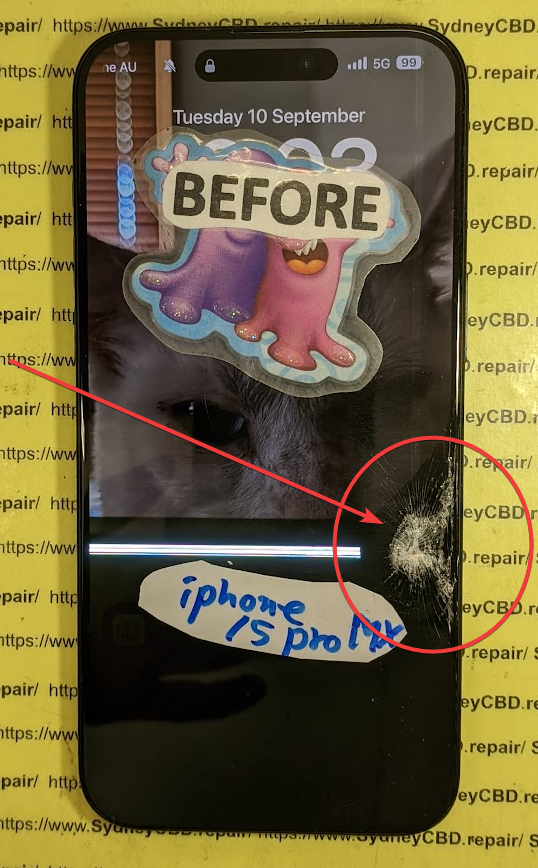
The video shows the step-by-step process of replacing a broken iPhone 15 Pro Max screen at the Sydney CBD Repair Centre. The phone in the video has a severely damaged and flickering screen. The repair involves disassembling the phone, replacing the damaged screen with a new one, and reassembling it.
Is the back cover also replaced in the video?
No, while the back cover of the iPhone 15 Pro Max in the video is damaged, the repair technicians choose to reuse it. Replacing the entire housing along with the back cover is considered a more complex process.
Why is replacing a screen considered complicated?
Replacing an iPhone 15 Pro Max screen is a delicate process requiring precision and specific tools. The phone uses tiny screws and fragile components, especially around the Face ID system. Attempting this repair without the right skills and tools can easily lead to further damage.
What precautions are taken regarding Face ID during the repair?
The video emphasizes the importance of carefully removing and transferring the Face ID components from the broken display to the new one. This ensures that the Face ID functionality works correctly after the repair.
Are DIY repairs recommended while iPhone 15 Pro Max Repair?
The video strongly advises against DIY repairs for the iPhone 15 Pro Max or any modern iPhones. The intricate design and small components make it easy to cause accidental damage.
What alternatives to DIY repairs are mentioned in iPhone 15 Pro Max?
The video recommends seeking professional repair services. If the phone is under AppleCare, contacting Apple is advised. Otherwise, the video recommends trusted repair service centers like the Sydney CBD Repair Centre.
Does the Sydney CBD Repair Centre offer services beyond screen replacements?
Yes, the repair center offers a range of services for iPhones and other smartphones, including diagnostics. They handle various repairs, not just screen replacements.
What are the customer service options available at the repair center?
The Sydney CBD Repair Centre offers both in-person repair services at their shop and mail-in repair services for customers outside Sydney or Australia. They also encourage potential customers to contact them for price quotes and inquiries.
What are the challenges and considerations associated with replacing the display on a modern iPhone?
Challenges and Considerations When Replacing an iPhone Display – iPhone 15 Pro Max
Replacing the display on a modern iPhone, like the iPhone 15 Pro Max shown in source, presents several challenges:
Fragility and Complexity: Modern iPhones have numerous delicate components and intricate connections. The process involves removing tiny screws, prying open glued components, and detaching delicate connectors, all of which can easily be damaged without proper tools and expertise.
Specialized Tools and Skills: Replacing an iPhone display requires specialized tools, such as pentalobe screwdrivers, tweezers, and advanced holding tools, to safely disassemble and reassemble the device. Additionally, successfully completing the repair requires a high level of skill and precision to avoid damaging components or losing screws.
Error Messages and Functionality Issues: Replacing the display incorrectly or using third-party components can lead to error messages and functionality issues with features like Face ID. Transferring specific parts from the old display to the new one is crucial to prevent these problems.
Cost: Repairing a modern iPhone at an Apple store or authorized repair center can be expensive. While third-party repair shops may offer lower prices, ensuring they use quality parts and have experienced technicians is essential to avoid further complications.
Considerations before replacing an iPhone display:
DIY Risks: Attempting a DIY repair without proper knowledge, tools, and experience can result in further damage and void any existing warranty. The source strongly advises against DIY repairs for this reason.
AppleCare Coverage: Check if the iPhone is still covered under AppleCare or other insurance policies, as this might cover the repair cost. However, even with AppleCare, repairs outside authorized service providers might void the warranty.
Repair Options: Explore different repair options, including Apple, authorized service providers, and reputable third-party repair shops, comparing prices, warranties, and customer reviews to make an informed decision.
Data Backup: Before handing over the iPhone for repair, back up all data to prevent potential data loss during the repair process.
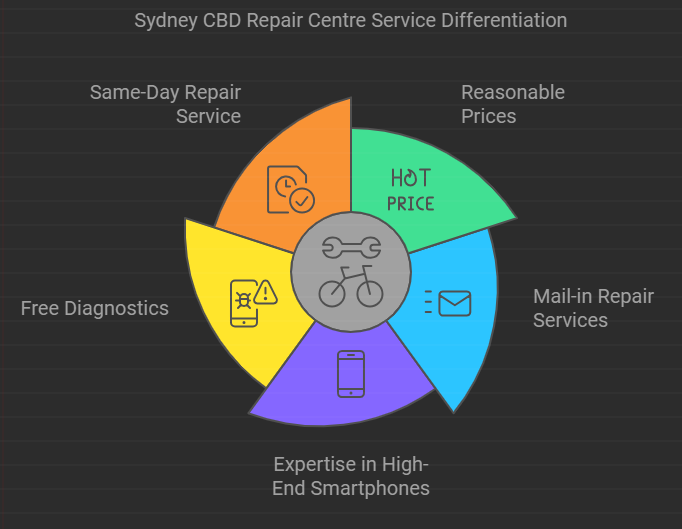
How does Sydney CBD Repair Center differentiate its services from other repair centers?
Sydney CBD Repair Center differentiates its services from other repair centers by offering:
Reasonable prices, especially compared to the high prices quoted by other repair centers.
Mail-in repair services for customers outside of Australia or Sydney.
Expertise in repairing higher-end smartphones, such as Asus ROG phones.
Free diagnostics to determine what needs to be fixed on a phone.
Same-day repair service.
The staff at Sydney CBD Repair Center are highly skilled and experienced in smartphone repair. For example, the video shows David, a technician at the center, skillfully replacing the screen on an iPhone 15 Pro Max. He uses specialized tools and techniques, such as using IPA to soften adhesive and tweezers to handle tiny screws. The center also emphasizes the importance of using the correct parts and procedures to avoid error messages after the repair.
What are the common causes of iPhone screen damage, and what precautions can users take to prevent it?
Here are some common causes of iPhone screen damage and precautions users can take to prevent it:
Dropping the phone is a very common cause of iPhone screen damage. To prevent this type of damage, users can:
Use a protective case.
Use a screen protector.
Be careful when handling their phones, especially in situations where the phone is more likely to be dropped, such as while walking or taking pictures.
Sitting on the phone can also damage the screen. To prevent this:
Users should avoid keeping their phones in their back pockets.
Users should be mindful of where they place their phones when sitting down.
Placing the phone face down on rough or dirty surfaces can scratch the screen. To avoid this, users can:
Use a screen protector.
Be careful about the surfaces on which they place their phones.
Exposing the phone to extreme temperatures can also damage the screen. To prevent this, users should avoid:
Leaving their phones in direct sunlight for extended periods of time.
Exposing their phones to extremely cold temperatures.
What specific steps are involved in replacing the display on an iPhone 15 Pro Max, as outlined in the video?
iPhone 15 Pro Max Screen Replacement Steps:
The video from Sydney CBD Repair Center outlines the following steps involved in replacing the display on an iPhone 15 Pro Max:
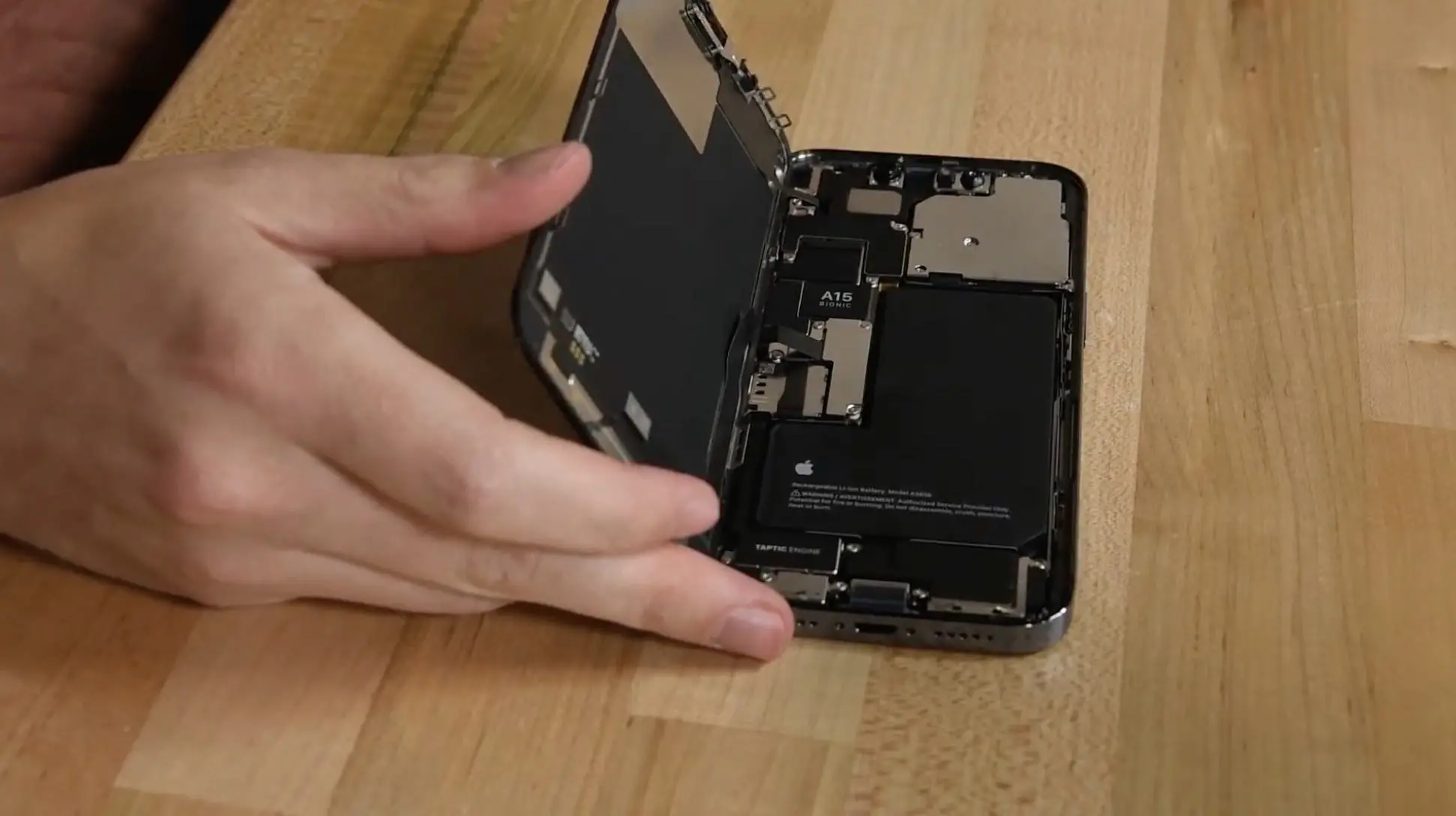
Remove the two pentalobe screws located on either side of the Type-C charging port.
Apply IPA (Isopropyl Alcohol) to the edges of the display to soften the adhesive holding it in place.
Carefully pry open the display assembly from the phone’s body. The source mentions that this step is “sticky” and “quite challenging.” They use a tool to lift the display on one side to a 90-degree angle.
Remove the screws securing the metal plate covering the display connectors.
Disconnect the battery connector from the logic board.
Disconnect the remaining display connectors from the logic board.
** Carefully remove the Face ID components** from the old display assembly. These need to be transferred to the new display to avoid functionality issues. The source highlights that this step is intricate and requires patience.
Install the Face ID components onto the new display assembly.
Place the new display assembly onto the phone’s body.
Reattach the metal plate over the display connectors and secure it with screws. The source emphasizes the small size of these screws, advising against DIY repairs for this reason.
Reconnect the battery connector.
Test the new display to ensure it functions correctly.
Reassemble the phone by closing the display and reinstalling the two pentalobe screws next to the charging port.
Important Considerations:
The source repeatedly emphasizes the complexity of this process, stating that it’s “quite a bit complicated” and requires a high degree of precision.
They strongly advise against attempting this repair without the “proper screwdrivers and the proper skills.”
The video showcases a skilled technician named David performing the repair, highlighting the expertise required for such a procedure.
OPEN 6 DAYS : Weekdays: 10am – 6pm, Saturday: 10am – 2pm
What is the advantage of using Sydney CBD Repair Centre over other repair centers for iPhone 15 Pro Max?
Advantages of Sydney CBD Repair Center
While the source, which is a promotional video from Sydney CBD Repair Center, doesn’t directly compare its services to other specific repair centers, it highlights several advantages that differentiate it from competitors:
Competitive Pricing: The video emphasizes that Sydney CBD Repair Center offers “reasonable prices” for its services, particularly for iPhone screen replacements. They suggest that customers often receive “very high prices” from other repair centers for similar repairs.
Expertise and Quality: The video showcases a skilled technician named “David” performing an iPhone 15 Pro Max screen replacement with precision and care, highlighting their technical proficiency. The video emphasizes the importance of using “proper screwdrivers” and having the “proper skills” to avoid damage during repairs. Additionally, they stress the use of correct parts and procedures, particularly when transferring Face ID components, to prevent errors after repair.
Speed and Convenience: Sydney CBD Repair Center offers same-day repair service, getting customers’ devices back to them quickly. They also provide a mail-in repair service for customers outside Sydney or Australia, expanding their reach and convenience.
Transparency and Customer Service: The video offers a detailed look at their repair process, showing the steps involved in an iPhone 15 Pro Max screen replacement. This transparency can build customer trust. Additionally, they mention having “good reviews on Google,” encouraging potential customers to check out their reputation. They also offer free diagnostics to assess phone issues and provide accurate repair quotes.
Overall, while not explicitly comparing themselves, the source emphasizes affordability, expertise, convenience, and transparency as key advantages of using Sydney CBD Repair Center for smartphone repairs.
OPEN 6 DAYS : Weekdays: 10am – 6pm, Saturday: 10am – 2pm
YEY, STILL FIXABLE! iPhone 15 Pro Max Screen Replacement | Sydney CBD Repair Centre
We do #iPhone15ProMax #ScreenReplacement in #SydneyCBDRepairCentre!
#AppleiPhone #Apple
We offer professional, guaranteed, and same day screen replacement on iPhone 15 Pro Max. You can visit our shop or you can send us your smartphone for repair if you’re outside Sydney, Australia.
Here’s our complete address.
Suite 201, Level 2, 661 George St, Haymarket, NSW 2000
Cracked screen on your brand-new iPhone 15 Pro Max? Don’t worry—it’s still fixable! In this video, the expert technicians at Sydney CBD Repair Centre tackle a complete screen replacement on Apple’s latest flagship device, the iPhone 15 Pro Max, restoring it to like-new condition.
With its stunning display and advanced features, the iPhone 15 Pro Max is a premium device that delivers incredible performance. But even the toughest screens can shatter when dropped, leaving you with a phone that’s barely usable. In this video, we walk you through the entire process of replacing the cracked screen, from carefully disassembling the phone to installing a brand-new display.
Our technicians use precision tools and techniques to ensure the new screen is perfectly aligned, preserving the smooth responsiveness and vibrant colors that make the iPhone 15 Pro Max display so impressive. We’ll also show you how to handle the phone’s advanced components, like Face ID sensors and the TrueDepth camera, ensuring that everything works seamlessly after the repair.
Whether you’re dealing with a broken iPhone 15 Pro Max or simply curious about how repairs are done on Apple’s latest devices, this video provides an in-depth look at the process. We’ll share expert tips on preventing future screen damage, the importance of using high-quality replacement parts, and how to keep your phone in top shape post-repair.
Don’t forget to like the video, share it with anyone who might need a screen replacement, and subscribe to our channel for more expert repair tutorials and tech tips. We’re happy to report that this iPhone 15 Pro Max was still fixable—and it’s back to looking and working like new!
via YouTube https://www.youtube.com/watch?v=q-ZuLg6au6M
Based on the meeting notes, there are no specific action items or tasks that can be distilled for assignment to a specific person. The content seems to be promotional material for a repair center offering screen replacement services for the iPhone 15 Pro Max. Therefore, no action items are generated from this content. If you have any other specific queries or tasks to be distilled, please provide the relevant information.
In this modern age of technology, mobile phones are now an integral part of our everyday lives. With the amount of time we spend on them, it is only natural that at some point, our phones may need to be repaired. When faced with a phone repair issue, many people have to decide whether to opt for a DIY repair or take it to a professional service in Sydney CBD. While both options have their advantages and disadvantages, it’s important to weigh up each one before making your decision.
One of the pros of DIY phone repairs is cost savings.
Repairing your own phone can be much cheaper than taking it to a professional service in Sydney CBD due to the fact that you don’t have to pay for labour or parts. This can be particularly beneficial if you’re tight on money or don’t want to invest too much into the repair. Additionally, you may not need any special tools in order to complete the repair yourself so this could also help with cost savings as well.
Downsides of DIY Repairs
On the other hand, one major downside of DIY repairs is that they can often be unreliable and difficult especially if you’re not experienced when it comes to dealing with phone issues. Without proper knowledge and equipment, you could end up making more problems than fixing them which will inevitably cost more money and time in the long run. Additionally, certain repairs may require specialised tools which can be hard or expensive for you acquire as an individual consumer so this would also add difficulty and expense into completing the repair yourself rather than taking it into a professional service in Sydney CBD who already has all these resources available at their disposal.
What’s with Pro Repair?
Taking your device into a professional service in Sydney CBD has its own set of advantages and disadvantages as well but overall this option tends to be more reliable than attempting DIY repairs yourself due to their experience and resources available at their disposal such as specialist tools and parts which are necessary for certain types of repairs. Furthermore, most professionals offer warranties on their work so if something goes wrong during or after the process they are obliged by law (depending on location)to fix any issues free of charge within a certain timeframe which provides consumers with some peace of mind knowing that their device is being fixed correctly by an experienced technician who knows exactly what they are doing without fear that something could go wrong down the line like when attempting DIY repairs yourself without proper knowledge or experience about how modern mobile devices work internally .
Conclusion
Overall, deciding between opting for DIY phone repairs versus taking it into a professional service in Sydney CBD ultimately comes down personal preference but before making your decision there are several factors that should be considered first such as cost savings versus reliability/warranty ,experience with repairing phones , availability/costs associated with tools/parts needed etc . Doing some research ahead such as reading customer reviews online about different services/technicians etc can help make informed decisions based on real world experiences from people who have gone through similar situations before so hopefully this article has been helpful when considering what option would suit your needs best when looking at repairing your mobile device !