We have obtained some information about Samsung’s next flagship smartphone. The company has started Galaxy S9 firmware development. The version numbers confirm that there will be two models, which means that we can expect a Galaxy S9 and Galaxy S9+ to be released in 2018.
Galaxy S9 firmware development begins
Two separate Galaxy S9 firmware are being developed, G960FXXU0AQI5 and G965FXXU0AQI5. The model numbers of Samsung’s next flagship smartphones have therefore been confirmed as well. The Galaxy S9 will be SM-G960 while the Galaxy S9+ will be SM-G965.
That’s not surprising, given that the Galaxy S8 and Galaxy S8+ have model numbers SM-G950 and SM-G955 respectively. It’s interesting to note that the Galaxy S9 firmware development has started two weeks earlier than it did for the Galaxy S8 last year.
Galaxy S9 expected release date
As you can probably imagine, there will soon be a lot of rumors about the Galaxy S9 being launched ahead of schedule. While that might be the impression you get from the early Galaxy S9 firmware development, it’s just as likely that the Galaxy S9 release will take place around the same time as the Galaxy S8.
Samsung unveiled the Galaxy S8 at a dedicated event in New York City on March 29 this year. It was released in a handful of markets across the globe on April 21. Samsung might stick with the same timeframe for the Galaxy S9 release next year.
As we continue to keep an eye on the Galaxy S9 firmware development, expect more information about Samsung’s next flagship smartphones to surface in the coming weeks.
The two flagships have remained stuck to Android 7.0 Nougat for a while now, which also brought a newer version of TouchWiz called Grace UX on board.
But the Samsung Galaxy S8/S8+ introduced the new Samsung Experience 8.1 which received an update to version number 8.5 when the Galaxy Note 8 made a debut.
But while other Samsung smartphones like the Galaxy J5 or the 2017 Galaxy A series received Samsung Galaxy 8.1, year’s flagships continue to run the same UI. But according to a Samsung Members community admin, the Galaxy S7 and Galaxy S7 edge will get Samsung Experience 8.1 as soon as the next update – which will probably be Android 8.0 Oreo – starts rolling out. No exact timeline for the release was provided.
Given that the Samsung Experience 8.5 update is more cosmetic in nature and not feature-oriented, it would make little sense for the Korean tech giant to invest time and resources to deliver only a UX-focused update. The Galaxy S7 and Galaxy S7 edge haven’t been updated that many times anyway and with Android 8.0 Oreo out, it’s quite unlikely the phones will get the bump to Android 7.1 or Android 7.1.2 now.
In this post, we’ll talk about what makes the Galaxy Note 8 stand out in an increasingly crowded premium Android smartphone market, such as its dual camera system, insanely gorgeous hardware design, specs that are out of this world, and how the Grace UX isn’t nearly as bad as Samsung haters say it is.
Here are five reasons we think the Galaxy Note 8 is a good buy.
1. It Has Everything
If you judge smartphones by the specs they have, then the Galaxy Note 8 should already be at the top of your list. Here, I’ll name a few, just to get the ball rolling. The Note 8 has a 6.3″ Infinity QHD+ Super AMOLED display, wireless charging, NFC/MST, fingerprint reader, facial recognition, iris scanner, expandable storage, Snapdragon 835 processor, 6GB RAM, dual rear-facing cameras with OIS, Bluetooth 5.0, S Pen, IP68 water and dust resistance, and the list goes on.
Seriously, if you were designing your own dream phone with realistic expectations for under $1,000, you’d probably create the Galaxy Note 8. Take all of these specs and toss them into a gorgeous, all glass and metal body and you have a legit flagship smartphone that can go up against anything else on the market.
Considering the Galaxy Note 7 was taken off the market prematurely due to the recall, I don’t think ex-owners and Samsung fans in general could’ve hoped for anything better this time around. In my review, I called this the best Note device Samsung has produced to date, and I still stand by those words 100%.
2. Dual Camera System + OIS is Beast
Smartphone cameras are all pretty stellar these days, but Samsung upped the bar this year, providing dual rear shooters, both with optical image stabilization (OIS). For Android, this was a first, and from my findings with this device during my review period, it killed.
This phone is exceptional in low lighting, when other phones would blow an image’s lighting to poo due to sensitive sensors. Like past years, the cameras handle assorted colors well, too, such as reds, purples, and greens. This is handy when you’re shooting landscapes or getting in close for a macro of a flower. With the secondary sensor, which is telephoto, you can zoom in on objects without losing a ton of detail, which can be helpful for wildlife shots, such as that cute squirrel that keeps terrorizing your dogs in the backyard.
Sample Shots
3. Grace UX, Give It a Try
Over the years of blogging about Android, I’ve heard countless people say, “TouchWiz sucks” or something along those lines. My friends, believe me when I tell you, Samsung’s custom skin that runs atop Android is not like it was back then. It’s been tweaked and refined heavily, almost to the point where I don’t have any real issues with it. Do I prefer stock Android still? Yes, but that’s because I’m a very minimal kinda guy and don’t need half of the features Samsung offers inside this skin, but others may benefit greatly from their inclusion.
My point is, don’t let this phone’s skin be the thing that is deterring you. It shouldn’t be. While at first you may feel overwhelmed by all of the different settings you can play with and enable, just know that after a few days, you’ll know everything that’s in there and be a real Note master. And luckily for you, we make videos specifically to help you discover all of the good stuff.
4. Hardware Design
If you checked out Kellen’s video review, I don’t share his exact sentiments regarding the size and feel of this phone. Yes, if you’re coming from something smaller, the Note 8’s size can take a bit of getting used to, but once you are used to it, it’s kinda hard to go back to anything smaller. You have this massive display and rounded edges for easy holding/gripping, with a body covered in soft glass. I think it’s a real delight to hold, use, and look at throughout the day.
Is this phone an accident prone-person’s worst nightmare? You better believe it, but what glass-encased phone isn’t going to shatter upon dropping it? It’s just the way things are, and you know, they do make cases to help protect your device. At the end of the day, I’ll gladly use a fragile phone that looks amazing over an ugly device any day of the week, because considering how often I’m looking at it and holding it, I want it to look good. I want others to ask me what it is and get a little jelly that all they have is an old busted iPhone. That’s fun for me and it’s the feeling I get when I pull out the Note 8 in my group of iPhone-loving friends.
Even if you don’t want something this big, you can get basically the same thing in a smaller Galaxy S8 package, which is also a great phone that we’ve covered countless times.
5. Future-Proof
Remember some of those specs I talked about earlier? Like facial recognition, iris scanning, NFC/MST, and Bluetooth 5.0? Well, because this phone comes equipped with all of that, you can rest assured that your phone will go on supporting the latest trends in mobile technology for a solid period of time. Because Apple just made facial recognition “cool” with the iPhone X, you can sleep comfortably knowing that your phone is capable of the exact same thing, but even goes a step further — iris scanning. Once you see your favorite banking apps support iris scanners, you’ll know that the Galaxy Note 8 was a solid investment.
Another great piece of tech in this device that gets overlooked often is the inclusion of MST (magnetic secure transmission). Mobile payments are all the rage right now, but every phone that isn’t a Samsung flagship lacks MST and access to Samsung Pay. With this on your phone, not only can you utilize an NFC reader, but virtually all credit/debit card readers in America with this touch-less technology. It makes your payment possibilities much more consistent and adds yet another reason to leave your plastic at home when you hit the town.
There have been a few rumors and leaks in the last couple of months claiming to offer details on Samsung’s 2018 iteration of the Galaxy A series. While we cannot confirm whether or not these leaks are accurate, we have managed to get the names of the countries where the Galaxy A5 (2018) and Galaxy A7 (2018) may be made available. This list is by no means final, and it’s possible these phones might not launch in all the listed countries and even launch in those not mentioned here. As for the Galaxy A3 (2018), we do not have any information on that device, but we’ll let you know once we do.
Find the list of countries, along with their region codes, down below.
Galaxy A5 (2018) :
AMO – Spain (Orange)
ATO – Open Austria
AUT – Switzerland
BTU – United Kingdom
CAC – Uzbekistan
CAM – Cambodia
CPW – United Kingdom (Carphone Warehouse)
DBT – Germany
ETL – Czech Republic
EUR – Greece
FTM – France (Orange)
GLB – Philippines (Globe)
ITV – Italy
LUX – Luxembourg
MM1 – Singapore
MYM – Thailand (MPT, Mectel)
NEE – Nordic countries
O2U – United Kingdom (O2)
ORO – Romania (Orange)
ORS – Slovakia
ORX – Slovakia
PHE – Spain
PHN – Netherlands
ROM – Romania
SEB – Baltic
SEE – South East Europe
SEK – Ukraine (Kyivstar)
SER – Russia
SIN – Singapore (SingTel)
SKZ – Kazakhstan
SMA – Philippines (Smart)
STH – Singapore (StarHub)
TEB – Bosnia and Herzegovina
THL – Thailand
TPH – Portugal (TPH)
XEC – Spain (Movistar)
XEF – France
XEH – Hungary
XEO – Poland
XEU – United Kingdom / Ireland
XME – Malaysia
XSP – Singapore
XTC – Philippines (Open Line)
XXV – Vietnam
Galaxy A7 (2018) :
ARO – Argentina
BNG – Bangladesh
CAC – Uzbekistan
CHO – Chile
COO – Colombia
CPW – United Kingdom (Carphone Warehouse)
DBT – Germany
EON – Trinidad and Tobago
INS – India
NPL – Nepal
SEK – Ukraine (Kyivstar)
SER – Russia
SKZ – Kazakhstan
SLK – Sri Lanka
TPA – Panama
TTT – Trinidad and Tobago
XEO – Poland
ZTO – Brazil
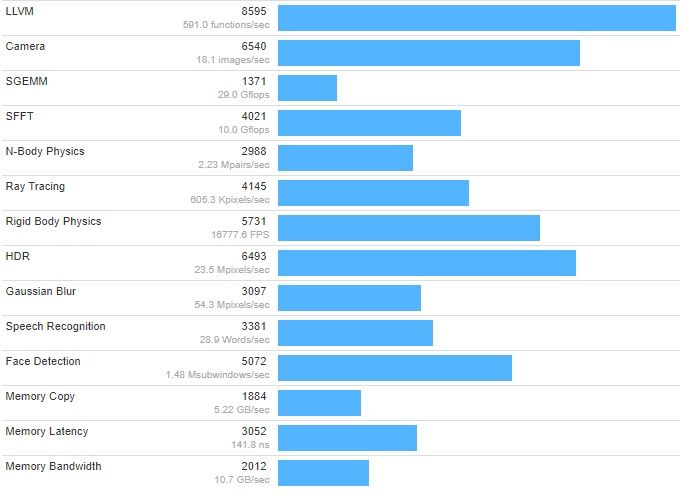
We’ll soon start hearing a lot of rumors and reports about the Galaxy A (2018) series as Samsung is due to launch it early next year. The first Galaxy A5 (2018) specifications have now surfaced online. A benchmark listing for the SM-A530F has been spotted which gives us an idea of what the Galaxy A5 (2018) specifications might be.
The Geekbench listing for the Galaxy A5 (2018) reveals that it’s going to be powered by Samsung’s new Exynos 7885 processor. It’s likely the 10nm version of the Exynos 7880 that can be found on the Galaxy A5 (2017).
According to these Galaxy A5 (2018) specifications, the octa-core Exynos 7885 has a clock speed of 1.59GHz. It’s paired with 4GB of RAM. That’s going to be a welcome improvement over the Galaxy A5 (2017)’s 3GB of RAM.
According to the listing, the handset is powered by Android 7.1.1. Whether or not Samsung launches it with Android 8.0 Oreo when the time comes remains to be seen. No further details have surfaced online but it’s a good bet to assume that the Galaxy A (2018) series will feature fingerprint scanners and water resistance.
Rumors suggest that the Infinity Display will be present as well. It was rumored yesterday that the physical Bixby button might also make its way to the Galaxy A (2018) series. Samsung is expected to unveil the new Galaxy A (2018) early next year. We will likely see more information about this series surface in the weeks to come.
A new Samsung device has just received certification from the National Radio Agency based in Samsung’s hometown of South Korea.
The device has the model number SM-G888N0 and is said to be known as the Galaxy X, which is set to be the company’s first foldable phone that has been heavily rumored Samsung has been working on. Now the device has received formal certification, it would suggest that the Samsung Galaxy X could be launching very soon, albeit in South Korea to begin with.
The Wi-Fi alliance lists the device as Bluetooth 4.2 and running Android 6.0.1 Marshmallow which would be slightly disappointing. I suspect this may be outdated given the profile of the Galaxy X in the lineup for Samsung and would expect similar specs to that of the rest of the Galaxy line.
The foldable smartphone is said to be being developed under codename Project Valley and points to a late 2017 or early 2018 release.
A device that folds up is an interesting concept and one that if executed correctly, would open the door for Samsung to further increase the display size on a smartphone without increasing its physical footprint.
Foldable phones were all the rage pre-smartphone but could Samsung be using the Galaxy X to reignite that trend or has it finally figured out foldable displays?
If the rumors are true we won’t have long to find out as we could see something launched in South Korea at the tail end of the year.
If you’re considering making the switch from an iPhone to the upcoming Samsung Galaxy Note 8, you should know that Samsung makes this process as painless as possible with their Smart Switch app. Even if you’re not switching away from iPhone, Samsung has you covered. They’ve also highlighted some interesting things you can do with your new Galaxy Note 8 including making GIFs, multi-tasking, using the low light cameras and more. Check it out.
How to transfer everything from an Android phone
Connect your phones with the cable included with your Galaxy Note 8.
Select Smart Switch in the menu that pops up.
Select which phone sends and receives the data.
Press Allow on your old device.
Choose what files you are keeping and then press Transfer.
How to transfer everything from an iPhone
Use the iPhone cable and the adapter included with the Galaxy Note 8 to connect your phones.
Select Smart Switch in the menu that pops up.
Tap Trust on your old phone.
Pick the files you want to keep and press Transfer.
How to make GIFs on your Galaxy Note 8
Tap the floating Air Command symbol on your chosen video.
Press Smart Select.
Press Animation.
Adjust where you want to capture with the S-Pen.
Hit Record then Stop when the time is right.
Then hit share.
How to use Live Focus on the Galaxy Note 8 camera
Quick launch the rear camera by double tapping the power button.
Select Live Focus.
Frame your subject and adjust your focus level.
Take the picture and then tap on it in the bottom right.
You can adjust the focus level in the background and even add stickers.
Save and share.
How to use the S-Pen with the Galaxy Note 8
Curious about the S-Pen that’s included with the new Galaxy Note 8? This video is a short primer on all the things you can do with your S-Pen through the help of Air Command, which is the interface that launches automatically when you remove the S-Pen from the phone. Tired of having Air Command pop up automatically? There’s a setting that allows you to change that, too.
How to multi-task with the Galaxy Note 8
The 2:1 screen ratio of the Galaxy Note 8 makes it perfect for multi-tasking. Here’s how.
Tap the Recents button.
Press and hold the app you want.
Drag it to the top of your screen.
Then open the other app you want.
You can even preset two apps to launch together using your Edge panel. Here’s how.
Swipe left on the Apps Edge tab.
Tap the + button to create a new Apps Pair.
Select two apps you use together and press Done.
How to take good low light pictures with the Galaxy Note 8
Quick launch your rear camera by double tapping power button.
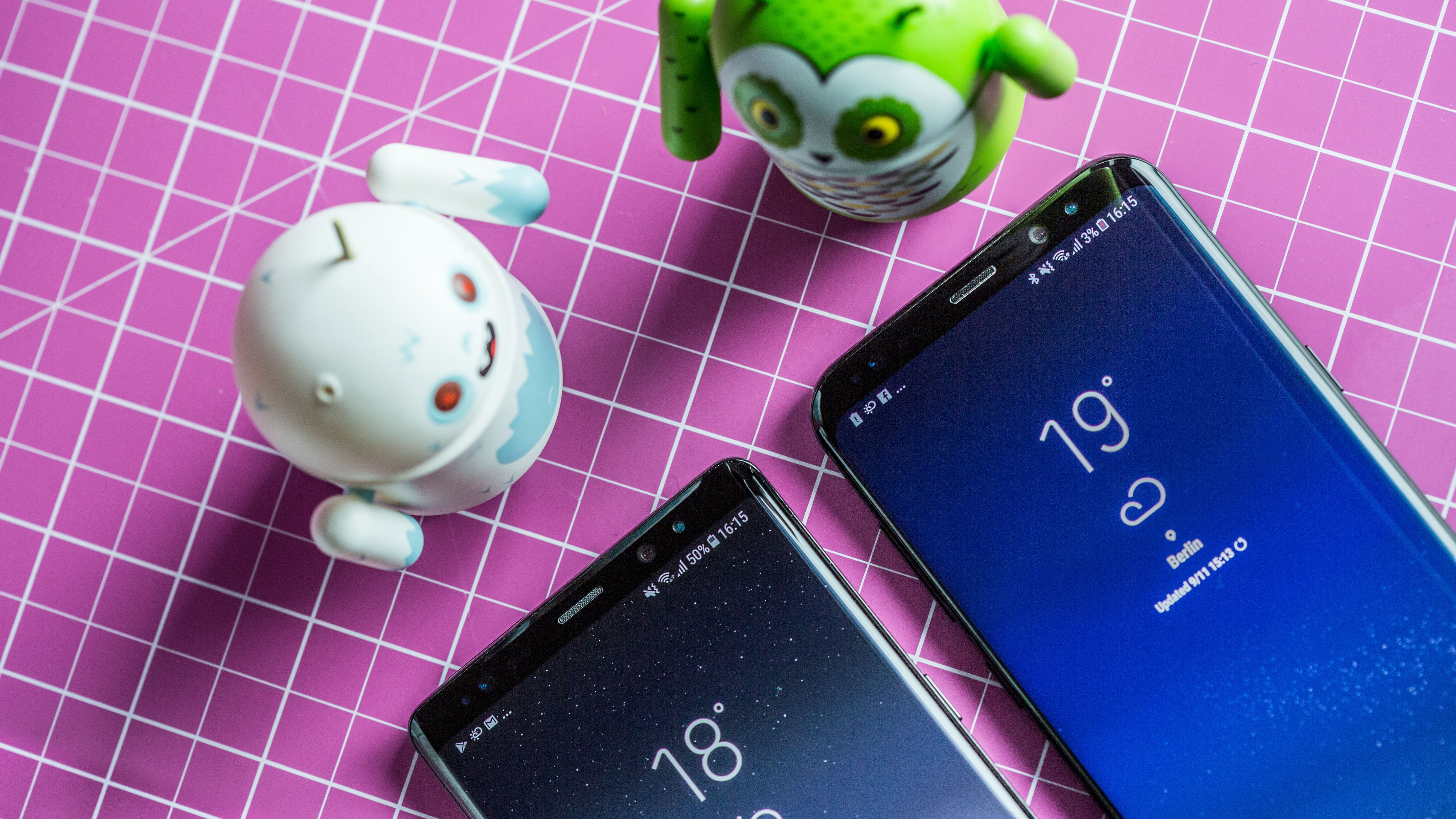
At first glance, the Samsung Galaxy Note 8 and Galaxy S8+ look like twins. But there are many differences between the smartphones which aren’t just limited to looks. The differences are also under the hood, which is where both the Note 8 and the S8+ are ahead of the pack.
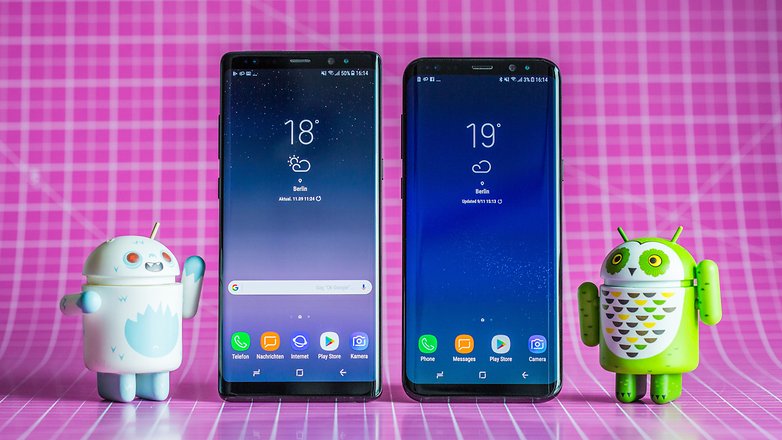
Anyone who does a side-by-side comparison of Samsung’s largest smartphones of the moment doesn’t need a magnifying glass to find the design differences; just having a second glance is enough. The Galaxy Note 8 is a little bit thicker than the Galaxy S8+. It’s also a bit more angular at the corners, but the build quality of both devices is flawless.
Compared to the S8+ (right), the Note 8 is hardly bigger but distinctively edgier.
The Note 8’s display is merely 0.1 inches bigger, and we estimate that the bezels are just as slim. Despite the curved glass surfaces, the Galaxy Note 8 is more massive and also heavier than the S8+. The controls, including the standalone Bixby button, are located in the same places.
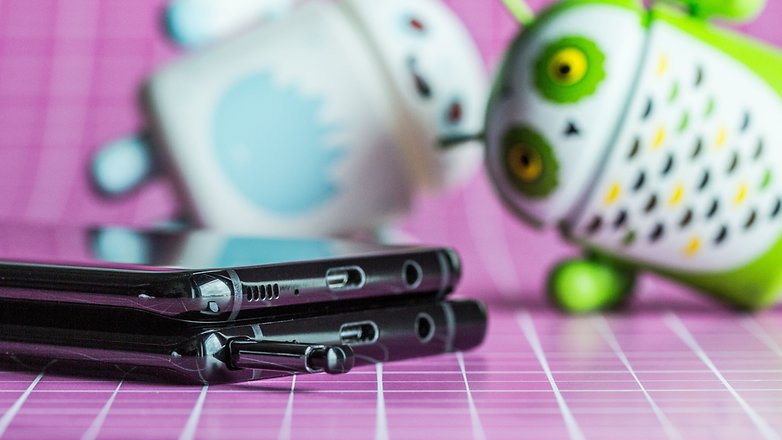
The button arrangement is identical.
The Galaxy Note 8’s most important differentiating factor is the S-Pen. This digital input stylus, which can be pulled from below the housing as usual, divides Samsung fans. For Note aficionados, the S-Pen is what makes this device truly interesting and thus, without equal. But, the pen critics do not see the need for the S-Pen and emphasize other things instead.
Only the Note 8 (bottom) sports the S-Pen.
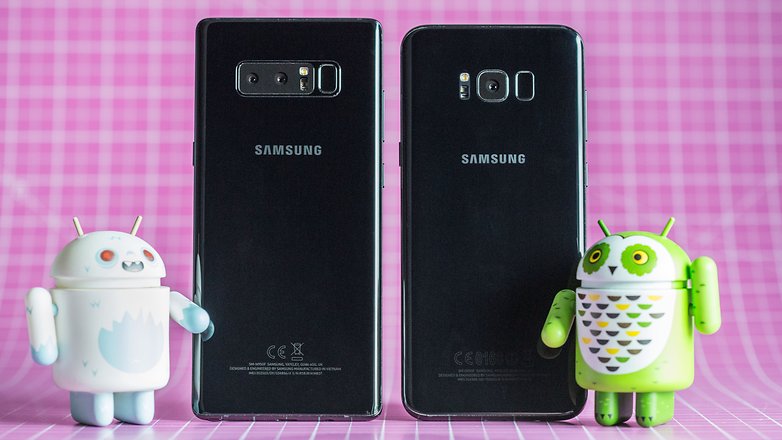
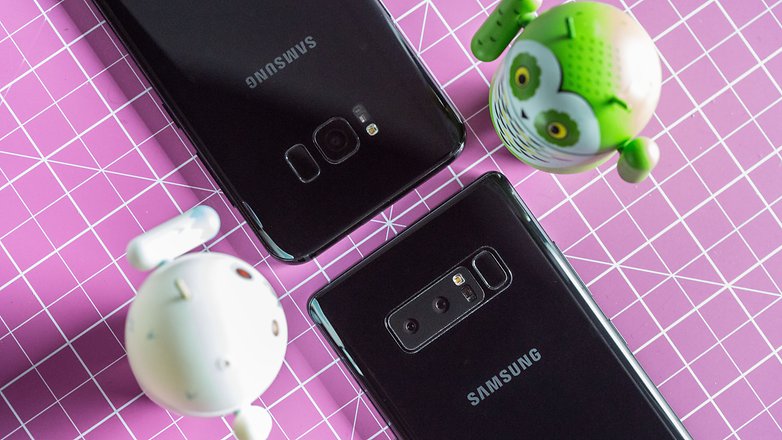
There are large differences between the cameras. The Galaxy Note 8 is the Korean manufacturer’s first smartphone that is equipped with a dual camera, while the Galaxy S8+ takes the conservative route and has a single 12 MP lens on the back. Although the camera still has to prove its worth in our review, it already offers more opportunities for creativity. Both are evenly matched when it comes to the front camera.
Galaxy S8+ has better battery life than the Note 8
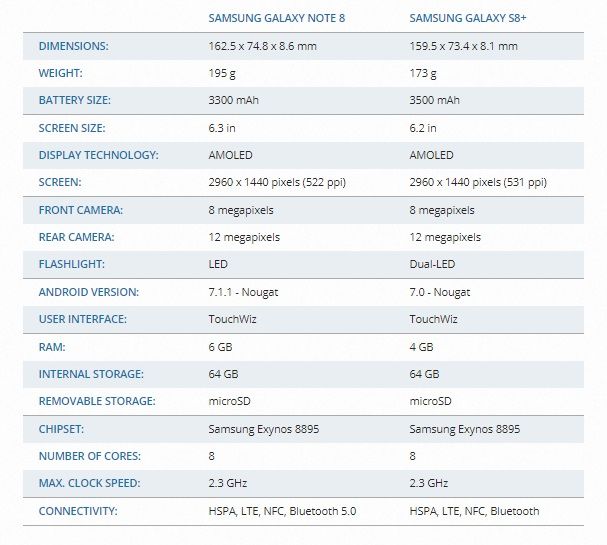
A look at the technical specs sheet reveals the following: The Galaxy S8+ has the larger battery of the two Samsung smartphones, and that’s in spite of the smaller size and thinner body. To make up for it, the Note 8 offers the S-Pen, which takes up space inside the body as well. Furthermore, the Galaxy Note 7 battery incidents caused Samsung to stay on the safe side and, for better or worse, not go for maximum capacity. As a result, the Galaxy S8+ lasts a bit longer on one charge, even if the differences are minor in practice. Both Galaxy smartphones support quick charging and wireless charging.
Samsung Galaxy Note 8 vs. Samsung Galaxy S8+ technical specifications
Performance wise, both smartphones are very close, which is no wonder since they are equipped with the same processor. RAM is the only thing where the Note 8 has a bit more to offer, which is hardly noticeable in practice. The Snapdragon 835 (or the Samsung Exynos 8895 outside of the US), powers both XXL smartphones and you won’t have to wait long for apps to load or deal with a laggy browser with either phone.
The Note 8 is the first Samsung with a dual camera.
Note 8 buyers pay $270 more for an $-Pen
There is quite a price difference between both smartphones, with the Galaxy Note 8 starting at a full $929, which is $80 more than what the Galaxy S8+ cost when it was released on the market ($850). Now the price for the latter has dropped further, and you can currently get it for as little as $659, which is an enormous $270 difference that will make some Note fans think twice.
Samsung took a huge gamble on the Galaxy S8 when it went all in on its virtual assistant and included a dedicated button to launch Bixby.
Unfortunately for consumers, Bixby wasn’t ready. That, unfortunately, left the Bixby button as merely a quick launch for Bixby Home, which housed some basic information from your calendar and news feed. There were some workarounds but Samsung kept responding to break the method used to remap the button.
It seems that Samsung may now finally be listening as a new update finally allows the Bixby button to be officially disabled. Unfortunately, it doesn’t go any further than that so you’re left with an even more useless button. Hopefully, Samsung takes this one step further and allow the button to be completely remapped to launch an app of the users choice like Google Assistant.
SamMobile reports the update isn’t appearing for everyone just yet so keep checking in Settings to see when it finally trickles down to your device.
The dedicated Bixby button on the Galaxy S8 and Galaxy S8+ didn’t really serve any meaningful purpose until last month when Bixby Voice was rolled out globally. Before the global release of Bixby Voice, the dedicated button could only be used for Bixby Home.
Most users didn’t feel the need for Bixby Home to have a dedicated key. Third-party apps were developed that allowed them to remap the button to launch any app of their choice. Samsung was quick to clamp down on those apps for reasons that our editor in chief explained in great detail.
I bemoaned recently that the Bixby button was driving me nuts and many of our readers agreed with me. I don’t like how it gets in the way and that you can’t avoid accidental presses of the button. However, it’s time for us to rejoice.
Samsung is finally allowing us to disable the Bixby button, to an extent. The latest Bixby updates add a new toggle which lets you decide whether or not Bixby Home should be launched when the dedicated button is pressed. This can also be configured from the Bixby settings menu.
You’ll see this toggle at the very top of Bixby Home once you install the update. You can tap on the gear icon to hide the toggle should you so desire. It’s just a matter of tapping on a toggle now and that makes me happy.
To be clear, Bixby Home isn’t going anywhere. You can still access it by swiping left from the home screen. The Bixby button will also work for summoning Bixby Voice. Just press and hold like you already do.
Are you happy that Samsung is finally giving us this option? Share your thoughts with us in the comments below.
Update: The implementation appears to be random right now. Some of our devices have got this toggle after the update. Some haven’t. Perhaps it will take more time for this to be available on all Galaxy S8 and Galaxy Note 8 units.
This shouldn’t be too much of a surprise, but Samsung is working on an Android Oreo build for the Galaxy S8. Common sense, right? Manufacturers are pretty much always working on newer software for their flagship devices.
The big story here is that a Galaxy S8 running Android 8.0 has popped up on Geekbench, which means there’s definitely at least one, if not a few, of these devices at Samsung HQ stable enough to run benchmarks with new software. That’s good news for all of us waiting for an update.
Yep, definitely a Galaxy S8, definitely running Android 8.0. Performance doesn’t really seem drastically improved, but then again, it’s rare to see a massive difference just because of a newer version of software anymore.
While this doesn’t mean Samsung is pushing out an Oreo update right away, it does mean we can expect an update for their current round of flagship devices very soon. Fingers crossed the Galaxy S7 sees some love, too.
With the Galaxy S8 pushing the boundaries of the display by extending the bezels on the device it set the way for other manufactures to follow suit. Samsung followed with the Note 8 and even Apple got into the game with the iPhone X.
The subtle differences between the Samsung and Apple implementation of a bezel-less display saw Apple opt for a top notch to house the front facing camera and various sensors, while Samsung extended the top bezel the entire way across the device.
One concept that has surfaced suggests the Samsung may take a design cue from Apple when it comes to the Galaxy S9 and reduce the bezels of the device even further with the top cutout.
We’ve seen this design on the Essential Phone as well where the camera is cut out from an otherwise edge-to-edge display.
The latest Samsung Galaxy S9 concept comes from the YouTube channel DBS Designing that sees the top and bottom bezel almost completely eliminated.
At the top of the Galaxy S9 there’s a small cutout to house the camera, speaker, iris scanner, and other sensors. The iPhone X cutout is more pronounced than that of the Galaxy S9 concept but arguably the cutout on the iPhone is that size for a reason given the available technology it has to pack in that small space.
Other key points of the Galaxy S9 concept are the inclusion of the 3.5mm jack that the designer believes Samsung will retain. The concept also has dual front-facing cameras with a 18:9 aspect ratio Quad HD+ Infinity OLED display. The device is said to have 6GB of RAM, 128GB of internal storage and will be the first device to run the upcoming Snapdragon 845 SoC.
We’ve heard previously that Samsung may expedite the arrival of the Galaxy S9 to combat sales of the iPhone X that may see a January or February arrival, a few months before when it is actually expected.
While there’s no doubt Samsung will continue to push the boundaries of what is possible with display technology, it could be very possible Samsung reduce the bezels even further to mimic the design of the iPhone X. However, I think reducing the bezels to the amount shown in the concept simply isn’t possible with the available technology and the size of the components needed in that notch.