As part of its $100 million Racial Equity and Justice Initiative commitment, Apple is supporting the launch of the Propel Center (rendering above), an innovation hub for the entire HBCU community that will provide curriculum, internships, and mentorship opportunities.
Cupertino, California — Apple today announced a set of major new projects as part of its $100 million Racial Equity and Justice Initiative (REJI) to help dismantle systemic barriers to opportunity and combat injustices faced by communities of color. These forward-looking and comprehensive efforts include the Propel Center, a first-of-its-kind global innovation and learning hub for Historically Black Colleges and Universities (HBCUs); an Apple Developer Academy to support coding and tech education for students in Detroit; and venture capital funding for Black and Brown entrepreneurs. Together, Apple’s REJI commitments aim to expand opportunities for communities of color across the country and to help build the next generation of diverse leaders.
Commitments build on Apple’s $100 million pledge and include a first-of-its-kind education hub for HBCUs and an Apple Developer Academy in Detroit
“We are all accountable to the urgent work of building a more just, more equitable world — and these new projects send a clear signal of Apple’s enduring commitment,” said Tim Cook, Apple’s CEO. “We’re launching REJI’s latest initiatives with partners across a broad range of industries and backgrounds — from students to teachers, developers to entrepreneurs, and community organizers to justice advocates — working together to empower communities that have borne the brunt of racism and discrimination for far too long. We are honored to help bring this vision to bear, and to match our words and actions to the values of equity and inclusion we have always prized at Apple.”
Jared Bailey, a senior at Morehouse College, has integrated Apple’s coding and creativity curricula into his public health and community service work as part of the school’s partnership with Apple, a collaboration that is expanding further with the launch of the Propel Center.
Last June 2020, Apple announced REJI in the wake of protests around the world following the killings of Breonna Taylor, George Floyd, and countless others. The initiative builds on Apple’s work to advance racial equity in education, the economy, and the criminal justice system, and is led by Apple’s vice president of Environment, Policy and Social Initiatives, Lisa Jackson. REJI complements Apple’s internal efforts to improve diversity and inclusion at every level of the company.
“Every individual deserves equal access to opportunity regardless of skin color or zip code,” said Jackson. “For too long, communities of color have faced gross injustices and institutional barriers to their pursuit of the American dream, and we are proud to lend our voices and resources to build new engines of opportunity that empower, inspire, and create meaningful change.”
Apple’s Support for HBCUs Expands with the Propel Center
Apple is working with Southern Company and a range of community stakeholders to support the launch of the Propel Center, a first-of-its-kind innovation and learning hub for the HBCU community. Apple’s $25 million contribution will enable the Propel Center to support HBCU students and faculty through a robust virtual platform, a physical campus in the historic Atlanta University Center, as well as on-campus activations at partner institutions.
The center is designed to support the next generation of diverse leaders, providing innovative curricula, technology support, career opportunities, and fellowship programs. The Propel Center will offer a wide range of educational tracks, including AI and machine learning, agricultural technologies, social justice, entertainment arts, app development, augmented reality, design and creative arts, career preparation, and entrepreneurship. Experts from Apple will help develop curricula and provide ongoing mentorship and learning support, along with offering internship opportunities.
The Propel Center campus (rendering above) — equipped with state-of-the-art lecture halls, learning labs, and on-site living for a scholars-in-residence program — will be located in the historic Atlanta University Center district.
The Propel Center was imagined and designed by Ed Farm, a groundbreaking organization that works to promote innovation and educational equity. The initiative builds upon Apple’s partnership with Ed Farm and the company’s work with three dozen HBCUs, bringing coding, creativity, and career opportunities to campuses and communities across the US.
“We’re thrilled to be partnering with Apple on this extraordinary project,” said Anthony Oni, Ed Farm’s founder and chairman of the board, and a vice president at Southern Company. “The Propel Center will help cultivate leadership and drive innovation in tech and beyond, acting as a springboard for change in communities across America.”
As part of Apple’s ongoing partnerships with HBCUs, the company is also establishing two new grants to support HBCU engineering programs. Apple’s new Innovation Grants will help HBCU Colleges of Engineering develop their silicon and hardware engineering curriculum in partnership with Apple’s experts. The new Faculty Fellows Program will support HBCU educators pursuing R&D with mentorship programs, curriculum development assistance, and funds to equip their lab spaces.
Building on its longstanding scholarship program with the Thurgood Marshall College Fund, Apple is also now offering scholarships to 100 new Apple Scholars from underrepresented communities. In addition to financial support, the Apple Scholars program includes mentorship and career development experience at Apple.
MaKisha Funderburke will collaborate with Apple and Clark Atlanta University, where she is a professor, to create the curriculum framework for the Propel Arts program, one of the many educational tracks that will be available to all HBCU students and faculty through the Propel Center.
Hailee Bryant-Roye, an early-childhood education major at Tennessee State University, has been able to pursue new teaching and learning opportunities with Apple’s Everyone Can Code and Everyone Can Create curricula, offered through the company’s collaboration with TSU. She’ll have access to additional programming, mentorship, and internship opportunities through the Propel Center.
Apple’s First US Developer Academy to Open in Downtown Detroit
Later this year, Apple will open an Apple Developer Academy in Detroit — the first of its kind in the US. Detroit has a vibrant Black entrepreneur and developer community, with over 50,000 Black-owned businesses, according to US Census data. The academy is designed to empower young Black entrepreneurs, creators, and coders, helping them cultivate the skills necessary for jobs in the rapidly growing iOS app economy. Launched in collaboration with Michigan State University, Apple Developer Academy courses will be open to all learners across Detroit, regardless of their academic background or whether they have any previous coding experience.
The Apple Developer Academy will offer two programs in Detroit. A 30-day introductory program is designed for learners who are considering app economy careers and looking to better understand what it means to be a developer. The full academy program is an intensive 10- to 12-month program that will help aspiring developers build the skills needed to participate in the iOS app economy, and even start their own businesses. Apple expects the academy’s programming to reach close to 1,000 students each year with a curriculum that covers coding, design, marketing, and professional skills.
And next month, Apple will host the inaugural cohort of its Entrepreneur Camp for Black Founders and Developers for a virtual experience, offering one-on-one code-level guidance from Apple experts and engineers, as well as mentorship, inspiration, and insights from top Apple leaders.
Empowering Entrepreneurs Through New Funding Partnerships
To address systemic barriers to access and funding faced by Black and Brown entrepreneurs, Apple is today announcing two new investments in the venture capital and banking spaces, with both projects designed to provide capital to minority-owned businesses. The company will invest $10 million with Harlem Capital — an early-stage venture capital firm based in New York — to support its investments in 1,000 companies with diverse founders over the next 20 years. In addition to providing capital to entrepreneurs of color, Harlem Capital will also lend its expertise to Apple’s broader efforts to advance access to economic opportunity. The firm will offer guidance and mentorship to students at the Detroit Developer Academy and participants in Apple’s Entrepreneur Camp for Black Founders and Developers. Apple will also support Harlem Capital’s internship program, focused on opening doors for aspiring women and minority investors.
The company will also invest $25 million in Siebert Williams Shank’s Clear Vision Impact Fund, which provides capital to small and medium-size businesses, with an emphasis on minority-owned companies. The fund looks to support businesses that operate in or serve underserved markets, and that foster inclusive growth initiatives.
Lifting up Community Organizations
As part of its REJI work, Apple continues to build on its contributions toward community colleges, nonprofit advocates, and local organizations working to empower and expand opportunity for the next generation.
Apple is making a contribution to The King Center, a living memorial to the legacy of Dr. Martin Luther King Jr. to share his teachings and inspire new generations to carry forward his unfinished work. Next week, Dr. King’s daughter and the CEO of The King Center, Dr. Bernice A. King, will issue a call to action encouraging young people to give back to their communities as part of Apple’s “Challenge for Change” series — a set of conversation guides and learning-based challenges on issues related to race and inequality.
Apple’s contribution to The King Center joins the company’s previous donations to nonprofit organizations that advance equity and justice, including the Birmingham Civil Rights Institute and the Equal Justice Initiative in Montgomery, Alabama.
Apple’s support for The King Center will bolster the organization’s work to share Dr. Martin Luther King Jr.’s teachings and inspire new generations to carry forward his unfinished work.
Facebook continues to panic about upcoming privacy changes in iOS 14. The company has sent a new email to businesses today informing them that it has no choice but to comply with the iOS 14 App Tracking Transparency feature. Otherwise, Apple could remove Facebook from the App Store completely.
As first reported by iMore, Facebook has sent another round of emails to businesses informing them that while it disagrees with Apple’s planned changes, it has no choice but to follow them. Facebook says that the App Tracking Transparency feature, which requires apps to obtain consent from users before tracking them across other websites and apps, will have “hard-hitting implications across targeting, optimization, and measuring campaign effectiveness.”
The company also says that it believes “personalized ads and user privacy can coexist,” which is also a claim Apple has made. The two companies clearly have different versions of what constitutes “user privacy,” though.
Apple’s requirement that all apps in the App Store show a prompt to iOS 14 users in accordance with their AppTrackingTransparency framework will have hard-hitting implications across targeting, optimization, and measuring campaign effectiveness for businesses that advertise on mobile devices and across the web. Apple’s changes will benefit them, while hurting the industry and the ability for businesses of all sizes to market themselves efficiently and grow through personalized advertising. We believe that personalized ads and user privacy can coexist.
Also in the email, Facebook tells businesses that it has “no choice” but to show the prompt seen at the top of this story. Otherwise, Facebook tells businesses that it believes Apple could block Facebook and its other apps from the App Store completely.
Facebook told businesses that whilst it disagrees with Apple’s solution, it has ‘no choice’ but to show the opt-in prompt and to continue using Apple’s device identifier for advertising. The company states that it believes Apple could block Facebook and its other apps from the App Store if it doesn’t comply, bringing ‘further harm to the businesses and users that rely on our services.’
Finally, Facebook says that if users do opt out of tracking, there could be a reduction in “ad effectiveness and limitations on measurements.”
This is not the first time Facebook has warned businesses about the potential impact of the new iOS 14 App Tracking Transparency feature. Last month, Facebook was warning users about the impacts on marketing efforts. Facebook also took out a full-page ad in US newspapers to slam Apple’s changes.
The ads claim that Facebook is standing up to the iPhone maker on behalf of small businesses …
Facebook has published a blog post with more details. It also says it will back Epic Games in its ongoing legal battle over the App Store.
Facebook Inc. attacked Apple Inc. in a series of full-page newspaper ads Wednesday, claiming the iPhone maker’s anticipated mobile software changes around data gathering and targeted advertising are bad for small businesses.
The ads, slated to run in the New York Times, Wall Street Journal and Washington Post, carry the headline “We’re standing up to Apple for small businesses everywhere.” They home in on upcoming changes to Apple’s iOS 14 operating system that will curb the ability of companies like Facebook to gather data about mobile users and ply them with advertising.
The attack relates to the fact that iOS will next year force apps to ask for permission if they want to use ad-tracking. It’s expected that most users will refuse, which will mean apps won’t be able to easily offer personalized ads. Ads reflecting user interests earn more money for app developers than generic ads.
The change will significantly impact Facebook, as the ads it carries in the app will be worth less. The social network claims, however, that it doesn’t have its own interests in mind: it is instead standing up for small businesses.
The ad reads:
We’re standing up to Apple for small businesses everywhere
At Facebook, small business is at the core of our business. More than 10 million businesses use our advertising tools each month to find new customers, hire employees and engage with their communities.
Many in the small business community have shared concerns about Apple’s forced software update, which will limit businesses’ ability to run personalized ads and reach their customers effectively.
Forty-four percent of small to medium businesses started or increased their usage of personalized ads on social media during the pandemic, according to a new Deloitte study. Without personalized ads, Facebook data shows that the average small business advertiser stands to see a cut of over 60% in their sales for every dollar they spend.
While limiting how personalized ads can be used does impact larger companies like us, these changes will be devastating to small businesses, adding to the many challenges they face right now.
Small businesses deserve to be heard. We hear your concerns, and we stand with you. Join us at fb.com/SpeakUpForSmall
This is an unconvincing tack the company has taken before. Back in October, CEO Mark Zuckerberg made the claim while warning investors of the likely hit to its own ad revenues.
Facebook CEO Mark Zuckerberg took aim at Apple on Thursday over its plans to limit advertisers’ ability to track iPhone users, suggesting the proposed changes could hurt small businesses and, by extention, the broader economy.
During Facebook’s quarterly earnings call, Zuckerberg told investors that “actions planned by platform companies like Apple could have a meaningful negative effect on small businesses and economic recovery in 2021 and beyond” […]
Zuckerberg argued that “personalized advertising is helping small businesses find customers, grow their businesses and create jobs,” and that measures to limit targeted ads, such as those by Apple and lawmakers in the European Union, would hurt those businesses’ ability to reach customers.
It follows the company yesterday taking a swipe at Apple in a statement to Reuters about planned European legislation known as the Digital Markets Act (DMA), which would force Apple to offer a more level playing field between its own apps and third-party ones.
“We hope the DMA will also set boundaries for Apple,” a Facebook spokesman said. “Apple controls an entire ecosystem from device to app store and apps, and uses this power to harm developers and consumers, as well as large platforms like Facebook,” he said.
Some are suggesting that Facebook is trying to divert attention from its continuing privacy woes over its spyware app pitched as a free VPN service. Reuters reports that Australia plans to fine Facebook over the app.
Sources close to Apple tell us the company is not opposed to ad-tracking, but simply wants it to be transparent to users.
The App Tracking Transparency feature will roll out sometime in early 2021. Apple had originally hoped to launch it with iOS 14 in September, but it ended up delaying the feature to give developers more time to prepare.
a coalition of eight civil and human rights organizations penned an open letter to Apple CEO Tim Cook regarding the company’s decision to delay the release of the new App Tracking Transparency feature in iOS 14.
Apple has now responded to that letter, doubling down on its privacy practices and offering more color on the decision to delay the App Tracking Transparency feature in the first place.
In a letter sent to the Ranking Digital Rights organization, Apple’s Jane Horvath, senior director of global privacy, reiterated that the company believes that “privacy is a fundamental human right.” Horvath explains that Apple delayed the App Tracking Transparency (ATT) feature in an effort to give developers more time to prepare for the changes.
The letter also confirms that the App Tracking Transparency feature, which is designed to allow users to disable tracking between different applications, is still coming next year. Once in effect, developers will also be required to ask for permission before tracking a user across apps or websites.
“We delayed the release of ATT to early next year to give developers the time they indicated they needed to properly update their systems and data practices, but we remain fully committed to ATT and to our expansive approach to privacy protections. We developed ATT for a single reason: because we share your concerns about users being tracked without their consent and the bundling and reselling of data by advertising networks and data brokers.”
Horvath goes on to emphasize that App Tracking Transparency features don’t prevent advertising, but rather encourages advertising that respects privacy:
“Advertising that respects privacy is not only possible, it was the standard until the growth of the Internet. Some companies that would prefer ATT is never implemented have said that this policy uniquely burdens small businesses by restricting advertising options, but in fact, the current data arms race primarily benefits big businesses with big data sets. Privacy-focused ad networks were the universal standard in advertising before the practice of unfettered data collection began over the last decade or so. Our hope is that increasing user demands for privacy and security, as well as changes like ATT, will make these privacy-forward advertising standards robust once more.”
Furthermore, Horvath has sharp criticism for Facebook, saying that the social network has “made clear” that its intent is to “collect as much data as possible” on its users:
“By contrast, Facebook and others have a very different approach to targeting. Not only do they allow the grouping of users into smaller segments, they use detailed data about online browsing activity to target ads. Facebook executives have made clear their intent is to collect as much data as possible across both first and third party products to develop and monetize detailed profiles of their users, and this disregard for user privacy continues to expand to include more of their products.”
On the flip side, Facebook has criticized the App Tracking Transparency feature and said it could cause ad revenue to drop as much as 40%. Facebook has reportedly met with advertising partners to discuss the impact the change will have on advertising when users have the ability to easily opt-out of cross-platform tracking.
Apple emphasizes again today that advertising that protects user privacy is possible. For example, Apple gives users the ability to disable ad personalization based on first-party data in the Settings app. For users with Personalized Ads enabled, Apple groups together users with similar characteristics, which ensures that a campaign can’t identify a given user.
Once available in 2021, the App Tracking Transparency feature will be accessible by opening the Settings app, then looking for the Privacy menu, and looking for the Tracking section. Apple also says that its new “nutrition labels” for app privacy will be required in the App Store starting on December 8.
Following the release of iOS 14.3 last month, Apple today stopped signing both iOS 14.2 and iOS 14.2.1 — which was only available for iPhone 12 models. That means users who have updated their devices to iOS 14.3 can no longer downgrade to iOS 14.2.
Among all the changes of iOS 14.3, the most notable one is the addition of the ProRAW photo format for the iPhone 12 Pro and iPhone 12 Pro Max. Apple announced the ProRAW feature for the new iPhones during its October event last year, but the feature was only released to users months later.
As for iOS 14.2, the updates brought new emojis, more wallpapers, and support for the HomePod Intercom feature. iOS 14.2.1 arrived a few days later with specific bug fixes for iPhone 12 models.
Reverting to older iOS builds is common for those with jailbroken devices. Restoring an iPhone or iPad to a previous version of iOS can sometimes be helpful for users who experience significant bugs after upgrading to the latest version of iOS.
If you have experienced any serious issues with iOS 14.3, unfortunately you’ll now have to wait until a future update is available rather than downgrading to iOS 14.2. The only possible downgrade for now is from the recently released iOS 14.4 beta to iOS 14.3.
The end is officially here for Adobe Flash. As previously announced, Adobe has confirmed that it will no longer provide support for Flash Player after December 31, 2020, and it will block Flash content from running in Flash Player beginning on January 12, 2021.
The writing has been on the wall for the end of Adobe Flash for years. Way back in 2017, Adobe announced its plans to drop support for the Flash plug-in by the end of 2020, and it is now making good on that promise.
As Adobe has worked to wind down Flash over the last three years, Apple’s message has been consistent. The company emphasized on its WebKit blog at the time of Adobe’s announcement that the transition from Flash began in 2010 for Apple users:
Apple users have been experiencing the web without Flash for some time. iPhone, iPad, and iPod touch never supported Flash. For the Mac, the transition from Flash began in 2010 when Flash was no longer pre-installed. Today, if users install Flash, it remains off by default. Safari requires explicit approval on each website before running the Flash plugin.
But of course, the relationship between Apple and Adobe in regards to Flash had been strained for years, ever since Steve Jobs famously published his “Thoughts on Flash” piece back in 2010 to address what was a major point of criticism at the time for iPhones and iPads as computer replacements.
I wanted to jot down some of our thoughts on Adobe’s Flash products so that customers and critics may better understand why we do not allow Flash on iPhones, iPods and iPads. Adobe has characterized our decision as being primarily business driven – they say we want to protect our App Store – but in reality it is based on technology issues. Adobe claims that we are a closed system, and that Flash is open, but in fact the opposite is true.
In the letter, Jobs bemoaned Flash for its many flaws, including things like reliability, security, battery life, and performance. While Adobe contested Jobs’ claims at the time, Apple never did bring Flash to the iPhone and iPad, and Flash’s downfall began shortly thereafter.
Adobe has a website dedicated to providing information about the end-of-life plans for Flash, saying that users should uninstall Flash from their computers immediately to “help protect their systems.”
Since Adobe will no longer be supporting Flash Player after December 31, 2020 and Adobe will block Flash content from running in Flash Player beginning January 12, 2021, Adobe strongly recommends all users immediately uninstall Flash Player to help protect their systems. Some users may continue to see reminders from Adobe to uninstall Flash Player from their system.
Since Adobe will no longer be supporting Flash Player after December 31, 2020 and Adobe will block Flash content from running in Flash Player beginning January 12, 2021, Adobe strongly recommends all users immediately uninstall Flash Player to help protect their systems.
Some users may continue to see reminders from Adobe to uninstall Flash Player from their system. See below for more details on how to uninstall Flash Player.
UPDATED: December 2, 2020
As previously announced in July 2017, Adobe will stop supporting Flash Player after December 31, 2020 (“EOL Date”).
Open standards such as HTML5, WebGL, and WebAssembly have continually matured over the years and serve as viable alternatives for Flash content. Also, major browser vendors are integrating these open standards into their browsers and deprecating most other plug-ins (like Flash Player). See Flash Player EOL announcements from Apple,Facebook,Google,Microsoft and Mozilla.
By providing more than three years’ advance notice, Adobe believes that there has been sufficient time for developers, designers, businesses, and other parties to migrate Flash content to new standards. The EOL timing was in coordination with some of the major browser vendors.
After the EOL Date, Adobe does not intend to issue Flash Player updates or security patches. Therefore, Adobe will continue to prompt users to uninstall Flash Player and strongly recommends that all users immediately uninstall Flash Player.
To help secure users’ systems, Adobe will block Flash content from running in Flash Player beginning January 12, 2021.
Major browser vendors will disable Flash Player from running after the EOL Date.
Flash Player may remain on your system unless you uninstall it. Uninstalling Flash Player will help secure your system since Adobe does not intend to issue Flash Player updates or security patches after the EOL Date. Adobe will block Flash content from running in Flash Player beginning January 12, 2021 and the major browser vendors will continue to disable Flash Player from running after the EOL Date.
Click “Uninstall” when prompted by Adobe in Flash Player, or follow these manual uninstall instructions for Windows and Mac users.
Since Adobe is no longer supporting Flash Player after the EOL Date, Adobe will block Flash content from running in Flash Player beginning January 12, 2021 to help secure users’ systems. Flash Player may remain on the user’s system unless the user uninstalls it.
As the EOL Date approaches, the number of Flash-supported browsers and operating systems will continue to decrease so Adobe strongly recommends that all users immediately uninstall Flash Player.
Apple Safari version 14, released for macOS in September 2020, no longer loads Flash Player or runs Flash content. Please visit Apple’s Safari support for more information.
Adobe will continue issuing regular Flash Player security patches, and maintain certain OS and browser compatibility through the end of 2020.
No. Adobe will remove Flash Player download pages from its site after the EOL Date. Adobe will block Flash content from running in Flash Player beginning January 12, 2021.
No. These versions of Flash Player are not authorized by Adobe. Users should not use unauthorized versions of Flash Player. Unauthorized downloads are a common source of malware and viruses.
Adobe does not intend to issue Flash Player updates or security patches after the EOL Date. Adobe strongly recommends that all users uninstall Flash Player immediately.
When it came to note-taking apps on mobile, Evernote was one of the earlier entrants. They helped popularize the idea behind the ability to sync your notes and also collaborate with other people on the same note in real-time, but this does not necessarily mean that the app is for everyone.
Some of you might have different needs and maybe you’re seeking an alternative to Evernote. If you are, you’ve come to the right place because here are some worthy Evernote alternatives that you can check out for Android and iOS.
Notion
Notion might not necessarily be an app that you have heard of, but it doesn’t detract from the app’s value and potential. In addition to being a decent note-taking app, Notion pulls double and triple duty by being an app that can help manage your workflow through Kanban-styled boards, timeline views, and more.
OneNote is an app developed by Microsoft that’s designed to be a note-taking app. It is a pretty straightforward app and comes with some features that Evernote users might actually be familiar with, but that’s a good thing. It can also sync over Microsoft’s OneDrive cloud service, so if you have an account, it can back it up to the cloud quickly and easily and you’ll be able to access it from other devices like a computer.
If you don’t need a full-fledged word processor like Google Docs and want something small and simple to jot down your notes, it would be remiss of us if we did not include Google Keep on this list. Given that this is a Google product, it quite easily integrates across Google’s other services, so if you’re tied into the Google ecosystem, this is a no-brainer.
Dropbox made a name for themselves as being a cloud storage service, but the company has been slowly expanding on its offerings and Paper is one of them. If you’re someone who uses Dropbox quite a bit, then using Paper would make a lot of sense as not only does it allow users to take down notes, but they can also sync it and collaborate with other users.
Simplenote, as the name implies, is a very simple and straightforward note-taking application. If you’re just looking for something that takes down notes well and can sync across a multitude of platforms (it’s also available on Linux), then Simplenote is a great alternative to Evernote.
These days as we work from home, being able to collaborate digitally and virtually is slowly becoming a necessity, and Notejoy excels in that regard. Users can quickly make changes to their notes and documents that can then be synced with other users in the team. There is also the ability to include reactions, threaded discussions, note views, and more.
If you’re looking to take your note-taking and productivity to the next level, there’s a good chance that you might have heard of the Todoist app. This is not only a note-taking app, but a planner, project manager, and reminder app all in one. You can use it to track your goals for your current projects, collaborate with other users, and it also integrates with other apps and services like Gmail, Slack, and more.
If you just got a new iPhone, there are lots of things you can do to make the most of the great cameras you now have in your pocket. I’ve selected some of the best camera and photo editing apps that will help you enhance your shots with your iPhone.
Halide
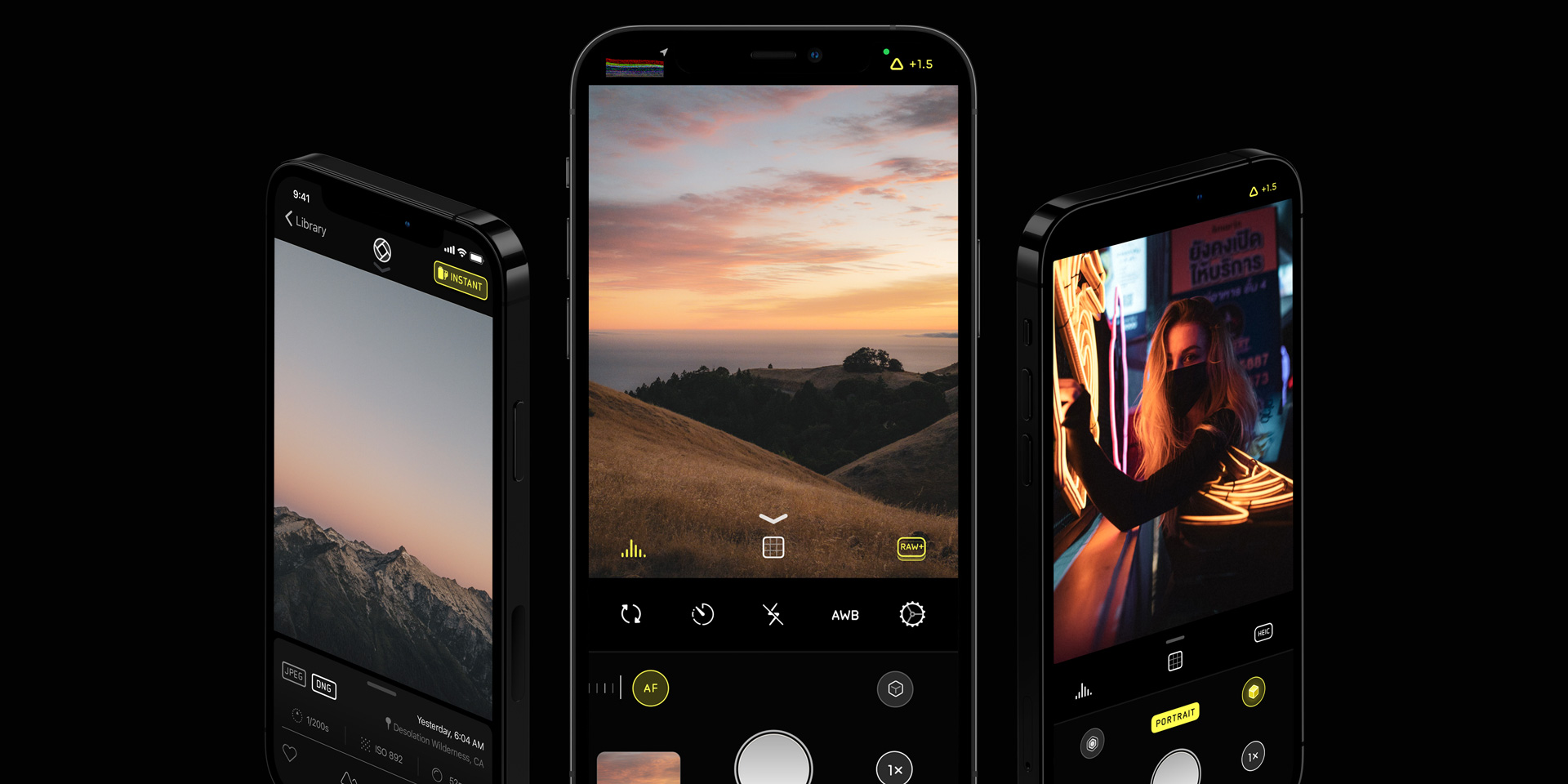
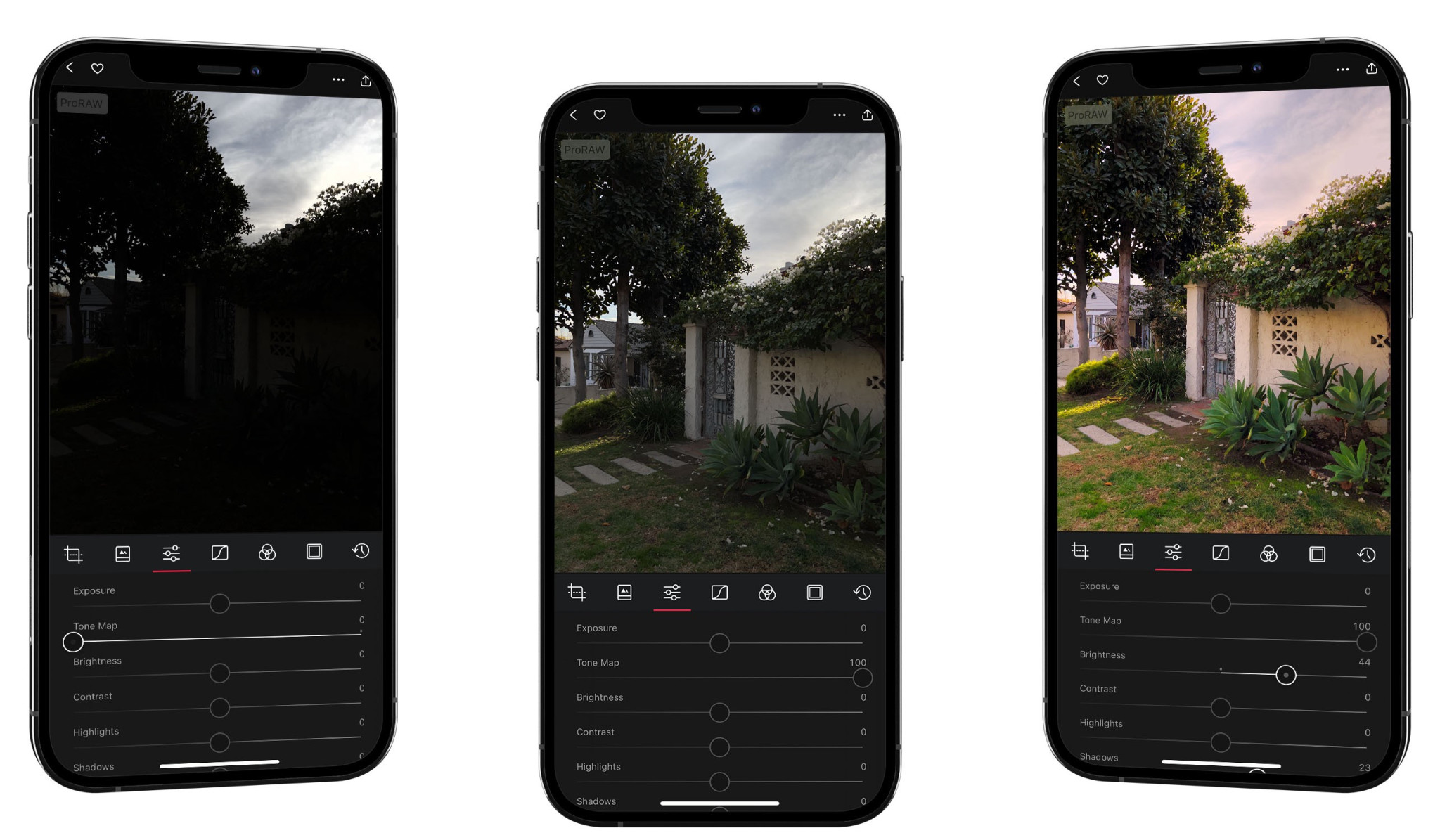
Halide is probably the most popular app for those who take mobile photography seriously — and also one of my favorite apps for iPhone. It features all the advanced controls you’d expect from a professional camera, including shutter speed, ISO, and white balance adjustments.
However, Halide is more than a camera app with manual controls. The app has some unique features to enhance photos by using artificial intelligence and other technologies. For instance, iPhone XR and iPhone SE (2nd gen) users can take portrait photos of animals and objects even without having two rear camera lenses.
You can also capture high-quality RAW photos, check histograms and metadata information, adjust focus precisely with focus peaking, export the depth map of the images, set Siri shortcuts, and much more.
You can try Halide for free on the App Store. The app requires an annual subscription of $11.99 or a lifetime license of $39.99 after the 7-day trial period.
Darkroom
After taking some great photos with your iPhone, you’ll need some professional tools to edit them — but don’t think you need a computer for that. Darkroom is one of my favorite photo editors since it is available not only for iPhone but also for iPad and Mac.
One of the best things about Darkroom is that the app is extremely intuitive and easy to use, even if you are not a professional photographer. The app comes integrated with the iCloud Photo Library, so you don’t have to waste time selecting and importing the photos you want to edit.
With Darkroom, you can adjust the brightness, contrast, highlights, shadows, color temperature, and other details of the photos you’ve already taken. In fact, the app also lets you edit videos and even Live Photos. In addition, you’ll also find a curve editor, watermark options, advanced support for RAW photos, and even integration with the Halide app.
The best part is that you can use most of the features of Darkroom for free, which is available on the App Store. There’s a $19.99 annual subscription to unlock all the app features.
Focos
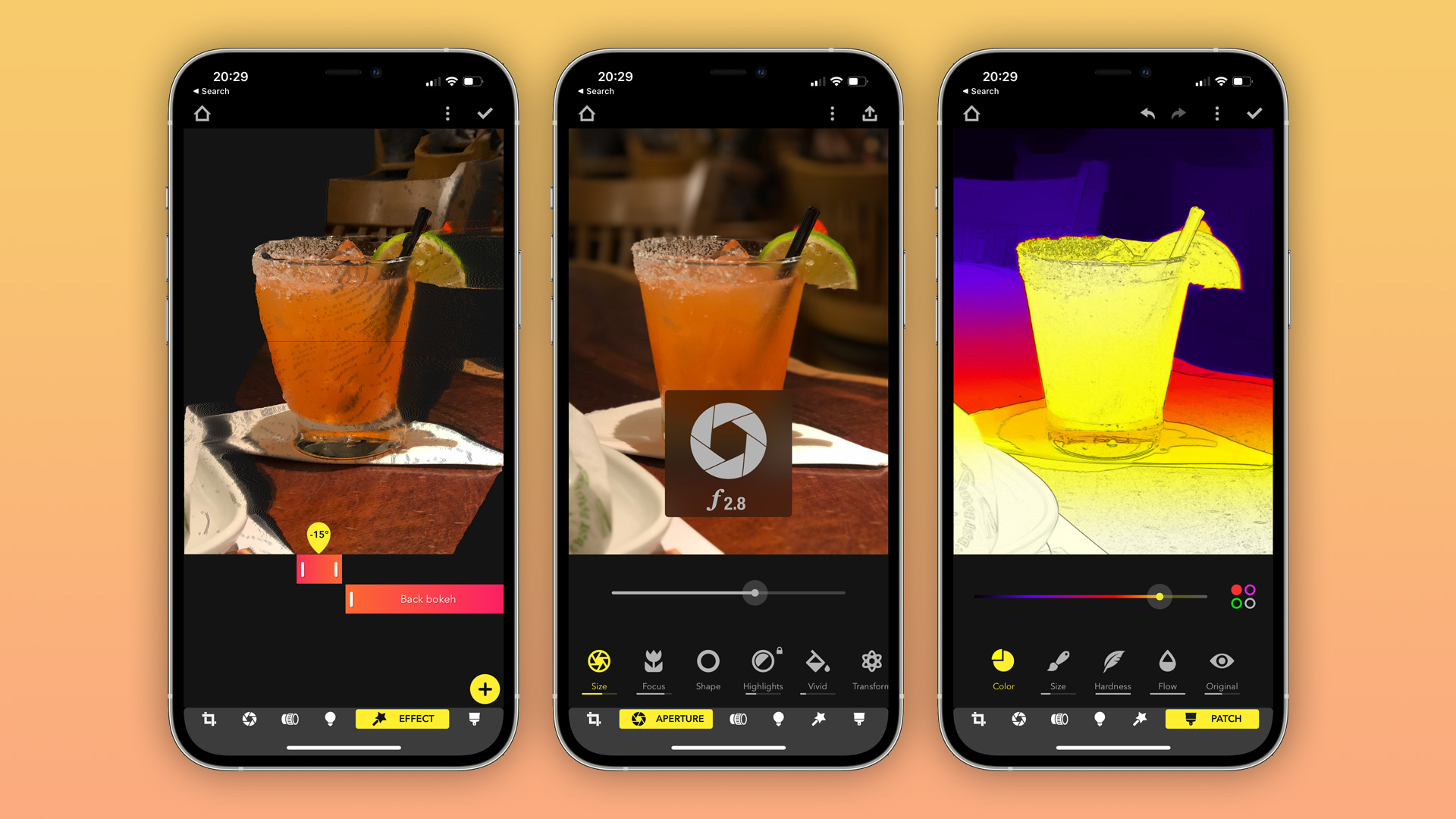
Focus is a must-have app for those who love taking portrait photos with the iPhone. While Apple took some time to let users change the level of blur in the backgrounds of portrait photos, Focos app offers this option since its release in 2017.
But Focos goes beyond adjusting the blur of the portrait photos as it generates different diaphragms with multiple bokeh spot effects and presets that simulate the feeling of professional lenses in the photos. There are even options to add 3D lighting and change the photo’s depth map to refine the blurred background.
What’s more impressive is that Focos uses AI to create an artificial depth map for any photo, even if it wasn’t taken with iPhone’s Portrait Mode. It’s amazing what you can do with your photos with this app.
Focus is available for free on the App Store, but some features require a $7.99 annual subscription or a $12.99 lifetime license.
Lightroom
Adobe Lightroom is the famous photo editor used by many professionals around the world, and although it is known for its desktop version, Adobe also offers a mobile version of Lightroom for iOS.
It’s extremely easy to edit your photos in Lightroom for iOS, even if they were taken in RAW. The app includes options to adjust lighting, colors, effects, details, and more. You can even distort photos, apply lens corrections, or use the automatic mode to set the best settings for that image. It also features different color profiles and settings presets.
If you’re subscribed to Adobe Creative Cloud, you can synchronize everything between the mobile and desktop versions of the app — so you can start editing a photo on your iPhone and then finish it on your Mac or iPad.
The mobile version of Lightroom is available for free on the App Store, but you’ll get the most out of the app by becoming an Adobe Creative Cloud subscriber.
DoubleTake
Since a camera is not made only of photos, this list wouldn’t be complete without an app to work on videos. DoubleTake is an app created by the same company behind FiLMiC Pro and it enables a new way to record videos with your iPhone.
Sometimes capturing video from just one camera is not enough, which is why DoubleTake came with a simple yet smart solution. If you ever needed to record the video from two different angles in order to create more professional-looking content, the app lets you choose two of the iPhone cameras to capture everything at the same time.
You can choose from ultra-wide, wide, telephoto, and selfie lenses to start a multi-cam video. The app also lets you switch between 24, 25, and 30 frames per second. There are no complicated settings or anything like that — all you need to do is open the app, choose the cameras you want, and start recording.
With these apps listed here, you have everything you need to start shooting and editing like a pro with your iPhone. While there are some paid apps like Halide, you can find great alternatives to enhance your photos for free on the App Store.
Apple continues its focus on privacy and security with some new resources on how to protect your devices, accounts, and personal safety. Let’s look at the recommended steps to check who can access your iPhone, other Apple devices, and Apple accounts.
Apple has published a new support guide this week that offers users an in-depth guide at managing their data and information on iPhone, iPad, Apple Watch, and Mac. The new document is entitled “Device and Data Access when Personal Safety is At Risk.”
Apple says that the goal of this new manual is to “help you identify risks, and walk you through the steps to help make the technology you rely on as private and secure as you want it to be.” The company explains that its devices make it easy to connect and share data with other users, friends, and family members, but that there are scenarios where you need to revoke previously-granted access to things like location data, photos, and more.
Apple makes it easy to connect and share your life with the people closest to you. What you share, and whom you share it with, is up to you — including the decision to make changes to better protect your information or personal safety.
If you’d like to revisit what you share with other people, or restore your device’s original settings for any reason, this guide can help you understand what information you are sharing via your Apple devices, and how to make changes to protect your safety. It includes step-by-step instructions on how to remove someone’s access to information you’ve previously granted: from location data on the Find My app, to meetings you’ve scheduled via Calendar.
If you’re concerned that someone is accessing information you did not share from your Apple device, this guide will also help you identify risks, and walk you through the steps to help make the technology you rely on as private and secure as you want it to be.
The document itself is 20 pages long, and it includes in-depth details on things like managing location sharing, using the Find My app, protecting your Apple ID, setting up or managing Family Sharing, and much more.
The company has also published a trio of separate checklists with important tips for managing privacy and sharing with other people:
This is an incredibly important document for Apple to have published. You can find the full PDF right here for easy sharing with friends and family members who might find themselves in search of these tips.
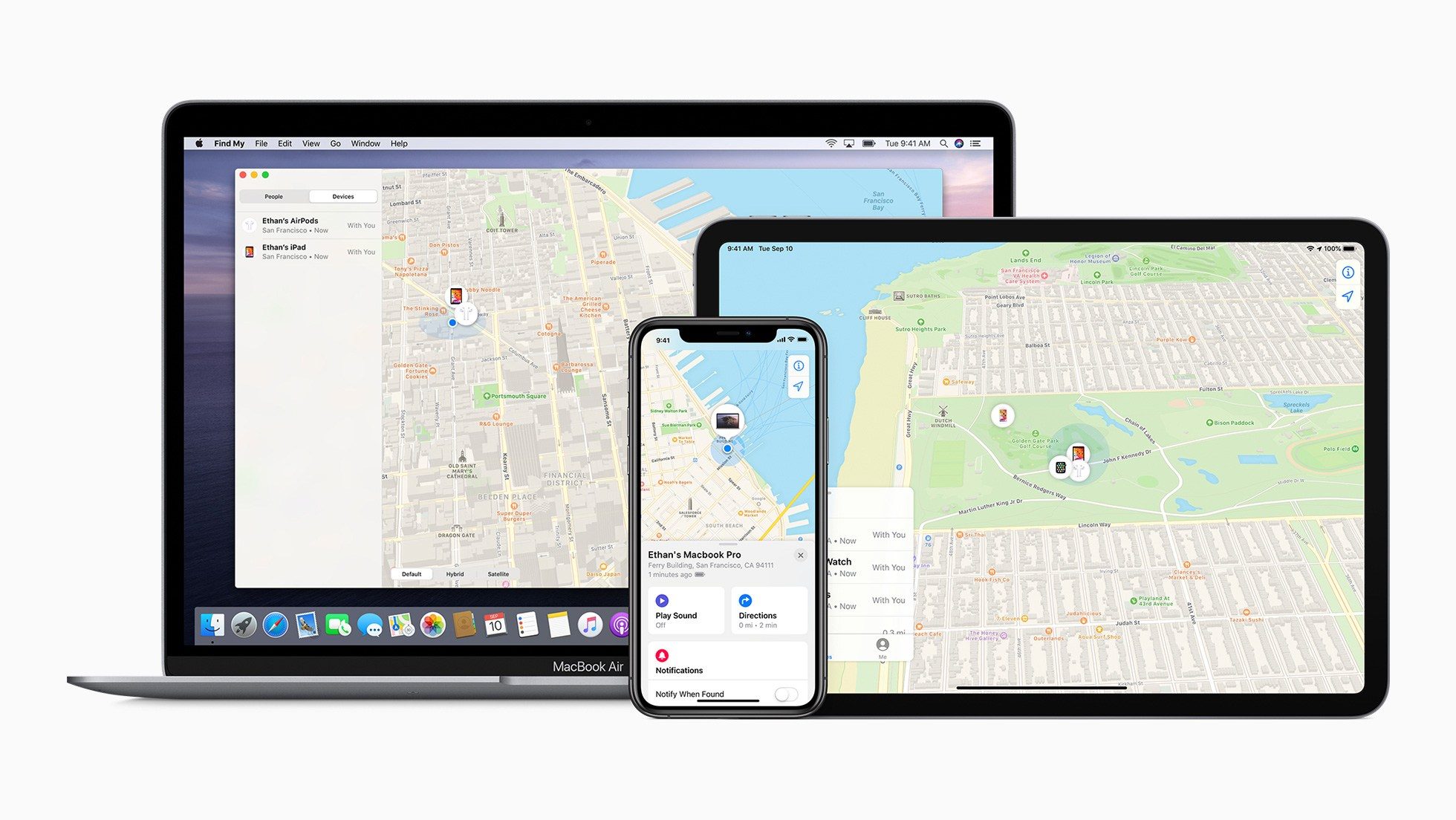
Apple published its new 20-page support guide called “Device and Data Access When Personal Safety is at Risk.” And whether you’ve got some specific personal safety concerns or are just ready for a privacy and security checkup, following along with the steps below is a great idea.
How to check who can access your iPhone, other Apple devices, and Apple accounts
Here’s what Apple recommends:
Check what devices are associated with your Apple ID
On iPhone and iPad, look at the devices that are signed in with your Apple ID by going to Settings > Your Name > Swipe down below Family Sharing
On Mac you can head to System Preferences > Apple ID > Look for your devices on the left
You can also see all your devices associated with your Apple ID at appleid.apple.com
You can tap/click any device to learn more, choose Remove from Account for anything that you don’t want to remain connected to your Apple ID
Review Face ID and Touch ID settings
Check if there is an unexpected alternate appearance or fingerprints in Face ID/Touch ID settings on iPhone, iPad, or Mac
Head to Settings > Face ID & Passcode or Touch ID & Passcode to check your settings
On Mac, you can head to System Preferences > Touch ID
If you don’t have two-factor authentication turned on, that’s a very important piece of securing your devices, accounts, and personal data
Check your apps
Check through all your installed apps looking for anything unexpected
Look for unexpected profiles
On iPhone and iPad, look under Settings > General for a Profiles section. Businesses, schools, and organizations are the most likely to install profiles but you can check to see if your device has one. The Profiles section won’t appear if there a none installed on your device. Profiles give additional access and privileges to Apple devices.
Keep in mind you won’t want/or be able to remove profiles if required by your employer/school/etc.
Going further on who can access your iPhone, iPad, more
Apple has rolled out its new iOS app privacy labels (the nutrition label equivalent for apps) for both first-party and third-party apps. Read along for how to check iOS app privacy details for apps in the App Store as well as those that come preloaded on iPhone and iPad to fully understand how your information is being used.
Apple first introduced its new iOS app privacy details initiative during WWDC in June 2020. Now they are officially live in the App Store for Apple’s apps and third-party software, as well as on Apple’s website for its apps that aren’t on the App Store (preinstalled apps).
Apple describes its iOS app privacy details as akin to nutrition labels on food. Apple’s goal with this initiative is to better inform users of the privacy practices of individual applications. The iOS app privacy labels are divided into three parts:
Data used to track you
Data linked to you
Data not linked to you
If you’re reading this, this probably won’t come as any surprise, but the iOS app privacy details you’ll learn may certainly lead you to change what apps you use, or at least what info you share with them. Let’s dive in…
How to check iOS app privacy details for iPhone and iPad
For Apple and third-party apps on the App Store
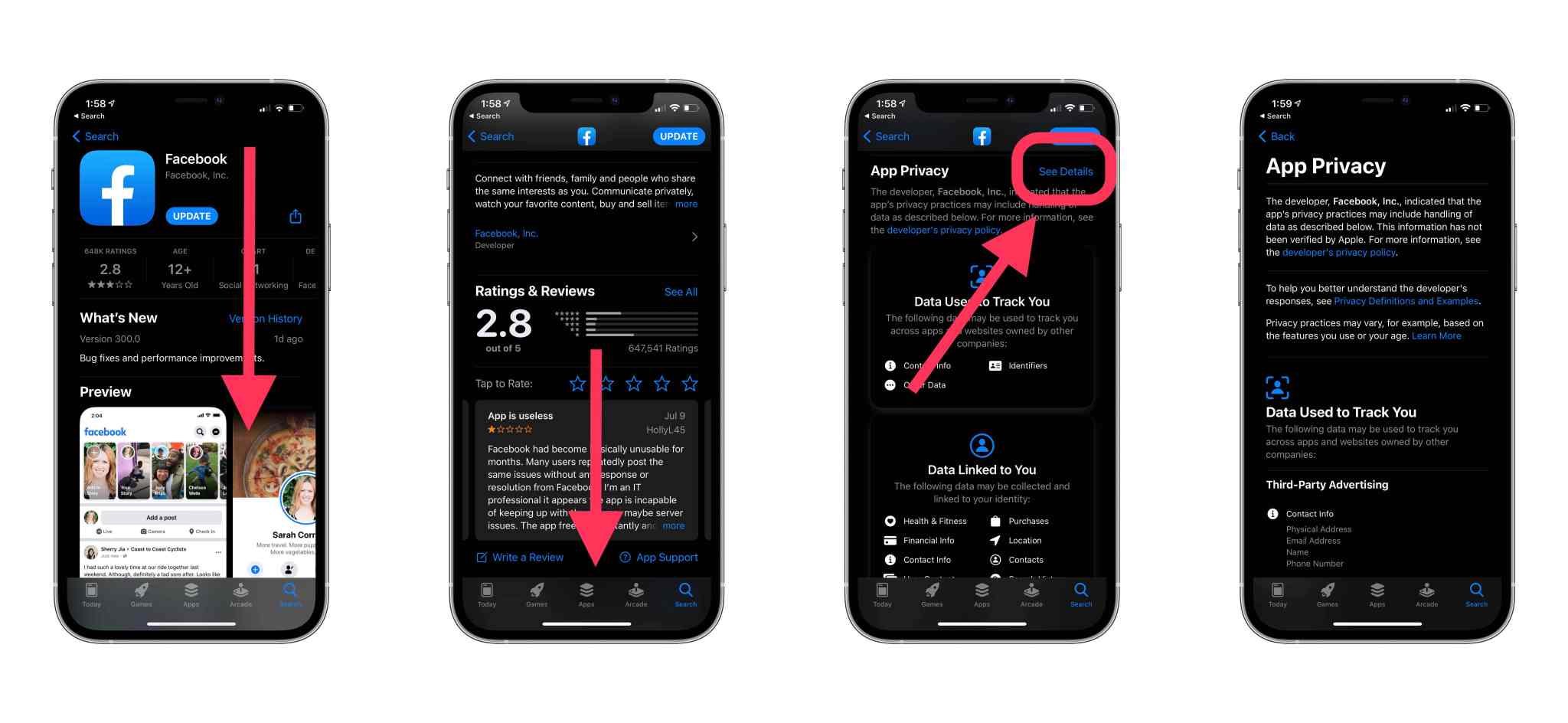
From your iPhone or iPad, open the App Store app
Search or pull up an app you want to see privacy details on
Swipe down below the app description and ratings until you see App Privacy
Tap See Details to the full iOS app privacy details
You can also find privacy details on the web for apps, just search the web for “app store ‘app name’” and you’ll see the privacy label below the reviews (click “See Details” for the full rundown)
For Apple apps not on the App Store
You can find an overview of the privacy details of all of Apple’s apps that aren’t on the App Store here
You can find specifics privacy details pages for Apple’s apps here
Apple faced several challenges in the development and manufacturing process of the iPhone 12 models in 2020 due to the COVID-19 pandemic, which led the company to launch the new iPhones in two stages. In 2021, the company will be able to launch the iPhone 13 models on regular schedule, says reliable analyst Ming-Chi Kuo.
Kuo states that the mass production schedule of the iPhone 13 will be the same as for previous iPhonemodels before the 12 lineup. That means we can expect all iPhone 13 models available by September 2021 without delays.
This year, Apple was unable to deliver all new iPhone 12 models at once as the COVID-19 pandemic affected the company’s associated factories around the world and even the internal production of the device at Apple headquarters since most employees are working from their homes.
While the regular iPhone 12 and iPhone 12 Pro were announced and launched in stores in October, iPhone 12 mini and iPhone 12 Pro Max arrived in stores in November with limited supplies.
Kuo also says he has no concerns about the lower shipping forecast for the A14 chip produced by TSMC in Q2 2021 compared to Q1 2021. The analyst says this decline is “seasonal” and expected as TSMC will begin shifting its production pipeline for developing the new A15 chip that will equip the iPhone 13 lineup.
He claims that iPhone 12 Pro sales remain strong and that demand for this year’s Pro models is better than expected, although Apple has been facing supply issues with the Sony camera sensors used for iPhone 12 Pro and iPhone 12 Pro Max.
The iPhone 13 is shaping up to deliver some radical new changes from Apple, including one model with no ports or holes at all. And now a new survey hints at an overdue upgrade in the age of face mask wearing.
Apple recently sent out a survey to some customers asking them a series of questions. And one of them was related to Face ID and Touch ID.
The survey asks whether the user is satisfied with Face ID. For those who answer no, they will see some follow-up answers in the survey to share with Apple. These include “security or privacy concerns”, “I don’t like having to pick up my phone to use Face ID”, “it does not detect my face in all situations” and “I prefer Touch ID.”
Even with a COVID-19 vaccine being rolled out soon, health experts are recommending that we wear face masks in public for the foreseeable future. And having to punch in your passcode every time you want to use your phone when you’re away from home can get annoying.
In what could be bad news for iPhone shoppers, the Apple survey also asks whether current owners use various items included in the box. This includes Apple stickers, the SIM eject tool and — get this — the USB-C to Lightning cable.
Apple already faced a backlash this fall for not including a charger in the box with the iPhone 12. So we find it hard to imagine that it would pull the plug (so to speak) on the charging cable as well in the very next model.
Then again, at least one model of the iPhone 13 is rumored to be portliness. So in that case a USB-C to Lightning cable would be pointless. That device would likely charge via a MagSafe charger instead, which currently costs $39 for the cable alone. The 20W power adapter adds another $19. So it’s possible that the portless iPhone 13 will come with just the phone in the box.
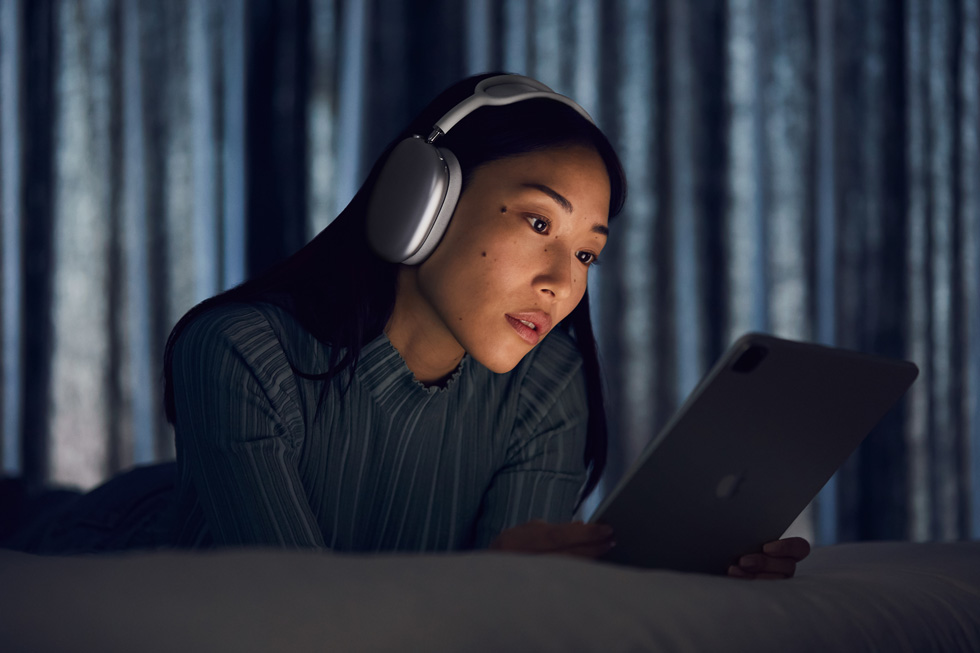
AirPods Max bring the magic of AirPods to an all-new wireless over-ear design with high-fidelity audio, Active Noise Cancellation, spatial audio, and more.
AirPods Max feature incredible high-fidelity audio, Adaptive EQ, Active Noise Cancellation, and spatial audio
Apple announced AirPods Max, innovative wireless headphones that bring the magic of AirPods to an over-ear design with high-fidelity sound. AirPods Max combine a custom acoustic design, H1 chips, and advanced software to power computational audio for a breakthrough listening experience with Adaptive EQ, Active Noise Cancellation, Transparency mode, and spatial audio. AirPods Max come in five gorgeous colors, including space gray, silver, sky blue, green, and pink, and are available to order starting today, with availability beginning Tuesday, December 15.
“AirPods are the most popular headphones in the world, beloved for their effortless setup, incredible sound quality, and iconic design. With AirPods Max, we are bringing that magical AirPods experience to a stunning over-ear design with high-fidelity audio,” said Greg Joswiak, Apple’s senior vice president of Worldwide Marketing. “The custom acoustic design, combined with powerful H1 chips, and advanced software enable AirPods Max to use computational audio to wirelessly deliver the ultimate personal listening experience.”
AirPods Max feature a breathable knit mesh canopy, distributing weight to reduce on-head pressure. AirPods Max come in silver, space gray, sky blue, pink, and green.
Custom Acoustic Design
From the canopy to the ear cushions, every part of AirPods Max is carefully crafted to provide exceptional acoustic performance for each user. The breathable knit mesh canopy, spanning the headband, is made to distribute weight and reduce on-head pressure. The stainless steel headband frame provides strength, flexibility, and comfort for a wide variety of head shapes and sizes. Telescoping headband arms smoothly extend and stay in place to maintain the desired fit.
Each ear cup attaches to the headband through a revolutionary mechanism that balances and distributes ear cup pressure, and allows it to independently pivot and rotate to fit the unique contours of a user’s head. Each ear cushion uses acoustically engineered memory foam to create an effective seal — a critical factor in delivering immersive sound. The Digital Crown, inspired by Apple Watch, offers precise volume control and the ability to play or pause audio, skip tracks, answer or end phone calls, and activate Siri.
The Digital Crown provides precise volume control and the ability to play or pause audio, skip tracks, answer or end phone calls, and activate Siri. The noise control button easily switches between Active Noise Cancellation and Transparency mode.
AirPods Max ear cushions use acoustically engineered memory foam to create an effective seal for immersive sound, and an Apple-designed knit textile wraps each ear cushion for added comfort.
From the canopy to the cushions, every part of AirPods Max is carefully crafted to provide a comfortable fit and exceptional acoustic performance for each individual.
Breakthrough Listening Experience
AirPods Max feature a 40-mm Apple-designed dynamic driver that provides rich, deep bass, accurate mid-ranges, and crisp, clean high-frequency extension so every note can be heard. A unique dual neodymium ring magnet motor allows AirPods Max to maintain total harmonic distortion of less than 1 percent across the entire audible range, even at maximum volume.1 Equipped with an Apple-designed H1 chip in each ear cup, a custom acoustic design, and advanced software, AirPods Max use computational audio to deliver the highest quality listening experience possible. Utilizing each of the chips’ 10 audio cores — capable of 9 billion operations per second — computational audio powers a breakthrough listening experience that includes Adaptive EQ, Active Noise Cancellation, Transparency mode, and spatial audio.
AirPods Max custom acoustic design features a 40-mm dynamic driver and a unique dual neodymium ring magnet motor.
Adaptive EQ: AirPods Max use Adaptive EQ to adjust the sound to the fit and seal of the ear cushions by measuring the sound signal delivered to a user and adjusting the low and mid-frequencies in real time — bringing rich audio that captures every detail.
Active Noise Cancellation: AirPods Max deliver immersive sound through Active Noise Cancellation so users can focus on what they are listening to. Each ear cup features three outward-facing microphones to detect environmental noise, while one microphone inside the ear cup monitors the sound reaching the listener’s ear. Using computational audio, noise cancellation continuously adapts to the headphone fit and movement in real time.
Transparency Mode: With AirPods Max, users can switch to Transparency mode to simultaneously listen to music while hearing the environment around them — ensuring everything, including a user’s own voice, sounds natural while audio plays perfectly. Switching between Active Noise Cancellation and Transparency mode can be done with a single press using the noise control button.
Spatial Audio: AirPods Max use spatial audio with dynamic head tracking to place sounds virtually anywhere in a space — delivering an immersive, theaterlike experience for content recorded in 5.1, 7.1, and Dolby Atmos. Using the gyroscope and accelerometer in AirPods Max and iPhone or iPad, spatial audio tracks the motion of a user’s head as well as the device, compares the motion data, then remaps the sound field so it stays anchored to the device, even as the user’s head moves.
AirPods Max deliver a breakthrough listening experience with Adaptive EQ, Active Noise Cancellation, Transparency mode, and spatial audio.
AirPods Max combine a custom acoustic design, Apple H1 chips, and advanced software to power computational audio for the ultimate personal listening experience.
The Magic of AirPods
AirPods Max join the existing AirPods family in delivering unparalleled wireless audio, whether a customer is listening to music, making phone calls, enjoying TV shows and movies, playing games, or interacting with Siri. The magical setup experience customers love with today’s AirPods and AirPods Pro extends to AirPods Max with one-tap setup, followed by automatic pairing with all the devices signed in to a user’s iCloud account, including iPhone, iPad, iPod touch, Mac, Apple Watch, and Apple TV.
AirPods Max automatically detect when they are on a user’s head using the optical and position sensors. Once in place, AirPods Max play audio and can pause once removed or when the user simply lifts one ear cup. With AirPods Max, voice calls and Siri commands are crisp and clear due to beam-forming microphones that block out ambient noise and focus on the user’s voice.
AirPods Max feature the magical one-tap setup experience that customers love with AirPods.
Battery and Performance
AirPods Max feature great battery life with up to 20 hours of high-fidelity audio, talk time, or movie playback with Active Noise Cancellation and spatial audio enabled.
AirPods Max come with a soft, slim Smart Case that puts AirPods Max in an ultralow power state that helps to preserve battery charge when not in use.
When stored in the soft, slim Smart Case, AirPods Max enter an ultralow power state that preserves charge.
Additional Features
Automatic switching allows users to seamlessly move sound between iPhone, iPad, and Mac. When playing music on Mac, users can easily take a call on iPhone and AirPods Max will automatically switch over.
Audio Sharing makes it possible to easily share an audio stream between two sets of AirPods on iPhone, iPad, iPod touch, or Apple TV 4K. Simply bring AirPods Max near the device and connect with a single tap.
Siri capabilities include the ability to play music, make phone calls, control the volume, get directions, and more. Siri can also read incoming messages as they arrive with Announce Messages with Siri.
Pricing and Availability
AirPods Max are available to order starting today for $549 (US) from apple.com and in the Apple Store app in the US and more than 25 other countries and regions. AirPods Max will begin shipping on Tuesday, December 15.
AirPods Max require Apple devices running iOS 14.3 or later, iPadOS 14.3 or later, macOS Big Sur 11.1 or later, watchOS 7.2 or later, or tvOS 14.3 or later.
AirPods start at $159 (US) and AirPods Pro are available for $249 (US).
Customers can add personal engraving to AirPods Max, AirPods Pro, and AirPods for free on apple.com and in the Apple Store app.
Customers are able to find the same great shopping and support services at apple.com/shop, in the Apple Store app, and at Apple Store locations. Customers can get shopping help from Apple Specialists, choose monthly financing options, get special carrier offers for iPhone, trade in eligible devices, and get Support services and no-contact delivery or Apple Store pickup options. Customers are encouraged to check apple.com/retail for more information on the health and safety measures in place, and the services available, at their local store.
Pickup options include in-store, curbside, or Express storefront, and vary by store. Same-day delivery may also be available. Customers can check apple.com/retail for services available at their local store.
With Apple Card, customers in the US get 3 percent Daily Cash back when they buy directly from Apple and have the option to choose Apple Card Monthly Installments so they can pay over time, interest-free.