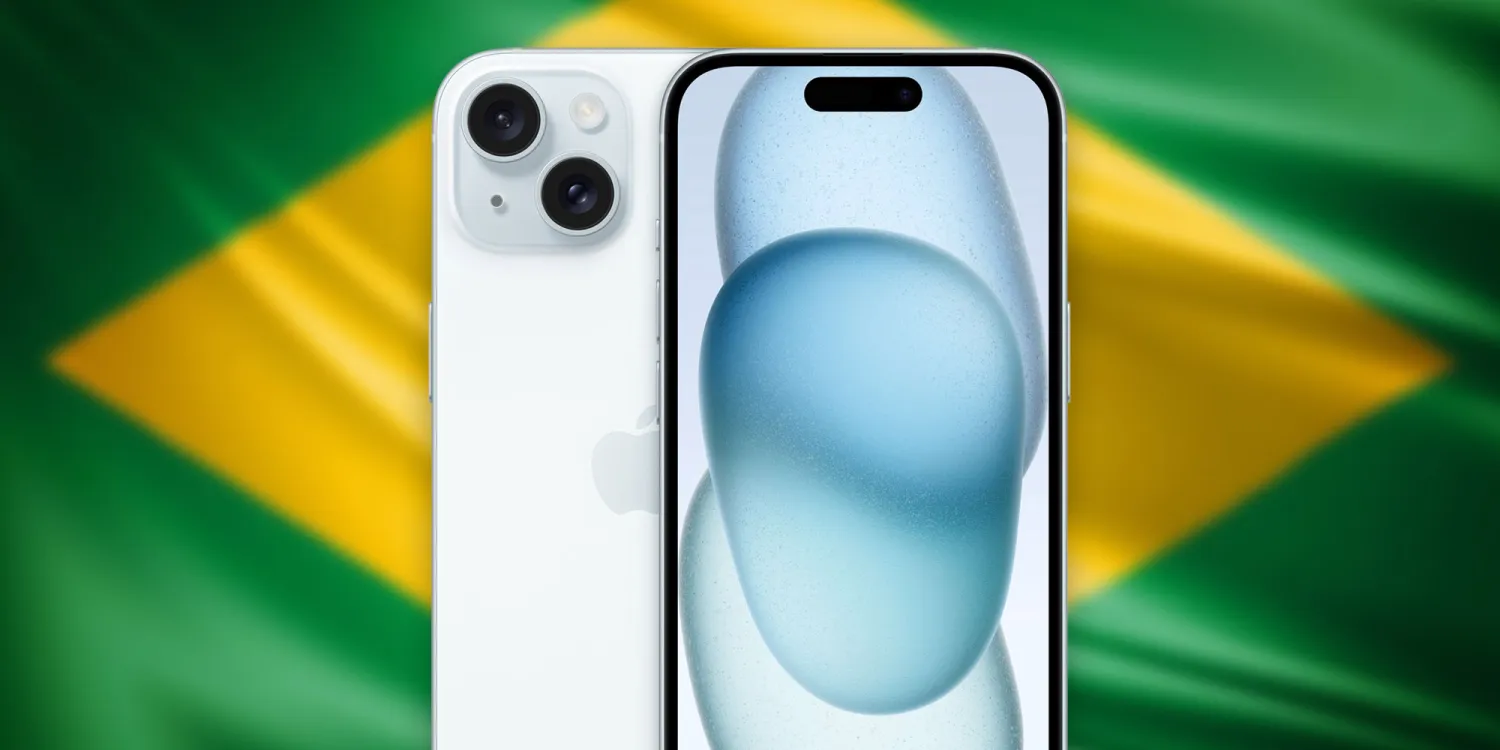
While China is still responsible for manufacturing most of Apple’s devices, the company does have some assembly facilities around the world. One of these facilities is Foxconn Brazil, located in São Paulo. There, Apple is now assembling the 6.1-inch iPhone 15.
iPhone 15 now assembled in Brazil
As noted by the Brazilian blog MacMagazine, Apple seems to be shipping iPhone 15 units assembled in Brazil. The company has not confirmed the news and there’s no explicit evidence of this on Apple’s website. However, Apple’s online store in Brazil gives customers a clue as to which model they’re getting.
When checking the URL of the checkout webpage for the iPhone 15, customers will now notice the part number ending with “BR/A,” which is used to identify Apple products assembled in Brazil. Most products are identified with “BE/A” or “BZ/A” to indicate that they’ve been imported to be sold in the country.
Interestingly, Apple has once again chosen to only assemble the 6.1-inch iPhone model in Brazil. The iPhone 15 Plus and both Pro models sold in the country are still imported from China. This may be due to the entry-level model likely being the most popular in Brazil, given the high prices of the iPhone in the South American country.
Brazil imposes high taxes on imported products. For that reason, some companies invest in assembling their products in Brazil, as this grants a reduction in taxes to sell those products. The 128GB iPhone 15 was launched for R$7,299 (around $1,460) in Brazil, but can now be found for as low as R$5,399 (about $1,080) in certain retail stores.
Apple diversifying its assembly chain
While assembling iPhones in Brazil benefits Brazilian customers, it also benefits Apple – and not just because of the opportunity to sell more iPhones. Having assembly facilities in other regions allows Apple to depend less on China and can help the company avoid supply shortages in the local market.
In addition to Brazil, Apple has also been investing in its assembly facilities in India and Vietnam. Last year, Indian customers were able to buy iPhone 15 models assembled in India on the very first day of sales.
Apple’s non-Pro lineup is arguably the most cost-effective way for consumers to keep up with the most recent and polished Apple experience without breaking the bank. The newly introduced iPhone 15 and 15 Plus models come with a handful of meaningful updates. There’s little to no difference between the two feature-wise, so screen size, battery size and price seem to be the major differentiators.
Last year, the large screen and the large battery were not enough to justify the 14 Plus’ high price, and its sales were the lowest in the family. The Plus lineup may not have a much longer lifespan than the iPhone mini if the 15 Plus’ sales are as unexciting as the 14 Plus’. The future of the entire Plus series may be hanging on the success of this device that we have for review today.
It’s not like Apple set it up for success this year, either. Its launch price is €50 lower in Europe, which is a nice start, but the US pricing remains the same. And the fact that last year’s 14 Plus remains officially on sale will add an extra dimension to the inter-sibling rivalry that the 15 Plus will have to endure. In other words, if you are looking for a big-screen iPhone, you have an even wider choice this year.
But this year’s changes are a step above the usual yearly update cycle. This year marks the shift to USB-C port for the iPhone, and we couldn’t be happier. The convenience of sharing the same charging connector as every other phone brand out there is unsurpassed. Not to mention the wide host of accessories you can plug directly into the phone, allowing you to easily transfer files, output video to a TV/monitor or even reverse charge your smartwatch or earphones.
Disclaimer. We can not guarantee that the information on this page is 100% correct.
Aside from the USB-C, the main camera is now a more advanced 48MP sensor with pixel binning, promising substantial improvement in image quality, with Apple promising great 2x zoom photos as well.
Although screen size remains the same – 6.7″, the iPhone 15 Plus now boasts almost twice as bright an OLED panel and finally replaces the old notch with the pill-shaped Dynamic Island. Even if you are not a fan of the software features revolving around the Dynamic Island, you can still appreciate the more modern and Pro-like look of the homescreen now that the sightly notch is gone.
Under the hood is last year’s pro chipset – the A16 Bionic. The chipset is still a powerful and well-optimized piece of hardware, and it offers faster performance than what the 14 Plus had.
Besides these changes, you still get the same ultra-wide camera without autofocus, and the screen is still 60Hz without an Always-On Display, which is a feature reserved for the Pro models. Speaking of Pro-only features, the USB-C port here provides only USB 2.0 speeds, and we don’t get the new customizable Action key on the left side of the device.
Unboxing the iPhone 15 Plus
Just like the rest of the iPhones, the iPhone 15 Plus comes in a modest box containing just some user manuals, a SIM ejector tool and a USB-C to USB-C cable for charging. US buyers don’t even have the pin for the SIM card tray as these iterations rely only on eSIM.
Even though you have to buy a new charger if you don’t already have one, the good news is you are not obligated to buy an iPhone charger. Any PowerDelivery charger should do the job. The recommended power output is 20W, but a 30W charger should provide even faster charging in the first 40-50min.
Competition
We’d consider the iPhone 15 Plus a big step up from its predecessor. The move to the universal USB-C port is landmark moment for the iPhones in its own right. The performance jump from the A15 Bionic chipset to the A16 Bionic is substantial; the new OLED panel is brighter, the full charge is considerably faster now, the battery life is longer, and the new 48MP main camera makes a sensible difference in daylight and low-light photography.
The iPhone 14 Plus remains officially available alongside the 15 Plus at a discounted price, so despite its poor market sales up until now, it will readily cater to consumers who find the 15 Plus too expensive but would like the same formula.
An even tougher choice would be between the iPhone 15 Plus and last year’s iPhone 14 Pro Max. The latter now costs €1,100, just about the same as the 15 Plus, but delivers a more premium experience – 120Hz display, better cameras all-around with proper 3x optical zoom shooter, longer battery life and the same SoC.
But as always, we also need to look at the market as a whole in case you are one of those rare breed of users looking for the best option available at a certain price instead of staying within your ecosystem. Sure, in iPhone terms, the 15 Plus is a nice phone with more upgrades than initially expected. However, the handset falls short of its direct Android rivals.
Right now, the Samsung Galaxy S23 Ultra is a slightly cheaper flagship phone with a better and more versatile camera system, better display, similar battery life and stylus as a nice bonus.
The same goes for the Xiaomi 13 Pro, which is cheaper and checks a flagship phone’s boxes. The 15 Plus is no match for cameras, and its 60Hz display doesn’t sit competitively on its spec sheet either.
There are other notable mentions in the sub-€1,000 category from Android manufacturers, which give the iPhone 15 Plus a good run for its money, like the Pixel 7 Pro (with the 8 Pro release just around the corner), OnePlus 11, Sony Xperia 1 V, etc. So, if you are not married to iOS just yet and you are within this price bracket, you should check out the Android-based alternatives.
Verdict
Overall, the iPhone 15 Plus boasts a significant upgrade over its predecessor in a couple of key departments – display, battery life, performance, main camera and charging.
It’s still nowhere near the Pro lineup, and it’s missing features such as this year’s chipset, the optical zoom camera, the autofocus on the ultra-wide camera, the 120Hz high-refresh-rate screen that comes with Always-On Display, or the new customizable Action key. Depending on your priorities, the lack of some of these might be a deal-breaker for you.
More importantly, however, Apple might have hindered the 15 Plus market odds the same way it did with the 14 Plus by placing it in a limbo where it has the feature set of the cheaper-tier iPhone but it’s priced way too close to the Pro-tier iPhones for its own good.
There is nothing inherently wrong with the iPhone 15 Plus; in isolation, we’d be happy to give it our full recommendation in an instant. But the market realities mean it will be a hard sell at its current price, regardless of whether you are comparing it to current or previous-gen iPhones or Android devices. This puts this particular device in a really tight spot and makes us less than optimistic for the future of the Plus lineup as a whole.
Pros
Excellent build quality, IP68 certified.
Brighter OLED panel with Dolby Vision and Dynamic Island.
Even better battery life than last year.
Nice-sounding stereo speakers.
Flagship-grade performance even if not the latest chipset.
Improved main camera performance, nice selfies.
Outstanding video quality and stabilization across the board, great action clips.
Standout charging speed to 100% for an iPhone.
Every iPhone gets at least five years of iOS updates.
Finally USB-C.
Cons
Considerably more expensive than corresponding Android alternatives.
The display is 60Hz; there is no Always On option.
No charger in the box, still rather slow charging overall.
No dedicated telephoto camera and disappointing performance out of the ultrawide.
Apple’s iOS restrictions can be off-putting to newcomers to the ecosystem.
It’s yet another year of incremental refinement for the vanilla iPhone. Not that anybody expects any major changes at this point. The iPhone 15 offers a few steps forward compared to the 14 without altering the formula in any significant way.
Still, there are a few changes worth noting. The vanilla iPhone finally gets the Dynamic Island from its Pro siblings. In fact, the display is all new this year with significantly improved max brightness. You also get a new 48MP main camera, again bringing the vanilla closer to the Pro models. This includes a new 24MP default resolution for photos, as well as next-gen portraits and 4K@60fps HDR video capture.
Disclaimer. We can not guarantee that the information on this page is 100% correct.
The new iPhone 15 also brings about a new Apple A16 Bionic chipset. As is tradition, this is not the latest and greatest Apple has to offer and is shipping with the Pro models, but rather last year’s flagship chip. This might be a blessing in disguise since the new Apple A17 Pro chip is currently amidst a thermal-throttling controversy. The A16, on the other hand, is tired and true. The iPhone 15 also gets a few other “minor” changes, like the inclusion of an Ultra Wideband 2 (UWB) chip for more precise precision finding for the Find My Friends feature.
Oh, and last but not least, Apple has finally moved to USB Type-C. Cupertino was kind of forced to do so due to mounting regulatory pressure, but regardless, the switch is finally a reality. So, if you are in the market for an iPhone 15 series device, you might also need to change out some cables you own.
Left: iPhone 15 • Right: iPhone 15 Plus
However, The real question is how popular the iPhone 15 will be and whether it is worth picking up. It seems that most of you are rather unenthused about the new Dynamic Island and lukewarm at best towards the new 48MP main shooter and Type-C port. Even so, in both relative and absolute terms, we still expect the iPhone 15 to sell very well. Perhaps not as well as its Pro Max and Pro sibling, but most likely better than the iPhone 15 Plus. So, without further ado, let’s dive into the iPhone 15.
Unboxing
Apple pays plenty of attention to packaging, and rightfully so. Cupertino tends to focus on reduction and reuse in this department, which is always great to see. The boxes have become smaller still, allowing Apple to fit more units in any single shipment, saving on transport and carbon emissions. In terms of materials, the box is made entirely out of cardboard (even the sturdy phone cradle on the inside) and thus is recyclable.
Inside the box, you’ll find a relatively short 1-meter-long USB Type-C to Type-C cable, a SIM ejector tool (outside the US, where the iPhone 15 is eSIM only and lacks a physical SIM tray) and some leaflets. That’s it. Nothing more, nothing less. Apple started the whole “less accessories” trend and is not about to backtrack now. The good news is that if you already have a decent USB Type-C charger, you might only need to swap some Lightning cables and not actually purchase a new charging brick. You just need at least 20W of power to charge the iPhone 15 optimally, ideally a bit more, perhaps in the 30W ballpark just to be safe.
The competition
Apple has been consistent with its base phone pricing, at least in the last few years. The iPhone 15 is no exception. Its MSRP for a base 128GB model is USD 799/GBP 799/EUR 949/INR 79,900/CNY 5,999/JPY 124,800 in the US, UK, Germany, India, China and Japan, respectively. In fact, looking at some historical pricing, in the UK and Germany, the base iPhone 15 and 15 Plus are now £50/€50 cheaper than the 14 and 14 Plus. Even so, that’s a pretty hefty price tag, and there are plenty of alternatives to consider.
Left: iPhone 15 • Right: iPhone 13
To be perfectly frank, if you are after an iPhone, chances are that you won’t just go for an Android phone instead. At least, that’s what most statistics nowadays claim. So, when examining the market alternatives, the first and probably most obvious choice would be to consider last year’s iPhone 14 Pro model. It is currently selling for about as much as the vanilla iPhone 15. And sure, it is last year’s model, which means that in relative terms, you will be getting shorter software support in the future. However, that’s about the only downside to picking the iPhone 14 Pro instead of the iPhone 15. Well, that and buying into the now effectively defunct Lightning port. Other than that, you get the same A16 Bionic chipset on the inside and practically the same performance. Being a Pro model, however, the 14 Pro gets a few extra goodies like a 120Hz display refresh rate, a dedicated 3x, an OIS-enabled telephoto camera and extra camera features like ProRes.
Of course, if you’ve already made peace with using an older model with a Lightning port, then the other obvious choice would be the iPhone 14. You can save a substantial amount of money by going for it, but you will be missing out on some of the new additions and upgrades of the iPhone 15. Notably, the iPhone 14 has an older and less bright display with the signature notch design instead of the Dynamic Island. You will also have to settle for the old 12MP main camera instead of the fancy new 48MP one and its superior default 24MP stills.
Apple iPhone 14 Pro • Apple iPhone 14
Moving on to the Android realm and probably the most obvious competitor – the Samsung Galaxy S23. It is noticeably cheaper to buy than the iPhone 15, which is a plus. Besides that, it is roughly the same physical size and well-endowed as a proper flagship with various quality-of-life extras like great stereo speakers and an IP68 ingress protection rating. Compared to the iPhone 15, the Galaxy S23 does offer a 120Hz refresh rate on its Dynamic AMOLED 2X display, which doesn’t get quite as bright as the panel on the iPhone but is still in the same ballpark. The Galaxy S23 also gets a dedicated 3x, OIS-enabled telephoto camera and a larger battery, which does result in slightly better battery life, but not by a lot.
While on the subject of Samsung flagships, it is worth noting that the Galaxy S23 Ultra can be had for about as much as a vanilla iPhone 15. Though, we can’t exactly say that the two devices are good direct competitors, given the massive size difference.
It’s back to compact devices then, and the Xperia 5 V. It is yet another proper flagship, housed in a relatively small chassis. The Xperia 5 V has a particularly interesting 6.1-inch OLED display with a 120Hz refresh rate, 10-bit color, BT.2020 HDR support and a 21:1 cinematic aspect ratio. You get excellent stereo speakers and a powerful dual rear camera system to accompany the display. Last but not least, the Xperia 5 V has a massive 5,000 mAh battery.
Left: iPhone 15 • Right: iPhone 13
Speaking of compact Android flagships, we can’t fail to mention the Asus Zenfone 10. Its 5.92-inch display is smaller still than the iPhone’s and not as bright, but it does offer a 144Hz refresh rate. Despite the small size, Asus still managed to fit in stereo speakers, a 4,300 mAh battery and a powerful dual-rear camera system with a gimbal-OIS setup on the main cam.
Samsung Galaxy S23 • Sony Xperia 5 V • Asus Zenfone 10 • Xiaomi 13
Finally, we should also mention the Google Pixel 7a, which is equally compact and has a similar set of cameras. It represents the best Google currently offers, including clean and snappy AOSP OS and some of the best computational photography around. It’s also considerably cheaper than the iPhone 15, and it’s got a 90Hz refresh rate screen. Its battery life, however, is a bit behind the iPhone’s.
Over in camp Xiaomi, the Xiaomi 13 seems like a good competitor to the iPhone 15. It has a slightly larger 6.36-inch, 120Hz AMOLED display that also gets extremely bright. There are stereo speakers on board, as well as IP68 ingress protection. In terms of cameras, the Xiaomi 13 is rocking three on the back, including a 50MP main snapper, a 3.2x OIS-enabled telephoto and a 12MP ultrawide. The onboard battery is a hefty 4,500 mAh pack, and the Xiaomi 13 gets very speedy 67W wired fast charging.
verdict
As much as we like offering Android-powered alternatives to the iPhone, by all major accounts and statistics, Apple’s smartphone lineup is currently, more or less, an isolated island. That is to say that not many people are jumping ship one way or the other with Android. If we assume that is indeed the case and that an iPhone user will inevitably also be an iPhone buyer at some point, then it makes sense to mostly look at the iPhone 15 in the context of Apple’s own selection of devices.
If historical data is anything to go by, the vanilla iPhone 15 won’t be the most popular of the iPhone 15 lot. That title will likely go to the iPhone 15 Pro Max. That doesn’t mean it will be unpopular, though. Quite the contrary. Apple has one of the most robust market research operations, and you can rest assured that if Apple deems it so, there is definitely an iPhone 15-shaped spot in its lineup.
As far as innovations go, the iPhone 15 brings a lot more to the table compared to its predecessor. The all-new and incredibly bright OLED display is a great step forward, and we appreciate Apple finally unifying its design with Dynamic Island across all models. And speaking of unification, Type-C was a long-overdue change. The other major novelty this year must be the new 48MP main camera. We found it to be excellent all-around and a noticeable improvement over last year’s 12MP cam.
The bottom line here is that, in our view, Apple has again managed to strike the delicate balance between familiarity and meaningful innovation – enough to justify an upgrade to the iPhone 15 from an older vanilla iPhone model. And as usual, the Android realm has better hardware and overall value to offer, though that almost seems irrelevant and beside the point.
Pros
Subtle redesign makes it more comfortable to hold and use; we like the new colors.
Great build quality, water-resistant up to 6m deep, industry-leading front glass scratch and shatter resistance.
Extremely bright OLED screen, HDR10, Dolby Vision and excellent color accuracy, and now the more modern-looking Dynamic Island.
USB-C is here, and we love it.
Solid battery life for the size.
Excellent loudspeaker quality.
Great all-around performance.
Great photo and video quality across all three cameras.
Every iPhone comes with at least five years of iOS updates.
Cons
A lot more expensive than corresponding Android alternatives.
The display is 60Hz; there is no Always On option, and the bezels are thicker than the Pro models.
No charger in the box, and charging isn’t particularly fast.
Apple’s iOS restrictions can be off-putting to newcomers to the ecosystem.
No dedicated telephoto camera or autofocus on the ultrawide.
The charging situation for the iPhone 15 and iPhone 15 Pro this year has changed. Apple’s proprietary Lightning port has been replaced with USB-C, so now you can charge your phone with almost any USB-C cable and USB-C power adapter that you can find online. But what exactly do you need to make sure you can charge your iPhone battery as fast as possible?
As USB-C is an open standard, you can use pretty much any USB-C cable you can find. The iPhone 15 comes with a nice woven braided cable in the box, but you can use any USB-C cable you can find — including those marketed as ‘Android’ phone cables. However, if it seems like your iPhone is charging slowly, you probably need to change your charging brick.
Back when Apple included accessories in the box, the iPhone came with small 5-watt power adapters. As they were included with the iPhone for such a long time, there are lot of these still out in the world. If you have one of these, it is perfectly safe to use with iPhone 15; you just need a USB-C to USB-A cable to plug in.
However, it will only charge your phone at 5W speed. This was fine when the battery capacities of smartphones was much smaller five years ago, but the iPhone batteries are much bigger these days. As a result, charging at 5 watts can take four or five hours to go from zero to 100%. It is slow.
Fast charge iPhone 15
To fast charge iPhone 15, you’ll need a higher wattage charging brick. The iPhone USB-C port can technically receive power up to 27 watt speeds, but practically speaking there are diminishing returns on charging speed above ~20-watts. So, with a USB-C cable and an Apple 20 W USB-C power adapter, you can charge the iPhone 15 from zero to 50% in about 30 minutes, and from zero to 100% in under 2 hours.
However, you aren’t limited to using Apple accessories. Plenty of higher-wattage USB-C charging options are on the market that are more convenient than Apple’s adapters, like this dual USB-C compact charger from Anker. It is also perfectly safe to use power adapters that are rated higher than 20 watts; they will automatically charge your iPhone at the maximum speed that it supports.
For example, this means if you have a USB-C MacBook power adapter, you can use that and charge your phone at full speed too. If your MacBook itself is plugged into power and charging, you can even connect your phone into one of the laptop’s USB-C ports and charge at near-full speed.
In fact, USB-C means that you can now fast charge all of your Apple devices with the same cable and 60-watt (or higher) MacBook power adapter.
As the Digital Markets Act antitrust law passed in the European Union, Apple has until March 2024 to let users in Europe install iOS apps outside the App Store. Although Apple has yet to say a word about how it will do this, regulators around the world have also been considering applying the same demands to the company – and Japan could be the next country to do so.
Japan wants to force Apple to allow sideloading on iOS
According to a report in Nikkei Asia on Tuesday, the Japanese regulator is preparing antitrust legislation that will require big tech companies like Apple and Google to allow third-party app stores, as well as alternative payment methods for any apps. In other words, forcing Apple to allow sideloading in iOS.
The legislation is expected to be sent to parliament next year and focuses on four areas: app stores and payments, search, browsers, and operating systems. If approved, the Japan Fair Trade Commission will be able to impose fines on companies that violate the new legislation. More details are expected to be revealed by spring 2024.
In 2020, the Japanese government began investigating Google, Apple, Amazon, and Facebook over antitrust concerns. In the same year, many Japanese developers expressed dissatisfaction with the App Store’s business model. In 2023, the Japanese regulator completed its study and concluded that the mobile app market is dominated by Apple and Google.
According to the local government, the new legislation would allow Japanese companies to have their own app stores on platforms like iOS and Android. It would also allow developers to opt for payment systems from local fintechs with lower fees.
Apple will soon have to comply with the EU’s DMA
The new Japanese antitrust legislation is very similar to the European Union’s Digital Markets Act in many ways. The DMA requires Apple to allow developers to distribute their iOS apps outside the App Store. Third-party apps will also be allowed to use third-party payment platforms for in-app purchases.
According to many reports, Apple has been working under the hood to enable sideloading in iOS in regions where the company is forced to do so. Unsurprisingly, the company has no plans to make sideloading available to everyone.
A few months ago, Apple vice president of software engineering Craig Federighi acknowledged that Apple will have to comply with European Union legislation. However, on other occasions, Federighi and other Apple executives have taken a stand against sideloading, arguing that distributing apps outside the app store would be dangerous for users.
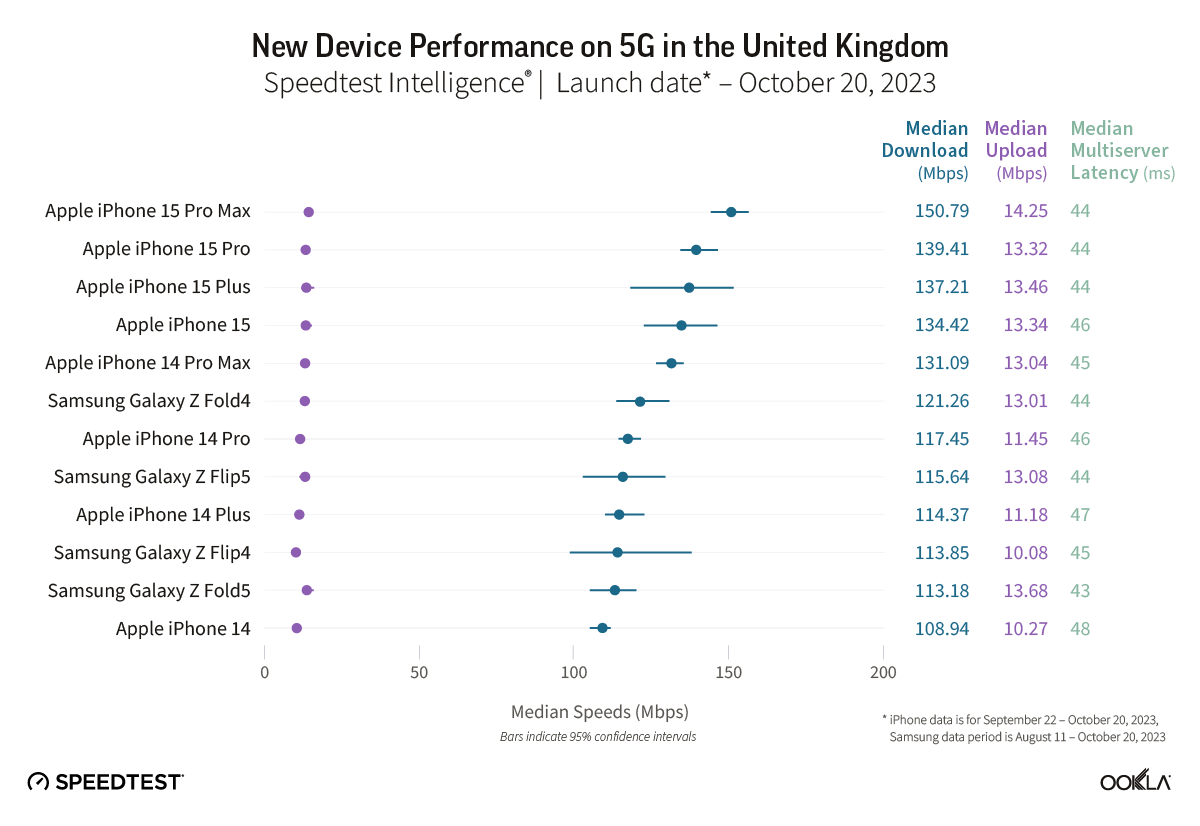
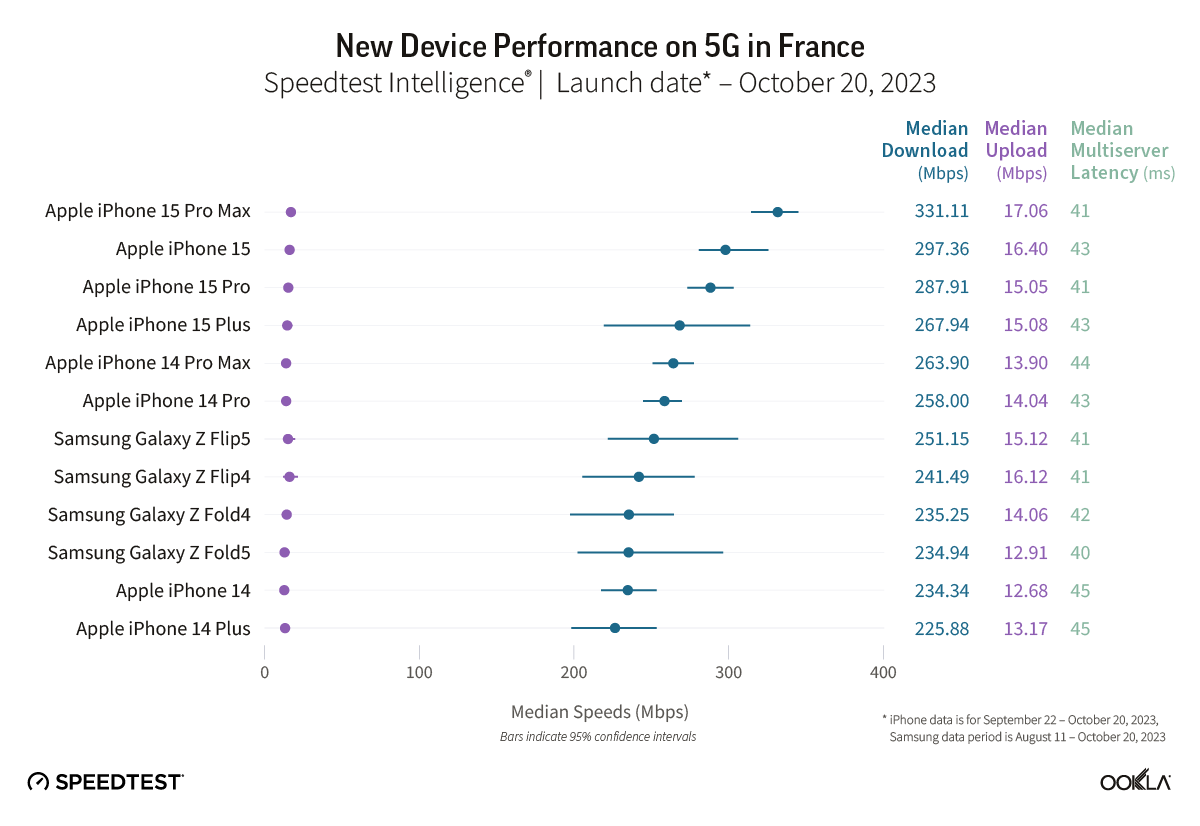
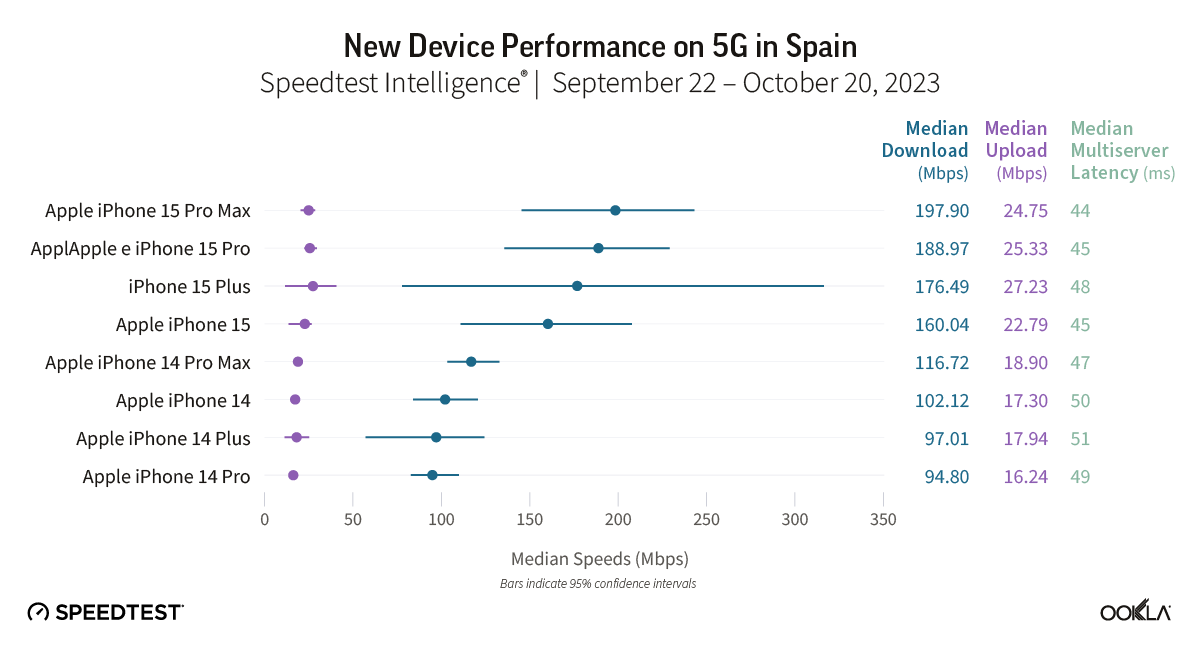
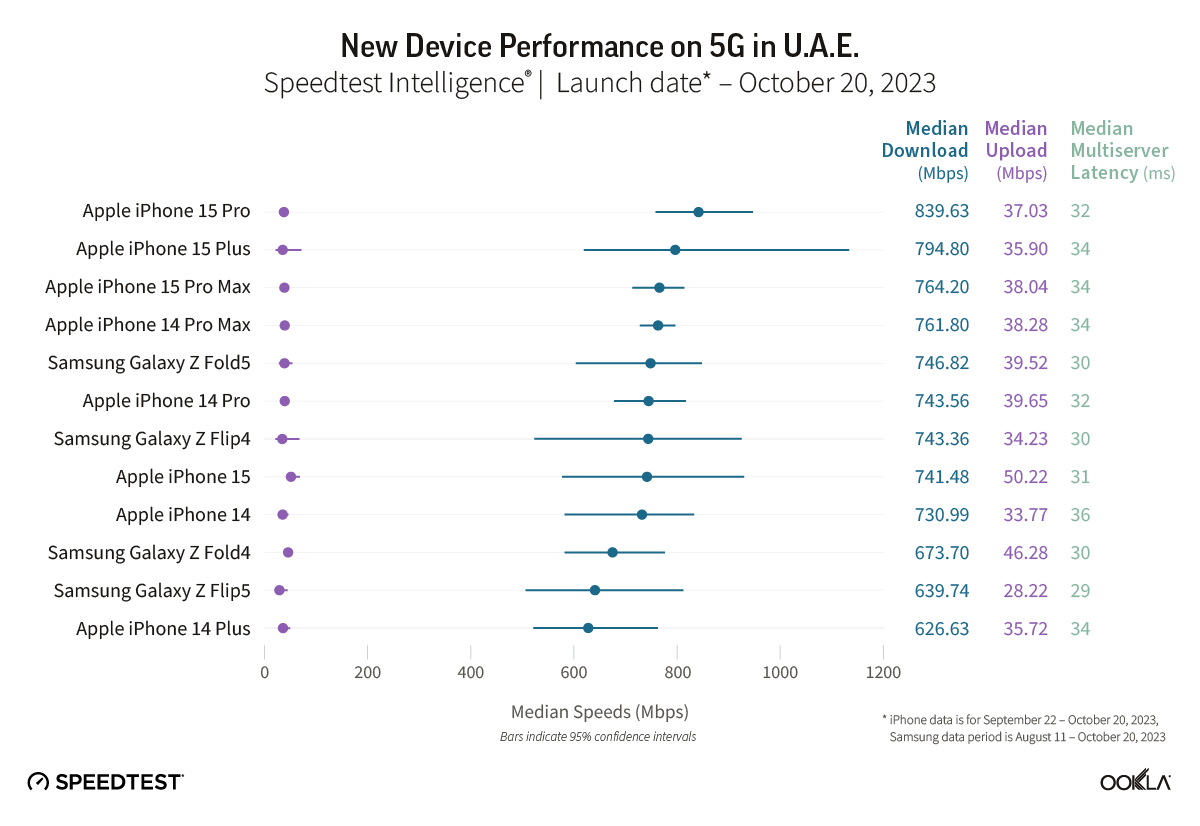
We got an early look at the iPhone 15 Pro Max cellular performance from Ookla in October with its Q3 report showing almost 100% faster 4G/5G speeds compared to iPhone 14 Pro Max. Now Ookla has shared a new 5G performance study and iPhone 15 lineup has dominated as the fastest 5G devices around the world.
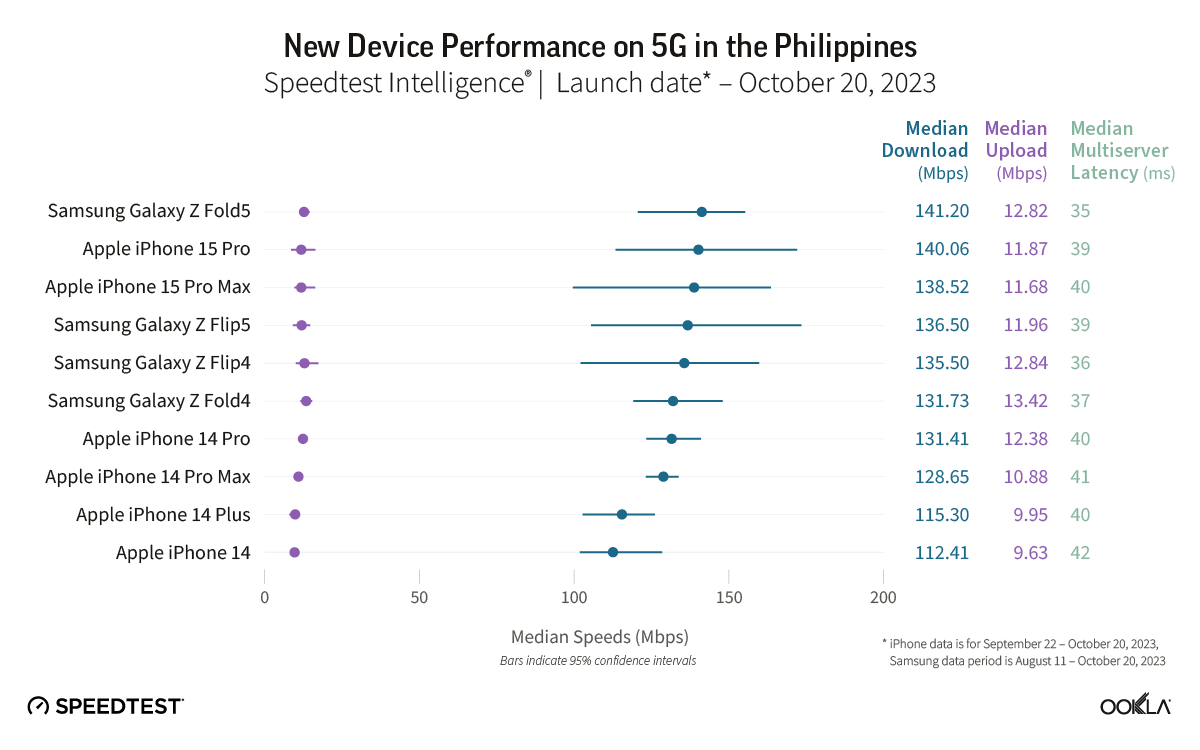
Ookla shared the new report on its blog. Collecting data from 13 countries between September and October for iPhone (August to October for Samsung devices), the results show the iPhone 15 Pro Max or in some cases the iPhone 15 or 15 Plus are the fastest 5G smartphones by a good margin. And an iPhone was the fastest 5G device in all but just one of the 13 countries.
Ookla notes that there are a number of variables when it comes to 5G performance like “5G investments by governments and mobile operators, different 5G spectrum allocations, and mobile 5G plans.”
In the US, the iPhone 15 Pro Max was on top with 285.02 Mbps as the median 5G download speed. The rest of the iPhone 15 family took 2nd, 3rd, and 4th place, with the next closest device being the Samsung Galaxy Z Fold5 with 231.56 Mbps.
5G performance in Canada was lower overall with the iPhone 15 Pro Max at 217.35 Mbps. The 15 Plus and 15 Pro took 2nd and 3rd and the Galaxy Z Fold5 snuck into 4th place with 175.63 Mbps.
In the UK, the new iPhones dominated with the Galaxy Z Fold4 coming in 6th place roughly 20-30 Mbps slower than the modern iPhones’ median 5G download speed.
One interesting result was in Brazil – the iPhone 15 took the top spot over the 15 Pro and Pro Max with 533.32 Mbps. However, the 15 Pro and Pro Max were close being with 523 Mbps.
The only country on the list where an iPhone didn’t have the fastest 5G median download speed was the Philippines. The Galaxy Z Fold5 beat out the iPhone 15 Pro by just 1 Mbps.
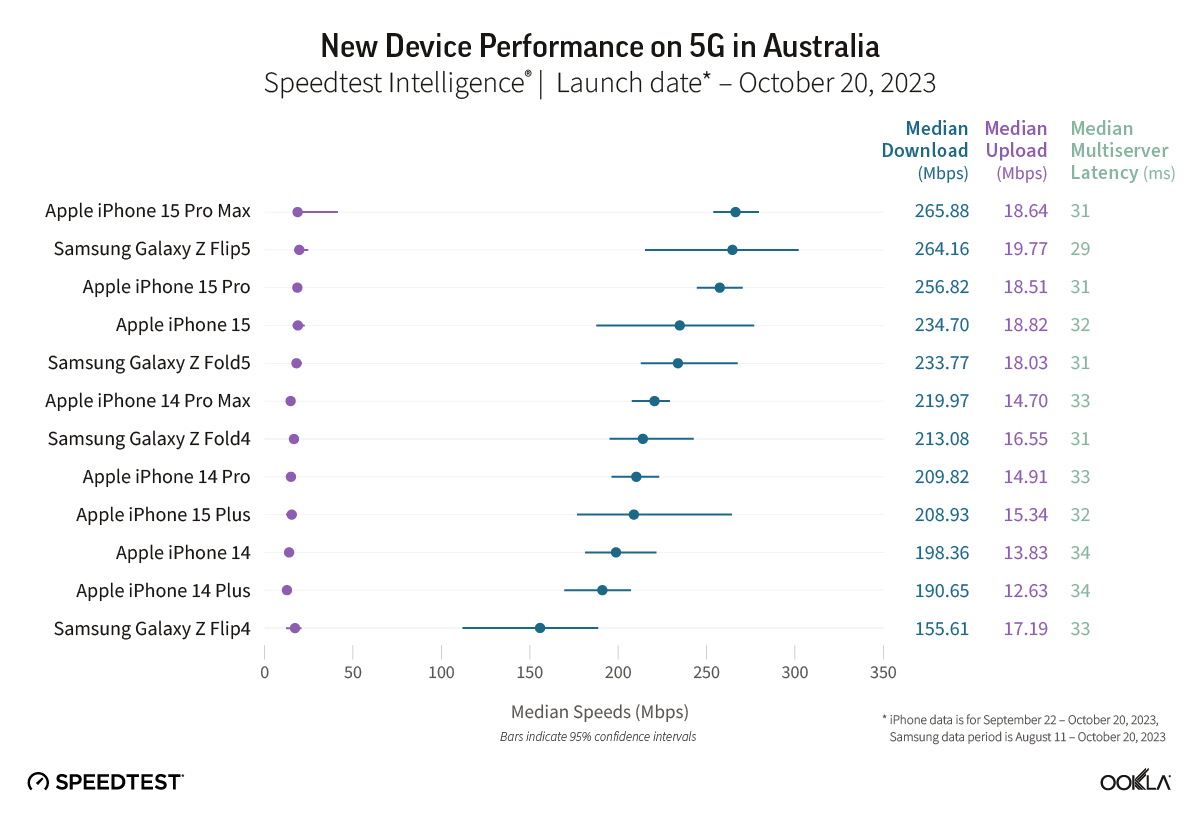
In Australia, two out of four iPhone 15 models showed median 5G download speeds that were significantly faster than their iPhone 14 equivalents during the September 22-October 20, 2023 period. Speedtest Intelligence reveals the iPhone 15 Pro and the iPhone 15 Pro Max both had a 14% better download speed than their prior year counterparts. There was no statistical winner for the iPhone standard model or the iPhone Plus in Australia during this period.
The Galaxy Z Flip5 had a 30% better download speed than the Galaxy Z Flip4 during the August 11-October 20, 2023 period in Australia, while there was no statistical winner for the Galaxy Z Fold.
Recommendation: Depending on your model of choice, only half the devices surveyed merit an upgrade based on performance alone in Australia.
Other Countries are:
Check out the full Ookla report on iPhone 15 5G performance against other devices for more details.
Apple’s proud boast that the entire Scary Fast event was shot on the iPhone 15 Pro Max has lead to a lot of discussion and debate about what that really means, and whether or not it’s a big deal.
There are those suggesting it really does mean the camera is something special, while other are suggesting that it’s at best meaningless, and at worst a cheat …
The Verge’s Jess Weatherbed was one of the naysayers.
Still images and a video reveal that (unsurprisingly) a great deal of fancy equipment — from drones, gimbals, dollies, industrial set lighting, and other recording accessories — is still required to make iPhone footage look this good […]
It’s a neat way to promote the recording quality of iPhone cameras, but it’s not like everyday folks can recreate these kinds of results at home unless they happen to own a shedload of ludicrously expensive equipment. The gear shown in the “Scary Fast” behind-the-scenes footage is fairly standard for big studio productions, but Apple’s implication with these so-called “shot on iPhone” promotions is that anyone can do it if only they buy the newest iPhone.
I saw a few folks mocking Apple for this on Mastodon and Threads, too. This is ridiculous. Do these people think that previous Apple keynote films were shot with just a single camera person wielding something like a $40K RED cinema camera and no crew, no lighting, no cranes? That the iPhone “needs help” that traditional cinema cameras do not? I mean, guess what, they used professional microphones too.
The whole point is that an iPhone 15 Pro camera is so good that it can fit right in on a high-budget commercial film shoot, and produce world-class results. There’s no implication that a casual user can get results like this by just hitting the shutter button in the iPhone Camera app.
Personally, I fall somewhere between the two views.
There’s one cheat Apple didn’t use
First, there is one cheat that is often used on ‘Shot on iPhone’ video footage, and that’s the use of high-end lenses.
You can buy adapters that allow you to use either DSLR or even full-on cinema lenses with iPhones. While those still have to go through the built-in lenses, of course, they do allow you to achieve things that simply cannot be achieved with the built-in lenses, like anamorphic perspectives and really shallow depth of field (DoF).
Since Apple showed us behind-the-scenes footage, and we saw no sign of external lenses, we can be reasonably confident that the company didn’t use that particular cheat.
But set control is a very good workaround
Very often, you want shallow DoF because there are distractions in the background. When you or I are filming on the street, or in a public area, there are other people around, trash cans, litter, all kinds of distracting elements.
A big-budget production, in contrast, has complete control of the set. You can either build the background you need, or simply take complete control of it.
Clear out all the people, ensure there’s nothing untidy to clutter up the scene, add a bit of dry ice, and voila: a setting in which everything being in focus is just fine.
Lighting is everything
When I introduced a friend to studio photography, he was amazed that camera settings were set-and-forget. Manual mode, ISO 100, f/11, 1/125th, done.
All the control is achieved with the lights. High-key, low-key, upbeat, moody, colorful, monochromatic, background visible, background invisible – lighting is the route to achieving the exact look you want.
The same is true with video. But more than this, studio or cinema lighting enables you to overcome weaknesses in a sensor. Almost any modern camera phone does just fine in bright light; it’s in low-light conditions that we see the difference between a high-end sensor and a mediocre one. Throw in the kind of lighting rigs we see in the BTS video and it’s no surprise that the iPhone sensor can cope.
Now, you might argue that this was a Halloween theme, and a lot of it was pretty dimly lit – and that’s true. But the presenters are very well-lit indeed, and it’s them we’re looking at. If we turn our attention to the low-lit background, that has nothing like the same clarity or sharpness. Those areas are as muddy and noisy as we’d expect from low-light filmed with a smartphone sensor (and bear in mind this is the result after professional editors have done their very best to clean it up):
Camera angles, movement, and transitions do a lot
The other factor to bear in mind is that a lot of heavy lifting was done by all the rest of the kit we got to see in the BTS videos. Dollies, jibs, gimbals, drones, you name it.
Plus some absolutely superb editing, with Apple’s trademark transitions.
The result was a lot of camera movement, a lot of angles, a lot of fast-paced transitions to capture our attention. So we don’t have much time to take in the wider framing and notice the noise and muddiness in the background areas.
Is Apple pulling a fast one?
The debate essentially comes down to whether Apple is trying to give the impression that the iPhone 15 Pro Max camera is so good that anyone can get these types of results.
There are those who say: No, of course not. The very fact that Apple chose to share the BTS video acknowledges that you need all the extra kit to get these results. You’d use exactly the same additional kit if you were shooting with Arri movie cameras.
That much is true. But … you could take your Alexa Mini into an ordinary room, partly lit by window light alone, without all those fancy lighting rigs, and still get very good results. The results from the iPhone wouldn’t even come close. And it’s that latter situation where most of us would find ourselves shooting.
So while Apple does acknowledge that it used movie-grade kit, at the same time the implied message is ‘See? The iPhone can get similar results to movie cameras’ – when that is, in most circumstances, very much not the case.
You decide
Ultimately, this comes down to opinion. What Apple did was real, and used exactly the same kit it has used with cinema cameras in the past. At the the same time, those are the least-challenging conditions for any camera – and there are a lot of weaknesses in the images that simply flashed past unnoticed.
iPhone 15 and 15 Plus are Apple’s latest non-pro smartphones that come with a number of new features. But are they worth the upgrade if you have an iPhone 13? Follow along for an in-depth look at the iPhone 13 vs 15 for everything that’s changed.
Screen sizes and design
The screen sizes between the iPhone 13 and iPhone 15 remain the same at 6.1 inches. However, the 15 Plus offers a 6.7-inch option that wasn’t available with the iPhone 13 lineup without stepping up to the 13 Pro Max.
New with the iPhone 15 displays is the Dynamic Island and an outdoor brightness of up to 2000 nits.
Here’s the full look at the display specs for iPhone 13 vs iPhone 15:
The bezels on the iPhone 15 are also slimmer than the 13, which is what allows the very slight increase in pixels.
Size, weight, design
Overall, the physical design of the iPhone 15 remains very similar to the 13, but Apple has given the 15 more rounded edges for a more comfortable feel.
And as mentioned above, you’ve now got the larger iPhone 15 Plus option.
For size, weight, and materials, here’s iPhone 13 vs 15:
Of course, the new iPhones also come in new colors.
Performance – A16 vs A15 Bionic
Here’s a breakdown of the iPhone 13 vs iPhone 15 chip specs:
Both the A15 and A16 Bionic are powerful enough for almost everyone. But GeekBench offers a look at the performance difference between the A15 and A16 Bionic.
16% faster single-core score
21% faster multi-core score
29% faster GPU
Battery life
When it comes to battery life, the iPhone 15 has one hour longer battery for video playback than the 13 and 5 hours longer for audio playback.
The iPhone 15 Plus offers 7 hours longer video use and 25 hours more audio than iPhone 13.
iPhone 13 vs 15 cameras
Rear cameras
iPhone 15 and 15 Plus come with a 48MP main rear camera, next-gen portrait with Focus and Depth Control, Smart HDR 5, and more.
The iPhone 15/Plus main camera also has more powerful sensors and supports shooting both 24 and 48MP “super-high-resolution photos.”
Video recording
The main new feature for video recording with the iPhone 15/Plus compared to iPhone 13 is Action mode.
The other new video features this year are reserved for the iPhone 15 Pro and Pro Max.
Selfie camera
Apple’s TrueDepth front camera on the iPhone 15 gets a mix of upgrades found on the main rear camera.
iPhone 13 vs 15 I/O
The major change for iPhone 15 I/O is the switch from Lightning to USB-C.
Unfortunately, it’s only the 15 Pro and Pro Max that offer much faster transfer speeds with USB 3 support at up to 10Gbps. The 15 and 15 Plus have USB 2 speeds up to 480Mbps.
Two more differences between the iPhone 15 vs 13 include Bluetooth and UWB upgrades.
Whether the new iPhone 15 devices will support Qi2, Apple is saying yes but it’s a bit confusing.
So it’s also unclear if iPhone 13 will support Qi2.
Safety
iPhone 15 has two more advanced safety features than iPhone 13 Pro:
iPhone 15 colors
iPhone 15 and 15 Plus come in these five colors:
Black
Blue
Green
Yellow
Pink
Storage and pricing
iPhone 15/Plus comes in these storage options:
128GB – $799 / $899
256GB – $899 / $999
512GB – $1,099 / $1,199
What’s in the box?
iPhone 15/Plus comes with the iPhone and a USB-C cable in the box.
If you need a power adapter, go with at least a 20W so you get fast charging for your iPhone.
iPhone 13 vs 15: Is it worth upgrading?
The iPhone 15 and 15 Plus are fantastic smartphones, but whether upgrading from the 13 is worth it for you will depend on how you want to use your iPhone and what features you find important.
Reasons to consider upgrading to iPhone 15 or 15 Plus:
More powerful and capable cameras
Dynamic Island
USB-C
Faster chip and more powerful GPU for mobile gaming
Crash Detection and Roadside assistance via satellite
On the iPhone 15 and iPhone 15 Plus, Apple finally got rid of the Lightning port and replaced it with USB-C. This opens up a whole new world of convenience of connecting accessories and peripherals. The iPhone 15 Pro and iPhone 15 Pro Max go one step further, as the USB-C port on the pro models supports USB-3 speeds, enabling up to 10 Gbps data transfer speeds.
USB-C makes it easy to connect displays, external storage, cameras, and charge using the same cable as all your other devices. Here’s what you can do with your new iPhone and its shiny new port.
Why did Apple change from Lightning?
Apple was fully invested in Lightning port ecosystem on the iPhone. However, it began adopting USB-C across Mac and iPad models since 2015 as a way to modernize PC connectivity. USB-C is versatile, carrying power and data with the same connector. And USB-4 / Thunderbolt offers even higher data transfer speeds.
At the same time, USB-C was becoming increasingly popular on the Android side of the smartphone market. But Apple stuck with Lightning on iPhone, partly because they were still stung from the backlash of 30-pin -> Lightning transition that happened more than a decade ago.
The forcing factor for Apple was the EU commission, who have passed legislation to reduce e-waste by enforcing USB-C as the universal connector for phones. That would mean Apple would at least have to make a special model of iPhone for the European market. That brings its own complications. Instead, Apple chose to just adopt USB-C across the board … and apart from the frustration of customers having to change out all their existing now-defunct Lightning cables, that brings a lot of benefits.
Universal USB-C Charging
Now that you have an iPhone 15, you are probably close to being able to use the same single cable to charge all of your devices. Almost all iPads have a USB-C port, and all Macs have been sporting USB-C for a decade. The newest Macs come with Apple’s MagSafe charger, but they can also be charged by plugging in to one of their USB-C ports too. The latest-generation Apple TV comes with a USB-C remote, and Apple just released new AirPods Pro with a USB-C charging case.
Apple sells its own USB-C charge cables, and the iPhone comes with a nice quality woven cable in the box itself. Unlike Lightning, USB-C is not proprietary. To charge your Apple gear, you can use any USB-C charging cable or accessory on the market. That includes cheaper USB-C cables, and USB-C cables of different styles and lengths. Anker has a very convenient dual 47 watt USB-C power adapter, for example.
To charge your iPhone at full speed, you want to use a 20-watt or 30-watt power adapter. You can safely use a higher wattage power adapter like the one that comes with your MacBook; the phone will automatically manage the power. Learn more about fast-charging iPhone 15 here.
Charge other devices with your iPhone 15 battery
Another cool angle of the USB-C charging story is that you can now use the iPhone to charge other accessories. The iPhone 15 can accept up to 27 watts through the USB-C port, but itself can also output about 4.5 watts. (Lightning could only manage a measly 0.3watts.)
This means you can actually use your spare iPhone battery to power and charge connected accessories. If your AirPods are running low, in a pinch, you can plug them into your phone and your phone will top up the juice in your AirPods case. You could even top up the battery of another person’s iPhone — but just be aware it will take a while.
Easily connect to external displays
With Lightning, you could only connect to external displays via a clunky dongle. With USB-C on iPhone 15, you can output to a screen directly. Use a USB-C to HDMI cable and show your iPhone screen on a 4K TV or monitor, with screen mirroring. If you are watching a movie in a video streaming service app, the film will automatically fill the TV dimensions with playback controls on the touch screen. Easily show off your photo library or conduct a presentation with Keynote by just plugging your phone directly into a projector.
One of the use cases Apple is pushing is positioning iPhone as a portable games console. Using the power of the A17 Pro chip inside, iPhone 15 Pro can run some top-end games with high graphical fidelity. Pair an Xbox or PlayStation game controller, connect your phone to a TV, and start gaming. The Apple USB-C Digital AV adapter is a good choice for this use case, as it allows for HDMI, power output for continuous charging and passthrough USB-C in one convenient dongle.
Expand your local storage with portable USB-C hard drives and SD cards
Connect a USB-C hard drive or SD card reader and browse files directly using the Files app on iPhone. If you go on holiday and take a dedicated camera with you, you can import photos directly from the SD card into your iPhone’s photo library. Then, empty the SD card and keep shooting while you edit and upload the pictures you’ve taken on your phone’s big touchscreen.
The iPhone 15 Pro Camera app allows you to record ProRes 4K at 60 FPS video directly to USB-3 storage. ProRes is uncompressed and the file sizes are huge, consuming gigabytes per minute of recording. But pairing your iPhone with a 1 TB portable SSD, you can record for a while before running out of space. This requires a USB-3 cable (not simply charge cable) to take advantage of the fast 10Gbps transfer speeds possible through the iPhone 15 Pro’s port.
Connect hardware keyboards and wired internet
Sometimes, wireless doesn’t cut it — and you just need to plug in. USB-C on iPhone supports almost any basic accessory you can think of, without the need for special drivers or additional configuration. It’s all plug and play. That means you can connect a hardware keyboard will just work.
Or if you are podcasting on the road, you can record using a mini USB-C microphone. Another possibility is wired internet, using a USB-C to Ethernet adapter. And if you have a MIDI keyboard, you can make a song on the go with an app like GarageBand.
Wired headphones that work with your phone and computer
Since Apple dropped the headphone jack, much of the world has moved on to using Bluetooth wireless headphones like AirPods. But if you still prefer to plug in with a wire, using wired headphones with iPhone has been an inconvenient affair. Lightning earbuds worked with your phone, but nothing else.
Now, it’s all much simpler. iPhone 15 works with any USB-C headphones, including Apple’s new USB-C EarPods. These headphones will work with any computer with a USB-C port, so you can finally use the same wired headphones across your phone, iPad and Mac. An increasing number of high-end headphones and speakers also rely on USB-C connectivity these days.
Connect multi-port hubs
USB-C is very flexible and allows for data and power to travel over the same port. This means you can carry a single dongle, which is a multi-port hub comprising all sorts of IO. These are super convenient as iPad and Mac accessories, and now work with the iPhone too.
For example, this Anker 5-in-1 hub will work with the USB-3 USB-C port on iPhone 15 Pro and enable you to connect to external displays, connect to power, plug in USB accessories and an external display all at the same time.
The only thing you have to keep in mind is that the iPhone can output power to the hub at 4.5 watts. iPad and Mac can offer much higher bus-powered wattage, so if you are using them with the iPhone, you may need to also plug in an external power source.
Some of these capabilities were previously possible with Lightning but necessitated large, clunky, and special purpose adapters for each use case. USB-C is standards-based which means anything you buy will also work with other devices too. You don’t need to carry a special Lightning SD card reader anymore; the same USB-C peripheral will work just as well with your iPhone, iPad, Mac and any Windows PC or Android devices in the family as well. The universal connector life is finally here.
new features, it fixes a bug that had been causing some iPhone models (especially the iPhone 15 Pro) to overheat more than usual. However, iOS 17.0.3 also comes with two important security fixes, including a fix for a breach that had been actively exploited.
iOS 17.0.3 patches two exploits
According to a document published by Apple on its website, iOS 17.0.3 and iPadOS 17.0.3 fix a Kernel exploit found in versions prior to iOS 16.6. The company explains that an attacker with access to the device could elevate their privileges to run malicious code. “The issue was addressed with improved checks,” Apple details.
But that’s not the only exploit fixed by today’s update. It also fixes a WebRTC exploit where attackers could use a buffer overflow to execute code arbitrarily. The discovery of the exploit was attributed to Bugzilla, a bug monitoring platform developed by the Mozilla Project.
iOS 17.0.3 and iPadOS 17.0.3 are available for every iPhone and iPad model compatible with iOS 17 and iPadOS 17. This includes iPhone XR and later, and every iPad with an A10X chip or later. Keeping your device up-to-date is important to keep it safe from hackers and malware.
Here’s how to update your iPhone or iPad:
Open the Settings app
Tap the General menu
Select Software Update
Wait until the update shows up and tap Update Now
We recommend backing up your device before installing software updates.