Tablets have always allowed one to lock the screen orientation to either portrait or landscape, but the latter has not been possible on smartphones, at least not those made by Samsung. But did you know the ability to lock screen orientation to landscape is available on the Galaxy Note 8, and any device that runs the Samsung Experience 8.5 or newer interface?
That’s right: You can finally use your Samsung phone in landscape mode and not have to deal with the orientation flipping back to portrait just because you turn the phone just a tad sideways. Again, this feature is only available on Samsung devices running at least Samsung Experience 8.5; it will be present on newer versions as well, including Samsung Experience 9.0 that will debut on Android 8.0 Oreo.
So, how does one lock screen orientation to landscape on the Galaxy Note 8 and other Samsung phones? Just follow the steps below to see how it’s done.
How to lock screen orientation to landscape on the Galaxy Note 8
Step 1: Access the notification shade by swiping down from the top of the screen, then swipe again to access the quick toggles.
Step 2: Here, tap the screen rotation toggle repeatedly till it says Auto Rotate.
Step 3: Then, rotate the phone to make the screen flip to landscape orientation. Then, bring up the toggles again and tap the screen rotation toggle till it says Landscape.
That’s it. Your phone’s screen will now continue to work in landscape mode (at least in apps and menus that support it; the home screen, for example, only works in portrait) until you re-enable auto rotation, turn the phone to portrait orientation, then tap the rotation toggle in the notification shade till it says Portrait.
We have three new iPhones, but if you judge by all the news and talk, you would think Apple had just unveiled one: the Apple iPhone X.
The new iPhone X is certainly the one that has everyone’s attention with its new edge-to-edge screen and compact size, but with a prohibitive starting price of $1,000 for the base 64GB model, you might wonder if there is an alternative.
Of course, there is! In fact, the iPhone X is late to the bezel-less screen game, and we round up 5 great Android options for a lower price, but with a similarly great design and cameras. With no further ado, here is our selection of the iPhone X bezel-less alternatives.
The Samsung Galaxy S8 and S8 Plus were among the first phones in the “bezel-less” trend. They have one of the finest Super AMOLED screens out there with lively, vivid colors. The Note 8 is just like the other two, but bigger and with the accurate S Pen on board that allows you to quickly take notes or get creative with drawings.
The Galaxy S8 in particular is available at nearly half the price of the iPhone X and the other two are also great alternatives. One big downside with them? The fingerprint scanner. It’s positioned weirdly to the side of the camera, where it is hard to reach and you will often smudge the camera instead of the finger reader.
Google’s new Pixel 2 XL comes with one glaring issue: an OLED screen that gets very bluish once you tilt the phone just slightly, and it can suffer from a ghosting effect, but if you are not pedantic about having the absolute display. the Pixel 2 XL delivers. It’s a stunning phone: it has arguably the best camera ever put in a phone, a clean version of Android that already has the latest update and is guaranteed to be first in line in the future, it has solid battery life and it performs admirably well.
The Essential Phone is a true design gem with its ceramic back and a solid construction. It has an extremely high screen to body ratio with a very distinct, “notch” design where a tiny cutout at the top of the front is made for the front camera. It all blends together nicely when you have the notification bar at the top, or if you have a black screen, but is otherwise noticeable. The Essential Phone lacks branding, runs on a clean version of Android and comes with the promise for timely updates.
The LG V30 is the company’s best phone as of fall 2017. With a 6-inch display and an edge-to-edge display, the V30 is actually a little smaller than the 5.5-inch OnePlus 5 that has a traditional, 16:9 display with bezels on the top and bottom. And that’s quite the achievement. The V30 – unlike Samsung phones – has its fingerprint on the back, below the camera and properly centered, so it’s really easy for your finger to reach it.
The G6 has a 5.7-inch full-screen display, but it lacks some of the V30‘s media capabilities, and has a less refined camera experience. It makes up with a much lower price. It also looks a lot like the V30, though, and features a very sleek glass and metal build.
The bezel-less Huawei Mate 10 Pro features a sleek design and one of the finest cameras on Android. It performs good as well: equipped with Huawei’s own Kirin 970 system chip, this powerful phone is the first around with a neural engine built-in. Battery life is another strong point for the Mate 10 Pro.
The Xiaomi Mi Mix was certainly one of the most interesting products of 2016: in fact, one could argue it was the device that kickstarted the bezel-less design trend. In 2017, we have the much more practical and smaller in size Mi Mix 2 with even less bezel and a more refined look and feel. The Mi Mix 2 features a 6-inch display with an 18:9 aspect ratio, narrower than the wide 17:9 screen on the original Mix. It runs top-grade silicon with the Snapdragon 835 chip on board and comes in three versions: 64GB, 128GB and 256 gigs. The phone also features an improved camera, now with the Sony IMX386 sensor and with 4-axis image stabilization.
A smartphone can have top-of-the-line specs and an affordable price tag but if it’s ugly, no one will buy it. Like it or not, design has a huge impact on consumers’ purchasing decisions. It can make or break a device.
Most of this year’s smartphone announcements have been pretty average-looking. Some are just plain ugly. However, a few devices sporting super sexy designs, which instantly grab your attention, were also released this year. A really great design is something every manufacturer aims for, but rarely manage.
Here are five of the sexiest smartphones we’ve seen this year. What makes them so alluring? Let’s dive in.
Samsung Galaxy S8
Samsung’s phone design made a huge leap forward with the Galaxy S8. The front of the device is gorgeous thanks to its thin bezels and curved display, both of which give off a futuristic vibe. It’s clean and elegant. It also doesn’t have a Samsung logo on top like its predecessor, which no one liked.
The back of the Samsung Galaxy S8 is simple but still eye-catching.
The Galaxy S8 has a premium-feeling metal frame and glass back too. The back of the handset is simple but still eye-catching and features a nicely designed camera sensor, with the flash module and fingerprint scanner to the left and right. The Samsung branding on the device’s rear doesn’t make it any less gorgeous. The back also has curved edges that not only look nice but help with handling.
Samsung’s flagship features four buttons located on its sides. The power button is on the right, sitting right where your thumb naturally rests— at least if you’re right-handed. The volume rocker is on the left side, above the dedicated Bixby button used for launching Samsung’s digital assistant. There’s a SIM card/microSD card slot on top and a headphone jack at the bottom alongside the USB Type-C port and speaker.
The device comes in a number of colors, although not all are available in every market. You can get it in Midnight Black, Coral Blue, Arctic Silver, Maple Gold, Rose Pink, or my favorite, Orchid Gray.
The Galaxy S8 is a stunning device, but it’s not perfect — no smartphone is. I think the overall design could be improved by placing the fingerprint scanner below the camera sensor, instead of next to it. This would look better and make the scanner a little easier to reach.
Huawei Mate 10
Huawei’s latest smartphone is a stunner and looks way better than its predecessor. It features a bezel-less design, but unlike the Galaxy S8, has the fingerprint scanner on the front. Whether that’s good or bad depends on who you ask, but what’s important here is that the scanner blends in with the overall design and looks really nice.
What makes the Huawei Mate 10 stand out from the crowd is the reflective stripe that runs horizontally across the cameras.
The Mate 10’s glass back is what makes it one of the most beautiful smartphones released this year. It has curved sides and a vertically positioned dual-camera setup along with a flash module and a Huawei logo that’s located on the bottom. The reflective stripe that runs horizontally across the cameras gives the device more character. It’s a simple design element which really improves the overall look of the Mate 10 and makes it instantly recognizable.
The power and volume control buttons are all located on the right side of the device and the SIM card slot can be found on the left. There’s a USB Type-C port at the bottom alongside a speaker, while the headphone jack is located on the top of the smartphone. There are four colors to choose from, as the Mate 10 comes in Black, Champagne Gold, Pink Gold, and Mocha Brown (which is the best one, in my opinion). You can take a closer look at the Mate 10 in the images below alongside the Mate 10 Pro.
The Mate 10 is simple and elegant, but also very stylish thanks to that gorgeous stripe. It has a little bit of everything and doesn’t take things too far, so to speak. Its design is universal and could be the key factor that will allow it to outsell its predecessor globally.
LG V30
The LG V30 doesn’t have a design “X factor” that makes it stand out from the crowd but is nevertheless one of the most beautiful handsets on the market.
The LG V30 doesn’t try to be too fancy or dazzle you with some crazy design features but instead just sticks to the basics.
It doesn’t try to dazzle you with crazy design features, instead sticking to the basics. It has a bezel-less design with a very clean, branding-free front. The device comes in four color options: Aurora Black, Cloud Silver, Moroccan Blue, and Lavender Violet. No matter which one you choose, the front of the device is always black. This makes it look even cleaner, as the camera, speaker, and proximity sensor aren’t as visible as they would be on a white smartphone.
The V30 has a metal frame and a simple yet stylish glass back. The dual-camera setup is more minimal than on a lot of other handsets but — just like the fingerprint scanner below it — stands out due to the rim that surrounds it. The back also has a flash module to the right of the cameras, the V30 and LG branding, and curved edges for a great feel in the hand.
Looking at the sides, you’ll find the SIM card slot on the right and two buttons for volume control on the left. The power button is on the back and doubles as a fingerprint scanner, which is something that takes getting used to. The headphone jack is on top, while the speaker and USB Type-C port are located on the bottom edge.
There’s not really anything bad I could say about the V30’s design; it’s impressive in every way. One thing worth pointing is that although the glass back looks and feel premium, it can be a fingerprint magnet. So to keep it looking clean as the first time you took it out of the box, you’ll have to wipe it down often.
Honor 9
It might not have a bezel-less design like the rest of the devices on this list, but the Honor 9 is still one hell of a sexy smartphone.
The Honor 9 may not have a bezel-less design like the rest of the devices on this list, but it’s still a sexy smartphone. Its front is simple without any over-the-top design elements, as it features a camera, speaker, and proximity sensor above the display, and a home button/fingerprint scanner along with two capacitive buttons below it. The great thing about the navigation keys is their minimal design, both marked with a small dot for a cleaner look.
Just like the Mate 10, it’s the glass back that got the Honor 9 a place on this list. Its design is minimal and eye-catching. There are two small horizontally positioned camera sensors in the upper left corner along with a flash module, and the Honor branding sits a bit further down.
The back has curved edges and is very clean, which is always a good thing in my opinion. A clean design can sometimes be a bit boring, but that’s not the case with the Honor 9 mainly due to its light-refracting composition that enables some enthralling reflective patterns. Sure, its shiny back might not be to everyone’s taste, but it definitely gives a boldness to the phone’s minimalistic look. In terms of colors, you can get it in Blue, Amber Gold, Gray, and Black.
The smartphone sports a metal frame that makes it feel sturdy in the hand and has the power as well as volume buttons on the right edge. The SIM/microSD tray is on the left. An IR blaster can be found on the top. The bottom edge features a speaker, USB Type-C port, and 3.5 mm headphone jack.
Overall, the Honor 9 offers the best of both worlds in terms of design. It keeps things simple, but also comes with a shiny glass back to prevent it from looking boring like most recent smartphones.
HTC U11 Plus
The U11 Plus is without a doubt the most beautiful smartphone HTC has ever made. I mean, just look at it.
The front of the device looks very minimalistic thanks to the thin bezels surrounding the screen and the lack of HTC’s branding. The back is also quite simple, as it only sports a camera sensor, a flash module, the company’s logo, and a fingerprint scanner that blends in nicely and doesn’t stand out too much.
However, the back does have a liquid glass surface already seen on the HTC U11that’s quite reflective and gives the device more character. It’s very eye-catching and is the main reason that makes the U11 Plus one of the sexiest smartphones in the world.
The Translucent Black version of the U11 Plus is gorgeous and unique, as it reveals parts of the internal components.
The HTC U11 Plus comes in Ceramic Black, Amazing Silver, and the gorgeous Translucent Black that stands out from the crowd. What makes it unique is its translucent glass back that reveals various internal components. It’s a bold design feature that makes the device instantly recognizable.
The smartphone sports a metal frame for a premium look and feel and a textured power button that’s located on the right side, below the volume rocker.
The HTC U11 Plus is a real stunner, and there’s not a lot of bad things to say about it. The only thing worth mentioning is that although the back is extremely sexy, it’s also hungry for fingerprints — just like the majority of glass smartphones.
Conclusion
Each smartphone on this list is unique in terms of design, but they all have a couple of things in common. The first is that they are made from a combination of metal and glass, which is clearly the trend this year. Which doesn’t mean that smartphones with full metal bodies aren’t sexy anymore; metal handsets can look just as gorgeous and premium as those made of glass — just look at the OnePlus 5. However, a glass design is more eye-catching, especially if it has a reflective mirror finish and is paired with a vibrant color.
But a smartphone with a glass back does have a major drawback: it’s a fingerprint magnet. This means that after using it for a while, it won’t look anywhere near as gorgeous as when you took it out of the box for the first time. You’ll have it wipe it down often to keep it looking clean, which is a problem you won’t experience with a metal device. Glass phones are also much more likely to crack if dropped, but I guess that’s the price we pay for fashion.
The other thing these smartphones have in common is that what makes them sexy is a combination of simplicity and something a little bit extra. For example, the Galaxy S8 has a curved screen, the Mate 10 has a beautiful stripe that runs horizontally across the cameras, while the U11 Plus sports a reflective liquid glass surface and is available with a translucent back.
Compared to last month, several products have been added to our best Android tablets and 2-in-1s list, including Amazon’s new Fire HD 10 tablet, and the Pixelbook, Google’s newest hybrid which was announced next to the company’s new Pixel phones. The Amazon Fire HD 10 tablet is available for purchase as we speak, while the Pixelbook is up for pre-order at the time, but will become available soon. There are quite a few of additional, interesting products listed down below, so read on if you’re interested.
10. Google Pixel C
The Google Pixel C is Google’s very own tablet which was announced back in October 2015. Even though it has been two years since this tablet was announced, it’s still relevant due to the fact how slow the tablet market is these days, and after all, it’s still a rather good tablet, though it’s still quite pricey, it costs $499 over at Amazon at the moment. The device is made out of metal, it sports a 10.2-inch 2560 x 1800 display, and in addition to that, you’re also getting 3GB of RAM and 32GB / 64GB of native storage here. NVIDIA’s Tegra X1 quad-core SoC fuels this device, and Android 6.0.1 Marshmallow comes pre-installed on it, though you will be offered an update to Android 8.0 Oreo when you start using it, as Google did release the latest version of Android for this device.
The Sony Xperia Z4 Tablet is definitely not one of the newer tablets out there, but it’s still quite compelling if you’re looking for a sleek-looking tablet, and are not really looking to get the newest product out there. This tablet is made out of metal and glass, while it sports a 10.1-inch 2560 x 1600 display. The Xperia Z4 Tablet comes with Android 5.0 Lollipop out of the box, but it is upgradeable to Android 7.0 Nougat. This tablet comes in both Wi-Fi and 4G LTE variants, though only the 4G LTE model seems to be available for purchase from Amazon.
The Huawei MediaPad M3 tablet was announced back in September last year, and it’s actually a rather solid offering by this China-based company. The device is made out of metal, and it sports a front-facing fingerprint scanner which doubles as a home key. The MediaPad M3 sports an 8.4-inch 2560 x 1600 IPS LCD display, while it is fueled by the Kirin 950 64-bit octa-core processor. This tablet sports an 8-megapixel camera on both its front and back sides, while Android 6.0 Marshmallow comes pre-installed on it, though you’ll find Emotion UI (EMUI) on top of it. The 32GB storage variant of this tablet is currently priced at $299 at Amazon, while the 64GB storage model costs $347.87.
The Amazon Fire HD 10 tablet was announced in September 2017, and it actually comes in two variants, one variant sports 32GB of storage, while the other one comes with 64GB of native storage. This tablet sports a 10.1-inch 1920 x 1200 display, while you’re also getting 2GB of RAM here. Dolby audio is also a part of the package here, and those of you who are interested in getting the tablet, should also know that it is fueled by a quad-core processor clocked at 1.8GHz. The Amazon Fire HD 10 tablet is currently available over at Amazon in Black, Marine Blue and Punch Red color variants. The 32GB storage model of the Amazon FIre HD 10 is priced at $149.99, while the 64GB storage variant costs $189.99.
The Galaxy Tab S2 might not be the latest or greatest ‘Galaxy Tab S’ tablet at the moment, but it’s considerably more affordable than the Galaxy Tab S3. This tablet comes in both 8 and 9.7-inch variants, while it sports 3GB of RAM. The device comes with a front-facing fingerprint scanner / home key, and it is currently available from Amazon, well, at least its Wi-Fi models are, for both 8 and 9.7-inch tablets. The Galaxy Tab S3 is made out of metal, and it there are two capacitive keys included on its front side, next to the tablet’s home key. The Galaxy Tab S2 comes in Black, Gold and White color variants.
The ASUS Chromebook Flip C302 is one of the newer Chromebooks out there. This device sports a 12.5-inch fullHD (1920 x 1080) display, while it comes with 4GB of RAM. The device is made out of metal, while it is fueled by the Intel Core M3 processor. This Chromebook, much like every other Chromebook which got announced in 2017, is capable of running Android apps, and it is currently priced at $459.99.
The Lenovo Yoga Book sports a 10.1-inch 1920 x 1200 display, while this tablet comes with 4GB of RAM and 64GB of internal storage. Intel’s Atom X5-Z8550 SoC fuels the Lenovo Yoga Book, while Android 6.0 Marshmallow comes pre-installed on this device. Those of you who are interested in getting this tablet should know that it is currently discounted by 32 percent over at Amazon, as it costs $339.99, it is quite a bit more affordable than it originally was.
The Samsung Chromebook Plus and Pro are the two Chromebooks Samsung introduced earlier this year. The Samsung Chromebook Pro is the more powerful of the two, it comes with a fairly more powerful processor, while both devices can run Android apps without a problem, if that’s something you’re looking for. It’s also worth noting that both of these devices come with a touchscreen, so you can, essentially, use them as tablets as well. The Samsung Chromebook Plus can be purchased for $437, while the Samsung Chromebook Pro costs $499.
The Google Pixelbook is Google’s newest Chromebook which was announced next to the company’s Pixel phones. This device is made out of metal, and it is actually quite powerful. The device is fueled by either the Intel Core i5 or Core i7 SoC (two variants are available), while it comes with 8GB or 16GB of RAM and 128GB / 512GB of native storage. The Pixelbook also comes with a stylus, and its display is touch sensitive, so it can be used as a tablet as well. The 8GB RAM model of the device is priced at $1,199 over at Amazon (ships on October 31), while the 16GB RAM model with Core i7 SoC is still not available.
The Galaxy Tab S3 is the most powerful tablet Samsung has to offer at the moment. This tablet is made out of metal, while it sports a front-facing fingerprint scanner. The device sports a 9.7-inch 2048 x 1536 display, 4GB of RAM, and it is fueled by the Snapdragon 820 64-bit quad-core processor. Android 7.0 Nougat comes pre-installed on this tablet, and on top of it, you’ll find Samsung’s custom UI. This tablet comes with an S Pen stylus, and it is currently priced at $498 over at Amazon. The Galaxy Tab S3 is currently one of the more powerful Android-powered tablets out there, if not the most powerful one.
Samsung’s mid-range Galaxy A smartphone family gained fingerprint recognition and Samsung Pay support in its 2016 incarnation, water and dust resistance earlier this year, now gearing up for possibly its biggest upgrade yet in just a few months.
How sweet would it be if you were able to own one of those dazzling “Infinity Displays” without selling a kidney first? Well, we don’t know how much the next-gen Galaxy A5 (2018) and A7 (2018) are supposed to cost, but they’ll definitely end up cheaper than a GS8 or Note 8 outright.
Thanks to the tireless work of the industry’s second most prolific leaker, who got access to another top-secret set of mobile device factory designs, we have a general idea of the A5 (2018) and A7 (2018)’s bezel size.
At a first glance, the display borders here are nowhere near as spectacularly thin as on the Galaxy S8 or Note 8, and the exact rumored dimensions of the two unreleased phones corroborate that gut feeling.
With “only” 6 inches of screen real estate, the Samsung Galaxy A7 (2018) is tipped to measure 159.6 x 75.6 mm, which would be about as tall and slightly wider than the 6.2-inch GS8+. But it’s also extremely close to the measurements of the A7 (2017).
Meanwhile, the A5 (2018) could squeeze a usable screen area of 5.5 inches into a relatively compact 148.8 x 70.5 mm body. That’s not as compact as the 5.8-inch Galaxy S8, but it’s similar to the 5.2-inch A5 (2017).
Interestingly (and excitingly) enough, the Galaxy A3 (2018) is speculated to match the A5 and A7 (2018) in the display resolution department, at 2160 x 1080 pixels, resulting in 18:9 or 2:1 aspect ratios.
Other impressive-sounding features (by mid-range standards) might include 4GB RAM and a brand-new 10nm Exynos 7885 SoC for both the Galaxy A7 (2018) and A5 (2018). Depending on your region, you may be able to buy the two with Snapdragon 660 processing power.
Always On Display functionality, IP68 certification, Samsung Pay, USB Type-C connectivity, 32GB internal storage and, sadly, Android 7.1.1 Nougat software will allegedly wrap up two overall robust spec sheets.
It’s big. It’s heavy. It’s not all that attractive. We love it.
The Samsung Galaxy S8 Active is the best rugged phone you’ll find on the market. Sure, there aren’t that many of them available; however, the Active line time and again rises to the top. The 2017 iteration is not only among the best in rugged and durable phones, but it’s also one of the most compelling packages offered right now.
In the early days of rugged phones we had to contend with less than desirable performance. We traded away sleek and sexy in favor of rough and tumble. If you were a general contractor or plumber in the market for a new phone to take on job sites, you had to choose from ugly and uninspired stuff. Even worse, the phones were a generation or two behind the rest of the pack.
Somewhere over the last few generations, though, Samsung figured out a way to deliver timely hardware in a body that was more sleek. Its Galaxy S Active series of devices, which has been exclusive to AT&T, is a great way to keep up with the Joneses, and have something designed to take moderate abuse.
The Galaxy S7 Active (2016) was a tremendous step forward for the line, and even bested the S7 standard bearer with a bigger battery. As for this year’s model, the S8 Active is another stellar device that delivers best-in-class specifications at its core. Indeed, it’s all Galaxy S8 under the hood.
What we really enjoy about the S8 Active is that it’s all of the good stuff in the Galaxy S8. The Super AMOLED display, excellent camera, Snapdragon 835 processor, 4GB RAM, and 64GB storage are what you expect in top phone in 2017. Also present are USB-C, water and dust resistance, and headphone jack.
When it comes to performance, it’s damn near impossible to get more than what comes in the aforementioned specifications. Yes, you can stack them up on benchmarks and create a pecking order. Moreover, you can also get more memory in other models.
Does that stuff matter to you? We suspect that most people can’t discern the differences in hardware on daily tasks. There’s very little you can throw at a phone like this that will tax it.
We saw no stutters, lags, or performance issues in the Galaxy S8 Active. Everything, from just checking email and messages, to games and always-synchronizing services like Slack and Todoist, went swimmingly.
Be careful in reading too much into these words. Don’t look at the S8 Active as an improvement or enhanced version of the flagship phone. It is, to a degree, a souped-up model in areas. But, what it loses, is everything that makes the Galaxy S8 so sexy. The beautiful body, sleek lines, and all of those premium materials are absent here.
The S8 Active’s screen is flat whereas the Galaxy S8 is curved; its resolution is 2,560 x 1,440 while the flagship offers up 2,960 x 1,440 pixels. The devil is in the details, and that matters to some.
Also, the display is protected by a special film or plastic that is prone to pick up scratches. This is one of the trades you’ll still make when dealing with a rugged phone. The glass is shatter-resistant, and will stand up to drops… but.
The top layer absorbs the scuffs and scratches of life and will show up over time. To us, though, we’ll take that any day. Nothing beats the peace of mind in knowing with almost 100 percent certainty that a dropped phone is going to look okay when we flip it over. Samsung says the S8 Active can withstand a 5-foot drop.
The Galaxy S8 Active is also heavier than its flagship counterpart. In fact, it’s even heavier than the Galaxy Note 8. There’s serious heft to it.
Part of the weight comes in a 4,000mAh battery. Yes, a full 1,000mAh more than the Galaxy S8 and 500mAh more than the Galaxy S8+. This means you’ll end up with plenty of juice left over at the end of the day.
Realistically you could expect to get two days of average use out of the S8 Active. Mileage varies, to be sure, but we’ve come to appreciate this much life and we think you would, too.
In the area of cameras, the S8 Active’s setup is identical to the one in both the Galaxy S7 and Galaxy S8. Specifically, it’s a single 12-megapixel sensor with an f/1.7 aperture. As we, and others, found with this to consistently deliver bright, sharp photos with a great level of detail.
The software is a real winner, too, thanks to a variety of shooting modes such as Selective Focus (DSRL-like bokeh) and Pro (manual settings for shutter speed, focus, and ISO).
Around front, the S8 Active’s selfie-camera is equally solid. The Wide Selfie is a neat trick which lets one snap panoramic-like shots. Samsung’s augmented reality (AR) stickers are similar to what you get in Snapchat and Instagram and make for a fun experience.
One of the other downsides to the Galaxy S Active line, thus far, is that it is exclusive to AT&T. This means you’ll end up with the carrier’s preloaded apps and services. To that end you can look forward to nearly one dozen titles.
You can uninstall or disable most of them, but you’ll have to find a way to hide the others. That is, of course, if you don’t want to see them. If you’re an AT&T fan through and through, you might find value in them. As of the time of this review we understand that T-Mobile may soon offer its own take on the Galaxy S8 Active.
Conclusion
The Samsung Galaxy S8 Active is pricey. With a sticker of $850 it falls on the high end of what smarphone makers command. It’s $100 more than the flagship model and the same cost of the Galaxy S8+ when purchased through AT&T. Go unlocked, though, and the S8 Active could be much more costly by comparison.
We definitely won’t list this phone among the most beautiful or sophisticated designs. It’s downright ugly, boring, and blocky when compared to others. On the other hand, it is better looking than its predecessors. We’re surely not the only ones to appreciate that Samsung left the camouflage off this year’s model.
Don’t purchase the S8 Active strictly on the merit of a larger battery. Do consider it, however, if your needs call for a phone that withstands abuse. Have young children in the house? If they expect to get to play with your device, you’ll want the peace of mind that comes with a shatter-resistant display.
If you’ve grown accustomed to having a rugged phone over the last few years, the S8 Active is a wonderful step up from your older model. A lot of people hold on to their handsets for 18-24 months; this phone is much improved over what was available at that time.
Available for Pre-order starting tomorrow, October 13, Samsung Gear Sport and the Enhanced Gear IconX 2018 are Designed to Help Motivate and Manage Fitness Goals
Samsung Electronics America, Inc. announced today the Gear Sportand Gear IconX 2018 will be available for online preorders starting tomorrow, October 13, with widespread U.S. availability starting October 27. Joining a full suite of Samsung wearables available this holiday season, the Gear Sport is a stylish, robust and 5 ATM water resistant fitness smartwatch with iconic circular bezel and built-in GPS, while the Gear IconX 2018 wireless earbuds are designed for comfort to track fitness goals and enjoy offline music while offering improved battery life. Samsung’s portfolio of wearables are uniquely designed for different consumers to meet their needs and fit into their lifestyle.
“Samsung’s new smartwatches and cord-free earbuds make wellness management simpler and easier,” said Alanna Cotton, Vice President Marketing, Samsung Electronics America. “Whether you want to get fitness insights or enjoy your favorite music, Gear Sport and Gear IconX 2018 blend style with functionality to help you manage your health and get the most out of your day.”
Gear Sport
Sporting military-grade1 durability, a 1.2-inch Super AMOLED display, and signature design touches like a circular bezel for easy navigation, and a form factor inspired by traditional watches, the Gear Sport is the latest in a line of wearable smart devices from Samsung which are as stylish as they are functional. With 5 ATM water resistance2 and swim tracking, real-time heart rate monitoring, auto activity detection, and Spotify’s offline mode that lets users listen to their favorite music anywhere; the new Gear Sport lives at the intersection of lifestyle and fitness.
Additionally, with a variety of custom watch bands to go along with Gear Sport’s traditional watch design, the smartwatch can be dressed up or down for any occasion. Available in Blue and Black, Gear Sport is $299.99 and will be available in the U.S. for online preorders at Samsung.com and BestBuy.com starting tomorrow, October 13, and widespread U.S. availability starting October 27 through Samsung.com, Amazon, Best Buy, Macy’s and U.S. Cellular3.
Gear IconX 2018
The second-generation Gear IconX 2018 cord-free earbuds let you effortlessly listen to your favorite music – making your daily commute more enjoyable or helping you get more from your workout. With 4GB of internal storage, music can be enjoyed on and offline by transferring songs from a Samsung smartphone4 or PC, or accessing your favorite streaming music service through Bluetooth connectivity. With a simple tap and hold of the earbuds when connected to a Galaxy S8, Galaxy S8+ or Galaxy Note8, users can control their music or smartphone with just their voice through Bixby.
The updated design comes in Black, Gray and Pink and is ergonomic and lightweight so Gear IconX 2018 earbuds are secure, comfortable and stylish to use. For the fitness enthusiast, the Gear IconX 2018 automatically tracks your running routines and features a standalone built-in Running Coach.
With an improved battery life of up to five hours of Bluetooth streaming, up to seven hours of MP3 listening standalone mode and up to four hours of talk time, users can enjoy a seamless experience whether tracking fitness activities, talking via Bluetooth or listening to music. The Gear IconX 2018 is $199.99 and will be available in the U.S. for online preorders at Samsung.com starting tomorrow, October 13, and widespread U.S. availability starting October 27 through Samsung.com, Amazon, BestBuy.com, Sprint and U.S. Cellular5.
iPhone 7, 7 Plus, 6S, 6s Plus, SE, 5 *iOS 9.0 or later
Samsung Gear IconX 2018 Specifications
Gear IconX 2018
Color
Black, Gray, Pink
Size
Earbud: 18.9 (W) x 21.8 (D) x 22.8(H) mm/ Case: 73.4 (W) x 44.5 (D) x 31.4(H) mm
Weight
Earbud: 8.0g per earbud / Case: 54.5g
Memory
4GB (per earbud)
Connectivity
Bluetooth® v 4.2
Sensor
Accelerometer, IR, Capacitive Touch
Battery
Earbud: 82mAh / Charging Case: 340mAh
Play time: up to 6 hours (Standalone Mode) / up to 5 hours (Bluetooth Mode)
Talk time: up to 4 hours
※ The charging case provides1 extra charge on the go
USB
2.0 & Type-C
Speaker
5.8pi Dynamic Driver
Compatibility
Android 4.4 or later
RAM 1.5 GB or above
Audio
Audio Formats: MP3, M4A, AAC, WAV, WMA (WMA v9)
Audio Codec: Samsung Scalable Codec, SBC
Voice Guide Language
English (U.S.), Chinese (China), German (Germany), French (France), Spanish (U.S.), Korean (South Korea), Italian (Italy), Russian (Russia), Japanese (Japan)
1 Gear Sport and Gear Fit2 Pro are MIL-STD-810G certified.
2 Gear Sport has ISO 22810:2010 certification for 5 ATM rating of 50 meters (165 feet) under specific conditions. This means that the device is safe to wear while walking in the rain or showering, and may be used for shallow-water activities like swimming in a pool or ocean. However, the Gear Sport should not be used for scuba diving, waterskiing, or other activities involving high-velocity water or submersion below shallow depth.
3Colors and availability dates may vary by retailer
4The Gear IconX is compatible with devices running Android 4.4 and above.
5Availability dates may vary by retailer
The Samsung Galaxy S8 and Galaxy Note 8 share a lot in common not just in terms of their internals but also the software experience they offer. Both phones have received plenty of praises this year from reviewers and customers alike, and if you have purchased either one of them, you really cannot go wrong with them.
Now, to help you get the most out of Samsung’s 2017 flagship handsets, the Galaxy S8 and Galaxy Note 8, we have a collection of tips and tricks for them. These tips will help you know how to make better use of the existing features on the devices, discover some hidden ones, and more. So, let’s get started.
Force Touch the Home Button
Thanks to their Infinity Display, the Galaxy S8 and Note 8 are all about their beautiful Super AMOLED displays at the front. Due to the all-display front, the phones do not come with capacitive navigation buttons as well like previous Galaxy devices from Samsung. Instead, like Google, Samsung finally decided to implement on-screen navigation buttons on its flagship handsets this year as well.
That’s not all though: the area where the Home button is shown on the Galaxy S8 and Note 8 supports Force Touch. So, you can hard press on that area when the phone is lying idle to wake the display up. Similarly, you can hard press on the home button area even when you are inside an app and the navigation bar is not being shown to go back to the home screen. Considering the fingerprint scanner on the Galaxy S8 and Note 8 is located at such an odd location, I end up Force Touching the Home button to wake the device and then unlock it by looking at the iris scanner.
Do make sure to enable the Unlock with Home button option under Settings -> Display to ensure your Galaxy S8 or Note 8 skips right past the lock screen when you hard press the Home button.
Automatically Enable Iris Unlock
By default, if you use the iris scanner on your Galaxy S8 or Note 8 to unlock the device, you will first have to press the power button/hard press the Home button to wake the device up. Then, you will have to swipe up on the lock screen to initiate the iris scanning process. This can be a particularly tedious and time-consuming process especially when you will be doing it hundreds of time on a daily basis.
To speed up the whole process, Samsung has included a handy ‘Iris unlock when screen turns on’ option under Iris Scanner in Settings -> Lock Screen & Security. Enable the feature and as soon as you wake up your Galaxy S8 or Note 8, the iris scanner will start scanning for your iris.
Quickly Hide the Navigation Bar
For an even more immersive browsing or reading experience, you can quickly hide the navigation bar on the Galaxy S8 and Note 8 by double tapping the small dot located on the left edge of the navigation bar. To restore the navigation bar, simply swipe up from the bottom of the screen and double tap the dot again.
Expand the Status Bar
You can quickly expand the notification bar on the Galaxy S8 or Note 8 by simply double tapping the status bar. This feature only works if you are using the stock launcher and might not be available on certain carrier variants of the device.
Quickly Launch the Camera App
The lack of a physical home button on the Galaxy S8 and Note 8 means you can no longer double press the home button to quickly launch the camera app. Instead, that duty has now been assigned to the power button similar to the Google Pixel. The feature is disabled by default so make sure to enable it by searching for Quick Launch in the Settings menu and enabling it.
Switch Between Front and Back Camera
Another camera related tip for the Galaxy S8 and Note 8 is related to how you can quickly switch between the front and back camera. With the camera app open, simply swipe up/down on the viewfinder to switch to the front/rear camera. An even faster way to switch to the front camera is to double press the power button with the camera app open.
Gesture Selfie
If you are someone who takes a lot of selfies, Samsung has included a handy gesture on the Galaxy S8 and Note 8 that makes it easier to click a selfie. Instead of struggling to hit the shutter button while holding the phone in your hand for a selfie, you can simply hold your palm in front of the camera to start the time. You can also take a selfie by keeping your finger on the heart rate monitor at the rear or by simply tapping anywhere on the screen.
Tweak the Flashlight Brightness Level
If you are someone who frequently uses the flashlight functionality on their Galaxy S8 or Note 8, you will be glad to know that the flashlight brightness level can also be customised on these handsets. Simply tap the Torch (or Flashlight) text below the flashlight toggle in Quick Settings to gain access to the brightness slider. There are five different brightness levels for you to choose from, though do remember that using the flashlight for an extended period of time can shorten its lifespan.
Use Secure Folder
Thanks to KNOX, Samsung’s version of Android is already among the most secure flavours of the OS out there. However, if you want an even additional layer of security while opening some important banking or enterprise apps, you can make use of Samsung’s Secure Folder feature. All apps put under Secure Folder run in a separate sandbox that is completely disconnected from the main OS.
Blue Light Filter
Similar to almost every other Android device out there, the Samsung Galaxy S8 and Note 8 also come with a Blue Light filter. As the name suggests, the Blue Light filter automatically filters the harmful blue rays emitted from a display by tweaking its color temperature to help reduce eye strain. If you are someone who reads a lot on their Galaxy S8 or Note 8, it is recommended that you turn on the Blue Light filter option especially while reading in the dark. You can also automatically set Blue Light filter to enable itself after sunset or at a scheduled time daily.
Quickly Zoom Into the Subject
The shutter button in the stock Camera app of the Galaxy S8 and Note 8 can also act as a virtual zoom slider. If you long press and drag the shutter button up, the camera will zoom into the subject. Similarly, dragging the shutter button down will zoom out from the frame.
Smart Capture
While every other Android device offers the option to natively take a screenshot, Samsung has taken this feature to the next level with Smart Capture. When you take a screenshot on the Galaxy S8 or Note 8, you can quickly crop the picture, draw on it, add filters and effects to it, and more. Even better, simply pressing the crop button after taking a screenshot will automatically crop out the navigation and status bar which serves no real purpose in a screenshot either way.
Change System Fonts
Samsung remains among the very few OEMs in the market to continue offering the option to customise the system fonts on its devices. Changing system fonts can go a long way in refreshing the UI look and feel, though in typical Samsung fashion, there’s a lot more to know about changing system fonts on the S8 and Note 8 instead of just the steps.
Samsung is among the very few OEMs in the market that continues to offer the option to change system fonts in its skin. While changing system fonts might not seem like a big deal to many, it does go a long way in refreshing the UI every once in a while.
While changing system fonts on the Galaxy Note 8 is a pretty straightforward process, there are still a few things one must know especially if you are coming from a previous Galaxy device. First, follow the steps below to change system fonts on the Galaxy Note 8.
How to Change System Fonts on Samsung Galaxy Note 8:
Step 1: Head over to Settings -> Display -> Screen zoom and font. Here, you will find all the options related to system fonts including its size and display zoom.
Step 2: To change the system font, simply select any of the pre-installed fonts from the ‘Font Style’ option located at the very bottom and tap the ‘Apply’ button located at the top-right corner. You can download additional fonts from the Galaxy App Store.
To change system font size on the Galaxy Note 8, simply drag the slider under Font size to left or right depending on your preference.
Screen Zoom
Google introduced the ability to change the DPI of an Android device in Nougat. With the Galaxy Note 8, Samsung has renamed the option to ‘Screen Zoom’.
With Screen Zoom, you can actually adjust the amount of content being displayed on the screen. This is different from changing the font size as here the UI will also scale depending on whether you increase or decrease the DPI. So, the lower the DPI/screen zoom you select, the more content will be displayed on the screen and vice versa.
‘Font Not Compatible’ Error
If you have a collection of fonts that you had used on previous Samsung Galaxy devices, prepare to be disappointed. Similar to the Galaxy S8 and S7 before it, while you will be able to install third-party fonts through the Play Store or other third-party sources on the Galaxy Note 8, you will be greeted with a ‘Font Not Compatible’ error when you try to apply them. This is because Samsung has changed its font framework starting from Nougat that makes it impossible to apply fonts acquired from other sources. The company took this step to clamp down on the piracy of fonts that was and still is prevalent on the Google Play Store.
So, the only way to download additional fonts on the Galaxy Note 8 is through the Galaxy Apps store. The problem? Apart from one font, almost every other font is paid and that’s not likely to go down well with most people. Sadly, there’s not much that you can do about it as well. On the bright side, most of the fonts are priced at a reasonable $0.99 or $1.99.
Once you have downloaded a font from the Galaxy Apps Store, simply follow the steps mentioned above to switch to your newly downloaded system font.
Coloring is one of the most enjoyable features on the Note 8. Here's how to use it!
It’s always been fun to use the Galaxy Note’s S Pen stylus to doodle in S Note and other compatible apps, but with the Note 8, Samsung has gone one step further — it’s added a dedicated coloring feature.
Part of the little-known but, in some circles, wildly popular PenUP app, the coloring feature gives the S Pen a creative rejuvination by transposing all of S Note’s brushes, styles and colors into a collection of thick line drawings.
The feature isn’t surprising, though: coloring books, both real and digital, have seen a resurgence in recent years as smartphone and tablet addicts look for something that clears the mind and encourages focusing on one task. While it’s not quite meditative, to many people the act of filling in a pictogram with color is relaxing, rewarding, and fun.
If you’re looking to do the same thing on the new Galaxy Note 8, here’s how.
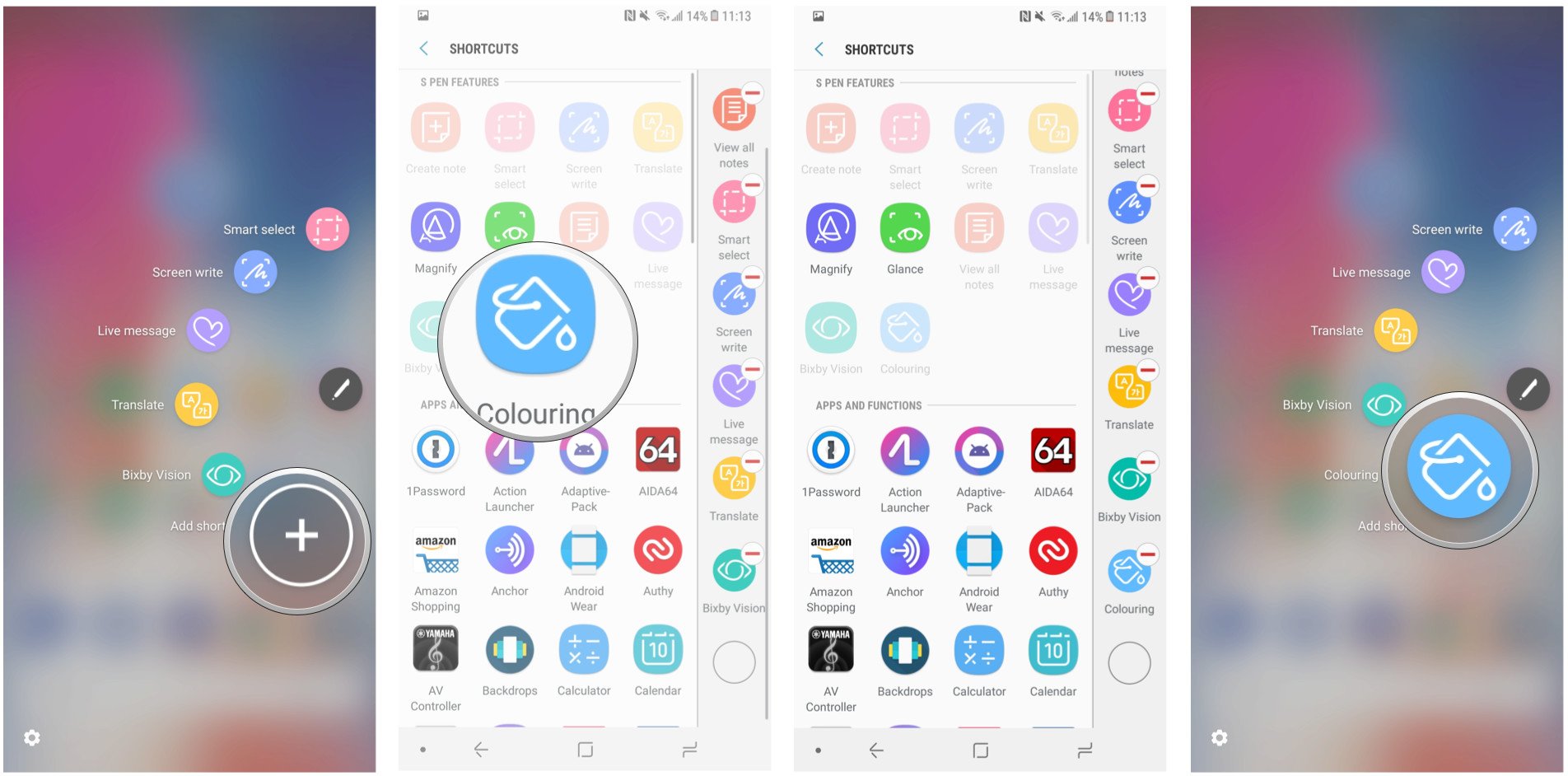
First, enable Coloring in Air Command
You can easily access the Coloring feature directly in the PenUP app, but it’s much easier to get to it using the shortcut in Air Command, which pops up when you remove the S Pen from its holster.
But it’s off by default, so you need to enable it.
Remove the S Pen from the holster. Wait for Air Command to appear.
Tap Add shortcut.
Tap on Coloring under S Pen features.
Now, access Coloring from the Air Command menu.
That’s it! Now the Coloring icon will show up whenever you open Air Command.
Then, play with the features
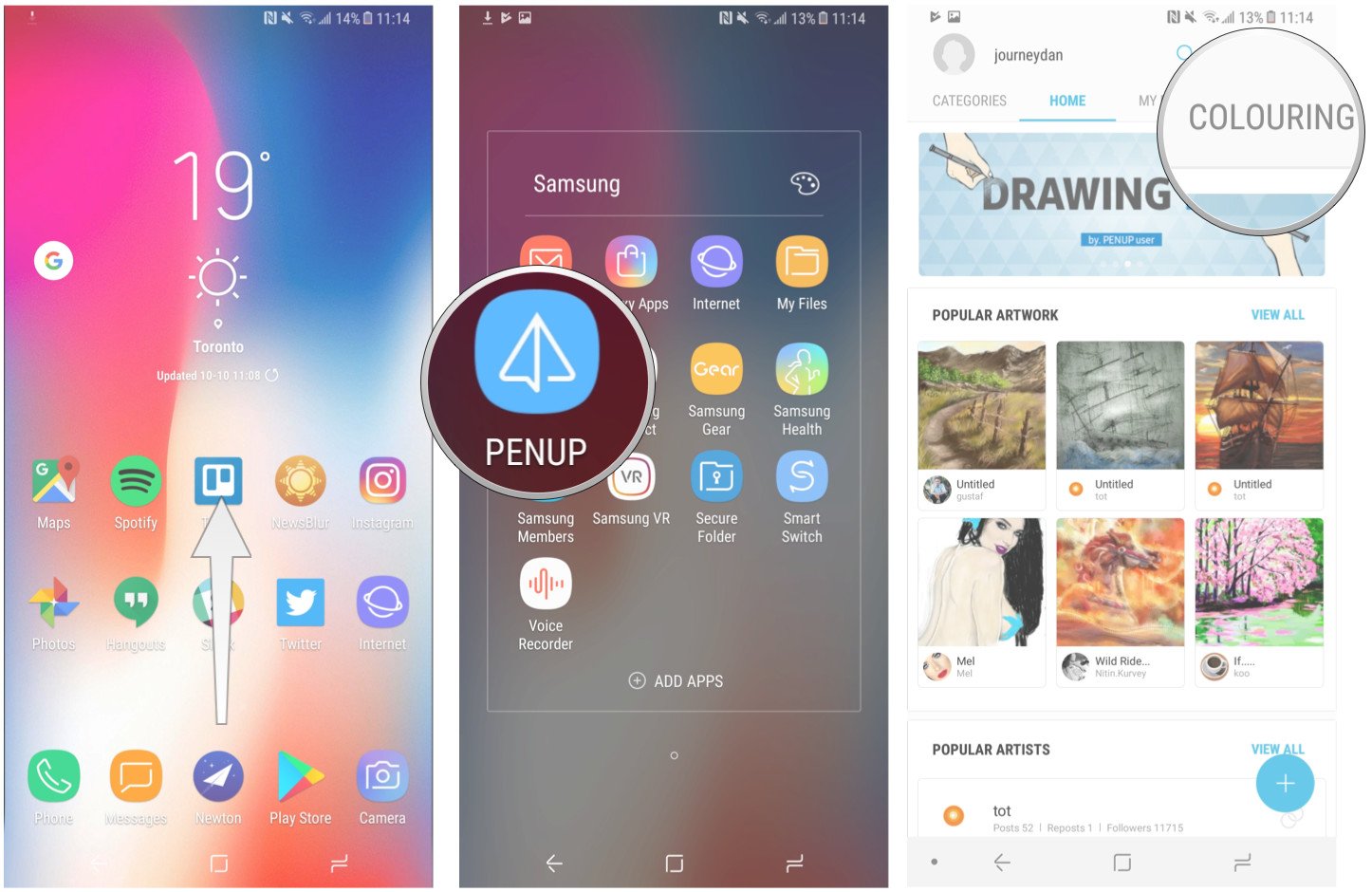
You can also find the Coloring feature inside the PenUP app.
Swipe up from the Samsung Launcher to access the app drawer.
Open the Samsung folder.
Tap on PenUP.
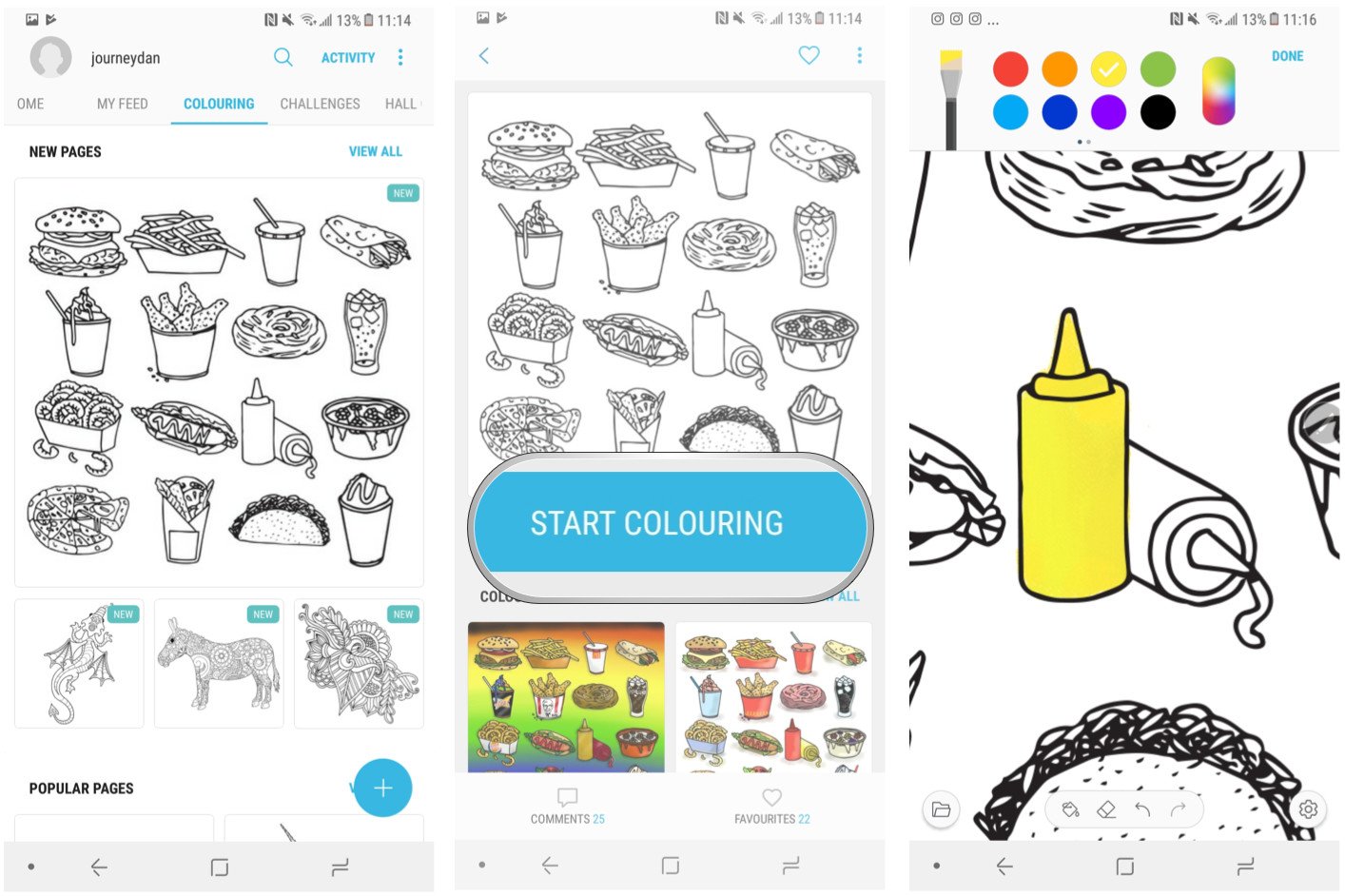
Navigate to the Coloring section on the right.
Find a drawing.
Play with brushes, opacity, colors and other features.
Now you’re set up to use, in my opinion, one of the best features on the Galaxy Note 8.
The great thing about the Coloring feature is that more pictograms are being added every week, and you can compare your work to others who have submitted their work through the community.
Even better, it’s possible to download many of those finished works of art and apply them as wallpapers, or to use as stepping stones for your own projects.
Today’s fitness tracker market feels oversaturated with devices of various shapes, sizes, and feature sets to the point where simply choosing which one you want to get becomes an exercise much tougher than the ones you’ll be doing once you actually buy it.
But despite this, last year Samsung still managed to position its Gear Fit 2 as one of the best options on the market, thanks to its inclusion of almost every major feature you can think of — and then some. So it’s not exactly surprising that, rather than release an all-new entry in its Gear Fit series this year, Samsung instead chose to simply give the Fit 2 a better water resistance rating, slap a “Pro” at the end of its name, and call it a day.
But as it turns out, not many other fitness trackers possess the ability to be used while swimming; so while this addition may at a first glance appear superficial, it could actually prove to be a game-changing feature for an otherwise quite iterative product.
Design
Being a near-clone of its predecessor, the Fit 2 Pro takes no significant liberties with the already established design: it’s a tiny bit wider, but otherwise has the same lightweight and unobtrusive ergonomics of last year’s model.
But when it comes to the straps, there are a couple of changes. Firstly, they now come in two new color options: a black and a red one, which are both arguably better-looking than last year’s options.
But secondly, they also offer a significant functional advantage: better clasps. Where last year’s model was prone to accidentally unclasping and falling to the ground, the Pro circumvents such problems by using the same traditional clasping mechanism you’ll find on your everyday wristwatch.
Interface and apps
The Fit 2 Pro’s interface doesn’t shed the extreme minimalism of its predecessor, with almost every app, menu, and watch face making liberal use of bland black backgrounds — no doubt a decision made in order to reduce the AMOLED screen’s battery consumption. The screen appears to be identical to the one used on last year’s model, judging by its specs sheet.
But aesthetics aside, using the Fit 2 Pro is mostly a breeze, thanks to a familiar combination of touch input and the two physical buttons on the side. Powered by Samsung’s in-house Tizen OS, the interface is composed of a variety of apps, each one dedicated to a single piece of the device’s functionality, as well as the central home screen containing the main watch face and a few user-configurable app widgets.
While there is the occasional stutter when opening or closing apps, most of the time the interface is fast and responsive. The only exception to this is the “cover screen to turn it off” gesture, which failed to trigger on occasions during our testing.
The device also offers some rudimentary controls for your smartphone: there’s the obligatory notification center, which also lets you respond to texts with a predefined set of responses, as well as built-in music controls. Curiously, you can also answer calls right from your wrist, but the use case for this is quite slim, considering the Fit 2 Pro has neither a microphone nor a speaker built into its body. You can reject the call if you need to.
The Gear Fit 2 Pro never claims to be a smartwatch, and its grand total of available apps on the Galaxy Apps webstore prove this. Their number is above 3000, Samsung claims, but the great majority of those are watchfaces. Thankfully, one of the apps that aren’t is Spotify, which brings a welcome new feature to the Gear Fit series: you can now download playlists right onto the device’s memory and listen to up to 500 songs offline though you Bluetooth headset. And this actually works much faster since streaming music – through your phone or over Wi-Fi – is accompanied by slow music loading times.
Health
But the most important part of any fitness tracker is, well, fitness tracking. And the Gear Fit 2 Pro does mostly fine at this, with modes for walking, running, cycling, elliptical trainer, yoga and a whole bunch of other activities too numerous to list.
All of these workouts can either be started manually, or left to the device’s automatic workout detection, which works surprisingly great but can be a little annoying when it decides to interrupt a casual stroll with its cheerful encouragement.
But the key new feature, the swim tracking, is only available inside the built-in Speedo On app, which means you can’t just jump in the water and expect the Fit 2 Pro to know that you’re swimming. But this is mostly nitpicking on our part, and we’re sure all the swimming enthusiasts out there will be happy to have the ability to track their stroke type and lap time right from their wrist.
Usability and battery life
While the Fit 2 Pro’s inclusion of Wi-Fi means the device doesn’t technically need to be tethered to a smartphone at all times, diving deeper into the data does require using your smartphone. The Samsung Health app does a fine job with this, but isn’t actually available on iOS, so users of Apple devices will have to settle for a somewhat inferior experience.
When it comes to battery life, Samsung’s official 3-5 days estimate is… quite optimistic. In real-life usage three days are the absolute maximum, which means potential users will have to recharge their units disappointingly often (though this was also the case for last year’s model).
And since the Fit 2 Pro will often be used outside, a discussion about its display visibility is in order. And as it happens, you’ll be mostly fine when using it in brightly-lit environments, albeit the curved, reflective glass is bound to become a problem in certain situations.
And lastly, the ability to dive underwater comes with a new feature, letting users turn off touch input entirely. And while it doesn’t actually detect when you go underwater, starting a swimming workout turns it on automatically.
Conclusion
One thing seems pretty clear: “Pro” in the name of the Gear Fit 2 Pro only applies if you’re a pro swimmer. For everyone else, the benefits of the new model over last year’s Fit 2 come in the form of a slightly cooler design and Spotify integration.
But that’s not to say the Pro is bad by any means: in fact, it’s still one of the best fitness trackers out there. But if you don’t care for swimming, the wearables market is full of alternatives that do everything else the Fit 2 Pro does, and they often cost considerably less than the Pro’s $200 asking price.
But if what you’re looking for is a device that can do it all, while looking good at the same time, the Samsung Gear Fit 2 Pro is certainly one of your safest bets.