It’s now clear what the main antagonists for late 2017’s smartphone championship are – the upcoming Apple iPhone X, the Google Pixel 2 XL, the exceptional Samsung Galaxy Note 8, and finally, the LG V30. An exceptional round-up of devices, for sure, with each vying for its rightful place in your pocket. But with the hefty premium prices that almost all of these command, you will most likely want to narrow your choice to a single of said devices. Sorry, three will have to go with only one spot available!
So, which one should you pick?
The Apple iPhone X is a new chapter in Apple’s history, featuring a rather flashy new design, an OLED HDR-capable display, an intriguing face-scanning Face ID camera up front, the iPhone X is on its way of being Apple’s most advanced phone yet. And this commands a premium – $999, to be exact, which is already stepping over the psychological barrier of a thousand dollars.
Apple iPhone X
The brand new Pixel 2 XL is a device that aims to put Google on the map, and from what we’ve seen so far it has a rather good chance of doing that if El Goog doesn’t stumble upon any supply issues. The demand is there, but from the looks of it, you will have to wait long if you want to get one of these before Halloween.
Google Pixel 2 XL
The Galaxy Note 8 is easily the most-spec’d out phone out there right now, boasting almost anything but the kitchen sink in its deep feature bag. Aside from the excellent hardware and head-turning design, the Note 8 turns things to 11 thanks to the S Pen – the Note 8‘s single most important feature.
Samsung Galaxy Note 8
Finally, the LG V30 is easily the most affordable of the bunch, but don’t let this fool you, it doesn’t skimp on hardware or design for that matter. Even more, it has found its own niche – LG’s latest top-shelf phone aims to be the multimedia phone to beat out there, with a bevy of multimedia and video-related features on board.
LG V30
Size comparison
So, here’s how all four of these high-end devices stack up against one another as far as size goes.
Apple iPhone X vs Google Pixel 2 XL vs Galaxy Note 8 vs LG V30
Specs comparison
With size out of the equation, it’s time to compare the specs of the four devices and see how the stack up.
Samsung HMD Odyssey provides remarkable immersive experience with Dual AMOLED high-resolution displays, a 110-degree field of view, AKG headphones and built-in 6 DOF inside-out position tracking
Samsung Electronics, in partnership with Microsoft, today announced the Samsung HMD Odyssey – the most immersive Windows Mixed Reality (MR) headset in the market. The quick and easy to set up Samsung HMD Odyssey delivers a premium virtual reality experience, with superior picture quality and the highest resolution display taking consumers to entirely new virtual limits.
“The Samsung HMD Odyssey is a high performing headset, which like all of our products, delivers meaningful innovation to our consumers’ lives,” said YG Choi, Senior Vice President of PC Business Team, Samsung Electronics. “Designed in partnership with Microsoft, the Samsung HMD Odyssey transports consumers to the next frontier of Windows Mixed Reality, which introduces to them to a new, industry leading virtual reality experience.”
Lifelike Experiences
With dual 3.5-inch AMOLED displays, the Samsung HMD Odyssey delivers more vibrant colors, and deeper blacks, providing crisper, more lifelike images. The 110-degree field of view allows users to discover paramount virtual experiences around them.
When it comes to sound, the Samsung HMD Odyssey comes with 360° Spatial Sound, providing users with complete surround sound, through premium built-in AKG headphones.
Users can also talk with other gamers, without having to remove the headset, using the fitted array mic.
Incredibly Easy Start
The Windows Mixed Reality experience with the Samsung HMD Odyssey has been designed to give users the very best experience right out of the box. Unlike typical head-mounted displays, you do not need to install any extra motion sensors – simply connect to your PC and get started. With inside-out position tracking, users are not restricted to a limited space during their virtual reality experience.
For a more immersive experience, Samsung HMD Odyssey comes with a Six Degrees of Freedom1 (6 DOF) sensor allowing for intuitive and natural movements.
With an adjustable control wheel, the Samsung HMD Odyssey is designed to provide a comfortable and snug fit.
Alex Kipman, Technical Fellow at Microsoft said, “We’re excited to welcome the Samsung HMD Odyssey to the Windows Mixed Reality family of devices. This is an incredible product and another important step for the mixed reality journey we are on at Microsoft. With the Samsung HMD Odyssey, the team at Samsung has developed a Windows Mixed Reality headset that will delight our fans looking to immersive themselves in the world of mixed reality this holiday.”
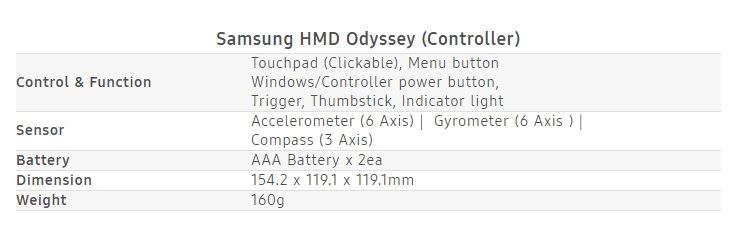
The Samsung HMD Odyssey comes with integrated AKG headphones and array mics for voice commands, as well as two motion controllers. The Samsung HMD Odyssey will be available later this year in the US, China, Korea, Brazil and Hong Kong, with pre-orders beginning in the US only on October 3rd.
*All functionality, features, specifications and other product information provided in this document including, but not limited to, the benefits, design, pricing, components, performance, availability, and capabilities of the product are subject to change without notice or obligation.
DOF refers to the freedom of movement in a 3 dimensional space. Unlike many VR controllers that recognizes 3 axis, 6 DOF gives you the freedom to move forward and back, left and right, up and down, yaw, pitch, and roll.
The Samsung Galaxy Tab S3 is one of the best Android tablets you can buy right now, for what that’s worth. It will probably be a while before Android 8.0 Oreo reaches the tablet, but in the meantime, Samsung has pushed a minor update that enables HDR support for Netflix (among other things).
The update has a version number of ‘T820XXU1AQ12/T820XAR1AQ12,’ and clocks in at 257MB. Here is the full changelog:
A new Samsung Pass function ahs been added
HDR support for Netflix
Update for Samsung Keyboard
Changes to the preload type mean that Kids Mode can now be re-installed onto devices from which it had previous been removed.
Changes to the preload type mean that Soundcamp can now be re-installed onto devices from which it had previous been removed.
Security policy updated.
As you can see in the below screenshot, Netflix displays an HDR logo in the app after the update, indicating that HDR is supported by both the device and the selected content (in this case, Marvel’s Luke Cage series) :
It was spotted on a Wi-Fi Tab S3 in the United States, so the version number/rollout date may vary if you live somewhere else or have the LTE model. Let us know in the comments if it shows up on your Tab S3.
The S Pen is the Note series’ defining feature – a versatile tool whose intuitive design and powerful functions make multitasking a breeze, and allow users to express themselves and connect with others in fun and creative ways. There’s truly nothing else quite like it.
The Galaxy Note8’s is the most powerful S Pen the series has ever seen. Here, Hyesoon Jeong, the Principal Engineer of Framework R&D Group for Samsung’s Mobile Communications Business Team, discusses various ways that Samsung optimized the implement’s latest iteration to streamline more facets of users’ daily lives.
Q. What kind of value does Samsung hope to deliver to consumers with the Galaxy Note8 and the S Pen’s new functions?
We’ve been delighted to hear that consumers who have used the S Pen with the Galaxy Note8 have given it good reviews so far, and remarked on how much better it feels to use the S Pen.
Many of these consumers had not had a chance to experience the S Pen’s convenient functions since the last device debuted. Therefore, when refining the design for the Galaxy Note8’s S Pen, we decided to, rather than upgrading the technology within, focus on adding features that would prove convenient in daily use.
Q. What are some of the processes that Samsung utilizes to identify potential S Pen functions?
In the beginning of each year, we hold a series of “Note Kickoff” meetings, which bring together our Development, Product Planning, UX and Usability teams. Each department is asked to present brand-new ideas for innovative features to include in the new model, and come up with ways to improve upon the previous device based on customer feedback. This is how the Note8’s new S Pen features came about – by diligently listening to our customers’ insights on previous S Pens.
Q. One of these new features, Live Message, has been particularly well received. What were your main focuses when developing it?
Live Message is a fun GIF-creation feature that’s an evolution of sorts of Smart Select, which was introduced with the previous Note device. We wanted to expand this type of functionality because the ability to create GIFs has proven popular among Note users, who are very active on social media. Live Message takes GIF creation a step further by allowing users to add personal touches to messages, via animated text or live emojis, and customize their photos with various pen effects.
Our main focus when developing it was usability. We wanted to make sure that the function would be freely available for users in markets across the world. Because people in different countries communicate via different channels, we worked closely with popular messaging services around the globe, working out conditions and regional restrictions, to build something that would work with them.
We also want to show users how easy it is to utilize the function when communicating with their friends. Our developers are currently working on software updates that will introduce more beautiful and decorative examples of animated GIFs for users who may not be entirely satisfied with their own GIF-creating handiwork to plug into messages. We’re also looking into expanding the selection of pen effects that users have at their disposal.
Q. What are some of the ways that users can utilize the S Pen when using Bixby?
Bixby integration currently allows users to utilize its voice command feature to adjust the type of pen they’re using, as well as its color.
The S Pen’s Bixby support also makes it easier for users to shop. When you’re surfing the web and you find an image of a product that you like, you can activate Bixby Vision via Air Command, hover the S Pen over it, and instantly search for it online.
Q. How did you improve the Screen off memo feature?
Screen off memo is another function that’s receiving positive reviews from users. It automatically activates when you remove the S Pen, and allows you to instantly jot down notes to the off screen. This is a new function that enables users to write even when the screen is off, so that you don’t forget any passing thoughts.
For the Galaxy Note8, we’ve enhanced the feature to deliver new levels of convenience after listening to the consumers’ voices. Whereas before this update, the function was well-suited for simple, temporary memos, now, Screen off memo supports up to 100 pages of notes and allows you to pin notes to the AOD and make edits. This makes the function perfect for taking notes during meetings or presentations, managing to-do lists, or writing quick reminders for important tasks.
Q. Could you elaborate on how collaborating with Wacom has helped Samsung maximize the S Pen’s utility?
Our collaboration with (pen display, tablet and stylus manufacturer) Wacom, incorporating its tablet technologies into mobile devices through the S Pen, has been excellent – a win-win. Although other mobile-device manufacturers could design a smartphone with a large screen, by introducing Wacom’s solutions to the mobile realm, we’ve been able to establish a new standard when it comes to productivity.
We’re currently working with Wacom to explore new possible S Pen features and B2B solutions, including support for secure digital signatures, that could offer users and businesses additional convenience.
Q. What motivates Samsung to constantly seek out new ways to innovate with the S Pen?
The S Pen is a feature that’s unique to our company. We often hear that Note users are very loyal, and I would like to add that we developers are also greatly committed to our work. Those of us who work on the Note devices take great pride in providing users with an S Pen experience that allows them to streamline how they work, live, and express themselves.
This desire to arm users with a tool that makes a difference in their daily lives is what motivates us to identify new and exciting S Pen innovations.
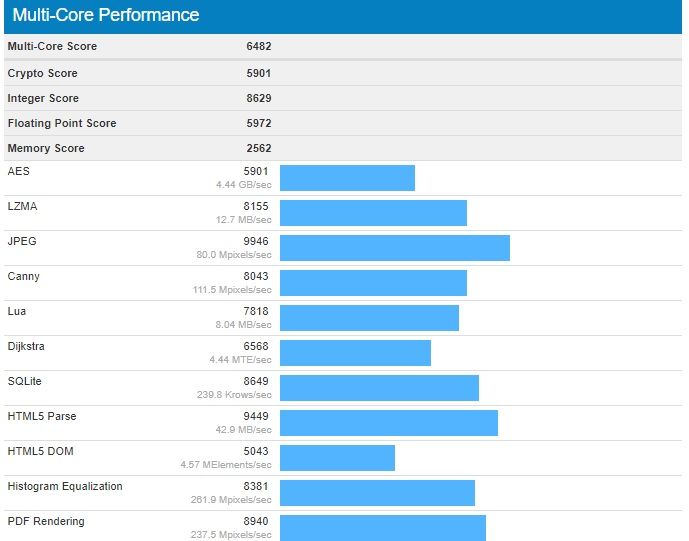
A Geekbench listing has been spotted today which mentions the Galaxy S8+ Android 8.0 Oreo update. It’s likely that tests are being performed on this firmware update as the development progresses.
Galaxy S8+ Android 8.0 Oreo update
In our report earlier this month, we mentioned that the Galaxy S8 and Galaxy S8+ Android 8.0 Oreo update firmware versions could be G950FXXU1BQI1 and G955FXXU1BQI1, respectively.
It’s unclear at this point in time when Samsung is going to release Oreo for this year’s flagship smartphone. It’s likely that a Samsung beta program for the Oreo update might be launched at some point in the coming weeks.
Once the beta firmware has been thoroughly tested, it’s likely that we might see it being rolled out much faster worldwide as Samsung has now started using multi-CSC firmware. That means end users will be able to get a taste of Oreo on their 2017 flagships sooner rather than later.
The Galaxy S8+ has now been spotted on Geekbench running Android 8.0 Oreo. It’s not uncommon for us to see such benchmark listings ahead of an impending major firmware release. However, it doesn’t really clarify anything.
Samsung is yet to confirm its Oreo release roadmap. Until it does that, there’s only going to be more speculation about when the Galaxy S8 and Galaxy S8+ Android 8.0 Oreo update might be released. One can only hope that it doesn’t make customers wait for a very long time.
We have obtained some information about Samsung’s next flagship smartphone. The company has started Galaxy S9 firmware development. The version numbers confirm that there will be two models, which means that we can expect a Galaxy S9 and Galaxy S9+ to be released in 2018.
Galaxy S9 firmware development begins
Two separate Galaxy S9 firmware are being developed, G960FXXU0AQI5 and G965FXXU0AQI5. The model numbers of Samsung’s next flagship smartphones have therefore been confirmed as well. The Galaxy S9 will be SM-G960 while the Galaxy S9+ will be SM-G965.
That’s not surprising, given that the Galaxy S8 and Galaxy S8+ have model numbers SM-G950 and SM-G955 respectively. It’s interesting to note that the Galaxy S9 firmware development has started two weeks earlier than it did for the Galaxy S8 last year.
Galaxy S9 expected release date
As you can probably imagine, there will soon be a lot of rumors about the Galaxy S9 being launched ahead of schedule. While that might be the impression you get from the early Galaxy S9 firmware development, it’s just as likely that the Galaxy S9 release will take place around the same time as the Galaxy S8.
Samsung unveiled the Galaxy S8 at a dedicated event in New York City on March 29 this year. It was released in a handful of markets across the globe on April 21. Samsung might stick with the same timeframe for the Galaxy S9 release next year.
As we continue to keep an eye on the Galaxy S9 firmware development, expect more information about Samsung’s next flagship smartphones to surface in the coming weeks.
The two flagships have remained stuck to Android 7.0 Nougat for a while now, which also brought a newer version of TouchWiz called Grace UX on board.
But the Samsung Galaxy S8/S8+ introduced the new Samsung Experience 8.1 which received an update to version number 8.5 when the Galaxy Note 8 made a debut.
But while other Samsung smartphones like the Galaxy J5 or the 2017 Galaxy A series received Samsung Galaxy 8.1, year’s flagships continue to run the same UI. But according to a Samsung Members community admin, the Galaxy S7 and Galaxy S7 edge will get Samsung Experience 8.1 as soon as the next update – which will probably be Android 8.0 Oreo – starts rolling out. No exact timeline for the release was provided.
Given that the Samsung Experience 8.5 update is more cosmetic in nature and not feature-oriented, it would make little sense for the Korean tech giant to invest time and resources to deliver only a UX-focused update. The Galaxy S7 and Galaxy S7 edge haven’t been updated that many times anyway and with Android 8.0 Oreo out, it’s quite unlikely the phones will get the bump to Android 7.1 or Android 7.1.2 now.
In this post, we’ll talk about what makes the Galaxy Note 8 stand out in an increasingly crowded premium Android smartphone market, such as its dual camera system, insanely gorgeous hardware design, specs that are out of this world, and how the Grace UX isn’t nearly as bad as Samsung haters say it is.
Here are five reasons we think the Galaxy Note 8 is a good buy.
1. It Has Everything
If you judge smartphones by the specs they have, then the Galaxy Note 8 should already be at the top of your list. Here, I’ll name a few, just to get the ball rolling. The Note 8 has a 6.3″ Infinity QHD+ Super AMOLED display, wireless charging, NFC/MST, fingerprint reader, facial recognition, iris scanner, expandable storage, Snapdragon 835 processor, 6GB RAM, dual rear-facing cameras with OIS, Bluetooth 5.0, S Pen, IP68 water and dust resistance, and the list goes on.
Seriously, if you were designing your own dream phone with realistic expectations for under $1,000, you’d probably create the Galaxy Note 8. Take all of these specs and toss them into a gorgeous, all glass and metal body and you have a legit flagship smartphone that can go up against anything else on the market.
Considering the Galaxy Note 7 was taken off the market prematurely due to the recall, I don’t think ex-owners and Samsung fans in general could’ve hoped for anything better this time around. In my review, I called this the best Note device Samsung has produced to date, and I still stand by those words 100%.
2. Dual Camera System + OIS is Beast
Smartphone cameras are all pretty stellar these days, but Samsung upped the bar this year, providing dual rear shooters, both with optical image stabilization (OIS). For Android, this was a first, and from my findings with this device during my review period, it killed.
This phone is exceptional in low lighting, when other phones would blow an image’s lighting to poo due to sensitive sensors. Like past years, the cameras handle assorted colors well, too, such as reds, purples, and greens. This is handy when you’re shooting landscapes or getting in close for a macro of a flower. With the secondary sensor, which is telephoto, you can zoom in on objects without losing a ton of detail, which can be helpful for wildlife shots, such as that cute squirrel that keeps terrorizing your dogs in the backyard.
Sample Shots
3. Grace UX, Give It a Try
Over the years of blogging about Android, I’ve heard countless people say, “TouchWiz sucks” or something along those lines. My friends, believe me when I tell you, Samsung’s custom skin that runs atop Android is not like it was back then. It’s been tweaked and refined heavily, almost to the point where I don’t have any real issues with it. Do I prefer stock Android still? Yes, but that’s because I’m a very minimal kinda guy and don’t need half of the features Samsung offers inside this skin, but others may benefit greatly from their inclusion.
My point is, don’t let this phone’s skin be the thing that is deterring you. It shouldn’t be. While at first you may feel overwhelmed by all of the different settings you can play with and enable, just know that after a few days, you’ll know everything that’s in there and be a real Note master. And luckily for you, we make videos specifically to help you discover all of the good stuff.
4. Hardware Design
If you checked out Kellen’s video review, I don’t share his exact sentiments regarding the size and feel of this phone. Yes, if you’re coming from something smaller, the Note 8’s size can take a bit of getting used to, but once you are used to it, it’s kinda hard to go back to anything smaller. You have this massive display and rounded edges for easy holding/gripping, with a body covered in soft glass. I think it’s a real delight to hold, use, and look at throughout the day.
Is this phone an accident prone-person’s worst nightmare? You better believe it, but what glass-encased phone isn’t going to shatter upon dropping it? It’s just the way things are, and you know, they do make cases to help protect your device. At the end of the day, I’ll gladly use a fragile phone that looks amazing over an ugly device any day of the week, because considering how often I’m looking at it and holding it, I want it to look good. I want others to ask me what it is and get a little jelly that all they have is an old busted iPhone. That’s fun for me and it’s the feeling I get when I pull out the Note 8 in my group of iPhone-loving friends.
Even if you don’t want something this big, you can get basically the same thing in a smaller Galaxy S8 package, which is also a great phone that we’ve covered countless times.
5. Future-Proof
Remember some of those specs I talked about earlier? Like facial recognition, iris scanning, NFC/MST, and Bluetooth 5.0? Well, because this phone comes equipped with all of that, you can rest assured that your phone will go on supporting the latest trends in mobile technology for a solid period of time. Because Apple just made facial recognition “cool” with the iPhone X, you can sleep comfortably knowing that your phone is capable of the exact same thing, but even goes a step further — iris scanning. Once you see your favorite banking apps support iris scanners, you’ll know that the Galaxy Note 8 was a solid investment.
Another great piece of tech in this device that gets overlooked often is the inclusion of MST (magnetic secure transmission). Mobile payments are all the rage right now, but every phone that isn’t a Samsung flagship lacks MST and access to Samsung Pay. With this on your phone, not only can you utilize an NFC reader, but virtually all credit/debit card readers in America with this touch-less technology. It makes your payment possibilities much more consistent and adds yet another reason to leave your plastic at home when you hit the town.
A new Samsung device has just received certification from the National Radio Agency based in Samsung’s hometown of South Korea.
The device has the model number SM-G888N0 and is said to be known as the Galaxy X, which is set to be the company’s first foldable phone that has been heavily rumored Samsung has been working on. Now the device has received formal certification, it would suggest that the Samsung Galaxy X could be launching very soon, albeit in South Korea to begin with.
The Wi-Fi alliance lists the device as Bluetooth 4.2 and running Android 6.0.1 Marshmallow which would be slightly disappointing. I suspect this may be outdated given the profile of the Galaxy X in the lineup for Samsung and would expect similar specs to that of the rest of the Galaxy line.
The foldable smartphone is said to be being developed under codename Project Valley and points to a late 2017 or early 2018 release.
A device that folds up is an interesting concept and one that if executed correctly, would open the door for Samsung to further increase the display size on a smartphone without increasing its physical footprint.
Foldable phones were all the rage pre-smartphone but could Samsung be using the Galaxy X to reignite that trend or has it finally figured out foldable displays?
If the rumors are true we won’t have long to find out as we could see something launched in South Korea at the tail end of the year.
If you’re considering making the switch from an iPhone to the upcoming Samsung Galaxy Note 8, you should know that Samsung makes this process as painless as possible with their Smart Switch app. Even if you’re not switching away from iPhone, Samsung has you covered. They’ve also highlighted some interesting things you can do with your new Galaxy Note 8 including making GIFs, multi-tasking, using the low light cameras and more. Check it out.
How to transfer everything from an Android phone
Connect your phones with the cable included with your Galaxy Note 8.
Select Smart Switch in the menu that pops up.
Select which phone sends and receives the data.
Press Allow on your old device.
Choose what files you are keeping and then press Transfer.
How to transfer everything from an iPhone
Use the iPhone cable and the adapter included with the Galaxy Note 8 to connect your phones.
Select Smart Switch in the menu that pops up.
Tap Trust on your old phone.
Pick the files you want to keep and press Transfer.
How to make GIFs on your Galaxy Note 8
Tap the floating Air Command symbol on your chosen video.
Press Smart Select.
Press Animation.
Adjust where you want to capture with the S-Pen.
Hit Record then Stop when the time is right.
Then hit share.
How to use Live Focus on the Galaxy Note 8 camera
Quick launch the rear camera by double tapping the power button.
Select Live Focus.
Frame your subject and adjust your focus level.
Take the picture and then tap on it in the bottom right.
You can adjust the focus level in the background and even add stickers.
Save and share.
How to use the S-Pen with the Galaxy Note 8
Curious about the S-Pen that’s included with the new Galaxy Note 8? This video is a short primer on all the things you can do with your S-Pen through the help of Air Command, which is the interface that launches automatically when you remove the S-Pen from the phone. Tired of having Air Command pop up automatically? There’s a setting that allows you to change that, too.
How to multi-task with the Galaxy Note 8
The 2:1 screen ratio of the Galaxy Note 8 makes it perfect for multi-tasking. Here’s how.
Tap the Recents button.
Press and hold the app you want.
Drag it to the top of your screen.
Then open the other app you want.
You can even preset two apps to launch together using your Edge panel. Here’s how.
Swipe left on the Apps Edge tab.
Tap the + button to create a new Apps Pair.
Select two apps you use together and press Done.
How to take good low light pictures with the Galaxy Note 8
Quick launch your rear camera by double tapping power button.