




Foldable Screen Protector Peeling: What Happens If You Remove It Yourself

Foldable Screen Protector Peeling: What Happens If You Remove It Yourself? + 7 Critical Risks to Avoid
Introduction: Why a Peeling Foldable Screen Protector Matters
A foldable phone screen protector that starts peeling might look like a small problem, but removing it incorrectly can lead to expensive display damage. This guide explains what happens when you remove a peeling foldable screen protector yourself, which warning signs to watch for, and when professional repair is the safer choice.
However, foldable phones have one important feature that traditional smartphones don’t: a flexible inner display that bends thousands of times throughout its life.
That flexibility creates unique maintenance challenges. One of the most common is foldable screen protector peeling, which may appear as a small bubble, a lifted edge, a thin line across the screen, or a growing gap near the centre crease.
When this happens, many owners consider removing the protector themselves. It seems simple enough. After all, ordinary tempered-glass protectors can often be removed at home with little difficulty.
Unfortunately, the inner display of a foldable phone is different.
Its protective film, flexible display layers, adhesives, and folding mechanism are designed to work together. Pulling at the wrong section, applying pressure, or using an unsuitable tool can create problems that go beyond a damaged protector.
The good news is that a peeling protector doesn’t automatically mean the screen underneath is damaged. In many cases, the issue can be addressed with an appropriate replacement. The key is knowing what to do, what to avoid, and when to ask a trained technician for help.
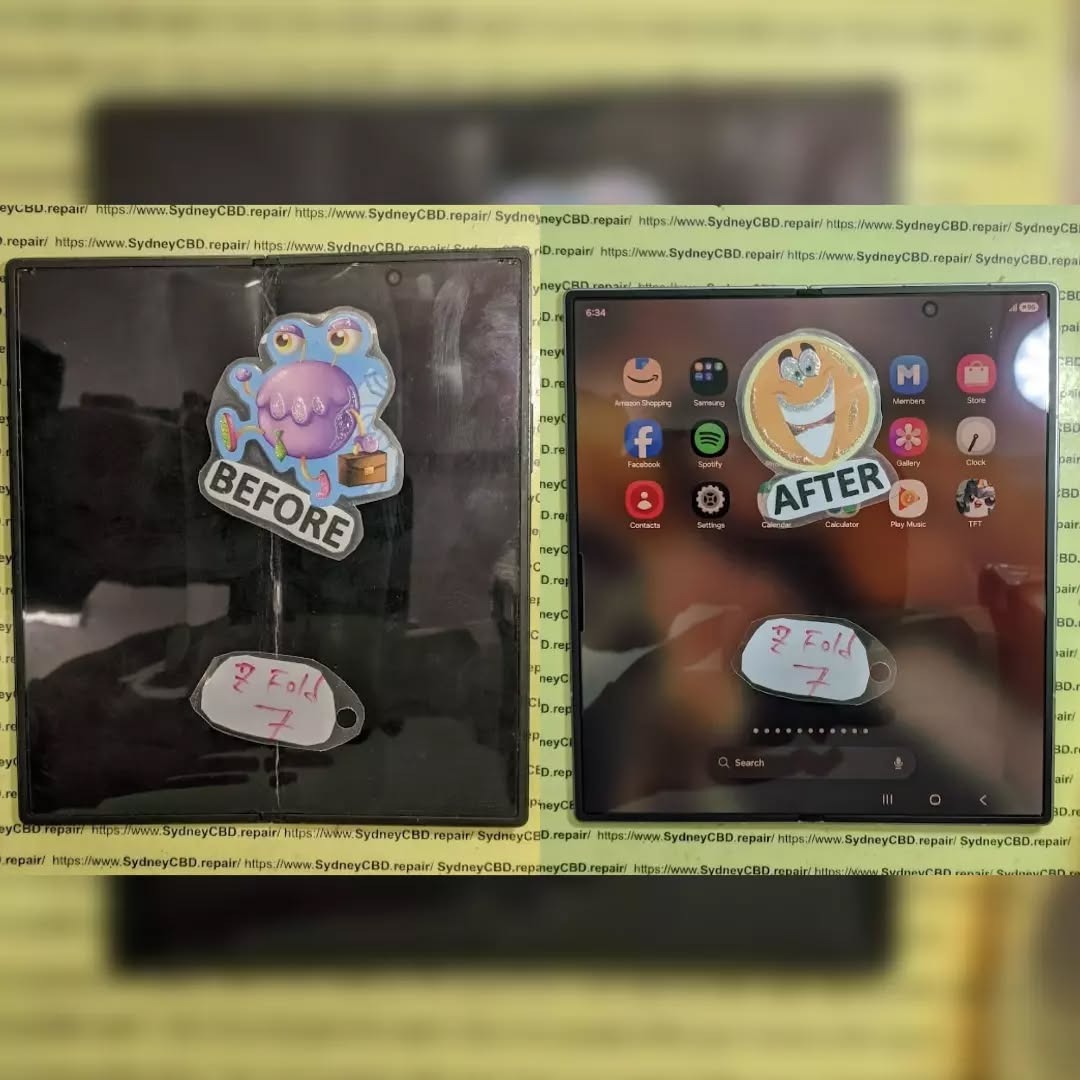
Why Do Foldable Screen Protectors Start Peeling?
Before deciding whether to remove a protector, it helps to understand why it begins lifting in the first place.
The protector isn’t simply a decorative sheet. It helps protect the flexible display surface from everyday contact, minor scratches, and other forms of wear. Its adhesive must also accommodate the repeated bending of the phone. Over time, several factors can weaken the bond between the film and the display.
1. Repeated Folding and Unfolding
Every time you open and close a foldable phone, the inner display bends along a specific folding area. The centre crease experiences repeated mechanical stress. Even when the phone operates normally, the protective film must adapt to this movement. Eventually, the adhesive may begin to separate in the most stressed area.
You might notice:
- A thin bubble forming along the centre crease.
- A line that becomes more visible when the phone is opened.
- Small areas of film lifting near the folding section.
- A slight change in the way the screen protector looks under bright light.
Important: If the protector begins lifting along the crease, don’t press the bubble flat or repeatedly fold the phone to test it. Additional pressure can make the separation worse.
2. Heat, Humidity, and Adhesive Wear
Environmental conditions can affect the adhesive that holds a screen protector in place. High temperatures, repeated temperature changes, moisture exposure, and ordinary ageing may contribute to adhesion problems.
For example, leaving a foldable phone in a hot vehicle can expose it to temperatures beyond its recommended operating conditions. Over time, this can affect adhesives and other components. Humidity and moisture may also contribute to edge lifting, particularly when dirt has accumulated around the film.
3. Dust, Dirt, and Edge Separation
Small particles can collect around a protector’s edges, especially when the phone spends a lot of time in pockets, bags, or dusty environments. Once an edge begins lifting, the gap may allow more debris to accumulate. This can create a cycle in which the separation becomes more noticeable.
Avoid sliding a fingernail, card, or metal tool underneath the lifted section. Doing so can introduce additional particles or put pressure on the delicate display.
4. Age, Previous Repairs, and Installation Quality
A protector that has been installed incorrectly may develop bubbles or lift sooner than expected. Other contributing factors include:
- An incompatible replacement film.
- Poor surface preparation during installation.
- Adhesive that doesn’t match the phone model.
- Damage caused during a previous repair.
- A replacement protector that has reached the end of its useful life.
What Happens If You Remove a Peeling Foldable Screen Protector Yourself?
Foldable screen protector peeling doesn’t always require a complete display replacement, but careless DIY removal can turn a minor maintenance issue into a serious repair. The level of risk depends on the phone model, the condition of the protector, the display construction, and the method used to remove it.
Risk 1: Damage to the Flexible Display
The inner display of a foldable smartphone is built differently from the rigid glass found on many conventional phones. Its flexible construction allows it to bend, but that doesn’t mean it’s designed to withstand uncontrolled pulling or prying. If a protector is strongly bonded to the display, pulling it away aggressively may place unnecessary stress on the surface beneath it.
Risk 2: Creases and Pressure Marks
Foldable screens already have a designed folding crease. Additional pressure can create unwanted marks or worsen an existing problem. Trying to flatten a bubble with a fingernail, pressing hard on the centre crease, or using a stiff card as a lever can put concentrated force on the display.
Risk 3: Damage to the Inner Display Layers
A foldable display contains multiple layers that perform different functions. Depending on the device, the display construction may include a flexible cover layer, optical adhesives, touch-sensing components, and the display panel itself. Using excessive pulling force or an inappropriate tool can damage these internal layers.
If the screen develops black spots, coloured lines, spreading discolouration, or unusual flickering, stop handling it immediately and arrange a professional inspection.
Risk 4: Touchscreen Problems
A damaged or stressed display assembly may develop touch-related problems, including dead zones, phantom touches, or input lag. If touch problems begin immediately after pulling at the film, further DIY attempts are unwise.
Risk 5: Dust and Debris Entering the Display Area
A peeling protector creates an exposed gap where foreign particles can enter. Never spray liquids directly onto the exposed display, and avoid household solvents, sharp tools, or compressed air.
Risk 6: Warranty or Repair Complications
Damage caused during an unsuccessful DIY attempt may complicate warranty assessments or paid repairs. For Samsung foldable owners, review the official guidance at the Samsung Support website.
Risk 7: Higher Repair Costs
A replacement protector is a small maintenance expense compared to replacing a damaged flexible display assembly.
| Situation | Possible Outcome | Recommended Action |
|---|---|---|
| Small bubble, no display symptoms | Protector may need replacement | Check manufacturer guidance |
| Film lifting along the centre crease | Further separation may occur | Avoid pressing or pulling |
| Protector tears during removal | Remaining film may be difficult to handle | Stop and seek advice |
| Black spots or coloured lines appear | Possible display fault | Arrange prompt inspection |
| Touch stops working normally | Possible hardware or software issue | Obtain professional diagnosis |
| Screen separates or cracks | Potentially serious structural damage | Stop folding and seek repair |
Can You Safely Remove a Peeling Foldable Screen Protector?

Sometimes a protector can be removed or replaced without damaging the phone. However, the correct approach depends on device construction and manufacturer instructions. Before attempting removal, verify:
- Is the protector on the inner or outer display? The inner display has delicate flexible layers.
- Does the manufacturer permit owner removal? Always follow official model documentation.
- Is the film torn or split? Partial tears increase the risk of uneven peeling force.
- Are display faults already present? Lines, black spots, or flickering mean you should stop immediately.
- Do you have an OEM-grade replacement? Standard rigid films cannot bend along the crease.
What Should You Do When Your Foldable Screen Protector Peels?
- Stop Pressing the Affected Area: Do not push the bubble flat or run your nail over it.
- Avoid Repeated Folding: Minimize unnecessary folding cycles if peeling occurs on the crease.
- Inspect Without Touching: Check visually for dead pixels, coloured lines, or lifting layers.
- Check Manufacturer Instructions: Read support guidance specific to your exact model generation.
- Back Up Important Data: Safeguard critical files in case diagnostics or hardware service are needed.
- Arrange the Correct Replacement: Have a certified technician apply a factory-specified film.
- Monitor the Phone After Service: Inspect touch response and hinge movement before normal use.
DIY Removal vs Professional Replacement
| Factor | DIY Removal | Professional Replacement |
|---|---|---|
| Model-specific knowledge | Depends on the owner’s research | Technician can assess model requirements |
| Tools | May be improvised or unsuitable | Appropriate precision tools used |
| Display inspection | Usually limited visual check | Comprehensive functional diagnostics |
| Installation accuracy | Variable, risks trapped air/dust | Clean-room protocols and precision alignment jigs |
| Risk management | Owner assumes 100% of the financial risk | Standardized procedures reduce failure rate |
| Cost | May be lower initially | Service fee applies |
How Professionals Replace Foldable Screen Protectors
- Initial Device Assessment: Testing display integrity and hinge mechanism before work begins.
- Model and Protector Verification: Matching exact part tolerances to the device generation.
- Controlled Removal: Removing the film at controlled angles and speeds without pulling perpendicular to the panel.
- Surface Preparation: Cleaning with approved antistatic, non-corrosive solvents.
- Accurate Film Placement: Using alignment jigs to ensure crease flexibility.
- Final Testing: Verifying uniform touch sensitivity and panel performance.
How to Prevent Future Foldable Screen Protector Peeling
- Fold the Phone as Intended: Use standard opening motions without pressing fingers hard into the crease.
- Keep the Screen Clean: Wipe gently with a dry, clean microfibre cloth; avoid spraying cleaners directly on the screen.
- Keep Sharp Objects Away: Prevent keys, coins, and grit from coming into contact with the inner screen.
- Avoid Extreme Temperatures: Keep the device out of hot cars or severe cold environments.
- Don’t Pick at Lifted Edges: Avoid catching lifted edges with your fingertips.
- Choose Compatible Replacement Materials: Avoid cheap third-party PET films that crack when bent.
- Address Problems Early: Replace bubbling films before they trap abrasive dust beneath the crease.
Frequently Asked Questions
- 1. Is it safe to remove a peeling foldable screen protector myself?
- It depends on your phone model and manufacturer instructions. Pulling or prying at the inner display carries high risk; checking model-specific guidance first is strongly recommended.
- 2. Will removing the protector damage my Samsung Galaxy Z Fold or Z Flip?
- Not necessarily, but excessive pulling force or incorrect tools can easily separate the flexible ultra-thin glass (UTG) or OLED layers beneath it.
- 3. Should I remove a bubble from the centre crease?
- No. Do not press, puncture, or pick at a bubble along the centre crease. Repeated folding will worsen the separation.
- 4. Can I keep using my phone if the protector is peeling?
- Yes, temporarily, provided the display itself is functioning normally. Minimize folding cycles until the film can be inspected or replaced.
- 5. Does a peeling protector mean the foldable screen is broken?
- No. Peeling is typically an adhesive or mechanical wear issue rather than a broken panel.
- 6. Can I use a regular tempered-glass protector on the inner display?
- No. Rigid tempered glass cannot fold and will shatter or destroy the flexible panel upon closing.
- 7. Will removing the protector void my phone warranty?
- Not automatically, but physical damage to the panel resulting from DIY removal is typically excluded from warranty coverage.
- 8. How much does foldable screen protector replacement cost?
- Costs vary by model and provider, but replacing a protector is significantly less expensive than replacing the complete foldable display assembly.
- 9. Why does my new foldable screen protector peel again?
- Common causes include poor surface degreasing during installation, non-flexible third-party films, or exposure to excessive heat and humidity.
- 10. What should I do if my display develops a black line after removing the protector?
- Stop applying pressure immediately, back up your data if touch still works, and take the device to an authorized repair specialist for display diagnostics.
Conclusion: Protect Your Foldable Display Before a Small Problem Becomes a Big One

Foldable smartphones offer impressive flexibility, but their inner displays require careful handling. When foldable screen protector peeling occurs, pulling it away without checking manufacturer instructions can create unnecessary risks, including panel damage, touch failure, and costly repairs.
With accurate diagnosis and an approved replacement film, a peeling screen protector can be safely resolved without replacing the entire display.

