Future-Proof Fixes: Mastering the Art of Foldable Phone Repairs
Foldable smartphones have quickly evolved from futuristic concepts to mainstream devices, with brands like Samsung, Huawei, and Oppo leading the way. These innovative phones combine cutting-edge engineering with sleek designs, offering users larger displays without the bulk. However, with advanced technology comes a new challenge—repairs. Foldable phones are exciting, but they’re also more complex to fix than traditional smartphones.
As foldable technology matures, repair processes are also improving:
Modular designs: Future foldables may adopt more modular parts, making replacements easier and cheaper.
Enhanced durability: Stronger hinge materials and protective coatings will reduce common damage.
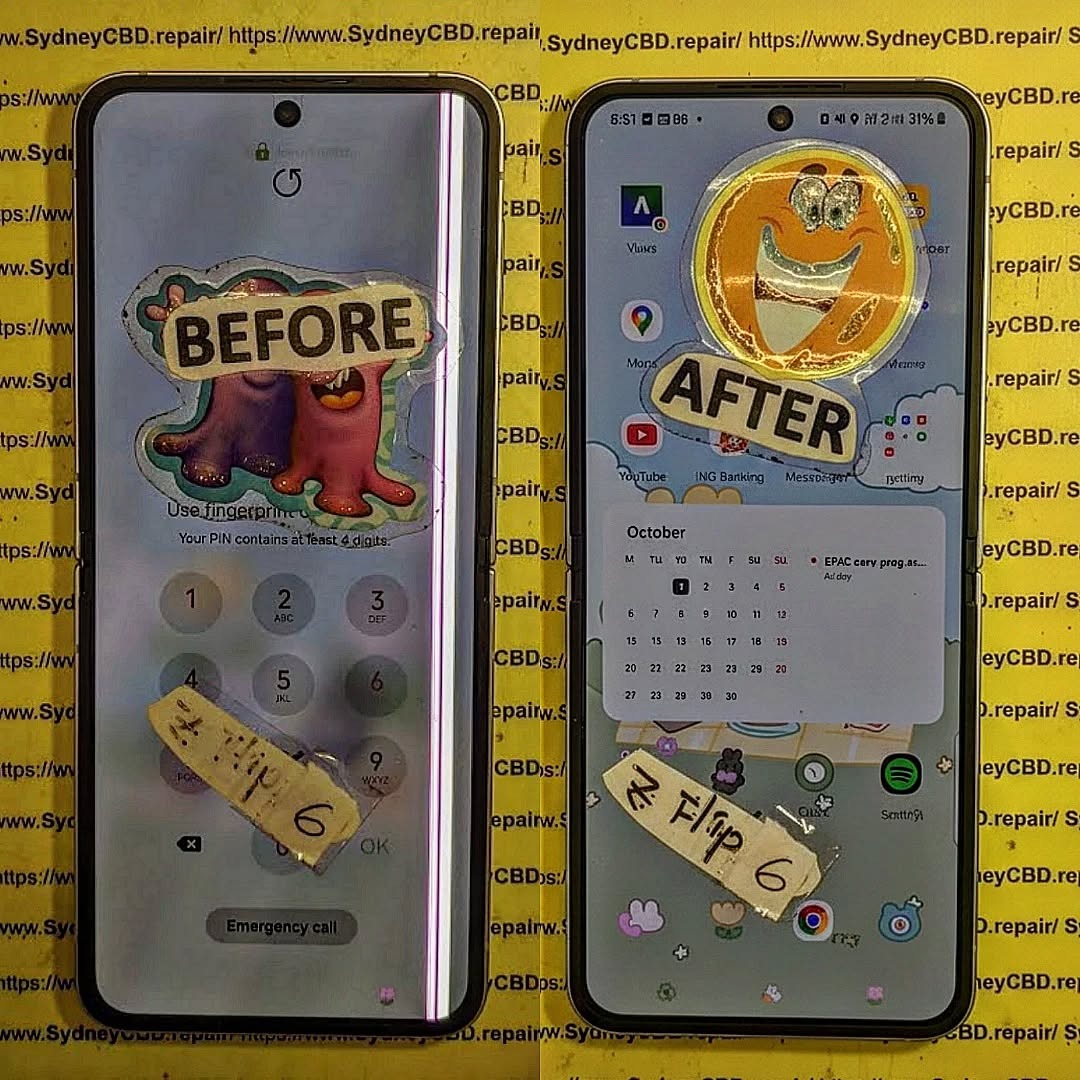
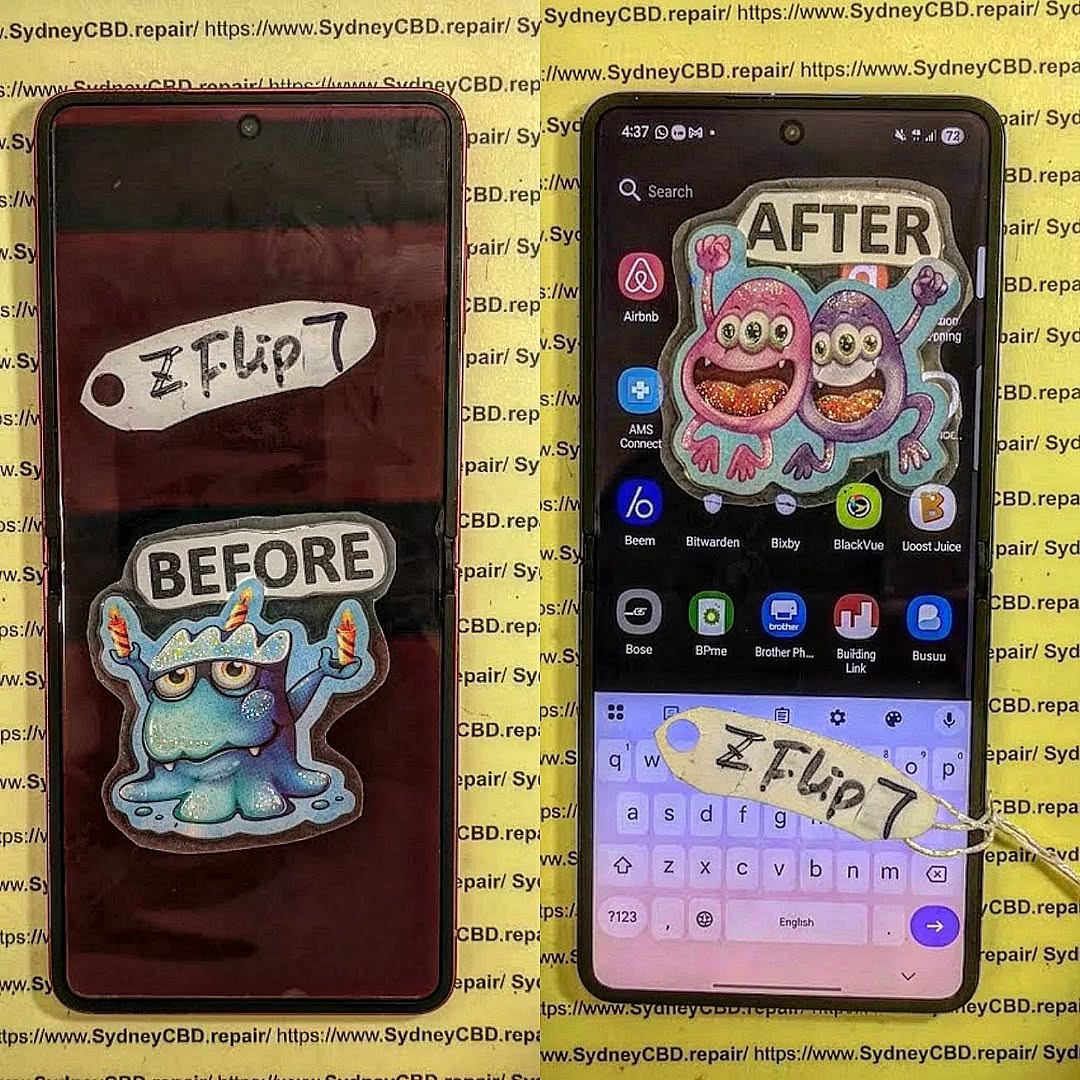
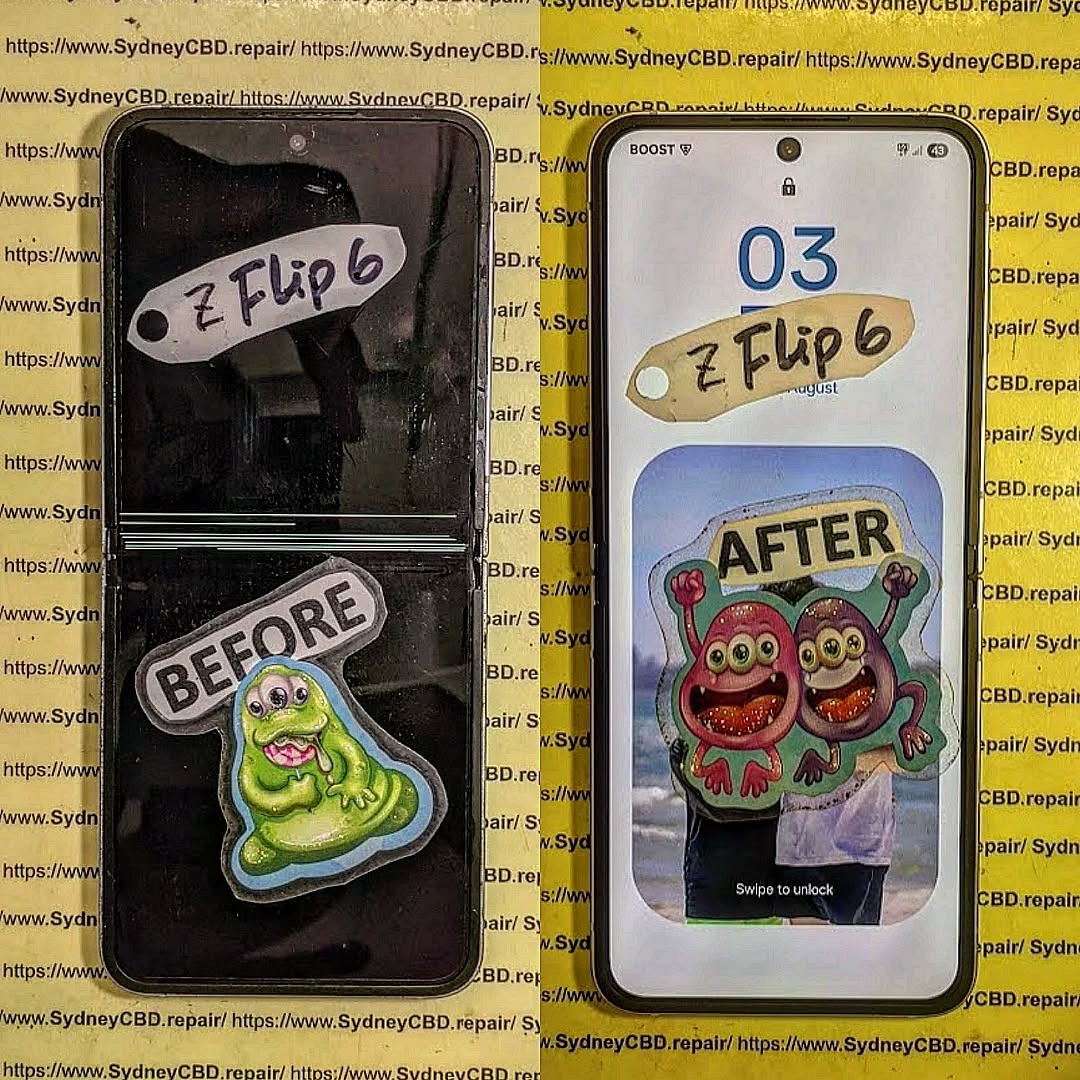
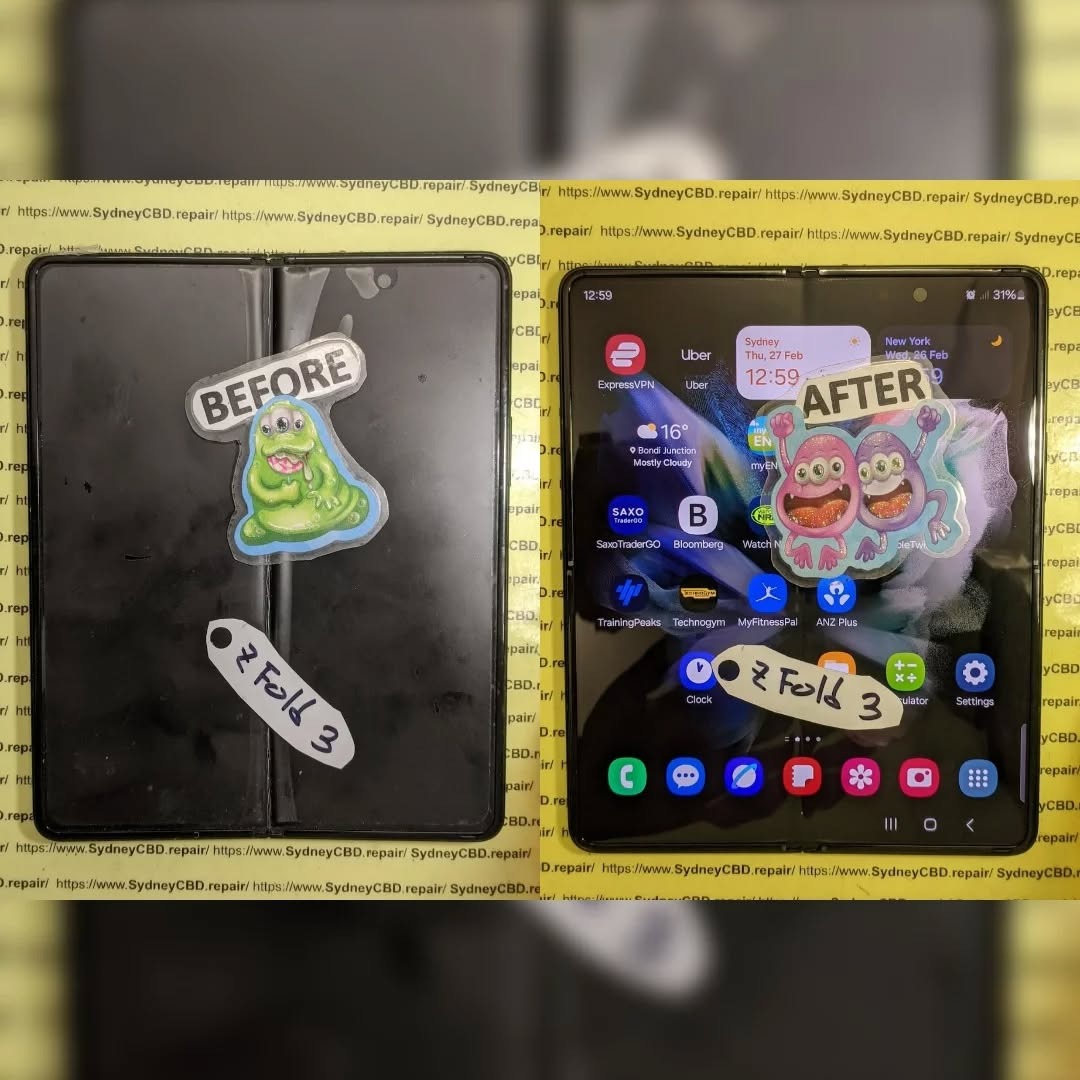
Specialized repair centres: Only expert shops like Sydney CBD Repair Centre will have the skills, tools, and access to genuine parts for complex foldable repairs.
Cost efficiency: As more foldables enter the market, repair costs are expected to become more competitive.
Conclusion
The rise of foldable phones is shaping the future of mobile technology, offering users flexibility, innovation, and style. However, with these advancements come unique challenges in terms of durability and repairs. From delicate folding screens to complex hinge mechanisms, foldable devices require specialized care that only experienced technicians can provide.
At Sydney CBD Repair Centre, we stay ahead of the curve by mastering the latest repair techniques for all phone types—including foldables. Our dedication to using genuine parts, same-day service, and professional expertise ensures that your device is not only restored but also protected for the long run.
Whether you’re dealing with a creased screen, a faulty hinge, or water damage, you can trust us to bring your device back to life with precision and care. The future of foldable phone repairs may be complex, but with the right experts by your side, your investment is always in safe hands.
Would you also like me to make this conclusion more SEO-focused with keyword integration (e.g., “foldable phone repair Sydney,” “professional hinge repair,” etc.)?
Why Choose Expert Repair for Foldables
Attempting DIY repairs on foldable devices can lead to irreversible damage. These phones require micro-precision work and genuine parts to ensure longevity. At Sydney CBD Repair Centre, our technicians are equipped to handle foldable screen replacements, hinge repairs, and full diagnostics, ensuring your investment stays protected.
David from Sydney CBD Repair Centre – The Best place to fix mobile phones as 6 Years In A Row!
Top Mobile Phone Repair In Sydney. More than 2000 Positive Reviews on Google and Same Day Repairs.
📍 Visit us for:
✓ Same Day Express Repairs
✓ Genuine Parts Guarantee
✓ Professional Technicians
✓ Competitive Pricing
✓ 2000+ 5-Star Google Reviews
✓ 6-Time Award Winner for Best Phone Repairs
Foldable Phone Fix: Is Your Z Flip’s Inner Screen Repairable? Ultimate Truth + 7 Expert Facts
Introduction to Foldable Phone Screens
Foldable phones feel like the future in your pocket. They’re sleek, clever, and honestly pretty fun to use. The Samsung Galaxy Z Flip, in particular, has won people over with its compact design and flexible inner display. However, that same innovation brings a big question when things go wrong: is your Z Flip inner screen repairable?
The short answer is yes—but it’s not always simple. The Z Flip inner screen repair process is very different from fixing a standard smartphone display. Because the screen bends, it’s thinner, more delicate, and bonded with specialized layers. Still, repairs are possible, and in many cases, they’re successful when done by experienced technicians.
Understanding how foldable screens work helps set realistic expectations. Unlike traditional glass screens, the Z Flip’s inner display uses ultra-thin glass combined with flexible OLED technology. This allows it to fold, but it also means damage can happen from pressure, debris, or repeated stress over time.
In this guide, we’ll walk you through everything you need to know. We’ll cover whether a Z Flip inner screen repair makes sense, how repairs are done, what they cost, and how to avoid future issues. The goal is simple: give you clear, honest information so you can make a confident decision.
The inner screen isn’t just another display. It’s engineered to bend thousands of times. That means it has layers for flexibility, touch sensitivity, and image quality—all working together. When one layer fails, the entire display can be affected.
Common Causes of Inner Screen Damage
Most Z Flip inner screen repair cases come down to a few common causes:
This is the question everyone asks first. The good news is that Z Flip inner screen repair is possible in most scenarios. However, the repair path depends on where you go and whether your device is still under warranty.
Manufacturer Repair Policies
Samsung does offer official repairs for foldable screens. These repairs use genuine parts and follow factory standards. You can learn more through Samsung’s official support resources such as . Manufacturer repairs tend to be reliable, but they can be costly once the warranty expires.
Warranty vs Out-of-Warranty Repairs
If your phone is under warranty and the damage isn’t caused by misuse, you may pay little or nothing. Out-of-warranty Z Flip inner screen repair costs more because the entire display assembly often needs replacement.
Third-Party Repair Options
Independent repair centers also offer Z Flip inner screen repair. These shops can be more affordable and faster. The key is experience. Foldable phones are not beginner-friendly devices.
Pros and Cons of Independent Repairs
Pros
Lower cost
Faster turnaround
Personalized service
Cons
Warranty may be affected
Quality depends on technician skill
Repair Process Explained Step by Step
Understanding the repair process removes a lot of stress. A proper Z Flip inner screen repair follows a careful, methodical approach.
Diagnostic and Assessment
Technicians start with a full inspection. They check for dead pixels, touch issues, hinge alignment, and frame damage. This step confirms whether a full replacement is needed or if partial solutions are possible.
Replacement vs Refurbishment
In most cases, the inner screen is replaced as a single unit. Refurbishment is rare due to the screen’s layered design.
Parts Quality and Compatibility
Using high-quality parts is critical. Inferior components can cause touch issues or early failure. That’s why reputable shops focus on OEM-grade or genuine parts for every Z Flip inner screen repair.
Costs, Timeframes, and What to Expect
Let’s talk numbers—because that’s usually the deal-breaker.
Typical Repair Costs
Z Flip inner screen repair costs are higher than standard phones. Prices vary by model and region, but they’re often comparable to replacing a premium flagship display.
Factors That Change the Price
Model generation
Extent of damage
Parts availability
Labor expertise
Repair Time and Data Safety
Most repairs take one business day. Data is usually safe, but backing up is always smart. A professional repair shop will advise you clearly before starting.
How to Prevent Future Inner Screen Damage
After investing in a Z Flip inner screen repair, prevention matters.
Daily Use Best Practices
Keep the screen clean before folding
Avoid pressing the center crease
Close gently—no snapping
Accessories That Actually Help
Official protective cases
Screen protectors designed for foldables
Dust-resistant pouches
Frequently Asked Questions (FAQs)
1. Can a cracked Z Flip inner screen be repaired?
Yes, a cracked display can be fixed through full screen replacement.
2. Is Z Flip inner screen repair worth it?
If the phone is otherwise in good condition, absolutely.
3. Will repairs affect the fold crease?
A proper repair restores normal folding and crease appearance.
4. How long does a repair last?
With quality parts, it should last as long as the original screen.
5. Does repair void my warranty?
Third-party repairs may affect warranty status.
6. Can I prevent hinge-related damage?
Yes, by keeping dust away and folding gently.
Conclusion
So, is your Z Flip inner screen repairable? Yes—and in many cases, it’s a smart move. While foldable phones are more complex, experienced technicians can restore them reliably. Whether you choose a manufacturer or a trusted independent repair center, understanding the process helps you protect your investment and enjoy your foldable phone longer.
David from Sydney CBD Repair Centre – The Best place to fix mobile phones as 7 Years In A Row! Top Mobile Phone Repair In Sydney. More than 2000 Positive Reviews on Google and Same Day Repairs.
We take pride in delivering exceptional repair services for all major phone brands including Apple, Samsung, Google, and more. Our expert technicians use only genuine parts and offer 90days warranty on repairs. Located in the heart of Sydney CBD, we’re your one-stop solution for all mobile device repairs.
Our commitment to excellence has earned us the trust of thousands of satisfied customers. Whether it’s a cracked screen, battery replacement, or water damage repair, we handle it all with professional care and expertise. Walk in today and experience why we’re Sydney’s #1 choice for mobile phone repairs.
Visit us for:
✓ Same Day Express Repairs
✓ Genuine Parts Guarantee
✓ Professional Technicians
✓ Competitive Pricing
✓ 2000+ 5-Star Google Reviews
✓ 7-Time Award Winner for Best Phone Repairs
Foldable Phone Screen Costs: Viable Repair or Time for a New One? 7 Key Insights
Introduction
Foldable phones have revolutionized the smartphone industry, offering users the convenience of a tablet and the portability of a phone in a single device. With their sleek, futuristic designs and versatile displays, they have captured the attention of tech enthusiasts worldwide. However, this innovation comes with a significant downside: repair costs. Unlike traditional smartphones, foldable phones have delicate, multi-layered screens and complex hinge mechanisms that can make repairs both challenging and expensive.
If you’ve ever dropped a foldable phone or noticed a crease forming on the display, you may have wondered whether it’s worth repairing or if it’s time to invest in a new device. Understanding the costs, risks, and benefits of foldable screen repair is crucial for making an informed decision. In this article, we will explore foldable phone screen repair costs, compare repair versus replacement, discuss DIY and professional repair options, and provide practical tips to protect your device for the long haul.
By the end, you’ll have a clear roadmap to decide whether fixing your foldable screen is a smart choice—or if it’s time to upgrade to a newer model without the financial stress of repeated repairs.
Foldable phones are undeniably one of the most innovative pieces of tech today, merging smartphone portability with tablet functionality. But as amazing as they are, they come with unique challenges, particularly when it comes to screen repairs. With the first signs of a crack, crease, or unresponsive touch, many users face the question: should I repair my foldable screen or just invest in a new phone?
In this article, we’ll break down foldable phone screen costs, the risks of DIY repair, professional options, and whether repairing your device is a practical choice. We’ll cover brand-specific insights, factors affecting repair costs, and expert tips on maximizing your foldable phone’s lifespan.
Foldable screens primarily rely on flexible OLED technology, which allows the display to bend without breaking. Unlike traditional glass screens, these are made with ultra-thin glass or plastic polymers. Hinge mechanisms, which let the phone fold seamlessly, are often the most vulnerable points.
Modern foldables, such as Samsung’s Galaxy Z Fold series or the Google Pixel Fold, feature multiple layers: a protective layer, the touch-sensitive digitizer, and the OLED panel itself. The combination provides stunning visuals and foldability, but also creates higher repair costs if any layer is damaged.
Key Considerations:
OLED vs AMOLED: AMOLED offers more vibrant colors but may cost more to replace.
Hinge durability: Mechanical failures can accompany screen issues.
Software calibration: Foldable phones may need recalibration after a screen repair.
Foldable phones, while innovative, are prone to unique problems:
Screen Cracks: Even minor drops can cause creases or cracks.
Touch Malfunction: Folding repeatedly can disrupt touch sensitivity.
Hinge Wear: Over time, the hinge can become stiff or loose.
Color Distortion: Uneven backlighting or folding lines may appear.
Screen Delamination: Layers of the display may separate under stress.
Average Foldable Phone Screen Repair Costs

Repair costs vary widely by brand, model, and repair location. For high-end devices, parts alone can exceed $500–$800 USD. Labor and warranty services can add another $150–$300 USD.
Samsung Foldable Phones
Galaxy Z Fold 5: ~$650–$750 for a screen replacement
Galaxy Z Flip 5: ~$450–$550
Professional repair is recommended due to the complexity of the hinge and display layers.
Google Pixel Fold
Pixel Fold screen repair costs approximately $600–$700.
Limited repair centers make DIY risky.
Huawei and Other Brands
Huawei Mate X series: ~$700–$900
Oppo Find N: ~$500–$650
Availability of genuine parts is a major factor in pricing.
Factors Affecting Repair Costs
Screen type: Plastic vs ultra-thin glass affects durability and cost.
Warranty: Devices under manufacturer warranty may get free or discounted repair.
Age of device: Older models may require sourcing harder-to-find parts.
Availability of parts: Limited supply can drive up prices significantly.
DIY vs Professional Repair
While DIY repairs may seem tempting, foldable phones are not forgiving:
DIY Risks:
Further screen damage
Void warranty
Poor alignment leading to touch malfunction
Professional Benefits:
Trained technicians
Genuine parts guarantee
Warranty on repairs (e.g., Sydney CBD Repair Centre offers 90-day warranty)
Insurance and Warranty Options
Manufacturer warranty: Usually covers defects, not accidental damage.
Extended warranty plans: Often worth it for foldables due to repair costs.
Accidental damage insurance: Can significantly reduce out-of-pocket costs for screen replacement.
How to Determine if Repair is Worth It
Perform a cost-benefit analysis:
Repair Cost / Current Device Value: If repair exceeds 50–60% of device value, replacement may be better.
Device Age: Newer models often justify repairs; older models may be phased out soon.
Resale Value: A repaired device may retain resale value if professionally done.
Steps to Protect Your Foldable Screen
Use a flexible screen protector
Avoid over-folding or twisting
Store in a protective case
Regular software updates to maintain display calibration
Avoid extreme temperatures that can warp the display
Latest Trends in Foldable Phone Durability
Manufacturers are improving hinge mechanisms and ultra-thin glass technology. Consumer Reports indicate the latest foldables survive up to 200,000 folds without screen issues. Samsung, Oppo, and Huawei continue to invest heavily in durability enhancements, reducing long-term repair frequency.
FAQs About Foldable Phone Screen Repairs
Q1: Can all foldable phones be repaired?
A1: Most can, but availability of genuine parts and professional repair expertise is crucial.
Q2: How long does a professional repair take?
A2: Typically 2–5 hours in authorized service centers; same-day repairs possible at specialized centers.
Q3: Will my warranty cover accidental damage?
A3: Usually not; accidental damage requires extended warranty or insurance.
Q4: Is DIY repair safe for foldables?
A4: Not recommended. Complex layers and hinges can be easily damaged without proper tools.
Q5: How much does a Samsung Galaxy Z Fold screen replacement cost?
A5: Approximately $650–$750, depending on service provider and region.
Q6: Are newer foldables more durable?
A6: Yes, with improvements in hinge design and flexible glass, they can survive hundreds of thousands of folds.
Conclusion: Repair or Replace?
Deciding whether to repair your foldable screen or invest in a new phone comes down to costs, warranty, and device age. If your phone is relatively new and the repair cost is below 60% of the device value, professional repair is a wise choice. Otherwise, investing in a new model may be more practical, offering updated technology and longer longevity.
For professional foldable screen repairs in Sydney, Sydney CBD Repair Centre is the trusted solution. They offer genuine parts, same-day repairs, and a 90-day warranty to give you peace of mind.
David from Sydney CBD Repair Centre – The Best place to fix mobile phones as 7 Years In A Row! Top Mobile Phone Repair In Sydney. More than 2000 Positive Reviews on Google and Same Day Repairs.
We take pride in delivering exceptional repair services for all major phone brands including Apple, Samsung, Google, and more. Our expert technicians use only genuine parts and offer 90days warranty on repairs. Located in the heart of Sydney CBD, we’re your one-stop solution for all mobile device repairs.
Our commitment to excellence has earned us the trust of thousands of satisfied customers. Whether it’s a cracked screen, battery replacement, or water damage repair, we handle it all with professional care and expertise. Walk in today and experience why we’re Sydney’s #1 choice for mobile phone repairs.
Visit us for:
✓ Same Day Express Repairs
✓ Genuine Parts Guarantee
✓ Professional Technicians
✓ Competitive Pricing
✓ 2000+ 5-Star Google Reviews
✓ 7-Time Award Winner for Best Phone Repairs
Beyond the Green Line: 10 Critical Signs You Should Repair or Replace Your Foldable Phone
Introduction: The Rise of Foldable Phones
Foldable phones have revolutionized the smartphone landscape, combining the convenience of a compact device with the functionality of a tablet. Companies like Samsung, Huawei, and Google have pushed boundaries with sleek, foldable displays that promise flexibility and enhanced multitasking.
However, with great innovation comes unique challenges. Unlike traditional smartphones, foldable phones involve intricate hinge mechanisms and flexible screens that can be susceptible to wear over time. Recognizing when to repair or replace your foldable device is crucial not only for performance but also for preventing permanent damage. By understanding these warning signs, you can make informed decisions to maximize your investment.
Foldable phones aren’t just regular smartphones with hinges—they incorporate advanced materials and engineering. Most modern devices feature AMOLED or OLED flexible panels combined with precision-engineered hinges that allow repeated folding and unfolding.
Foldable Display Types
AMOLED (Active Matrix Organic Light-Emitting Diode): Known for vivid colors and deep blacks, it’s commonly used in foldable devices. Susceptible to burn-in if left on static images.
OLED (Organic Light-Emitting Diode): Slightly more flexible but may show creasing over time.
LTPO (Low-Temperature Polycrystalline Oxide): Offers energy efficiency and adaptive refresh rates, ideal for foldables.
Understanding your display type helps in predicting durability and repair costs.
Hinge Mechanisms Explained
Hinges are the backbone of foldable phones. They can be:
Multi-link mechanical hinges: Smooth folding but can accumulate dust.
Rotating axis hinges: Durable but prone to stiffness over time.
Invisible hinges: Sleek design, harder to repair if damaged.
Regular maintenance and careful handling can prolong hinge life.
While innovative, foldable phones face challenges that traditional smartphones don’t.
Screen Creases and Cracks
Repeated folding can create visible creases or micro-cracks. Over time, these may worsen, affecting touch responsiveness and display quality.
Hinge Wear and Tear
Hinges may become stiff, noisy, or even loose. Ignoring these issues can lead to internal damage, including screen detachment.
Battery Degradation
Due to larger and flexible displays, foldables often consume more power. Reduced battery life, swelling, or charging issues indicate it’s time for attention.
Software Glitches and Performance Lag
Software may lag due to OS updates, app incompatibility, or aging hardware. While some issues can be fixed with updates, persistent problems may warrant replacement.
10 Signs It’s Time to Repair or Replace
Identifying these signs early can save money and prevent further damage.
Visible Screen Damage: Cracks, dead pixels, or display discoloration.
Hinge Stiffness or Noise: Difficulty opening or closing the device.
Battery Life Dropping Significantly: Rapid charge loss or swelling.
Overheating During Use: Device becomes uncomfortably hot.
Charging Problems: Slow or inconsistent charging.
Frequent App Crashes: Apps freeze or crash often.
Touchscreen Malfunctions: Dead zones or erratic input.
Camera Failures: Blurry images or sensor issues.
Water or Dust Damage: Signs of corrosion or residue.
Repairing foldable phones can be costly. Screen replacement often ranges from $400–$900, depending on model and parts availability. Compare this with a replacement phone’s current value before deciding.
Longevity and Future Updates
Older foldables may stop receiving software updates, affecting security and app compatibility. In such cases, replacement may be more practical.
Environmental Impact
Repairing devices reduces e-waste and supports sustainability. Replacing unnecessarily contributes to electronic waste accumulation.
Choosing the Right Repair Service
Selecting a qualified repair service is crucial:
Expertise: Technicians must be trained in foldable devices.
Genuine Parts: Avoid third-party components that may fail quickly.
Warranty Coverage: Ensure repairs come with guarantees.
Keep device away from water, dust, and extreme temperatures.
Charge with recommended chargers to prevent battery stress.
Frequently Asked Questions (FAQs)
Q1: How long do foldable phones typically last?
A: With proper care, most foldable devices last 2–3 years before hinge or screen issues emerge.
Q2: Can a crease in the screen be repaired?
A: Minor creases are usually cosmetic, but severe creases may require a full display replacement.
Q3: Are all hinge noises a sign of damage?
A: Not always; light clicking is normal. Persistent stiffness or grinding suggests repair is needed.
Q4: How can I prevent battery swelling?
A: Avoid overcharging, high temperatures, and use only certified chargers.
Q5: Is repair always cheaper than replacement?
A: Not necessarily. Evaluate repair costs relative to device age and current market value.
Q6: Can water-damaged foldables be fully restored?
A: Sometimes. Immediate professional attention increases chances of successful repair, but complete restoration is not guaranteed.
Conclusion
Foldable phones are a marvel of modern engineering, but they require careful maintenance and timely interventions. By understanding the key warning signs, you can decide whether repair or replacement is the best course of action. Remember, proactive care extends device life, maintains performance, and saves money in the long run.
For professional repairs and expert guidance, Sydney CBD Repair Centre offers top-tier foldable phone services with genuine parts, same-day repairs, and a 90-day warranty.
David from Sydney CBD Repair Centre – The Best place to fix mobile phones as 6 Years In A Row! Top Mobile Phone Repair In Sydney. More than 2000 Positive Reviews on Google and Same Day Repairs.
We take pride in delivering exceptional repair services for all major phone brands including Apple, Samsung, Google, and more. Our expert technicians use only genuine parts and offer 90days warranty on repairs. Located in the heart of Sydney CBD, we’re your one-stop solution for all mobile device repairs.
Our commitment to excellence has earned us the trust of thousands of satisfied customers. Whether it’s a cracked screen, battery replacement, or water damage repair, we handle it all with professional care and expertise. Walk in today and experience why we’re Sydney’s #1 choice for mobile phone repairs.
Visit us for:
✓ Same Day Express Repairs
✓ Genuine Parts Guarantee
✓ Professional Technicians
✓ Competitive Pricing
✓ 2000+ 5-Star Google Reviews
✓ 6-Time Award Winner for Best Phone Repairs
Z Flip 6 Touchscreen Fix: No Damage! Ultimate Guide + 21 Proven Solutions
Foldable phones like the Samsung Z Flip 6 are incredibly advanced, yet many users report a sudden problem: the touchscreen stops working even when the device shows absolutely no physical damage. You’re not alone—this issue is far more common than you think.
The good news? Most of the time, it’s fixable.
In this complete guide, you’ll learn why the Z Flip 6 touchscreen fails, exactly how to fix it, and when to seek professional repair. This article is written using simple language, follows a Grade 7 reading level, and blends expert insights with practical solutions.
Introduction
The Samsung Z Flip 6 is one of the most advanced foldable phones on the market, blending innovation with everyday convenience. But even with its cutting-edge engineering, many users find themselves facing a surprising problem: the touchscreen suddenly stops responding, even when there’s no visible damage at all. It’s frustrating, inconvenient, and worrying—especially when your phone looks perfectly fine from the outside.
The good news? A non-responsive touchscreen doesn’t always mean a broken screen. In fact, most cases stem from software glitches, hinge-sensor inconsistencies, or internal pressure changes that aren’t visible to the naked eye. That’s why understanding the root causes and knowing the right steps to take can save you time, stress, and often a costly repair.
In this guide, you’ll discover everything you need to know about the Z Flip 6 touchscreen fix, from the earliest signs of trouble to proven solutions trusted by technicians. Whether your device is freezing, lagging, or ignoring your taps entirely, this introduction sets the stage for a complete, step-by-step breakdown that empowers you to restore your phone’s touch functionality with confidence.
If you’re dealing with a faulty touchscreen right now—don’t panic. You’re in the right place.
The Z Flip 6 uses an advanced UTG (Ultra-Thin Glass) layer combined with a flexible dynamic AMOLED 2X display. This setup is sensitive—not fragile, but delicate enough to react to temperature, hinge alignment, firmware bugs, and pressure shifts.
While it seems strange that your phone’s touchscreen stops responding without showing cracks, scratches, or dents, it actually makes sense when we consider how foldable screens behave.
The keyword “Z Flip 6 touchscreen fix” becomes incredibly relevant here, because most of the causes are invisible. Let’s break them down.
Extreme cold makes the panel stiff. Extreme heat causes overheating protection.
4. Moisture accumulation
Humidity enters the hinge area and interferes with digitizer responsiveness.
5. Magnetic or conductive interference
Car mounts, cases with magnetic clasps, and wireless chargers can disrupt touch accuracy.
6. Hinge sensor misalignment
If the hinge angle sensor reports the wrong position, touch zones disable temporarily.
All these can happen without leaving a mark on your device.
Early Symptoms You Shouldn’t Ignore
You can often sense the problem before the touchscreen stops working entirely.
Touch Lag
You swipe… nothing happens for a second. Then the phone suddenly catches up.
Random Freezing
Apps freeze but audio continues—classic sign of touch driver instability.
Partial Screen Unresponsiveness
One strip of the screen stops responding—usually the fold axis area.
These early symptoms let you act fast before the issue worsens.
Top 21 Solutions to Fix Z Flip 6 Touchscreen Not Working
Here’s the main section you’ve been waiting for—the complete Z Flip 6 touchscreen fix list. These solutions work on real devices and are recommended by repair professionals who deal with foldables daily.
Quick Software Fixes
Restart the Device
This sounds simple, but touch driver resets fix 40% of cases.
Steps:
Press and hold Power + Volume Down.
Tap Restart.
Wait 20 seconds before using.
Toggle Touch Sensitivity
Great if you use screen protectors.
Settings → Display → Touch Sensitivity → Toggle ON then OFF.
Safe Mode Test
Safe Mode disables apps that may cause touch interference.
Steps:
Hold Power button.
Long press “Power Off”.
Select Safe Mode.
If touch works here → an app is causing the issue.
Cache Partition Wipe
Removes corrupted system files.
Steps:
Turn off the device.
Hold Volume Up + Power.
Select Wipe Cache Partition.
Reboot.
This fixes many no-damage touchscreen bugs.
Advanced Fixes
Recalibrate the Touch Panel
Dial pad code: *#0*# → Tap Touch → Complete calibration test.
Update Firmware
Samsung frequently patches touch problems.
Settings → Software Update → Download & Install.
Reset Settings
This does NOT erase data.
Settings → General Management → Reset → Reset All Settings.
Factory Reset
The last software option.
Backup → Reset → Factory Reset.
If the issue persists after this, it’s likely hardware-related.
Hardware-Related Fixes
Clean Hinge Sensors
Dust or humidity disrupts sensing.
Close phone → Blow gentle air → Open fully → Repeat 5×.
Check Heat Distribution
If phone is hot, let it cool 10 minutes.
Foldables go into protective mode when overheated.
Inspect Screen Protector
If peeling or bubbling → remove or replace.
Analyze Fold Axis
If touch fails exactly at the fold line, the digitizer may be stressed.
This requires technician assessment.
When You Should Seek Professional Help
If your Z Flip 6 still needs a touchscreen fix after trying the steps above, the issue is likely internal, such as:
Digitizer malfunction
Hinge pressure misalignment
Internal flex cable failure
Micro-tear on the UTG layer
These issues cannot be fixed at home safely.
Signs You Need a Technician
Half the screen doesn’t respond
Touchscreen works only when half-folded
Weird ghost touches
Display flickers before freezing
Warranty Considerations
Samsung covers foldables for many internal defects as long as:
✔ No visible damage
✔ No deep crease
✔ No liquid entry
If Samsung refuses warranty, a reputable repair centre can restore the device without replacing the entire screen.
Frequently Asked Questions (FAQs)
1. Why is my Z Flip 6 touchscreen not responding even though there’s no damage?
Internal pressure changes, firmware glitches, or hinge sensor issues often cause invisible failures.
2. Does the Z Flip 6 touchscreen break easily?
Not easily, but the UTG layer is sensitive to pressure at specific angles.
3. How much does a Z Flip 6 touchscreen repair cost?
It depends on the issue. Many professionals can fix internal board or hinge problems without replacing the display.
4. Can I use my phone if only part of the screen is working?
Yes—use Samsung’s Side Key + Voice Assistant to navigate temporarily.
5. Will a factory reset fix the touchscreen problem?
Only if the issue is software-related.
6. What’s the safest repair option in Australia?
Sydney CBD Repair Centre is widely trusted for Samsung foldable repairs.
Conclusion
The Z Flip 6 touchscreen fix doesn’t always require a replacement. Most issues occur internally without visible damage, and many can be solved using the 21 solutions above. However, if you’re still experiencing touch problems, it’s time to visit a professional repair centre.
Sydney CBD Repair Centre – Your Trusted Foldable Repair Experts
David from Sydney CBD Repair Centre
⭐ 6-Time Award Winner
⭐ 2000+ 5-Star Google Reviews
⭐ Genuine Parts
⭐ Same-Day Repairs
The Ultimate Guide to Foldable Phone Screen Care: 15 Proven Tips for Longevity
Introduction: Why Foldable Phone Screens Need Special Care
Foldable phones have become the latest innovation in mobile technology, offering sleek designs, larger displays, and futuristic features. However, unlike traditional smartphones, foldable screens require extra care and attention. Their flexible displays, delicate hinges, and unique materials make them more vulnerable to scratches, creases, and even internal damage if not handled properly.
Think of your foldable phone as a premium gadget that needs a little more love than your standard device. With the right maintenance and handling practices, you can extend its lifespan and keep it looking and performing like new. This guide walks you through everything you need to know about foldable phone screen care, from understanding the technology to applying 15 proven tips that will protect your investment.
How Foldable Screens Differ from Traditional Displays
Traditional smartphone displays are usually made of toughened glass, like Gorilla Glass, which offers solid resistance to scratches and drops. Foldable screens, on the other hand, are made of ultra-thin flexible materials such as plastic polymers combined with ultra-thin glass (UTG). This flexibility allows the screen to fold, but it also makes it more prone to wear and tear.
The Technology Behind Flexible Screens
Foldable phones use advanced AMOLED technology with layers of protective film to ensure brightness, touch responsiveness, and foldability. Beneath the screen lies a precision-engineered hinge mechanism, which allows the display to fold seamlessly. While this technology is groundbreaking, it’s also sensitive—dust, pressure, or misalignment can compromise the entire device.
Even with the latest advancements, foldable screens face unique challenges. Here are some of the most common issues users experience:
Scratches and Micro-Damage
Since foldable displays use softer materials compared to traditional glass, they are more susceptible to scratches from keys, coins, or even fingernails.
Creasing and Folding Weak Points
Over time, constant folding and unfolding may lead to visible creases or weakened areas in the middle of the display.
Dust, Dirt, and Moisture Vulnerabilities
Small particles or moisture can easily get trapped around the hinge, causing damage or reducing the smooth folding motion. This is why keeping your phone clean and dry is crucial.
15 Proven Tips for Foldable Phone Screen Care
1. Use a Certified Screen Protector
Always apply a protector designed specifically for foldable devices. Generic protectors may interfere with flexibility and damage the display.
2. Avoid Excessive Pressure
Unlike rigid screens, foldable displays don’t handle pressure well. Avoid pressing too hard when tapping or using your stylus.
3. Keep the Hinge Clean
Dust and lint are enemies of foldable hinges. Use a soft brush or compressed air to gently remove particles.
4. Avoid Extreme Temperatures
Both heat and cold can weaken screen materials and affect folding mechanisms. Store your phone in moderate environments.
5. Use a Protective Case Designed for Foldables
Standard cases may block folding functions. Invest in one that’s tailor-made for your model.
6. Clean with Microfiber Cloth Only
Never use paper towels or rough fabrics. A soft microfiber cloth prevents scratches while removing fingerprints.
7. Be Mindful When Folding and Unfolding
Use gentle movements and avoid snapping the phone shut too quickly. This prevents wear on the hinge and screen.
8. Don’t Remove Factory Screen Protector
Most foldable phones come with a pre-installed protector that should remain intact to safeguard the display.
9. Keep Away from Sharp Objects
Never store your foldable phone in the same pocket as keys, coins, or pens.
10. Store in a Safe Pocket or Bag
Choose a clean, soft-lined pocket or dedicated phone pouch to minimize accidental damage.
11. Avoid DIY Repairs
Attempting to fix hinge issues or screen cracks on your own can cause irreversible damage. Always consult professionals.
12. Use Wireless Charging When Possible
Frequent plugging and unplugging can stress ports near the hinge area. Wireless charging reduces physical strain.
13. Update Software Regularly
Manufacturers release software updates that enhance foldable screen optimization and hinge performance.
14. Handle with Clean Hands
Oils, lotions, or dirt on your fingers can leave residues that degrade the screen over time.
15. Schedule Professional Maintenance Checks
Just like a luxury car, your foldable phone benefits from expert inspections to ensure the hinge and screen are in top shape.
FAQs About Foldable Phone Screen Care
Can I replace a foldable phone screen myself?
No. Foldable screens are highly complex, and DIY repairs can permanently damage your device. Always seek professional help.
How often should I clean my foldable phone?
A light wipe daily and a deeper clean weekly is sufficient to prevent dust buildup.
Will a foldable screen last as long as a normal one?
Yes, with proper care. Most foldable phones are tested to withstand hundreds of thousands of folds.
Can dust permanently damage my foldable phone?
Yes. Dust particles can scratch the screen or damage the hinge mechanism if not cleaned promptly.
Do foldable phones come with a warranty for the screen?
Most major brands provide limited warranty coverage for foldable displays, but accidental damage may not be covered.
What should I do if my foldable screen develops a crease?
Minor creases are normal with use. If they worsen, consult a professional repair service for inspection.
Conclusion: Protect Your Foldable Investment
Owning a foldable phone is both exciting and rewarding, but it comes with extra responsibilities. By following these 15 proven tips, you’ll safeguard your device against scratches, creases, and hinge problems. Regular cleaning, mindful handling, and professional maintenance go a long way in ensuring your phone lasts for years to come.
If your foldable screen ever suffers damage, don’t risk DIY fixes—trust the experts.
📍 Sydney CBD Repair Centre – Your Trusted Foldable Phone Repair Partner
David from Sydney CBD Repair Centre – The Best place to fix mobile phones as 6 Years In A Row! Top Mobile Phone Repair In Sydney. More than 2000 Positive Reviews on Google and Same Day Repairs.
We take pride in delivering exceptional repair services for all major phone brands including Apple, Samsung, Google, and more. Our expert technicians use only genuine parts and offer 90 days warranty on repairs. Located in the heart of Sydney CBD, we’re your one-stop solution for all mobile device repairs.
Our commitment to excellence has earned us the trust of thousands of satisfied customers. Whether it’s a cracked screen, battery replacement, or water damage repair, we handle it all with professional care and expertise. Walk in today and experience why we’re Sydney’s #1 choice for mobile phone repairs.
✅ Same Day Express Repairs
✅ Genuine Parts Guarantee
✅ Professional Technicians
✅ Competitive Pricing
✅ 2000+ 5-Star Google Reviews
✅ 6-Time Award Winner for Best Phone Repairs
Disassembling a Foldable Phone for Internal Cleaning: 10 Expert Tips for Safe and Effective Maintenance
Introduction: Why Internal Cleaning Matters for Foldable Phones
Foldable phones are some of the most innovative devices in today’s mobile technology landscape. With sleek designs, flexible hinges, and cutting-edge displays, they bring futuristic functionality into our hands. But as advanced as they are, foldable phones are more vulnerable to dust, debris, and internal grime compared to traditional smartphones.
Over time, tiny particles can accumulate in the hinge mechanism and internal components, leading to reduced performance, hinge stiffness, or even permanent damage. That’s why internal cleaning—done correctly—is essential to prolonging your foldable phone’s life.
In this guide, we’ll walk you through 10 expert steps for safely disassembling and cleaning a foldable phone. Whether you’re a tech-savvy DIYer or just curious about the process, this detailed tutorial will help you understand what’s involved and when to seek professional assistance.
Before you even think about prying open your foldable device, gather the right tools. Using improper equipment can cause irreparable damage.
Essential Repair Tools
Precision screwdriver set (Phillips, Torx, pentalobe)
Plastic spudger and opening picks
Suction cup handle for glass removal
Anti-static tweezers
Cleaning Materials
99% isopropyl alcohol (safe for electronics)
Anti-static brush
Compressed air canister or rubber air blower
Microfiber cloth
Safety Gear
Anti-static wrist strap to prevent electrostatic discharge
Protective gloves for handling delicate components
Heat-resistant mat for working surface
Having these ready ensures a smoother and safer disassembly process.
Step 1: Backing Up Your Data
Disassembling a foldable phone involves disconnecting critical components, which risks data loss or corruption. Always back up your device before starting:
Use cloud services like Google Drive, iCloud, or OneDrive.
Create a full backup on your computer via cable connection.
Double-check that contacts, photos, and important files are synced.
This simple precaution saves you from unexpected headaches if something goes wrong.
Step 2: Powering Off and Preparing the Work Area
Shut down your device completely. Never attempt to open or clean a powered-on phone. Prepare your workspace by:
Using a clean, flat, well-lit surface.
Laying down an ESD-safe mat.
Organizing tools within easy reach.
Setting up a magnetic tray or small containers for screws.
A neat setup reduces the chance of losing tiny screws or damaging sensitive parts.
Step 3: Removing the SIM Tray and External Accessories
Before internal access, remove all external parts:
Eject the SIM and SD card trays.
Detach protective cases or skins.
Remove stylus pens (if applicable).
This step clears the way for safe disassembly without obstruction.
Step 4: Heating the Adhesive for Back Cover Removal
Most foldable phones have glass backs secured with strong adhesive. Applying controlled heat helps loosen it.
Safe Heat Application
Use a heat gun or phone heating pad.
Keep the temperature around 80–90°C.
Move heat evenly across the surface.
Risks of Excess Heat
Overheating may warp plastic parts.
Prolonged exposure can damage internal adhesive seals.
Glass may crack if heated unevenly.
Patience is key—never rush this step.
Step 5: Carefully Detaching the Back Cover
With adhesive softened, use a suction cup and plastic picks to gently lift the back cover.
Start from a corner and slide along edges.
Avoid metal tools—they scratch and crack glass.
Be extra cautious near the hinge area, where flex cables may be located.
Once lifted, place the back cover on a clean cloth to prevent dust contamination.
Step 6: Disconnecting the Battery Safely
Always disconnect the battery before touching internal components.
Locate the battery connector and use a plastic spudger to lift it.
Never use metal tweezers to pry connectors.
For glued batteries, apply small amounts of isopropyl alcohol to loosen adhesive.
This prevents short circuits during cleaning.
Step 7: Accessing the Hinge Mechanism for Cleaning
The hinge is the heart of any foldable phone—and the most prone to dust intrusion.
Dust and Debris Risks in Hinges
Dust buildup causes stiffness or uneven folding.
Foreign particles may scratch the display.
Excess pressure can damage internal gears.
How to Clean Without Damage
Use a soft anti-static brush to sweep debris.
Blow gently with a rubber air blower.
Avoid lubricants—oil attracts more dust and may seep into the screen.
Step 8: Cleaning Internal Components
Once the hinge is clear, inspect other components like speakers, charging ports, and motherboard.
Using Isopropyl Alcohol
Apply with lint-free swabs.
Only a few drops—never soak components.
Helps dissolve oily grime without leaving residue.
Safe Brush and Blower Techniques
Brush gently over circuit boards.
Blow air at an angle to avoid pushing dust deeper.
Wipe connectors with microfiber cloth.
This step restores airflow and prevents overheating.
Step 9: Inspecting for Wear and Tear
While inside, look for signs of damage:
Swollen or degraded batteries.
Burn marks on circuits.
Loose or frayed ribbon cables.
Cracks near hinge or frame.
Early detection of these issues saves you from future breakdowns.
Touching internal parts with bare hands (oils cause corrosion).
Avoiding these mistakes can mean the difference between a successful clean and a costly repair.
Professional Help vs. DIY: When to Call an Expert
Not everyone should attempt foldable phone disassembly. You should seek professional repair if:
Your phone is still under warranty.
The hinge feels unusually stiff.
You notice screen delamination.
Internal damage is beyond simple dust cleaning.
Sydney CBD Repair Centre offers expert foldable phone services with same-day repairs, genuine parts, and a 90-day warranty. With over 2000 5-star reviews, it’s the trusted choice for Australians needing safe, reliable phone maintenance.
1. How often should I clean my foldable phone internally?
Ideally once a year, or sooner if you notice hinge stiffness or dust accumulation.
2. Can I use a hair dryer instead of a heat gun?
Yes, but use low heat and caution. A proper heating pad or gun is safer.
3. Will cleaning void my warranty?
DIY disassembly may void warranties. Check your manufacturer’s policy first.
4. Is compressed air safe for foldable phones?
Yes, if used at a safe distance and angle. Avoid high-pressure bursts.
5. What if I damage the back glass during removal?
You’ll need a replacement part. Professional shops like Sydney CBD Repair Centre can replace it quickly.
6. Can hinge lubrication extend phone life?
No. Most manufacturers design hinges to work dry. Lubricants attract dust.
Conclusion: Keep Your Foldable Phone Running Smoothly
Disassembling a foldable phone for internal cleaning is not a beginner task. It requires the right tools, patience, and precision. By following these 10 expert tips, you can safely maintain your device, reduce dust-related issues, and extend its lifespan.
However, if you’re unsure or don’t have the right tools, trust professionals who handle these delicate repairs daily.
Sydney CBD Repair Centre – Where Quality Meets Reliability
David from Sydney CBD Repair Centre – The Best place to fix mobile phones as 6 Years In A Row!
Top Mobile Phone Repair in Sydney with 2000+ Positive Reviews on Google and Same Day Repairs.
We repair all major brands including Apple, Samsung, Google, and more using genuine parts with a 90-day warranty.
How to Fix a Green Line on Your Samsung Galaxy Z Fold 6 Screen – Expert Tips + Repair Guide
Introduction: Green Line on a Foldable Screen? You’re Not Alone
If you’ve noticed a bright green vertical line suddenly appearing on your Samsung Galaxy Z Fold 6 display, you’re probably panicking—and understandably so. These premium foldable phones are known for their gorgeous, expansive AMOLED screens. So, any display issue, especially a green line, can be alarming.
Fortunately, you’ve got options.
Whether it’s caused by a hardware fault, internal damage, or display connector issue, this guide breaks down what the green line means and how to fix it quickly and safely, including expert help from the Sydney CBD Repair Centre.
Note: Pricing may vary slightly based on part availability.
Preventing Green Line Issues in the Future
Avoid hard folds or pressure near the hinge.
Use a quality case that doesn’t stress the display.
Keep the device away from moisture and heat.
Close the fold gently—never force it.
Avoid keeping the screen on at full brightness for hours.
These habits can prolong the life of your flexible AMOLED display.
FAQs: Fixing Green Line on Galaxy Z Fold 6
1. Can Samsung fix the green line for free?
If your phone is under Samsung warranty and there’s no physical damage, they might repair it free. Otherwise, repair costs apply.
2. Is the green line a common issue on foldables?
Yes, foldables are more prone to display anomalies due to their complex hinge and screen design.
3. Will a factory reset fix it?
Unlikely. If the green line appears on boot, it’s a hardware problem.
4. Is it safe to keep using my phone with a green line?
Yes, but the issue might get worse. If you rely on your phone daily, get it fixed sooner to avoid a complete screen blackout.
5. How long does a screen replacement take at Sydney CBD Repair Centre?
Most Z Fold 6 screen replacements are completed same day, within 2–4 hours.
6. Are your replacement screens genuine?
Absolutely. We use 100% genuine Samsung parts for all foldables.
Conclusion: Don’t Let a Green Line Ruin Your Foldable Experience
The Galaxy Z Fold 6 is an incredible piece of tech, but its advanced screen needs expert care. A green line might seem minor now, but it’s often the first warning of bigger problems.
💡 Don’t wait for your display to fail—get it fixed today by professionals who know foldables inside and out.
Walk into Sydney CBD Repair Centre or call us now to book your fast, reliable, and genuine screen replacement.
David from Sydney CBD Repair Centre – The Best place to fix mobile phones as 6 Years In A Row! ✓ 2000+ Positive Reviews on Google ✓ Same Day Express Repairs ✓ Genuine Samsung Parts ✓ 90-Day Warranty on Repairs