




Reviving the Note 20 Ultra: Is Your Older Flagship Worth Repairing?

Reviving the Note 20 Ultra: Is Your Older Flagship Worth Repairing? 10 Smart Insights
Introduction
The Samsung Galaxy Note 20 Ultra remains one of the most iconic smartphones of its generation. Launched in 2020, it combined cutting-edge technology, a stunning design, and the productivity-focused S Pen, making it a favorite for professionals, creatives, and tech enthusiasts alike. But as the years go by, even the most robust devices begin to show signs of wear and tear. Cracked screens, battery degradation, and software slowdowns are common issues that many Note 20 Ultra owners face.
So, the big question arises: is it worth repairing an older flagship like the Note 20 Ultra, or should you simply invest in a new device? Repairing your device can save money, extend its lifespan, and even reduce electronic waste, but it requires careful consideration of repair costs, part quality, and the type of issues affecting your phone.
In this guide, we’ll explore everything you need to know about reviving the Note 20 Ultra. From common problems and repair costs to professional repair tips and maintenance advice, this article will help you make an informed decision. Whether you’re contemplating a DIY fix or heading to a certified repair center, we’ll provide insights, tips, and real-world examples to help your device feel almost brand new again.
The Samsung Galaxy Note 20 Ultra remains one of the most revered flagship smartphones of its generation. Released in 2020, this powerhouse combined premium design with top-tier performance. However, as with any older device, time takes its toll. Screens crack, batteries degrade, and software can slow down. If you’re wondering whether reviving the Note 20 Ultra is worth the investment, you’re in the right place. This guide dives deep into repairs, costs, and strategies to get your device running like new again.
Understanding the Legacy of the Note 20 Ultra
The Note 20 Ultra set the bar high in the smartphone market. Featuring a stunning 6.9-inch Dynamic AMOLED 2X display, a powerful Snapdragon 865+ or Exynos 990 processor, and the beloved S Pen functionality, it became a favorite among productivity enthusiasts and tech aficionados alike. Its premium build, featuring Gorilla Glass Victus and a stainless steel frame, promised durability, yet nothing is invincible.
Even years after its launch, the Note 20 Ultra still holds up in terms of performance, camera quality, and display technology. Its combination of features and aesthetic design ensures it remains a device worth considering for repair rather than replacement, especially if you want to extend its life and avoid unnecessary e-waste.
Common Issues That Drive Repairs
Like all devices, the Note 20 Ultra experiences wear over time. Understanding these issues is key to deciding whether a repair makes sense.
Screen and Display Problems
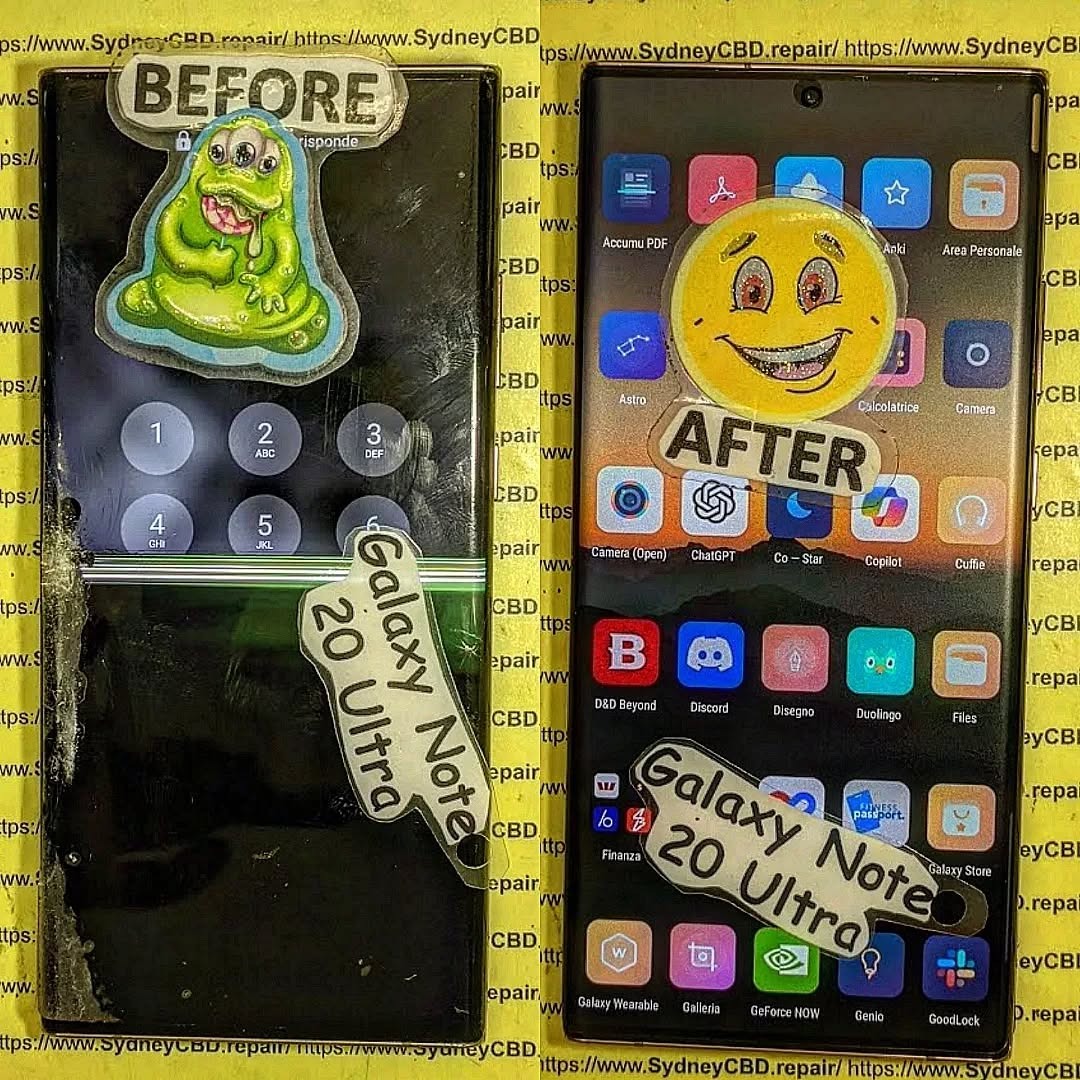
One of the most frequent problems is a damaged display. The Note 20 Ultra’s AMOLED screen delivers exceptional color and contrast, but it’s susceptible to cracks from drops. Users also report ghost touches or flickering after water exposure. Replacing the display often resolves these issues, restoring both touch responsiveness and vibrant visuals.
Battery and Charging Concerns
Over time, the battery’s maximum capacity naturally declines. This can result in shorter screen-on time and slower charging speeds. Some users encounter fast-charging failures or overheating. Replacing the battery with a genuine Samsung component can bring back original performance levels, sometimes at a fraction of the cost of a new phone.
Water Damage and Internal Corrosion
Despite IP68 water resistance, accidental exposure to water or moisture can occur. Signs include erratic touch input, camera fogging, or device failure. Water damage repair is complex and usually requires professional intervention. Technicians can clean and replace affected internal components to restore functionality.
Repair vs Replacement: Making the Smart Choice

Deciding whether to repair or replace your Note 20 Ultra depends on several factors, including cost, performance, and personal preference.
Financial Considerations
Repairs can range from $150 to $500 depending on the issue. For instance, screen replacement may cost more than battery replacement but is still cheaper than purchasing a new flagship device. Compare the repair cost to current market prices for a refurbished or new equivalent. Often, repair is the economical and sensible route.
Environmental Impact
Repairing your device is an eco-friendly choice. Extending the life of your Note 20 Ultra reduces electronic waste and the carbon footprint associated with manufacturing new devices. For sustainability-conscious users, this factor alone may tip the balance toward repair.
DIY Repairs: What You Can Do at Home
Some minor issues can be handled without professional help, but caution is essential.
- Battery Calibration: Reboot and reset battery stats to extend lifespan.
- Software Updates: Keep your device updated to prevent slowdowns.
- Cleaning: Use isopropyl alcohol and microfiber cloths for ports and surfaces.
DIY repairs can save money, but avoid opening the device for major internal repairs unless you have proper tools and experience.
Professional Repairs: When Expertise Matters
Certain repairs require expertise:
- Screen Replacement: AMOLED screens are fragile and expensive.
- Water Damage: Internal corrosion requires specialized cleaning.
- Motherboard Issues: Only trained technicians should handle.
Certified centers, like Sydney CBD Repair Centre, provide genuine parts, warranties, and professional service. They ensure the device is restored safely, maintaining performance and longevity.
Finding Quality Replacement Parts
Using genuine Samsung components is critical. Aftermarket parts can be cheaper, but they may compromise display quality, touch sensitivity, or battery life. Look for reputable suppliers and certified repair centers to guarantee compatibility and longevity.
Maintaining Your Device After Repair
Once repaired, taking proactive steps prolongs life:
- Use a high-quality case and screen protector.
- Avoid excessive heat or moisture.
- Regularly clear cache and background apps.
- Perform battery calibration every few months.
Consistent maintenance ensures that your Note 20 Ultra continues performing optimally.
Software Optimization and Updates
Even with hardware repaired, outdated software can hinder performance. Ensure you:
- Install the latest One UI updates.
- Remove unused apps and bloatware.
- Perform regular system optimization.
Software upkeep complements hardware repairs, making your device feel nearly new.
User Experiences: Stories from the Field
Many users have successfully extended their Note 20 Ultra’s life:
- Emma, 32: Replaced battery and screen, regained full-day battery and flawless display.
- James, 28: Water damage repair restored camera and touch functionality.
- Raj, 40: Opted for professional repair over replacement, saving over $600.
These real-world cases demonstrate the tangible benefits of repair versus replacement.
Frequently Asked Questions
1. How much does a Note 20 Ultra screen replacement cost?
Typically, $300–$500 depending on parts and labor.
2. Can water damage be fully repaired?
Yes, with professional cleaning and component replacement, though success depends on damage severity.
3. Are aftermarket parts safe for repairs?
They can be used, but genuine parts ensure optimal performance and longevity.
4. How long does a battery replacement last?
A new genuine battery usually lasts 18–24 months with proper care.
5. Is repairing environmentally friendly?
Absolutely. It reduces e-waste and energy consumption compared to manufacturing new devices.
6. Can software updates improve an old Note 20 Ultra?
Yes, updates can enhance speed, security, and battery optimization.
Conclusion: Is It Worth It?

Repairing your Note 20 Ultra is often a smart choice. With professional repairs, genuine parts, and regular maintenance, your device can function like new, saving money and supporting sustainability. For owners who value performance and design, revival is not just feasible—it’s rewarding.
David from Sydney CBD Repair Centre – The Best place to fix mobile phones as 7 Years In A Row! Top Mobile Phone Repair In Sydney. More than 2000 Positive Reviews on Google and Same Day Repairs.
We take pride in delivering exceptional repair services for all major phone brands including Apple, Samsung, Google, and more. Our expert technicians use only genuine parts and offer 90days warranty on repairs. Located in the heart of Sydney CBD, we’re your one-stop solution for all mobile device repairs.
Our commitment to excellence has earned us the trust of thousands of satisfied customers. Whether it’s a cracked screen, battery replacement, or water damage repair, we handle it all with professional care and expertise. Walk in today and experience why we’re Sydney’s #1 choice for mobile phone repairs.
Visit us for:
✓ Same Day Express Repairs
✓ Genuine Parts Guarantee
✓ Professional Technicians
✓ Competitive Pricing
✓ 2000+ 5-Star Google Reviews
✓ 7-Time Award Winner for Best Phone Repairs
Sydney CBD Repair Centre – Where Quality Meets Reliability.
Call : +61280114119
Website: https://SydneyCBD.repair/locate-us

