After first being announced back in October, Apple’s new Apple Card Savings Account is officially available. Head below for a closer look at how to sign up for an Apple Card Savings Account, what it looks like in the Wallet app, and how to manage your Daily Cash rewards.
How to sign up for Apple Card Savings Account
Apple Card Savings Account is integrated directly into the Wallet app on your iPhone. It’s available exclusively to Apple Card users, so if you aren’t an Apple Card user, you won’t be able to sign up for the savings account. This, of course, also means that the Apple Card Savings Account is only available in the United States.
The process to sign up for an Apple Card Savings Account is incredibly straightforward. Here’s how to do it.
Open the Wallet on your iPhone.
Tap on your Apple Card.
Tap the “…” three dots in the upper-right corner.
Tap on the “Daily Cash” option in the menu.
Scroll down and look for the “Apple Card Savings Account” option.
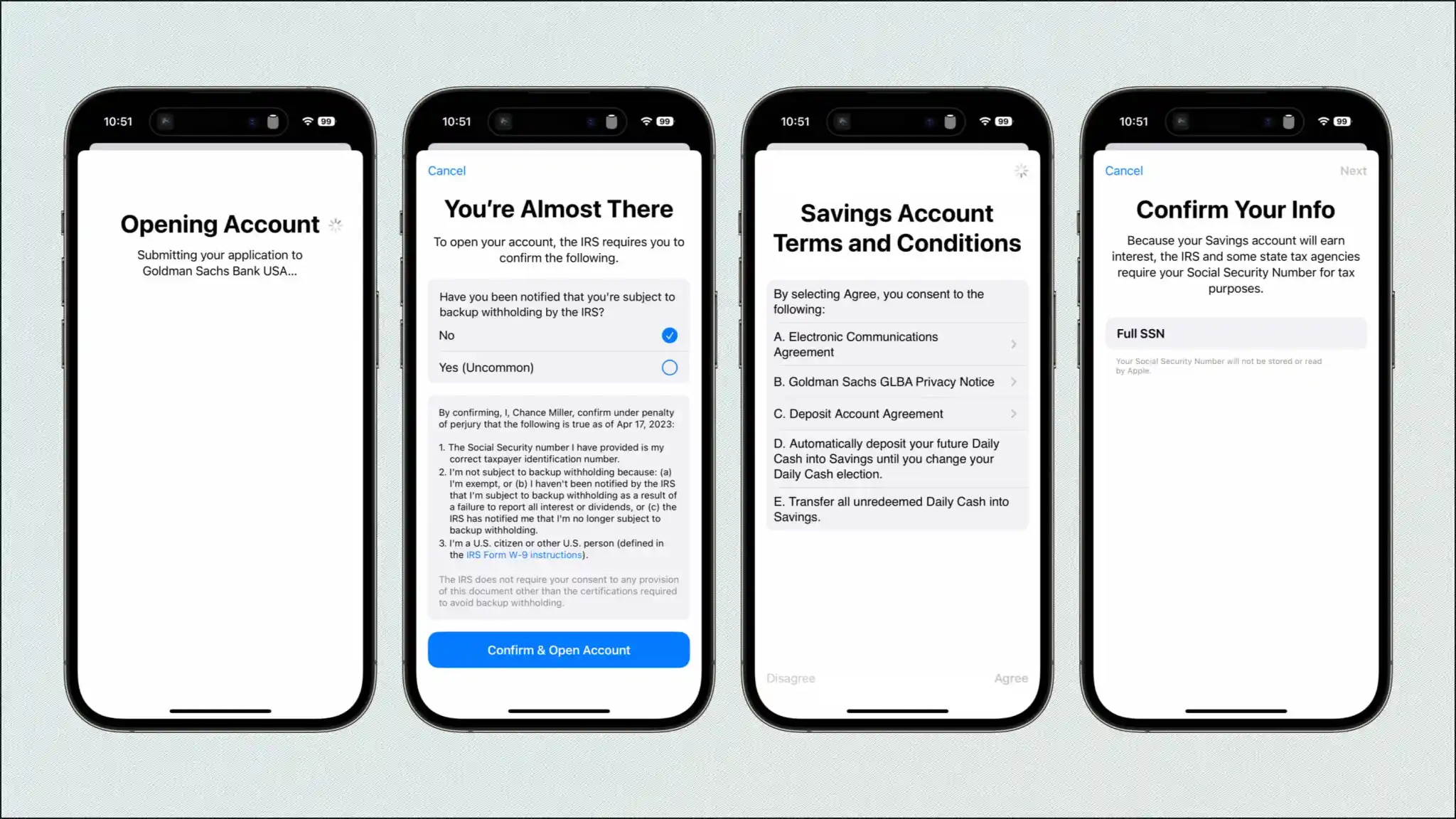
Now, the Wallet app will walk you through the sign-up process for an Apple Card Savings Account. You’ll need to enter your Social Security number, agree to the terms and conditions, then submit your application to Goldman Sachs (Apple’s partner bank) for final approval.
It should only take a few minutes to complete this sign-up process. Once you’re approved, you’ll receive an email from Apple, and you’ll be able to access your Apple Card Savings Account directly in the Wallet app.
After approval, you’ll see a new “Savings Account” interface within the Apple Card section of the Wallet app. Tap on this to view your current account balance, to add money to your account, and to withdraw any money to a linked bank account or to your Apple Cash card.
You can fund your account through a linked bank account or from your Apple Cash balance. Withdrawals and deposits “typically take 1-3 business days,” Apple says, and there are no fees whatsoever.
Finally, to set up your Apple Card Daily Cash rewards to instantly deposit into your Savings account, follow these steps:
Open the Wallet on your iPhone.
Tap on your Apple Card.
Tap the “…” three dots in the upper-right corner.
Tap on the “Daily Cash” option in the menu.
Under “Daily Cash Election,” choose “Savings.”
The current interest rate for Apple Card Savings Account is 4.15%, but as always, this APY can change based on the broader economy. “Your account starts earning interest on the day of your first deposit,” Apple explains. “Interest is compounded daily and paid at the end of the month.”
Apple Card Savings Account, a new integration for the Wallet app first announced back in October, may finally be about to launch. Apple is reportedly making changes to its back-end code in preparation for a full launch of the new feature…
This change was first pointed out by @aaronp613 on Twitter, who spotted a new file in Apple’s back end promoting Apple Card Savings Account. While Apple announced its plans for Apple Card Savings Account back in October, the company didn’t share any specific timeline on when the feature would actually launch.
Changes to the back end were also how @aaronp613 was able to spot the impending launch of Apple Pay Later, just a day before the feature ultimately debuted.
Apple Card Savings Account will allow you to automatically deposit your Daily Cash rewards into the account. So as you earn Daily Cash with your Apple Card, that money can be automatically deposited into the high-yield savings account in the Wallet app.
In addition to depositing Daily Cash directly into the savings account, Apple Card users can also deposit additional money using a linked bank account or their Apple Cash balance.
Users will also be able to track the balance of this high-yield savings account directly in the Wallet app. There will be a new “Savings Account” button in the Apple Card interface. Tapping on it will show a list of transactions and a chart showing the account’s growth. You’ll also be able to withdraw it to your bank easily.
Apple Card Savings Account will be operated in partnership with Goldman Sachs, which is also Apple’s partner for the Apple Card itself. There’s no word on what exact percentage rate the account will pay out in interest, but Goldman’s existing online savings account offers an annual percentage yield of 3.75%.
The new savings account will only be available to Apple Card users, including owners and co-owners. Apple Card is only available in the United States.
Apple Card integrating new savings account feature for Daily Cash
Apple has announced an expansion of its relationship with Goldman Sachs for a new Apple Card feature. In a press release, Apple says that Apple Card users will be able to have their Daily Cash rewards deposited automatically into a high-yield savings account from Goldman Sachs.
You’ll even be able to track the balance of that savings account right in the Wallet app. There are no fees, minimum deposits, or minimum balance requirements.
Apple says:
Apple Card users will be able to easily set up and manage Savings directly in their Apple Card in Wallet. Once users set up their Savings account, all future Daily Cash received will be automatically deposited into it, or they can choose to continue to have it added to an Apple Cash card in Wallet. Users can change their Daily Cash destination at any time.
In addition to depositing Daily Cash directly into the savings account, Apple Card users can also deposit additional money using a linked bank account or their Apple Cash balance.
To expand Savings even further, users can also deposit additional funds into their Savings account through a linked bank account, or from their Apple Cash balance. Users can also withdraw funds at any time by transferring them to a linked bank account or to their Apple Cash card, with no fees. Once set up, Apple Card users can watch their rewards grow in Wallet through an easy-to-use Savings dashboard, which shows their account balance and interest accrued over time.
Users can track the balance of this high-yield savings account directly in the Wallet app. There will be a new “Savings Account” button in the Apple Card interface. Tapping on it will show a list of transactions and a chart showing the account’s growth. You’ll also be able to withdraw it to your bank easily.
Apple hasn’t announced when this feature will be available, instead simply saying it will launch “soon.” It also hasn’t confirmed the exact percentage rate that the account will pay out in interest. Goldman’s existing online savings account offers an annual percentage yield of 2.15%.
The new savings account will only be available to Apple Card users, including owners and co-owners.
Apple Card users will be able to grow their rewards in Apple Wallet by automatically depositing their Daily Cash into a new high-yield Savings account from Goldman Sachs
Apple Card users will be able to grow their Daily Cash while saving for the future by automatically depositing their Daily Cash into a new high-yield Savings account from Goldman Sachs.
Apple announced a new Savings account for Apple Card that will allow users to save their Daily Cash and grow their rewards in a high-yield Savings account from Goldman Sachs. In the coming months, Apple Card users will be able to open the new high-yield Savings account and have their Daily Cash automatically deposited into it — with no fees, no minimum deposits, and no minimum balance requirements. Soon, users can spend, send, and save Daily Cash directly from Wallet.
“Savings enables Apple Card users to grow their Daily Cash rewards over time, while also saving for the future,” said Jennifer Bailey, Apple’s vice president of Apple Pay and Apple Wallet. “Savings delivers even more value to users’ favorite Apple Card benefit — Daily Cash — while offering another easy-to-use tool designed to help users lead healthier financial lives.”
Apple Card users will be able to easily set up and manage Savings directly in their Apple Card in Wallet. Once users set up their Savings account, all future Daily Cash received will be automatically deposited into it, or they can choose to continue to have it added to an Apple Cash card in Wallet. Users can change their Daily Cash destination at any time.
Apple Card users will be able to easily set up and manage Savings directly in their Apple Card in Wallet.
To expand Savings even further, users can also deposit additional funds into their Savings account through a linked bank account, or from their Apple Cash balance. Users can also withdraw funds at any time by transferring them to a linked bank account or to their Apple Cash card, with no fees. Once set up, Apple Card users can watch their rewards grow in Wallet through an easy-to-use Savings dashboard, which shows their account balance and interest accrued over time.
Apple Card users get 3 percent Daily Cash on Apple Card purchases made using Apple Pay with Apple and select merchants, including Uber and Uber Eats, Walgreens, Nike, Panera Bread, T-Mobile, ExxonMobil, and Ace Hardware, as well as 2 percent Daily Cash when they use Apple Pay at other merchants, and 1 percent on all other purchases. There is no limit to the amount of Daily Cash users can receive.
The new Savings account from Goldman Sachs expands upon the financial health benefits and valuable Daily Cash that Apple Card already offers. Built into Wallet on iPhone, Apple Card has transformed the credit card experience by simplifying the application process, eliminating all fees, encouraging users to pay less interest, offering the privacy and security users expect from Apple, and offering Daily Cash on every purchase.
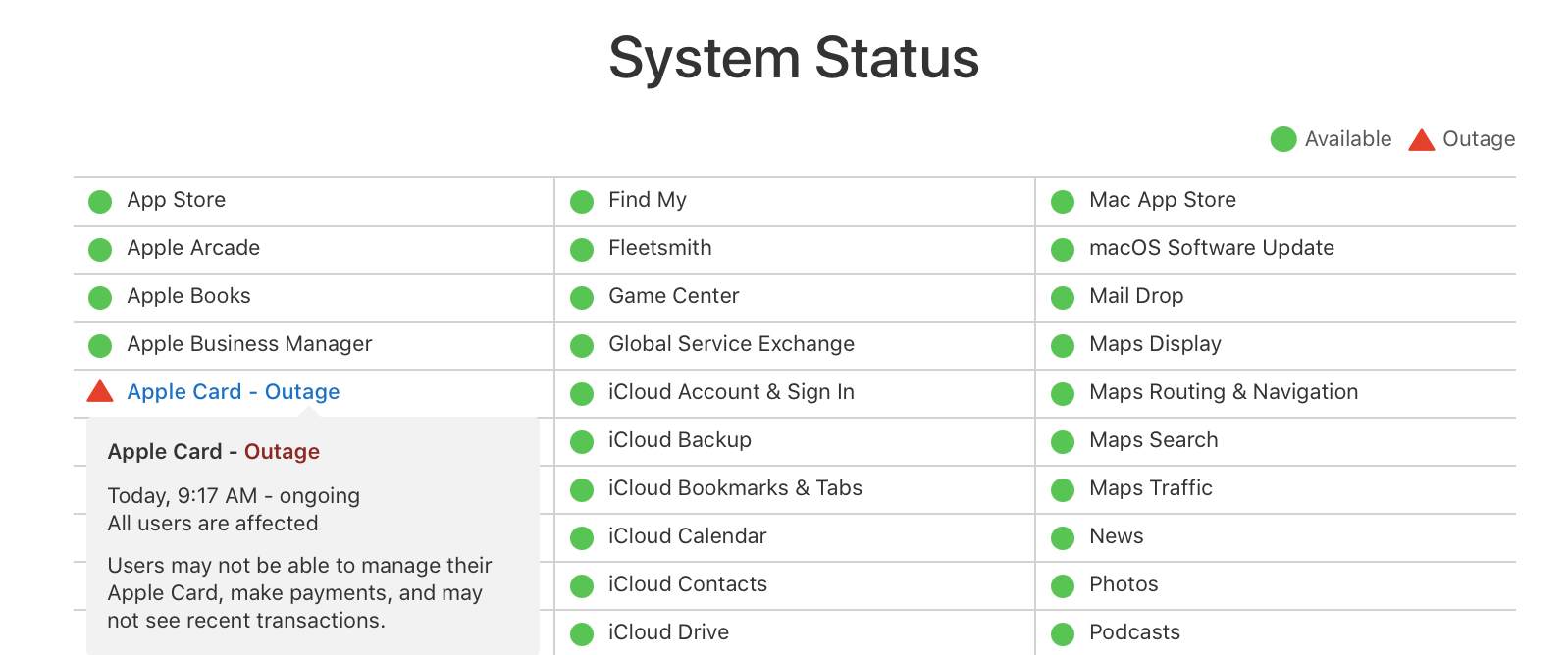
After seeing an Apple Card outage earlier this month that affected all users, the credit card is seeing downtime again this morning which is preventing some from using it for in-store purchases.
Apple Card is seeing downtime June 02,2021 and Apple says the outage is impacting all users.
Update 12:19 pm PT: Apple’s system status webpage indicates the Apple Card outage has been resolved.
Update 11:06 am PT: The outage is still ongoing and appears to be affecting purchases as well, according to tweets we’ve embedded below.
Update 10:28 am PT: Going on four hours, the Apple Card downtime continues.
Update 8:28 am PT: The outage is still ongoing.
Apple updated its System Status page last June 02,2021 noting the issue with Apple Card. Along with Apple confirming all users are affected by the outage, it looks like most all functionality such as making payments, viewing/managing the card, and even seeing payments is not available.
Users may not be able to manage their Apple Card, make payments, and may not see recent transactions.
The outage started at 6:17 am PT/ 9:17 am ET. We’ll update this post as we learn more about the situation.
last June 02,2021 issue comes shortly after Apple Card Family Sharing arrived with iOS 14.6 at the end of May.
as of June 14,2021 Apple Card outage is more minor than the one we saw two months ago. But the company has confirmed on its System Status page that Apple Card via Apple Pay isn’t working for some in stores.
Some users may not be able to make in-store purchases with Apple Card using Apple Pay.
That means using the physical card with the chip or to swipe should work for in-store purchases and also Apple Card via Apple Pay online and in apps should be fine as well.
The outage has been going on since 12:30 am PT / 3:30 am ET. We’ll update this post as the issue is worked on and resolved.
The previous Apple Card outage that took the credit down completely for all users lasted about six hours. Hopefully this one will be resolved more quickly.
Whether you want to take advantage of the 0% interest offers for iPhone, iPad, Mac, and more or have been wanting to get Apple’s credit card for while for another reason, follow along for how to apply for Apple Card on iPhone and iPad.
Apple Card offers a variety of compelling features like its Daily Cash program, strong focus on security and privacy, no fees, a clean, optional Titanium physical card, and a great software experience to track spending and more on iPhone.
While Apple has offered free iPhone financing to Apple Card users for some time, a new addition is the ability to get 0% interest financing for iPad, Mac, AirPods, and more. The interest-free period ranges from 6-12 months depending on the product you’re buying. There’s also a $50 sign up bonus promotion through 7/31/2020.
Here are some of the requirements for Apple Card eligibility:
Be 18 years or older, depending on where you live
Be a U.S. citizen or a lawful U.S. resident with a valid, physical U.S. address that is not a P.O. Box. You can also use a military address
Have a compatible iPhone with the latest iOS version (iPhone 6 or later)
Using two-factor authentication with your Apple ID and be signed in to iCloud with your Apple ID
Apple works with Goldman Sachs to provide the financial end of Apple Card.
How to apply for Apple Card on iPhone and iPad
On iPhone open the Wallet app (on iPad head to Settings > Wallet & Apple Pay > Add Card)
You might see an offer at the top to apply for Apple Card (if not tap the + icon in the top right corner)
Choose Apply for Apple Card
Read the terms and conditions, tap Continue
Confirm your Apple ID, name, date of birth, and phone number, tap Next
Enter your address (no P.O. boxes)
Enter the last four digits of your social security number
Enter your total annual income (required by Goldman Sachs)
Agree to the terms and conditions
It will just take a few moments and you’ll see if you’re immediately approved or not
In some cases, Apple/Goldman Sachs may ask for you to share a photo of your driver’s license or State ID.
Here’s how the process looks:
Once your application is submitted, you should see a screen that lets you know if you’re approved or not. Check out our previous hands-on coverage of using Apple Card, tracking spending, and more with iPhone, iPad, and Apple Watch.
Apple Card is a credit card offered by Apple and Goldman Sachs that offers daily cash back, in-app data about your purchases and spending habits, and other benefits, and you can use it directly from iPhone in the Wallet app. You’ll get a physical Apple Card too, which is crafted out of a fancy metal material, making the physical card somewhat similar in appearance to other notoriously high end credit cards like the AmEx Centurion or JP Morgan Reserve card. But unlike those other high-end credit cards, the Apple Card is much more broadly accessible and without the same requirements to obtain.
If you like to use credit cards for cash back and the convenience they offer, and you have an iPhone, applying for Apple Card may be something you’re interested in.
How to Apply & Sign Up for Apple Card from iPhone
Note that you must have an iPhone to be able to apply for the Apple Card:
Open the “Wallet” app on your iPhone
Click on ‘Apply’ on the Apple Card promo, or click the “+” plus button to add an Apple Card
Click continue and through the signup process
Confirm your Apple ID, name, address, and other personal information as required by Apple Card
Agree to the terms after reviewing interest rate and charges
You’ll either be immediately approved for Apple Card and shown your credit limit and details to which you can approve and accept, or asked to submit additional documentation like taking a photo of your ID
If you are granted immediate approval than you can use the Apple Card right away with your iPhone and Apple Pay. If you have to submit additional documentation there will be a delay until you’re either approved, or denied.
The credit limits and interest rates vary on the individual persons credit scores and other details, and there seems to be a large range of numbers for both. If you’re not happy with what is offered to you, you can always reject the card, or close it.
Like all other credit cards, Apple Card charges interest (and at varying rates depending on your credit), so it’s best to use the credit card responsibly. Paying the card balance off in full before any interest is accumulated is one way to do that.
After you’re signed up, managing your Apple Card is also done through the Wallet app, and you can also have a live chat with customer service if needed, or call a phone number of course too.
While you’re in the Wallet app, you might also find it worthwhile to add other credit cards to Apple Pay on the iPhone too.
Note that if you’ve never setup Apple Pay you will need to do that as well in order to apply for and use Apple Card.
Thank you for using
Themify Popup
This is a sample pop up. Themify Builder or Builder Lite (free) plugin is recommended to design the pop up layouts.