




Is Fixing A Smashed Samsung Galaxy S26 Ultra Actually Worth It

Is Fixing A Smashed Samsung Galaxy S26 Ultra Actually Worth It? 7 Powerful Factors To Consider
Introduction
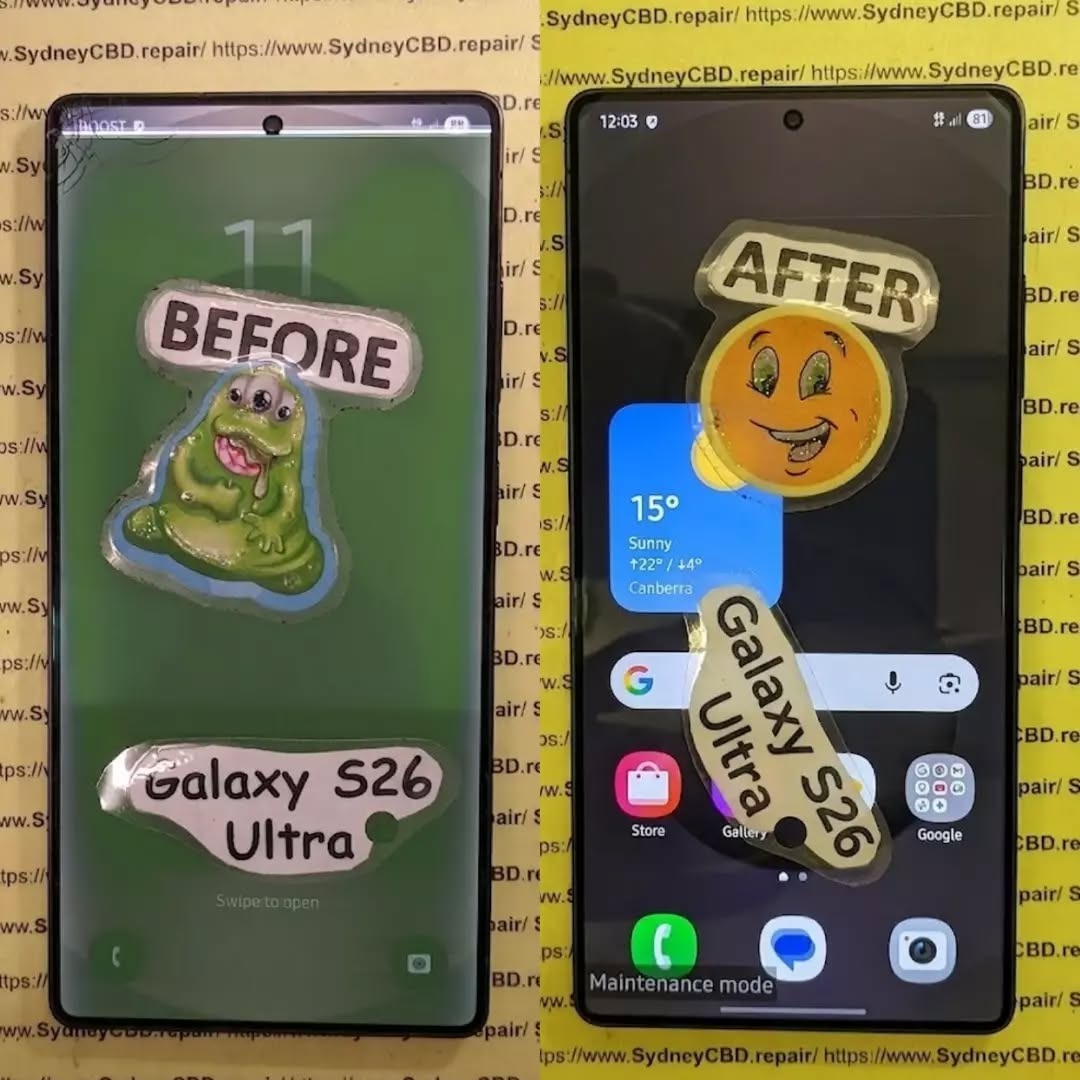
A smashed smartphone can turn a great day upside down in seconds. One drop, one unfortunate landing, and your expensive Samsung Galaxy S26 Ultra can suddenly have a cracked screen, damaged frame, broken camera glass or a back panel covered in cracks.
So, is fixing a smashed Samsung Galaxy S26 Ultra actually worth it?
In many cases, yes. However, it isn’t always as simple as looking at the repair price and comparing it with the cost of another phone. The condition of the device, extent of the damage, quality of replacement parts, remaining useful life and available protection all matter.
The Galaxy S26 Ultra is a premium flagship designed for demanding users. Samsung lists features including a 6.9-inch QHD+ Dynamic AMOLED 2X display with an adaptive 120Hz refresh rate, a 200MP camera system, a 5,000mAh battery and IP68 water and dust resistance. That means there’s plenty of technology packed into one relatively thin device.
When something this sophisticated gets smashed, professional diagnosis is usually more sensible than guessing what needs replacing.
This guide explains the seven most important factors to consider before spending money on a repair.
1. Start By Understanding Exactly What Is Broken
Before you decide whether to repair your phone, you need to know what has actually been damaged.
A phone that looks terrible may sometimes need only one major component replaced. On the other hand, a phone that appears to have “just” a cracked screen may have hidden internal damage.
Common types of Galaxy S26 Ultra damage include:
- Cracked or shattered display glass
- OLED display damage
- Touchscreen failure
- Black spots or coloured lines
- Flickering display
- Damaged frame
- Broken rear glass
- Scratched or cracked camera lenses
- Camera focusing problems
- Charging-port damage
- Battery damage
- Bent internal components
- Loss of water resistance
- Face or biometric sensor problems
That’s why it’s important not to judge a smashed phone solely by its appearance.
Cosmetic Damage vs Functional Damage
A small scratch on the frame isn’t the same as a bent frame.
Likewise, a crack in rear glass isn’t necessarily as serious as a display that has stopped responding to touch.
Think of damage in three broad categories:
| Damage Type | Example | Potential Concern |
|---|---|---|
| Cosmetic | Small frame scratches | Mostly appearance |
| Component | Cracked display or camera glass | Functionality |
| Structural | Bent frame or internal damage | Potentially extensive repair |
The distinction matters because a repair technician needs to establish whether the damaged component can be replaced independently or whether additional parts have been affected.
2. The S26 Ultra’s Premium Display Can Change the Repair Equation
For many owners, the display is the biggest concern after a drop.
The Galaxy S26 Ultra uses a large 6.9-inch QHD+ Dynamic AMOLED 2X display with an adaptive refresh rate of up to 120Hz. Samsung also highlights anti-reflective display technology and its built-in Privacy Display feature.
In other words, this isn’t an ordinary phone screen.
A smashed display may involve more than replacing a piece of glass.
What Happens When the Screen Is Cracked?
There are several possibilities.
The outer glass may be cracked while the image and touch functionality still work. In other cases, the display panel itself can be damaged.
Warning signs of deeper display damage include:
- Black patches
- Green, pink or white lines
- Flickering
- Touch areas that don’t respond
- Ghost touches
- Display discoloration
- A completely black screen
- Brightness problems
If the screen is still working perfectly, don’t assume the damage is harmless. A crack can allow dust or moisture to enter areas that were previously sealed.
Samsung explains that its repair process distinguishes between Screen Repair and Screen Replacement on eligible models. Screen Repair addresses the display screen itself, while Screen Replacement can involve the display, frame and associated components. Final eligibility is determined after technician assessment.
That distinction is important when you’re comparing quotes.
3. Consider the Condition of the Frame and Back Glass
A smashed Galaxy S26 Ultra isn’t necessarily a screen-only repair.
The phone’s frame provides structural support for the display and internal components. If the frame is badly dented or bent, installing a replacement display onto a damaged chassis may not be the appropriate solution.
Check the Frame Carefully
Look around the entire perimeter of the device.
Pay attention to:
- Deep dents
- Bends
- Gaps between components
- Loose buttons
- Damaged speaker openings
- Distorted edges
- Cracks around the charging port
A minor scuff is one thing. A visibly bent frame is another.
What About Back Glass?
Rear glass damage is usually less immediately disruptive than a broken display, but it shouldn’t automatically be ignored.
A damaged back can:
- Expose internal components.
- Allow dust or moisture to enter.
- Affect structural integrity.
- Reduce resale or trade-in value.
- Make the device uncomfortable or unsafe to handle.
If your S26 Ultra has a smashed back but everything else works, ask a technician whether the rear glass can be replaced independently or whether the damage extends to the chassis.
4. Don’t Ignore Camera Damage
The camera system is another major consideration.
Samsung positions the Galaxy S26 Ultra as a camera-focused flagship with a 200MP main camera and additional camera hardware for different shooting situations.
That makes camera damage particularly frustrating.
A drop can damage:
- Camera lens glass
- Camera covers
- Autofocus mechanisms
- Optical stabilisation components
- Camera sensors
- Internal connectors
Signs Your Camera Needs Professional Inspection
Open the camera application and test every available camera.
Look for:
- Blurry images
- Persistent focus problems
- Shaking or unusual movement
- Black spots
- Hazy photos
- Cracked camera glass
- Camera-app crashes
- Strange clicking or buzzing
Don’t assume that a cracked camera cover automatically means the camera sensor is damaged.
Sometimes replacing the damaged external glass is enough. In other situations, impact can affect the camera assembly underneath.
That’s another reason a proper diagnostic assessment can save money.
5. Think About Water Resistance After a Major Smash
The Galaxy S26 Ultra has an IP68 rating under Samsung’s specifications. However, owners shouldn’t treat a heavily damaged phone as though its original protection is guaranteed forever.
A significant impact can compromise physical seals, glass and structural components.
If the phone has been smashed, avoid deliberately exposing it to:
- Swimming pools
- Showers
- Heavy rain
- Sinks
- Steam
- Spilled drinks
Even if the phone still works normally.
Why This Matters
A phone can appear perfectly functional after a drop and then develop problems later.
Moisture-related damage can affect:
- Charging components
- Display connections
- Cameras
- Speakers
- Microphones
- Motherboard components
If your device was dropped into water at the same time it was smashed, tell the repair technician. That information can significantly change the diagnostic process.
6. Compare the Repair Cost With the Value of Your Phone
This is where the big question gets answered.
Is fixing a smashed Samsung Galaxy S26 Ultra worth it?
There isn’t one universal answer because every damaged phone has a different repair requirement.
Instead, compare four numbers:
A. The Repair Quote
Get a complete quote rather than relying on a rough estimate.
Ask whether the price includes:
- Parts
- Labour
- Diagnostics
- Adhesives
- Testing
- Warranty
- Any additional damaged components
Samsung Australia’s repair-cost estimator provides estimates for eligible repair scenarios, but Samsung notes that the final cost can change after a technician assesses the actual device.
B. The Replacement Cost
Don’t compare your repair bill with the launch price from months ago.
Look at the current cost of a comparable replacement with similar:
- Storage
- Condition
- Warranty
- Carrier status
- Accessories
C. The Remaining Useful Life
A newer phone with relatively low battery wear can make a repair more attractive than replacing it.
Consider how long you expect to use the device.
If you planned to keep your S26 Ultra for several more years, repairing it may preserve value that would otherwise be lost.
D. Your Data and Setup
This factor is often overlooked.
Your phone isn’t just hardware.
It may contain:
- Photos
- Videos
- Messages
- Authentication apps
- Work information
- Banking apps
- Contacts
- Notes
- Saved settings
- App configurations
Replacing a phone can take hours of setup and data transfer.
If the smashed device still contains important information that isn’t backed up, professional repair may also be part of your data-recovery strategy.
7. Repair Quality Matters Just as Much as Repair Price
A cheap repair isn’t necessarily a good repair.
This is particularly important with flagship smartphones.
A low-quality replacement component may affect:
- Display brightness
- Colour accuracy
- Touch responsiveness
- Battery performance
- Camera operation
- Fit and finish
- Durability
- Long-term reliability
Genuine Parts vs Low-Cost Alternatives
When obtaining a repair quote, ask exactly what parts will be used.
Questions worth asking include:
Are the replacement parts genuine Samsung components?
Does the repair include a warranty?
Will the technician test all phone functions after repair?
Will the frame be inspected before a new display is installed?
Does the repair affect any remaining manufacturer coverage?
These questions may feel a little fussy, but they’re worth asking when you’re dealing with an expensive flagship.
A proper repair isn’t simply about making the cracks disappear.
It’s about restoring the device as safely and reliably as possible.
Repair vs Replacement: A Practical Comparison
| Factor | Repair | Replace |
|---|---|---|
| Upfront cost | Usually lower than buying another flagship | Usually higher |
| Existing data | Can remain on the original device | Requires transfer |
| Familiar setup | No major change | New setup required |
| Device condition | Depends on repair quality | Depends on replacement device |
| Warranty | Depends on repair provider | New-device warranty may apply |
| Environmental impact | Extends existing device life | Requires another device |
| Convenience | Potentially same-day | May require purchasing and setting up another phone |
The table isn’t a verdict. It’s a framework.
Your personal situation determines which option makes more financial and practical sense.
When Fixing a Smashed Samsung Galaxy S26 Ultra Usually Deserves Serious Consideration

Repair deserves consideration when:
- The phone is otherwise functioning normally.
- Damage is concentrated in one component.
- Your data is important and not fully backed up.
- The device is relatively new.
- Battery health remains satisfactory.
- The frame isn’t badly bent.
- Cameras and internal functions still work.
- The repair quote is reasonable compared with replacement.
- A reputable technician can provide quality parts.
- You intend to keep the phone for another few years.
In these situations, repairing the device can extend its useful life rather than forcing you to purchase another phone.
When Replacing the Phone May Deserve Consideration
Replacement deserves a closer look when the phone has extensive damage across several major components.
For example:
- The frame is badly bent.
- The display is destroyed.
- Multiple cameras are damaged.
- The motherboard has impact damage.
- The battery is damaged.
- There are signs of liquid ingress.
- Repair costs approach the cost of a comparable replacement.
- The phone already has other significant faults.
- You were planning to upgrade soon anyway.
Again, don’t make the decision from one factor alone.
A cracked screen plus an otherwise perfect phone is a very different situation from a cracked screen, bent chassis, dead camera and charging problems.
What a Professional Technician Should Check
A professional assessment should go beyond looking at the front glass.
A comprehensive inspection may include:
- Display testing
- Touchscreen testing
- Frame inspection
- Camera testing
- Speaker testing
- Microphone testing
- Charging-port inspection
- Wireless charging testing
- Button testing
- Biometric-function testing
- Battery checks
- Connectivity testing
- Internal damage assessment
This is particularly important after a hard impact.
Sometimes the visible damage is only the tip of the iceberg.
Don’t Forget About Samsung Care+
If you purchased Samsung Care+, check your coverage before paying for an independent repair.
Samsung Australia currently lists Samsung Care+ options for Galaxy devices, including screen-replacement and swap services. Its current information states that eligible S Series customers can access screen-replacement services for a stated service fee, with specific coverage depending on the plan and eligibility requirements.
Samsung also notes that its screen-replacement service can involve screen replacement, battery replacement, device cleaning or diagnostic testing depending on the service.
Coverage terms can change, so check the current plan associated with your device before making a decision.
Protect Your Data Before Handing Over the Phone
If your smashed S26 Ultra still works, back it up before repair whenever possible.
Samsung’s support terms also recommend using Maintenance Mode when appropriate. Maintenance Mode restricts access to personal data while a device is being serviced.
Before handing over the phone, consider:
- Backing up photos
- Syncing contacts
- Backing up important files
- Confirming your Samsung account details
- Checking Google backup
- Removing sensitive information where appropriate
- Recording the device condition
- Keeping your repair documentation
If the screen is barely usable, ask the repair centre whether they can help you secure the data before work begins.
Why DIY S26 Ultra Repair Can Be Risky
You can find smartphone repair videos online, and some repairs may look straightforward.
But flagship phones aren’t LEGO sets.
Opening a modern smartphone can involve adhesives, delicate cables, compact components and tightly integrated assemblies.
DIY repair risks include:
- Damaging display cables
- Breaking connectors
- Puncturing the battery
- Damaging cameras
- Creating alignment problems
- Introducing dust under the display
- Compromising seals
- Losing biometric functionality
- Turning a repairable problem into a much larger one
If you’ve never repaired a flagship smartphone before, the apparent savings can disappear quickly if something goes wrong.
How to Get an Accurate Repair Quote
When contacting a repair centre, provide as much information as possible.
Tell them:
- Exact model
- Storage capacity
- What happened
- Whether the phone still turns on
- Whether touch works
- Whether cameras work
- Whether the frame is bent
- Whether the phone was exposed to liquid
- Whether there are display lines or black spots
Photos can also help a technician provide an initial assessment, although a physical inspection is more reliable.
Samsung’s Australian repair-cost estimator can also provide an initial estimate for supported products and issues. The company states that the final repair cost can vary after technician assessment.
6 Questions to Ask Before Approving the Repair
Before saying “go ahead,” ask:
1. Is the quoted price the final price?
Find out whether additional internal damage could increase the cost.
2. What parts will be installed?
Ask whether genuine manufacturer parts are being used.
3. Is labour included?
Some quotes list the replacement part but don’t clearly explain labour or other charges.
4. What warranty comes with the repair?
Get the warranty terms in writing.
5. Will the phone be fully tested?
A quality repair should include post-repair testing.
6. Will the frame and internal components be inspected?
This is especially important after a significant impact.
6 Frequently Asked Questions About Fixing a Smashed Samsung Galaxy S26 Ultra
Is fixing a smashed Samsung Galaxy S26 Ultra worth it?
It can be. The decision depends on the severity of the damage, repair quotation, condition of the rest of the phone, remaining useful life and cost of a comparable replacement.
How much does it cost to repair a smashed Galaxy S26 Ultra?
There isn’t one universal repair price because damage varies. A screen-only problem can require a different service from a damaged frame, camera, battery or internal component. Samsung Australia provides an online repair-cost estimator, while the final price can depend on technician assessment.
Can a cracked Galaxy S26 Ultra screen be repaired?
Depending on the model, damage and repair eligibility, a technician may offer a screen-repair or screen-replacement service. Samsung Australia distinguishes between the two, with screen replacement involving the display assembly and associated components where applicable.
Is it safe to keep using a smashed S26 Ultra?
It depends on the damage. If the glass is severely shattered, the frame is bent, the battery is damaged, or the device has been exposed to liquid, continued use may create additional risks. Have significant physical damage professionally inspected.
Will repairing the screen restore water resistance?
You shouldn’t assume that a repaired phone has exactly the same water-resistance performance as a factory-new device. Ask the repair provider what sealing process and post-repair testing they perform.
Should I use a cheap screen replacement?
Price shouldn’t be the only consideration. Ask about part quality, compatibility, warranty, technician experience and post-repair testing. A lower initial price can be less attractive if the replacement component performs poorly or fails prematurely.
Can I repair the S26 Ultra myself?
Technically, some components can be replaced, but modern flagship phones require specialised tools and skills. DIY repair can cause additional damage, particularly around the battery, display and internal connectors.
Should I repair or trade in my smashed S26 Ultra?
Compare the actual repair quote with the current trade-in or replacement options available to you. Also check whether the trade-in programme accepts damaged devices and how damage affects the offered value.
Does Samsung Care+ cover a smashed Galaxy S26 Ultra?
Coverage depends on your specific Samsung Care+ plan, device eligibility and the circumstances of the damage. Samsung Australia currently provides Care+ options that can include screen replacement and device swap services, subject to plan terms.
How long does a Galaxy S26 Ultra repair take?
Repair time varies according to the type of damage, parts availability and repair centre. A straightforward component replacement may be faster than a repair involving multiple damaged components.
Conclusion: Look at the Whole Picture

So, is fixing a smashed Samsung Galaxy S26 Ultra actually worth it?
The smartest way to approach the question is to avoid making the decision based solely on how bad the phone looks.
Start with a professional diagnosis.
Then compare:
Repair cost + repair quality + remaining phone life
against:
Replacement cost + setup time + data transfer + loss of your current device
If the S26 Ultra is otherwise in excellent condition and the damage is limited to a repairable component, fixing it can make practical and financial sense.
If the device has widespread structural and internal damage, replacement may become more relevant.
The key is getting an accurate assessment before spending money.
And don’t forget that a premium smartphone isn’t necessarily disposable just because its glass is smashed. With the right diagnosis and a quality repair, a damaged flagship can potentially return to everyday service and continue being useful for years.
For Australian owners, Samsung’s official repair-cost estimator is a useful starting point for checking current repair information, while Samsung Care+ may provide additional options for eligible customers.
Ultimately, the best decision comes from knowing exactly what is damaged, what the repair includes and what you’re getting for your money.
A smashed screen is frustrating, but it doesn’t automatically mean your Galaxy S26 Ultra has reached the end of the road.
David from Sydney CBD Repair Centre – The Best place to fix mobile phones as 7 Years In A Row! Top Mobile Phone Repair In Sydney. More than 2000 Positive Reviews on Google and Same Day Repairs.
We take pride in delivering exceptional repair services for all major phone brands including Apple, Samsung, Google, and more. Our expert technicians use only genuine parts and offer 90days warranty on repairs. Located in the heart of Sydney CBD, we’re your one-stop solution for all mobile device repairs.
Our commitment to excellence has earned us the trust of thousands of satisfied customers. Whether it’s a cracked screen, battery replacement, or water damage repair, we handle it all with professional care and expertise. Walk in today and experience why we’re Sydney’s #1 choice for mobile phone repairs.
Visit us for:
✓ Same Day Express Repairs
✓ Genuine Parts Guarantee
✓ Professional Technicians
✓ Competitive Pricing
✓ 2000+ 5-Star Google Reviews
✓ 7-Time Award Winner for Best Phone Repairs
Sydney CBD Repair Centre – Where Quality Meets Reliability.
Call : +61280114119
Website: Sydney CBD Repair Centre

