Phones all look the same once you scrape away a few details. They’re rectangles designed to fit (mostly) into one’s hand and a display where we can tap and poke the things we see to find other things poke and tap. You can even make phone calls with them!
It’s those details, though, that makes the difference. Speakers, bevels, buttons and the physical size are the things that make a Galaxy Note different from a Moto E4. They also are a big part of the price and what we use to decide which one is better for our uses. One of those details that’s always a point of discussion, and sometimes a point of detraction is what the body of a phone is made of. Oddities like wood or gold phones aside, you’ll find three different materials are being used to make phones is all sizes: metal, plastic, and glass.
Which one is best?
Metal
Metal, done very well on the Nokia 7 Plus.
Plenty of phones use a metal band or a faux-metal finish over plastic trim, but there are also plenty that are made of metal. Usually, that means some manner of aluminum alloy that’s very thin and light because the buying public is in love with thin and light. Nobody wants a 3-pound phone built from cold forged steel to lug around all day.
Metal screams premium.
For many, metal equals premium. Seeing an aluminum phone polished or anodized with a crisp finish does make a phone look good, so naturally, a lot of people associate them with high-quality, even if only subconsciously. But this isn’t always the case as aluminum can be cheaper than other materials. Blame our perception here.
A metal phone can be a great phone. It can also be a bad phone. Let’s look at the pros and cons.
Pros
That premium look. As mentioned, a phone that’s well built will always look good with a metal design. Metal is beautiful and we can’t help but feel that anything beautiful is automatically premium. For many, having a premium phone is important.
It’s “modern”. Metal is a big part of the industrial design school of thought. Minimal markings and no extraneous parts to take away from a single piece of metal with a certain shape is a complete design aesthetic, and it often ties in well with a premium look. There are plenty of fans of this type of design.
Heat transfer. That way a cold metal phone feels when you first pick it up provokes a thought. It doesn’t have to be a good thought, but if you ever noticed that your phone felt cold you were thinking about it. Touch is one of our senses, and it’s an important one.
All of these “pros” work together to give the impression that the small metal object you’re holding is simply a superior product. Some people feel differently, but most people can’t say a phone like a Pixel 2 or a Nokia 7 Plus felt bad or was built poorly.
Cons
Bends and dents. Metal deforms fairly easily — especially light, malleable metal like aluminum —and tends to keep its new shape, at least the types used to build phones. We’re not talking about people on YouTube bending phones for a living; we’re talking about sitting on your phone and bending it or dropping it and putting a big dent in that premium shell. (Buy a case?)
RF transmission. This means your LTE, Wi-Fi, and Bluetooth signals. Radio frequencies of the safe variety have a tough time transmitting through dense material. This can mean your phone needs to have antenna lines or glass cutouts for the antennas and probably won’t support wireless charging if it’s made of metal.
Heat transfer. The same thing that makes a metal phone feel solid and cold when you first pick it up will also make it feel hotter after you’ve used it for a while. Heat sinks and heat pipes (also made of metal) try to offset this, but a metal phone will always have a hot spot where the chipset is. And sometimes they can get uncomfortably hot.
The same material that can make a phone feel premium can also stop it from having premium features, like smooth lines without antenna bands or wireless charging. And they look a lot less premium when you dent or bend them.
Plastic
The Moto E5 is one of the few plastic phones you can buy in 2019.
Plastic comes in all shapes, colors, and sizes. Man-made materials have that advantage. That means plastic can also come with a number of different finishes, and phones can feel slimy or even soft when made of plastic. Plastic is also cheap and very workable which means curves and design elements can be used with plastic that isn’t feasible with other materials.
Any shape, any color, and tough as nails.
Some plastic phones look and feel great. Of course, others don’t. Consumers can be influenced by their experience enough to think all plastic phones are a slippery, glossy, slimy mess even when they’re not and the general perception is that plastic phones are cheap. But a plastic phone can be great, too.
Unfortunately, it’s becoming difficult to find phones made of plastic. Even inexpensive brands like Nokia and Motorola are moving on to metal-bodied phones, and that makes me a little sad.
Pros
Cost. Not the cost to the consumer, but the costs of making the phone from beginning to end. Using plastic means manufacturing equipment is easier to tool, which means designers have more freedom to work with the shape, which means phones don’t always have to look like a flat slab and still be reasonably priced. We love things that look nice and things that are reasonably priced. We love it more when they are both.
Resilience. Plastic is tough. Like football helmet tough. You might be able to break plastic but it will take a lot more abuse than metal or glass, and for the most part, it will snap right back into shape if it gets bent or dinged.
RF transmission. Plastic can be designed to be tough but still allow radio waves to pass through with very little signal loss. When you’re building or using a phone, this is important.
Millions of colors. You can make plastic that’s any color imaginable. Companies like Nokia (the Nokia of old, R.I.P.) and Sony have put this to the test and orange, lime, pink, yellow and even brown phones have all been offered and had their fans. Black is also a color for folks who like to keep things tamer.
Plastic gives a manufacturer the freedom to build a phone that’s tough and beautiful. And we’ve seen some very high-end phones from almost every manufacturer that were plastic, and nobody complained that they were plastic.
Cons
They feel bad. At least, they can. One of our favorite phones was LG’s G2. One of the phones we always complained about when it came to the finish of materials was the LG G2. It was the phone that coined our use of slimy when talking about bad plastic. Don’t even get us started on the Galaxy S III.
They can stain. The plastic on the phone can be stained by a colorful case or spending too much time in a cup holder in Florida-style weather, and some plastic finishes can stain you or your clothes. Remember the orange red Nexus 5? It did both.
They look cheap. Not all of them, of course. HTC, as well as that Nokia of old, built some gorgeous phones that were plastic. The LG Optimus 3D was not my favorite phone. Not even close. But it was plastic and the body, the build, and the finish were stunning. But for every good plastic phone, you can buy there will be four or five bad plastic phones in equally bad plastic clamshells on a hook at Walmart. That makes people equate plastic with cheap.
All the plastic phones that were tough, looked good and came in a plethora of colors have to compete with the bottom-of-the-barrel plastics used in phones that have none of those qualities. It’s not fair to compare things this way, but you usually won’t find a phone you think is plain ugly or that feels slimy that’s not made of plastic. Stereotypes are sometimes real.
Glass
The Google Pixel 3 and Galaxy S10 keep everything under glass.
We started seeing glass phones with the iPhone 4 and Nexus 4. They aren’t completely glass, of course, but there are plenty of phones with full glass backs to go with the full glass front. They can be beautiful and give a look that compliments a great design. They can also be fragile; phone screens break all too often and so do glass backs.
It only looks wet.
Using glass also adds to a phone’s price. Cheap pieces of soda-lime glass you may find at the hardware store aren’t suitable for a phone. Instead, specially made ultra-clear low-expansion glass and composites like Gorilla Glass are used and can add a lot to the final price. Exotic materials like synthetic sapphire can be exceptionally clear for the wavelengths of light a person can see, and very scratch-resistant. They are even more expensive, often prohibitively so.
Pros
RF transmission. Glass is dense, but still allows radio waves to pass through fairly easily. This means your LTE signal, Wi-Fi, and Bluetooth will be stronger without any long antenna cutouts.
They look great. Phones with a glass back can have a feeling of depth if anything is under the glass. Glass can also shimmer and give the illusion of being wet. Both of these effects together can make for a stunning look. Samsung is a total pro at this, and its recent glass-backed Galaxy phones are simply beautiful.
They feel good in your hand. Glass can be polished until it’s very smooth. Because it’s inert it will also feel solid and cold like metal does. When you hold a glass-backed phone in your hand it just feels like a luxury product. Everyone loves luxury products, even if it’s only an illusion.
Cons
Glass breaks. There is nothing any company can do to make thin glass unbreakable. That means when you drop your phone (and you will) you have to worry about breaking both sides.
Glass scratches. Everything will scratch, but glass seems to be the best at doing it. No matter what a company tells us about the Mohs scale or hardened polymers, glass will scratch. Scratches on a phone with the wet and deep illusion like a Galaxy S9 look terrible when they have a big scratch across the back.
Glass is slippery. When your hands are damp, holding a glass phone is like squeezing an ice cube. It can pop right out of your grip and when you consider that glass breaks and glass scratches, you have a recipe for disaster.
Glass-backed phones can look amazing. That silky wet look of a Galaxy S10 or the disco ball look of the Nexus 4 makes for a beautiful looking piece of gear. We want our expensive things to be beautiful.
Unfortunately, glass is also a really risky material to use in a phone. It needs to be thin (glass is heavy!) so when you use hardened treated materials like Gorilla Glass the risk of breaking increases because hardened glass is more brittle. It’s a catch-22 situation that we gladly put ourselves in because of how great it looks.
Ceramic
The Galaxy S10+ is beautiful in ceramic, but it’s not the only phone using the material.
Ceramic phones aren’t commonplace in North America, though that’s about to change with the Galaxy S10+. Phones that have used ceramic, like the Essential Phone or Xiaomi’s Mi Mix series, look and feel amazing.
When you think of ceramic you might be picturing your grandmother’s antique china, but that’s not the whole story. Sure, ceramic can look beautiful and delicate but it doesn’t have to be — ceramic is harder than glass or plastic, almost completely corrosion resistant, lighter than metal and it’s an insulator so there is no heat transfer.
Ceramic is also expensive. that’s why we don’t see low-end watches, dishware, or phones made from the material. It’s costly to mine and manufacture because of the special equipment needed, not easily formed like metal or plastic, and requires better handling along the assembly floor to keep the unassembled parts from shattering. Still, once you feel it, there’s no denying it’s nice.
Pros
RF transmission. Like glass, ceramic allows radio waves to pass through fairly easily. This means your LTE signal, Wi-Fi, and Bluetooth will be stronger without any long antenna cutouts.
They stay cool. Ceramic is what your power company uses to insulate the transmissions lines from their metal brackets. that’s because it’s non-conductive in regard to both heat and electricity. your ceramic phone isn’t going to get hot in your hand.
They feel so good. Ceramic can be highly polished after it’s formed to a completely smooth finish, and then take a clear coating to remove every surface line. Without any irregularities that your hand can feel, it’s like holding a piece of ice. Except it’s not cold because it doesn’t absorb or give off any heat dues to the magic of its insulatory properties.
Cons
Ceramic breaks. Ceramic (the type used in something like a phone) is tough, but it’s still breakable. With the right amount of abuse, it will break before metal or plastic will.
The coating can scratch. Ceramic is tough, and so are the polymers used to clear-coat it, but it can scratch. It’s not as easy as scratching glass or even metal, but if it does scratch, you’ll hate feeling even the tiniest blemish on that otherwise baby-smooth finish.
Ceramic is slippery. Wet hands? That might mean an oopsie because smooth ceramic is pretty slippery when your hands are wet or your fingers are cold and hard. Keep that in mind and take a bit of extra care.
Ceramic phones look and feel gorgeous. they also stay nice and cool because of ceramic’s insulatory properties. There is a reason some of the finest watches you can buy are made from ceramic.
The moment we’ve been waiting for is finally here. Samsung has made its tenth-anniversary Galaxy S flagship official in San Francisco today. The Galaxy S10, as the rumors and leaks had told us, comes in three different variants. There’s the Galaxy S10e, Galaxy S10, and the Galaxy S10+, with the Galaxy S10e slotting in as the entry-level model that misses out on a number of highlight features found on the S10 and S10+.
Infinity-O displays with up to 93.1% screen-to-body ratio
The Infinity-O displays are the biggest change here compared to previous Galaxy S flagships. The Galaxy S10e and Galaxy S10 feature 5.8-inch and 6.1-inch Infinity-O displays with a cutout for the front camera on the right side. The Galaxy S10+ gets a wider cutout on its 6.4-inch screen for its dual front camera. The S10e has a flat display and Full HD+ resolution while the S10 and S10+ have curved QHD+ AMOLEDs, only this time the bezels are considerably smaller to allow for a 93.1% screen-to-body ratio (91.6% on the S10e).
The S10 and S10+ also have ultrasonic fingerprint sensors embedded under the display. The Galaxy S10e has its fingerprint sensor mounted on the right side, built into the power button. Samsung is also throwing around some certifications to tout the quality of its ‘Dynamic AMOLED display’. For example, the Galaxy S10s come with ‘TÜV Rheinland-certified Eye Comfort display’ for lower strain from blue light, while DisplayMate has tested the display’s peak brightness to be as high as 1200 nits. Oh, and all three models get Gorilla Glass 6 protection.
Ultra-wide rear cameras, Dual Pixel front camera, HDR10+ recording
The cameras are also getting a major boost with the Galaxy S10. The Galaxy S10 and S10+ come with a triple-camera setup at the back. Two of those are the same as the Galaxy S9’s: a 12MP F1.5-F2.4 (Dual Aperture) primary sensor with OIS and a 12MP F2.4 telephoto lens, also with OIS. The third is a 16MP F2.2 ultra-wide lens with a 123-degree field of view. The Galaxy S10e gets the primary 12MP sensor and the ultra-wide sensor. Yes, there’s no telephoto lens on this year’s 5.8-inch Galaxy S flagship, either, which is a shame since being able to zoom in on a scene is a very useful feature to have.
The front camera has received a considerable upgrade. The S10e, S10, and S10+ all have a 10MP front camera with Dual Pixel autofocus and 4K video recording, while the S10+ also gets a second front camera, an 8MP depth sensor that will make Live Focus shots possible. Samsung has enabled the cameras to use the dedicated NPU on the Exynos/Snapdragon chips inside the phone for improved AI-enhanced photography. The Galaxy S10 is also the first phone on the market with the ability to shoot HDR10+ videos, and Samsung is touting improve digital image stabilization for video recording as well.
Up to 12GB of RAM and 1TB storage on the Galaxy S10+!
As far as the underlying hardware is concerned, the three Galaxy S10 models get an 8nm Exynos 9820 chip in most markets and the 7nm Snapdragon 855 in others. The Galaxy S10e comes in 6GB and 8GB RAM flavors, the Galaxy S10 only has 8GB of RAM, and the S10+ has 8GB and 12GB RAM variants. The 12GB RAM is accompanied by 1TB storage, and it’s also the one with the ceramic back. Yes, there is no version of the 12GB S10+ with a regular glass back. The S10e and S10 have 128GB of base storage and go up to 256GB and 512GB respectively. The S10+ also comes in an 8GB+512GB flavor.
Battery sizes for the S10e, S10, and S10+ are 3,100 mAh, 3,400 mAh, and 4,100 mAh respectively. However, these are typical capacities, so the actual capacity would be similar to the S9, Note 8, and Note 9, so 3,000 mAh, 3,300 mAh, and 4,000 mAh. The Galaxy S10s come with Wireless PowerShare, which enables the phones to charge other devices wirelessly. Samsung is hoping you’ll be using the feature to charge your Gear/Galaxy wearable and the new Galaxy Buds, but sadly, the company is sticking to its existing wired fast charging speeds. Fast wireless charging should be faster, though.
Android Pie with One UI, Digital Wellbeing
The Galaxy S10 trio run Android Pie with One UI version 1.1. It’s mostly the same as what we see on the Galaxy S9 or Galaxy Note 9, but the S10s get features like Google’s Digital Wellbeing for helping you reduce the time spent on your smartphone screen. The Galaxy S10 also gets something called Bixby Routines, which will attempt to automate things based on your usage habits. Some existing features, like IP68 water resistance and stereo speakers tuned by AKG and with Dolby Atmos, have come along for the ride. Samsunghas also added support for Wi-Fi 6 (Wi-Fi 802.11ax) networks.
On sale from March 8
The Galaxy S10e, S10, and S10+ will go on sale on March 8 in select markets in Prism White, Prism Black, Prism Green, Prism Blue, Canary Yellow and Flamingo Pink color options (the Canary Yellow will be exclusive to the S10e). The S10+’ ceramic model will come in black and white. Pricing details can be found at this link, and you can check out our hands-on post to see our initial impressions on the Galaxy S10. For a comparison of the specs of all three models, check out the table below.
Samsung’s Galaxy S10e SM-G970F specifications and features: this is a 5.8” (146.5mm) device with a FHD + 2280x 1080 screen resolution. The phone is powered by the Exynos 9820 Octa soc with a Dual Core 2.8 GHz & Dual Core 2.4 GHz & Quad Core 1.7GHz configuration. Memory is 8GB, 6GB, with the device offering 128GB, 256GB internal storage and up to 512GB of external memory. The Galaxy S10e features Accelerometer, barometer, Capacitive Fingerprint Sensor, Gyro Sensor and Geomagnatic Sensor. Notable features include Samsung Pay (MST), Bixby, Samsung Pay (NFC) Stereo Speakers tuned by AKG. The device measures 69.9 x 142.2 x 7.9mm and weighs 150g.
Samsung’s Galaxy S10 SM-G973F specifications and features: this is a 6.1″(157.5mm) device with a QHD + 1440 x 2960 screen resolution. The phone is powered by the Exynos 9820 Octa soc with a Dual Core 2.8 GHz & Dual Core 2.4 GHz & Quad Core 1.7GHz configuration. Memory is 8GB, 6GB, with the device offering 128GB, 512GB internal storage and up to 512GB of external memory. The Galaxy S10 features Accelerometer, Barometer, Ultrasonic Fingerprint Sensor, Gyro Sensor and Geomagnatic Sensor. Notable features include Samsung Pay (MST), Bixby, Samsung Pay (NFC) Stereo Speakers tuned by AKG. The device measures 70.4 x 149.9 x 7.8mm and weighs 157g.
GALAXY S10 SM-G973F
GENERAL INFORMATION
Model name
Galaxy S10
Model Number
SM-G973F
Model type
Phone
Color
Prism Black, Prism Green, Prism White
Announced
2019,February
Released
2019,March
PHYSICAL SPECIFICATIONS
Dimensions
70.4 x 149.9 x 7.8mm
Weight
157g
IP Rating
IP 68 : Totally protected against dust, Protected against the effect of immersion to 1.5m for up to 30 minutes.
Samsung’s Galaxy S10 Plus SM-G975F specifications and features: this is a 6.4″(162.5mm) device with a QHD + 2960×1440 screen resolution. The phone is powered by the Exynos 9820 Octa soc with a Dual Core 2.8 GHz & Dual Core 2.4 GHz & Quad Core 1.7GHz configuration. Memory is 8GB, 12GB, with the device offering 128GB, 512GB, 1TB internal storage and up to 512GB of external memory. The Galaxy S10 Plus features Accelerometer, Barometer, Ultrasonic Fingerprint Sensor, Gyro Sensor and Geomagnatic Sensor. Notable features include Samsung Pay (MST), Bixby, Samsung Pay (NFC) Stereo Speakers tuned by AKG, Wireless PowerShare. The device measures 74.1 x 157.6 x 7.8mm and weighs 175g.
When it comes to offering consumers the most bang for the buck, the OnePlus 6T has proven itself in being untouchable. Few are the phones as compelling as the 6T, which blends high-end specs and excellent performance with affordable cost. Well, that’s until now with the release of the Honor View 20! Huawei’s sub-brand has taken nearly everything found with flagship Huawei smartphones and put it in a phone with a refreshingly new design slapped with an aggressive price point – a formula to give the OnePlus 6T a run for its money. Knowing all of that, who’s going to come out on top?
Design
Put them side by side, and we’d bet that most people would take fancy in the Honor View 20’s design. That’s attributed primarily to the gleaming V-shaped effect on the back of the phone courtesy of the nanolithography technique that Honor has employed, resulting in a hypnotic, irresistible look. The OnePlus 6T continues to feel like a premium smartphone, but its glass-meets-metal construction doesn’t have nearly the same level of pop and style that accompanies the Honor View 20.
Supplementing that too is how the Honor View 20 manages to package in a standard 3.5mm headphone jack and an IR blaster. Yes, the OnePlus 6T’s in-screen fingerprint sensor is neat and forward thinking, but we don’t mind having the finger print sensor on the rear of the Honor View 20. We’ll happily trade that for a headphone jack any day of the week, seeing that it’s still a valuable thing to have in a smartphone for many people!
Front View
6.2 x 2.94 x 0.32 inches
157.5 x 74.8 x 8.2 mm
6.53 oz (185 g) OnePlus 6T
6.18 x 2.97 x 0.32 inches
156.9 x 75.4 x 8.1 mm
6.35 oz (180 g) Honor View20
Side View
6.2 x 2.94 x 0.32 inches
157.5 x 74.8 x 8.2 mm
6.53 oz (185 g) OnePlus 6T
6.18 x 2.97 x 0.32 inches
156.9 x 75.4 x 8.1 mm
6.35 oz (180 g) Honor View20
Display
Most people would agree that the two phones have gorgeous, high-resolution displays that command attention. It’s a 6.4-inch 1080 x 2340 AMOLED display for the OnePlus 6T, while the Honor View 20 sizes up nicely with its 6.4-inch 1080 x 2310 IPS LCD panel.
An aspect we have to consider is how both phones attempt to achieve that all-screen look. We’re basically faced with the OnePlus 6T’s teardrop notch and the Honor View 20’s hole-punch display cutout. In all honesty, there isn’t as much of a disparity here – so we’re content with their respective implementations. We’ll gladly take either over the traditional notches we’ve been getting for the last year.
Display measurements and quality
Interface and functionality
Right away, there’s a clear and defined philosophy with each of the two interfaces. On one hand, we absolutely adore the simplicity and cleanliness of OxygenOS with the OnePlus 6T. It’s no wonder why so many people rave about OnePlus’ interface, since it doesn’t attempt to inundate or overwhelm users with an abundance of redundant features. Power users will still appreciate the experience here, seeing that the core Android features are at their disposal – like side-by-side multitasking.
The OnePlus 6T comes with the familiar OnePlus OxygenOS interface
Magic UI 2.0.1 on the Honor View20
On the flip side, the Honor View 20’s Magic UI doesn’t look as polished on the surface, but it certainly makes it up with its enhanced extended desktop experience. You can attach the phone to an external display, connect a mouse and keyboard, and convert it to a desktop PC of sorts with this mode. Not everyone may end up using this feature, but it’s nonetheless useful and adds to the overall experience. At the core, though, we’ll still give it to the OnePlus 6T for presenting us with the more favorable day-to-day experience.
Processor and Performance
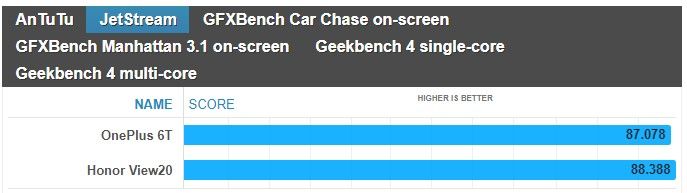
Battling it out for supremacy, the OnePlus 6T is powered by the Qualcomm Snapdragon 845 chipset, while the Honor View 20 leverages the Kirin 980 chipset. Even though the synthetic benchmarks nearly have the two smartphones matching one another, the OnePlus 6T continues to exhibit the more fluid responses with navigation. We can easily notice how instantaneous it is with its actions, like scrolling, which we feel weighs more in the greater scheme of things than those traditional synthetic tests.
Neither phone offers expandable storage, but you can sleep knowing that they’re offered with generous capacities. Starting off with 128GB of storage, there’s also the option of having 256GB of storage as well if you’re the kind to be liberal when it comes to snapping photos, downloading movies, and recording video in 4K resolution.
Performance benchmarks
Camera
Now this is where things really get juicy, given how these two cameras are highly respected. On the OnePlus 6T you have a dual camera on the back: a 16-megapixel main shooter with an f/1.7 lens, a 25mm focal distance and optical image stabilization (OIS), as well as a secondary, 20-megapixel camera used to acquire depth information for bokeh effects. The Honor View 20 features a 48MP 1/2-inch Sony IMX586 stacked CMOS image sensor, with a nearby 3D camera that emits infrared light to measure the distance from the phone to the subject – enabling it to deliver the same portrait and aperture effects found on other dual-camera phones. However, the View20 does not have optical image stabilization. Additionally, both phones are well equipped in the selfie camera department, seeing that the OnePlus 6T sizes up with a 16MP snapper, while the Honor View 20 ups it to a 25MP camera.
Image Quality
For this comparison, we captured samples using the 12MP stills option and AI camera mode set to on with the Honor View 20. As for the OnePlus 6T, the only option we enabled was Auto HDR mode. Under ideal lighting conditions, it’s sometimes difficult to gauge who’s delivering the better shots. At times, one seems to offer better dynamic range, but then in another scene, it’s the other way around. Details capture, too, is for the most part identical between the two.
If you love taking selfies, you won’t be disappointed by either phone because they capture a ton of fine details. We’re talking about skin imperfections, like wrinkles, that are clearly defined with the two. However, we do notice that even with the Auto HDR more set to on with the OnePlus 6T, it tends to be more under exposed. It’s not terrible and doesn’t diminish the overall quality, but the Honor View 20 does a better job of evenly exposing the entire shot.
OnePlus 6T vs Honor View 20
Things become more interesting under low light, which tends to be the main differentiator with most phones. Under the automatic settings, they both do a pretty decent job of minimizing noise – with the slight edge going to the Honor View 20 because shadows are boosted a smidgen more to draw out details. Even though they both have their respective night modes, the Honor View 20 yet again shows its superiority in brightening up the scenery.
Video Quality
Recording video at 4K UHD resolution at 30 FPS, both handle ideal lighting conditions by delivering punchy colors and strong details. The only noticeable difference between the two is in how the OnePlus 6T’s stabilization pales in comparison to the Honor View 20’s EIS. Besides that, the two seem to offer tight exposure adjustment and auto-focus.
Neither are particularly great under extreme low-light situations, given how noisy looking their footages appear. It’s quite distracting, especially when details become muddy. However, the Honor View 20 seems to have a very subtle advantage with exposure. It’s just barely brighter than the OnePlus 6T, but that’s the only defining quality we can pick up from comparing the two.
OnePlus 6T vs Honor View 20
Multimedia
Watching video is a treat on both smartphones, more so when there are no distracting notches to deal with. Their respective implementations allow video to be viewed without any major obstructions, so to that end, we’re happy that clips can be enjoyed using the full real estate.
Adding to its multimedia package, we absolutely appreciate how the Honor View 20 features a standard 3.5mm headphone jack. The convenience of being able to plug in a pair of headphones is invaluable, whereas with the OnePlus 6T, it of course requires the aid of an adapter. Furthermore, the IR blaster of the Honor View 20 doubles the phone as a universal remote – allowing us to quickly control a myriad of home entertainment gadgets.
Call Quality
For the most part, conducting phone conversations won’t be an issue with either smartphone. They’re ideal for casual conversations, exhibiting clear voices and very little distortion in the process.
Battery life
It’s a longevity battle between the OnePlus 6T and Honor Views 20, which respectively feature battery cells of 3700 mAh and 4000 mAh. In our experience, the Honor View 20 seems to have a little bit more juice in the tank by the day’s end. Both are more than adequate in getting us through a full day’s worth of normal usage, but like we said, there’s just still more leftover charge with the Honor View 20.
Over on the recharging side, it’s the OnePlus 6T that effortlessly beats the Honor View 20 with its speedy clocked time of 85 minutes – versus the longer 120 minutes required by the Honor View 20 to be completely full.
Battery recharge
Conclusion
Before we wrap things up, it’s worth noting that the Honor View 20 isn’t commercially available for purchase in the US – so the OnePlus 6T definitely has an advantage in this area by being readily accessible to US consumers. You also get proper 4G LTE support in the US thanks in part to LTE Advanced connectivity with a Category 16 LTE modem on the OnePlus 6T. All in all, it simply means that you won’t have as much of a problem using the OnePlus 6T on your carrier here in the US.
Now comes the defining quality of both devices: the price. The edge still goes to the OnePlus 6T with its starting price of $550 in the US or 550 euro in Europe, but the price gap is next to negligible. Currently, the Honor View 20 can be had for about 570 euro in European markets where it’s being sold. While our sentiments about the OnePlus 6T don’t change at all, being one of the best bang for the buck smartphone deals around, there are still compelling reasons for the Honor View 20. You’re paying only a bit more for the convenience of a 3.5mm headphone jack and an IR blaster, longer battery life, an extended desktop experience mode, slightly better performing cameras, and the more attractive design.
All of those things do add up in giving the Honor View 20 an equally compelling package. The OnePlus 6T, on the other hand, is still the better pick if you prefer a cleaner, smoother software experience out of the box.
Huawei Nova 4 launches with 48MP rear camera and a display hole for the front camera
Huawei has been teasing a new release for a while now and the Huawei Nova 4 is finally here. Leaked photos showed a display hole ala the Samsung Galaxy A8s, and now that it’s finally here it’s confirmed that, yes, there is a display hole on the top left of the device for the camera. Display holes are the next attempt at a fully bezel-less smartphone, with the screen wrapping around the camera instead of a cut out at the top of the display. Functionally, they’re the same as a corner notch, but they don’t look like one which adds to their appeal.
The Huawei Nova 4 isn’t just a device that pioneers a new design we’ll likely see a lot of in 2018. No, it also features flagship specifications including a 48MP triple rear camera, possibly the highest in a smartphone yet. Huawei has really been pushing camera performance as of late, and the Nova 4 is no different. There’s also a Kirin 970 onboard combined with 8GB of RAM.
Is the inclusion of a display hole here an indication of things to come? It’s a lot less unsightly than a notch, and it functions more or less the same. It’s probably the best way to have a bezel-less display on a smartphone without implementing some form of sliding camera mechanism. The earpiece is housed above the display, which is also likely where other sensors are too.
Huawei Nova 4 Specifications
Specs
Huawei Nova 4
SoC
HiSilicon Kirin 970 @ 2.4 GHz
RAM
8GB
Camera
Rear: 48MP (f/1.8) + 16MP (f/2.2) + 2MP (f/2.4), 4k video recording supportFront: 25MP (f/2.0) 1080p video recording
Storage
128GB, expandable to 512GB with a MicroSD card
Display
6.4-inch 2310×1080 IPS LCD
Audio
3.5mm headphone jack, speaker
Battery
3,750mAh with 18W charging (9V, 2A)
Ports
One USB-C port, 3.5mm headphone jack
Miscellaneous
Dual Nano-SIM
Price
3,399 Yuan (~$492) in January 2019 in China, with a release in Europe likely
Huawei Nova 4 Performance
The Huawei Nova 4 packs the HiSilicon Kirin 970 system-on-chip, a chipset heralded for its AI performance. It’s certainly no slouch in day-to-day tasks either and is a contributing factor in what grants Huawei smartphones excellent battery life. It’ll handle basically anything you throw at it, and coupled with 8GB of RAM it should have no trouble holding your applications in memory either. The Kirin 970 has a Mali G72 GPU, which is, admittedly, considerably weaker than the Adreno line of GPUs from Qualcomm. As a result, game performance may be a little bit weaker than what you’re used to. It should still be fine though and should be more than adequate for the job. 128GB of storage with MicroSD card support ensures that you won’t run out of space either. Finally, the Huawei Nova 4 comes with EMUI, which is going to be a little bit heavier on the system than something closer to stock Android like OxygenOS. It’s based on Android Pie, so you’ll get all of the latest and greatest features.
Huawei Nova 4 Display
The display on the Huawei Nova 4 is a 6.4-inch 2310×1080 IPS LCD display. This is ultimately where the biggest change is, with a display hole in place of a notch. As mentioned above, it’s functionally the same as a notch as it can’t really allow a user to make use of more screen real estate, but it arguably looks nicer than a notch and takes up slightly less space.
The display is 1080p, the bare minimum resolution for a flagship display. The lack of AMOLED may be disappointing to some, but it’s not as if that is usually a deal breaker. Flagship IPS displays nowadays are just as good as AMOLED displays, with the only difference being the lack of deeper blacks.
Huawei Nova 4 Camera
Huawei’s cameras in the last year or two have been nothing short of excellent, with the Huawei Nova 4 not looking to buck that trend. The 48MP camera included should allow Huawei to, yet again, work their low light magic. Coupled with that, are two other cameras as well, coming in at 16MP and 2MP. Their exact function is unknown at this time, but it’s impossible to deny that the company is pushing their cameras as defining features of their smartphones. While it’s always best for real-world camera samples to come out before deciding whether this is your next camera-phone, it’s a safe bet to say that this will be one of the best cameras on a smartphone once it launches. Huawei has had no trouble getting it right before, and with better hardware, there’s no reason to assume that they won’t get it right again.
Huawei Nova 4 Battery
Yet another usual win for Huawei, the Huawei Nova 4 should have excellent battery life. That’s thanks to the 3,750 mAh battery in tandem with the power efficient Kirin 970. It should have no trouble getting you through a day of use, and it’ll charge fast as well at 18W (9V, 2A).
Huawei Nova 4 Pricing and Availability
The Huawei Nova 4 is set to launch in China at a price of 3,399 Yuan, around $492. While it hasn’t been announced in Europe yet, it’s expected to launch soon after given that its predecessor did.
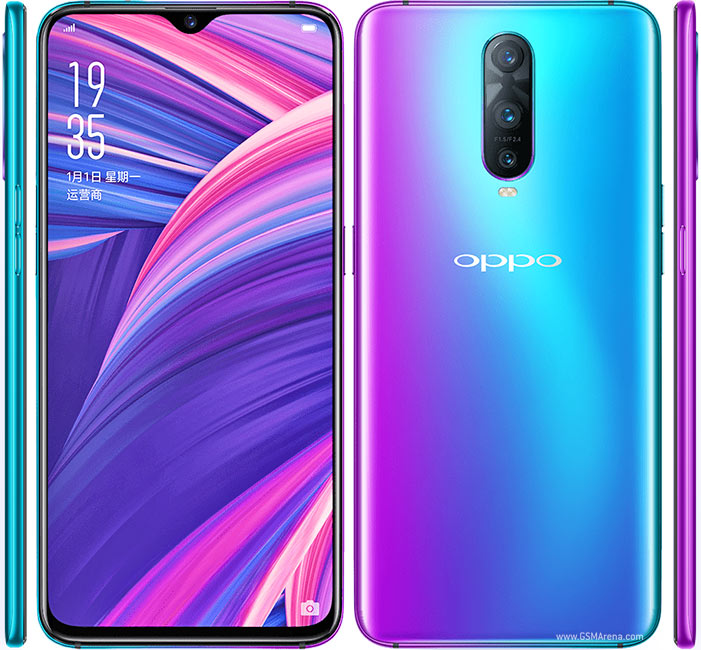
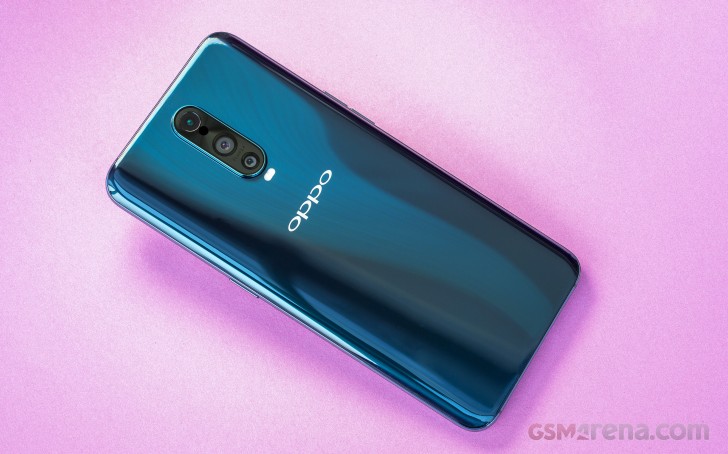
The Oppo R17 Pro or RX17 Pro as it’s known in Europe for trademark reasons is the latest arrival in our office. It offers a premium design and feel with a gradient color finish on the back that unlike anything else in the market. On this occasion we got the Emerald Green variant which looks a bit more conservative than the so-called Radiant Mist color.
A Snapdragon 710 chipset is ticking under the hood, so we expect great CPU performance combined with high power efficiency. You get 8GB of RAM with 128GB of internal storage and unlike the OnePlus 6T, which shares much of the design, the R17 Pro offers expandable storage if you sacrifice the second SIM slot.
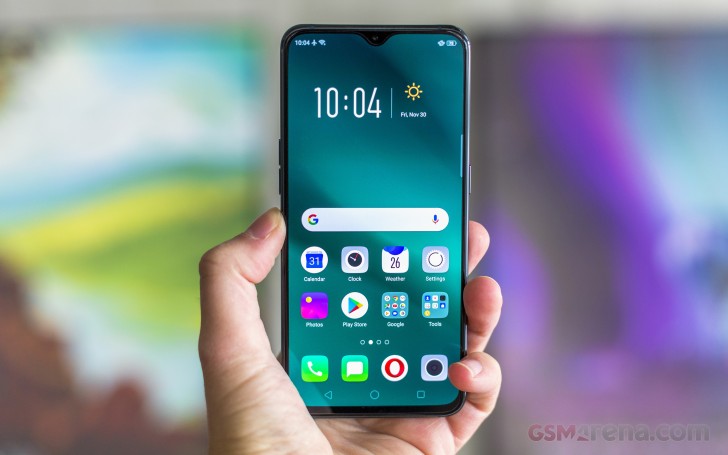
A gorgeous 6.4-inch AMOLED display sits on the front with 1080 x 2340 pixel resolution (tall 19.5:9 aspect ratio) and a minimalist notch on the top. The bezels all around are super slim including the bottom chin.
A 25MP shooter sits on the notch with f/2.0 aperture while the back packs a rather unorthodox triple camera setup. The main module has variable aperture f/1.5-2.4 and a 12MP sensor with OIS. The secondary camera has 20MP resolution, but its usage mostly boils down to sensing.
The third unit is a 3D TOF (time-of-flight) stereo sensor that we’ve previously mostly seen in advanced face unlock implementations. However, putting it on the back means that’s not the case here – you get some Animoji-style gimmicks for now, while a precise ruler for the camera app is coming through a software update.
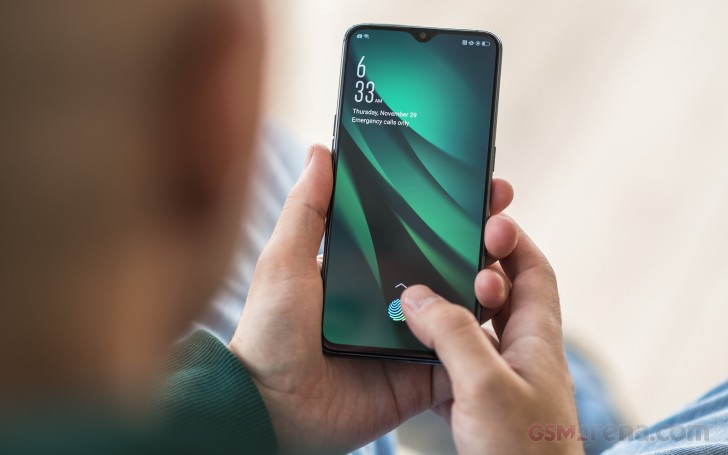
Yet, the two centerpiece features of the Oppo R17 Pro are certainly the optical in-display fingerprint reader and SuperVOOC fast charging that can top up the 3,700 mAh battery in just 35 minutes. The appropriate 50W charger is included in the retail package so you can enjoy the hard-to-believe charging speeds right out of the box.
The Oppo R17 Pro will now go through our extensive testing so we can make a better assessments of its market prospects.
The Redmi Note 6 Pro comes 9 months after the Redmi Note 5 Pro. The device comes with an improved dual-camera setup at the rear which can even give more premium and expensive flagship smartphones a run for their money.
Xiaomi is also ensuring that this time around, the Redmi Note 6 Pro is available easily. It is holding the first sale of the device just a day after officially unveiling it.
If you are planning on buying a Redmi Note 6 Pro, check out our FAQ below which answers some of the most common questions surrounding the device.
Q) What are the full specifications of the Redmi Note 6 Pro?
A) The full specs of the Redmi Note 6 Pro are as follows:
Chipset: Octa-core Snapdragon 636 chipset clocked at 1.8GHz
GPU: Adreno 509
RAM: 4/6GB
Storage: 32/64GB, Hybrid microSD card slot
Rear camera:
Primary: 12MP Dual Pixel Autofocus, f/1.9 aperture, 1.4um, Dual-LED flash, Full HD video recording
Secondary: 5MP, 1.12um pixels, f/2.2 Used for capturing depth information for adding bokeh effects
Connectivity: LTE, (Hybrid) Dual-SIM, GPS, Wi-Fi b/g/n/ac, Bluetooth 5.0, microUSB
Battery: 4000mAh non-removable
Others: MIUI 10 based on Android 8.1 Oreo
Q) What are the differences between Redmi Note 5 Pro and Redmi Note 6 Pro?
A) The Redmi Note 6 Pro is all about its improved dual-camera setup at the rear. The new primary 12MP sensor features large 1.4um pixels and a wide f/1.9 aperture which makes it significantly better than the 12MP f/2.2 sensor found on the Redmi Note 5 Pro. The difference would be most evident in low-light scenarios as the Redmi Note 6 Pro would be able to capture more light. The addition of a depth sensor at the front on the device and other improvements allow the Redmi Note 6 Pro to offer Lighting effects for Portrait mode photos as well.
Q) Is there any performance difference between the Redmi Note 6 Pro and Redmi Note 5 Pro?
A) No. With both devices coming with a Snapdragon 636 chipset, they offer the same level of performance.
Q) Is the Redmi Note 6 Pro water-resistant?
A) No, but the handset is splash resistant.
Q) Is the battery of the handset removable?
A) No, since the Redmi Note 6 Pro features a unibody aluminum build, the battery and back cover is not removable.
Q) What kind of SIM card slot does the phone have? Can I use two SIM cards and a microSD card at the same time?
A) The Redmi Note 6 Pro features a hybrid SIM card slot. This means that you can either 1 SIM card and microSD card or 2 SIM cards at any given time. The primary SIM slot accepts microSIM cards, while the secondary slot accepts nanoSIM cards.
Q) Is there an IR blaster on the Redmi Note 6 Pro that can be used to control TVs and other devices?
A) Yes, the Redmi Note 6 Pro features an IR blaster. Coupled with Mi Remote, one can use the IR blaster on the device to control TV, ACs, and other electronic items.
Q) Do you get face unlock on Redmi Note 6 Pro?
A) Yes.
Q) Can one record calls on Redmi Note 6 Pro?
A) Yes, one can record calls on the Redmi Note 6 Pro.
Q) Does the Redmi Note 6 Pro feature FM radio?
A) Yes, the Redmi Note 6 Pro features FM radio.
Q) Is the display on the Redmi Note 6 Pro protected by Gorilla Glass?
A) Yes, the 6.26-inch display on the Redmi Note 6 Pro is protected by a 2.5D curved Corning Gorilla Glass 3.
Q) Can you lock apps using the fingerprint scanner on the Redmi Note 6?
A) Yes, you can.
Q) Where is the fingerprint scanner on the Redmi Note 6 Pro located? Is it touch-based?
A) The fingerprint scanner on the Redmi Note 6 Pro is located at the rear, and yes, it is touch based.
Q) How many fingerprints can one register on the Redmi Note 6 Pro?
A) 5.
Q) Can you record slow-motion videos on the Redmi Note 6 Pro?
A) Yes, it can but only at 720p @ 120fps. It can also record videos in Full HD resolution at 30fps.
Q) Can one make native video calls on Redmi Note 6 Pro without using a third-party app?
A) Yes, you can directly make video calls on the Redmi Note 6 Pro without using an app like Google Duo or Skype.
Q) Which version of Android does the handset run on?
A) Android 8.1 Oreo.
Q) Which version of MIUI does the Redmi Note 6 Pro run on?
A) The Redmi Note 6 Pro runs on MIUI 10 out of the box.
Q) Does the Redmi Note 6 Pro support LTE and VoLTe networks? Will a Reliance Jio SIM work on the phone?
A) Yes, it does support LTE and VoLTE out of the box. The Note 6 Pro also has dual-VoLTE support which means one can use two Jio or any two VoLTE networks on the device at the same time.
Q) What about VoLTE support on AirTel’s network?
A) Yes, the Redmi Note 6 Pro support Airtel’s VoLTE network. Xiaomi will also add support for Vodafone’s VoLTE network on the handset with a future software update.
Q) Is Quick charging 3.0 supported on the Redmi Note 6 Pro?
A) No and yes. The Redmi Note 6 Pro has support for Quick Charge 3.0 but it comes bundled with a regular 5v/2A charger. To fast charge the device, one will have to buy a Quick Charge 3.0 charger separately.
Q) How much free storage space does one get on the Redmi Note 6 Pro out of the box?
A) Almost 23GB out of the box, while the 64GB has 53.22GB of free space
Q) Can you uninstall or disable pre-installed apps on the handset?
A) Yes, you can uninstall or disable some pre-installed apps on the Redmi Note 6 Pro, but not all.
Q) What colors are the Redmi Note 6 Pro going to be available in?
A) The handset will be available in Black, Blue, Rose Gold, and Red colors. The Red color will go on sale at a later date.
Q) What contents do you get inside the retail box of the Redmi Note 6 Pro?
A) You get the phone, a 2A charger, a USB cable, SIM ejector tool, and some regulatory papers. Xiaomi is also bundling a free plastic case with the Redmi Note 6 Pro just like its other recent devices.
Q) Does the handset support USB OTG?
A) Yes, the Redmi Note 6 Pro supports USB On-The-Go. This allows you to directly connect pen drives, external hard disks and more using an adapter to the device.
Q) When does the Redmi Note 6 Pro go on sale and where?
A) The Redmi Note 6 Pro goes on sale in India from November 23rd. The handset will be available for purchase through Mi.com and Flipkart.
Q) How much do the different variants of the Redmi Note 6 Pro cost?
A) The prices of the different variants of the Redmi Note 6 Pro are as follows:
Redmi Note 6 Pro Price:
4GB RAM + 32GB storage – Rs 13,999
4GB RAM + 64GB storage – Rs 15,999
Q) Will Xiaomi continue to sell the Redmi Note 5 Pro alongside the Redmi Note 6 Pro?
A) Only for a few weeks. Once the stocks are exhausted, Xiaomi will only sell the Redmi Note 6 Pro in stores.
Display tech has come a long way for smartphones, but what makes a good TV doesn’t work so well on mobile handsets.
This year, we partnered with our friends at Spectracal to kick the proverbial tires on the displays of all the Android phones we tested, to see just how good they could get. For the most part, phones tend to sacrifice color accuracy for screen brightness. However, while many phones are happy to make their screen as blue as tolerably possible (looking at you, LG G7 ThinQ) for brightness, there are a handful of phones with extremely good displays. Let’s explore!
What makes a good smartphone screen?
What’s “best” generally requires a certain philosophy. That may not make a lot of sense to you now, but it will in a minute.
When you ask someone what the best TV is, you generally assume you’ll be using it in a somewhat darker room, and all your content is going to be in 24, 30, or 60fps. What makes the best TV is very straightforward: you want the most accurate screen you can find — in color, grayscale, and so on.
Smartphones go with you wherever you go. They need to work as well in bright sunlight as a dark room, so your mobile needs are very different than someone making a home theater setup.
Color temperature (K)
Closer to 6500 is better
Smartphone screens need to be accurate, of course, but they also need to be bright. This poses a lot of issues for smartphones, and satisfying both demands has frustrated many manufacturers.
Peak brightness (cd/m^2)
Higher is Better
Display makers have a tough choice to make: do you boost blue values to make the overall brightness higher, or suck it up and stick with color accuracy?
When we look at color accuracy, it’s generally accepted that anything under 1 (DeltaE2000) is pretty much where nobody can tell the difference between a perfect image and an imperfect one, however for smartphones we find that the expanded gamuts mean our eyes are a little more forgiving than that. While TV calibrators look for values as close to this as possible, it’s just not something smartphones really try to do — for a number of reasons. Mostly because nobody cares how accurate the screen is if you can’t see it.
Color accuracy is outstanding in Samsung’s Cinema mode, even in the DCI-P3 gamut.
This is why our criteria for a good screen is a lot more unforgiving than what you’d find elsewhere. A good smartphone screen should meet these criteria:
It should be brighter than 500cd/cm2, so you can see it outdoors without any help from shadows.
Its display color error should be under 5 (DeltaE2000).
Its greyscale values should be reasonably accurate (how the phone transitions from black to white).
Its refresh rate needs to be able to handle common content.
It should target a color temperature under 8000K, but above 6500K
To be clear, a lot of phones meet these criteria, but not all measurements are as important as others. This is why we needed an internal scoring algorithm. Even after feeding all this data through, every phone charted above did exceptionally well, and the differences between ranks aren’t as substantial as awarding one phone “best” would imply. About 20 out of the 30 phones tested failed one of the main criteria — it’s why that 2018 Average bar is so high in that color error chart.
The Samsung Galaxy Note 9 boasts the top display of 2018
If you’ve ever noticed your screen looks more orange or blue than it should, what you’re seeing is what’s called a “color temperature” that’s not where it should be. If a color temperature is above 6500K, the screen will look more blue. If it’s lower than 6500K, it will look more orange.
This has all sorts of consequences for picture quality, but most manufacturers are banking on the fact that most people will only notice the increased screen brightness. For an extreme example, the LG G7 does this by wildly tuning the default screen color to a bluish tint. By doing this, it can achieve screen brightness no other phone can touch — at the expense of color accuracy.
The LG G7 ThinQ’s boosted blue levels increase color error but also peak brightness.
For the record, the LG G7 ThinQ isn’t a bad phone. It gambles on the needs of general consumers outweighing the needs of hardcore movie enthusiasts, and I think it was the right call for that phone. However, the display is nowhere near where it needs to be to make this list.
The Samsung Galaxy S9 and its bigger brother the S9 Plus both have surprisingly dim screens, so if you need a little extra juice, any of the phones in the charts below will offer you a little more screen brightness with the least possible tradeoffs in picture quality among the twenty-nine Android phones and one iPhone we put through the wringer.
It may not be obvious right away, but a wonky color temperature is something you can’t unsee.
That’s just a small taste of the testing we went through, but you should start seeing more comparisons in the near future — our database is jam-packed with every measurement you can probably think of. We also tested gamma, greyscale performance, brightness, and a few other oddities that came up along the way. If you’re wondering why we don’t compare pixel densities, it’s because all of the phones listed meet or exceed the quality someone with 20/20 vision would notice during normal use.
The Samsung Galaxy Note 9 has the best screen for most
After we collected the data from thirty phones, and fed all of our results through our custom scoring algorithms, the Samsung Galaxy Note 9 just barely edged out the OnePlus 6T, Samsung Galaxy S9 Plus, and Huawei Mate 20 Pro. These phones showed their mettle by offering the most accurate colors, as well as the least gamma errors.
However I have to say, many won’t notice a difference between each display. If I could award them all, I would.
The Samsung Galaxy Note 9 only beat out the OnePlus 6T, and its little brothers the Galaxy S9 and S9 Plus because of its much brighter screen. Even against the whole field, the Note 9 only edges the other phones out for the top spot by a couple hundredths of a point out of 100 possible points.
If you find yourself in the desert, the southern U.S., or more tropical locales, you may want to go with the Huawei Mate 20 Pro instead. It has just that extra little burst of brightness with only a minor tradeoff in picture quality when the sun is directly overhead. For everyone who spends time in offices, subways, buses, and other situations where you don’t need to melt your retinas, springing for the Samsung Galaxy Note 9 is probably your best bet.
Display competition has become incredibly fierce, but Samsung still leads the way.
It tops the charts along with its smaller brethren the Samsung Galaxy S9 and S9 Plus in gamma error and color error, also nailing color temperature closer than all other phones outside of the Samsung Galaxy S9. While it’s got picture quality on lock, what sets it apart is the peak brightness. It trounces its brethren, offering a picture 20 percent brighter, and only 30cd/m2 behind the brightest display in our top eight. If you want a phone display that does everything well, the Samsung Galaxy Note 9 is the best in the biz. We also tested the iPhone XS Max for giggles, but as it’s the only phone here that uses the much narrower sRGB gamut, we didn’t want people thinking its low error scores meant it’s better than the Android phones’ DCI-P3 screens.
However, this year more than any other there are so many good displays you’ll be happy with any of the ones we listed here. Among the contestant phones, all of the following were within a few points of each other, and you probably won’t notice much of a difference between them:
Samsung Galaxy Note 9
Huawei Mate 20 Pro
Samsung Galaxy S9
Xiaomi Mi 8
Vivo V11 Pro
Razer Phone 2
OnePlus 6T (though it’s quite dim)
Google Pixel 3 XL (though it’s quite dim)
These are the leaders of the pack — unless you’re gamer.
The Razer Phone 2 has the best screen for gamers
While more and more gaming smartphones have come out, Razer’s 120Hz screen is something special. It’s not as technically accurate as the Samsung Galaxy S9, but it’s close enough. It also offers something no other phone does: a higher than 90Hz framerate (sorry, Asus). Even if that’s something not many people really need, the vast majority of phones don’t even attempt to pass 60Hz. By experimenting with this kind of power in a display, Razer is making strides others should definitely attempt to follow if mobile gaming, gamecasting, and high-framerate content picks up. In short, its screen is a bit more future-proof than the rest. Even if you don’t need it now, it’s nice to have just in case you ever want it in the future.
The IGZO IPS LCD panel isn’t going to make anyone forget an OLED’s superior quality in dimmer lighting situations, but you’ll appreciate the ability to turn up the max brightness a little further than every other model listed here — except the LG G7 and Huawei Mate 20 Pro. In a weird way, this phone is better suited for more lighting situations than the more accurate phones out there. However, the Razer Phone 2 isn’t getting our attention because it’s the winner of some Byzantine competition of hardware performance — it’s because the phone is swinging for the fences in a way nobody else is.
While the Asus ROG phone technically does better with picture quality, the refresh rate isn’t where it needs to be to future-proof for changes in content. That’s where Razer holds the edge. If the differences in picture quality aren’t as noticeable as something like the framerate, that makes this comparison a rather easy one.
A final note on testing
Obviously, if our winner’s margin of victory is as razor thin as the Samsung Galaxy Note 9’s is, chances are pretty good that you might like another display better simply because it’s attached to a phone that’s not $1,000. Our scoring is designed to meet the needs of most people, not all people (that would be impossible).
If you add money to the equation, you absolutely have standing to say a display like the OnePlus 6T’s is more appropriate for you. That’s fine! There’s plenty of data to back up the argument that another display would suit you better. Be on the lookout for comparison articles in the future to help you pick between similar phones using the data we’ve collected.
While we aren’t ready to publish our internal scores, I invite everyone to read up on how we arrive at them anyways. We go to great lengths to squish outlier data points and get a much better picture of the story, as well as properly contextualize results that might not matter all that much to your average Joe or Jane. We don’t want test results people can’t experience for themselves to skew things one way or the other, so we avoid making recommendations without being as exact as possible.
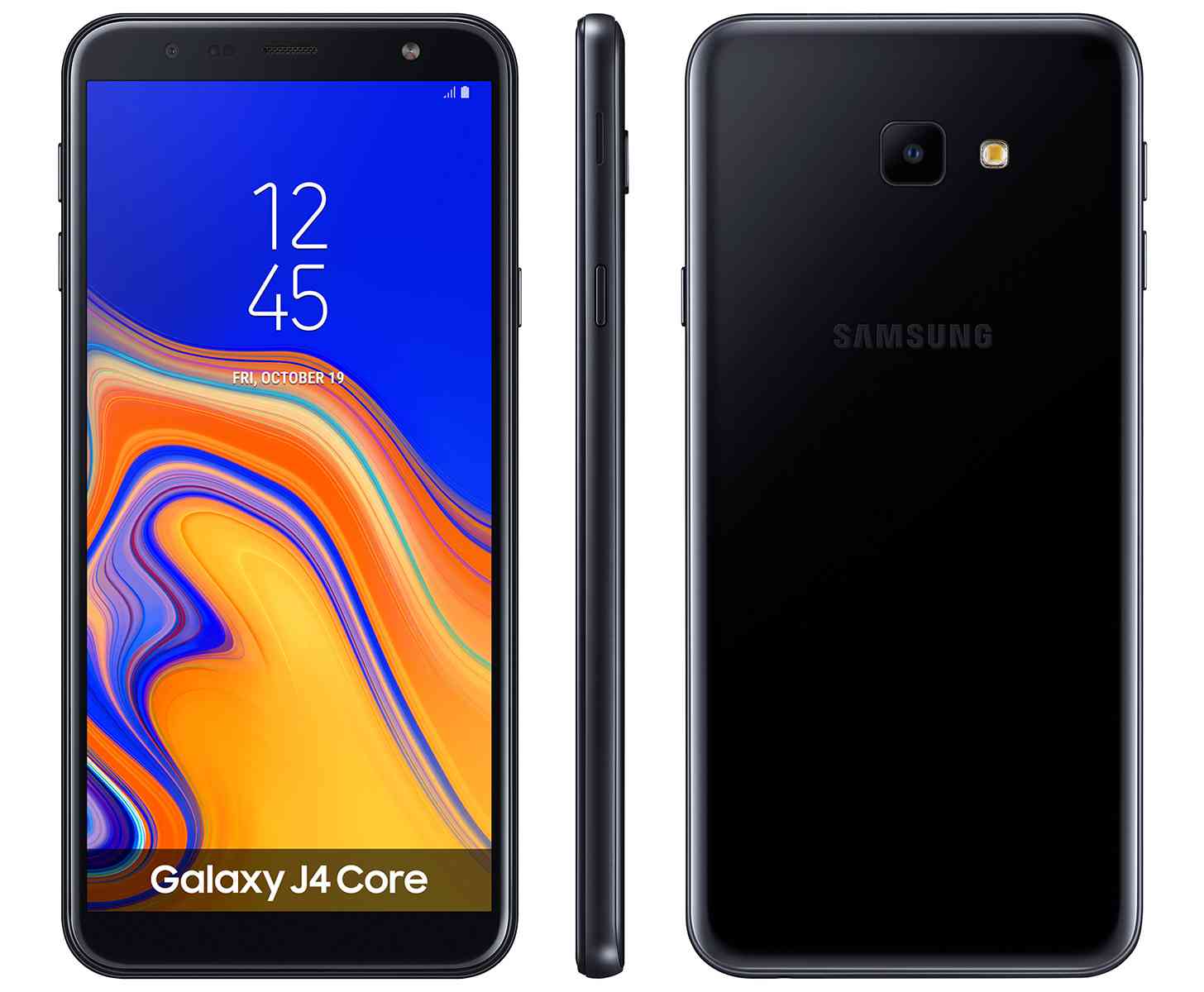
After debuting its first Android Go phone in August, Samsung is back with its second such model.
The Samsung Galaxy J4 Core boasts a 6-inch 1480×720 display — up from the 5-inch 960×540 screen on the Galaxy J2 Core — as well as an 8MP rear camera and 5MP front-facing camera. There’s 16GB of storage built into the Galaxy J4 Core, but if that’s not enough, Samsung has included a microSD card slot so that you can add more storage.
Powering the J4 Core is a 1.4GHz quad-core processor paired with 1GB of RAM and a 3300mAh battery. On the software side, Samsung has preloaded the Galaxy J4 Core with Android 8.1 Oreo (Go edition). Android Go devices come with fewer preinstalled apps and smaller app sizes, giving you access to more storage. Google’s suite of Go apps are more lightweight and are meant to work smoothly on devices with entry-level specs.
The Samsung Galaxy J4 Core looks like a nice option for folks who are interested in Android Go, but want something with slightly improved specs compare to the Galaxy J2 Core. Compared to the J2 Core, the J4 Core has a larger and higher-res screen that could be better for watching content on the go, and it also comes with double the built-in storage and a beefier battery. There’s no word yet on when the Galaxy J4 Core will launch or how much it’ll cost when it does, but because it’s an Android Go device, it should be too hard on buyers’ wallets.
Since Nokia’s reboot after the company licensed its mobile branding out to HMD Global, we’ve seen a number of great smartphones hit the market. From the likes of the flagship Nokia 8 Sirocco, to a rather unique re-imagination of the Nokia 3310, the company is slowly becoming a household name again. HMD Global has been hard at work capturing the attention of all kinds of consumers, enthusiasts, and “regular” users alike. The Nokia 7.1 is a part of the Android One program and sits right in the middle of the pack.
What can’t go unnoticed is the HMD Global’s commitment to the Android One program, as the Nokia 7.1 is far from being their first entry. In fact, the majority of the company’s smartphones are a part of it. Being part of the Android One program not only means that you’ll have a close-to-stock Android experience, but you should (in theory, anyway) have faster updates. To HMD Global’s merit, they have achieved this with an impressive amount of their devices already receiving the Android Pie update and more to come as well.
Having said that, the Nokia 7.1 runs Android Oreo out of the box, though an update to Android Pie is promised to be launched soon. As such, our review unit is actually running Android Oreo. I found a number of mild software-related performance issues (or what I believe to be, anyway) that may not be present once the Android Pie update drops. The Nokia 7.1 is a unique phone in that the devices it compares to are not readily available in the US. Within Europe and Asia, the Nokia 7.1 is easily outclassed by offerings from the likes of Xiaomi, but in the US it’s a different story entirely.
Nokia 7.1 Specs
Specifications
Nokia 7.1
Size
149.7 x 71.18 x 7.99mm, 160g
Software
Stock Android 8.1 Oreo (Android One) (upgradeable to Android Pie by the end of November)
SoC
Qualcomm Snapdragon 636 Octa-core SoC @ 1.8GHz
RAM and storage
3GB/4GB of RAM with 32GB/64GB of storage; microSD card slot
Color options
Gloss Midnight Blue and Gloss Steel
Battery
3,060mAh with QuickCharge
Display
5.84-inch Pure Display Full HD+ (2246×1080) IPS LCD with 19:9 aspect ratio and HDR10 support
Connectivity
Wi-Fi 802.11b/g/n/ac, Bluetooth 5.0, NFC
Ports
USB Type-C port, 3.5mm headphone jack
Rear camera
12 MP 2PD/AF/f1.8/1.28um
5 MP, BW/FF/f2.4/1.12um
Dual-phase autofocus
Front-facing camera
8 MP FF/f2.0
Pricing and availability
BestBuy, Amazon, B&H starting at $349 for the base model.
Presentation of the Nokia 7.1
While an often-overlooked part of the process of picking up a smartphone, the presentation is very important for the first impression of a device. The Nokia 7.1 comes in a surprisingly small, flat box with very little to show other than the phone. You get a (pretty large) charging brick, a USB-C cable, a SIM eject tool, and a set of Nokia-branded earphones. It’s simple and it’s elegant, with the box following a design language similar to the Nokia of old. This isn’t just another Android smartphone, this is a Nokia smartphone.
Nokia 7.1 Design & Hardware
The Nokia 7.1 features a design reminiscent of the majority of 2018 flagships released today. A notch and a flat glass back complete with a metal trim on the edges trying to convince you that this isn’t just any mid-range device. While many dread the notch, it has quickly become a sign of someone having a new phone. When you see a notch on someone’s smartphone, you know that they bought it within the last year. It’s, in a sense, a sign of luxury. Love it or hate it, for the foreseeable future the notch appears to be here to stay.
As for the glass back, that again is often a point of contention. While it allows for wireless charging, many argue that there is no point of its existence if you don’t actually have wireless charging. A plastic or aluminum back can’t smash when you drop it, but glass certainly can. The Nokia 7.1 does not support wireless charging, and the glass back is simply for looks. Glass can also be more slippery than other materials, again adding to its fragility.
However, I personally find the Nokia 7.1’s design classy, if a bit simplistic. There’s nothing special about it, but it’s a solid design that’s (mostly, more on that later) nice to look at. Coming in at 5.84-inches, it’s a rather small device given its screen-to-body ratio. With the 19:9 aspect ratio it’s a tall device, and the notch is pretty wide. Even still, I have absolutely no problems using this device with one hand. People looking for a smartphone to operate one-handed may well find that this particular handset fits the bill nicely.
The chamfered edges with the metal trim and flat glass back are, in my opinion, appealing to look at. I don’t share the dislike for glass backs that others do – I find that they give a premium feel to any smartphone, especially when done correctly. The glass back features the Nokia logo, the Android One logo, and some regulatory information in small print at the bottom.
There are a few things that I don’t like, however, and the chin is one of those things. The existence of the notch is so that manufacturers can provide the largest screen-to-body ratio possible – so why is the chin so big? It houses the Nokia logo which is also present on the back, making its inclusion rather redundant. I don’t mind devices having a traditional top and bottom bezel, but it feels like the Nokia 7.1 tried to both have a bezel and not have one, mismatching the top and bottom and failing at basic symmetry.
And then there are the side buttons, which have already begun to annoy me. It feels really awkward to take a screenshot as the volume rocker is directly above the power button. It takes some getting used to, though it’s nowhere near the end of the world.
Finally, the headphone jack has a weird placement at the top of the phone on the right. It feels unnatural to use, though that could be because every phone I’ve had in the last few years has had it on the bottom. It’s taking a bit of getting used to, and I dislike having my cable droop down over my screen.
The fingerprint sensor is in a perfectly natural position on the back, sitting exactly where my index finger naturally gravitates towards. The vibration motor is also decent as well, with no complaints from me. You can hear it, yes, but you can feel it as well, which is the most important thing about it. Haptic feedback is excellent. Build quality is something that the Nokia 7.1 clearly has over competitors in this price range, and it’ll be hard to find a device that beats it. There is no IP rating here, but that’s hard to come by on mid-range smartphones anyway.
Nokia 7.1 Display
The display of the Nokia 7.1 is one that greatly impressed me. The Nokia 7.1 sports a 5.84-inch 2246×1080 IPS LCD display with a 19:9 aspect ratio and HDR10 support. Not only does that make this display a cut above many in this price range, but HDR10 support is unheard of even in flagships released only last year. Content that isn’t natively HDR10 can be upscaled as well, and with the likes of Netflix releasing more HDR10 supported content you’ll get to make use of that display very soon. It’s worth pointing out that HDR10 upscaling isn’t enabled by default, but you can enable it under the Display settings on your device.
Colour reproduction on the Nokia 7.1 is very good, and colors are saturated. I don’t know what color space it operates in, but I doubt its complete accuracy. Even still, I’m not one to actually care about the accuracy of my display. I prefer my content to look nicer rather than accurate, which is why I personally have no issue with a saturated display. The display itself is sharp and gets bright enough for outdoor usage, so that’s certainly not an issue either. I can’t measure the nits output, but it does the job for sure.
Viewing angles are fine, with a little bit of a brightness drop off when tilted away from the user. That’s to be expected with most LCD displays and isn’t really cause for alarm. The colors do shift slightly as well while tilting it away, but again that’s really not an issue either.
Android One on the Nokia 7.1
When I found out I was going to be reviewing the Nokia 7.1, I was most excited about giving Android One a go. It’s close to stock Android and embodies (more or less) Google’s vision of what Android should be. To me, the software of an Android One phone is exactly what I would image a mid-range or budget Google Pixel smartphone to run. I was impressed by Android One, and I was even more impressed by the little features that Nokia throws in as well. It’s basically AOSP, which in a sense is what makes the Nokia 7.1 so unique. In a world where every device manufacturer needs to make their mark in the software department, it’s a breath of fresh air to have an unbloated software experience. There are no preloaded applications aside from Google’s own. Such simplistic software also allows for quick software updates, and in the process of writing this article, I have already received the November 2018 security patch – merely two days after Google released their security bulletin.
I very much consider myself an Android purist, so close-to-AOSP skins like OxygenOS are definitely my favorite way to use my phone. Android One is that in a nutshell, and it’s wonderful to use. There’s no bloat, no myriad of settings to trawl through, and everything just works. Having said that, I had a dive through the settings and found a number of cool features. My favorite is one that I originally discovered on the Honor 9 Lite, and I was very disappointed to learn that not every device with a back-facing fingerprint sensor has it. On the Nokia 7.1, you can pull down the notification shade simply by swiping your finger down the fingerprint sensor. Swiping back up closes it again. It’s not just a useful feature, but it’s a cool little thing to play with idly as well.
There is a lack of usability features though, primarily I found that there is no way to clear all of the notifications from the status bar. It’s not a huge problem, but it’s something worthy of note. The “Enhanced HDR 10” can also be enabled under the Display settings, though I don’t know why it’s switched off by default given that it is one of the selling points of this particular handset. The software also handles the notch well, with videos not being cut off or anything of that sort.
Another benefit of being a part of the Android One program is that given that the software is lightweight, it should, in theory, have less of an impact on performance. Sadly, I have found that for some reason it feels like the Nokia 7.1 actually performs worse than other Snapdragon 636 devices such as the Xiaomi Redmi Note 5. I’m not sure how much of this I can chalk up to being the included RAM – my unit has 3GB – given that the Xiaomi device I’ve used had 4GB. Even still, I figured that MIUI would require more RAM than the likes of the Android One software.
But there is one major caveat to this particular device’s software, and that’s HMD Global’s aversion to bootloader unlocking. After complete community outcry, the Nokia 8finally received an official bootloader unlock a few months back. That was the only device the company actually unlocked, and there are no signs of any more getting unlocked any time soon. If stock Android isn’t your thing or you want to modify your phone in any way requiring root, you simply can’t.
Performance of the Nokia 7.1
I touched on this in the last section, but the specifications of the Nokia 7.1 leaves the performance I’ve been faced with to appear a tad worrisome. It’s not bad, but it’s nowhere near as good as other devices I’ve used with the same Qualcomm chipset. Sadly, I no longer have access to a Xiaomi Redmi Note 5 for direct comparisons, but in my day-to-day usage, I found that the Xiaomi ran a lot better for the likes of Snapchat and Facebook Messenger. I’ve found that the performance of Snapchat, in particular, is extremely poor, with the app taking a long time to process any input whatsoever. I can’t tell how much of that is on the side of Snapchat and how much of it is on HMD Global, however. It could well be down to the poor amount of RAM fielded by the Nokia.
The camera application’s performance on the Nokia 7.1 is about average. There’s a little bit of shutter-lag most of the time, and launching the app can take a second or two. It’s certainly not a bad experience though, and the photos it produces are rather spectacular. I’m willing to put up with its performance thanks to the excellent photo quality, which we’ll get to later.
There are system-wide lag spikes, but nothing major at all. I had the LinkedIn application crash when I switched to Google Chrome and back, but that (again) may be down to the amount of memory in my unit. Because it’s the 3GB of RAM variant, I can’t tell you how things will be if you pick up the 4GB of RAM variant for slightly more. 3GB of RAM is the bare minimum these days, with even the Pixel 3 having only 4GB of RAM. Obviously, the Nokia 7.1 isn’t quite a flagship like a Pixel, but it still could definitely benefit from more memory.
The Nokia 7.1 runs pretty warmly most of the time as well. With my usual mix of browsing Reddit, messaging through Facebook Messenger and switching over to Google Chrome my phone was easily hitting 45 degrees Celsius (113 Fahrenheit). It runs extremely hot (for a phone) most of the time.
Nokia 7.1 Speed Test
Our app opening test confirms the huge amount of heat generated by the Nokia 7.1. With only 30 iterations of opening the Play Store, YouTube, and Gmail, we found that the phone went from 35 degrees to 40. The glass back of the phone doesn’t do much for heat dissipation either.
Having said that, apps do launch rather quickly and there isn’t a huge amount of thermal throttling. I found that even when the phone is hot, usage remains pretty much unchanged. The only problem I have found is that it can become quite uncomfortable in the hand when it’s warm, but that’s to be expected. It makes a great hand warmer during the winter, though.
Scrolling performance is also much in line with what we’re seeing here, in that it’s basically average. There are no crazy results here, and it’s about in-line with any mid-range device that you’d expect to see – which is a good thing. Before looking at the graph below, we do need to know how to interpret the data. We took these graphs by using the GPU profiling data dumped to adb, which we then graphed. You can understand how to view these graphs by the following image. The green line in the graphs below represents 60 FPS.
This phone is not a flagship yet performs just fine for basically any basic use case. You’re not going to be flying in between different applications, multi-tasking to your heart’s content or anything, but it’s not a bad phone either. It can play games, you can consume social media, and you can make calls or texts. It’s a pretty perfect mid-range phone in that it can do everything you would expect it to, and it has a number of extras on top that make it betterthan other phones in the same bracket.
Gaming and GPU performance
PUBG
I chose PUBG to demonstrate the Nokia 7.1’s game performance as I felt that it is probably one of the most intensive games on Android currently available. Not only did the Nokia 7.1 handle it perfectly, but it didn’t even heat up that much! It hit 45 degrees Celsius after 15 minutes of playing, which is perfectly reasonable, especially when, given the nature of the testing, the device was plugged in and charging at the time. Holding an FPS of 26 consistently means that gaming is a breeze on this particular handset, as there’s not a whole lot more you can ask from a game that’s locked to 30 FPS. Admittedly, the game did reduce itself to the lowest graphics settings available, but that is because of the Adreno 509. It’s definitely no world beater, that’s for sure, but it’s a pretty good performance for a mid-range handset.
We would like to give special thanks to the team at GameBench for the assistance they provided us. Their tool makes it possible for any person, whether it be a regular user, journalist, or engineer, to test a mobile game’s performance on an Android device. They have an Android app you can install to start benchmarking your games as well.
As for other games, you’ll have no issues running popular favorites such as Need for Speed, Minecraft, or Pokemon Go. All of them work fine, and the only thing you really have to worry about when it comes to the Nokia 7.1 is its battery life. The battery life is remarkably poor when gaming, but we’ll touch on its overall battery performance later on.
Benchmarks
While a benchmark isn’t the best indicator of a device’s overall performance, it is a quantifiable figure that we can use to compare it to other smartphones. As such, I tested the Nokia 7.1’s storage speed along with giving it a computational benchmark in Geekbench 4 Pro and, finally, an Antutu benchmark as well. The results are impressive (if a little misleading), and you can check them out below.
The best results here come from the storage speed tests, which shows that HMD Global has not cheapened out on-device storage – even if it is eMMC. eMMC storage suffers when doing, well, basically anything generally. For example, downloading music or installing applications from the Google Play Store will slow your device to a crawl. It’s not as if this is an issue unique to the Nokia 7.1 or anything, but it’s worth noting. Most devices in this price range (including the Xiaomi Redmi Note 5 that we mentioned earlier) will have eMMC storage, so it’s not as if this is something that HMD Global is doing worse than other manufacturers. Also something incredibly frustrating – because of the eMMC storage, trying to take a screenshot of something means that you’ll have to wait a few seconds for it to save.
The benchmark results are good though when pitted against other devices. My OnePlus 3 actually scores a little bit over 100,000 in the Antutu benchmark and only the single core performance of the OnePlus 3 beats out the Nokia 7.1 on Geekbench. That puts a mid-range device released this year comfortably over a flagship from nearly three years ago, but there is a caveat. Storage speed is almost as important as raw computational power, and if your storage is slow, then the whole device will suffer. The Nokia 7.1 is capable of more things computationally than the OnePlus 3 but is hampered by its low amount of RAM that causes the system to have to repeatedly request resources from the slow onboard storage.
That’s how benchmark results can be misleading, as they don’t take into account other features of a smartphone. The benchmark results do match up with what I’ve seen though, in that when things are running, they are generally running well. We saw this in the game benchmarks above. The Nokia 7.1 is, overall, a pleasant experience when it comes to performance. If you are in Europe, there are a number of smartphones that are within an affordable range that will offer much, much better performance than the Nokia 7.1. If you are in the US, where this phone will be sold in stores off-contract, then there are very few, easily affordable devices that will even come close in performance.
Nokia 7.1 Battery Life
The battery life is where the Nokia 7.1 really falls down, and that’s thanks to its rather small 3,060 mAh battery. It struggles to get me through the day, hitting from anywhere from 2 to 3 hours of screen-on-time. That’s with my daily usage of Facebook Messenger, Snapchat, and web browsing. In contrast, my OnePlus 6 gets between 4 and 5 hours of screen-on-time. Its quick charging standard means that you can top it off if you need to with relative ease throughout the day, but it’s not quite a dash charge contender. I found that I can get it to around 50% within half an hour, with it taking closer to an hour and a half to fill up entirely. It’s certainly better than regular charging, but it’s definitely not the fastest around either.
A typical day of usage with the Nokia 7.1
I understand that screen-on-time isn’t the end all be all of battery usage, which is why I have also included my extended battery statistics like application usage. It should hopefully paint a picture of the kind of user that I am. If you find yourself using the same apps as me, then you’re likely going to have a similar experience. I would deem myself a power user, meaning I do put my phone through quite a lot. It might be that the battery life on this particular device is fine for you, in which case there’s nothing wrong with it. You won’t be gaming on it though, that’s for sure.
As for standby time, it’s just fine. It’s not good, but it’s not bad either. That also describes my whole experience with battery life on this device. There’s nothing special at all about it, but at the same time, it’s not detrimental to the phone either. If you find yourself in a position where getting to a charger during your day is difficult and you use your phone pretty frequently, then this phone isn’t for you. In college, I have no trouble charging my device in lecture halls, so it wasn’t as big of an issue to me. I also have a 20,000 mAh powerbank which I throw into my bag, so if I’m in desperate need of a top-up then I can use that as well.
The Nokia 7.1 is just average when it comes to battery life, nothing more and nothing less.
Nokia 7.1 Camera & Video
The Nokia 7.1’s camera is what surprised me about this device the most. Despite featuring cheaper devices, Android One smartphones have somewhat of a history when it comes to surprisingly good camera quality. The Nokia 7.1 is no different, and the 12MP f/1.8 aperture shooter powered by ZEISS wowed me to no end. The device itself is rather average with a couple of high points, and the majority of those high points lie in its camera. HMD Global clearly put a lot of work into the device here, and I’m very impressed. From the beautiful photos its capable of taking to the well-crafted camera application, this device is yet another camera winner in the Android One category. Take a look at some of the photos I’ve taken in the gallery below.
The Nokia 7.1, as you can see, has excellent photo quality in daylight. The colors are well-defined with photos having an appropriate level of sharpness. The light parts of the photo are a little bit overblown, and one could argue that the photos are a little bit too saturated. Even still, this is nowhere near a flagship level phone and as such it behaves more than appropriately. The camera quality is rather excellent. Things begin to fall off when it gets to low light, however, which you can check out in the gallery below.
As you can see, low light absolutely tells a different story. The photos aren’t bad, but they’re of noticeably worse quality than their brighter counterparts. That’s okay, however, as obviously, a $349 smartphone is not going to perform in low light scenarios on the same level as, say, the Huawei P20 Pro. Even still, it’s just worth noting that while this device has a great camera, you’re going to have difficulties in some scenarios taking great photos.
As I’ve mentioned, the camera application itself is stellar with a huge amount of features to offer. You get the Nokia Pro mode which was forever popular on the Nokia Lumia series, along with a few other cool features as well. Live Bokeh mode, for example, lets you tune the blur effect to your liking before taking the photo. There’s also a square photo option for Instagram photos, and finally, there’s also Google Lens support so that you can leverage Google’s machine learning to identify objects around you. It’s all very cool. You can take a look at a few screenshots of the bundled camera application below.
Video 1 – Quick EIS test
I included the above video as I felt that the Nokia 7.1’s EIS was especially apparent on the horizontal axis, as the device stabilizes the video relatively well thanks to its gyro-based EIS algorithm. The audio quality is pretty good too, definitely serviceable for the job.
Video 2 – Outdoors
The microphone handles wind well, and you can hear the announcement made over the speakers in this train station.
The video quality is apt for both indoor and outdoor usage, and the audio quality from the microphone is perfectly acceptable.
Miscellaneous
Connectivity
This is the part where I always worry about a smartphone, as I feel that connectivity is not paid attention to in most reviews. Am I going to have a consistent connection on my commute every day? Will I have Wi-Fi access throughout my whole house? These are the things I worry about when it comes to my smartphone’s connectivity, and thankfully the Nokia 7.1 passed this test without a hitch. I was able to get a data connection instantly after inserting my SIM card, being met with 3 bars of 4G LTE in my home in rural Ireland. Definitely not bad whatsoever, and a connection of sorts remained consistent on my journey to and from university. It wasn’t always LTE (or even HSDPA+) but it was there, which is more than I can say for some devices.
Wi-Fi coverage through my home is also fine, and there are no issues with me losing signal at the opposite end of my house (I live in a bungalow). I never felt that the phone lied about its signal status either, which is also a major plus. Overall, this device is a winner when it comes to signal strength. No issues from me whatsoever. I even gave Google Pay a go, and it worked fine and didn’t require me to tap again or anything. I’ve had that happen even on the flagship OnePlus 6, so I was somewhat worried that it may perform poorly.
Audio
In a world where the headphone jack is dying out, I’m quickly learning to be thankful for the mere existence of the headphone jack here rather than the good quality it provides. The Nokia 7.1’s headphone jack works, and it works fine. There are no weird crackling issues when you turn your headphone cable, it gets plenty loud and overall, it’s just a pretty good experience. The single bottom-firing speaker is rather poor, but there’s not much else you can really expect from a $349 smartphone. It does the job, and that’s about as much as you can ask from it. It plays sound and does it moderately loud, but don’t expect a great amount of clarity from it.
The Nokia 7.1 – Worth your money?
To preface this section, I would like to say that the majority of the positive feedback I am about to give applies mainly to US readers. The Nokia 7.1’s price tag is a lot harder to justify outside of the US, given the abundance of options from the likes of Xiaomi and even Honor. The Nokia 7.1 costs €299 starting in Europe, and a Xiaomi Redmi Note 5 with the same chipset, more RAM, and a bigger screen costs around €100 less. It’s just not a contest.
However, in the US, things are a little different. Xiaomi devices aren’t as easy to import, and their band support in the US is rather poor as well. You can pick up a OnePlus 6T for cheap from T-Mobile with their trade-in deal, or even a flagship of last year for around the same price second-hand, but that’s about it. If you want a brand new smartphone with a decent camera, good chipset, and a lasting build quality for a relatively low price in the region, then look no further than the Nokia 7.1. It has it all, from software support to power, there are a lot of reasons to love the Nokia 7.1. It’s overpriced in a lot of ways, there is absolutely no denying that, but in a market known for its contracts and its high off-contract prices, the Nokia 7.1 is not a bad choice whatsoever.
The first foldable phone is a reality – the FlexPai. Well, it’s actually a tablet as unfolded it boasts a 7.8” screen (4:3 aspect ratio). Folded, that drops to a more manageable 4”. And get this, this device is the first to use the 7nm Snapdragon 8150!
Back to the screen, it’s an AMOLED that folds down the middle. The software (dubbed Water OS) switches to using only half of the screen, displaying a wallpaper on the other half.
You get to choose which half you use, though, one has slightly more screen, the other is next to the dual camera, which can be used for selfies and video calls in this configuration. It’s a 16+20MP camera, by the way, the second camera module has a telephoto lens.
The FlexPai measures 7.6mm thick. However, it doesn’t fold flat so it’s thicker than than 15.2mm when folded (certainly near the “hinge”). The hinge is rated to being folded 200,000 times.
The device is powered by a 7nm Qualcomm chipset and only the Snapdragon 8150 fits that description. The base configuration has 6GB of RAM and 128GB storage, but other options include 8/256 and 8/512GB. A proprietary Ro-Charge fast charging tech is supported – it goes from 0% to 80% in an hour.
The price starts at CNY 9,000 – $1,300/€1,135 – which doesn’t seem so high considering that some Android flagships cost that much without a next-gen chipset or a foldable design.




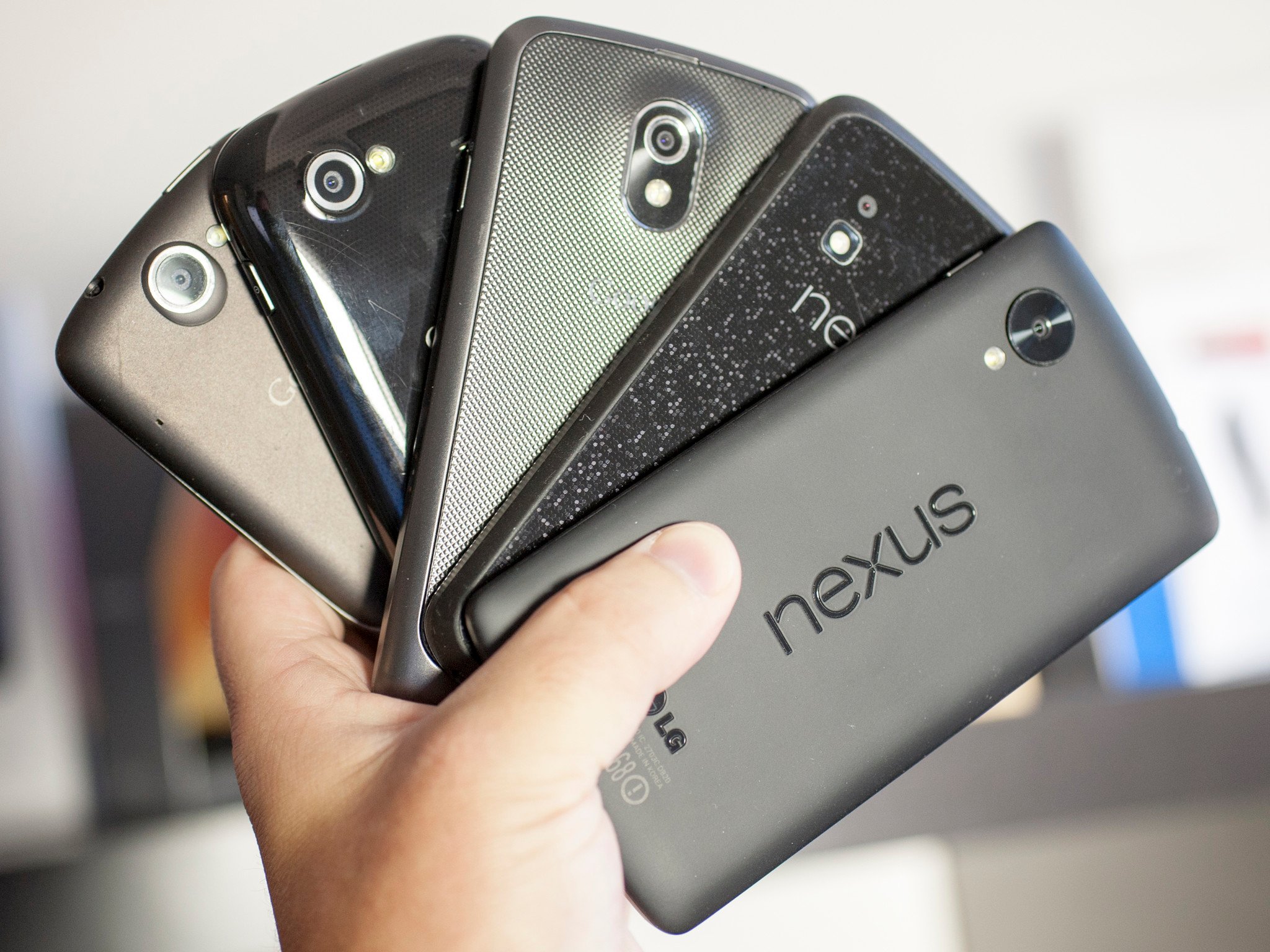
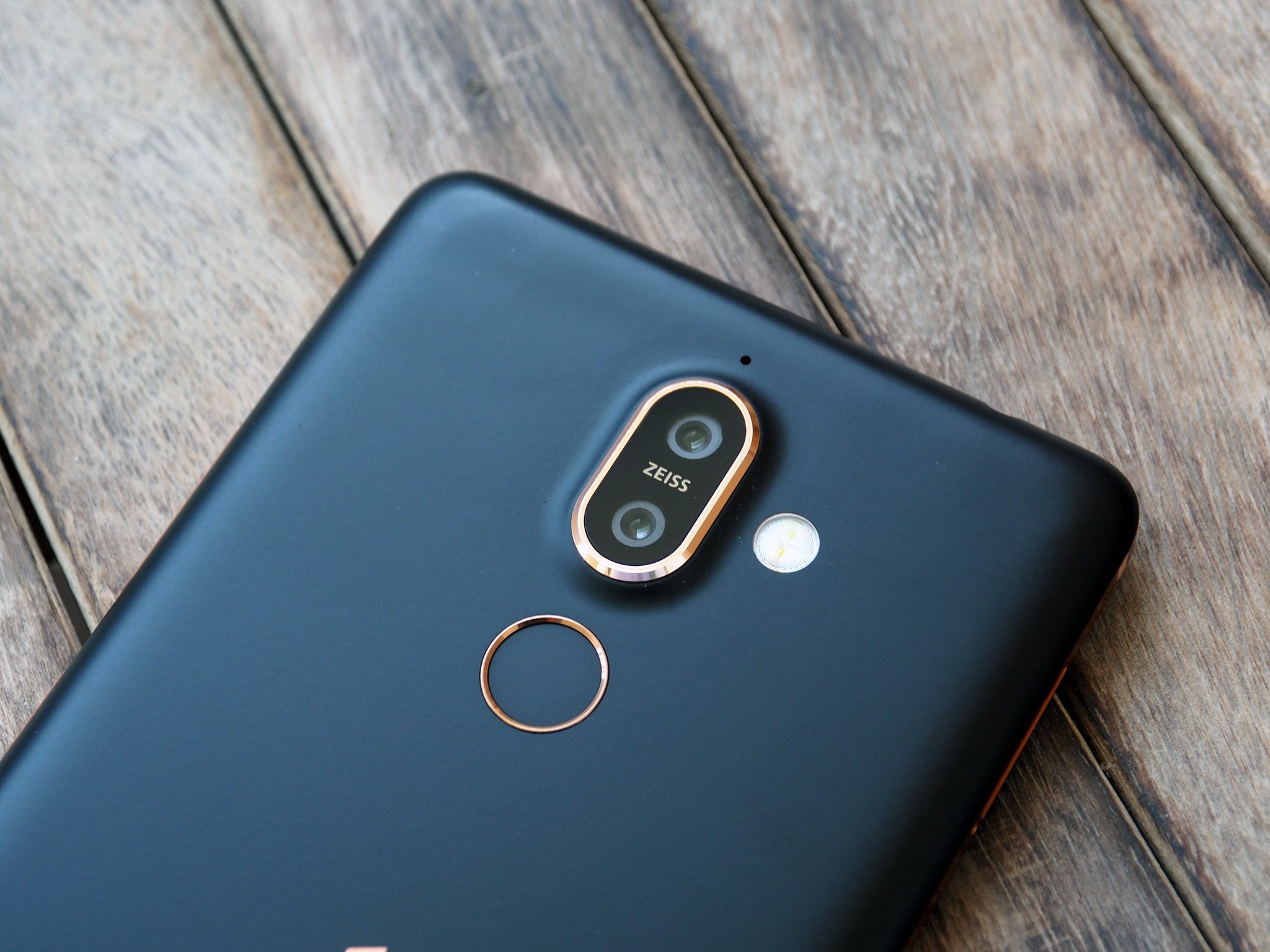
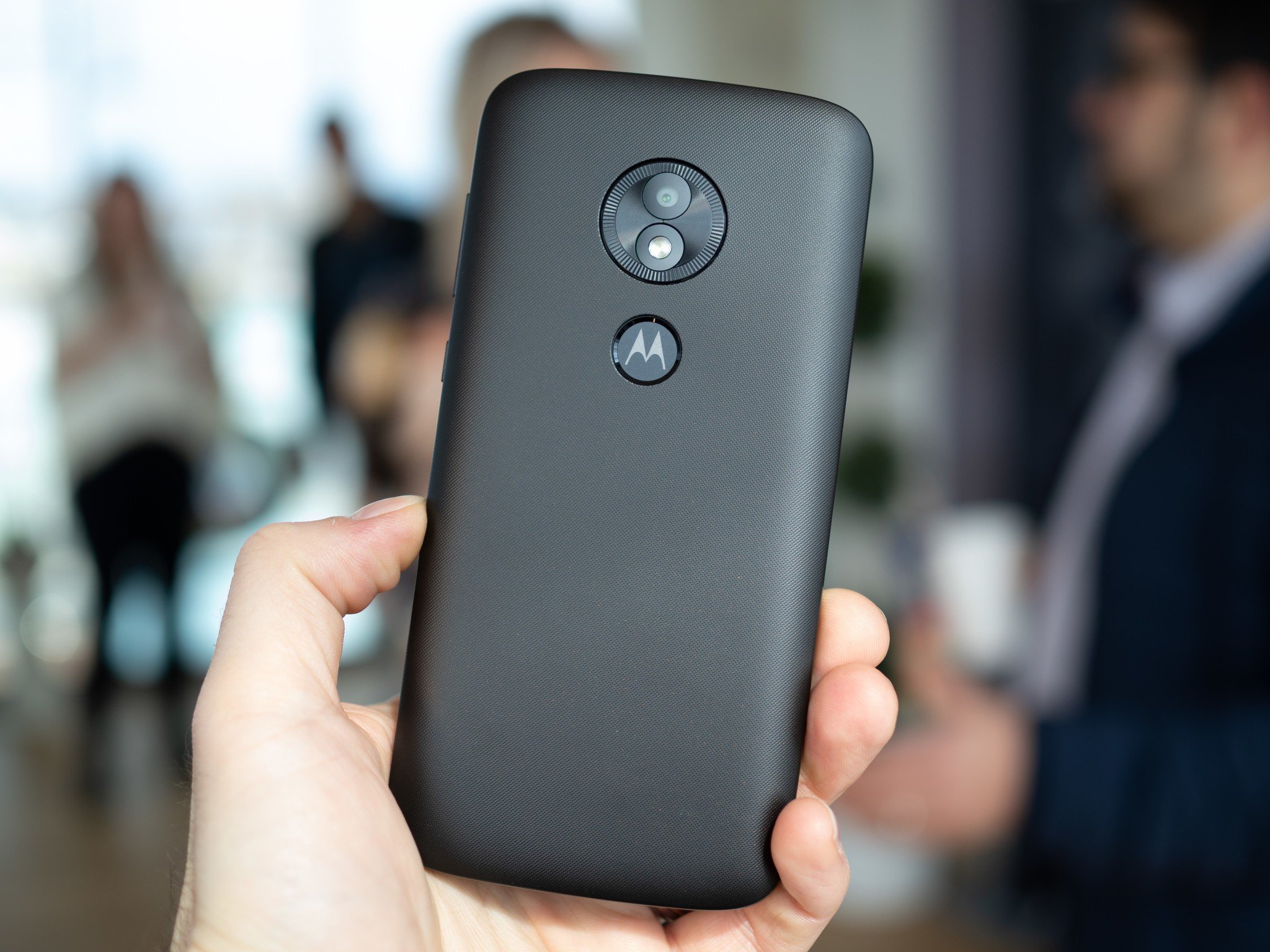
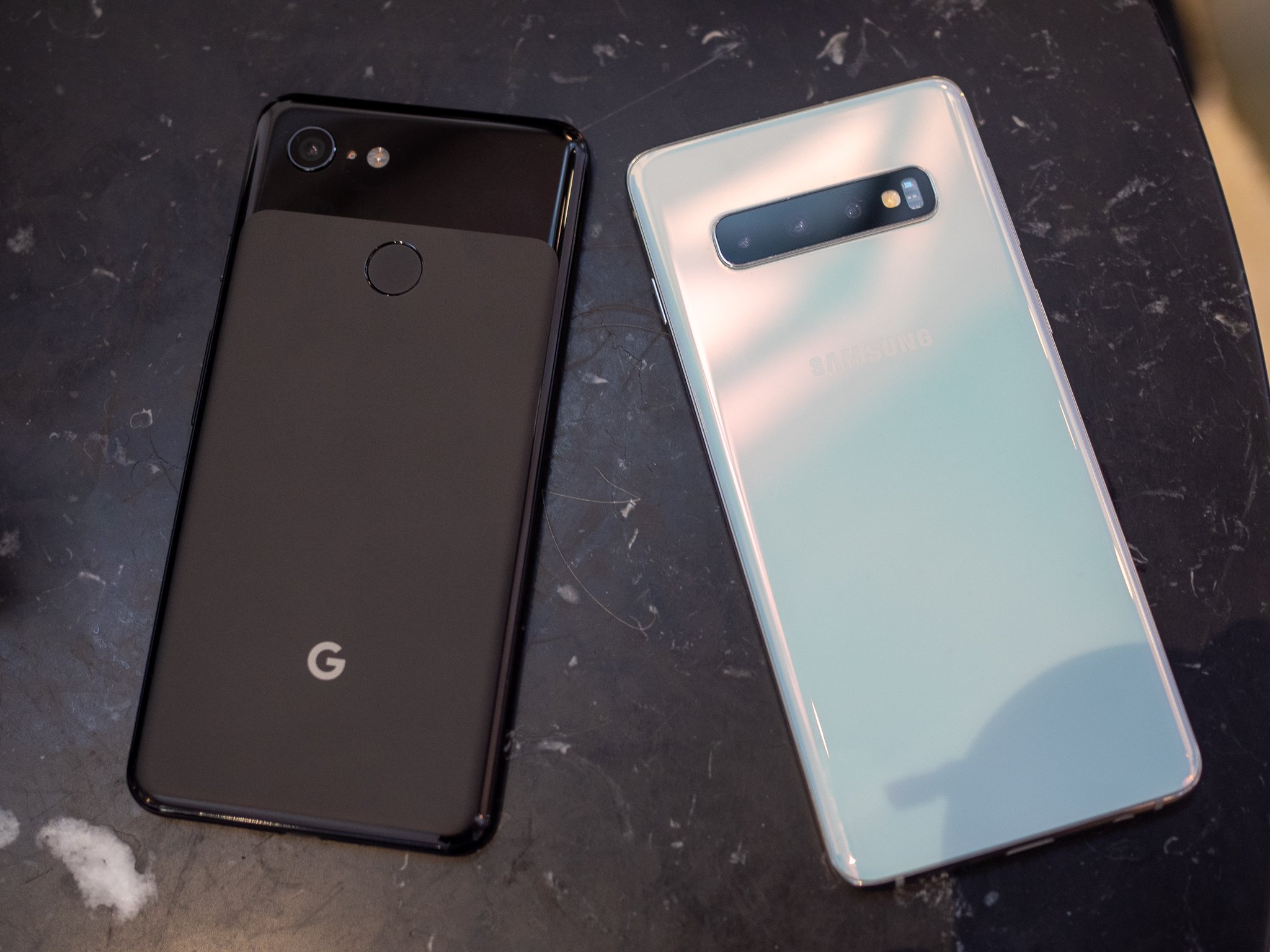
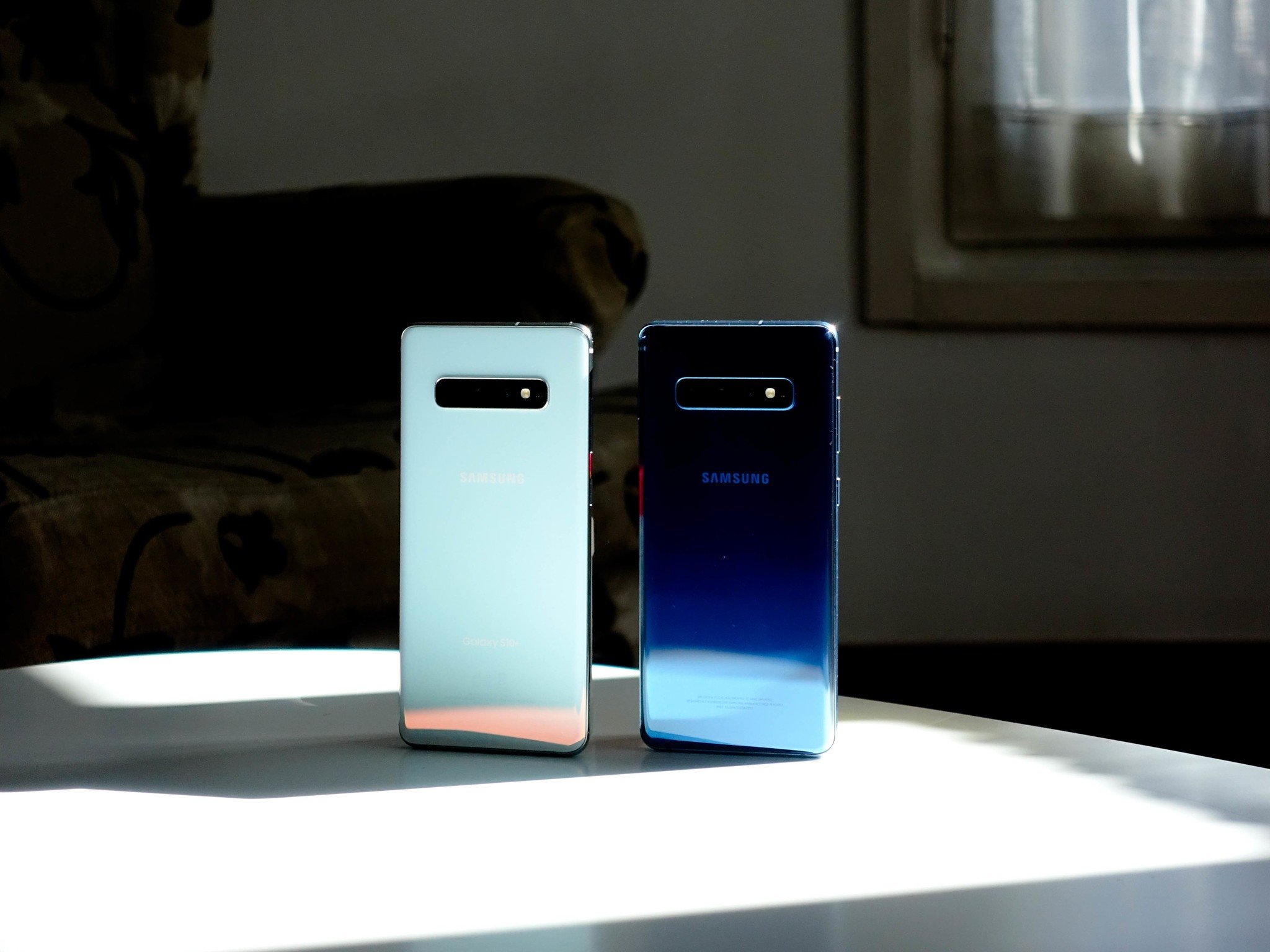


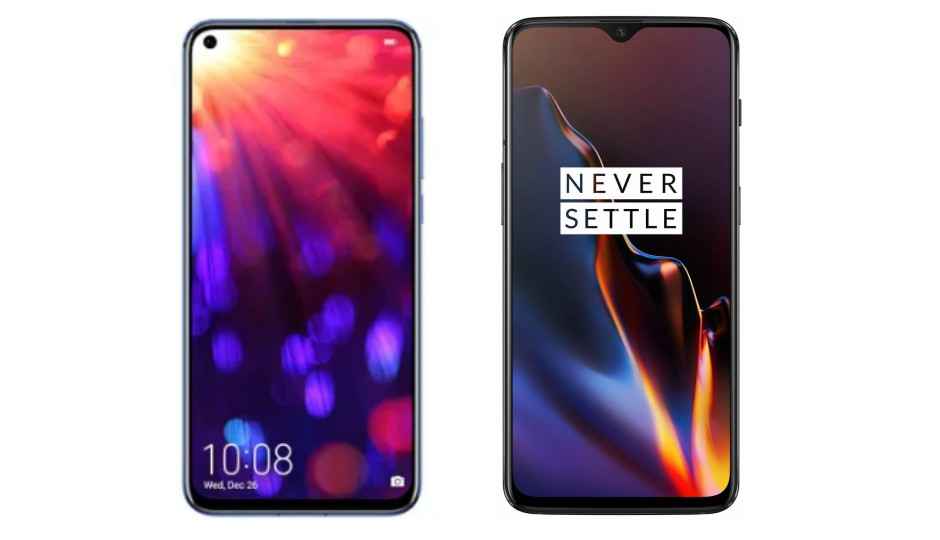


 Magic UI 2.0.1 on the Honor View20