Moving menstrual health forward with iPhone and Apple Watch
Ahead of International Women’s Day, new preliminary findings from the Apple Women’s Health Study underscore the importance of paying attention to menstrual cycles and their connection to overall health.
Many physicians consider periods a vital sign, but this area of health is notably under-researched. The Apple Women’s Health Study is a first-of-its-kind research study conducted with the Harvard T.H. Chan School of Public Health and the National Institute of Environmental Health Sciences (NIEHS) that aims to advance the understanding of menstrual cycles and how they relate to various health conditions such as polycystic ovary syndrome (PCOS), infertility, and menopausal transition. The study is significant in its scope and scale because it invites anyone who has ever menstruated across the US to contribute to this research simply by using their iPhone.
New Preliminary Findings
Harvard Chan School researchers used survey data from the Apple Women’s Health Study to advance the scientific understanding around the relationship between persistently abnormal periods, PCOS, and endometrial hyperplasia and cancer. Looking at a preliminary analysis cohort of over 50,000 study participants, the study team found:
12 percent of participants reported a PCOS diagnosis. Participants with PCOS had more than four times the risk of endometrial hyperplasia (precancer of the uterus) and more than 2.5 times the risk of uterine cancer.
5.7 percent of participants reported their cycles taking five or more years to reach cycle regularity after their first period. Participants in that group had more than twice the risk of endometrial hyperplasia and more than 3.5 times the risk of uterine cancer, compared to those who reported their cycles took less than one year to reach regularity.
These updates are a first step for helping people understand risk factors for these diseases, and encouraging people to have conversations with their healthcare providers about cycle irregularity earlier.
“More awareness on menstrual cycle physiology and the impact of irregular periods and PCOS on uterine health is needed,” said Dr. Shruthi Mahalingaiah, MS, Harvard Chan School’s assistant professor of Environmental Reproductive and Women’s Health and co-principal investigator of the Apple Women’s Health Study. “This analysis highlights the importance of talking to a healthcare provider when menstruators are experiencing persistent changes to their period that span many months. Over time, we hope our research can lead to new strategies to reduce disease risk and improve health across the lifespan.”
The study team will conduct further analyses on this preliminary data for scientific publication.
Cycle Tracking on Apple Watch and in the Health app on iPhone can help users have more informed conversations with their providers.
Previous Interim Updates
The Apple Women’s Health Study team has previously shared a number of other interim research updates that highlight how large-scale, longitudinal research on menstruation can help advance the science around this topic.
Research published in the American Journal of Obstetrics and Gynecology focuses on cycle deviations, like irregular or prolonged periods, which can be a sign of underlying conditions including PCOS, fibroids, malignancies, or infections. The study found cycle deviations were found in 16.4 percent of the study population. Black participants had a 33 percent higher prevalence of infrequent periods compared to white, non-Hispanic participants, while Asian participants had a higher prevalence of irregular periods.
Demonstrating just how common menstrual symptoms really are, researchers found the most frequently tracked symptoms were abdominal cramps, bloating, and tiredness, all of which were experienced by more than 60 percent of participants who logged symptoms. More than half of the participants who logged symptoms reported acne and headaches. Some less widely recognized symptoms, like diarrhea and sleep changes, were also tracked by 37 percent of participants logging symptoms.
After analyzing over 125,000 menstrual cycles, researchers found that participants experienced slightly longer menstrual cycles for cycles in which they received a COVID-19 vaccine, but participants’ cycles typically returned to prevaccination lengths the cycle after getting a vaccine.
The Apple Women’s Health Study invites anyone who has ever menstruated across the US to contribute to scientific research by enrolling via the Apple Research app. The study enables participants to share their cycle tracking data, along with other health data from iPhone, and Apple Watch if they have one. Participants can also provide a more well-rounded set of information about their personal and family history and lifestyle through occasional surveys. The Research app helps the study reach individuals across various stages of their life, varying races, and across the US. Participants control the data types shared with the study, with transparency into how the data will be used for the purposes of the study.
Anyone who has ever menstruated across the US can download the Apple Research app to enroll in the Apple Women’s Health Study, which helps the study reach individuals across various stages of their life, of varying races, and in multiple locations.
Cycle Tracking on iPhone and Apple Watch
Cycle Tracking is available in the Health app on iPhone or the Cycle Tracking app on Apple Watch, allowing users to track their menstrual cycle along with details like symptoms or ovulation test results. Cycle Tracking uses information users have logged for previous periods and cycle length, plus heart rate data from Apple Watch, to offer period and fertile window predictions. Users can turn on notifications to tell them when their next period or fertile window is approaching.
With iOS 16 and watchOS 9, Cycle Tracking can inform users if their logged cycle history from the previous six months shows a pattern of irregular periods, infrequent periods, prolonged periods, or persistent spotting. It’s important to know when these patterns occur, as they may be a sign of an underlying health condition. Users are also able to learn about the Cycle Deviation detected, and export the last 12 months of their cycle history as a PDF to share with their provider.
Cycle Tracking — available in the Health app on iPhone and in the Cycle Tracking app on Apple Watch — allows users to conveniently track their menstrual cycle and receive period and fertile window predictions, with the same strong privacy protections as with all other health data.
Additionally, the new temperature-sensing capabilities in Apple Watch Series 8 and Apple Watch Ultra allow users to receive retrospective ovulation estimates. New sensors gather overnight wrist temperature data that can be used to estimate the likely day of ovulation after it has occurred and improve period predictions. Knowing when ovulation has occurred can be helpful for family planning, and users can view these estimates in the Health app.
New temperature sensors in Apple Watch Series 8 and Apple Watch Ultra gather overnight wrist temperature data that can be used to estimate the likely day of ovulation after it has occurred, which can be helpful for family planning.
Privacy is fundamental in the design and development across all of Apple’s features. When a user’s iPhone is locked with a passcode, Touch ID, or Face ID, all of their health and fitness data in the Health app — other than Medical ID — is encrypted. Any Health data backed up to iCloud is encrypted both in transit and on Apple servers. When using iOS and watchOS with the default two-factor authentication and a passcode, Health app data synced to iCloud is encrypted end-to-end, meaning that Apple does not have the key to decrypt the data and therefore cannot read it.
The first beta of iOS 16.4 was released to developers today, and it includes a number of new features and changes. There are new emoji, improvements to Safari and web apps, and much more. Head below as we round up everything new in iOS 16.4 beta 1.
What’s new in iOS 16.4 beta 1?
New Safari and third-party browser features
iOS 16.4 brings new capabilities for Safari web apps: access to push notifications, home screen badges, and more.
Third-party browsers are now able to show a user interface for users to add a website to their home screen.
New Emoji
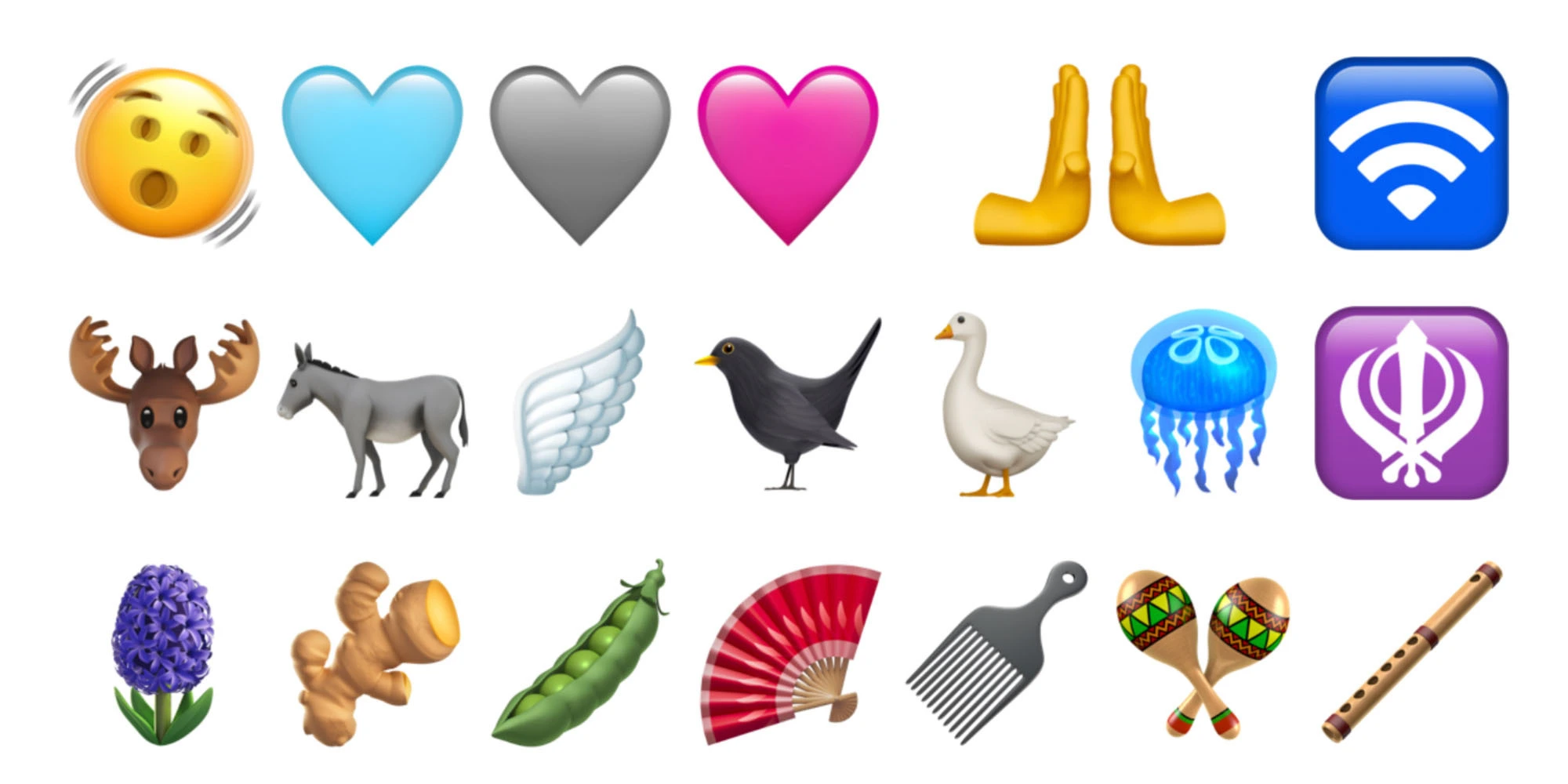
There are new emoji for things like a shaking face, a goose, a hyacinth, and a plain pink heart. These new Emoji are part of the Unicode Standard for Emoji Update 15.0, which was announced in July.
Changes to beta testing enrollment
Apple is cracking down on sharing iOS beta profiles. Now, the beta enrollment process will be tied to a developer’s Apple ID and accessed directly in the Settings app. Apple says:
Beginning with iOS & iPadOS 16.4 beta, members of the Apple Developer Program will see a new option to enable developer betas directly from Software Update in Settings.
This new option will be automatically enabled on devices already enrolled in the program that update to the latest beta release. Your iPhone or iPad must be signed in with the same Apple ID you used to enroll in the Apple Developer Program in order to see this option in Settings. In future iOS and iPadOS releases, this new setting will be the way to enable developer betas and configuration profiles will no longer grant access.
Cellular and 5G changes
iOS 16.4 adds a new “5G Standalone” feature that can deliver wildly fast speeds up to 3Gbps. In the United States, T-Mobile is the only carrier to support this feature.
Learn more: 3Gbps iPhone speeds could be coming soon as iOS 16.4 brings 5G Standalone support
Apple Podcasts updates
For Apple Podcasts, there are changes to the Library, improvements to Up Next, and new CarPlay updates.
Channels in Library: Easily access the channels you subscribe to and browse channels from shows you follow.
Up Next Enhancements: Resume episodes you began, start episodes you saved, and remove any you want to skip.
CarPlay Updates: Quickly pick up where you left off with Up Next and find new shows in Browse.
Shortcuts and Focus mode changes
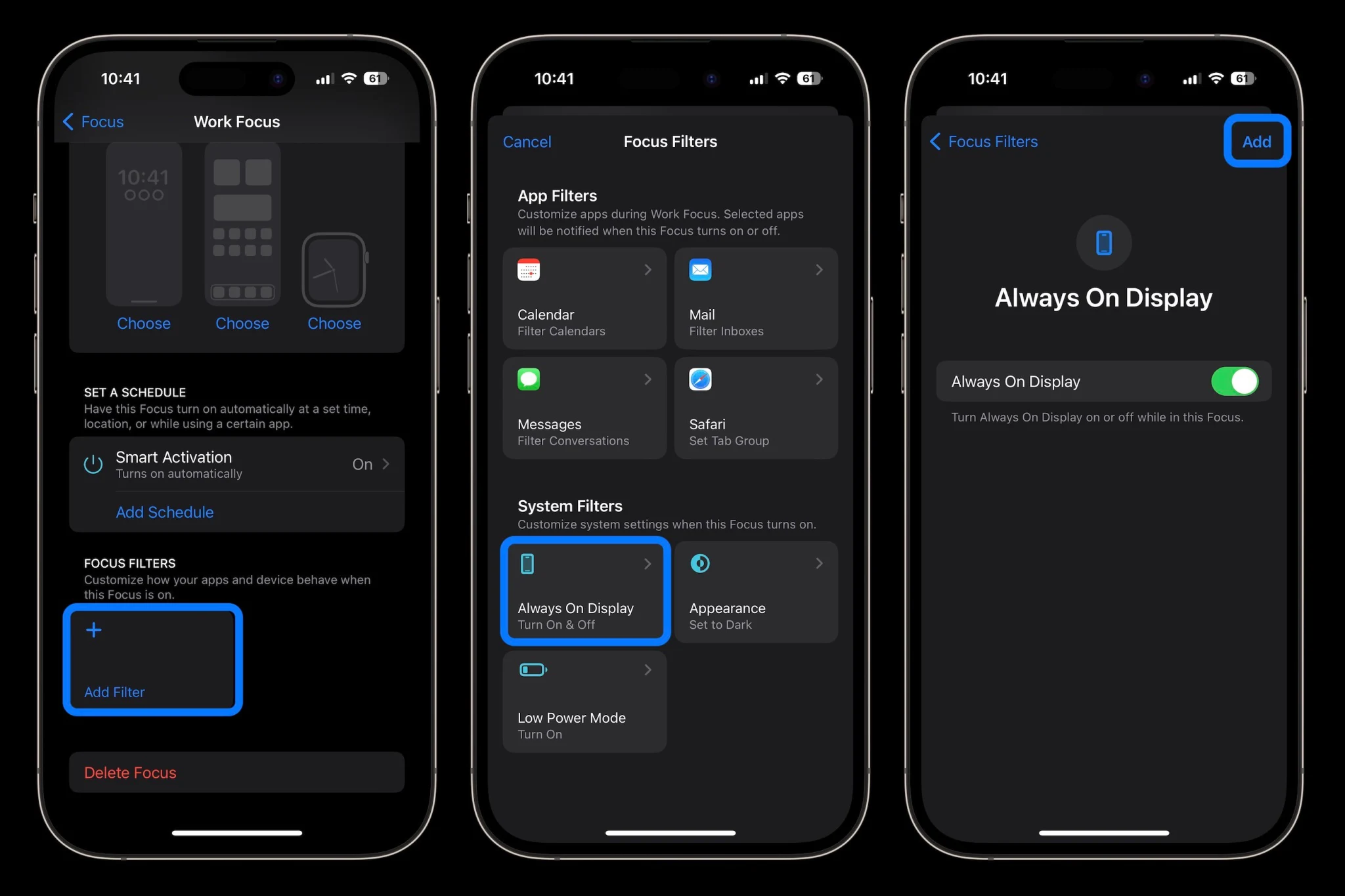
For the Always On Display, there’s a new filter for Focus modes, so you can have certain Focus modes enable or disable the Always On Display automatically.
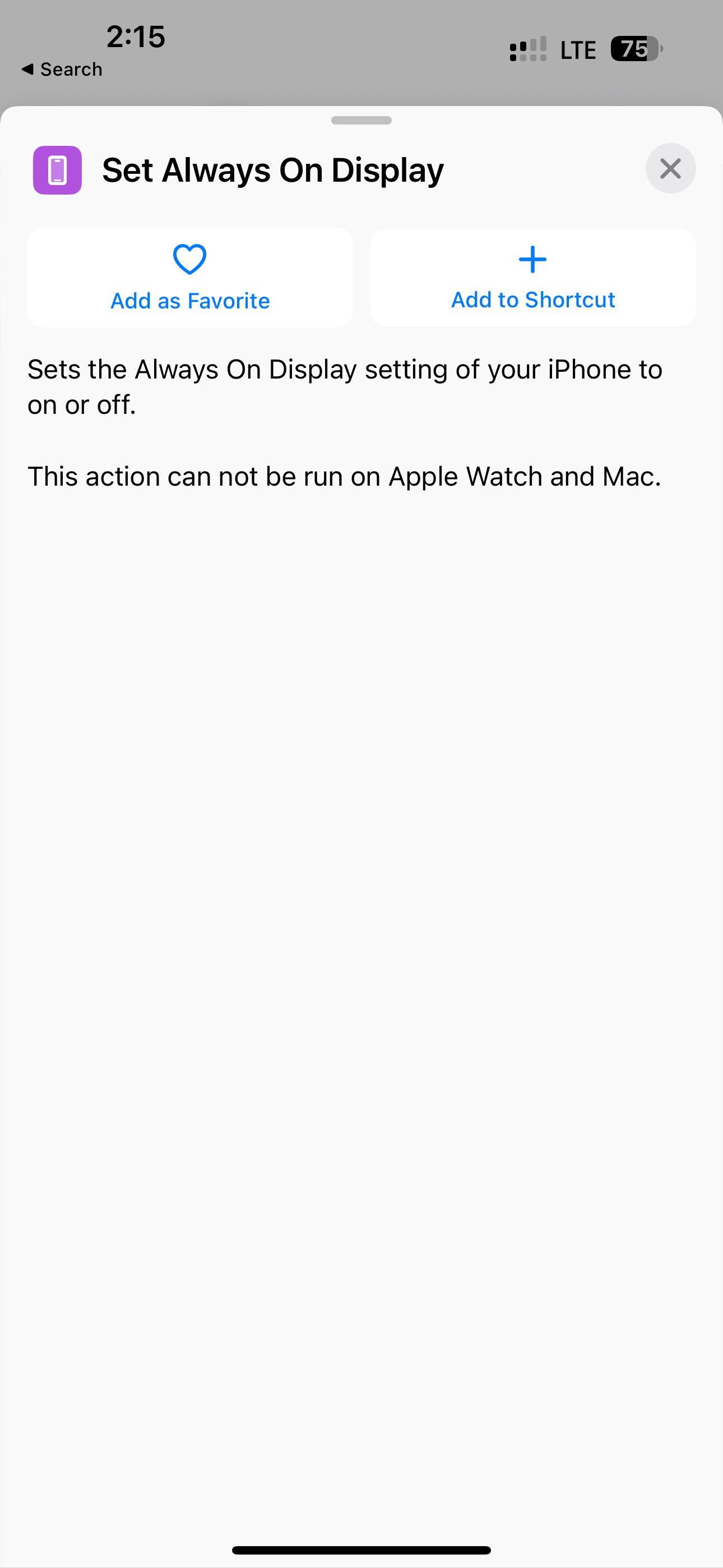
In Shortcuts, there’s a new “Set Always on Display” action, a new Lock Screen action, and a new Set VPN action.
New animations in the Music app
In the Music app, there are various interface tweaks and icon changes. For instance, adding a song to your queue no longer causes a full-screen pop-up. Instead, there’s a much smaller notification at the bottom.
There isn’t, however, any sign of Apple Classical.
AppleCare in Settings
iOS 16.4 includes a new screen in the Settings app where you can see all of your AppleCare coverage for multiple devices like the iPhone, Apple Watch, and AirPods.
Mastodon in Messages
iOS 16.4 beta enables rich previews for Mastodon links in the Messages app. This is similar to what the app offers for Twitter and other websites.
Accessibility
iOS 16.4 beta 1 adds a new Accessibility feature in the “Motion” menu for dimming flashing lights: “Video content that depicts repeated flashing or strobing lights will be automatically dimmed. The video timeline will display when flashing lights occur in the timeline for supported media.”
New “Order Tracking” widgets for the Wallet app
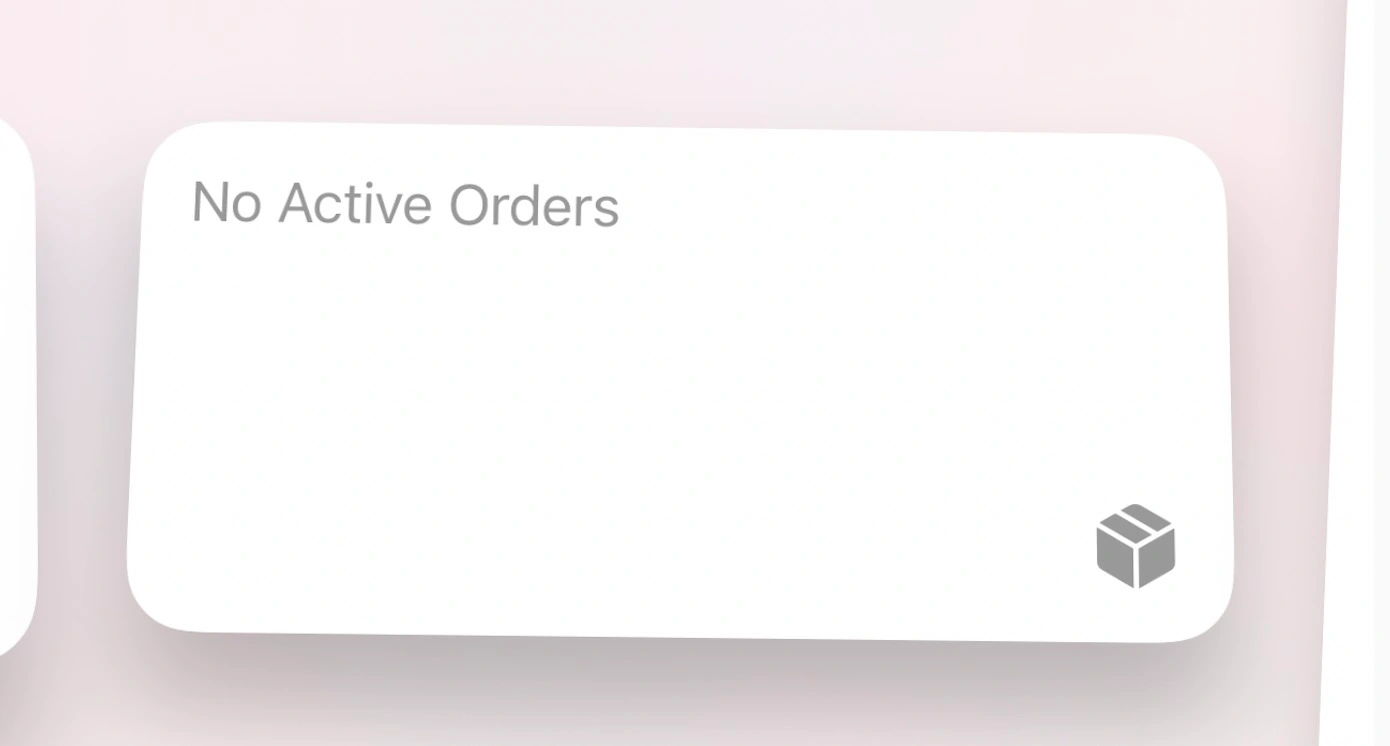
Apple has added three new Home Screen widgets for the Wallet app’s integrated order tracking features.
Other tidbits
In the Home app, Apple says both manual and automatic Software Update support is now available for Matter Accessories. The update also reintroduces the new home architecture after it was pulled due to reliability issues.
A few other changes to the keyboard:
Autocorrect for the Korean keyboard is enabled by default for testing and feedback.
Ukrainian keyboard now supports predictive text.
Gujarati, Punjabi, and Urdu keyboards add support for transliteration layouts.
New keyboard layouts are available for Choctaw and Chickasaw.
Apple Pencil hover now provides Tilt and Azimuth support.
Following the release of iOS 16.4 beta 1 to developers on Thursday, Apple is rolling out the same update to public beta users. In addition, other updates such as watchOS 9.4 and tvOS 16.4 are also now available to those registered in the Apple Beta Software Program.
iOS 16.4 Public Beta 1 now available
iOS 16.4 comes with a lot of new features. These include the ability to enable push notifications for web apps, dozens of new emoji, new Shortcuts actions, interface tweaks to Apple Music, enhanced 5G support, and more. As reported by 9to5Mac, Apple is also bringing back the new architecture for the Home app with iOS 16.4.
Users who want to try out Apple’s latest public beta software can register their devices via the Apple Beta Software Program webpage. If you already have your iPhone or iPad registered in the program, you can download today’s update by going to Settings > General > Software Update.
In addition to iOS 16.4 beta 1 (build number 20E5212f), Apple has also released these updates:
watchOS 9.4 beta 1, build number: 20T5222g
tvOS 16.4 beta 1, build number: 20L5463g
macOS Ventura 13.3 beta 1, build number: 22E5219e
Here’s how to automate iPhone’s always-on display with iOS 16.4
After debuting with the iPhone 14 Pro last fall, Apple continues to improve its always-on screen with software updates. The latest capability is the option to automate iPhone’s always-on display with iOS 16.4 and later.
After launching without much flexibility, Apple released the first always-on display customizations with iOS 16.2 in December. That allowed users to turn off colored wallpapers and notifications from the always-on screen.
Now with the iOS 16.4 beta, Apple has made it possible to schedule/automate when iPhone always-on is enabled via Focus Filters.
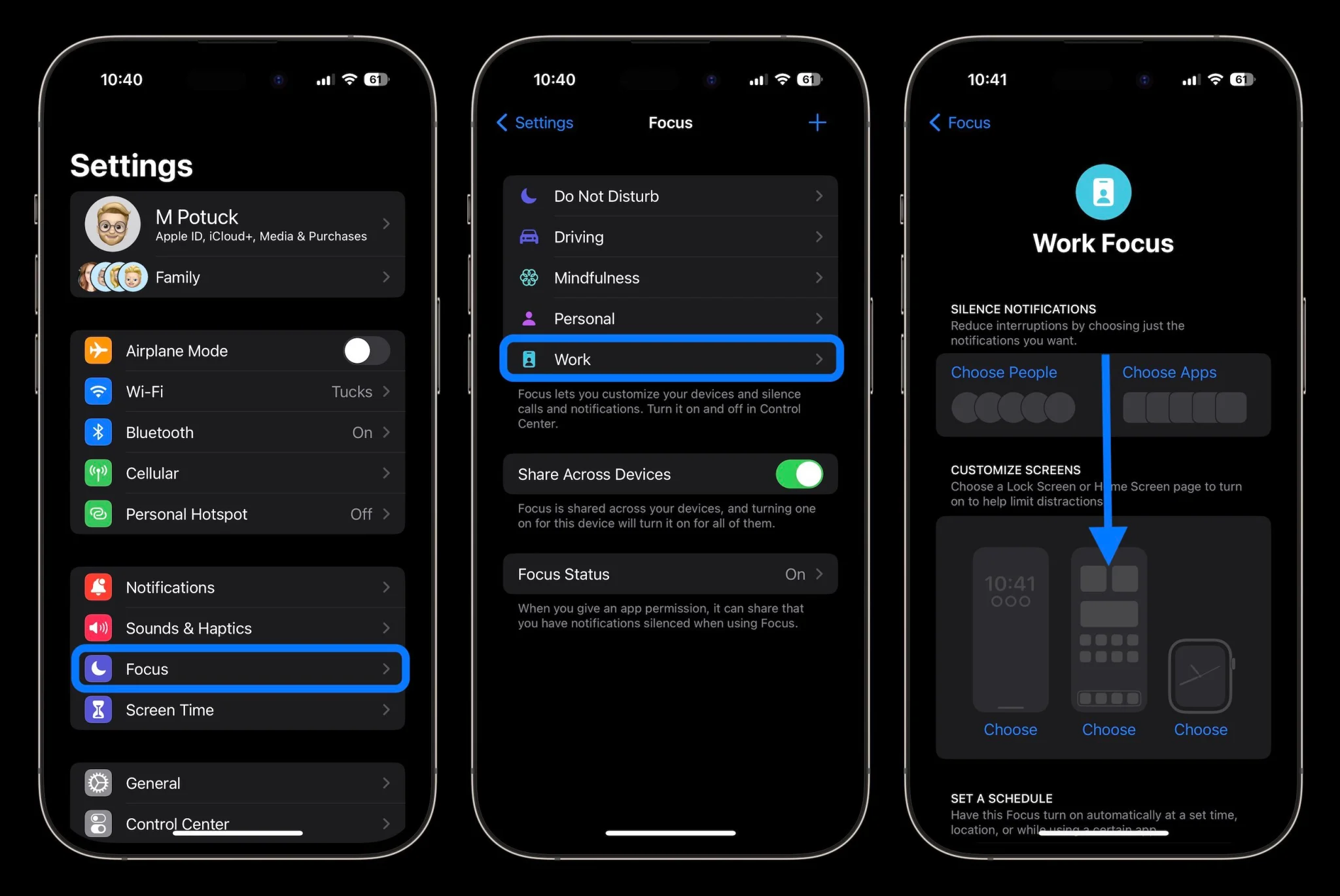
How to automate iPhone always-on display with Focus Filters
You’ll need to be running the iOS 16.4 beta to get this feature or wait for the iOS 16.4 public release. Check out our guide for how to install the free beta.
Open the Settings app on your iPhone 14 Pro/Pro Max
Choose Focus > pick an existing Focus or create a new one
Swipe down and under Focus Filters tap Add Filter
At the bottom choose the new “Always On Display”
The default will be to turn it on, tap Add in the top right corner
To automate this, make sure you have either Smart Activation on or a schedule set for the Focus you’ve added always-on to (just above Focus Filters)
You can also tie the always-on on/off filter to different Lock Screens by linking them with a Focus mode (long-press on your Lock Screen > tap Focus)
Jump into another Focus mode and set always-on to off to automate the feature
How to enable iOS betas from the Settings app with 16.4 and later
Apple is introducing a notable change in how to get its developer and public beta updates on iPhone with iOS 16.4 and beyond. Follow along for a look at how to turn on iOS beta updates in Settings as well as some pros and cons that come with the change.
In the release notes for the first iOS 16.4 developer beta, here’s how Apple describes the change:
“Beginning with iOS & iPadOS 16.4 beta, members of the Apple Developer Program will see a new option to enable developer betas directly from Software Update in Settings. This new option will be automatically enabled on devices already enrolled in the program that update to the latest beta release. Your iPhone or iPad must be signed in with the same Apple ID you used to enroll in the Apple Developer Program in order to see this option in Settings. In future iOS and iPadOS releases, this new setting will be the way to enable developer betas and configuration profiles will no longer grant access.”
Interestingly, the option was set to “off” by default on my iPhone in the first developer build of iOS 16.4 and it also includes a button for public beta testers.
How to turn on iOS beta updates in Settings with 16.4 and later
Note: You’ll need to be running the iOS 16.4 beta to see the new option or wait for the iOS 16.4 public release.
Launch the Settings app on your iPhone or iPad running iOS 16.4
Tap General > Software Update
Choose the new Beta Updates button (it may take a moment to appear)
Now choose the Developer Beta or Public Beta
The Apple ID you’re signed into your iPhone with needs to be the same as what you’re using for your Apple Developer account or Apple Public Beta program
After choosing the iOS 16 Developer Beta option in Settings, the iOS 16 Beta configuration profile is still showing for me in iOS 16.4 b1.
The good and bad
The main advantage of the change is it will be faster and easier to install either of the iOS betas on your iPhone or iPad with the ability to toggle it on in Settings. It should also be faster to switch between the public release and a beta release for those who may need to go back and forth.
However, the main downside is that with configuration profiles going away as a method to install future betas, developers won’t be able to share them with others. It could also be a headache in situations where developers need to run the beta but aren’t signed in with the same Apple ID on an iPhone or iPad as their Apple Developer account.
The full removal of configuration profiles may not happen immediately as Apple vaguely said “In future iOS and iPadOS releases” instead of giving a specific version or date.
iOS 16.4 also includes more features like new emoji, new Safari/browser capabilities, 5G Standalone support, fresh Apple Music animations, and more.
iOS 16 was released back in September of 2022. It brought plenty of visual changes to the iPhone and also changed how we interact with it, especially the lock screen. This update was all about personalization and customization. It brought features like lock screen customizations, widgets, the ability to edit & undo messages, and much more. So what could Apple possibly have in store for iOS 17? Parker Ortolani is back at it again with some new concepts and renders of what the future of iOS could look like, and it seems like refinement is the name of the game.
here is the refresh of my iOS 17 concept from last year! more customization. bunch of Siri stuff. ton of tweaks.
Parker posted his vision of what the future of iOS could look like, and it seems like it’s more of a refinement year than an evolutionary year. If customization was the theme in iOS 16, then further customization and frictionless interactivity is the theme for iOS 17.
iOS 17 Lock Screen updates
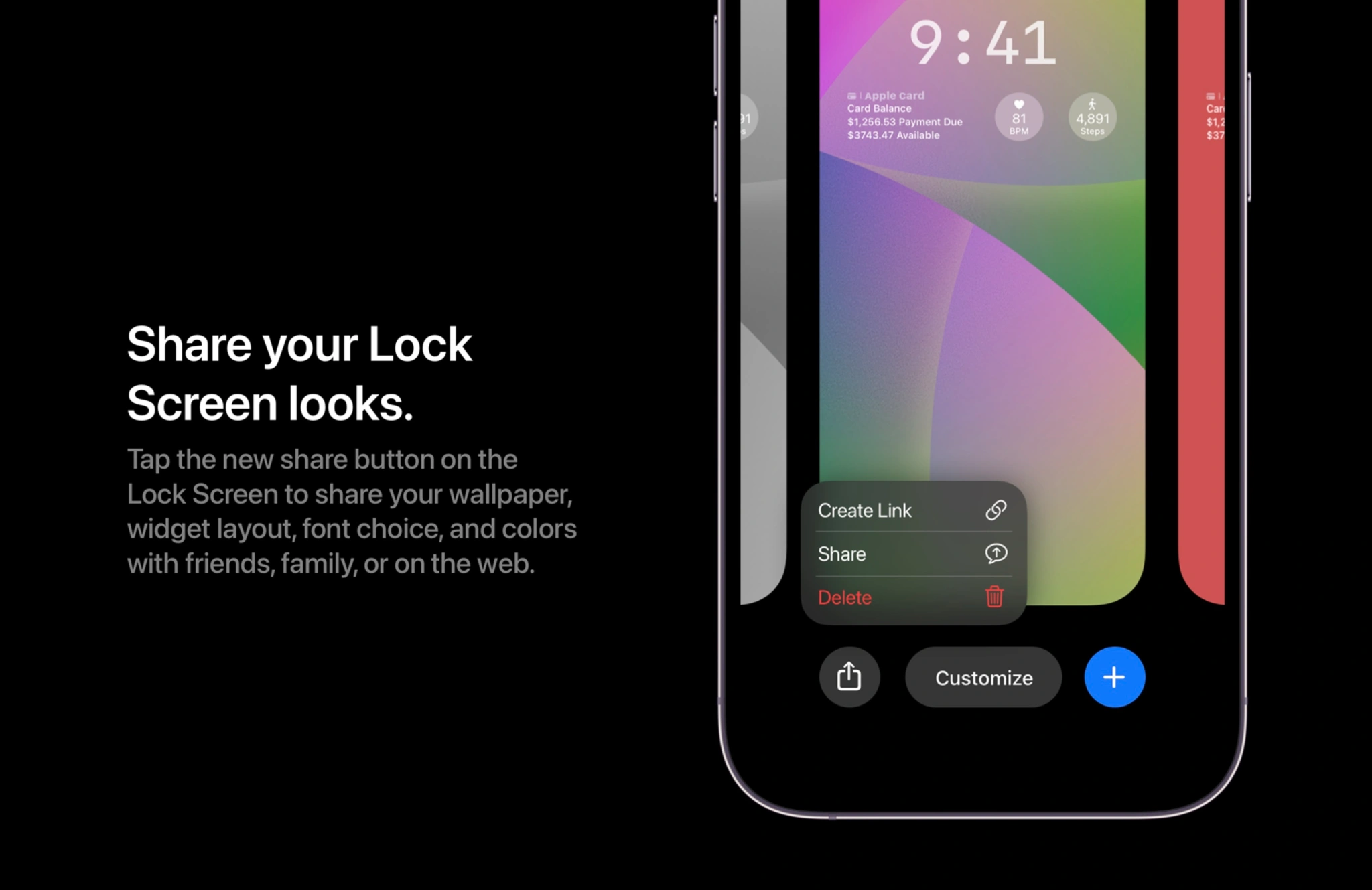
iOS 17 will most likely bring even more customization to your Lock Screen setups. Last year we got the ability to change the font on the time, add a few widgets, and even set different lock screens for different focus modes. iOS 17 should bring this to the next level with more fonts and widgets. Having the ability to possibly download other fonts and then be able to use them for your Lock Screen clock would be a great addition. Then, finally, also have the ability to fully share your Lock Screen with others. This could create a small marketplace where iPhone users could actually digitally sell their unique Lock Screen setups, similar to when the custom icon feature took over. I would love this feature to take place. I take inspiration from other people’s Lock Screens, so being able to share them would be ideal.
iOS 17 Lock Screen
New notification banners
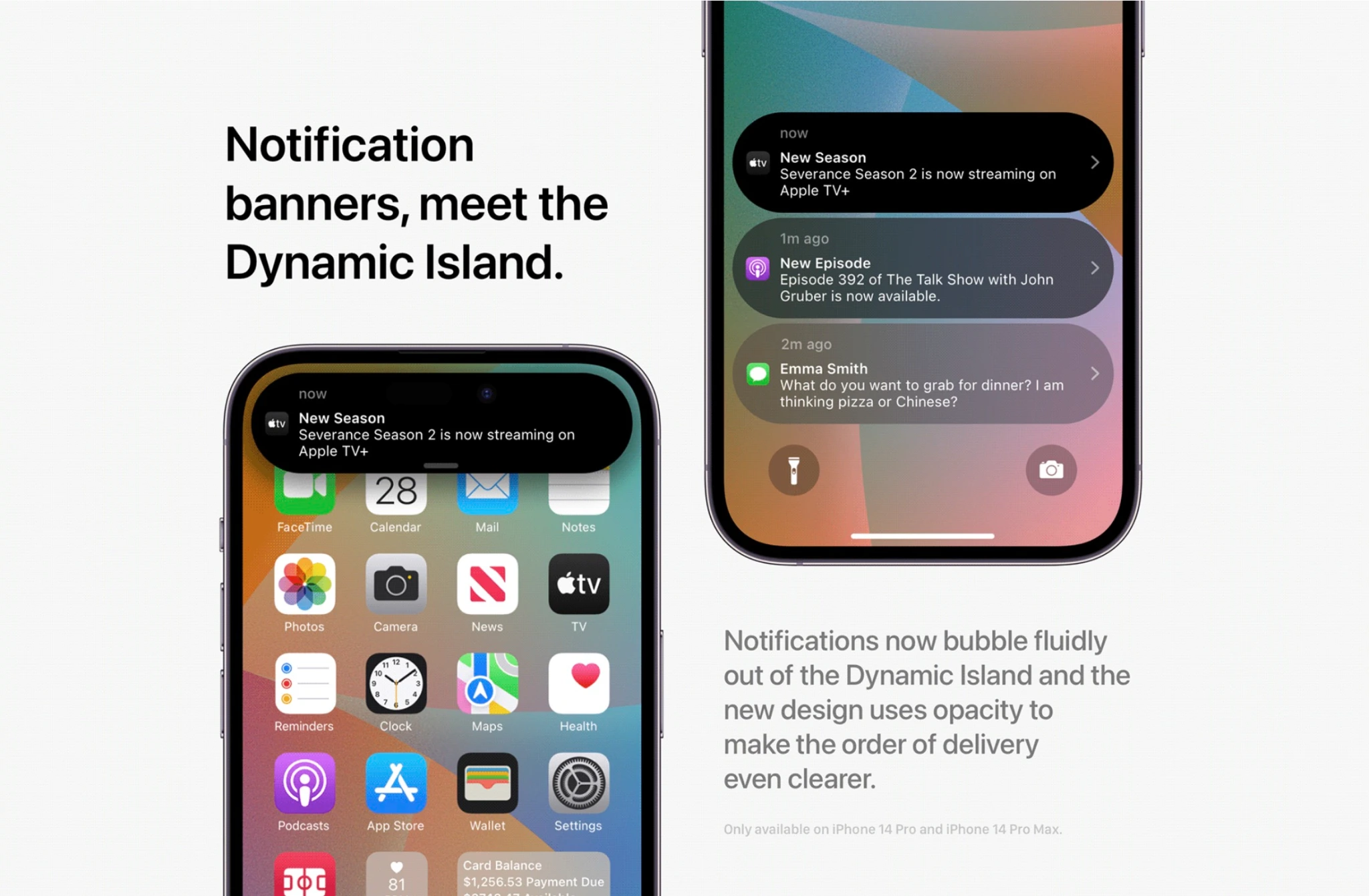
It seems as though Parker believes that iOS 17 will bring a new UI to notification banners and how it interacts with the Dynamic Island. I personally think the new look is great, but it seems like others are not a fan. To me, it makes sense to make notifications the same shape as the Dynamic Island – pill-shaped and more bubbly. The other aspect of notifications that could be updated is actually using opacity to help with notification organization. The older that notification is the more opaque it gets, indicating that it’s no longer the first notification. I can also see this being adopted for types of notifications, where the higher importance the bolder the notification looks.
iOS 17 Notifications
Live Activities & widgets come to Home screen
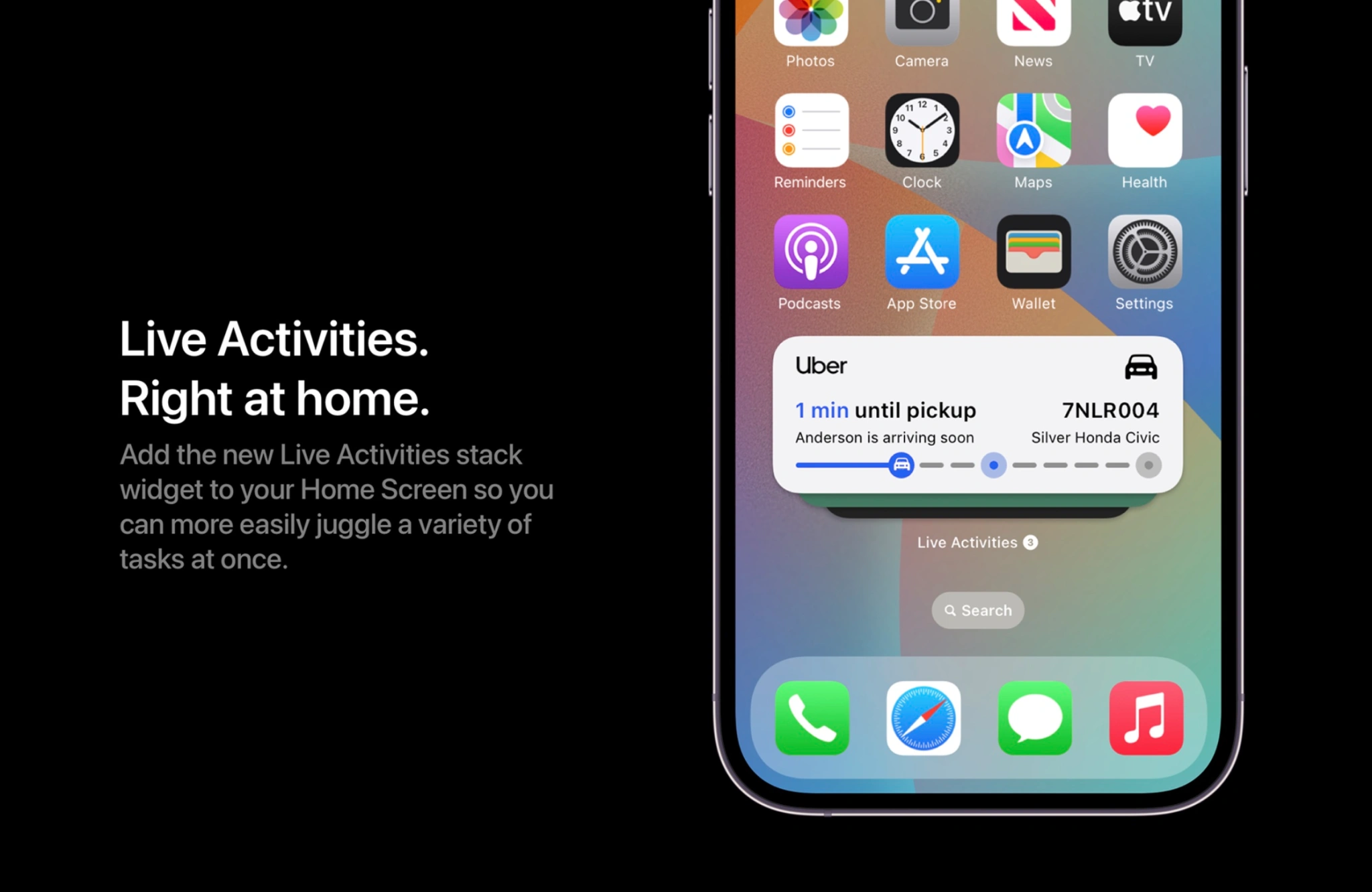
iOS 16 brought the new Live Activities feature to our iPhones. This allows us to have an active widget that shows us real-time information and data based on the app that is using it. You could see how far your Uber is in real-time, or see the score of the basketball game. Live Activities are only displayed on the Lock Screen. iOS 17 could allow us to have a section of the Home screen that has a carousel of Live Activities. Very similar to how we can create a smart stack of Home screen widgets, just flick through your Live Activities to the most relevant one at the moment.
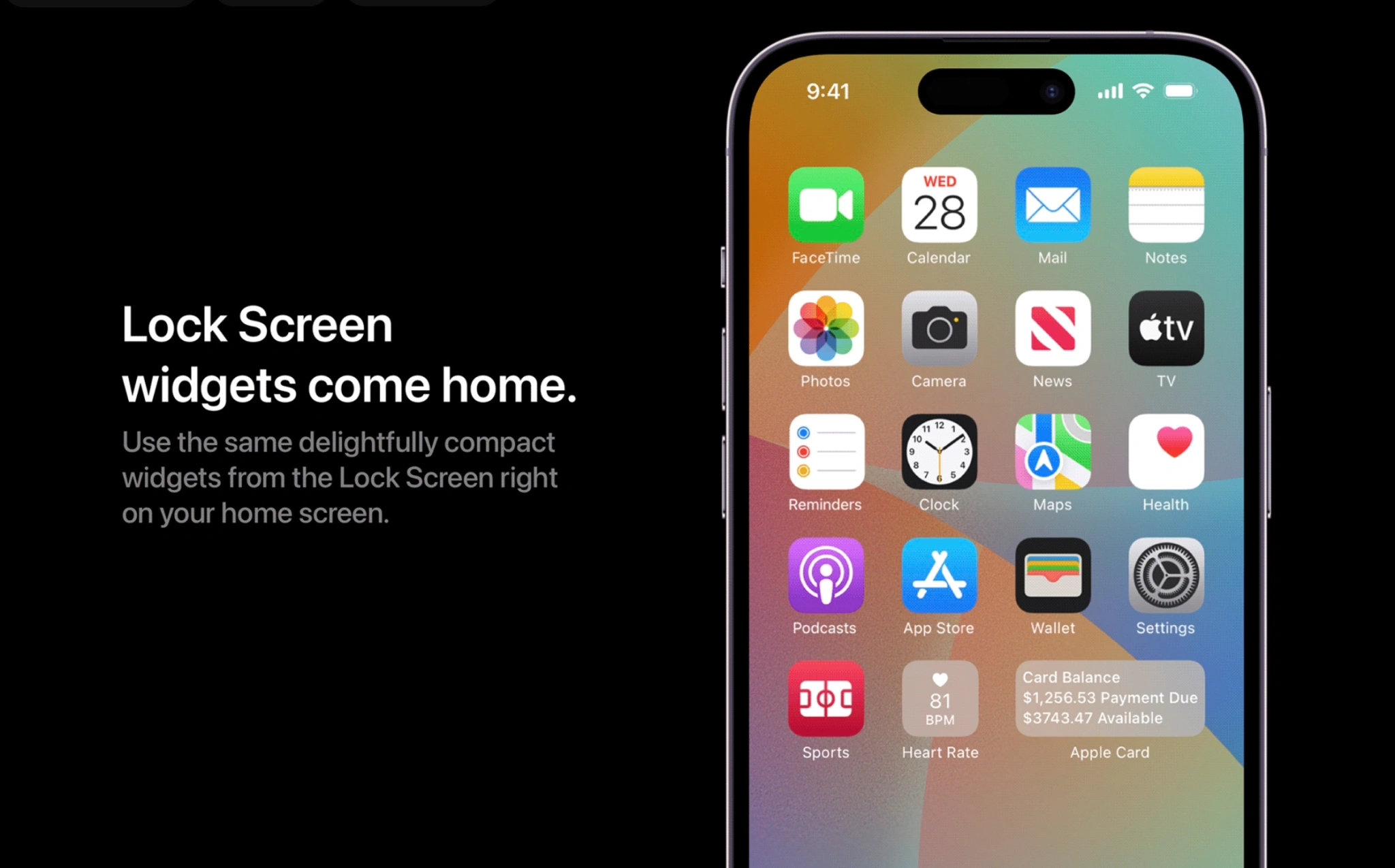
Another idea highlighted by Parker is that Apple could bring Lock Screen widgets to the Home screen. You might notice that the Home screen and Lock Screen widgets are different in how they look and where they can be used. Being able to add Lock Screen widgets to the Home screen is something Apple could easily implement.
Siri catches up to the competition
Siri has always been known as the second (or even third) fiddle when it comes to smart assistants. Google has always been the king there, Alexa has an abundance of users it’s constantly learning from, and now Bing has begun to rise with the addition of ChatGPT; improving Siri should be of high importance to Apple, which can be done in multiple ways.
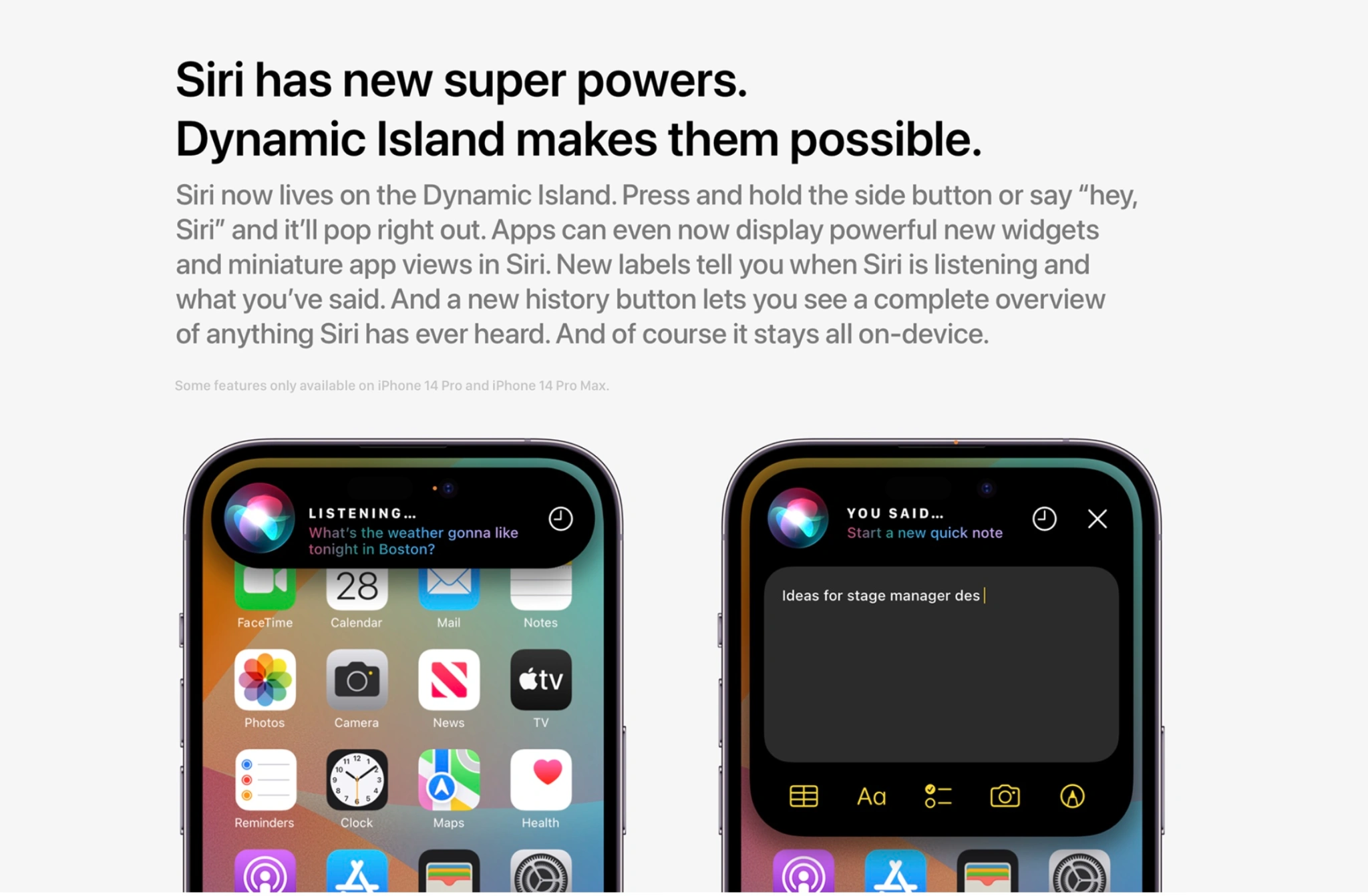
Parker suggests making Dynamic Island the area where Siri lives. Every time Siri is summoned, it will come from Dynamic Island. Adding small visual cues like a “listening” or a “you said” label to let the user know what Siri is actively doing would be a welcome addition. Being able to launch mini versions of an app like a quick note directly from Siri will also improve the user experience.
Wrap-up
Parker does a great job of highlighting some realistic updates and features that could come to iOS 17. The keyword there is realistic. We’ve learned that Apple is putting a lot of its R&D power into a supposed VR/AR headset in 2023; this means that there will be less innovation when it comes to iOS, iPadOS, and MacOS. That is why I also believe iOS 17 is going to be mostly about refining all the features they released with iOS 16.
There have also been reports that iOS 16 has been a huge battery drain and some persistent bugs and other annoyances that users were not dealing with when it came to iOS 15. iOS 15 was amazingly stable and had great optimization for battery life. That is the type of improvement we should expect with iOS 17 – refining the feature-heavy update of iOS 16.
Apple is reportedly considering ways to push the price of the high-end iPhone even higher. Rather than simply re-branding Pro Max to Ultra, Apple is discussing adding an “Ultra” high-end model above the Pro Max as soon as 2024, or the iPhone 16 lineup.
That’s according to Mark Gurman in his latest Power On newsletter for Bloomberg. The new model would help increase iPhone average selling price even higher, with Tim Cook hinting on this week’s earnings call that consumers are willing to pay more for the best phone.
Apple has steadily raised the price of its best-specced iPhone model, beginning with the jump to the $999 iPhone X in 2017. Then, it added a Max screen size to the lineup starting in 2018, to bump up the price to $1099 for consumers wanting the biggest display and best battery life iPhone. Add in the 1 TB storage option first introduced with iPhone 13 Pro, and the best iPhone today is priced at $1599.
Consumers have clearly shown that they will splurge, though, with the iPhone 14 Pro and Pro Max models believed to have performed well this cycle, compared to the cheaper iPhone 14 and iPhone 14 Plus. A hypothetical Ultra would start above the $1099 base price of the Max.
From Gurman’s Power On newsletter,
But instead of renaming the Pro Max “the Ultra,” Apple could add an even higher-end iPhone above both Pro models. Internally, the company has discussed doing just that — potentially in time for the 2024 iPhone release.
Gurman says it is currently unclear what features the new high-end model could provide, but speculates an even larger screen is a possibility as well as better cameras and even more cutting-edge chip designs. However, he does not expect a foldable form factor to be the differentiator; Apple is not believed to be working on foldable phones currently.
Obviously, Apple kicked off the Ultra branding train with the Apple Watch this past year. The Apple Watch Ultra offers an even larger display, titanium body with unique industrial design, and some features not found on other watches like improved diving capabilities, a siren, and an Action Button.
Apple Inc. Chief Executive Officer Tim Cook, speaking on an earnings call that was mostly focused on holiday results, made an off-the-cuff remark that could be quite telling about the company’s future.
Cook was fielding a question about whether the iPhone’s rising average sales price was sustainable. After all, a top-of-the-line model that cost $1,150 in 2017 (the iPhone X with 256 gigabytes of storage) now fetches $1,600 (the iPhone 14 Pro Max with 1 terabyte).
His response: The price increase is no problem. In fact, consumers could probably be persuaded to spend more.
“I think people are willing to really stretch to get the best they can afford in that category,” Cook said on the call, noting that the iPhone has become “integral” to people’s lives. Consumers now use the device to make payments, control smart-home appliances, manage their health and store banking data, he said.
While Cook wouldn’t say if he anticipates further price increases, he made a good argument for why even more upscale iPhones could make sense — especially if they deliver new features.
Apple has internally discussed adding a higher-end iPhone to the top of its smartphone lineup. And it’s already been doing more to distinguish its Pro models from standard iPhones, giving consumers a reason to pay up.
When the iPhone 15 arrives later this year, Apple will further differentiate the product’s tiers with a range of materials, processors and cameras. That includes giving the Pro Max model a periscope lens, which will offer improved optical zoom.
Apple’s plan to draw a greater distinction between the Pro and Pro Max has spurred speculation that the company will opt for a new top-end brand: the Ultra. Apple has already used that name for its sporty high-end smartwatch and the top version of the M1 processor.
But instead of renaming the Pro Max “the Ultra,” Apple could add an even higher-end iPhone above both Pro models. Internally, the company has discussed doing just that — potentially in time for the 2024 iPhone release.
That could certainly drive up prices, but consumers would need a reason to upgrade. At this point, it’s unclear how that top-of-the-line model would be different, but it will probably offer further camera improvements, a faster chip and perhaps an even larger display. There also may be more future-forward features, such as finally dropping the charging port.
Samsung Electronics Co. has already embraced this approach with its own Ultra phone — a model that offers more cameras, a bigger battery, a larger screen, stylus support, additional memory and a different design.
Moreover, Samsung offers two types of foldable phones, which have increasingly become the focal point of its smartphone strategy. Apple has explored a foldable iPhone in the past, but I wouldn’t anticipate one launching in the near future. For now, the company is focused on larger foldable devices — something the size of a laptop.
If Apple were to sell a foldable iPhone, the price would clearly be higher than that of its current models. Such a device would require far more advanced technology for batteries, displays and chips. Samsung’s priciest foldable — the Z Fold4 — costs as much as $2,160.
It may be quite a while before Apple customers have a chance to actually purchase an “iPhone Fold.” But if Cook’s comments are any indication, many will happily spend the money.
Apple drops role of industrial design chief after struggling to find a long-term replacement for Jony Ive. Evans Hankey, Apple’s head of industrial design, took that job when Jony Ive left the company in 2019. But she only lasted about three years in the role, sending Apple scrambling to find a successor.
Sure enough, Apple has now decided that it simply won’t replace her. Instead, the company’s team of about 20 senior industrial designers will report to Chief Operating Officer Jeff Williams.
Given the brain drain suffered by Apple’s design team in recent years — about 15 designers from the Ive era have left — I’m not surprised that the company ended up punting on choosing a successor. But the lack of long-term succession planning that led to this point is still striking. Design is one of the most critical departments at Apple. Having no one to take up the mantle is a cause for concern.
Every other major Apple department — from services to hardware engineering to silicon to operations — has at least one or two executives that could capably take over for that group’s leader. Perhaps a similarly capable person could one day emerge at the design group, but it doesn’t appear that person currently works at Apple.
Samsung launches minimal smartphone updates in a big iPhone year for Apple. Samsung’s latest slate of non-foldable models — the S23, S23+ and S23 Ultra — represent very modest year-over-year upgrades. The enhancements revolve around minor battery bumps, some front-facing camera tweaks (some people think the Ultra is a downgrade in that area) and a jump from 108 megapixels to 200 megapixels on the Ultra’s back camera. All three models also get ever-so-slight changes to their curvature.
I think these upgrades are about as exciting as jumping from a iPhone 12 to the iPhone 13. In other words, not that exciting. I get that Samsung is more focused on its foldable lineup at this point, but the company missed a chance to generate more buzz — at a time when smartphone sales are already sluggish.
The timing also may not be great for Samsung. Apple has finally resolved its supply-chain problems, letting it fill orders for the iPhone 14 Pro. And the iPhone 15 launch isn’t too far away. Unlike the S23 models, the iPhone 15 lineup is in for some major changes, including a titanium frame on the Pro models and the addition of the Dynamic Island to the cheaper variants.
March 10: Apple’s annual shareholder meeting. Cook and his lieutenants, such as General Counsel Kate Adams, will take the virtual stage to field carefully selected questions from shareholders and give some company updates. Major news rarely breaks at these conferences, but there will be shareholder votes on Apple’s board, executive pay, labor and other matters.
Apple on Monday released iOS 16.3, macOS Ventura 13.2, and other software updates to the public. The new versions of the company’s operating systems come with new features but also bring multiple security patches. Not only that, but Apple also released updates with security patches for users running iOS 15. Read on as we detail what has been patched with the updates.
Security patches available with iOS 16.3
According to Apple’s website, both iOS 16.3 and iPadOS 16.3 fix two security exploits found in previous versions of the operating system. This includes patches in areas such as AppleMobileFileIntegrity, ImageIO, Kernel, Mail, Maps, Safari, and WebKit.
For instance, an exploit found in the Weather app could allow other apps to bypass Privacy preferences. In another security exploit related to WebKit, which is the engine for Safari and other web browsers on iOS, Apple has fixed two exploits that could lead to the arbitrary execution of malicious code. You can check some of the details below:
WebKit
Available for: iPhone 8 and later, iPad Pro (all models), iPad Air 3rd generation and later, iPad 5th generation and later, and iPad mini 5th generation and later
Impact: Processing maliciously crafted web content may lead to arbitrary code execution
Description: The issue was addressed with improved checks.
WebKit
Available for: iPhone 8 and later, iPad Pro (all models), iPad Air 3rd generation and later, iPad 5th generation and later, and iPad mini 5th generation and later
Impact: Processing maliciously crafted web content may lead to arbitrary code execution
Description: The issue was addressed with improved memory handling.
Most of these patches are also available for Mac users with macOS Ventura 13.2, Apple TV users with tvOS 16.3, and Apple Watch users with watchOS 9.3. It’s worth noting that Apple has also released iOS 15.7.3, macOS Monterey 12.6.3, and macOS Big Sur 11.7.3 with the same patches for users who haven’t (or can’t) update their devices to the latest versions of the operating systems.
There’s even an update available for iPhone 5s, iPhone 6, and other devices that are stuck on iOS 12. It’s worth noting that Apple is letting all users stay on iOS 15.7 while still receiving security patches instead of being forced to update to iOS 16. However, it’s unclear whether the company has plans to maintain support for iOS 15 for long.
All users can now enable iCloud Advanced Data Protection, an opt-in feature to get end-to-end encryption for almost all data stored in iCloud, including messages, photos, and device backups.
The feature is activatable once users upgrade to iOS 16.3, currently in developer beta, with a public release of the new software update expected to arrive next week.
Under the default setup, Apple retains the keys to decrypt your iCloud data on their servers. This is required to support account recovery and other features.
But for users wanting ultimate data protection, iCloud Advanced Data Protection allows users to encrypt their iCloud data with their own device passcode so that Apple doesn’t have a key. This means that even if Apple’s servers were hacked, the intruders would not be able to read your personal data without knowing your passcode.
iCloud Advanced Data Protection rolled out at the end of last year with iOS 16.2 in the United States. Apple said it would make the feature available around the world in 2023. iOS 16.3 delivers on that promise.
If you want to enable iCloud Advanced Data Protection, open Settings -> [your name] -> iCloud -> Advanced Data Protection and follow the steps to turn it on. When iCloud Advanced Data Protection is enabled, it is critically important to remember your password. However, the phone will guide you to set up account recovery provisions, in case you do lose access to your account, like a trusted contact or printable recovery key.
Law enforcement groups heavily rely on iCloud for data collection as part of an investigation, by simply sending a search warrant or subpoena for Apple to retrieve a suspect’s iCloud backups. With iCloud Advanced Data Protection enabled, this is no longer possible as Apple cannot simply decrypt the information.
It remains to be seen whether governments in certain regions will push back against Apple’s rollout of end-to-end encryption. If end-to-end encryption becomes illegal in certain markets, Apple would be forced to comply and make iCloud Advanced Data Protection unavailable to those users.
iOS 16.3 is set to be released next week, according to Apple. This update first entered beta testing in December and includes a handful of changes and features, though it’s a minor update in comparison to other updates from Apple over the last few months.
What’s new in iOS 16.3?
Apple confirmed iOS 16.3’s release date in a press release announcing a number of ways the company is celebrating Black History Month this year. The initiatives include a new Unity wallpaper for iPhone as well as a Unity face for your Apple Watch.
Apple says that both of these things require that your Apple Watch is running watchOS 9.3 and your iPhone is running iOS 16.3. Again, these updates are currently in beta testing, but Apple says everything will be available for update sometime “next week.”
The Unity 2023 watch face will be available next week and requires Apple Watch Series 4 or later running watchOS 9.3, and iPhone 8 or later and iPhone SE (2nd generation) or later running iOS 16.3.
The new Unity iPhone wallpaper for the lock screen will also be available next week and requires iPhone 8 or later running iOS 16.3.
Aside from the new watch face and wallpaper for Black History Month, iOS 16.3 also includes a few other changes and features. Here’s a quick rundown:
Security Keys for Apple ID: You can now use a physical hardware security key to serve as the second layer of authentication for your Apple ID.
Changes to how “Call with Hold” for Emergency SOS works: iPhone will now wait until you release the buttons to call emergency services, even after the countdown.
iOS 16.3 beta guides users on how to use Handoff from iPhone to HomePod
As you can see, this is a relatively minor release without too many changes or new features for iPhone users. That’s not necessarily surprising, given that the update hasn’t been in beta testing as long as usual.
Once iOS 16.3 is released, we expect iOS 16.4 beta testing to begin almost immediately after. We’re still waiting on a number of already announced features from Apple: Apple Card Savings Account, Apple Pay Later, Apple Music Classical, and Advanced Data Protection for iCloud outside of the United States.
Mark Gurman reports that Apple has prioritized development of the operating system for its upcoming AR/VR headset, which is expected to be named ‘xrOS’. This means Apple has diverted engineering resources away from work on features for iOS 17 and macOS 14, in order to get the headset software over the line in time for a planned product launch later this year.
As a result, Gurman says that iOS 17, iPadOS 17 and macOS 14 may have fewer major new features than originally planned. Separately, work on new augmented reality features for the Apple Store app are apparently almost ready for release.
The augmented reality features would activate when a user enters a physical Apple Store. Through the Apple Store app on their phone, users would point at a product in the retail store — like an Apple Watch band, for instance — to see more information about it appear overlaid in the augmented reality view.
This kind of AR-enhanced shopping experience may be the sort of thing Apple has in mind for the headset, too.
Gurman reports that Apple has been working on the AR shopping features since 2020, and has been testing it at stores more recently. This suggests the feature may be officially unveiled soon.
Don’t get too excited just yet for iOS 17
We don’t really know yet what to expect from the next generation of Apple OS releases, but Gurman’s report today indicates that they may not represent huge leaps in terms of new features:
Apple’s focus on the xrOS operating system — along with iOS 16 snags — has also cost it some new features in iOS 17 and iPadOS 17, the next major iPhone and iPad software updates. That software, codenamed Dawn, may have fewer major changes than originally planned. The same goes for macOS 14, which is codenamed Sunburst.
Apple typically announces its new operating systems at WWDC in June. The company then releases beta versions for developers to test over the summer, with a public launch set for the fall alongside the new iPhone 15 launch. No doubt, we’ll hear more about what to expect in the coming months.
Apple Inc., after seven years of development, is nearly ready to launch its first mixed-reality headset. But the focus on this new product will lead to an otherwise muted 2023.
First wrote in 2017 about Apple’s ambition to launch a high-performance AR-based headset — complete with its own operating system, App Store and dedicated chips. Back then, Apple had aimed to get it to market by 2019. Over time, the delays stacked up. Apple had plans to launch the device in 2020, then 2021 and then 2022.
The final postponement, at least for the moment, happened last year. Up until fairly recently, Apple had aimed to introduce the headset in January 2023 and ship it later this year. Now the company is aiming to unveil it this spring ahead of the annual Worldwide Developers Conference in June, I’m told.
Apple has already shared the device with a small number of high-profile software developers for testing, letting them get started on third-party apps. The device’s operating system, dubbed “Borealis” inside the company, will be publicly named xrOS.
With the current plan, Apple could introduce the device to consumers — likely under the name Reality Pro — and then get developers up to speed on its software features in June. On this timeline, the company would then ship the product later in the fall of 2023.
While Apple still has many kinks to work out with the device —involving hardware, software and services, as well as how it will be marketed and sold — the company is banking on the product as its hot new introduction for this year.
To make that happen, Apple roped in resources from several hardware and software engineering departments. That’s hampered other projects, some of which were already suffering from their own delays and budget cuts stemming from the economic slowdown. And it could mean Apple has fewer major breakthroughs to show off this year.
Here’s what to expect, starting with the Mac lineup:
The new MacBook Pros, coming in the first half of this year, will have the same designs and features as the current 14-inch and 16-inch models, but include M2 Pro and M2 Max chips. Those are marginal leaps from today’s MacBook Pro processors.
A high-end configuration of the Mac Pro, a model with 48 CPU cores and 152 graphics cores, has been canceled. Instead, Apple plans to release a version with the M2 Ultra, making it unclear — beyond the machine’s expandability — why most users would buy it over the cheaper and smaller Mac Studio. In another disappointment, the new Mac Pro will look identical to the 2019 model. It will also lack one key feature from the Intel version: user-upgradeable RAM. That’s because the memory is tied directly to the M2 Ultra’s motherboard. Still, there are two SSD storage slots and for graphics, media and networking cards.
A larger iMac Pro, meanwhile, has been on and off Apple’s road map, and I would be surprised at this point if it arrives in 2023. A spec-bump upgrade for the 24-inch iMac won’t arrive until the M3 chip is ready, which likely won’t happen until late 2023 or 2024 at the earliest.
If there’s any major saving grace for the Mac lineup in 2023, it’s a planned 15-inch MacBook Air. A new 12-inch MacBook is no longer on Apple’s near-term road map however.
As for the iPad, I don’t expect any major updates in 2023:
Apple has been working on larger iPads, but I’m told not to expect those this year.
Updates to the 11-inch and 13-inch iPad Pros won’t come until the first half of 2024, I’m told. These will likely include a new design and they’re set to include OLED displays, a first for an iPad.
Any updates to the iPad mini, iPad Air and entry-level iPad this year won’t be anything more than a spec bump — if they arrive at all.
The Apple Watch and other accessories will be a similar story:
I wouldn’t anticipate major changes to the Apple Watch’s hardware this year, save for some minor performance boosts.
The AirPods probably won’t get any updates of note in 2023 either.
The return of the larger HomePod size is still set for this year, but I wouldn’t expect anything revolutionary about it. Look for a lower price, an updated touch control panel on the top and the S8 chip from the latest Apple Watches in a design similar to the model from 2018.
There are no plans for a new Apple TV to launch in 2023.
Apple’s focus on the xrOS operating system — along with iOS 16 snags — has also cost it some new features in iOS 17 and iPadOS 17, the next major iPhone and iPad software updates. That software, codenamed Dawn, may have fewer major changes than originally planned. The same goes for macOS 14, which is codenamed Sunburst.
The new iPhone’s hardware, though, could still be impressive. I’m told to expect the same screen sizes as the iPhone 14 family, but the Dynamic Island will expand to all four models. A titanium frame replaces stainless steel on the Pro models, and there will be haptic volume buttons. The phone also will switch to USB-C and faster
There are probably almost as many ways to organize your iPhone apps as there are iPhone users, and most of us have probably experimented with a bunch of them. But more than eight years later of using a method, first tried back in 2013 (that screen size! those icons!).
Instead of organizing apps by what they do, organize them by where when I use them ….
For quite a while, the most logical way to organize my apps: by category. For example, You had a bunch of chat apps in a folder called, imaginatively enough, Chat. Camera and other photography-related apps were in a folder called Photography. And so on.
But as the number of apps grew, there came a point where the cracks in that approach started to show themselves. First, there was the question of remembering how I’d categorized an app. When I first started using Dropbox, for example, it was almost exclusively for business use, so it went into a Business folder. Later, however, it became a much more general tool.
Second, although a bunch of apps might belong in the same category, that might lump together apps I used all the time with apps I hardly ever used. For example, I went through a phase of using GarageBand a lot (to kind of pretend I could play an instrument… ), and that was in the same Entertainment folder as Kindle, which I used only if I’d forgotten to take my physical Kindle on a trip.
To be clear, use categorized folders – but only for apps I hardly ever use. The apps you use frequently are organized by usage occasion.
Organize your iPhone apps by context/place
For example, You have apps you use all the time at home. While my Mac is your primary device when you are sitting at your desk, in the evening you more likely to use your iPhone to simply check email or play some music.
There are other apps you can use almost exclusively while you are out and about. BBC News and The Guardian, for example, are news apps that you can use to quickly catch up on the world while you are on the move, while at home you can use the website on your Mac. WordPress on your phone is another example of an app you can only ever use while mobile – used when you come up with an idea for a piece you want to write, and you just create a new post to jot down a few notes you can use as a prompt when you are sitting at your desk.
The third major category for is travel. When you are in another country, make extensive use of apps like Google Translate and Revolut (used because the card gives the best exchange rate, and you can use the app to freeze the card between uses). There are also apps you can use only when in a specific country, like the Western Union app to send yourself cash – so you don’t have a subfolder for that, given you’ve now taken to spending one month a year there.
So effectively you have three Home screens:
At home
Mobile
Abroad
Each of these has the main apps you use in each of these situations, with the Dock used for the key apps you can use everywhere.
Of course, one can argue that there’s little need to organize apps at all: just stick your most-used ones on the Home screen, then use search for everything else.
you can use search for apps that are either used out-of-context (for example, to access a travel app while I’m at home), or an app used so infrequently that it’s in one of my categorized folders. But you can still find it a smoother experience to have instant access to the apps you are most likely to use in any given circumstance.