Google IO or Google I/O (with a slash) is finally done for this year. Many have been rooting and predicting for a new voice assistant and was not disappointed. Google Assistant is now well-known as the Siri killer.
What is Google IO?
Google Assistant will be the new voice assistant for Android once it is released with the latest version of Android, the Android N.
This was presented on the Google I/O event as the best voice assistant for Android. To back this claim, Google engineers have some pretty tricks to make this one stand out and become a worthy successor to Google Now.
Features of the Google Assistant

More Natural
Google Assistant is more human in its interaction, following the context of your query, even uses your location to get more specific with its search results. Unlike any other voice assistant for Android, Google Assistant answers back to you, gives you follow up answers to your follow up questions for a very natural experience.

Integrations
Google Assistant is not only a search-based app but is also integrated to Allo and Echo, Google’s new chat and video chat apps respectively. An AI that provides a seamless combination of different devices while providing a learning assistant that gets better the more you use it.

Open
Google Assistant is open for integrations on current and new Google developers who would wish to use this AI technology in their own apps. It will be expected that Google Assistant will continue to surpass what Apple’s Siri has started many years ago.
Gmail threw the doors open when it added support for non-Google email accounts, but there was one glaring omission: you couldn’t get Microsoft Exchange support on all devices. Not consistently, anyway. What if you want to get your work email without turning to another app? Relax. Google is trotting out an update to Gmail for Android that supports Exchange on all devices, so your corporate reports can live in the same app as your personal messages. The update isn’t available for everyone right away, so be patient if you’re eager to move your correspondence.
You’ll at least have something else to try while you’re waiting. An update to Google Drive on the web has introduced Chrome notifications that let you know whenever someone either shares files or requests access. It’s a small thing (you’d ultimately get these notifications one way or the other), but it could save valuable time when you’re waiting for that all-important document.
Back in October, Google Maps rolled out a new feature for finding pit stops along your route. Today, the handy tool is making its way to the iOS version of the app. If you missed the news the first time around, the feature allows you to add a detour to your road trip without leaving navigation mode. Tap the magnifying glass in the top right and you’ll be given a list of options like gas stations, restaurants and more. If you need to search for something else, you’ll be able to do so. You can also use voice search to find a specific place or another category. You know, so you don’t have to futz with your phone too much.
No matter how you access them, search results will display the average rating for the destination and how much time the stop will add to your trip. The pit stop feature is rolling out to iOS users starting today, so you should be able to use it soon.
After Android Pay’s slow rollout throughout the US, it’s finally available to everyone — well, those with a compatible device anyway. In the spirit of giving (or trying to get more people using the service), Google has teamed up with DonorsChoose.org to support special needs children in US schools. Through December 31st, Google will donate $1 for every purchase made through Android Pay, with a total of up to $1 million. The idea is to create an interactive classroom environment so kids who struggle to engage aren’t left out. What’s more, Android Pay will double its donations for every purchase made on Black Friday. As if you needed another reason to spend big on the most insane shopping day of the year.
Much like the Google logo before it, Google+ is being completely reinvented today. In a blog post, Google says that after pulling in feedback from users it has decided to focus the former do-everything social network around two key features: communities and collections. Collections launched earlier this year as a way to let users gather a bunch of content together around a single idea and share it with other users, while the older communities section encouraged users of similar interests to share “whatever you’re into,” be it food, sports, photography, the country of New Zealand, or anything else. The new version is rolling out today on the web, iOS and Android — you’ll need to opt-in if you’re viewing it from your browser, and the apps don’t appear to have gone live just yet.
Narrowing the focus of Google+ was probalby the best way for Google to salvage the service. It originally started life as a Facebook-style social network for posting links, photos, status updates, and more with your friends. The original big innovation was the concept of dividing the people you followed on Google+ into “circles” and then sharing content with just the relevant groups of people, but it failed to catch on with users. However, there’s no doubt that some good things came out of Google+ as well — particularly the excellent Google Photos project that the company separated out of Google+ back at I/O this year.
With today’s change, Google+ will formally be less about interacting with your real-life friends and more about finding topics that interest you and meeting people across the internet who have those same interests. Alongside its photos product, those community features were probably the most successful part of Google+ for a long time. While I never had any friends who used it very much, I did come across some pretty vibrant photography communities after just a little exploration. Now, those features will be more front and center for users who want them.
The question of Google+ living up to its original ambitions ended a long time ago — it’s months since the company stopped forcing Google users to create a Google+ profile. Now, the company is simply taking the parts of the service that were working for users and putting them front and center for its users.
For years, people have wondered if Google would merge its Android and Chrome operating systems, and the company has steadfastly held to them important but distinct pieces of its strategy. That might be changing: The Wall Street Journal is reporting that Google has been working for two years to merge Chrome OS and Android. The results of that unified operating system is expected to be officially released to the public in 2017, but we may see an early version as soon as next year.
Update: While some have reported Google might “kill” ChromeOS, the company seems to still have some kind of dual-strategy in mind and has disputed that interpretation. As the Senior VP of Chrome OS, Chromecast and Android Hiroshi Lockheimer probably knows the the most about each project’s potential fate, and he tweeted tonight that “we are very committed to Chrome OS.”
The WSJ says that this new version of Android will also run on PCs, though it’s not clear if the company is talking about Windows and Mac computers or just a rebranded extension of the current Chromebook lineup. The former seems likely, as the Chrome browser contains most of the functionality of Chrome OS itself. Given that Google wants to get its Google Play store on as many devices as possible, it would make sense to see a version that works with the vast number of Windows and Mac machines out there. Chromebooks will end up being rebranded to an as-yet undetermined name.
Ever since current Google CEO Sundar Pichai became both the director of Android as well as Chrome OS in March of 2013, there’s been a lot of speculation about if the two operating systems would merge. While Pichai initially said they would stay separate, he appointed Hiroshi Lockheimer to manage both operating systems late last year — so there’s been a fairly long history of Google’s two operating systems having one clear lead for some time now.
When we might see this new, combined operating system is far from certain — but it seems like the next Google I/O event would be as natural a time as any for the company to show off such a major shift.
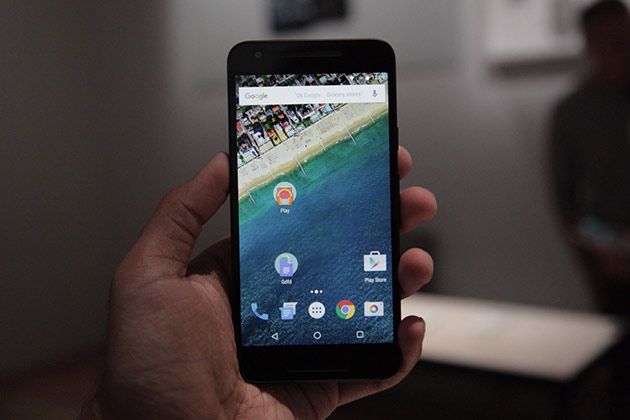
When Google (and Motorola) showed off the Nexus 6 last year, most nerds were excited. Others, making up a surprisingly vocal minority, reacted as though the companies dropped ice cubes down the backs of their shirts. Bigger isn’t always better, and they were more than a little concerned that the days of easy-to-grip Nexus phones were nearly over. They were wrong. To go with the big-screened Nexus 6P, Google once again teamed up with LG on a Nexus 5 — the 5X this time — and it’s shaping up to be the successor that N5 fans have been hoping for.
First off, yes, it nestles nice and easily into even small hands (mine are probably slightly above-average but there were some surprisingly tiny mitts at this event). The 5.2-inch 1080p IPS LCD, cutesy rounded aesthetic and the plastic body’s almost-nutty lightness make the Nexus 5X feel much more compact than it actually is. And as if it needed even more cute fuel, you’ll be able to get it in a fetching robin’s egg blue that’s a little reminiscent of that phone Nextbit is working on. Naturally, none of this would be worth a damn if the 5X failed as a phone, and it definitely doesn’t. You see, there’s a Snapdragon 808 (which we’ve seen in the LG G4 previously) and 2GB of RAM here — easily plenty of horsepower for anyone who doesn’t want/need to live on the bleeding edge of phone performance. I spent maybe a half hour with the thing in total and couldn’t get it to stutter or flip out, even with the non-final version of Android 6.0 Marshmallow running on it. Not bad.
It would’ve been easy for Google and LG to just shrug and phone things in with a weak-sauce camera, but that’s thankfully not the case. The Nexus 5X shares an impressive 12.3-megapixel rear camera with the 6P, which means it also shares those sweet, photon-slurping 1.55-micron pixels. Both did a solid job snapping photos in a weirdly lit, uncomfortably packed demo room, but we’ll have to wait until we get a review unit before we can pass any real judgment. The similarities don’t end there, either — Google really is looking at these things as siblings. Both have the Nexus Imprint fingerprint scanner (which worked well) and a USB Type-C charging port. While the 5X is a sort of love letter to a certain kind of Nexus fan, its limited memory options will make it harder for hardcore mobile nerds to take seriously. Yes, yes, Google has sunk plenty of cash and effort into building its cloud, and the original N5 didn’t have a memory card slot either, but it still sucks that the 5X will only be available with 16 or 32GB of storage and without any way to expand it further.
Speaking of which, you’ll be able to pre-order a Nexus 5X today, with the first shipments going out sometime in October. At this early stage, the hardware seems promising and Marshmallow already appears to be a worthy update (even if the nature of Android has already been changing a bit). We can’t blame you if you want more info before you pull the trigger — just stay tuned for our full review.
If you’ve ever tapped on a search result on your phone only to see a giant ad imploring you to install the site’s app, you know how annoying that can be. Google realizes that too, thanks to its own internal study that showed users often don’t click through when they encounter these ads. Now Google wants to change that by downranking sites that pull such a stunt. Starting November 1st, any site that uses large app install interstitials will no longer be deemed “mobile-friendly” by Google, which could spell disaster for the site’s SEO. Other interstitials will still be okay, however, and Google is encouraging the use of less obtrusive app install banners instead. While ads aren’t going away entirely — this is Google, after all — at least it looks like they’ll be less aggravating in the future.