AirPods today offer a handful of different features related to hearing health and Accessibility. A new report today, however, says Apple has big plans for iOS 18: a new “hearing aid mode” for AirPods Pro.
AirPods Pro with iOS 18
In the latest edition of his Power On newsletter, Bloomberg’s Mark Gurman writes that AirPods Pro aren’t set to see any hardware changes in 2024. Instead, he says that the “big news will be a major new hearing aid mode, coming alongside iOS 18.”
AirPods already offer a feature called Live Listen, which launched as part of iOS 12 in 2018. This feature essentially turns an iPhone into a directional microphone, transmitting the audio captured by that iPhone to AirPods in real time. A handful of testimonials over the years have shown how useful this feature can be.
Apple also introduced a Conversation Boost capability to AirPods Pro in 2021, which boosts mic pickup from directly in front of you, to better hear someone talking to you. A study in 2022 showed that some of these existing AirPods Pro features already compare well to much more expensive dedicated devices.
Also notable: in 2022, the FDA established new guidelines to allow for a category of hearing aids that can be purchased over-the-counter. Hearing aids within this category can be sold directly to consumers in stores or online without a medical exam or a fitting by an audiologist.
More details on this new iOS 18 feature for AirPods Pro users are unclear. This isn’t the first time Gurman has written about Apple’s plans to bring new hearing health features to AirPods, though. Last year, he reported that Apple is also working on a hearing test feature for future AirPods as well.
Apple is widely rumored to be working on a new fourth-generation iPhone SE with a modern design refresh. New CAD files obtained by 91mobiles this week claim to offer our clearest look yet at this update, showing an iPhone SE 4 with an iPhone 14-style design.
The current iPhone SE was released in 2022 and features a 4.7-inch display with a Home button, similar to the iPhone 8. It’s powered by the A15 Bionic chip inside, features Touch ID instead of Face ID, and retails for $429.
These CAD renders suggest the iPhone SE 4 will feature a 6.1-inch display with a notch along the top that houses new Face ID sensors and the front-facing camera. On the back, there is a single camera cutout alongside a flash sensor.
According to 91mobiles, the iPhone SE 4 will measure 147.7 x 71.5 x 7.7mm. The current iPhone SE measures 138.4 x 67.3 x 7.3 mm. These dimensions show just how bigger the iPhone SE 4 will get to accommodate the bigger 6.1-inch display.
Previous rumors have also suggested that the iPhone SE 4 will have USB-C instead of Lightning. There’s even been one rumor claim it will feature the Action button – which is currently exclusive to the iPhone 15 Pro.
There’s still no exact details on when Apple might release the iPhone SE 4, but the current expectation is that it likely won’t be until 2025. The device has been rumored off and on for the past 18 months. Ming-Chi Kuo reported last April that Apple had paused development of the iPhone SE 4.
Verdict
It’s a sad day for everyone who had hoped the iPhone SE 4 would be based on the iPhone 12 mini and iPhone 13 mini form factor.
iOS 17.4 is a massive new iOS update for iPhone users, and includes new features to support European Union regulations, which makes it possible for to use alternative app marketplaces. However, the recent changes aren’t just limited to those who fall under EU jurisdiction. iOS 17.4 has tons of new changes and features, like new emoji, new Apple Music and Apple Podcasts updates, an updated “Hello” screen, and much, much more.
Notable iOS 17.4 updates
Podcast transcription
My favorite iOS 17.4 change relates to the Podcast app. I appreciate it even more since I recently launched a brand new podcast called 9to5Mac Overtime with my colleague Fernando Silva. The Podcast app now has text transcriptions that work similarly to the lyrics view in Apple Music. As the hosts talk, you’ll see each word from the transcription highlighted, and the highlights will adjust in real-time based on playback speed.
Another nice thing about text transcription in Apple Podcasts is the ability to search for a term quickly and jump directly to a specific part of the show with just a tap. I’m impressed with the accuracy of podcast transcription, and I was surprised at how well it accommodated my Kentucky twang.
iOS 17.4 RC changes and features
Apple Cash virtual card numbers and Safari autofill
Apple Cash gets more valuable thanks to the new virtual card numbers that can be regenerated on the fly in iOS 17.4. These numbers let you use your Apple Cash balance at merchants that don’t use Apple Pay. It also includes the ability to autofill card numbers in Safari and will even reflect your Apple Cash balance on the autofill button so that you know if you’ll be able to cover the balance in advance.
Music recognition
Updated integrated Shazam music recognition can now add a song directly to your Apple Music library or a specific playlist. Music recognition will also let you add classical music songs to Apple Music Classical.
Stolen Device Protection update
Stolen Device Protection gains additional security in iOS 17.4 thanks to a new option that lets you enforce the 1-hour delay at all locations before you can access critical areas of your iPhone. In previous versions of iOS, the security delay was only enforced when not in a familiar location.
Battery Health
Apple updated battery health by decoupling Battery information from Charging Optimization. It also instituted a new, more straightforward Battery Health status, similar to what Mac users have. In addition, pertinent battery information like cycle count, manufacture date, and first usage date now reside directly within Settings → Battery → Battery Health.
Full list of what’s new in iOS 17.4
Updated “Hello” Screen
New emoji
18 new right-facing body emoji
City Digital Clock Widget
Apple Podcasts full episode text
Apple Podcasts transcripts
Podcast app Home tab replaces Listen Now
Music recognition update
Music app “Home” tab replaces “Listen Now”
Apple Music Classical Music Recognition
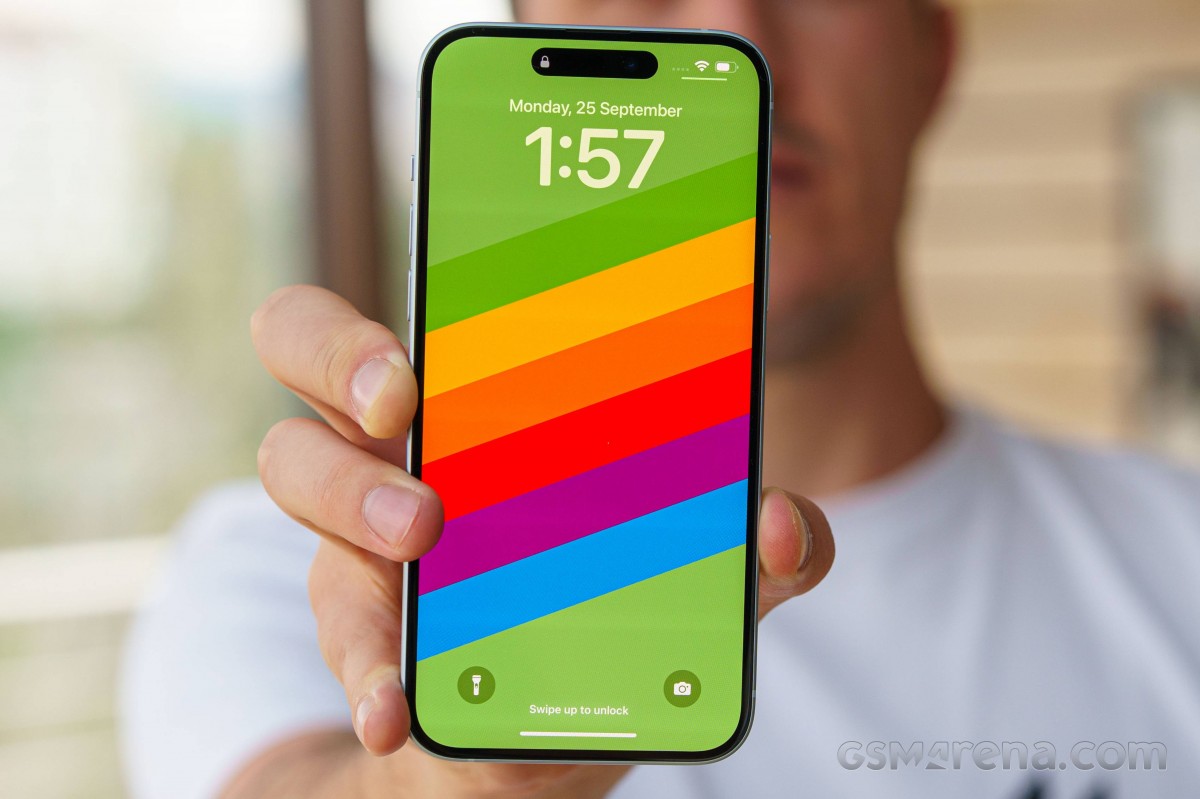
Updated Lock Screen song title animation
Siri announces messages in any supported language
Stolen Device Protection update
Battery Health decoupled from charging
Battery Health Status
Additional Battery data
Passkeys Access for Web Browsers
Apple Cash virtual card numbers
Apple Cash autofill in Safari
Updated dialer background for unknown calls
Quantum Computer Protection for iMessage
Support for game streaming apps
Updated TV app channel links
Updated “How to Watch” in TV app
Updated iCloud glyph in Files app
Updated App Store user settings
Other iOS 17.4 bug fixes
CarPlay Updates
Beats Solo 4 Headphones
iOS 17.4 isn’t all about EU regulatory changes, but there are noteworthy updates that all users, regardless of location, will benefit from. Highlighted a few in this post, but as you can see from the bullet point list above, there are tons of new changes and features in iOS 17.4, not to mention the various bug fixes and security updates.
iOS 17.4 RC was stable in my brief hands-on time with the release. This is likely the version that Apple will launch next week. We’ll know if next week’s release sports the same 21E217 build number.
Apple’s non-Pro lineup is arguably the most cost-effective way for consumers to keep up with the most recent and polished Apple experience without breaking the bank. The newly introduced iPhone 15 and 15 Plus models come with a handful of meaningful updates. There’s little to no difference between the two feature-wise, so screen size, battery size and price seem to be the major differentiators.
Last year, the large screen and the large battery were not enough to justify the 14 Plus’ high price, and its sales were the lowest in the family. The Plus lineup may not have a much longer lifespan than the iPhone mini if the 15 Plus’ sales are as unexciting as the 14 Plus’. The future of the entire Plus series may be hanging on the success of this device that we have for review today.
It’s not like Apple set it up for success this year, either. Its launch price is €50 lower in Europe, which is a nice start, but the US pricing remains the same. And the fact that last year’s 14 Plus remains officially on sale will add an extra dimension to the inter-sibling rivalry that the 15 Plus will have to endure. In other words, if you are looking for a big-screen iPhone, you have an even wider choice this year.
But this year’s changes are a step above the usual yearly update cycle. This year marks the shift to USB-C port for the iPhone, and we couldn’t be happier. The convenience of sharing the same charging connector as every other phone brand out there is unsurpassed. Not to mention the wide host of accessories you can plug directly into the phone, allowing you to easily transfer files, output video to a TV/monitor or even reverse charge your smartwatch or earphones.
Disclaimer. We can not guarantee that the information on this page is 100% correct.
Aside from the USB-C, the main camera is now a more advanced 48MP sensor with pixel binning, promising substantial improvement in image quality, with Apple promising great 2x zoom photos as well.
Although screen size remains the same – 6.7″, the iPhone 15 Plus now boasts almost twice as bright an OLED panel and finally replaces the old notch with the pill-shaped Dynamic Island. Even if you are not a fan of the software features revolving around the Dynamic Island, you can still appreciate the more modern and Pro-like look of the homescreen now that the sightly notch is gone.
Under the hood is last year’s pro chipset – the A16 Bionic. The chipset is still a powerful and well-optimized piece of hardware, and it offers faster performance than what the 14 Plus had.
Besides these changes, you still get the same ultra-wide camera without autofocus, and the screen is still 60Hz without an Always-On Display, which is a feature reserved for the Pro models. Speaking of Pro-only features, the USB-C port here provides only USB 2.0 speeds, and we don’t get the new customizable Action key on the left side of the device.
Unboxing the iPhone 15 Plus
Just like the rest of the iPhones, the iPhone 15 Plus comes in a modest box containing just some user manuals, a SIM ejector tool and a USB-C to USB-C cable for charging. US buyers don’t even have the pin for the SIM card tray as these iterations rely only on eSIM.
Even though you have to buy a new charger if you don’t already have one, the good news is you are not obligated to buy an iPhone charger. Any PowerDelivery charger should do the job. The recommended power output is 20W, but a 30W charger should provide even faster charging in the first 40-50min.
Competition
We’d consider the iPhone 15 Plus a big step up from its predecessor. The move to the universal USB-C port is landmark moment for the iPhones in its own right. The performance jump from the A15 Bionic chipset to the A16 Bionic is substantial; the new OLED panel is brighter, the full charge is considerably faster now, the battery life is longer, and the new 48MP main camera makes a sensible difference in daylight and low-light photography.
The iPhone 14 Plus remains officially available alongside the 15 Plus at a discounted price, so despite its poor market sales up until now, it will readily cater to consumers who find the 15 Plus too expensive but would like the same formula.
An even tougher choice would be between the iPhone 15 Plus and last year’s iPhone 14 Pro Max. The latter now costs €1,100, just about the same as the 15 Plus, but delivers a more premium experience – 120Hz display, better cameras all-around with proper 3x optical zoom shooter, longer battery life and the same SoC.
But as always, we also need to look at the market as a whole in case you are one of those rare breed of users looking for the best option available at a certain price instead of staying within your ecosystem. Sure, in iPhone terms, the 15 Plus is a nice phone with more upgrades than initially expected. However, the handset falls short of its direct Android rivals.
Right now, the Samsung Galaxy S23 Ultra is a slightly cheaper flagship phone with a better and more versatile camera system, better display, similar battery life and stylus as a nice bonus.
The same goes for the Xiaomi 13 Pro, which is cheaper and checks a flagship phone’s boxes. The 15 Plus is no match for cameras, and its 60Hz display doesn’t sit competitively on its spec sheet either.
There are other notable mentions in the sub-€1,000 category from Android manufacturers, which give the iPhone 15 Plus a good run for its money, like the Pixel 7 Pro (with the 8 Pro release just around the corner), OnePlus 11, Sony Xperia 1 V, etc. So, if you are not married to iOS just yet and you are within this price bracket, you should check out the Android-based alternatives.
Verdict
Overall, the iPhone 15 Plus boasts a significant upgrade over its predecessor in a couple of key departments – display, battery life, performance, main camera and charging.
It’s still nowhere near the Pro lineup, and it’s missing features such as this year’s chipset, the optical zoom camera, the autofocus on the ultra-wide camera, the 120Hz high-refresh-rate screen that comes with Always-On Display, or the new customizable Action key. Depending on your priorities, the lack of some of these might be a deal-breaker for you.
More importantly, however, Apple might have hindered the 15 Plus market odds the same way it did with the 14 Plus by placing it in a limbo where it has the feature set of the cheaper-tier iPhone but it’s priced way too close to the Pro-tier iPhones for its own good.
There is nothing inherently wrong with the iPhone 15 Plus; in isolation, we’d be happy to give it our full recommendation in an instant. But the market realities mean it will be a hard sell at its current price, regardless of whether you are comparing it to current or previous-gen iPhones or Android devices. This puts this particular device in a really tight spot and makes us less than optimistic for the future of the Plus lineup as a whole.
Pros
Excellent build quality, IP68 certified.
Brighter OLED panel with Dolby Vision and Dynamic Island.
Even better battery life than last year.
Nice-sounding stereo speakers.
Flagship-grade performance even if not the latest chipset.
Improved main camera performance, nice selfies.
Outstanding video quality and stabilization across the board, great action clips.
Standout charging speed to 100% for an iPhone.
Every iPhone gets at least five years of iOS updates.
Finally USB-C.
Cons
Considerably more expensive than corresponding Android alternatives.
The display is 60Hz; there is no Always On option.
No charger in the box, still rather slow charging overall.
No dedicated telephoto camera and disappointing performance out of the ultrawide.
Apple’s iOS restrictions can be off-putting to newcomers to the ecosystem.
For years, it’s been possible to share a playlist you’ve made on Apple Music with others. However, a new feature allows for shared, editable playlists in iOS 17.2. Here’s how to use Apple Music collaborative playlists.
Two new features come to Apple Music with iOS 17.2 (currently in beta) – collaborative playlists and a new automatic “Favorites” playlist.
To find the latter, you can head to Library > Playlists in Apple Music and swipe down to find the new auto-generated Favorites playlist.
While Spotify has often led Apple Music in terms of social features, it’s great to see collaborative playlists arrive with iOS 17.2, let’s dig into how they work.
How to use Apple Music collaborative playlists
iOS 17.2 is available now in beta – read more on how to install it for free on your device
Running the iOS 17.2 beta, open Apple Music on iPhone or iPad
Choose the Library tab at the bottom, then tap Playlists
Select a playlist that you’ve created (or create a new one – this does not work for now with Apple Music’s playlists that you’ve saved)
Tap the … icon in the top right corner
Now choose Collaborate (second from the top)
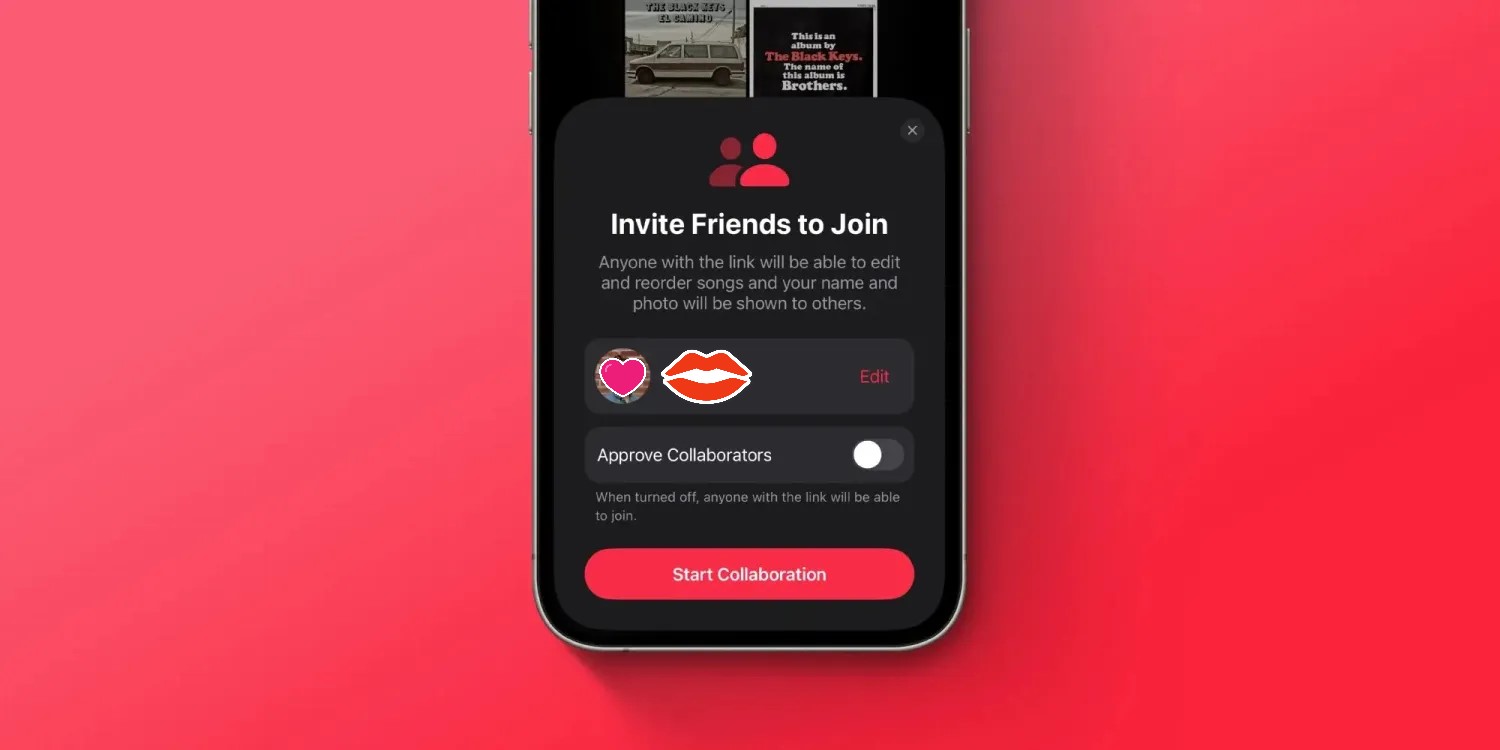
You can choose if collaborators need to be approved or not
Tap Start Collaboration to invite people
You can head back to the playlist and tap the … icon to get the Manage Collaboration option
Here’s how the process looks to use Apple Music collaborative playlists on iPhone:
Now you’ll see the new Collaborate option. Apple notes anyone you share a collaborative playlist link with will be able to edit and reorder songs and change the name and photo of the playlist.
It’s yet another year of incremental refinement for the vanilla iPhone. Not that anybody expects any major changes at this point. The iPhone 15 offers a few steps forward compared to the 14 without altering the formula in any significant way.
Still, there are a few changes worth noting. The vanilla iPhone finally gets the Dynamic Island from its Pro siblings. In fact, the display is all new this year with significantly improved max brightness. You also get a new 48MP main camera, again bringing the vanilla closer to the Pro models. This includes a new 24MP default resolution for photos, as well as next-gen portraits and 4K@60fps HDR video capture.
Disclaimer. We can not guarantee that the information on this page is 100% correct.
The new iPhone 15 also brings about a new Apple A16 Bionic chipset. As is tradition, this is not the latest and greatest Apple has to offer and is shipping with the Pro models, but rather last year’s flagship chip. This might be a blessing in disguise since the new Apple A17 Pro chip is currently amidst a thermal-throttling controversy. The A16, on the other hand, is tired and true. The iPhone 15 also gets a few other “minor” changes, like the inclusion of an Ultra Wideband 2 (UWB) chip for more precise precision finding for the Find My Friends feature.
Oh, and last but not least, Apple has finally moved to USB Type-C. Cupertino was kind of forced to do so due to mounting regulatory pressure, but regardless, the switch is finally a reality. So, if you are in the market for an iPhone 15 series device, you might also need to change out some cables you own.
Left: iPhone 15 • Right: iPhone 15 Plus
However, The real question is how popular the iPhone 15 will be and whether it is worth picking up. It seems that most of you are rather unenthused about the new Dynamic Island and lukewarm at best towards the new 48MP main shooter and Type-C port. Even so, in both relative and absolute terms, we still expect the iPhone 15 to sell very well. Perhaps not as well as its Pro Max and Pro sibling, but most likely better than the iPhone 15 Plus. So, without further ado, let’s dive into the iPhone 15.
Unboxing
Apple pays plenty of attention to packaging, and rightfully so. Cupertino tends to focus on reduction and reuse in this department, which is always great to see. The boxes have become smaller still, allowing Apple to fit more units in any single shipment, saving on transport and carbon emissions. In terms of materials, the box is made entirely out of cardboard (even the sturdy phone cradle on the inside) and thus is recyclable.
Inside the box, you’ll find a relatively short 1-meter-long USB Type-C to Type-C cable, a SIM ejector tool (outside the US, where the iPhone 15 is eSIM only and lacks a physical SIM tray) and some leaflets. That’s it. Nothing more, nothing less. Apple started the whole “less accessories” trend and is not about to backtrack now. The good news is that if you already have a decent USB Type-C charger, you might only need to swap some Lightning cables and not actually purchase a new charging brick. You just need at least 20W of power to charge the iPhone 15 optimally, ideally a bit more, perhaps in the 30W ballpark just to be safe.
The competition
Apple has been consistent with its base phone pricing, at least in the last few years. The iPhone 15 is no exception. Its MSRP for a base 128GB model is USD 799/GBP 799/EUR 949/INR 79,900/CNY 5,999/JPY 124,800 in the US, UK, Germany, India, China and Japan, respectively. In fact, looking at some historical pricing, in the UK and Germany, the base iPhone 15 and 15 Plus are now £50/€50 cheaper than the 14 and 14 Plus. Even so, that’s a pretty hefty price tag, and there are plenty of alternatives to consider.
Left: iPhone 15 • Right: iPhone 13
To be perfectly frank, if you are after an iPhone, chances are that you won’t just go for an Android phone instead. At least, that’s what most statistics nowadays claim. So, when examining the market alternatives, the first and probably most obvious choice would be to consider last year’s iPhone 14 Pro model. It is currently selling for about as much as the vanilla iPhone 15. And sure, it is last year’s model, which means that in relative terms, you will be getting shorter software support in the future. However, that’s about the only downside to picking the iPhone 14 Pro instead of the iPhone 15. Well, that and buying into the now effectively defunct Lightning port. Other than that, you get the same A16 Bionic chipset on the inside and practically the same performance. Being a Pro model, however, the 14 Pro gets a few extra goodies like a 120Hz display refresh rate, a dedicated 3x, an OIS-enabled telephoto camera and extra camera features like ProRes.
Of course, if you’ve already made peace with using an older model with a Lightning port, then the other obvious choice would be the iPhone 14. You can save a substantial amount of money by going for it, but you will be missing out on some of the new additions and upgrades of the iPhone 15. Notably, the iPhone 14 has an older and less bright display with the signature notch design instead of the Dynamic Island. You will also have to settle for the old 12MP main camera instead of the fancy new 48MP one and its superior default 24MP stills.
Apple iPhone 14 Pro • Apple iPhone 14
Moving on to the Android realm and probably the most obvious competitor – the Samsung Galaxy S23. It is noticeably cheaper to buy than the iPhone 15, which is a plus. Besides that, it is roughly the same physical size and well-endowed as a proper flagship with various quality-of-life extras like great stereo speakers and an IP68 ingress protection rating. Compared to the iPhone 15, the Galaxy S23 does offer a 120Hz refresh rate on its Dynamic AMOLED 2X display, which doesn’t get quite as bright as the panel on the iPhone but is still in the same ballpark. The Galaxy S23 also gets a dedicated 3x, OIS-enabled telephoto camera and a larger battery, which does result in slightly better battery life, but not by a lot.
While on the subject of Samsung flagships, it is worth noting that the Galaxy S23 Ultra can be had for about as much as a vanilla iPhone 15. Though, we can’t exactly say that the two devices are good direct competitors, given the massive size difference.
It’s back to compact devices then, and the Xperia 5 V. It is yet another proper flagship, housed in a relatively small chassis. The Xperia 5 V has a particularly interesting 6.1-inch OLED display with a 120Hz refresh rate, 10-bit color, BT.2020 HDR support and a 21:1 cinematic aspect ratio. You get excellent stereo speakers and a powerful dual rear camera system to accompany the display. Last but not least, the Xperia 5 V has a massive 5,000 mAh battery.
Left: iPhone 15 • Right: iPhone 13
Speaking of compact Android flagships, we can’t fail to mention the Asus Zenfone 10. Its 5.92-inch display is smaller still than the iPhone’s and not as bright, but it does offer a 144Hz refresh rate. Despite the small size, Asus still managed to fit in stereo speakers, a 4,300 mAh battery and a powerful dual-rear camera system with a gimbal-OIS setup on the main cam.
Samsung Galaxy S23 • Sony Xperia 5 V • Asus Zenfone 10 • Xiaomi 13
Finally, we should also mention the Google Pixel 7a, which is equally compact and has a similar set of cameras. It represents the best Google currently offers, including clean and snappy AOSP OS and some of the best computational photography around. It’s also considerably cheaper than the iPhone 15, and it’s got a 90Hz refresh rate screen. Its battery life, however, is a bit behind the iPhone’s.
Over in camp Xiaomi, the Xiaomi 13 seems like a good competitor to the iPhone 15. It has a slightly larger 6.36-inch, 120Hz AMOLED display that also gets extremely bright. There are stereo speakers on board, as well as IP68 ingress protection. In terms of cameras, the Xiaomi 13 is rocking three on the back, including a 50MP main snapper, a 3.2x OIS-enabled telephoto and a 12MP ultrawide. The onboard battery is a hefty 4,500 mAh pack, and the Xiaomi 13 gets very speedy 67W wired fast charging.
verdict
As much as we like offering Android-powered alternatives to the iPhone, by all major accounts and statistics, Apple’s smartphone lineup is currently, more or less, an isolated island. That is to say that not many people are jumping ship one way or the other with Android. If we assume that is indeed the case and that an iPhone user will inevitably also be an iPhone buyer at some point, then it makes sense to mostly look at the iPhone 15 in the context of Apple’s own selection of devices.
If historical data is anything to go by, the vanilla iPhone 15 won’t be the most popular of the iPhone 15 lot. That title will likely go to the iPhone 15 Pro Max. That doesn’t mean it will be unpopular, though. Quite the contrary. Apple has one of the most robust market research operations, and you can rest assured that if Apple deems it so, there is definitely an iPhone 15-shaped spot in its lineup.
As far as innovations go, the iPhone 15 brings a lot more to the table compared to its predecessor. The all-new and incredibly bright OLED display is a great step forward, and we appreciate Apple finally unifying its design with Dynamic Island across all models. And speaking of unification, Type-C was a long-overdue change. The other major novelty this year must be the new 48MP main camera. We found it to be excellent all-around and a noticeable improvement over last year’s 12MP cam.
The bottom line here is that, in our view, Apple has again managed to strike the delicate balance between familiarity and meaningful innovation – enough to justify an upgrade to the iPhone 15 from an older vanilla iPhone model. And as usual, the Android realm has better hardware and overall value to offer, though that almost seems irrelevant and beside the point.
Pros
Subtle redesign makes it more comfortable to hold and use; we like the new colors.
Great build quality, water-resistant up to 6m deep, industry-leading front glass scratch and shatter resistance.
Extremely bright OLED screen, HDR10, Dolby Vision and excellent color accuracy, and now the more modern-looking Dynamic Island.
USB-C is here, and we love it.
Solid battery life for the size.
Excellent loudspeaker quality.
Great all-around performance.
Great photo and video quality across all three cameras.
Every iPhone comes with at least five years of iOS updates.
Cons
A lot more expensive than corresponding Android alternatives.
The display is 60Hz; there is no Always On option, and the bezels are thicker than the Pro models.
No charger in the box, and charging isn’t particularly fast.
Apple’s iOS restrictions can be off-putting to newcomers to the ecosystem.
No dedicated telephoto camera or autofocus on the ultrawide.
Not just the best iPhone ever, but also the one with the ‘biggest camera update ever’ – that would be this year’s iPhone 13 Pro, which we have here in Max size. Joining those larger and better cameras, we have a high refresh rate display, more battery, the mandatory chipset upgrade – the 13 Pro Max ticks all the boxes for improving everything that’s important. We’re here to see by just how much.
The advancements in the camera system start with a new primary unit with a bigger sensor and a brighter lens. The ultrawide module also sports a brighter lens, but one that features autofocus – a first for an iPhone ultrawide. Then there’s the telephoto which now offers improved reach up to 3x, albeit with a slightly dimmer lens. On the front, things have remained the same, and no, the 20% reduction in notch size doesn’t count.
Finally giving in to market trends, Apple‘s fitted the 13 Pro and Pro Max with 120Hz displays – or, rather, ProMotion. They’re the adaptive kind, theoretically capable of variable refresh rates to reach all the way down to 10Hz to preserve battery. That’s in addition to an already great screen feature set that includes DolbyVision support, plenty of brightness and excellent color rendition.
2021 iPhones all come with increased battery capacity, and in the 13 Pro Max‘ case, that’s an 18% bump – 2.5 hours more than last year’s Pro Max in Apple’s metrics, or ‘longest battery life ever on an iPhone’, and all that.
As usual, a new year means an upgraded chipset, and alongside freshly named CPU cores and higher clock rate, the A15 in the 13 Pros also comes with an extra GPU core on top of the non-Pros. Somewhat related, the 13 Pro Max can be specced with up to a full 1TB of storage – that should be useful for iPhone filmmakers if no one else.
Disclaimer. We can not guarantee that the information on this page is 100% correct.
Apple iPhone 13 Pro Max unboxing
This one is easy – there’s not a whole lot to unbox. The slimline packaging introduced in 2020 (with barebones contents too) is now followed up with the removal of the plastic sleeve as this year’s contribution to the environment.
Inside, you’ll find the phone, a USB-C to Lightning cable, and a paper sleeve containing documentation, a single Apple sticker and the SIM tray removal pin. All in all, Apple’s standard issue stuff.
Competition
What makes an iPhone competitor? Can Androids be on that list, excellent as they may be? Aren’t the 13 Pro Max‘s rivals made mainly by Apple, whether this year or last? So many questions.
The biggest camera update ever on an iPhone might go unnoticed if you don’t take photos of small things from up close and if you don’t go out at night and if 2.5x zoom is the same as 3.0x to you (it probably objectively is). Then there’s the matter of the unified processing that renders hardware differences smaller than they seem. And if you can’t see the difference between 120Hz and 60Hz (or care for it), or if your battery life is good enough – which, let’s face it, it is on your 12 Pro Max, then perhaps don’t upgrade from the 12 to the 13 and wait for the major updates expected on the 14.
On the other hand, if all of the above sounds like actual improvements to you, then you have plenty of reasons to justify your thirst for yearly upgrades in front of less enthusiastic folk. Arguably more so than usual, in fact.
Conveniently, if you’re after a big iPhone now and coming from an older Apple or from outside the orchard entirely, the 12 Pro Max has been discontinued in most parts of the world, so that’s easily settled – 13 Pro Max it is.
iPhone 13 Pro Max (left) next to iPhone 12 Pro Max
If the ‘big’ part isn’t as important, the 13 Pro will mostly deliver in the other areas – it has the latest cameras and the 120Hz display. Battery life may not be as earth-shattering on the small one, and that’s the only potential drawback for going small that we can think of.
The 13 non-Pros make less sense in this context since they don’t bring nearly as much to the table as their more advanced stablemates. Then again, there will be those that just want any new iPhone, or the smallest new iPhone, or the very likely last iPhone mini – the 13 and 13 mini will serve those just fine.
Apple iPhone 12 Pro Max • Apple iPhone 13 Pro • Apple iPhone 13 • Apple iPhone 13 mini
Things get trickier if you’re open to cross-platform comparisons. The iPhone 13 Pro Max‘s position as the ultimate iPhone means it faces other all-out efforts from the Android side of the divide, and no rival is more apparent than the Samsung Galaxy S21 Ultra.
Such clashes are hard to evaluate strictly on the merits, and these two are particularly similar, polar opposites as they may be. Industry-leading displays on both, battery life to spare, camera performance that won’t leave you wanting – with minor differences in priorities, of course. It boils down mostly to matters of the heart here – the Galaxy isn’t universally likable in its looks, and neither is the iPhone, and the locked-in iOS vs. do-whatever-you-want Android debate can split people.
This next one is probably not really an option for a huge chunk of prospective iPhone 13 Pro Max buyers, but we can’t help but mention the Xiaomi Mi 11 Ultra. Apple’s biggest camera update mandates a comparison against our current cameraphone reference standard, and, purely as an image capture device, the Mi still reigns supreme in our book. It’s a properly good phone altogether as well, with little to complain about on the fundamentals. If anyone is faced with this dilemma, philosophical arguments like OS and design are likely to be the key to its resolution, again.
Other more unorthodox alternatives exist, of course. The vivo X70 Pro+, for example, offers a compelling camera system with wide-ranging capabilities. The Oppo Find X3 Pro’s sexy curves are just the opposite of the iPhone’s flat everything, and it’s got a microscope under its belt. The Galaxy Z Fold3 is two devices in one – a phone and a tablet, always in your pocket (it does need to be a big pocket, though).
Galaxy S21 Ultra 5G • Xiaomi Mi 11 Ultra • vivo X70 Pro+ • Oppo Find X3 Pro • Galaxy Z Fold3 5G
Verdict
The best iPhone to date isn’t perfect. It’s got recycled looks and an eyesore of a notch, and it weighs as much as a phone and a half. The high refresh rate implementation isn’t great in the early days, the powerhouse that is the A15 chipset tends to throttle a lot, and Apple still has work to do to put any meaning behind ‘fast’ in its ‘fast charging’ claims. Then there’s the matter of iOS, which will forever remain a dealbreaker to some.
But it’s still the best iPhone ever, this 13 Pro Max. The display is properly gorgeous, and 120Hz support in apps will eventually pick up. Battery life is the longest we’ve seen on an iPhone and in its present state is among the best on a top-class smartphone. The chipset is plenty powerful to outpace anything even in its throttled state. And then, there’s the cameras – not quite the absolute best in existence, but they all just work and do so all the time, every time.
A new iPhone purchase is hardly ever rooted entirely in reason. But even setting emotion aside as best as we can, it’s hard to argue with what the iPhone 13 Pro Max has to offer.
Pros
Outstanding design – sturdy and water-proof.
Brightest OLED screen we’ve seen, super accurate, Dolby Vision, sort of 120Hz.
Class-leading battery life (with 60Hz caveats).
Loud stereo speakers, excellent output.
Unmatched performance.
Great all-round photo and video quality across all four cameras.
Cons
Stale looks, the notch should have been gone by now.
An absolute unit of a phone, 240g is a lot and a case doesn’t make it smaller or lighter.
120Hz refresh rate not widely available in third-party apps at launch.
The chipset is prone to heavy throttling under max load.
The fast charging isn’t very fast.
Doesn’t come bundled with a charger.
iOS (with its limitations) remains a love it or leave it affair.
Amid all the OpenAI drama, the team has still been doing some work, it seems! The company’s newly-reinstated co-founder Greg Brockman has just tweeted that ChatGPT Voice is rolling out to everyone, not just paying subscribers …
OpenAI has announced that it is releasing a dedicated iPhone app for its ChatGPT service. The app, which is available via the App Store, gives users the ability to use ChatGPT through a native app on their iPhone. The app is free to download and includes no ads. It’s currently only available in the United States, but OpenAI says availability will expand “in the coming weeks” […]
The app will also sync your ChatGPT history across all your devices, including the web. It also includes support for Whisper, OpenAI’s open-source speech-recognition system. This integration with Whisper enables voice input for the ChatGPT app on iPhone. The ChatGPT app is also completely ad-free.
At that time, you could use voice to ask questions, though there wasn’t any real benefit in doing so over using the iPhone’s built-in keyboard dictation feature, and answers could only be displayed on-screen.
Shortcuts and Siri support was added in July.
ChatGPT Voice
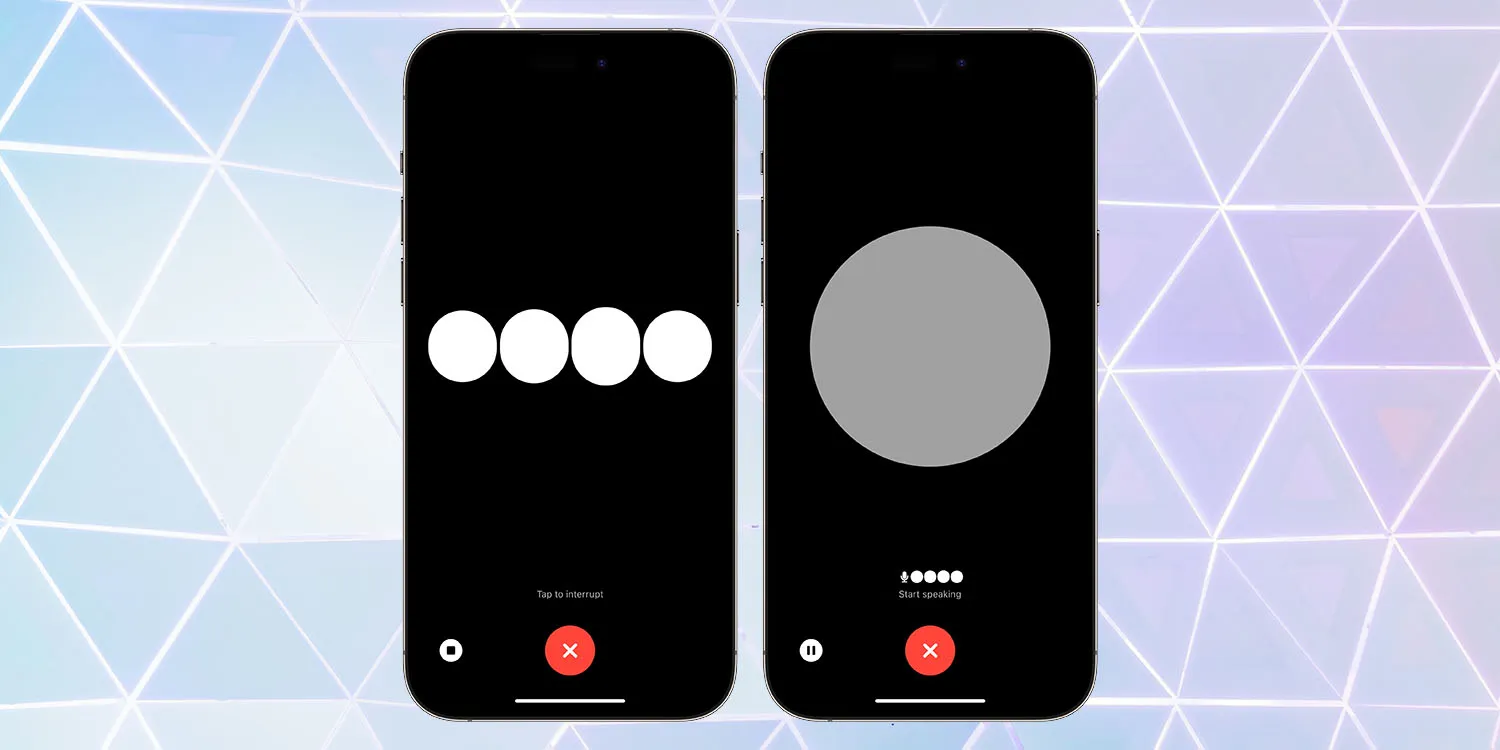
Two-way voice interaction was later launched, but only for paying subscribers. The company now says it is available to all, with Brockman urging people to try it.
ChatGPT Voice rolled out for all free users. Give it a try — totally changes the ChatGPT experience.
You can choose between five different voices.
ChatGPT Voice rolled out for all free users. Give it a try — totally changes the ChatGPT experience: https://t.co/DgzqLlDNYF
I found I had to delete the app and then re-install it from the App Store to get the update. Please be careful if you need to do the same, as there are many scam apps which come up in a search for ChatGPT.
It’s also worth noting that demand for the feature is apparently extremely high, as I’ve experienced long delays at the ‘connecting’ stage, and some failures.
The charging situation for the iPhone 15 and iPhone 15 Pro this year has changed. Apple’s proprietary Lightning port has been replaced with USB-C, so now you can charge your phone with almost any USB-C cable and USB-C power adapter that you can find online. But what exactly do you need to make sure you can charge your iPhone battery as fast as possible?
As USB-C is an open standard, you can use pretty much any USB-C cable you can find. The iPhone 15 comes with a nice woven braided cable in the box, but you can use any USB-C cable you can find — including those marketed as ‘Android’ phone cables. However, if it seems like your iPhone is charging slowly, you probably need to change your charging brick.
Back when Apple included accessories in the box, the iPhone came with small 5-watt power adapters. As they were included with the iPhone for such a long time, there are lot of these still out in the world. If you have one of these, it is perfectly safe to use with iPhone 15; you just need a USB-C to USB-A cable to plug in.
However, it will only charge your phone at 5W speed. This was fine when the battery capacities of smartphones was much smaller five years ago, but the iPhone batteries are much bigger these days. As a result, charging at 5 watts can take four or five hours to go from zero to 100%. It is slow.
Fast charge iPhone 15
To fast charge iPhone 15, you’ll need a higher wattage charging brick. The iPhone USB-C port can technically receive power up to 27 watt speeds, but practically speaking there are diminishing returns on charging speed above ~20-watts. So, with a USB-C cable and an Apple 20 W USB-C power adapter, you can charge the iPhone 15 from zero to 50% in about 30 minutes, and from zero to 100% in under 2 hours.
However, you aren’t limited to using Apple accessories. Plenty of higher-wattage USB-C charging options are on the market that are more convenient than Apple’s adapters, like this dual USB-C compact charger from Anker. It is also perfectly safe to use power adapters that are rated higher than 20 watts; they will automatically charge your iPhone at the maximum speed that it supports.
For example, this means if you have a USB-C MacBook power adapter, you can use that and charge your phone at full speed too. If your MacBook itself is plugged into power and charging, you can even connect your phone into one of the laptop’s USB-C ports and charge at near-full speed.
In fact, USB-C means that you can now fast charge all of your Apple devices with the same cable and 60-watt (or higher) MacBook power adapter.
Want to try out the latest iPhone security feature – Stolen Device Protection for iPhone? Read along for how to install iOS 17.3 beta for free, as well as where to turn on the new iPhone protection that requires biometric authentication and more.
Apple has made the first iOS 17.3 beta available for both public and developer testers.
The major new feature to arrive with the test software is Stolen Device Protection for iPhone. It adds a layer of security for your Apple ID and more in the rare event your iPhone is stolen and your device passcode is also compromised.
After you follow the steps below to install the free iOS 17.3 public or dev beta, you’ll be able to:
Open the Settings app.
Swipe down and tap Face ID & Passcode (or Touch ID & Passcode).
Now choose Stolen Device Protection.
How to install iOS 17.3 beta – public
Make a fresh backup of your iPhone or iPad.
You may need to sign in with your Apple ID at beta.apple.com if you haven’t before.
Launch the Settings app on your iPhone or iPad (running at least iOS 16.4).
Tap General > Software Update.
Choose the new Beta Updates button (it may take a moment to appear).
Now, choose iOS 17.3 Public Beta.
If you need to change your Apple ID associated with the beta, you can tap that at the bottom.
Choose Back when done.
Look for iOS 17.3 Public Beta to appear; choose Download and Install.
If you’re not seeing the option to turn on beta updates or iOS 17.3 appear:
Try quitting and relaunching the Settings app.
Double check you’re running iOS 16.4 or later. (If not, you’ll need to update before getting the in-Settings beta option.)
Sign in with your Apple ID at beta.apple.com for free, then try the above steps again.
How to install iOS 17.3 beta – developer
A paid Apple Developer account is no longer needed – but you may need to sign in with your Apple ID at developer.apple.com if you haven’t before.
Make a fresh backup of your iPhone or iPad.
Launch the Settings app on your iPhone or iPad (running at least iOS 16.4).
Tap General > Software Update.
Choose the new Beta Updates button (it may take a moment to appear).
Now, choose iOS 17.3 Developer Beta.
If you need to change your Apple ID associated with the beta, you can tap that at the bottom.
Choose Back when done.
Look for iOS 17.3 Developer Beta to appear, choose Download and Install.
If you’re not seeing the option to turn on beta updates or iOS 17.3 appear:
Try quitting and relaunching the Settings app.
Double check you’re running iOS 16.4 or later. (If not, you’ll need to update before getting the in-Settings beta option.)
Sign in with your Apple ID at developer.apple.com for free, then try the above steps again.
Apple launches Stolen Device Protection for iPhone with iOS 17.3 beta, here’s how it works
On the heels of iOS 17.2 being released to the public yesterday, Apple has seeded developers with the first iOS 17.3 beta. Notably, a brand new security feature is available to test with the update called Stolen Device Protection for iPhone.
Earlier this year, WSJ’s Joanna Stern investigated a rise in iPhone thefts in public places like bars. The tactic usually involved attackers observing victims entering their passcodes before stealing their iPhones and then using that to immediately change their Apple ID password and lock the owners out of their accounts and even iCloud backups.
With iOS 17.3, Apple is debuting a clever solution to this rare but frustrating threat: Stolen Device Protection for iPhone.
How Stolen Device Protection for iPhone works
Here’s how Apple describes the new security feature in iOS 17.3:
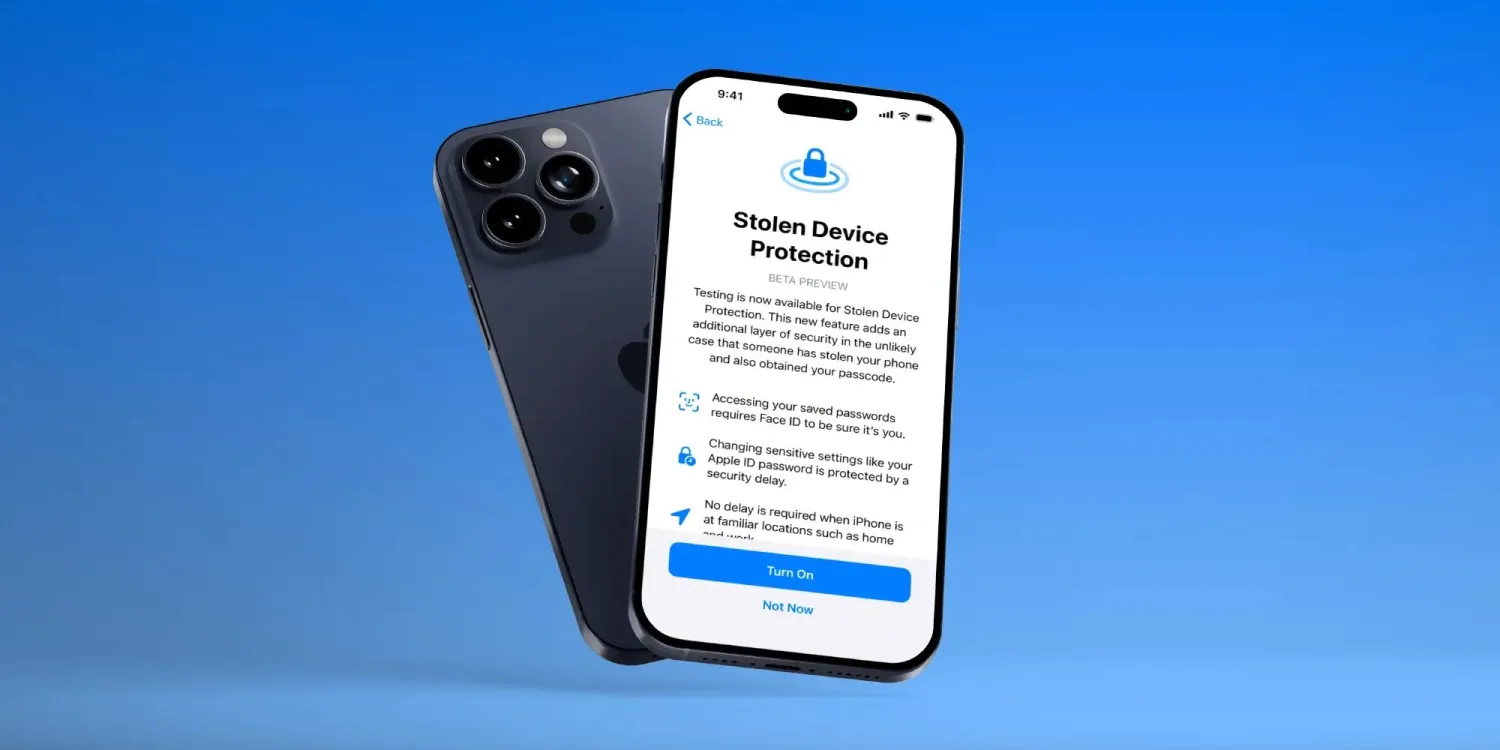
Testing is now available for Stolen Device Protection. This new feature adds an additional layer of security in the unlikely case that someone has stolen your phone and also obtained your passcode.
Accessing your saved passwords requires Face ID to be sure it’s you.
Changing sensitive settings like your Apple ID password is protected by a security delay
No delay is required when iPhone is at familiar locations such as home and work
Apple has thoughtfully created a two-tier system of how Stolen Device Protection works that offers a balance of user-friendliness while enhancing security.
For example, with the feature turned on, actions like using passwords or passkeys, applying for an Apple Card, turning off Lost Mode, erasing an iPhone, and using payment methods saved with an iPhone will require biometric authentication – no passcode fallback when away from familiar locations.
But for even more sensitive actions like changing your Apple ID password, updating Apple ID security settings, changing passcode or Touch/Face ID settings, and turning off Find My or Stolen Device protection, the one-hour security delay will come into play away from familiar locations. That means a second biometric authentication will be required after that delay.
How to turn on Stolen Device Protection for iPhone
Make sure you’re running the iOS 17.3 beta on your iPhone.
Open the Settings app.
Swipe down and tap Face ID & Passcode (or Touch ID & Passcode).