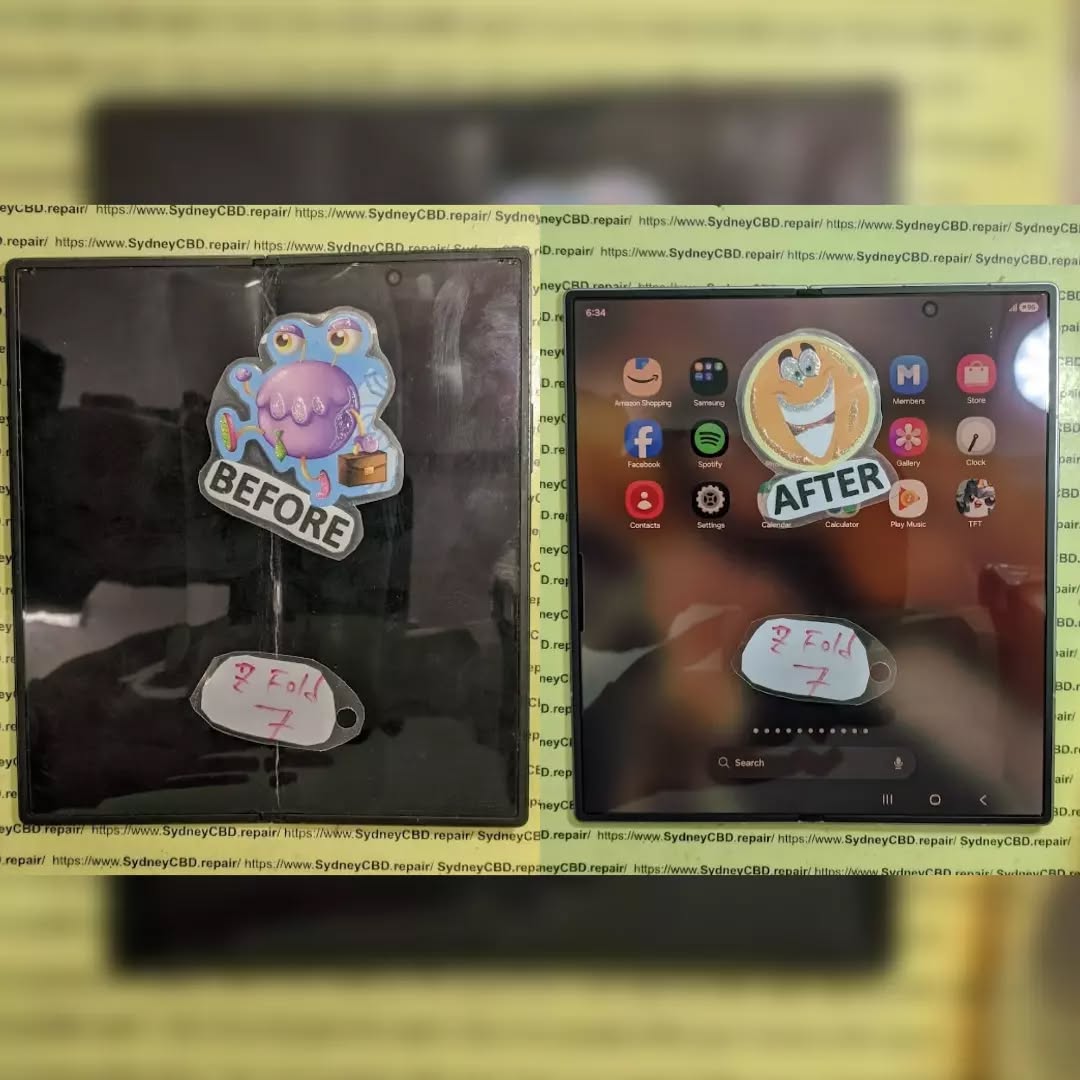
DON’T PANIC! Samsung Galaxy Z Fold 7 Inner Screen Mail-in Repair Success

DON’T PANIC! Samsung Galaxy Z Fold 7 Inner Screen Mail-in Repair Success – Ultimate 7-Step Recovery Guide
Introduction
If your Samsung Galaxy Z Fold 7’s inner display has suddenly stopped working, developed black spots, started flickering, or no longer responds to touch, don’t assume the phone is beyond repair. Modern foldable smartphones are incredibly advanced, but they’re also highly repairable when handled by experienced technicians using professional tools and genuine replacement components.
This guide explains everything you need to know about Samsung Galaxy Z Fold 7 Inner Screen Mail-in Repair Success, including the repair process, common causes of failure, packaging tips, repair timelines, and why choosing an experienced repair center makes all the difference.
The Samsung Galaxy Z Fold 7 Inner Screen Mail-in Repair Success story is becoming increasingly common as more Australians choose foldable smartphones for work, entertainment, and productivity. The Galaxy Z Fold 7 represents Samsung’s latest innovation in foldable technology, combining flagship performance with an expansive inner display that transforms from a smartphone into a tablet within seconds.
However, despite remarkable engineering improvements, the flexible OLED display remains the most delicate component inside the device. Even with stronger ultra-thin glass, improved hinge mechanisms, and reinforced display layers, unexpected accidents and normal wear can eventually lead to display issues.
Fortunately, a damaged inner display doesn’t necessarily mean purchasing a brand-new phone. Professional repair specialists now offer reliable mail-in services that allow customers across Australia to restore their devices without needing to visit a repair shop in person.
Mail-in repairs have become especially valuable for customers living outside major cities. Instead of searching for local technicians who may have limited experience with foldable devices, owners can send their phones directly to specialized repair centers equipped with the proper tools, calibration equipment, and genuine replacement parts.
Professional technicians understand that repairing a foldable phone differs significantly from repairing a traditional smartphone. Every component—from the flexible OLED panel to the hinge assembly and delicate internal cables—requires precision handling.
The repair process isn’t simply about replacing a damaged screen. It also involves inspecting the hinge mechanism, verifying cable integrity, checking battery safety, recalibrating sensors, and performing extensive functional testing before the phone is returned.
For many customers, choosing a professional mail-in repair provides peace of mind. Their valuable device is handled by specialists who repair foldable smartphones every day rather than technicians who occasionally encounter them.
Throughout this guide, you’ll discover exactly how professional mail-in repairs work, what happens after your phone arrives, how technicians ensure long-term reliability, and why expert repairs often extend the life of your Galaxy Z Fold 7 by years.
For additional information about foldable device care, Samsung also provides helpful support resources through its official support pages.

Why the Galaxy Z Fold 7 Inner Screen Fails
Understanding why the Galaxy Z Fold 7’s flexible display develops problems helps owners recognize early warning signs and seek repairs before the damage becomes more extensive.
Unlike conventional smartphones, foldable devices contain moving components that work together every time the phone opens and closes. The flexible OLED display bends repeatedly while remaining incredibly thin, making proper engineering essential.
Although Samsung has significantly strengthened each generation of the Galaxy Z Fold, physics still plays a role. Any flexible display experiences stress during repeated folding cycles, even when engineered to last hundreds of thousands of folds.
Everyday Wear and Tear
Normal daily use gradually places mechanical stress on several critical components inside the Fold 7.
These include:
- Flexible OLED display
- Ultra-thin protective glass
- Internal ribbon cables
- Adhesive bonding layers
- Hinge support brackets
- Display backing materials
Over months or years, repeated folding may eventually contribute to issues such as:
- Dead pixels
- Display flickering
- Black lines
- Green lines
- White screen
- Touch failure
- Crease discoloration
- Display separation
Most users never notice these symptoms until they suddenly become obvious.
Professional repair centers understand how these failures occur and inspect every supporting component during repair rather than replacing only the visible display.
Hidden Impact Damage
Many Galaxy Z Fold 7 owners are surprised when the inner display fails even though the phone has no cracked glass.
This often happens because impact energy travels through the aluminum frame into the flexible display underneath.
Examples include:
- Dropping the phone while closed
- Sitting on the device
- Pressure inside a backpack
- Corner impacts
- Twisting the chassis
- Heavy compression during travel
Sometimes the damage doesn’t appear immediately.
Instead, the display may continue functioning for several days before developing:
- Flickering
- Vertical lines
- Dead touch areas
- Black spots
- Complete display failure
Professional diagnostics identify these hidden issues before technicians begin replacing components.
Moisture and Dust Risks
Although the Galaxy Z Fold 7 features improved durability, foldable devices remain more complex than standard smartphones.
Tiny particles entering the hinge mechanism can contribute to long-term wear, while moisture exposure may affect:
- Display connectors
- Flexible cables
- Internal adhesives
- OLED circuitry
- Sensor modules
Even phones that appear perfectly dry externally may contain internal corrosion after accidental liquid exposure.
Experienced repair technicians inspect these components carefully before installing a replacement inner display, ensuring hidden damage isn’t overlooked.
Why Mail-in Repairs Are Becoming the Preferred Choice

The rise of foldable smartphones has also changed the way people approach repairs. Many local repair shops can confidently replace traditional smartphone screens, but far fewer have the experience, specialized tools, and genuine components needed for modern foldable devices.
That’s why Samsung Galaxy Z Fold 7 Inner Screen Mail-in Repair Success is becoming a trusted solution for customers across Australia. Instead of settling for limited local options, owners can send their devices directly to technicians who regularly handle advanced foldable repairs.
Access to Specialized Foldable Expertise
Repairing a Galaxy Z Fold 7 isn’t the same as repairing a standard slab phone.
Technicians must understand:
- Flexible OLED display construction
- Foldable hinge tolerances
- Internal cable routing
- Adhesive curing procedures
- Battery safety protocols
- Water-resistance sealing techniques
- Display calibration requirements
An inexperienced repair can create additional issues such as:
- Uneven folding
- Screen lifting
- Reduced touch sensitivity
- Crease abnormalities
- Premature display failure
- Hinge stiffness
- Dust ingress
Professional foldable repair centers perform these procedures regularly, significantly reducing the likelihood of repeat failures.
Australia-Wide Convenience
Mail-in repairs remove geographical limitations.
Whether you’re located in:
- Sydney
- Melbourne
- Brisbane
- Perth
- Adelaide
- Canberra
- Darwin
- Regional towns
- Remote communities
You can still access professional foldable repair services.
Instead of driving for hours or shipping your phone between multiple repair providers, a single secure shipment can connect you directly with specialists.
For busy professionals, students, and business owners, convenience matters. Mail-in services allow repairs to happen while you continue focusing on work and daily responsibilities.
Faster Turnaround Than Expected
Many people assume mail-in repairs take weeks.
In reality, specialized repair centers often complete the repair within a remarkably short timeframe once the device arrives.
This happens because:
- The technicians already specialize in foldables.
- Genuine parts are typically stocked.
- Dedicated tools are available immediately.
- Diagnostic procedures are standardized.
- Quality-control processes are efficient.
As a result, customers frequently experience a faster overall repair compared to searching locally for someone willing to attempt the repair.
Professional Diagnostics Matter
A damaged display isn’t always the only issue.
Before replacing the screen, experienced technicians inspect:
| Component | Why It Matters |
|---|---|
| Hinge assembly | Ensures smooth opening and closing |
| Battery condition | Prevents safety concerns |
| Flex cables | Detects hidden damage |
| Frame alignment | Ensures correct screen installation |
| Display connectors | Verifies signal integrity |
| Internal corrosion | Identifies liquid damage |
| Adhesive surfaces | Maintains structural stability |
This comprehensive inspection is one of the biggest reasons why professional mail-in repairs often deliver longer-lasting results.
Step-by-Step Samsung Galaxy Z Fold 7 Mail-in Repair Process
Understanding the repair journey can remove a lot of anxiety. Let’s walk through the complete process from start to finish.
Step 1: Book the Repair
The first step is contacting the repair center and describing the issue.
Common symptoms include:
- Black screen
- No touch response
- Flickering display
- Vertical lines
- Dead pixels
- Screen bleeding
- Crease damage
- Intermittent display operation
Providing clear information helps technicians prepare the correct replacement parts before the phone arrives.
Helpful details include:
- When the issue started
- Whether the phone was dropped
- Whether liquid exposure occurred
- If the outer display still works
- Whether the hinge feels normal
The more information provided, the smoother the repair process becomes.
Step 2: Back Up Your Data
Whenever possible, create a complete backup before sending your phone.
Recommended items to back up:
- Photos
- Videos
- Contacts
- Documents
- Notes
- Messages
- App data
- Authentication backups
Although professional technicians take every precaution, maintaining a backup is always best practice.
Step 3: Package the Phone Safely
Proper packaging dramatically reduces shipping risks.
Recommended Packaging Method
- Turn the device off.
- Remove unnecessary accessories.
- Place the phone in a protective sleeve.
- Wrap it with bubble wrap.
- Use a rigid box.
- Fill empty spaces with cushioning material.
- Seal the package securely.
Avoid shipping the phone in a padded envelope alone.
Foldable devices deserve better protection during transit.
Include Repair Information
Place a note inside containing:
- Your name
- Contact information
- Return address
- Device model
- Password instructions if required
- Description of the issue
Clear communication helps technicians begin work faster.
Step 4: Professional Diagnostic Inspection
Once the device arrives, technicians perform a full inspection.
This stage often includes:
- External assessment
- Functional testing
- Internal inspection
- Battery safety verification
- Hinge evaluation
- Connector examination
- Flex cable inspection
- Corrosion detection
Sometimes technicians discover additional hidden damage that wasn’t visible before disassembly.
Identifying these problems early prevents future failures.
Step 5: Inner Screen Replacement
This is the most technically demanding stage.
Foldable display replacement requires:
- Controlled heat application
- Precision adhesive removal
- Battery isolation procedures
- Careful cable disconnection
- Hinge alignment checks
- Frame preparation
- Exact display placement
- Controlled adhesive curing
Skipping even one of these steps can compromise repair quality.
Professional technicians follow carefully tested procedures designed specifically for foldable devices.
Why Battery Disconnection Matters
Safety is critical.
Disconnecting the battery before internal repairs helps reduce the risk of:
- Short circuits
- Electrical damage
- Accidental component failure
- Connector damage
- Thermal incidents
Experienced repair centers never rush this stage.
Step 6: Calibration and Functional Testing
Replacing the display is only part of the repair.
After installation, technicians test:
- Touch responsiveness
- Brightness levels
- Adaptive refresh rate
- Fingerprint recognition
- Multi-touch functionality
- Speaker performance
- Cameras
- Charging
- Wireless charging
- Wi-Fi
- Bluetooth
- Fold detection
- Display uniformity
This extensive testing helps ensure the repaired phone performs as expected.
Step 7: Final Quality Control and Return Shipping
Before returning the device, technicians complete a final inspection.
Quality-control checks typically include:
| Inspection Area | Purpose |
|---|---|
| Screen alignment | Proper fit and finish |
| Hinge operation | Smooth folding action |
| Display integrity | No defects present |
| Adhesive bonding | Structural reliability |
| Cosmetic condition | Professional presentation |
| Functional testing | Full device verification |
| Final cleaning | Customer-ready appearance |
Only after passing all inspections is the device carefully packaged and shipped back.
This attention to detail is a major reason why Samsung Galaxy Z Fold 7 Inner Screen Mail-in Repair Success continues to grow in popularity among foldable phone owners.
Benefits of Genuine Parts in Foldable Repairs
Not all replacement displays are created equal.
Foldable phones are among the most advanced consumer electronics ever produced. Their flexible OLED panels contain highly specialized layers that work together to deliver smooth folding, vibrant colors, and responsive touch performance.
Using genuine components can help preserve:
- Display quality
- Touch accuracy
- Folding durability
- Brightness consistency
- Color accuracy
- Structural reliability
- Long-term performance
While lower-cost components may appear attractive initially, they can sometimes introduce reduced durability or inconsistent performance.
Professional repair centers understand the importance of installing high-quality parts that meet the demanding requirements of foldable devices.
According to Samsung’s official support resources, proper care and handling are essential for maintaining foldable displays and ensuring long-term reliability. For additional guidance, visit Samsung’s foldable device support documentation: https://www.samsung.com/support/
How Professionals Protect Foldable Phones During Repair
A successful Samsung Galaxy Z Fold 7 Inner Screen Mail-in Repair Success story depends on far more than simply installing a new display. Professional technicians follow strict repair procedures designed specifically for foldable smartphones to ensure every repair meets high standards of quality and reliability.
Precision Disassembly
Unlike conventional smartphones, the Galaxy Z Fold 7 contains multiple flexible cables, intricate hinge components, and delicate display layers. Every screw, bracket, and connector must be removed in the correct order.
Professional repair technicians use specialized tools that help prevent:
- Frame damage
- Torn flex cables
- Connector breakage
- Display pressure marks
- Battery punctures
- Cosmetic scratches
Each step is performed carefully to maintain the structural integrity of the device.
Controlled Adhesive Removal
Modern smartphones rely on strong industrial adhesives to hold displays securely while helping maintain resistance against dust and moisture.
Improper adhesive removal may result in:
- Bent frames
- Uneven displays
- Poor sealing
- Internal contamination
Professional technicians use calibrated heating equipment and precision tools to soften adhesives safely before removing the damaged display.
Careful Hinge Inspection
The Galaxy Z Fold 7 hinge is one of its most important mechanical components.
Before installing a replacement screen, technicians inspect the hinge for:
- Smooth operation
- Alignment
- Wear
- Loose components
- Debris
- Structural deformation
If the hinge is not operating correctly, installing a new display without addressing the underlying issue may reduce the lifespan of the repair.
Professional Reassembly
Reassembly requires patience and precision.
Technicians ensure:
- Every connector is securely seated.
- Adhesives are evenly applied.
- Internal cables are correctly routed.
- The display sits perfectly within the frame.
- Folding movement remains smooth.
- The phone opens and closes evenly.
These small details contribute significantly to long-term durability.
Repair vs. Replacement: Which Is the Better Choice?
Many Galaxy Z Fold 7 owners wonder whether repairing the inner display is worthwhile or if purchasing a brand-new device is the smarter option.
For most users, professional repair offers excellent value, especially when the phone is otherwise functioning normally.
| Factor | Professional Repair | Buying a New Phone |
|---|---|---|
| Cost | Usually much lower | Significantly higher |
| Setup Time | Minimal | Several hours |
| Data Preservation | Existing data can often be retained | Requires migration |
| Environmental Impact | Lower electronic waste | Higher environmental impact |
| Familiarity | Keep your existing device | Learn a new device |
When Repair Makes Sense
Repair is often the best option if:
- The motherboard works properly.
- Cameras remain functional.
- Battery health is acceptable.
- The outer screen still operates.
- The phone has only display-related damage.
- You want to avoid the expense of replacing the entire device.
When Replacement May Be Considered
A new phone might be appropriate if:
- The motherboard has extensive damage.
- Multiple major components have failed.
- Severe liquid damage has affected the entire device.
- Repair costs approach the value of a replacement.
A professional diagnostic assessment helps determine the most cost-effective solution.
Tips to Keep Your Galaxy Z Fold 7 in Great Condition
After a successful repair, proper care can help maximize the life of your foldable smartphone.
1. Fold Gently
Avoid snapping the device open or closed. Smooth, controlled movements reduce unnecessary stress on the hinge and flexible display.
2. Keep the Hinge Clean
Dust and debris can accumulate over time. Regularly inspect the hinge and gently clean the exterior with a soft microfiber cloth.
3. Avoid Extreme Temperatures
Very hot or very cold environments may affect battery performance, adhesives, and display materials.
4. Use a Quality Protective Case
A well-designed case helps absorb impacts while protecting the frame and hinge from everyday wear.
5. Never Press Hard on the Inner Screen
The flexible OLED display is durable but should not be subjected to excessive pressure from fingernails, pens, or other sharp objects.
6. Transport the Phone Carefully
Avoid placing the phone in overcrowded bags or tight pockets where excessive pressure could be applied.
7. Seek Professional Repairs Promptly
If you notice:
- Flickering
- Display lines
- Touch issues
- Hinge stiffness
- Unusual noises
Arrange a professional inspection before the problem worsens.
Frequently Asked Questions
1. Can the Galaxy Z Fold 7 inner screen really be repaired?
Yes. In many cases, professional technicians can replace the damaged inner display while preserving the rest of the device.
2. Is a mail-in repair safe?
Yes. When packaged securely and sent to a reputable repair center, mail-in repairs are a safe and convenient option for customers across Australia.
3. Will my data be erased during the repair?
Most screen repairs do not require data deletion. However, it’s always recommended to back up your important files before shipping your phone.
4. How long does an inner screen repair usually take?
Repair times vary depending on parts availability and diagnostic findings, but specialized repair centers often complete the repair soon after receiving the device.
5. Are genuine replacement parts important?
Absolutely. Genuine or high-quality replacement components help maintain display performance, touch responsiveness, durability, and overall reliability.
6. Can a damaged hinge affect the new screen?
Yes. A worn or misaligned hinge can place additional stress on the replacement display. This is why professional technicians inspect the hinge before completing the repair.
7. Should I attempt a DIY inner screen replacement?
Due to the complexity of foldable devices, DIY repairs are not recommended. Specialized tools, technical expertise, and proper calibration are essential to avoid causing additional damage.
Conclusion

A damaged foldable display doesn’t have to mean the end of your premium smartphone. With Samsung Galaxy Z Fold 7 Inner Screen Mail-in Repair Success, owners have access to a practical, reliable, and cost-effective solution that restores their devices without the need to purchase a new phone.
Professional mail-in repair services combine expert diagnostics, specialized foldable repair techniques, genuine replacement parts, and thorough quality testing to deliver dependable results. From careful packaging and detailed inspections to precision screen installation and final performance checks, every step is designed to protect your investment.
By choosing experienced technicians and following recommended care practices after the repair, you can continue enjoying the innovative features of your Galaxy Z Fold 7 for years to come. Whether you’re a business professional, content creator, or everyday user, investing in a quality repair helps extend the life of your device while reducing electronic waste and saving money.
If your Galaxy Z Fold 7’s inner display has developed lines, flickering, touch issues, or a completely black screen, don’t panic. Professional repair specialists have the expertise and equipment to bring your foldable phone back to life with confidence.
References
- Samsung Support – Foldable Device Care: https://www.samsung.com/support/
- Samsung Galaxy Device Support: https://www.samsung.com/au/support/
David from Sydney CBD Repair Centre – The Best place to fix mobile phones as 7 Years In A Row! Top Mobile Phone Repair In Sydney. More than 2000 Positive Reviews on Google and Same Day Repairs.
We take pride in delivering exceptional repair services for all major phone brands including Apple, Samsung, Google, and more. Our expert technicians use only genuine parts and offer 90 days warranty on repairs. Located in the heart of Sydney CBD, we’re your one-stop solution for all mobile device repairs.
Our commitment to excellence has earned us the trust of thousands of satisfied customers. Whether it’s a cracked screen, battery replacement, or water damage repair, we handle it all with professional care and expertise. Walk in today and experience why we’re Sydney’s #1 choice for mobile phone repairs.
Visit us for:
- ✓ Same Day Express Repairs
- ✓ Genuine Parts Guarantee
- ✓ Professional Technicians
- ✓ Competitive Pricing
- ✓ 2000+ 5-Star Google Reviews
- ✓ 7-Time Award Winner for Best Phone Repairs
Sydney CBD Repair Centre – Where Quality Meets Reliability.
Call: +61280114119
Website: https://SydneyCBD.repair/locate-us