BEYOND THE SCREEN REPAIR: Phone Camera Repair Secrets + 7 Expert Tips
The Rising Dependence on Smartphone Cameras
In the last decade, smartphone cameras have gone from a convenient add-on to a central part of modern life. They’re no longer just for the occasional holiday snap — they’re how we record memories, document daily life, and even earn a living. For many, the phone’s camera is the camera.
Whether you’re capturing your child’s first steps, shooting content for social media, or scanning important documents, your phone camera is working harder than ever. Unfortunately, with this increased use comes an increased risk of damage. Even a tiny scratch on the lens or a minor software glitch can transform your crystal-clear shots into blurry, unusable images.
Smartphone cameras are intricate systems where optical precision meets advanced electronics. Understanding the most common issues helps you spot problems early.
Physical Damage to Camera Lens
The most obvious culprit is impact damage. Drops, bumps, or even carrying your phone in a pocket with keys can crack or scratch the lens. A cracked lens can cause light refraction problems, leading to blurry or distorted photos.
Internal Hardware Failures
Inside your phone, the camera module houses sensors, stabilizers, and connectors. Hardware failures may come from manufacturing defects, moisture damage, or hard impacts that cause parts to come loose.
Software-Related Glitches
Sometimes, your hardware is fine, but the software controlling it isn’t. Outdated firmware, conflicting apps, or corrupted system files can cause your camera to freeze, refuse to focus, or fail to launch altogether.
When your phone’s camera stops working properly, you have two main options — try fixing it yourself or go to a repair shop.
DIY Repairs may seem cost-effective, but without the proper tools and training, you risk causing more damage. You could void your warranty, damage delicate connectors, or even break other components while trying to reach the camera module.
Professional Repairs, like those at Sydney CBD Repair Centre, ensure your phone is handled by experts using the correct tools and genuine parts. It’s not just about fixing the problem — it’s about preserving the longevity and performance of your device.
Step-by-Step Professional Camera Repair Process
A quality repair centre doesn’t just swap out parts blindly — they follow a systematic process to diagnose and fix the exact issue.
Initial Inspection – The technician checks for physical and software problems.
Detailed Diagnosis – Using specialized tools, they identify whether the issue is lens damage, sensor failure, or software malfunction.
Secure Disassembly – The phone is carefully opened to avoid damaging nearby components.
Component Replacement or Repair – Faulty parts are replaced with genuine OEM components for reliability.
Reassembly & Testing – After the repair, the phone undergoes multiple quality checks to ensure the camera functions like new.
Tools and Equipment Used by Experts
Professional repairers use precision screwdrivers, anti-static mats, magnifying glasses, and sometimes heat guns to soften adhesives without damaging the device.
Use of Genuine Replacement Parts
Choosing OEM (Original Equipment Manufacturer) parts means your camera performs exactly as it did when new. Aftermarket parts may be cheaper but often fall short in image quality, colour accuracy, and durability.
Preventive Measures to Protect Your Phone Camera
Use a protective phone case with raised edges around the camera.
Invest in camera lens protectors to prevent scratches.
Avoid placing your phone face-down on rough surfaces.
Clean the lens regularly with a microfiber cloth — never with your shirt sleeve.
Cost of Phone Camera Repairs in 2025
The price of camera repairs depends on the phone model and extent of the damage:
Brand / Model
Average Camera Repair Cost (AUD)
Repair Time
iPhone 14 Pro
$250 – $350
1–2 hours
Samsung S23 Ultra
$300 – $400
1–2 hours
Google Pixel 7 Pro
$220 – $300
1–2 hours
Budget Android Models
$100 – $180
1–2 hours
Note: Prices vary based on part availability and whether the device is still under warranty.
Sydney CBD Repair Centre – Excellence in Camera Repairs
David and his team at Sydney CBD Repair Centre have been restoring phone cameras to perfect working condition for over six years — winning Best Phone Repairs in Sydney year after year.
With more than 2000 positive Google reviews, customers trust them for:
✓ Same Day Express Repairs
✓ Genuine Parts Guarantee
✓ Professional Technicians
✓ Competitive Pricing
Located in the heart of Sydney CBD, they’re a one-stop solution for Apple, Samsung, Google, and other major brands.
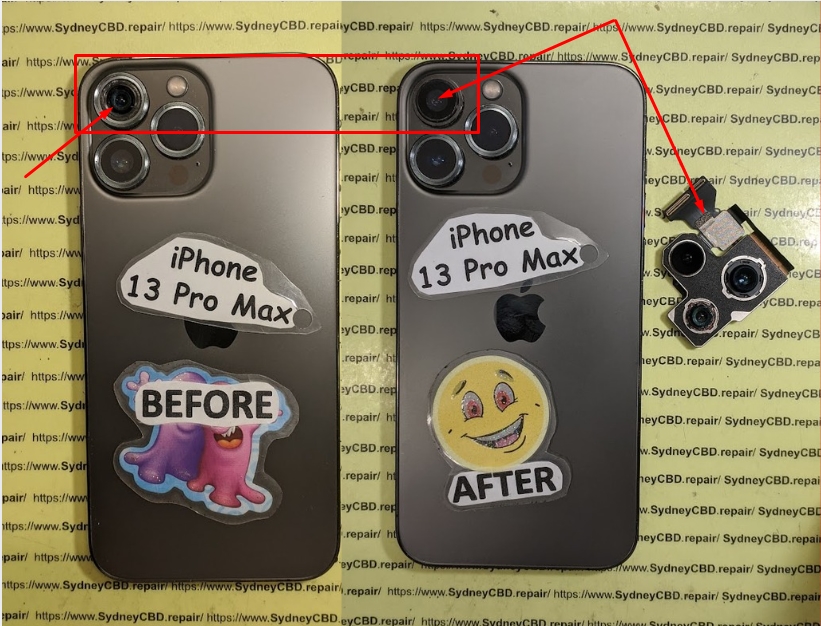
Case 1: An iPhone 13 Pro owner came in with a foggy lens after beach exposure. Within an hour, the team replaced the lens, cleaned the internals, and restored the camera’s crystal-clear quality.
Case 2: A Samsung S22 Ultra dropped from a balcony had severe camera module damage. The Sydney CBD Repair Centre team sourced a genuine module and completed the repair the same day.
FAQs About Phone Camera Repairs
1. How long does a phone camera repair take?
Most repairs are completed within 1–2 hours, depending on part availability.
2. Can a scratched lens be polished instead of replaced?
Minor scratches can sometimes be reduced, but deep scratches usually require lens replacement.
3. Does repairing my camera void my phone’s warranty?
Repairs at authorized or reputable centres using genuine parts typically preserve your warranty.
4. Can water damage be fixed in phone cameras?
Yes — if addressed quickly. Delays can cause corrosion and permanent sensor damage.
5. Why is my phone camera blurry after a fall?
The impact may have misaligned the lens or damaged the stabilizer.
6. Is it worth repairing an old phone’s camera?
If the phone is otherwise functional, repairing it can extend its life and save money compared to buying new.
Conclusion – The Future of Phone Camera Repairs
Smartphone cameras will only become more advanced — and more integral to our daily lives. With higher megapixel counts, AI enhancements, and improved stabilization, future repairs will require even greater expertise.
By choosing a trusted service provider like Sydney CBD Repair Centre, you ensure that your phone’s camera remains reliable, no matter the damage. In an age where every memory counts, protecting your camera is protecting your life’s moments.
iPhone 17 Pro Max Full Housing Swap And Internal Component Restoration Sydney: Ultimate 2026 Expert Guide
Introduction
Has your iPhone 17 Pro Max suffered a bent frame, cracked rear housing, heavy cosmetic damage, or internal issues after an accidental drop? A professional iPhone 17 Pro Max Full Housing Swap And Internal Component Restoration Sydney service can restore both its appearance and performance without compromising reliability.
This comprehensive guide explains how housing replacement works, why precision matters, and why experienced technicians are essential for such an advanced repair.
The iPhone 17 Pro Max is one of Apple’s most advanced smartphones. It combines premium materials, powerful hardware, professional-grade cameras, and cutting-edge engineering into a single device. While it is built for durability, accidents still happen.
A significant drop can bend the frame, crack the rear housing, damage mounting points, or deform the chassis enough to affect buttons, cameras, speakers, wireless charging, or even display alignment.
That’s where iPhone 17 Pro Max Full Housing Swap And Internal Component Restoration Sydney becomes invaluable.
Unlike a simple screen replacement, a housing swap involves completely disassembling the phone. Every working internal component is carefully transferred into a brand-new housing while maintaining proper alignment and functionality.
Professional restoration provides several benefits:
Restores factory appearance
Corrects structural damage
Improves button responsiveness
Fixes camera alignment
Restores speaker positioning
Re-establishes wireless charging alignment
Extends device lifespan
Preserves valuable internal components
For premium smartphones, replacing the housing often costs far less than purchasing an entirely new device.
What Is a Full Housing Swap?
A housing swap is among the most advanced smartphone repairs available.
Instead of replacing only one damaged part, technicians move nearly every internal component into a new original-quality housing.
These components include:
Component
Transferred?
OLED Display
✔
Logic Board
✔
Rear Cameras
✔
Front Camera
✔
Battery
✔ (if healthy)
Speakers
✔
Taptic Engine
✔
Charging Port
✔
Face ID Components
✔
Microphones
✔
Antennas
✔
Buttons
Usually pre-installed or transferred
Each part must be removed carefully because many components are connected using delicate flex cables and microscopic connectors.
Unlike older smartphones, modern iPhones rely heavily on precision alignment. Even slight installation errors can affect:
Face ID
Camera focus
Display seating
Button feel
Charging
Wireless charging
Signal reception
Professional technicians follow systematic procedures that minimize risk while ensuring every component functions as intended.
Many users assume that cosmetic damage is merely an aesthetic issue. However, structural damage can gradually lead to much larger problems.
Common warning signs include:
Bent Frame
Even a slight bend may prevent the display from sealing correctly.
Potential issues include:
Dust ingress
Display lifting
Pressure spots
Water resistance loss
Cracked Rear Housing
Glass fragments may expose internal components to dust and moisture.
Risks include:
Battery contamination
Camera damage
Wireless charging issues
Loose Buttons
Housing deformation often affects:
Volume buttons
Power button
Action button
Camera Control button (if applicable)
Camera Misalignment
A damaged frame can cause:
Blurry photos
Autofocus problems
Lens vibration
Optical stabilization errors
Charging Problems
Housing damage may place stress on:
USB-C connector
Charging port bracket
Internal flex cables
This can lead to intermittent charging or complete charging failure.
Display Not Sitting Flush
A warped frame prevents proper installation of the display.
Symptoms include:
Screen lifting
Adhesive failure
Increased vulnerability to moisture
These issues indicate that a full housing restoration is often the most reliable long-term solution.
Common Causes of Housing Damage
Housing damage typically occurs through repeated physical stress or sudden impact.
The most common causes include:
Accidental Drops
Even a drop from waist height can generate significant force on the titanium or aluminum frame.
Corners usually absorb the greatest impact.
Heavy Pressure
Sitting on the phone while it’s in a back pocket can slowly bend the chassis.
Over time this affects:
Display alignment
Internal brackets
Camera positioning
Vehicle Accidents
Phones left on car roofs, dashboards, or seats often sustain severe structural damage during accidents.
Water Damage
Moisture may corrode internal screws and structural components, making restoration necessary.
Previous Poor Repairs
Improper repairs can create:
Missing screws
Broken brackets
Misaligned components
Damaged adhesive
Bent internal shields
Professional restoration corrects these issues while restoring the phone to a much higher standard.
Components Carefully Transferred During Internal Restoration
A complete iPhone 17 Pro Max Full Housing Swap And Internal Component Restoration Sydney involves transferring dozens of precision-engineered components into a new housing.
Every component plays an important role in the overall performance of the device. Skilled technicians follow an organized workflow to ensure nothing is damaged during the transfer.
Logic Board
The logic board is the heart of the iPhone.
It contains:
Processor
Memory
Storage
Security chips
Power management circuits
Wireless communication modules
Extreme care is required because even minor flexing can permanently damage solder connections.
OLED Display Assembly
If the display is still functioning correctly, it is carefully removed using specialized heating equipment and precision tools.
The display is inspected for:
Pixel defects
Pressure marks
Flex cable integrity
Connector condition
Once transferred, it is reseated with fresh adhesive to help maintain proper alignment.
Rear Camera System
The advanced multi-camera array must remain perfectly aligned.
During restoration, technicians inspect:
Lens condition
Optical image stabilization
Autofocus performance
Dust contamination
Camera brackets
Proper installation ensures image quality remains excellent after the repair.
Battery
If the battery health remains strong and shows no signs of swelling or damage, it can often be transferred into the replacement housing.
Before reuse, technicians check:
Battery health
Charge cycles
Physical condition
Connector integrity
A degraded battery may be replaced during the restoration to maximize device longevity.
Charging Port Assembly
The USB-C charging port is one of the most frequently used components in the iPhone 17 Pro Max. During a full housing restoration, technicians carefully remove and inspect the charging assembly before installing it into the new housing.
The charging port assembly includes several interconnected parts:
USB-C connector
Primary microphone
Charging flex cable
Mounting brackets
Waterproof seals
Connector shielding
Any signs of corrosion, bent pins, or physical wear are addressed before reassembly. Reusing a damaged charging port can lead to unreliable charging, intermittent data transfer, or accessory connection issues.
Speaker Modules
The iPhone 17 Pro Max features high-quality stereo speakers designed to deliver rich sound for music, videos, and phone calls.
During the restoration, technicians inspect:
Speaker mesh
Dust accumulation
Water residue
Speaker magnets
Mounting screws
Cleaning the speaker chambers often improves sound quality, especially on devices that have accumulated dirt over time.
Taptic Engine
Apple’s Taptic Engine provides the precise vibration feedback users expect when typing, receiving notifications, or using system gestures.
The component is transferred carefully to avoid damage to its mounting points.
Once installed, technicians verify:
Vibration strength
Haptic accuracy
Noise levels
Mounting stability
Face ID Components
Face ID is among the most sensitive systems inside the iPhone.
Its components include:
Infrared camera
Dot projector
Flood illuminator
Ambient light sensor
Because these components are paired to the logic board, replacing them improperly can permanently disable Face ID functionality.
Professional technicians transfer these components with exceptional care while preserving their factory pairing.
Wireless Charging Components
Modern iPhones rely on precision alignment for wireless charging.
Technicians inspect:
MagSafe charging coil
NFC antenna
Wireless charging flex cables
Alignment brackets
Shielding components
Accurate positioning ensures accessories attach correctly and charging performance remains consistent.
Professional Tools Required for Housing Restoration
A successful iPhone 17 Pro Max Full Housing Swap And Internal Component Restoration Sydney requires far more than a standard screwdriver set. Professional workshops invest in specialized equipment that allows technicians to perform intricate repairs safely and accurately.
Some of the essential tools include:
Tool
Purpose
Precision Screwdriver Set
Removes Apple’s proprietary screws
Heated Display Separator
Softens waterproof adhesive
Plastic Pry Tools
Prevents cosmetic damage
Anti-Static Workstation
Protects sensitive electronics
Magnetic Screw Mat
Organizes tiny screws
Microscope
Inspects connectors and solder joints
Fine Tweezers
Handles delicate flex cables
Adhesive Removal Tools
Cleans old waterproof seals
Battery Removal Cards
Safely separates battery adhesive
Torque-Control Drivers
Prevents overtightening screws
These professional tools significantly reduce the risk of accidental damage during disassembly and reassembly.
A complete housing swap is a meticulous procedure that requires patience, technical expertise, and attention to detail.
Step 1 – Initial Assessment
Before any repair begins, technicians examine the device for:
Frame distortion
Screen condition
Camera alignment
Charging functionality
Face ID performance
Speaker output
Battery health
This baseline assessment helps identify any pre-existing issues.
Step 2 – Data Protection
Although a housing restoration generally does not affect stored data, customers are encouraged to back up their device beforehand.
Technicians also verify that:
The phone powers on
Touchscreen responds correctly
Cameras function
Wireless connectivity works
Step 3 – Display Removal
Using controlled heat and precision tools, the display is carefully separated from the housing.
Special attention is given to:
Display flex cables
Adhesive integrity
Connector brackets
Face ID assembly
This is one of the most delicate stages of the repair.
Step 4 – Component Transfer
One by one, every reusable internal component is removed and installed into the new housing.
Technicians maintain an organized workflow to ensure:
Correct screw placement
Accurate cable routing
Proper bracket installation
Secure component alignment
Step 5 – New Adhesive Installation
Fresh waterproof adhesive is applied around the display frame.
While no third-party repair can guarantee the original factory water resistance, using high-quality adhesive helps restore a strong protective seal against dust and everyday moisture exposure.
Step 6 – Reassembly
The device is carefully reassembled, ensuring that:
Buttons click properly
Display sits flush
Cameras are aligned
Charging port fits securely
Speakers seal correctly
Step 7 – Comprehensive Testing
Once assembled, technicians perform extensive testing before returning the device to the customer.
Risks of DIY Housing Swaps
Watching online repair videos may make a housing replacement appear straightforward, but the reality is far more complex.
Attempting a DIY repair carries several significant risks.
Flex Cable Damage
Modern iPhones contain extremely thin ribbon cables that can tear easily if handled incorrectly.
Replacing damaged cables often adds considerable repair costs.
Face ID Failure
Improper handling of the TrueDepth system can permanently disable Face ID.
Unlike many components, these sensors cannot simply be replaced without affecting functionality.
Display Damage
OLED displays are both expensive and fragile.
Common DIY mistakes include:
Excessive prying force
Uneven heating
Flex cable tears
Pressure cracks
Replacing a damaged display dramatically increases the total repair cost.
Missing Screws
Apple uses multiple screw sizes throughout the device.
Installing a screw in the wrong location may puncture the logic board or damage the OLED display from behind.
Professional technicians carefully organize every screw throughout the repair process.
Waterproof Seal Failure
Without proper adhesive application and surface preparation, the device may lose much of its resistance to dust and moisture.
This increases the likelihood of future internal damage.
Static Electricity
Electrostatic discharge can damage delicate integrated circuits even if no visible spark occurs.
Professional repair environments use anti-static equipment to minimize this risk.
Benefits of Choosing Professional Housing Restoration
Opting for a professional iPhone 17 Pro Max Full Housing Swap And Internal Component Restoration Sydney service provides advantages that go well beyond cosmetic improvements.
Precision Workmanship
Experienced technicians understand the intricate internal layout of Apple’s flagship devices. Their expertise helps reduce the likelihood of accidental damage and ensures each component is installed correctly.
High-Quality Replacement Housing
Professional repair centres use premium replacement housings designed to match the original fit, finish, and structural integrity of the device.
Genuine-Quality Components
Where appropriate, original components are carefully retained and transferred, helping preserve the phone’s performance, compatibility, and overall reliability.
Thorough Quality Control
Every repaired device undergoes detailed inspections and functional testing before it is returned to the customer. This helps identify and resolve any issues prior to completion.
Cost-Effective Alternative
Replacing the housing is typically much more affordable than purchasing a brand-new flagship smartphone, making it a practical option for extending the life of your device.
Extended Device Lifespan
A professionally restored iPhone 17 Pro Max can continue to provide dependable performance for years, especially when paired with regular maintenance and protective accessories.
Importance of Genuine Parts During Restoration
Choosing high-quality parts is one of the most important aspects of a successful iPhone 17 Pro Max Full Housing Swap And Internal Component Restoration Sydney service. Premium replacement housings are manufactured to precise specifications, allowing all internal components to fit correctly while maintaining the premium feel of the device.
Benefits of using genuine-quality or OEM-specification parts include:
Precise fit and finish
Proper button alignment
Accurate camera positioning
Reliable wireless charging performance
Improved structural strength
Better long-term durability
Inferior replacement housings may seem less expensive initially, but they can introduce issues such as poor button response, loose camera modules, gaps around the display, or reduced structural integrity. Investing in quality parts helps ensure the restored iPhone continues to perform as expected.
Data Safety During the Restoration Process
Many customers worry about losing their photos, contacts, or important files during a repair. Fortunately, a housing swap focuses on the physical components of the phone rather than its stored data.
During the repair process, technicians aim to preserve:
Photos and videos
Contacts
Messages
Apps
Documents
Device settings
Although data is generally unaffected, it’s always recommended to create a full backup before any major repair. This provides peace of mind in the unlikely event of an unexpected issue.
Comprehensive Quality Testing Procedures
After the device has been fully reassembled, professional technicians perform an extensive series of quality control tests to verify that every feature operates correctly.
Functional Testing Checklist
Function
Tested
OLED Display
✔
Touchscreen
✔
Face ID
✔
Front Camera
✔
Rear Cameras
✔
Flash
✔
Speakers
✔
Microphones
✔
USB-C Charging
✔
Wireless Charging
✔
Wi-Fi
✔
Bluetooth
✔
Cellular Signal
✔
Buttons
✔
Vibration
✔
Proximity Sensor
✔
Ambient Light Sensor
✔
Only after every test has been completed successfully is the phone considered ready for collection.
Preventing Future Housing Damage
Once your iPhone has been professionally restored, taking a few preventative measures can significantly reduce the risk of future damage.
Use a High-Quality Protective Case
A shock-absorbing case helps protect the frame and corners from accidental impacts.
Install a Tempered Glass Screen Protector
While a screen protector won’t prevent every accident, it can reduce the risk of scratches and minor cracks.
Avoid Carrying the Phone in a Back Pocket
Sitting on a phone can gradually bend the chassis, affecting display alignment and internal components.
Keep the Device Away from Excessive Heat
High temperatures may weaken adhesives and accelerate battery wear.
Clean the Charging Port Regularly
Removing lint and debris helps maintain reliable charging performance and reduces unnecessary strain on the USB-C connector.
Schedule Prompt Repairs
Ignoring minor frame damage can allow problems to worsen over time. Addressing issues early often prevents more extensive repairs later.
Choosing a Trusted Repair Centre in Sydney
Selecting an experienced repair provider is just as important as the repair itself. When evaluating a repair centre, consider the following:
Experienced technicians with expertise in Apple devices
High-quality replacement parts
Transparent pricing
Warranty on workmanship
Positive customer reviews
Same-day service where available
Comprehensive testing procedures
A reputable repair centre will clearly explain the repair process, answer your questions, and stand behind the quality of its work.
For general information about Apple device care and support, you can visit the official Apple Support website: https://support.apple.com/
Frequently Asked Questions
1. What is included in a full housing swap?
A full housing swap involves transferring all functional internal components—including the logic board, display, cameras, battery (if suitable), speakers, charging port, and sensors—into a new replacement housing.
2. Will I lose my data during the repair?
In most cases, no. Since the logic board and storage remain with your device, your personal data is typically preserved. However, creating a backup before any repair is always recommended.
3. How long does a housing restoration take?
Repair times vary depending on the condition of the device and parts availability. Many professional repair centres can complete the service on the same day or within 24 hours.
4. Can a bent frame affect phone performance?
Yes. A bent frame can cause issues such as display lifting, camera misalignment, button problems, charging difficulties, and reduced structural stability.
5. Is the phone still water-resistant after the repair?
Professional technicians install new waterproof adhesive during reassembly. While this helps restore protection against everyday dust and moisture, no third-party repair can guarantee the original factory water-resistance rating.
6. Is a housing replacement better than buying a new phone?
If the internal components remain in good condition, a housing replacement is often a cost-effective way to restore the appearance and functionality of your iPhone while extending its usable lifespan.
Conclusion
A professional iPhone 17 Pro Max Full Housing Swap And Internal Component Restoration Sydney service is an excellent solution for devices with severe cosmetic or structural damage. Rather than replacing an otherwise functional phone, a complete housing restoration preserves valuable internal components while restoring the premium appearance and feel of the device.
By entrusting your repair to experienced technicians who use high-quality parts and follow meticulous restoration procedures, you can enjoy renewed confidence in your iPhone’s performance, reliability, and longevity. Whether your device has suffered a bent frame, cracked housing, or impact damage, a comprehensive housing swap can return it to excellent working condition and help protect your investment for years to come.
David from Sydney CBD Repair Centre – The Best place to fix mobile phones as 7 Years In A Row! Top Mobile Phone Repair In Sydney. More than 2000 Positive Reviews on Google and Same Day Repairs.
We take pride in delivering exceptional repair services for all major phone brands including Apple, Samsung, Google, and more. Our expert technicians use only genuine parts and offer 90 days warranty on repairs. Located in the heart of Sydney CBD, we’re your one-stop solution for all mobile device repairs.
Our commitment to excellence has earned us the trust of thousands of satisfied customers. Whether it’s a cracked screen, battery replacement, water damage, charging port repair, back glass replacement, or a complete housing restoration, we handle every repair with professional care and expertise.
Visit us for:
✓ Same Day Express Repairs
✓ Genuine Parts Guarantee
✓ Professional Technicians
✓ Competitive Pricing
✓ 2000+ 5-Star Google Reviews
✓ 7-Time Award Winner for Best Phone Repairs
Sydney CBD Repair Centre – Where Quality Meets Reliability.
BEYOND THE SCREEN! Smartphone Camera Lens Repair Made Simple in 2025
Understanding Smartphone Camera Lens Damage
Smartphone cameras have become the heart of modern mobile devices. Whether you’re capturing memories, scanning documents, or creating content, a clean and intact camera lens ensures every shot is sharp and vibrant. However, accidents happen — drops, scratches, or exposure to moisture can compromise your lens quality.
Common Causes of Lens Cracks and Scratches
Accidental Drops: The most frequent cause of damage. Even minor impacts can crack the lens cover.
Dust and Sand: Fine particles can scratch the lens over time, especially if the phone isn’t protected.
Temperature Changes: Extreme heat or cold may cause lens glass expansion or condensation.
Poor-Quality Cases: Cheap cases can fail to absorb impact or even rub against the lens.
Signs Your Camera Lens Needs Repair
If you notice any of these issues, your smartphone camera may need professional repair:
Blurry or hazy photos even after cleaning.
Dark spots or light flares appearing in images.
The camera app fails to focus or flickers.
Cracks visible on the outer lens glass.
A cracked camera lens doesn’t just affect aesthetics — it can also expose the internal camera sensor to dust and moisture, leading to further damage.
Your smartphone lens is designed to channel light perfectly into the sensor. When it’s cracked or scratched, that precision is lost.
Blurry, Foggy, or Distorted Images Explained
A cracked lens scatters incoming light, causing image distortion. Meanwhile, foggy or cloudy shots may result from condensation or internal dust. These imperfections prevent the lens from focusing correctly, reducing contrast and color accuracy.
The Science Behind Smartphone Lens Technology
Modern smartphones use multi-layered lenses — often made from sapphire or reinforced glass — to ensure optical clarity. These lenses are coated to reduce glare and improve light transmission. Even a hairline scratch can break this coating, creating visual defects that worsen over time.
DIY repair videos make it look easy — but should you risk it?
Essential Tools for Basic Lens Fixes
If you’re confident, here’s what you’ll need:
Precision screwdriver set
Replacement camera lens (brand-specific)
Microfiber cloths and isopropyl alcohol
Adhesive tape or waterproof sealant
Step-by-Step DIY Lens Cleaning and Replacement
Power off your phone completely.
Remove the back cover using the proper tools.
Clean the area with a soft microfiber cloth.
Gently heat the damaged lens with a hairdryer (low setting).
Use a suction tool to lift the cracked lens.
Place the new lens carefully, ensuring proper alignment.
Reseal the area to maintain dust and moisture protection.
When to Avoid DIY Repairs
Avoid DIY if:
Your phone has multiple rear cameras (multi-lens alignment is tricky).
The lens damage extends to internal components.
Your phone is still under warranty — DIY voids coverage.
For premium devices like iPhones, Samsung Galaxy, and Google Pixel, professional help is strongly advised.
Professional Smartphone Camera Lens Repair Services
How Expert Technicians Handle Lens Replacement
Professionals use specialized heat and vacuum tools to remove broken lenses without damaging surrounding parts. They then install a new lens under clean-room conditions, ensuring zero dust particles enter the housing.
The Cost of Professional Lens Repair in 2025
In 2025, average costs vary by brand:
Brand
Average Cost (AUD)
Repair Time
iPhone
$120 – $200
1–2 hours
Samsung Galaxy
$100 – $180
1–2 hours
Google Pixel
$110 – $190
2 hours
(Source: Sydney CBD Repair Centre estimates)
Benefits of Choosing a Certified Repair Centre
Guaranteed genuine replacement parts
Same-day repairs for most devices
90-day warranty on repairs
Trained technicians with ESD-safe workstations
Affordable pricing and trusted reputation
Recommended:Sydney CBD Repair Centre – Sydney’s #1 rated mobile phone repair shop with over 2000 positive Google reviews.
Smartphone Brands and Lens Repair Differences
iPhone Camera Lens Repair
Apple uses sapphire crystal for lens protection, which resists scratches but can shatter upon impact. iPhone models like the 12 Pro and newer require precision alignment due to multiple lens sensors. Only certified technicians should perform these repairs.
Samsung and Google Pixel Lens Repair Techniques
Samsung and Pixel phones use multi-layer glass housings. Samsung’s curved lenses and Pixel’s wide aperture designs make replacements delicate tasks best handled by professionals.
How to Prevent Future Camera Lens Damage
Best Protective Cases and Lens Covers
Use camera ring covers to shield lens glass.
Avoid metal cases that trap dust particles.
Choose shock-absorbent TPU or hybrid cases for maximum protection.
Cleaning and Maintenance Tips
Wipe lenses weekly with a microfiber cloth.
Avoid harsh chemicals — use lens-safe cleaners only.
Store phones in dry environments to prevent condensation.
FAQs About Smartphone Camera Lens Repair
1. Can I replace my phone’s camera lens myself?
Yes, but it’s not recommended for high-end models. One mistake can misalign sensors or damage internal wiring.
2. How long does professional camera lens repair take?
Most repairs are completed within 1–2 hours, depending on the model and part availability.
3. Will lens repair affect my phone’s waterproofing?
If done professionally, sealing and adhesive layers are replaced, maintaining water resistance.
4. How much does camera lens repair cost in Sydney?
Between $100–$200, depending on brand and model.
5. Can a cracked lens damage the camera sensor?
Yes. Dust and moisture can enter through cracks and harm the sensor, leading to costly replacements.
6. Where can I get genuine lens replacements in Sydney?
Visit Sydney CBD Repair Centre for authentic parts and expert service.
Conclusion: Restore Your Smartphone’s Vision Beyond the Screen
A smartphone’s camera lens is more than glass — it’s your connection to memories, creativity, and communication. Whether you’re an iPhone enthusiast, Android photographer, or casual selfie taker, keeping your lens in top shape ensures life’s moments are captured in stunning clarity.
For reliable, same-day Smartphone Camera Lens Repair, trust the experts at Sydney CBD Repair Centre — Sydney’s award-winning repair destination for six consecutive years.
David from Sydney CBD Repair Centre – The Best place to fix mobile phones, 6 Years In A Row!
📍 Visit: SydneyCBD.repair/locate-us
📞 Call: +61 2 8011 4119
✅ Genuine Parts | 2000+ 5-Star Reviews | 90-Day Warranty
The iPhone 15 Pro Max is Apple’s most advanced smartphone yet, boasting cutting-edge performance, stunning titanium build, and industry-leading camera systems. But even the best devices aren’t immune to wear and tear. Whether you’ve cracked the screen, damaged the charging port, or experienced water damage—this ultimate guide covers everything you need to know to get your iPhone 15 Pro Max back in top shape.
Despite its premium design, the iPhone 15 Pro Max can still face various issues:
Cracked or shattered front glass
Unresponsive OLED display
Battery drain or sudden shutdowns
Charging port malfunction (USB-C)
Camera module problems
Water or liquid damage
Software glitches and boot loops
Face ID or proximity sensor failures
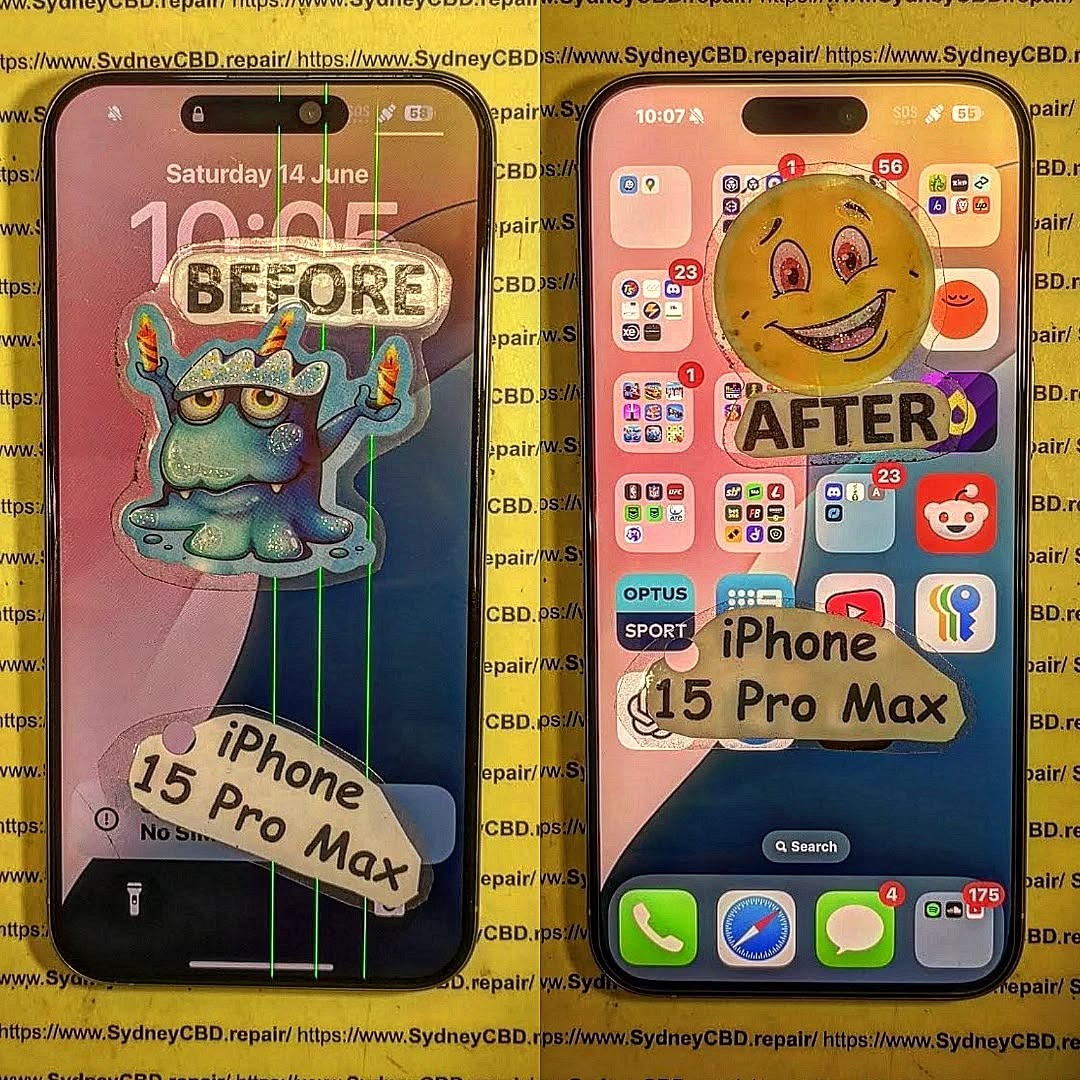
💥 Cracked Screen Replacement
Signs You Need a Screen Replacement:
Visible cracks
Ghost touch or no touch response
Dead pixels or black spots
Flickering display
At Sydney CBD Repair Centre, we use original OLED panels to ensure your screen retains its high brightness and colour accuracy. The replacement typically takes under 1 hour, and all screen repairs include a 90-day warranty.
Pro Tip: Avoid third-party aftermarket LCDs—they degrade camera quality and reduce battery life.
Our Solution:
We offer genuine battery replacements that maintain full compatibility with iOS and battery health reporting. Same-day service is available with no data loss.
⚡ USB-C Charging Port Repair
Apple’s switch to USB-C on the iPhone 15 Pro Max is a big change, but port damage can still occur.
Signs of Port Failure:
Phone not charging unless cable is adjusted
Accessory not supported error
Dirt or lint preventing full connection
Fix It at Sydney CBD Repair Centre:
We’ll diagnose whether it’s a port obstruction or a hardware fault. Our technicians safely clean or replace USB-C ports using ESD-safe tools and genuine parts.
📸 Camera & Face ID Repairs
Rear Camera Issues:
Blurry images or shaky videos
Camera app freezing
Unable to focus
Face ID Not Working?
This could be due to:
Drop damage
Screen replacement with incompatible parts
Flex cable damage
Our repairs maintain TrueDepth sensor functionality and original Face ID calibration—something only expert repair centres like us can guarantee.
💧 Water Damage Treatment
Despite being rated IP68, the iPhone 15 Pro Max isn’t fully waterproof. Water damage can lead to:
Motherboard corrosion
Display or speaker failure
Charging port oxidation
What We Do:
We perform professional ultrasonic cleaning and diagnostics to salvage your device and replace damaged components. Success rates are high if the device is brought in quickly.
🧠 Software & Logic Board Repairs
If your iPhone is stuck in a boot loop or showing error messages like “Unable to Activate”, this could indicate:
Software corruption
NAND storage issues
Logic board damage
Advanced Micro-Soldering Repairs:
We perform micro-soldering to repair faulty logic board connections or replace tiny IC chips—something most general repair shops can’t handle.
🕓 Turnaround Times
Repair Type
Average Time
Screen Replacement
30–60 minutes
Battery Replacement
30 minutes
Charging Port Repair
1–2 hours
Water Damage Diagnostics
24–48 hours
Camera & Face ID Repairs
1 hour
Board-Level Repair
1–3 days
🛡️ Why Choose Sydney CBD Repair Centre?
SydneyCBDrepairCentreTeam-854-553.jpg
✅ Same Day Express Repairs
✅ Genuine Apple-Compatible Parts
✅ 2000+ 5-Star Google Reviews
✅ Expert Technicians with 10+ Years Experience
✅ Located in the Heart of Sydney CBD
✅ Awarded 6 Times for Best Phone Repairs
We’re not your average repair shop. We offer transparency, speed, and reliability that’s hard to find elsewhere in Sydney.
🔎 FAQs
1. Do you use original Apple parts?
We use Apple-grade OEM components, which are functionally identical to the original. Your iPhone retains full performance and iOS compatibility.
2. Will my data be erased during the repair?
No! Most of our repairs, like screen and battery replacements, are non-invasive and keep your data intact.
3. How long does a screen replacement take?
Typically under 1 hour, depending on current queue and model availability.
4. Is your work covered by warranty?
Yes, all repairs come with a 90-day warranty covering parts and workmanship.
5. Can you fix water-damaged iPhones?
Yes! We have a very high success rate with water-damaged phones—especially if brought in within 24 hours.
6. Do I need an appointment?
Walk-ins are welcome! But you can also book online or call ahead for priority service.
🏁 Final Thoughts
The iPhone 15 Pro Max is a powerhouse, but when things go wrong, it’s crucial to trust your device with experts who understand its complexity.
Sydney CBD Repair Centre stands out with top-tier repairs, real Apple-grade parts, and thousands of satisfied customers. Whether it’s a simple screen swap or complex logic board fix, we’re ready to help.
📍 Visit Us Today!
Sydney CBD Repair Centre – Where Quality Meets Reliability
📞 Call: +61280114119
🌐 Website: https://SydneyCBD.repair/locate-us
📍 Address: Shop 2, 661 George St, Haymarket NSW 2000
🕘 Open Mon–Sat, 10AM–6PM
Thank you for using
Themify Popup
This is a sample pop up. Themify Builder or Builder Lite (free) plugin is recommended to design the pop up layouts.