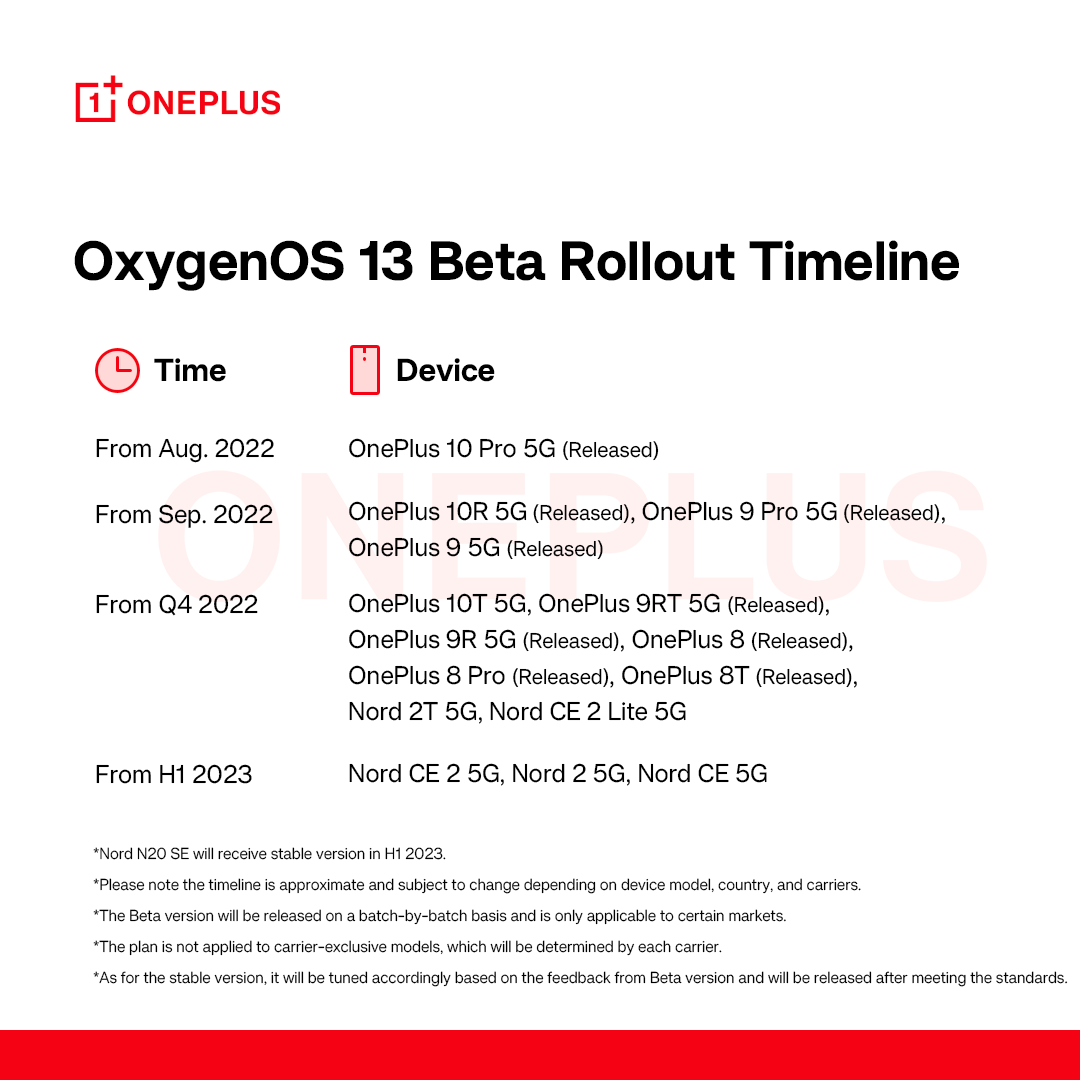
Android 13 is starting to expand past the beta stage on devices from Samsung, Vivo, and more after launching on Pixels earlier this year. OnePlus, though, is just now releasing a schedule for when to expect Android 13 on more devices, but only in its beta form.
So far, OnePlus has only released a “stable” version of Android 13 with OxygenOS 13 to a single device, the OnePlus 10 Pro. That was followed by open beta releases for theOnePlus 9 and 9 Pro, as well as theOnePlus 10R in September, and betas have also since been released for OnePlus 10T, OnePlus 8 series, and the OnePlus 9R/T.
Sometime in “Q4 2022,” OnePlus says the Android 13 beta will expand to the OnePlus Nord 2T 5G and the OnePlus Nord CE 2 Lite 5G. That’s all the brand says to expect through the end of 2022. From there, the first half of 2023 will see Android 13 beta releases for the OnePlus Nord CE 2 5G, Nord 2 5G, and Nord CE 5G. Note, of course, this is only talking about the beta releases, not the stable release.
OnePlus does add that the OnePlus Nord N20 will see a stable Android 13 release sometime in the first half of 2023 as well.
With this schedule, OnePlus also doubly confirms that devices from the OnePlus 7 series are seemingly not getting Android 13, which lines up with the brand’s stance of only promising two major Android updates to its flagships.
In a time where Samsung is providing a stable Android 13 update just two months behind Google and has active beta programs ongoing for both its flagship and budget models, it’s rough to see OnePlus making slow progress like this. OnePlus and Oppo touted “faster and smoother” updates as a benefit that users would enjoy as the two brands merged closer together, but it’s certainly not reflected in this schedule. Rather, we’re just seeing more ColorOS on OnePlus devices.
OxygenOS 13 and ColorOS 13 share more than a few similarities – they are effectively the same OS masquerading as different “versions.” Toss in Realme UI 4.0 and it’s an inconvenient truth that BBK appears unwilling to own up to.
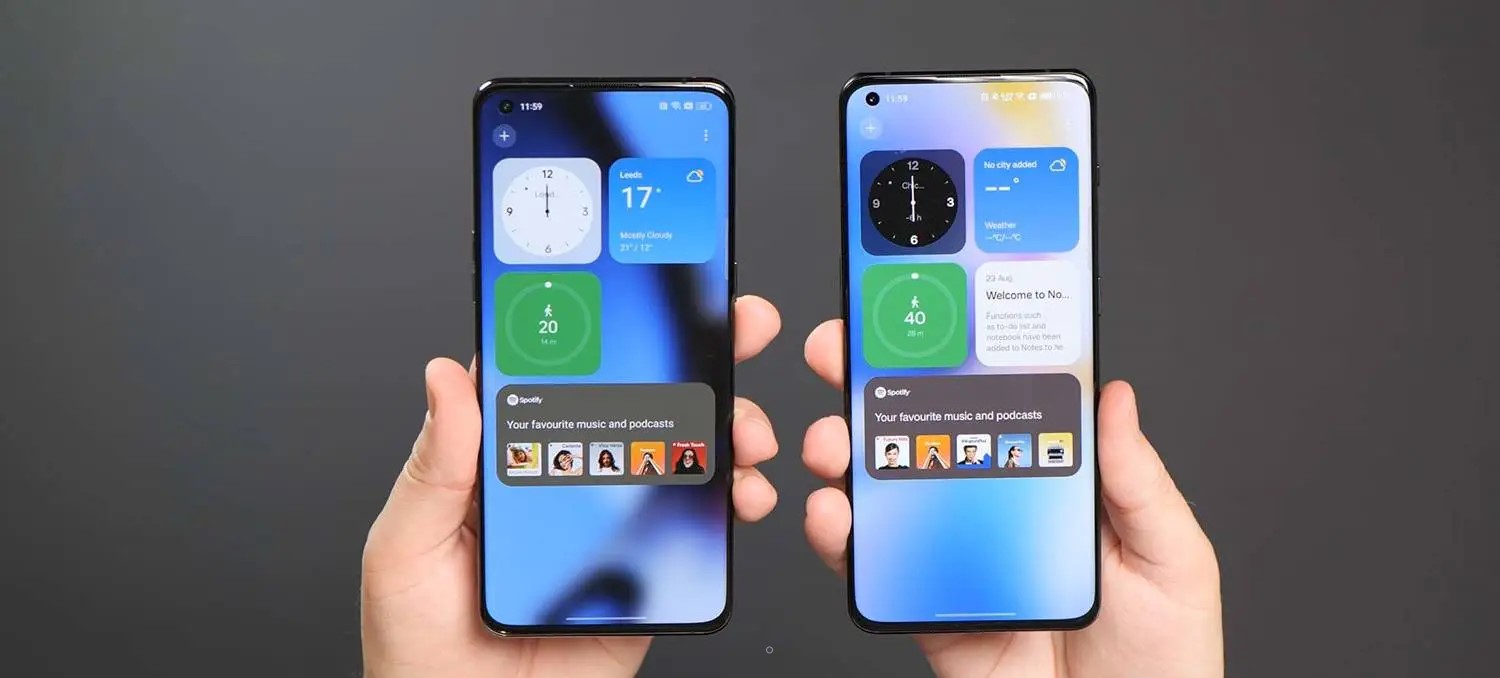
Given that Pete Lau claimed OxygenOS and ColorOS’s unified platform was set to be walked back, it’s all the more frustrating as we once lauded the former as the “best Android experience.” It’s amazing to see how much times have changed the industry’s disrupter. Some might say that this has been inevitable. None of this is more apparent when using ColorOS 13 and OxygenOS 13 side-by-side.
Sharing components and hardware production pipelines is one thing, but for many, the crux of why they still continued to persevere with OnePlus was OxygenOS. Just what is in store? Here’s everything you need to know – the good and the bad.
Merging all in Android 13
We saw the first steps of the merger between ColorOS and OxygenOS with the Android 12 update. It’s even more pronounced this time around, to the point that it’s actively hard to tell the two Android skins apart. The similarities are so pronounced that it’s almost easier to point out the minor changes than what is the same.
Notification center
There are big changes right away in the pull-down Notification center in OxygenOS and ColorOS 13. It is eerily reminiscent of the Android 11 Developer Preview 1 whereby the media controls were tested inside the Quick Settings panel alongside common toggles. You can certainly see some iOS influences, but the addition of the Android 12 Wi-Fi and Bluetooth pill-style toggles are an important alteration.
It’s hard to argue that this does limit utility and does so at the expense of some identity. With many Chinese OEMs doing similar things, it’s a tad disappointing to see the simple Quick Settings panel and Notification center removed in favor of this iOS-lite combination.
Settings page changes
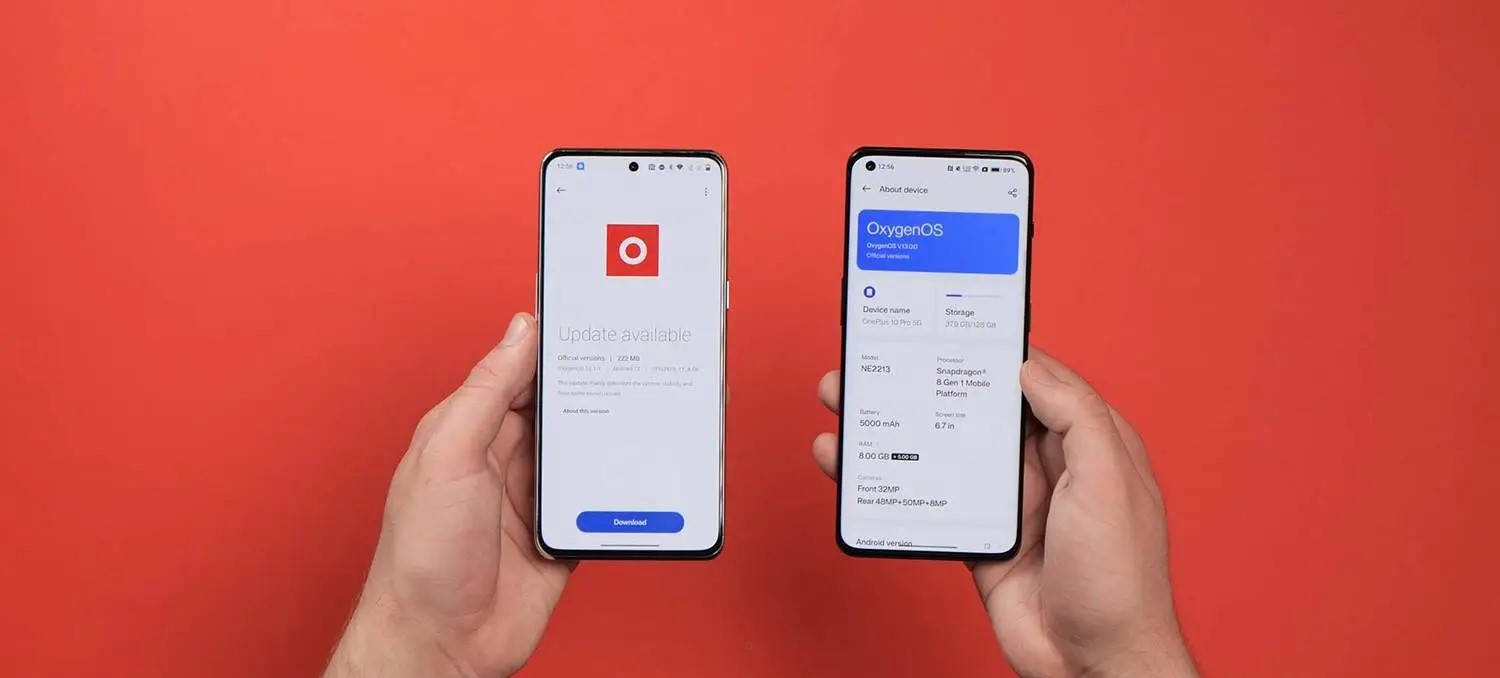
A number of changes have been made in the Settings menu and a number of associated submenus so that OxygenOS 13 is even more like ColorOS 13. You can see it instantly from the injection of color to the Settings sectional icons. There are other changes such as to the About phone screen, which is now identical on both devices including the “share” button to send or post your device specs to apps and other services.
If you’re in any doubt about whether the changes are fully merged across, even the SystemUI icon within the processes and battery section now has the same icon in OxygenOS and ColorOS 13 based upon Oppo’s system icon design.
AOD features
For years we hoped that OnePlus would add Always-on display support and finally it was introduced with OxygenOS 11 and Android 11. Since then, the feature has evolved, and to be fair to OnePlus the implementation has been solid overall.
A case in point is the brand-new Spotify widget for the Always-on display. Spotify is pushed like a banner ad within the Shelf section here too, which some might find intrusive. However, if you do use the music streaming service, you can enable a new widget that will appear when the Always-on display function is active. It’s a neat integration but is artificially limited. We’d like to see it come to more streaming and media services or just have a generic option available.
Because so much of the software is now bleeding into ColorOS, one-time exclusive Canvas AOD functions are now available to Oppo phones. Even the exclusive Parsons School of Design “Insight” feature is now part and parcel of ColorOS 13. Many of the widgets and customization options are set to be made available to Oppo and OnePlus owners.
Homescreen changes
A number of changes have been made to the homescreen including to how things look and operate, but, again, everything is visible across both versions of OxygenOS 13 and ColorOS 13. One of the most notable changes that feels like it has been lifted right out of Nothing OS is the ability to enlarge any homescreen folders for easier access.
ColorOS 13’s “Aquamorphic” icon style is available here too, which is another indication of the merging visual identities. Google’s themed icons have also made the jump over to ColorOS and OxygenOS for the first time. System apps and any supported Google apps will adhere to your preset system wallpaper colors. This relies upon greater support for Dynamic color with wallpaper-based theming available more extensively via the “Wallpaper & style” app in the Settings section.
This works in a similar manner to the Color palette feature in One UI. You can select from some preset basic color swatches with previews of just how certain menus and app controls will look. It’s nothing new, it’s just tuned here again in Android 13. Even the new wallpaper selection in OxygenOS 13 and ColorOS 13 have similarities. The stock selection feels like a copycat without the effort being made to hide it.
Global device search is in the works for the App drawer in both versions of Android 13. This looks like it is going to work in a similar manner to how Pixel devices offer the search functions when swiping up from the homescreen. It’s not fully functional or doesn’t appear to be at this stage, but this is a good move regardless.
Shelf alterations
The OnePlus Shelf function has jumped over to ColorOS for the first time in Android 13. This is one of the few features alongside Zen Mode and Work-Life Balance that has survived the UI overhaul. You can still activate by swiping down at the homescreen but it’s here in ColorOS 13 for the first time.
There is no ability to add toggles or on-device storage data with a limited selection of widgets including a Step tracker, Weather data, Notes, Clock, Photos, and Spotify control tab. Sadly, it looks like the ability to choose a right corner swipe gesture to access this quick panel has also been fully removed as you can only toggle via a homescreen swipe down here in Android 13 in ColorOS 13 and OxygenOS 13.
O-haptics
OnePlus and Oppo are among the best on Android when it comes to haptic feedback. The O-haptic feature has been available for a little while but joined OxygenOS 12.1 and ColorOS 12.1 when the Find X5 Pro launched. With Android 13, it’s likely coming to even more OnePlus and Oppo devices. This lets you tune the haptic intensity and how vibrations “feel” when active.
Charging animations
For years OnePlus and Oppo have remained adamant that Warp Charge and SuperVOOC charging utilized different technology despite evidence to the contrary. Now even the charging animation is identical across OxygenOS and ColorOS. It’s pretty nice too, but the “SuperVOOC” branding is now more prominent after bleeding into OnePlus devices over the past 18 months.
Removal of OnePlus identity
You could very easily argue that the OnePlus identity is slowly being airbrushed out of existence, and there are a few key areas where that is evident here in the Android 13 beta. Of course, changes could be simply due to the fact that ColorOS and OxygenOS 13 are still in the early preview phase. We’re not quite as convinced given the bulk of changes over the past couple of years. Even so, here’s a few key areas you’ll notice the watering down of the OxygenOS branding:
No Never Settle in Shelf
The useful Shelf feature has evolved over time to include many new tweaks and functions, but you’ll spot right away that the iconic “Never Settle” tagline and branding has been wiped from the pulldown section. ColorOS 13 has added the Shelf feature to add yet more confusion. It looks and functions in the same way.
Lack of 1+ calculator easter egg
Another removal in the OxygenOS 13 beta is the popular calculator easter egg. For those unaware, you can launch the stock calculator app and enter “1+” then tap “=” to reveal an animated “Never Settle” logo in the output box. Attempting to do this in the latest OxygenOS beta does nothing.
OxygenOS logo removed in Settings
In the Settings menu, there is no more room for the traditional OxygenOS logo that has been used for a number of years. You’ll usually find this by heading to Settings > About phone > Software version. While Oppo’s ColorOS logo is emblazoned within the same pane on Find X5 Pro, it’s curiously missing on the OnePlus 10 Pro. This could be a simple oversight within the Android 13 preview, given that the animated OxygenOS logo remains in place upon device startup.
Final thoughts
Oppo and OnePlus need to stop this charade of trying to claim that ColorOS and OxygenOS are different builds. While there may be under-the-hood differences, at least functionally the two are now identical. Some of the identity of OnePlus has been sacrificed and for hardened fans, the lack of transparency is not only frustrating, but it’s also insulting.
It’s exacerbated as OxygenOS 13 and ColorOS 13 are, in fact, absolutely fine. In fact, ColorOS has come a long way in recent years. It was once quite poor and now it’s very good in its own right. Oppo’s third-party Android skin can stand on its own with a number of impressive features, well-organized sections, and genuinely useful changes.
A bigger problem with this update choice is that the OnePlus of years gone by could almost sell devices courtesy of the clean, lightweight version of OxygenOS that offered a genuine alternative to the Google Pixel series.Things deteriorated over the past few years and any individuality has been ripped from the brand. Fans will be disappointed, and we’re saddened too. It almost makes it hard to recommend that you go out and buy a OnePlus phone, because, from Android 13 onwards, you’re buying an Oppo phone in all but name.
With Android 13 on the horizon, OnePlus is now finally offering OnePlus 7 and OnePlus 7T series owners the opportunity to install Android 12 with the launch of the OxygenOS 12 Open Beta.
Announced in twoseparate posts on the OnePlus Forums, OxygenOS 12 Open Beta 1 can now be sideloaded on OnePlus 7/ OnePlus 7 Pro and OnePlus 7T/ OnePlus 7T Pro units. The divisive update certainly bears a striking resemblance to Oppo’s ColorOS, that is despite protestations from OnePlus that the “unified platform” will not be coming after all.
Aesthetically, you’d be hard-pressed to tell the difference between OxygenOS 12 on OnePlus 7 series devices and ColorOS or Realme UI on Oppo and Realme devices. However, a new software update is important and Android 12 offers a number of improvements to the core OS that will undoubtedly improve the daily experience you’ll have with a OnePlus 7 or OnePlus 7T series handset.
One caveat is that to install OxygenOS 12 Open Beta 1 on your OnePlus 7, OnePlus 7 Pro, OnePlus 7T, or OnePlus 7T Pro you will need to already be running OxygenOS 11.0.71 or 11.0.8.1 before proceeding. These builds contain prerequisites that are not contained within the OxygenOS 12 Open Beta ZIP files that are required for Android 12 to run correctly.
Both builds for the 7 and 7T series contain the June 2022 security patch, which means you’re up-to-date — at least for now. You can check out the full changelog below:
System
Newly added Smart Battery Engine, a feature that prolongs your battery life based on smart algorithms and biomimetic self-restoration technology
Redesigns app icons using new materials to give more depth and a greater sense of space and texture to the icons
Revamps the page layout based on the principle of reducing visual noise and optimizes the presentation of text and color to make key information stand out
Optimized desktop icons with improved textures, by using a design inspired by brand-new materials and uniting lights and layers
Optimized spam block rules: Adds a rule for blocking MMS messages
Games
Newly added the HyperBoost end-to-end frame rate stabilizer
Newly added Voice effect preview to allow you to record your voice effect or check your voice effect in real time
Dark mode
Dark mode now supports three adjustable levels, bringing a more personalized and comfortable user experience
Shelf
New additional style options for Cards, making data contents more visual and easier to read
Newly added access to OnePlus Scout in Shelf, allowing you to search multiple contents on your phone, including Apps, Settings, Media Data, etc
Work Life Balance
Work Life Balance feature is now available to all users, allowing you to effortlessly switch between Work and Life mode via quick settings
WLB 2.0 now supports automatic Work/Life mode switching, based on specific locations, Wi-Fi network, and time, also bringing customized App notification profiles according to the personalization
Gallery
Gallery now allows you to switch between different layouts with a two-finger pinch gesture, intelligently recognizing the best-quality pictures, and cropping the thumbnail based on the content, making the gallery layout more pleasing
Canvas AOD
Canvas AOD brings you new diverse styles of lines and colors, for a more personalized lock screen experience with inspiring visuals
Newly added multiple brushes and strokes and support for color adjustment
Optimized software algorithm and improved face recognition to better identify the features and skin color of different figures
Accessibility
Optimized categorization of functions by grouping them into vision, hearing, interactive actions, and general
TalkBack supports more system apps including Photos, Phone, Mail, and Calendar
Of course, before attempting to install, ensure you have at least 30% battery remaining and 4GB of onboard storage free. This process should not wipe any personal data on your device, but we would highly recommend backing up any important files and photos before joining the beta program. Downgrading or rolling back to Android 11 will cause you to lose device data if you are not happy with OxygenOS 12 and Android 12 on your OnePlus 7 or OnePlus 7T series handset.
After officially launching almost two months ago the Android 12-based LineageOS 19 is expanding to more handsets once again. This time those with the OnePlus 9 and 9 Pro alongside the Xiaomi Poco X3 Pro and budget Mi A1 can now flash LineageOS 19 on their devices (h/t XDA). For those with the latter Xiaomi handsets, this is the most recent software build that you can access and might provide a more consistent update path moving forward.
While Android 12 is already available for the OnePlus 9 series and Poco X3 Pro, the Mi A1 shipped with Android One and has only been officially updated as far as Android 9 Pie. As mentioned, this might be a way to extend the lifespan of your devices given that support for older handsets from the likes of Xiaomi and OnePlus can be sporadic or limited at best.
It’s also important to note that LineageOS 19 is actually based upon Android 12.1/12L, a build that is not yet officially available for the OnePlus 9, 9 Pro, and Poco X3 Pro. That means that if you truly want the latest and greatest version of Android on your smartphone, LineageOS 19 might provide you with that option.
Should you want to flash LineageOS 19 on your device, you can find build/device links with specific device installation instructions:
Google apps do not come pre-installed with LineageOS builds. You will, therefore, need to flash a GApps package to retain access to the Play Store and important Google apps and services. Luckily, there is a solid guide from the team behind the ROM that you can refer to here.
OnePlus promises to deliver regular system updates for its wide array of smartphones for at least two years and in some cases much longer for flagship models, but how is the April 2022 security update being handled?
OnePlus April 2022 security update — What’s new?
At the start of April, Google added the security patch as the fifth post-Android 12 update for all eligible Pixel devices after the previous addition of a substantial Feature Drop and version 12.1/12L upgrade. This OTA included a number of new tweaks to improve the experience on larger displays while simultaneously tuning the base Android 12 experience for devices.
Moving forward, this will be the basis for third-party OEM builds, but it’s still unclear when OnePlus phones will see it. It might be enveloped into the full Android 13 release at some point in future. Unlike Samsung, OnePlus is not quite as fast out of the blocks when it comes to Android updates. It took until April 20 before the latest security patch arrived on eligible handsets.
Late March saw the release of the OnePlus 10 Pro, which is likely to be given priority for future patches. That said, the OnePlus 9 and 9 Pro have been supported very well since launch given that updates are often served on a bimonthly basis.
At this point in time, the April 2022 security patch has only arrived on a few OnePlus devices, but we expect that to change over the coming days and weeks. The April 2022 security update for OnePlus devices patches the DirtyPipe exploit, as this predominantly affected Google Pixel and Samsung Galaxy smartphones.
OnePlus devices with the April 2022 update
OnePlus 9 series
Although superseded by the recent OnePlus 10 Pro, the OnePlus 9 and 9 Pro are running a newer security patch courtesy of the OxygenOS C.48 update. This patch includes some system stability improvements and the latest patch but very little else.
OnePlus 7T series
Although almost identical to the OnePlus 7 Pro with very similar internals and external design, the OxygenOS 11.0.7.1 update is now available for the OnePlus 7T and 7T Pro. This patch includes the April 2022 security update and some general software stability improvements for the OnePlus duo.
OnePlus 7 series
Bearing the same build number as the April patch for OnePlus7T series devices, the OxygenOS 11.0.7.1 OTA is now rolling out for the OnePlus 7 and 7 Pro. Much like the OnePlus 7T patch, this update includes very little beyond the April security update.
OnePlus Nord series
The first device to actually get the latest April patch was, in fact, the OnePlus Nord 2. This upgraded follow-up to the original Nord is starting to see OxygenOS A.20, which includes the April 2022 security patch and some other tweaks as part of the update.
OxygenOS 11.0.6 is now rolling out for the most affordable Nord series handset. The Nord N100 might not be a powerful or “stacked” smartphone but it is getting the April security patch (via XDA). The update should be rolling out over the coming days to eligible handsets.
Devices still awaiting the April patch
While we’re seeing a very small pool of devices get the latest patch, a larger selection of the OnePlus hardware lineup is still updated with older 2022 security patches — with all devices noted below. As patches are often served on a bi-monthly cadence, you may see some devices skipped ahead of a wider rollout of an upcoming patch.
It’s also important to note that OnePlus has officially confirmed that the 6 and 6T series will no longer be updated or supported over the coming months. The 2018 flagship duo received a surprise update in mid-November and now will only be supported via third-party unofficial means moving forward.
OnePlus 10 series
OnePlus 10 Pro (March 2022 patch)
OnePlus 9 series
OnePlus 9 (March 2022 patch)
OnePlus 9 Pro (March 2022 patch)
OnePlus 9R (November 2021 patch)
OnePlus 9RT (March 2022 patch)
OnePlus 8 series
OnePlus 8 (February 2022 patch)
OnePlus 8 Pro (February 2022 patch)
OnePlus 8T (February 2022 patch)
OnePlus 7 series
OnePlus 7 (February 2022 patch)
OnePlus 7 Pro (February 2022 patch)
OnePlus 7T (February 2022 patch)
OnePlus 7T Pro (February 2022 patch)
OnePlus Nord series
OnePlus Nord (March 2022 patch)
OnePlus Nord CE (March 2022 patch)
OnePlus Nord 2 (December 2021 patch)
OnePlus Nord CE 2 (March 2022 patch)
OnePlus Nord N10 5G (March 2022 patch)
OnePlus Nord N100 (February 2022 patch)
OnePlus Nord N200 5G (March 2022 patch)
How can I get the April 2022 security patch on my OnePlus device?
OnePlus has a habit of rolling out updates for devices in a staged manner. That means that the initial release and subsequent confirmation on the OnePlus Forums don’t always indicate when you’ll be able to grab an OTA file and get your device updated/patched.
Our advice is to use a third-party application to get updates in a timely manner. The community-run Oxygen Updater allows you to sideload official update .zip files as soon as they are available publicly. While this will ensure you get updates right away, if you encounter problems, you may need to revert to an older build. This may require a device reset if problems are major.
OnePlus‘ new lineup consists of its two flagship models: the OnePlus 9 and OnePlus 9 Pro. With these devices, OnePlus establishes a new position with competing OEMs as it snags the Hasselblad camera brand in a new partnership to help it further develop OnePlus’ camera prowess. OnePlus is using the tagline “Your best shot”, so let’s see what all the fuss is about.
You may be asking exactly how Hasselblad was involved in the development of the OnePlus 9’s cameras. As per OnePlus, Hasselblad has collaborated with the OEM to calibrate the cameras’ sensors and tune the color optics to behave as they would on high-end Hasselblad cameras – known for their accurate colors and image output in 16-bit RAW. While the OnePlus 9 can’t quite shoot in 16-bit RAW, it does have the ability to do so in 12-bit color while using the camera’s Pro shooting mode.
In this review, we’re going to focus on the (slightly) smaller of the two. The OnePlus 9 does skip out on some of the features that are exclusive to the 9 Pro – which has extra camera features, a more premium display, and support for OnePlus new 50W wireless charger. Storage is now updated to UFS 3.1 for faster read/write speeds, as well.
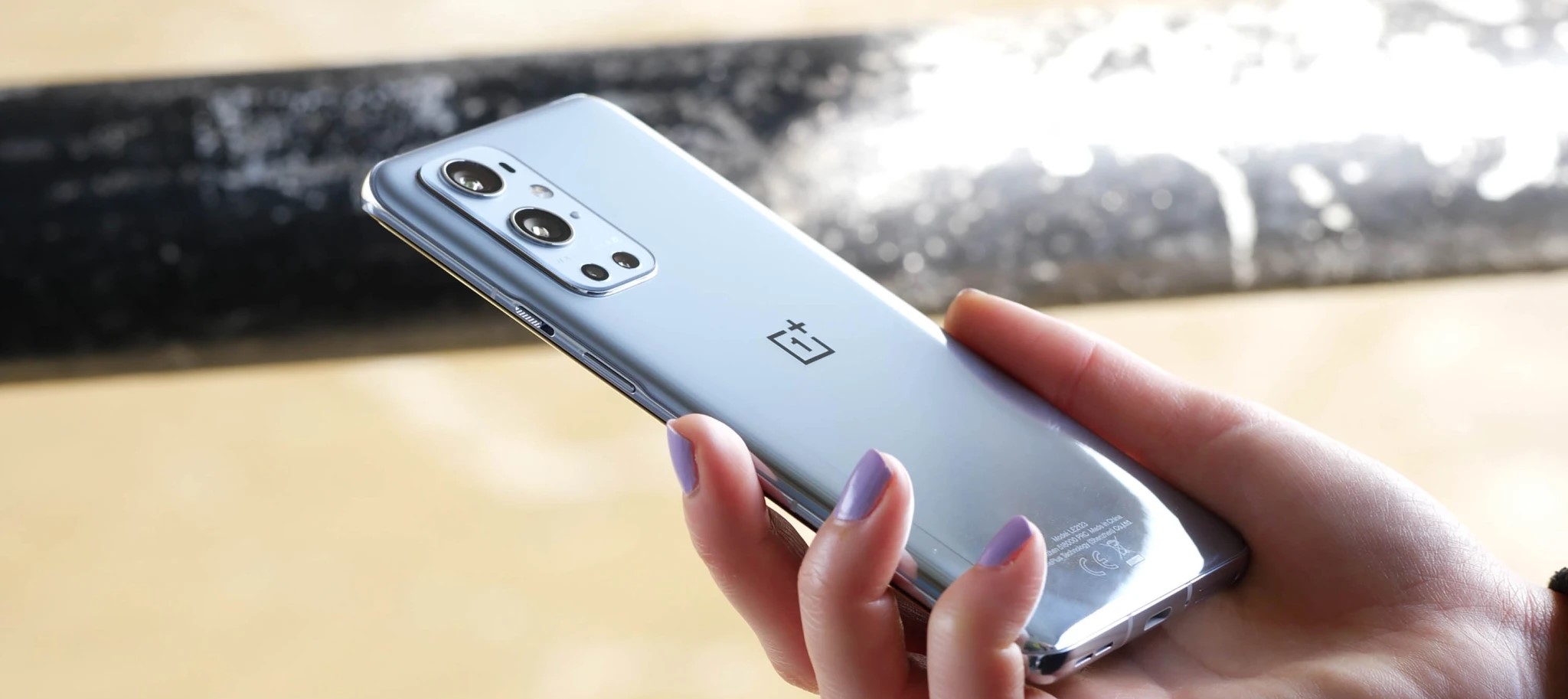
The look and feel of the OnePlus 9‘s design do not deviate far from its predecessor. The OnePlus 9 keeps the flat display and the new plastic frame could fool anyone into thinking it was metal. Don’t worry though, the front and back panes are still made of Gorilla Glass. The punch-hole camera cutout remains in the same spot for now, and the main camera cluster gets a new arrangement.
Coming from the OnePlus 8, the 9 gets updated wired charging, updated camera modules, support for 120Hz refresh rate, and now supports bi-directional wireless charging, though only in select markets. The more obvious updates include the Snapdragon 888 5G Mobile Platform, and a bump in battery capacity.
OnePlus 9 specs at a glance:
Body: 160.0×73.9×8.1mm, 183g; Glass front (Gorilla Glass), glass back (Gorilla Glass), plastic frame.
The OnePlus 9 now shares the same dual-cell battery setup that debuted on the OnePlus 8T. This means that the 9 supports OnePlus’ Warp Charge 65T. This tech quickly charges two smaller batteries that work in tandem and a full charge of the batteries’ combined 4,500 mAh capacity is promised in about half an hour.
The camera module has been updated to the Sony IMX689 – the same sensor from the OnePlus 8 Pro. The difference here is that this one is tuned with Hasselblad’s likeness. The ultrawide module is a significant upgrade. This is a large 50MP sensor that beefs up the performance of the ultrawide camera in low-light photography and when shooting video. It also has a fancy new lens that drastically minimizes distortion normally observed on ultrawide cameras – we’re excited to test it out.
Let’s dig into the OnePlus 9 and see what experience the entry-level OnePlus flagship has to offer. Let’s start with the contents of the phone’s packaging.
Unboxing
The OnePlus packaging has become a standard fare and the OnePlus 9 is no exception. Inside the now familiar red box is the phone at the top layer, followed by some paperwork, a silicone case in some markets, the 65W Warp Charge power adapter, and the usual red Type-C to Type-C USB 2.0 cable.
Unlike the opaque silicone case that comes with the 9 Pro, the OnePlus 8 silicone case is clear. We’re not sure why OnePlus chooses to omit this accessory in some markets and decides to leave it elsewhere. There will be aftermarket cases, obviously, along with some first-party options from OnePlus.
As usual, there are no audio accessories inside the package. Not even an audio adapter.
The competition
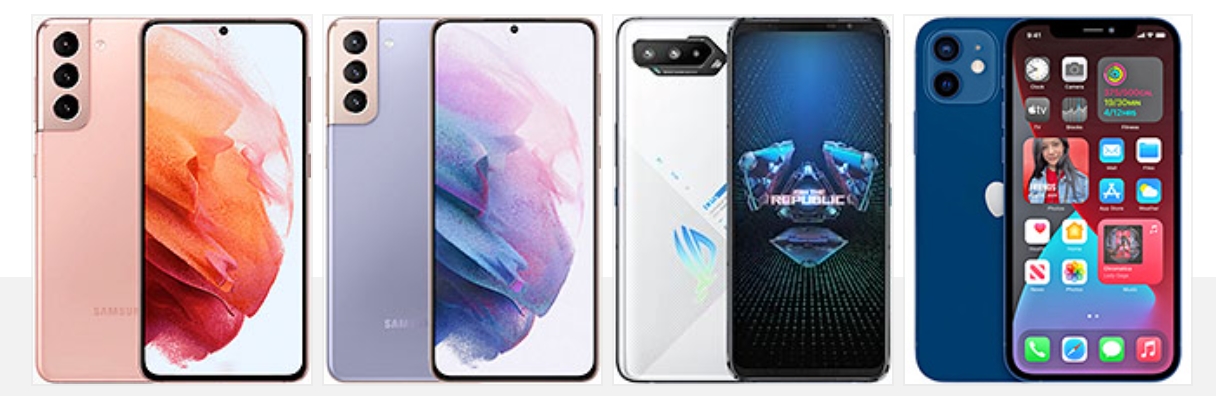
The OnePlus 9 starts at $729, which is a fairly serious price tag that gets it some fairly serious competition. For starters, it’s more expensive than the Samsung Galaxy S21, which starts at $699 but can occasionally be found for a lower price. Probably the most underrated of the three new S21 phones, the standard S21 is still a great smartphone whose only real flaw is perhaps opting for a plastic back in a market full of glass phones.
But if that’s a real deal-breaker to you or if you just want something larger, then there’s the S21+, which goes for $799 or at times even $749. The S21+ is a fully-featured smartphone that leaves very little on the table and has the performance to match the price tag. Samsung may even throw in an accessory or two in some regions or offer a discount on them if you pick this up, which makes the deal even sweeter.
The newly launched ASUS ROG Phone 5 is also a tough competitor in this segment. ASUS has not just chosen to pack this phone with as many features as possible but also opted for an aggressive pricing at around the same price as the OnePlus 9. While clearly marketed as a gaming phone (and it’s a damn good at that), the ROG Phone 5 is also a fairly complete package, with respectable performance in nearly every area.
If you’re looking for something a bit different, then maybe you’d want to consider the Apple iPhone 12. Possibly the best value iPhone in a while, the standard iPhone 12 manages to pack great design and build quality, a high quality display, best in class performance, a high quality set of cameras, easy to use software with unparalleled software and game library, legendary customer support and a high resale value to boot. The iPhone 12 will also be appealing to those who are looking for a more compact smartphone but for those who want something even smaller, there’s the $100 cheaper iPhone 12 mini as well, which does basically everything the iPhone 12 does in a smaller size. Yes, the 60Hz display aren’t exactly modern and the lack of any kind of charger in the box may be frustrating to some but as a complete package, the iPhone 12 is still hard to beat.
Verdict
From being the hero of its own story to becoming the sidekick, the non-Pro line of OnePlus phones has had a tragic demotion over the years. We first saw this with the OnePlus 7 and two years later, not much has changed.
It’s clear the Pro device is going to get all the best stuff moving forward but at times it feels like OnePlus swings the cripple hammer too hard on the non-Pro mode. A plastic frame, no certified ingress protection, lower resolution display from last year’s model, no telephoto camera and downgraded main sensor, no 4K 120fps recording, no OIS, and no wireless charging outside of NA and Europe.
As reviewers, it’s hard to get excited about the OnePlus 9. Just as it was hard to get excited about the OnePlus 8 and the OnePlus 7. As a phone, it’s perfectly adequate and for the most part it’s quite nice to use. But at $729 starting price, it’s supposed to be nice. The brakes on the OnePlus price hike train stopped working years ago and the company clearly has no plans on slowing down. So then why are things being taken away instead of being added?
We can’t decipher these mixed signals. If the OnePlus 9 is available in your region at a reasonable price, then it is a reasonable phone to pick up. But if OnePlus wants to play the price hike game, it will have to do better than this.
Pros
Good display performance
Relatively clean software and great UI performance
Powerful loudspeakers
Good performance from the main wide and ultra-wide cameras
Fast charging
Cons
Plastic frame
No official IP rating
No OIS
No dedicated telephoto camera
Outdated front camera
Hasselblad partnership mostly a marketing gimmick
Monochrome camera is useless
No wireless charging outside of NA and Europe
Worse battery life performance than previous models
OxygenOS 11.0.10.10 is now rolling out for the OnePlus 8 and OnePlus 8 Pro without Android 12 but with a host of fixes for the former flagship duo alongside the December 2021 security patch.
While owners await the full, stable release of Android 12 with OxygenOS 12 on their OnePlus 8 series devices, the Chinese firm has pushed a new update that resolves a few lingering problems affecting Android 11 on the duo. Confirmed over on the official OnePlus Forums, for those hoping for an expanded changelog, it’s fairly light on major details.
OxygenOS 11.0.10.10 most notably adds the December 2021 security patch, some display UI and Settings interface tweaks, fixes an issue with the Google Assistant, and resolves some minor WhatsApp crashes. All in all, it’s a nice little bonus before the end of 2021, but still not quite Android 12 that many would have hoped for. You can check out the full changelog below:
OxygenOS 11.0.10.10 for OnePlus 8/8 Pro update changelog
System
Optimized the UI display of Settings interface
Fixed the issue that Google Assistant and Gpay doesn’t display as expected in the Setup Wizard
Fixed the low probability issue of WhatsApp crash
Updated Android security patch to 2021.12
The OxygenOS 11.0.10.10 OTA update has started rolling out but comes in a few flavors based upon the region you live in – as you can see below:
OnePlus 8
India: 11.0.10.10.IN21DA
Europe: 11.0.10.10.IN21BA
Global: 11.0.10.10.IN21AA
OnePlus 8 Pro
India: 11.0.10.10.IN11DA
Europe: 11.0.10.10.IN11BA
Global: 11.0.10.10.IN11AA
As is often the case with OnePlus updates, the actual OxygenOS 11.0.10.10 OTA file is heading out in an incremental fashion. You may be able to grab it and sideload on your device using Oxygen Updater though.
If you don’t have the Community app installed on your device, feel free to download it HERE. You can check here for more information on the integrated Feedback tool.
As always, this OTA will be incremental. The OTA will reach a small percentage of users today, and we’ll begin a broader rollout in a few days.
Your feedback is appreciated. We may not always be able to respond to every comment in the forums, but please be assured that we take your comments and feedback seriously. Hope you enjoy and let us know how you feel about the update in the comments below.
OnePlus looks to be working on yet another limited-edition device – this time a Pac-Man-themed version of the affordable Nord 2.
We’ve seen the Chinese firm produce a number of tie-in devices over the years including with cultural juggernaut Star Wars, high-end boutique designers and my personal favorite, the Cyberpunk 2077 OnePlus 8T. Sticking with gaming, OnePlus appears to have a limited Pac-Man Nord 2 in the works.
Evidence is mounting as code digging into the recent OxygenOS A.11 update for OnePlus Nord CE devices by the team behind the fantastic Oxygen Updater has unearthed some interesting tidbits (via XDA). After delving into the Settings APK file, the team behind Oxygen Updater uncovered a new fingerprint animation that features titular character Pac-Man chased by ghosts “Blinky” and “Inky” above a maze-styled lock icon.”
Several other code strings also include various references to stickers that can be unlocked after completing various tasks including charging this proposed Pac-Man OnePlus Nord 2 device for 256 minutes. This is a reference to the last level in the original arcade game — which is also the “kill screen” for the game.
Other hardware notables include wireless charging, which is missing on the Vanilla Nord 2. The MediaTek 1200-powered device could also receive a chipset change to the Qualcomm Snapdragon 778 according to other code-strings found in this initial report.
At first, none of this information really indicated a great deal in terms of new hardware. However, OnePlus tipster Max Jambor has since teased an image to indicate that this indeed could be a special edition or limited Nord 2 device with Pac-Man theming. Just why a Pac-Man edition of the device would be needed is anyone’s guess but if done well it could be a nice option.
Security updates are designed to keep Android devices as secure as possible, but you’re only as safe as your latest update. OnePlus does promise regular updates for its smartphones for at least two years, so let’s see how they’re handling the September 2021 security update.
OnePlus September 2021 security update — What’s new?
Google released the September security patch way back on September 7, but as is often the case nowadays, market leader Samsung started to see the update almost a week before it “officially” arrived on Android with the Pixel rollout. As a part of this month’s patch, Google issued a few key fixes, mostly of moderate severity — as is often the case.
Rightly criticized for update consistency, OnePlus started rolling out the September patch 11 days after Google, but a whopping 18 days after Samsung started updating almost all of its core device lineup. It’s worth noting that this is a bit of an improvement over the August patch update schedule, but it still feels as though OnePlus is letting things slip after a rally earlier in the year. While it’s very close to October, we’re still seeing a rollout to select devices.
Those devices that have already started to see the latest update have also been on the receiving end of a few new features. As is often the case, there’s no discernable pattern to the company’s additions. We’ve said for some time that the overreliance on the Open Beta path is something that OnePlus has to move away from. It’s worth noting that the OxygenOS Open Beta has ended for a few devices over the past few weeks ahead of Android 12 coming soon.
On OnePlus 9 and OnePlus 9 Pro, the September patch not only includes a number of common bug fixes including stability and device performance, but it also adds a brand-new XPan camera mode that was made famous by Hasselblad cameras. It’s unclear if this feature will ever come to other non-Hasselblad-certified devices from the firm, but it’s a neat new option for those with 2021’s flagship devices.
OnePlus devices with the September 2021 update
OnePlus 9 Series
OnePlus confirmed that we are unlikely to see a 9T model this year. This means that until the OnePlus 10 arrives, the 9 series will be more prominent — and hopefully gain greater software support. As the flagship series, the OnePlus 9 and 9 Pro were the first from the Chinese OEM to gain access to the September 2021 security patch.
This has arrived in a couple of flavors. Firstly, it is available as part of the OxygenOS 11.2.9.9 update. As we have mentioned, this includes a number of substantial camera tweaks and the new XPan camera mode. For those happy to run what amounts to pre-release software, the recent Android 12 Developer Preview 2 for the OnePlus 9 and 9 Pro also comes with the latest September 2021 security patch. However, it isn’t mentioned in the changelog, but we can confirm that it is included as part of this update.
Although an India exclusive device, the OnePlus 9R is also able to grab the latest security patch with OxygenOS 11.2.5.5. This patch includes a number of tweaks and fixes for some problems many owners saw with app crashes, and even problems with Warp Charge not activated correctly.
OnePlus 6 Series
Now approaching four years old, the oldest OnePlus devices in the entire lineup still receiving support now have access to the September 2021 security patch. It’s hard to be massively critical of OnePlus for this particularly update, especially as many other devices from a similar time period — save some Samsung flagships — have ceased being supported.
The OxygenOS 11.1.1.1 patch does not bring any new features, but does add some important software fixes and tuning to ensure your device runs smoothly. Plus on top of that, you have the September patch to protect your OnePlus 6 series handset.
Devices still awaiting the September patch
While we’re seeing a relatively small pool of devices get the latest patch, a larger selection of the OnePlus hardware lineup is now running the outdated August 2021 security patch. We’re not entirely sure if or when we could see the devices updated, but we are hoping that they are patched soon.
OnePlus 8 series
OnePlus 8
OnePlus 8 Pro
OnePlus 8T
OnePlus 7 series
OnePlus 7
OnePlus 7 Pro
OnePlus 7T
OnePlus 7T Pro
OnePlus Nord series
OnePlus Nord
OnePlus Nord CE
OnePlus Nord N100
OnePlus Nord N10 5G
OnePlus Nord 2
How can I get the September 2021 security patch on my OnePlus device?
OnePlus has a habit of rolling out updates for devices in a staged manner. That means that the initial release and subsequent confirmation on the OnePlus Forums doesn’t always indicate when you’ll be able to grab an OTA file and get your device updated/patched.
Our advice is to use a third-party application to get updates in a timely manner. The community-run Oxygen Updater allows you to sideload official update .zip files as soon as they are available publicly. While this will ensure you get updates right away, if you encounter problems, you may need to revert to an older build. This may require a device reset if problems are major.
OnePlus usually pushes out Oxygen OS updates to the OnePlus 8 Pro and One Plus 8 together, but availability may be affected by variant, carrier, and region.
Current stable version: Android 11
When will the OnePlus 8 series get Android 12? Early to mid-2022 (Estimated)
Latest OnePlus 8 Pro and OnePlus 8 updates
August 17, 2021: Oxygen OS 11.0.8.8 is a bumper update for the OnePlus 8 and 8 Pro. The patch brings a lengthy changelog, including a host of new features for the always-on display. Bitmoji AOD now features, while there’s now also a new screenshot feature for the display, too.
OnePlus is also adding its Store app to the devices, while camera fixes and navigation gesture tweaks are also incoming. Finally, the August 2021 Android security patch is the cherry on top.
See the full changelog below.
System
Newly adapted OnePlus Buds Pro and brought new powerful features
Newly added the screenshot feature for AOD
Fixed the failed issue of Navigation gestures in some scenes
Improved system stability and fixed known issues
Updated Android security patch to 2021.08
Camera
Optimized the portrait mode effect of the front camera
OnePlus Store
An intuitive and convenient way to manage your OnePlus account, get easy-to-access support, discover exciting members-only benefits, and shop for OnePlus products. (Please note that it can be uninstalled)
Ambient Display
Newly added Bitmoji AOD, co-designed with Snapchat, which will liven up the ambient display with your personal Bitmoji avatar. Your avatar will update throughout the day based on your activity and things happening around you (Path: Settings > Customization > Clock on ambient display > Bitmoji)
The update is available to users in Europe first, but will disseminate to India and North America “soon.”
As always, this update will be rolled out via OTA incrementally. Don’t be too concerned if you haven’t yet received it. To check if an update is available, head to Settings > System > System updates on your device.
Previous OnePlus 8 Pro and OnePlus 8 updates
June 9, 2021: Oxygen OS 11.0.7.7 brought fixes to the devices’ camera, specifically addressing the 48MP sensor’s shutter button issues. The June 2021 Android security patch was also included.
May 26, 2021: Oxygen OS 11.0.6.6 is now rolling out to the OnePlus 8 Pro and OnePlus 8. The patch brings improvements to the 8 Pro’s wireless charging experience, a number of bug fixes to both devices, and the May 2021 Android security patch. Also included are fixes to Gallery, Phone, and Messages bugs.
April 22, 2021: The ninth Oxygen OS 11 beta build rolled out to the OnePlus 8 and 8 Pro. Open Beta 9 included a lengthy changelog that mainly touched on system improvements. It also brought the April 2021 Android security patch.
March 29, 2021: Oxygen OS 11.0.5.5 failed to bring any new features to the OnePlus 8 Pro or 8, but did iron out several system bugs. The March 2021 Android security patch arrived in tow.
March 22, 2021: OnePlus started disseminating the eighth Oxygen OS 11 open beta build for the OnePlus 8 and 8 Pro. Alongside the March 2021 Android security patch, the beta update also brought a number of fixes for the system, camera, and other aspects of the OnePlus 8 and 8 Pro.
February 27, 2021: OnePlus rolled out the seventh Oxygen OS 11 open beta build for the OnePlus 8 and 8 Pro. It added the February security patch to the phones and fixed several system issues.
February 3, 2021: The sixth Oxygen OS 11 open beta brought a lengthy changelog, which included the Android Security Patch for January 2021, and a host of tweaks to Weather, Shelf, and Gaming Space apps.
December 22, 2020: OnePlus pushed out the fifth open beta update, bringing Rewind Recording for Game Space, selfie camera animation tweaks, and addressing a Bluetooth call bug. It also brought the December 2020 security patch to the table.