Samsung Galaxy: How to take screenshots with the Galaxy S9
Except Bixby, the new Samsung Galaxy S9 and S9+ will now enable you to take screenshots of your smartphone screen with new tricks you might not know about just yet.
Use Bixby
If you’re a super sleek and an advanced tech person, you just use Bixby to make a quick screenshot with your Galaxy S9.
Just say “Hi, Bixby”.
Then say, “Take a Screenshot”.
Done!
Use Edge Panel
The edge panel trick in your Galaxy S9 and S9+ will enable you to take oval or rectangle screenshots that you can then customize into a great-looking GIF ready for sharing on your messaging apps.
Activate Edge Panels by going to Settings > Display > Edge screen > Edge panels.
Go to the screen you want to capture.
Open the Edge panel and slide until you find the Smart select section.
Select from Rectangle, Oval or animation.
And finally, select the area of the screen you want to turn into a GIF or take a screenshot of.
Use Smart Capture
With Smart Capture, you can extend your usual one screen piece screen photo into a rolling screenshot. This is perfect for long web pages or conversation threads that you want to share or document.
Go to the screen you want to take a screenshot of.
Use anyof the above two methods to capture a screenshot.
Once you take a screenshot, tap on Scroll capture(previously “capture more”) from the options that will show up at the bottom of the screen.
Keep tapping the Scroll capture button to keep going down the page until you are done.
Use Swipe Gestures
Swipe gestures is by far the fastest and easiest one to use among all the choices with your new Galaxy S9. You just Swipe your screen from right to left while in contact with the screen and you’re done.
Activate gestures first by going to Settings > Advanced features.
Enable Palm swipe to capture.
Go to the screen that you want to take a screenshot of.
Now swipe the edge of your hand from right to left or left to right, horizontally. This edge-to-edge swipe gesture may take you a few tries to master.
Again, your phone will buzz a little and show you a quick animation to confirm the screenshot.
Use Key Combinations
The classic yet effective screenshot technique on all Galaxies before the Galaxy S9 and S9+, is the key combinations. This involves hardware keys like home, volume up and power button to get the job done.
Open the screen or app that you want to capture like inside an app or even at the home screen.
Press and hold Power and Volume Downkeys together.
Samsung Galaxy: 4 Screen Protectors for Samsung Galaxy S9
Your new Samsung Galaxy S9 deserves to go naked showcasing the fabulous glass and metal construction. However, drop it once and it’s gonna break on you. Here’s some protection you can use on your new Galaxy.
Spigen GLAS.tR Nano Liquid ($25)
Suitable for all touchscreens, Spigen’s Nano Liquid protection adds an extra oleophobic layer on top of the Galaxy S9 and S9+ Gorilla Glass 5 displays that serves against scratches, bumps, spills, and various other facts of life that may happen to your new and expensive handset. It’s very easy to apply, remains crystal clear, and, naturally, does not have the bubble-worry of the other film and glass solutions.
Olixar Invisible Protection ($10)
If you want something more affordable, and film-based, the Olixar Invisible Protection pack will fill that need until the Koreans from GPEL finally get around to release a Galaxy S9 edition of their famed film covers, at least.
The film has been custom cut for the Samsung Galaxy S9 and S9+, and keeps it clear, scratch- and dirt-free. It’s fairly easy to apply, though it won’t offer the same protection as the tempered glass ones, but is still way better than a naked Galaxy S9 cover glass, plus it’s a pretty good budget solution.
Whitestone Dome Glass ($52.49)
Noted the “ultraviolet baking” mention in the previous writeup? Well, that’s Whitestone’s Dome Glass we were referring to, with 9H hardness for utmost protection, 0.3mm thickness, and 100% touch sensitivity retention, and that is a big deal for Samsung’s edge-y phones of late.
Its liquid adhesive spills underneath the glass all the way to the rimless, colorless edges, as you can see in the video below, thus avoiding both touch issues on the sides, and the nasty reflections that most other tempered glass protectors for curved screen phones exhibit.
Granted, the Whitestone Dome does have to be baked with a lamp afterwards, but, hey, you will be doing something with your own hands in this day and age of digital complacency!
InvisibleShield Glass Curve Elite ($50)
Curved glass protectors are a pain to get right, and most of them, even from reputable brands, are a tradeoff when it comes to side touch functionality or aesthetics. Most of the curved shields so far suffered from the usual touch sensitivity problems due to the adhesive being used at the edges only, or a certain amount of unpleasant shine when adhesive was applied throughout.
Enter InvisibleShield’s new Glass Curve Elite series for handsets with flexible OLED displays that are sloping to the sides, such as the Galaxy S9 or S9+. The brand’s previous curved protector efforts were as good as anyone else’s, barring those that have to be installed using ultraviolet baking.
The Glass Curve Elite uses all new type of gel glue that eliminates both issues, and is arguably the toughest adhesive it has ever placed on a screen protector. For now, the new gel substance will be used only for Galaxy S-line, as these are the popular ones in dire need of curved protection for their expensive screens, but more models may be released down the road. The price? At $50 apiece for the Glass Curve Elite covering, it is the same price it charged for its previous sloping OLED display protection efforts.
Samsung Galaxy: How much is Samsung Galaxy S9 and S9 Plus
You like the Samsung Galaxy S9 and S9+. You want to buy it. You are surprised to find that it’s, as expected, more expensive than the Galaxy S8 from last year. But how much is it really?
SAMSUNG
The cheapest way to get an S9 is through Samsung itself. Additionally, you can get an unlocked phone instead of getting stuck with one carrier, and if you trade in a device for an extra discount, it looks like you’ll get that upfront, instead of distributed over time.
Galaxy S9 for $719.99 or $30 for 24 months
Galaxy S9 Plus for $839.99 or $35 for 24 months
BEST BUY
Best Buy has an interesting offer that may make it worth looking at for preorders tonight: it’s $100 off if you preorder through Verizon, AT&T, or Sprint on March 2nd only (unlocked phones don’t count, though). That’s a better deal than Samsung, assuming you’re quick enough to catch it. Plus, there are the usual trade-in offers, too, which will depend on how new your smartphone is.
AT&T
AT&T’s phones are a bit more expensive than picking one up from Samsung, but you’ll get the advantage of adding it to your existing AT&T bill (if that’s something you prefer), and there are some trade-in offers that can further lower your bill if you don’t mind getting rid of your old phone.
Galaxy S9 for $790.20 or $26.34 for 30 months
Galaxy S9 Plus for $915 or $30.50 for 30 months
VERIZON
Like AT&T, Verizon is more expensive than Samsung, but the trade in offers may sweeten the pot overall.
Galaxy S9 for $800 or $33.33 for 24 months
Galaxy S9 Plus for $930 or $38.74 for 24 months
T-MOBILE
T-Mobile is about the same as Samsung’s prices, but to take advantage of any trade-in offers means that you’re committing to some time with T-Mobile, as the discounts come in the form of bill credits.
Galaxy S9 for $30 for 24 months
Galaxy S9 Plus for $30 for 24 months plus a $120 down payment
SPRINT
Also more expensive than Samsung, but if Samsung is sold out and you really want a Sprint S9 on release day, it’s an option.
Samsung Galaxy: How good is the new Galaxy S9 to the Galaxy S8
Would you really upgrade after a year of owning a Galaxy S8 for the newer Galaxy S9? If you can afford it, then yes go ahead. But is it worth it?
Camera Differences
The camera on the Samsung Galaxy S8 is pretty awesome to start with. Nothing much room for improvement yet the new Samsung Galaxy S9 built upon the successful formula for an amazing camera. Although the Galaxy S9 sticks with a single sensor, it compensates by addin in dual-aperture capabilities.
The camera is Galaxy S9’s main marketing focus.
It has a single 12MP lens on the back, but it’s one with a variable aperture, meaning it can change between f/2.4, which is ideal for daylight scenes, and f/1.5, which is meant for low light shooting, providing more light, more detail and less noise. It’s the highest aperture ever found in a smartphone.
In fact, it apparently delivers 30% less noise than the 12MP camera on the Galaxy S8, which has a fixed aperture of f/1.7. The ISP (Image Signal Processor) in the S9 is also supposedly four times faster than the S8’s.
The Galaxy S9’s camera also improves on the S8’s with its slow motion shooting skills, as the S9 can shoot at up to 960fps, allowing for footage that’s four times slower than the Galaxy S8’s. It also offers more shooting modes, such as one which automatically starts recording in slow-mo when movement enters a focus point.
Price Difference
The new Samsung Galaxy S9, though a tad better than the S8, is bumped up in price. It costs £739 which is £50 more than the price of a brand new Galaxy S8 last year.
And that means that the early prices we’re seeing for Samsung Galaxy S9 deals on contract are way more expensive, too. Realistically, you’re looking at spending well over £1,000 for the two years if you want an upfront spend of anything less than £200.
Performance Difference
The Galaxy S9 offers the chance to create cartoon-based animated characters, and needs a bit more grunt to do that.
What chipset you get with either of these phones depends on where you are. In most of the world the Samsung Galaxy S9 has an octa-core Exynos 9810 chipset with four cores running at 2.7GHz and four at 1.7GHz.
But in the US it has an octa-core Snapdragon 845 chipset which can run at up to 2.8GHz. Both of these are brand new top of the range chips though and in both cases you get 4GB of RAM.
The Samsung Galaxy S8 meanwhile uses an octa-core Exynos 8895 chipset in most of the world, with four cores running at 2.3GHz and four running at 1.7GHz. In the US it uses the octa-core Snapdragon 835, which has four cores running at 2.35GHz and four at 1.9GHz.
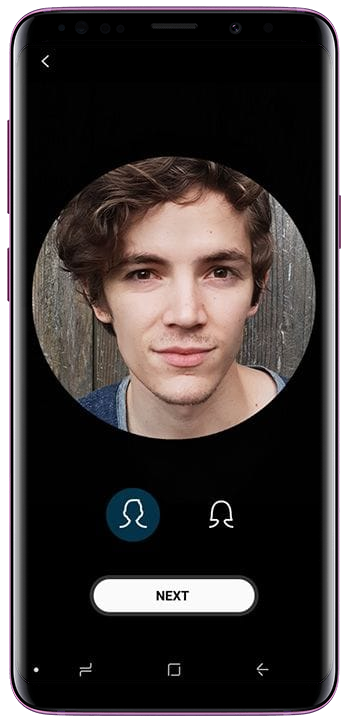
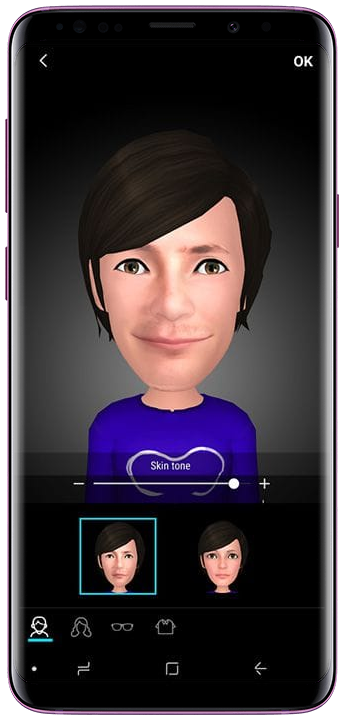
If you’ve followed up with the new Samsung Galaxy S9, one of the biggest selling point they’ve been pushing is AR Emoji. It’s an animated emoji based on your face. Here’s how you make your own.
Step 1
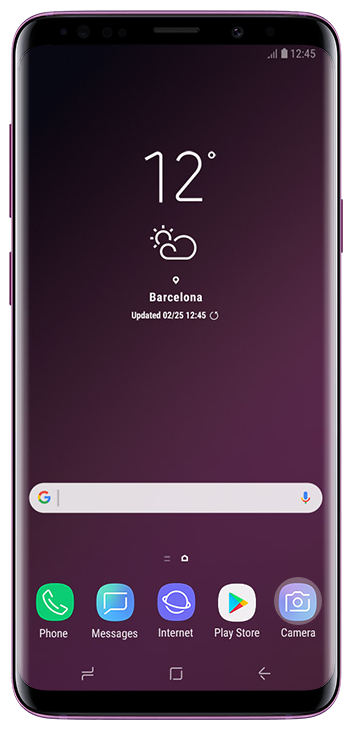
Open the Camera App. This is the app that comes default with your Samsung Galaxy S9 or S9+.
Your Samsung Galaxy S9 is a gorgeous sleek looking smartphone. There’ll come at times, however, that it’ll need protection. Here’s some accessories you can get ranging from thin, sleek silicones to utilitarian cover stands.
Clear View Standing Cover
Protect your whole phone while still being able to access the functions. You can reply to notifications and check your AOD easily through the clear cover, and it stays clear with fingerprint prevention coatings. While you’re watching a movie, fold the cover to prop up your phone for a comfortable view.
LED View Cover
You don’t need to see the screen to keep informed with the LED View Cover. It gives you easy to read notifications through the cover and allows you to choose personalized icons to add some fun to your alerts.
Alcantara Cover
Add a layer of premium protection to your new Galaxy S9 or S9+ with the Alcantara cover. A fabric that’s often seen inside luxury cars, the soft suede-like texture gives your phone a comfortable, easy grip while protecting it.
Protective Standing Cover
When you need heavy-duty protection that’s still stylish, this is the case for you. It’s been drop-tested and granted a military-grade rating. Plus you can prop it up with the detachable kickstand to watch at a comfortable landscape angle.
Hyperknit Cover
Put a sporty spin on your Galaxy S9 or S9+ with the Hyperknit cover. Made from the same material as your favorite sneakers, this lightweight fabric ensures a comfortable, easy grip without adding bulk to your phone. So you can hold on tight and slip it in your pocket when you’re done.
Silicone Cover
Soft and super smooth to the touch, the Silicone Cover enhances the wonderful grip of your Galaxy S9 or S9+. Available in several colors that complement the design, this is a case you’ll love to hold and see.
Hyperknit Cover
Put a sporty spin on your Galaxy S9 or S9+ with the Hyperknit cover. Made from the same material as your favorite sneakers, this lightweight fabric ensures a comfortable, easy grip without adding bulk to your phone. So you can hold on tight and slip it in your pocket when you’re done.
DeX Pad
All you need for a desktop-like experience is your Galaxy S9 or S9+, DeX Pad, and a monitor. It’s better than screen mirroring because DeX Pad allows you to use your phone as a touchpad. So you can quickly set up and check emails, surf the internet, and more on a full-size screen.
Wireless Charger Stand
When your battery’s low, the last thing you want is to fumble for a charging cable. Simply place your Galaxy S9 or S9+ onto the Wireless Charger Stand to power up. And you don’t even need to stop watching or texting, this stand holds your phone at a comfortable angle while it charges.
Wireless Charger Convertible
As beautiful as it is functional, the Wireless Charger Convertible is designed to be stunning when it’s not in use. Use it as a pad and set your phone down, or stand it up to keep your phone at an optimal viewing angle. Plus, it’s portable so you can easily bring it with you.
Battery Pack
When you’re on the go and there’s no outlet in sight, plug your Galaxy S9 or S9+ into this battery pack to give your phone a boost. It’s compact enough to slip into your pocket or purse but packs a powerful punch with the 5100mAh capacity.
Earphones tuned by AKG
Whatever the sound, you want to hear it clearly as if you were in the studio. The earphones tuned by AKG have an 11Φ Woofer and 8Φ Tweeter to produce crisp, vibrant audio. And with their ergonomic design that fits your ears better, you can comfortably tune out and jam on.
Samsung Galaxy: Different ways to unlock Samsung Galaxy S9
You can unlock your Galaxy S9 in many, many ways. With security and privacy being a top priority in every smartphone, Samsung has done a good job at giving redundancy in your security.
Iris Scanning is one new unlock feature that can’t easily be breached. Using the iris of your eyes, your Galaxy S9 will scan it and verify if it’s you who’s trying to access the phone. Although, not commonplace in all Android smartphones, Samsung has kept this feature in for it’s flagship device.
Pros: Very secure from hacking
Cons: Need to hold your smartphone parallel to your eyes
Face Unlock uses your face to unlock your Galaxy S9 and Galaxy S9+. This, in paper, sounds really great and bulletproof in terms of it’s ability to deter unauthorized access to your smartphone but it sometimes fail. One instance is when a photograph of you is used to unlock your device. Without a depth sensor like in the iPhone X, the Face Unlock will remain sub par in the new Galaxy.
Pros: Easy to use
Cons: Security concerning tricked lockscreens with the use of photos or masks, or a twin
Fingerprint has been around for many years now on every modern smartphone released. It has been proven to work flawlessly each and every time. It has since been improving together with enhanced processing power and upgraded hardware on the newer Galaxy S9.
Pros: Tested and proven to be secure and easy to use
Cons: Fingerprints can somehow be compromised by using copies of your fingerprints
Pattern. Remember this one? It’s not secure. People can see your pattern while you’re doing it. You can either make a few wrong tries then you’re locked out.
Pros: Easy to setup
Cons: Not secure and easy to hack
Password is good when you’re trying to login to your email account or your social media apps. But with a smartphone that you open every 5 minutes, the idea of entering a long, secure password seems time consuming and tedious. Short and fast passwords are insecure, so it’s out of the equation.
Pros: Easy to setup
Cons: Not that easy to use
PIN is also best left to your ATM machine yet when your fingerprint fails to read correctly, your PIN is the easiest secondary option to unlock your Samsung Galaxy S9.
Pros: Easy to use and PINs are easier to remember
Cons: Hacking is also easier due to lesser PIN characters to crack
Augmented Reality Emoji is a new feature for the Samsung Galaxy S9’s messaging platforms. You can take your own selfie and from that create a whole set of emojis completely customizable anytime you want.
1. AR Emojis
Augmented Reality with Samsung Galaxy S9 is taking AR to the next level. This time, to make it more appealing to the average consumer or the social media addict in us, they’ve incorporated it on AR emojis. It can turn your selfie into an emoji and watch your messaging come alive by having a version of you being used for conversations.
You can create an animated version of yourself that shows off your inner you.
Get your message across with an emoji that follows your movements and expressions.
2. Personalized Emoji
You can now show off your personal style. From hair to clothes, you can make your emoji look a lot like you—or who you want to be. 3. Animated AR Emoji
You can record videos with your emoji talking, singing, or whatever you feel like doing. Then share it with your friends.
Samsung Galaxy: What’s so special with the Galaxy S9 camera
This is the time when smartphone cameras may have reached peak performance, yet the new Samsung Galaxy S9 is still pushing innovations towards DSLR territory.
What makes the Samsung Galaxy S9’s camera special is not the bumped up resolution since a smartphone camera sensor could only cater for so much pixels. It’s the way it manages light that makes it stand out from the competitions like the Pixel or the iPhone.
1. Dual Aperture is a brand new feature that let’s the camera module take on two different apertures. This means that when it in extremely bright conditions, the Samsung Galaxy S9’s camera will use a smaller aperture (f2.4) to make a photo clearer yet not overexpose the image with so much light.
In low-light or dark conditions, it will use a wider aperture (f1.5) to let in more light to get the most out of the image. As a result, photos taken with this setting in dark places will appear less grainy yet retains the details that it should deliver to the sensor.
2. Super Slow-mo takes on an iPhone feature with a vengeance. This time, the Samsung Galaxy S9 can capture 960 frames a second of video that will slow down time with a very smooth playback once the video file is saved.
3. Instant Sharing of your super slow-mo has never been easier with the Samsung Galaxy S9’s built-in editor to create GIFs out of your Super Slow-mo videos. You can then immediately share it on your favorite social media app after choosing whether you want to reverse, forward or swing loop your desired video.
4. Slow-mo Lockscreen is when you get one slow-mo video from your gallery and use it as your lockscreen screensaver. It sounds gimmicky but you’ll love it when you’ve tried it.
5. Slow-mo Motion Detection is when you set an area of your touchscreen and once the Samsung Galaxy S9 camera sensor detects motion, it will automatically record a Super Slow-mo video without any help from you. Just set and capture.
Here is the official spec sheet for the Galaxy S9 and Galaxy S9+
Samsung has officially announced the Galaxy S9 and the Galaxy S9+ at a special event in Barcelona today. As confirmed by numerous leaks prior to the official announcement, the new devices mostly retain the same design language of its predecessors. The most noticeable design changes are at the back of the devices in the form of a repositioned fingerprint reader and a dual camera exclusive to the Galaxy S9+.
Galaxy S9 and S9+ bring major camera improvements
The Galaxy S9 series focuses mainly on camera improvements along with the usual incremental spec upgrades. The new cameras come equipped with a Super Speed Dual Pixel sensor that can combine up to 12 frames into one high-quality image. The Galaxy S9 series also boasts a dual aperture lens for improved low-light performance, Super Slow-mo video capabilities, and AR-powered Emoji.
The new devices have stereo speakers tuned by AKG and support Dalby Atmos surround sound. The Galaxy S9 and Galaxy S9+ are the first devices to come with the new SmartThings app that was announced at the CES 2018 in January. Samsung’s AI assistant Bixby is also improved with new AR tricks and live translation features.
As expected, the new devices also come with the usual spec upgrades. If you’re interested, you can find the official specifications of the S9 and S9+ in the table below. You can also check our hands-on impression of the new Galaxy flagships here. For more details on these phones’ specs, check out our devices section.
Update: We’ve added Samsung’s official image showing off the Galaxy S9’s specs.
Galaxy S9
Galaxy S9+
OS
Android 8 (Oreo)
Display
5.8-inch Quad HD + Curved Super AMOLED, 18.5:9,(529ppi)
6.2-inch Quad HD + Curved Super AMOLED, 18.5:97, 8 (570ppi)
Body
147.7mm x 68.7mm x 8.5mm, 163g, IP68
158.1mm x 73.8mm x 8.5mm, 189g, IP689
Camera
Rear: Super Speed Dual Pixel 12MP AF sensor with OIS (F1.5/F2.4)Front: 8MP AF (F1.7)
Rear: Dual Camera with Dual OISWide-angle: Super Speed Dual Pixel 12MP AF sensor (F1.5/F2.4)
Check out our pictures of the Galaxy S9 and Galaxy S9+
We’ve had the chance to play with the Galaxy S9 and Galaxy S9+ at the Mobile World Congress, and so have other publications, but it will be a while before the new flagships are seen in stores so regular folks can check them out in person. Yes, the wait can be excruciating, especially when the newly announced devices are as good as the Galaxy S9 and S9+, and pictures and hands-on videos are the closest one can get. We’ve seen a few requests for putting up more Galaxy S9 pictures, so that’s exactly what we’re doing with this article.
For those who haven’t been following our Galaxy S9 coverage, Samsung’s latest flagships are packed to the brim with impressive features. The S9 and S9+ sport a rear camera with a mechanically adjustable aperture for improved photography in both low-light and bright conditions (the S9+ also gets dual rear cameras), with support for slow-motion videos at 960 frames per second. You can use the AR Emoji feature to create emojis that look and emote like you, and last but not the least, the Galaxy S9 and S9+ also come with stereo speakers. The speakers are tuned by AKG and support Dolby Atmos for virtual 360-degree surround sound.
The technical specs include the new Exynos 9810 chip that’s a monster when it comes to benchmarks (the US and China variants will be powered by the Snapdragon 845), 6GB of RAM on the S9+, 64/128/256GB of expandable storage, Android 8.0 Oreo, IP68 water and dust resistance, and the same displays and batteries as the Galaxy S8 and S8+. Iris and facial recognition have been improved and can now be used together; the fingerprint sensor has been relocated below the rear camera and supports a new one-swipe gesture for registering fingerprints.
Our full review of the Galaxy S9 and S9+ will come in a few weeks; we’re trying to get it done by March 16, the official release date for the phones, so you can go in prepared if you’re thinking of buying either of the two handsets. Now, without further ado, go ahead and check out all the images of Samsung’s latest and greatest below!
Galaxy S9 and Galaxy S9+ pictures
T-Mobile’s Galaxy S9 unboxing video is literally out of this world
T-Mobile has a habit of posting unorthodox unboxing videos for Samsung’s flagship Galaxy S handsets every year and it has come through this year as well. We saw the company unbox the Galaxy S8 under water last year with its product expert @AskDes in a cage surrounded by sharks.
The Galaxy S9 unboxing video is literally out of this world as the company has sent @AskDes to the “moon” in order to unbox Samsung’s new flagship and even share some camera samples with us.
Galaxy S9 unboxing video
In case the premise wasn’t already clear to you, T-Mobile hasn’t really sent anyone to the real moon, it’s just part of a clever marketing ploy from the carrier every year to showcase Samsung’s new flagship device while also promoting its brand.
So Des is on the moon with the new flagships and this Galaxy S9 unboxing video shows precisely what’s going to ship with the handset inside its retail packaging. He also walks us through some of the core functionality of the Galaxy S9 and the Galaxy S9+ in this video.
This Galaxy S9 unboxing video itself is mildly amusing but it does offer you a glimpse inside the new flagship’s box. It’s going to be a while before proper unboxing videos of the Galaxy S9 and the Galaxy S9+ so this is your best bet for you to get a look inside the retail box.