




Micro Soldering Secrets Why Your Phone Charging Port Refuses To Accept Power

Micro Soldering Secrets: Why Your Phone Charging Port Refuses To Accept Power – 11 Powerful Repair Insights
Introduction
A phone that suddenly refuses to charge can feel like a disaster. One moment it works perfectly, and the next moment the battery icon stays frozen no matter how many chargers you try. In many cases, the problem goes deeper than a dirty charging port. That’s where micro soldering secrets become incredibly important.
Modern smartphones are miniature computers packed with ultra-small components. A damaged charging port often affects nearby circuits, charging ICs, filters, or motherboard traces. Because of this, standard repairs sometimes fail. Skilled technicians use advanced micro soldering techniques to restore damaged electrical pathways and bring dead devices back to life.
Whether you own an Apple Inc. iPhone, a Samsung Electronics Galaxy device, or a Google Pixel phone, understanding these hidden repair methods can help you make smarter decisions.
In this guide, you’ll discover why charging ports stop accepting power, how technicians diagnose motherboard-level issues, and why professional micro soldering repairs often save devices that seem beyond repair.
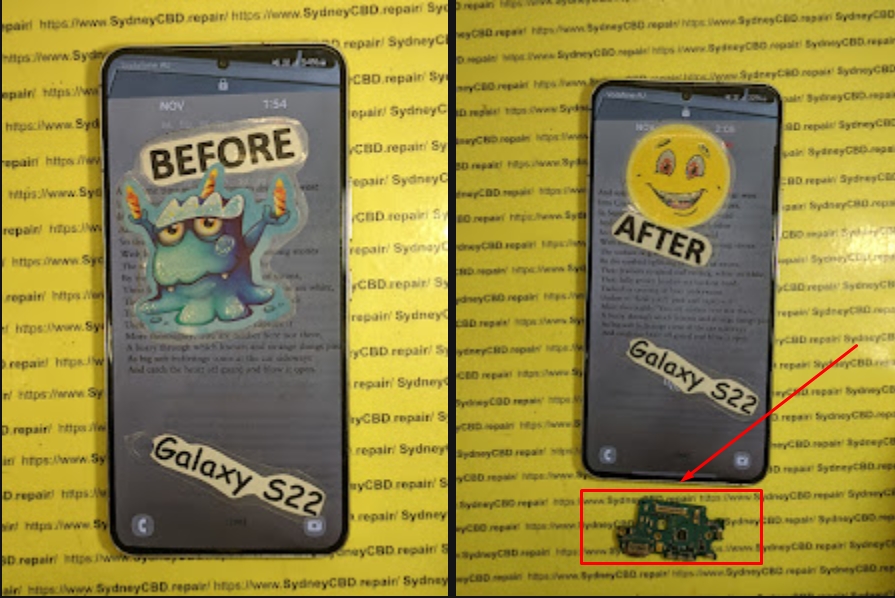
Understanding Why Charging Ports Fail
Charging ports go through tremendous stress every single day. Think about it. Most people plug and unplug their phones several times daily. Over time, this constant movement slowly weakens the internal structure.
The Role of Daily Wear and Tear
Repeated insertion of charging cables eventually loosens the metal contacts inside the port. Once these contacts bend or crack, electrical current can no longer flow correctly.
Common symptoms include:
- Charging only at certain angles
- Slow charging speeds
- Random charging disconnections
- “Accessory not supported” messages
- Complete charging failure
USB-C and Lightning connectors contain delicate pins that can wear out surprisingly fast if handled roughly.
How Moisture Damages Charging Components
Water exposure is another major reason charging ports fail. Even a small amount of moisture can corrode the tiny solder joints connecting the charging port to the motherboard.
Corrosion usually appears after:
- Rain exposure
- Humid environments
- Liquid spills
- Steam from bathrooms
- Saltwater exposure
Once corrosion spreads, the damage can extend beyond the charging port and affect power management circuits.


What Is Micro Soldering in Phone Repair?
Micro soldering is a specialized repair process involving tiny electronic components on a smartphone motherboard. Unlike basic repairs, micro soldering targets microscopic electrical faults.
Technicians work under powerful microscopes using precision soldering stations.
Why Modern Phones Need Precision Repairs
Today’s smartphones are more compact than ever. Manufacturers place charging chips, capacitors, and filters extremely close together. A single damaged component may stop the entire charging system from functioning.
Micro soldering helps repair:
- Broken charging circuits
- Damaged charging ICs
- Torn motherboard pads
- Shorted capacitors
- Corroded traces
- Burned connectors
Without micro soldering, many “dead” phones would simply be replaced.
Tools Used in Micro Soldering
Professional technicians use advanced tools, including:
| Tool | Purpose |
|---|---|
| Microscope | Magnifies tiny components |
| Hot air station | Removes soldered chips |
| Precision soldering iron | Repairs micro connections |
| Multimeter | Measures electrical flow |
| DC power supply | Tests motherboard power draw |
| Ultrasonic cleaner | Removes corrosion |
According to Sydney CBD Repair Centre, motherboard-level repair has become increasingly important because manufacturers now integrate more charging functions directly into the logic board.
Common Signs Your Charging Port Has Serious Damage

Not every charging issue means the battery is faulty. Often, the charging port itself is the real culprit.
Intermittent Charging Problems
Intermittent charging is one of the earliest warning signs. The device may charge briefly and then stop unexpectedly.
This usually indicates:
- Loose charging pins
- Cracked solder joints
- Damaged flex cables
- Internal connector wear
Many users mistakenly replace batteries first, wasting money before discovering the real issue.
Burnt Smell or Heat Around the Port
If your phone becomes unusually hot while charging, stop using it immediately.
Excess heat may indicate:
- Short circuits
- Burned charging ICs
- Electrical resistance
- Melted internal contacts
A burning smell often points to motherboard-level damage requiring micro soldering intervention.
Hidden Causes Behind Charging Failure
Some charging failures aren’t visible from the outside. In fact, many of the worst problems occur deep inside the motherboard.
Broken Charging IC
The charging integrated circuit controls how power flows into the phone. If this chip fails, your device may:
- Refuse to charge
- Restart repeatedly
- Overheat
- Show incorrect battery percentages
Replacing charging ICs requires advanced micro soldering skills because these chips contain extremely tiny solder balls underneath.
Corroded Motherboard Traces
Motherboard traces are microscopic copper pathways carrying electrical signals. Corrosion can eat through these traces, disconnecting critical charging circuits.
Technicians often rebuild damaged traces manually using jumper wires thinner than human hair.
Damaged USB-C Pins
USB-C connectors contain multiple communication pins responsible for:
- Fast charging
- Data transfer
- Voltage negotiation
Even one broken pin can stop charging completely.


Why Cheap Chargers Can Trigger Board Damage
Many users don’t realize that low-quality charging accessories can permanently damage their phones.
Voltage Spikes Explained
Cheap chargers often fail to regulate voltage properly. Sudden spikes can destroy sensitive charging circuits instantly.
Modern smartphones expect precise voltage ranges. If the incoming power fluctuates excessively, charging ICs may burn out.
The Dangers of Fake Charging Accessories
Counterfeit cables and adapters commonly cause:
- Overheating
- Battery swelling
- Connector damage
- Short circuits
- Slow charging
- Random shutdowns
Certified accessories provide safer power delivery and better long-term reliability.
Step-By-Step Diagnostic Process Used by Experts
Professional repair shops follow a structured process before performing micro soldering repairs.
Visual Inspection
Technicians first inspect the charging port under magnification.
They look for:
- Bent pins
- Corrosion
- Debris buildup
- Burn marks
- Torn pads
Sometimes the issue is simple dirt accumulation rather than component failure.
Power Consumption Testing
A DC power supply helps measure how the phone behaves electrically.
For example:
| Reading | Possible Meaning |
|---|---|
| No current draw | Broken power path |
| Excessive current draw | Short circuit |
| Fluctuating current | Damaged charging IC |
This process identifies faults without guessing.
Microscope-Level Analysis
Under high magnification, technicians can detect tiny fractures invisible to the naked eye.
This stage often reveals:
- Cracked solder joints
- Missing components
- Corrosion damage
- Lifted pads
Micro soldering repairs become much more precise after detailed analysis.
How Micro Soldering Restores Charging Function
Micro soldering isn’t just about replacing parts. It’s about restoring the phone’s electrical integrity.
Rebuilding Broken Pads
When charging ports are ripped off aggressively, motherboard pads can tear away completely.
Technicians carefully reconstruct these damaged points using:
- Micro jumper wires
- UV solder masks
- Precision solder techniques
This process restores electrical continuity.
Replacing Charging Chips
Charging chips often fail after power surges or liquid damage.
Replacement involves:
- Heating the motherboard carefully
- Removing the damaged chip
- Cleaning old solder
- Reballing or replacing components
- Testing voltage flow
Experienced technicians must avoid overheating nearby components during this process.
Can You Repair a Charging Port at Home?
DIY phone repair videos make micro soldering look easy. In reality, it’s one of the most difficult electronics repair skills.
DIY Risks Most Users Ignore
Home repair attempts frequently cause:
- Torn motherboard pads
- Melted connectors
- Short circuits
- Permanent data loss
Without professional equipment, even minor mistakes can destroy the motherboard.
When to Seek Professional Help
You should seek expert repair if:
- Your phone won’t detect chargers
- The port feels loose
- Charging stops randomly
- Water exposure occurred
- The device overheats during charging
Professional diagnosis prevents unnecessary part replacements.
Preventing Future Charging Port Problems
Fortunately, many charging issues are preventable with proper habits.
Proper Cable Handling
Avoid pulling cables sideways while charging. This creates stress on internal solder joints.
Good habits include:
- Unplugging gently
- Using certified cables
- Avoiding cheap adapters
- Preventing cable tension
Small habits greatly extend charging port lifespan.
Cleaning Your Charging Port Safely
Pocket lint commonly blocks charging pins.
Safe cleaning methods include:
- Soft anti-static brushes
- Compressed air
- Wooden toothpicks
Never use metal objects because they can short internal pins.


Why Professional Repair Saves Money
Many people assume replacing a phone is easier than repairing it. However, professional micro soldering often costs far less than buying a new device.
Repair vs Replacement Cost
Consider the financial difference:
| Option | Typical Cost |
|---|---|
| New flagship phone | Very expensive |
| Charging port replacement | Moderate |
| Micro soldering repair | Often affordable |
Repairing the motherboard also preserves important personal data.
Protecting Your Data
A dead charging system can block access to:
- Family photos
- Business files
- Banking apps
- Two-factor authentication
- Contacts
Successful micro soldering repairs often recover devices long enough for full data backup.
Frequently Asked Questions
Can a charging port be repaired without replacing the motherboard?
Yes. Many charging failures only require micro soldering repairs or charging port replacement rather than full motherboard replacement.
How long does micro soldering repair take?
Most repairs take several hours to one business day depending on component availability and damage severity.
Is micro soldering safe for my phone?
When performed by experienced technicians, micro soldering is generally safe and highly effective.
Why does my phone only charge at certain angles?
This usually indicates worn charging pins, cracked solder joints, or internal connector damage.
Can water damage affect charging even months later?
Yes. Corrosion can slowly spread over time and eventually interrupt charging circuits.
Are wireless charging issues related to charging ports?
Sometimes. Certain motherboard power circuits manage both wired and wireless charging systems.
Should I use aftermarket chargers?
High-quality certified chargers are usually safe. Extremely cheap chargers may damage sensitive power circuits.
Can charging IC damage drain the battery quickly?
Yes. Faulty charging chips can cause abnormal power consumption and battery drain.
Conclusion

Understanding the hidden world of micro soldering secrets explains why some phones refuse to accept power even after basic repairs. Charging problems often go far beyond dirt or worn connectors. In many cases, the real issue lies deep within microscopic motherboard components.
Professional micro soldering technicians diagnose faults using microscopes, thermal tools, electrical testing equipment, and years of experience. Their ability to repair charging circuits, rebuild damaged traces, and replace failed ICs can save phones that appear completely dead.
Most importantly, timely repair prevents further motherboard damage and protects valuable personal data. Instead of immediately replacing your device, seeking expert diagnosis may offer a faster and more affordable solution.
For reliable information about repairability and device maintenance, resources like Sydney CBD Repair Centre provide additional educational support for smartphone users worldwide.
David from Sydney CBD Repair Centre – The Best place to fix mobile phones as 7 Years In A Row! Top Mobile Phone Repair In Sydney. More than 2000 Positive Reviews on Google and Same Day Repairs.
We take pride in delivering exceptional repair services for all major phone brands including Apple, Samsung, Google, and more. Our expert technicians use only genuine parts and offer 90days warranty on repairs. Located in the heart of Sydney CBD, we’re your one-stop solution for all mobile device repairs.
Our commitment to excellence has earned us the trust of thousands of satisfied customers. Whether it’s a cracked screen, battery replacement, or water damage repair, we handle it all with professional care and expertise. Walk in today and experience why we’re Sydney’s #1 choice for mobile phone repairs.
Visit us for:
✓ Same Day Express Repairs
✓ Genuine Parts Guarantee
✓ Professional Technicians
✓ Competitive Pricing
✓ 2000+ 5-Star Google Reviews
✓ 7-Time Award Winner for Best Phone Repairs
Sydney CBD Repair Centre – Where Quality Meets Reliability.
Call : +61280114119
Website: Sydney CBD Repair Centre

