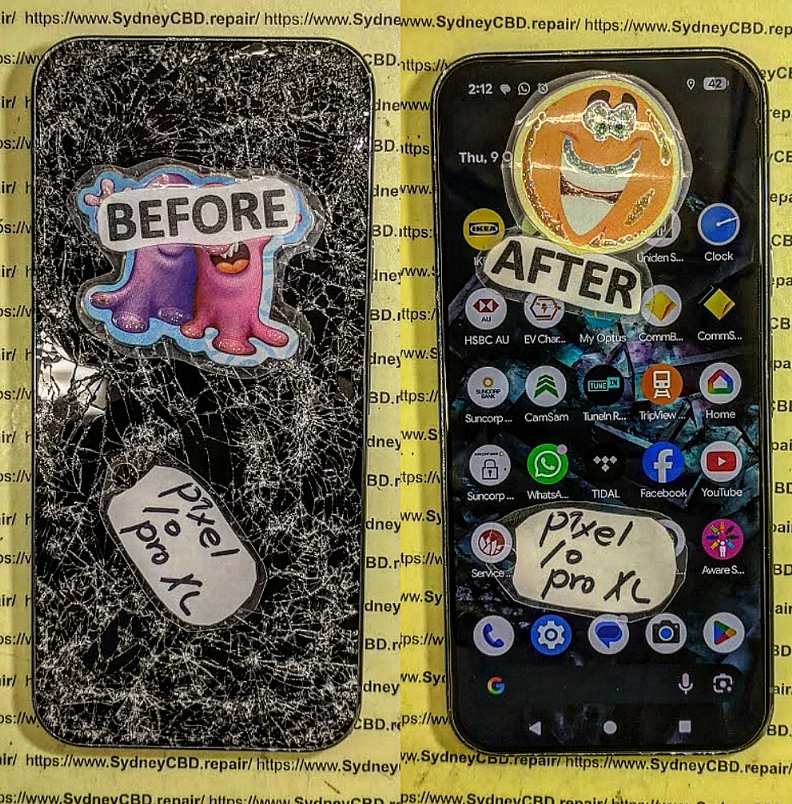
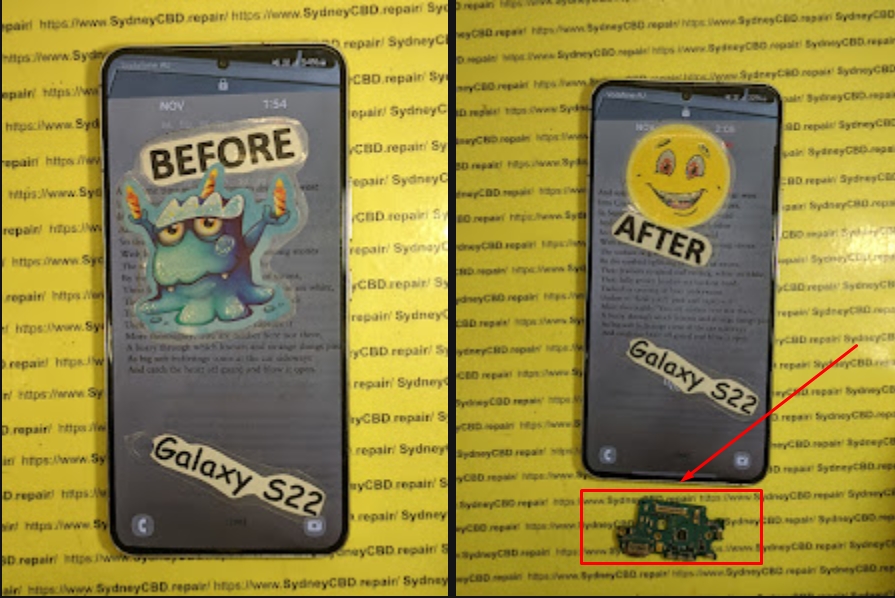
Beyond screen repair: Reviving dead charging ports across all major brands – The Ultimate 7-Step Repair Guide
Understanding Charging Port Repair and Why It Matters
Charging port repair is one of the most requested mobile phone services worldwide, and honestly, it’s not hard to see why. Your phone might have a flawless screen and a long-lasting battery, but without a working charging port, it’s basically a paperweight. Charging port repair restores the lifeline between your device and its power source, bringing dead phones back to life.
A charging port repair issue often starts small. At first, the cable needs to be wiggled. Then charging becomes painfully slow. Eventually, the device stops charging altogether. Because this problem sneaks up gradually, many users delay professional charging port repair until the phone is completely unusable.
From an E-E-A-T perspective, experienced technicians see these issues daily. At Sydney CBD Repair Centre, charging port repair isn’t guesswork—it’s a precise process refined over thousands of successful repairs. This expertise ensures safety, reliability, and long-term performance, which DIY fixes simply can’t guarantee.
You’d be surprised how much debris fits into a charging port. Pocket lint is the number one silent killer. Over time, compressed lint blocks the connection between the cable and the charging pins. Many charging port repair jobs begin with a professional clean, saving customers money and stress.
Liquid Damage and Corrosion
Water damage doesn’t always kill a phone instantly. Moisture seeps into the charging port, causing corrosion that worsens over time. Even small exposure—like rain or humidity—can trigger the need for charging port repair weeks later. According to Apple’s own guidelines on liquid exposure , corrosion can compromise internal connectors long after the device dries.
Wear and Tear from Daily Use
Charging ports are mechanical components. Plugging and unplugging cables multiple times a day causes gradual loosening. Eventually, internal pins bend or break, making charging port repair unavoidable.
Apple devices are known for precision engineering, which means charging port repair requires skill and the right tools. iPhone charging ports are often integrated with microphones or antenna flex cables. A proper charging port repair ensures all functions work perfectly, not just charging.
Samsung Charging Port Repair
Samsung charging port repair varies by model. Some devices use daughterboards, while others require micro-soldering. Professional technicians understand these differences, ensuring safe and efficient charging port repair without risking data loss.
Google Pixel and Other Android Brands
Google Pixel charging port repair often involves USB-C modules that demand careful calibration. Brands like OPPO, Xiaomi, and Huawei each have unique designs, reinforcing why experienced hands matter when performing charging port repair.
Diagnosing Charging Port Problems Like a Pro
Symptoms You Shouldn’t Ignore
If your phone only charges at a certain angle, stops charging randomly, or overheats while plugged in, these are red flags. Early charging port repair can prevent secondary damage to the battery or motherboard.
Professional Diagnostic Tools
Certified repair centres use multimeters, microscopes, and current readers to pinpoint faults. This level of diagnosis ensures charging port repair targets the real problem—not just the symptoms.
Professional Charging Port Repair Process
Cleaning vs Full Charging Port Replacement
Not every case needs a full charging port replacement. Sometimes, a deep ultrasonic clean restores perfect charging. When replacement is needed, technicians carefully remove the damaged port and install a new one using precise soldering techniques.
Quality Parts and Precision Soldering
High-quality components are crucial. Inferior parts fail quickly, undoing the benefits of charging port repair. Professional centres use genuine or premium-grade parts, ensuring durability and performance.
DIY vs Professional Charging Port Repair
Risks of DIY Repairs
DIY charging port repair videos make it look easy, but one slip can damage the motherboard. Static electricity, improper tools, and low-quality parts often turn a simple repair into an expensive disaster.
Benefits of Expert Technicians
Professional charging port repair saves time, protects data, and comes with warranties. It’s a smarter, safer investment—especially for premium devices.
Preventing Future Charging Port Damage
Daily Habits That Protect Your Port
Avoid charging your phone in dusty environments. Don’t use excessive force when plugging cables. Small habits go a long way in reducing the need for charging port repair.
Accessories That Extend Port Life
Magnetic charging cables and wireless charging pads reduce wear. While not perfect, they can significantly delay future charging port repair needs.
FAQs About Charging Port Repair
1. How long does charging port repair take?
Most charging port repair jobs take 30–90 minutes, depending on the model.
2. Will charging port repair erase my data?
No. Professional charging port repair does not affect stored data.
3. Is charging port repair permanent?
Yes, when quality parts and proper techniques are used.
4. Can water-damaged ports be repaired?
Often, yes. Early charging port repair increases success rates.
5. Is charging port repair cheaper than replacing the phone?
Absolutely. Charging port repair costs a fraction of a new device.
6. Should I replace my cable before charging port repair?
Yes. Technicians always test with known-good cables first.
Conclusion: Reliable Charging Port Repair That Lasts
Charging port repair is more than a technical fix—it’s about restoring reliability, safety, and peace of mind. Across Apple, Samsung, Google, and every major brand, expert charging port repair breathes new life into devices that seem beyond saving. With professional care, genuine parts, and proven expertise, your phone can charge flawlessly again—and stay that way.
David from Sydney CBD Repair Centre – The Best place to fix mobile phones as 7 Years In A Row! Top Mobile Phone Repair In Sydney. More than 2000 Positive Reviews on Google and Same Day Repairs.
We take pride in delivering exceptional repair services for all major phone brands including Apple, Samsung, Google, and more. Our expert technicians use only genuine parts and offer 90 days warranty on repairs. Located in the heart of Sydney CBD, we’re your one-stop solution for all mobile device repairs.
Our commitment to excellence has earned us the trust of thousands of satisfied customers. Whether it’s a cracked screen, battery replacement, or water damage repair, we handle it all with professional care and expertise. Walk in today and experience why we’re Sydney’s #1 choice for mobile phone repairs.
Visit us for:
✓ Same Day Express Repairs
✓ Genuine Parts Guarantee
✓ Professional Technicians
✓ Competitive Pricing
✓ 2000+ 5-Star Google Reviews
✓ 7-Time Award Winner for Best Phone Repairs
THE INVISIBLE DAMAGE! Google Pixel 10 Pro XL Hidden Internal Structural Repair Showcase – 9 Critical Problems Every Owner Should Know
Introduction
Modern smartphones are built with remarkable engineering. The Google Pixel 10 Pro XL combines premium materials, powerful hardware, and advanced AI features into an elegant design. While its exterior looks strong, many owners don’t realise that a seemingly harmless drop can create hidden internal damage long before cracks appear on the screen.
Invisible structural damage is one of the most misunderstood problems affecting premium smartphones today. A phone may continue functioning for days or even weeks before internal issues begin to surface. Display glitches, charging failures, camera alignment problems, overheating, or unexpected shutdowns can all originate from structural damage hidden beneath the surface.
Professional technicians often encounter devices that appear nearly perfect externally but reveal extensive internal deformation after careful disassembly. This is why Google Pixel 10 Pro XL hidden internal structural repair requires specialised knowledge, precision tools, and genuine replacement parts.
In this repair showcase, we’ll explore what happens inside the device after impact, how technicians diagnose hidden damage, and why expert repairs protect your investment far better than temporary fixes.
Why Invisible Damage Is More Dangerous Than Visible Damage
Visible cracks immediately capture attention. Hidden damage, however, quietly develops beneath the housing where owners cannot see it.
A strong impact can slightly twist the internal aluminium frame without breaking the display glass. Although the change may be measured in fractions of a millimetre, modern smartphones are engineered with incredibly tight tolerances. Even tiny shifts can affect how components fit together.
Some of the most common consequences include:
Misaligned display assemblies
Pressure on the battery
Loose motherboard mounting points
Camera vibration issues
Charging port movement
Damaged antenna connections
Speaker alignment problems
Reduced water resistance
These issues often appear gradually rather than immediately after the accident.
For example, a phone dropped onto a hard concrete surface may still power on normally. Weeks later, the owner notices intermittent touch response, random display flickering, or poor charging performance. The original drop may seem unrelated, but a professional inspection frequently reveals hidden structural deformation.
Invisible damage is dangerous because it continues affecting surrounding components every time the phone experiences heat expansion during charging or regular daily use.
What Causes Hidden Internal Structural Damage?
Several situations can lead to Google Pixel 10 Pro XL hidden internal structural repair becoming necessary.
Accidental Drops
The most common cause is accidental impact.
Even if a protective case absorbs much of the force, energy still travels through the phone’s frame. Depending on how the device lands, stress may concentrate around:
Camera housing
Charging port
Frame corners
Display mounting brackets
Motherboard supports
Premium smartphones contain hundreds of tiny components mounted with microscopic precision. A sudden shock can alter alignment without causing immediate external damage.
Pressure and Bending
Many users accidentally place their phones in back pockets, backpacks, or tight bags where constant pressure slowly bends the frame.
Unlike dramatic drops, bending damage develops over time.
Repeated stress can create:
Slight chassis warping
Internal screw loosening
Display pressure marks
Battery compression
Connector fatigue
Eventually, these problems require professional structural repair before more expensive components fail.
Water Exposure
Water itself doesn’t always create structural damage, but corrosion weakens internal supports and mounting brackets.
Moisture may affect:
Steel shielding
Internal screws
Connector brackets
Adhesive layers
Structural reinforcement plates
As corrosion spreads, components gradually lose stability, leading to additional mechanical failures.
Professional technicians always inspect for corrosion whenever a phone has suffered liquid exposure.
Manufacturing Tolerances and Daily Wear
Although premium devices undergo rigorous quality control, every smartphone experiences thousands of heating and cooling cycles throughout its lifetime.
Charging generates heat.
Gaming generates heat.
Wireless charging generates heat.
Environmental temperature changes also contribute.
These cycles cause materials to expand and contract repeatedly. Combined with accidental impacts, long-term wear can eventually reveal weaknesses that weren’t noticeable when the device was new.
This is why regular professional inspections after significant drops are recommended, even if the phone appears perfectly functional.
Instead of complete failure, owners usually notice small changes that gradually worsen.
Common symptoms include:
Symptom
Possible Structural Cause
Display lifting
Bent frame
Screen flickering
Display connector stress
Random restarts
Motherboard flex
Poor charging
Misaligned USB-C port
Camera won’t focus
Camera bracket movement
Weak signal
Antenna displacement
Clicking sounds
Loose internal mounting
Battery swelling appearance
Frame distortion or battery damage
Some users mistakenly assume these are software problems.
In reality, software updates cannot repair physical deformation inside the device.
Professional diagnostic equipment helps distinguish between hardware faults and software-related issues, preventing unnecessary troubleshooting.
Professional Inspection Process
Before replacing any component, experienced repair technicians perform a comprehensive structural assessment.
Skipping this stage often leads to repeat failures because damaged supporting components remain hidden.
A professional inspection follows a systematic process designed to identify every affected area.
External Examination
The repair begins with careful visual inspection.
Technicians examine:
Display alignment
Camera housing
Rear glass
Frame edges
SIM tray fitment
Button response
Charging port alignment
Tiny gaps around the display often reveal hidden chassis deformation.
Even differences smaller than one millimetre may indicate underlying structural movement.
Lighting magnification helps technicians identify impact points that ordinary inspection would miss.
Internal Diagnostic Testing
After documenting external condition, technicians test every major hardware function before opening the device.
Typical diagnostics include:
OLED display performance
Touch sensitivity
Camera calibration
Face unlock sensors
Charging circuitry
Wireless charging
Battery health
Thermal sensors
Audio components
Microphones
Network performance
Wi-Fi and Bluetooth connectivity
Recording baseline performance allows technicians to verify successful repairs once the structural restoration is complete.
Structural Frame Inspection
Once the device has been safely opened, the most important stage of the Google Pixel 10 Pro XL hidden internal structural repair begins—examining the internal frame. This stage often reveals problems that are completely invisible from the outside.
Technicians carefully remove the display assembly, protective shields, and internal modules to expose the chassis. Using precision measuring tools, they inspect whether the frame remains perfectly flat and whether every mounting point aligns with factory specifications.
Areas receiving special attention include:
Display mounting rails
Camera housing supports
Motherboard screw posts
Battery compartment
USB-C charging port bracket
Speaker housing
Wireless charging coil alignment
Internal antenna mounting points
Even a slight bend can place constant pressure on nearby components. Over time, this pressure may cause ribbon cables to loosen, connectors to wear prematurely, or the OLED display to develop pressure-related issues.
Professional repair isn’t simply about replacing broken parts—it’s about restoring the phone’s original structural integrity.
A successful repair follows a carefully planned sequence. Rushing the process or skipping steps increases the likelihood of future failures.
Step 1 – Safe Device Disassembly
The repair begins by gently heating the adhesive securing the display or rear panel. Controlled heat softens the adhesive without damaging sensitive internal components.
Specialised opening tools are then used to lift the panel safely, avoiding unnecessary stress on the OLED display or frame.
Every screw is removed in order and stored separately, ensuring each one returns to its original position during reassembly.
Step 2 – Disconnecting the Battery
Before touching any internal electronics, technicians disconnect the battery.
This essential safety step helps prevent:
Electrical shorts
Component damage
Accidental power-on
Static discharge risks
Modern smartphones contain highly integrated circuitry, making this precaution critical for protecting the motherboard.
Step 3 – Full Internal Assessment
With the device open, each component undergoes inspection.
Technicians look for:
Bent brackets
Cracked mounting points
Loose connectors
Torn flex cables
Corrosion
Dust or debris
Liquid indicators
Heat damage
This detailed assessment determines whether the repair requires only structural restoration or additional component replacement.
Step 4 – Restoring the Internal Frame
This is the centrepiece of the Google Pixel 10 Pro XL hidden internal structural repair showcase.
If the frame is only slightly deformed, specialised alignment tools may restore it to factory specifications.
If structural damage is extensive, technicians replace the entire chassis instead of attempting temporary repairs.
Replacing the frame ensures:
Proper display fit
Correct motherboard alignment
Accurate camera positioning
Reliable charging port placement
Improved durability
Restored structural strength
Because every internal component depends on the frame, restoring it correctly is essential for long-term reliability.
Step 5 – Replacing Damaged Components
After the structural repair is complete, any affected components are replaced.
Common replacements include:
OLED display assembly
Battery
Charging port
Camera modules
USB-C flex cables
Wireless charging coil
Speaker assemblies
Microphones
Internal antennas
Button flex cables
Only after all damaged parts have been addressed can the phone be safely reassembled.
Step 6 – Precision Reassembly
Reassembly demands the same level of care as disassembly.
Technicians:
Reconnect all ribbon cables
Reinstall shielding
Tighten screws to correct torque
Apply new waterproof adhesive
Refit the display
Clean internal lenses
Remove dust particles
Verify connector seating
Attention to detail during this stage helps maintain the phone’s durability and improves resistance to dust and moisture.
Common Components Replaced During Structural Repairs
Structural damage often affects more than one part. During a professional repair, technicians evaluate every component for hidden wear.
Component
Why It May Need Replacement
OLED Display
Pressure damage or connector stress
Internal Frame
Bent or cracked chassis
Battery
Compression or swelling
USB-C Port
Impact misalignment
Rear Glass
Cracks from frame flex
Camera Module
Misalignment affecting focus
Flex Cables
Torn or stretched during impact
Wireless Charging Coil
Shifted from original position
Speaker Assembly
Broken mounts or distortion
Internal Shields
Bent protective covers
Replacing worn components during the repair helps prevent future issues and reduces the likelihood of repeat disassembly.
Why Genuine Parts Matter
Premium smartphones are designed with tight manufacturing tolerances. Using high-quality, genuine-compatible replacement parts helps preserve the device’s original performance.
Benefits of genuine-quality parts include:
Accurate fitment
Consistent OLED colour reproduction
Reliable touch sensitivity
Stable battery performance
Proper charging compatibility
Improved longevity
Better overall reliability
Lower-quality aftermarket parts may fit physically but can introduce problems such as reduced brightness, poor touch response, faster battery degradation, or inconsistent charging behaviour.
For a flagship device like the Google Pixel 10 Pro XL, investing in quality replacement parts is an investment in long-term performance.
DIY Repair Risks
Online repair videos can make structural repairs appear straightforward, but the reality is far more complex.
The Google Pixel 10 Pro XL contains delicate ribbon cables, precision-mounted cameras, and a high-value OLED display that can be damaged by improper handling.
Common DIY risks include:
Cracking the display during removal
Damaging ribbon cable connectors
Puncturing the battery
Misaligning internal components
Losing water-resistant sealing
Stripping screw heads
Introducing dust beneath the display
Incorrect adhesive application
Additionally, without specialised measuring equipment, it’s nearly impossible to determine whether the internal frame has been restored to factory specifications.
Professional repair technicians rely on experience, precision tools, and established procedures to minimise these risks and deliver dependable results.
When it comes to Google Pixel 10 Pro XL hidden internal structural repair, choosing an experienced repair centre can make the difference between a long-lasting solution and recurring problems. Professional technicians don’t simply replace damaged parts—they restore the entire device to operate as close to factory specifications as possible.
Some of the biggest advantages of professional repair include:
Unlike trial-and-error repairs, professionals follow structured repair procedures developed through years of experience working on premium smartphones.
Tips to Prevent Hidden Structural Damage
Although accidents can’t always be avoided, a few simple habits can greatly reduce the risk of internal frame damage.
Use a Quality Protective Case
A well-designed shock-absorbing case helps distribute impact forces across the phone instead of concentrating them in one corner.
Look for features such as:
Reinforced corners
Raised screen bezels
Camera protection
Certified drop protection
Secure button coverage
Install a Tempered Glass Screen Protector
While a screen protector won’t prevent internal structural damage, it helps minimise scratches and may reduce the severity of impacts to the display glass.
Avoid Carrying Your Phone in Your Back Pocket
Sitting with your phone in your back pocket places continuous pressure on the frame, especially on larger devices like the Google Pixel 10 Pro XL.
Over time, this repeated stress can contribute to subtle frame deformation.
Keep Your Device Away from Excessive Heat
High temperatures can weaken adhesives and accelerate battery wear.
Avoid leaving your phone:
On a car dashboard
In direct sunlight for extended periods
Near heaters
Inside hot vehicles
Seek Inspection After a Major Drop
Even if your phone appears to work normally, a professional inspection after a significant impact can detect hidden problems before they become expensive repairs.
Early diagnosis often saves both time and money.
Why Structural Repairs Require Experience
Modern smartphones are far more complex than earlier generations.
The Google Pixel 10 Pro XL integrates:
Advanced OLED technology
AI-powered camera hardware
Precision antenna systems
Wireless charging components
High-density batteries
Multiple internal sensors
Delicate ribbon cable assemblies
Every component is engineered to fit within extremely small tolerances.
Professional technicians receive ongoing training and use specialised repair equipment to ensure each repair meets high standards of accuracy.
Without proper alignment, even a newly installed display or battery may fail prematurely due to hidden frame distortion.
This is why structural repair is considered one of the most demanding forms of smartphone repair.
Frequently Asked Questions
1. What is hidden internal structural damage?
Hidden internal structural damage refers to bends, cracks, or distortions inside the phone that aren’t immediately visible from the outside. These issues can affect the frame, mounting brackets, connectors, or internal components.
2. Can my Google Pixel 10 Pro XL still work with structural damage?
Yes. Many phones continue operating after an impact. However, hidden damage may gradually lead to charging issues, display problems, camera faults, overheating, or unexpected shutdowns.
3. Can structural damage be repaired?
In many cases, yes. Depending on the severity, technicians may realign the frame or replace the chassis entirely while transferring the original internal components.
4. How long does a structural repair usually take?
Repair times vary depending on the extent of the damage and parts availability. Many repairs can be completed on the same day, while more complex structural restorations may require additional time.
5. Will repairing the frame improve phone performance?
If internal misalignment is causing hardware issues, restoring the frame can improve charging reliability, display performance, camera alignment, and overall device stability.
6. Should I continue using my phone after a hard drop?
It’s best to have the device professionally inspected. Continuing to use a phone with hidden structural damage may place additional stress on sensitive internal components, potentially leading to more extensive repairs later.
Learn More About Smartphone Care
For additional information about maintaining your smartphone and extending its lifespan, visit the official Android Help Center:
It provides practical guidance on device maintenance, troubleshooting, software updates, and general best practices for Android devices.
Conclusion
The Google Pixel 10 Pro XL hidden internal structural repair process highlights an important reality of modern smartphones: the most serious damage isn’t always visible.
A device that looks nearly perfect on the outside may conceal bent internal frames, stressed connectors, displaced cameras, or weakened mounting points. Left untreated, these hidden issues can gradually affect performance, reliability, and the overall lifespan of the phone.
Professional technicians use specialised diagnostic tools, precision repair techniques, and high-quality replacement parts to restore both the structural integrity and functionality of the device. From carefully inspecting the chassis to replacing damaged components and thoroughly testing the finished repair, every step plays a vital role in achieving a dependable result.
If your Google Pixel 10 Pro XL has suffered a significant impact—even without obvious cosmetic damage—don’t ignore the warning signs. Early inspection and professional repair can prevent small issues from developing into costly failures, helping you enjoy your device for years to come.
David from Sydney CBD Repair Centre – The Best place to fix mobile phones as 7 Years In A Row! Top Mobile Phone Repair In Sydney. More than 2000 Positive Reviews on Google and Same Day Repairs.
We take pride in delivering exceptional repair services for all major phone brands including Apple, Samsung, Google, and more. Our expert technicians use only genuine parts and offer 90 days warranty on repairs. Located in the heart of Sydney CBD, we’re your one-stop solution for all mobile device repairs.
Our commitment to excellence has earned us the trust of thousands of satisfied customers. Whether it’s a cracked screen, battery replacement, or water damage repair, we handle it all with professional care and expertise. Walk in today and experience why we’re Sydney’s #1 choice for mobile phone repairs.
Visit us for:
✓ Same Day Express Repairs
✓ Genuine Parts Guarantee
✓ Professional Technicians
✓ Competitive Pricing
✓ 2000+ 5-Star Google Reviews
✓ 7-Time Award Winner for Best Phone Repairs
Sydney CBD Repair Centre – Where Quality Meets Reliability.
Micro Soldering Secrets: Why Your Phone Charging Port Refuses To Accept Power – 11 Powerful Repair Insights
Introduction
A phone that suddenly refuses to charge can feel like a disaster. One moment it works perfectly, and the next moment the battery icon stays frozen no matter how many chargers you try. In many cases, the problem goes deeper than a dirty charging port. That’s where micro soldering secrets become incredibly important.
Modern smartphones are miniature computers packed with ultra-small components. A damaged charging port often affects nearby circuits, charging ICs, filters, or motherboard traces. Because of this, standard repairs sometimes fail. Skilled technicians use advanced micro soldering techniques to restore damaged electrical pathways and bring dead devices back to life.
Whether you own an Apple Inc. iPhone, a Samsung Electronics Galaxy device, or a Google Pixel phone, understanding these hidden repair methods can help you make smarter decisions.
In this guide, you’ll discover why charging ports stop accepting power, how technicians diagnose motherboard-level issues, and why professional micro soldering repairs often save devices that seem beyond repair.
Charging ports go through tremendous stress every single day. Think about it. Most people plug and unplug their phones several times daily. Over time, this constant movement slowly weakens the internal structure.
The Role of Daily Wear and Tear
Repeated insertion of charging cables eventually loosens the metal contacts inside the port. Once these contacts bend or crack, electrical current can no longer flow correctly.
Common symptoms include:
Charging only at certain angles
Slow charging speeds
Random charging disconnections
“Accessory not supported” messages
Complete charging failure
USB-C and Lightning connectors contain delicate pins that can wear out surprisingly fast if handled roughly.
How Moisture Damages Charging Components
Water exposure is another major reason charging ports fail. Even a small amount of moisture can corrode the tiny solder joints connecting the charging port to the motherboard.
Corrosion usually appears after:
Rain exposure
Humid environments
Liquid spills
Steam from bathrooms
Saltwater exposure
Once corrosion spreads, the damage can extend beyond the charging port and affect power management circuits.
Micro soldering is a specialized repair process involving tiny electronic components on a smartphone motherboard. Unlike basic repairs, micro soldering targets microscopic electrical faults.
Technicians work under powerful microscopes using precision soldering stations.
Why Modern Phones Need Precision Repairs
Today’s smartphones are more compact than ever. Manufacturers place charging chips, capacitors, and filters extremely close together. A single damaged component may stop the entire charging system from functioning.
Micro soldering helps repair:
Broken charging circuits
Damaged charging ICs
Torn motherboard pads
Shorted capacitors
Corroded traces
Burned connectors
Without micro soldering, many “dead” phones would simply be replaced.
Tools Used in Micro Soldering
Professional technicians use advanced tools, including:
Tool
Purpose
Microscope
Magnifies tiny components
Hot air station
Removes soldered chips
Precision soldering iron
Repairs micro connections
Multimeter
Measures electrical flow
DC power supply
Tests motherboard power draw
Ultrasonic cleaner
Removes corrosion
According to Sydney CBD Repair Centre, motherboard-level repair has become increasingly important because manufacturers now integrate more charging functions directly into the logic board.
Common Signs Your Charging Port Has Serious Damage
Not every charging issue means the battery is faulty. Often, the charging port itself is the real culprit.
Intermittent Charging Problems
Intermittent charging is one of the earliest warning signs. The device may charge briefly and then stop unexpectedly.
This usually indicates:
Loose charging pins
Cracked solder joints
Damaged flex cables
Internal connector wear
Many users mistakenly replace batteries first, wasting money before discovering the real issue.
Burnt Smell or Heat Around the Port
If your phone becomes unusually hot while charging, stop using it immediately.
Excess heat may indicate:
Short circuits
Burned charging ICs
Electrical resistance
Melted internal contacts
A burning smell often points to motherboard-level damage requiring micro soldering intervention.
Hidden Causes Behind Charging Failure
Some charging failures aren’t visible from the outside. In fact, many of the worst problems occur deep inside the motherboard.
Broken Charging IC
The charging integrated circuit controls how power flows into the phone. If this chip fails, your device may:
Refuse to charge
Restart repeatedly
Overheat
Show incorrect battery percentages
Replacing charging ICs requires advanced micro soldering skills because these chips contain extremely tiny solder balls underneath.
Corroded Motherboard Traces
Motherboard traces are microscopic copper pathways carrying electrical signals. Corrosion can eat through these traces, disconnecting critical charging circuits.
Technicians often rebuild damaged traces manually using jumper wires thinner than human hair.
Damaged USB-C Pins
USB-C connectors contain multiple communication pins responsible for:
Fast charging
Data transfer
Voltage negotiation
Even one broken pin can stop charging completely.
Why Cheap Chargers Can Trigger Board Damage
Many users don’t realize that low-quality charging accessories can permanently damage their phones.
Voltage Spikes Explained
Cheap chargers often fail to regulate voltage properly. Sudden spikes can destroy sensitive charging circuits instantly.
Modern smartphones expect precise voltage ranges. If the incoming power fluctuates excessively, charging ICs may burn out.
The Dangers of Fake Charging Accessories
Counterfeit cables and adapters commonly cause:
Overheating
Battery swelling
Connector damage
Short circuits
Slow charging
Random shutdowns
Certified accessories provide safer power delivery and better long-term reliability.
Step-By-Step Diagnostic Process Used by Experts
Professional repair shops follow a structured process before performing micro soldering repairs.
Visual Inspection
Technicians first inspect the charging port under magnification.
They look for:
Bent pins
Corrosion
Debris buildup
Burn marks
Torn pads
Sometimes the issue is simple dirt accumulation rather than component failure.
Power Consumption Testing
A DC power supply helps measure how the phone behaves electrically.
For example:
Reading
Possible Meaning
No current draw
Broken power path
Excessive current draw
Short circuit
Fluctuating current
Damaged charging IC
This process identifies faults without guessing.
Microscope-Level Analysis
Under high magnification, technicians can detect tiny fractures invisible to the naked eye.
This stage often reveals:
Cracked solder joints
Missing components
Corrosion damage
Lifted pads
Micro soldering repairs become much more precise after detailed analysis.
How Micro Soldering Restores Charging Function
Micro soldering isn’t just about replacing parts. It’s about restoring the phone’s electrical integrity.
Rebuilding Broken Pads
When charging ports are ripped off aggressively, motherboard pads can tear away completely.
Technicians carefully reconstruct these damaged points using:
Micro jumper wires
UV solder masks
Precision solder techniques
This process restores electrical continuity.
Replacing Charging Chips
Charging chips often fail after power surges or liquid damage.
Replacement involves:
Heating the motherboard carefully
Removing the damaged chip
Cleaning old solder
Reballing or replacing components
Testing voltage flow
Experienced technicians must avoid overheating nearby components during this process.
Can You Repair a Charging Port at Home?
DIY phone repair videos make micro soldering look easy. In reality, it’s one of the most difficult electronics repair skills.
DIY Risks Most Users Ignore
Home repair attempts frequently cause:
Torn motherboard pads
Melted connectors
Short circuits
Permanent data loss
Without professional equipment, even minor mistakes can destroy the motherboard.
When to Seek Professional Help
You should seek expert repair if:
Your phone won’t detect chargers
The port feels loose
Charging stops randomly
Water exposure occurred
The device overheats during charging
Professional diagnosis prevents unnecessary part replacements.
Preventing Future Charging Port Problems
Fortunately, many charging issues are preventable with proper habits.
Proper Cable Handling
Avoid pulling cables sideways while charging. This creates stress on internal solder joints.
Good habits include:
Unplugging gently
Using certified cables
Avoiding cheap adapters
Preventing cable tension
Small habits greatly extend charging port lifespan.
Cleaning Your Charging Port Safely
Pocket lint commonly blocks charging pins.
Safe cleaning methods include:
Soft anti-static brushes
Compressed air
Wooden toothpicks
Never use metal objects because they can short internal pins.
Why Professional Repair Saves Money
Many people assume replacing a phone is easier than repairing it. However, professional micro soldering often costs far less than buying a new device.
Repair vs Replacement Cost
Consider the financial difference:
Option
Typical Cost
New flagship phone
Very expensive
Charging port replacement
Moderate
Micro soldering repair
Often affordable
Repairing the motherboard also preserves important personal data.
Protecting Your Data
A dead charging system can block access to:
Family photos
Business files
Banking apps
Two-factor authentication
Contacts
Successful micro soldering repairs often recover devices long enough for full data backup.
Frequently Asked Questions
Can a charging port be repaired without replacing the motherboard?
Yes. Many charging failures only require micro soldering repairs or charging port replacement rather than full motherboard replacement.
How long does micro soldering repair take?
Most repairs take several hours to one business day depending on component availability and damage severity.
Is micro soldering safe for my phone?
When performed by experienced technicians, micro soldering is generally safe and highly effective.
Why does my phone only charge at certain angles?
This usually indicates worn charging pins, cracked solder joints, or internal connector damage.
Can water damage affect charging even months later?
Yes. Corrosion can slowly spread over time and eventually interrupt charging circuits.
Are wireless charging issues related to charging ports?
Sometimes. Certain motherboard power circuits manage both wired and wireless charging systems.
Should I use aftermarket chargers?
High-quality certified chargers are usually safe. Extremely cheap chargers may damage sensitive power circuits.
Can charging IC damage drain the battery quickly?
Yes. Faulty charging chips can cause abnormal power consumption and battery drain.
Conclusion
Understanding the hidden world of micro soldering secrets explains why some phones refuse to accept power even after basic repairs. Charging problems often go far beyond dirt or worn connectors. In many cases, the real issue lies deep within microscopic motherboard components.
Professional micro soldering technicians diagnose faults using microscopes, thermal tools, electrical testing equipment, and years of experience. Their ability to repair charging circuits, rebuild damaged traces, and replace failed ICs can save phones that appear completely dead.
Most importantly, timely repair prevents further motherboard damage and protects valuable personal data. Instead of immediately replacing your device, seeking expert diagnosis may offer a faster and more affordable solution.
For reliable information about repairability and device maintenance, resources like Sydney CBD Repair Centre provide additional educational support for smartphone users worldwide.
David from Sydney CBD Repair Centre – The Best place to fix mobile phones as 7 Years In A Row! Top Mobile Phone Repair In Sydney. More than 2000 Positive Reviews on Google and Same Day Repairs.
We take pride in delivering exceptional repair services for all major phone brands including Apple, Samsung, Google, and more. Our expert technicians use only genuine parts and offer 90days warranty on repairs. Located in the heart of Sydney CBD, we’re your one-stop solution for all mobile device repairs.
Our commitment to excellence has earned us the trust of thousands of satisfied customers. Whether it’s a cracked screen, battery replacement, or water damage repair, we handle it all with professional care and expertise. Walk in today and experience why we’re Sydney’s #1 choice for mobile phone repairs.
Visit us for:
✓ Same Day Express Repairs
✓ Genuine Parts Guarantee
✓ Professional Technicians
✓ Competitive Pricing
✓ 2000+ 5-Star Google Reviews
✓ 7-Time Award Winner for Best Phone Repairs
Sydney CBD Repair Centre – Where Quality Meets Reliability.
Call : +61280114119
Website: Sydney CBD Repair Centre
Thank you for using
Themify Popup
This is a sample pop up. Themify Builder or Builder Lite (free) plugin is recommended to design the pop up layouts.