How to turn off iPhone WiFi auto-join for public and carrier networks
Have you noticed your iPhone jump onto a WiFi network when you’re away from home without asking first? Or maybe you want to check what networks your iPhone is auto-joining? Follow along for how to turn off iPhone WiFi auto-join for public and carrier networks.
The default setting for iPhone when it picks up an unknown WiFi network is to ask if you’d like to join. However, there is a scenario where it can automatically join WiFi networks without asking.
These are called “managed networks” and they’re often provided for free by wireless providers like AT&T, T-Mobile, Verizon, and more.
Because they typically come from a reliable source, iPhone defaults to auto-join these managed networks that are found in public, but you can disable that behavior.
Managed networks can vary. For example, they may be locked networks only available for customers of a certain carrier. But even though some are not fully open, public networks, you may not want to auto-join them as they are somewhat public connections.
Separate from managed networks, you can also check the list of your iPhone’s known networks to forget them in case you’ve accidentally joined one in the past.
How to turn off iPhone WiFi auto-join for managed networks
Open the Settings app on your iPhone
Choose Wi-Fi at the top
Now tap Edit in the top right corner
Swipe to the bottom and look under Managed Networks
Tap the circled “i” on the right of any network
Now tap the toggle next to Auto-Join to turn it off
Here’s how that looks:
Of course, another option to turn off iPhone WiFi auto-join is to switch off WiFi fully, but that can be a hassle and easy to forget about.
How to manage iPhone known networks
If you’d like to audit which networks your iPhone automatically joins after having joined it at least once before, follow these steps:
Open the Settings app on your iPhone
Choose Wi-Fi at the top
Now tap Edit in the top right corner
The top section will be your known networks, tap the – icon on the right to delete one
Or tap the circled “i” on the right of any network to turn off auto-join, turn on Private WiFi Address, and more
You can also change the default setting of iPhone asking if you want to join unknown networks. Outside of the default to “Ask” you can set it to “Notify” you about available networks, or turn it “Off” which will have you manually select and join all networks.
How to check if iPhone has 5G Standalone turned on and is working in iOS 16.4
Included with the new features and changes in iOS 16.4 is the capability for iPhone to use T-Mobile’s 5G Standalone coverage in the US and with Vivo and Claro in Brazil. The new option can offer speeds as fast speeds as 3.3Gbps using the power of carrier aggregation. Here’s how to make sure 5G Standalone is turned on with iPhone and how to verify your cellular connection stats.
T-Mobile officially launched its Ultra Capacity 5G SA network in November last year, touting speeds up to 3Gbps. However, only flagship Samsung smartphones were able to take advantage of the latest network advancement at first with T-Mobile saying that it would “expand to additional devices in the near future.”
Now with iOS 16.4, we’ve seen the toggle arrive in iPhone Settings to enable the super-fast speeds. 5G SA should be enabled by default for T-Mobile customers in the US – the Uncarrier is the only stateside provider for now with 5G SA. Claro and Vivo are also showing 5G SA functionality with iPhone in Brazil. Meanwhile, this flavor of 5G has previously been available on iPhone in other countries.
As a refresher, T-Mobile says its Ultra Capacity 5G SA + carrier aggregation allows it to achieve 3Gbps speeds by merging multiple channels of mid-band 5G spectrum. Also, it’s unclear exactly which cities 5G SA is accessible through T-Mobile for now, so you need to just test it out to see.
How to make sure 5G Standalone (SA) is turned on with iPhone
Only iPhones connected to a carrier with 5G SA will see the option available in Settings
Running iOS 16.4, open the Settings app
Choose Cellular
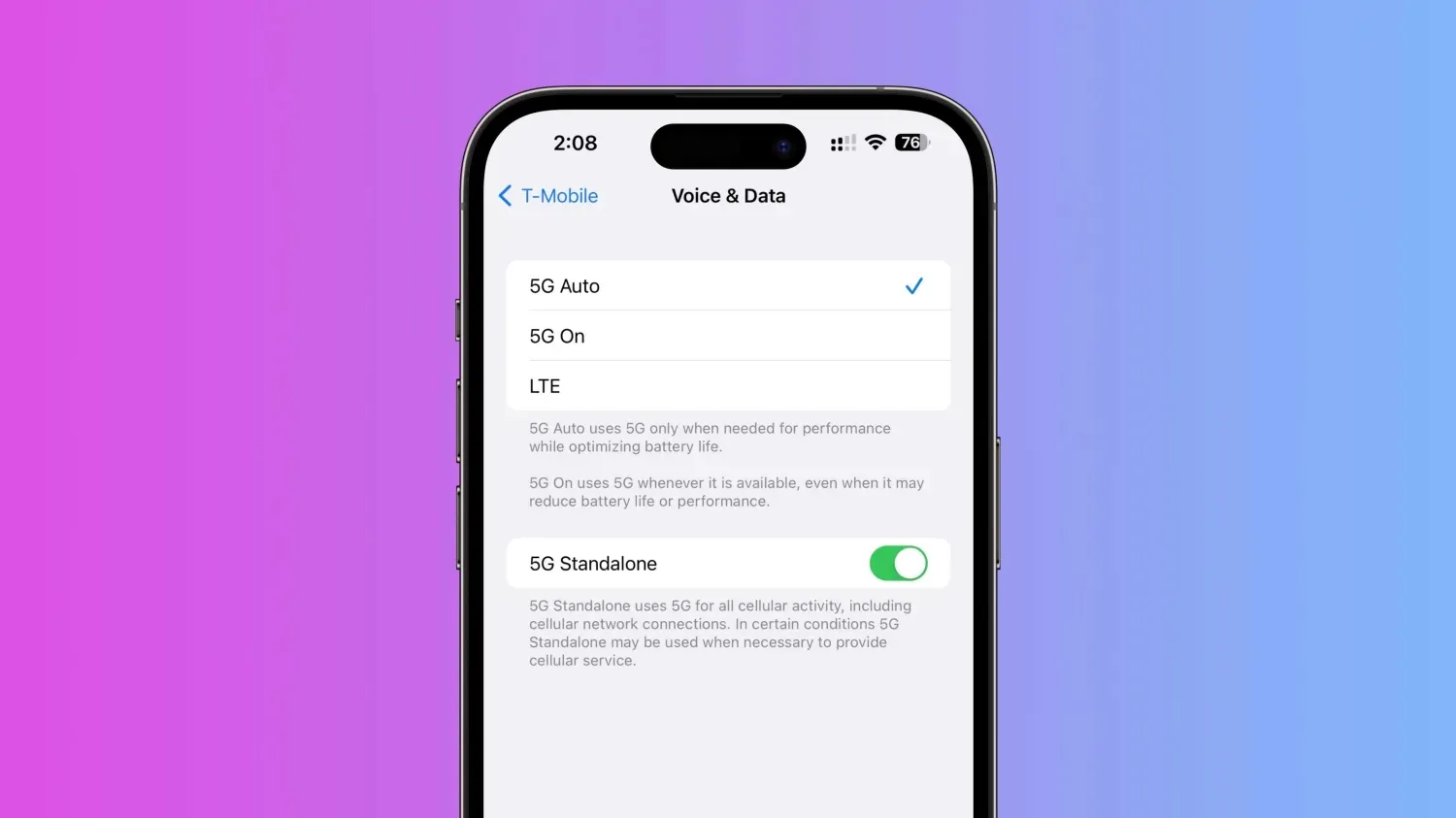
Now tap Cellular Data Options then Voice & Data
At the bottom, make sure the 5G Standalone toggle is turned on
Check your 5G SA connection stats
After you make sure 5G Standalone is turned on, you can run a speed test to see what performance you’re getting
You can dial 3001#12345# and hit call to enter Field Test mode – this will provide specific details about your 5G connection and whether or not you’re getting Standalone service
Look for SA next to connection_type
Keep in mind while 3.3Gbps has been achieved in T-Mobile tests, real-world performance will vary
Entire conference available online for all developers, with a special in-person experience at Apple Park on June 5
Submissions for the Swift Student Challenge are open now through April 19
pple has officially announced WWDC 2023. The event will take place at Apple Park with a keynote address, the State of the Union, and more. The entire conference will also be available online for developers who aren’t able to or aren’t chosen to attend WWDC in person in California.
At WWDC this year, Apple will unveil the “latest iOS, iPadOS, macOS, watchOS, and tvOS advancements.” This includes iOS 17, iPadOS 17, macOS 14, watchOS 10, and tvOS 17.
WWDC 2023 officially announced:
Apple says:
Apple today announced it will host its annual Worldwide Developers Conference (WWDC) in an online format from June 5 through 9, 2023, with an opportunity for developers and students to celebrate in person at a special experience at Apple Park on opening day.
Free for all developers, WWDC23 will spotlight the latest iOS, iPadOS, macOS, watchOS, and tvOS advancements. As part of Apple’s ongoing commitment to helping developers create innovative apps, the event will also provide them with unique access to Apple engineers, as well as insight into new technologies and tools to help them realize their visions.
Apple will host a special all-day event for developers and students on June 5 at Apple Park. At Apple Park, developers and students will watch the keynote and State of the Union videos, attend the Apple Design Awards ceremony, and more.
In addition to the in-person component of WWDC 2023 at Apple Park, Apple says that the entire conference will be available online for all developers. There is no cost for WWDC, whether you attend online or in person.
It sounds like the WWDC 2023 keynote will be pre-recorded, as has been the case every year since 2020. Apple says that developers who attend in-person will “watch the keynote and State of the Union videos together.”
Developers interested in attending WWDC 2023 at Apple Park can submit their requests via the links below. Apple says invitations will be allocated by a random selection process. Those chosen to attend will be notified by April 5 at 6:00 p.m. PDT.
Swift Student Challenge winners (2020 to 2022)2023 Challenge applicants can opt in to be included in a separate random selection process for winners when they submit their app playground.
Every year at WWDC, Apple announces its latest software updates with new features and changes. This year, that will include iOS 17, iPadOS 17, macOS 14, watchOS 10, and tvOS 17.
Apple is also expected to unveil its first Reality Pro headset at WWDC this year. After numerous delays, the headset is reportedly set for an official unveil at WWDC, alongside new software platforms and developer tools.
Finally, Apple is currently developing an updated version of the MacBook Air with an M3 chip inside. An all-new 15-inch MacBook Air is also in the works. Both of these products are potential candidates for a WWDC announcement, especially given that the M2 chip was announced at WWDC 2022.
Apple announced it will host its annual Worldwide Developers Conference (WWDC) in an online format from June 5 through 9, 2023, with an opportunity for developers and students to celebrate in person at a special experience at Apple Park on opening day. Free for all developers, WWDC23 will spotlight the latest iOS, iPadOS, macOS, watchOS, and tvOS advancements. As part of Apple’s ongoing commitment to helping developers create innovative apps, the event will also provide them with unique access to Apple engineers, as well as insight into new technologies and tools to help them realize their visions.
“WWDC is one of our favorite times of the year at Apple because it’s an opportunity to connect with the talented developers from around the globe who make this community so extraordinary,” said Susan Prescott, Apple’s vice president of Worldwide Developer Relations. “WWDC23 is going to be our biggest and most exciting yet, and we can’t wait to see many of you online and in person at this very special event!”
Along with announcements shared from the keynote and State of the Union presentations, this year’s online program will include sessions, one-on-one labs, and opportunities to engage with Apple engineers and other developers. Developers and students will also have the opportunity to attend a special day at Apple Park on June 5 to watch the keynote and State of the Union, alongside the global online community. Space for this in-person event will be limited, and details on how to apply to attend can be found on the Apple Developer site and app.
WWDC23 is also an opportunity to support student developers through the Swift Student Challenge, one of many Apple programs that seek to elevate developers and learners of all ages who love to code. With the help of Swift Playgrounds — a revolutionary app for iPad and Mac that makes learning the Swift programming language interactive and fun — students from around the world are invited to create an app playground on a topic of their choice. Submissions for this year’s challenge are now open, and students can submit their work through April 19. For more information, visit the Swift Student Challenge website.
PayPal has announced that it is now rolling out Apple Pay as a checkout option for small businesses. This means that small businesses using PayPal’s “complete payments solution” online can now offer Apple Pay as a payment option during their checkout flow.
PayPal first detailed its plans to adopt Apple Pay support last year as part of its roadmap of “strategic initiatives and business updates” for 2023. In a press release April 4,2023, the company announced that Apple Pay support is now rolling out for small businesses online.
The option to enable Apple Pay for checkout is available to small businesses that use PayPal’s “complete payments solution” platform. This is the unbranded checkout flow that many small businesses use and it’s different than the branded checkout page. Essentially, this means that small businesses using PayPal as the backend for their payment processing can now enable Apple Pay.
Small businesses that are leveraging PayPal’s complete payments solution will now be able to accept Apple Pay alongside a variety of other popular payment options. Apple Pay offers their customers an easy, secure and private way to pay online and in-apps when using Apple devices.
“The retail landscape is constantly evolving and SMBs need access to a range of tools to help them drive sales, cut costs and protect themselves and their customers from fraud,” said Nitin Prabhu, VP, Merchant Experiences and Payment Solutions, PayPal. “With our complete payments solution, small businesses can get access to all of these tools with one integration.”
At launch, the ability to pay with Apple Pay through PayPal’s unbranded checkout flow is available only for one-time transactions. The company says that recurring payment support will be added soon.
PayPal and Venmo adding Tap to Pay on iPhone, Apple Pay for online purchases, and Wallet app support
PayPal will soon be rolling out new ways for customers and merchants to take advantage of Apple Pay, iPhone, and more. PayPal says it will soon be adopting Apple’s new Tap to Pay on iPhone feature for merchants, as well as adding support for Apple Pay to its branded debit and credit cards and adding Apple Pay as a payment option in checkout flows.
PayPal adopting Apple Pay and more
PayPal made these announcements in an update to investors as part of its Q3 2022 earnings release. As one of its “strategic initiatives and business updates,” the company says it is “working with Apple to enhance our offerings for PayPal and Venmo merchants and consumers.”
We’re very pleased to be working with Apple to enhance our offerings for our PayPal and Venmo merchants and consumers,” PayPal Chief Executive Officer Dan Schulman said in the statement.
There are different components to today’s announcement from PayPal, which also owns the popular peer-to-peer payment platform Venmo. Here they are:
Leveraging Apple’s Tap to Pay on iPhone technology, US merchant will soon be able to accept contactless debit or credit cards and mobile wallets, including Apple Pay, using an iPhone and the PayPal or Venmo iOS app.
Adding Apple Pay as a payment option in PayPal’s unbranded checkout flows on merchant platforms, including the PayPal Commerce Platform.
Next year, US customers will be able to add PayPal and Venmo network-branded credit and debit cards to Apple Wallet and use them anywhere Apple Pay is accepted.
Tap to Pay on iPhone is a new feature launched by Apple earlier this year, currently available in Apple Stores and via Square’s merchant app. Tap to Pay on iPhone works by the merchant prompting the customer to hold their iPhone or Apple Watch near the merchant’s iPhone to pay with Apple Pay, a contactless credit or debit card, or another digital wallet. The payment is then securely completed using NFC technology.
Meanwhile, PayPal’s announcement today also means that you’ll see Apple Pay as a payment option at select online stores that use the company’s unbranded checkout flows. This will increase the availability of Apple pay for purchases on the web, but it sounds like the implementation will be somewhat limited.
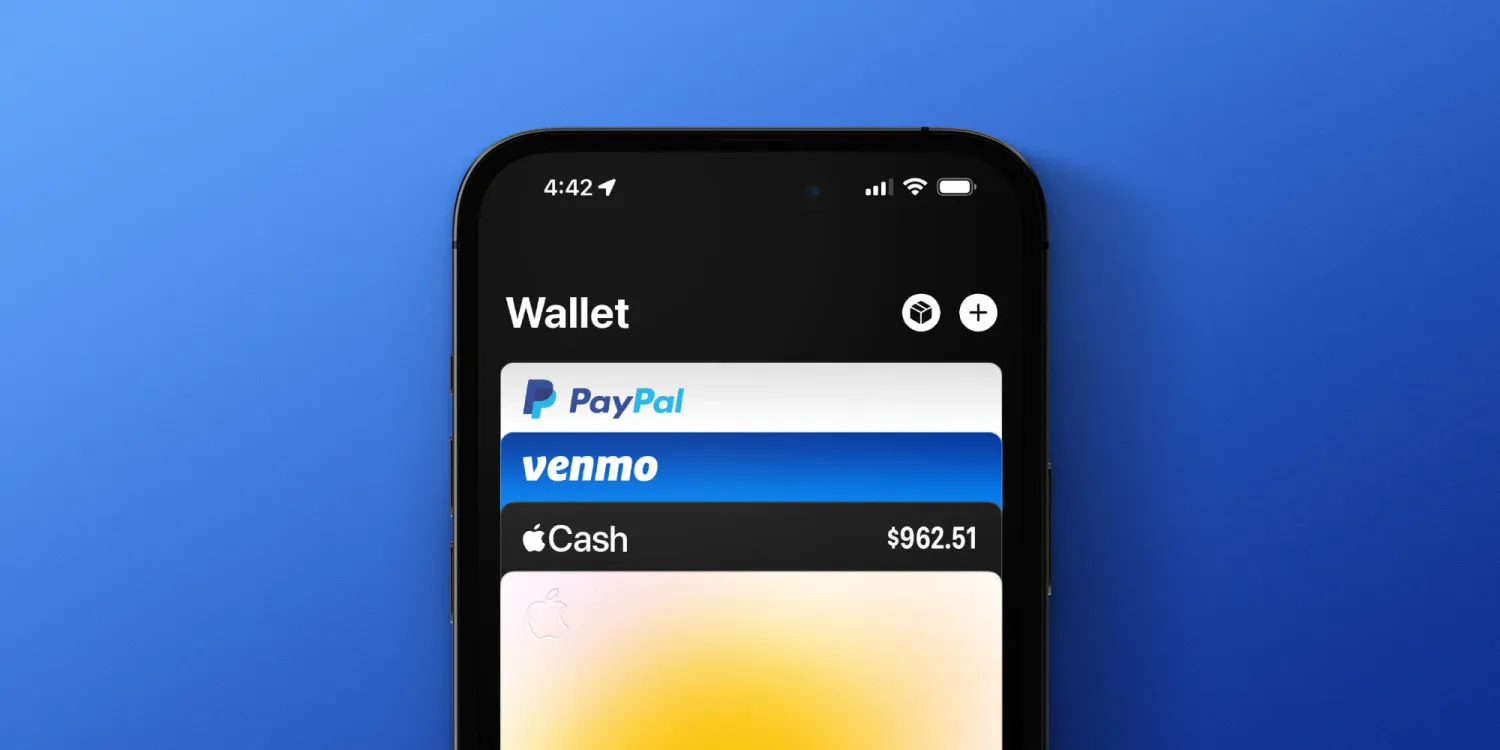
Finally, PayPal also says that consumers will be able to add their PayPal and Venmo-branded debit and credit cards to Apple Wallet and Apple Pay.
PayPal Adds New Features to Its Complete Payments Solution for Online Small Businesses
PayPal’s online payment solution enables SMBs to accept PayPal payments, credit and debit cards, digital wallets and more. Beginning today, SMBs will also be able to accept payments with Apple Pay®, allow their customers to save payment methods with the PayPal vault and keep their cards up to date with real-time account updater, as well as get access to features to help them run their business including interchange plus plus (IC++) pricing with gross settlement.
SAN JOSE, Calif., April 4, 2023 /PRNewswire/ — PayPal Holdings, Inc. (NASDAQ: PYPL) today announced it has added new features to its complete payments solution for small businesses. The solution enables small businesses to accept a range of payments including PayPal, Venmo and PayPal Pay Later products. Giving customers more choice in how they can pay can help drive checkout. Fifty-nine percent of respondents of a recent Ponemon Institute study said their customers frequently abandon their shopping cart when their preferred payment method is unavailable.PayPal’s complete payments solution also enables small businesses to process card payments directly on their website, and customize the checkout experience to match the look and feel of their brand, all through a single integration.
Beginning today, PayPal will also give small businesses access to four new features to help them drive payment acceptance and enhance how they run their business. This will include Apple Pay as a checkout option, the ability for customers to save payment methods with the PayPal vault for faster future checkout, real-time account updater to help customers keep their payment methods up to date, and access to IC++ pricing.
“The retail landscape is constantly evolving and SMBs need access to a range of tools to help them drive sales, cut costs and protect themselves and their customers from fraud,” said Nitin Prabhu, VP, Merchant Experiences and Payment Solutions, PayPal. “With our complete payments solution, small businesses can get access to all of these tools with one integration.”
Enabling more payment choice to help drive checkout
Small businesses that are leveraging PayPal’s complete payments solution will now be able to accept Apple Pay alongside a variety of other popular payment options. Apple Pay offers their customers an easy, secure and private way to pay online and in-apps when using Apple® devices.
Simplifying the checkout experience to help drive conversion
In addition, PayPal’s complete payments solution now allows consumers to securely save their payment information on a business’s ecommerce website for future purchases. This can reduce friction and drive conversion. By letting PayPal help manage some of the business’s PCI compliance for the storage of financial instruments, businesses are better able to manage risk and complexity of their businesses. Small businesses can save multiple payment methods — including PayPal, Venmo and cards — in the PayPal vault. Once saved, these payment methods will remain fresh via PayPal’s real-time account updater service and network tokens, which can help reduce declines and drive conversions by automatically updating lost, stolen or expired cards-on-file.
Helping businesses better manage their cashflow and get more transparent pricing
Small businesses will continue to get access to features like automatic transfer, which helps businesses better manage their cashflow. Businesses will now be able to choose between flat-rate pricing or an IC++ pricing model, which helps them get paid the full amount up-front and get a transparent view into processing costs.
Helping keep businesses and their customers secure
To help keep small businesses secure in an environment where fraud is on the rise, PayPal’s complete payments solution will continue to offer Fraud Protection, Chargeback Protection and Seller Protection, on eligible transactions. SMBs will also get one of the market-leading rates on processing fees for card payments, alternative payment methods and other digital wallets, at just 2.59% + 49 cents. Pricing for PayPal payments is 3.49% + 49 cents.
You can learn more about PayPal’s complete payments solution here.
About PayPal
PayPal has remained at the forefront of the digital payment revolution for more than 20 years. By leveraging technology to make financial services and commerce more convenient, affordable, and secure, the PayPal platform is empowering 435 million active accounts in more than 200 markets to join and thrive in the global economy. For more information, visit paypal.com.
1 Ponemon Institute, Commissioned by PayPal. The 2022 True Cost of Online Fraud Global Study. 2 Pay with Apple Pay on Advanced Checkout is currently for one-time transactions with recurring payment support to be added soon. 3 Apple and Apple Pay are registered trademarks of Apple Inc. 4 Fraud Protection is available on “Advanced Card Payments” (unbranded processing) and branded PayPal payments but not guest transactions. 5 Certain chargebacks are not eligible for the Chargeback Protection tool. See terms for details. Chargebacks that are not related to fraud or item not received (INR), such as broken Item, significantly not as described (SNAD), refund not processed, and duplicate charge, are not protected by Chargeback Protection. Chargeback Protection is available for accounts enrolled in Advanced Credit and Debit Card Payments. 6 Available on eligible purchases. Limits apply. 7 Fees are subject to change.
Following the release of the first iOS 16.5 beta to developers on Tuesday, Apple is now rolling out iOS 16.5 beta 1 to users registered in the Apple Beta Software Program. The update comes with some minor improvements, including new Siri commands.
iOS 16.5 beta 1
Right now, iOS 16.5 seems more like a minor update focused on fixing bugs and improving the overall stability of the operating system. There are new Siri commands to start or stop a screen recording. Apple is also adding a dedicated Sports tab to the Apple News app with iOS 16.5.
Moreover, code found in iOS 16.5 shows that Apple has been working on a new quad-box Picture-in-Picture mode for streaming sports in the Apple TV app.
Beta testers can install iOS 16.5 by going to the Settings app, choosing General, then choosing Software Update. It’s unclear when Apple plans to make iOS 16.5 available to the public. Today’s build number is 20F5028e.
More updates available
In addition to iOS 16.5 public beta 1, Apple is also rolling out the following updates to users registered in the Apple Beta Software Program:
iPadOS 16.5 beta 1 (20F5028e)
watchOS 9.5 beta 1 (20T5527c)
tvOS 16.5 beta 1 (20L5527d)
macOS Ventura 13.4 beta 1
new iPhone and iPad software features coming this year, according to Apple
While iOS 17 speculation is already in full swing, there is still a few software features that Apple has announced, but not yet released for iPhone and iPad users. Head below as we round up all of the previously announced features still coming for iPhone and iPad…
Apple Card Savings Account
Continuing with the focus on financial services, Apple has also announced it will integrate a high-yield savings account directly into the Wallet application for Apple Card users. This feature was announced in October, with Apple saying it would be available sometime “soon.” Given that Apple Card is only available in the United States, the new savings account will also be limited to the US.
Apple Card Savings Account will allow you to automatically deposit your Daily Cash rewards into the account. It will fully integrate with the Apple Wallet applications, allowing you to track the balance and growth of the account over time and even make additional deposits via a linked bank account.
Apple Card Savings Account will be operated in partnership with Goldman Sachs, which is also Apple’s partner for the Apple Card itself. There’s no word on what exact percentage rate the account will pay out in interest, but Goldman’s existing online savings account offers an annual percentage yield of 3.30%.
Next-generation CarPlay
At WWDC, Apple unveiled what it described as the “next generation of CarPlay.” This is a feature, however, that even Apple acknowledged would not be available for quite a while, despite the initial announcement at WWDC 2022.
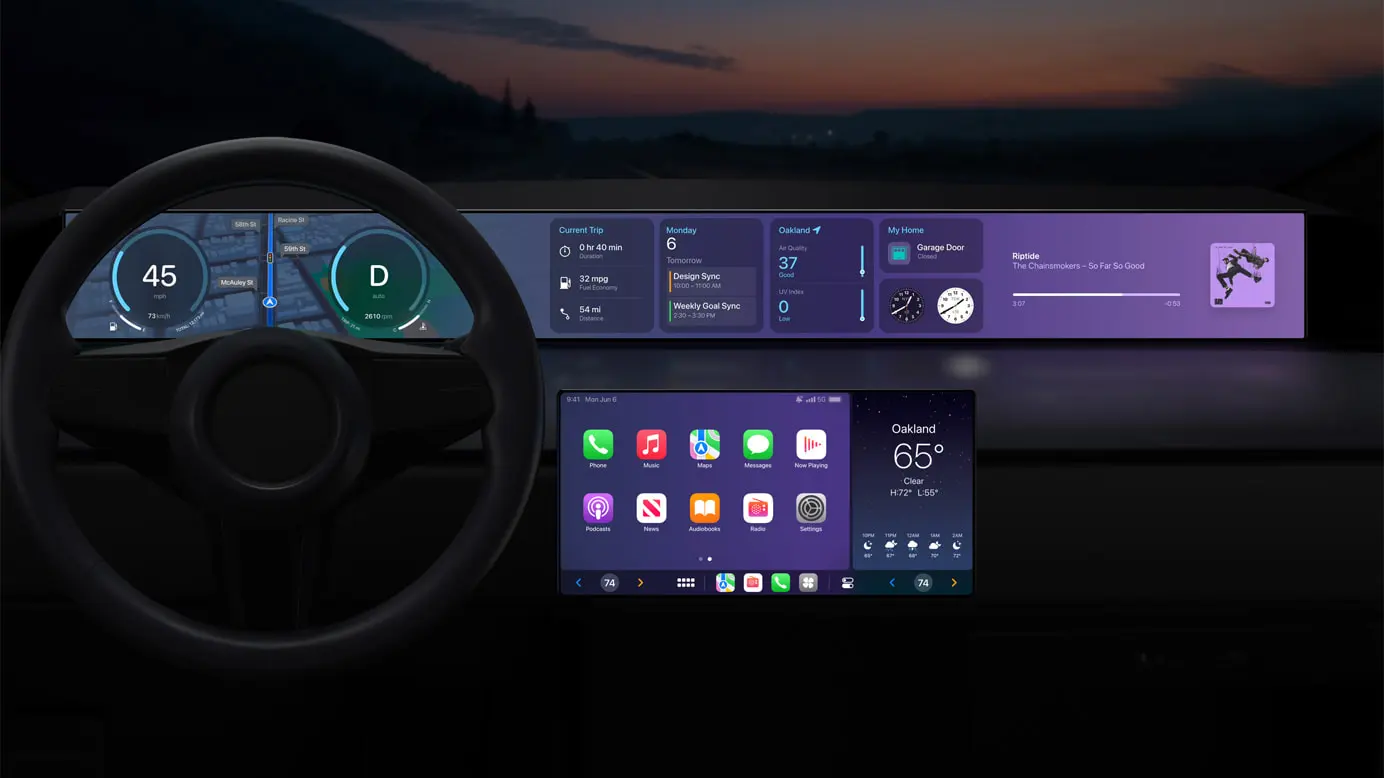
The new CarPlay interface is a dramatic overhaul compared to what is currently offered. It will offer support for multiple screens within your car and be able to deeply integrate with your car’s hardware. Essentially, this new CarPlay design can completely replace the manufacturer’s own digital interfaces:
Speed, fuel level, temperature, and more on the instrument cluster
Control the radio or change the climate directly through CarPlay
Personalize the driving experience by choosing different gauge cluster designs
With widgets, users will have at-a-glance information from Weather and Music right on their car’s dashboard
This is a big undertaking by Apple, and it will require close cooperation with automakers looking to adopt the new CarPlay interface. Apple says that more information will be “shared in the future” and that we can expect the first vehicles with support for the new CarPlay design sometime late this year.
iMessage Contact Key Verification
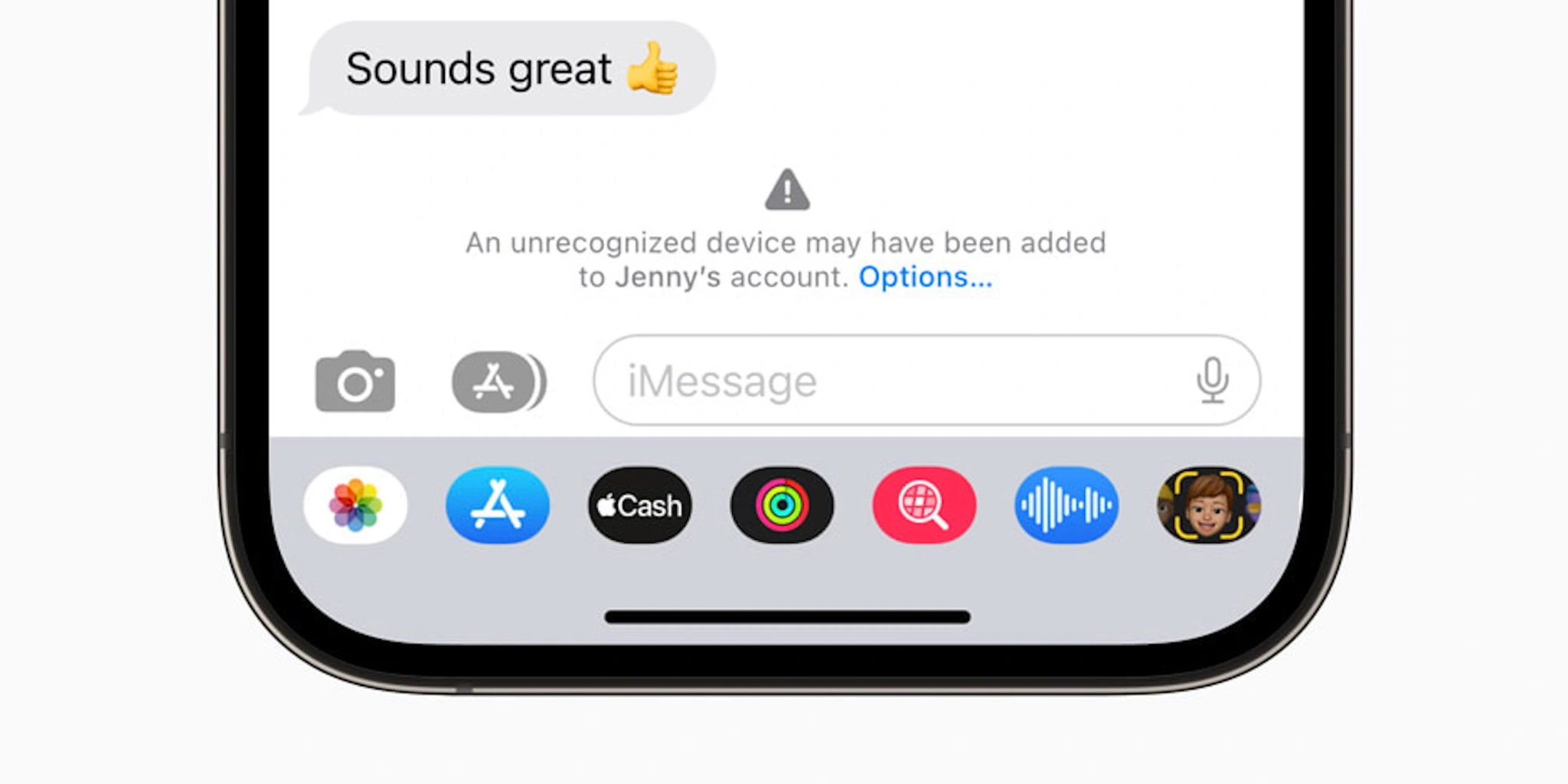
Finally, there’s one security and privacy-focused feature that Apple has already announced is coming sometime this year. iMessage Contact Key Verification is designed for “users who face extraordinary digital threats,” including journalists, human rights activists, and members of government.
The feature works by giving those users a way to further verify that they are messaging with the people they intend. Apple explains:
The vast majority of users will never be targeted by highly sophisticated cyberattacks, but the feature provides an important additional layer of security for those who might be. Conversations between users who have enabled iMessage Contact Key Verification receive automatic alerts if an exceptionally advanced adversary, such as a state-sponsored attacker, were ever to succeed breaching cloud servers and inserting their own device to eavesdrop on these encrypted communications. And for even higher security, iMessage Contact Key Verification users can compare a Contact Verification Code in person, on FaceTime, or through another secure call.
iMessage Contact Key Verification will be available “globally” sometime in 2023, Apple says.
Apple Pay Later [Now available]
Update March 29, 2023: Apple Pay Later has officially started rolling out to users, but it won’t be available to all users for several months, Apple says.
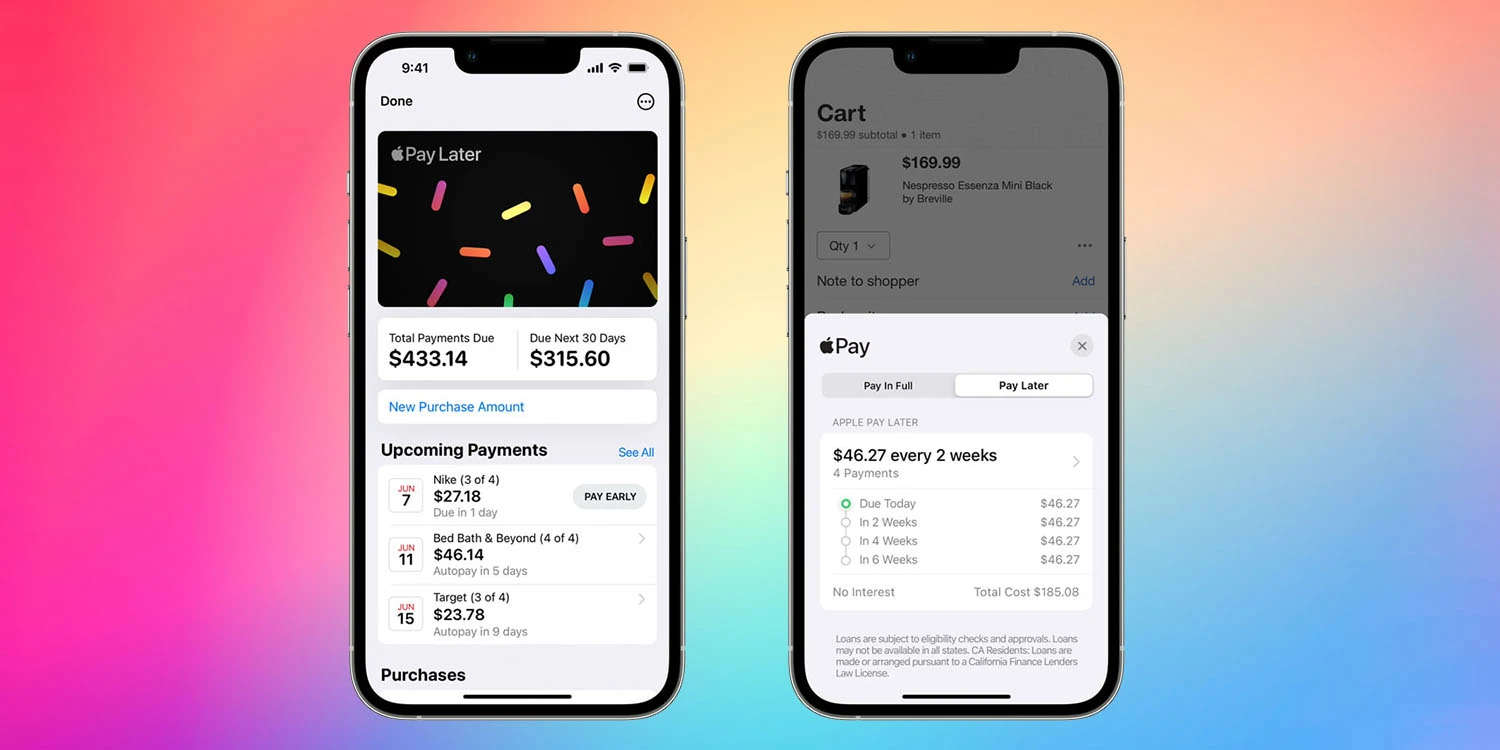
Apple is ramping up its initiatives in the personal finance sector, and one of its most anticipated new features in this category is something called Apple Pay Later. Announced at WWDC 2022, Apple Pay Later will allow you to split Apple Pay purchases into four equal payments with zero percent interest, spread across six weeks.
The Apple Pay Later feature is similar to competitors like Affirm and Klarna, two of the companies leading a modern wave of “buy now, pay later” platforms. Apple, however, touts that its platform will be “seamless and secure,” with integration into the Apple Wallet application and zero fees.
When Apple Pay Later was announced at WWDC 2022, there was no clear timeline for when it would be available to customers. The feature was not included in the initial release of iOS 16 and hasn’t been added with any of the subsequent software updates. Bloombergreported that the feature faced “fairly significant technical and engineering challenges.”
Once it launches, Apple Pay Later will be “available everywhere Apple Pay is accepted online or in-app” to “qualifying applicants in the United States.”
Apple Music Classical [Now available]
Update March 29, 2023: Apple Music Classical is now available to all Apple Music users.
Ah, yes, Apple Music Classical. This isn’t necessarily a feature specific to iOS 16, but it’s something that Apple said would be available in 2022… and wasn’t. Apple acquired the classical music service Primephonic in 2021, immediately removing the app from the App Store and integrating the content into its own Music app.
Apple also promised, however, that it would release a “dedicated classical music app” sometime in 2022, “combining Primephonic’s classical user interface with more added features.” This didn’t come to fruition in 2022, and Apple is silent on when the app will launch.
At this point, we’re starting to question whether Apple Music Classical has been scrapped (or significantly scaled back in scope), given Apple’s silence on the matter. The good news is that references to the service have been spotted in iOS code. Hopefully, we’ll get an update soon.
Web push notifications [Now available]
Update March 29, 2023: More advanced web apps are now available as of iOS 16.4, which can be installed via the Settings app on your iPhone.
Here’s something that has largely flown under the radar since it was officially announced: support for web push notifications for Safari on iOS and iPadOS. This was announced at WWDC last year, with Apple saying that Safari on iPad and iPhone would support push notifications from websites for the first time.
Support for web notifications in Safari has been available on the Mac for several years but has remained notably absent on iPhone and iPhone. What jogged our memory on this feature was a post on Mastodon from Jen Simmons, who works as an Apple Evangelist on the company’s Web Developer Experience team.
In the post, Simmons asked users to share their “favorite web apps” that they’ve added to the Home Screen of their iPhone. This could signal Apple’s continued work on web push notifications for iPhone and iPad, as well as maybe some other improvements to how progressive web apps work on Apple’s platforms.
Apple says that support for web notifications on iPhone and iPadOS will be available sometime in 2023. The feature hasn’t yet materialized in betas of iOS 16.
New Home architecture [Now available]
Update March 29, 2023: With the launch of iOS 16.4, the revamped Home architecture is now available to users once again.
Apple says that support for web notifications on iPhone and iPadOS will be available sometime in 2023. The feature hasn’t yet materialized in betas of iOS 16.
In response to the backlash and complaints, Apple ended up pulling the new architecture altogether last month. The company said in a statement:
We are aware of an issue that may impact the ability for users to share the Home within the Home app. A fix will be available soon. In the meantime, we’ve temporarily removed the option to upgrade to the new Home architecture. Users who have already upgraded will not be impacted.
There’s no official word on when Apple plans to re-implement this new HomeKit architecture. Evidence within recent iOS beta releases, however, shows the company is continuing to work on the platform.
iOS 16.4 was released to everyone this past week with a handful of features and changes. Now that this update has been released, Apple has started beta testing iOS 16.5. Unfortunately, it doesn’t look like this update contains any of the features we’re still waiting for Apple to release.
Just one day after the release of iOS 16.4 to everyone, Apple is once again kick-starting the beta testing process. iOS 16.5 beta 1 is rolling out to registered developers starting today, with a public beta likely to follow later this week or next week.
iOS 16.5 beta 1 will be available today to registered developer beta testers. As the update rolls out over the air within the next hour, you’ll be able to install it by going to the Settings app, choosing General, then choosing Software Update. The build number for today’s update is 20F5028e.
We’re still downloading iOS 16.5 onto our devices to check what’s new. There are, however, a few features that Apple has announced but not yet released, as well as features in development under the hood that aren’t yet available.
Apple Card Savings Account
Next-generation CarPlay
iMessage Contact Key Verification
Custom Accessibility Mode
As we approach the announcement of iOS 17 at WWDC in June, however, we expect these iOS 16 point updates to become less and less exciting.
Alongside iOS 16.5, Apple has also released the first betas of tvOS 16.5, HomePod Software Version 16.5, watchOS 9.5, and iPadOS 16.5.
iOS 16.5 beta brings highly-requested ‘My Sports’ tab to Apple News
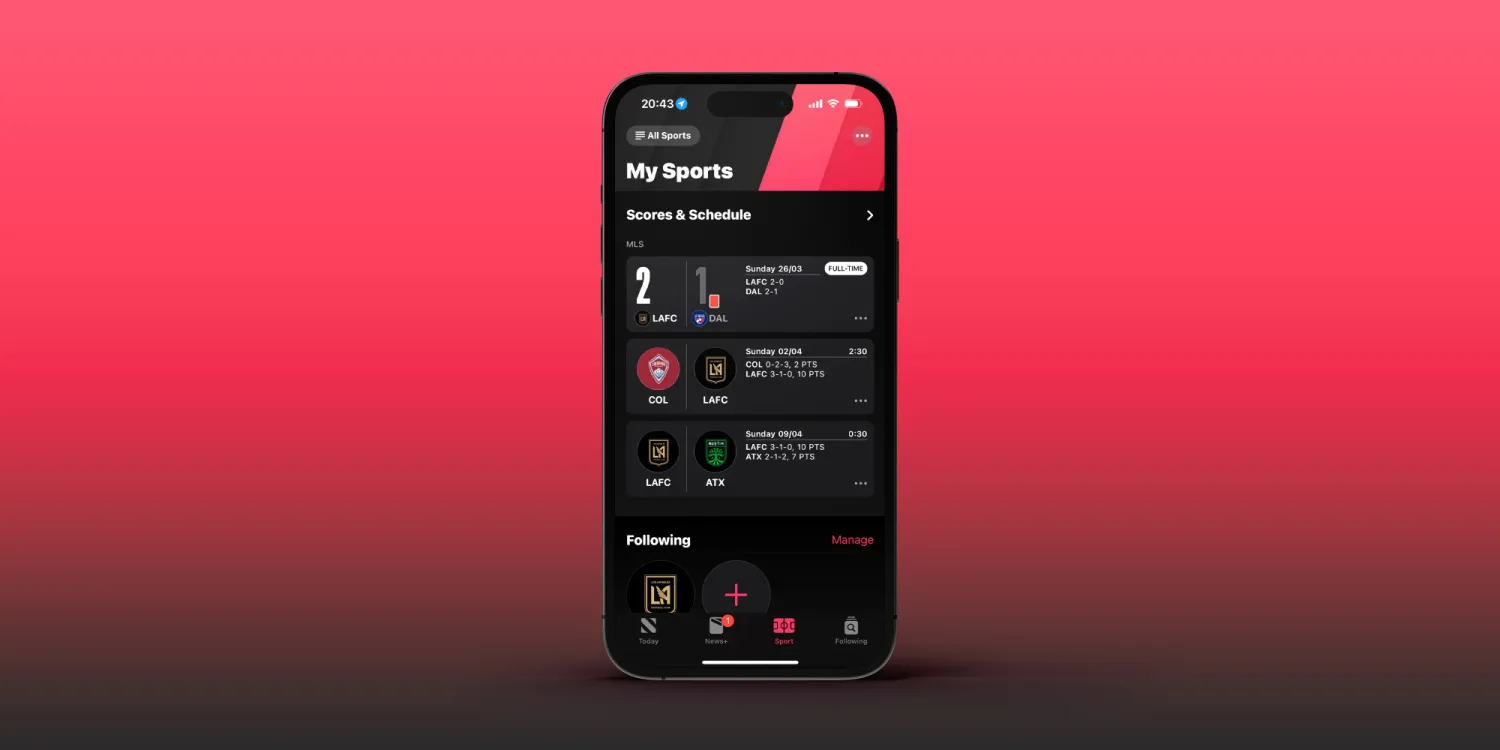
Apple released the first beta of iOS 16.5 to developers on March 28,2023, just one day after iOS 16.4 was released to the public. And while today’s update doesn’t seem like a big one, it does bring some small changes. For example, the Apple News app now has a tab dedicated to the My Sports feature.
My Sports gets its own tab in the Apple News app
iOS 16 introduced My Sports to Apple News. With this feature, users can easily follow news from their favorite teams and leagues, as well as get live scores, schedules, and more. However, My Sports was originally part of the Today tab of Apple News. Now with iOS 16.5, My Sports has become a dedicated tab within the Apple News app.
The way the tab works is basically the same as before, but now it’s much easier to find, as the tab is located between the Today, News+, Audio, and Following tabs. Here’s how Apple describes My Sports:
In My Sports in the News app , you can follow your favorite sports, teams, leagues, and athletes; receive stories from top sports publications, local newspapers, and more; access scores, schedules, and standings for the top professional and college leagues; and watch highlights.
It’s no surprise that My Sports got its own tab on Apple News, as Apple has been investing more in sports content. Apple TV+ now offers access to MLB’s Friday Night Baseball, while the company also recently launched MLS Season Pass in the Apple TV app.
It’s worth noting, however, that the Apple News app is only available in selected countries. This includes Australia, Canada, the US, and the UK.
More about iOS 16.5
Right now, iOS 16.5 seems more like a minor update focused on fixing bugs and improving the overall stability of the operating system. The only new feature found so far besides the My Sports tab is the addition of new Siri commands to start or stop a screen recording.
Developers with eligible devices can install the beta update by going to the Settings app, choosing General, then choosing Software Update. It’s unclear when Apple plans to make iOS 16.5 available to the public.
iOS 16.5 beta enables screen recording via Siri [Video]
iOS 16.5 developer beta 1 doesn’t appear to contain many new features and changes, but there is at least one new feature that will surely make some users happy – the ability to ask Siri to start a screen recording.
iOS users have been able to request Siri to take a screenshot in previous versions of iOS, but up until now, invoking screen recordings required manual intervention. In iOS 16.5, you can simply say “Hey Siri, start screen recording” and the screen recording will begin.
Unfortunately, it doesn’t look like there’s a dedicated screen recording action for the Shortcuts app yet, but we can presume that such an action will eventually make its way to end users. Until then, you’ll need to either start a screen recording manually via its dedicated Control Center toggle, or ask Siri.
Once you’re finished recording the screen, you can ask Siri to “stop screen recording” and Siri will usually comply. You can watch the brief video embed above to see an example of requesting Siri to start and stop a screen recording on iOS 16.5 in action.
Designed with users’ financial health in mind, Apple Pay Later allows users to split purchases into four payments, spread over six weeks with no interest and no fees.
Apple Pay users can split purchases into four payments with zero interest and no fees
CUPERTINO, CALIFORNIA Apple introduced Apple Pay Later in the U.S. Designed with users’ financial health in mind, Apple Pay Later allows users to split purchases into four payments, spread over six weeks with no interest and no fees. Users can easily track, manage, and repay their Apple Pay Later loans in one convenient location in Apple Wallet. Users can apply for Apple Pay Later loans of $50 to $1,000, which can be used for online and in-app purchases made on iPhone and iPad with merchants that accept Apple Pay. Starting today, Apple will begin inviting select users to access a prerelease version of Apple Pay Later, with plans to offer it to all eligible users in the coming months.
“There’s no one-size-fits-all approach when it comes to how people manage their finances. Many people are looking for flexible payment options, which is why we’re excited to provide our users with Apple Pay Later,” said Jennifer Bailey, Apple’s vice president of Apple Pay and Apple Wallet. “Apple Pay Later was designed with our users’ financial health in mind, so it has no fees and no interest, and can be used and managed within Wallet, making it easier for consumers to make informed and responsible borrowing decisions.”
Apply for, Track, and Manage Loans Seamlessly in Wallet
To get started with Apple Pay Later, users can apply for a loan within Wallet with no impact to their credit.4 They will then be prompted to enter the amount they would like to borrow and agree to the Apple Pay Later terms. A soft credit pull will be done during the application process to help ensure the user is in a good financial position before taking on the loan.
After a user is approved, they will see the Pay Later option when they select Apple Pay at checkout online and in apps on iPhone and iPad, and can use Apple Pay Later to make a purchase. Once Apple Pay Later is set up, users can also apply for a loan directly in the checkout flow when making a purchase.
Users can apply for Apple Pay Later loans of $50 to $1,000, which can be used for online and in-app purchases made on iPhone and iPad with merchants that accept Apple Pay.
Users can seamlessly view, track, and manage all of their loans in Wallet. They can also choose to see all upcoming payments on a calendar view in Wallet.
Apple Pay Later is built right into Wallet, so users can seamlessly view, track, and manage all of their loans in one place. With Apple Pay Later in Wallet, users can easily see the total amount due for all of their existing loans, as well as the total amount due in the next 30 days. They can also choose to see all upcoming payments on a calendar view in Wallet to help them track and plan their payments. Before a payment is due, users will also receive notifications via Wallet and email so they can plan accordingly. Users will be asked to link a debit card from Wallet as their loan repayment method; to help prevent users from taking on more debt to pay back loans, credit cards will not be accepted.
Apple Pay Later was designed with privacy and security at its core. Purchases using Apple Pay Later are authenticated using Face ID, Touch ID, or passcode, and users’ transaction and loan history are never shared or sold to third parties for marketing or advertising.
Apple Pay Later is offered by Apple Financing LLC, a subsidiary of Apple Inc., which is responsible for credit assessment and lending. Apple Financing plans to report Apple Pay Later loans to U.S. credit bureaus starting this fall,5 so they are reflected in users’ overall financial profiles and can help promote responsible lending for both the lender and the borrower.
Mastercard and Goldman Sachs
Apple Pay Later is enabled through the Mastercard Installments program, so merchants that accept Apple Pay do not need to do anything to implement Apple Pay Later for their customers. When a merchant accepts Apple Pay, Apple Pay Later will be an option for their customers during checkout online and in apps on iPhone and iPad. Goldman Sachs is the issuer of the Mastercard payment credential used to complete Apple Pay Later purchases.
Availability
Starting March 28,2023 , randomly selected users will be invited to get early access to a prerelease version of Apple Pay Later via Wallet and through their Apple ID email. Apple Pay Later is available in the U.S. for online and in-app purchases on iPhone and iPad.Apple Pay Later is available with iOS 16.4 and iPadOS 16.4.
Apple Pay Later is subject to eligibility and approval. Apple Pay Later is available only in the U.S. It may not be available in all states. It is not available in U.S. territories. Loans are made by Apple Financing LLC, NMLS #2154940. For California residents, loans are made or arranged pursuant to a California Financing Law license. To use Apple Pay Later, a user must have an iPhone or iPad updated to the latest version of iOS or iPadOS. For more eligibility details, see support.apple.com/en-us/HT212967.
A user’s bank may charge them fees if their debit card account contains insufficient funds to make loan repayments.
Some merchants may not be eligible to offer Apple Pay Later.
Upon purchase, a user’s Apple Pay Later loan and payment history may be reported to credit bureaus and impact their credit.
Apple Financing LLC may report past, current, or future Apple Pay Later loans.
With iOS 16.4 beta, which was first released to developers last month, Apple has introduced a new way to set up a device to get beta software that doesn’t require special profiles or using a computer. As the company will make this the only way to install iOS betas in the future, the latest iOS 16.4 beta 3 now lets users sign in with a different Apple ID to download beta software.
Apple changes how users will install iOS beta on their devices
However, when it comes to developers, some people have different Apple IDs for personal and work use, which could make it impossible for them to install iOS betas using the new system. But Apple is now fixing this. The iOS 16.4 beta released today adds an option to manage the Apple ID used to download beta software.
Now, when you go to Settings > General > Software Update > Beta Updates, you’ll see a menu showing your Apple ID. By tapping there, you can enter an Apple ID other than your iCloud and App Store Apple ID. This way, even if you’re a member of the Apple Developer Program or Apple Beta Software Program through another Apple ID, you’ll be able to download the latest Apple software.
The main advantage of the change is it will be faster and easier to install either of the iOS betas on your iPhone or iPad with the ability to toggle it on in Settings. It should also be faster to switch between the public release and a beta release for those who may need to go back and forth.
Last year, Apple began taking down websites that shared developer profiles to install iOS betas. Currently, developers are required to pay $99 per year to be part of the Apple Developer program, which includes early access to beta software. The Apple Beta Software Program is a free alternative for users who want to install iOS beta on their devices, but updates take longer to become available in this program.
Right now, the new method for installing iOS beta is optional, but Apple says that this will be the only way to enroll an iPhone or iPad to get beta software in the future.
More about iOS 16.4
In addition to the new system for installing beta software, iOS 16.4 comes with multiple new features. This includes dozens of new emoji, updates to the Music and Podcast apps, 5G Standalone support, new HomeKit architecture, previews of Mastodon links in Messages, and more.
With beta testing progressing on schedule, iOS 16.4 will likely be released to the general public sometime in March or April.
iOS 16.4 beta 3 and more now rolling out to developers
Apple is releasing iOS 16.4 beta 3 to developers today, just one week after the release of the previous beta. As we’ve covered in-depth over the last two weeks, iOS 16.4 includes a number of new features and changes for iPhone users.
iOS 16.4 beta 3 will be available today to registered developer beta testers. As the update rolls out over the air, you’ll be able to install it by going to the Settings app, choosing General, then choosing Software Update. The new update will be released to public beta testers later this week. The build number for today’s update is 20E5229e.
What’s new in iOS 16.4?
Roundup: Here’s every new feature and change in iOS 16.4 beta 1
iPhone Lock Screen Shortcut: How to use
iOS 16.4 to detail Always-On display battery consumption
iOS 16.4 and iPadOS 16.4 add new Emoji for iPhone and iPad
iOS 16.4 adds new capabilities for web apps on iPhone and iPad, including access to push notifications
iOS 16.4 reintroduces new HomeKit architecture
iOS 16.4 expands 5G support to new regions, plus Google Fi users
iOS 16.4 hints at HomePod launch in Israel with Siri in Hebrew
iOS 16.4: iMessage now supports rich content previews for Mastodon posts
Apple is making it easier for registered developers to install iOS betas, but eliminating profile sharing
Last week’s release of iOS 16.4 beta 2 in particular brought a few additional changes. These include the return of the Apple Books page turn animations, additional references to Apple Music Classical, and more. You can find our full recap of all the additions right here.
With beta testing progressing on schedule, iOS 16.4 will likely be released to the general public sometime in March or April. In addition to iOS 16.4, Apple is also beta testing the following software updates:
Moving menstrual health forward with iPhone and Apple Watch
Ahead of International Women’s Day, new preliminary findings from the Apple Women’s Health Study underscore the importance of paying attention to menstrual cycles and their connection to overall health.
Many physicians consider periods a vital sign, but this area of health is notably under-researched. The Apple Women’s Health Study is a first-of-its-kind research study conducted with the Harvard T.H. Chan School of Public Health and the National Institute of Environmental Health Sciences (NIEHS) that aims to advance the understanding of menstrual cycles and how they relate to various health conditions such as polycystic ovary syndrome (PCOS), infertility, and menopausal transition. The study is significant in its scope and scale because it invites anyone who has ever menstruated across the US to contribute to this research simply by using their iPhone.
New Preliminary Findings
Harvard Chan School researchers used survey data from the Apple Women’s Health Study to advance the scientific understanding around the relationship between persistently abnormal periods, PCOS, and endometrial hyperplasia and cancer. Looking at a preliminary analysis cohort of over 50,000 study participants, the study team found:
12 percent of participants reported a PCOS diagnosis. Participants with PCOS had more than four times the risk of endometrial hyperplasia (precancer of the uterus) and more than 2.5 times the risk of uterine cancer.
5.7 percent of participants reported their cycles taking five or more years to reach cycle regularity after their first period. Participants in that group had more than twice the risk of endometrial hyperplasia and more than 3.5 times the risk of uterine cancer, compared to those who reported their cycles took less than one year to reach regularity.
These updates are a first step for helping people understand risk factors for these diseases, and encouraging people to have conversations with their healthcare providers about cycle irregularity earlier.
“More awareness on menstrual cycle physiology and the impact of irregular periods and PCOS on uterine health is needed,” said Dr. Shruthi Mahalingaiah, MS, Harvard Chan School’s assistant professor of Environmental Reproductive and Women’s Health and co-principal investigator of the Apple Women’s Health Study. “This analysis highlights the importance of talking to a healthcare provider when menstruators are experiencing persistent changes to their period that span many months. Over time, we hope our research can lead to new strategies to reduce disease risk and improve health across the lifespan.”
The study team will conduct further analyses on this preliminary data for scientific publication.
Cycle Tracking on Apple Watch and in the Health app on iPhone can help users have more informed conversations with their providers.
Previous Interim Updates
The Apple Women’s Health Study team has previously shared a number of other interim research updates that highlight how large-scale, longitudinal research on menstruation can help advance the science around this topic.
Research published in the American Journal of Obstetrics and Gynecology focuses on cycle deviations, like irregular or prolonged periods, which can be a sign of underlying conditions including PCOS, fibroids, malignancies, or infections. The study found cycle deviations were found in 16.4 percent of the study population. Black participants had a 33 percent higher prevalence of infrequent periods compared to white, non-Hispanic participants, while Asian participants had a higher prevalence of irregular periods.
Demonstrating just how common menstrual symptoms really are, researchers found the most frequently tracked symptoms were abdominal cramps, bloating, and tiredness, all of which were experienced by more than 60 percent of participants who logged symptoms. More than half of the participants who logged symptoms reported acne and headaches. Some less widely recognized symptoms, like diarrhea and sleep changes, were also tracked by 37 percent of participants logging symptoms.
After analyzing over 125,000 menstrual cycles, researchers found that participants experienced slightly longer menstrual cycles for cycles in which they received a COVID-19 vaccine, but participants’ cycles typically returned to prevaccination lengths the cycle after getting a vaccine.
The Apple Women’s Health Study invites anyone who has ever menstruated across the US to contribute to scientific research by enrolling via the Apple Research app. The study enables participants to share their cycle tracking data, along with other health data from iPhone, and Apple Watch if they have one. Participants can also provide a more well-rounded set of information about their personal and family history and lifestyle through occasional surveys. The Research app helps the study reach individuals across various stages of their life, varying races, and across the US. Participants control the data types shared with the study, with transparency into how the data will be used for the purposes of the study.
Anyone who has ever menstruated across the US can download the Apple Research app to enroll in the Apple Women’s Health Study, which helps the study reach individuals across various stages of their life, of varying races, and in multiple locations.
Cycle Tracking on iPhone and Apple Watch
Cycle Tracking is available in the Health app on iPhone or the Cycle Tracking app on Apple Watch, allowing users to track their menstrual cycle along with details like symptoms or ovulation test results. Cycle Tracking uses information users have logged for previous periods and cycle length, plus heart rate data from Apple Watch, to offer period and fertile window predictions. Users can turn on notifications to tell them when their next period or fertile window is approaching.
With iOS 16 and watchOS 9, Cycle Tracking can inform users if their logged cycle history from the previous six months shows a pattern of irregular periods, infrequent periods, prolonged periods, or persistent spotting. It’s important to know when these patterns occur, as they may be a sign of an underlying health condition. Users are also able to learn about the Cycle Deviation detected, and export the last 12 months of their cycle history as a PDF to share with their provider.
Cycle Tracking — available in the Health app on iPhone and in the Cycle Tracking app on Apple Watch — allows users to conveniently track their menstrual cycle and receive period and fertile window predictions, with the same strong privacy protections as with all other health data.
Additionally, the new temperature-sensing capabilities in Apple Watch Series 8 and Apple Watch Ultra allow users to receive retrospective ovulation estimates. New sensors gather overnight wrist temperature data that can be used to estimate the likely day of ovulation after it has occurred and improve period predictions. Knowing when ovulation has occurred can be helpful for family planning, and users can view these estimates in the Health app.
New temperature sensors in Apple Watch Series 8 and Apple Watch Ultra gather overnight wrist temperature data that can be used to estimate the likely day of ovulation after it has occurred, which can be helpful for family planning.
Privacy is fundamental in the design and development across all of Apple’s features. When a user’s iPhone is locked with a passcode, Touch ID, or Face ID, all of their health and fitness data in the Health app — other than Medical ID — is encrypted. Any Health data backed up to iCloud is encrypted both in transit and on Apple servers. When using iOS and watchOS with the default two-factor authentication and a passcode, Health app data synced to iCloud is encrypted end-to-end, meaning that Apple does not have the key to decrypt the data and therefore cannot read it.
The first beta of iOS 16.4 was released to developers today, and it includes a number of new features and changes. There are new emoji, improvements to Safari and web apps, and much more. Head below as we round up everything new in iOS 16.4 beta 1.
What’s new in iOS 16.4 beta 1?
New Safari and third-party browser features
iOS 16.4 brings new capabilities for Safari web apps: access to push notifications, home screen badges, and more.
Third-party browsers are now able to show a user interface for users to add a website to their home screen.
New Emoji
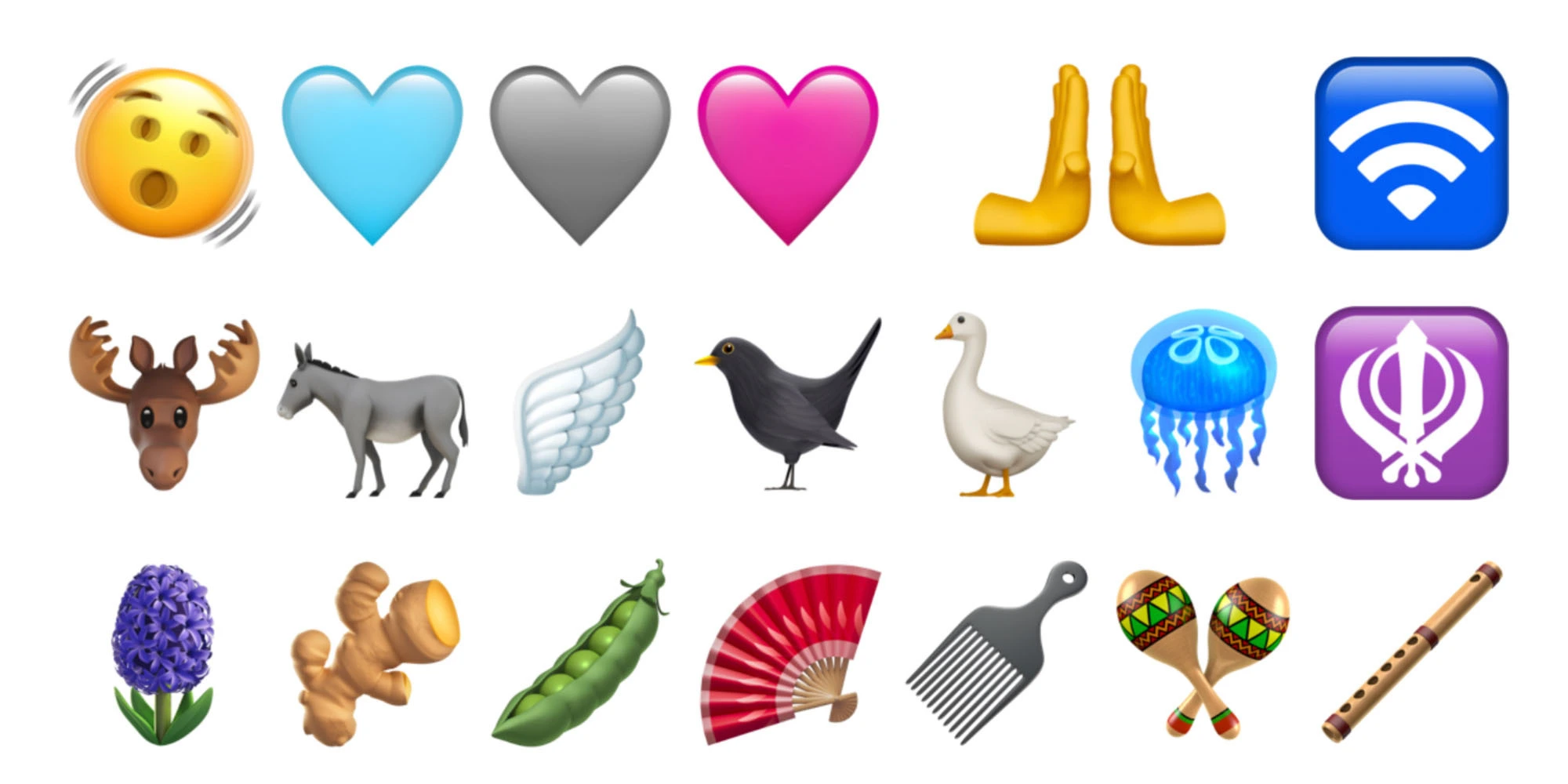
There are new emoji for things like a shaking face, a goose, a hyacinth, and a plain pink heart. These new Emoji are part of the Unicode Standard for Emoji Update 15.0, which was announced in July.
Changes to beta testing enrollment
Apple is cracking down on sharing iOS beta profiles. Now, the beta enrollment process will be tied to a developer’s Apple ID and accessed directly in the Settings app. Apple says:
Beginning with iOS & iPadOS 16.4 beta, members of the Apple Developer Program will see a new option to enable developer betas directly from Software Update in Settings.
This new option will be automatically enabled on devices already enrolled in the program that update to the latest beta release. Your iPhone or iPad must be signed in with the same Apple ID you used to enroll in the Apple Developer Program in order to see this option in Settings. In future iOS and iPadOS releases, this new setting will be the way to enable developer betas and configuration profiles will no longer grant access.
Cellular and 5G changes
iOS 16.4 adds a new “5G Standalone” feature that can deliver wildly fast speeds up to 3Gbps. In the United States, T-Mobile is the only carrier to support this feature.
Learn more: 3Gbps iPhone speeds could be coming soon as iOS 16.4 brings 5G Standalone support
Apple Podcasts updates
For Apple Podcasts, there are changes to the Library, improvements to Up Next, and new CarPlay updates.
Channels in Library: Easily access the channels you subscribe to and browse channels from shows you follow.
Up Next Enhancements: Resume episodes you began, start episodes you saved, and remove any you want to skip.
CarPlay Updates: Quickly pick up where you left off with Up Next and find new shows in Browse.
Shortcuts and Focus mode changes
For the Always On Display, there’s a new filter for Focus modes, so you can have certain Focus modes enable or disable the Always On Display automatically.
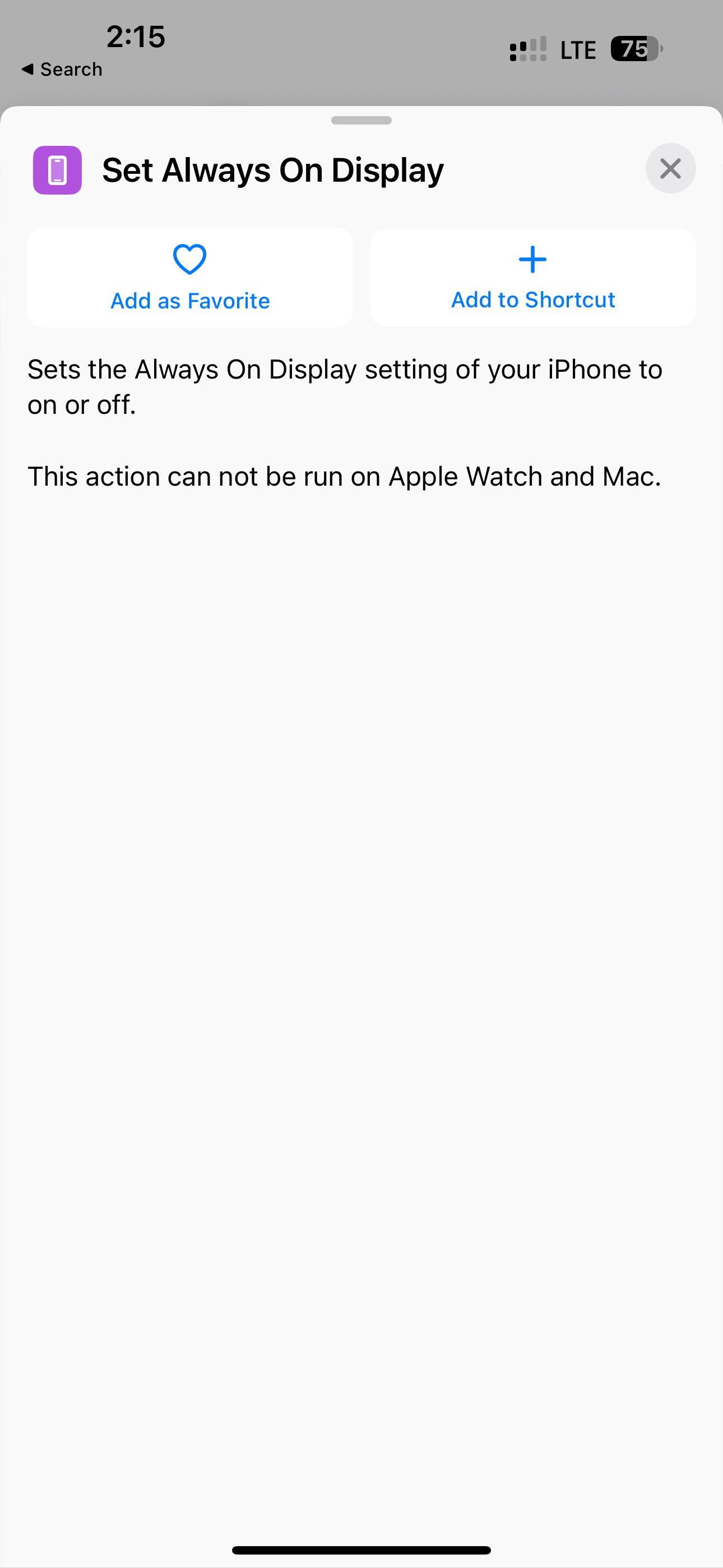
In Shortcuts, there’s a new “Set Always on Display” action, a new Lock Screen action, and a new Set VPN action.
New animations in the Music app
In the Music app, there are various interface tweaks and icon changes. For instance, adding a song to your queue no longer causes a full-screen pop-up. Instead, there’s a much smaller notification at the bottom.
There isn’t, however, any sign of Apple Classical.
AppleCare in Settings
iOS 16.4 includes a new screen in the Settings app where you can see all of your AppleCare coverage for multiple devices like the iPhone, Apple Watch, and AirPods.
Mastodon in Messages
iOS 16.4 beta enables rich previews for Mastodon links in the Messages app. This is similar to what the app offers for Twitter and other websites.
Accessibility
iOS 16.4 beta 1 adds a new Accessibility feature in the “Motion” menu for dimming flashing lights: “Video content that depicts repeated flashing or strobing lights will be automatically dimmed. The video timeline will display when flashing lights occur in the timeline for supported media.”
New “Order Tracking” widgets for the Wallet app
Apple has added three new Home Screen widgets for the Wallet app’s integrated order tracking features.
Other tidbits
In the Home app, Apple says both manual and automatic Software Update support is now available for Matter Accessories. The update also reintroduces the new home architecture after it was pulled due to reliability issues.
A few other changes to the keyboard:
Autocorrect for the Korean keyboard is enabled by default for testing and feedback.
Ukrainian keyboard now supports predictive text.
Gujarati, Punjabi, and Urdu keyboards add support for transliteration layouts.
New keyboard layouts are available for Choctaw and Chickasaw.
Apple Pencil hover now provides Tilt and Azimuth support.
No blue or green bubbles… iMessage on Windows brings with it gray bubbles.
People never thought it would happen. People didn’t think it was possible. But in an update to Windows 11, you will be able to send and receive iMessages and manage your notifications through a PC.
This update comes through the Windows Insider program, which offers users prerelease versions of the desktop operating system for beta testing and software development. Microsoft ships updates to Windows annually in the fall, so this feature may arrive for everyone later this year.
When you pair it with your phone, you can only see the messages that you’ve sent and received with Phone Link active, not the entire message history.
You also won’t be able to send pictures, videos or files.
You can only send and receive messages to one person; you can’t participate in group chats.
The app makes no distinction between regular text messages and iMessages.
These restrictions are unlikely to change soon; it appears to be a technical limitation of how the feature was implemented. Phone Link with an Android phone is no different.
So how does this work?
Phone Link will guide you through the process of pairing your iPhone.
Microsoft did not seem to get Apple’s blessing to create an iMessage client for Windows. Instead, the company implemented a workaround through Bluetooth pairing.
If your PC has Bluetooth, the Phone Link app on Windows will create a Bluetooth signal that you must connect to from your iPhone. You’ll be inundated with a bunch of permissions you need to accept, but if it all works, your phone will relay notifications and texts to your computer.
This has long been a supported feature through Bluetooth on iOS — it’s how early smartwatches like the Pebble were able to relay incoming notifications, too.
Can you get it right now if you’re on the Windows Insider Program?
If you’re thinking about joining the Windows Insider Program just to get this feature (like I did last year to get tabs in File Explorer), slow down just a minute. According to the Windows Insider blog, it will only be available to “a small percentage of Insiders at first throughout this week, which means not all Insiders will see the preview right away.”
The company said it plans to ramp up the release of this build “to more Insiders over time and based on feedback we receive.” Microsoft may ship it as part of the 2023 feature update to everyone running Windows 11 later this fall.
Other Apple services coming to Windows 11
Apple Music for Windows replaces the aging iTunes.
If you’re rocking the iPhone + Windows combo, you’re not left cold by the two tech giants. Instead, you get first-class support for many other Apple services on your PC.
Microsoft is rolling out a new version of its Phone Link app for Windows, and it finally brings support for iPhone. Most notably, this includes support for iMessage on Windows for the first time… but there are some limitations on how exactly this works.
Microsoft somehow brings iMessage to Windows, will it last?
As reported by The Verge, the Phone Link app for Windows is meant to mirror your phone on your PC for things like notifications, phone calls, and messages. The app has historically only supported Android devices, but that’s changing today with the addition of iPhone support.
The new version of Phone Link for Windows uses Bluetooth to link a user’s iPhone to their Windows PC. It then “passes commands and messages” to the Messages app on that paired iPhone. This means you can send and receive all iPhone messages — text messages and iMessages — through the Phone Link app on your PC.
“We send the messages back and forth via Bluetooth, Apple I think in turn sends those as iMessage once it gets onto their system,” Yusuf Mehdi, Microsoft’s head of consumer marketing, explained to The Verge.
This is clearly a workaround since Apple doesn’t natively support Messages via any platforms other than its own. With that in mind, there are a couple of limitations.
For instance, you can’t see the full message history in conversations via the Phone Link app. Instead, you’ll only see messages that “have been sent or received using Phone Link.” Microsoft also isn’t able to differentiate between text messages and iMessages, so there are no blue or green bubbles.
The biggest limitation, however, is that you won’t be able to send pictures in messages nor will you be able to participate in group messages.
After choosing iPhone, the guided installation will kick off to pair your iPhone. You will be directed to follow a set of steps that will guide you to pair your iPhone and PC over Bluetooth. This will initiate after you scan a QR code shown on your screen, and then move on to the confirmation steps that helps us confirm the phone and PC are in range.
During this step, you will be asked to confirm the code in Phone Link matches the code shown on your iPhone. Once you complete pairing, you’ll be asked to grant a set of permissions that allow us to get all your favorite content sync’d over to Phone Link.
iPhone integration into the Phone Link app is available starting today for a “small percentage” of Windows Insiders enrolled in the Dev, Beta, and Release Preview channels. It will roll out to more users over time.
Despite these limitations, however, Microsoft believes this is a worthwhile feature addition for Phone Link users. The app didn’t support iPhone in any capacity before, so this at least brings basic functionality. There’s the possibility more features could be added in the future.
What’s interesting to me is whether this is an Apple-sanctioned approach. It certainly doesn’t seem like it is. There’s a possibility Apple could roll out a change to iOS that completely breaks this Bluetooth-based workaround that Microsoft is using.