Google has spent the past several years working to replace passwords because of frequent reuse, vulnerability to data breaches, and phishing. Passkeys are the industry solution, and the ability to log in to your Google Account with them is starting to roll out.
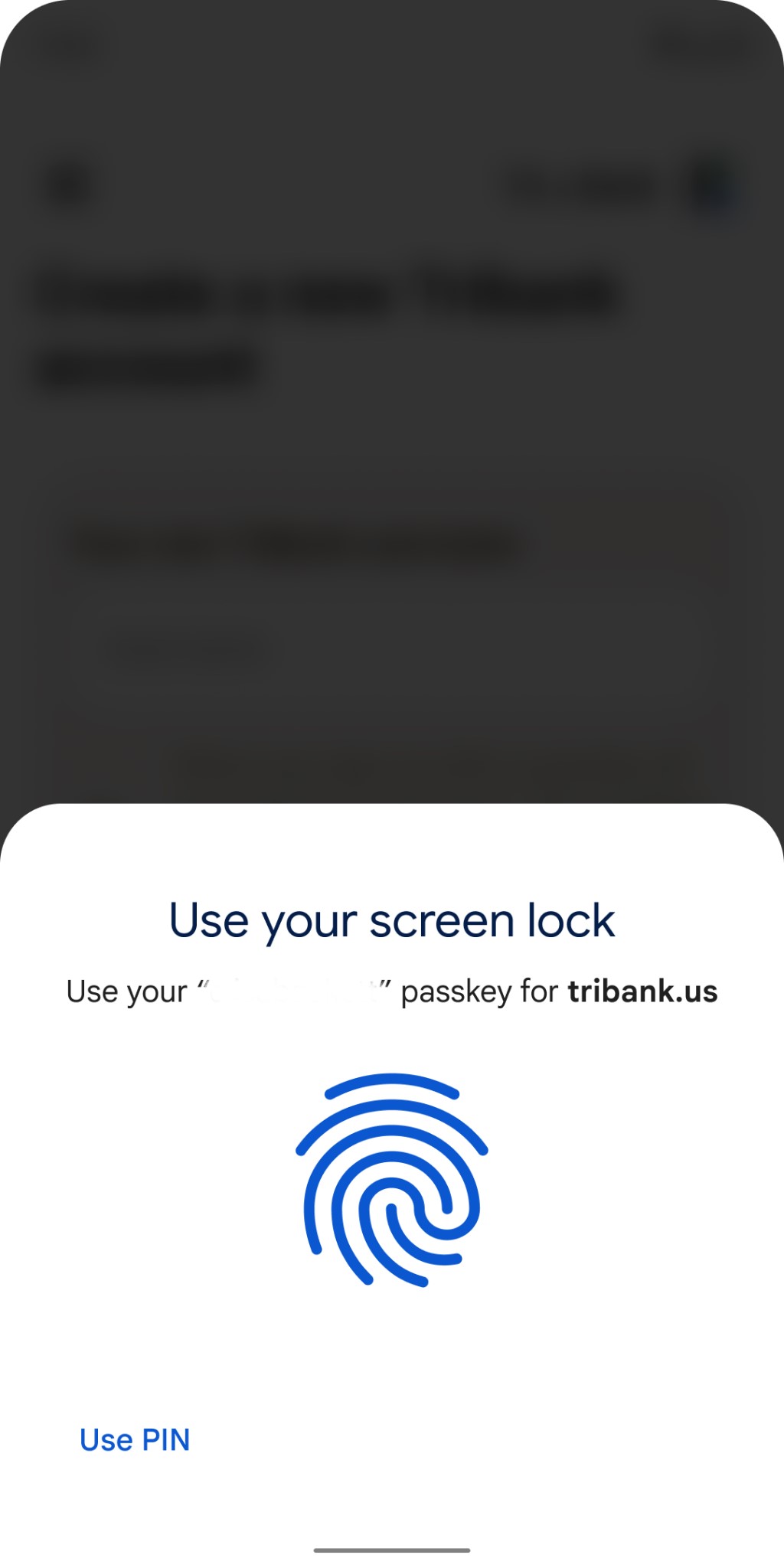
With passkeys, signing in to a service no longer requires a password. Instead, you just enter your existing phone or computer password (PIN code, fingerprint, face, etc.), and that’s used to authenticate your identity. In Google’s case, no 2-Step Verification (2SV) is required.
Google Account passkeys
You have to create a Google Account passkey for each device (phone, tablet, laptop, desktop, etc.). Behind the scenes, a cryptographic private key gets stored on that device, while a “corresponding public key is uploaded to Google.”
When you sign in we ask your device to sign a unique challenge with the private key. Your device only does so if you approve this by unlocking the device. We then verify the signature with your public key.
If you’re signing in with a new device (or doing so temporarily), you use the passkey on your phone with a QR code scanning process and a Bluetooth proximity check.
On the new device, you’d just select the option to “use a passkey from another device” and follow the prompts. This does not automatically transfer the passkey to the new device, it only uses your phone’s screen lock and proximity to approve a one-time sign-in. If the new device supports storing its own passkeys, we will ask separately if you want to create one there.
As of launch, passkeys serve as another Google Account sign-in option. There are no changes to existing methods, while passwords are the fallback method (used if a device doesn’t support passkeys). That should change in the future:
Passkeys are still new and it will take some time before they work everywhere, however creating a passkey today still comes with security benefits as it allows us to pay closer attention to the sign-ins that fall back to passwords. Over time we’ll scrutinize these more as passkeys gain broader support and familiarity.
If one device is lost, you can revoke Google Account passkeys in settings, while a device wipe is also recommended.
To add a passkey for your Google Account, start here: g.co/passkeys. This feature is actively rolling out, with the following operating system and browser versions required:
Google: Chrome 109+, Android 9+, ChromeOS 109+
Apple: Safari 16+, iOS 16, macOS Ventura
Microsoft: Edge 109+, Windows 10/11
Why passkeys are more secure
Google likes passkeys because, compared to passwords, they cannot be “written down or accidentally given to a bad actor,” phished, or exposed in a data breach. The company believes passkeys offer “stronger protection than most 2SV methods offer today, which is why we allow you to skip not only the password but also 2SV when you use a passkey.” To that end, Google is so confident that the Advanced Protection Program can just work with a passkey:
In fact, passkeys are strong enough that they can stand in for security keys for users enrolled in our Advanced Protection Program.
Google notes how Apple will sync passkeys created on your iPhone across logged-in iCloud devices:
This protects you from being locked out of your account in case you lose your devices, and makes it easier for you to upgrade from one device to another.
Passkey sync providers, like the Google Password Manager and iCloud Keychain, “use end-to-end encryption to keep your passkeys private.” In the case of Google’s Password Manager, it can sync and save other Google Accounts.
Passkeys place a great deal of emphasis on your device password. However, Google believes “most people will find it easier to control access to their devices rather than maintaining the security implications of passwords and the need to be on the lookout for phishing attempts that come with them.”
On May 02,2023, Apple and Google are partnering to address unwanted tracking through Bluetooth tracker devices and to alert users across platforms like iOS and Android when they are being tracked. The companies have proposed an industry specification to combat unwanted tracking, with support from manufacturers like Samsung, Chipolo, eufy Security, and Pebblebee. This demonstrates their commitment to ensuring user safety and privacy. Ron Huang, Apple’s vice president of Sensing and Connectivity, emphasized the importance of collaboration with Google, stating that it is a critical step forward in combatting unwanted tracking across both iOS and Android platforms.
Feedback from manufacturers and advocacy groups has been incorporated into the development of the specification. Erica Olsen, Senior Director of the Safety Net Project of the National Network to End Domestic Violence, praised the collaboration and resulting standards as a significant step forward in protecting survivors and all people from the misuse of Bluetooth tracking devices.
The specification has been submitted as an Internet-Draft via the Internet Engineering Task Force (IETF), and the partnership is inviting other companies to join the initiative, provide comments or review the draft over the next three months. After this period, Apple and Google will release a production implementation of the specification to address unwanted tracking, which will arrive on both iOS and Android platforms by the end of 2023.
Introduction to the IETF
The Internet Engineering Task Force (IETF), founded in 1986, is the premier standards development organization (SDO) for the Internet.
The IETF makes voluntary standards that are often adopted by Internet users, network operators, and equipment vendors, and it thus helps shape the trajectory of the development of the Internet. But in no way does the IETF control, or even patrol, the Internet.
the overall goal of the IETF is to make the Internet work better.
Its mission is to produce high quality, relevant technical and engineering documents that influence the way people design, use, and manage the Internet in such a way as to make the Internet work better. These documents include protocol standards, best current practices, and informational documents of various kinds.
The Mission Statement further states that the Internet isn’t value-neutral, and neither is the IETF. The IETF wants the Internet to be useful for communities that share our commitment to openness and fairness. The IETF embraces technical concepts such as decentralized control, edge-user empowerment and sharing of resources, because those concepts resonate with the core values of the IETF community. These concepts have little to do with the technology that’s possible, and much to do with the technology that the IETF chooses to create.
Participation
There is no membership in the IETF. Anyone can participate by signing up to a mailing list, or registering for an IETF meeting. All IETF participants are considered volunteers and expected to participate as individuals, including those paid to participate.
The IETF welcomes all interested individuals and participants come from all over the world and from many different parts of the Internet industry. In any one year, over 6000 people actively participate in the IETF either by authoring a document, engaging in a mailing list discussion, or attending a meeting.
The only fee the IETF charges is for registering for an IETF meeting, with options in place to prevent that fee from becoming a barrier to participation.
IETF participants are regularly shown the Note Well, a reminder of the policies and processes they are expected to comply with.
To ensure an environment in which people of many different backgrounds are treated with dignity, decency, and respect, these policies include a code of conduct, an anti-harassment policy, and the IETF has an Ombudsteam who are the point of escalation for any problems with conduct.
The IETF conducts its work solely in English.
Principles
The IETF pursues its mission in adherence to the following cardinal principles:
Open process Any interested person can participate in the work, know what is being decided, and make his or her voice heard on the issue. Part of this principle is our commitment to making our documents, our Working Group mailing lists, our attendance lists, and our meeting minutes publicly available on the Internet.
Technical competence The issues on which the IETF produces its documents are issues where the IETF has the competence needed to speak to them, and that the IETF is willing to listen to technically competent input from any source. Technical competence also means that we expect IETF output to be designed to sound network engineering principles – this is also often referred to as “engineering quality”.
Volunteer Core Our participants and our leadership are people who come to the IETF because they want to do work that furthers the IETF’s mission of “making the Internet work better.”
Rough consensus and running code We make standards based on the combined engineering judgement of our participants and our real-world experience in implementing and deploying our specifications.
Protocol ownership When the IETF takes ownership of a protocol or function, it accepts the responsibility for all aspects of the protocol, even though some aspects may rarely or never be seen on the Internet. Conversely, when the IETF is not responsible for a protocol or function, it does not attempt to exert control over it, even though it may at times touch or affect the Internet.
RFCs
The IETF publishes its technical documentation as RFCs, an acronym for their historical title *Requests for Comments*. RFCs are sequentially numbered, starting with RFC 1 published in 1969 (the RFC series predates the IETF). Each RFC has a status, generally one of ‘Internet Standard’, ‘Proposed Standard’, ‘Informational’, ‘Experimental’ or ‘Historic’. Some statuses may change over time. RFCs are freely available.
The RFC series has two sub-series, STDs and BCPs, with each numbered STD and BCP comprising one or more RFCs. STDs are ‘Internet Standard’ RFCs and BCPs are RFCs that describe Best Current Practices in the Internet, some of which are administrative processes for the IETF.
Once an RFC is published, it is never revised. If the specification it describes changes, the standard will be re-published in another RFC that “obsoletes” the first. If a technical or editorial error is found in an RFC, an errata may be linked to the RFC and/or held for the next document update.
The authoritative repository of RFCs is the RFC Editor website.
New work in the IETF begins with one or more participants producing a document called an Internet-Draft (I-D) and then working to get that I-D adopted for further work. Anyone can write an Internet-Draft on any topic they believe is relevant to the IETF. There are different routes that an I-D can follow to be adopted, worked on and eventually become an RFC.
The vast majority of the IETF’s work is done in its many Working Groups. A Working Group (WG) has its own mailing list with most of its interaction, and all of it official work, conducted via email. A WG also has a charter that states the scope of discussion for the WG and its goals. The WG’s mailing list and any WG meetings are expected to focus only on what is in the charter. A WG is headed by one or two (occasionally three) **WG chairs**.
Working Groups are organized into one of seven areas, Application and Real Time (art), General (gen), Internet (int), Operations and Management (ops), Routing (rtg), Security (sec), and Transport (tsv), with each area overseen by one to three **Area Directors** (AD).
The day to day work of WGs revolves around Internet-Drafts, those that have been proposed for adoption and those that have been adopted, and over time the WG shapes the latter into RFCs. Decisions within WGs, as with the broader IETF, are taken by ‘rough consensus’ and not by voting. It is the role of the WG chair(s) to determine when rough consensus has been reached. When a Working Group has finished with an I-D and is ready for it to become an RFC, the I-D goes through a process to ensure that it has approval from the appointed technical leadership and the consensus support of the IETF as a whole.
The other routes for an I-D to become an RFC are as the output of some of the leadership bodies, Area Directors can sponsor an I-D, and there is an independent submissions process.
For an RFC to become a Proposed Standard or Internet Standard there must be at least two independent and inter-operable implementations, and the RFC must have full IETF consensus.
The IETF has policies about Intellectual Property Rights (IPR) that are designed to ensure that Working Groups and participants have as much information as possible about any IPR constraints on a technical proposal as early as possible in the development process.
When an I-D has cleared all the hurdles to become an RFC it goes through a professional editorial process and is then assigned a number, published in a range of formats, both human- and machine-readable, and deposited in libraries and archives.
Meetings
The IETF holds three week-long meetings a year with the primary goal of helping Working Groups get their tasks done, and promoting mixing among the WGs. In-person participation at IETF meetings now averages between 1000 and 1500 participants. These meetings rotate through Asia, North America and Europe each year, though the IETF occasionally meets outside of these regions.
IETF meetings are very different from standard computer industry conferences as there is no exposition hall, no sales staff and the sessions are mostly meetings of existing or proposed working groups who meet to discuss their ongoing work. There are generally eight concurrent tracks of WG sessions which are scheduled so as to reduce the number of scheduling conflicts for related WGs.
WG sessions at IETF meetings are not decision making and any consensus reached during a session must be referred to the WG mailing list to see if it has consensus support across all WG participants, not just those that were at the session.
To assist newcomers there are tutorials and networking sessions, and often there is a social event open to all participants. Additionally there is a plenary session with no other concurrently scheduled sessions, for the IETF to meet as a whole and where the various leadership bodies report on their activities and take questions from the floor.
All sessions have remote participation support and recordings of the sessions are posted on YouTube soon after they are recorded. The full proceedings of all IETF meetings (agenda, sessions materials, recordings, chat logs, etc) are archived and permanently available online after the meeting.
IETF meetings are operated on a cost-recovery basis and participants are charged a fee to participate whether in-person or remote as sponsorship income does not cover the full cost. There is a “no questions asked” remote participation fee waiver available to anyone for whom the fee would be a barrier to participation.
Individual Working Groups can choose to hold interim meetings outside of the regular IETF meeting cycle. These are generally remote only and are always free to participate in.
Right off the bat, we’d treat this rumor with skepticism. The source of the leak is @analyst941 on Twitter, who does not have an established long-term track record of accurate iOS leaks. They did, however, correctly predict certain details of the iPhone 14 Pro’s Dynamic Island ahead of its release.
The source claims to have seen various aspects of iOS 17 themselves, including the new Wallet app, the new Health app, and the revamped interface for customizing your iPhone’s wallpaper. With that knowledge, the source created a set of concepts visualizing what these new designs will look like.
This is the new grid view for Wallpapers in iOS 17.
• All new Grid-view displays 9+ wallpapers at once. • Delete wallpapers quickly within the grid-view. • Rearrange the order of wallpapers in grid-view. • Share or duplicate wallpapers by swiping up in single-view. pic.twitter.com/BUMugPKb1v
The new Wallet app is said to feature an updated interface that offers search functionality and separated tabs for your cards and your other passes, such as airline boarding passes. iOS 17 will also reportedly add a bottom navigation bar to the Wallet app, with dedicated tabs for “Cash,” “Keys, “IDs,” and “Orders.”
Someone pointed out the glyphs on the bottom were wrong, and they were. Here’s an updated version of the original image with new & more accurate glyphs… pic.twitter.com/nZYV1Lp5Fp
Bloomberg’s Mark Gurman has previously reported on Apple’s plans to overhaul the Wallet app with a new design and new features in iOS 17.
The new Health app will reportedly feature a revamped interface for the “Favorites” tab of the app. The new design will allegedly use smaller square-shaped tiles, allowing you to see additional metrics without having to scroll down the app.
This is the iOS 17 Health app ‘favorites redesign,’ — there will obviously be VISUAL data inside the squares — I’m just too lazy to do all that. I’m sure you get the point.
Finally, Apple is also reportedly planning to overhaul the process of changing and customizing your iPhone’s wallpaper. The source says:
All new Grid-view displays 9+ wallpapers at once.
Delete wallpapers quickly within the grid view.
Rearrange the order of wallpapers in a grid view.
Share or duplicate wallpapers by swiping up in single-view.
This is the new grid view for Wallpapers in iOS 17.
• All new Grid-view displays 9+ wallpapers at once. • Delete wallpapers quickly within the grid-view. • Rearrange the order of wallpapers in grid-view. • Share or duplicate wallpapers by swiping up in single-view. pic.twitter.com/BUMugPKb1v
The @analyst941 source shared these concepts on Twitter. Again, we’d treat the rumor with skepticism for now. Apple will officially unveil iOS 17 at WWDC in June, alongside updates to watchOS, iPadOS, macOS, and tvOS.
Report: iOS 17 sideloading features not coming to the US; Find My and Wallet app updates planned
Apple will announce its next round of software updates in less than two months, including iOS 17. We’ve heard scattered reports on what to expect from these updates, including the possibility that iOS 17 will include support for sideloading apps for the first time.
A report today, however, indicates that sideloading will only be available to iPhone users in Europe, not worldwide. iOS 17 will also reportedly include new features for Wallet and Find My.
iOS 17 sideloading features limited to the EU
The new rumors come from Bloomberg’s Mark Gurman, who made the comments on a recent MacRumors podcast guest appearance. Bloomberg first reported on Apple’s plans to open the iPhone up to third-party app stores and sideloading back in December, saying the company was “dedicating a significant amount of resources” to the endeavor.
Apple is not enabling third-party app stores and sideloading because of a change of heart in its long-held belief that doing so will lead to security and privacy issues. Instead, it’s doing so purely to comply with looming regulations in the European Union, known as the Digital Markets Act.
As the move is being made purely in response to regulatory pressure in the European Union, Apple is doing the bare minimum to comply with those regulations. According to Gurman, this means iOS 17 sideloading will only be available in countries where the DMA is applicable – which only includes the EU.
Gurman believes Apple will implement sideloading in a way similar to what it did when it was forced to make App Store changes in response to an antitrust case in the Netherlands. In fact, Gurman suggested Apple may downplay iOS 17 sideloading to such a degree that it’s not even announced at WWDC:
I think it will be a Europe-only feature. I think that they’re not going to shoot themselves in the foot and expand this globally if they don’t have to.
If you remember, there was that change in the Netherlands around dating apps and the percentage there. And so you have to install a special profile, you have to go through some sort of hoops to do it, and it was very under the radar.
So I think they’re going to push more in that direction. I would be a bit surprised if they announced it at WWDC and made this a highlight consumer feature. I think they want to sort of downplay it as much as possible.
“They’re not gonna do anything extraneous that would further hurt their grip on the App Store,” Gurman continued. “There really going to stick to the letter of the law here.”
But still, the project has been a “major undertaking” inside Apple, Gurman said today. As he initially reported in December, the effort has required involvement from teams across the company, including legal, marketing, and the App Store team itself.
As for how Apple might implement sideloading in the European Union, Gurman speculates that the company will likely charge developers to be part of the program, and they will use some sort of configuration profile-based process. “There’ll be some sort of review process, even though these apps would be installed outside the App Store,” Gurman said.
Outside of the geo-limited sideloading features, Gurman also mentioned in today’s podcast appearance that iOS 17 will include changes to Find My and the Wallet. “I think you’ll see a bigger push on location and Find My-related changes,” he said. “In addition to Wallet and some user interface tweaks and enhancements there.”
As for the rumors about a redesigned Control Center in iOS 17, Gurman said he has nothing to share about that. It should be noted that the rumor of a redesigned Control Center comes from the same anonymous MacRumors source that Gurman recently questioned the reliability of on Twitter. “Many of the details I’ve seen from this account are not true,” he wrote in a post.
Many of the details I’ve seen from this account are not true
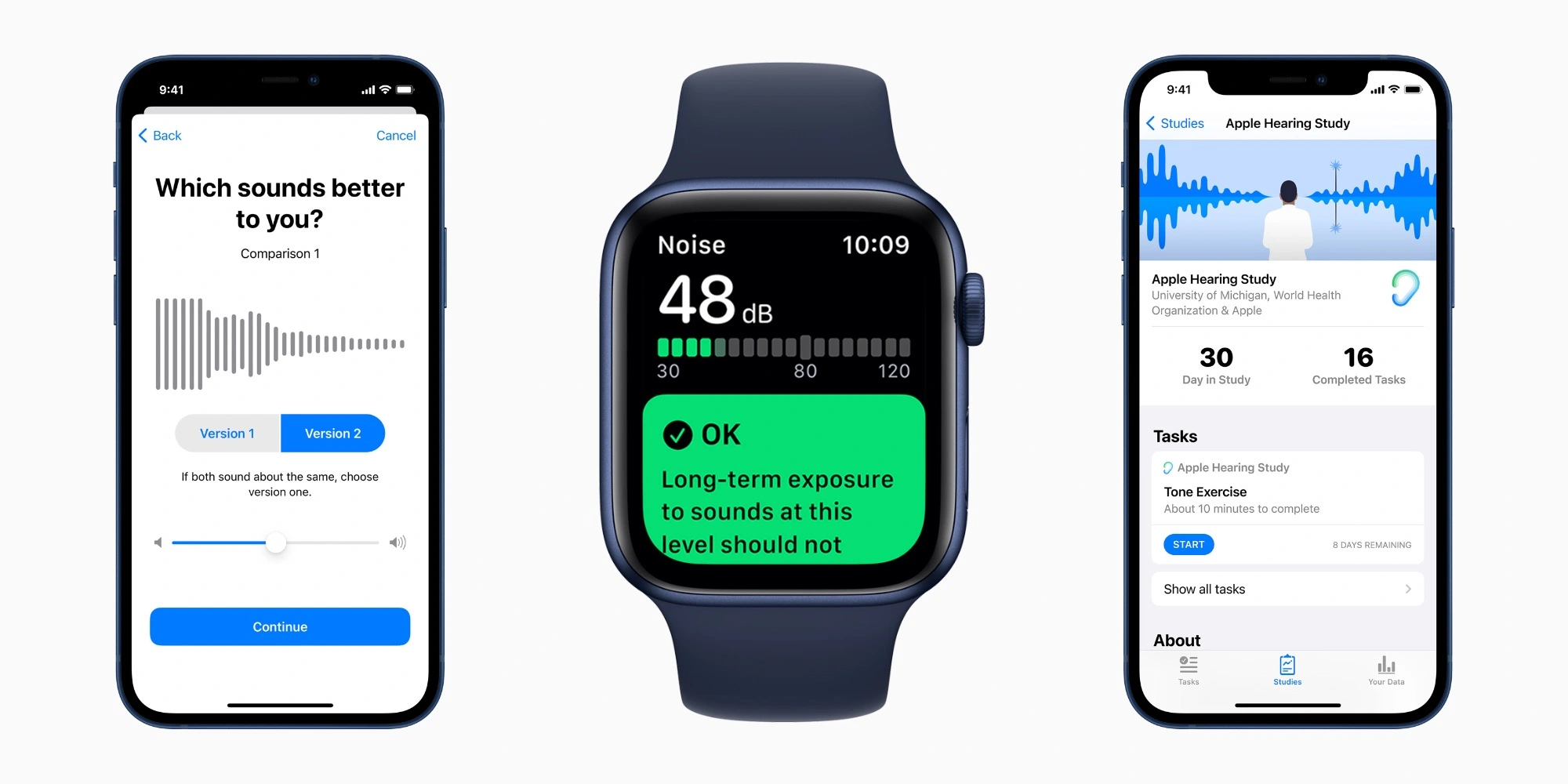
Back in 2019, Apple announced three new health research studies based on data collected from the iPhone and Apple Watch. To coincide with International Noise Awareness Day on April 26, the company shared updates on its Hearing Study conducted in partnership with the University of Michigan.
Apple launching three new research studies including hearing, cycle tracking, heart, and movement
Apple has announced three new health studies powered in part by the Apple Watch. Three new studies include hearing, cycle tracking, heart, and movement research. Apple is also launching a new Apple Research app for enrolling in each study.
Apple announces three groundbreaking health studies
UPDATE September 10, 2019
In Collaboration with Leading Medical Institutions, Apple to Examine Hearing, Women’s, Mobility and Heart Health
The new Research app displaying healthy study enrollment options on iPhone. Three new studies, available on the Research app later this fall, will explore new areas of medical research. Apple today announced three unprecedented medical studies, in partnership with leading academic and research institutions, that will reach more participants than has ever been possible. The studies will be available on the new Research app,1 which democratizes how medical research is conducted by bringing together academic medical institutions, healthcare organizations and the Apple products customers already make a part of their everyday life. Participants will contribute to potential medical discoveries and help create the next generation of innovative health products. The Research app will be available as a free download in the App Store later this year.
“With the Apple Heart Study, we found that we could positively impact medical research in ways that help patients today and that make contributions that will benefit future generations,” said Jeff Williams, Apple’s chief operating officer. “Today’s announcement carries our commitment to health even further by engaging with participants on a larger scale than ever before.”
A heart rate reading displayed on Apple Watch Series 5. The Apple Heart and Movement Study will look into the connection of heart health and mobility signals, like walking pace. The studies include:
Apple Women’s Health Study: In partnership with Harvard T.H. Chan School of Public Health and the NIH’s National Institute of Environmental Health Sciences (NIEHS), Apple has created the first long-term study of this scale focused on menstrual cycles and gynecological conditions. This study will inform screening and risk assessment of conditions like polycystic ovary syndrome (PCOS), infertility, osteoporosis, pregnancy and menopausal transition. Apple Heart and Movement Study: Apple is partnering with Brigham and Women’s Hospital and the American Heart Association on a comprehensive study of how heart rate and mobility signals — like walking pace and flights of stairs climbed — relate to hospitalizations, falls, heart health and quality of life in order to promote healthy movement and improved cardiovascular health. Apple Hearing Study: Alongside the University of Michigan, Apple is examining factors that impact hearing health. The Apple Hearing Health Study is the first of its kind to collect data over time in order to understand how everyday sound exposure can impact hearing. The study data will also be shared with the World Health Organization (WHO) as a contribution toward its Make Listening Safe initiative. The new Cycle Tracking app on Apple Watch Series 5. The Apple Women’s Health Study will explore gynecological conditions on an unparalleled scale. Apple’s support of the medical research community began with the introduction of ResearchKit and CareKit, which expanded the pace and scale at which healthcare could be studied and provided. Apple used ResearchKit to create the Apple Heart Study, which was the largest study of its kind and illustrated the impact virtual, large-scale studies can have on medical research by examining atrial fibrillation to provide validation for the irregular rhythm notification feature on Apple Watch.
“Women make up half of the world’s population, yet even today there has been limited investment in studying their unique health needs,” said Michelle A. Williams, a reproductive epidemiologist and dean of the faculty at the Harvard T.H. Chan School. “This study, unprecedented in scope, will greatly advance our understanding of the biological and social determinants of women’s health, and lead to better health outcomes.”
“This is an exciting opportunity for NIEHS researchers to contribute to the study design and use the resulting data to answer novel questions, not only important to women of reproductive age, but to women of all ages,” said Dale Sandler, Ph.D., chief of the NIEHS Epidemiology Branch.
“We are excited to be working with all the study participants and with Apple to identify the features of complex human physiology that lead to different outcomes in wellness or chronic disease, and to use this information to empower individuals to maximize their own health,” said Calum MacRae, the vice chair of Scientific Innovation for the Department of Medicine at Brigham and Women’s Hospital and associate professor of Medicine at Harvard Medical School.
“At the American Heart Association, we are a relentless force for a world of longer, healthier lives, and we are committed to educating and empowering people to be proactive in all areas of their heart health and general well-being,” said Nancy Brown, CEO of the American Heart Association. “We believe that emerging technology solutions that seek to provide deeper health insights offer great potential in getting us there. We are collaborating with Apple and Brigham and Women’s Hospital on the Apple Heart and Movement Study to explore the correlation between a broad range of physical activities and a person’s overall heart health to ultimately understand risks and interventions to improve health.”
“We are excited about this unique opportunity to partner with Apple to determine how everyday activities affect our hearing,” said DuBois Bowman, dean of the University of Michigan School of Public Health. “The information gleaned from this partnership will be critical for us to address the public health impact of various noise exposures on hearing loss in the United States.”
“The World Health Organization is pleased to note the announcement of the Apple Hearing Study which will contribute toward our Make Listening Safe initiative by improving our understanding of users’ listening behaviors,” said Dr. Shelly Chadha, technical officer of Prevention of Deafness and Hearing Loss at the World Health Organization. “With over a billion young people who could be at risk of hearing loss due to unsafe listening, WHO is addressing this challenge through raising awareness and setting new standards for safe listening. The knowledge gained through this study will contribute to future public health action in this field.”
Media
Images of Apple Health Studies
Available in the US only.
Apple Hearing Study
Since watchOS 6, Apple Watch users can rely on the Noise app, which measures the level of noise in the user’s environment, to warn of potential ear damage. According to the World Health Organization (WHO) and the US Environmental Protection Agency (EPA), people shouldn’t be exposed to an average annual noise level above 70 decibels (dBA).
The study, conducted in partnership between Apple and the University of Michigan, uses this data to measure the impacts of noise exposure on hearing health. In 2021, Apple shared the first insights from this study, which showed that 25% of participants experienced exposure to sound levels louder than the recommended limit at some point.
In most instances, this happened during common situations like being in traffic, working with machinery, and riding public transportation.
The most recent data show that 1 in 3 adults in the US, around 77 million people, are exposed to excessive noise levels. The states with the highest populations have the largest number of those affected by high-decibel noise. This includes California, Texas, Florida, and New York.
The highest percentage of participants exposed to noise levels that are often above 70 dBA reside in Puerto Rico (44%) and the lowest percentage reside in Washington DC (20%).
Apple shares first insights from hearing study based on iPhone and Apple Watch data
Apple launched three research studies in September 2019 that use the iPhone and Apple Watch to learn more about hearing health, women’s cycle tracking, and movement’s effect on wellbeing. A year and a half later, Apple has published what it describes as new insights gathered from the Apple Hearing Study.
The Research app allows iPhone and Apple Watch users to voluntarily participate in health studies from Apple and its research partners. This dramatically lowers the barrier for entry for participation. In turn, results can be based on much larger samples of the population than traditional studies.
The Apple Hearing Study is a partnership between Apple and the University of Michigan School of Public Health. Apple says data from the study is provided to the World Health Organization’s Make Listening Safe Initiative.
The first key insight from the Apple Hearing Study so far is that one in four participants are exposed to higher than recommended environmental sound levels:
The new insights generated leveraging this unprecedented data demonstrate that 25 percent of participants experience a daily average environmental sound exposure (which can include traffic, machinery, public transport, and so on) that is higher than the WHO recommended limit.
The Research app on iPhone includes questions that help inform researchers about overall hearing health. Based on that data, Apple learned that almost half of participants work or have worked in loud environments.
Also, nearly 50 percent of participants now work, or have previously worked, in a loud workplace. As noise exposure has shown an impact on hearing, it’s important to be aware of surroundings. Checking noise levels with the Noise app on Apple Watch can be an effective way to be more aware of sound exposure.
Apple is also sourcing volume level data from headphones, including AirPods. Based on this information from participants, the study has learned that 10% of participants are exposed to higher than recommended headphone volume levels.
Average weekly headphone exposure for one in 10 participants is higher than the WHO recommended limit. While catchy tunes can be tempting, listeners should consider listening to music and other media at the lowest enjoyable volume.
Other key insights realized from the Apple Health Study include these numbers:
1 in 10 participants have been professionally diagnosed with hearing loss
75% of those professionally diagnosed with hearing loss do not use a hearing aid or cochlear implant
1 in 5 participants experience hearing loss compared to World Health Organization standards
1 in 4 participants experience a ringing in their ears a few times a week or more
“Even during this pandemic, when many people are staying home, we’re still seeing 25 percent of our participants experiencing high environmental sound exposures,” according to Rick Neitzel, associate professor of environmental health sciences at the University of Michigan School of Public Health.
“The results of this study can improve our understanding of potentially harmful exposures, and help identify ways that people can proactively protect their hearing,”
Finally, Apple suggests a number of ways that people can positively impact their hearing health and reduce noise exposure to avoid hearing loss including this:
Access support for the Deaf and Hard of Hearing community: Hearing accessibility on iOS includes several features to support people who are profoundly deaf or hard of hearing, like Sound Recognition; FaceTime, including sign language detection in Group FaceTime; sensory alerts; and Type to Siri.
The Apple Hearing Study is available in the United States through the Apple Research app for iPhone.
Here’s how to protect your ears from external noise
According to Apple and the University of Michigan, there are a few things people can do to protect themselves from loud noises. These include wearing hearing protection devices such as earplugs in noisy environments, buying quiet appliances, and taking regular breaks from noisy areas when possible.
If you own an Apple Watch, be sure to check out the Noise app for a better idea of the sound noise levels in your environment. You can also enable notifications for when you’re exposed to above-recommended levels for extended periods of time.
It’s worth noting that the Apple Hearing Study is available in the United States through the Apple Research app for iPhone.
With the Apple iPhone 12 Pro Max, our collection is finally complete. It is the biggest, heaviest, most powerful, and most feature-rich iPhone Apple has made so far, and that’s enough to make it the best-seller it was designed to become.
The iPhone 12 Pro Max is the only member of Series 12 to pack the new and improved triple-camera on the back. This might be even enough to entice users who may not even be after the Max size. That is how a proper upgrade should be done – by updating every aspect possible, not just the design.
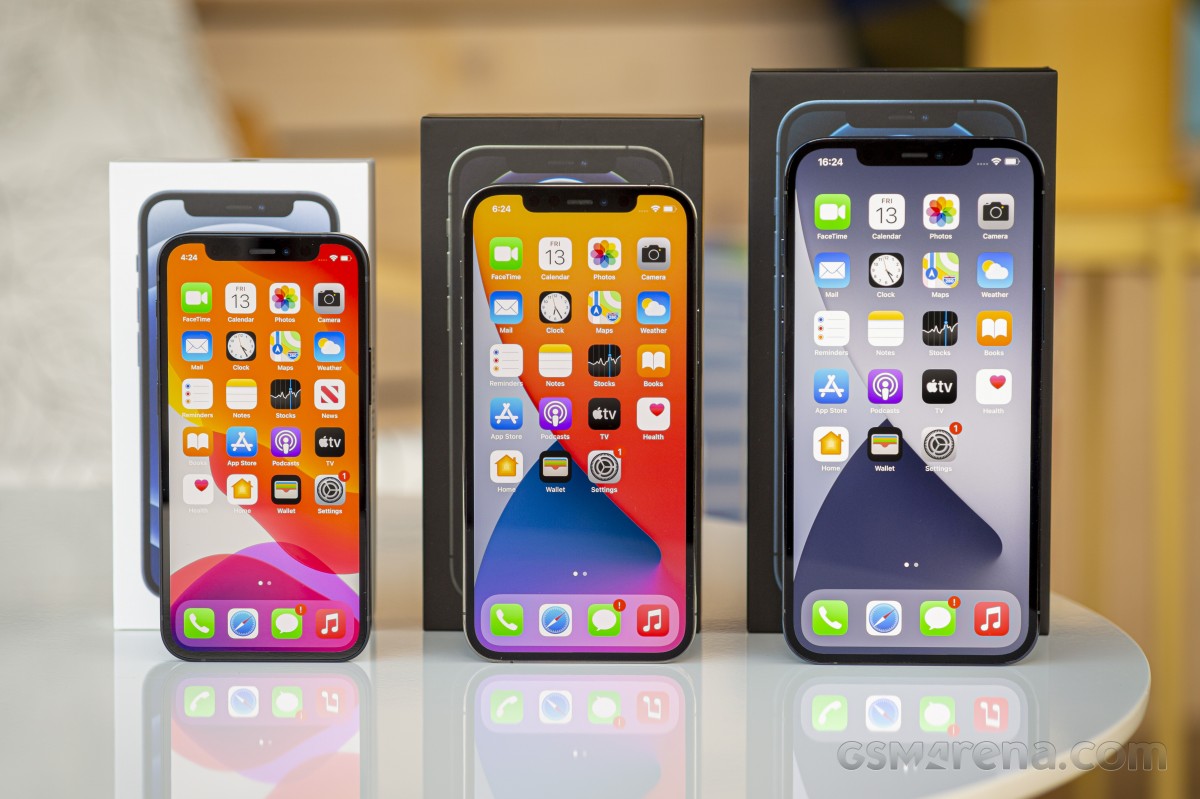
iPhone 12 mini, iPhone 12, iPhone 12 Pro Max and iPhone 12 Pro
The iPhone 12 Pro‘s Max denomination isn’t standing just for maximum size, but for the complete set of new features. The biggest iPhone to date enjoys the most premium and durable design Apple has made, the most powerful chip with 5G support, the latest Apple camera, the LiDAR scanner, the largest speakers, the beefiest battery, and, of course, MagSafe support.
Apple iPhone 12 family
This Max version could have been even better with a 120Hz display, but, alas, this feature didn’t make the cut on Series 12. Maybe next year, who knows, but today even the most expensive iPhone can’t show more than 60fps on its screen.
We know you are eager to see the Pro Max‘s battery life and camera performance, but first things first. Let’s take a closer look through its specs, shall we?
Disclaimer. We can not guarantee that the information on this page is 100% correct.
The iPhone 12 Pro Max is an upscaled version of the iPhone 12 Pro with a bigger display and battery. It also features a larger 12MP sensor for its primary camera with the industry’s first sensor-shift image stabilization. Finally, its telephoto camera has an even longer-range lens now – 65mm f/2.2 for 2.5x optical zoom. Nice!
Finally, even if the iPhone 12 Pro Max is one of the most expensive phones today, just like the rest of the iPhone 12’s, it also comes accessory-free thanks to Apple’s latest controversial endeavor to save the planet.
Unboxing the iPhone 12 Pro Max
The Apple iPhone 12 Pro Max comes within a thin and lightweight box that contains the phone and a USB-C-to-Lightning cable.
There is no charger or EarPods inside, but you will find a SIM ejection pin and a lonely Apple sticker if you dig deeper. You better hold on to that metal pin, as it might disappear next year, too.
Alternatives
This year, you can choose between three different iPhone sizes, and we believe this will continue to be the case in the years to come. The iPhone 12 mini and iPhone 12 will successfully cater to anyone who needs a compact flagship. This has allowed the 12 Pro Max to grow bigger and better without any holdbacks.
Indeed, that year, along with the new design with better materials, the 12 Pro Max model brings an even larger screen. Its enormous size has allowed Apple to fit a better camera as well – the industry’s first-ever sensor-shift stabilization and for the first time ever on an iPhone – a longer, 65mm zoom lens.
If the Pro Max’s size is of any concern, the more reasonably-sized iPhone 12 Pro is literally the same phone, just smaller. Yes, we are well aware of the camera differences.
The normal iPhone 12 will give you a lightweight body with all the Pro’s power and screen without the telephoto camera and the LiDAR scanner. If you are not into AR apps, the lack of LiDAR won’t matter to you. As for the zoom camera – only you can decide.
Apple has this bad habit of making all previous-gen iPhones disappear from the market within a week of its latest premiere, and the iPhone 11 Pro models have suffered the same fate. But if you already own an iPhone 11 Pro Max, there is really no reason to upgrade. It’s still quite recent, and you don’t really need the LiDAR or the new glossy frame, which looks amazing only on the showroom floor. .
There is one Android phone that comes to mind when thinking in Max size, and that’s the Galaxy Note20 Ultra 5G. It encompasses the best of everything Samsung has to offer. The Ultra has an even larger 6.9″ OLED with higher resolution and a much smaller cutout. It also provides enormous processing power and has a rather unique triple camera with a 108MP primary, a 12MP 5x telephoto, and a 12MP ultrawide shooter. The Note packs an S-Pen that has become a fan-favorite feature for many. The Ultra is a powerful mini-tablet in your pocket, and if you are not invested much in Apple‘s ecosystem, you may want to give it a try.
Apple iPhone 12 Pro • Apple iPhone 12 • Samsung Galaxy Note20 Ultra 5G
The verdict
The iPhone 12 Pro Max is Apple‘s mightiest iPhone on the market before. It employs the most massive iPhone screen ever. It has every new feature the company has come up with, and it’s wrapped in a premium body with a bold new design that brings a dash of nostalgia. Heck, even its outrageous price tag is a selling point for many potential customers.
The 12 Pro Max is not without its flaws. On the contrary – it’s doesn’t even bring enough worthy upgrades over the 11 Pro Max to justify a switch. Not only that, but they are cutting back some features and deliberately omitting others. No charger, no headphones, same camera quality generation after generation, no high refresh rate screen when everyone else has one, and no under-display fingerprint reader when everybody is forced to wear a mask.
Apple is certainly not a company to go with the trends. On the opposite, their success in doing things differently has turned them into a trend-setter. For any other company, any of these decisions would have led to a severe backlash. Yet, Apple’s mobile business is doing better than ever.
They’ve earned a special place in the customer’s hearts and minds by coming up with consistently polished products with great after-sales service, and of course, by supplementing all this effort with great marketing.
The iPhone 12 Pro Max is a product of the same great recipe for success. So without a doubt, millions of customers have already bought one, and millions more will get theirs in the year ahead.
Do we recommend getting it? Certainly, if you are after the large screen and you have an older iPhone. If you already have a recent device like the iPhone 11 Pro or Pro Max, there is really not much sense in upgrading.
Pros
Sumptuous design with jewelry-like attention to detail, durable and water-resistant
Excellent large OLED screen, very bright
Loud stereo speakers, outstanding audio quality
The fastest smartphone chip on the planet, 5G, too
Dependable battery life, fast charging
Apple iOS 14 is fast and easy to use, 5 years of guaranteed major updates
Very good photo and video quality across the board, day and night
LiDAR Scanner has varied applications and use cases (albeit quite niche)
MagSafe is a promising accessory concept
Cons
No charger or headphones in the box
No high refresh rate screen
iOS needs better file management
We miss TouchID as FaceID does not work with a mask on
The new camera offers the same quality as the old one
Few meaningful upgrades over iPhone 11 Pro Max and even fewer over iPhone 12 Pro
The ‘biggest camera update ever’ on an iPhone doesn’t have to come in a big iPhone, at least not a Max-sized one – the iPhone 13 Pro will do. Unlike last year, when only the 12 Pro Max got the ultimate camera system, the differences between the two Pro sizes now are simply in quantity, not in quality.
The small Pro is packing the all-new main camera with a larger sensor that shifts around for image stabilization, the same unit that’s in the Max. It’s also got the now-longer 3x tele that the Max has. The iPhone 12 Pro was crippled in these two areas last year compared to the 12 Pro Max, and we’re happy Apple has put an end to that disparity. The new ultrawide with autofocus and close-up shooting capability is also a common feature of the two Pros.
It’s not just the cameras either – the 13 Pro gets the ProMotion display too.
Other upgrades shared across the lineup make it to the 13 Pro as well. At 10%, the increase in battery capacity isn’t huge, but the adaptive refresh will do its share to improve longevity. The A15 chipset is, as always, a bit more powerful than the previous one, and perhaps excessively so when compared to non-Apples. The 20% reduction in notch size also deserves mention – more for the comedic value of the statement than for the significance of the development.
Disclaimer. We can not guarantee that the information on this page is 100% correct.
Apple iPhone 13 Pro unboxing
The Apple unboxing experience of 2020 returns in 2021, with a twist. There’s still color-coding – black box means Pro, white is vanilla, and there’s a likeness of the phone printed on the lid in the corresponding color to the unit inside. Perhaps you’ll appreciate the satisfying way in which the paper seal tears along its dotted line, the novelty brought about by an evolution in packaging that eliminated the plastic outer sleeve.
All that comes secondary to what’s inside the flat box, and there’s not a whole lot. Other than the iPhone 13 Pro, you get a USB-C to Lightning cable, a SIM pin and an Apple sticker, and that’s it – the rest is just documentation.
Competition
So, what if you’re looking for a high-end phone that is also compact? It turns out your options aren’t all that many, and the iPhone 13 Pro might just breeze through comparisons with ease, only pulled back by its steep price.
The Galaxy S21 easily wins on that front, saving you roughly $200/€350 (from reputable retailers, possibly more if you’re adventurous). The Samsung is also tangibly lighter, so if not just size but also weight is a top priority, the iPhone loses once more.
The 13 Pro is more of a status symbol than the somewhat nondescript S21, and the Galaxy’s plastic back isn’t screaming ‘premium’ either. While each will perform splendidly as a cameraphone, the different image processing approaches aren’t quantifiable and will polarize people. Such is the case with the OS divide as well. Ultimately, it takes a special kind of person to be faced with this dilemma in the first place, but the Galaxy does have objective pros in the numbers – the ones we started with.
Another compact top-tier handset that you can get for a bit less than the 13 Pro in Europe (though not as cheap as the Galaxy), the Xperia 5 III is slimmer and lighter than the iPhone, appealing to your quest for pocketability. The Sony also boasts legacy goodies like a headphone jack and a microSD slot – you know who you are, if those put a smile on your face. Even as we write this, we realize this bout is even more theoretical than the previous one, though.
Samsung Galaxy S21 5G • Sony Xperia 5 III • Apple iPhone 13 Pro Max • Apple iPhone 13
Realistically, it’s probably one of the other iPhones you’ll be comparing the 13 Pro against, and things are pretty clear-cut there. The 13 Pro Max will get you longer battery life (longest ever on an iPhone) and a bigger display for a $100/€100 premium, which is a marginal difference when you’ve already conceded spending 13 Pro money. The iPhone 13 non-Pro, meanwhile, will save you a more meaningful $200/€250, for which you’ll have to part with both close-up photos and zoom capability, but you’ll shave 30g off your EDC.
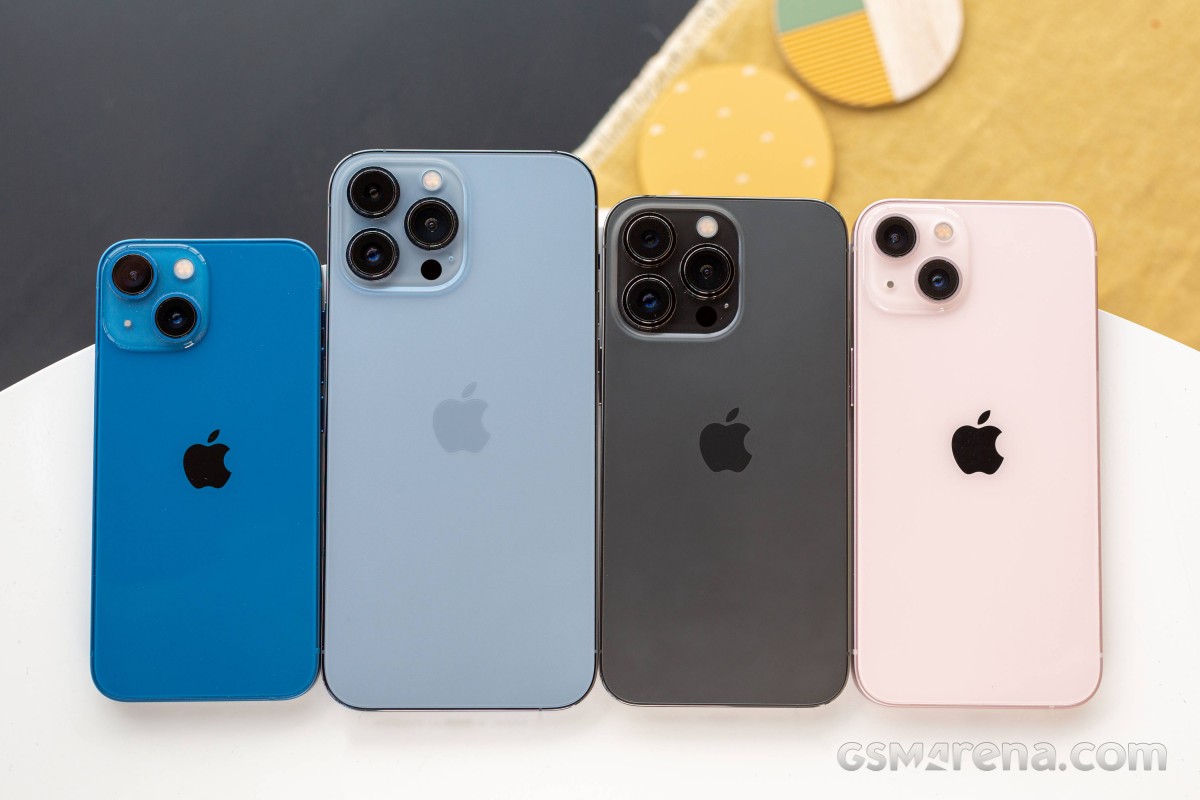
iPhone 13 family shot: Mini • Pro Max • Pro • Vanilla
Verdict
With the newfound parity between the two Pro model sizes resulting in a shared camera system, the small Pro is suddenly in a position to be the iPhone of choice for more people than what the 12 was equipped to. While last year you had to go Max to get the ultimate cameras Apple offered, in 2021, it’s only decided by dimensions and, somewhat consequently, battery life.
13 Pro Max vs. 13 Pro
The iPhone 13 Pro may not last as long as the Max, but it’s still an upgrade over the 12 Pro, and it’s better in some ways than the main competitor across the OS divide. And when it comes to deciding between screen estate and pocketability, the latter wins in surprisingly many cases among ourselves.
With these being the only two points that set the 13 Pros apart, it also means they have common faults. Charging isn’t overly fast; even on this small battery, the excessively powerful chipset can be quick to throttle, and the 120Hz refresh rate is yet to gain universal third-party support. And for its reasonable size, the 13 Pro sure is hefty.
But most of those cons have their counterpoints. Despite the weight, the phone remains pocket-friendly and, well, thanks to the weight, it’s both sturdy and premium-feeling. The display is all kinds of great, and when HRR compatibility catches up, there’ll be nothing to complain about. iOS on the A15 is super smooth, and even if the SoC does throttle, it remains above the competition. The unsightly notch enables quick unlock and great portrait selfies and is home to half of the nice speaker setup.
It might sound like we’re making excuses for the iPhone 13 Pro‘s flaws, but it’s really doing a pretty decent job building its own defense. Unless the Max’s display and endurance make a difference to the way you use your phone, the 13 Pro is the iPhone to get this year.
Pros
Outstanding design – sturdy and water-proof.
One of few properly high-end phones that can pass for ‘compact’.
Brightest OLED screen we’ve seen, super accurate, Dolby Vision, sort of 120Hz.
Loud stereo speakers.
Unmatched performance, 5G.
Great all-round photo and video quality across all four cameras.
Cons
Stale looks, the notch should have been gone by now.
Compact as it may be, the ‘small’ 13 Pro weighs a lot.
120Hz refresh rate not widely available in third-party apps at launch.
Battery life not up to the Max’s standard.
The chipset is prone to heavy throttling under max load.
The fast charging isn’t very fast and the charger is not bundled.
iOS (with its limitations) remains a love it or leave it affair.
One small reduction of the notch, one giant leap for the iPhone! That’s the best description for the most minor iPhone upgrade yet – the Apple iPhone 13. But even if it won’t make iPhone 12 owners line up for the new model, like it or not, the iPhone 13 is still one of the most powerful smartphones on the market and a bestseller in the making.
The notorious notch, first introduced back with the iPhone X in 2017, spread in mere months across the entire smartphone industry, possibly faster than any other feature so far. It has since evolved into droplets, punch holes, or gone thanks to pop-up or under-screen selfies. But for the first time in four years, Apple has shrunk its size, albeit not by much, and the process of getting rid of it has finally begun. The predictions for the iPhone 14 are already running wild.
It is wrong to focus on just the notch size with iPhone 13. This standard 13 model has a 6.1″ Super Retina XDR OLED screen with Dolby Vision, now with higher brightness, the most powerful mobile chip to date – the Apple A15 Bionic, and three nicely capable 12MP cameras – two at the back and one at the front. Apple has used a new, larger sensor for the main camera and has the sensor-shift stabilization from last year’s 12 Pro Max has trickled down across the entire iPhone 13 lineup.
Other tweaks include doubled base storage, a larger battery, and a couple of exclusive software tricks for the camera like Cinematic mode and Photographic Styles.
And that’s it – a brighter screen with a smaller cutout, a faster chipset, more storage, more battery, and an improved sensor on the main camera. Not the upgrade iPhone 12 users have been hoping for, but a massive one for anyone using an older-gen iPhone.
Disclaimer. We can not guarantee that the information on this page is 100% correct.
The biggest letdown has to be the missing ProMotion support – the 120Hz refresh rate is exclusive to the Pro models this year, and we guess the base models will have to wait a year or two before they are allowed to have it. The ultrawide camera autofocus upgrade is also exclusive to the Pro series, which is not great, but it’s what Apple usually does, so not surprising either.
With the ongoing chip crisis, among other production problems due to the pandemic and lack of resources, the iPhone 13 devices will face various delays with production and shipping, but doesn’t this happen every year? Oh, well…
Unboxing the iPhone 13
There is not a whole lot to unbox with the iPhone 13 as Apple has expelled everything but the USB cable from the iPhone retail boxes with the goal of reducing electronic waste, the extra profit being just a bonus. This year it has gone even greener by ditching the plastic wrapping – wherever wrapping was needed, Apple has used paper stickers.
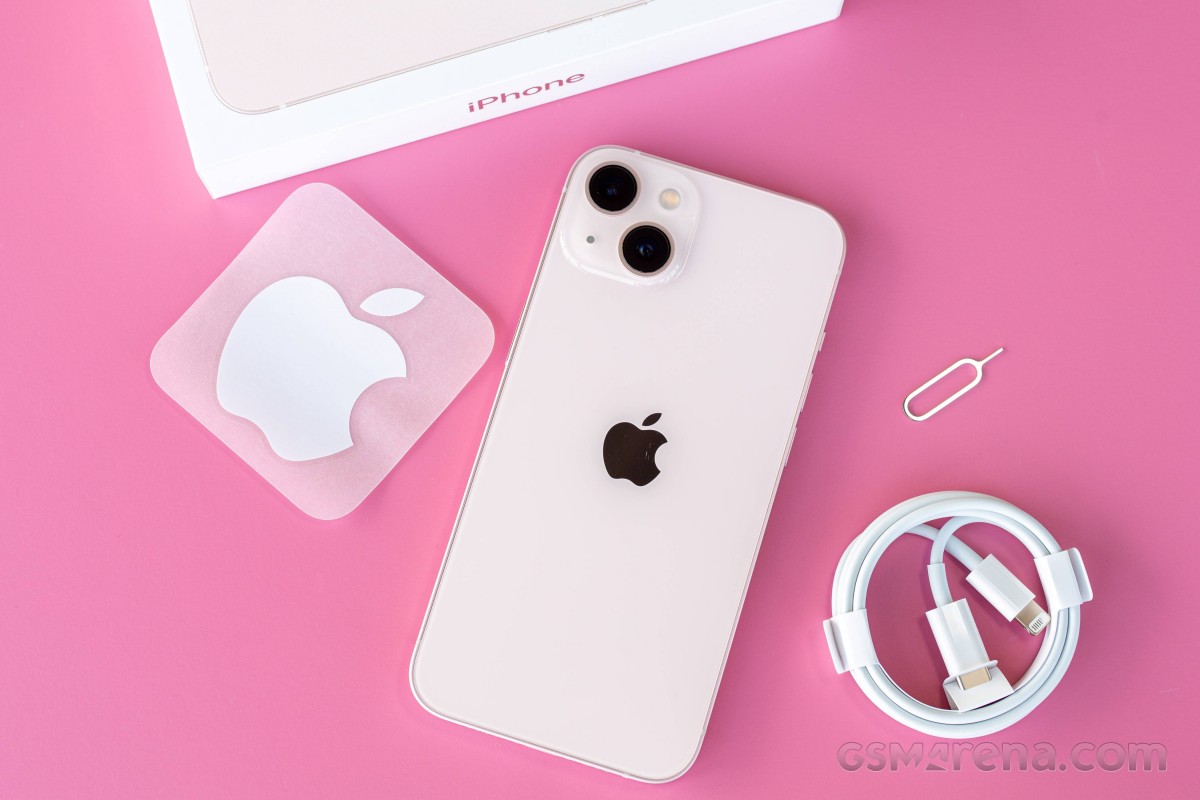
So, inside this thin and lightweight box, you will find the iPhone 13 and a USB-C to Lightning cable.
Apple has still not switched to USB-C on the iPhones for various reasons, most of them being accessories compatibility and electronic waste. The EU Commission is pressing for such change, so we are either seeing the last of Lightning-capable iPhones or, knowing Apple, the last of the iPhones with any sort of USB ports.
The small paper compartment contains some paperwork, the SIM-ejection pin and one Apple sticker.
Alternatives
The Apple iPhone 13 is obviously a very minor upgrade over the iPhone 12, and we cannot think of a single reason why any iPhone 12 user should jump on it.
But the iPhone 13 is also one of the best current smartphones on the market for its beautiful design, increased durability, powerful hardware, superb speakers, and excellent camera experience day and night. And for such a compact device, the battery life turned out pretty good, too.
Of course, there are plenty of offers on the market, and the competition within Apple’s own series is already tough enough. Let’s say you are using an older model iPhone, should you get this €900 iPhone 13 or another iPhone?
Well, the iPhone 12 is now at least €100-150 cheaper than the iPhone 13, while carriers are pushing even bigger promotions as they are getting ready to replace the older model with the new one. And it’s pretty much the same device with a slightly bigger notch and a missing Cinematic video mode. We can’t blame anyone that would skip these features and get the iPhone 12 at a large discount instead.
The iPhone 11 is also still on sale, and it’s now cheaper at about €500-€550. It is one particularly powerful smartphone that’s great for gaming, plus it is also a dual-glass IP68-rated device. It has a 6.1″ LCD screen and a familiar 12MP dual-camera, supports Face ID, and its 12MP selfie shooter is really good, too. Not to mention that battery life is great, too.
You can, of course, get the €800 iPhone 13 mini if you want the most compact yet most powerful iPhone, which is identical to the iPhone 13, but smaller. Or, if you want to get the best compact iPhone right now, the €1150 iPhone 13 Pro will offer you a 120Hz display, more powerful graphics and much better ultrawide and telephoto cameras. It is a significant update over the iPhone 12 Pro and will surely get the most attention. We guess most people will get it for the versatile photography skills with the added autofocus on the ultrawide and its 3x zoom lens, so you should consider it, too.
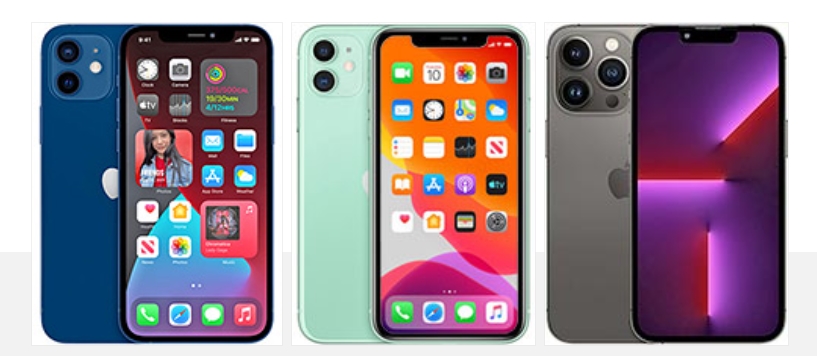
Apple iPhone 12 • Apple iPhone 11 • Apple iPhone 13 Pro
And if you are into Android phones of similar size and capabilities like the iPhone 13, you may want to explore the Samsung Galaxy S21 5G, or the Asus Zenfone 8, or maybe the Realme GT 5G. These are all not-so-large phones with 120Hz OLEDs, powerful processors, and great cameras, plus they are all cheaper! The Realme GT is not water-resistant, but it’s quite affordable, so it’s worth mentioning.
The Apple iPhone 13 is a very capable smartphone – it has one of the fastest chipsets and one of the best camera kits – that’s why it is ideal for photography and video capturing on the go, great for bloggers and vloggers on a budget. It also does a brilliant job at streaming your favorite shows and playing demanding games. Its speakers are surprisingly nice, too.
The iPhone 13 is a premium-looking smartphone with great all-around protection. But it’s not just the good looks; it’s also built to last with that Ceramic Shield and sapphire covers for the lenses.
There is also another thing that seems to be an iPhone-exclusive – the promised 5 years of major updates. That’s a whole lot more than any Android device can offer, but also understandable since Apple makes a limited number of phones and has full control over every aspect of them.
The iPhone 13 is not a perfect smartphone – the notch is still huge as Apple doesn’t want to resurrect the Touch ID yet, the 120Hz display is exclusive to the more expensive Pro model, and it just won’t allow for faster than 25W charging, though the last one could be somewhat responsible for the longer battery lifespan of the iPhones.
There are also controversial aspects that will never change – the aim towards a port-less phone, the minimalistic retail bundle that reduces electronic waste, the iOS-specific file manager, among other controversial Apple policies.
But there are two undeniable facts – no iPhone is a bad phone, on the contrary – every iPhone is designed to excel at a wide variety of tasks, and it does. And secondly, no review will make a decided Apple user to reconsider their iPhone purchase/upgrade because of that. So, go get your new iPhone and enjoy it, it is yet another good one, in case you needed to hear it from us.
Pros
Outstanding design – sturdy and water-proofed.
Bright OLED screen, HDR10, Dolby Vision.
Dependable battery life.
Loud stereo speakers, excellent output.
Unmatched performance, 5G.
Great all-round photo and video quality across all three cameras.
Cons
Minor upgrade over iPhone 12.
No 120Hz refresh rate.
The notch is still an eyesore even if smaller.
The fast charging isn’t very fast and the charger is not bundled.
iOS (with its limitations) remains a love it or leave it affair.
After first being announced back in October, Apple’s new Apple Card Savings Account is officially available. Head below for a closer look at how to sign up for an Apple Card Savings Account, what it looks like in the Wallet app, and how to manage your Daily Cash rewards.
How to sign up for Apple Card Savings Account
Apple Card Savings Account is integrated directly into the Wallet app on your iPhone. It’s available exclusively to Apple Card users, so if you aren’t an Apple Card user, you won’t be able to sign up for the savings account. This, of course, also means that the Apple Card Savings Account is only available in the United States.
The process to sign up for an Apple Card Savings Account is incredibly straightforward. Here’s how to do it.
Open the Wallet on your iPhone.
Tap on your Apple Card.
Tap the “…” three dots in the upper-right corner.
Tap on the “Daily Cash” option in the menu.
Scroll down and look for the “Apple Card Savings Account” option.
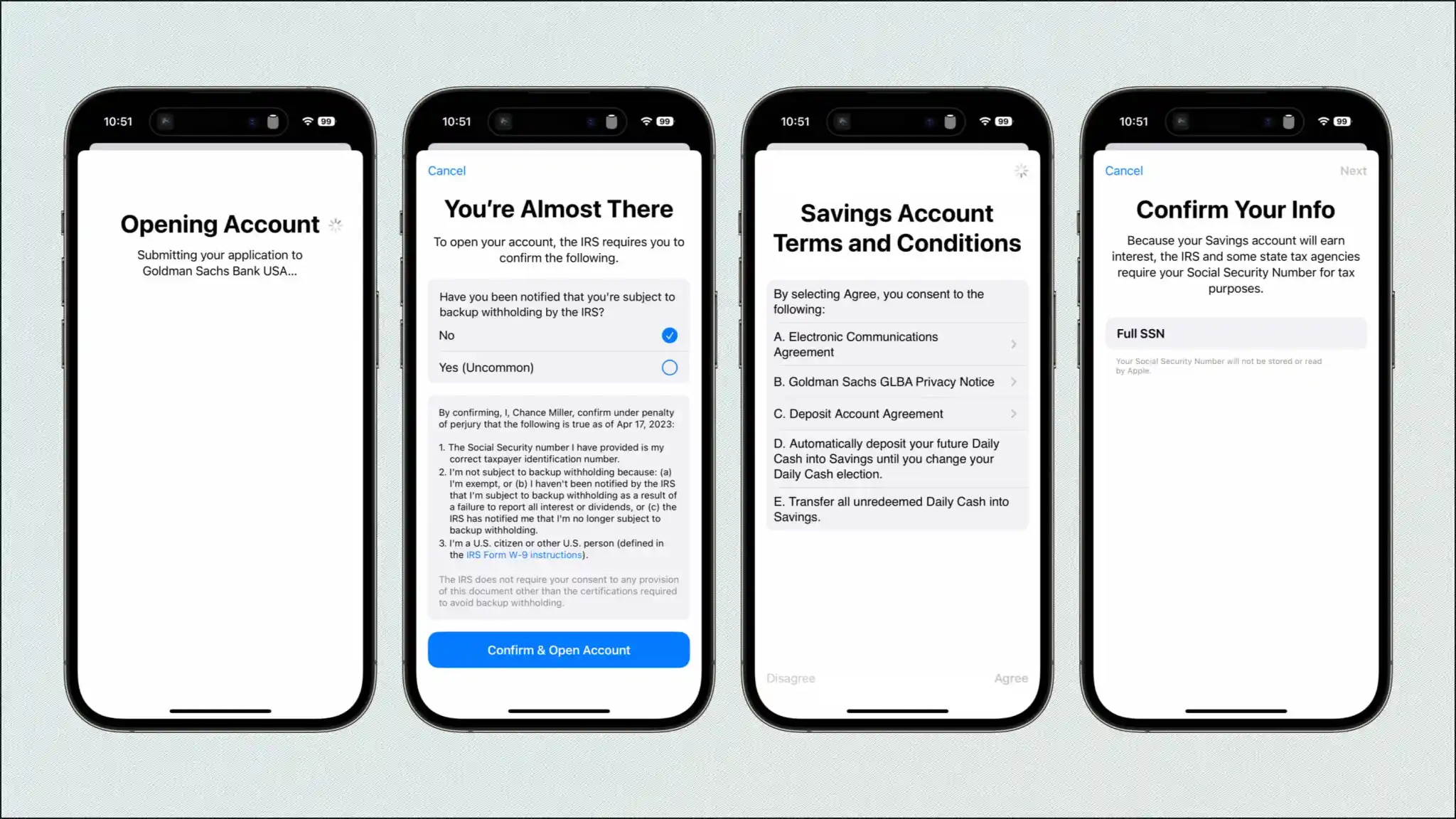
Now, the Wallet app will walk you through the sign-up process for an Apple Card Savings Account. You’ll need to enter your Social Security number, agree to the terms and conditions, then submit your application to Goldman Sachs (Apple’s partner bank) for final approval.
It should only take a few minutes to complete this sign-up process. Once you’re approved, you’ll receive an email from Apple, and you’ll be able to access your Apple Card Savings Account directly in the Wallet app.
After approval, you’ll see a new “Savings Account” interface within the Apple Card section of the Wallet app. Tap on this to view your current account balance, to add money to your account, and to withdraw any money to a linked bank account or to your Apple Cash card.
You can fund your account through a linked bank account or from your Apple Cash balance. Withdrawals and deposits “typically take 1-3 business days,” Apple says, and there are no fees whatsoever.
Finally, to set up your Apple Card Daily Cash rewards to instantly deposit into your Savings account, follow these steps:
Open the Wallet on your iPhone.
Tap on your Apple Card.
Tap the “…” three dots in the upper-right corner.
Tap on the “Daily Cash” option in the menu.
Under “Daily Cash Election,” choose “Savings.”
The current interest rate for Apple Card Savings Account is 4.15%, but as always, this APY can change based on the broader economy. “Your account starts earning interest on the day of your first deposit,” Apple explains. “Interest is compounded daily and paid at the end of the month.”
Apple Card Savings Account, a new integration for the Wallet app first announced back in October, may finally be about to launch. Apple is reportedly making changes to its back-end code in preparation for a full launch of the new feature…
This change was first pointed out by @aaronp613 on Twitter, who spotted a new file in Apple’s back end promoting Apple Card Savings Account. While Apple announced its plans for Apple Card Savings Account back in October, the company didn’t share any specific timeline on when the feature would actually launch.
Changes to the back end were also how @aaronp613 was able to spot the impending launch of Apple Pay Later, just a day before the feature ultimately debuted.
Apple Card Savings Account will allow you to automatically deposit your Daily Cash rewards into the account. So as you earn Daily Cash with your Apple Card, that money can be automatically deposited into the high-yield savings account in the Wallet app.
In addition to depositing Daily Cash directly into the savings account, Apple Card users can also deposit additional money using a linked bank account or their Apple Cash balance.
Users will also be able to track the balance of this high-yield savings account directly in the Wallet app. There will be a new “Savings Account” button in the Apple Card interface. Tapping on it will show a list of transactions and a chart showing the account’s growth. You’ll also be able to withdraw it to your bank easily.
Apple Card Savings Account will be operated in partnership with Goldman Sachs, which is also Apple’s partner for the Apple Card itself. There’s no word on what exact percentage rate the account will pay out in interest, but Goldman’s existing online savings account offers an annual percentage yield of 3.75%.
The new savings account will only be available to Apple Card users, including owners and co-owners. Apple Card is only available in the United States.
Apple Card integrating new savings account feature for Daily Cash
Apple has announced an expansion of its relationship with Goldman Sachs for a new Apple Card feature. In a press release, Apple says that Apple Card users will be able to have their Daily Cash rewards deposited automatically into a high-yield savings account from Goldman Sachs.
You’ll even be able to track the balance of that savings account right in the Wallet app. There are no fees, minimum deposits, or minimum balance requirements.
Apple says:
Apple Card users will be able to easily set up and manage Savings directly in their Apple Card in Wallet. Once users set up their Savings account, all future Daily Cash received will be automatically deposited into it, or they can choose to continue to have it added to an Apple Cash card in Wallet. Users can change their Daily Cash destination at any time.
In addition to depositing Daily Cash directly into the savings account, Apple Card users can also deposit additional money using a linked bank account or their Apple Cash balance.
To expand Savings even further, users can also deposit additional funds into their Savings account through a linked bank account, or from their Apple Cash balance. Users can also withdraw funds at any time by transferring them to a linked bank account or to their Apple Cash card, with no fees. Once set up, Apple Card users can watch their rewards grow in Wallet through an easy-to-use Savings dashboard, which shows their account balance and interest accrued over time.
Users can track the balance of this high-yield savings account directly in the Wallet app. There will be a new “Savings Account” button in the Apple Card interface. Tapping on it will show a list of transactions and a chart showing the account’s growth. You’ll also be able to withdraw it to your bank easily.
Apple hasn’t announced when this feature will be available, instead simply saying it will launch “soon.” It also hasn’t confirmed the exact percentage rate that the account will pay out in interest. Goldman’s existing online savings account offers an annual percentage yield of 2.15%.
The new savings account will only be available to Apple Card users, including owners and co-owners.
Apple Card users will be able to grow their rewards in Apple Wallet by automatically depositing their Daily Cash into a new high-yield Savings account from Goldman Sachs
Apple Card users will be able to grow their Daily Cash while saving for the future by automatically depositing their Daily Cash into a new high-yield Savings account from Goldman Sachs.
Apple announced a new Savings account for Apple Card that will allow users to save their Daily Cash and grow their rewards in a high-yield Savings account from Goldman Sachs. In the coming months, Apple Card users will be able to open the new high-yield Savings account and have their Daily Cash automatically deposited into it — with no fees, no minimum deposits, and no minimum balance requirements. Soon, users can spend, send, and save Daily Cash directly from Wallet.
“Savings enables Apple Card users to grow their Daily Cash rewards over time, while also saving for the future,” said Jennifer Bailey, Apple’s vice president of Apple Pay and Apple Wallet. “Savings delivers even more value to users’ favorite Apple Card benefit — Daily Cash — while offering another easy-to-use tool designed to help users lead healthier financial lives.”
Apple Card users will be able to easily set up and manage Savings directly in their Apple Card in Wallet. Once users set up their Savings account, all future Daily Cash received will be automatically deposited into it, or they can choose to continue to have it added to an Apple Cash card in Wallet. Users can change their Daily Cash destination at any time.
Apple Card users will be able to easily set up and manage Savings directly in their Apple Card in Wallet.
To expand Savings even further, users can also deposit additional funds into their Savings account through a linked bank account, or from their Apple Cash balance. Users can also withdraw funds at any time by transferring them to a linked bank account or to their Apple Cash card, with no fees. Once set up, Apple Card users can watch their rewards grow in Wallet through an easy-to-use Savings dashboard, which shows their account balance and interest accrued over time.
Apple Card users get 3 percent Daily Cash on Apple Card purchases made using Apple Pay with Apple and select merchants, including Uber and Uber Eats, Walgreens, Nike, Panera Bread, T-Mobile, ExxonMobil, and Ace Hardware, as well as 2 percent Daily Cash when they use Apple Pay at other merchants, and 1 percent on all other purchases. There is no limit to the amount of Daily Cash users can receive.
The new Savings account from Goldman Sachs expands upon the financial health benefits and valuable Daily Cash that Apple Card already offers. Built into Wallet on iPhone, Apple Card has transformed the credit card experience by simplifying the application process, eliminating all fees, encouraging users to pay less interest, offering the privacy and security users expect from Apple, and offering Daily Cash on every purchase.
Last week, Apple released iOS 15.7.4 to the general public with notable security patches. Now, Apple is rolling out iOS 15.7.5 as yet another update for older iPhone and iPad devices. This update, along with iPadOS 15.7.5, addresses two vulnerabilities that “may have been actively exploited.”
as Apple stated about iOS 15 Updates iOS 15 brings audio and video enhancements to FaceTime, including spatial audio and Portrait mode. Shared with You resurfaces the articles, photos, and other shared content from your Messages and conversations in the corresponding app. Focus helps you reduce distractions by filtering out notifications based on what you are currently doing. Notifications have been redesigned and a new notification summary delivers a collection of notifications so you can catch up on your own time. Maps delivers a beautiful redesign with a new three-dimensional city experience and augmented reality walking directions. Live Text uses on-device intelligence to recognize text in photos across the entire system and on the web. New privacy controls in Siri, Mail, and more provide transparency and give you more control over your data.
You can update your iPhone to iOS 15.7.5 by heading to the Settings app, choosing General, and then choosing Software Update. The build number for today’s update is 19H332. It’s available for the following devices:
iPhone 6s (all models), iPhone 7 (all models), iPhone SE (1st generation), iPad Air 2, iPad mini (4th generation), and iPod touch (7th generation)
Apple says iOS 15.7.5 addresses two security vulnerabilities that may have been actively exploited in the wild:
IOSurfaceAccelerator
Impact: An app may be able to execute arbitrary code with kernel privileges. Apple is aware of a report that this issue may have been actively exploited.
Description: An out-of-bounds write issue was addressed with improved input validation.
WebKit
Impact: Processing maliciously crafted web content may lead to arbitrary code execution. Apple is aware of a report that this issue may have been actively exploited.
Description: A use-after-free issue was addressed with improved memory management.
In addition to iOS 15.7.5, Apple has also released macOS Big Sur 11.7.6 (20G1231) as well as macOS Monterey 12.6.5 (21G531).