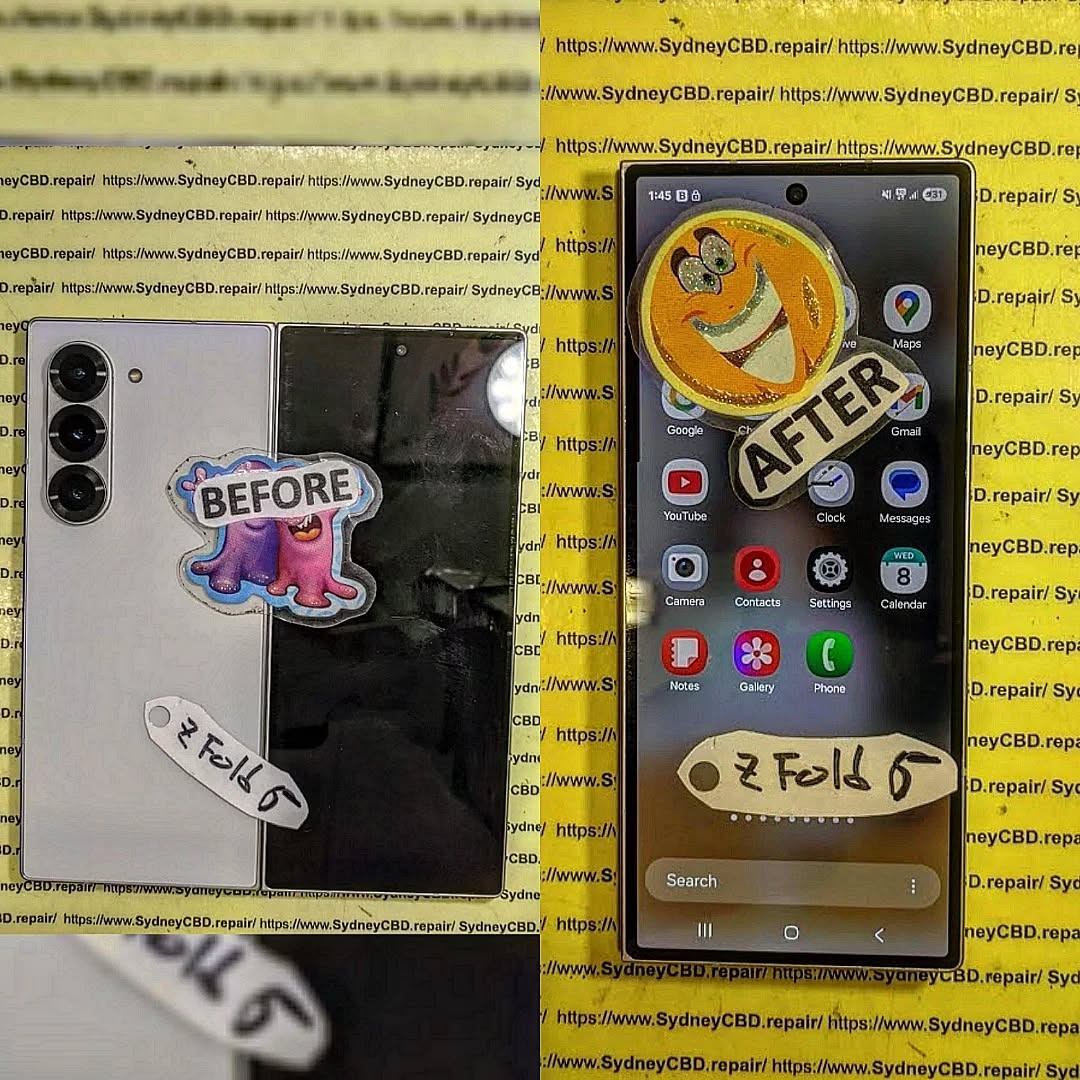
Diagnosing Black Crease Bleed and Dead Inner Displays on Foldable Phones

Diagnosing Black Crease Bleed and Dead Inner Displays on Foldable Phones: 13 POWERFUL Expert Insights to Save Your Device
Introduction: Why Foldable Inner Screens Can Fail Without Warning
Foldable smartphones have changed the mobile industry. Devices such as the Samsung Galaxy Z Fold, Galaxy Z Flip, Google Pixel Fold, and other flexible-screen models offer impressive technology in a compact design. However, their folding displays have a more complex structure than traditional smartphone screens.
One of the most worrying problems owners can experience is black crease bleed and dead inner displays on foldable phones. What begins as a tiny dark mark along the folding line can quickly become a large black patch. In more serious cases, the entire inner display stops working, leaving the user with a black screen even though the phone still powers on.
These failures can be confusing. The outer glass might look perfectly fine, the hinge may still move, and the cover screen may continue displaying notifications. Yet the main folding display could be permanently damaged.
Understanding the warning signs is essential. Early diagnosis can help prevent further damage, protect important data, and make the repair process easier.
At Sydney CBD Repair Centre, professional foldable phone diagnostics focus on more than the visible damage. Technicians must consider the flexible OLED panel, display connectors, hinge assembly, internal frame, and other components that may contribute to screen failure.
This guide explores 11 powerful diagnostic insights, explains why foldable displays develop black marks and dead pixels, and shows how professional repair can restore a damaged device.
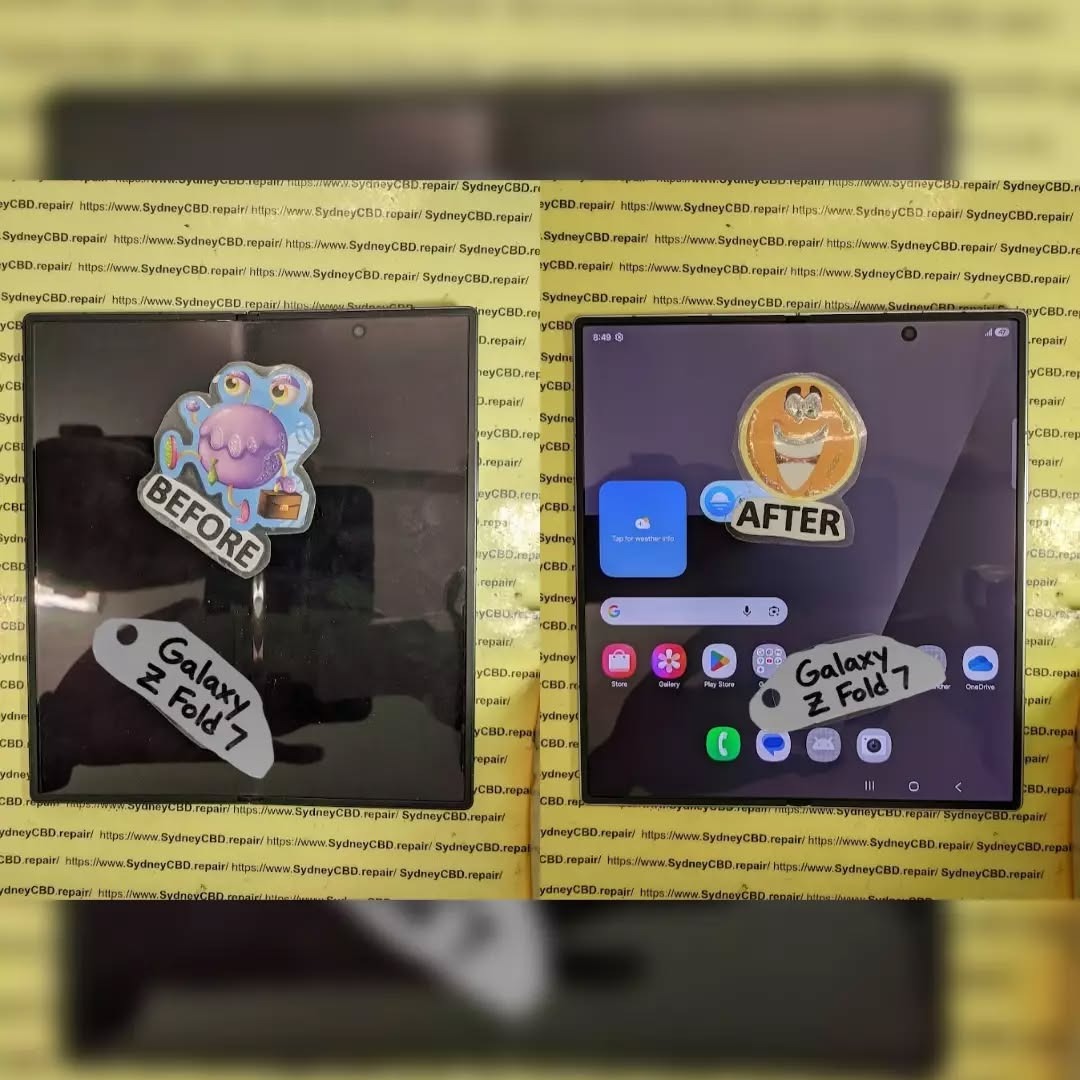
1. Understanding Foldable Display Technology and Crease-Related Damage
1.1 How Flexible OLED Displays Work
Unlike conventional smartphones, foldable devices use flexible OLED display technology.
OLED stands for Organic Light-Emitting Diode. Each pixel produces its own light, allowing the display to deliver deep blacks, strong contrast, and vibrant colours without relying on a traditional backlight.
A foldable display contains several carefully engineered layers, including:
-
A flexible protective surface.
-
An ultra-thin glass or other flexible structural layer, depending on the model.
-
OLED pixel layers.
-
Touch-sensitive components.
-
Supporting films and adhesives.
-
Flexible electrical connections.
These layers work together to create a screen that can bend repeatedly without breaking under normal operating conditions.
However, flexibility doesn’t mean the display is indestructible.
Repeated folding, accidental impacts, pressure, manufacturing defects, and internal component problems can damage sensitive layers.
1.2 Why the Crease Is a Vulnerable Area
The crease is the section where the display bends during opening and closing.
Manufacturers design the hinge and flexible screen to distribute bending forces as evenly as possible. Even so, the folding area experiences repeated mechanical movement.
Over time, certain conditions can increase the risk of damage:
-
Excessive pressure applied directly to the crease.
-
Small particles trapped between display surfaces.
-
Accidental drops while the phone is open.
-
Twisting or bending the device incorrectly.
-
Damage to the hinge mechanism.
-
Separation or deterioration of internal display layers.
A normal crease may remain visible throughout the phone’s life. This is not automatically a sign of failure.
However, a crease that suddenly develops a black line, coloured distortion, flickering, or an expanding dark patch requires attention.
1.3 Normal Crease Appearance vs Actual Display Damage
It’s important to understand the difference between normal folding characteristics and serious display faults.
| Display Condition | Normal or Faulty? | What It Means |
|---|---|---|
| Slight visible crease | Usually normal | Expected folding characteristic |
| Minor reflection along fold | Usually normal | Light reflecting from the flexible surface |
| New black line across crease | Faulty | Possible OLED or connection damage |
| Black ink-like patch | Faulty | Possible internal panel damage |
| Green or purple vertical lines | Faulty | Possible pixel or display-driver failure |
| Touch failure around crease | Faulty | Possible touch-layer or panel damage |
| Completely black inner screen | Faulty | Possible display or electrical failure |
Samsung also explains that black ink-like spots can appear when internal display components are damaged by impact or continuous pressure, even when the outer glass doesn’t appear cracked.
1.4 Why Flexible OLED Damage Can Spread
OLED damage doesn’t always remain the same size.
An initially small damaged area may develop into a larger black patch as more pixels and internal display structures fail.
For example, a phone might initially show a tiny dark mark near the centre crease. A few days later, the mark may become wider, with coloured lines appearing around it.
This doesn’t mean every black mark will spread. However, expanding damage is a strong reason to stop using the inner display and arrange an inspection.
1.5 Why the Cover Screen Can Still Work
One confusing situation occurs when the outer screen functions normally while the inner screen remains completely black.
This can happen because foldable smartphones use different display assemblies for their cover and main screens.
Consequently, a working cover display doesn’t prove that the inner OLED panel, its connectors, or related circuitry are healthy.
A technician must inspect the main display system separately.
2. What Is Black Crease Bleed? Recognising the Warning Signs
Black crease bleed is a descriptive term for dark or black areas appearing around the folding region of a flexible display. It isn’t a formal diagnosis or a single failure mechanism.
The appearance may resemble spilled ink underneath the screen. In many cases, the actual problem involves physical damage to the OLED panel or its internal layers.
2.1 Small Black Dots Near the Folding Line
A small black dot can be one of the earliest visible warning signs.
It might appear:
-
Directly along the centre crease.
-
Near the top or bottom of the folding area.
-
Close to the display edges.
-
Around a point that has experienced pressure or impact.
Even if the spot looks harmless, it should be inspected.
2.2 Expanding Black Ink-Like Patches
A larger black patch suggests that more of the display area may have stopped functioning.
Some owners describe the appearance as:
-
Black ink spreading underneath glass.
-
A dark liquid stain.
-
An expanding shadow.
-
A permanent black cloud.
These descriptions are understandable, but the screen doesn’t necessarily contain liquid ink.
The damaged area may consist of non-functioning OLED pixels or compromised internal display structures.
2.3 Horizontal and Vertical Black Lines
Another common symptom is a black line running across or along the folding display.
The line may be:
-
Thin and sharply defined.
-
Thick and uneven.
-
Interrupted in certain areas.
-
Accompanied by flickering.
-
Visible only when the phone is unfolded.
A technician should establish whether the fault originates in the panel, display connection, or another internal component.
2.4 Colour Distortion Around the Crease
Some failing displays show unusual colours before becoming completely black.
Possible symptoms include:
-
Green vertical lines.
-
Purple patches.
-
White flashing sections.
-
Unusual brightness changes.
-
Distorted images.
-
Flickering during screen movement.
These symptoms shouldn’t be treated as ordinary software glitches without further testing.
2.5 Touchscreen Failure Along the Fold
The image might still appear normal while the touchscreen becomes unresponsive.
For example, a user might be able to open applications on the left side but experience no response on the right side.
This can indicate damage affecting the touch-sensitive components or related electrical connections.
3. Recognising a Dead Inner Display on a Foldable Smartphone
A dead inner display is one of the most serious foldable smartphone problems.
It occurs when the main folding screen no longer produces a usable image. Depending on the underlying fault, the phone may still vibrate, receive calls, produce notification sounds, or display content on the cover screen.
3.1 Complete Blackout
The most obvious symptom is a completely black main display.
The phone might still be operating in the background, but the user cannot see anything after unfolding it.
Possible causes include:
-
Severe OLED panel damage.
-
A damaged display flex connection.
-
Electrical failure in the display circuit.
-
Damage to associated motherboard components.
-
A problem affecting the display assembly.
The exact cause requires testing.
3.2 Flickering Before Complete Failure
Some screens show warning signs before becoming completely unresponsive.
A user may notice:
-
Brief flashes when unfolding.
-
Sudden brightness changes.
-
Horizontal lines.
-
Intermittent black sections.
-
A complete display blackout.
This sequence doesn’t happen in every case, but it highlights why early inspection matters.
3.3 The Phone Works but the Main Screen Doesn’t
Try to distinguish a display failure from a completely dead phone.
Look for external signs of operation, such as:
-
Incoming calls.
-
Notification vibrations.
-
Charging indicators.
-
Sounds from alarms.
-
A functioning cover screen.
These observations can help a technician narrow down the fault.
However, they aren’t sufficient to confirm that the motherboard is healthy.
3.4 Why Repeated Folding Is a Bad Idea
If the screen is already flickering, showing black marks, or displaying distorted images, repeatedly opening and closing it may increase the risk of further damage.
Don’t force the hinge or press on the damaged area.
Keep the phone in a stable position and arrange a professional inspection.
4. 11 Powerful Diagnostic Insights for Black Crease Bleed and Dead Inner Displays
The following diagnostic insights explain how technicians can investigate serious folding-screen problems without immediately assuming that every black display requires the same repair.
Insight 1: Inspect the Entire Crease Under Controlled Lighting
The first step is a detailed visual inspection.
Technicians examine the folding area under suitable lighting to identify:
-
Fine cracks.
-
Dark spots.
-
Pressure marks.
-
Surface separation.
-
Unusual reflections.
-
Uneven display brightness.
A magnified inspection may reveal damage that isn’t obvious during ordinary use.
The technician should also compare the damaged area with the surrounding screen to understand how far the fault extends.
Insight 2: Determine Whether the Black Area Is Expanding
A black patch that becomes larger over time is a significant warning sign.
Technicians can document the affected area and compare it with previous photographs supplied by the customer.
This helps establish whether the damage is stable or progressing.
Owners shouldn’t repeatedly touch the affected area to check its size. Doing so may create additional pressure.
Insight 3: Test the Cover Display Independently
A functioning outer display provides useful diagnostic information.
If the cover screen works while the inner screen remains black, the fault may be isolated to the main display system.
However, the technician must still test the relevant internal circuitry before confirming the diagnosis.
Insight 4: Examine Display Flex Cables and Connectors
Foldable phones contain delicate flexible electrical connections.
These connections carry display signals and power between internal components.
Possible problems include:
-
Damaged flex cables.
-
Poor connector contact.
-
Torn or creased cable sections.
-
Connector damage.
-
Corrosion.
-
Mechanical stress around the hinge.
A trained technician can inspect these connections using suitable tools and controlled disassembly procedures.
Insight 5: Check the Hinge Mechanism
The hinge plays an important role in protecting the folding display.
If the mechanism becomes damaged, misaligned, or obstructed, it may place unusual stress on surrounding components.
Inspection should include:
-
Uneven folding resistance.
-
Unusual clicking noises.
-
Visible hinge deformation.
-
Misalignment between display sections.
-
Signs of debris or foreign objects.
A hinge problem and a display problem can occur together, so both should be considered.
Insight 6: Look for Pressure and Impact Damage
A phone doesn’t need a visibly shattered surface to have internal screen damage.
Sitting on a folded device, placing heavy objects on it, or dropping it while unfolded may damage sensitive internal layers.
Technicians examine the device for dents, frame deformation, pressure marks, and other evidence of physical damage.
Insight 7: Investigate Possible Liquid Exposure
Liquid exposure can affect connectors, circuits, and other internal components.
Even if the display failure appears to be an OLED problem, corrosion or moisture may contribute to the symptoms.
A professional inspection should check for signs of liquid ingress where accessible.
If moisture exposure is suspected, switch the device off and avoid charging it until it has been assessed.
Insight 8: Perform Controlled Display and Touch Tests
If the screen remains partially functional, technicians can assess different areas.
Testing may include:
-
Image output.
-
Brightness consistency.
-
Touch responsiveness.
-
Dead pixel locations.
-
Flickering.
-
Colour accuracy.
-
Display behaviour during normal operation.
Testing should never involve pressing hard on a damaged folding screen.
Insight 9: Separate Software Symptoms from Hardware Damage
Not every black screen is caused by a broken OLED panel.
A software crash or system problem can sometimes cause temporary display issues.
A technician may investigate software-related causes where appropriate.
However, a spreading black ink-like patch, visible crack, or physical crease damage strongly suggests a hardware problem.
A factory reset shouldn’t be the first response to suspected physical display damage.
Insight 10: Assess the Frame and Display Assembly
A replacement display must fit the device correctly.
If the internal frame is bent or damaged, installing a new panel without addressing the underlying issue could lead to another failure.
Technicians should examine the frame, adhesive surfaces, hinge alignment, and mounting points.
This step is particularly important for expensive foldable models.
Insight 11: Confirm the Repair Scope Before Replacement
The final diagnostic step is deciding exactly what needs attention.
Depending on the model and damage, the repair may involve:
-
A complete inner display assembly.
-
A display module with associated components.
-
A damaged flex cable or connector.
-
A hinge-related component.
-
Additional frame or internal repairs.
The technician should explain the findings and provide a clear quotation before proceeding.
5. Common Causes of Black Crease Bleed and Inner Screen Failure
Understanding what causes foldable display failures helps owners avoid repeating the same mistakes after repairs.
5.1 Accidental Drops and Physical Impact
Dropping a foldable phone can damage its flexible display even when the exterior looks relatively good.
The impact may affect the OLED layers, internal support structure, or hinge assembly.
An unfolded device can be especially vulnerable because its large inner display is exposed.
5.2 Excessive Pressure on the Inner Screen
Pressure damage is another important cause.
Examples include:
-
Keeping keys or coins between the folded screens.
-
Placing a heavy object on the device.
-
Carrying the phone in an overcrowded bag.
-
Pressing the crease with a fingernail.
-
Closing the device over a foreign object.
Even a small object trapped inside the phone can create concentrated pressure.
5.3 Dust and Foreign Particles
Dust, grit, and other small particles can interfere with the folding mechanism.
If particles become trapped in sensitive areas, they may contribute to scratches, pressure points, or mechanical problems.
Never insert needles, metal picks, or sharp tools into the hinge to remove debris.
5.4 Hinge Misalignment
A damaged hinge may change how the screen folds.
This can create uneven movement or additional stress on the flexible display.
A phone that suddenly feels stiff, catches during opening, or doesn’t close evenly should be inspected.
5.5 Repeated Folding and Material Fatigue
Foldable phones are engineered for repeated movement, but their components still experience mechanical wear.
Over time, wear or damage can affect flexible materials, adhesives, electrical connections, and the hinge system.
Normal use shouldn’t automatically cause screen failure. However, previous damage, manufacturing issues, and harsh handling can reduce reliability.
5.6 Improper Screen Protector Removal
The factory-installed protective film on many foldable phones is designed for that particular display.
Removing it incorrectly or installing an unsuitable replacement can create additional problems.
Samsung advises users not to remove or replace the inner protective film themselves because improper handling can damage the display.
5.7 Poor Previous Repairs
An incorrectly completed repair can create further problems.
Potential issues include:
-
Incorrect adhesive application.
-
Poor connector seating.
-
Damaged flex cables.
-
Incorrect replacement parts.
-
Misaligned display assemblies.
-
Inadequate post-repair testing.
This is why foldable devices should be handled by technicians experienced with flexible display technology.
6. Black Crease Bleed vs Other Foldable Display Problems
Not every display problem has the same cause. Correctly identifying the symptoms helps avoid unnecessary repairs.
| Problem | Common Symptoms | Possible Cause |
|---|---|---|
| Black crease bleed | Dark ink-like patches | Internal OLED damage |
| Dead inner display | Entire folding screen black | Panel, connector, or circuit failure |
| Green line | Thin green vertical line | Display or driver damage |
| Purple bleeding | Purple or coloured patches | OLED panel damage |
| Flickering | Unstable brightness or image | Panel, connection, or software issue |
| Dead touch area | Image visible but touch fails | Touch layer or connection problem |
| Screen protector lifting | Bubbles or peeling film | Protective layer separation |
| Hinge stiffness | Resistance during folding | Mechanical obstruction or hinge damage |
6.1 Black Spots vs Dead Pixels
A dead pixel is generally a tiny individual pixel that no longer displays correctly.
Black ink-like bleeding usually involves a much larger damaged region.
Several dead pixels might be visible as isolated dots, while a damaged OLED area can appear as an expanding dark patch.
6.2 OLED Burn-In vs Physical Display Damage
OLED burn-in and physical panel damage aren’t the same.
Burn-in involves uneven pixel ageing, which can leave persistent ghost images or shadows.
Physical OLED damage may produce black spots, lines, cracks, or complete display failure.
The distinction matters because the repair approach can be different.
6.3 Software Glitches vs Hardware Failure
Software problems may sometimes cause temporary black screens or display freezing.
A restart may resolve certain software-related symptoms.
However, software troubleshooting won’t repair a physically damaged OLED panel.
If a black spot is spreading or a crease has developed visible lines, don’t rely on software resets.
7. Professional Foldable Phone Display Diagnosis: What Happens at a Repair Centre?
A professional diagnosis should be systematic. Replacing the screen without investigating the surrounding components can lead to unnecessary costs or repeated failures.
7.1 Initial Customer Assessment
The process begins by understanding what happened.
The technician may ask:
-
When did the black mark first appear?
-
Was the device dropped?
-
Did the phone experience pressure?
-
Does the hinge feel different?
-
Does the cover screen still work?
-
Was the device exposed to moisture?
-
Has it been repaired previously?
These details help establish a starting point.
7.2 Visual and Physical Inspection
The technician examines the external condition of the device.
This includes the frame, hinge, folding area, protective film, and visible display damage.
Any existing scratches, dents, or cracks should be recorded before repair.
7.3 Internal Component Assessment
Where necessary, the phone is carefully opened using model-specific procedures.
The technician may inspect:
-
Display connectors.
-
Flexible cables.
-
Battery connections.
-
Internal frame condition.
-
Hinge components.
-
Signs of moisture or corrosion.
Foldable devices require special care because their internal construction is different from conventional smartphones.
7.4 Display Assembly Replacement
If the OLED panel is physically damaged, replacing the affected display assembly is often the practical solution.
The exact procedure depends on the model.
Some models use a display assembly that includes additional structural components. Others may allow different repair configurations.
The technician should confirm compatibility before installing any replacement.
7.5 Post-Repair Testing
A successful repair involves more than making the screen light up.
A professional quality check should include:
| Test | Purpose |
|---|---|
| Display brightness | Confirm consistent illumination |
| Colour reproduction | Identify unusual colour distortion |
| Touch response | Check the full usable display area |
| Dead pixel inspection | Identify abnormal pixel behaviour |
| Folding operation | Check normal hinge movement |
| Connector stability | Confirm reliable electrical connections |
| Camera testing | Check camera operation |
| Charging | Confirm charging functionality |
| Audio and calls | Verify essential phone functions |
Water-resistance performance should not be assumed after opening a device. Any sealing or pressure testing should follow an appropriate model-specific procedure, where supported.
8. Repair or Replace? Choosing the Best Solution for Your Foldable Phone
When a foldable phone develops black crease bleeding or a dead inner screen, owners often face an important decision.
Should they repair the existing device or purchase another smartphone?
The answer depends on the model, age, overall condition, repair quotation, and availability of suitable replacement components.
8.1 When Inner Display Replacement Makes Sense
A display replacement may be worthwhile when:
-
The phone is relatively new.
-
The battery remains healthy.
-
The motherboard works correctly.
-
The hinge is in good condition.
-
The replacement display is available.
-
The repair cost is reasonable compared with buying another device.
For premium foldable smartphones, replacing the inner screen may be significantly more economical than replacing the entire phone.
8.2 When Additional Repairs May Be Necessary
Sometimes the problem extends beyond the display.
For example, a drop may damage both the OLED panel and hinge mechanism.
In that situation, replacing only the screen might not address the underlying issue.
A proper quotation should include any additional work needed to restore reliable operation.
8.3 When Replacement Is the Better Option
Purchasing another phone may be more sensible when:
-
The device has multiple major faults.
-
The motherboard is severely damaged.
-
Replacement components are unavailable.
-
The total repair cost approaches the value of another suitable device.
-
The phone has a history of repeated failures.
8.4 Comparing the Two Options
| Consideration | Professional Repair | New Phone |
|---|---|---|
| Initial expense | Usually lower | Usually higher |
| Existing data | Can often be preserved | Requires transfer |
| Familiar device | Keep existing phone | Learn a new device |
| Environmental impact | Extends device life | Adds another device |
| Warranty | Depends on repair provider | Manufacturer terms apply |
| Long-term value | Depends on overall condition | Depends on purchase price |
8.5 Always Back Up Important Data
If the cover screen or other phone functions still work, back up important information as soon as practical.
Consider saving:
-
Photos and videos.
-
Contacts.
-
Documents.
-
Messaging backups.
-
Authentication recovery information.
-
Important application data.
A damaged display can become completely unusable without warning.
If the device cannot be accessed, ask a professional about safe diagnostic and data-preservation options.
9. Five Costly Mistakes That Can Make Foldable Screen Damage Worse
Many owners unintentionally make a damaged display worse while trying to fix it themselves.
Avoid these five mistakes.
Mistake 1: Repeatedly Opening and Closing the Phone
If the screen has developed black patches or unusual lines, stop unnecessary folding.
Continued movement may increase mechanical stress on an already damaged assembly.
Mistake 2: Pressing the Black Spot
Never press an ink-like patch to see whether it disappears.
OLED panel damage isn’t repaired by applying pressure.
Instead, the extra force may worsen the condition.
Mistake 3: Removing the Original Screen Protector
The protective film is part of the designed screen protection system on many foldable models.
Don’t peel it off simply because it looks scratched or has started lifting.
Seek model-specific professional advice.
Mistake 4: Using Cheap Replacement Displays
An unsuitable replacement may introduce problems involving:
-
Brightness.
-
Colour accuracy.
-
Touch response.
-
Folding compatibility.
-
Connector alignment.
-
Long-term reliability.
Always ask what type of component will be installed.
Mistake 5: Attempting DIY Internal Repairs
Foldable displays are difficult to remove and install safely.
Incorrect heating, sharp tools, excessive pressure, or careless connector handling can damage additional components.
A professional repair centre is the safer option for complex inner display replacement.
10. Genuine vs Aftermarket Foldable Display Replacements
Choosing the right replacement display is one of the most important parts of a successful repair.
Not all replacement screens offer the same quality, performance, or compatibility.
10.1 Genuine Replacement Components
Genuine replacement components are designed for the corresponding device model and specification.
Depending on availability and the repair programme, they may offer:
-
Appropriate display specifications.
-
Correct physical dimensions.
-
Compatible connectors.
-
Expected touch functionality.
-
Suitable folding characteristics.
-
Better consistency with the original design.
Always ask the repair provider to explain the part’s origin and warranty coverage.
10.2 Aftermarket Replacement Screens
Aftermarket screens come from manufacturers other than the original device manufacturer.
Quality varies considerably.
Some aftermarket components can provide acceptable performance, while others may have issues with brightness, colour, touch sensitivity, or mechanical compatibility.
A very cheap replacement isn’t necessarily a bargain if it fails prematurely.
10.3 Questions to Ask Before Approving a Repair
Before agreeing to an inner display replacement, ask:
-
Is the replacement component genuine or aftermarket?
-
Is it compatible with my exact model?
-
Does the quotation include installation?
-
Will the hinge and frame also be inspected?
-
Is there a warranty on the repair?
-
Will the touch system be tested?
-
Are there any additional charges?
Clear answers help customers make informed decisions.
11. Understanding Foldable Screen Repair Costs and Long-Term Value
Foldable smartphone displays can be expensive to replace because they use specialised flexible components.
The final price depends on several factors.
11.1 Factors Affecting Replacement Costs
| Factor | How It Affects the Price |
|---|---|
| Phone model | Different models use different display assemblies |
| Display size | Larger assemblies may cost more |
| Component availability | Limited supply can increase costs |
| Genuine or aftermarket | Component type affects pricing |
| Frame damage | Additional structural work may be needed |
| Hinge damage | Mechanical repairs may add expense |
| Labour | Complex installations require specialist skills |
| Warranty | Coverage and exclusions vary |
11.2 Why Foldable Displays Cost More
Unlike standard smartphone screens, foldable displays must accommodate repeated bending.
Their construction and installation requirements are more specialised.
A technician must also protect the hinge mechanism, flexible connections, and surrounding components during the repair.
These additional requirements can increase labour time and component costs.
11.3 Get a Proper Diagnosis Before Comparing Quotes
A low quotation isn’t always the best option.
For example, one repair provider might quote for the display alone, while another includes additional frame components and installation.
Always compare the same repair scope.
A professional quotation should clearly explain:
-
The identified fault.
-
The recommended repair.
-
The replacement component.
-
The expected turnaround time.
-
Warranty conditions.
-
Any additional damage discovered.
12. Seven Practical Ways to Protect Your Foldable Inner Display
Prevention is much cheaper than replacing an expensive flexible display.
Here are seven practical ways to reduce the risk of future problems.
12.1 Keep the Folding Surface Clean
Check that the inner screen is free from loose objects before closing the device.
Avoid allowing dust, grit, or small particles to accumulate around the hinge.
12.2 Avoid Excessive Pressure
Don’t press hard against the folding area.
Never place heavy objects on top of a folded phone.
12.3 Use a Compatible Protective Case
A suitable case can help protect the frame and external surfaces against everyday knocks.
However, no case can guarantee protection against all impacts.
12.4 Follow the Manufacturer’s Folding Instructions
Open and close the phone as designed.
Never force a hinge that feels stiff or catches unexpectedly.
12.5 Avoid Extreme Environmental Conditions
Follow the manufacturer’s recommended operating and storage temperature limits.
Excessive heat and cold can affect electronic components, adhesives, batteries, and other materials.
12.6 Don’t Experiment With Screen Protectors
Use only protective films approved for your particular device.
Avoid removing factory-installed films without professional advice.
12.7 Arrange Early Inspection
Don’t ignore new black spots, lines, flickering, or unusual folding behaviour.
Early inspection can help identify whether the problem involves the display, hinge, or another component.
13. Professional Foldable Phone Repairs at Sydney CBD Repair Centre
A damaged foldable smartphone deserves specialist attention.
At Sydney CBD Repair Centre, the focus is on identifying the actual fault before recommending a repair.
Whether your Samsung Galaxy Z Fold has developed black ink-like patches, your Galaxy Z Flip has a dead inner screen, or your flexible OLED display is showing unusual lines, professional assessment is an important first step.
13.1 Expert Diagnosis for Different Smartphone Brands
Modern smartphone repairs require knowledge of different display technologies and internal designs.
Sydney CBD Repair Centre provides repair services for major brands, including:
-
Apple.
-
Samsung.
-
Google.
-
OPPO.
-
Xiaomi.
-
Other popular smartphone brands.
13.2 Same-Day Express Repairs
Some smartphone repairs can be completed on the same day, depending on the model, component availability, and the complexity of the fault.
Foldable inner screen replacements may require additional time because of their specialised construction.
Customers should confirm availability and turnaround time before visiting.
13.3 Genuine Parts Guarantee
Component quality matters, particularly when repairing expensive foldable smartphones.
Ask about available genuine replacement components and suitable alternatives before approving the work.
13.4 Professional Technicians and Repair Warranty
Experienced technicians use appropriate equipment and careful repair procedures to reduce the risk of additional damage.
Sydney CBD Repair Centre offers a 90-day warranty on repairs, subject to the applicable warranty terms and conditions.
13.5 Walk-In and Mail-In Repair Options
Located in the heart of Sydney CBD, the repair centre provides a convenient option for customers seeking professional smartphone repairs.
Customers outside Sydney can also enquire about mail-in repair arrangements.
For more information, visit:
Sydney CBD Repair Centre – Location and Repair Information.
Frequently Asked Questions About Black Crease Bleed and Dead Inner Displays
FAQ 1: Why Is My Foldable Phone Developing a Black Spot Along the Crease?
A black spot along the crease may indicate internal OLED panel damage.
It can result from impact, excessive pressure, or damage to sensitive display layers.
Even when the outer surface looks intact, the internal display may have failed. Arrange a professional inspection rather than pressing the affected area.
FAQ 2: Can Black Ink-Like Bleeding Spread Across a Foldable Screen?
Yes, it can.
When the internal display panel is physically damaged, the affected area may become larger over time.
Some damage remains stable, while other failures progress quickly.
Avoid repeatedly folding or pressing the screen and arrange a repair assessment.
FAQ 3: Why Is My Samsung Galaxy Z Fold Inner Screen Black but the Cover Screen Still Works?
The cover display and inner folding display are separate display systems.
The outer screen may continue working even when the main OLED panel, its flex connections, or related circuitry has failed.
A technician needs to test the inner display system to determine the exact cause.
FAQ 4: Can a Dead Inner Display Be Repaired Without Replacing the Entire Phone?
Yes, in many cases.
If the motherboard and other essential components remain functional, replacing the damaged inner display assembly may restore normal operation.
However, the repair depends on the exact model, component availability, and the condition of the surrounding hardware.
FAQ 5: Is Black Crease Bleed Covered by the Manufacturer’s Warranty?
It depends on the circumstances and warranty terms.
Manufacturing defects may qualify for warranty assessment, while accidental drops, pressure damage, and other physical damage may be treated as out-of-warranty repairs.
The manufacturer or authorised service provider must assess the device before confirming coverage.
FAQ 6: Can a Software Update Fix a Black Inner Foldable Screen?
A software update may resolve certain software-related display problems.
However, it cannot repair physically damaged OLED pixels, cracked internal layers, or damaged display connections.
If the screen shows black bleeding, visible damage, or spreading lines, professional hardware diagnosis is recommended.
FAQ 7: How Much Does It Cost to Replace a Foldable Inner Display?
There isn’t one fixed price for every foldable phone.
Costs depend on the manufacturer, model, replacement assembly, parts availability, and labour requirements.
Request a quotation based on your exact model and damage before approving the repair.
FAQ 8: Is It Safe to Continue Using a Foldable Phone With a Black Crease?
It’s best to avoid using the damaged inner display.
If the phone remains operational, back up your important data using a safe method.
Don’t press the affected area or repeatedly open and close the device. Arrange a professional inspection as soon as possible.
FAQ 9: Can a Damaged Foldable Display Be Repaired Without Replacing the OLED Panel?
That depends on the type of damage and the device’s repair design.
Some faults may involve a connector or another replaceable component rather than the OLED panel itself.
However, physical OLED damage generally requires replacement of the affected display assembly.
FAQ 10: How Can I Prevent Black Lines From Appearing on My Foldable Phone?
You can reduce the risk by:
-
Avoiding excessive pressure.
-
Keeping the inner screen clean.
-
Never placing objects between the folded screens.
-
Using a compatible protective case.
-
Following manufacturer care instructions.
-
Avoiding unapproved screen protector replacements.
-
Arranging early inspection if the hinge behaves unusually.
No preventative measure can guarantee that a flexible display will never fail, but careful handling can reduce avoidable damage.
Conclusion: Protect Your Foldable Phone Before a Small Crease Problem Becomes a Major Failure

Foldable smartphones represent some of the most advanced mobile technology available today. Their flexible OLED displays, precision hinges, and specialised internal structures deliver an impressive user experience.
However, these components require proper care and professional repair knowledge.
Black spots, ink-like bleeding, green lines, flickering, touch failure, and completely dead inner displays should never be ignored. They can indicate serious problems involving the OLED panel, flexible connections, or hinge assembly.
The most important lesson is to identify the problem early.
Don’t press damaged areas, force the hinge, remove the original protective film, or attempt complicated DIY repairs. Back up important information whenever possible and seek an accurate diagnosis.
When choosing a repair centre, consider component quality, technician experience, repair warranty, and the complete repair procedure rather than simply selecting the cheapest quotation.
Sydney CBD Repair Centre is ready to help with professional smartphone diagnostics and repair solutions. Whether you’re dealing with a damaged Samsung Galaxy Z Fold, a broken Galaxy Z Flip inner display, or another smartphone screen problem, getting the right diagnosis is the first step towards restoring your device.
David from Sydney CBD Repair Centre – The Best place to fix mobile phones as 7 Years In A Row! Top Mobile Phone Repair In Sydney. More than 2000 Positive Reviews on Google and Same Day Repairs.
We take pride in delivering exceptional repair services for all major phone brands including Apple, Samsung, Google, and more. Our expert technicians use only genuine parts and offer 90days warranty on repairs. Located in the heart of Sydney CBD, we’re your one-stop solution for all mobile device repairs.
Our commitment to excellence has earned us the trust of thousands of satisfied customers. Whether it’s a cracked screen, battery replacement, or water damage repair, we handle it all with professional care and expertise. Walk in today and experience why we’re Sydney’s #1 choice for mobile phone repairs.
Visit us for:
✓ Same Day Express Repairs
✓ Genuine Parts Guarantee
✓ Professional Technicians
✓ Competitive Pricing
✓ 2000+ 5-Star Google Reviews
✓ 7-Time Award Winner for Best Phone Repairs
Sydney CBD Repair Centre – Where Quality Meets Reliability.
Call: +61280114119
Website: https://SydneyCBD.repair/locate-us