Huawei Mate 9 running Android 8.0 Oreo spotted on Geekbench: Here’s what you need to know


 |  |  |  |  |  |  |  |
🎯 7 Years In A Row ! 👑🥇 Top 3 Mobile Phone Repair In SydneyClick Here to See CERTIFICATE of EXCELLENCE 2026💢 | |||||||
 | 🥇 The Best Phone Repair Store in City Of Sydney From Quality Business Awards in 2026🥇 The Best Phone Repair Store in City Of Sydney From Quality Business Awards in 2025 | ||||||


Huawei has lost no time in releasing its smartphone to catch up with and compete against Vivo’s X20 and X20 Plus launched just a couple of days back.
Huawei’s new phone is named ‘Maimang 6’ (it will be called ‘Mate 10’ outside of China). The phone has a 5.9-inch IPS full HD display, its screen resolution being 2160x1080pixels. It’s a least bezel display with the aspect ratio being 18:9. Under the hood, Huawei has fitted its in-house CPU, the octa-core Kirin 659. The phone comes with 4GB RAM and 64GB internal memory. Further expansion of the storage is feasible through a microSD card.
The optics department is unique on the Huawei Maimang 6 since it has four cameras, a double camera setup in the rear and a double camera setup in the front as well. The rear camera setup has a 16MP plus a 2MP camera. It is capable of capturing images even in blurred backgrounds. On the front, the combination of 13MP plus 2MP sensors with a f/2.0 aperture lens. In addition, the front camera is supported by the spotlight flash and bokeh effect as well.
The operating system is the Android Nougat version 7.0 with Huawei’s UI EMUI 5.1 skin riding over it. The battery fitted on the Huawei Maimang 6 or Mate 10 is 3340mAh.
The phone has all possible connectivity options, including compatibility for 4G LTE networks. A fingerprint sensor is also present on the rear panel of the phone.
Huawei will make the phone available in three colors, black, gold and blue. Priced at CNY 2, 399 (approx. Rs. 24, 000), the phone will start shipping for Chinese customers from September 30 while the rest of the world may see its equivalent launched in October.

As yet another evolutionary device rather than the design revolution some cash-strapped iFans may have expected, the iPhone 8 is unsurprisingly overshadowed by the much sleeker X, despite the latter’s delays and availability concerns.
We’re talking of course about media coverage and apparent consumer interest, because in terms of critical reception, the 8 and especially 8 Plus seem to be doing just fine.
While we continue to cook up our exclusive in-depth reviews, it’s definitely worth highlighting how the smaller iPhone 8 handled JerryRigEverything’s obligatory durability inspection.
In a word, pretty great. In more, let’s start off by noticing Apple’s “most durable glass ever” and sapphire camera lens claims don’t exactly hold up in real life. The iPhone 8 screen is about as resistant to scratches as any high-end Android display around, and the rear-facing shooter appears to cut a few build quality corners.
Still, there’s no denying this is a robust slab of (mostly) glass and (very little) metal, largely impervious to razor blades, coins and keys, and impossible to bend with sheer force of will. It even bravely combats flames… if you somehow feel that information is relevant to the way you typically use your mobile device.
Meanwhile, iFixit’s comprehensive teardown examination concluded in a repairability score of 6 out of a possible 10, which is much better than Samsung’s DIY Galaxy S8 nightmare, but actually one point lower than last year’s iPhone 7 and 7 Plus grades.
As always, you’re advised to not try any of the above, including scratch, flame, bend tests and routine disassembly, at home unless you know precisely what you’re doing or just want to watch the world burn.

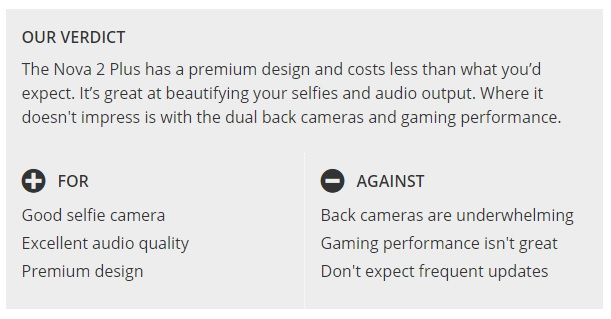
The original Huawei Nova Plus was decent but not necessary a memorable phone. With the follow up, Huawei is focusing on the front camera and audio capabilities.
At AED 1,399 (US$375), the Huawei Nova 2 Plus is cheaper than the likes of Honor 9, but it’s also not at the same performance level as that or the Nokia 8.
Packaged in a white box that looks very much like the one we saw on the Honor 8 last year, the Nova 2 Plus comes with a fast charger, a USB Type C cable and a headset along with the quickstart guide.
Like other Huawei phones we’ve reviewed of late, a translucent case is also bundled to protect the phone. We think it’s great that Huawei is providing basic protection out of the box.
The Huawei Nova 2 Plus can be seen as a cheaper version of the Huawei P10 Plus. It has almost identical dimensions and a slightly less premium, yet, a beautiful design.
Instead of the glass strip found on the top of P10 Plus with Leica brand, the Nova 2 plus has a smooth all-metal back.
It’s available in three colors- Graphite Black, Prestige Gold and Aurora Blue. We got that last one for review and it has a nice zen like finish that is achieved by moving the antennae lines on the top and bottom.


Weight: 169g
Dimensions: 153.9 x 74.5 x 6.9mm
OS: Android 7.0
Screen size: 5.5-inch
Resolution: 1080 x 1920
CPU: HiSilicon Kirin 659
RAM: 4GB
Storage: 64GB
Battery: 3340mAh
Rear camera: Dual 12 + 8 MP
Front camera: 20MP
Even though the screen size is 5.5 inches, the Huawei Nova 2 Plus sits comfortably in your hand. And with a weight of 169g, it’s easier to handle than other phones with similar screen sizes.
Huawei has placed the fingerprint sensor on the back of the phone. Although we prefer a fingerprint sensor on the front, the positioning of it on the Nova 2 is well thought out. It sits reasonably below the cameras and in the center making it very easy for your index finger to reach it.
Like the Huawei P10, the fingerprint sensor is extremely quick to recognize and unlock your phone – among the fastest we’ve used. It also allows for gestures such as pulling down the notification shade or browsing your photos. You can even answer calls and take photos by tapping it.
The 5.5-inch screen on the Huawei Nova 2 Plus is FullHD in resolution which is expected from a device at its price point. It’s LED in technology and is bright enough to be used in the outdoor sun, though you will need to crank the brightness levels all the way up when using it outdoors in a place like Dubai. Huawei has also done a good job with colour reproduction, especially when you use one of the bundled theme that brings out the best the screen has to offer.

While the Huawei Nova 2 Plus has an elegant design, it won’t necessarily turn heads. It’s definitely more premium than what is expected out of a phone in it’s price range, but it’s a phone that will disappear among all other phones that look like it.
At just 6.9mm thickness, the phone sits comfortably in your hands and is easier to use that other phones with a similar screen size. Although there are bezels present on the top and bottom, they don’t feel oversized though most of us will need to use the phone with two hands.
The left side holds the SIM tray which can take one nano SIM and one micro SIM, or a MicroSD card. On the right, you can find a textured power button was well as volume keys that are easy to reach. Moving to the bottom, the Nova 2 Plus features a USB Type-C port along with a 3.5mm jack.
The back holds the dual camera setup along with a flash on the top and the fingerprint sensor below it to the centre. The front of the phone is very generic- a large glass slab with noticeable bezels on the top and the bottom.

The Apple iPhone 8 Plus has a main camera system truly worthy of a flagship phone. Similar to the iPhone 7 Plus, it features two cameras — a wide-angle 12MP main camera, and a 12MP telephoto camera with a slower lens for zooming in on subjects and for special effects such as Portrait mode. Comparing the camera datasheets of the older iPhone 7 Plus and the new iPhone 8 Plus make the two look almost identical; however, under-the-hood upgrades have given the 8 Plus an image quality and camera performance boost in almost every one of our tested categories.
Key camera specifications:
The Apple iPhone 8 Plus is the best-performing mobile device camera we have ever tested. Its overall DxOMark Mobile score of 94 sets a new record, beating out the 90 points for both the Google Pixel and the HTC U11, as well as the 92 that its sibling iPhone 8 just scored. Its Photo score of 96 is also a new record, blowing past the Pixel’s 90. For Video, its score of 89 is among our highest, but tied with the HTC U11 and slightly below the Pixel’s 91. Of course, the Pixel is nearly a year old now, so it makes sense that Apple’s new flagship is breaking new ground.
Images captured outdoors with the iPhone 8 Plus are generally stunning, with excellent detail preservation, accurate color, and impressive dynamic range. The iPhone 8 Plus builds on the excellent performance of the iPhone 7 family with even better results in bright light. In particular, it has improved exposure calculation, and excellent ability to capture HDR (High Dynamic Range) scenes.

This scene has proved challenging to many of the smartphones we have tested, but the 8 Plus handles it like a champ. If you didn’t know that the image came from a phone, it would it would be very hard to tell.


Low light: Exposures are generally accurate, although there can be some underexposure in very low light. The 8 Plus’s strong performance in low light and with flash, combined with its excellent ability to recognize and properly expose faces, make it a natural for anyone wanting to easily create memories of their indoor events.

While the iPhone 8 Plus camera is amazing overall, it is in our new test categories of Zoom and Bokeh where it really stands out. While the technical specifications for the second camera that help make these features possible are very similar to the specs for the second camera on the iPhone 7 Plus on paper, upgrades to the image processing software have raised the 8 Plus’s performance to a new level. Especially important for those looking to capture portraits with their phones, or to create artistic effects in macro and other closeup shots, zoom and bokeh used to require standalone cameras. But phones like the 8 Plus are changing that.
Zoom: The dedicated telephoto camera on the 8 Plus gives it a large advantage over most traditional single-camera designs when it comes to zoom. At 51, it has the highest Zoom sub-score of any mobile device we have measured — a full 5 points better than its predecessor, the iPhone 7 Plus. Here you can see that at 2x (full-frame equivalent of about 56mm), the iPhone 8 Plus does an excellent job of both framing and detail preservation (click on individual images to get a full-size version for easier comparison):


Bokeh: Overall, the 8 Plus is the highest-performing phone we’ve tested when it comes to bokeh. Despite the relatively small changes in the actual camera specs, additional development and processing power allow it to beat out the 7 Plus by 5 points, putting it even further ahead of the Google Pixel, with a score of 55 compared to 30.
You can see the improved depth effect on the iPhone 8 Plus compared to the older model, showing that the dual-camera system now does a better job of blurring the foreground like a true optical blur, instead of blurring only the background. The images below also show how the second camera of the 8 Plus provides a much more artistic rendering of the image than the single camera on the iPhone 8 (click on individual images to get a full-size version for easier comparison):


Apple continues to up its game on Video. With a score of 89, the 8 Plus has the best video quality of any Apple device, starting with the best exposure calculation. In particular, exposure is more stable while panning or walking than on previous iPhones. Its HDR capabilities are also very good, but highlights are sometimes blown out. There is still room for improvement, as the iPhone 8 Plus’s Video score of 89 still only ties the HTC U11 and is still behind the Google Pixel’s 91 points. This said, the 8 Plus camera does an excellent job of face tracking when shooting video in bright light.
Our Overall Photo Score is a composite of a number of category sub-scores. Here we detail how the 8 Plus performed in each of those categories.
The 8 Plus does an excellent job of accurately calculating exposure, improving on the performance of the iPhone 7 family. Its ability to represent high-contrast scenes is also improved, probably at least in part due to additional processing power and improved software for combining multiple frames into a single image. Apple’s AutoHDR technology is some of the best on the market for rendering high-dynamic-range scenes. The 8 Plus also does an unusually good job at recognizing and properly exposing faces in an image.

Color is pleasing both outside and indoors. White balance is also quite good. The 8 Plus improves slightly over the iPhone 8 in its color performance by completely avoiding visible color shading, even in low-light conditions.


Although the 8 Plus doesn’t always focus quickly, once it focuses, it is remarkably accurate. In both our long- and short-delay tests, the 8 Plus was able to repeatably capture an in-focus scene. The sometimes longer delay — which occurred periodically in both bright and low light — can mean that users miss the shot they intended.


The 8 Plus does an excellent job of capturing detail under a wide variety of lighting conditions, especially when there is no motion in the scene. That makes it especially good for landscape images. There is a noticeable loss of detail when there is motion, especially in low-light — as you can see in this chart of detail preservation versus light level:

It is easy to forget how far smartphone cameras have come in just a few years. These tight crops of an area in our standard natural test scene demonstrate how much more detail the iPhone 8 Plus captures than previous generations of iPhones:

Similar to its detail score, the 8 Plus features a very low level of noise when capturing static scenes, outperforming every other phone in our database. Even the darkest areas in HDR scenes have very low levels of noise, and blue skies are almost without noise. There is some slight luminance noise indoors and in very low light, but well within acceptable limits. In this indoor test target scene, for example, the 8 Plus is a little further off in exposure than the Google Pixel, but has lower noise:

This next comparison image is another that shows how quickly smartphone camera technology is advancing. This image was shot with the iPhone 7 Plus and the 8 Plus, both in Portrait mode. The newer model does a much better job of suppressing noise, especially on the model’s face:


The 8 Plus, like most iPhone models we’ve tested, has very few artifacts in its images, achieving an excellent artifact sub-score as a result. Interestingly, the iPhone 8 outscores the 8 Plus in this area. Slight flare in harsh light and moiré when repeating patterns are present reduced its score somewhat. Some visible ghosting can also occur.
Flash-only photos with the iPhone 8 Plus feature accurate white balance and good color rendering. With both flash and flash combined with ambient light, there is low noise and good detail preservation. There can be a slight yellow cast when flash is mixed with a low level of ambient light, and exposure and white balance can vary from shot to shot in a sequence.

The iPhone 8 Plus sets a new standard for zoom performance in a smartphone, a tribute to its dual camera design, and the image processing improvements Apple has made since the introduction of the 7 Plus. There is still some room for improvement: when shooting several images in a row using zoom, some (but not all) images show artifacts.
Even with the 8 Plus’s stunning Zoom and Portrait mode performance, photographers still need to watch out for possible side effects. For example, these images show that subject motion can detract from an otherwise excellent portrait:


The bokeh effect on the 8 Plus is remarkably reliable, as the 8 Plus is not fooled nearly as often as other smartphone cameras when it makes estimations of depth, even compared to competitors with similar dual-camera systems.
In low light, the iPhone 8 Plus does a much better job of rendering a bokeh effect than the Google Pixel, although at the cost of some noise. Further, the Pixel version of the image has strong artifacts (click on individual images to get a full-size version for easier comparison):


Key to the 8 Plus’s excellent Bokeh score is very good depth estimation and facial recognition. These technologies help ensure that blurs are created naturally and effectively. There is room for improvement, though — in particular, when the subject touches the edges of the frame, the camera can mistake portions of the subject for part of the background, and ends up blurring those portions accordingly.
This type of artifact is visible in the portrait in this review, in which some of the subject’s hair is blurred — an unfortunate and sometimes unpleasant effect on an important part of the portrait.
The Apple iPhone 8 Plus achieves a total Video score of 89. As with the photo scores, this is calculated from the sub-scores it achieves in a number of categories of tests that help define its overall video capabilities, specifically: Exposure and Contrast (81), Color (87), Autofocus (84), Texture (50), Noise (68), Artifacts (81), and Stabilization (91). Of particular note, stabilization is excellent, color rendering is very accurate, and exposure is greatly improved over previous models. Exceptionally good face tracking also aids in accurate subject exposure. Video suffers from some judder, and a small amount of frame-rate inaccuracy.
One thing the iPhone 8 Plus’s video lacks somewhat is good exposure in low light. As light falls off, the 8 Plus tends to underexpose, as you can see from this chart:

Overall, the Apple iPhone 8 Plus is an excellent choice for the needs of nearly every smartphone photographer. It features outstanding image quality, zoom for those needing to get closer to their subjects, and an industry-leading Portrait mode for artistic efforts. It is at the top of our scoring charts in nearly every category — and in particular, its advanced software allows it to do an amazing job of capturing high-dynamic range scenes and images in which it can recognize faces.
We look forward to testing the iPhone X and comparing it against the iPhone 8 Plus, as the X’s wider aperture and its OIS on both cameras should place it on the cutting edge of zoom and portrait performance — enhancing the iPhone shooting experience for memory makers and image lovers even more.
A note about image formats for this review: The iPhone 8 and 8 Plus record photographs in the DCI-P3 colorspace, which their displays also use. DCI-P3 is newer and larger than the sRGB color space that most devices use and most web browsers assume. So to ensure that the images we used in the review display properly on a wide variety of browsers and devices, we converted the originals from DCI-P3 to sRGB using Photoshop (which is why the published test photos show Photoshop as the creator). This can slightly reduce the richness of color in some cases from what you would see when viewing the original images on a DCI-P3-calibrated display with appropriate software. We also captured the original images using the new HEIF (High-Efficiency Image Format), but then converted them to very high-quality JPEGs for viewing in standard browsers and image editing software. (HEIF is very similar to JPEG, but provides better compression for similar image quality, so the conversion makes the sample image file sizes larger than they were when shot.) Please note, however, that unlike our test images, some of the comparison photos used in this review were shot in JPEG and used as-is for illustrative purposes, and were not used to compute scores.

espite the recent acquisitions by Google of some HTC’s smartphone team, it seems HTC has no plans to stop rolling with their smartphone division, or at least for now. A year ago we reported some code names which were leaked by LlabTooFeR. The HTC Ocean, HTC Ocean Note, the HTC Ocean Smart and the HTC Ocean Master. The Ocean came to fruition in the form of the HTC U11, the Ocean Note became the HTC U Ultra and the Ocean Smart has disappeared entirely. Now according to a report from the French Android blog Frandroid, we may be seeing the HTC Ocean Master, dubbed the HTC U11 Plus, a lot sooner than you may think.
Frandroid has reported a full list of specifications of the new device, citing a source at HTC for the leak. They suggest a November reveal initially in the Chinese market, with a likely release in the west in the future. HTC is reportedly entering the bezel-less market, with the help of an 18:9, 2880×1440 screen (supplied by Japan Design Incorporated) and no headphone jack (again). The full list of the specifications of the HTC Ocean Master (HTC U11 Plus) can be found below.
The “Edge Sense” feature is making a return, even if it largely turned out to be a gimmick (though, luckily, HTC began offering users more customization options). It seems this device is largely built on the successes of HTC’s previous devices, with improvements in some departments, notably their display efforts. The same camera sensor is allegedly the same one found on the HTC U11 as well, which is reassuring knowing how well the U11’s camera performs. It may also seem that the price may be lower this time around, as Frandroid points out that the HTC U11 was regarded as expensive at launch ($650), which HTC was not happy about. The waterproof rating is also great to see, as it means that it has total protection from dust and significant protection against water in depths over 1 meter.
The device is said to be announced at a conference on the 11th of November in China, as an attempt to regain some of the Chinese market.

For a long time, OEMs have relied on pushing out OTA updates to bring new features of some pre-installed applications to their users. This allowed for those applications to continue receiving new features and bug fixes while still maintaining their system application status. However, a lot of them simply do not need to be installed as a system application so we’ve been seeing a trend of these OEM applications being uploaded to the Play Store. Today, OnePlus has announced they are bringing four of their in-house applications to to Google Play so they can push out updates faster to their users.
We won’t see a time in which OEMs will push all of their 1st-party applications to the Play Store, but it certainly makes sense for a lot of them. Using this new OnePlus announcement as an example, there just isn’t a reason for them to limit updates for the Weather or Gallery applications to OTA updates. This results in it taking the company longer to get bug fixes and new features out to their users and that can be a big deal if someone has been putting up with an annoying bug within the application.
The company is calling these Individual Application Updates and it is being made available for owners of the OnePlus 3, OnePlus 3T and the OnePlus 5. This new transition includes the OnePlus Launcher, OnePlus Community, Weather and their Gallery applications. So not only should we see these applications updated faster, but the company should also be able to push out more updates than we’re used to.
Some users have already reported seeing multiple OnePlus apps suddenly update through the Play Store, but now we have an official list with the full roster. We’re told that the Launcher will be the first of these that receives the next update from the Play Store. They said this should happen later this week and it comes with the following changes. . .
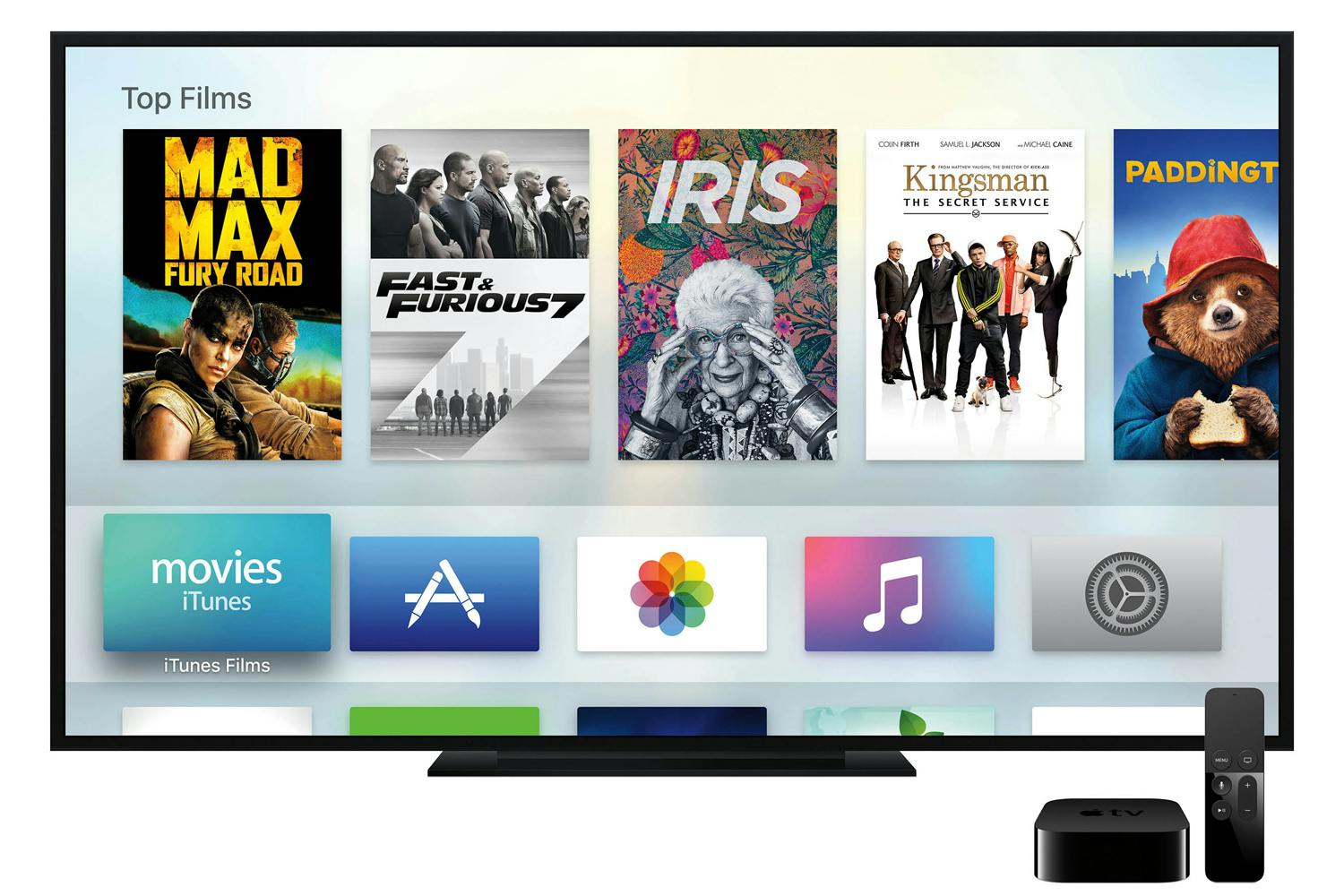
Although it received no special mention at last week’s event, Apple quietly released tvOS 11 yesterday alongside its considerably larger updates to iOS 11 and watchOS 4. While it’s a surprisingly minor update considering the new version number, tvOS 11 does add a few small and interesting improvements that help enhance the Apple TV experience.

tvOS 10 introduced a new Dark Mode to the Apple TV — a welcome change in our opinion from the garishly bright white background that heralded the fourth-generation Apple TV UI. We’ve generally been pretty content to use Dark Mode on our Apple TVs all the time, but we can understand some users may want to switch back and forth, using the original Light Mode during the daytime, but switching the more subdued Dark Mode at night, so tvOS 11 now allows for this with a new “Automatic” option.

You’ll be prompted to enable Location Services the first time you switch this on, as tvOS will use your current location to figure out sunrise and sunset times. Once enabled, the Apple TV will switch into Dark Mode at sunset, and back into Light Mode at sunrise.
It seems that one of Apple’s goals with its new releases this year is to sync even more information via iCloud; iOS 11 users will gain the ability to sync Messages and Siri information between devices using iCloud, and tvOS 11 isn’t left out of the iCloud game either — you’ll be able to store your Home screen layout in iCloud, along with your installed apps, so that this information can be synced across multiple Apple TVs, and restored should you ever have to reset or replace your Apple TV. It was a feature that was kind of conspicuously missing in tvOS 10, so it’s good to see Apple finally addressing it.

The option to enable this can be found in the your iCloud account settings (Settings, Accounts, iCloud) as “One Home Screen,” and is simply an on/off toggle.
The AirPlay Settings now include an additional setting that allows you to decide whether users can stream to your Apple TV via AirPlay from any device within Wi-Fi range, or whether AirPlay devices have to already be joined to the same Wi-Fi network as your Apple TV.

The Security options available will also depend on which Access option you choose: “Same Network” allows you to select “None” as an option, relying simply on your normal Wi-Fi access controls; however if you choose to grant access to “Everyone” then you’ll need to at least require a first-time passcode as the minimum security, to prevent just anybody in the neighbourhood from randomly broadcasting to your Apple TV.

This will make it easier to allow guests and visitors to stream to your Apple TV without having to first join your Wi-Fi network, and we can see this being especially useful in conference room or classroom environments.
The standard video player has received a couple of interesting tweaks. While a single tap on the Siri Remote touchpad brings up the scrubber timeline as before, tapping a second time will now switch to a time-of-day display, showing the current time by the playback position and an estimate of what time the video will finish at the end of the timeline.

You can also now double-tap on the Siri Remote touchpad to zoom in and out when viewing 4:3 or 2.35:1 content, and a triple-tap will toggle subtitles on and off, if available; this could previously be accomplished with an accessibility shortcut, however now it’s built-in and works independently of the accessibility shortcut option, which remains assigned to a triple-click of the Menu button, as before.
The Computers tvOS app — used for accessing content stored in your local iTunes library — has been something of an anachronism in the Apple TV environment, maintaining a UI that was far more reminiscent of the third-generation Apple TV, with vertical hierarchical menus for navigating content. tvOS 11 finally brings the Computers app into line with the rest of the tvOS experience, adding a top navigation bar for content types such as Music, Movies, TV Shows, Podcasts, and Audiobooks, as well as a new “Search” option. As before, only available content types will be listed here, so if you don’t have any movies in your iTunes library, you won’t see the “Movies” heading.

The Music section basically inherits the style of the Music app redesign from tvOS 10, while the other sections such as Movies and TV Shows now match the style of the TV app and corresponding iTunes apps. Individual movie and TV show items also gain the same type of info screens found in the tvOS iTunes apps.

The tvOS Music app gains the new social features found in iOS 11 and iTunes 12.7, with the ability to search for and follow other Apple Music profiles and see what your friends are listening to.

You can search for other users from the standard search window, and you can access your own profile by swiping up to your profile picture in the “For You” section.


The Music settings (Settings, Apps, Music) gain the additional “Use Listening History” setting, similar to the option found in iTunes 12.7, to allow you to choose whether the music you listen to on your Apple TV will be visible to your followers on Apple Music and influence your “For You” recommendations. If multiple family members listen to your Apple TV music library, you’ll probably want to turn this option off unless each family member normally switches to their own Apple ID before listening.

If you don’t want to use any of the Apple Music sharing services on your Apple TV, the Restrictions settings include a new option to hide music profiles and posts entirely.

Apple has expanded its TV App internationally with the release of tvOS 11, with Canada and Australia gaining access to the new app this week (albeit with a limited number of content providers thus far), and France, Germany, Norway, Sweden and the UK expected to get the TV app later this year. Beyond the wider availability, the app itself doesn’t appear to have gained any significant enhancements, however.

After very recently hitting it out of the park with the incredibly affordable mid-range M6 Note, and making quite a few headlines with the quirky and original PRO 7 duo not that long ago, it’s time for Meizu to “go back to basic.”
Enter the regular M6, following in the footsteps of a crazy cheap M5 with a couple of important upgrades, an interesting redesign and a starting price of just CNY 699, converting to roughly $105.
There’s no point comparing the Meizu M6 and M6 Note, of course, with a single rear-facing camera in tow this time around, a substantially smaller battery, a smaller and lower-res screen, and a modest MediaTek processor replacing the far superior Qualcomm Snapdragon 625 silicon.
Next to the M5, the new guy’s spec sheet will feel weirdly familiar however, including everything from a 5.2-inch 720p display to a 13MP main shooter, 3070mAh cell capacity, and even the same octa-core MT6750 SoC.
But here’s the intriguing part. The Meizu M6 is still made of polycarbonate, aka plastic, adding a “well-rounded” metallic finish and “hand-crafted metal-like lines.” We’re basically talking fake antenna bands and a coat of “shiny metal-like” paint here.
That should at least fool some of your friends into believing this is a premium handset. And at first glance, the entry-level new 5.2-incher does arguably look good… for its price, 2.5D curved glass and everything.
As for actual, beneath-the-surface enhancements, the M6 comes with an 8MP front camera (up from the M5’s 5-megapixel selfie snapper), Android 7.0 Nougat software, as well as a home button-integrated fingerprint sensor. 699 yuan will buy you 2GB RAM and 16GB internal storage, with a 3/32 gig variant costing CNY 899, or $135. No word on international availability just yet.

If you’re considering making the switch from an iPhone to the upcoming Samsung Galaxy Note 8, you should know that Samsung makes this process as painless as possible with their Smart Switch app. Even if you’re not switching away from iPhone, Samsung has you covered. They’ve also highlighted some interesting things you can do with your new Galaxy Note 8 including making GIFs, multi-tasking, using the low light cameras and more. Check it out.
Curious about the S-Pen that’s included with the new Galaxy Note 8? This video is a short primer on all the things you can do with your S-Pen through the help of Air Command, which is the interface that launches automatically when you remove the S-Pen from the phone. Tired of having Air Command pop up automatically? There’s a setting that allows you to change that, too.
The 2:1 screen ratio of the Galaxy Note 8 makes it perfect for multi-tasking. Here’s how.
You can even preset two apps to launch together using your Edge panel. Here’s how.

