


Folding Phone Nightmare: Restoring a Catastrophic Samsung Z Flip 5

Folding Phone Nightmare: Restoring a Catastrophic Samsung Z Flip 5 – 10 Proven Fixes
Introduction
Foldable smartphones have redefined mobile technology, offering sleek designs and innovative features that make everyday tasks more convenient and stylish. Among these cutting-edge devices, the Samsung Z Flip 5 stands out as a marvel of engineering, combining a full-sized smartphone experience with the portability of a compact, foldable form factor. However, with its revolutionary design comes a unique set of challenges. One accidental drop, an exposed hinge to dust, or minor water exposure can transform your high-tech device into a folding phone nightmare.
For many users, facing a damaged Z Flip 5 can feel overwhelming. The delicate foldable screen, hinge mechanisms, and internal components require careful handling, and improper repairs may lead to permanent damage. That’s why understanding the proper steps for diagnosis, repair, and maintenance is crucial.
In this guide, we’ll take you through everything you need to know to restore a catastrophic Samsung Z Flip 5. From immediate troubleshooting and DIY repair options to professional services and long-term maintenance strategies, you’ll discover 10 proven fixes that can bring your foldable phone back to life. Whether you’re a tech enthusiast attempting a careful repair at home or a user seeking trusted professional assistance, this article will provide the knowledge, tips, and confidence needed to tackle even the most severe Z Flip 5 issues.
By the end, you’ll understand not only how to fix your device but also how to maintain it, ensuring that your Samsung Z Flip 5 continues to perform flawlessly for years to come.
Foldable smartphones have revolutionized mobile technology, and the Samsung Z Flip 5 is a prime example of engineering brilliance. Its sleek design and flexible screen make it both futuristic and functional. However, this sophistication comes with fragility. One misstep—a drop, a spill, or an excessive bend—can turn your high-end phone into a folding phone nightmare.
In this comprehensive guide, we’ll explore how to restore a catastrophic Samsung Z Flip 5, covering everything from diagnosing damage to DIY repair tips, professional fixes, and long-term maintenance. With 10 proven fixes, you can regain full functionality while protecting your device for the future.
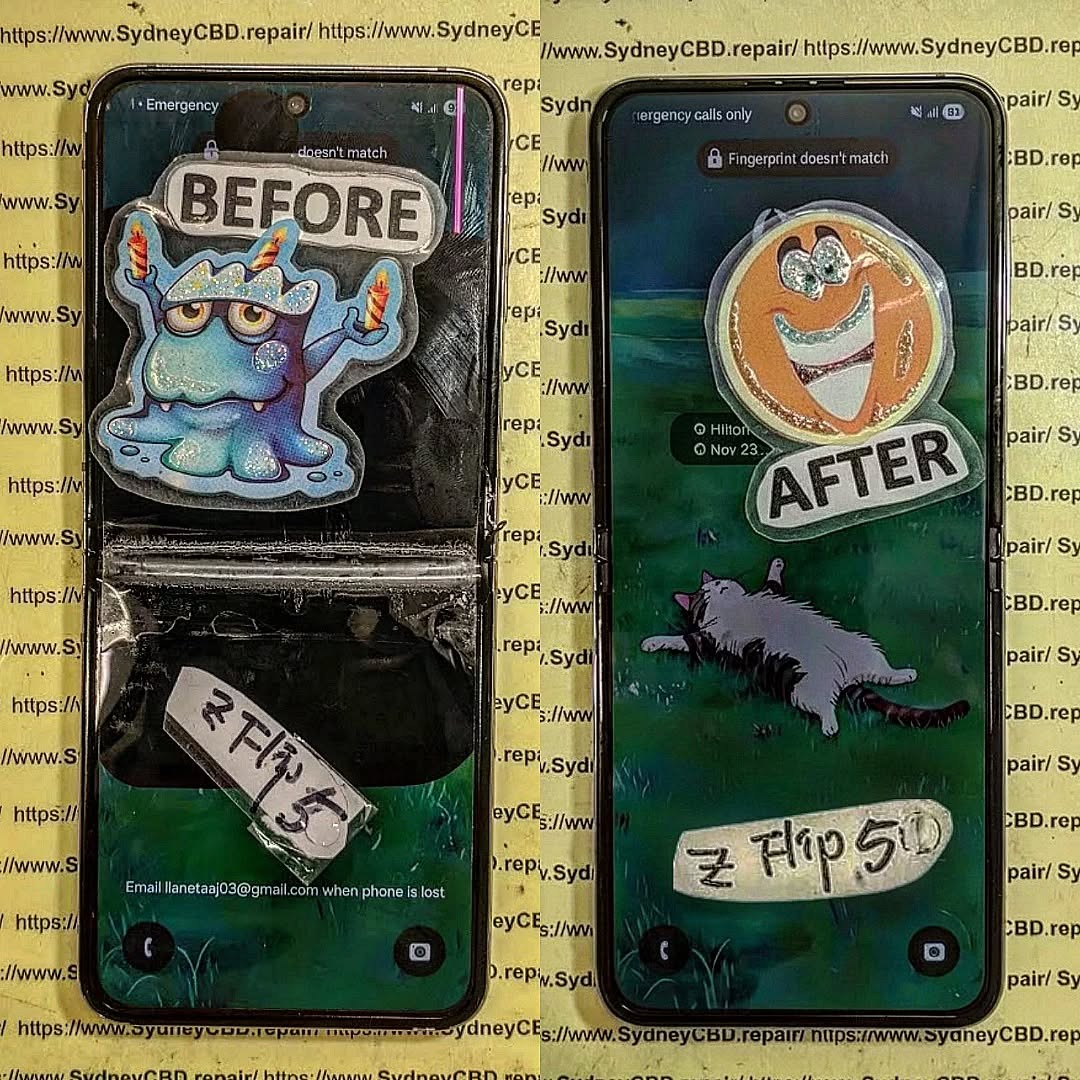
Understanding the Samsung Z Flip 5: A Foldable Marvel
The Samsung Z Flip 5 is more than just a phone; it’s a technological statement. Its foldable OLED display allows a full-sized smartphone to collapse into a compact form, blending portability with power. But the very features that make it remarkable also make it delicate.
The Anatomy of the Foldable Screen
The Z Flip 5’s screen is a marvel of flexible engineering:
- Ultra-thin glass layer: Provides a smooth touch experience but is prone to cracking if stressed.
- Plastic protective layer: Guards the OLED, but scratches easily.
- Flexible OLED panel: The core display that bends along the hinge.
- Hinge mechanism: Allows folding but is susceptible to dust and misalignment.
Understanding these components is crucial for any repair strategy.
Why Foldable Phones Fail: Common Issues
Foldable phones, especially the Z Flip 5, face unique challenges:
- Screen crease or crack: Frequent folding may cause permanent lines or breaks.
- Hinge malfunction: Misalignment or stiffness can affect folding and cause internal damage.
- Water or dust ingress: Even with IPX8 water resistance, particles can penetrate the hinge.
- Battery or connector damage: A drop may disconnect or puncture internal components.
Immediate Steps After Your Z Flip 5 Gets Damaged
Reacting quickly is essential. A wrong move can worsen damage or void warranties.
Diagnosing Physical vs. Software Damage
Not all issues are obvious. For instance, a phone that refuses to boot might have:
- Software glitches: Corrupted apps, failed updates, or system crashes.
- Hardware damage: Broken display, damaged connectors, or hinge issues.
Check for:
- Visible screen cracks
- Unusual sounds from the hinge
- Overheating
- Error messages
Power Cycling and Safe Reboot Methods
To prevent further harm:
- Hold the power and volume down buttons for 10 seconds to force reboot.
- If the screen is unresponsive, connect the phone to a charger or a PC to see if it powers up.
- Avoid attempting to fold or unfold the device forcefully.
Repair Options: DIY vs Professional

Essential Tools for DIY Foldable Phone Repair
For those daring to repair at home, you’ll need:
- Precision screwdrivers
- Plastic pry tools
- ESD-safe tweezers
- Suction cups
- Heat gun (for adhesive loosening)
Caution: DIY repairs are risky; a single misstep can damage the OLED beyond repair.
When to Seek Expert Technicians
Professional repair is recommended when:
- The screen is shattered
- The hinge is misaligned or jammed
- Water damage is suspected
- Internal components appear damaged
Sydney CBD Repair Centre, for instance, provides same-day express repairs and uses genuine parts with 90-day warranty—ideal for foldable phone emergencies.
Learn more about professional Samsung repair
Step-by-Step Guide to Restoring a Damaged Z Flip 5
Screen Replacement Techniques
Screen replacement is delicate due to the foldable OLED:
- Heat the frame gently to soften the adhesive.
- Use a suction cup and plastic pry tool to lift the screen.
- Disconnect the ribbon cables carefully.
- Align and install the new screen, then test before sealing.
Tip: Only use genuine Samsung replacement screens to avoid touch sensitivity issues.
Hinge Adjustment and Lubrication
Hinges can get stiff or loose over time:
- Inspect for dust or debris.
- Apply a small amount of precision hinge lubricant.
- Align screws and test folding movement.
Misaligned hinges can damage the OLED if ignored.
Battery and Internal Component Checks
After physical repair:
- Inspect battery connectors and ribbon cables.
- Check for bulges or liquid damage.
- Replace damaged components to prevent future failures.
Software Troubleshooting After Hardware Repair
Even after physical repairs, software issues may persist.
Factory Reset and Data Backup
- Always backup your data to Samsung Cloud or a PC.
- Perform a factory reset if apps misbehave or the system crashes.
Firmware Updates and Calibration
- Update to the latest software to fix bugs.
- Calibrate foldable sensors for smooth folding animations and battery optimization.
Maintaining Your Samsung Z Flip 5 to Prevent Future Damage
Protective Cases and Screen Guards
- Use a custom-fit flip case to prevent drops.
- Apply a screen protector designed for foldable displays.
Regular Maintenance and Cleaning
- Remove dust from the hinge every few weeks.
- Clean screen with a microfiber cloth.
- Avoid extreme heat or moisture exposure.
Cost Analysis: Repair vs Replacement
| Issue | DIY Cost | Professional Cost | Replacement Cost |
|---|---|---|---|
| Screen Replacement | $250-$350 | $400-$500 | $1200+ |
| Hinge Repair | $50-$100 | $150-$250 | N/A |
| Battery Replacement | $30-$50 | $80-$120 | N/A |
| Full Replacement | N/A | N/A | $1200+ |
Professional repair often saves money long-term, as it ensures genuine parts and avoids repeated damage.
FAQs About Samsung Z Flip 5 Repair
Q1: Can a foldable phone fully recover after a screen crease?
A: Minor creases may fade over time, but deep creases typically require a screen replacement.
Q2: Is DIY screen replacement safe?
A: Only if you have experience. Otherwise, professional repair is strongly recommended.
Q3: How long does Samsung Z Flip 5 repair take?
A: Simple fixes like battery or hinge adjustment may take 1–2 hours, full screen replacement 2–4 hours.
Q4: Does repair void the warranty?
A: Yes, unauthorized repairs can void warranty. Use certified centers like Sydney CBD Repair Centre.
Q5: Can water damage be repaired?
A: Yes, if addressed quickly. Components must be cleaned, dried, and replaced if needed.
Q6: How can I prevent hinge damage in the future?
A: Clean regularly, avoid forceful folding, and use protective cases designed for foldables.
Conclusion: Restoring Confidence in Your Foldable Phone

A catastrophic Samsung Z Flip 5 doesn’t have to spell disaster. With the right diagnosis, repair strategy, and maintenance, you can restore your foldable phone to near-original condition. Whether you choose DIY repair or professional service, following these 10 proven fixes ensures longevity, performance, and peace of mind.
Invest in protective accessories, maintain the hinge, and update software regularly. Foldable phones are marvels of technology—but even marvels need care.
External Link Reference: Samsung Support for Repairs
David from Sydney CBD Repair Centre – The Best place to fix mobile phones as 6 Years In A Row! Top Mobile Phone Repair In Sydney. More than 2000 Positive Reviews on Google and Same Day Repairs.
We take pride in delivering exceptional repair services for all major phone brands including Apple, Samsung, Google, and more. Our expert technicians use only genuine parts and offer 90days warranty on repairs. Located in the heart of Sydney CBD, we’re your one-stop solution for all mobile device repairs.
Our commitment to excellence has earned us the trust of thousands of satisfied customers. Whether it’s a cracked screen, battery replacement, or water damage repair, we handle it all with professional care and expertise. Walk in today and experience why we’re Sydney’s #1 choice for mobile phone repairs.
Visit us for:
✓ Same Day Express Repairs
✓ Genuine Parts Guarantee
✓ Professional Technicians
✓ Competitive Pricing
✓ 2000+ 5-Star Google Reviews
✓ 6-Time Award Winner for Best Phone Repairs
Sydney CBD Repair Centre – Where Quality Meets Reliability.
Call : +61280114119
Website: https://SydneyCBD.repair/locate-us

