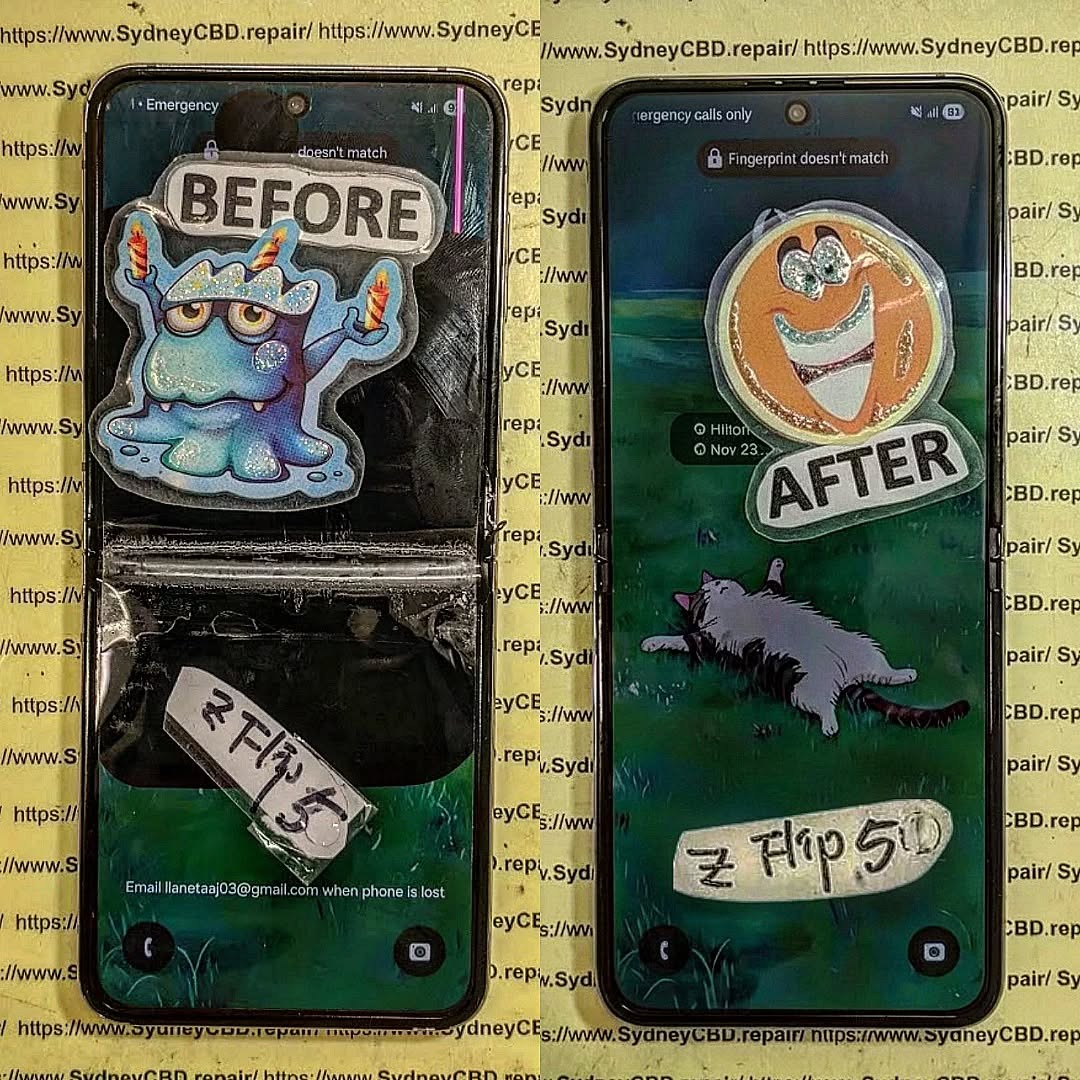
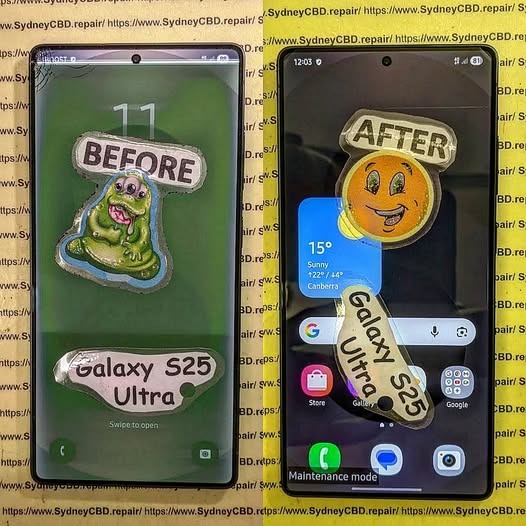
Folding Phone Nightmare: Restoring a Catastrophic Samsung Galaxy Z Flip 5 – 10 Proven Fixes
Introduction
Foldable smartphones have redefined mobile technology, offering sleek designs and innovative features that make everyday tasks more convenient and stylish. Among these cutting-edge devices, the Samsung Z Flip 5 stands out as a marvel of engineering, combining a full-sized smartphone experience with the portability of a compact, foldable form factor. However, with its revolutionary design comes a unique set of challenges. One accidental drop, an exposed hinge to dust, or minor water exposure can transform your high-tech device into a folding phone nightmare.
For many users, facing a damaged Z Flip 5 can feel overwhelming. The delicate foldable screen, hinge mechanisms, and internal components require careful handling, and improper repairs may lead to permanent damage. That’s why understanding the proper steps for diagnosis, repair, and maintenance is crucial.
In this guide, we’ll take you through everything you need to know to restore a catastrophic Samsung Z Flip 5. From immediate troubleshooting and DIY repair options to professional services and long-term maintenance strategies, you’ll discover 10 proven fixes that can bring your foldable phone back to life. Whether you’re a tech enthusiast attempting a careful repair at home or a user seeking trusted professional assistance, this article will provide the knowledge, tips, and confidence needed to tackle even the most severe Z Flip 5 issues.
By the end, you’ll understand not only how to fix your device but also how to maintain it, ensuring that your Samsung Z Flip 5 continues to perform flawlessly for years to come.
Foldable smartphones have revolutionized mobile technology, and the Samsung Z Flip 5 is a prime example of engineering brilliance. Its sleek design and flexible screen make it both futuristic and functional. However, this sophistication comes with fragility. One misstep—a drop, a spill, or an excessive bend—can turn your high-end phone into a folding phone nightmare.
In this comprehensive guide, we’ll explore how to restore a catastrophic Samsung Z Flip 5, covering everything from diagnosing damage to DIY repair tips, professional fixes, and long-term maintenance. With 10 proven fixes, you can regain full functionality while protecting your device for the future.
The Samsung Z Flip 5 is more than just a phone; it’s a technological statement. Its foldable OLED display allows a full-sized smartphone to collapse into a compact form, blending portability with power. But the very features that make it remarkable also make it delicate.
The Anatomy of the Foldable Screen
The Z Flip 5’s screen is a marvel of flexible engineering:
Ultra-thin glass layer: Provides a smooth touch experience but is prone to cracking if stressed.
Plastic protective layer: Guards the OLED, but scratches easily.
Flexible OLED panel: The core display that bends along the hinge.
Hinge mechanism: Allows folding but is susceptible to dust and misalignment.
Understanding these components is crucial for any repair strategy.
Why Foldable Phones Fail: Common Issues
Foldable phones, especially the Z Flip 5, face unique challenges:
Screen crease or crack: Frequent folding may cause permanent lines or breaks.
Hinge malfunction: Misalignment or stiffness can affect folding and cause internal damage.
Water or dust ingress: Even with IPX8 water resistance, particles can penetrate the hinge.
Battery or connector damage: A drop may disconnect or puncture internal components.
Reacting quickly is essential. A wrong move can worsen damage or void warranties.
Diagnosing Physical vs. Software Damage
Not all issues are obvious. For instance, a phone that refuses to boot might have:
Software glitches: Corrupted apps, failed updates, or system crashes.
Hardware damage: Broken display, damaged connectors, or hinge issues.
Check for:
Visible screen cracks
Unusual sounds from the hinge
Overheating
Error messages
Power Cycling and Safe Reboot Methods
To prevent further harm:
Hold the power and volume down buttons for 10 seconds to force reboot.
If the screen is unresponsive, connect the phone to a charger or a PC to see if it powers up.
Avoid attempting to fold or unfold the device forcefully.
Repair Options: DIY vs Professional
Essential Tools for DIY Foldable Phone Repair
For those daring to repair at home, you’ll need:
Precision screwdrivers
Plastic pry tools
ESD-safe tweezers
Suction cups
Heat gun (for adhesive loosening)
Caution: DIY repairs are risky; a single misstep can damage the OLED beyond repair.
When to Seek Expert Technicians
Professional repair is recommended when:
The screen is shattered
The hinge is misaligned or jammed
Water damage is suspected
Internal components appear damaged
Sydney CBD Repair Centre, for instance, provides same-day express repairs and uses genuine parts with 90-day warranty—ideal for foldable phone emergencies.
Step-by-Step Guide to Restoring a Damaged Z Flip 5
Screen Replacement Techniques
Screen replacement is delicate due to the foldable OLED:
Heat the frame gently to soften the adhesive.
Use a suction cup and plastic pry tool to lift the screen.
Disconnect the ribbon cables carefully.
Align and install the new screen, then test before sealing.
Tip: Only use genuine Samsung replacement screens to avoid touch sensitivity issues.
Hinge Adjustment and Lubrication
Hinges can get stiff or loose over time:
Inspect for dust or debris.
Apply a small amount of precision hinge lubricant.
Align screws and test folding movement.
Misaligned hinges can damage the OLED if ignored.
Battery and Internal Component Checks
After physical repair:
Inspect battery connectors and ribbon cables.
Check for bulges or liquid damage.
Replace damaged components to prevent future failures.
Software Troubleshooting After Hardware Repair
Even after physical repairs, software issues may persist.
Factory Reset and Data Backup
Always backup your data to Samsung Cloud or a PC.
Perform a factory reset if apps misbehave or the system crashes.
Firmware Updates and Calibration
Update to the latest software to fix bugs.
Calibrate foldable sensors for smooth folding animations and battery optimization.
Maintaining Your Samsung Z Flip 5 to Prevent Future Damage
Protective Cases and Screen Guards
Use a custom-fit flip case to prevent drops.
Apply a screen protector designed for foldable displays.
Regular Maintenance and Cleaning
Remove dust from the hinge every few weeks.
Clean screen with a microfiber cloth.
Avoid extreme heat or moisture exposure.
Cost Analysis: Repair vs Replacement
Issue
DIY Cost
Professional Cost
Replacement Cost
Screen Replacement
$250-$350
$400-$500
$1200+
Hinge Repair
$50-$100
$150-$250
N/A
Battery Replacement
$30-$50
$80-$120
N/A
Full Replacement
N/A
N/A
$1200+
Professional repair often saves money long-term, as it ensures genuine parts and avoids repeated damage.
FAQs About Samsung Z Flip 5 Repair
Q1: Can a foldable phone fully recover after a screen crease?
A: Minor creases may fade over time, but deep creases typically require a screen replacement.
Q2: Is DIY screen replacement safe?
A: Only if you have experience. Otherwise, professional repair is strongly recommended.
Q3: How long does Samsung Z Flip 5 repair take?
A: Simple fixes like battery or hinge adjustment may take 1–2 hours, full screen replacement 2–4 hours.
Q4: Does repair void the warranty?
A: Yes, unauthorized repairs can void warranty. Use certified centers like Sydney CBD Repair Centre.
Q5: Can water damage be repaired?
A: Yes, if addressed quickly. Components must be cleaned, dried, and replaced if needed.
Q6: How can I prevent hinge damage in the future?
A: Clean regularly, avoid forceful folding, and use protective cases designed for foldables.
Conclusion: Restoring Confidence in Your Foldable Phone
A catastrophic Samsung Z Flip 5 doesn’t have to spell disaster. With the right diagnosis, repair strategy, and maintenance, you can restore your foldable phone to near-original condition. Whether you choose DIY repair or professional service, following these 10 proven fixes ensures longevity, performance, and peace of mind.
Invest in protective accessories, maintain the hinge, and update software regularly. Foldable phones are marvels of technology—but even marvels need care.
David from Sydney CBD Repair Centre – The Best place to fix mobile phones as 6 Years In A Row! Top Mobile Phone Repair In Sydney. More than 2000 Positive Reviews on Google and Same Day Repairs.
We take pride in delivering exceptional repair services for all major phone brands including Apple, Samsung, Google, and more. Our expert technicians use only genuine parts and offer 90days warranty on repairs. Located in the heart of Sydney CBD, we’re your one-stop solution for all mobile device repairs.
Our commitment to excellence has earned us the trust of thousands of satisfied customers. Whether it’s a cracked screen, battery replacement, or water damage repair, we handle it all with professional care and expertise. Walk in today and experience why we’re Sydney’s #1 choice for mobile phone repairs.
Visit us for:
✓ Same Day Express Repairs
✓ Genuine Parts Guarantee
✓ Professional Technicians
✓ Competitive Pricing
✓ 2000+ 5-Star Google Reviews
✓ 6-Time Award Winner for Best Phone Repairs
THE HIDDEN COST: Counterfeit Vs Original Samsung Phone Display Comparison | Sydney CBD Repair + 7 Shocking Truths
Introduction
Smartphone users often focus on repair prices without understanding the long-term consequences of installing low-quality parts. A counterfeit vs original Samsung display comparison reveals that the cheapest option can become the most expensive decision over time. While counterfeit screens may initially save money, they often lead to poor performance, repeat repairs, battery issues, and even device damage.
Samsung smartphones are known for premium AMOLED displays, vibrant colors, and responsive touch technology. However, counterfeit replacement displays rarely meet the same standards. Many users don’t realize they’re receiving fake screens until problems appear weeks later.
At professional repair centers, technicians regularly see devices suffering from issues caused by imitation parts. From flickering screens to overheating, the risks are real. Understanding the difference between counterfeit and original Samsung displays helps consumers make smarter decisions and protect their devices for years to come.
Samsung has built a strong global reputation for producing some of the best smartphone displays in the industry. Whether it’s the flagship Galaxy S Series or foldable devices like the Galaxy Z Fold lineup, Samsung displays are designed with advanced engineering and strict quality control.
Original Samsung screens deliver:
Deep blacks and vivid colors
Excellent outdoor brightness
Smooth touch responsiveness
Energy efficiency
Long-term durability
Unfortunately, counterfeit manufacturers attempt to imitate these features using cheaper materials and inferior technology. At first glance, fake screens may appear acceptable. Yet once users begin daily use, the difference becomes obvious.
A counterfeit vs original Samsung display comparison clearly shows that genuine parts outperform fake alternatives in almost every category.
The global smartphone repair market continues to grow rapidly. Because of this, counterfeit component suppliers have flooded the market with imitation Samsung displays. These screens are often marketed as “OEM quality,” “AAA grade,” or “premium compatible.”
However, these labels can be misleading.
Many repair shops purchase cheaper parts to maximize profit margins or advertise lower repair prices. Consumers searching for bargain repairs may unknowingly accept counterfeit components simply because they cost less upfront.
Several factors contribute to the rise of fake Samsung screens:
Increasing smartphone repair demand
High price of genuine AMOLED displays
Lack of consumer awareness
Online marketplaces selling imitation parts
Difficulty distinguishing fake from genuine
As a result, more customers are experiencing poor-quality repairs that fail prematurely.
Understanding Original Samsung Displays
Original Samsung displays are manufactured to precise engineering standards. Every component works together to ensure optimal performance and reliability.
AMOLED Technology Explained
Samsung’s AMOLED technology is widely regarded as industry-leading. Unlike LCD screens, AMOLED displays illuminate individual pixels independently. This creates:
Better contrast
Richer colors
Improved battery efficiency
Superior viewing angles
Samsung invests heavily in research and development to maintain this display quality. Genuine displays undergo strict calibration to ensure accurate color reproduction and touch performance.
Samsung Factory Calibration
Every original Samsung display is factory-tested before installation. Calibration ensures:
Uniform brightness
Accurate touch response
Proper fingerprint sensor compatibility
Correct refresh rate operation
Counterfeit screens rarely receive this level of testing. Consequently, users often notice inconsistencies almost immediately.
What Makes a Counterfeit Display Different
Counterfeit displays are designed primarily to reduce manufacturing costs. While they may resemble genuine screens physically, their internal construction is significantly different.
Inferior Materials Used
Most fake Samsung displays use lower-quality glass and weaker internal components. These materials scratch more easily and crack under minor impact.
Common problems include:
Poor adhesive quality
Weak flex cables
Cheap digitizers
Fragile OLED layers
These weaknesses reduce the overall lifespan of the screen.
Fake OLED and TFT Panels
Many counterfeit “OLED” screens are actually low-cost TFT LCD panels designed to imitate AMOLED appearance. While they may function initially, performance is noticeably worse.
A counterfeit vs original Samsung display comparison often reveals:
Feature
Original Samsung Display
Counterfeit Display
Display Type
Genuine AMOLED
TFT LCD or Fake OLED
Brightness
Very High
Low to Moderate
Color Accuracy
Excellent
Inconsistent
Battery Efficiency
Optimized
Poor
Touch Response
Smooth
Delayed
Durability
Long-lasting
Short lifespan
This table highlights why authentic displays remain the superior option.
Counterfeit Vs Original Samsung Display Comparison
The differences become clearer during everyday use.
Brightness and Color Accuracy
Original Samsung displays offer vibrant colors and excellent visibility even in direct sunlight. Counterfeit screens often appear washed out or overly saturated.
Users commonly report:
Yellow tinting
Uneven brightness
Blue light imbalance
Dull blacks
These issues reduce the premium feel of Samsung devices.
Touch Sensitivity Differences
Touch performance is critical for gaming, typing, and navigation. Genuine screens provide fast and accurate response times.
Fake displays may suffer from:
Ghost touches
Delayed typing
Unresponsive corners
Lag during scrolling
This creates frustration during normal phone use.
Durability and Lifespan
Original Samsung screens are engineered for long-term reliability. Counterfeit displays frequently fail within months.
Common failures include:
Flickering
Random shutdowns
Dead touch areas
Screen separation
In many cases, customers end up paying for multiple repairs.
Battery Consumption
A counterfeit vs original Samsung display comparison also reveals major battery differences.
Fake displays typically consume more power because:
They lack efficient AMOLED technology
Poor calibration increases energy usage
Incompatible drivers strain the motherboard
Consequently, users notice faster battery drain after repair.
Hidden Financial Costs of Fake Displays
At first glance, counterfeit repairs seem affordable. However, hidden costs quickly accumulate.
Consider the following expenses:
Hidden Cost
Potential Impact
Repeat Repairs
Additional labor and parts
Battery Drain
Earlier battery replacement
Device Damage
Motherboard repair risk
Warranty Loss
Manufacturer support voided
Reduced Resale Value
Lower market price
Consumers who choose cheaper repairs often spend more money overall.
Furthermore, counterfeit screens can damage other internal components. A poorly made flex cable may short the motherboard, resulting in expensive repairs that exceed the original savings.
Performance Problems Users Commonly Experience
Many users notice issues shortly after installing fake screens.
Green Lines and Flickering
Green line problems are increasingly associated with low-quality replacement displays. Flickering may occur due to:
Poor OLED quality
Weak display connectors
Incompatible firmware
These symptoms usually worsen over time.
Dead Pixels and Burn-In
Counterfeit displays are more vulnerable to:
Permanent image retention
Dead pixels
Uneven brightness patches
Original Samsung AMOLED screens include advanced burn-in protection systems that counterfeit versions lack.
Fingerprint Scanner Issues
Modern Samsung devices use under-display fingerprint technology. Fake screens often interfere with sensor accuracy.
Users may experience:
Failed fingerprint registration
Slow unlocking
Complete scanner malfunction
This compromises both convenience and security.
Safety Risks of Counterfeit Displays
Many consumers overlook the safety risks associated with counterfeit smartphone parts.
Poorly manufactured screens may:
Overheat excessively
Damage battery performance
Cause internal short circuits
Fail during charging
In extreme situations, defective components can increase fire risks.
Professional repair centers prioritize safety by using genuine parts tested to manufacturer standards. This helps protect both the device and the user.
How Genuine Samsung Repairs Protect Your Device
Professional repair providers understand the importance of authentic components.
Benefits of genuine Samsung repairs include:
Reliable performance
Longer screen lifespan
Better touch accuracy
Manufacturer compatibility
Improved device value
Technicians using original displays can also ensure proper sealing and water resistance restoration.
Consumers should always ask repair shops:
Are the screens genuine Samsung parts?
Is there a repair warranty?
Will biometric features work properly?
Is waterproof sealing restored?
These questions help avoid low-quality repairs.
How to Identify an Original Samsung Display
Spotting fake screens can be difficult, but several indicators help identify authentic displays.
Serial Number Verification
Original Samsung components usually contain traceable serial numbers and factory markings. Professional repair centers can verify authenticity using supplier documentation.
Display Quality Indicators
Signs of a genuine Samsung display include:
Deep black colors
High brightness outdoors
Smooth scrolling
Accurate touch response
Consistent color temperature
Counterfeit screens often reveal flaws immediately when compared side by side.
Why Professional Repair Matters
Choosing a trusted repair center matters just as much as choosing genuine parts.
Experienced technicians understand:
Proper installation procedures
Samsung calibration requirements
Waterproof sealing techniques
Safe battery handling
Improper installation can damage even authentic components. Therefore, professional expertise is essential.
Consumers should look for repair providers with:
Strong customer reviews
Warranty coverage
Genuine part transparency
Experienced technicians
Reliable repair shops prioritize quality over shortcuts.
The Environmental Impact of Fake Parts
Counterfeit electronics contribute significantly to electronic waste. Because fake screens fail more frequently, they increase landfill waste and environmental pollution.
Original Samsung displays generally last longer, reducing unnecessary replacements.
Environmental benefits of genuine repairs include:
Reduced electronic waste
Longer device lifespan
Lower resource consumption
Improved sustainability
Repairing devices correctly the first time is both economically and environmentally responsible.
Installing counterfeit components may void manufacturer warranties. Samsung service policies typically require genuine parts for official support eligibility.
Consumers should request:
Detailed invoices
Repair warranties
Genuine part confirmation
Transparent documentation protects customers from disputes later.
A counterfeit vs original Samsung display comparison proves that genuine repairs offer stronger long-term value, reliability, and peace of mind.
FAQs
1. How can I tell if my Samsung screen is counterfeit?
Signs include poor brightness, inaccurate colors, laggy touch response, battery drain, and fingerprint sensor issues. Genuine screens feel smoother and more responsive.
2. Are counterfeit Samsung displays cheaper?
Yes, counterfeit screens usually cost less upfront. However, they often fail sooner and may lead to additional repair costs.
3. Do fake Samsung screens damage phones?
They can. Poor-quality screens may cause overheating, motherboard stress, battery drain, and connection issues.
4. Is AMOLED better than TFT LCD?
Yes. AMOLED displays provide deeper blacks, better color accuracy, improved energy efficiency, and superior viewing angles.
5. Why do some repair shops use counterfeit screens?
Some businesses prioritize lower pricing and higher profit margins. Unfortunately, many customers aren’t aware of the differences.
6. Does a genuine Samsung display improve resale value?
Absolutely. Devices repaired with original parts usually maintain higher resale value and buyer confidence.
7. Can counterfeit displays affect waterproofing?
Yes. Improper installation and low-quality adhesives may compromise water resistance and internal protection.
8. Should I always choose genuine Samsung parts?
For long-term reliability and performance, genuine parts are strongly recommended.
Conclusion
A counterfeit vs original Samsung display comparison highlights the real cost behind cheap smartphone repairs. While counterfeit displays may appear attractive due to lower pricing, they frequently result in performance problems, reduced lifespan, safety risks, and expensive repeat repairs.
Original Samsung displays provide superior brightness, color accuracy, touch sensitivity, battery efficiency, and durability. More importantly, they preserve the overall health and value of the device.
Consumers should prioritize reputable repair providers that use authentic components and professional installation methods. Quality repairs protect both smartphones and long-term budgets.
When it comes to Samsung display replacements, investing in genuine parts is the smarter and safer choice.
David from Sydney CBD Repair Centre – The Best place to fix mobile phones as 7 Years In A Row! Top Mobile Phone Repair In Sydney. More than 2000 Positive Reviews on Google and Same Day Repairs.
We take pride in delivering exceptional repair services for all major phone brands including Apple, Samsung, Google, and more. Our expert technicians use only genuine parts and offer 90days warranty on repairs. Located in the heart of Sydney CBD, we’re your one-stop solution for all mobile device repairs.
Our commitment to excellence has earned us the trust of thousands of satisfied customers. Whether it’s a cracked screen, battery replacement, or water damage repair, we handle it all with professional care and expertise. Walk in today and experience why we’re Sydney’s #1 choice for mobile phone repairs.
Visit us for:
✓ Same Day Express Repairs
✓ Genuine Parts Guarantee
✓ Professional Technicians
✓ Competitive Pricing
✓ 2000+ 5-Star Google Reviews
✓ 7-Time Award Winner for Best Phone Repairs
The Hidden Cost of Cheap Repairs: Samsung S25 Ultra Screen Quality Comparison – 7 Shocking Truths You Must Know
Introduction
The Samsung S25 Ultra represents one of Samsung’s most advanced smartphones to date. Featuring a premium Dynamic AMOLED display, exceptional brightness, advanced touch sensitivity, and outstanding colour accuracy, it’s designed to deliver an elite smartphone experience.
Unfortunately, accidents happen. A dropped phone can quickly result in a cracked display, forcing owners to decide between an affordable repair and a premium replacement.
This is where many people unknowingly make a costly mistake.
At first glance, a cheap repair appears to offer tremendous value. After all, the screen lights up, the phone works again, and the repair bill is much lower than genuine replacement pricing.
However, appearances can be deceiving.
Many low-cost repair shops install inferior display assemblies that look acceptable for the first few days but gradually reveal significant shortcomings. These include:
Lower brightness
Washed-out colours
Delayed touch response
Reduced durability
Poor fingerprint recognition
Increased battery consumption
Higher likelihood of future failures
In many cases, customers eventually pay twice—once for the inexpensive repair and again for a proper replacement after the cheap screen fails.
This comprehensive Samsung S25 Ultra screen quality comparison explores exactly why inexpensive repairs often become expensive mistakes. You’ll learn how professional technicians distinguish genuine displays from low-quality alternatives, understand the hidden compromises made during budget repairs, and discover how to choose a repair centre that protects both your phone and your wallet.
By the end of this guide, you’ll know exactly what to look for before trusting anyone with your premium smartphone.
The Samsung S25 Ultra isn’t simply another smartphone with a large screen. Its display is among the most sophisticated components ever fitted to a mobile device, combining advanced engineering with years of Samsung display innovation.
When a repair shop replaces this display, they aren’t merely swapping broken glass. They’re replacing an integrated system consisting of multiple precisely calibrated layers that work together seamlessly.
Understanding these components helps explain why genuine-quality repairs cost more—and why they’re often worth every dollar.
Dynamic AMOLED Technology
Samsung’s flagship displays have earned a reputation for exceptional image quality.
The S25 Ultra’s Dynamic AMOLED technology offers:
Deep blacks
Exceptional contrast
Vibrant colours
HDR support
Excellent outdoor visibility
High refresh rates
Smooth animations
Every pixel produces its own light, eliminating the need for traditional backlighting.
This results in:
Feature
Benefit
Individual pixel lighting
Perfect black levels
HDR capability
Richer multimedia
High contrast ratio
Better readability
Wide colour gamut
Professional image quality
Adaptive refresh rate
Smooth scrolling
Cheap replacement displays rarely reproduce these characteristics accurately.
Instead, users may notice:
Grey-looking blacks
Oversaturated colours
Yellow tinting
Blue shift
Reduced brightness
Uneven illumination
While these flaws may seem minor initially, they become increasingly obvious during everyday use.
Premium Anti-Reflective Glass
One of the most overlooked features of the Samsung S25 Ultra is its advanced anti-reflective coating.
Many aftermarket displays completely omit this specialised coating because manufacturing it significantly increases production costs.
Without it, users often experience:
Increased reflections
Lower visibility outdoors
More fingerprints
Greater glare under office lighting
Although these issues don’t prevent the phone from functioning, they noticeably reduce the premium experience customers originally paid for.
Touch Precision and S Pen Performance
The Samsung S25 Ultra is engineered for exceptional touch responsiveness.
Whether you’re:
Writing notes
Editing photos
Drawing illustrations
Gaming competitively
Navigating menus
every touch should feel immediate and accurate.
This level of precision depends on sophisticated digitiser technology integrated directly into the display assembly.
Cheap replacements frequently compromise this technology.
Common symptoms include:
Delayed response
Missed taps
Ghost touches
Reduced palm rejection
Inconsistent stylus tracking
Professional technicians often test touch performance using specialised diagnostic software because problems aren’t always obvious during a quick inspection.
Many customers only discover these issues after living with the repaired phone for several weeks.
Fingerprint Sensor Compatibility
Modern Samsung phones use advanced ultrasonic fingerprint sensors beneath the display.
These sensors require:
Correct display thickness
Proper optical characteristics
Accurate adhesive alignment
High manufacturing precision
Inferior replacement screens often interfere with these requirements.
Users may experience:
Slower unlocking
Failed recognition
Repeated scans
Random authentication errors
Although some repair shops attempt software recalibration, hardware limitations cannot always be overcome.
This is one reason experienced repair centres strongly recommend genuine-quality display assemblies whenever possible.
Why Every Layer Matters
The display assembly consists of far more than visible glass.
It includes:
Protective glass
OLED display
Digitiser
Polariser
Adhesive layers
Display controller
Touch controller
Sensor integration
Each component must work perfectly with the others.
Replacing only one layer with inferior materials can reduce the overall performance of the entire phone.
This is why professional repairs focus on maintaining factory-level quality rather than simply restoring basic functionality.
When customers compare a genuine repair with a budget replacement side by side, the difference is often immediately noticeable—not only in appearance but also in responsiveness, comfort, and long-term reliability.
When searching online for a repair, you’ll likely notice enormous price differences between repair providers. Some advertise remarkably low prices that seem too good to ignore, while others charge considerably more for what appears to be the same service.
So why does such a significant price gap exist?
The answer lies in the quality of the replacement parts, the skill of the technician, and the repair process itself. In many cases, the lower price is achieved by cutting corners in ways that aren’t immediately visible to the customer.
Understanding these differences can help you make a smarter decision and avoid paying more in the long run.
Low-Quality OLED Panels
One of the biggest ways inexpensive repairs reduce costs is by using lower-grade OLED panels.
These displays may resemble the original at first glance, but they often have noticeable shortcomings after a short period of use.
Common issues include:
Lower maximum brightness
Poor colour calibration
Reduced viewing angles
Faster image retention
Higher power consumption
Uneven backlighting appearance
Shorter lifespan
Manufacturers of these panels typically aim to reduce production costs rather than match Samsung’s original specifications. As a result, the screen may technically function, but it won’t deliver the premium experience expected from a flagship device.
Screen Quality Comparison: Genuine vs Aftermarket Samsung S25 Ultra Displays
When comparing replacement screens for the Samsung S25 Ultra, the differences extend far beyond appearance. Two displays may look similar when the phone is first powered on, but their performance often varies dramatically after weeks or months of regular use. Understanding these differences helps consumers make informed repair decisions and avoid unnecessary future expenses.
Brightness Performance
One of the most noticeable differences between genuine and budget replacement displays is maximum brightness.
Samsung engineers its flagship displays to remain highly visible in almost every environment. Whether you’re reading messages outdoors, navigating with maps, or taking photos in bright sunlight, the screen adjusts automatically to maintain excellent visibility.
Many aftermarket displays advertise similar specifications but struggle to reach the same peak brightness. As a result, users may notice:
Poor readability in direct sunlight
Duller colours outdoors
Reduced automatic brightness performance
Greater battery consumption as brightness is manually increased
Over time, lower-quality OLED panels may also lose brightness more quickly than genuine displays.
Colour Accuracy
Samsung invests heavily in display calibration to ensure colours appear realistic and consistent.
A genuine display offers:
Feature
Genuine Screen
Budget Screen
Colour accuracy
Excellent
Often inconsistent
White balance
Neutral
May appear blue or yellow
Black levels
Deep black
Greyish black
HDR support
Full performance
Limited or unavailable
Colour consistency
High
Can vary between panels
Photographers, designers, and content creators especially benefit from accurate colour reproduction, but even everyday users appreciate a display that looks natural rather than overly saturated or washed out.
Touch Responsiveness
Touch responsiveness plays a major role in the overall user experience.
Original Samsung displays are engineered to register every gesture with minimal delay. Scrolling feels fluid, typing is accurate, and gaming performance remains consistent.
Lower-cost replacements may introduce problems such as:
Missed touches
Delayed responses
Ghost touches
Reduced edge sensitivity
Less accurate multi-touch recognition
While these issues may seem minor at first, they can become increasingly frustrating during daily use.
Fingerprint Sensor Performance
The Samsung S25 Ultra uses an ultrasonic fingerprint sensor located beneath the display.
This technology relies on precise screen thickness and carefully calibrated materials. Genuine replacement assemblies maintain these specifications, allowing the sensor to continue working reliably.
Some aftermarket screens interfere with fingerprint recognition, leading to:
Slower unlocking
Multiple scan attempts
Increased recognition failures
The need to re-register fingerprints
Although software recalibration can sometimes improve performance, it cannot compensate for hardware limitations.
Durability and Everyday Wear
A replacement screen should withstand normal daily use for years, not just a few months.
High-quality display assemblies generally provide:
Better resistance to scratches
Stronger structural integrity
Reliable adhesive bonding
Improved impact resistance
Cheaper alternatives often reduce manufacturing costs by using lower-grade glass and adhesives. This can result in lifting around the edges, dust entering beneath the display, or premature failure after minor drops.
The Hidden Costs of Choosing the Cheapest Repair
The initial repair price rarely tells the full story.
A budget repair may save money on the day of service, but additional costs can quickly outweigh those savings if the replacement screen fails or performs poorly.
Potential long-term expenses include:
Paying for another screen replacement
Lost productivity while the phone is repaired again
Reduced resale value
Poor user experience every day
Possible damage to other components if inferior adhesives or parts fail
In many cases, investing in a higher-quality repair once is more economical than paying for multiple low-cost repairs over the life of the device.
How Professional Technicians Identify Genuine Screens
Experienced repair technicians use more than visual inspection to assess display quality.
Common evaluation methods include:
Brightness testing under controlled lighting
Colour accuracy comparison
Touch response diagnostics
Fingerprint sensor verification
Inspection of adhesive application
Frame alignment checks
Pixel uniformity testing
Dead pixel detection
Professional workshops also examine whether the replacement display integrates correctly with Samsung’s hardware and software, ensuring the repaired phone performs as close to factory specifications as possible.
How to Choose a Trustworthy Samsung S25 Ultra Repair Centre
Not all repair shops deliver the same level of service. While price is important, the quality of the repair and the reliability of the replacement parts should be your top priorities. A reputable repair centre will be transparent about the components they use, explain the repair process, and stand behind their work with a warranty.
Here are the key factors to consider before handing over your Samsung S25 Ultra:
1. Ask About the Replacement Parts
A professional repair centre should clearly explain whether they use:
Genuine Samsung parts (where available)
OEM-quality components
High-quality aftermarket parts
Avoid businesses that cannot tell you where their replacement screens come from or refuse to discuss the differences between screen grades.
2. Check the Warranty
A quality repair should always include a warranty that covers manufacturing defects and workmanship. While accidental damage is usually excluded, a warranty gives customers confidence that the repair centre stands behind its service.
3. Read Customer Reviews
Online reviews often reveal how a repair business treats its customers. Look for consistent feedback about:
Repair quality
Turnaround time
Customer service
Honest pricing
Warranty support
A long history of positive reviews is generally a good indicator of reliable service.
4. Experience Matters
Flagship smartphones such as the Samsung S25 Ultra are more complex than older devices. Choosing technicians with experience repairing premium Samsung models reduces the risk of installation errors and helps preserve important features such as:
Display quality
Touch responsiveness
Ultrasonic fingerprint sensor performance
Water-resistant sealing (where possible after repair)
S Pen functionality
5. Transparent Pricing
Trustworthy repair centres provide clear quotations before starting work. Be cautious of businesses advertising unrealistically low prices that later increase due to “unexpected” charges.
A professional quote should explain exactly what is included, including parts, labour, and warranty coverage.
Maintaining Your New Screen After Repair
Even the highest-quality replacement display benefits from proper care. Following a few simple habits can significantly extend its lifespan.
Use a Quality Screen Protector
A tempered glass screen protector helps reduce scratches and absorbs impact from minor drops. Although it cannot prevent every crack, it adds an extra layer of protection.
Choose a Protective Case
A well-designed protective case cushions your phone during accidental drops and helps prevent direct impact to the display.
Avoid Extreme Temperatures
Very high or very low temperatures can affect battery performance, adhesives, and display components. Avoid leaving your phone in direct sunlight or inside a hot vehicle for extended periods.
Keep the Display Clean
Use a soft microfiber cloth to remove fingerprints and dust. Avoid harsh cleaning chemicals that may damage protective coatings.
Repair Small Cracks Quickly
Small cracks can worsen over time, allowing dust and moisture to enter the display assembly. Addressing damage early may prevent more extensive repairs later.
Frequently Asked Questions
1. Are cheap Samsung S25 Ultra screen replacements worth it?
Cheap repairs may reduce the upfront cost, but they often involve lower-quality parts that can compromise brightness, colour accuracy, touch performance, and durability. In many cases, paying slightly more for a quality repair provides better long-term value.
2. Can an aftermarket screen look the same as the original?
Some premium aftermarket displays closely resemble the original, but many lower-cost options differ in brightness, colour reproduction, viewing angles, and touch sensitivity. The overall experience depends on the quality of the replacement part.
3. Will my fingerprint sensor work after a screen replacement?
If the replacement display is properly installed and compatible with the Samsung S25 Ultra, the ultrasonic fingerprint sensor should continue to function correctly. Lower-quality displays may reduce recognition accuracy or require repeated scans.
4. How long does a Samsung S25 Ultra screen replacement take?
Many experienced repair centres can complete a screen replacement on the same day, depending on parts availability and workshop demand.
5. Does replacing the screen affect water resistance?
Opening any smartphone may impact its original water-resistant seal. Professional technicians replace adhesives and sealing components during the repair, but manufacturers generally recommend avoiding deliberate water exposure after any repair.
6. How can I tell if a replacement screen is high quality?
Look for signs such as:
Bright, even display illumination
Accurate colour reproduction
Smooth touch response
Reliable fingerprint recognition
Proper frame alignment
No lifting around the edges
Warranty coverage from the repair centre
7. Is replacing the screen better than buying a new phone?
In many situations, yes. If the rest of the phone is functioning normally, replacing a damaged screen is usually far more affordable than purchasing a brand-new flagship device.
Conclusion
A damaged display does not necessarily mean the end of your Samsung S25 Ultra. However, choosing the right repair solution makes all the difference.
While inexpensive repairs may appear attractive initially, the hidden compromises often become apparent over time. Reduced brightness, inaccurate colours, unreliable touch response, weaker durability, and fingerprint sensor issues can all affect your daily experience. In some cases, these problems lead to additional repair costs that exceed the savings of the original low-priced repair.
Investing in quality parts and experienced technicians helps preserve the premium features that make the Samsung S25 Ultra one of Samsung’s flagship smartphones. A professional repair performed with high-quality components offers better reliability, greater customer satisfaction, and improved long-term value.
Before selecting a repair provider, take the time to compare warranties, customer reviews, technician experience, and the quality of the replacement parts being offered. A little research today can save considerable money and frustration in the future.
For additional information about Samsung mobile devices, visit the official Samsung support website: https://www.samsung.com/support/
Choosing quality over the lowest price is often the smartest investment when repairing a premium smartphone. A professionally installed, high-quality screen helps maintain the Samsung S25 Ultra’s outstanding display performance, protects your investment, and provides peace of mind every time you unlock your device.
David from Sydney CBD Repair Centre – The Best place to fix mobile phones as 7 Years In A Row! Top Mobile Phone Repair In Sydney. More than 2000 Positive Reviews on Google and Same Day Repairs.
We take pride in delivering exceptional repair services for all major phone brands including Apple, Samsung, Google, and more. Our expert technicians use only genuine parts and offer 90 days warranty on repairs. Located in the heart of Sydney CBD, we’re your one-stop solution for all mobile device repairs.
Our commitment to excellence has earned us the trust of thousands of satisfied customers. Whether it’s a cracked screen, battery replacement, or water damage repair, we handle it all with professional care and expertise. Walk in today and experience why we’re Sydney’s #1 choice for mobile phone repairs.
Visit us for:
✓ Same Day Express Repairs
✓ Genuine Parts Guarantee
✓ Professional Technicians
✓ Competitive Pricing
✓ 2000+ 5-Star Google Reviews
✓ 7-Time Award Winner for Best Phone Repairs
Sydney CBD Repair Centre – Where Quality Meets Reliability.
Why OLED Green Lines Happen: Professional Sydney Repair View on Samsung Screen Failure – 11 Critical Facts Every User Must Know
Introduction to OLED Green Line Issues
The appearance of a bright vertical green line on a smartphone display can be alarming. Many users first notice the issue when unlocking their device or after completing a software update. While the timing may seem coincidental, the root cause is often deeper than software alone.
The OLED green lines phenomenon has become one of the most discussed display issues among smartphone owners, particularly those using premium Samsung devices. Although modern OLED screens provide exceptional contrast, deep blacks, and vibrant colors, they also contain delicate display structures that can develop faults over time.
From a professional repair perspective, understanding why OLED green lines occur is essential before deciding whether repair or replacement is the most practical solution.
Modern smartphones are highly sophisticated devices. Their screens are composed of millions of tiny pixels controlled by microscopic circuits. Even a small disruption in these circuits can lead to highly visible display abnormalities. Consequently, a single damaged display pathway can create a bright vertical line stretching from the top to the bottom of the screen.
Fortunately, many cases can be professionally diagnosed and repaired. The key is identifying the underlying cause as early as possible.
OLED stands for Organic Light Emitting Diode. Unlike traditional LCD panels that rely on backlighting, OLED displays produce light directly from individual pixels.
Each pixel consists of sub-pixels:
Red
Green
Blue
When electrical current flows through these sub-pixels, they emit light independently. This technology allows OLED screens to achieve:
Superior contrast
Better energy efficiency
Rich color reproduction
True black levels
However, because each pixel operates independently, damage to display control circuits can affect specific color channels. This is one reason why OLED green lines often appear as bright green vertical streaks.
Why Samsung Uses OLED Screens
Samsung has long been recognized as a leader in OLED display manufacturing. Many flagship devices feature advanced AMOLED technology, which is a refined form of OLED.
Advantages include:
Feature
Benefit
Deep Blacks
Better viewing experience
High Refresh Rates
Smooth scrolling
Energy Efficiency
Longer battery life
Thin Construction
Slimmer devices
Despite these advantages, OLED technology remains sensitive to physical stress and electrical faults.
These factors help ensure a positive repair experience.
Frequently Asked Questions
1. Can a software update cause OLED green lines?
A software update may reveal an existing hardware weakness, but permanent OLED green lines are generally associated with physical display faults rather than software itself.
2. Will a factory reset remove the green line?
If the issue is hardware-related, a factory reset will not eliminate the line.
3. Can green lines spread over time?
Yes. Additional lines or display defects may appear if underlying screen damage continues to worsen.
4. Is it safe to continue using a phone with a green line?
Generally yes, but continued use may become inconvenient if visibility deteriorates or touch performance is affected.
5. Are OLED green lines covered under warranty?
Coverage depends on the manufacturer’s warranty terms and whether accidental damage is involved.
6. Should I replace the screen or buy a new phone?
For many premium smartphones, professional screen replacement is significantly more cost-effective than replacing the entire device.
7. Can pressure on the screen create green lines?
Yes. Excessive pressure can damage OLED layers and display circuits, leading to permanent vertical lines.
8. How quickly should I repair OLED green lines?
Prompt diagnosis is recommended. Early assessment helps determine whether additional components have been affected.
Conclusion
The growing discussion surrounding OLED green lines highlights the delicate nature of modern OLED display technology. While Samsung devices are often associated with these reports, the issue can affect any OLED-equipped smartphone under the right conditions.
Physical impacts, manufacturing weaknesses, thermal stress, and moisture exposure remain the most common causes. Although temporary workarounds exist online, permanent OLED green lines generally require professional diagnosis and screen replacement.
The good news is that expert repair services can often restore affected devices quickly and reliably. By understanding the causes, recognizing warning signs, and seeking professional assistance early, smartphone owners can maximize the lifespan of their valuable devices and avoid more costly problems down the road.
David from Sydney CBD Repair Centre – The Best place to fix mobile phones as 7 Years In A Row! Top Mobile Phone Repair In Sydney. More than 2000 Positive Reviews on Google and Same Day Repairs.
We take pride in delivering exceptional repair services for all major phone brands including Apple, Samsung, Google, and more. Our expert technicians use only genuine parts and offer 90days warranty on repairs. Located in the heart of Sydney CBD, we’re your one-stop solution for all mobile device repairs.
Our commitment to excellence has earned us the trust of thousands of satisfied customers. Whether it’s a cracked screen, battery replacement, or water damage repair, we handle it all with professional care and expertise. Walk in today and experience why we’re Sydney’s #1 choice for mobile phone repairs.
Visit us for:
✓ Same Day Express Repairs
✓ Genuine Parts Guarantee
✓ Professional Technicians
✓ Competitive Pricing
✓ 2000+ 5-Star Google Reviews
✓ 7-Time Award Winner for Best Phone Repairs