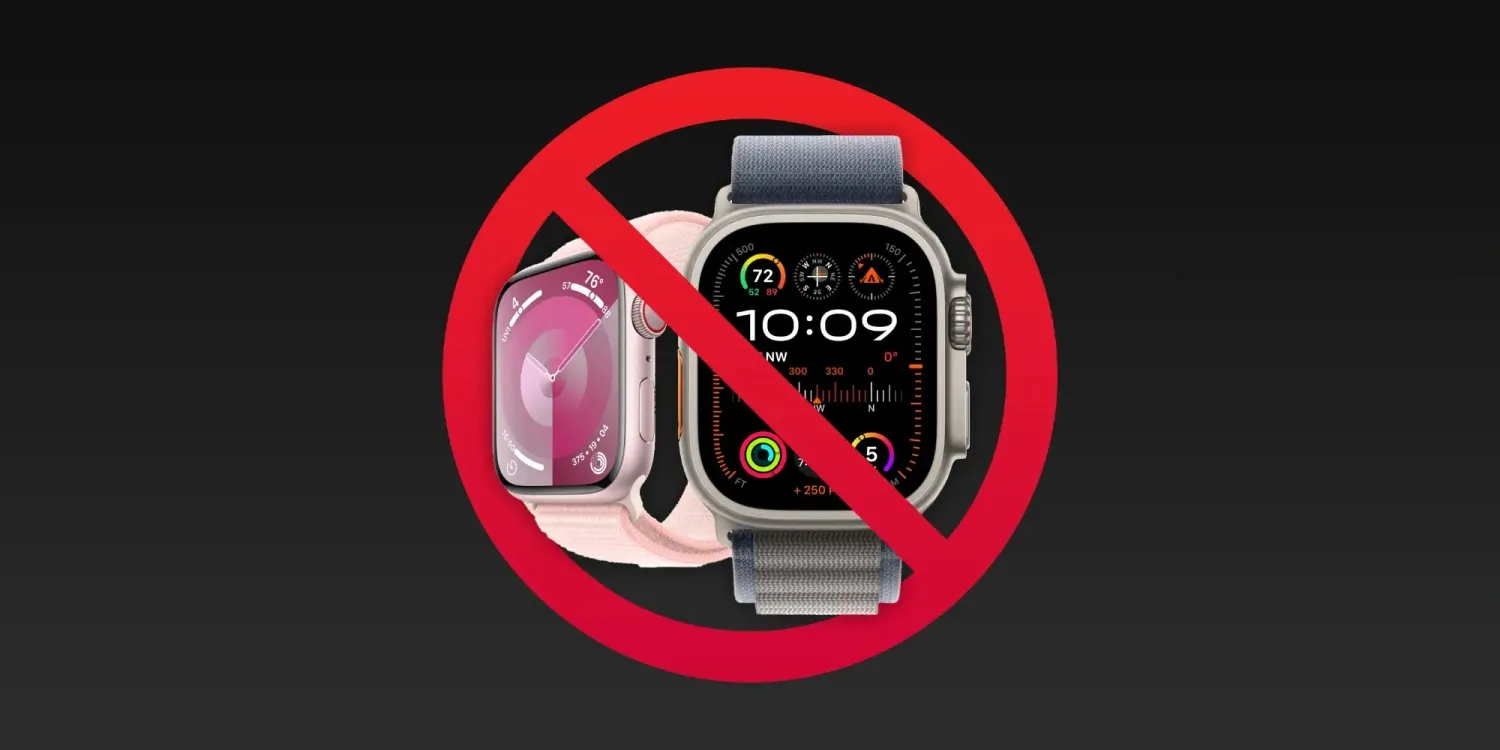
On December 27, 2023, the Apple Watch Series 9 and Apple Watch Ultra 2 ban was put on pause thanks to a US appeals court. In a new statement, Apple has confirmed that its flagship Apple Watch models are available today from retail stores and will return to Apple.com by tomorrow at 12 p.m. PT.
Here’s Apple’s full statement:
“We are thrilled to return the full Apple Watch lineup to customers in time for the new year. Apple Watch Series 9 and Apple Watch Ultra 2, including the blood oxygen feature, will become available for purchase again in the United States at Apple Stores starting today and from apple.com tomorrow by 12pm PT.”
Apple’s teams have worked tirelessly over many years to develop technology that empowers users with industry-leading health, wellness and safety features and we are pleased the U.S. Court of Appeals for the Federal Circuit has stayed the exclusion order while it considers our request to stay the order pending our full appeal.”
Here’s a timeline for the Apple Watch Series 9 and Ultra 2’s return to shelves:
Available from select Apple Stores today, with broader availability by Saturday, December 30.
From Apple’s website starting tomorrow, December 28, by 12 p.m. PT.
Apple also encourages customers to check in-store availability at apple.com once online sales have resumed.
Apple’s victory today puts the watch ban on hold until January 10. Apple has also submitted a software update that it believes will resolve the issue. The decision on whether or not that will satisfy the government is expected on January 12.
As Apple Stores across the United States start to close for the day, the Apple Watch Series 9 and Apple Watch Ultra 2 sales halt is officially going into effect. Apple removed its flagship Apple Watches from its online store on Thursday, and now they’re also being removed from Apple Stores.
When Apple Stores reopen after Christmas on December 26, the Apple Watch Ultra 2 and Apple Watch Series 9 won’t be available.
Apple Watch sales ban: The latest news
The Apple Watch sales ban comes as part of a long-running patent dispute between Apple and the medical device company Masimo. The ITC ruled in October that the blood oxygen sensor in the Apple Watch Series 9 and Apple Watch Ultra 2 infringes on two Masimo patents.
Following the ITC decision, the case was sent to the Biden administration for a 60-day Presidential Review Period. During this, President Biden could veto the ruling, but so far has chosen not to act. The Presidential Review Period officially ends after December 25, so it is still possible that President Biden will choose to intervene and veto the ITC decision at the last minute.
After December 25, Apple will be barred from importing or selling the Apple Watch Series 9 and Apple Watch Ultra 2 in the United States. Apple made the decision to remove the devices from its website on December 21 and from Apple Stores after today as part of its efforts to “preemptively” comply with the ITC’s ruling.
Apple Watch no longer available from Apple Stores
Following the removal of the Apple Watch Series 9 and Apple Watch Ultra 2 from Apple’s website on Friday, the two devices are also no longer available from Apple Stores. Most Apple Stores across the United States are closing at 6 p.m. local time on Sunday.
When Apple Stores reopen on December 26, the Apple Watch Series 9 and Apple Watch Ultra 2 will not be available to purchase. As reported by Mark Gurman, Apple Stores have been sent new marketing materials that promote the Apple Watch SE, which remains available to buy because it lacks the blood oxygen sensor.
Apple Stores in the US have received new display signage for the Apple Watch: instead of showing the Ultra 2 and Series 9 like they do today, it’s just plain and says “Apple Watch” on it. Unless Biden administration steps in in next few days, the sales pause is happening. https://t.co/FmVc3OdsTk
Apple said that it will “continue to take all measures to return Apple Watch Series 9 and Apple Watch Ultra 2 to customers in the U.S. as soon as possible.”
Apple also said to 9to5Mac that it will file an appeal of the ITC’s final decision with the US Court of Appeals for the Federal Circuit on December 26.
As it stands right now, there are no further details on how long the Apple Watch will be unavailable in the United States.
For now, the devices will remain available for purchase from other outlets, including Amazon and Best Buy. Once existing supply from those retailers is exhausted, however, they won’t be able to re-stock.
December 21, 2023, Apple removed the Apple Watch Series 9 and Apple Watch Ultra 2 from its US online store in response to an impending ITC ban. Now, more details are emerging about what the ban will mean for existing Apple Watch users when it comes to repairs and servicing.
As reported by Bloomberg, the ITC ban will impact Apple’s ability to service and replace Apple Watch models that are out of warranty. This affects Apple Watch models dating back to the Series 6, Series 7, and Series 8, as well as the first-generation Apple Watch Ultra.
Apple employees were informed of these restrictions in a memo today. Employees are being instructed to tell customers “they will be contacted when hardware replacements are allowed again.”
Apple’s customer service teams were informed in a memo this week that the company will no longer replace out-of-warranty models going back to Apple Watch Series 6. That means if a customer has a broken screen, for instance, they won’t be able to get the issue fixed by Apple. The company will still offer help that can be done via software, such as reinstalling the operating system.
What this means is that if you have an Apple Watch with a blood oxygen sensor that is not covered by warranty, you will be unable to have it serviced, repaired, or replaced in any fashion. For instance, if your Apple Watch Series 6’s screen is damaged, Apple won’t be able to help you in any way, shape, or form.
The restrictions on repairs and replacements won’t impact Apple Watch models that are still covered by warranty. This includes devices covered by Apple’s one-year warranty or covered by AppleCare+.
Additionally, Bloomberg reports that after December 25, Apple won’t be allowed to exchange a watch for a different model, even if it was purchased before the ban.
After Dec. 25, Apple also won’t be able to exchange a watch purchased before the ban, say for a different color or size, during the typical return period. Retail staff was told a product swap won’t be allowed, but Apple will replace accessories like bands. Watches can still be returned for a refund.
This seems particularly bad for Apple and customers, essentially meaning that anyone who is given an Apple Watch for Christmas can’t swap it out if they need or want a different size or color.
For now, the Apple Watch Series 9 and Apple Watch Ultra 2 will remain available for purchase from other outlets, including Amazon and Best Buy.
Apple is continuing its annual tradition of donating a portion of all Apple Pay sales during the holiday shopping season to The Global Fund. This is an extension of Apple’s ongoing partnership with (RED), which has raised more than a quarter of a billion dollars so far.
Apple always donates a portion of proceeds from every (PRODUCT)RED purchase to the Global Fund. This includes purchases from (PRODUCT)RED iPhones, cases, Apple Watch bands, and more.
This limited-time promotion expands the donation eligibility to include every purchase made with Apple Pay on Apple’s website, in the Apple Store app, and at Apple Stores.
“From November 28 through December 8, Apple is donating $1 to the Global Fund for every purchase made with Apple Pay on apple.com, in the Apple Store app, or at an Apple Store,” Apple says on its website.
“Donations are limited to a maximum of one million dollars ($1,000,000). The donation goes to the Global Fund to fight AIDS and help fund critical health programs that save lives,” it continues.
You can learn more about Apple’s partnership with (RED) on the company’s website.
Apple’s support for World AIDS Day 2023 includes in-app purchases
Apple’s annual support for World AIDS Day this year includes donating all proceeds from in-app purchases in three popular games.
Apple is also suggesting the (PRODUCT)RED Apple Watch Series 9 and Sport Band combo as a holiday gift …
Apple has supported the (RED) Global Fund since 2006, with Apple’s contribution helping to fund HIV/AIDS programs in sub-Saharan Africa.
Over the last 17 years, Apple customers have helped raise more than a quarter of a billion dollars, giving millions of people access to lifesaving antiretroviral treatment and HIV testing, and helping HIV-positive mothers prevent passing the virus on to their babies.
Apple is supporting the fund in three ways. First by promoting (PRODUCT)RED versions of a range of products.
Apple Watch Series 9, iPhone 14, iPhone 14 Plus, iPhone 13, and iPhone SE, and accessories, including the Silicone Case with MagSafe for the entire iPhone 14 and iPhone 13 lineups.
A portion of the sale price on all these goes to the Global Fund. Apple is highlighting the special edition Apple Watch S9 as a potential gift choice.
The world’s most popular watch is available in a (PRODUCT)RED aluminum case with a (PRODUCT)RED Sport Band. Powered by the new S9 SiP, Apple Watch Series 9 is packed with the most advanced health, fitness, and safety capabilities in Apple Watch to date, plus a magical new double tap gesture and Precision Finding for iPhone.
New Palette and Solar Analog watch faces will also be available in red, joining Metropolitan, World Time, Numerals Mono, Gradient, Stripes, and Typograph in a collection of specially customized watch faces celebrating World AIDS Day.
Second, with a one dollar donation on any purchase made this week.
Now through December 8, Apple will donate $1 for every purchase made using Apple Pay on apple.com, through the Apple Store app, or at an Apple Store location. Customers can buy any Apple product or accessory and help save lives.
Third, special in-app purchases for three popular games.
Beginning today through December 4, the App Store will donate all proceeds from select, exclusive in-app purchases for three amazing games — MONOPOLY GO!, Gardenscapes, and EA Sports FC Mobile — to the Global Fund, including playful avatars, cool shields, and star soccer players.
As usual, the company will also be highlighting World AIDS Day in Apple Stores, likely including turning the logo red.
The Apple Watch’s fall detection feature came to the rescue for a man in Georgia, according to a new report from Fox5 Atlanta. Mike Menand was on a hike in the Chattahoochee River National Recreation Area earlier this year when his two dogs spotted a coyote in the distance, leading Menand to suffer a near-fatal fall.
“They got spooked and knocked me down and dragged me off the trail,” Menand said, referring to what happened when his dogs saw the coyote. This triggered his Apple Watch’s fall detection feature, which kicked in to call emergency services on his behalf.
“I couldn’t even get to the phone because my phone was in my pocket, which I was lying on,” Menand said. He suffered a broken leg in the accident and had a titanium rod put in his leg during surgery.
Menand said that he isn’t sure what would’ve happened if he wasn’t wearing an Apple Watch. “There’s no telling how long I would’ve been laying there,” he recalled. “I realized I couldn’t move, I couldn’t get up. I was in a lot of pain.”
In fact, just a month after Menand suffered his fall, a woman fell while hiking in the same park and did not survive. “When I read that, I thought that could’ve been me,” Menand said. “Because I was by myself, no one around me, no one really knew where I was.”
Fall detection works by intelligently detecting when a sudden fall occurs, automatically calling emergency services if the person doesn’t dismiss the alert within one minute of falling. If the person’s emergency contact information is filled out, that contact will be notified with a text message and a map of the watch’s location at the time of the fall.
Here’s how Apple Watch fall detection works, how to customize, and use it
One of Apple Watch’s potentially life-saving features is fall detection that’s paired with auto emergency SOS calling. Whether you’ve never enabled it or have but later turned it off, follow along for how Apple Watch fall detection works, how to customize, and use it.
Apple Watch fall detection can be used by anyone 18 years of age and up with the option of having it enabled just during workouts or all the time.
The feature is automatically turned on for those 55 years old+. But it’s not only valuable for the elderly, even young users have seen their lives saved by Apple Watch fall detection.
While it can be an important safety feature, Apple notes it “cannot detect all falls” and also that Apple Watch may interpret “high-impact” activity” as a fall and trigger a false alert.
If Apple Watch SE or Apple Watch Series 4 or later detects a hard fall while you’re wearing your watch, it taps you on the wrist, sounds an alarm, and displays an alert. You can choose to contact emergency services or dismiss the alert by pressing the Digital Crown, tapping Close in the upper-left corner, or tapping “I’m OK.”
How to turn on Apple Watch fall detection
Apple Watch fall detection is available for users 18 years old+ on SE and Series 4 and later
Launch the Apple Watch app on iPhone
Choose the My Watch tab in the bottom left corner
Now swipe down and tap Emergency SOS
To turn on Apple Watch fall detection, tap the toggle next to it
You can also choose if you want the feature always on or just activated during workouts
If you’re under 55, fall detection – when turned on – will default to “Only on during workouts” – but can be changed to “Always on”
It can be worth double-checking your Medical ID and emergency contacts data at the bottom of the Emergency SOS page your on, tap “Edit These Contacts in Health” to make changes
You can check your fall history (excludes when you report you didn’t fall) by heading to the Health app on iPhone > Browse tab > Other data > Number of Times Fallen.
Here’s how the process looks to turn on fall detection:
And here are more specifics on how emergency SOS calls via fall detection work:
If your Apple Watch detects that you’re moving, it waits for you to respond to the alert and won’t automatically call emergency services. If your watch detects that you’ve been immobile for about a minute, it will make the call automatically.
After the call ends, your watch sends a message to your emergency contacts with your location letting them know that your watch detected a hard fall and dialed emergency services. Your watch gets your emergency contacts from your Medical ID.
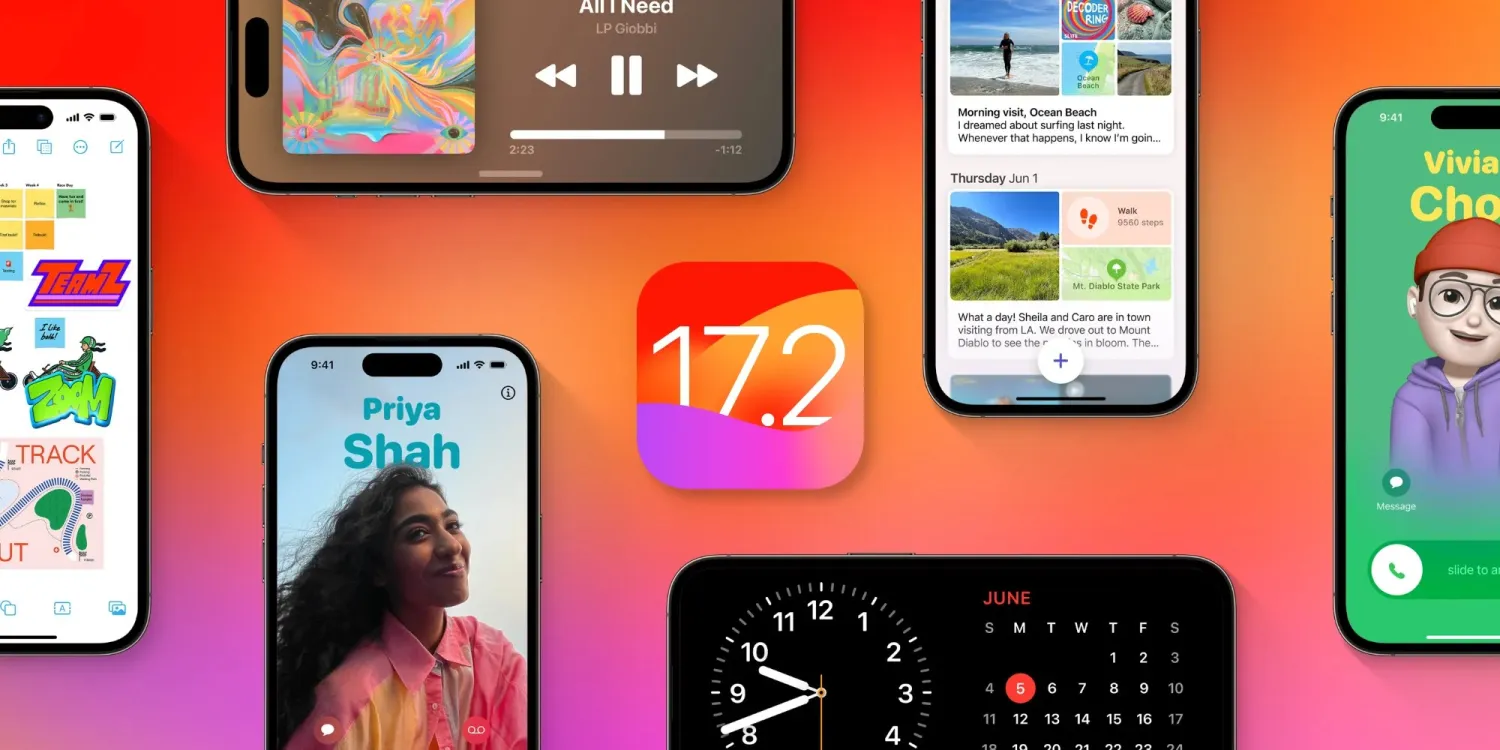
After the release of iOS 17.1 in October, Apple is hard at work on iOS 17.2 with a collection of new features and changes. iOS 17.2 is currently in beta testing with developers and public beta users. Here’s everything new so far.
When will iOS 17.2 be released?
Thus far, Apple has released four betas of iOS 17.2. This leads us to believe that the update will be released to the public sometime within the next several weeks. The update will almost certainly be released before the end of 2023.
Last year, iOS 16.2 was released on December 13 with major new features like Apple Music Sing and the all-new Freeform app.
What’s new in iOS 17.2?
Journal app
The headlining change in iOS 17.2 is the addition of the new Journal app, which Apple first unveiled at WWDC in June. Apple describes the new Journal app as an “all-new way to appreciate life’s moments and preserve your memories.”
At launch, the Journal app is only available on iPhones. There’s no word on when or if Apple plans to expand it to the iPad and Mac.
Collaborative playlists in Apple Music (maybe?)
The first three betas of iOS 17.2 included the ability to create collaborative playlists in Apple Music. This feature was announced by Apple at WWDC in June and teased as coming sometime later this year.
iOS 17.2 beta 4, however, removes the ability to create collaborative Apple Music playlists. Whether or not Apple adds the feature back before iOS 17.2 is released to everyone remains to be seen.
More changes to Apple Music
Also in iOS 17.2, there is a new default playlist called “Favorite Songs” that is automatically generated based on songs you’ve “favorited.” This builds upon the “Favorites” feature that was first introduced in iOS 17.1.
iOS 17.2 can now automatically add songs to your music library when you favorite them. You can find this option by going to the Settings app and then choosing “Music.”
Finally, iOS 17.2 adds the ability to disable Apple Music Listening History when a Focus Mode is on. “Choose if music played will influence recommendations and mixes, appear in Recently Played, or be shown to others on Apple Music,” Apple explains.
This means that when you have a particular Focus mode enabled, you can toggle on the Apple Music Focus Filter to prevent any songs played from affecting your listening data.
Spatial Video recording
With iOS 17.2, iPhone 15 Pro and iPhone 15 Pro Max users can record spatial video for Vision Pro. You can enable the new spatial video toggle by going to the Settings app, choosing the Camera menu, then choosing Formats and toggling the “Spatial Video for Apple Vision Pro” option.
Spatial video is recorded in 1080p resolution at 30 frames per second. Apple estimates that one minute of spatial video takes up around 130MB of storage space.
iOS 17.2 beta 2 enables Vision Pro spatial video capture on iPhone 15 Pro
Apple has allowed some press to view their own spatial videos in Vision Pro, Final Cut gaining editing ability next year
Default notification sounds
At long last, iOS 17.2 adds the ability to change the default notification sound. This comes after iOS 17 changed the default notification sound from “Tri-tone” to “Rebound,” which has proven to be a controversial decision.
In iOS 17.2, you can go to the Settings app and choose “Sounds & Haptics” to find a new “Default Alerts” option. Here, you can change the default sound and haptic feedback for alerts.
Reactions in Messages
Another feature coming with iOS 17.2 is the ability to react to messages using any sticker or emoji in the Messages app. This is done by long-pressing on a message and choosing the new “Add Sticker” option.
Action Button adds “Translate” option
With iOS 17.2, iPhone 15 Pro users can assign their Action button to a new “Translate” option. With this enabled, pressing the Action button initiates an automatic voice-to-text translation between two languages.
Although this capability was first introduced during the announcement of the iPhone 15 Pro in September, it wasn’t added until iOS 17.2.
New widgets
Apple has added three new widgets for the Weather app:
Details: See the chance of precipitation, UV index, wind, and more.
Daily forecast: See the current weather conditions and daily forecast for a location.
Sunrise and sunset: See the upcoming sunrise and sunset information for your location.
For the Clock app, there’s a new “Clock Digital” widget that displays the current time in a digital format rather than analog. This is the first digital clock widget Apple has offered.
‘Local Awareness’ for Emergency Alerts
iOS 17.2 includes a new “Local Awareness” option for Emergency Alerts. “Apple can use your approximate location to improve the timeliness, accuracy, and reliability of emergency,” Apple says.
To enable this option, go to the Settings app, head to Notifications, then choose Emergency Alerts and look for the new “Local Awareness” toggle.
Contact Key Verification
A year ago, Apple unveiled a feature called Contact Key Verification to enhance the security of iMessage. This feature has now been added with iOS 17.2.
Contact Key Verification enables users of iMessage to ensure that their messages are reaching only the intended recipients.
iOS 17.2 adds a new “AirPlay Receiver” option for Vision Pro. “Stream or share content from Apple Vision Pro to your iPhone,” Apple explains.
Vision Pro is currently expected to be released sometime in “early 2024.” The new toggle is in the Settings app under the AirPlay menu.
iTunes Store changes
Bloomberg has reported that Apple plans to phase the dedicated iTunes movie and TV show apps in favor of the TV app. iOS 17.2 lays the groundwork for these changes, including new messaging that redirects users to the TV app.
Software update feature
iOS 17.2 also lays the groundwork for a new feature that will allow iPhones to be updated even if they are still sealed in the box.
For instance, Apple retail employees will be able to update iPhones without taking them out of the box. Currently, iPhones are shipped from the factory with whatever build of iOS was available at that time. This means millions of iPhones out there ship with software that is multiple updates old by the time that phone arrives to the customer.
More changes in iOS 17.2
The new “Sensitive Content Warning” feature in iOS 17 is expanding to stickers in the Messages app and Contact Posters in the Contacts app.
Siri can now tell you your ETA when using Apple Maps and tell you your current altitude.
iOS 17.2 lets users disable inline text predictions without turning off predictive text.
Apple says that iOS 17.2 fixes Wi-Fi slowdowns and connectivity issues.
In the App Store’s “Apps” and “Games” sections, there are new sub-categories that appear along the top for additional filtering options.
There’s a new rainbow text option when designing a Contact Poster in iOS 17.2.
The Apple Books app has added a new “Fast Fade” option for page turning.
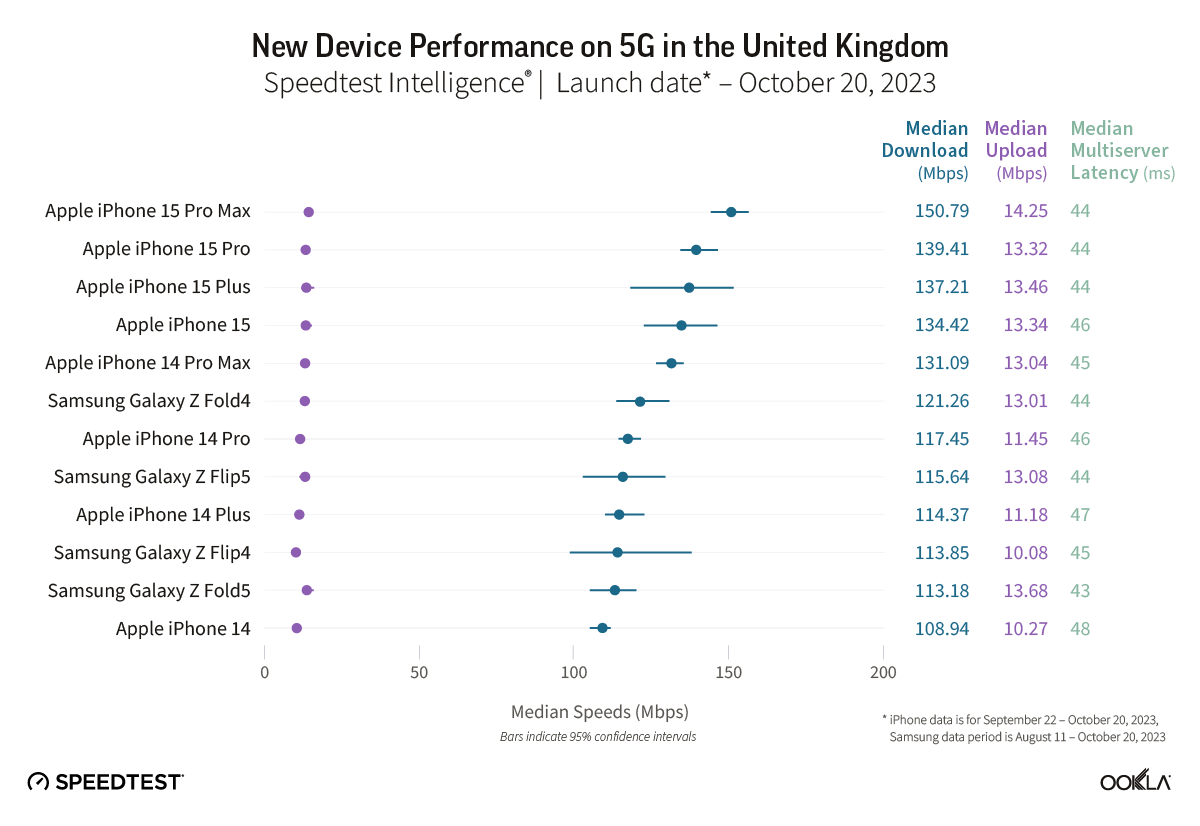
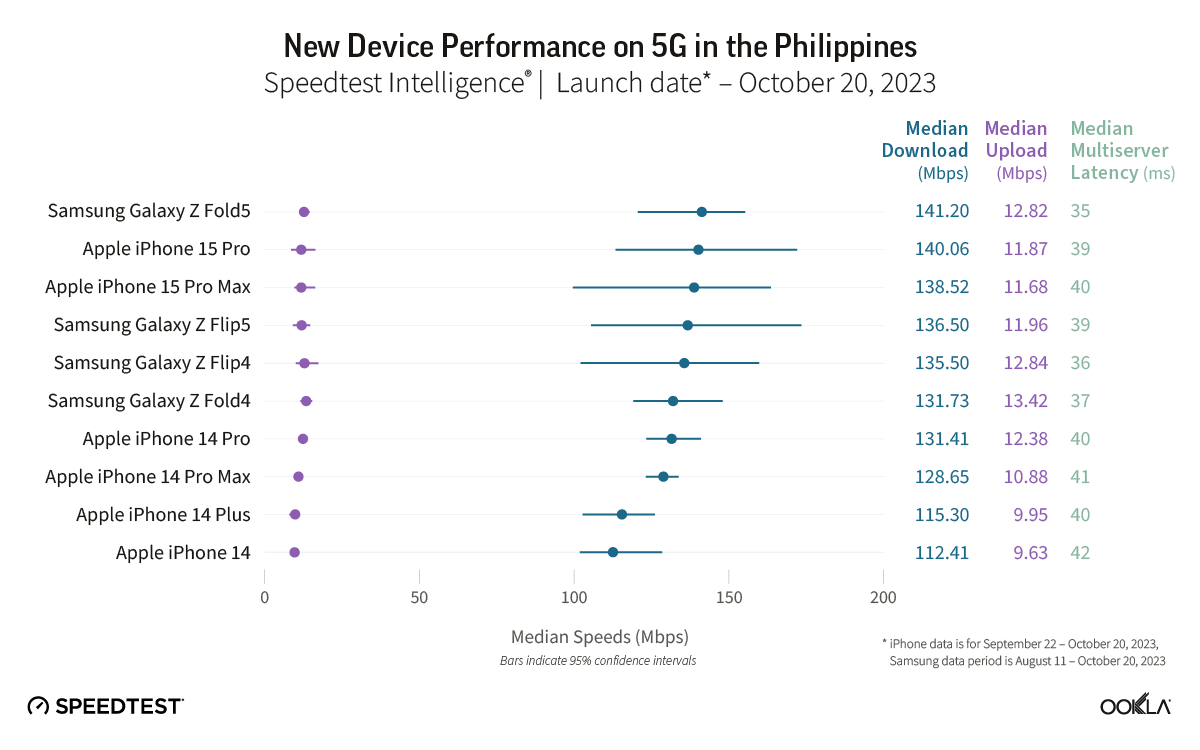
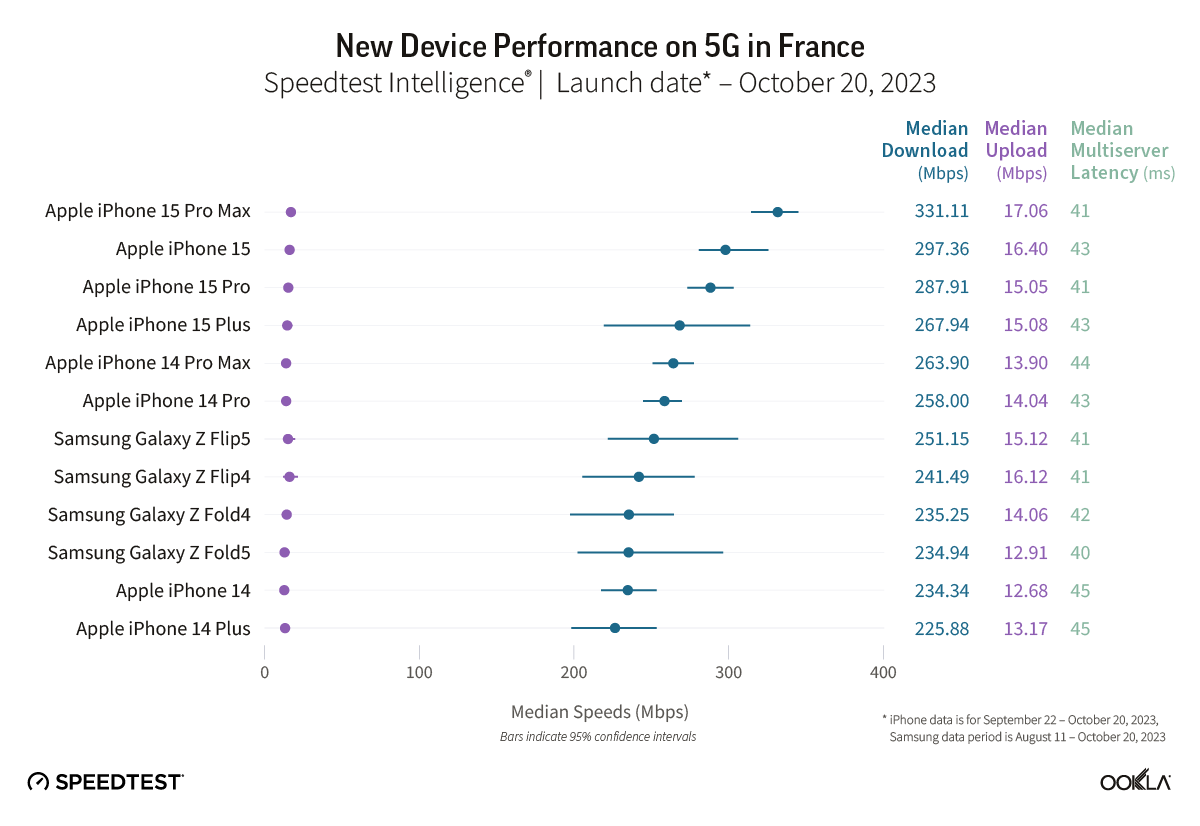
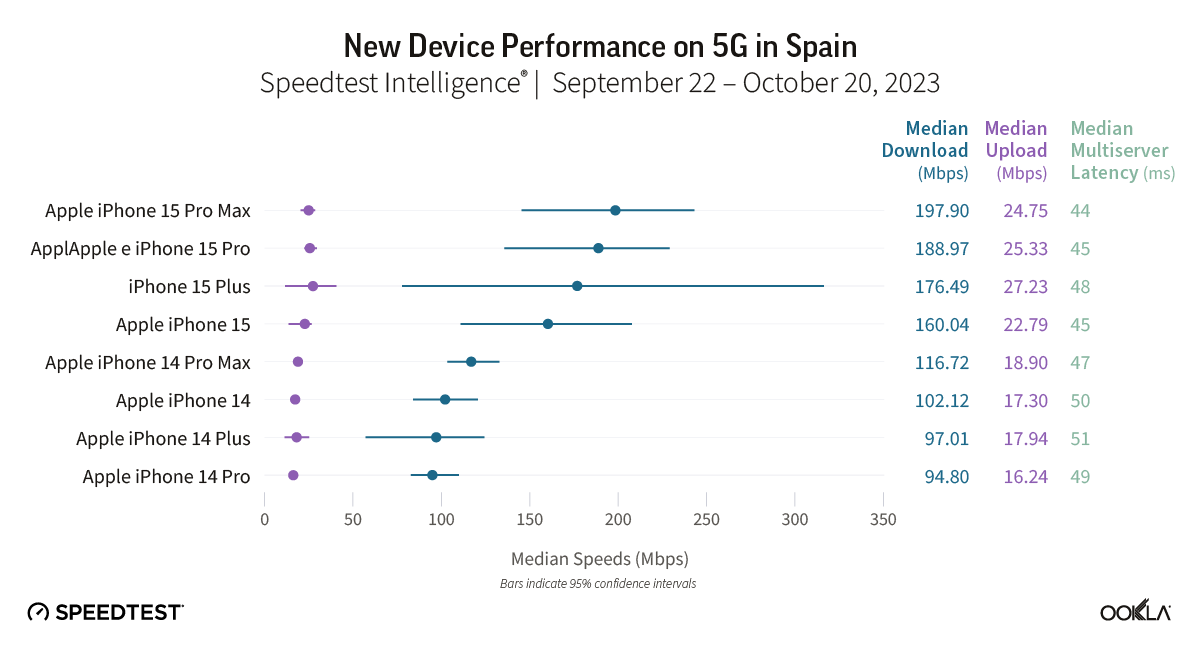
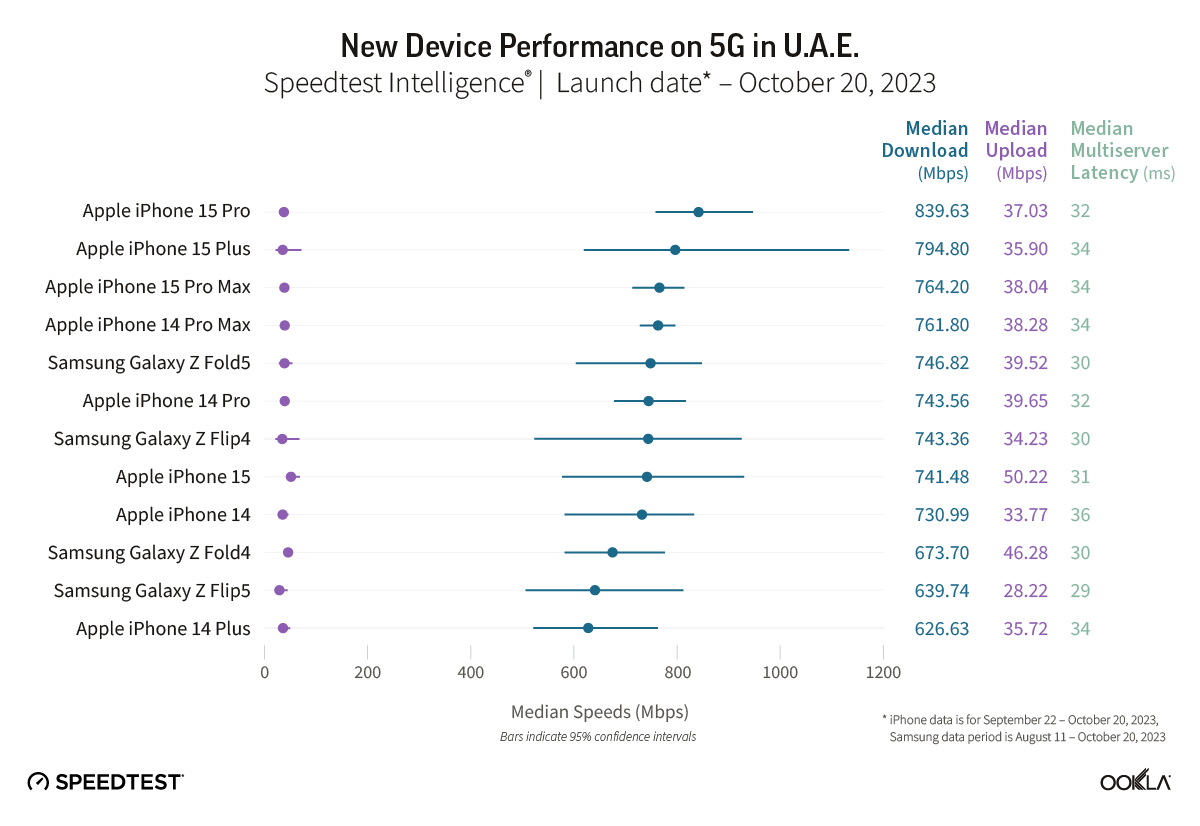
We got an early look at the iPhone 15 Pro Max cellular performance from Ookla in October with its Q3 report showing almost 100% faster 4G/5G speeds compared to iPhone 14 Pro Max. Now Ookla has shared a new 5G performance study and iPhone 15 lineup has dominated as the fastest 5G devices around the world.
Ookla shared the new report on its blog. Collecting data from 13 countries between September and October for iPhone (August to October for Samsung devices), the results show the iPhone 15 Pro Max or in some cases the iPhone 15 or 15 Plus are the fastest 5G smartphones by a good margin. And an iPhone was the fastest 5G device in all but just one of the 13 countries.
Ookla notes that there are a number of variables when it comes to 5G performance like “5G investments by governments and mobile operators, different 5G spectrum allocations, and mobile 5G plans.”
In the US, the iPhone 15 Pro Max was on top with 285.02 Mbps as the median 5G download speed. The rest of the iPhone 15 family took 2nd, 3rd, and 4th place, with the next closest device being the Samsung Galaxy Z Fold5 with 231.56 Mbps.
5G performance in Canada was lower overall with the iPhone 15 Pro Max at 217.35 Mbps. The 15 Plus and 15 Pro took 2nd and 3rd and the Galaxy Z Fold5 snuck into 4th place with 175.63 Mbps.
In the UK, the new iPhones dominated with the Galaxy Z Fold4 coming in 6th place roughly 20-30 Mbps slower than the modern iPhones’ median 5G download speed.
One interesting result was in Brazil – the iPhone 15 took the top spot over the 15 Pro and Pro Max with 533.32 Mbps. However, the 15 Pro and Pro Max were close being with 523 Mbps.
The only country on the list where an iPhone didn’t have the fastest 5G median download speed was the Philippines. The Galaxy Z Fold5 beat out the iPhone 15 Pro by just 1 Mbps.
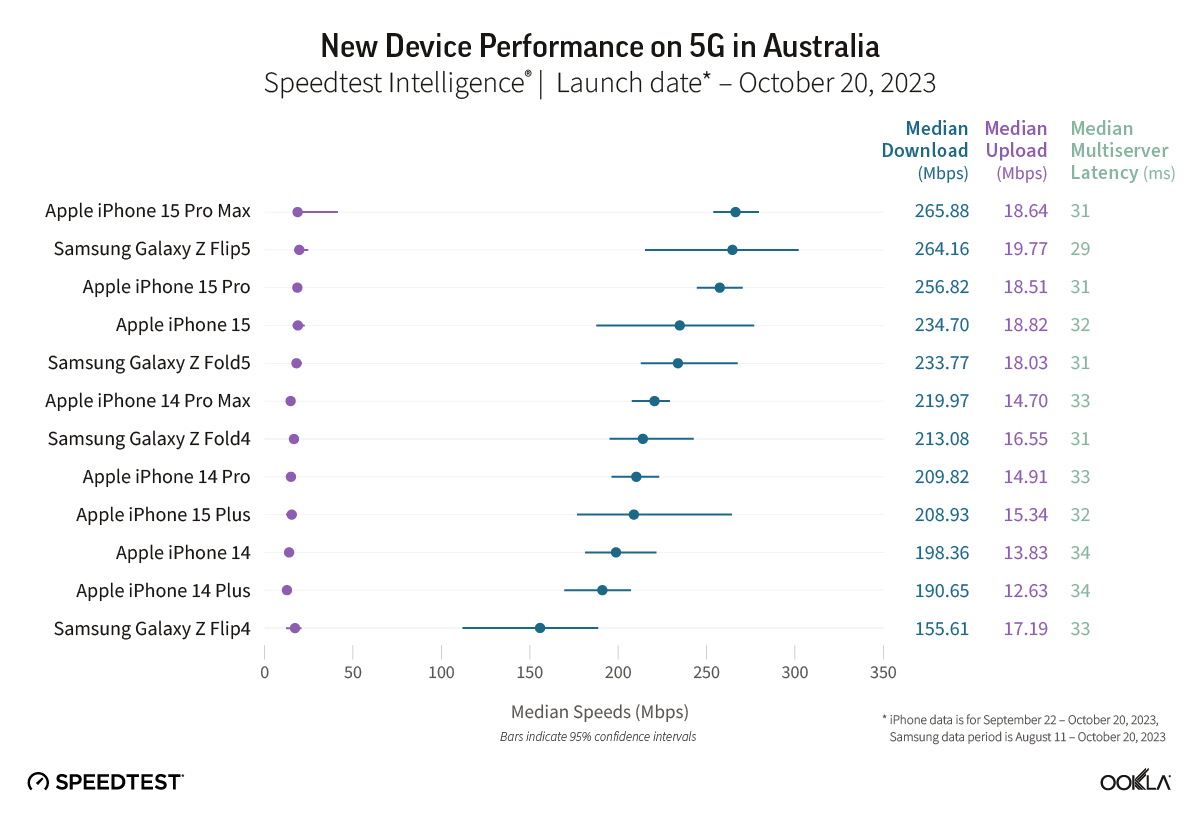
In Australia, two out of four iPhone 15 models showed median 5G download speeds that were significantly faster than their iPhone 14 equivalents during the September 22-October 20, 2023 period. Speedtest Intelligence reveals the iPhone 15 Pro and the iPhone 15 Pro Max both had a 14% better download speed than their prior year counterparts. There was no statistical winner for the iPhone standard model or the iPhone Plus in Australia during this period.
The Galaxy Z Flip5 had a 30% better download speed than the Galaxy Z Flip4 during the August 11-October 20, 2023 period in Australia, while there was no statistical winner for the Galaxy Z Fold.
Recommendation: Depending on your model of choice, only half the devices surveyed merit an upgrade based on performance alone in Australia.
Other Countries are:
Check out the full Ookla report on iPhone 15 5G performance against other devices for more details.
Apple today announced it is extending the free usage period for Emergency SOS satellite features for iPhone 14 users. Previously, Apple gave iPhone 14 customers two free years after device activation, which would have began expiring this time next year.
But now, all current iPhone 14 users will be able to use the service for free for another two years. Apple has not revealed how much it will charge for Emergency SOS via satellite when the free period is up, and today’s announcement means the company can defer any decision making on that further into the future.
The free period for iPhone 15 customers has not been extended. That means iPhone 15 users still currently are working on a two free years model, which will begin to elapse in September 2024.
This means iPhone 14 and iPhone 15 customers will see their free periods expire at roughly the same time, beginning September 2025. It gives Apple more time to decide on pricing plans for these features.
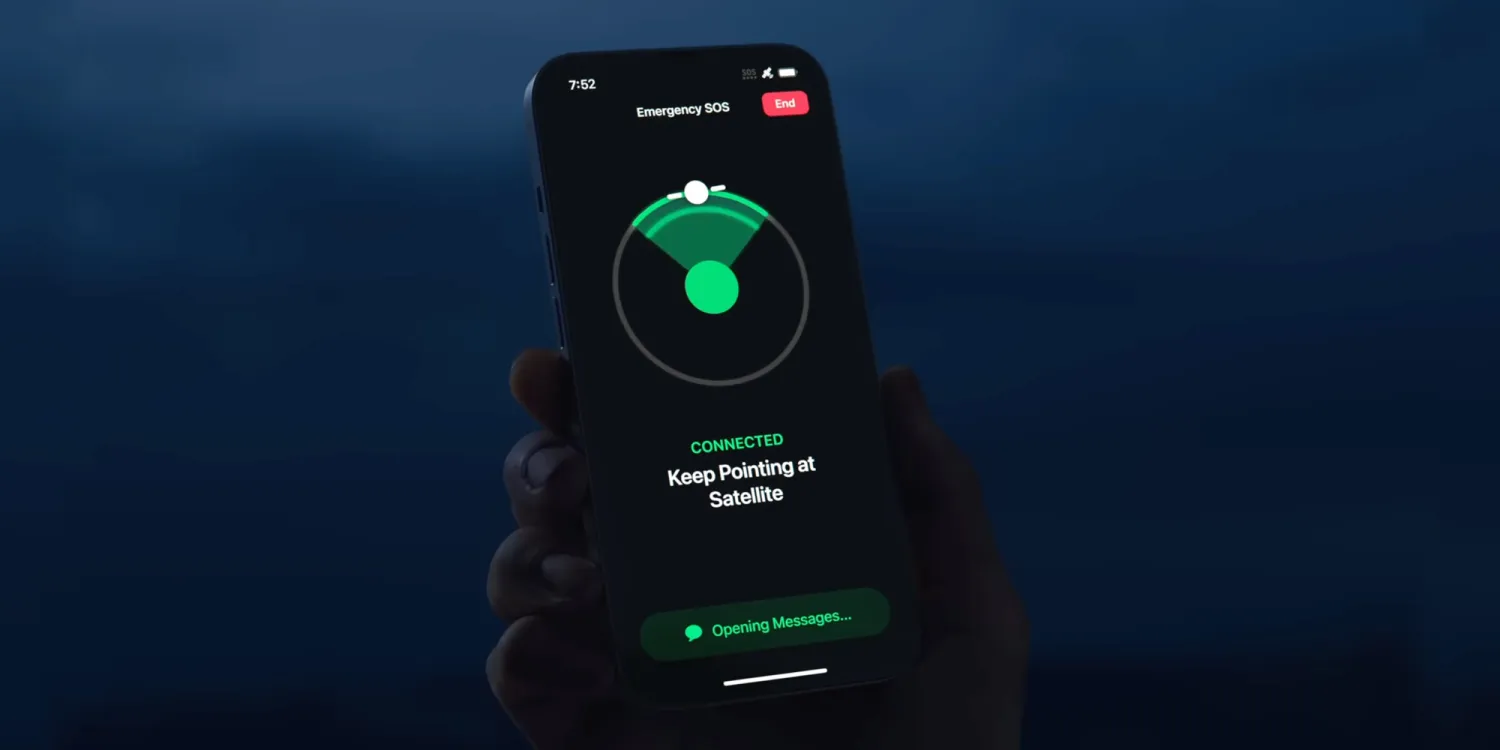
Emergency SOS via satellite allows compatible iPhone users to send short text messages to nearby emergency services even when outside of Wi-Fi or cellular signal range. It allows people to get help if they get into trouble in places where usually they would have no way to contact anyone else.
Users can also update their location in the Find My app using the satellite signal. With iPhone 15, Apple also extended the Emergency SOS feature to include contacting roadside assistance when your car breaks down.
Apple has been under pressure in the European Union as the Digital Markets Act antitrust legislation requires the company to allow users to sideload apps outside the App Store to increase competition. The iOS 17.2 beta code that the company is indeed moving towards enabling sideloading on iOS devices.
Update: Apple has published new documentation for the ManagedAppDistribution API on its website confirming that it is primarily intended as an MDM solution. As we suggested in our report, it could still be used for other purposes. You can read the original article below.
What is sideloading
For those unfamiliar, the sideloading process consists of installing apps obtained from third-party sources instead of an official source. When it comes to iOS, the official source (and the only one available to iPhone and iPad users) is the App Store. Apple has never allowed sideloading on iOS, as this would allow apps to bypass the App Store guidelines.
However, the European Union last year passed the Digital Markets Act, or DMA, a new piece of antitrust legislation aimed at big tech companies so that they don’t use their advantages to undermine competition. One of the requirements of the DMA is that users can install any apps they want from third-party sources.
Previous reports revealed that Apple had been doing under-the-hood work on iOS 17 to prepare the system for sideloading in Europe. With the iOS 17.2 beta, internal code suggests this is true.
iOS 17.2 seems ready to allow alternative app stores
iOS 17.2 has a new public framework called “Managed App Distribution.” While our first thought was that this API would be related to MDM solutions for installing enterprise apps (which is already possible on iOS), it seems that Apple has been working on something more significant than that.
By analyzing the new API, we’ve learned that it has an extension endpoint declared in the system, which means that other apps can create extensions of this type. Digging even further, we found a new, unused entitlement that will give third-party apps permission to install other apps. In other words, this would allow developers to create their own app stores.
The API has basic controls for downloading, installing, and even updating apps from external sources. It can also check whether an app is compatible with a specific device or iOS version, which the App Store already does. Again, this could easily be used to modernize MDM solutions, but here’s another thing.
We also found references to a region lock in this API, which suggests that Apple could restrict it to specific countries. This wouldn’t make sense for MDM solutions, but it does make sense for enabling sideloading in particular countries only when required by authorities – such as in the European Union.
When will this happen?
In theory, Apple is required to comply with DMA legislation by March 2024. The company has even admitted in a Form 10-K filing that it expects to make changes that will impact the App Store’s business model.
At the same time, Apple will also appeal to the European Union about including the App Store in the Digital Markets Act, which is no surprise. Apple will likely try everything to preserve the iOS App Store. But ultimately, iOS 17 will be ready for sideloading.
One of the more useful changes to recent Apple Watch models is support for fast charging. This allows you to quickly top off your Apple Watch battery at much faster speeds than before. There are a few things to remember, and you don’t get everything you need in the box…
Which Apple Watch models support fast charging?
The following Apple Watch variants allow for fast charging:
Apple Watch Series 7
Apple Watch Series 8
Apple Watch Series 9
Apple Watch Ultra
Apple Watch Ultra 2
Apple says that with fast charge, your Apple Watch battery level can go from 0-80% in about 45 minutes. Apple has a support document detailing the specifics of fast charging with the Apple Watch Series 7, Apple Watch Series 8, and Apple Watch Ultra.
What do you need to fast charge your Apple Watch?
Included with the Apple Watch is an Apple USB-C Magnetic Fast Charging Cable. As we’ve previously reported, the difference with this cable is that it has aluminum instead of plastic around the magnetic charger.
While Apple is including one of these cables in the box with Apple Watch Series 7, Series 8, and Ultra, you can also buy them separately so you can outfit all of your charging spots with fast charge support. The cable measures 1m in length and is available for $29. The model number for the cable is A2515, so make sure you’re buying that specific model if you purchase from a third party other than Apple or Amazon.
The second part of the equation is the power adapter that you plug into the wall. As part of its continued focus on reducing its environmental footprint, Apple no longer includes this power brick in the box. This means you’ll have to use one that you already have or buy a new one.
Apple says that any USB-C power adapter that supports USB Power Delivery of 5W or better is capable of Apple Watch fast charging. You can find these on Amazon from reputable brands such as UGreen for as little as $10.
Here are the specifications from Apple:
Apple 18W, 20W, 29W, 30W, 61W, 87W, or 96W USB-C Power Adapter
A comparable third-party USB-C power adapter that supports USB Power Delivery (USB-PD) of 5W or greater
Interesting. So if I read this article correctly, you only need 5 watts with the new usb-c cable to get 45 minutes at 80% on AW 7 or 8?
I thought you needed a larger charger.
Finally, if you use Apple’s MagSafe Duo or its Apple Watch Magnetic Charging Dock, you can’t tap into fast-charging capabilities, regardless of which cable or power adapter you use. You could, however, place the fast charger puck in a third-party dock of any sort.
More options
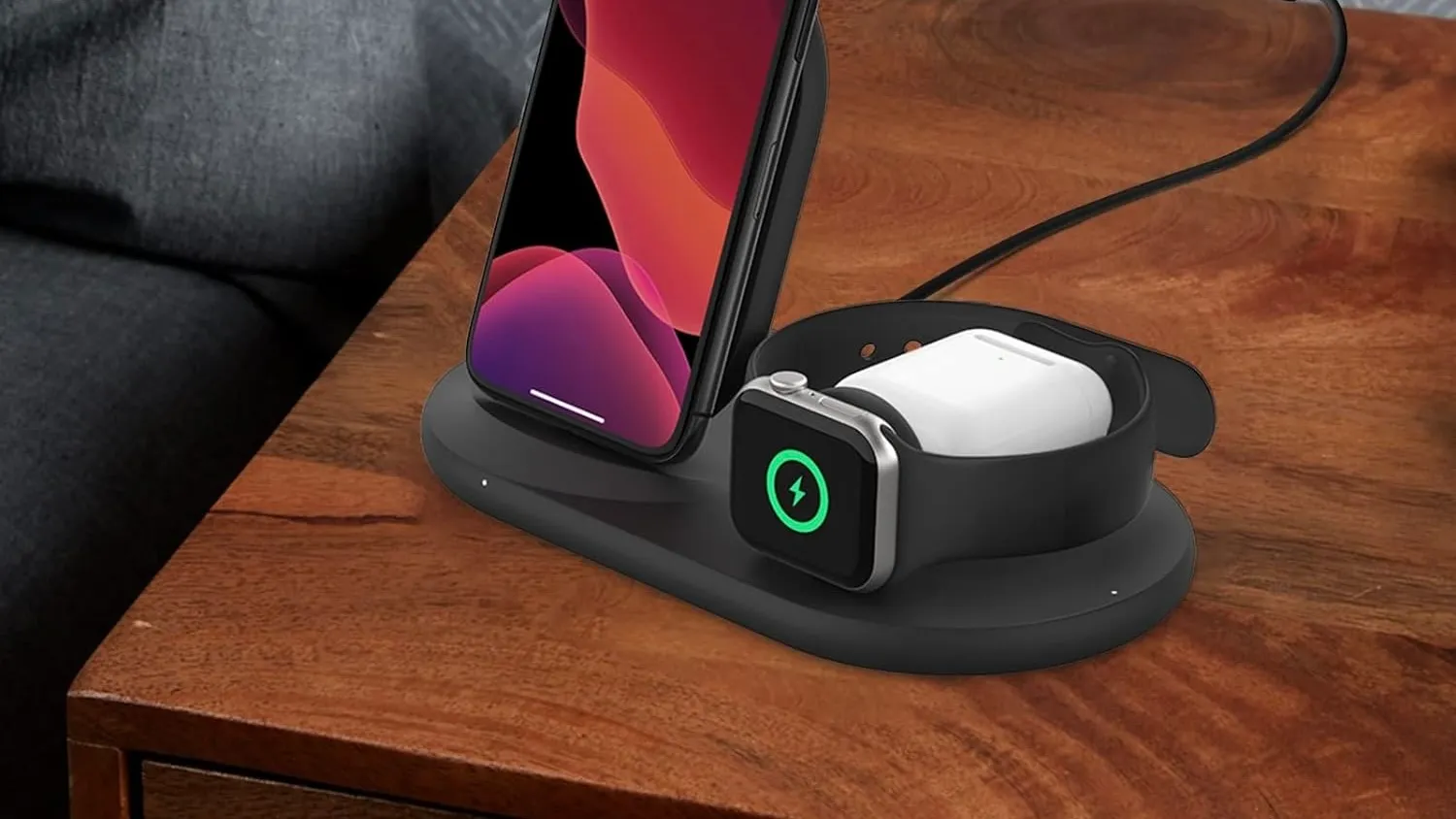
Belkin Apple Watch Fast Charger Dock
Belkin 3-in-1 Wireless Charger – Fast Charging Stand