Last week, Apple released iOS 15.7.4 to the general public with notable security patches. Now, Apple is rolling out iOS 15.7.5 as yet another update for older iPhone and iPad devices. This update, along with iPadOS 15.7.5, addresses two vulnerabilities that “may have been actively exploited.”
as Apple stated about iOS 15 Updates iOS 15 brings audio and video enhancements to FaceTime, including spatial audio and Portrait mode. Shared with You resurfaces the articles, photos, and other shared content from your Messages and conversations in the corresponding app. Focus helps you reduce distractions by filtering out notifications based on what you are currently doing. Notifications have been redesigned and a new notification summary delivers a collection of notifications so you can catch up on your own time. Maps delivers a beautiful redesign with a new three-dimensional city experience and augmented reality walking directions. Live Text uses on-device intelligence to recognize text in photos across the entire system and on the web. New privacy controls in Siri, Mail, and more provide transparency and give you more control over your data.
You can update your iPhone to iOS 15.7.5 by heading to the Settings app, choosing General, and then choosing Software Update. The build number for today’s update is 19H332. It’s available for the following devices:
iPhone 6s (all models), iPhone 7 (all models), iPhone SE (1st generation), iPad Air 2, iPad mini (4th generation), and iPod touch (7th generation)
Apple says iOS 15.7.5 addresses two security vulnerabilities that may have been actively exploited in the wild:
IOSurfaceAccelerator
Impact: An app may be able to execute arbitrary code with kernel privileges. Apple is aware of a report that this issue may have been actively exploited.
Description: An out-of-bounds write issue was addressed with improved input validation.
WebKit
Impact: Processing maliciously crafted web content may lead to arbitrary code execution. Apple is aware of a report that this issue may have been actively exploited.
Description: A use-after-free issue was addressed with improved memory management.
In addition to iOS 15.7.5, Apple has also released macOS Big Sur 11.7.6 (20G1231) as well as macOS Monterey 12.6.5 (21G531).
How to turn off iPhone WiFi auto-join for public and carrier networks
Have you noticed your iPhone jump onto a WiFi network when you’re away from home without asking first? Or maybe you want to check what networks your iPhone is auto-joining? Follow along for how to turn off iPhone WiFi auto-join for public and carrier networks.
The default setting for iPhone when it picks up an unknown WiFi network is to ask if you’d like to join. However, there is a scenario where it can automatically join WiFi networks without asking.
These are called “managed networks” and they’re often provided for free by wireless providers like AT&T, T-Mobile, Verizon, and more.
Because they typically come from a reliable source, iPhone defaults to auto-join these managed networks that are found in public, but you can disable that behavior.
Managed networks can vary. For example, they may be locked networks only available for customers of a certain carrier. But even though some are not fully open, public networks, you may not want to auto-join them as they are somewhat public connections.
Separate from managed networks, you can also check the list of your iPhone’s known networks to forget them in case you’ve accidentally joined one in the past.
How to turn off iPhone WiFi auto-join for managed networks
Open the Settings app on your iPhone
Choose Wi-Fi at the top
Now tap Edit in the top right corner
Swipe to the bottom and look under Managed Networks
Tap the circled “i” on the right of any network
Now tap the toggle next to Auto-Join to turn it off
Here’s how that looks:
Of course, another option to turn off iPhone WiFi auto-join is to switch off WiFi fully, but that can be a hassle and easy to forget about.
How to manage iPhone known networks
If you’d like to audit which networks your iPhone automatically joins after having joined it at least once before, follow these steps:
Open the Settings app on your iPhone
Choose Wi-Fi at the top
Now tap Edit in the top right corner
The top section will be your known networks, tap the – icon on the right to delete one
Or tap the circled “i” on the right of any network to turn off auto-join, turn on Private WiFi Address, and more
You can also change the default setting of iPhone asking if you want to join unknown networks. Outside of the default to “Ask” you can set it to “Notify” you about available networks, or turn it “Off” which will have you manually select and join all networks.
How to check if iPhone has 5G Standalone turned on and is working in iOS 16.4
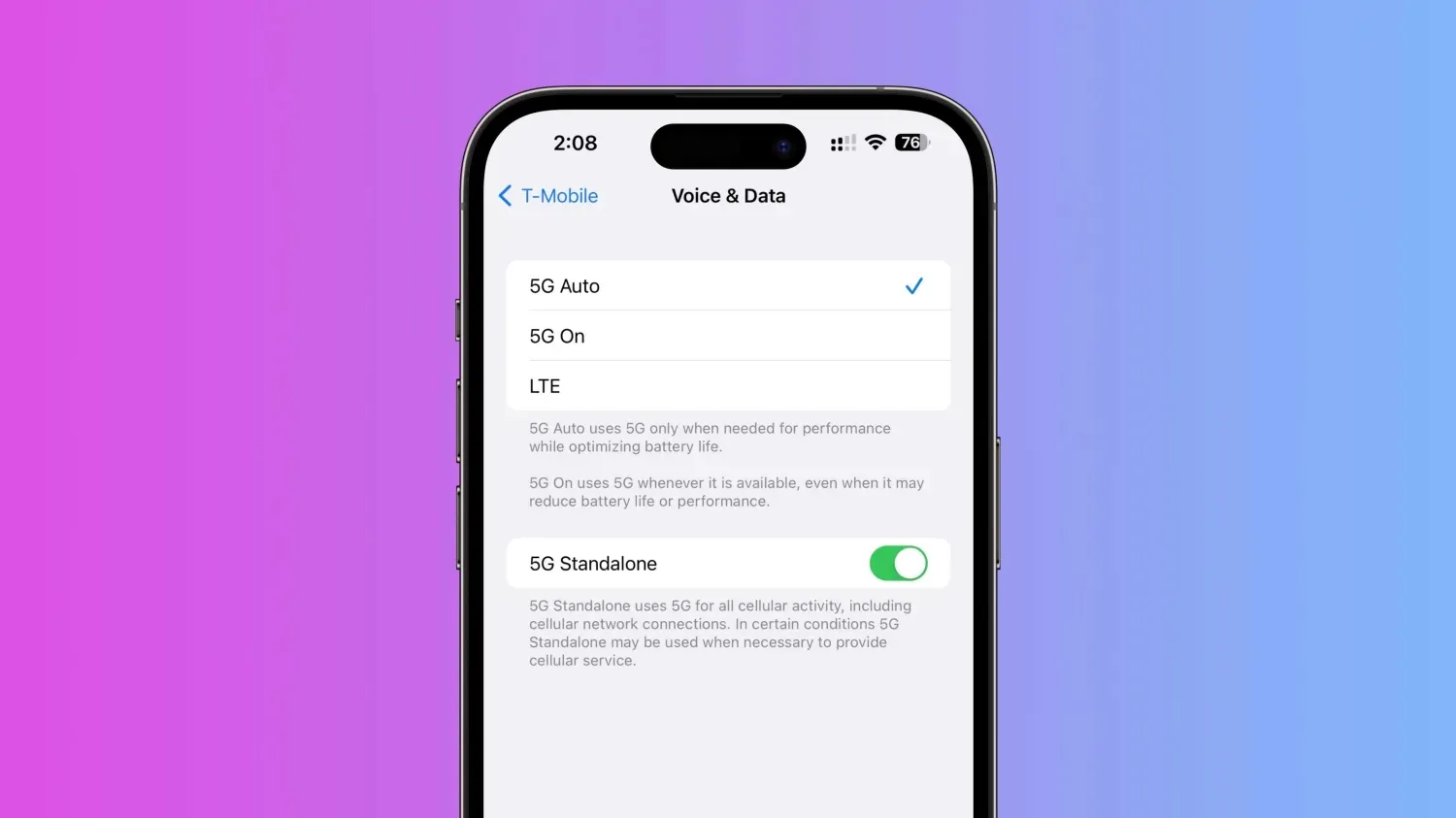
Included with the new features and changes in iOS 16.4 is the capability for iPhone to use T-Mobile’s 5G Standalone coverage in the US and with Vivo and Claro in Brazil. The new option can offer speeds as fast speeds as 3.3Gbps using the power of carrier aggregation. Here’s how to make sure 5G Standalone is turned on with iPhone and how to verify your cellular connection stats.
T-Mobile officially launched its Ultra Capacity 5G SA network in November last year, touting speeds up to 3Gbps. However, only flagship Samsung smartphones were able to take advantage of the latest network advancement at first with T-Mobile saying that it would “expand to additional devices in the near future.”
Now with iOS 16.4, we’ve seen the toggle arrive in iPhone Settings to enable the super-fast speeds. 5G SA should be enabled by default for T-Mobile customers in the US – the Uncarrier is the only stateside provider for now with 5G SA. Claro and Vivo are also showing 5G SA functionality with iPhone in Brazil. Meanwhile, this flavor of 5G has previously been available on iPhone in other countries.
As a refresher, T-Mobile says its Ultra Capacity 5G SA + carrier aggregation allows it to achieve 3Gbps speeds by merging multiple channels of mid-band 5G spectrum. Also, it’s unclear exactly which cities 5G SA is accessible through T-Mobile for now, so you need to just test it out to see.
How to make sure 5G Standalone (SA) is turned on with iPhone
Only iPhones connected to a carrier with 5G SA will see the option available in Settings
Running iOS 16.4, open the Settings app
Choose Cellular
Now tap Cellular Data Options then Voice & Data
At the bottom, make sure the 5G Standalone toggle is turned on
Check your 5G SA connection stats
After you make sure 5G Standalone is turned on, you can run a speed test to see what performance you’re getting
You can dial 3001#12345# and hit call to enter Field Test mode – this will provide specific details about your 5G connection and whether or not you’re getting Standalone service
Look for SA next to connection_type
Keep in mind while 3.3Gbps has been achieved in T-Mobile tests, real-world performance will vary
Following the release of the first iOS 16.5 beta to developers on Tuesday, Apple is now rolling out iOS 16.5 beta 1 to users registered in the Apple Beta Software Program. The update comes with some minor improvements, including new Siri commands.
iOS 16.5 beta 1
Right now, iOS 16.5 seems more like a minor update focused on fixing bugs and improving the overall stability of the operating system. There are new Siri commands to start or stop a screen recording. Apple is also adding a dedicated Sports tab to the Apple News app with iOS 16.5.
Moreover, code found in iOS 16.5 shows that Apple has been working on a new quad-box Picture-in-Picture mode for streaming sports in the Apple TV app.
Beta testers can install iOS 16.5 by going to the Settings app, choosing General, then choosing Software Update. It’s unclear when Apple plans to make iOS 16.5 available to the public. Today’s build number is 20F5028e.
More updates available
In addition to iOS 16.5 public beta 1, Apple is also rolling out the following updates to users registered in the Apple Beta Software Program:
iPadOS 16.5 beta 1 (20F5028e)
watchOS 9.5 beta 1 (20T5527c)
tvOS 16.5 beta 1 (20L5527d)
macOS Ventura 13.4 beta 1
new iPhone and iPad software features coming this year, according to Apple
While iOS 17 speculation is already in full swing, there is still a few software features that Apple has announced, but not yet released for iPhone and iPad users. Head below as we round up all of the previously announced features still coming for iPhone and iPad…
Apple Card Savings Account
Continuing with the focus on financial services, Apple has also announced it will integrate a high-yield savings account directly into the Wallet application for Apple Card users. This feature was announced in October, with Apple saying it would be available sometime “soon.” Given that Apple Card is only available in the United States, the new savings account will also be limited to the US.
Apple Card Savings Account will allow you to automatically deposit your Daily Cash rewards into the account. It will fully integrate with the Apple Wallet applications, allowing you to track the balance and growth of the account over time and even make additional deposits via a linked bank account.
Apple Card Savings Account will be operated in partnership with Goldman Sachs, which is also Apple’s partner for the Apple Card itself. There’s no word on what exact percentage rate the account will pay out in interest, but Goldman’s existing online savings account offers an annual percentage yield of 3.30%.
Next-generation CarPlay
At WWDC, Apple unveiled what it described as the “next generation of CarPlay.” This is a feature, however, that even Apple acknowledged would not be available for quite a while, despite the initial announcement at WWDC 2022.
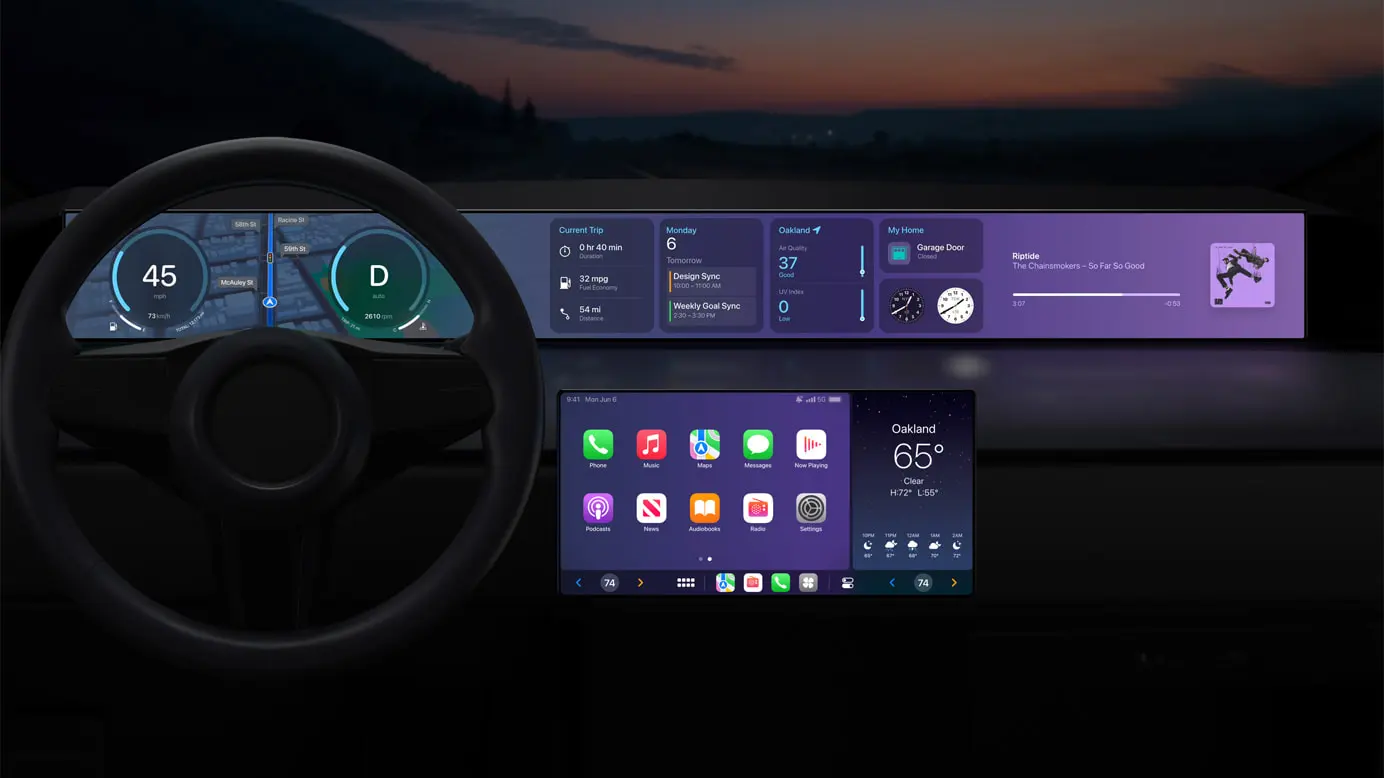
The new CarPlay interface is a dramatic overhaul compared to what is currently offered. It will offer support for multiple screens within your car and be able to deeply integrate with your car’s hardware. Essentially, this new CarPlay design can completely replace the manufacturer’s own digital interfaces:
Speed, fuel level, temperature, and more on the instrument cluster
Control the radio or change the climate directly through CarPlay
Personalize the driving experience by choosing different gauge cluster designs
With widgets, users will have at-a-glance information from Weather and Music right on their car’s dashboard
This is a big undertaking by Apple, and it will require close cooperation with automakers looking to adopt the new CarPlay interface. Apple says that more information will be “shared in the future” and that we can expect the first vehicles with support for the new CarPlay design sometime late this year.
iMessage Contact Key Verification
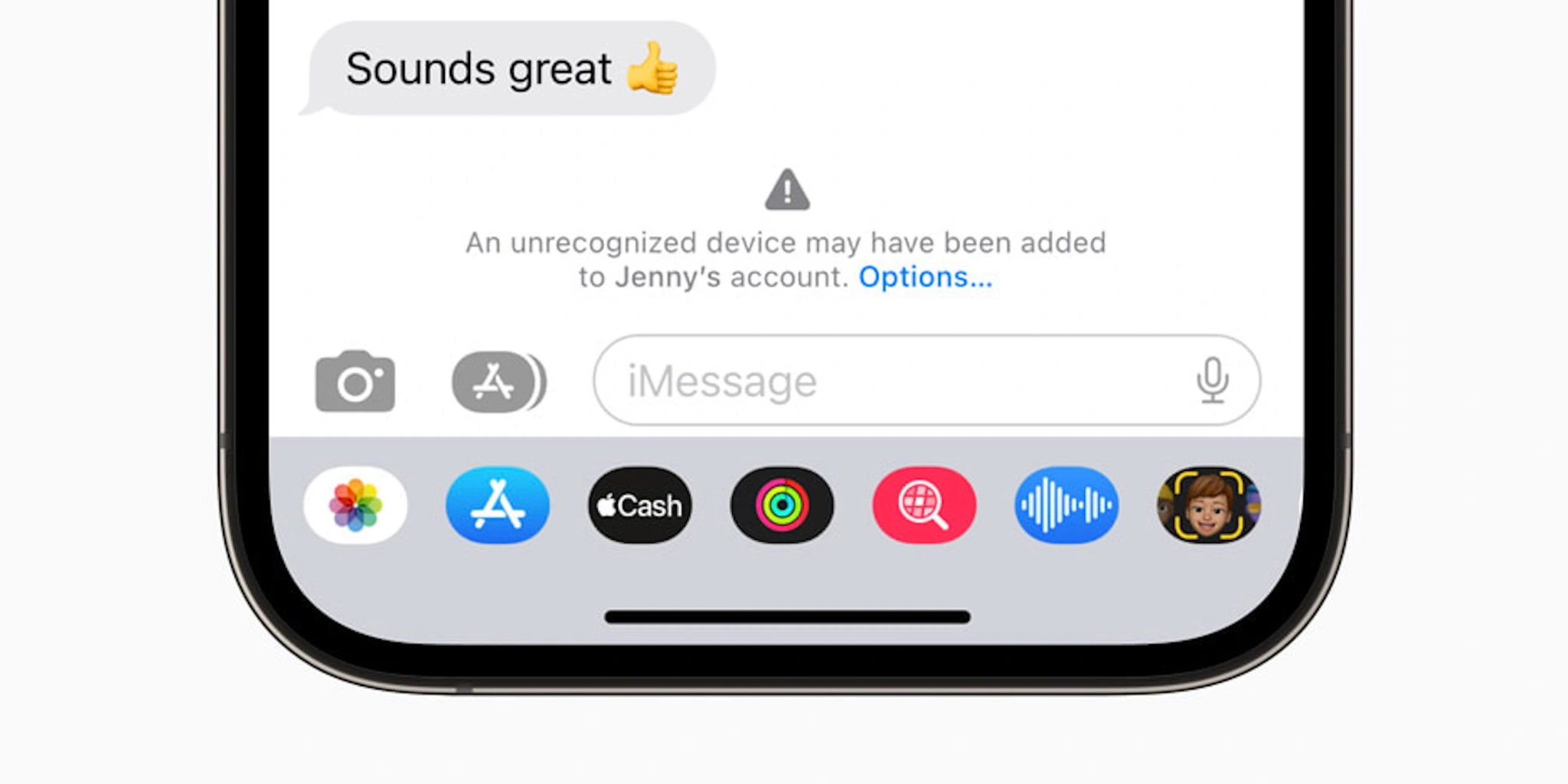
Finally, there’s one security and privacy-focused feature that Apple has already announced is coming sometime this year. iMessage Contact Key Verification is designed for “users who face extraordinary digital threats,” including journalists, human rights activists, and members of government.
The feature works by giving those users a way to further verify that they are messaging with the people they intend. Apple explains:
The vast majority of users will never be targeted by highly sophisticated cyberattacks, but the feature provides an important additional layer of security for those who might be. Conversations between users who have enabled iMessage Contact Key Verification receive automatic alerts if an exceptionally advanced adversary, such as a state-sponsored attacker, were ever to succeed breaching cloud servers and inserting their own device to eavesdrop on these encrypted communications. And for even higher security, iMessage Contact Key Verification users can compare a Contact Verification Code in person, on FaceTime, or through another secure call.
iMessage Contact Key Verification will be available “globally” sometime in 2023, Apple says.
Apple Pay Later [Now available]
Update March 29, 2023: Apple Pay Later has officially started rolling out to users, but it won’t be available to all users for several months, Apple says.
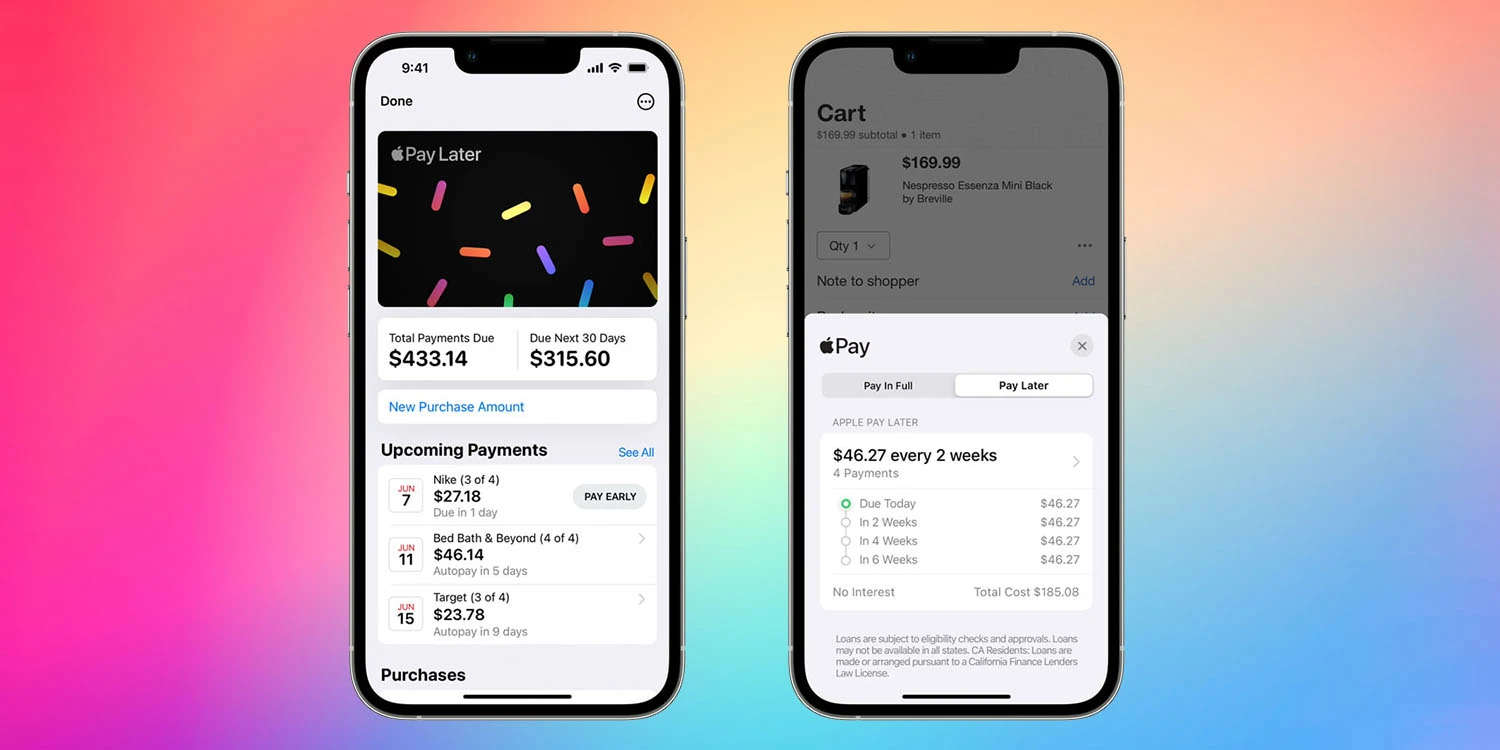
Apple is ramping up its initiatives in the personal finance sector, and one of its most anticipated new features in this category is something called Apple Pay Later. Announced at WWDC 2022, Apple Pay Later will allow you to split Apple Pay purchases into four equal payments with zero percent interest, spread across six weeks.
The Apple Pay Later feature is similar to competitors like Affirm and Klarna, two of the companies leading a modern wave of “buy now, pay later” platforms. Apple, however, touts that its platform will be “seamless and secure,” with integration into the Apple Wallet application and zero fees.
When Apple Pay Later was announced at WWDC 2022, there was no clear timeline for when it would be available to customers. The feature was not included in the initial release of iOS 16 and hasn’t been added with any of the subsequent software updates. Bloombergreported that the feature faced “fairly significant technical and engineering challenges.”
Once it launches, Apple Pay Later will be “available everywhere Apple Pay is accepted online or in-app” to “qualifying applicants in the United States.”
Apple Music Classical [Now available]
Update March 29, 2023: Apple Music Classical is now available to all Apple Music users.
Ah, yes, Apple Music Classical. This isn’t necessarily a feature specific to iOS 16, but it’s something that Apple said would be available in 2022… and wasn’t. Apple acquired the classical music service Primephonic in 2021, immediately removing the app from the App Store and integrating the content into its own Music app.
Apple also promised, however, that it would release a “dedicated classical music app” sometime in 2022, “combining Primephonic’s classical user interface with more added features.” This didn’t come to fruition in 2022, and Apple is silent on when the app will launch.
At this point, we’re starting to question whether Apple Music Classical has been scrapped (or significantly scaled back in scope), given Apple’s silence on the matter. The good news is that references to the service have been spotted in iOS code. Hopefully, we’ll get an update soon.
Web push notifications [Now available]
Update March 29, 2023: More advanced web apps are now available as of iOS 16.4, which can be installed via the Settings app on your iPhone.
Here’s something that has largely flown under the radar since it was officially announced: support for web push notifications for Safari on iOS and iPadOS. This was announced at WWDC last year, with Apple saying that Safari on iPad and iPhone would support push notifications from websites for the first time.
Support for web notifications in Safari has been available on the Mac for several years but has remained notably absent on iPhone and iPhone. What jogged our memory on this feature was a post on Mastodon from Jen Simmons, who works as an Apple Evangelist on the company’s Web Developer Experience team.
In the post, Simmons asked users to share their “favorite web apps” that they’ve added to the Home Screen of their iPhone. This could signal Apple’s continued work on web push notifications for iPhone and iPad, as well as maybe some other improvements to how progressive web apps work on Apple’s platforms.
Apple says that support for web notifications on iPhone and iPadOS will be available sometime in 2023. The feature hasn’t yet materialized in betas of iOS 16.
New Home architecture [Now available]
Update March 29, 2023: With the launch of iOS 16.4, the revamped Home architecture is now available to users once again.
Apple says that support for web notifications on iPhone and iPadOS will be available sometime in 2023. The feature hasn’t yet materialized in betas of iOS 16.
In response to the backlash and complaints, Apple ended up pulling the new architecture altogether last month. The company said in a statement:
We are aware of an issue that may impact the ability for users to share the Home within the Home app. A fix will be available soon. In the meantime, we’ve temporarily removed the option to upgrade to the new Home architecture. Users who have already upgraded will not be impacted.
There’s no official word on when Apple plans to re-implement this new HomeKit architecture. Evidence within recent iOS beta releases, however, shows the company is continuing to work on the platform.
iOS 16.4 was released to everyone this past week with a handful of features and changes. Now that this update has been released, Apple has started beta testing iOS 16.5. Unfortunately, it doesn’t look like this update contains any of the features we’re still waiting for Apple to release.
Just one day after the release of iOS 16.4 to everyone, Apple is once again kick-starting the beta testing process. iOS 16.5 beta 1 is rolling out to registered developers starting today, with a public beta likely to follow later this week or next week.
iOS 16.5 beta 1 will be available today to registered developer beta testers. As the update rolls out over the air within the next hour, you’ll be able to install it by going to the Settings app, choosing General, then choosing Software Update. The build number for today’s update is 20F5028e.
We’re still downloading iOS 16.5 onto our devices to check what’s new. There are, however, a few features that Apple has announced but not yet released, as well as features in development under the hood that aren’t yet available.
Apple Card Savings Account
Next-generation CarPlay
iMessage Contact Key Verification
Custom Accessibility Mode
As we approach the announcement of iOS 17 at WWDC in June, however, we expect these iOS 16 point updates to become less and less exciting.
Alongside iOS 16.5, Apple has also released the first betas of tvOS 16.5, HomePod Software Version 16.5, watchOS 9.5, and iPadOS 16.5.
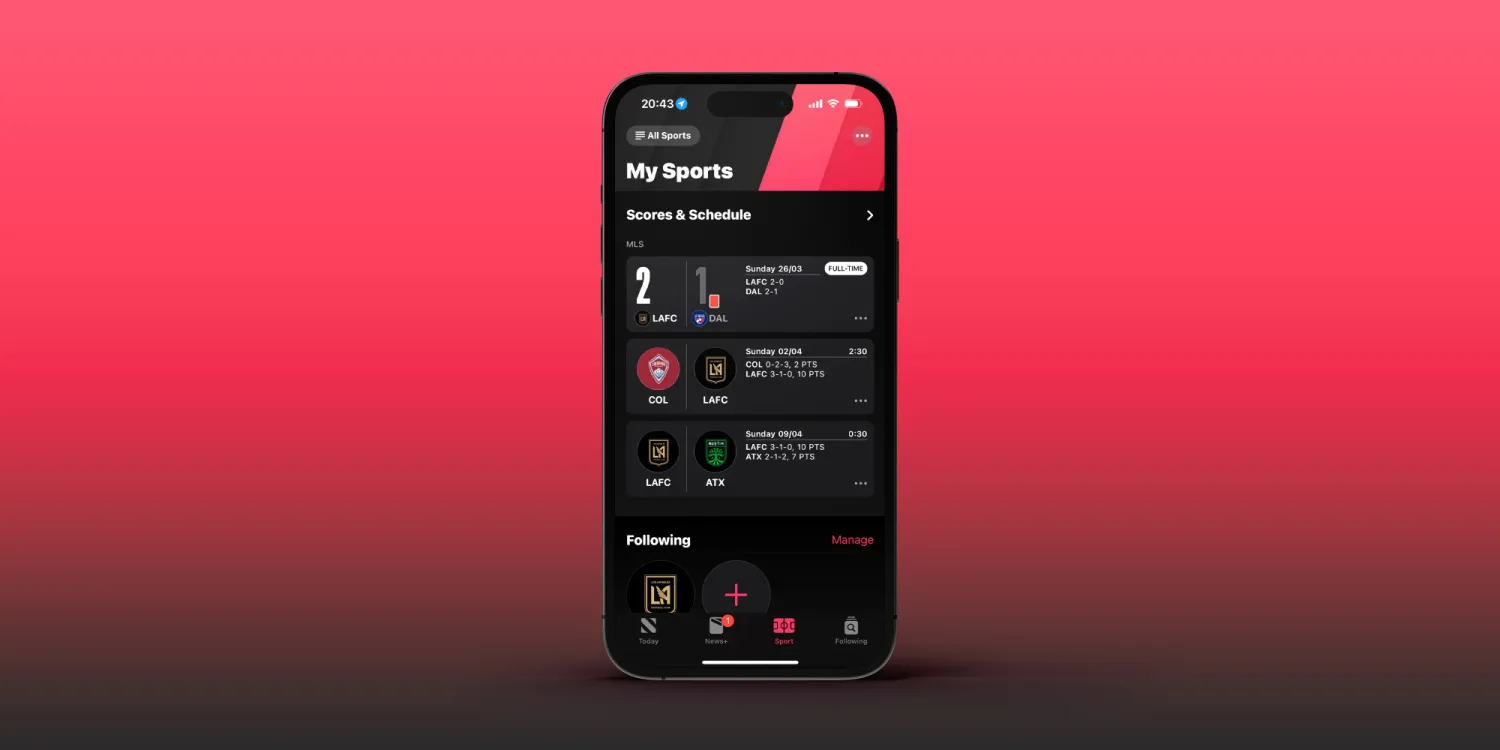
iOS 16.5 beta brings highly-requested ‘My Sports’ tab to Apple News
Apple released the first beta of iOS 16.5 to developers on March 28,2023, just one day after iOS 16.4 was released to the public. And while today’s update doesn’t seem like a big one, it does bring some small changes. For example, the Apple News app now has a tab dedicated to the My Sports feature.
My Sports gets its own tab in the Apple News app
iOS 16 introduced My Sports to Apple News. With this feature, users can easily follow news from their favorite teams and leagues, as well as get live scores, schedules, and more. However, My Sports was originally part of the Today tab of Apple News. Now with iOS 16.5, My Sports has become a dedicated tab within the Apple News app.
The way the tab works is basically the same as before, but now it’s much easier to find, as the tab is located between the Today, News+, Audio, and Following tabs. Here’s how Apple describes My Sports:
In My Sports in the News app , you can follow your favorite sports, teams, leagues, and athletes; receive stories from top sports publications, local newspapers, and more; access scores, schedules, and standings for the top professional and college leagues; and watch highlights.
It’s no surprise that My Sports got its own tab on Apple News, as Apple has been investing more in sports content. Apple TV+ now offers access to MLB’s Friday Night Baseball, while the company also recently launched MLS Season Pass in the Apple TV app.
It’s worth noting, however, that the Apple News app is only available in selected countries. This includes Australia, Canada, the US, and the UK.
More about iOS 16.5
Right now, iOS 16.5 seems more like a minor update focused on fixing bugs and improving the overall stability of the operating system. The only new feature found so far besides the My Sports tab is the addition of new Siri commands to start or stop a screen recording.
Developers with eligible devices can install the beta update by going to the Settings app, choosing General, then choosing Software Update. It’s unclear when Apple plans to make iOS 16.5 available to the public.
iOS 16.5 beta enables screen recording via Siri [Video]
iOS 16.5 developer beta 1 doesn’t appear to contain many new features and changes, but there is at least one new feature that will surely make some users happy – the ability to ask Siri to start a screen recording.
iOS users have been able to request Siri to take a screenshot in previous versions of iOS, but up until now, invoking screen recordings required manual intervention. In iOS 16.5, you can simply say “Hey Siri, start screen recording” and the screen recording will begin.
Unfortunately, it doesn’t look like there’s a dedicated screen recording action for the Shortcuts app yet, but we can presume that such an action will eventually make its way to end users. Until then, you’ll need to either start a screen recording manually via its dedicated Control Center toggle, or ask Siri.
Once you’re finished recording the screen, you can ask Siri to “stop screen recording” and Siri will usually comply. You can watch the brief video embed above to see an example of requesting Siri to start and stop a screen recording on iOS 16.5 in action.
With iOS 16.4 beta, which was first released to developers last month, Apple has introduced a new way to set up a device to get beta software that doesn’t require special profiles or using a computer. As the company will make this the only way to install iOS betas in the future, the latest iOS 16.4 beta 3 now lets users sign in with a different Apple ID to download beta software.
Apple changes how users will install iOS beta on their devices
However, when it comes to developers, some people have different Apple IDs for personal and work use, which could make it impossible for them to install iOS betas using the new system. But Apple is now fixing this. The iOS 16.4 beta released today adds an option to manage the Apple ID used to download beta software.
Now, when you go to Settings > General > Software Update > Beta Updates, you’ll see a menu showing your Apple ID. By tapping there, you can enter an Apple ID other than your iCloud and App Store Apple ID. This way, even if you’re a member of the Apple Developer Program or Apple Beta Software Program through another Apple ID, you’ll be able to download the latest Apple software.
The main advantage of the change is it will be faster and easier to install either of the iOS betas on your iPhone or iPad with the ability to toggle it on in Settings. It should also be faster to switch between the public release and a beta release for those who may need to go back and forth.
Last year, Apple began taking down websites that shared developer profiles to install iOS betas. Currently, developers are required to pay $99 per year to be part of the Apple Developer program, which includes early access to beta software. The Apple Beta Software Program is a free alternative for users who want to install iOS beta on their devices, but updates take longer to become available in this program.
Right now, the new method for installing iOS beta is optional, but Apple says that this will be the only way to enroll an iPhone or iPad to get beta software in the future.
More about iOS 16.4
In addition to the new system for installing beta software, iOS 16.4 comes with multiple new features. This includes dozens of new emoji, updates to the Music and Podcast apps, 5G Standalone support, new HomeKit architecture, previews of Mastodon links in Messages, and more.
With beta testing progressing on schedule, iOS 16.4 will likely be released to the general public sometime in March or April.
iOS 16.4 beta 3 and more now rolling out to developers
Apple is releasing iOS 16.4 beta 3 to developers today, just one week after the release of the previous beta. As we’ve covered in-depth over the last two weeks, iOS 16.4 includes a number of new features and changes for iPhone users.
iOS 16.4 beta 3 will be available today to registered developer beta testers. As the update rolls out over the air, you’ll be able to install it by going to the Settings app, choosing General, then choosing Software Update. The new update will be released to public beta testers later this week. The build number for today’s update is 20E5229e.
What’s new in iOS 16.4?
Roundup: Here’s every new feature and change in iOS 16.4 beta 1
iPhone Lock Screen Shortcut: How to use
iOS 16.4 to detail Always-On display battery consumption
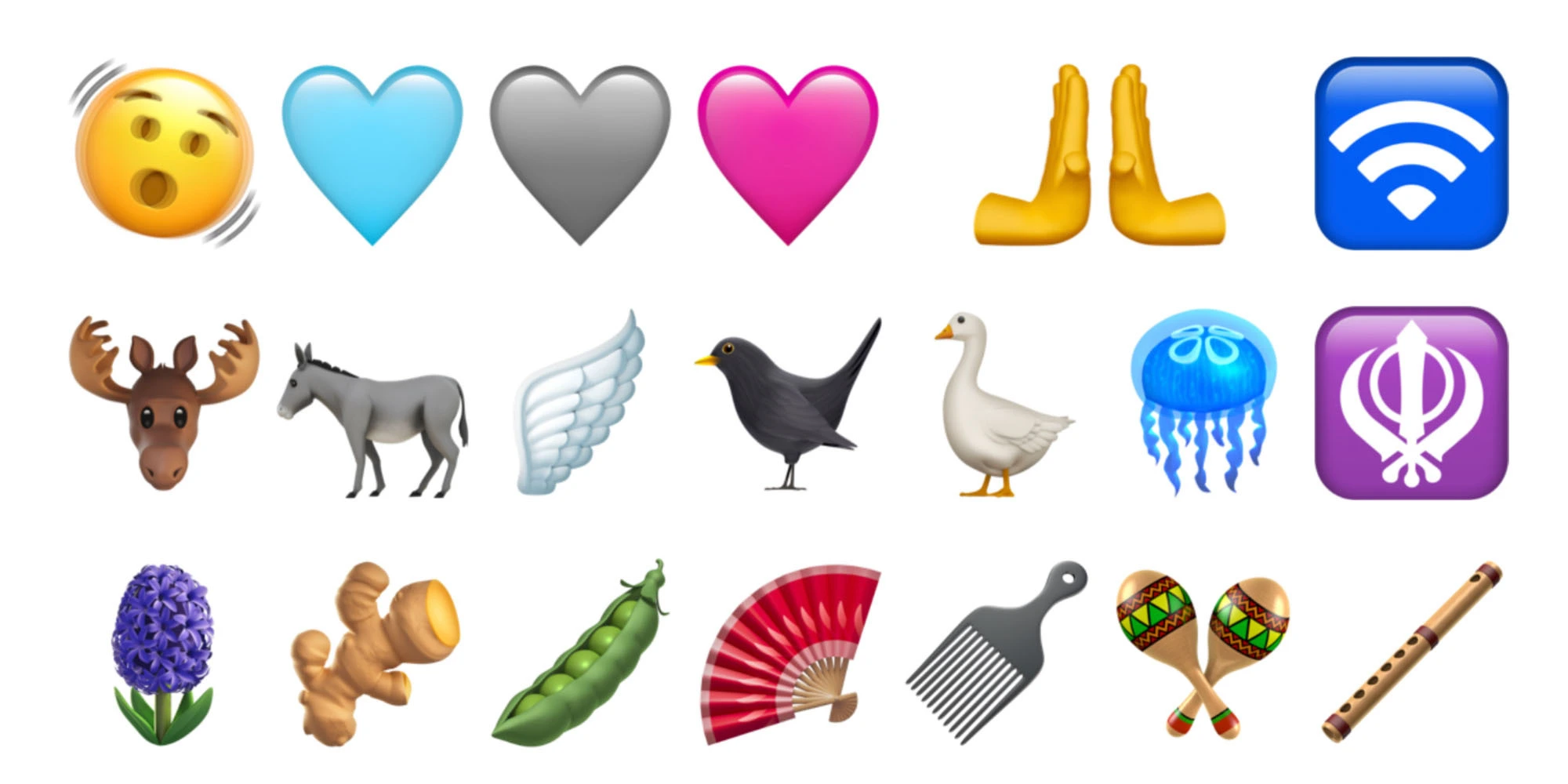
iOS 16.4 and iPadOS 16.4 add new Emoji for iPhone and iPad
iOS 16.4 adds new capabilities for web apps on iPhone and iPad, including access to push notifications
iOS 16.4 reintroduces new HomeKit architecture
iOS 16.4 expands 5G support to new regions, plus Google Fi users
iOS 16.4 hints at HomePod launch in Israel with Siri in Hebrew
iOS 16.4: iMessage now supports rich content previews for Mastodon posts
Apple is making it easier for registered developers to install iOS betas, but eliminating profile sharing
Last week’s release of iOS 16.4 beta 2 in particular brought a few additional changes. These include the return of the Apple Books page turn animations, additional references to Apple Music Classical, and more. You can find our full recap of all the additions right here.
With beta testing progressing on schedule, iOS 16.4 will likely be released to the general public sometime in March or April. In addition to iOS 16.4, Apple is also beta testing the following software updates:
The first beta of iOS 16.4 was released to developers today, and it includes a number of new features and changes. There are new emoji, improvements to Safari and web apps, and much more. Head below as we round up everything new in iOS 16.4 beta 1.
What’s new in iOS 16.4 beta 1?
New Safari and third-party browser features
iOS 16.4 brings new capabilities for Safari web apps: access to push notifications, home screen badges, and more.
Third-party browsers are now able to show a user interface for users to add a website to their home screen.
New Emoji
There are new emoji for things like a shaking face, a goose, a hyacinth, and a plain pink heart. These new Emoji are part of the Unicode Standard for Emoji Update 15.0, which was announced in July.
Changes to beta testing enrollment
Apple is cracking down on sharing iOS beta profiles. Now, the beta enrollment process will be tied to a developer’s Apple ID and accessed directly in the Settings app. Apple says:
Beginning with iOS & iPadOS 16.4 beta, members of the Apple Developer Program will see a new option to enable developer betas directly from Software Update in Settings.
This new option will be automatically enabled on devices already enrolled in the program that update to the latest beta release. Your iPhone or iPad must be signed in with the same Apple ID you used to enroll in the Apple Developer Program in order to see this option in Settings. In future iOS and iPadOS releases, this new setting will be the way to enable developer betas and configuration profiles will no longer grant access.
Cellular and 5G changes
iOS 16.4 adds a new “5G Standalone” feature that can deliver wildly fast speeds up to 3Gbps. In the United States, T-Mobile is the only carrier to support this feature.
Learn more: 3Gbps iPhone speeds could be coming soon as iOS 16.4 brings 5G Standalone support
Apple Podcasts updates
For Apple Podcasts, there are changes to the Library, improvements to Up Next, and new CarPlay updates.
Channels in Library: Easily access the channels you subscribe to and browse channels from shows you follow.
Up Next Enhancements: Resume episodes you began, start episodes you saved, and remove any you want to skip.
CarPlay Updates: Quickly pick up where you left off with Up Next and find new shows in Browse.
Shortcuts and Focus mode changes
For the Always On Display, there’s a new filter for Focus modes, so you can have certain Focus modes enable or disable the Always On Display automatically.
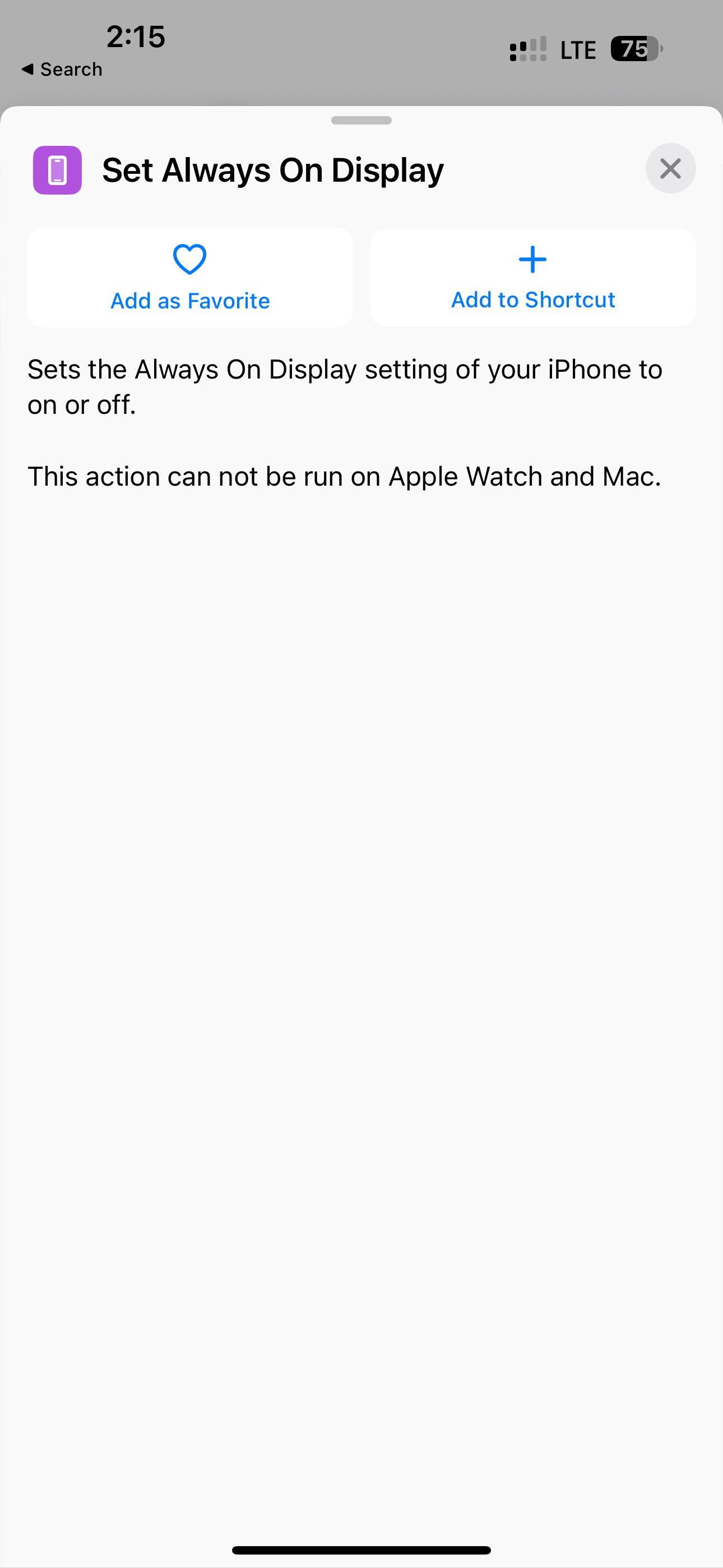
In Shortcuts, there’s a new “Set Always on Display” action, a new Lock Screen action, and a new Set VPN action.
New animations in the Music app
In the Music app, there are various interface tweaks and icon changes. For instance, adding a song to your queue no longer causes a full-screen pop-up. Instead, there’s a much smaller notification at the bottom.
There isn’t, however, any sign of Apple Classical.
AppleCare in Settings
iOS 16.4 includes a new screen in the Settings app where you can see all of your AppleCare coverage for multiple devices like the iPhone, Apple Watch, and AirPods.
Mastodon in Messages
iOS 16.4 beta enables rich previews for Mastodon links in the Messages app. This is similar to what the app offers for Twitter and other websites.
Accessibility
iOS 16.4 beta 1 adds a new Accessibility feature in the “Motion” menu for dimming flashing lights: “Video content that depicts repeated flashing or strobing lights will be automatically dimmed. The video timeline will display when flashing lights occur in the timeline for supported media.”
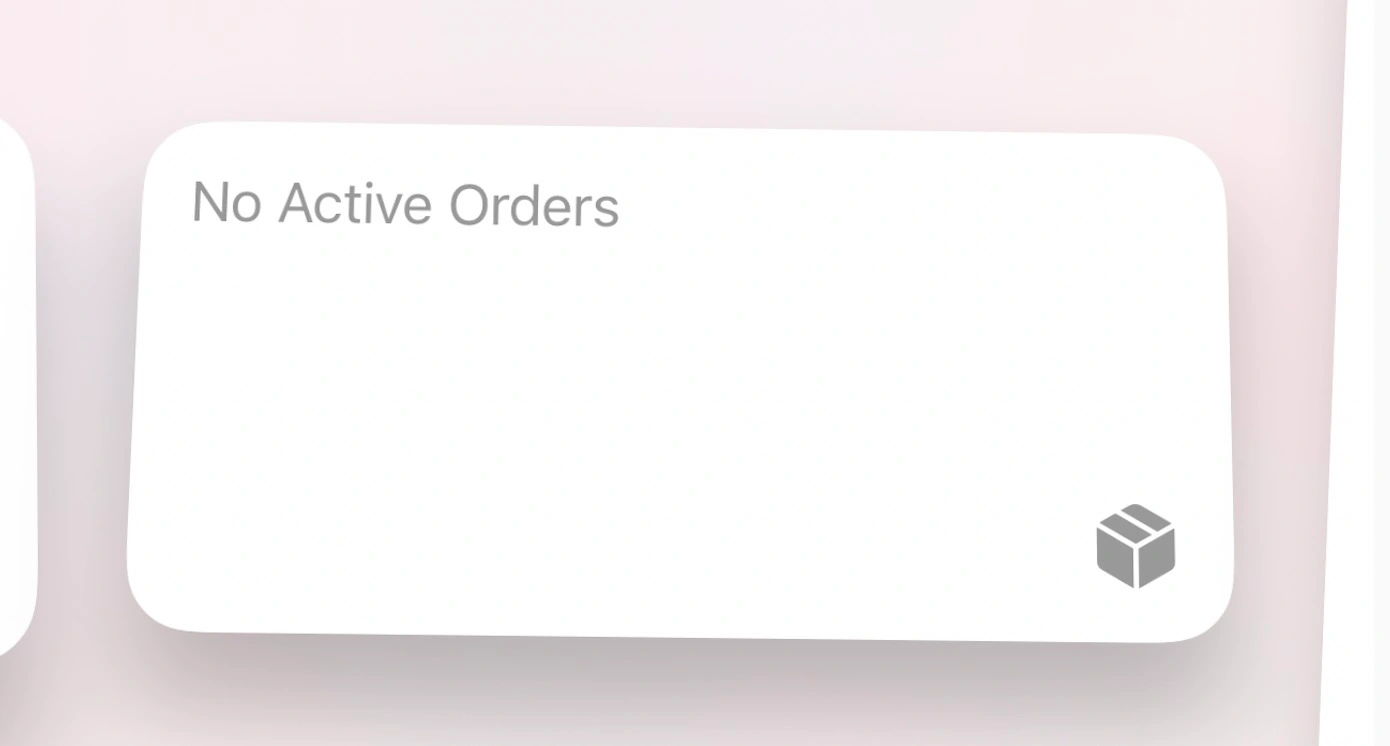
New “Order Tracking” widgets for the Wallet app
Apple has added three new Home Screen widgets for the Wallet app’s integrated order tracking features.
Other tidbits
In the Home app, Apple says both manual and automatic Software Update support is now available for Matter Accessories. The update also reintroduces the new home architecture after it was pulled due to reliability issues.
A few other changes to the keyboard:
Autocorrect for the Korean keyboard is enabled by default for testing and feedback.
Ukrainian keyboard now supports predictive text.
Gujarati, Punjabi, and Urdu keyboards add support for transliteration layouts.
New keyboard layouts are available for Choctaw and Chickasaw.
Apple Pencil hover now provides Tilt and Azimuth support.
Following the release of iOS 16.4 beta 1 to developers on Thursday, Apple is rolling out the same update to public beta users. In addition, other updates such as watchOS 9.4 and tvOS 16.4 are also now available to those registered in the Apple Beta Software Program.
iOS 16.4 Public Beta 1 now available
iOS 16.4 comes with a lot of new features. These include the ability to enable push notifications for web apps, dozens of new emoji, new Shortcuts actions, interface tweaks to Apple Music, enhanced 5G support, and more. As reported by 9to5Mac, Apple is also bringing back the new architecture for the Home app with iOS 16.4.
Users who want to try out Apple’s latest public beta software can register their devices via the Apple Beta Software Program webpage. If you already have your iPhone or iPad registered in the program, you can download today’s update by going to Settings > General > Software Update.
In addition to iOS 16.4 beta 1 (build number 20E5212f), Apple has also released these updates:
watchOS 9.4 beta 1, build number: 20T5222g
tvOS 16.4 beta 1, build number: 20L5463g
macOS Ventura 13.3 beta 1, build number: 22E5219e
Here’s how to automate iPhone’s always-on display with iOS 16.4
After debuting with the iPhone 14 Pro last fall, Apple continues to improve its always-on screen with software updates. The latest capability is the option to automate iPhone’s always-on display with iOS 16.4 and later.
After launching without much flexibility, Apple released the first always-on display customizations with iOS 16.2 in December. That allowed users to turn off colored wallpapers and notifications from the always-on screen.
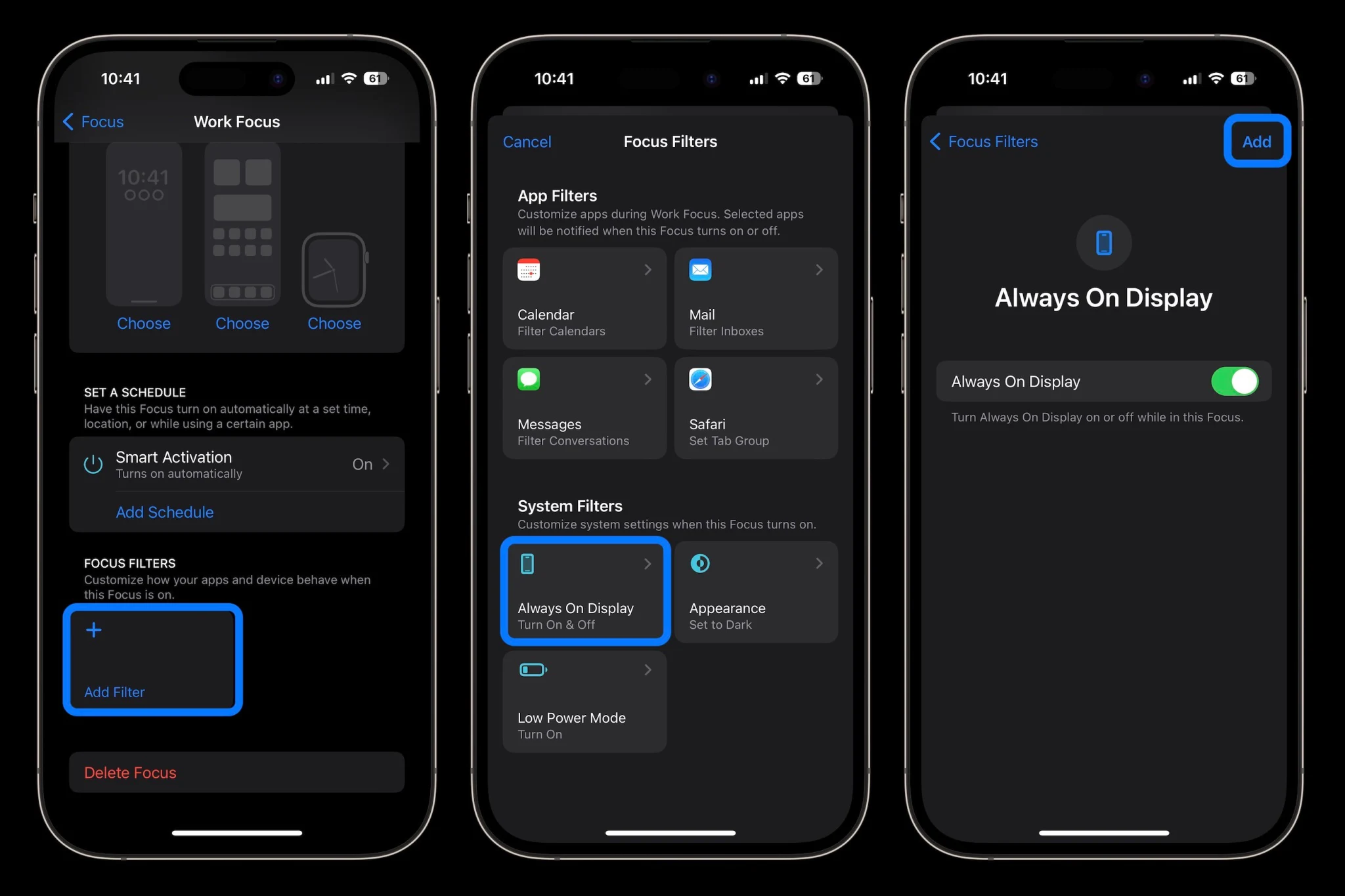
Now with the iOS 16.4 beta, Apple has made it possible to schedule/automate when iPhone always-on is enabled via Focus Filters.
How to automate iPhone always-on display with Focus Filters
You’ll need to be running the iOS 16.4 beta to get this feature or wait for the iOS 16.4 public release. Check out our guide for how to install the free beta.
Open the Settings app on your iPhone 14 Pro/Pro Max
Choose Focus > pick an existing Focus or create a new one
Swipe down and under Focus Filters tap Add Filter
At the bottom choose the new “Always On Display”
The default will be to turn it on, tap Add in the top right corner
To automate this, make sure you have either Smart Activation on or a schedule set for the Focus you’ve added always-on to (just above Focus Filters)
You can also tie the always-on on/off filter to different Lock Screens by linking them with a Focus mode (long-press on your Lock Screen > tap Focus)
Jump into another Focus mode and set always-on to off to automate the feature
How to enable iOS betas from the Settings app with 16.4 and later
Apple is introducing a notable change in how to get its developer and public beta updates on iPhone with iOS 16.4 and beyond. Follow along for a look at how to turn on iOS beta updates in Settings as well as some pros and cons that come with the change.
In the release notes for the first iOS 16.4 developer beta, here’s how Apple describes the change:
“Beginning with iOS & iPadOS 16.4 beta, members of the Apple Developer Program will see a new option to enable developer betas directly from Software Update in Settings. This new option will be automatically enabled on devices already enrolled in the program that update to the latest beta release. Your iPhone or iPad must be signed in with the same Apple ID you used to enroll in the Apple Developer Program in order to see this option in Settings. In future iOS and iPadOS releases, this new setting will be the way to enable developer betas and configuration profiles will no longer grant access.”
Interestingly, the option was set to “off” by default on my iPhone in the first developer build of iOS 16.4 and it also includes a button for public beta testers.
How to turn on iOS beta updates in Settings with 16.4 and later
Note: You’ll need to be running the iOS 16.4 beta to see the new option or wait for the iOS 16.4 public release.
Launch the Settings app on your iPhone or iPad running iOS 16.4
Tap General > Software Update
Choose the new Beta Updates button (it may take a moment to appear)
Now choose the Developer Beta or Public Beta
The Apple ID you’re signed into your iPhone with needs to be the same as what you’re using for your Apple Developer account or Apple Public Beta program
After choosing the iOS 16 Developer Beta option in Settings, the iOS 16 Beta configuration profile is still showing for me in iOS 16.4 b1.
The good and bad
The main advantage of the change is it will be faster and easier to install either of the iOS betas on your iPhone or iPad with the ability to toggle it on in Settings. It should also be faster to switch between the public release and a beta release for those who may need to go back and forth.
However, the main downside is that with configuration profiles going away as a method to install future betas, developers won’t be able to share them with others. It could also be a headache in situations where developers need to run the beta but aren’t signed in with the same Apple ID on an iPhone or iPad as their Apple Developer account.
The full removal of configuration profiles may not happen immediately as Apple vaguely said “In future iOS and iPadOS releases” instead of giving a specific version or date.
iOS 16.4 also includes more features like new emoji, new Safari/browser capabilities, 5G Standalone support, fresh Apple Music animations, and more.
Apple is reportedly considering ways to push the price of the high-end iPhone even higher. Rather than simply re-branding Pro Max to Ultra, Apple is discussing adding an “Ultra” high-end model above the Pro Max as soon as 2024, or the iPhone 16 lineup.
That’s according to Mark Gurman in his latest Power On newsletter for Bloomberg. The new model would help increase iPhone average selling price even higher, with Tim Cook hinting on this week’s earnings call that consumers are willing to pay more for the best phone.
Apple has steadily raised the price of its best-specced iPhone model, beginning with the jump to the $999 iPhone X in 2017. Then, it added a Max screen size to the lineup starting in 2018, to bump up the price to $1099 for consumers wanting the biggest display and best battery life iPhone. Add in the 1 TB storage option first introduced with iPhone 13 Pro, and the best iPhone today is priced at $1599.
Consumers have clearly shown that they will splurge, though, with the iPhone 14 Pro and Pro Max models believed to have performed well this cycle, compared to the cheaper iPhone 14 and iPhone 14 Plus. A hypothetical Ultra would start above the $1099 base price of the Max.
From Gurman’s Power On newsletter,
But instead of renaming the Pro Max “the Ultra,” Apple could add an even higher-end iPhone above both Pro models. Internally, the company has discussed doing just that — potentially in time for the 2024 iPhone release.
Gurman says it is currently unclear what features the new high-end model could provide, but speculates an even larger screen is a possibility as well as better cameras and even more cutting-edge chip designs. However, he does not expect a foldable form factor to be the differentiator; Apple is not believed to be working on foldable phones currently.
Obviously, Apple kicked off the Ultra branding train with the Apple Watch this past year. The Apple Watch Ultra offers an even larger display, titanium body with unique industrial design, and some features not found on other watches like improved diving capabilities, a siren, and an Action Button.
Apple Inc. Chief Executive Officer Tim Cook, speaking on an earnings call that was mostly focused on holiday results, made an off-the-cuff remark that could be quite telling about the company’s future.
Cook was fielding a question about whether the iPhone’s rising average sales price was sustainable. After all, a top-of-the-line model that cost $1,150 in 2017 (the iPhone X with 256 gigabytes of storage) now fetches $1,600 (the iPhone 14 Pro Max with 1 terabyte).
His response: The price increase is no problem. In fact, consumers could probably be persuaded to spend more.
“I think people are willing to really stretch to get the best they can afford in that category,” Cook said on the call, noting that the iPhone has become “integral” to people’s lives. Consumers now use the device to make payments, control smart-home appliances, manage their health and store banking data, he said.
While Cook wouldn’t say if he anticipates further price increases, he made a good argument for why even more upscale iPhones could make sense — especially if they deliver new features.
Apple has internally discussed adding a higher-end iPhone to the top of its smartphone lineup. And it’s already been doing more to distinguish its Pro models from standard iPhones, giving consumers a reason to pay up.
When the iPhone 15 arrives later this year, Apple will further differentiate the product’s tiers with a range of materials, processors and cameras. That includes giving the Pro Max model a periscope lens, which will offer improved optical zoom.
Apple’s plan to draw a greater distinction between the Pro and Pro Max has spurred speculation that the company will opt for a new top-end brand: the Ultra. Apple has already used that name for its sporty high-end smartwatch and the top version of the M1 processor.
But instead of renaming the Pro Max “the Ultra,” Apple could add an even higher-end iPhone above both Pro models. Internally, the company has discussed doing just that — potentially in time for the 2024 iPhone release.
That could certainly drive up prices, but consumers would need a reason to upgrade. At this point, it’s unclear how that top-of-the-line model would be different, but it will probably offer further camera improvements, a faster chip and perhaps an even larger display. There also may be more future-forward features, such as finally dropping the charging port.
Samsung Electronics Co. has already embraced this approach with its own Ultra phone — a model that offers more cameras, a bigger battery, a larger screen, stylus support, additional memory and a different design.
Moreover, Samsung offers two types of foldable phones, which have increasingly become the focal point of its smartphone strategy. Apple has explored a foldable iPhone in the past, but I wouldn’t anticipate one launching in the near future. For now, the company is focused on larger foldable devices — something the size of a laptop.
If Apple were to sell a foldable iPhone, the price would clearly be higher than that of its current models. Such a device would require far more advanced technology for batteries, displays and chips. Samsung’s priciest foldable — the Z Fold4 — costs as much as $2,160.
It may be quite a while before Apple customers have a chance to actually purchase an “iPhone Fold.” But if Cook’s comments are any indication, many will happily spend the money.
Apple drops role of industrial design chief after struggling to find a long-term replacement for Jony Ive. Evans Hankey, Apple’s head of industrial design, took that job when Jony Ive left the company in 2019. But she only lasted about three years in the role, sending Apple scrambling to find a successor.
Sure enough, Apple has now decided that it simply won’t replace her. Instead, the company’s team of about 20 senior industrial designers will report to Chief Operating Officer Jeff Williams.
Given the brain drain suffered by Apple’s design team in recent years — about 15 designers from the Ive era have left — I’m not surprised that the company ended up punting on choosing a successor. But the lack of long-term succession planning that led to this point is still striking. Design is one of the most critical departments at Apple. Having no one to take up the mantle is a cause for concern.
Every other major Apple department — from services to hardware engineering to silicon to operations — has at least one or two executives that could capably take over for that group’s leader. Perhaps a similarly capable person could one day emerge at the design group, but it doesn’t appear that person currently works at Apple.
Samsung launches minimal smartphone updates in a big iPhone year for Apple. Samsung’s latest slate of non-foldable models — the S23, S23+ and S23 Ultra — represent very modest year-over-year upgrades. The enhancements revolve around minor battery bumps, some front-facing camera tweaks (some people think the Ultra is a downgrade in that area) and a jump from 108 megapixels to 200 megapixels on the Ultra’s back camera. All three models also get ever-so-slight changes to their curvature.
I think these upgrades are about as exciting as jumping from a iPhone 12 to the iPhone 13. In other words, not that exciting. I get that Samsung is more focused on its foldable lineup at this point, but the company missed a chance to generate more buzz — at a time when smartphone sales are already sluggish.
The timing also may not be great for Samsung. Apple has finally resolved its supply-chain problems, letting it fill orders for the iPhone 14 Pro. And the iPhone 15 launch isn’t too far away. Unlike the S23 models, the iPhone 15 lineup is in for some major changes, including a titanium frame on the Pro models and the addition of the Dynamic Island to the cheaper variants.
March 10: Apple’s annual shareholder meeting. Cook and his lieutenants, such as General Counsel Kate Adams, will take the virtual stage to field carefully selected questions from shareholders and give some company updates. Major news rarely breaks at these conferences, but there will be shareholder votes on Apple’s board, executive pay, labor and other matters.
Apple on Monday released iOS 16.3, macOS Ventura 13.2, and other software updates to the public. The new versions of the company’s operating systems come with new features but also bring multiple security patches. Not only that, but Apple also released updates with security patches for users running iOS 15. Read on as we detail what has been patched with the updates.
Security patches available with iOS 16.3
According to Apple’s website, both iOS 16.3 and iPadOS 16.3 fix two security exploits found in previous versions of the operating system. This includes patches in areas such as AppleMobileFileIntegrity, ImageIO, Kernel, Mail, Maps, Safari, and WebKit.
For instance, an exploit found in the Weather app could allow other apps to bypass Privacy preferences. In another security exploit related to WebKit, which is the engine for Safari and other web browsers on iOS, Apple has fixed two exploits that could lead to the arbitrary execution of malicious code. You can check some of the details below:
WebKit
Available for: iPhone 8 and later, iPad Pro (all models), iPad Air 3rd generation and later, iPad 5th generation and later, and iPad mini 5th generation and later
Impact: Processing maliciously crafted web content may lead to arbitrary code execution
Description: The issue was addressed with improved checks.
WebKit
Available for: iPhone 8 and later, iPad Pro (all models), iPad Air 3rd generation and later, iPad 5th generation and later, and iPad mini 5th generation and later
Impact: Processing maliciously crafted web content may lead to arbitrary code execution
Description: The issue was addressed with improved memory handling.
Most of these patches are also available for Mac users with macOS Ventura 13.2, Apple TV users with tvOS 16.3, and Apple Watch users with watchOS 9.3. It’s worth noting that Apple has also released iOS 15.7.3, macOS Monterey 12.6.3, and macOS Big Sur 11.7.3 with the same patches for users who haven’t (or can’t) update their devices to the latest versions of the operating systems.
There’s even an update available for iPhone 5s, iPhone 6, and other devices that are stuck on iOS 12. It’s worth noting that Apple is letting all users stay on iOS 15.7 while still receiving security patches instead of being forced to update to iOS 16. However, it’s unclear whether the company has plans to maintain support for iOS 15 for long.
All users can now enable iCloud Advanced Data Protection, an opt-in feature to get end-to-end encryption for almost all data stored in iCloud, including messages, photos, and device backups.
The feature is activatable once users upgrade to iOS 16.3, currently in developer beta, with a public release of the new software update expected to arrive next week.
Under the default setup, Apple retains the keys to decrypt your iCloud data on their servers. This is required to support account recovery and other features.
But for users wanting ultimate data protection, iCloud Advanced Data Protection allows users to encrypt their iCloud data with their own device passcode so that Apple doesn’t have a key. This means that even if Apple’s servers were hacked, the intruders would not be able to read your personal data without knowing your passcode.
iCloud Advanced Data Protection rolled out at the end of last year with iOS 16.2 in the United States. Apple said it would make the feature available around the world in 2023. iOS 16.3 delivers on that promise.
If you want to enable iCloud Advanced Data Protection, open Settings -> [your name] -> iCloud -> Advanced Data Protection and follow the steps to turn it on. When iCloud Advanced Data Protection is enabled, it is critically important to remember your password. However, the phone will guide you to set up account recovery provisions, in case you do lose access to your account, like a trusted contact or printable recovery key.
Law enforcement groups heavily rely on iCloud for data collection as part of an investigation, by simply sending a search warrant or subpoena for Apple to retrieve a suspect’s iCloud backups. With iCloud Advanced Data Protection enabled, this is no longer possible as Apple cannot simply decrypt the information.
It remains to be seen whether governments in certain regions will push back against Apple’s rollout of end-to-end encryption. If end-to-end encryption becomes illegal in certain markets, Apple would be forced to comply and make iCloud Advanced Data Protection unavailable to those users.