New privacy and security features give users more control to browse freely with true peace of mind
Samsung Electronics today announced a new update to Samsung Internet, its fast, easy and reliable web browser. Samsung Internet 13.0 introduces a series of new features and enhancements designed to offer users a better and safer browsing experience.
“At Samsung, we’re always optimizing our products and services to offer the best experience to our users,” said Du Kim, VP and Head of Web R&D Group, Mobile Communications Business, Samsung Electronics. “Our lives are increasingly lived online, as people try to stay informed and connected, so we wanted to make it easier for everyone to enjoy the best the internet has to offer with peace of mind, knowing you can count on us to keep you safe.”
Protecting You From Prying Eyes
These days, it’s hard to know which website you can trust. Samsung Internet 13.0 offers a new permission request UI that will display a warning message if a website seems malicious and is attempting to trick users into allowing notifications. And since we know how much privacy means to our users, Secret mode allows them to automatically clear their browsing history as soon as all their Secret mode tabs are closed. A new Secret mode icon will also be displayed on the address bar as part of the Samsung Internet 13.0 update, so that it’s easier to know when it’s switched on. For more information about Secret mode, check out the new About Secret mode section.
Permission Request UI – Before (left) and Samsung Internet 13.0 (right)
A Better User Experience
We introduced a series of new features and enhancements to make Samsung Internet even more user-friendly:
You can now use High contrast mode with Dark mode on, to make fonts and other components stand out even more.
Samsung Internet 13.0 also introduces an Expandable App Bar for menus such as Bookmarks, Saved pages, History and Downloads.
Get more screen space by hiding the status bar, to immerse yourself in the content you’re browsing.
When watching a video in full screen with Video assistant, pause it by double tapping the middle of the screen.
Easily edit the title of your bookmarks so that they’re easier to recognize and search.
High contrast mode
Extension API for Developers
New Application Programming Interface (API) modules are now available for Samsung Internet 13.0, including WebRequest, Proxy, Cookies, Types, History, Alarms, Privacy, Notifications, Permissions, Idle and Management. Developers can use these APIs to build extensions and contact the Samsung Internet team to validate, approve and add their extension to the Samsung Internet browser. For more details, please visit https://developer.samsung.com/internet/android/extensions-dev-overview.html
If you’re an existing Samsung Internet user, you will receive a notification telling you a new version is available. You can also download the latest version of Samsung Internet browser on the Google Play Store or Galaxy Store.
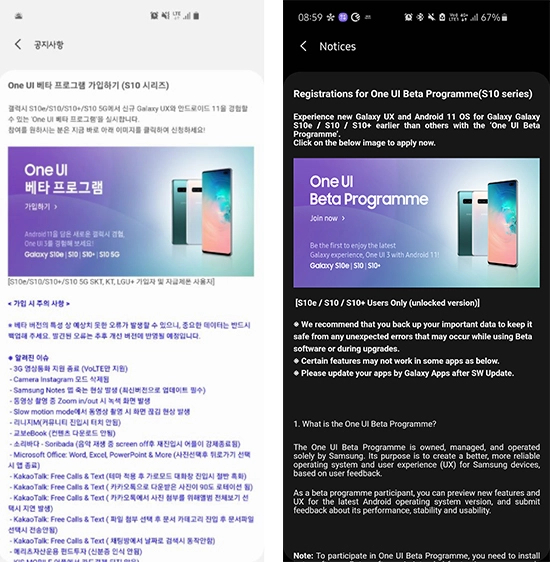
Samsung has released Android 11-based One UI 3.0 beta for the Galaxy S20, Note20 and Z Flip lineups already, and today the Galaxy S10, Galaxy S10+ and Galaxy S10e join them as the company opened the One UI 3.0 beta program for its 2019 flagships.
Samsung had confirmed the One UI 3.0 beta for the S10 lineup a couple of weeks ago, but it was delayed due to battery drain concerns. But now that Samsung has opened the beta program for the S10 trio, you can get a taste of Samsung’s latest custom Android skin by participating in the beta program from the Samsung Members app.
So Android 11 is still officially missing from Samsung Galaxy devices, but the Android 11-based One UI 3.0 beta has offered a preview phase ahead of a global rollout.
Before you enroll in the beta program, make sure you’ve backed up your device, and remember that beta software is not as stable as the final builds and often has bugs that hamper the user experience.
The One UI 3.0 beta program for the S10 trio is currently live in the UK, India and South Korea, but should expand to other countries soon.
It looks like the stable One UI 3.0 could be here within weeks as firstly the One UI 3.0 beta for Galaxy Note 20 series devices has now officially ended in Samsung’s homeland of South Korea. This is a good sign, as the beta ending signifies that testing is complete. The next likely rollout for Galaxy Note 20 devices will be the stable One UI 3.0 update.
Samsung kicked off the One UI 3.0 public beta program for the Galaxy S20 series early last month. A few weeks after the update started rolling out to Galaxy S20 users, the company expanded the beta program to include Galaxy Note 20 series devices. Then, earlier this month, Samsung announced that it would be expanding the One UI 3.0 beta program to more devices, including the Galaxy Z Fold 2, Galaxy Z Flip 5G, the Galaxy S10 series, and the Galaxy Note 10 series. As promised, the company has now opened the One UI 3.0 beta program for the Galaxy S10 series in South Korea, India, and the UK.
Samsung had first unveiled its lifelike artificial humans called NEON earlier this year during CES 2020. Since then, the company has showcased several use cases, including in the banking, news, and retail sectors. Now, the company is hinting that we might get to see NEON on smartphones really soon.
Pranav Mistry, the CEO and President of STAR Labs, has mentioned on Twitter that he is currently using NEON on his smartphone. He also said that the company is testing its artificial humans on smartphones right now, and others can see it before Christmas. So, Samsung may showcase NEON on Galaxy smartphones sometime in December 2020.
There is no clear indication from Samsung if NEONs would one day come pre-installed on Galaxy devices and if they would be available on devices from other brands. NEONs are powered by STAR Labs’ Core R3 and SPECTRA technologies. SPECTRA offers emotions, intelligence, learning, and memory to Core R3, which Samsung claims can pass the Turing test once it is ready.
NEONs feature AI-generated virtual avatars that are indistinguishable from human beings, and each one of them has his/her own unique personality. Samsung’s website mentions that the artificial humans can be customized as per the client’s requirement. They can be used as a service representative, financial advisor, concierge, healthcare provider, or just as a virtual friend.
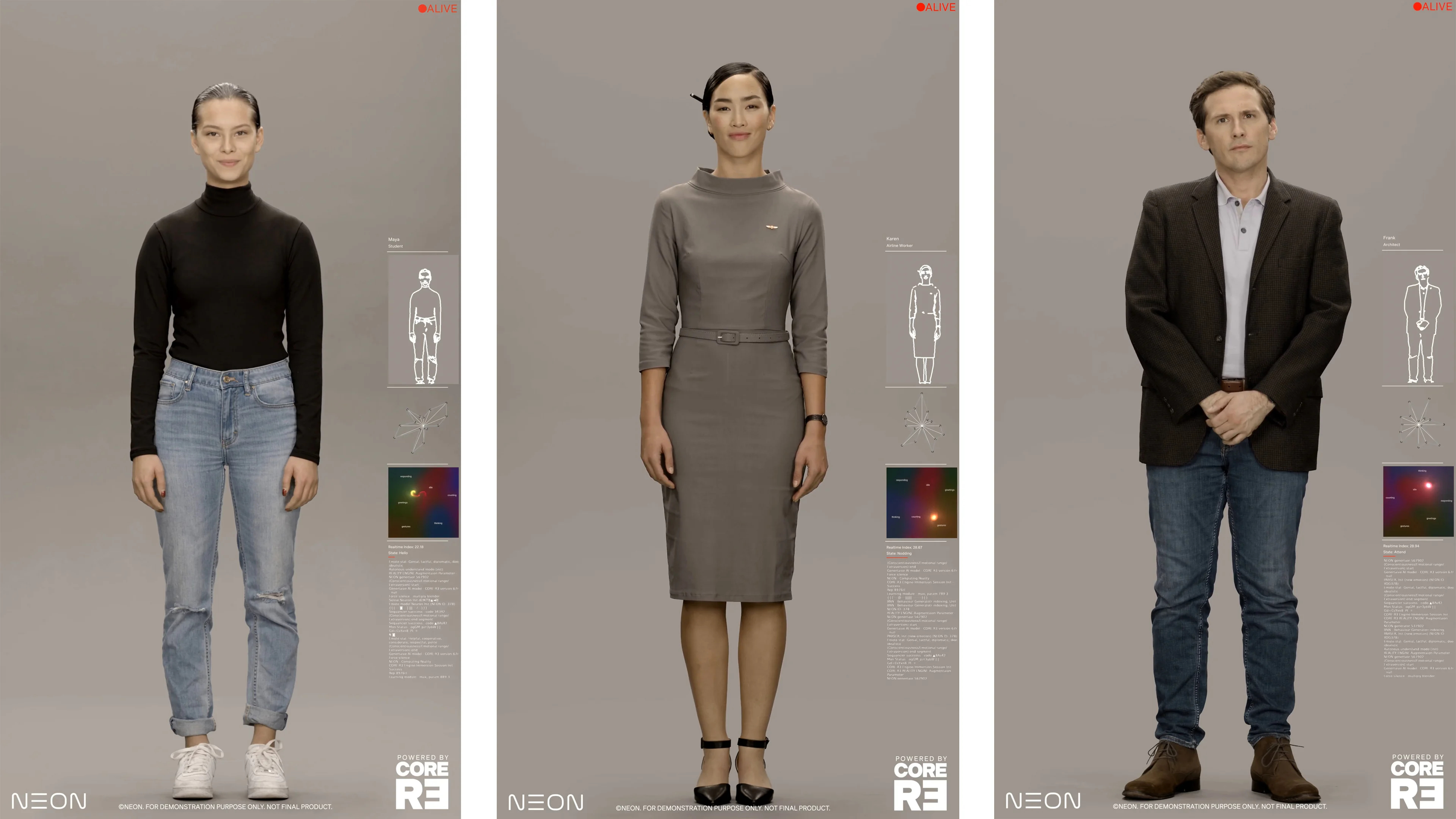
Disappointingly, what has been confirmed via The Verge and through the official teaser images is that the scenarios shown at CES and in promotional content ‘are fictionalized and simulated for illustrative purposes only.’ This likely means that the recently leaked NEON video doesn’t give us much of an insight into what STAR Labs’ ‘artificial human’ is all about or how these avatars will look like. The people shown in that video (and the images below) were actual actors and weren’t computer-generated images or the real ‘NEONs’ as the company calls its virtual avatars.
Samsung NEON will bring lifelike ‘artificial humans’ to your digital screens
It seems Samsung has found a way to bring lifelike ‘artificial humans’ to the masses. The company has been teasing a new product called NEON in recent weeks, and a leaked video showcasing what NEON can do suggests that we could soon be talking to a digital human who looks, talks, and even thinks like a real person.
NEON seems to use motion capture technology to capture an actor’s likeness and voice and then lets AI use that data to let the digital avatars “autonomously create new expressions, new movements, new dialog (even in Hindi), completely different from the original captured data”, according to Pranav Mistry, who is leading the project. Digital humans are not new – they have been seen in movies and video games for decades, but Samsung is suggesting that NEON can take things a step further and enable these digital humans to have unscripted interactions.
NEONs can’t be exact copies of an existing human being. They can share some similarities with humans but a NEON will never be an exact replica. The company claims that ‘each NEON is a unique, individual artificial human, with his/her own unique personality, just like us.’
NEON is a hype vector for now
Checking the official NEON webpage might get you all hyped for the future, but that seems to be by design. However, you don’t need an overly-critical eye to realize that there’s barely any concrete information there. The webpage is filled with buzz phrases such as ‘Inspired by the rhythmic complexities of nature‘ or ‘Virtually, Real. 100% visually real, like you and me. Existing among us from all walks of life.’
The most ambitious statement of all might be that the so-called NEONs are indistinguishable from real humans. ‘Introducing lifelike reality that is beyond our normal perception to distinguish.’ In other words, NEONs can easily pass the Turing test, according to STAR Labs, and that is quite a bold statement to make for a product that, so far, has only been ‘fictionalized and simulated for illustrative purposes only.’
But who knows?! Maybe this really is the beginning of a new era and we will be truly impressed once NEON will be ready for the masses. It’s just that, for now, STAR Labs hasn’t given us enough information to sell us on this rather confusing non-assistant AI concept. For the time being, it looks like NEON is a vision of a future enhanced by AI and powered mostly by hype.
A look at what the NEON artificial human could become
NEONs are supposed to show emotions and intelligence, with each avatar being customizable for different tasks. In STAR Labs’ vision ‘In the near future, one will be able to license or subscribe to a NEON as a service representative, a financial advisor, a healthcare provider, or a concierge. Over time, NEONs will work as TV anchors, spokespeople, or movie actors; or they can simply be companions and friends.’
Idealistically, NEONs are life-like computer-generated AI avatars indistinguishable from human beings. Exactly how they would reach the consumer market is unclear. We don’t know if they will be streamed to your smart devices from the cloud or if they would require prospective customers to purchase special local hardware.
They are, however, powered by STAR Labs’ Core R3 and SPECTRA technologies which remain somewhat of a mystery. But in short, Core R3 is a proprietary technology that can computationally create lifelike reality, while SPECTRA is an upcoming tech that will lend Intelligence, Learning, Emotions, and Memory to Core R3, according to the company. So, SPECTRA – the brain of the AI if you will – is not yet ready, but the company was confident enough to claim that it (together with Core R3) can pass the Turing test.
NEON beta is planned for release by the end of 2020
STAR Labs claims that NEON is ‘fundamentally different from deepfake or other facial reanimation techniques.’ What NEON isn’t, according to STAR Labs, is an AI assistant. It’s not an interface to the internet, not a music player. It’s ‘simply, a friend‘ and it can ‘speak it all, from Spanish to Hindi, from Japanese to English.’ NEON artificial humans are ‘more like us, an independent but virtual living being.’ Just how independent a NEON can be? We don’t know, but we might find out later this year.
It sounds like the technology is not yet ready for deployment and we don’t have a concrete launch date for the time being, but STAR Labs plans to release a beta version of NEON through select partners by the end of 2020.
The Samsung Galaxy S7 is one of Samsung’s decommissioned devices and hasn’t actually received any updates for quite a while. But the Galaxy S7 is still one of the most popular smartphones and is actively used. For S7 owners, Samsung is now surprisingly rolling out an update.
The Galaxy S7 and the Galaxy S7 edge were launched in 2016 and turned out to be a big seller for the South Korean manufacturer. The curved display of the Edge version impressed the technology world. These glorious times are long gone for the former Samsung flagships. And yet, four years after its launch, Samsung is now rolling out an important update for the Galaxy S7.
Galaxy S7 and S7 Edge receive security update
While we’ve been waiting a long time for Samsung to stop quarterly patches for the outdated Galaxy models, an update for the S7 is coming in October. Of course, the two smartphones will not receive a version update – Android 8 was the last update for the Galaxy phones. It is on this version of Google’s operating system that the models still run today.
According to Sammobile.com, Samsung has begun rolling out the September security patch, which is currently being distributed in Canada and the UK and is expected to find its way onto the Galaxy S7 range in these countries as well. The download size of the updates is 70 MB and comes as firmware versions G930W8VLS8CTI1 or G935W8VLS8CTI1, depending on whether you are using an S7 or S7 edge.
Firmware versions for the British versions of the smartphones are G930FXXU8ETI2 and G935FXXU8ETI2. The new software updates also improve device stability, fix some bugs, and improve performance.
We do not know when the update will be available here in this country. You can manually check on your Galaxy smartphone if the new firmware version has already been pushed in. To do so, navigate to “Settings” and “Software Update”.
The Samsung Galaxy S7 and S7 edge are officially no longer eligible for software updates, and when a security patch was rolled out in March, many thought it was their final one. Luckily for the owner of these two phones, a new update is now being deployed, reports SamMobile.
Galaxy S7 series is receiving the September 2020 security patch
The phones came out back in 2016 with Android 6.0, which makes them nearly five years old. In 2018, they were upgraded to Android 8, which was their last OS upgrade.
Currently, Galaxy S7 and S7 edge users in the UK and Canada are receiving the September 2020 security update. The patch weighs nearly 70MB and will likely make it to other markets soon.
Samsung recently committed to three years of Android updates, but this only applies to recent flagships, some Galaxy A series phones, and foldable handsets.
The company sometimes addresses critical vulnerabilities on unsupported older phones, and this could be the case with the Galaxy S7 and S7 edge too. Nonetheless, it’s still commendable to see Samsung support phones which do not even qualify for quarterly security updates any longer.
Per today’s report, the software update improves performance and device stability, and also irons out some bugs.
If you haven’t received the security update yet, you can check for it manually. Simply go to Settings, then navigate to Software update, and then tap Download and install.
Samsung’s SmartThings Find service, which was showcased by the company at its Unpacked event in August, has finally been officially launched. The new service, which will be available within the SmartThings app, will help users find their connected Galaxy devices.
The service uses Bluetooth Low Energy and ultra-wideband (UWB) to help you locate your misplaced Galaxy phone, tablet, smartwatch, or wireless earbuds. You will be able to use the SmartThings Find even when your Galaxy device isn’t connected to the internet. This is possible as SmartThings users can now choose to use their Galaxy phone or tablet to help other Galaxy device owners locate their devices. Samsung says devices that have been offline for 30 minutes will produce a Bluetooth Low Energy signal that can be received by other Galaxy devices nearby.
Once you report your device as lost in the SmartThings app, nearby Galaxy phone or tablet owners will be able to alert Samsung’s server about the device’s location, which will then notify you. Samsung says all SmartThings Find user data is encrypted to ensure the device location isn’t accessible by anyone except its owner.
To help you find your device easily, SmartThings Find can provide you map directions to the exact location. Once you are close to the device, you can choose to “ring” it or use the AR-based Search Nearby function.
Samsung is rolling out the new service to Galaxy phones and tablets running Android 8 or later as part of a new software update for the SmartThings app. Once you install the update, you will be able to access SmartThings Find by tapping on the banner at the bottom of the home screen in the SmartThings app.
Samsung is now rolling out its new SmartThings Find service globally.
The service helps locate lost Galaxy devices using Bluetooth Low Energy and UWB tech.
It will be available to all Galaxy users through an update to the SmartThings app.
Samsung today announced the launch of SmartThings Find. It’s a new service that uses ultra-wideband (UWB) tech and Bluetooth Low Energy (BLE) to quickly locate your misplaced Galaxy phones, smartwatches, earbuds, or tablets.
SmartThings Find was under beta testing until now. Samsung says nearly six million people have tried it out in the US, UK, and Korea. Samsung says it’s now ready for a global launch.
Starting today, Samsung will roll out a new software update for the SmartThings app with the SmartThings Find service. Once you get the feature, you’ll be able to access it by tapping the banner at the bottom of the home screen in the SmartThings app.
Users will have to complete a brief registration process, after which they’ll be able to locate their Galaxy devices, down to each individual earbud.
“Whether you dropped your Galaxy Note 20 Ultra behind the sofa, can’t remember where you stashed your Galaxy Buds Live, or left your Galaxy Watch 3 somewhere,” Samsung says SmartThings Find will guide you to your lost device with integrated map directions and the ability to ping it.
The service also features an AR-based Search Nearby function that displays color graphics that increase in intensity as you get closer to your lost device. It can even locate offline devices. Once a device has been offline for 30 minutes, it will produce a BLE signal that can be received by other Galaxy devices. If you report your device as lost via SmartThings Find, any nearby Galaxy phone or tablet that has opted to help find misplaced devices will be able to alert the Samsung server about its location.
You can see how SmartThings Find works in the video embedded above.
Availability
The service will be available on Galaxy phones and tablets running Android 8 or later and Galaxy Watch devices running Tizen 5.5 or later. It will also work with the Samsung Galaxy Buds Plus and Buds Live, but not the original Galaxy Buds. The UWB-assisted tracking feature will be available only on the Galaxy Note 20 Ultra and Galaxy Z Fold 2. Other Samsung devices will use Bluetooth-based tracking as they don’t feature UWB tech.
Samsung’s Find My Mobile app is designed to help you remotely locate your device, back up data to Samsung Cloud, delete local data, and block access to Samsung Pay in case of loss or theft. However, the app requires a working network connection to perform all of the aforementioned functions. This means that if your device loses network coverage, there’s no way for you to locate it using the app. Thankfully, Samsung is now rolling out an update for the Find My Mobile app which addresses this issue.
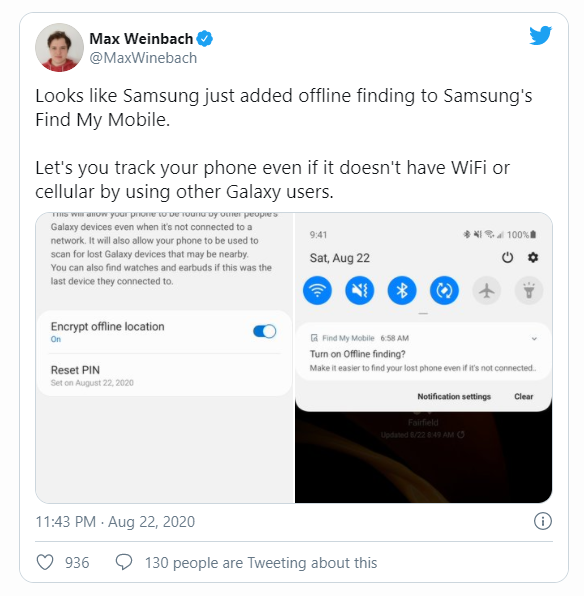
The latest update for the Find My Mobile app (version 7.2.05.44) adds a new ‘Offline finding’ feature that will let you find your phone using someone else’s Galaxy device, even when your device isn’t connected to a network. The feature will also let other users use your phone to scan for lost Galaxy devices that may be nearby. Additionally, the feature will let you find Galaxy Watches and earbuds if they were connected to your device.
The feature was recently spotted by Max Weinbach from our team, who shared the above screenshots. As you can see in the screenshots, your phone will display a notification for the new feature as soon as you receive the latest Find My Mobile update on your Samsung Galaxy device. Tapping on the notification will instantly open up the respective settings page, where you’ll be able to enable the feature by tapping on the toggle in the top right corner. You’ll also be able to encrypt your offline location from the same settings page. Once the feature is turned on, you’ll be able to find your phone even if it’s not connected to a network.
While we can’t confirm how this feature works just yet, it appears that it’s only available in the U.S. and South Korea, according to one user who dug through the SmartThings app.
You can download version 7.2.05.44 of the Find My Mobile app from the Samsung Galaxy Store or from APKMirror. Once we confirm how this feature works, we’ll update this article with those details.
Splashing your cash on a high-end, premium smartphone such as Samsung’s Galaxy S10+ is probably not an everyday occurrence, indeed, like most of us you’ll probably be aiming to get a couple of years usage out of the phone before upgrading again. With its all-glass design, large Infinity-O display with its punch-hole (that you can customize) that houses the two selfie cameras, the Galaxy S10+ isn’t going to be cheap to repair, so you’ll probably want to slap a case on it to keep it in pristine condition for as long as possible unless you have money to burn.
Samsung LED View Cover Case
Kicking the list off is Samsung with its LED View case that features built-in LED lights that show the clock and notifications as well as the ability to store a bank card in the internal slot. The dot matrix design allows for customizable notification designs while the case itself offers front and back protection for your Galaxy S10+. Available in Black, Green, or White, the LED View case can be ordered from Amazon for $59.92.
X-Doria’s Defense Shield case combines hard polycarbonate, flexible TPU, and anodized aluminum to provide military-grade drop protection (exceeding MIL-STD-810G) while the transparent rear panel ensures your choice color is displayed to all and sundry. The phone’s display is protected on flat surfaces by the raised lip and there is an integrated sound channel that amplifies the bottom speaker, redirecting sound to the front of the case. You can grab X-Doria’s Defense Shield Case from Amazon in Red or Irridescent for $29.95.
One of the arguments you hear against using a case is that it hides the design of the phone, but Speck’s GemShell Clear case you can show off your Galaxy S10+ to one and all while ensuring it’s protected against life’s knocks. The hard polycarbonate outer layer protects against scratches while the soft TPU inner absorbs the shock creat from drops and bumps. The GemShell case meets Mil-STD-810G drop-test standards and the raised bezel protects the display when the phone is laid face-down on flat surfaces. The Speck GemShell Clear case costs $27.60 from Amazon.
If you want your phone case to store your cash and bank cards, Ringke’s Wallet Case could be the case your Galaxy S10+ needs. It’s exterior is made from Premium PU Leather while the inner mount is constructed from flexible TPU material. You can store 2 cards in each of the three card slots and an internal side pocket where you can store bank notes, receipts, or even more cards. The case also has a built-in kickstand so you can enjoy hands-free viewing of your favorite content, and there is all-around protection for your phone. Available from Amazon for $12.99, you can get the Ringke Wallet Case in Navy Blue & Brown or Black & Red.
Adding some glitz to the Galaxy S10+ is OtterBox’s Symmetry Clear series of cases that features a pocket-friendly design with wraparound colors and more importantly, polycarbonate and TPU outer and inner layers of protection against bumps and scratches. The raised lip protects the display when it’s laid on a flat surface, and OtterBox offers a limited lifetime warranty on the case. The OtterBox Symmetry Clear case can be ordered from Amazon for $33.81 in the following designs – Aspen Gleam, Black, Clear, Gradient Energy, Ivy Meadow, Love Triangle, Stardust, and Tonic Violet.
The Design Armor case from SQMCase features a 360-degree rotating ring that brings extra grip and the option to be used as a built-in kickstand. The transparent rear panel is scratch-resistant while the bumper is made of TPU and guards against bumps and knocks. It should be noted that the case is not compatible with wireless charging, but the metal ring on the rear can attach to magnetic car mounts when using the phone for navigation. Amazon is selling the Design Armor case for $10.89 in Black, Blue, and Red.
Poetic’s Revolution case adds some heavy-duty protection into the mix as well as a colorful design and a built-in kickstand for hands-free viewing. The outer shell is made of scratch-resistant polycarbonate while the shock-absorbent bumper is made from a flexible TPU. There are raised lips and corners to keep your display safe when the phone is laid face down on a flat surface. Despite the heavy-duty protection, the case is still compatible with wireless charging. Available in Pink, Blue, and Black, Poetic’s Revolution case can be ordered from Amazon for $16.95.
Despite being the cheapest case in the list, Tudia’s Slim-Fit case offers dual-layer protection, a snap-on design, and maintains the slim profile of your Galaxy S10+. The TPU inner layer absorbs shock from bumps and knocks while the polycarbonate outer shell protects against scratches, and the case is compatible with wireless charging. When laid face-down on a flat surface, the raise lips prevent the display from being harmed. The Slim-Fit case from Tudia is available in Matte Black, Metallic Slate, Mint, and Rose Gold for $7.50 from Amazon.
Featuring a feather-light design, the Plyo case from UAG has an impact-resistant inner core along with air-soft corners and military-grade drop protection. The phone’s buttons are protected by tactile covers that deliver a clean click-feel and the case itself maintains compatibility with wireless charging and reverse wireless charging. Available in Glacier or Ice colors, the Plyo case from UAG can be purchased from Amazon for $39.95.
If you are after a slim case with a built-in kickstand, then perhaps the ESR Metal is the case you need. The case has a polycarbonate rear panel and a shock-absorbent TPU bump that provides military-grade drop protection while its built-in two-way kickstand allows the phone to be stood vertically or horizontally. Its raised lips guard the phone’s display when it’s laid on a flat surface and the rear camera is similarly protected. Available only in Black, the ESR Metal case costs $21.99 from Amazon.
So you’ve got one of the new Galaxy S10 series of phones… congratulations!
But how do you turn on the battery percentage so you can clearly see exactly how much juice you have left?
By default, Samsung‘s One UI only shows an icon with the battery so you only get a rough idea about the battery levels, but not an exact number. Luckily, it’s easy to fix that and add an exact percentage marker to that. Follow the few steps right below to get it done in a matter of seconds.
All three models of the Galaxy S10 come with an ultra-wide camera at the back, allowing users to take photos that can capture more of a scene without having to move back. The ultra-wide camera has a field of view of 123 degrees, which is considerably higher than the 77-degree field of view of the primary camera. However, the outer corners of ultra-wide photos can have some distortion that’s widely (no pun intended) known as the fish-eye effect.
The fish-eye effect can be highly noticeable in some scenes or be minor enough to not be a concern in others. Examples of the former include photos that have buildings in the corner of the frame, which can look quite distracting. Don’t worry, though: The Galaxy S10 comes with a built-in shape correction feature to fix that distortion.
How does it work? Well, once enabled, the shape correction feature crops out a part of the photo at the edges. Basically, the distorted edges are simply cut out of the frame, leaving you without the fish-eye effect. Check above to see how the corrected image looks vs. the non-corrected image (slide right for non-corrected image and left for the corrected version).
Shape correction for the ultra-wide camera is disabled by default, so let’s look at where you can find it on your Galaxy S10.
How to fix distortion in Galaxy S10 ultra-wide photos
Step 1: Open the Camera app on your S10e, S10, or S10+.
Step 2: Tap the gear icon on the top left of the camera UI to go into camera settings.
Step 3: Under the Pictures section of the settings, tap Save options.
Step 4: Here, enable the Ultra-wide shape correction option.
That’s it. Every ultra-wide shot you take will have the distortion on the edges automatically removed after you have taken a photo. And it’s best to have the option enabled at all times, as cutting out the distorted edges rarely has an adverse effect on an ultra-wide photo’s usefulness.
Smartphones have grown steadily bigger over the years as screens have increased in size and manufacturers have tried to balance things by shrinking down bezels so that our devices are still manageable. This is a trend that can only be pushed so far, and there’s a new design on the horizon that could bring us phones that are easy to handle one-handed and slip into a pocket, but that also fold out to give us more screen space. If folding phones are to herald a new age of creativity for smartphone design, the success of the first two big releases in this category will be paramount.
After teasing for months we finally got a better look at the Samsung Galaxy Fold recently, though it remains behind glass and off limits for hands-on testing. Meanwhile, the Huawei Mate X popped up as an alternative that we were allowed to touch. We don’t know everything about these two folding phones, but we have some details, so let’s take a look at how they measure up.
SPECS
Samsung Galaxy Fold
Huawei Mate X
Size
Unfolded: ? × ? × ?mm, Folded: ? × ? × 17 mm
Unfolded: 161.3 × 146.2 × 5.4 mm, Folded: 161.3 × 78.3 × 11 mm
Weight
TBC
295 grams (10.41 ounces)
Screen size
7.3-inch AMOLED and 4.6-inch AMOLED
8-inch AMOLED folds down to 6.6 and 6.3 inches
Screen resolution
2,152 x 1,536 pixels and 1,960 x 840 pixels
2,480 x 2,200 pixels and 2,480 x 1,148 pixels, 2,480 x 892 pixels
Operating system
Android 9.0 Pie
Android 9.0 Pie
Storage space
512GB
512GB
MicroSD card slot
No
Yes
Tap-to-pay services
Google Pay, Samsung Pay
Google Pay
Processor
Qualcomm Snapdragon 855 (TBC)
Kirin 980
RAM
12GB
8GB
Camera
Triple-lens ultra wide-angle 16-megapixel, standard 12MP with OIS and variable aperture, and telephoto 12MP with OIS rear, 10MP front closed, 10MP and 8MP front open
Quad-lens ultra-wide-angle 16-megapixel, standard 40MP with OIS, 8MP telephoto, and TOF camera rear
Video
2160p at 60 frames per second, 1080p at 240 fps, 720p at 960 fps
2160p at 30 frames per second, 1080p at 30 fps
Bluetooth version
Bluetooth 5.0
Bluetooth 5.0
Ports
USB-C
USB-C
Fingerprint sensor
Yes (side)
Yes (side)
Water resistance
TBC
TBC
Battery
4,380mAhQuick Charge 2.0 (18W)
Qi wireless charging
4,500mAhHuawei SuperCharge (55W)
App marketplace
Google Play Store
Google Play Store
Network support
AT&T, T-Mobile
TBC
Colors
Cosmos Black, Space Silver, Martian Green, or Astro Blue
When Samsung showed off the Galaxy Fold, it didn’t specify the chip inside, merely calling it a 7nm processor, but given that it’s using the Qualcomm Snapdragon 855 in the S10 range, and doesn’t seem to have developed a 7nm chip itself yet, we’re going to assume it’s the Snapdragon 855 here. It goes up against Huawei’s Kirin 980 in the Mate X. These processors offer similar performance, but benchmark tests suggest the Qualcomm chip has a very slight edge and may be a touch better for mobile gaming.
Samsung has also thrown in a whopping 12GB of RAM, which seems excessive until you consider that the Samsung Galaxy Fold has two screens to transition between and enough screen space for you to use three apps simultaneously, as it showed in the demo. Huawei has gone with 8GB of RAM in the Mate X, which will likely be plenty. Both have 512GB of storage, but only the Huawei Mate X has a MicroSD card slot for expansion.
There is only 120mAh difference in the battery sizes, but the bigger Huawei Mate X battery can also be charged up faster thanks to Huawei’s 55W SuperCharge, which can take the battery from zero to 85 percent in just 30 minutes. By contrast, Samsung has stuck with Qualcomm’s older Quick Charge 2.0 standard, which goes up to 18W. When you plug in the Galaxy Fold, it is going to take a lot longer to charge than the Mate X. The Samsung Galaxy Fold does also support Qi wireless charging, though, which is lacking in the Huawei Mate X.
DESIGN AND DURABILITY
The designs of these two folding phones are very different. While Samsung has opted to go for a separate cover display which you will use when the main display is folded up, Huawei has gone with a single folding screen. Both fold down to phone size like a book, but Huawei’s screen is the cover, whereas Samsung’s Infinity Flex display is tucked away inside. This design allows the Huawei Mate X to go from an 8-inch screen with a camera module on the back to a 6.6-inch screen with the camera on the back or a 6.3-inch screen with the camera facing you (the device switches on whatever one you’re looking at automatically). The Huawei Mate X is 11 mm when folded.
Samsung’s design necessitates a notch on the main 7.3-inch display for a dual-lens front-facing camera, then there is a triple-lens camera on the back, and another single-lens camera on the front with the 4.6-inch cover display. The Samsung Galaxy Fold is 17 mm when folded.
These are both expensive, fragile-looking devices, and case manufacturers really have their work cut out, but there’s no obvious difference between them in terms of durability. Neither has any stated IP rating for water resistance.
Not only does Huawei’s design mean more screen real estate, it also seems like a more elegant solution to us.
DISPLAY
You have a 4.6-inch display with a 7.3-inch display inside in the Galaxy Fold or an 8-inch display that folds down to a 6.6-inch display on one side and a 6.3-inch display on the other in the Mate X. Both the Huawei Mate X and the Samsung Galaxy Fold have AMOLED screens with very similar resolutions and the differences in size translate to almost identical pixel densities, so they are both plenty sharp enough. Samsung has an edge in display quality in the smartphone market generally, but it’s not yet clear if this translates to the folding category. Given that the real raison d’être here is a larger display, we think the Huawei Mate X has an obvious edge.
CAMERA
On paper, the Samsung Galaxy Fold has a whopping six lenses, with a triple-lens main camera on the back, a dual-lens front-facing camera in a notch at the top of the main screen, and a single-lens front-facing camera above the cover screen. The main camera looks to be the same as the triple-lens setup in the S10 range which combines a 12-megapixel standard lens with a variable aperture (f/1.5 to f/2.4), an ultra wide-angle 16-megapixel lens with a 123 degree field of view and an f/2.2 aperture, and a 12-megapixel telephoto lens with an f/2.4 aperture that allows for 2x optical zoom.
The Huawei Mate X has one quad-lens camera module that combines a 40-megapixel standard lens, an ultra-wide-angle 16-megapixel lens, an 8-megapixel telephoto lens, and a Time of Flight (TOF) camera that can map depth by measuring the distance between the sensor and objects. We haven’t had a chance to try out the camera suites on either device, so we can’t call a winner here, but both seem to be very well-equipped.
SOFTWARE AND UPDATES
You can expect to find Android 9.0 Pie on both devices, but the Samsung Galaxy Fold will have the One UI on top while the Huawei Mate X features EMUI 9.1.1. Both offer a range of handy extras and some clutter, but we prefer One UI on normal phones. Much depends on how the software handles screen switching and multitasking, which we simply can’t say much about until we get some proper time with these folding phones. The way Android is designed, most apps and games should adapt to the different sizes automatically.
Sadly, both Huawei and Samsung have a poor track record with Android updates and both tend to take quite a few months to update their devices when a new version comes out.
SPECIAL FEATURES
The folding screens are obviously the real standout features, but both manufacturers like to offer a lot of extra value. Samsung showed off the Multi-Active Window with three apps open at once and talked about App Continuity enabling you to switch screens seamlessly. You’ll also get support for the Dex desktop mode, Bixby, Samsung Pay, Knox, Health, and a few other bits and pieces.
Huawei seems to be sticking with Android’s usual split-screen mode, but the Mate X does support Mirror Shooting when folded, enabling subject and photographer to preview shots in real time. There’s also the impressive 55W SuperCharge, which will enable that incredible zero to 85 percent wired charging in just half an hour.
PRICE AND AVAILABILITY
The Samsung Galaxy Fold will come in 4G LTE or 5G versions starting from $1,980. The 5G version will presumably be more expensive. We know that AT&T and T-Mobile will carry it, but other carriers may pick it up. It will be available from April 26 in the U.S. and May 3 in Europe.
The Huawei Mate X will only come in a 5G version costing 2,300 euros (around $2,600). It will be released around the world when carriers and 5G networks are ready, which is likely to be early summer this year. There’s no word on a U.S. release, which is unsurprising given Huawei’s difficulties in the States.