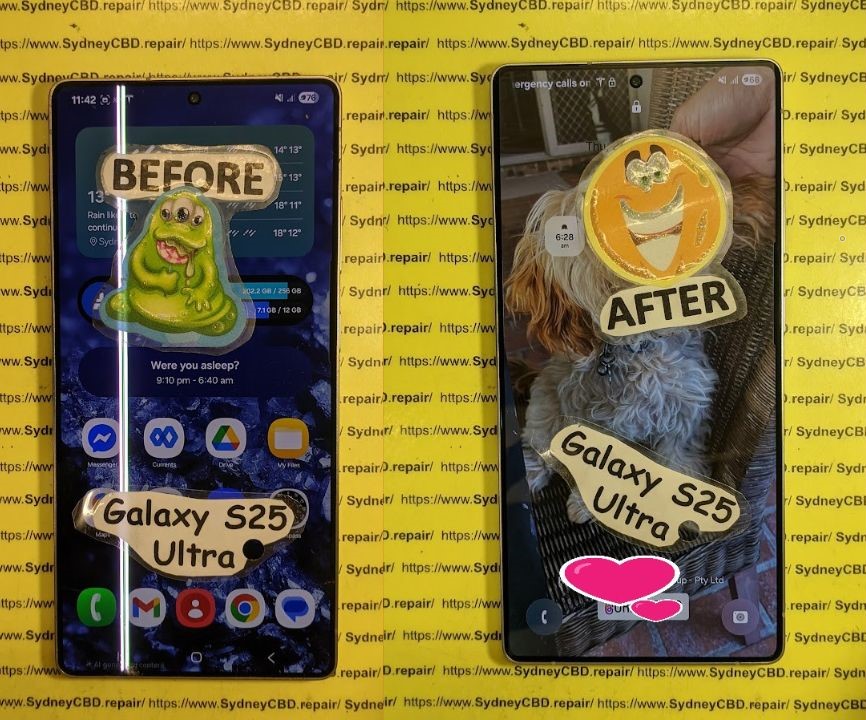
Extreme Phone Restoration: Transforming a Water-Damaged S25 Ultra

Extreme Phone Restoration: Transforming a Water-Damaged S25 Ultra + 7 Proven Techniques
Introduction
Smartphones have become an essential part of our daily lives, and few devices combine cutting-edge technology and premium features like the Samsung S25 Ultra. However, even the most advanced smartphones are vulnerable to water damage, which can strike unexpectedly—whether it’s a spilled coffee, a sudden rainstorm, or a drop into a sink. Water damage can cause everything from minor glitches to complete device failure, leaving users frustrated and unsure of their next steps.
The good news is that water-damaged S25 Ultra devices can often be restored with the right techniques, tools, and professional guidance. This comprehensive guide will walk you through 7 proven strategies for reviving a water-damaged S25 Ultra, covering immediate actions, advanced restoration methods, component replacement, and preventive measures. By following these steps, you can maximize your chances of rescuing your device, protecting your investment, and extending its lifespan.
Whether you are a DIY enthusiast or prefer professional repair services, this guide combines practical advice, technical insights, and expert recommendations to help you restore your S25 Ultra to full functionality. From understanding the mechanics of water damage to step-by-step recovery processes, you’ll learn everything you need to confidently tackle water-related issues and prevent future mishaps.
Water damage is one of the most dreaded mishaps for any smartphone owner, and the Samsung S25 Ultra is no exception. While it boasts high-end specifications and a robust design, liquid exposure can lead to serious functional issues. In this guide, we explore 7 proven techniques to restore a water-damaged S25 Ultra, from immediate actions to advanced restoration methods, ensuring you maximize your device’s lifespan and functionality.
Understanding Water Damage in Smartphones
Water damage is not just about liquid making contact with your device; it’s about the short-circuits, corrosion, and oxidation that follow. Smartphones, including the S25 Ultra, have intricate circuits that are highly sensitive to moisture. Understanding how water interacts with these components is the first step toward effective restoration.
Common Causes of S25 Ultra Water Damage
- Accidental Spills: Coffee, soda, and other liquids are common culprits. Even small splashes can seep into ports and seams.
- Submersion: Dropping the device in water—bathtubs, pools, or puddles—can cause immediate short circuits.
- Condensation: Environmental changes, such as moving from cold air-conditioning into a hot room, can cause internal condensation.
Symptoms of Water-Damaged Devices
Water-damaged devices may not show visible signs immediately. Watch for these common indicators:
- Flickering or unresponsive screens
- Battery draining faster than usual
- Difficulty charging or connecting to peripherals
- Random shutdowns or restarts
- Corrosion spots visible near ports or SIM tray
Early detection significantly increases the success rate of restoration.
Immediate Actions After Water Exposure
The first few minutes after water exposure are critical. Acting fast can prevent permanent damage and improve recovery chances.
Power Off Immediately
If your S25 Ultra comes into contact with water, turn it off immediately. Powering it on can cause short circuits and permanently damage internal components. Avoid pressing buttons repeatedly, as this can worsen corrosion.
Removing the Case and Accessories
Remove any protective cases, screen protectors, or external accessories. Open the SIM tray and memory card slot to allow airflow and prevent trapped moisture. This simple step improves drying efficiency and prevents long-term damage.
Drying Techniques
Several methods can help extract moisture safely:
- Air Drying: Place the phone in a dry, cool area with good ventilation. Avoid direct sunlight or heat sources.
- Silica Gel Packs: Place the device in a container with silica gel packs to absorb moisture efficiently.
- Avoid Rice: Though popular, rice is less effective and can leave dust particles inside ports.
Professional drying solutions, like specialized dehumidifying chambers, provide the best results for critical devices.
Advanced Restoration Techniques
For serious water damage, professional restoration methods go beyond simple drying. These techniques can revive your S25 Ultra and prevent long-term failures.
Disassembly and Cleaning
Carefully disassembling the S25 Ultra allows technicians to clean internal components thoroughly:
- Remove the back panel and battery
- Inspect for corrosion or oxidation on the motherboard
- Use soft brushes or specialized tools to remove debris
Disassembly should be done by trained professionals to avoid voiding warranties or causing further damage.
Using Isopropyl Alcohol for Cleaning
Isopropyl alcohol (90% or higher) is highly effective in removing moisture and cleaning corrosion:
- Dip a soft brush or swab in alcohol
- Gently clean affected areas, especially connectors and ports
- Let the alcohol evaporate completely before reassembly
This method prevents conductive residues and minimizes long-term electrical issues.
PCB Drying and Reflow Techniques
Printed circuit boards (PCBs) can suffer micro-corrosion that may not be visible. Professionals may use low-temperature reflow techniques to restore connectivity:
- Specialized ovens or infrared tools heat the PCB
- Heat causes solder points to reflow, re-establishing broken connections
- This is a delicate process requiring precise equipment and expertise
Repair and Component Replacement

After water damage, some components may require replacement to restore full functionality.
Screen and Digitizer Replacement
Water exposure can cause flickering screens, dead pixels, or touch sensitivity loss. Steps include:
- Removing the damaged display
- Cleaning the surrounding frame
- Installing a new screen and digitizer assembly
- Testing for touch and display responsiveness
Professional replacement ensures the device retains its original resolution and responsiveness.
Battery and Charging Port Restoration
Water can corrode battery connectors and charging ports, leading to erratic charging:
- Check for green or white corrosion deposits
- Clean with isopropyl alcohol
- Replace the battery if swelling or inefficiency is observed
- Replace the charging port if connectors are damaged
Camera and Sensor Repair
Water can fog camera lenses and damage sensors, affecting photos and Face ID functionality:
- Disassemble camera modules carefully
- Clean lens and sensor surfaces
- Replace damaged modules if necessary
Maintaining camera integrity ensures your S25 Ultra continues to capture high-quality images.
Preventing Future Water Damage
Prevention is always better than restoration. Consider these measures to safeguard your S25 Ultra:
Protective Accessories
- Waterproof Cases: Certified IP68 cases protect against full submersion
- Port Plugs: Prevent dust and moisture from entering charging ports
- Screen Protectors: Some advanced protectors repel liquid and reduce surface damage
Behavioral Precautions
- Avoid using phones near pools, sinks, or bathtubs
- Keep your phone in a stable temperature environment
- Consider insurance or extended warranties that cover accidental water damage
Professional Repair vs DIY
Water damage restoration is delicate. DIY attempts can sometimes worsen the situation.
Choosing a Certified Repair Centre
Certified technicians, such as those at Sydney CBD Repair Centre, offer:
- Genuine parts replacement
- Expert handling of complex repairs
- 90-day warranty on repairs
Costs and Warranty Considerations
- Water damage repairs vary from $150 to $400+, depending on severity
- Professional repairs often save money long-term by preventing repeated failures
- DIY attempts may void warranties and reduce resale value
FAQs About S25 Ultra Water Damage
1. Can my S25 Ultra survive water immersion?
Yes, the S25 Ultra has some water resistance (IP68), but prolonged exposure can cause internal damage. Immediate action is crucial.
2. Is it safe to charge a wet phone?
Never charge a device that has been exposed to water until fully dried and inspected, as this may cause short circuits.
3. How long should I wait before turning the phone back on?
At least 24–48 hours of drying time is recommended, or longer if internal moisture persists.
4. Will a DIY rice method fix water damage?
Rice can absorb some moisture but is less effective than silica gel packs or professional drying methods.
5. Can water damage cause long-term battery problems?
Yes, corrosion may cause irregular battery performance, requiring replacement.
6. Should I attempt internal cleaning myself?
Only trained professionals should perform internal cleaning to avoid further damage and voiding warranties.
Conclusion

Restoring a water-damaged Samsung S25 Ultra is challenging but achievable with quick action, professional restoration techniques, and preventive habits. From drying and cleaning to component replacement, each step maximizes the chance of returning your device to peak performance. While DIY measures may help, consulting a certified repair centre like Sydney CBD Repair Centre ensures reliability, genuine parts, and expert care.
Your S25 Ultra doesn’t have to be a lost cause—extreme phone restoration techniques can bring it back to life. Protect your device moving forward, and enjoy the full functionality you invested in.
David from Sydney CBD Repair Centre – The Best place to fix mobile phones as 6 Years In A Row! Top Mobile Phone Repair In Sydney. More than 2000 Positive Reviews on Google and Same Day Repairs.
We take pride in delivering exceptional repair services for all major phone brands including Apple, Samsung, Google, and more. Our expert technicians use only genuine parts and offer 90days warranty on repairs. Located in the heart of Sydney CBD, we’re your one-stop solution for all mobile device repairs.
Our commitment to excellence has earned us the trust of thousands of satisfied customers. Whether it’s a cracked screen, battery replacement, or water damage repair, we handle it all with professional care and expertise. Walk in today and experience why we’re Sydney’s #1 choice for mobile phone repairs.
Visit us for:
✓ Same Day Express Repairs
✓ Genuine Parts Guarantee
✓ Professional Technicians
✓ Competitive Pricing
✓ 2000+ 5-Star Google Reviews
✓ 6-Time Award Winner for Best Phone Repairs
Sydney CBD Repair Centre – Where Quality Meets Reliability.
Call: +61280114119
Website: https://SydneyCBD.repair/locate-us