Apple releases new updates for its software platforms every year, and the highlight of 2024 is Apple Intelligence. Apple’s suite of AI features is now available for beta users. But when will Apple Intelligence release for the public? Here’s when to expect AI to arrive on your iPhone.
iOS 18.1 will kick off Apple Intelligence rollout in October
Apple Intelligence is coming to compatible devices in iOS 18.1, iPadOS 18.1, and macOS Sequoia 15.1.
Before that happens, Apple will first release its major new OS versions following the iPhone 16 introduction. iOS 18, iPadOS 18, and macOS Sequoia are expected to release in mid-to-late September, bringing a host of new features and changes—but no Apple Intelligence.
The first Apple Intelligence features will arrive in updates to those OS versions, roughly a month afterwards.
Fortunately, Apple’s history gives us a solid expectation for when to expect iOS 18.1.
Here is Apple’s recent timing for x.1 software updates:
iOS 17.1: October 25
iOS 16.1: October 24
iOS 15.1: October 25
The pattern is very clear.
If Apple keeps to tradition, iOS 18.1 will release near the end of October, and Apple Intelligence along with it.
October 25 is unlikely to be the exact date this year, because it’s a Friday. Generally Apple doesn’t debut big software updates on Fridays.
More likely, Apple will target October 23 or 24, or possibly Monday, October 28.
In any case, a debut by the end of October seems highly likely considering the pattern of past years.
Staggered rollout of Apple Intelligence features
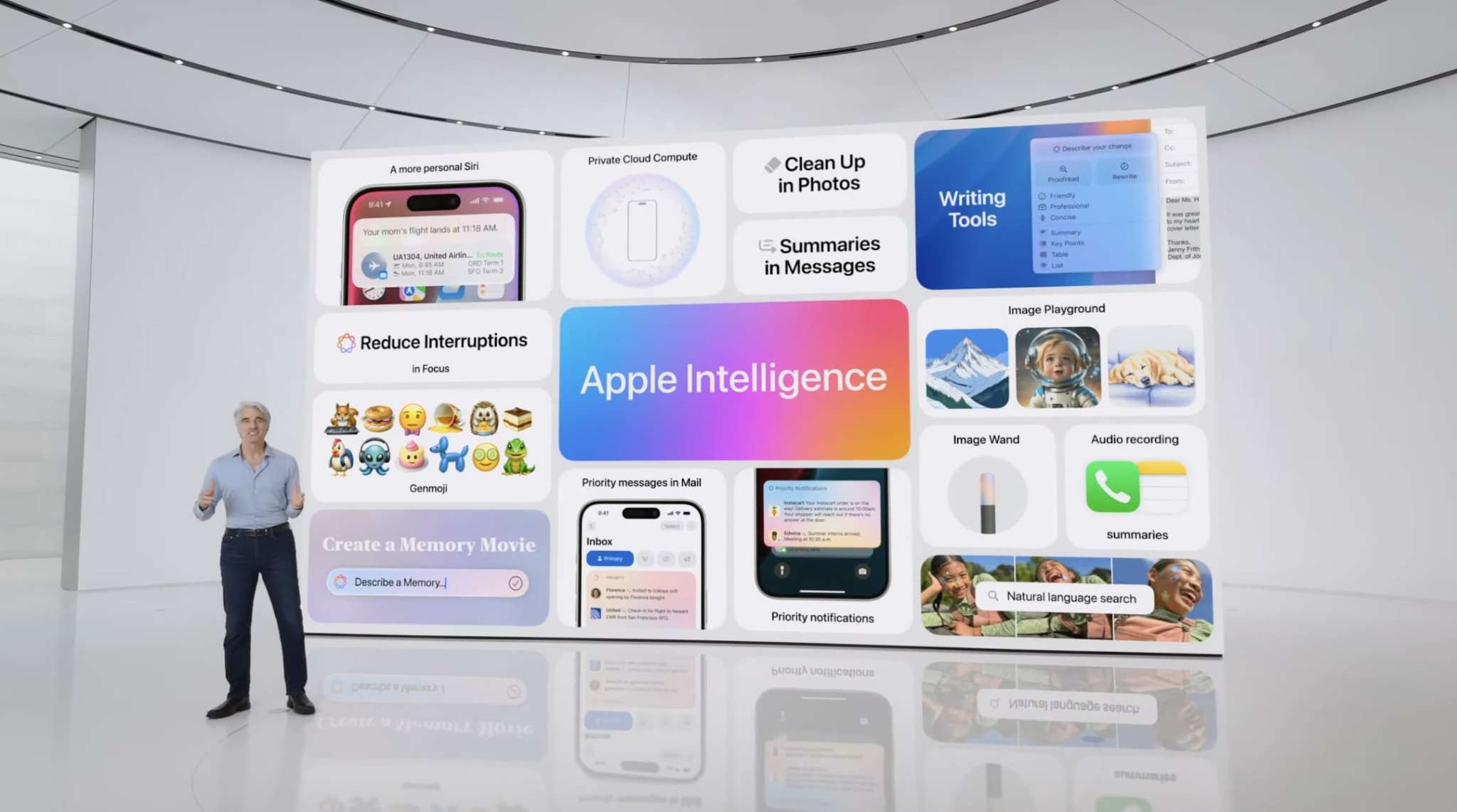
When Apple Intelligence first arrives at the end of October, only certain features will be included.
Currently in the iOS 18.1 beta, the following AI features are included:
The new Siri with a subset of its AI capabilities
Writing tools such as proof and rewrite
Memory movie generation in Photos
Smart reply in apps like Messages and Mail
Intelligent summaries for notifications
Webpage summaries in Safari
Priority messages in Mail
Natural language search in Photos
It is possible more AI features will make their way into iOS 18.1 in future betas, but currently this is everything offered.
Which leaves a lot of question marks for other AI features.
Apple’s ChatGPT integration is likely coming in iOS 18.2 in December. Image generation tools like Genmoji and Image Playground are big unknowns. They might make it into 18.1, or get pushed to 18.2 or even later.
Several new Siri capabilities won’t debut until 2025. Then, not long after, it will be time for WWDC 2025. That event will undoubtedly bring announcements of all-new Apple Intelligence features to come in iOS 19.
Is your device compatible with Apple Intelligence?
Not every device that can install iOS 18.1, iPadOS 18.1, and macOS Sequoia 15.1 will be getting Apple Intelligence.
Due to the high level of computing power needed to run AI features, Apple Intelligence is limited to a select number of modern devices. These include:
iPhone 15 Pro and Pro Max
iPads with an M1 chip or later
Macs with an M1 chip or later
It is also expected that all iPhone 16 models will also support Apple Intelligence, including the standard 16 and 16 Plus.
Wrap-up
When Apple Intelligence arrives in iOS 18.1, iPadOS 18.1, and macOS Sequoia 15.1, it will just be the beginning.
Apple plans to label its AI features as ‘beta’ even after their public release. That’s because there will be improvements and upgrades regularly in the works.
But you have to start somewhere.
The end of October is when the launch of AI on your iPhone appears set to begin.
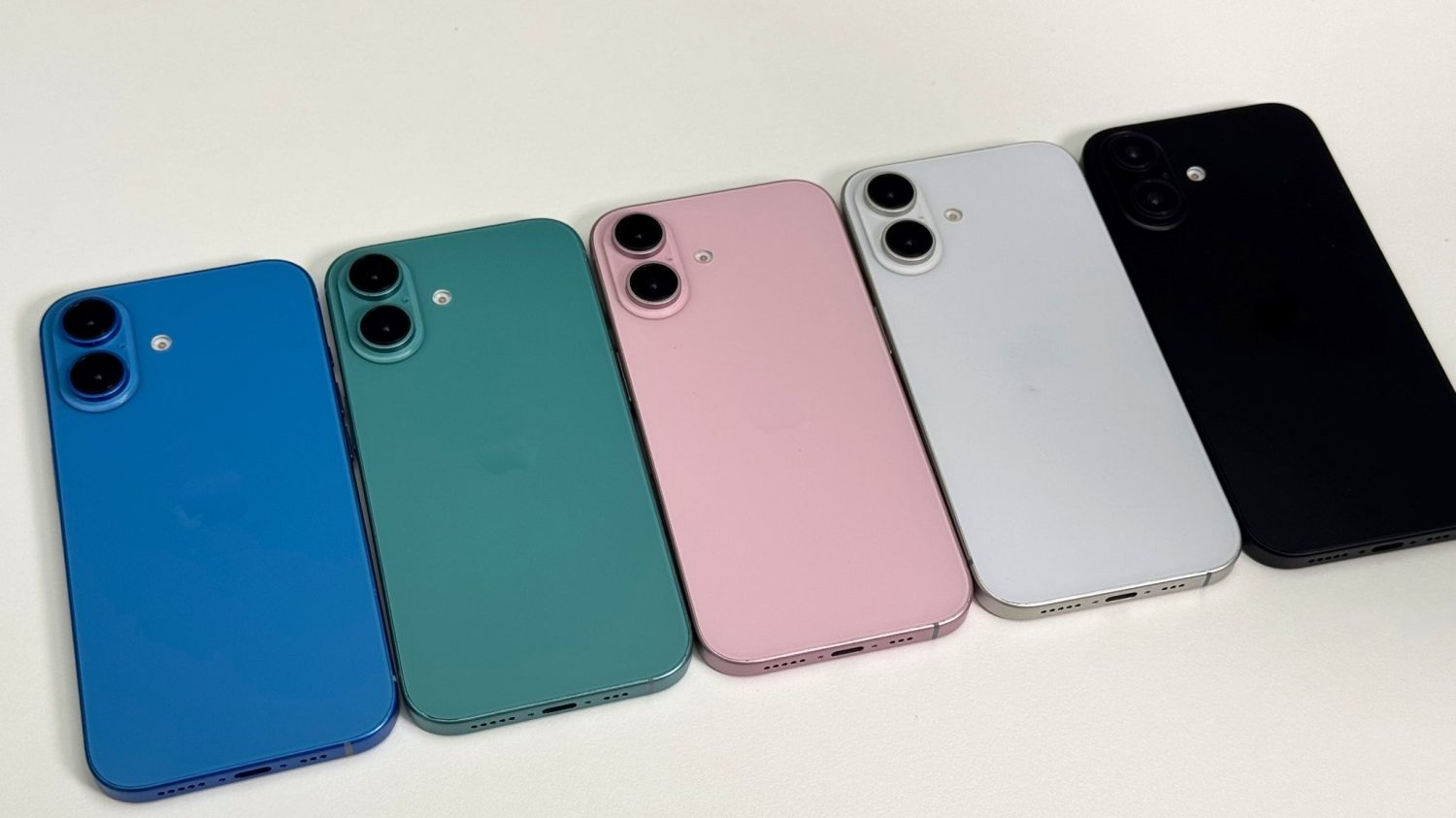
Last week, an image gave us our first clear look at all of the planned iPhone 16 color options. Now, a new video from Aaron Zollo on YouTube gives us an even more detailed look at dummy units showing the five different colors for the iPhone 16 and iPhone 16 Plus.
Hands-on with iPhone 16 colors
The iPhone 16 and iPhone 16 Plus are expected to be available in these colors. Compared to the iPhone 15 lineup, Apple is ditching yellow in favor of white.
Blue
Pink
White
Black
Green
The video also gives us yet another look at the new vertically aligned camera layout, which is expected to enable spatial video capture for the iPhone 16 models.
Verdict
The bar is very low, but these new iPhone 16 colors look significantly better than pastel-style iPhone 15 colors. It’s like Apple refilled the ink in their printer and decided to give us bolder, more saturated colors for the first time in several years.
Of these five colors, I think the green looks especially nice. The blue is a close second. I have an iPhone 15 Plus that is allegedly blue, but the color is so faint it’s hard to even tell it’s blue in most lighting environments.
Here’s hoping Apple has plans to give at least some of the iPhone 16 Pro colors a similar treatment this year.
It’s August, so we’re officially only a month away from iPhone event season. Apple has debuted its new iPhone every September for years. But when, exactly, is the iPhone 16 event happening? Here’s what to expect.
iPhone events in recent years
Over the past three years, here is when Apple has announced its latest iPhone:
2023: Tuesday, September 12
2022: Wednesday, September 7
2021: Tuesday, September 14
Another important data point to keep in mind is the proximity of these dates to Labor Day. The US holiday moves around from year to year, but it’s always the first Monday in September.
In 2023, Apple’s iPhone events was 8 days after Labor Day. In 2022 it was only two days after. While in 2021 it was again 8 days later.
Based on this history, we can observe that Apple favors Tuesdays and Wednesdays as iPhone event days. Tuesdays are preferred, but it pushes the event to Wednesday when it happens the same week as Labor Day.
Essentially, the company wants a full business day to happen in a new week before the iPhone event.
So what will Apple do this year with the iPhone 16 event?
Date for Apple’s iPhone 16 event
2023 and 2021 present an identical pattern. Both iPhone events took place on the second Tuesday of the month, a full 8 days after Labor Day.
Following this pattern, Tuesday, September 10 is the most likely date for the iPhone 16 event.
2022 did deviate from the pattern of adjacent years, but here’s why September 10 is still the most likely option for 2024.
Labor Day is especially early this year. Landing on September 2, it’s almost the earliest it could possibly be.
That makes Wednesday, September 4 unlikely. Especially because in parts of the US, schools won’t have even kicked off the fall semester yet. In New York City, for example, the first day of school is Thursday, September 5.
Apple probably won’t hold its biggest event of the year when plenty of people are still transitioning out of vacation mode. It has happened before, but Apple then reverted to a later date the following year.
Because of Labor Day being so early, and some schools starting so late, an event the first week of September is probably out.
Which again supports Tuesday, September 10 as iPhone 16 event day.
When to expect the iPhone 16 to release
If Apple announces the iPhone 16 on September 10, it will likely go on sale for pre-orders a few days later on Friday, September 13.
The iPhone 16 lineup should then arrive in users’ hands as soon as Friday, September 20.
The latest rumors indicate we’ll get some nice new color options with the iPhone 16 Pro and iPhone 16, plus a variety of camera upgrades, bigger screens for the Pro models, and more.
In addition to new details about next year’s iPhone 17 lineup, a rumor today has shed more light on what to expect from the next-gen iPhone SE. The so-called iPhone SE 4 will reportedly feature a larger display, a significantly upgraded camera, an OLED screen, and more.
iPhone SE 4 rumored specs
Today’s rumor comes from Ice Universe on Weibo, a source that has previously leaked accurate details about upcoming iPhone features. Here’s what the account says to expect from the iPhone SE 4, apparently set to launch sometime in spring 2025.
Display: 6.06-inch OLED screen with a notch and 60Hz refresh rate
Chipset: A18
RAM: Either 6GB or 8GB
Rear camera: Single 48MP lens
Design: Aluminum frame
Biometrics: Face ID
Port: USB-C
Price: $499-$549
iPhone SE 4 CAD render / source: 91mobiles
The iPhone SE 4 is expected to feature an iPhone 14-style design. This means it will ditch the Home button in favor of an edge-to-edge display with a notch.
As a refresher, the current iPhone SE was introduced in 2022 with a design that resembles the iPhone 8. It features a 4.7-inch display, the A15 Bionic chip, a 12MP Main camera, and a 7MP front-facing camera.
With those specs in mind, it’s clear the forthcoming iPhone SE 4 will be a major upgrade. The question, of course, is pricing. The current iPhone SE starts at $429 for 64GB of storage. If today’s rumor turns out to be true, we’d be looking at a price increase of as much as $120.
The iOS 18 public beta is now rolling out for download. This means anyone can now try out iOS 18 and all of its new features. The update includes a broad range of new features for iPhone users, such as new customization options, upgrades to Messages, a completely redesigned Photos app, and much more.
Head below for our full recap of everything new in iOS 18…
How to install iOS 18 public beta
If you’re interested in signing up for Apple’s public beta testing program, you can do so via Apple’s website right here. Apple’s new software version will be complete in the fall, at which point it will be released to the general public. For the time being, testers should still expect performance and stability issues when running the iOS 18 public beta on primary devices.
What’s new in iOS 18?
Home screen customization
iOS 18 adds multiple new ways for users to customize their iPhone’s Home Screen. You can now place app icons and widgets anywhere on your Home Screen grid. This allows you to leave blank spaces and have full control over where your icons and widgets appear.
iOS 18 also now lets you tint your Home Screen app icons and widgets. You can choose any color you want, or opt for a new dark mode option that turns almost all of Home Screen app icons dark.
New Control Center features
Control Center has gotten a significant overhaul in iOS 18, giving you full control (ha) over the layout and organization of your experience. You can have multiple pages in Control Center, which you can easily swipe between.
There is also a new API that allows third-party apps to donate controls to the new Control Center interface. For example, the Ford app could adopt this API and offer Control Center controls for things like starting your car, opening your trunk, and more.
Change Lock Screen controls
As part of the new Control Center revamp, iOS 18 now lets you customize the two controls that appear on your iPhone’s Lock Screen. You can replace the flashlight and camera buttons with any of the new Control Center controls, even including third-party controls.
All of these controls can also be assigned to the Action button on the iPhone 15 Pro.
New Messages features
iOS 18 includes multiple new features for the Messages app. First, there are new text effects that can be applied to individual words in messages. These options include big, small, shake, nod, explode, ripple, bloom, and jitter. You can also now add formatting like bold, underline, italics, and strikethrough to any letter, word, or phrase in iMessage.
The Tapbacks system has been revamped in iOS 18, so you can react to messages using emojis or stickers.
Scheduled messages are also now supported in Messages with iOS 18. You can write a message and then choose to have it delivered in the future, such as when you know the other person will be awake.
RCS support
Speaking of the Messages app, iOS 18 includes support for RCS messaging for the first time. RCS unlocks better cross-platform communication between iPhone and Android devices. This includes things like read receipts, typing indicators, better group chat support, high quality photos and videos, and more.
RCS support will vary from carrier to carrier around the world. Availability will likely expand as we get closer to iOS 18’s general release in September.
iPhone Mirroring
In conjunction with macOS Sequoia (which is also now available in public beta), iOS 18 adds a new iPhone Mirroring feature for accessing your iPhone via your Mac. This feature allows you to interact with your iPhone, receive push notifications, and move files between both devices.
iOS 18 revamps the experience of using screen sharing with SharePlay. Now, you can draw on someone’s screen so they can see what you can do on theirs, or you can control their screen and take actions yourself.
If you provide a lot of iPhone or iPad tech support, this feature will be a lifesaver for you.
All-new Photos app
The Photos app is getting a major revamp in iOS 18, with Apple describing this as the biggest-ever update to the app. There are no more tabs at the bottom of the Photos app, and instead, it features a unified layout that has been simplified into a single view.
One tent pole of the Photos app is a series of collections. Apple explains that your library is organized by theme, letting you browse by Recent Days, People & Pets, Trips, on a map, and more. The new Photos app is also highly customizable, so you can rearrange and pin different Collections, filter out specific types of content (like screenshots), and more.
The search functionality in the iOS 18 Photos app has been completely revamped as well. You can now search by combinations of people, places, and more.
New features in Safari
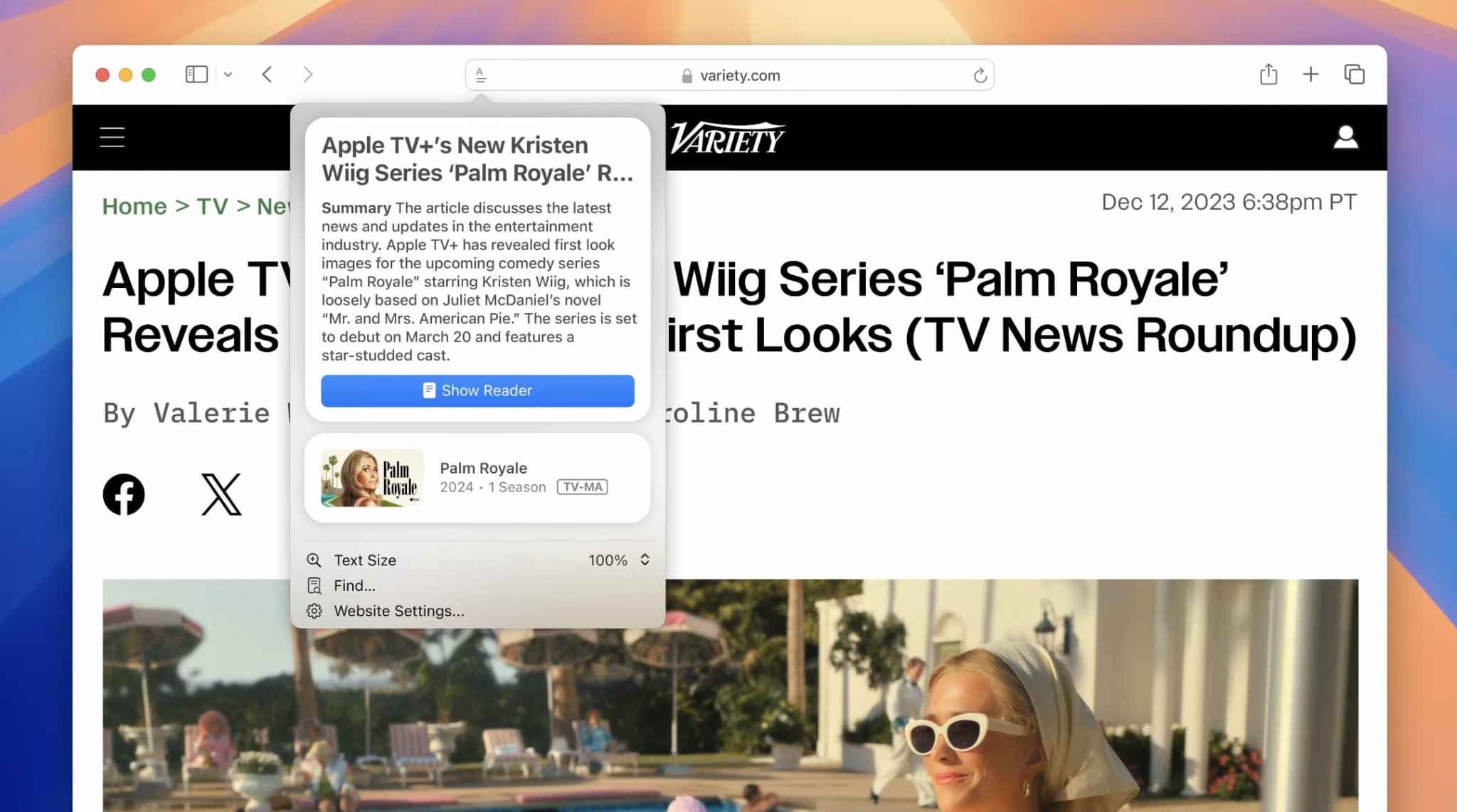
iOS 18 brings a new Highlights feature to Safari, which Apple says uses machine learning to surface key information from the webpage you’re visiting:
Summary: Review a summary of an article to get the gist before reading on.
Location: See the location of a restaurant, hotel, or landmark.
People: Expand your knowledge about a person you’re reading about.
Music: Listen to an artist’s hit track right from an article about the song or album.
Movies and TV shows. Check out a movie or TV show or add it to your watch list.
New Passwords app
Apple has finally given us a dedicated Passwords app. This new app, included in iOS 18, iPadOS 18, macOS Sequoia, and visionOS 2, gives easy access to all of your passwords, passkeys, and other login information. The app also stores your Wi-Fi passwords.
New features for Apple Notes
The Notes app has added a number of new features with iOS 18:
In-line math support: Enter an expression and have it solved instantly while typing.
Collapsible sections: Simplify and hide text with collapsible section headers, making it easy to manage your most text-heavy notes.
With the new highlight style feature, it’s easier to quickly mark up your notes and make text stand out.
Gaming improvements
Apple continues its efforts to make the iPhone a gaming powerhouse with iOS 18:
Maximize gameplay performance: Game Mode minimizes background activity to sustain consistently high frame rates for hours of continuous gameplay.
More responsive AirPods and controllers: Game Mode dramatically reduces audio latency with AirPods, and makes wireless game controllers incredibly responsive.
Apple Wallet upgrades
The Wallet app is getting noticeably better with iOS 18 this year. These upgrades are headlined by a new Tap to Cash feature. By simply bringing your phone close to a friend’s iPhone, you can send money instantly – transferring from your Apple Cash account to theirs.
Apple Wallet’s support for event tickets has also been redesigned in iOS 18, as Apple explains:
Event tickets in Apple Wallet receive their greatest transformation ever, with a beautiful new design and richer experience for fans. Tickets in Wallet can put key event information at users’ fingertips, such as a map of the venue and parking details; useful services like in-seat food delivery; recommended playlists from Apple Music; local forecasts from Weather; and easy access to location sharing to help fans find their friends when they arrive.
A new Tap to Provision feature coming to Apple Wallet this year. When available, this feature will let you add new credit or debit cards to Apple Wallet by simply tapping your card on the back of your iPhone.
Apple Pay is also coming to Chrome and other third-party web browsers and computers with iOS 18. Apple says you will just need to scan a code from the website using your iPhone and then complete the payment.
Finally, Apple Pay and Apple Wallet are also adding new integrations with rewards and installment payments from banks. Perhaps most notably, Apple says that users in the United States will be able to apply for loans directly through Affirm when they check out with Apple Pay.
New Home app and HomeKit features
In the Home app with iOS 18, you can now grant specific controls with guest access. This will help you better manage how and when people can enter your home. You have the flexibility to give access to things like garage openers, alarm systems, and door locks only at specific times.
iOS 18 also adds hands-free unlock support for HomeKit smart locks. The idea is that UWB support will make the process truly hands-free, using proximity to automatically lock and unlock doors as you arrive and depart. Unfortunately, you’ll need a UWB-enabled smart lock for this to work, and those don’t exist yet.
You can now set a preferred Home Hub in iOS 18. In the past, the Home app has attempted to automatically select the best Apple TV or HomePod in your house to serve as your Home Hub, but this gives you direct control over which is used.
New privacy features
As usual, iOS 18 includes a number of new privacy and security features for iPhone users. First, you can now lock any app behind Face ID, Touch ID, or a passcode. This means no one will be able to open the app without your authentication.
More than that, iOS 18 also includes support for hidden apps. The app name and icon are hidden on the Home Screen and in search, and you won’t receive notifications from the app. Instead, the app is only accessible via a new hidden apps folder in the App Library and requires Face ID, Touch ID, or your passcode to be opened.
More new privacy features:
Improved Contacts sharing: Choose which contacts to share with an app, instead of giving an app access to all your contacts.
Accessory Setup Kit: A new way to pair Bluetooth accessories without giving the app visibility of other devices on your network.
Settings app changes: A redesigned Privacy & Security interface in the Settings app makes it easier to manage what information you’re sharing with apps.
Accessibility
Here are some of the new Accessibility features in iOS 18:
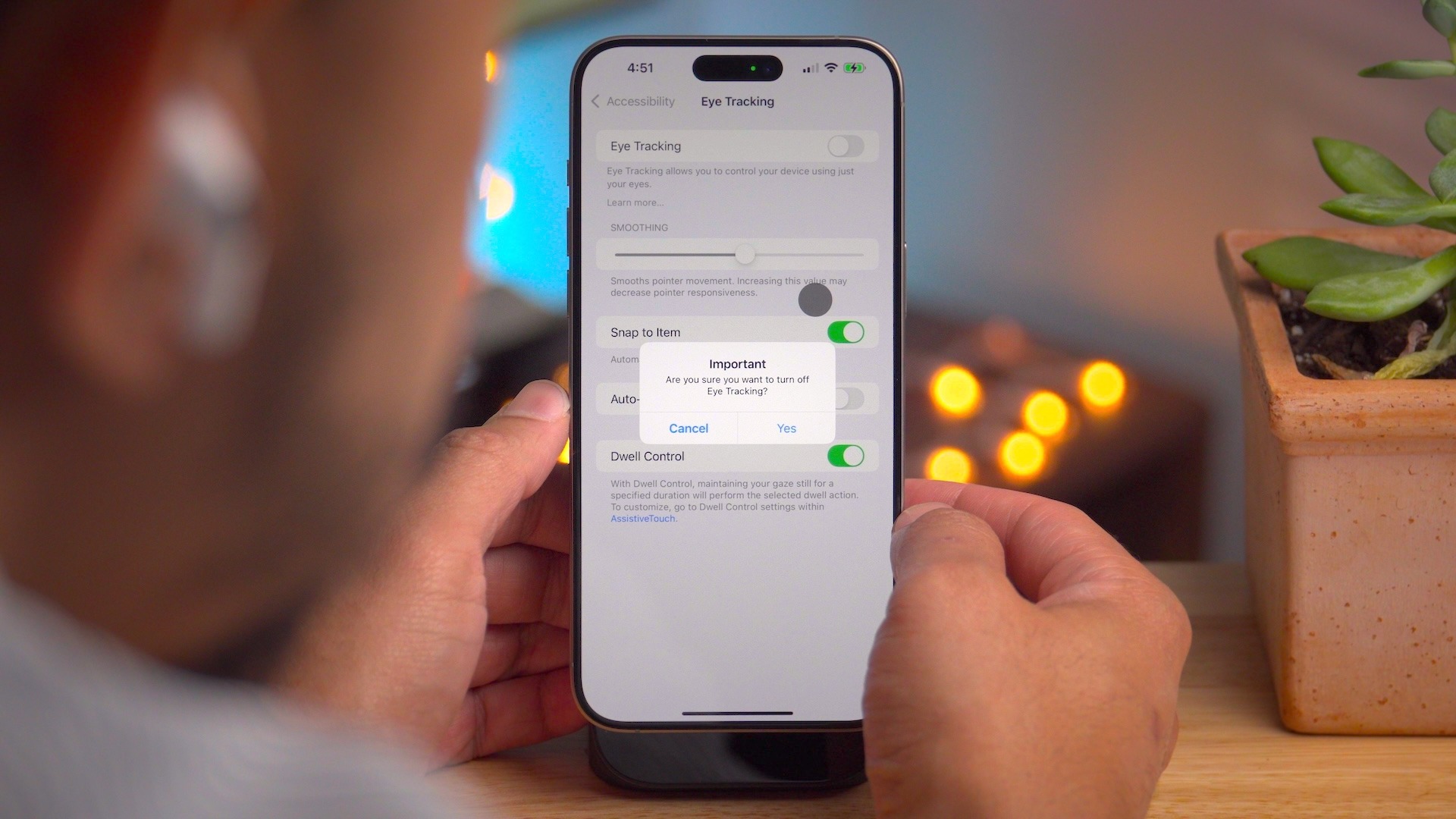
Eye Tracking gives users a built-in option for navigating iPad and iPhone with just their eyes.
Music Haptics is a new way for users who are deaf or hard of hearing to experience music on iPhone. The Taptic Engine in iPhone plays taps, textures, and refined vibrations to the audio of the music.
With Vocal Shortcuts, iPhone and iPad users can assign custom utterances that Siri can understand to launch shortcuts and complete complex tasks.
Vehicle Motion Cues is a new experience for iPhone and iPad that can help reduce motion sickness for passengers in moving vehicles.
Accessibility features coming to CarPlay include Voice Control, Color Filters, and Sound Recognition.
And much more…
Outside these headlining features, iOS 18 includes many other changes and new features.
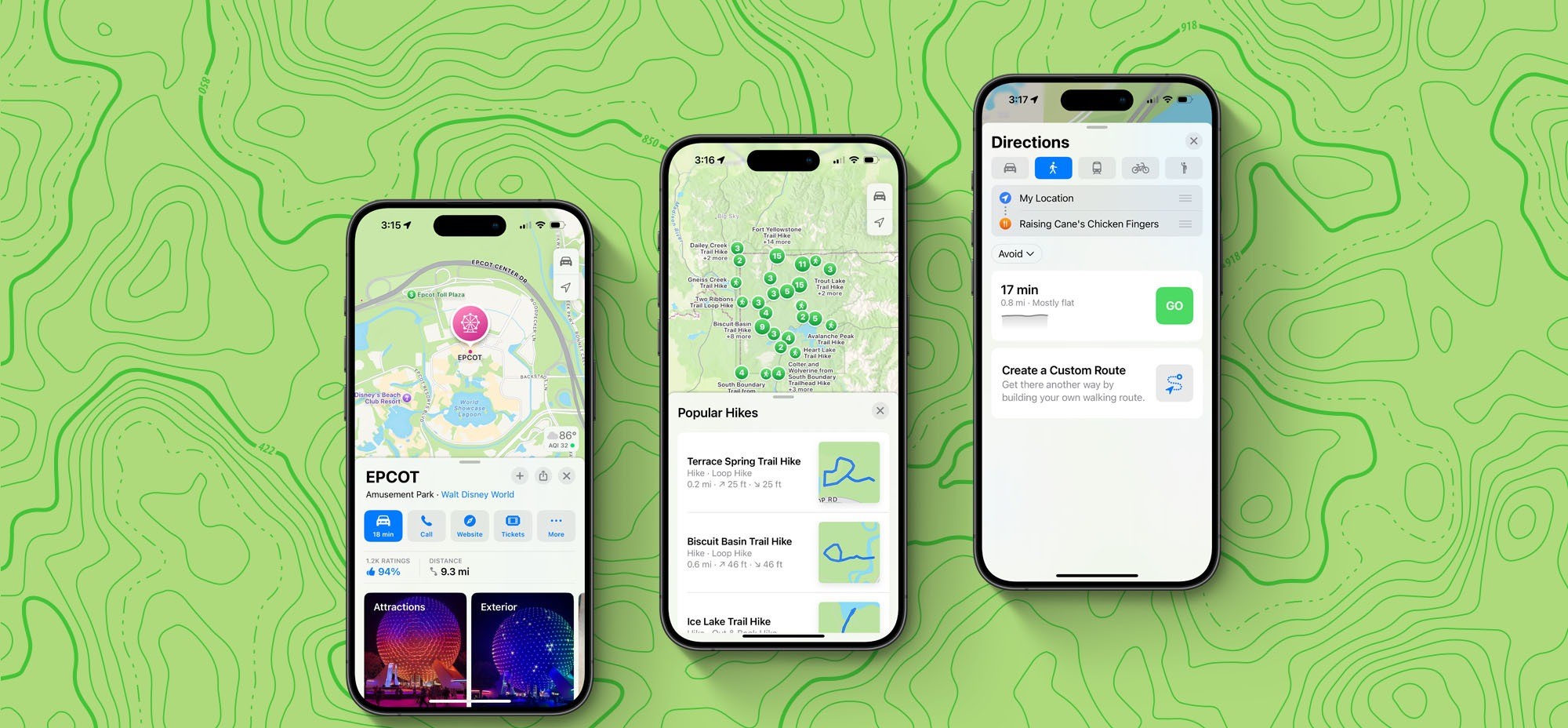
Apple Maps:
Topographic maps
Browse a selection of hikes available at national parks across the United States
Create and save custom walking and hiking routes
Get turn-by-turn navigation for hiking and walking routes.
Journal:
Log your state of mind and mood directly in the Journal app.
New “insights” feature for keeping track of your journaling goals like streaks and stats
New widgets for your Home Screen or Lock Screen
Search and sort support
Phone:
Record phone calls, with a notification to both parties that the call is being recorded. Recorded transcriptions are automatically saved to the Notes app.
Keypad search with T9 dialing support
Call history search
Automatic Mic Mode selection
Calendar:
A redesigned month view makes it easier to get an overview of your month ahead.
You can create, view, edit, and complete reminders from the Reminders app right in Calendar.
Freeform:
Scenes allow you to organize and present your board section by section.
Share a copy of your board with anyone using a simple link.
The enhanced diagramming mode simplifies forming connections on your canvas.
Align your board content precisely by snapping items to the grid.
More tidbits:
Emergency SOS live video: Share streaming video and recorded media during emergency calls
Calculator: Access the all-new Math Notes calculator, a new portrait orientation for the scientific calculator, and other new features like unit conversion and history.
Apple’s Weather app gets two new features in iOS 18
iOS 18’s new ‘dynamic’ wallpaper option changes colors automatically
Apple TV+ InSight feature now live with iOS 18 and tvOS 18 beta 3
iOS 18 adds a much-needed new feature for Apple Maps search
Apple Music in iOS 18 gets two new features that are flying under the radar
Your iPhone is getting a dedicated Game Mode in iOS 18
iOS 18 will show you what time it is even when your iPhone is dead
iPhone flashlight iOS 18: How it works
Coming later: Apple Intelligence
These are just some of the new features in iOS 18 available today. A number of new features, including Apple Intelligence, will roll out over the next year.
As reported before, Apple Intelligence is Apple’s suite of AI features that it says will revolutionize how people use their Apple devices. This includes a set of Writing Tools for proofreading and rewriting your text. A new Priority Notifications feature powered by AI will surface your most important notifications first.
Apple Intelligence also includes Genmoji, a new feature for creating your own emoji using natural language right from your keyboard. Image Playground is a new feature where you can create original images that can be used anywhere.
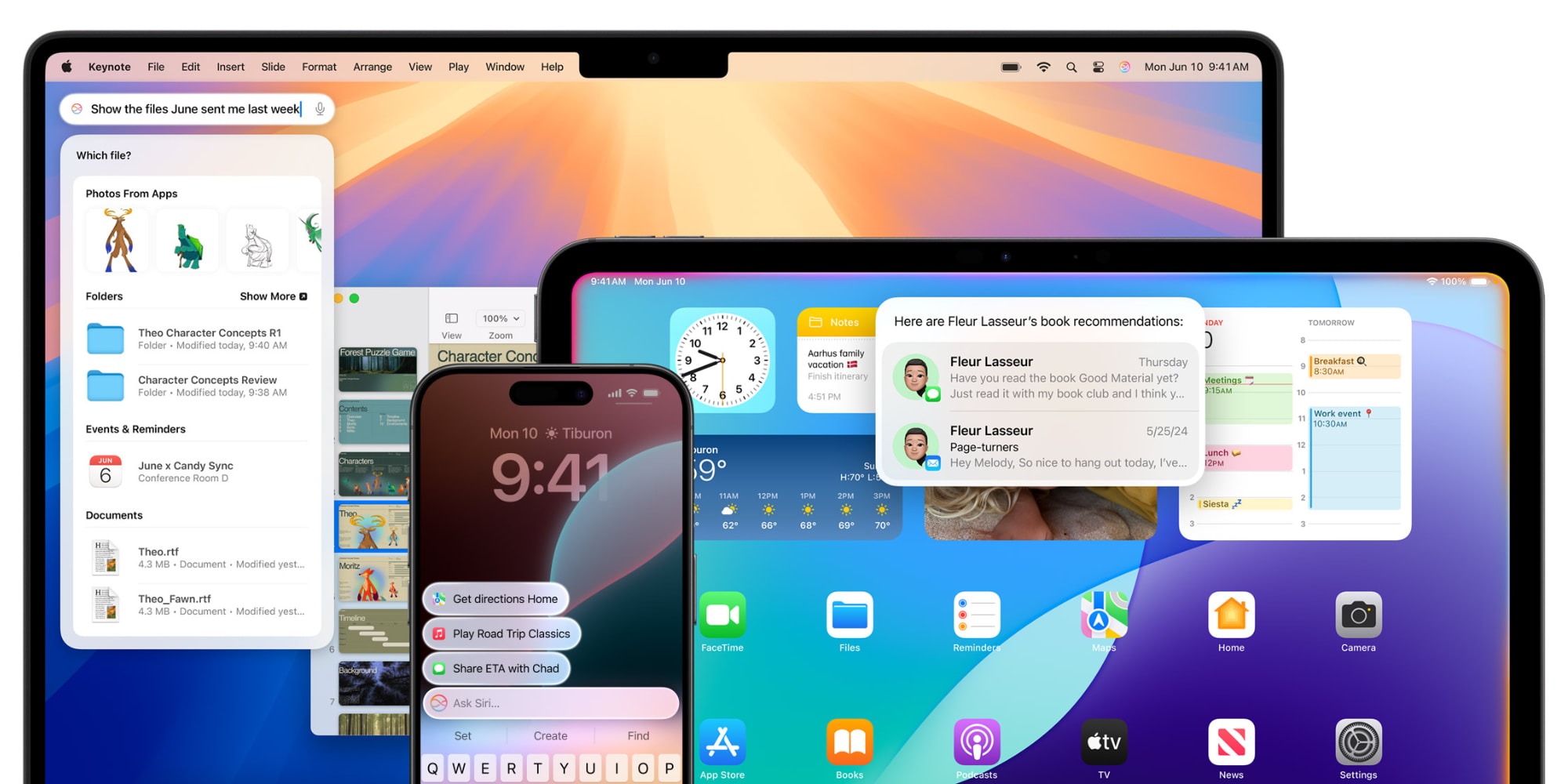
Siri is also getting a dramatic revamp as part of Apple Intelligence and iOS 18:
Powered by Apple Intelligence, Siri becomes more deeply integrated into the system experience. With richer language-understanding capabilities, Siri is more natural, more contextually relevant, and more personal, with the ability to simplify and accelerate everyday tasks. It can follow along if users stumble over words and maintain context from one request to the next. Additionally, users can type to Siri, and switch between text and voice to communicate with Siri in whatever way feels right for the moment. Siri also has a brand-new design with an elegant glowing light that wraps around the edge of the screen when Siri is active.
Again, none of the Apple Intelligence features are available in the iOS 18 public beta. These features will be released over the months to come.
iOS 18 device compatibility
iOS 18 is compatible with the following iPhone models:
Apple is now rolling out updated builds of iOS 18 beta 3 and macOS Sequoia beta 3. The revised builds come a week after the original beta 3 was released and are a strong indication that the company is gearing up to launch the first iOS 18 and macOS 15 public betas.
New iOS 18 beta 3 and macOS 15 beta 3 build
For instance, the current build number for iOS 18 beta 3 is 22A5307f, while the new one is 22A5307i. For macOS Sequoia, the new build number is 24A5289h, while the previous one was 24A5289g. It’s unclear at this point whether there’s anything new in these updated builds, but it’s likely that they just bring some additional bug fixes.
There’s a lot of anticipation about when Apple will enable Apple Intelligence features in the iOS 18 beta and macOS Sequoia beta. So far, none of the AI-related stuff is available to beta users. The company said that some features would be available later this summer, while others are not expected until 2025.
With iOS 18 beta 3, Apple has introduced a new variant of the system’s default wallpaper that changes color during the day. The update also refines the new Photos app and the redesigned flashlight interface on iPhones with Dynamic Island. The update also enabled RCS on the iPhone for more carriers around the world.
Apple’s public beta program is gearing up for its busiest season. Any day now, Apple is expected to release the first public betas for iOS 18, macOS Sequoia, and several other major updates.
Ahead of the public beta’s release, Apple lets you pre-enroll in the beta program so your device is ready and able to install the new software as soon as it becomes available. Here’s how to do it.
Public beta enrollment available now
If you plan to install the iOS 18 public beta on your iPhone—or any of the other beta releases for another device—you’ll first need to enroll in Apple’s public beta program.
Enrollment is quick and easy, and available now at beta.apple.com. Here’s what you need to do:
Sign in with your Apple Account (formerly called Apple ID)
Read the Beta Software Program Agreement
Hit the blue ‘Agree’ button
Follow the device-specific guides for getting beta updates on that device
After you’ve followed these instructions, your device will be set for the public betas’ impending release.
These are the public beta releases coming soon
Public betas will be available for nearly all of Apple’s devices—but not quite all. The following public betas are expected to be available:
iOS 18
iPadOS 18
macOS Sequoia
watchOS 11
tvOS 18
HomePod software 18
Each of these has its own specific instructions for installing the public beta, which you can find here.
While just about every platform offers a public beta, the one notable exception is the Vision Pro. Apple has never offered a public beta for Vision Pro, limiting its betas to developers only. That unfortunately will still be the case this summer with visionOS 2.
iOS 18 beta 3 is now available for developers. The update comes two weeks after iOS 18 beta 2 was released and a month after WWDC.
The build number for iOS 18 beta 3 is 22A5307f . There’s no word on what’s new, but we’ll dive in to the update and have more details soon.
Each new iOS 18 beta is expected to introduce numerous changes, bug fixes, and additional features. Apple closely monitors feedback from iOS 18 beta testers, with each successive beta addressing complaints, bug reports, and performance issues.
iOS 18 beta 2 brought a number of changes and new features, including the addition of iPhone Mirroring and SharePlay screen sharing upgrades. The update also started the process of rolling out RCS support to iPhone users.
The iOS 18 beta is currently only available to registered developer beta testers. The update will launch to public beta testers sometime this month, followed by a release to the general public in September. For the time being, testers should still expect performance and stability issues when running the iOS 18 beta on primary devices.
Spot any changes in today’s release of iOS 18 beta 3 or iPadOS 18 beta 3? Let us know in the comments below.
Google’s Pixel phones have never really held up to the competition in regards to using the latest and greatest specs, but the company has been stepping it up in certain areas. After the debut of “Actua” displays on the Pixel 8 series, Google is reportedly looking to use the same Samsung OLED display in the Pixel 9 series as Apple will use in the iPhone 16 Pro.
The Pixel 8 series saw Google jump from lagging well behind in display quality to putting out what was briefly the best smartphone display in the US market. That was thanks to an OLED panel from Samsung, which offered excellent brightness and colors.
According to a new report, Google will again be turning to Samsung for its display.
ETNews reports that Google will utilize an updated “M14” OLED panel from Samsung. The new panel is said to be brighter and have an improved lifespan. According to the report, Google will be utilizing this new generation of OLED panel in the Pixel 9, Pixel 9 Pro, Pixel 9 Pro XL, and Pixel 9 Pro Fold.
Something worth noting, though, is that Google won’t be alone here. The iPhone 16 Pro lineup is also expected to use this same new panel. Apple has, for the past couple of years, been using Samsung’s top-of-the-line displays in its “Pro” iPhones, with the “M12” being used in previous releases. That same generation will still be used in the base iPhone 16 models, but iPhone 16 Pro and Pro Max will both use “M14” like the Pixel.
Google is set to launch the Pixel 9 series on August 13, way ahead of the company’s usual schedule. Apple, meanwhile, is still expected to launch new iPhones in September.
Google announces early August 13 event for Pixel 9 and Pixel Watch 3
Last June 25, 2024 announced that its annual Pixel hardware event will be taking place on August 13. This is incredibly early for 2024 with Made by Google usually taking place in October.
Instead of New York City, Made by Google 2024 is taking place at the company’s headquarters in Mountain View, California. The first two Made by Google events were held in San Francisco before the East Coast shift.
This year’s keynote starts at 10 a.m. PT, with the invite announcement coming 1.5 months before the actual event. Last year, Google announced the event a month before it took place.
The invite is very telling for highlighting Google AI, Android, and Pixel:
You’re invited to an in-person Made by Google event where we’ll showcase the best of Google AI, Android software and the Pixel portfolio of devices.
Meanwhile, we previously reported on a 41mm and 45mm Pixel Watch 3, with renders confirming how it looks like the first two generations. We also reported on Pixel Buds Pro 2.
iOS 18 offers more customization than ever and one of the new options is the ability to change Lock Screen controls on iPhone. There are over 50 options to replace the Flashlight and Camera buttons. But one trick gives you access to almost unlimited possibilities. Here’s how to change Lock Screen buttons plus some related tips and tricks.
The new iOS 18 option to change Lock Screen controls lets you change the bottom buttons to everything from launching apps, accessibility features, changing settings, and more.
However, the most powerful and flexible way to use the new Lock Screen customization is by placing a Shortcuts button for one or both controls.
That means you can effectively create a button to do anything you can think of with the Shortcuts app.
The new Lock Screen control flexibility is a great addition to Lock Screen widgets and the Action button on iPhone 15 Pro/Max.
How to change Lock Screen controls on iPhone in iOS 18
Make sure you’re running the iOS 18 beta on your iPhone.
Long-press on your iPhone Lock Screen
Tap Customize under the Lock Screen you’d like to change
Now tap Lock Screen
Tap the Flashlight or Camera icon to remove them
Now tap the + icon to add a new Lock Screen control
Tap Done in the top right corner to set your new controls
For those with an iPhone 15 Pro/Max with an Action button, you can find a new Controls option in Settings > Action Buton that includes many of the new Lock Screen button options
If you still want quick camera access but want to change the Camera Lock Screen button, you can still swipe from right to left to instantly launch it (or program your Action button for Camera on iPhone 15 Pro/Max)
Here’s how it looks to change Lock Screen controls on iPhone:
After you tap the Flashlight and Camera with the minus icon, you can tap the + icon to add your new controls.
You can swipe through the 61 options or use the handy search bar at the top.
After you make your choices, tap Done in the top right corner, then tap your Lock Screen one last time, you’re all set!