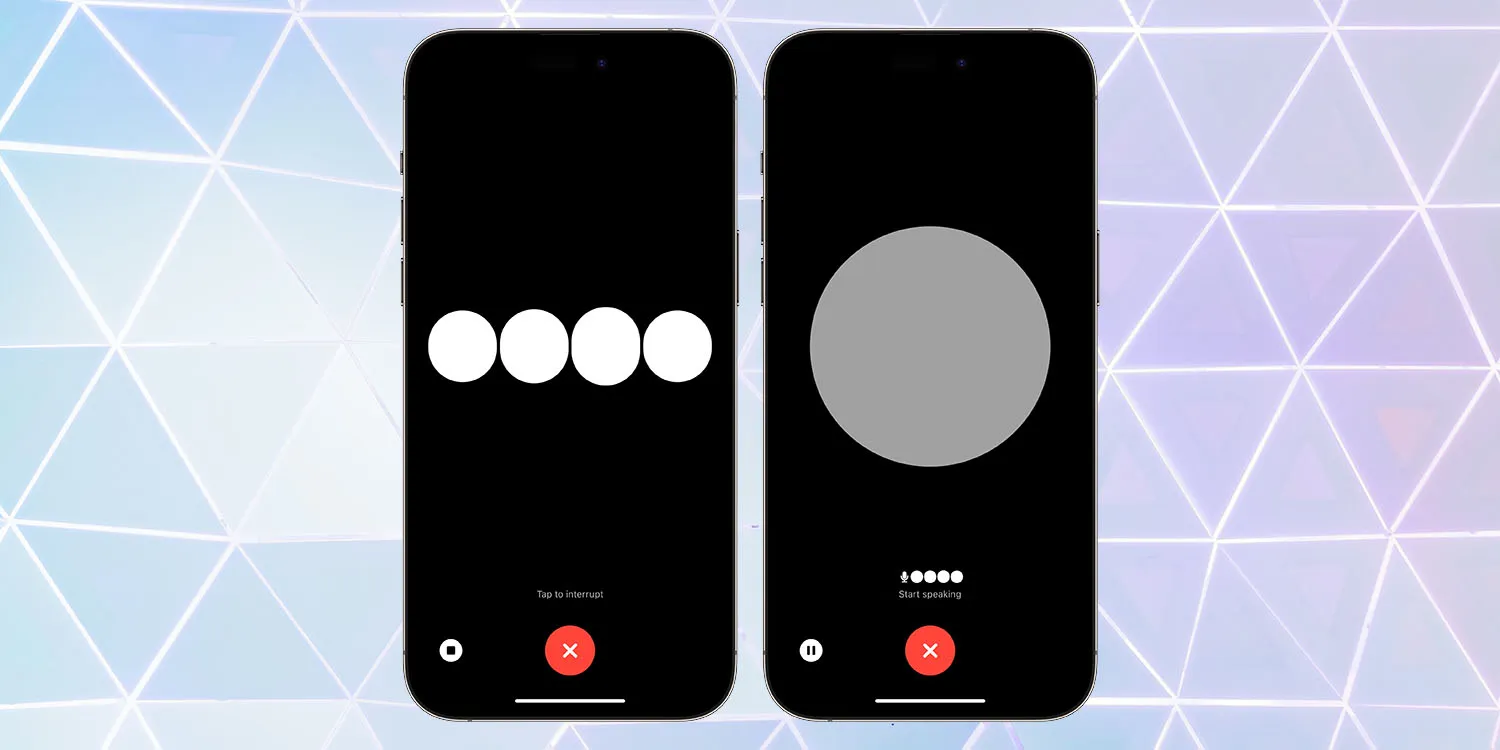
Amid all the OpenAI drama, the team has still been doing some work, it seems! The company’s newly-reinstated co-founder Greg Brockman has just tweeted that ChatGPT Voice is rolling out to everyone, not just paying subscribers …
OpenAI has announced that it is releasing a dedicated iPhone app for its ChatGPT service. The app, which is available via the App Store, gives users the ability to use ChatGPT through a native app on their iPhone. The app is free to download and includes no ads. It’s currently only available in the United States, but OpenAI says availability will expand “in the coming weeks” […]
The app will also sync your ChatGPT history across all your devices, including the web. It also includes support for Whisper, OpenAI’s open-source speech-recognition system. This integration with Whisper enables voice input for the ChatGPT app on iPhone. The ChatGPT app is also completely ad-free.
At that time, you could use voice to ask questions, though there wasn’t any real benefit in doing so over using the iPhone’s built-in keyboard dictation feature, and answers could only be displayed on-screen.
Shortcuts and Siri support was added in July.
ChatGPT Voice
Two-way voice interaction was later launched, but only for paying subscribers. The company now says it is available to all, with Brockman urging people to try it.
ChatGPT Voice rolled out for all free users. Give it a try — totally changes the ChatGPT experience.
You can choose between five different voices.
ChatGPT Voice rolled out for all free users. Give it a try — totally changes the ChatGPT experience: https://t.co/DgzqLlDNYF
I found I had to delete the app and then re-install it from the App Store to get the update. Please be careful if you need to do the same, as there are many scam apps which come up in a search for ChatGPT.
It’s also worth noting that demand for the feature is apparently extremely high, as I’ve experienced long delays at the ‘connecting’ stage, and some failures.
The charging situation for the iPhone 15 and iPhone 15 Pro this year has changed. Apple’s proprietary Lightning port has been replaced with USB-C, so now you can charge your phone with almost any USB-C cable and USB-C power adapter that you can find online. But what exactly do you need to make sure you can charge your iPhone battery as fast as possible?
As USB-C is an open standard, you can use pretty much any USB-C cable you can find. The iPhone 15 comes with a nice woven braided cable in the box, but you can use any USB-C cable you can find — including those marketed as ‘Android’ phone cables. However, if it seems like your iPhone is charging slowly, you probably need to change your charging brick.
Back when Apple included accessories in the box, the iPhone came with small 5-watt power adapters. As they were included with the iPhone for such a long time, there are lot of these still out in the world. If you have one of these, it is perfectly safe to use with iPhone 15; you just need a USB-C to USB-A cable to plug in.
However, it will only charge your phone at 5W speed. This was fine when the battery capacities of smartphones was much smaller five years ago, but the iPhone batteries are much bigger these days. As a result, charging at 5 watts can take four or five hours to go from zero to 100%. It is slow.
Fast charge iPhone 15
To fast charge iPhone 15, you’ll need a higher wattage charging brick. The iPhone USB-C port can technically receive power up to 27 watt speeds, but practically speaking there are diminishing returns on charging speed above ~20-watts. So, with a USB-C cable and an Apple 20 W USB-C power adapter, you can charge the iPhone 15 from zero to 50% in about 30 minutes, and from zero to 100% in under 2 hours.
However, you aren’t limited to using Apple accessories. Plenty of higher-wattage USB-C charging options are on the market that are more convenient than Apple’s adapters, like this dual USB-C compact charger from Anker. It is also perfectly safe to use power adapters that are rated higher than 20 watts; they will automatically charge your iPhone at the maximum speed that it supports.
For example, this means if you have a USB-C MacBook power adapter, you can use that and charge your phone at full speed too. If your MacBook itself is plugged into power and charging, you can even connect your phone into one of the laptop’s USB-C ports and charge at near-full speed.
In fact, USB-C means that you can now fast charge all of your Apple devices with the same cable and 60-watt (or higher) MacBook power adapter.
Want to try out the latest iPhone security feature – Stolen Device Protection for iPhone? Read along for how to install iOS 17.3 beta for free, as well as where to turn on the new iPhone protection that requires biometric authentication and more.
Apple has made the first iOS 17.3 beta available for both public and developer testers.
The major new feature to arrive with the test software is Stolen Device Protection for iPhone. It adds a layer of security for your Apple ID and more in the rare event your iPhone is stolen and your device passcode is also compromised.
After you follow the steps below to install the free iOS 17.3 public or dev beta, you’ll be able to:
Open the Settings app.
Swipe down and tap Face ID & Passcode (or Touch ID & Passcode).
Now choose Stolen Device Protection.
How to install iOS 17.3 beta – public
Make a fresh backup of your iPhone or iPad.
You may need to sign in with your Apple ID at beta.apple.com if you haven’t before.
Launch the Settings app on your iPhone or iPad (running at least iOS 16.4).
Tap General > Software Update.
Choose the new Beta Updates button (it may take a moment to appear).
Now, choose iOS 17.3 Public Beta.
If you need to change your Apple ID associated with the beta, you can tap that at the bottom.
Choose Back when done.
Look for iOS 17.3 Public Beta to appear; choose Download and Install.
If you’re not seeing the option to turn on beta updates or iOS 17.3 appear:
Try quitting and relaunching the Settings app.
Double check you’re running iOS 16.4 or later. (If not, you’ll need to update before getting the in-Settings beta option.)
Sign in with your Apple ID at beta.apple.com for free, then try the above steps again.
How to install iOS 17.3 beta – developer
A paid Apple Developer account is no longer needed – but you may need to sign in with your Apple ID at developer.apple.com if you haven’t before.
Make a fresh backup of your iPhone or iPad.
Launch the Settings app on your iPhone or iPad (running at least iOS 16.4).
Tap General > Software Update.
Choose the new Beta Updates button (it may take a moment to appear).
Now, choose iOS 17.3 Developer Beta.
If you need to change your Apple ID associated with the beta, you can tap that at the bottom.
Choose Back when done.
Look for iOS 17.3 Developer Beta to appear, choose Download and Install.
If you’re not seeing the option to turn on beta updates or iOS 17.3 appear:
Try quitting and relaunching the Settings app.
Double check you’re running iOS 16.4 or later. (If not, you’ll need to update before getting the in-Settings beta option.)
Sign in with your Apple ID at developer.apple.com for free, then try the above steps again.
Apple launches Stolen Device Protection for iPhone with iOS 17.3 beta, here’s how it works
On the heels of iOS 17.2 being released to the public yesterday, Apple has seeded developers with the first iOS 17.3 beta. Notably, a brand new security feature is available to test with the update called Stolen Device Protection for iPhone.
Earlier this year, WSJ’s Joanna Stern investigated a rise in iPhone thefts in public places like bars. The tactic usually involved attackers observing victims entering their passcodes before stealing their iPhones and then using that to immediately change their Apple ID password and lock the owners out of their accounts and even iCloud backups.
With iOS 17.3, Apple is debuting a clever solution to this rare but frustrating threat: Stolen Device Protection for iPhone.
How Stolen Device Protection for iPhone works
Here’s how Apple describes the new security feature in iOS 17.3:
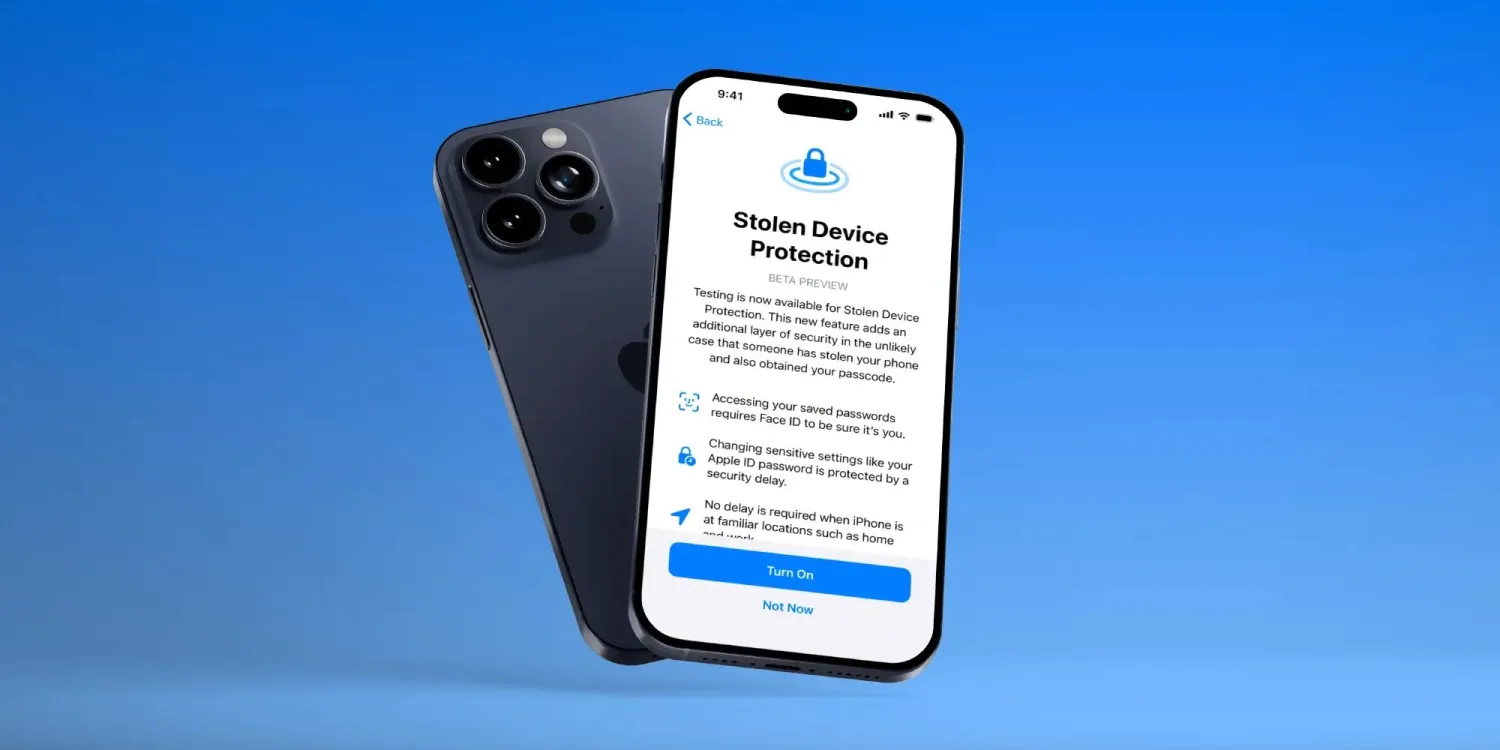
Testing is now available for Stolen Device Protection. This new feature adds an additional layer of security in the unlikely case that someone has stolen your phone and also obtained your passcode.
Accessing your saved passwords requires Face ID to be sure it’s you.
Changing sensitive settings like your Apple ID password is protected by a security delay
No delay is required when iPhone is at familiar locations such as home and work
Apple has thoughtfully created a two-tier system of how Stolen Device Protection works that offers a balance of user-friendliness while enhancing security.
For example, with the feature turned on, actions like using passwords or passkeys, applying for an Apple Card, turning off Lost Mode, erasing an iPhone, and using payment methods saved with an iPhone will require biometric authentication – no passcode fallback when away from familiar locations.
But for even more sensitive actions like changing your Apple ID password, updating Apple ID security settings, changing passcode or Touch/Face ID settings, and turning off Find My or Stolen Device protection, the one-hour security delay will come into play away from familiar locations. That means a second biometric authentication will be required after that delay.
How to turn on Stolen Device Protection for iPhone
Make sure you’re running the iOS 17.3 beta on your iPhone.
Open the Settings app.
Swipe down and tap Face ID & Passcode (or Touch ID & Passcode).
As the Digital Markets Act antitrust law passed in the European Union, Apple has until March 2024 to let users in Europe install iOS apps outside the App Store. Although Apple has yet to say a word about how it will do this, regulators around the world have also been considering applying the same demands to the company – and Japan could be the next country to do so.
Japan wants to force Apple to allow sideloading on iOS
According to a report in Nikkei Asia on Tuesday, the Japanese regulator is preparing antitrust legislation that will require big tech companies like Apple and Google to allow third-party app stores, as well as alternative payment methods for any apps. In other words, forcing Apple to allow sideloading in iOS.
The legislation is expected to be sent to parliament next year and focuses on four areas: app stores and payments, search, browsers, and operating systems. If approved, the Japan Fair Trade Commission will be able to impose fines on companies that violate the new legislation. More details are expected to be revealed by spring 2024.
In 2020, the Japanese government began investigating Google, Apple, Amazon, and Facebook over antitrust concerns. In the same year, many Japanese developers expressed dissatisfaction with the App Store’s business model. In 2023, the Japanese regulator completed its study and concluded that the mobile app market is dominated by Apple and Google.
According to the local government, the new legislation would allow Japanese companies to have their own app stores on platforms like iOS and Android. It would also allow developers to opt for payment systems from local fintechs with lower fees.
Apple will soon have to comply with the EU’s DMA
The new Japanese antitrust legislation is very similar to the European Union’s Digital Markets Act in many ways. The DMA requires Apple to allow developers to distribute their iOS apps outside the App Store. Third-party apps will also be allowed to use third-party payment platforms for in-app purchases.
According to many reports, Apple has been working under the hood to enable sideloading in iOS in regions where the company is forced to do so. Unsurprisingly, the company has no plans to make sideloading available to everyone.
A few months ago, Apple vice president of software engineering Craig Federighi acknowledged that Apple will have to comply with European Union legislation. However, on other occasions, Federighi and other Apple executives have taken a stand against sideloading, arguing that distributing apps outside the app store would be dangerous for users.
One of the more interesting features recently added to iPhone is something called Clean Energy Charging. Apple says that this feature aims to “reduce your carbon footprint” by charging when lower carbon-emission electricity is available. In a support document, Apple has more details on how this feature works.
Apple says:
When Clean Energy Charging is enabled and you connect your iPhone to a charger, your iPhone gets a forecast of the carbon emissions in your local energy grid and uses it to charge your iPhone during times of cleaner energy production.
Clean Energy Charging is available only in the United States and is on by default when you set up your iPhone or after you update to iOS 16.1.
Clean Energy Charging is enabled by default, but you can manage the setting by going into the Settings app, choosing Battery, then Battery Health & Charging. Here, you’ll see a new toggle dedicated to the Clean Energy Charging feature.
Clean Energy Charging works together with Optimized Battery Charging to learn your charging habits. Clean Energy Charging engages only where you spend the most time and regularly charge your iPhone for long periods of time, such as your home and place of work. The feature doesn’t engage if your charging habits are variable or you’re in a new location, such as when you travel.
For Clean Energy Charging to work, Apple says the following settings must be configured:
Go to Settings > Battery > Battery Health & Charging and make sure that Clean Energy Charging is on.
Go to Settings > Privacy & Security > Location Services and make sure that Location Services is on.
Go to Settings > Privacy & Security > Location Services > System Services and make sure that System Customization is on.
Go to Settings > Privacy & Security > Location Services > System Services > Significant Locations and make sure that Significant Locations is on.
Finally, if you enable Clean Energy Charging but want to override it, you can do so directly from your iPhone’s lock screen. When Clean Energy Charging suspends charging, you’ll see a notification on your lock screen. Long press on this notification then choose the “Charge Now” option to override.
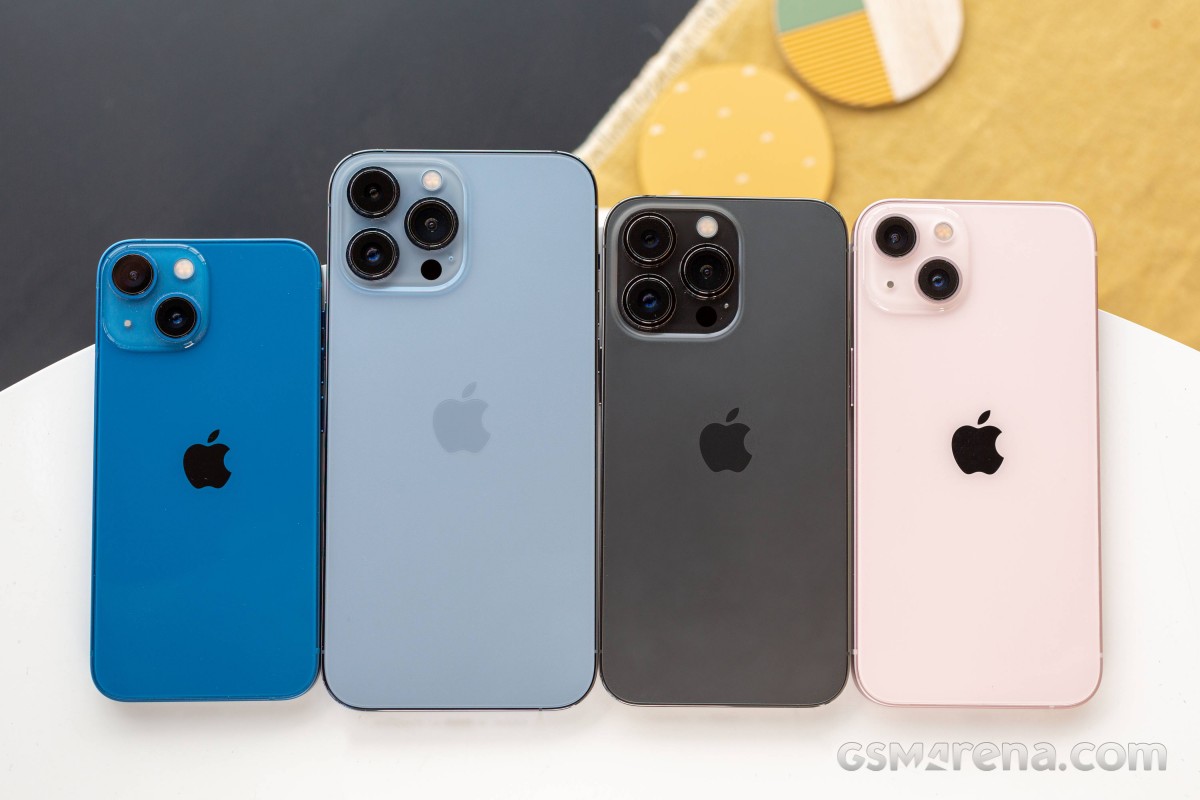
The Apple iPhone 13 mini is the most compact flagship smartphone money can buy. It’s also easy enough to outright recommend to anyone looking for this particular type of device. It is astonishingly rare to find such a pocket-friendly smartphone, let alone one of flagship caliber.
Apple launched the first iPhone mini a year ago, and while it did not turn out to be the massive success some hoped for it to be, it was still a popular purchase among the fans of compact phones, Android and iOS alike. But because of the lackluster sales, the rumor has it the iPhone 13 mini will be the last of its kind before it is merged with the iPhone SE in a year or two.
The iPhone 13 mini brings few updates over the iPhone 12 mini – an improved chipset, a better main camera with new sensor and stabilization, about 10% battery capacity increase, and a couple of software features. And a smaller screen notch, of course! But we imagine few if any iPhone 12 mini users will be upgrading to the iPhone 13 mini.
But as a standalone smartphone, the iPhone 13 mini seems like a great offer for a number of reasons – it is the cheapest current flagship iPhone with unmatched compact and lightweight design. It employs the most durable design on the market so far, runs on the most powerful Apple A15 chip with 5G, has excellent cameras, there are loud stereo speakers and a great 5.4″ OLED screen with Dolby Vision support.
Disclaimer. We can not guarantee that the information on this page is 100% correct.
For a device of this size, the Apple iPhone 13 mini is jam-packed with features. We can’t but appreciate that how Apple made the mini possible without cutting any corners – it is basically a shrunk version of the regular iPhone 13. It even offers Face ID and MagSafe wireless charging. And despite the new improvements, Apple managed to increase the battery capacity, too.
The iPhone 13 mini, just like the iPhone 13, has a regular 60Hz OLED, though that’s hardly surprising. The ProMotion screen is reserved for the iPhone ProModels. And that’s probably the only missing feature worth a mention before we get this review started.
Unboxing the Apple iPhone 13 mini
The iPhone 13 mini may be jam-packed with features, but its retail bundle is the opposite. Inside the thin paper box, you will find the iPhone 13 mini and a USB cable.
If you dig a little deeper, you’ll also discover the SIM ejection pin and one Apple sticker. This year Apple’s removed all plastic wrapping of its boxes and became even greener, so we guess the iconic sticker will be a goner soon enough.
The competition
The Apple iPhone 13 mini is a rare occurrence – it’s not only one of the most compact phones on the market, but it’s also a flagship one. And while people are still hoping for Sony to make a new Xperia mini, Apple is making compact iPhones by the dozen. Not only that, but it also offers budget phones as part of the iPhone SE lineup.
Apple iPhone 13 series
The new iPhone 13 mini is a minor upgrade over the 12 mini model with a smaller screen notch and a brighter panel, a bit faster chipset, doubled base storage, a slightly larger battery, and an improved primary camera. We’d say the battery bump is what got us excited the most about this mini, and it indeed offers improved battery autonomy over the previous model.
The compact class is ruled by Apple, so you can imagine our first alternative recommendations come from Apple’s camp. The iPhone 12 mini is still available, if the new upgrades don’t excite you, you can just as well go for the older model and save yourself €120 and maybe spend them on a pair of AirPods instead.
There is also iPhone SE (2020), which is €320 cheaper than the €799 iPhone 13 mini, but it still offers a great iOS experience, excellent performance, good photo quality, and excellent videos. The bezels and the lack of Night Mode are potential deal-breakers, though.
If the mini is too small for you, then you can consider the iPhone 13 (€100 over the 13 mini) – it’s the same phone but with a larger 6.1″ display. The regular model is still considered compact, and many users may find it striking the best balance between pocketability and multimedia-friendly.
Apple iPhone 12 mini • Apple iPhone SE (2020) • Apple iPhone 13
Outside Apple, we want to mention the Asus Zenfone 8 and the Samsung Galaxy S21 5G for being one of the most compact Android flagships with outstanding screens, performance, hardware, battery life. The Zenfone is a bit cheaper than the mini, while the S21 5G costs about the same.
Asus Zenfone 8 • Samsung Galaxy S21 5G
Verdict
The Apple iPhone 13 mini is the most compact smartphone on the market right now, with a flagship feature set and surprisingly good battery life for its small size. It has a lively Dolby Vision OLED screen, one of the most powerful chipsets to date, superb stereo speakers, and it offers a proficient trio of cameras that delivers great photo and video quality.
The iPhone 13 mini is also one of the most durable phones – it has a scratch-resistant screen and is IP68-rated for dust and water endurance in up to 6m deep water. Oh, and it’s incredibly thin and lightweight.
The iPhone 13 mini is not perfect, of course, but it’s close. It doesn’t offer a 120Hz refresh rate, it ships without a charger, and iOS is not for everyone. Plus, it’s a minor upgrade over the iPhone 12 mini, and the notch reduction is far from what many were hoping for.
We don’t know if the iPhone 13 mini is the last of its kind, for a while at least, but if it goes extinct, we know many people will miss it dearly. Because it is the phone you get if you want a small yet powerful flagship – it’s that simple. Even with its imperfections, it is the perfect smartphone for fans of compact phones.
It was confirmed back in September that Apple will need to comply with antitrust requirements relating to app sales, and it seems most likely this will require the company to allow third-party app stores on iPhones. Microsoft has now indicated its intention to run one of these.
One key driver for the plan is likely Microsoft’s $69 billion acquisition of mobile gaming giant Activision Blizzard …
The App Store is officially a monopoly
Currently, the only place you can buy and download iOS apps is from the App Store. Apple had argued that consumers and developers were free to buy and sell Android versions of apps, therefore it didn’t have a monopoly on mobile apps as a whole – but the European Union rejected this as irrelevant, as Apple has an undeniable monopoly on the sale of iPhone and iPad apps.
Apple eventually conceded the point, and the matter was finally settled in September. The EU named the companies which will be subject to the Digital Markets Act (DMA) antitrust law, with the iPhone maker on the list.
Apple will likely have to allow third-party app stores
We still don’t know for certain what action Apple will have to take to comply with the DMA.
As a minimum, Apple must allow developers to use third-party payment platforms for European app sales, and in-app purchases. However, it seems more likely that it will need to permit third-party app stores to fully comply.
All indications are that Apple has reluctantly accepted this. The company has for some time had a senior team working on permitting third-party app stores.
This work is being spearheaded by Andreas Wendker, a software engineering vice president within Apple. Wendker reports directly to Craig Federighi. In addition to the engineering teams, Apple’s services team is also involved. Jeff Robbin, Apple’s “top engineering manager for its services,” is leading the effort on that side. Robbin reports to Eddy Cue.
Apple has until March 6 2024 to comply.
It’s not known whether the company will limit the changes to EU countries, or make the change globally. Apple faces similar antitrust pressures in the US and elsewhere, so may decide it’s best to bite the bullet and make one change worldwide.
Microsoft plans to offer an app store for games
Bloomberg reports that Microsoft has confirmed reports that it plans to offer an iOS app store for games.
Microsoft Corp. is talking to partners to help launch a mobile gaming store that will take on Apple Inc. and Google’s dominant position in the business, according to Phil Spencer, who leads the company’s Xbox video-game division.
“It’s an important part of our strategy and something we are actively working on today not only alone, but talking to other partners who’d also like to see more choice for how they can monetize on the phone,’’ Spencer said in an interview in Sao Paulo during the CCXP comics and entertainment convention.
Earlier reports said that it plans to launch the store next year, and the company more-or-less confirmed this.
The executive declined to give a specific date for a launch of the online store, which earlier reports suggested could be next year. “I don’t think this is multiple years away, I think this is sooner than that,’’ he said.
What does this mean for iPhone users?
What will likely happen is that you’ll be able to go to Apple’s App Store, and download apps for third-party app stores, like the planned Microsoft one.
If you do, you’ll then be able to choose where to buy your apps – either from the official App Store, or from any of the third-party ones.
You may pay the same price or different ones; that will be up to developers. However, the most likely outcome is that third-party stores will offer lower commissions to developers, and they will pass on at least some of the savings or offer other incentives to encourage you to use the stores which charge them the lowest commissions.
But most iPhone owners likely to stick to Apple
However, while the law will give you the option of buying apps from other stores, the choice will be yours. We’d expect most iPhone owners to stick to Apple’s own store, for three reasons.
First, interia. The average iPhone user probably won’t even know that third-party app stores exist, and even those who do will likely continue to use the App Store out of habit.
Second, comfort with Apple. If you need a refund, or want to cancel a subscription, you know that Apple will take care of that for you. If you buy elsewhere, you’d be dependent on the third-party store to handle those issues.
Third, security. Apple has long argued that it does more than other app stores to exclude scam apps. Even if that might be a somewhat questionable claim, people may be less inclined to trust Microsoft.
Apple has delivered iOS 17.2 to all users and with it comes a brand new security feature for iMessage. Called Contact Key Verification (CKV), the capability gives users more certainty they’re messaging with the people they think they are. Follow along for what this feature is, how it works, and how to turn on Contact Key Verification on for iMessage.
Contact Key Verification background
When enabled, the opt-in Contact Key Verification gives automatic alerts if the iMessage key distribution services return device keys that have not been verified (e.g. if an unrecognized device has been added to an iMessage account).
And even more security is available by using CKV in person, on FaceTime, or via another secure method. You can read more on the details of how CKV works in our full coverage here.
Apple has not seen an attack like this – which would be quite advanced – but CKV arriving with iOS 17.2 means Apple is staying a step ahead of hackers and giving users more peace of mind.
Even though a very small percentage of iPhone users may need security of this level, the neat part is turning it on doesn’t reduce the functionality of your iPhone or iMessage – so it could end up being more widely used than something like Lockdown Mode.
How to turn on iMessage Contact Key Verification
Important: All devices signed into your iCloud account need to be running iOS 17.2, macOS 14.2, or watchOS 10.2 before enabling this(or you can sign out of iMessage on those devices that you don’t want to enable the feature).
Running iOS 17.2, open Settings on your iPhone
At the top, tap your name
Swipe to the very bottom
Choose Contact Key Verification
Tap the toggle next to Verification in iMessage
Follow the prompts to enable Contact Key Verification
Last month, it was reported that iOS 17.1.1 broke in-car wireless charging for a number of GM drivers with an iPhone 15. In today’s release notes for iOS 17.2, which will be released to everyone next week, Apple says it has solved this problem…hopefully.
A fix for GM drivers
Following my report last month, GM acknowledged the problems in a statement to The Verge. “We are aware of this concern and are investigating. There’s nothing we can confirm at this point,” a company spokesperson said.
Here’s what Apple’s release notes for iOS 17.2 say: “Fixes an issue that may prevent wireless charging in certain vehicles.”
Unfortunately, there aren’t any additional details about the scope of this fix. Apple doesn’t specifically mention that iOS 17.2 addresses the problem for GM drivers, but that feels like a safe assumption to make.
This is the second time Apple has had to address issues in iOS 17 specifically affecting in-car wireless chargers. iOS 17.1.1, released at the beginning of November, included a fix for wireless charging and NFC problems affecting BMW drivers.
iOS 17.2 is currently available in beta for developers and public beta users. It’s expected to be released to the general public in about a week.
iPhone 15 wireless charging apparently broken in many GM cars with iOS 17.1
While iOS 17.1.1 last week was released to fix iPhone 15 wireless charging problems for BMW drivers, the same can’t be said for GM drivers. A number of GM drivers have taken to Reddit and other online forums to report that they are unable to wirelessly charge their iPhone 15 in their car after updating to iOS 17.1.
iPhone 15 wireless charging problems: BMW first, now GM
After mounting complaints, Apple finally acknowledged a bug impacting wireless charging for iPhone 15 users in some BMW cars last month. In these instances, the problem would also temporarily disable NFC features of the iPhone 15, such as Apple Pay. Apple rolled out a fix for BMW wireless charging issues as part of iOS 17.1.1 last week.
In the meantime, however, GM drivers say that they are no longer able to use their in-car wireless charging pads to charge their iPhone 15 after updating to iOS 17.1. There are a number of complaints from GM drivers on Reddit, GM forums, and Apple’s support forums. These issues, however, don’t appear to impact NFC features.
It’s not immediately clear how widespread these problems are, nor is it clear which specific GM cars are affected. There are complaints from Bolt drivers, Silverado drivers, Sierra drivers, and more scattered across the web.
GM drivers say that last week’s iOS 17.1.1 update did not fix their wireless charging problems, nor does the current iOS 17.2 beta cycle. Two different GM drivers say that they spoke to Apple about the problems, and Apple told them to talk to GM about it. The key, however, is that wireless charging for these people worked prior to updating to iOS 17.1, so it’s clearly something tied to that update.
Based on these bizarre wireless charging problems that have affected GM and BMW drivers, paired with experiences using in-car wireless chargers, Starting to question the usefulness of wireless charging in cars. It clearly seems to be a fickle solution in a lot of cases, even though there are some convenience benefits, particularly if you have a car with wireless CarPlay.
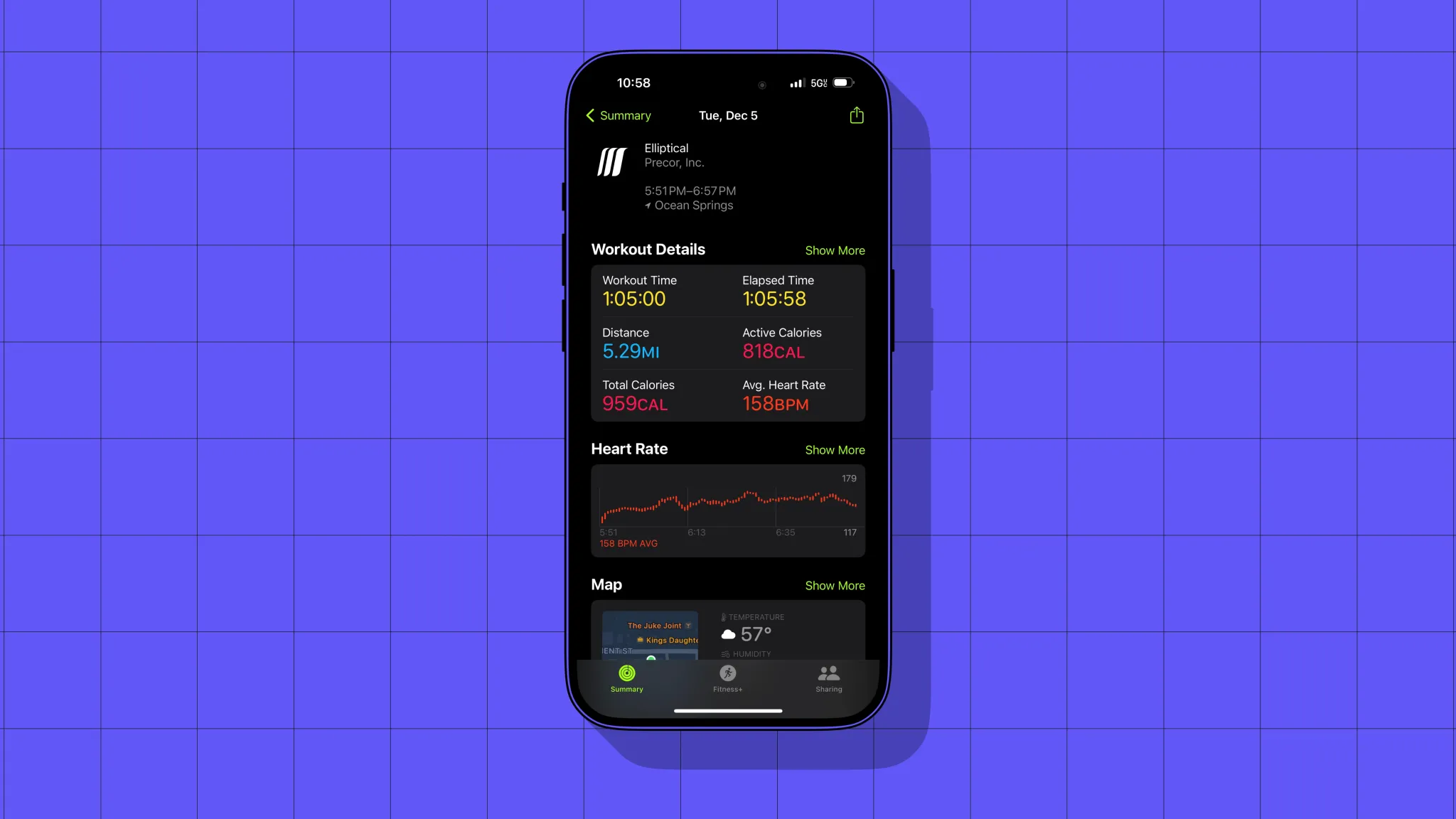
As an Apple nerd first and a person who wants to workout second, GymKit equipment is super encouraging. For everyone else with an Apple Watch, it’s the best way to sync up workout data, like heart rate, distance, and calories, that might not otherwise be available or accurate.
GymKit
Depending on who you ask, GymKit is either dead or very nice to have. I don’t think GymKit has really taken to home gym equipment except for Peloton (Bike+ only, not Tread). It also takes years for gyms to cycle through their equipment.
The GymKit slow roll started five years ago, and GymKit availability at Planet Fitness still varies by location. When you spot it, GymKit equipment is easy to use. Just wave your Apple Watch near the machine’s reader, allowing you to pair. Then starting/pausing/ending a workout from the machine matches the state on the watch (and vice versa).
The GymKit part is labeled with a watch
Wallet
Another perk since the last time we were a member? Digital keycards in Apple Wallet.
Years ago, We made our pass for the Wallet app so we could check in using our watch without our phone. Far less obsessed with trying to shoehorn the phone’s functionality into the watch now.
Still, it’s very nice being able to pull up and have the pass appear on the lock screen one tap away. And if we do want to leave our phone in the car or check in from the watch, that’s easily doable.
This is something Planet Fitness does do well. Membership cards aren’t available in Apple Wallet but are digitally available in the gym’s phone and watch apps.
Apple Watch
We can also mention here that we recently tried to pull off run tracking without the watch. We already knew this, but using a run-tracking app on the phone was not ideal.
The biggest factor for us is that the iPhone has the lock screen in between you and the run tracking app. Live Activities may help on the phone, but the watch is optimized for workout tracking.
The point? Working out is more fun with the Apple Watch, and gyms that have GymKit treadmills and ellipticals are true… gems.













 Asus Zenfone 8 • Samsung Galaxy S21 5G