Apple on Monday released iOS 16.3, macOS Ventura 13.2, and other software updates to the public. The new versions of the company’s operating systems come with new features but also bring multiple security patches. Not only that, but Apple also released updates with security patches for users running iOS 15. Read on as we detail what has been patched with the updates.
Security patches available with iOS 16.3
According to Apple’s website, both iOS 16.3 and iPadOS 16.3 fix two security exploits found in previous versions of the operating system. This includes patches in areas such as AppleMobileFileIntegrity, ImageIO, Kernel, Mail, Maps, Safari, and WebKit.
For instance, an exploit found in the Weather app could allow other apps to bypass Privacy preferences. In another security exploit related to WebKit, which is the engine for Safari and other web browsers on iOS, Apple has fixed two exploits that could lead to the arbitrary execution of malicious code. You can check some of the details below:
WebKit
Available for: iPhone 8 and later, iPad Pro (all models), iPad Air 3rd generation and later, iPad 5th generation and later, and iPad mini 5th generation and later
Impact: Processing maliciously crafted web content may lead to arbitrary code execution
Description: The issue was addressed with improved checks.
WebKit
Available for: iPhone 8 and later, iPad Pro (all models), iPad Air 3rd generation and later, iPad 5th generation and later, and iPad mini 5th generation and later
Impact: Processing maliciously crafted web content may lead to arbitrary code execution
Description: The issue was addressed with improved memory handling.
Most of these patches are also available for Mac users with macOS Ventura 13.2, Apple TV users with tvOS 16.3, and Apple Watch users with watchOS 9.3. It’s worth noting that Apple has also released iOS 15.7.3, macOS Monterey 12.6.3, and macOS Big Sur 11.7.3 with the same patches for users who haven’t (or can’t) update their devices to the latest versions of the operating systems.
There’s even an update available for iPhone 5s, iPhone 6, and other devices that are stuck on iOS 12. It’s worth noting that Apple is letting all users stay on iOS 15.7 while still receiving security patches instead of being forced to update to iOS 16. However, it’s unclear whether the company has plans to maintain support for iOS 15 for long.
All users can now enable iCloud Advanced Data Protection, an opt-in feature to get end-to-end encryption for almost all data stored in iCloud, including messages, photos, and device backups.
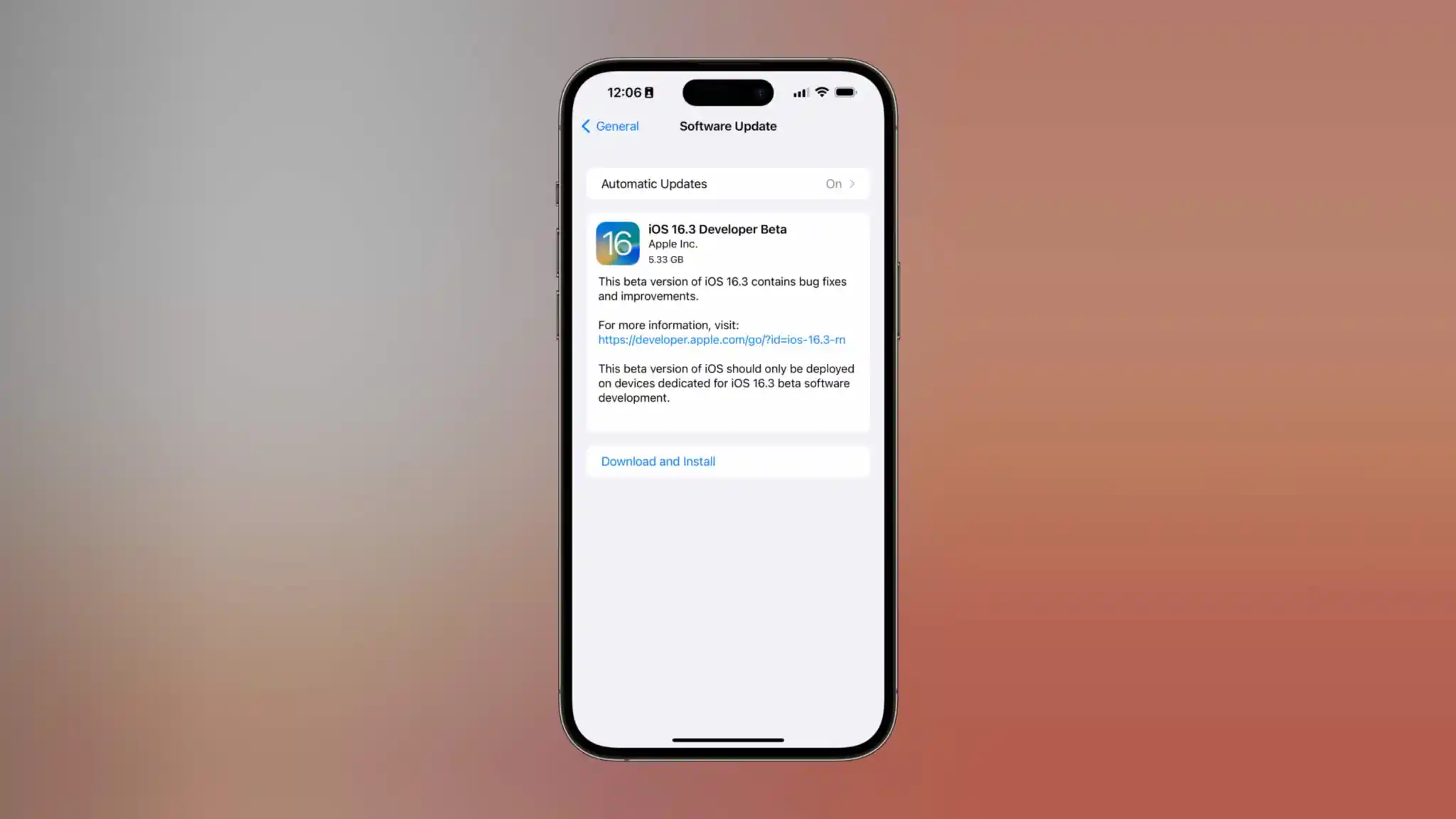
The feature is activatable once users upgrade to iOS 16.3, currently in developer beta, with a public release of the new software update expected to arrive next week.
Under the default setup, Apple retains the keys to decrypt your iCloud data on their servers. This is required to support account recovery and other features.
But for users wanting ultimate data protection, iCloud Advanced Data Protection allows users to encrypt their iCloud data with their own device passcode so that Apple doesn’t have a key. This means that even if Apple’s servers were hacked, the intruders would not be able to read your personal data without knowing your passcode.
iCloud Advanced Data Protection rolled out at the end of last year with iOS 16.2 in the United States. Apple said it would make the feature available around the world in 2023. iOS 16.3 delivers on that promise.
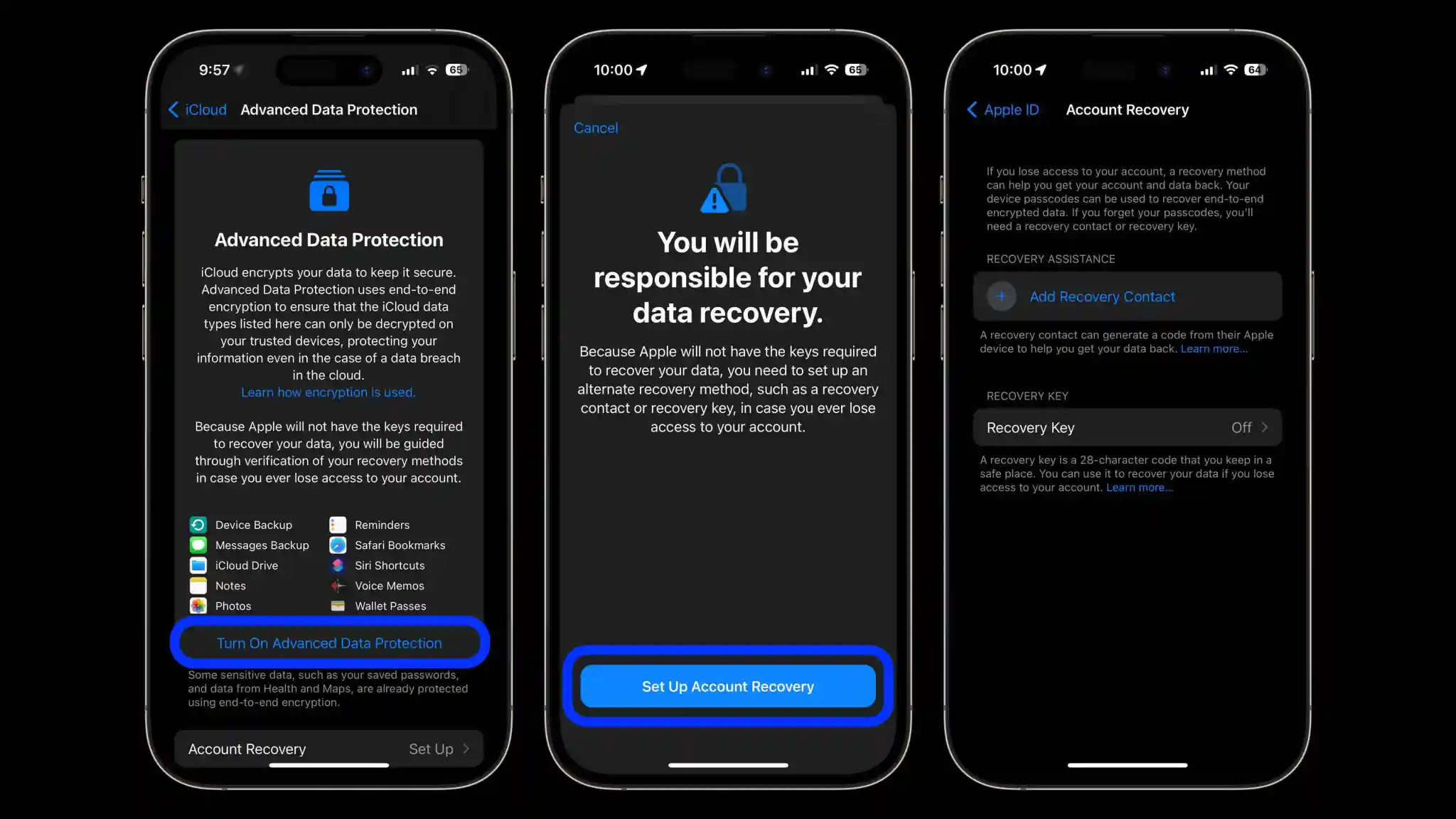
If you want to enable iCloud Advanced Data Protection, open Settings -> [your name] -> iCloud -> Advanced Data Protection and follow the steps to turn it on. When iCloud Advanced Data Protection is enabled, it is critically important to remember your password. However, the phone will guide you to set up account recovery provisions, in case you do lose access to your account, like a trusted contact or printable recovery key.
Law enforcement groups heavily rely on iCloud for data collection as part of an investigation, by simply sending a search warrant or subpoena for Apple to retrieve a suspect’s iCloud backups. With iCloud Advanced Data Protection enabled, this is no longer possible as Apple cannot simply decrypt the information.
It remains to be seen whether governments in certain regions will push back against Apple’s rollout of end-to-end encryption. If end-to-end encryption becomes illegal in certain markets, Apple would be forced to comply and make iCloud Advanced Data Protection unavailable to those users.
iOS 16.3 is set to be released next week, according to Apple. This update first entered beta testing in December and includes a handful of changes and features, though it’s a minor update in comparison to other updates from Apple over the last few months.
What’s new in iOS 16.3?
Apple confirmed iOS 16.3’s release date in a press release announcing a number of ways the company is celebrating Black History Month this year. The initiatives include a new Unity wallpaper for iPhone as well as a Unity face for your Apple Watch.
Apple says that both of these things require that your Apple Watch is running watchOS 9.3 and your iPhone is running iOS 16.3. Again, these updates are currently in beta testing, but Apple says everything will be available for update sometime “next week.”
The Unity 2023 watch face will be available next week and requires Apple Watch Series 4 or later running watchOS 9.3, and iPhone 8 or later and iPhone SE (2nd generation) or later running iOS 16.3.
The new Unity iPhone wallpaper for the lock screen will also be available next week and requires iPhone 8 or later running iOS 16.3.
Aside from the new watch face and wallpaper for Black History Month, iOS 16.3 also includes a few other changes and features. Here’s a quick rundown:
Security Keys for Apple ID: You can now use a physical hardware security key to serve as the second layer of authentication for your Apple ID.
Changes to how “Call with Hold” for Emergency SOS works: iPhone will now wait until you release the buttons to call emergency services, even after the countdown.
iOS 16.3 beta guides users on how to use Handoff from iPhone to HomePod
As you can see, this is a relatively minor release without too many changes or new features for iPhone users. That’s not necessarily surprising, given that the update hasn’t been in beta testing as long as usual.
Once iOS 16.3 is released, we expect iOS 16.4 beta testing to begin almost immediately after. We’re still waiting on a number of already announced features from Apple: Apple Card Savings Account, Apple Pay Later, Apple Music Classical, and Advanced Data Protection for iCloud outside of the United States.
Just one day after the release of iOS 16.2 with a slew of new features, Apple is once again starting the beta testing process. iOS 16.3 beta 1 is rolling out to developers today. We’re still waiting to find out what’s new, but there are a number of features that Apple has already announced, but not yet released.
iOS 16.3 beta 1
iOS 16.3 beta 1 will be available today to registered developer beta testers. As the update rolls out over the air, you’ll be able to install it by going to the Settings app, choosing General, then choosing Software Update. There is no public beta of iOS 16.3 available yet, but we’d expect it to be released later this week or sometime next week.
As for what’s new in iOS 16.3, we aren’t quite sure yet. We’ll have to get the update installed on our devices to dig into the changes. There are, however, a handful of features that Apple has announced but not yet released, as well as features in development under the hood that aren’t yet available.
The highlights include:
Apple Card Savings Account
Apple Pay Later
Security Keys for Apple ID
Apple Music Classical
Custom Accessibility Mode
Advanced Data Protection for iCloud beyond the United States
Alongside iOS 16.3 beta 1, Apple has also released the following updates:
iPadOS 16.3 beta 1
watchOS 9.3 beta 1
macOS 13.2 beta 1
tvOS 16.3 beta 1
Bloomberg’s Mark Gurman has reported that Apple is targeting a release date of sometime in February 2023 or early March 2023. Ahead of today’s release of iOS 16.3 beta 1 to developers
How to enable ‘More Frequent Updates’ for Live Activities in iOS 16.2
A neat under-the-radar feature coming to iPhone with iOS 16.2 is the ability to customize Live Activities for “More Frequent Updates.” But even though the capability is valuable, you may not want it turned on for all available apps, more on that below. Here’s how to enable Live Activities more frequent updates on iPhone.
New Live Activities customization when the initial iOS 16.2 beta was released – which was before the feature showed up in Settings.
Now in the iOS 16.2 RC and public release that’s expected this week, you can find the toggle to turn on Live Activities “More Frequent Updates” on iPhone.
Here’s how Apple describes it: “Allowing more frequent updates lets you see more real time information, but can drain your battery faster.”
How to enable Live Activities more frequent updates on iPhone
Make sure you’re running iOS 16.2 (install the free beta if you don’t want to wait)
Open the Settings app on your iPhone
Swipe down and choose an app with Live Activities support (using the TV app below)
Note: developers need to build support for the feature, so it may take time for the option to show up for third-party apps after the public iOS 16.2 release
Choose Live Activities
Tap the toggle next to More Frequent Updates
Live Activities will need to be allowed to see the new option
Using the feature will drain your battery faster, so you may want to be careful how many apps you turn it on for
Here’s how it looks to find the feature for Apple’s TV app:
While the “More Frequent Updates” Live Activities option is showing up for Apple’s own TV app, I haven’t seen it show up yet for a third-party app. Expect developers to launch support for it over the coming weeks.
Interestingly, in the iOS 16.2 RC, More Frequent Updates is turned on by default for Apple’s TV app.
How to turn on end-to-end encryption for iMessage, iCloud, iPhone backups in iOS 16.2
Apple is launching a big security enhancement with iOS 16.2 that brings the long-requested feature of full encryption for iMessage in iCloud, iPhone backups, and eight other apps/categories. As part of the process, you’ll need to set up a recovery contact/key – here’s how to turn on iPhone end-to-end encryption for iMessage, iCloud, device backups, Notes, Safari, Photos, and more.
While end-to-end encryption (E2E) has been already present for Apple’s Messages, iCloud Keychain, Health data, and more, the update brings E2E to your Messages Backup (Messages in iCloud) your iPhone iCloud backup, iCloud Drive, Notes, Photos, Reminders, Safari Bookmarks, Siri Shortcuts, Voice Memos, and Wallet Passes. Read more on the fine details in our full coverage and Apple’s support document.
How to turn on iPhone end-to-encryption for iMessage, iCloud backups
Make sure you’re running iOS 16.2 (install the free beta if you don’t want to wait)
You’ll also need to update your Mac, iPad, HomePods, etc. to the latest update to use the feature
Open the Settings app on your iPhone
Tap your name at the top
Now choose iCloud
Swipe to the bottom and tap Advanced Data Protection
Tap Turn On Advanced Data Protection
If you don’t have a recovery contact or recovery key set up, you’ll be prompted to do that first
If you just finished setting up a recovery contact/key, head back to Settings app > iCloud >Advanced Data Protection and tap Turn On Advanced Data Protection
Follow the prompts
You may be asked to update your other devices signed into your iCloud account before you can enable the end-to-end encryption (E2E)
Alternatively, you can remove devices that are on old software to move forward with the process
Here’s how the process looks to turn on iPhone end-to-end encryption with Advanced Data Protection:
If you don’t have a recovery contact or key set up already, you’ll do that first:
After finishing the recovery contact/key setup, head back to the Advanced Data Protection screen and tap “Turn On Advanced Data Protection”.
One more thing to keep in mind, you may need to update your other Apple devices to the newest release to enable end-to-end encryption – or need to remove them from the main Apple ID screen in the Settings app.
What do you think about end-to-end encryption coming to Messages in iCloud, backups, and more? Will you be turning the feature on? Share your thoughts in the comments!
Hands-on: How to use Apple Music Sing karaoke feature in iOS 16.2
After announcing its fun new karaoke feature yesterday, Apple Music Sing is live with the iOS 16.2 RC build. Follow along for a hands-on look at how to use Apple Music Sing karaoke including adjusting vocal volume, seeing the Duet view, and more.
iOS 16.2 is currently finishing its testing as a developer and public beta. The release candidate was made available today, so it won’t be long until it’s released to the public.
However, if you don’t want to wait for Apple Music Sing and other great features like a customizable always-on display for iPhone 14 Pro, major end-to-end encryption update, and more, you can learn how to install the free public beta in our full explainer:
What Apple Music Sing offers
Adjustable vocals: Users now have control over a song’s vocal levels. They can sing with the original artist vocals, take the lead, or mix it up on millions of songs in the Apple Music catalog.
Real-time lyrics: Users can sing along to their favorite songs with animated lyrics that dance to the rhythm of the vocals.
Background vocals: Vocal lines sung simultaneously can animate independently from the main vocals to make it easier for users to follow.
Duet view: Multiple vocalists show on opposite sides of the screen to make duets or multi-singer tracks easy to sing along to.
How to use Apple Music Sing karaoke feature in iOS 16.2
Make sure you’re running the iOS 16.2 RC
On your iPhone, open Apple Music and find a song you want to listen to
Apple Music Sing is also available on recent iPads and the Apple TV 4K (not on older Apple TV hardware)
Compatible devices include iPhone 11 and later, iPad 9/10, iPad mini 6, iPad Air 4/5, M1 and M2 iPad Pro
After starting a song, tap the lyrics button (quotation mark icon) in the bottom left corner
Now look for the microphone + stars icon (non-compatible songs won’t show the icon)
After tapping the mic, Apple Sing is turned on
Now you can drag to adjust the vocal volume and sing along with the beat-by-beat lyrics
Tap the Sing icon to turn the feature off
Here’s how it looks to use Apple Music Sing:
For songs that include duets, you’ll see the special view automatically kick in with the different parts on the left and right sides of the screen:
What songs work with Apple Music Sing?
Apple hasn’t shared exactly what songs are compatible with Apple Music Sing
But the feature is launching with support for “tens of millions of songs”
For now, you’ll have to listen to a song and tap the lyrics button to see if it works with the Apple Music Sing karaoke feature
The feature is a bit buggy for some users at the moment with the pre-launch in the iOS 16.2 RC – e.g. the button showing up and disappearing for songs
Following the release of iOS 16.1.2 on November 30, Apple has now stopped signing both iOS 16.1 and iOS 16.1.1. This means that iPhone and iPad users can no longer downgrade from iOS 16.1.2 or newer versions of the operating system.
iOS 16.1 and iOS 16.1.1 no longer signed by Apple
iOS 16.1 was released in October with multiple new features and enhancements, such as iCloud Shared Photo Library, Fitness+ for iPhone users, Live Activities, and more. iOS 16.1.1 came in November with bug fixes and security improvements.
Then, on November 30, Apple released iOS 16.1.2 to enhance the iPhone 14’s Crash Detection feature and also improve wireless carrier compatibility. This is the latest version of iOS officially available to users at the moment.
At the same time, Apple is about to release iOS 16.2 to the public in the next few days. The update will add the new Freeform app, improvements to the Home app, new Always-on options for iPhone 14 Pro users, Apple Music Sing, and more.
Reverting to older iOS builds is often used by those who jailbreak their iPhones and iPads. However, there are no signs of any jailbreak tools for iOS 16 being developed at this point. Restoring an Apple device to a previous version of iOS can also sometimes be helpful for users who experience significant bugs after upgrading to the latest version of iOS.
Downgrade from iOS 16 to iOS 15
While you can’t easily revert to iOS 16.1, you still have a chance to downgrade from iOS 16.1.2 to iOS 15. That’s because Apple is still providing security updates to users running iOS 15.7.1. Those who want to downgrade an iPhone or iPad must do so using a Mac or PC.
This is not the first time Apple has offered the option to let users stay on an older version of iOS. Last year, once iOS 15 became available, users could choose to stay on iOS 14 longer while Apple was still releasing security updates for it. However, the company removed this option a few months later.
After released iOS 16 to the public after months of beta testing. While some users have waited long for the new lock screen and other new features coming with the update, some may prefer to wait a little longer before installing iOS 16. This is why Apple is letting users stay on iOS 15, while still getting security updates before upgrading to iOS 16.
While iOS 16 is certainly the big news of the day, Apple also released iOS 15.7 for iPhone users today. The update doesn’t bring any major changes, but it does come with bug fixes and security enhancements, and users running iOS 15 now have the option to install iOS 15.7 or iOS 16.
This is not the first time Apple has offered the option to let users stay on an older version of iOS. Last year, once iOS 15 became available, users could choose to stay on iOS 14 longer while Apple was still releasing security updates for it. However, the company removed this option a few months later.
At the time, Apple claimed that the option was always intended to be temporary, so something similar may happen this year. New iOS releases can cause incompatibilities with certain apps, so it’s normal that some users (especially enterprise users) prefer to wait a few weeks before installing the update.
How to stay on iOS 15.7
When you go to the Software Update menu in the Settings app, your iPhonewill prominently show the iOS 15.7 update. “Upgrade to iOS 16” appears as an alternative option. Just choose the version you want to install and wait until the update process finishes. If you really don’t want to install iOS 16, you can disable automatic updates on your device.
Open the Settings app on your iPhone, iPod, or iPad
Go to the General menu
Tap Software Update
Tap Automatic Updates
Disable the options to automatically download and install iOS updates
You can now share your car key in Apple Wallet with Android users,
starting with Google Pixel
If you happen to be an owner of one of the very few cars on the market with Car Key support, you are now able to share that car key credential with non-iPhone users for the first time.
Apple is working with the IETF and industry members to standardize cross-platform car key sharing. The first implementation of this support has landed today for Google Pixel owners. Google is working on rolling out support for all Android 12+ devices soon.
The Car Key feature allows Apple Wallet to treat unlocking your car in the same manner as you can conduct contactless payments with Apple Pay: Walk up to your car and then present your iPhone or Apple Watch to unlock it.
You can share car keys by using the Share button inside the Wallet app. You could previously send the key to other iPhone users. On iOS 16.1 or later, the Wallet app generates keys that also work with other supporting platforms, most notably Android users.
Share using the system share sheet with your favorite app like Messages, Mail, and WhatsApp. You can secure the process using an optional one-time code.
At any later time, you can revoke access to a shared car key. Simply open the Wallet app, select your car key and tap on the People icon to manage the current list of shared keys for that vehicle.
Apple’s partnership with the IETF was first announced at this year’s WWDC. The group is still working on a final specification to make publicly available for adoption by anyone. But for now, only Apple and Google have access to the necessary protocols and are working on the respective implementations privately.
It’s a really cool technology that furthers Apple’s goal to replace the wallet in your pocket, alongside other initiatives like Digital ID and Apple Pay. Hopefully, more Car Key compatible vehicles will be available soon.
Apple releases iOS 16.2 beta 4 to developers ahead of expected launch this month
Following the release of iOS 16.1.2 to iPhone users on Wednesday, Apple released iOS 16.2 beta 4 to developers on Thursday. Along with iOS 16.2, Apple has also been testing new betas for watchOS 9.2, tvOS 16.2, and macOS Ventura 13.1. Read on as we detail what’s new in these updates.
iOS 16.2 and iPadOS 16.2 include some notable changes. The Freeform collaboration app is now available to iPad, iPhone, and Mac users. There are also changes to the Home app, updates to the Weather app, and more.
On November 28, Apple also released a “Rapid Security Response” update for users running iOS 16.2 beta. Once the feature becomes available to everyone, Apple will be able to quickly fix security exploits without having to release a new version of iOS just for this.
In addition to iOS 16.2 beta 4, Apple has also made the following updates available to all developer beta testers:
Apple this week launched the first betas of its next round of software updates, including iOS 16.2, iPadOS 16.2, and macOS Ventura 13.1. A new report from Bloomberg today indicates that Apple is currently targeting a release date to the public sometime in mid-December for these updates.
iOS 16.2 release date
In the latest edition of his Power On newsletter, Bloomberg’sMark Gurman says while Apple is done with hardware releases for the year, it still has more software updates on the way. “The iOS 16.2 and iPadOS 16.2 updates, which began beta testing this past week, should be released around mid-December,” Gurman says in today’s newsletter.
Gurman also notes that Apple is targeting a release date of sometime between early February and the beginning of March for iOS 16.3 and macOS Ventura 13.3:
I’m told that Apple is aiming to introduce the upgraded models—including M2-based versions of the 14-inch and 16-inch MacBook Pros—in the first quarter of calendar 2023 and has tied the launches to the upcoming macOS Ventura 13.3 and iOS 16.3. Those software updates are expected to debut between early February and the beginning of March.
iOS 16.2 includes a handful of changes, including the new Freeform collaboration app that Apple first showed off at WWDC. As of right now, iOS 16.2 is available to developer and public beta testers.
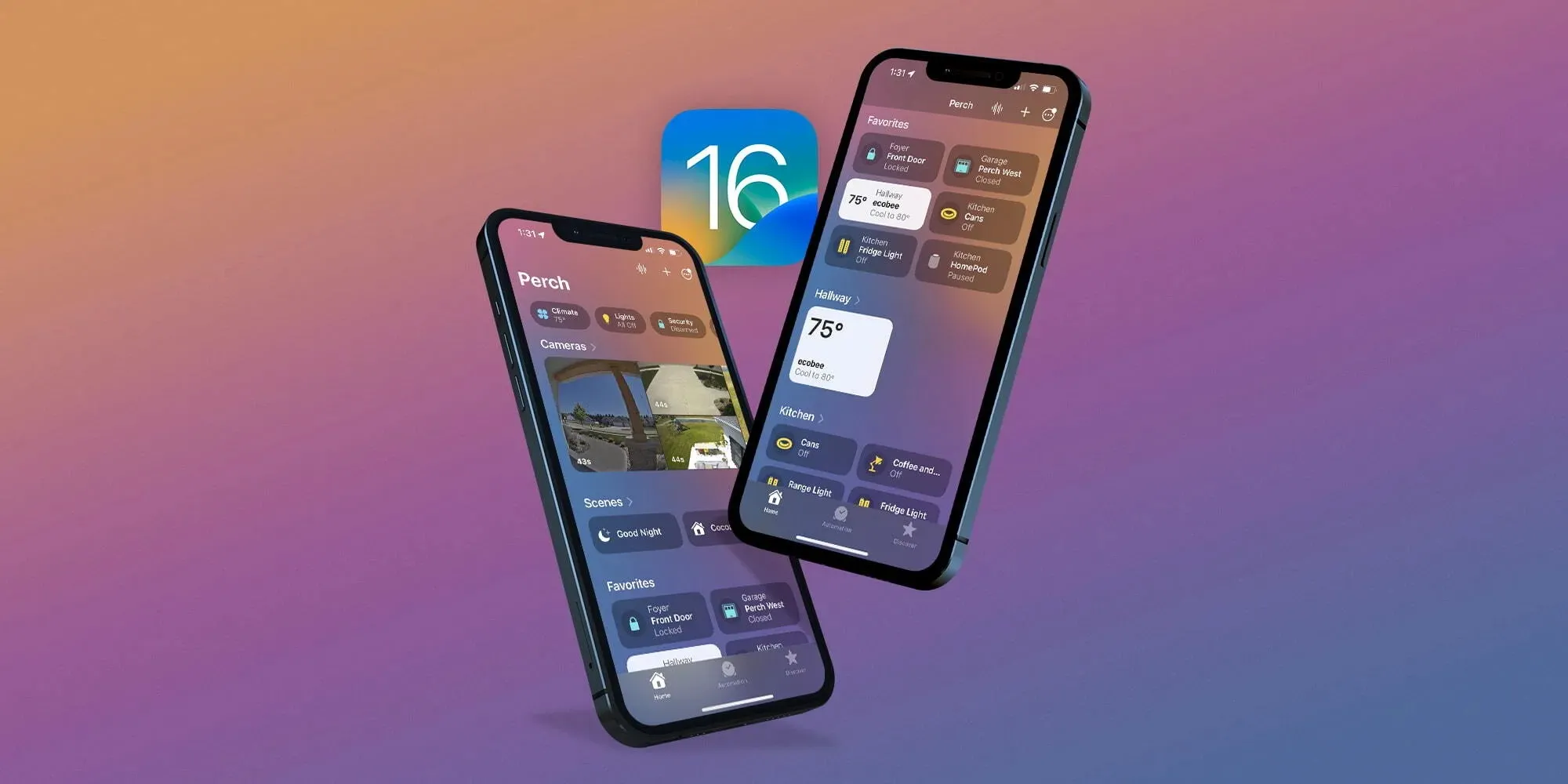
Apple reveals how it approached redesigning the new Home app in iOS 16
One of the valuable updates that arrived with iOS 16 this fall is an overhauled Home app. Additions and changes in the fresh experience include a new UI and iconography, customizable sections, fresh wallpapers, a more seamless experience, and more. Now Apple has shared how it approached the big Home app update in an interview.
Speaking to Parade, Cecelia Dantas who works in Product Marketing at Apple detailed how the goal was to make the new app beautiful and workable for everyone from beginners to HomeKit experts:
“We took the opportunity to rethink and redesign the Home app. It has this fresh new look and it scales beautifully, even for those who are just starting out their smart home with a few accessories or for those who have an advanced setup.”
As I wrote in my detailed hands-on coverage of the new Home app earlier this year, it features a sharp default layout:
New top category buttons
HomeKit cameras are at the top of the app, below are Scenes and Favorites
Then you’ll see your other devices organized by Room
Most of the HomeKit device icons have been either totally updated or given a slight refresh
Other improvements include improved access to Home app settings, customizable sections, new wallpapers, and more.
Dantas also highlighted that while Apple had adopted Matter support with iOS 16.1, it “continues to apply the same lens for privacy that we do across all of our products and services. So all the data is stored using end-to-end encryption. So there’s no way for Apple to read this data. And Appledoesn’t build a profile around what accessories you use, or how you use them.”
As a refresher, Matter is a collaboration between Apple, Amazon, Google, Samsung, the Connectivity Standards Alliance, and many others to make it easy to use any smart home device with better reliability, speed, and performance.
An underlying technology of Matter is Thread. And we’ve already seen a number of smart device companies adopt Thread like Apple with HomePod mini, Belkin, Nanoleaf, Eve, and more.
With the official release of iOS 16.1 this week, Apple introduced Live Activities – a new way for third-party apps to provide useful information right on the iPhone lock screen or Dynamic Island. With the iOS 16.2 beta, which was released to developers on Tuesday, the company is working to let users choose to keep Live Activities updated more frequently.
More Frequent Updates to Live Activities
The new option, which is not yet enabled in iOS 16.2 beta 1, will provide “More Frequent Updates” for Live Activities. Code seen by 9to5Mac confirms that when this option is enabled, Live Activities (and consequently Dynamic Island interactions) will request updates at shorter intervals to show “more real time information.”
At the same time, the same message found in the code warns that enabling More Frequent Updates for Live Activities will also drain the iPhone’s battery faster. Here’s what the message says:
More Frequent Updates
Allowing more frequent updates lets you see more real time information, but can drain your battery faster.
Once available, the new option will be accessible to users in the Settings app. Having more frequent updates can be extremely useful for some apps like Flighty, which now has a Live Activity to show details about an upcoming flight. Delivery and ride apps should also benefit from this option. Presumably Apple will make the feature public before the official release of iOS 16.2.
What’s new with iOS 16.2?
iOS 16.2 comes with some other new features. The update introduces the Freeform app, which was announced back in June at WWDC 2022. Freeform allows users to write and draw together in a collaborative canvas. For iPad users, iPadOS 16.2 enables support for an external display with Stage Manager.
Also coming with iOS 16.2 is a new option to send feedback to Apple when Emergency SOS is mistakenly triggered on the iPhone, plus a new, more reliable architecture for the Home app.
The update is now available for developers and is expected to be released soon for users registered in the Apple Beta Software Program. There’s no word on when it will become available to the public.
Following the release ofiOS 16.0.3 to all users on Wednesday, Apple is now rolling out iOS 16.1 beta 5 to developers. The new beta update, which adds new features to the iPhone operating system, comes ahead of the official iOS 16.1 release to the public expected later this month.
oday’s build number is 20B5072b, compared to the previous build 20B5064c. Developers and public beta testers can now install the iOS 16.1 beta 5 update by going to the Software Update menu within the Settings app on an iPhone or iPad enabled to get beta updates.
In addition to iOS 16.1 beta 4, here’s what else Apple is rolling out today:
iPadOS 16 beta 12
macOS Ventura beta 11
tvOS 16.1 beta 5
What changes with the update?
iOS 16.1 enables battery percentage for iPhone XR, 11, 12 mini, and 13 mini. Apple has tweaked the battery indicator so that it now has a dynamic icon when the percentage is enabled. The update also adds a Clean Energy Charging option, Live Activities API, and early support for the Matter protocol. For iPad users, iPadOS 16.1 brings Stage Manager for the 2018 and 2020 iPad Pro.
Here’s a detailed roundup of some of the major changes in iOS 16.1 so far:
Live Activities: Live Activities help you stay on top of things that are happening in real-time, right from your Lock Screen;
Live Activities API: Follow an ongoing sports game, track the progress of your ride, or order with just a glance. Glance at Live Activities from your favorite third-party apps with the new developer API;
Apple Wallet app can be deleted: iOS 16.1 now lets users delete the Wallet app for the first time. As you’d expect, deleting the Wallet app means you won’t be able to use a number of different features, including Apple Pay, Apple Cash, and Apple Card;
Matter support: Matter is a new smart home connectivity standard that will enable compatible accessories to work together seamlessly, across platforms;
iCloud Shared Photo Library: A new way for families to share photos seamlessly with a separate iCloud library that up to six users can collaborate on, contribute to, and enjoy. Users can choose to share existing photos from their personal libraries or share based on a start date or people in the photos;
Clean Energy Charging: Clean Energy Charging aims to decrease the carbon footprint of the iPhone by optimizing charging times for when the grid is using cleaner energy sources.
When will iOS 16.1 be available to the public?
According to a recent report by Bloomberg’s Mark Gurman, Apple plans to release iOS 16.1, iPadOS 16.1, and other software updates to the public the week of October 24. The software updates should come in time for the launch of new products, such as the rumored 10th generation iPad, iPad Pro with M2 chip, and updated MacBook Pros.