Apple could very well never adopt the Touch ID sensor on its flagship iPhones again, but since the pandemic started more than two years ago, rumors about this possibility ramped up. Now, with iOS 15.4 set to be released in a few weeks now, Apple shows how it could focus on Face ID for the indefinite future.
Don’t get me wrong, Touch ID was a breakthrough feature when it launched with the iPhone 5s: fast, secure, and easy to use, but everything changed when Apple introduced Face ID with the iPhone X.
At the time, the company said it was two years ahead of the competition, but five years since the iPhone X launched, it still looks like Apple is, at least, half a decade ahead of its competitors about facial recognition.
Sure, the embedded fingerprint sensor has gotten better, but the easiest – and the safest – way to unlock your device is by looking at it. And although Apple took a while, it’s finally launching a simple solution that makes Face ID usable again with eye recognition.
It’s funny to think that while iOS 14.5 was a big update to iPhone users – as it brought the ability to unlock the iPhone with the Apple Watch – it’s once again launching an important software feature as. a mid-year release. This upcoming operating system will give users the ability to unlock their iPhones while wearing a mask, without the need for an Apple Watch or other device in addition to your iPhone.
As Apple explains, the TrueDepth system tries to “recognize the unique features around the eye to authenticate” your face. With the Apple Watch unlock feature, on the other hand, the TrueDepth system recognizes someone is wearing a mask, that the Apple Watch is near, and then the iPhone is unlocked. Since it only recognizes a mask and not the person, this is why you couldn’t authenticate third-party apps or pay with Apple Pay before.
Face ID with a mask works – and it’s great
Now, with the beta version of iOS 15.4, You can use Face ID again on the street. You can access email app, WhatsApp, and other apps that require facial recognition with ease. Not only that, but I can also pay with Apple Pay again using my phone.
Of course, in the perfect world, Apple still recommends you use full facial recognition, but as we still have to wear masks everywhere, it’s very convenient to have the TrueDepth system scanning your eyes.
The new Face ID function continues to be as reliable as always. No one can unlock your iPhone by mistake, and the TrueDepth system usually recognizes your eyes rapidly.
It finally looks like Apple found the right approach to deal with Face ID and masks.
Touch ID rumors will die. Even though it was reported that Apple tested an embedded fingerprint scanner on the iPhone 13, Face ID is one of the functions that makes Apple shine when compared to its competitors.
Not only that, but the company keeps pushing for Face ID recognition. Rumors for the iPhone 14 show that Apple is planning a new notch by hiding some TrueDepth sensors. It shows that the company is indeed improving its facial recognition method as the only way for iPhone users to securely unlock, pay, and store information on their devices.
With iOS 15.4 being released a few weeks from now, users that don’t like to update their iPhones with beta versions will see how much this operating system makes our everyday tasks seamless again, as we shouldn’t have to worry whether we’ll be able to unlock our iPhones as fast as we used to.
Facebook was one of the main companies affected by Apple’s new privacy policies, which now require iOS apps to ask users if they want to be tracked by third parties. During the Q4 2021 earnings report on Wednesday, CEO of Meta (Facebook’s parent company) Mark Zuckerberg said that Facebook is “rebuilding” its ads infrastructure due to the iOS changes.
According to Zuckerberg, Facebook’s ad infrastructure is being rebuilt so that the company can continue to deliver “high-quality personalized ads” to iOS users.
Ever since Apple implemented App Tracking Transparency in iOS, Facebook has been openly criticizing Apple as the social network’s revenue relies heavily on advertisements that are based on data collected from users. However, that’s not the only thing that worries Zuckerberg.
As regulators around the world are investigating Facebook for privacy concerns, the company has been forced to change how it delivers ads based on user data. Earlier this year, lawmakers in the European Parliament voted to ban online advertising platforms from showing content based on “intimate information” such as health, religion, or sexual orientation.
Zuck: "With Apple's iOS changes and new regulation in Europe, there's a clear trend where less data is available to deliver personalized ads….So we're rebuilding a lot of our ads infrastructure so we can continue to grow and deliver high quality personalized ads."
As reported by CNBC, Facebook shares dropped more than 20% after the announcement of last quarter’s results due to “disappointing” results. The company reported revenue of $33.67 billion, which was above expectations of $33.4 billion for the quarter. However, the number of monthly active users was 2.91 billion, down from the previously predicted 2.95 billion users.
While Meta insists heavily on the “metaverse,” the company continues to lose money on the segment. The Reality Labs division, which is responsible for the Meta Quest virtual reality headset, lost more than $10 billion in 2021. Executives at Meta have already said that it may take more than 15 years before the metaverse business becomes profitable, but it’s hard to imagine that investors will wait that long.
The full transcript of Meta’s investor call can be found here.
Following the release of iOS 15.2.1 earlier this month, Apple on Thursday stopped signing iOS 15.2 for all iPhone, iPod Touch, and iPad models. This means that users can no longer downgrade their devices to iOS 15.2.
iOS 15.2 was released to the public on December 13, 2021, with a few notable changes, which include Apple Music Voice Plan, new App Privacy Report in the Settings, safety alerts for children using Messages, Digital Legacy, and more.
iOS 15.2.1 came a month later on January 20 to fix a CarPlay bug and also a security exploit found in HomeKit that could cause iPhone or iPad to repeatedly crash.
Reverting to older iOS builds is often used by those who jailbreak their iPhones. Restoring an iPhone or iPad to a previous version of iOS can also sometimes be helpful for users who experience significant bugs after upgrading to the latest version of iOS.
If you have experienced any serious issues with iOS 15.2.1, unfortunately, you’ll now have to wait until a future update rather than downgrading to iOS 15.2. Users running the iOS 15.3 beta can no longer downgrade to iOS 15.2 either.
Apple confirms it is ramping up efforts to get more iOS 14 users to update to iOS 15 [U]
Update:Apple reached out and pointed out a support page from September 2021 saying the company intended to offer “important security updates” for iOS and iPadOS 14 users for “a period of time.”
Last week, reported that Apple wasn’t letting users stay on iOS 14 with security updates as it had removed the ability to update to iOS 14.8.1. Now, the company confirmed its efforts to make the iPhone userbase update to iOS 15 instead.
While it was once rumored that it could be a bug, Apple told Ars Technica that it didn’t intend to let users stay forever on iOS 14. In fact, the company wanted this to be only a “temporary” option.
Apple told Ars that it always intended the iOS 14 security update option to be temporary. Essentially, people could have a short grace period while Apple worked out the worst of the new operating system’s early bugs, but you would always eventually have to upgrade to stay patched.
This statement from Apple is very different from what we heard during WWDC21. At the time, the company was very serious about giving users the option to stay in an old version of iOS while still giving users occasional security patches.
As a matter of fact, this was the first time Apple had spoken about continuing to support an old version of its iPhone operating system, as the company had released security patches for iOS 12 and even older software versions every now and then.
Last year, even before Apple announced the possibility to stay on iOS 14 during WWDC21, 9to5Mac had discovered that the company was planning that during the beta tests of iOS 14.5:
A new section added to the iOS software update menu indicates that Apple will provide standalone security updates for iPhone and iPad users. Users would be able to choose whether they want to install only security updates or full iOS updates.
Although we don’t yet have more details about this change, macOS already offers a similar method of updates. When you have a Mac running an older version of the operating system, such as macOS Mojave, Apple delivers separate security updates so that users can get security patches and bug fixes without having to install the latest macOS version available.
With this change of mind, Apple is pushing users to update to iOS 15, as they can take advantage of security patches and new features, which includes the ability to find the iPhone even when turned off, using Focus Mode settings, and more.
It’s a weird decision Apple has made. Coincidence or not, just last week the company said iOS 15 adoption was lower than usual. According to Apple, iOS 15 is currently installed on 72% of iPhones released in the last four years, which is lower than previous iOS updates.
Here is the current breakdown of iOS adoption among “devices introduced in the last four years,” according to Apple:
72% iOS 15
26% iOS 14
2% Earlier
When comparing to iOS 14 numbers shared by the end of 2020, 81% of all iPhones in the last four years were already running the operating system, while, this time, Apple took more time to provide its first update on iOS 15 adopters and with fewer users running the latest software available.
Of course, you can still take advantage of your iPhone with iOS 14, but it doesn’t mean you’ll be as secure as someone running the latest version of iOS 15.
After over a month of beta testing, Apple has made the iOS 15.2 Release Candidate available to developers. Head below for the full release notes on everything new in this update, which will be released to the public as soon as next week.
Update: Now available to public beta testers as well.
Today’s new release of iOS 15.2 RC is available to developers via an over-the-air update in the Settings app. As usual, if the update does not immediately appear for download, keep checking, as it sometimes takes a few minutes to roll out to all registered developers. The build number of iOS 15.2 RC is 19C56.
As a refresher, iOS 15.2 brings a few notable changes for iPhone and iPad users. Most notably, it adds the full “App Privacy Report” feature to the Settings application. With this, users can now see the data accessed by applications, including third-party apps and Apple apps.
Below are the full release notes, directly from Apple.
iOS 15.2 adds Apple Music Voice Plan, a new subscription tier that provides access to music using Siri. This update also includes the App Privacy Report, new safety features for children and parents in Messages, and other features and bug fixes for your iPhone.
Apple Music Voice Plan
Apple Music Voice Plan is a new subscription tier that gives you access to all songs, playlists, and stations in Apple Music using Siri
Just Ask Siri suggests music based on your listening history and likes or dislikes
Play it Again lets you access a list of your recently played music
Privacy
App Privacy Report in Settings lets you see how often apps have accessed your location, photos, camera, microphone, contacts and more during the last seven days, as well as their network activity
Messages
Communication safety setting gives parents the ability to enable warnings for children when they receive or send photos that contain nudity
Safety warnings contain helpful resources for children when they receive photos that contain nudity
Siri and Search
Expanded guidance in Siri, Spotlight, and Safari Search to help children and parents stay safe online and get help with unsafe situations
Apple ID
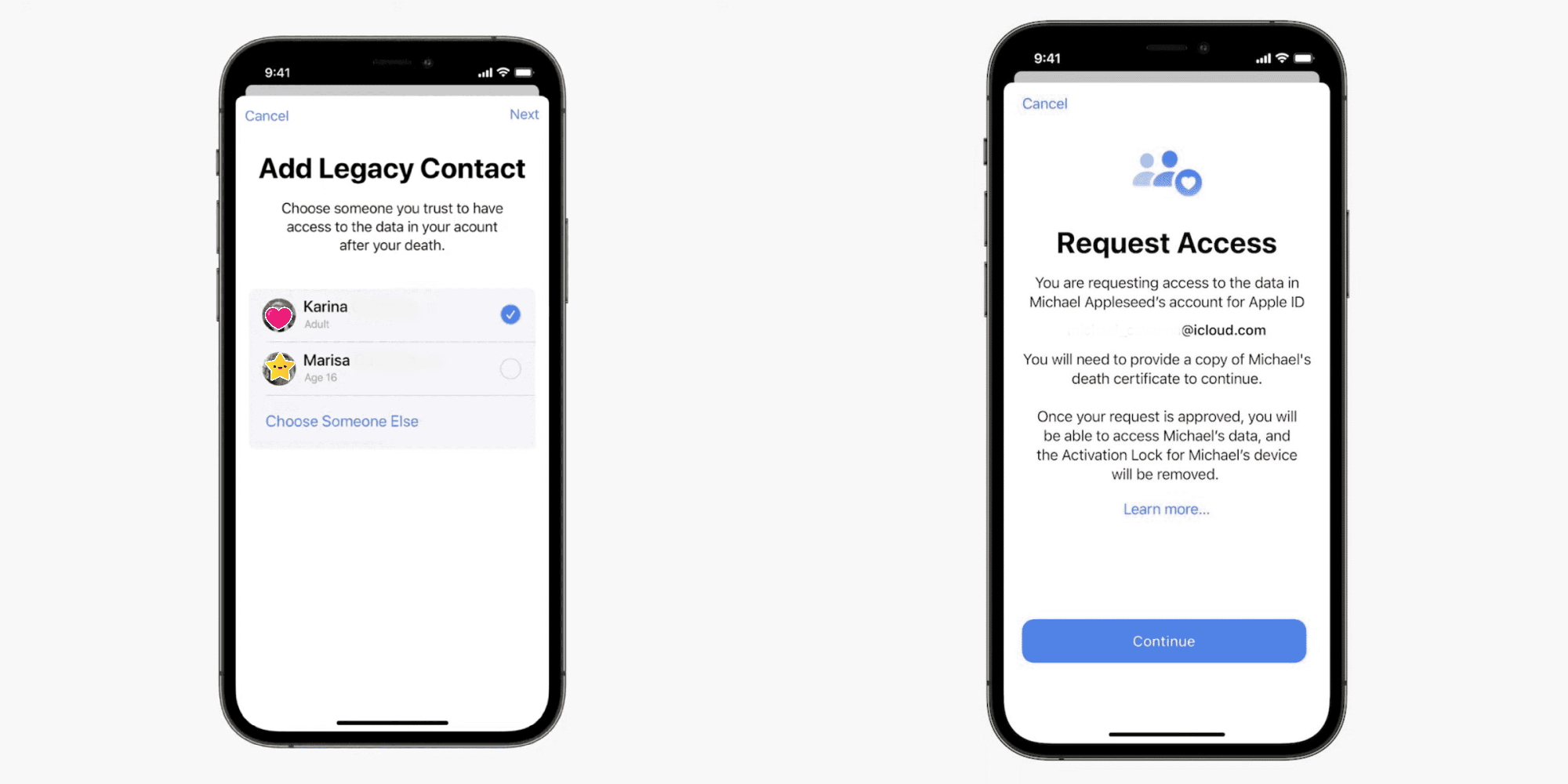
Digital Legacy allows you to designate people as Legacy Contacts so they can access your iCloud account and personal information in the event of your death
Camera
Macro photo control for switching to the Ultra Wide lens to capture macro photos and videos can be enabled in Settings on iPhone 13 Pro and iPhone 13 Pro Max
TV app
Store tab lets you browse, buy, and rent movies and TV Shows all in one place
CarPlay
Enhanced city map in Apple Maps with road details like turn lanes, medians, bike lanes, and pedestrian crosswalks for supported cities
This release also includes the following enhancements for your iPhone:
Hide My Email is available in the Mail app for iCloud+ subscribers to create unique, random email addresses
Find My can locate iPhone for up to five hours when in Power Reserve
Stocks allows you to view the currency for a ticker and see year-to-date performance when viewing charts
Reminders and Notes now allow you to delete or rename tags
This release also includes bug fixes for your iPhone:
Siri may not respond while VoiceOver is running and iPhone is locked
ProRAW photos may appear overexposed when viewing in third-party photo editing apps
HomeKit scenes that include a garage door may not run from CarPlay when your iPhone is locked
CarPlay may not update Now Playing information for certain apps
Video streaming apps may not load content on iPhone 13 models
Calendar events may appear on the wrong day for Microsoft Exchange users
Google is rolling out a trio of productivity updates to its iPhone and iPad productivity apps. Notably, Gmail will get a homescreen widget, while iOS Picture-in-Picture is now available for Google Meet.
Gmail is getting another widget on iOS after the original was quietly removed sometime in the past year. The screenshot Google shared today shows your inbox with three recent emails that note the sender and subject.
What account they originate from is highlighted in the top-left corner by your profile picture, while there’s a compose FAB at the left. Functionality-wise, it’s identical to the Android version, which is due for a Material You overhaul. The iOS widget will be available in Gmail over the “next few weeks.”
Meanwhile, Google recently added Picture-in-Picture support to Meet. It’s a fairly standard implementation with the ability to resize the window. A PiP is also coming to the integrated video calling experience in mobile Gmail over the “next few weeks.”
For example, you might want to forward an email, share a document or just look something up while you’re chatting. Simply navigate out of the Google Meet app, and your meeting will be minimized in a window that you can move around your Home Screen.
The last upcoming update will see Google Sheets add support for shortcuts — hold down the command key to see a list of available ones:
Shortcuts make it easier to complete common and advanced tasks on Google Sheets using a small keyboard — like selecting a whole row or finding and replacing certain values.
Apple Maps features a three-dimensional city experience with more realistic and colorful details, and an interactive globe that offers a new way of looking at the world.
With the release of iOS 15, Apple Maps gets its biggest update ever with a city experience that offers rich details, driving routes with better navigation, immersive walking directions shown in augmented reality, and much more. The update, which expands on the new map that Apple spent years building from the ground up, is now available in London, Los Angeles, New York City, and the San Francisco Bay Area, with more cities to come.
“We are thrilled to offer the new Apple Maps experience. Maps is the best way to navigate the world: It is easy to use, beautifully designed, and built with privacy at its core. With this update, we are pushing Maps even further, providing more ways for users to discover the natural beauty of the world and explore cities through a new 3D view,” said Eddy Cue, Apple’s senior vice president of Services. “Our goal has always been to build the best and most accurate map in the world. The upgrades in Apple Maps are a continuation of that effort, with features and an attention to detail that only Apple can deliver.”
Explore Cities with Highly Detailed Maps
Apple Maps introduces a new way to navigate cities with a visually stunning 3D map that offers unprecedented detail for neighborhoods, commercial districts, marinas, buildings, and more. Now users can see elevation details across a city, new road labels, and hundreds of custom-designed landmarks like Coit Tower in San Francisco, Dodger Stadium in LA, the Statue of Liberty in NYC, and the Royal Albert Hall in London, with more to come. A beautiful nighttime mode with a moonlit glow activates at dusk. The city map experience is now available in London, Los Angeles, New York, and San Francisco, and later this year, it will be available in Philadelphia, San Diego, and Washington, D.C. Support for additional cities, including Montreal, Toronto, and Vancouver, will be available next year.
A visually stunning 3D map shows unprecedented levels of detail and custom-designed landmarks in major cities.
Enhanced Navigation Provides a Better Driving Experience
Maps now features even more road details to help drivers navigate through cities more easily and safely. Turn lanes, medians, bus and taxi lanes, and crosswalks are clearly displayed for navigating busy intersections, and highways with overlapping complex interchanges are rendered in a road-level 3D view, making it easier to see upcoming traffic conditions or the best lane for an approaching exit. Route planning provides the estimated time of arrival for future departures based on expected traffic. The new navigation will be available through CarPlay later this year.
A road-level 3D view makes it easier to see upcoming traffic conditions or the best lane for an upcoming exit.
Maps now offers major improvements for public transit riders. Nearby stations are prominently displayed at the top of the screen, and users can pin their favorite lines in Maps so the best route is just one tap away. Once a transit route is selected, Maps will automatically notify a user when it is time to disembark as they approach their final destination, and riders can even keep track on Apple Watch. These updates build on transit features already available in Maps, including real-time transit, which provides detailed transit schedules, live departure times, arrival times, the current location of a bus or train en route, and system connections to help plan a journey. Maps also includes important real-time information like outages.
Maps automatically follows along a selected transit ride and now notifies users when they are nearing their desired stop, and riders can even keep track on their Apple Watch.
Immersive Walking Directions
With iOS 15, Apple Maps introduces step-by-step walking guidance in augmented reality. Users can simply raise their iPhone to scan buildings in the area, and Maps generates a highly accurate position to deliver detailed directions that can be viewed in the context of the real world.
iPhone users can now receive step-by-step walking guidance in augmented reality.
Discover Great Places with Curated Guides
Maps makes it easy to discover the amazing things to see and do in cities around the world through curated Guides created by a selection of trusted resources. In iOS 15, users can tap the Explore Guides button in Maps to access over a thousand expertly curated guides that include recommendations from respected brands such as Time Out, The Washington Post, the National Park Foundation, Complex, and The Infatuation. Curated Guides can be saved, and they are automatically updated when new places are added, so users always have the latest recommendations. Users can even create their own personal Guides of favorite places to share with friends and family.
Guides make it easy to find great new restaurants, places to visit on vacation, or things to do in a city.
A New Interactive Globe
In iOS 15, Apple Maps offers a rich and interactive three-dimensional globe that introduces a whole new way of looking at the world. The globe shows Earth’s natural beauty with amazing textures and contours. Users can see vibrant details of mountain ranges, deserts, rainforests, oceans, and more. Now even the most remote and precious locations on the planet can be explored right from iPhone.
\
In addition to the new updates available in iOS 15, Apple Maps offers many useful features:
Look Around gives users a way to explore parts of the world through an interactive 3D street-level experience and a smooth, seamless 360-degree view. Customers anywhere in the world can explore places like Dublin, Edinburgh, London, Los Angeles, New York City, Tokyo, Toronto, and the Italian countryside.
Cycling directions show the elevation for a ride, how busy a street is, and whether there are stairs along a route. With voice guidance and Haptic Touch on Apple Watch, users can stay even more focused on the path ahead while enjoying their ride.
Speed cameras let users know when approaching speed and red light cameras along a route, with the added ability to see where cameras are located on the map.
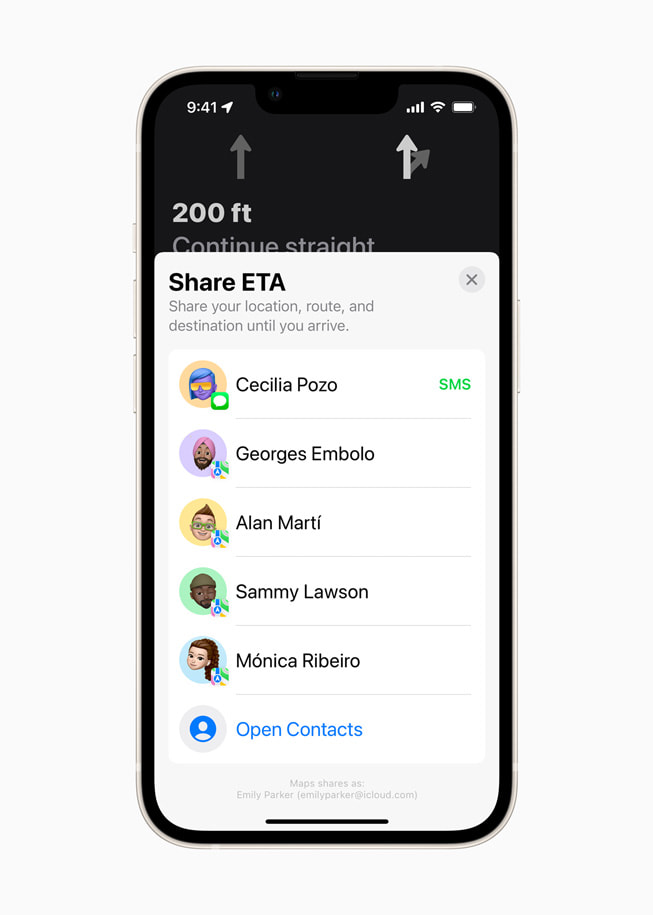
Share ETA enables users to share an estimated time of arrival with family, friends, and coworkers with a simple tap or by asking Siri.
Incident reports make it possible to safely and easily report an accident, hazard, or speed check along a route by simply letting Siri know “There’s an accident up ahead” or “There is something on the road.” Users can even report when incidents displayed on the map have been cleared, all while keeping their focus on the road.
Flyover offers a way to see select major metro areas with photo-realistic, immersive 3D views. Users can move their device through space to view a city from above, or explore in high resolution as they zoom, pan, tilt, and rotate around the city and its landmarks.
Favorites provides one-tap navigation to frequently visited places. Whether they’re headed home, to work, to the gym, or to school, users can simply tap and go once a location is added to Favorites on the launch screen.
Indoor Maps for airports and malls allow users to simply open the Maps app and see what level they’re on, look for restrooms, and even find out which stores and restaurants are open.
Look Around is an interactive way to visually explore a city with 3D imagery.
Maps offers cycling directions along bike lanes, bike paths, and bike-friendly roads.
Maps users can share their estimated time of arrival with friends and family.
Now users can safely report an accident, hazard, or speed check along a route by using Siri.
Explore major metro areas with photo-realistic immersive 3D views with Flyover.
Maps users can see where stores and restaurants are located within malls and airports using Indoor Maps.
Maps and Privacy
Apple is committed to keeping personal information safe and has built privacy into the core of Maps. With Maps, no sign-in is required. Personalized features, such as suggesting departure time to make the next appointment, are created using on-device intelligence. Any data collected by Maps while using the app, including search terms, navigation routing, and traffic information, is associated with random identifiers that regularly reset to prevent connecting search and location data stored on the server to a unique user. Maps goes even further to obscure a user’s location on Apple servers when searching for a location through a process called “fuzzing.” Maps converts the precise location where the search originated to a less-exact one within 24 hours.
One of the features Apple announced for iOS 15 is Legacy Contacts, a way to ensure that your digital life outlives you – if you would like it to.
The company hasn’t yet launched it, saying only that it is “coming in a software update to iOS 15,” but there are signs that Apple is preparing for its introduction …
Background
As we store more and more data digitally, a growing concern is that all of it could be lost in the event of our death. We’ve outlined in the past the risk to family photos in particular.
We’ve previously detailed some steps you can take today, including leaving device passwords and Apple ID credentials with a lawyer, alongside a copy of your will.
First of all, you may want to think about including your device passwords in a letter with a will. Without that, all the data on them may be rendered inaccessible. That could well include things with huge sentimental value, like family photos or that novel you’ve been working on […]
Your Apple ID also holds the key to everything you’ve ever bought from iTunes. Think about that. In the old days, your family could continue to enjoy your music, books and movies simply by reaching onto the shelf for a CD, paperback or DVD. But every app, every piece of music, every TV show, every movie, every book or audiobook you ever bought through iTunes is inaccessible to them without your Apple credentials. That’s a huge volume of valuable assets they can’t easily access.
But Apple is aiming to make the process a little easier with a new feature called Legacy Contacts.
The Digital Legacy programme allows you to designate people as Legacy Contacts so they can access your account and personal information in the event of your death.
The way the feature will work is this. If you want one or more friends or family members to be able to access your iCloud data after your death, you will be able to name them, and provide them with a security key. The key will not be usable while you are alive – Apple will only activate it if supplied with proof of your death, which would normally be a copy of your death certificate.
It’s worth noting that not all of your data will be accessible, as some of it is protected with end-to-end encryption. This includes Apple Card transactions, health data, keychain entries, and browser history.
Macworld spotted two signs of readiness for launch. First, the company has updated the iCloud usage agreement.
With Digital Legacy, you can choose to add one or more contacts to access and download certain data in your account after your death.
If your designated contacts provide proof of death to Apple and have the required key, they will automatically obtain access to that certain account data and activation lock will be removed from all your devices. Thus, it is your responsibility to keep your Digital Legacy contacts up to date.
Second, Apple has a microsite for Legacy Contacts to request access to your account and devices after your death.
Request access to a deceased friend or family member’s account. If you are the legacy contact for a deceased person, you can request access to their account and have the activation lock removed from their devices.
There are links there to two support documents, but these currently redirect to the main support page.
Every year, new iOS releases arrive with headline-grabbing features like SharePlay and Focus. Likewise, every year, iOS includes under-the-radar improvements that aren’t likely to generate headlines. In this hands-on video I consider the top hidden iOS 15 features that I’ve stumbled upon.
While a few of these low-key features were demonstrated in my top iOS 15 features overview, the majority are enhancements that I haven’t yet showcased for the public version of iOS 15. Here’s a full list of all of the sleeper features covered in this video, along with a brief commentary on why I think each feature is beneficial.
Return of the editing loupe
The editing loupe was a staple feature of iOS for years, but was inexplicably removed. The loupe magnifies the immediate area around the cursor to help with precise movement. Needless to say, it’s an iOS 15 features that I welcome back with open arms.
Mute notifications for individual apps
You can now mute notifications via Notification Center on a per-app basis. Simply swipe on the notification, select Options, and mute for 1 hour or for the entire day.
Reorder Home Screen pages
You can now quickly reorder Home Screen pages by going into edit mode and tapping the page dots to enter the page editor.
Delete Home Screen pages
Within the page editor, it’s now possible to outright delete hidden Home Screen pages, sending all of its apps to the App Library.
Drag and drop support
iPadOS has enjoyed true drag and drop support for several years now, and iPhone users can now join in on the fun. Try dragging an image from the Photos app to a Messages app thread, or drag a URL directly from Safari into Notes.
Live Text shortcut
Live Text is one of the headline features in iOS 15, and if you tap in a text field to open the copy paste menu, you’ll see a new capture text shortcut to quickly insert live text from anywhere.
Reduce Bass on HomePod
If you’re an apartment dweller, this is a feature that you’ll surely appreciate. Open the Home app, invoke your HomePod, and flip the Reduce Bass switch.
Background sounds
I often listen to ambient sounds on Apple Music at night to help me sleep. With iOS 15, ambient background sounds are built right into iOS. Simply go to Accessibility → Audio/Visual → Background Sounds.
Voice memos skip silence and adjust playback speed
iOS 15 lets you speed through voice memos with the adoption of skip silence and playback speed adjustments.
Shazam history
Long-press on the Shazam shortcut in Control Center to access Shazam listening history.
Playback speed with default video player
Press the ellipsis button in the bottom right-hand corner of the default video player to access awesome new playback speed options.
Zoom in with Quick Take
When taking a video with Quick Take, slide up or down to zoom in and out.
New QR code UI
A new AR-centric QR code UI appears in the stock camera app when a QR code appears in the viewfinder.
Photo picker order
iOS 15 will now respect the order of your selections when picking photos via the Photo picker.
Markup immediately available when editing photos
No longer are the markup options hidden behind a menu when editing photos in the Photos app.
iCloud Backup Over Cellular
Users on fast cellular connections now have the option to perform backups even when not connected to Wi-Fi. This option is perfect for those connected to speedy 5G cellular service.
Prepare for new iPhone on reset
iOS 15 helps you get ready for the iPhone 13 with a new Prepare for New iPhone checklist.
iCloud Data Recovery service
This service can help you recover data that is not yet end-to-end encrypted, such as photos, notes, and reminders.
Account Recovery Contact
It’s a good idea to establish an account recovery contact just in case you forget your device passcode and Apple ID password.
Use Groups with Files app
You can now group files in the Files app by Kind, Date, and Size.
Hybrid Time Picker
iOS 15 lets you cycle through the time picker old school style, complete with haptic feedback, but it also allows for direct time input with just a tap.
Updated AirPrint interface
An updated AirPrint UI comes with a new presets panel and the ability to select media and quality.
Built-in OTP authenticator
Finally! iOS 15 now supports one-time-passcodes for two-factor authentication. It will also auto-fill your one-time-passcodes for a totally seamless login experience. To set up one-time-passcodes, go to Settings → Password.
Pull to refresh in Safari
Safari gets tons of new additions like Tab Groups, and a new bottom address bar with built-in swipe gestures. But Safari gets an additional swipe gesture by finally bringing support for pull-to-refresh to Apple’s default browser for the first time.
Safari extensions
Definitely don’t sleep on Safari’s new extensions capability, which lets users integrate apps and utilities such as Apollo or 1Password like never before. To activate available extensions, open Safari, tap the ‘Aa’ button, and click Manage Extensions.
Per-app accessibility settings
In the past, enabling an accessibility setting like Smart Invert would apply to iOS as a whole. In iOS 15, it’s now possible to apply accessibility settings on a per-app basis. Simply visit Settings → Accessibility → Per-App Settings.
Keyboard search
If you’re multi-lingual, you’ll no doubt enjoy being able to search through all available keyboards in Settings → General → Keyboard → Keyboards → Add New Keyboard.
Download from Spotlight
A refreshed UI allows you to download apps from Spotlight directly without invoking the App Store.
Modified App Store search results for installed apps
If your App Store search results include apps that you already have installed, iOS 15 will present a minimized view of the app icon with no corresponding screenshots.
Spotlight web image search
You can now easily search the web for images via Spotlight.
Lock Screen access for Spotlight search
You can also access Spotlight search directly from the Lock Screen on an unlocked iPhone.
Uninstall apps via Spotlight
In iOS 15, it’s now possible to search for an app via Spotlight, long-press on the result, and delete the app right from Spotlight.
Continuous Siri dictation
iOS 15 affords users the ability to continually dictate text well beyond the limits of previous versions of iOS.
Share On Screen items with Siri (Screenshot)
You can ask Siri to share on-screen content with a friend.
Control Smart Home Devices at a Specific Time
You can also ask Siri to control Smart Home devices at a certain time, which will create an automation within the Home app.
Find My after power off
Finally, for devices logged in to the Find My network, you can now find your iPhone running iOS 15, even if the device has been powered off.
The all-new iPhone 13 lineup is officially here. As has become the norm, the lineup is split into the iPhone 13 and iPhone 13 Pro. On the surface, the iPhone 13 and iPhone 13 Pro are very similar phones. They both feature a 6.1-inch display and the A15 Bionic processor inside, but look closer and you’ll notice some key differences.
If you’re trying to make a buying decision between the iPhone 13 and iPhone 13 Pro, head below for everything you need to know about the iPhone 13 vs iPhone 13 Pro comparison.
In this comparison, we focus specifically on the 6.1-inch iPhone 13 and the 6.1-inch iPhone 13 Pro. There are many similarities between the iPhone 13 mini and iPhone 13, and the iPhone 13 Pro Max, but there are also some key differences. Stay tuned to 9to5Mac over the coming days and weeks for additional comparisons between Apple’s iPhone lineup as it stands today.
iPhone 13 vs iPhone 13 Pro: Display
The iPhone 13 and iPhone 13 Pro feature 6.1-inch Super Retina XDR displays using OLED technology with a resolution of 2532 x 1170 pixels. This equals 460 pixels per inch. The iPhone 13 Pro, however, features a max brightness of 1000 nits, compared to the iPhone 13’s at 800 nits. For HDR content, however, both can reach a max brightness of 1200 nits.
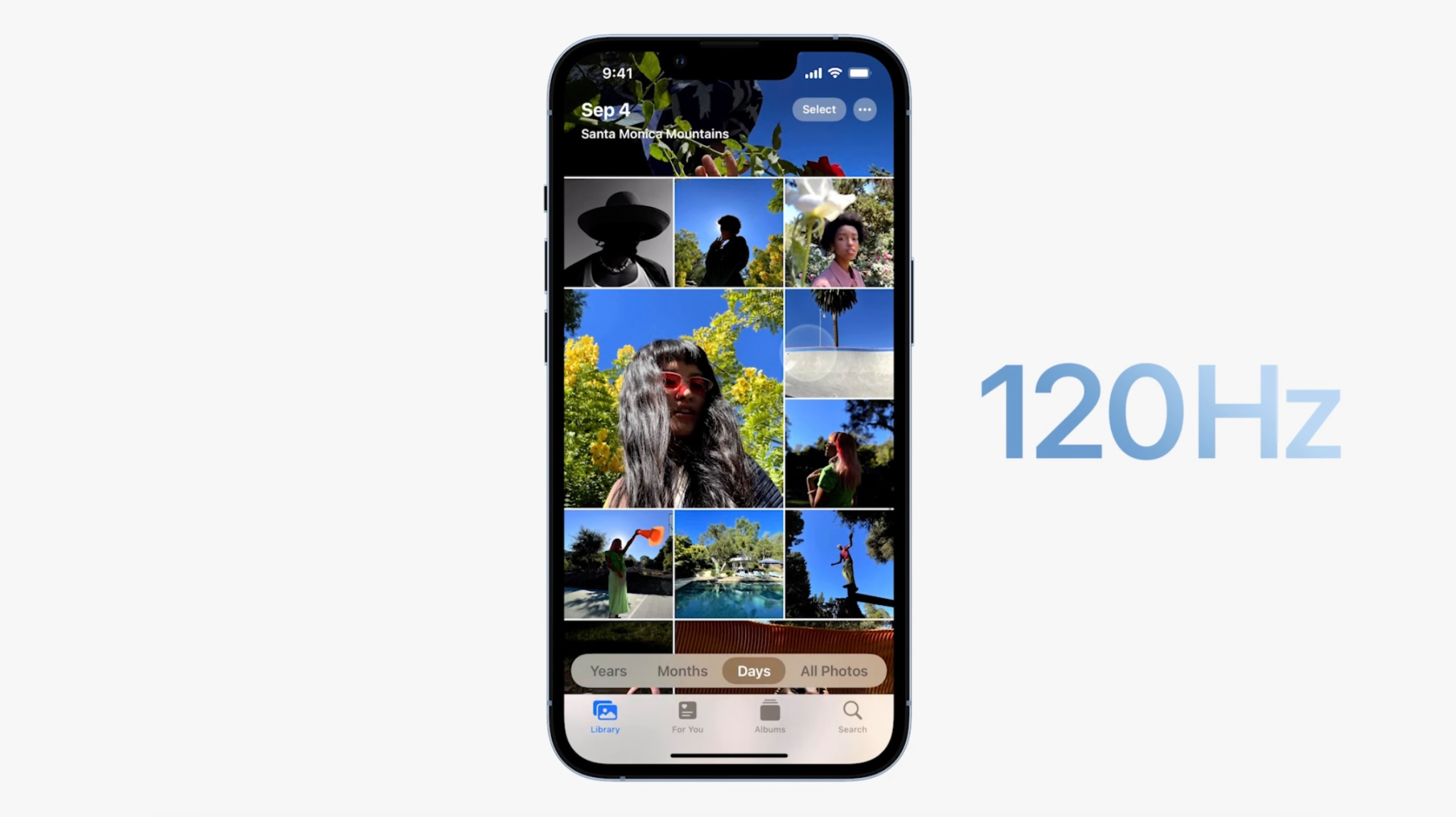
There is one major difference between the iPhone 13 and iPhone 13 Pro displays: ProMotion technology. Exclusive to the iPhone 13 Pro, Apple’s ProMotion display technology brings adaptive refresh rates up to 120Hz to the iPhone for the first time. This means the refresh rate of the iPhone 13 Pro’s screen can scale between 10Hz and 120Hz depending on what you’re doing on your device.
In real-world usage, this should mean things like scrolling and animations are significantly smoother. ProMotion also makes the display more efficient because it can scale all the way down to 10Hz when you’re doing something such as reading.
Other display features on the iPhone 13 and iPhone 13 Pro include:
2,000,000:1 contrast ratio
True Tone display
Wide color gamut (P3)
Haptic Touch
HDR display
Design
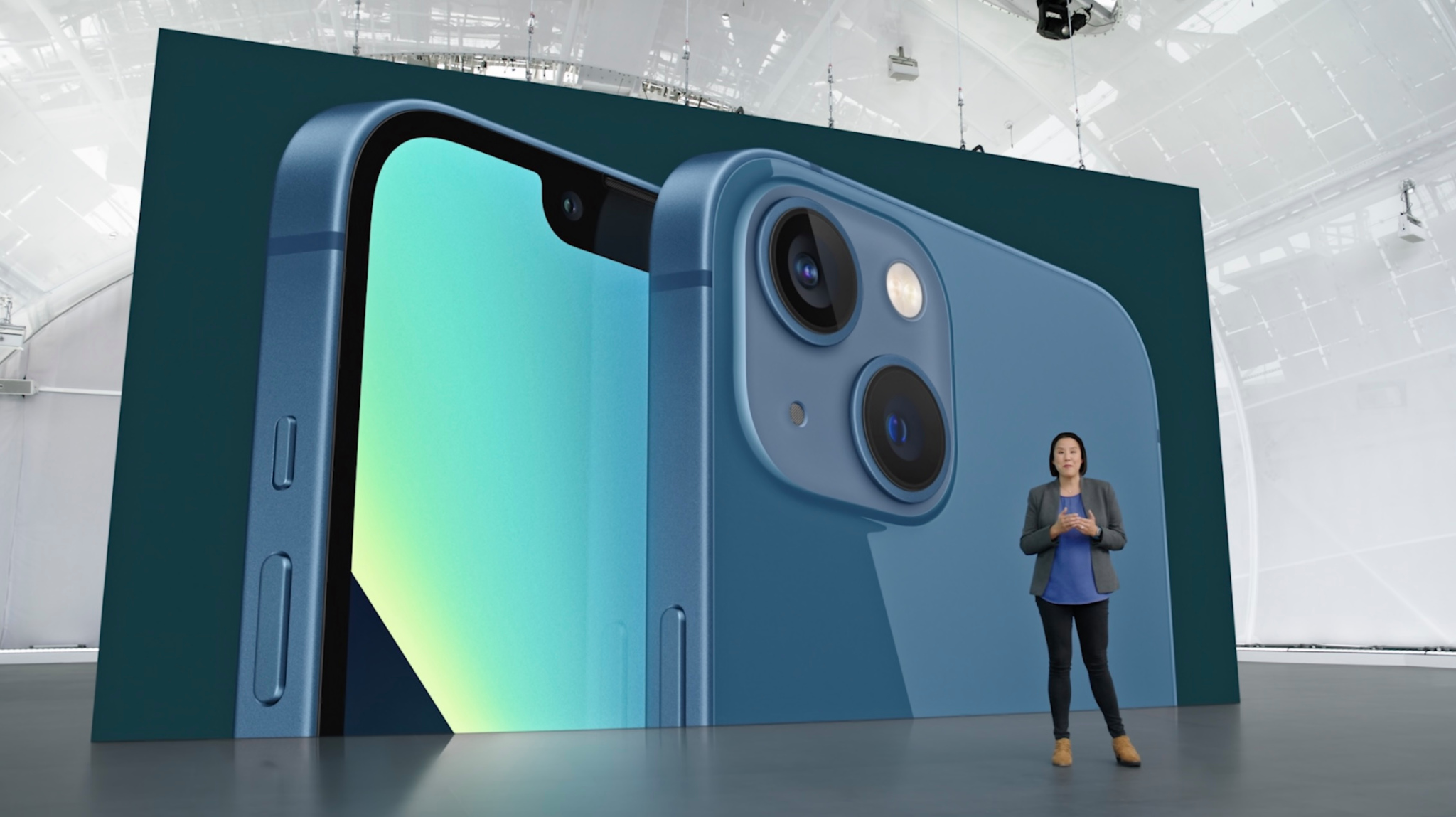
In terms of design, the iPhone 13 and iPhone 13 Pro are similar, with flat edges and nearly edge-to-edge displays. Both devices also feature slightly smaller notches at the top, which measure in at roughly 20% smaller in terms of width.
One major difference is that the iPhone 13 is made out of what Apple refers to as “aerospace-grade aluminum” while the iPhone 13 Pro is made from “surgical-grade stainless steel.” This means that the iPhone 13 has a brushed aluminum finish, while the iPhone 13 Pro features a shiny stainless finish.
The difference in materials makes the iPhone 13 Pro slightly heavier than the iPhone 13. The iPhone 13 weighs in at 6.14 ounces (174 grams), while the iPhone 13 Pro weighs in at 7.19 ounces (204 grams).
The dimensions are the same between the iPhone 13 Pro and iPhone 13 :
Height: 5.78 inches (146.7 mm)
Width: 2.82 inches (71.5 mm)
Thickness: 0.30 inches (7.65 mm)
The iPhone 13 and iPhone 13 Pro are both rated for IP68 splash, water, and dust resistance. Under this rating, the iPhone 13 and iPhone 13 Pro can withstand submersion to a maximum depth of 6 meters for up to 30 minutes.
Performance and battery life
The iPhone 13 and iPhone 13 Pro are both powered by an A15 Bionic processor, packing a 6-core CPU with 2 performance and 4 efficiency cores. The A15 Bionic processor also features a new 16-core Neural Engine to power machine learning and artificial intelligence tasks.
One difference between the iPhone 13 and iPhone 13 Pro is that the former features a 4-core GPU, while the latter features a 5-core CPU. It remains to be seen what kind of difference this leads to in real-world performance, but it is a notable change for Apple to be segmenting the iPhone 13 lineup in this way for the first time.
Apple has not made any changes to the RAM configuration this year, with the iPhone 13 packing 4GB of RAM and the iPhone 13 Pro packing 6GB of RAM.
Both the iPhone 13 and iPhone 13 Pro feature notable improvements in battery life this year compared to their predecessors. The iPhone 13 Pro is able to edge out the iPhone 13 in some areas, according to Apple’s claims.
iPhone 13 battery estimates:
Audio playback: 75 hours
Video playback (streamed): Up to 15 hours
Video playback: Up to 19 hours
iPhone 13 Pro battery estimates:
Audio playback: 75 hours
Video playback (streamed): Up to 20 hours
Video playback: Up to 22 hours
Both devices support fast charging, for getting up to a 50% charge in 30 minutes with a 20W power adapter. There’s also support for 7.5W Qi wireless charging and 15W wireless charging when using a MagSafe wireless charger.
Connectivity
Have you heard the great news about 5G? Just like their predecessors, the iPhone 13 and iPhone 13 Pro both feature support for 5G. Apple says this makes for “superfast downloads and high-quality streaming.” This includes support for mmWave 5G connectivity in the United States, as well as sub-6GHz 5G in the United States and other countries.
Camera
Where you really start to notice differences between the iPhone 13 and iPhone 13 Pro, however, is the camera technology. The iPhone 13 features a dual 12MP camera system with Wide and Ultra Wide cameras on the back. On the front, you’ll find a 12MP f/2.2 aperture selfie camera.
Here are the full camera features for the iPhone 13:
Dual 12MP camera system: Wide and Ultra Wide cameras
Wide: ƒ/1.6 aperture
Ultra Wide: ƒ/2.4 aperture and 120° field of view
2x optical zoom out
Digital zoom up to 5x
Portrait mode with advanced bokeh and Depth Control
Portrait Lighting with six effects (Natural, Studio, Contour, Stage, Stage Mono, High‑Key Mono)
Meanwhile, the iPhone 13 Pro features a triple-lens camera system on the back plus a LiDAR Scanner. The triple-lens camera setup features Telephoto, Wide, and Ultra Wide cameras. On the front, you’ll find the same 12MP camera with an f/2.2 aperture.
Here are the full camera features for the iPhone 13 Pro:
Pro 12MP camera system: Telephoto, Wide, and Ultra Wide cameras
Telephoto: ƒ/2.8 aperture
Wide: ƒ/1.5 aperture
Ultra Wide: ƒ/1.8 aperture and 120° field of view
3x optical zoom in, 2x optical zoom out; 6x optical zoom range
Digital zoom up to 15x
Night mode portraits enabled by LiDAR Scanner
Portrait mode with advanced bokeh and Depth Control
Portrait Lighting with six effects (Natural, Studio, Contour, Stage, Stage Mono, High‑Key Mono)
Dual optical image stabilization (Telephoto and Wide)
Sensor‑shift optical image stabilization (Wide)
Six‑element lens (Telephoto and Ultra Wide); seven‑element lens (Wide)
True Tone flash with Slow Sync
Panorama (up to 63MP)
Sapphire crystal lens cover
100% Focus Pixels (Wide)
Night mode
Deep Fusion
Smart HDR 4
Photographic Styles
Macro photography
Apple ProRAW
Wide color capture for photos and Live Photos
Lens correction (Ultra Wide)
Advanced red‑eye correction
Photo geotagging
Auto image stabilization
Burst mode
Image formats captured: HEIF and JPEG
Video recording
In terms of video recording, both the iPhone 13 and iPhone 13 Pro support up to 4K video recording at 24 fps, 25 fps, 30 fps, or 60 fps as well as HDR video recording with Dolby Vision up to 4K at 60 fps. Both devices also feature Cinematic mode for recording videos with shallow depth of field at 1080p at 30 fps.
One notable difference, however, is that the iPhone 13 Pro packs support for Apple’s ProRes video recording standard at up to 4K at 30 fps (1080p at 30 fps for 128GB storage). This is a major feature for professional videographers looking to get the highest quality and lowest compression possible.
Colors, storage, and pricing
The iPhone 13 is available in five different colors: midnight, starlight, blue, red, and pink. The iPhone 13 Pro is available in four different colors: silver, graphite, gold, and sierra blue.
In terms of pricing, the iPhone 13 retails for:
$799 for 128GB of storage
$899 for 256GB of storage
$999 for 512GB of storage
Pricing for the iPhone 13 Pro is as follows:
$999 for 128GB of storage
$1099 for 256GB of storage
$1299 for 512GB of storage
$1499 for 1TB of storage
Included accessories
Citing environmental concerns, Apple is no longer including headphones or a charging brick in the iPhone 13 box this year. Here are some accessories you might consider picking up to help fill that gap and complement your new iPhone.
iPhone 13 vs iPhone 13 Pro features
iPhone 13
iPhone 13 Pro
Display
6.1-inch Super Retina XDR OLED
6.1-inch Super Retina XDR OLED
ProMotion Display
❌
✅
Finish
Aluminum
Stainless Steel
Processor
A15 Bionic
A15 Bionic
RAM
4GB
6GB
CPU cores
6 cores
6 cores
GPU cores
4 core
5 core
Durability
IP68
IP68
Battery life
Up to 19 hours video
Up to 22 hours video
Camera
Dual-lens 12MP
Triple-lens 12MP
Optical zoom range
2x
6x
Video
Dolby Vision HDR up to 4K at 60 fps
Dolby Vision HDR up to 4K at 60 fps
LiDAR
❌
✅
ProRes
❌
✅
ProRAW
❌
✅
Cinematic mode
✅
✅
5G
✅
✅
Weight
6.14 ounces (174 grams)
7.19 ounces (204 grams)
Storage
128GB, 256GB, 512GB
128GB, 256GB, 512GB, 1TB
Pricing
From $799
From $999
Wrap up
As you can see, the iPhone 13 and iPhone 13 Pro share many similarities in terms of size, form factor, and performance. With that being said, there are some notable differences this year in the camera category as well as in the display category.
Unlike last year when the iPhone 12 and iPhone 12 Pro featured the same display technology, the iPhone 13 Pro exclusively features the new ProMotion display technology. The iPhone 13 Pro also packs a more impressive camera setup with ProRes video recording, a triple-lens design, and more.
But ultimately, for most people, the iPhone 13 is enough: it can handle virtually any task you throw at it and it features a stunning design available in 5 different colors. The camera, while not as impressive as the iPhone 13 Pro, can still take stunning images and videos.
Those who should opt for the iPhone 13 Pro include people who take professional-level video and can take advantage of the ProRes video recording features. Those people should also opt for higher storage capacities as well.
Apple Inc. will debut major software updates for the iPhone and iPad at its developers’ conference on June 07,2021 to an audience that has grown increasingly critical of the company’s App Store policies.
The virtual event beginning June 07,2021 will also include software updates for the Mac, Apple Watch and Apple TV as well as tools developers can use to build apps. The company plans to discuss new privacy protections for limiting data collection as well as health-tracking, notifications and messaging features. Executives also will promote significant improvements to iPad software, making the device more capable and appealing to more advanced users.
This year’s conference arrives while Apple is facing criticism from some developers over its App Store policies. The controversy was highlighted by a three-week trial last month of a lawsuit filed by Epic Games Inc., which argued that the iPhone maker’s policies and revenue share of as much as 30% are anticompetitive. Unhappy developers have grown more willing publicly to express discontent, Apple executives have been grilled by U.S. lawmakers and companies such as Microsoft Corp. and Spotify Technology SA have chided Apple.
What to Expect From Apple’s WWDC
The Cupertino, California-based iPhone maker will now try to convince developers that Apple’s platform remains the best place for them to sell software and that it has new features to keep consumers glued to the company’s products. Apple, however, isn’t expected to announce wholesale App Store policy changes next week. The company generated about $22 billion from App Store commission in 2020 alone, according to Sensor Tower estimates.
As part of its continued privacy push, Apple is planning new features to counter overly invasive apps. One major new addition will be a control panel that provides in-depth detail on what data are being collected by each third-party app installed on a user’s device. Earlier this year, Apple rolled out a feature to limit the ability of developers to track users across apps and the web for advertising purposes, irking developers like Facebook Inc.
On the iPhone and iPad software updates, users will now be able to set a status — such as whether you are driving, sleeping, working or don’t want to be disturbed — and have that dictate how incoming notifications are handled. The update will also include a larger focus on auto-replying to messages and a new design for incoming notification banners at the top of the screen.
For the iPad, Apple plans to revamp the home screen and support the placement of widgets — snippets of dynamic information like calendar, weather and stocks — anywhere on the screen. This is a commonly requested feature that will bring the iPad in line with Android rivals. The company also plans an improved multitasking system to make it easier to operate multiple apps at the same time.
The Messages app will receive enhancements on the way toward Apple’s eventual goal to turn it into a more direct competitor to messaging services on social networks like Facebook’s WhatsApp and Messenger, Bloomberg News has previously reported. Apple has also been working on a revamped lock screen for the iPhone and iPad, though some of those changes have been pushed back to a future release and won’t appear this year.
Apple’s planned update to macOS is expected to be somewhat minor after the operating system received an overhaul in 2020, while the Apple Watch is expected to gain some health-tracking and interface improvements. The Apple TV will also get enhanced software after the company released a faster model last month.
WWDC kicks off on Monday June 07,2021 or June 08,2021 3am some part of the world.