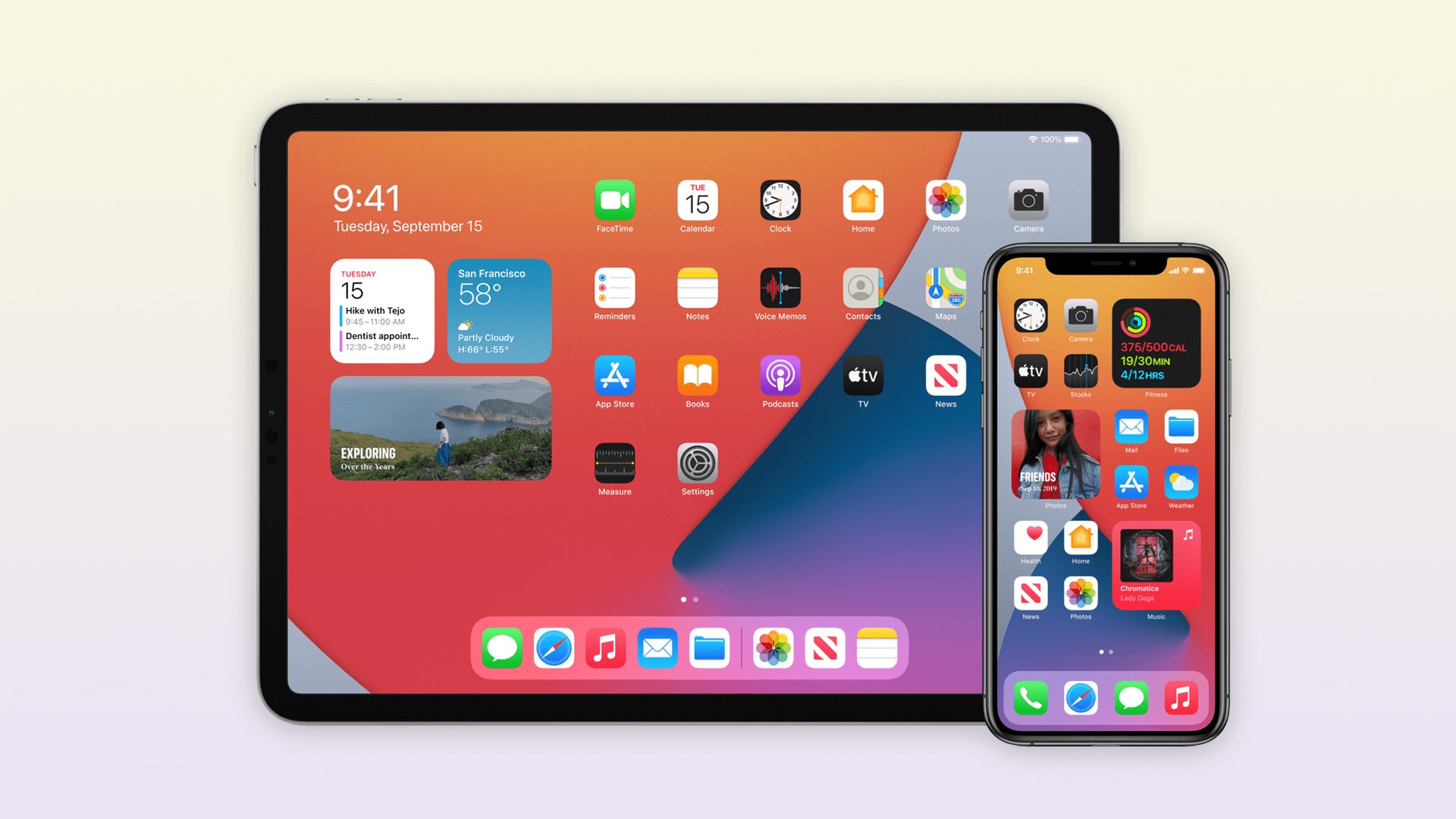
Following the release of iOS 14.3 last month, Apple today stopped signing both iOS 14.2 and iOS 14.2.1 — which was only available for iPhone 12 models. That means users who have updated their devices to iOS 14.3 can no longer downgrade to iOS 14.2.
Among all the changes of iOS 14.3, the most notable one is the addition of the ProRAW photo format for the iPhone 12 Pro and iPhone 12 Pro Max. Apple announced the ProRAW feature for the new iPhones during its October event last year, but the feature was only released to users months later.
As for iOS 14.2, the updates brought new emojis, more wallpapers, and support for the HomePod Intercom feature. iOS 14.2.1 arrived a few days later with specific bug fixes for iPhone 12 models.
Reverting to older iOS builds is common for those with jailbroken devices. Restoring an iPhone or iPad to a previous version of iOS can sometimes be helpful for users who experience significant bugs after upgrading to the latest version of iOS.
If you have experienced any serious issues with iOS 14.3, unfortunately you’ll now have to wait until a future update is available rather than downgrading to iOS 14.2. The only possible downgrade for now is from the recently released iOS 14.4 beta to iOS 14.3.
After nearly two years of no major movement in its smart speaker product line, which itself came years late to the market, Apple has finally announced a half-successor to the HomePod. The HomePod mini isn’t due to ship until next month but isn’t stopping Apple from pushing out a new version of its HomePod software that prepares for its arrival. Software version 14.1, however, which lines up with iOS 14.1 and iPadOS 14.1, isn’t just about the mini speaker but also introduces features that make all HomePods, and Siri, smarter.
With a $99 price tag, the HomePod mini aims squarely at the Amazon Echo Dot and Google Nest Mini markets, leaving people fewer excuses not to sink their teeth into Apple’s smart home ecosystem. Of course, this small smart speaker makes more sense if you’re already hooked into Apple’s world anyway or if you find its features just as or even more helpful than the competition.
The HomePod’s features haven’t exactly been at the top of the list when it comes to smart speakers but that list has been consistently growing while, some will argue, respect users’ privacy the way only Apple knows how. With Software version 14.1, for example, HomePod owners and future HomePod mini owners will be able to use a set of speakers as an intercom system throughout the house. You’ll also be able to finally select your preferred music to wake up to in the alarm settings.
Siri is also getting an update in this iteration, like being able to stop alarms and timers across all HomePods in the same network. Web searches can now be started on a HomePad then sent to an iPhone to make a more seamless and convenient transition.
As with previous HomePod software updates, the firmware is automatically installed on the speaker without requiring user intervention. It can also be triggered manually from the iOS app, of course, if you’re are that excited for a smarter and more useful smart speaker.
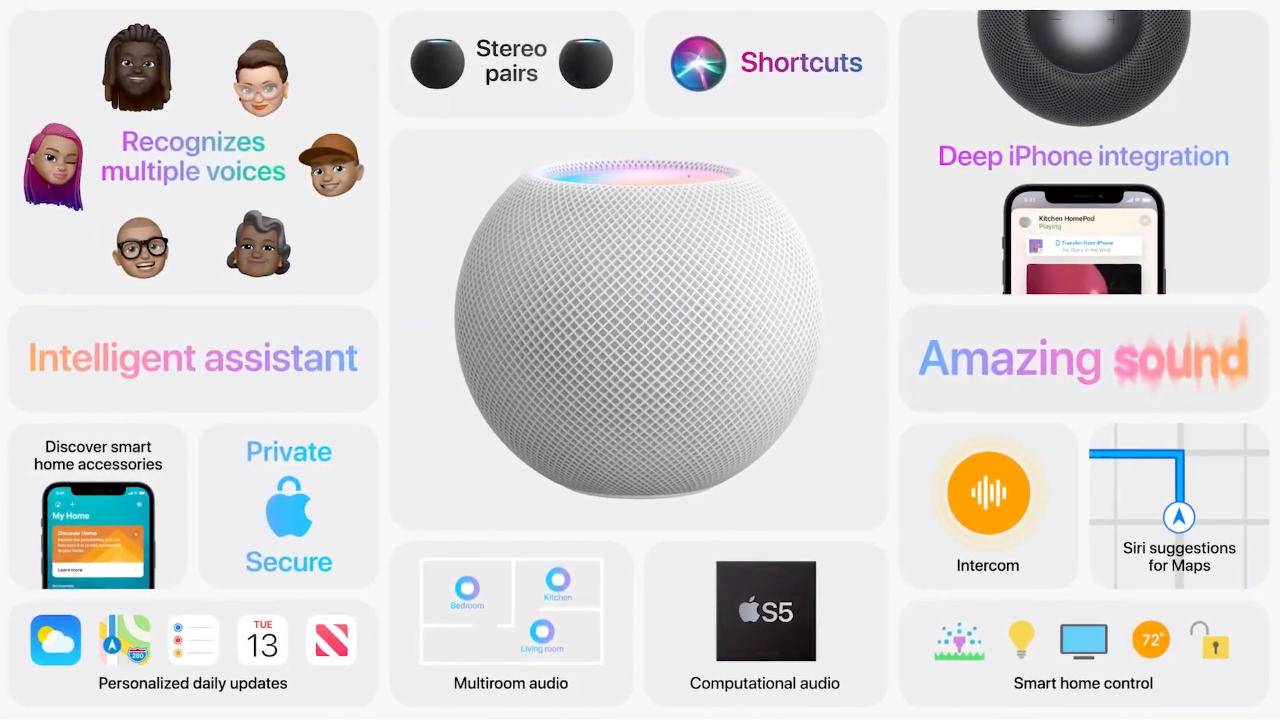
Alongside iOS and iPadOS 14.1, Apple today released new 14.1 software for the HomePod, which includes a number of new updates such as support for the Intercom feature that allows you to speak to anyone in the home on iPhone, iPad, HomePod, and more.
The update also introduces support for the HomePod mini that’s launching in November and it adds new Siri features. Siri is able to stop alarms, timers, and media across HomePod speakers, and web search requests from HomePod can be sent from HomePod to the iPhone.
There’s also an option to add music to alarms to wake up to a favorite song or playlist from Apple Music, and there are multiple reliability improvements.
Software version 14.1 includes support for HomePod mini and new Siri and Intercom features. This update also includes bug fixes and improvements.
HomePod mini
– Setup and automatically transfer your Apple ID, Apple Music, Siri and Wi-Fi settings to HomePod mini
Siri
– Siri suggestions appear in Maps when you ask HomePod for information about a location
– Web search requests to HomePod can be sent from HomePod to your iPhone
– Siri can now stop alarms, timers, and media across HomePod speakers
– Voice recognition support for Podcasts for multiple users in the home
Intercom
– Ask HomePod to make announcements to other HomePod speakers throughout your home
– Intercom to all HomePod speakers
– Intercom to a HomePod in a specific room or zone
Other improvements and fixes
– Add music to your alarms and wake up to your personal song, playlist, or radio station from Apple Music
– Fixes an issue where stereo pairs can sometimes play out of sync
– Improves reliability when using Siri to control multiple speakers
– Optimizes Siri performance
HomePod software is installed automatically on the HomePod
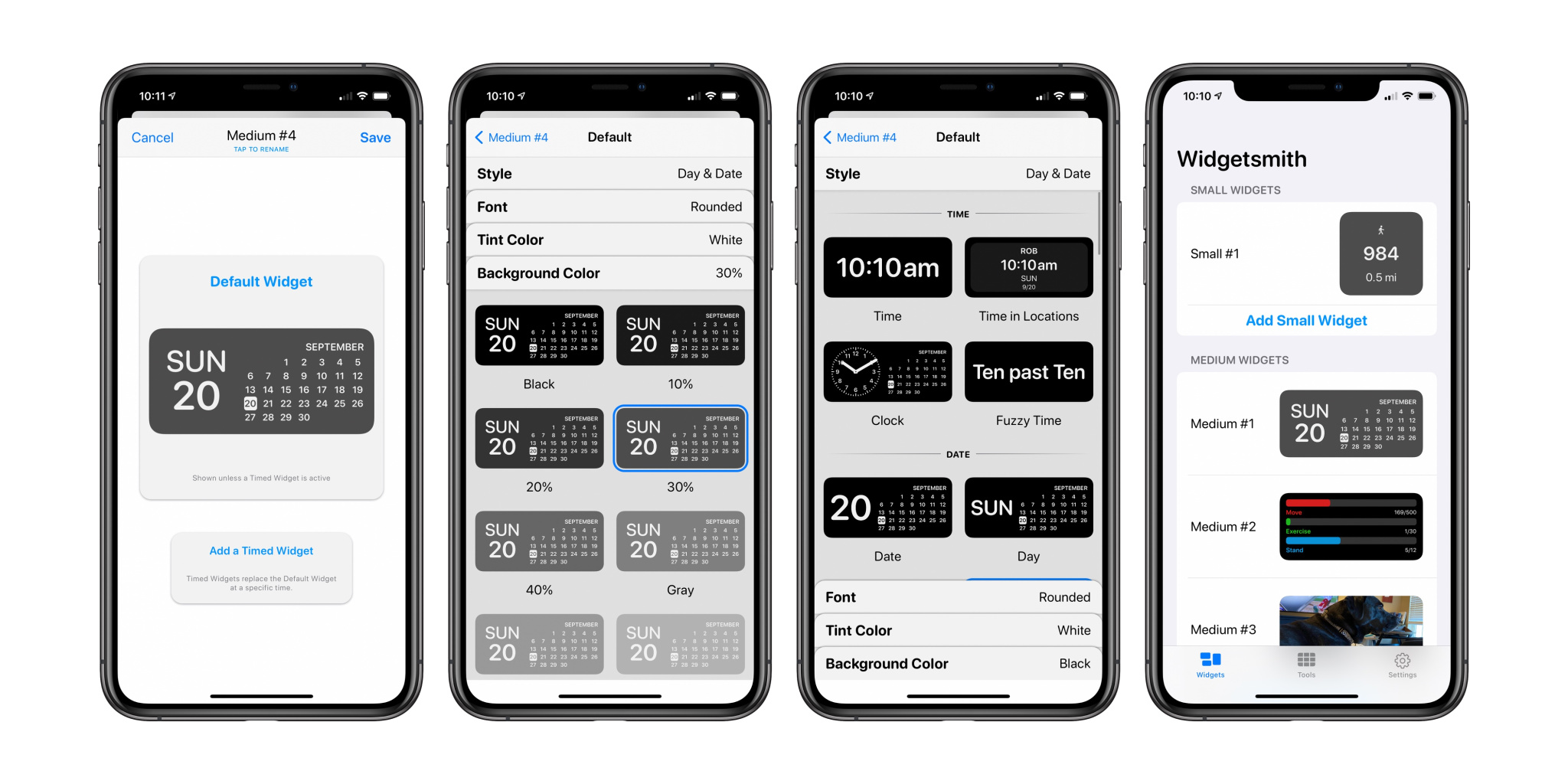
Apple’s iOS 14 home screen widgets have been a huge hit going beyond the tech community and making their way into the mainstream. We’ve seen some awesome options like Widgetsmith and Pastel to make custom widgets, and Clear Spaces is another handy app to create a customized home screen layout with transparent iPhone widgets.
Using stock or custom widgets is a great way to create a personalized iPhone home screen, but you’re typically still locked into filling up the entire screen with apps or widgets.
There have been some solutions to create invisible app icons to color-match your home screen, making them blend in but taking up an app space to allow for custom layouts (without jailbreaking). But one of the limitations has been that for the best results, you need to use a solid, or mostly solid wallpaper.
Enter Clear Spaces for iPhone, an app that allows you to create custom transparent widgets that work with any wallpaper background. For now, options are 2×2 or 2×4 (small and medium) widgets. Another app that you can pair with Clear Spaces if you want even more options is Transparent App Icons. As the name implies, you can create individual transparent apps.
Back to Clear Spaces, it works by taking a screenshot of your wallpaper, placing the widget based on the wallpaper, and then selecting what part of the screenshot the transparent widget should mirror.
The developers behind the app Marko Crnkovic and Aurther Nadeem (WWDC scholarship winners) are also working on an option to remove the “Clear Spaces” text under the widgets in a beta version.
As shown in the screenshot above, you can even use the Clear Spaces transparent iPhone widgets to make custom home screen layouts compatible with complex wallpapers.
After opening the app, you can tap the info button at the bottom for full instructions but what you’ll want to do is grab some screenshots of your blank wallpaper.
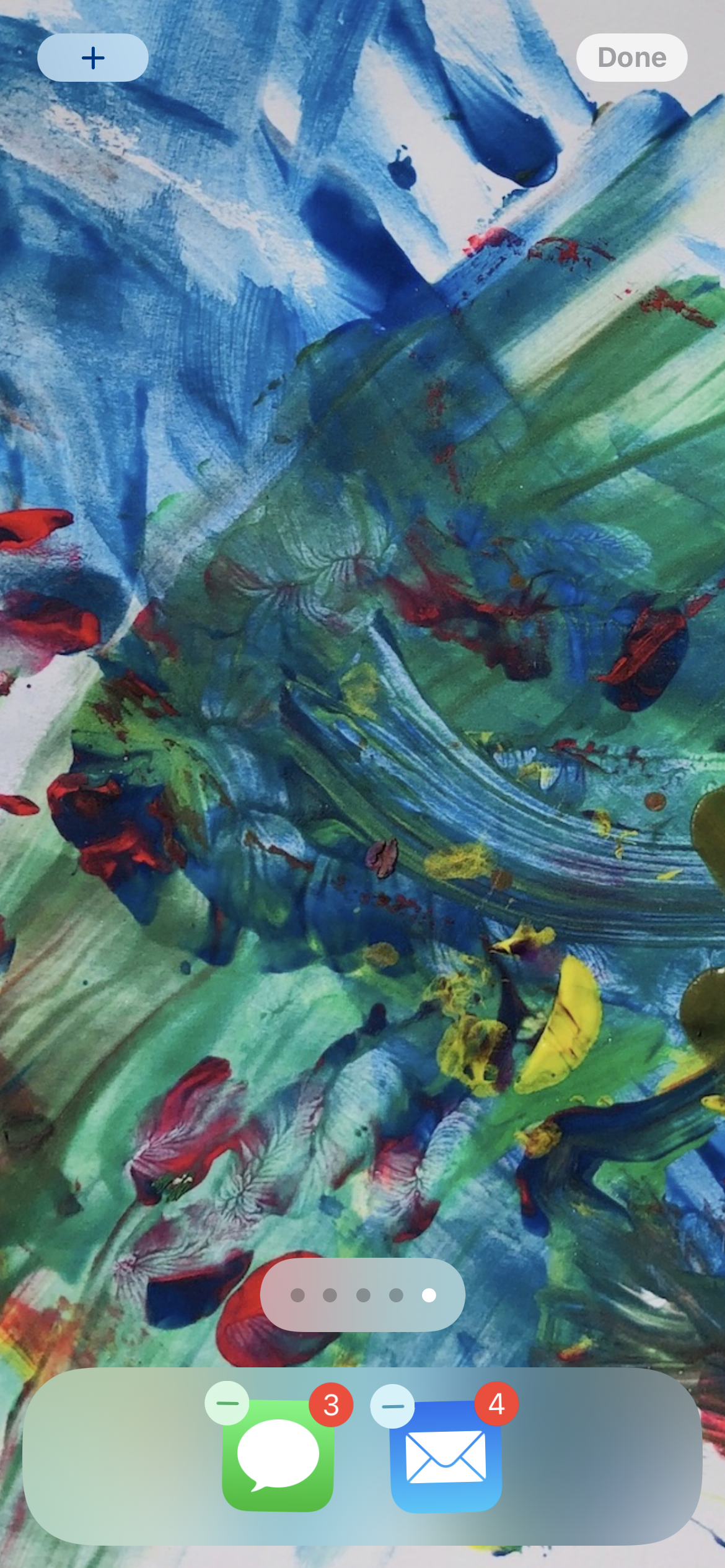
Head to your home screen, tap and hold to enter jiggle mode
Swipe from right to left to the end of your app pages to see the blank one, grab a screen shot (one for dark mode and light mode)
Open up Clear Spaces, tap the plus image above “No Image Set” and pick your wallpaper screenshots
Now you can head back to your home screen, enter jiggle mode again, tap the plus in the top left corner, look for Clear Spaces to add your new transparent widgets
Once you have it placed on your home screen, long-press on it > Edit Widget to select the position so, or also opt for date/time, both, or none
Here’s how it looks to customize Clear Spaces widgets:
Outside of the iPhone SE, every iPhone that Apple sells today features an “edge-to-edge” display devoid of a physical Home button. If you’re upgrading from a device with a Home button, this refresher course can help you learn how to force restart your iPhone 12, enter recovery mode, DFU mode, etc. Watch our hands-on video tutorial inside for the details.
Getting started
This tutorial will work for all new iPhone 12 releases, including the iPhone 12 Pro, and the forthcoming iPhone 12 mini and iPhone 12 Pro Max. Henceforth, when using the term iPhone 12, I’m referring to all iPhone 12 models.
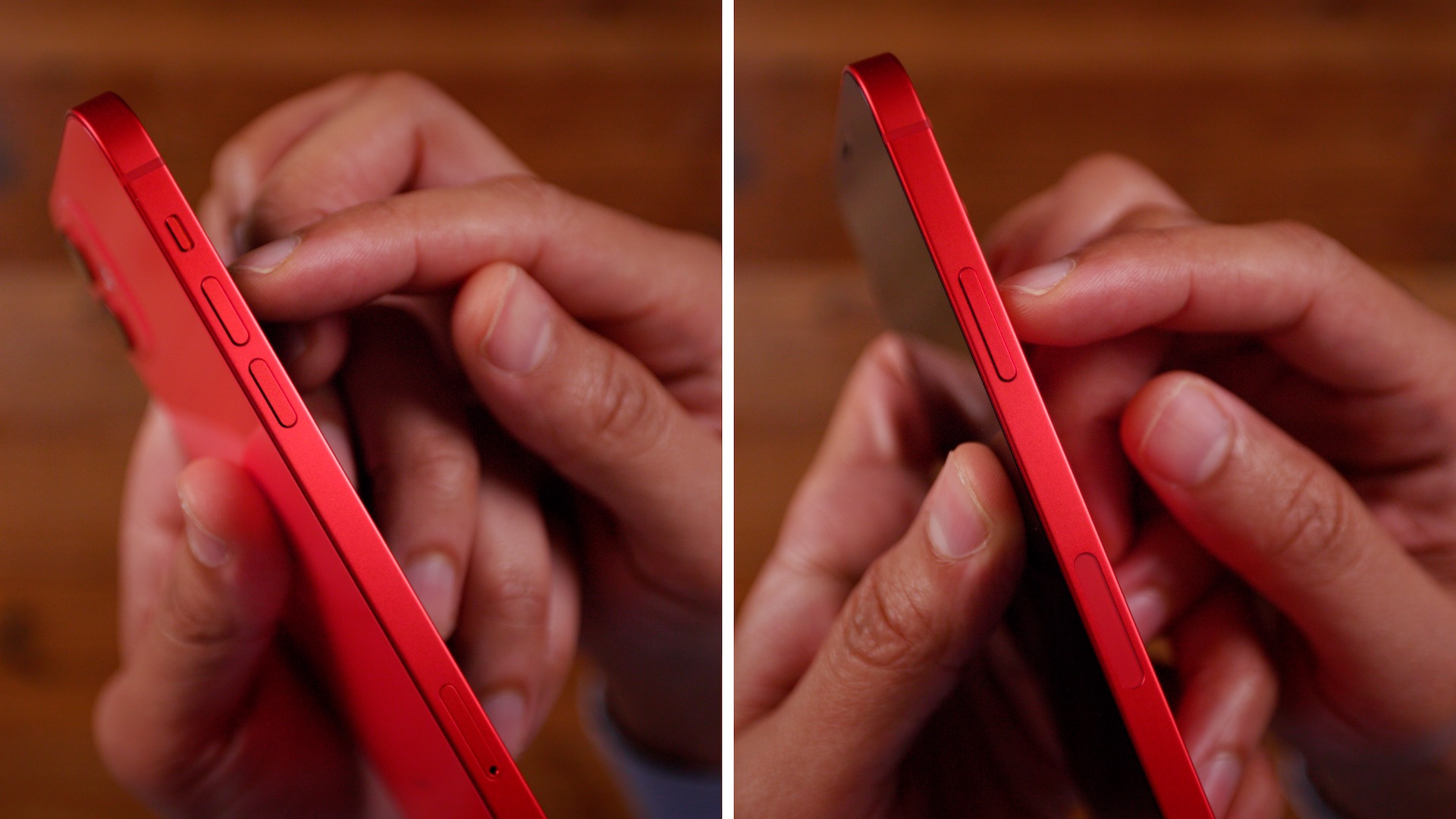
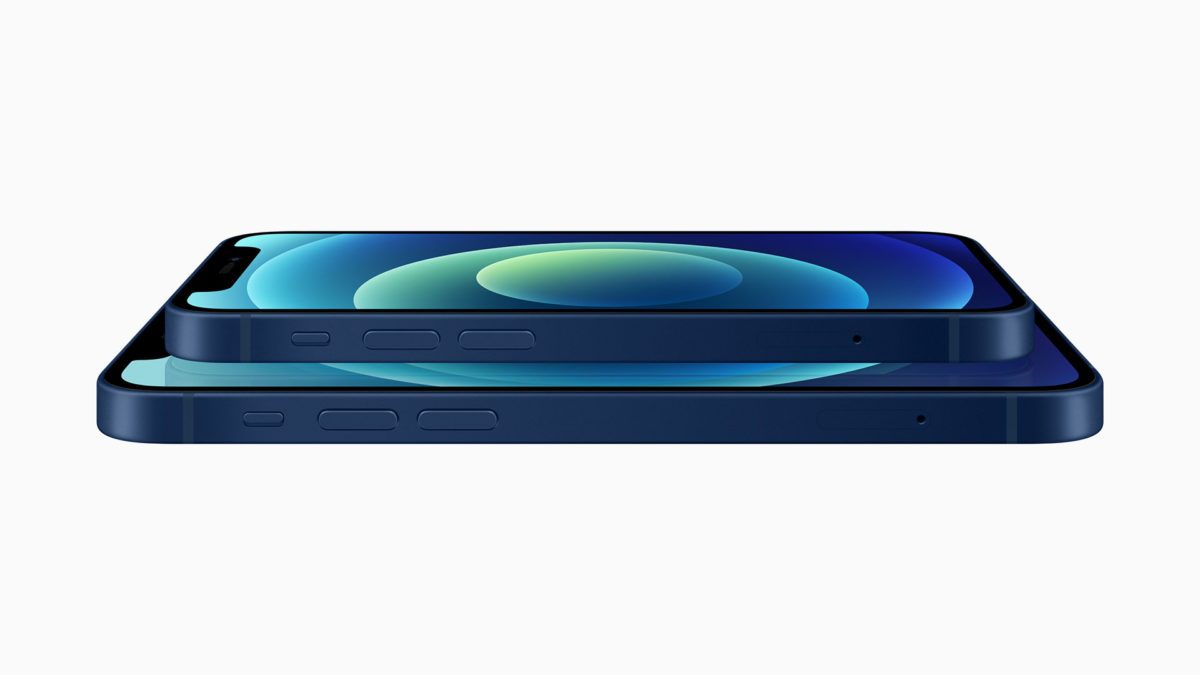
You’ll need to familiarize yourself with the buttons on your iPhone in order to perform any of the following functions. There are two Volume buttons on the left-hand side of the iPhone, along with a Side button on the opposite side.
Since modern iPhone hardware lacks the Home button, the Side button, along with the volume buttons, play instrumental roles when it comes to force resetting, entering recovery mode, DFU mode, etc.
iPhone 12 Volume buttons and Side button
How to turn off iPhone 12
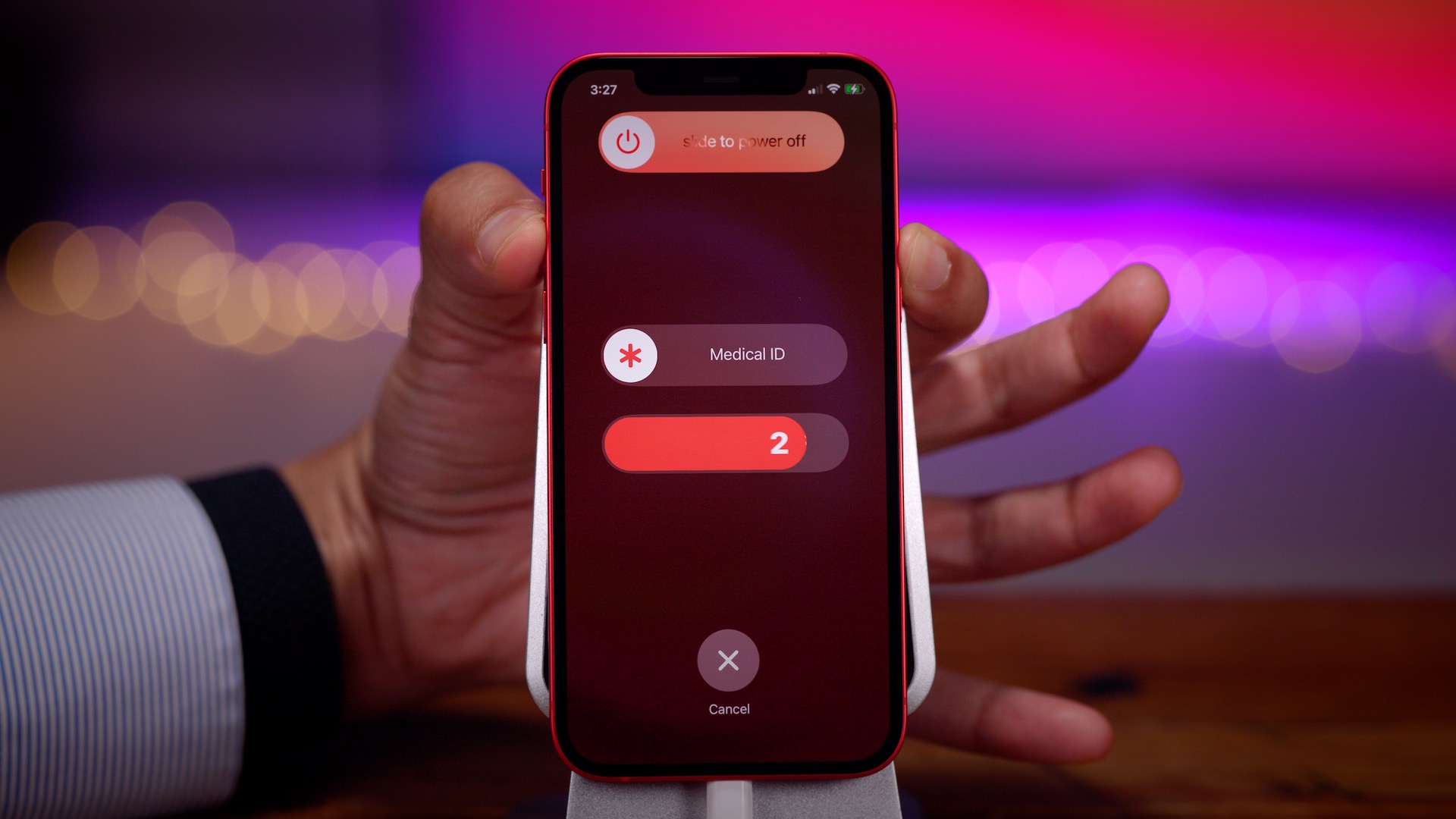
Powering down the iPhone 12 can be accomplished via a couple of methods. The easiest way to power down the iPhone 12 is to hold the Side button along with one of the volume buttons until the slide to power off slider appears at the top of the screen. From there, just slide to power off your iPhone.
You can also go to Settings → General, scroll down to the bottom of the page, and tap the Shut Down button. This will cause the slide to power off slider to appear at the top of the screen.
How to turn on iPhone 12
To power your iPhone 12 back up, press and hold the Side button until the Apple logo appears on screen. If this doesn’t work, your iPhone may need to be charged. If your iPhone has a black screen and the Side button doesn’t function, it could be because your iPhone 12 is in DFU mode. See the tutorial for exiting DFU mode below.
How to force restart iPhone 12
To force restart iPhone 12, perform the following in quick succession:
Step 1: Press Volume up and release.
Step 2: Press Volume down and release.
Step 3: Press and hold the Side button until you see a black screen.
Your iPhone 12 will restart and automatically boot back to the Lock screen.
How to put iPhone 12 into recovery mode
Step 1: Connect your iPhone to your computer with a Lightning to USB cable. If this is your first time connecting your iPhone to this computer, you’ll need to tap the Trust button that appears on the Trust This Computer dialogue that appears. You’ll then have to enter your passcode on your iPhone to confirm the pairing.
Next, perform the following steps in quick succession:
Step 2: Press Volume up and release.
Step 3: Press Volume down and release.
Step 4: Press and continue holding the Side button until you see the connect to computer dialogue on screen.
Step 6: Release the Side button and continue holding the Volume down button for an additional 10 seconds.
When you successfully enter DFU mode, your iPhone should remain on a black screen. If you see the Apple logo appear, then something went wrong and you’ll need to try again.
If you’re connected to a Mac, the Finder should acknowledge that you’ve entered recovery mode. Instead of having the option to Update iOS, you should only see the Restore option, which is another indication that you’ve successfully entered DFU mode.
How to exit DFU mode on iPhone 12
Exiting DFU mode is a little more involved than exiting regular recovery mode:
Step 1: Press Volume up and release.
Step 2: Press Volume down and release.
Step 3: Press and continue holding the Side button until you see the Apple logo appear. Your iPhone should boot back to the Lock screen.
How to disable Face ID temporarily on iPhone 12
To temporarily disable FaceID on iPhone 12, press and hold either of the Volume buttons along with the Side button until the slide to power off slider appears. Tap the ‘X’ button at the bottom of the screen to go back to the Lock screen, and you’ll see a message that says Your passcode is required to enable Face ID. Once your enter your device passcode, Face ID will be automatically reactivated.
How to use Emergency SOS on iPhone 12
Warning: activating Emergency SOS will contact emergency authorities. Please only use this feature in case of a real emergency.
There are three ways to invoke Emergency SOS on iPhone 12:
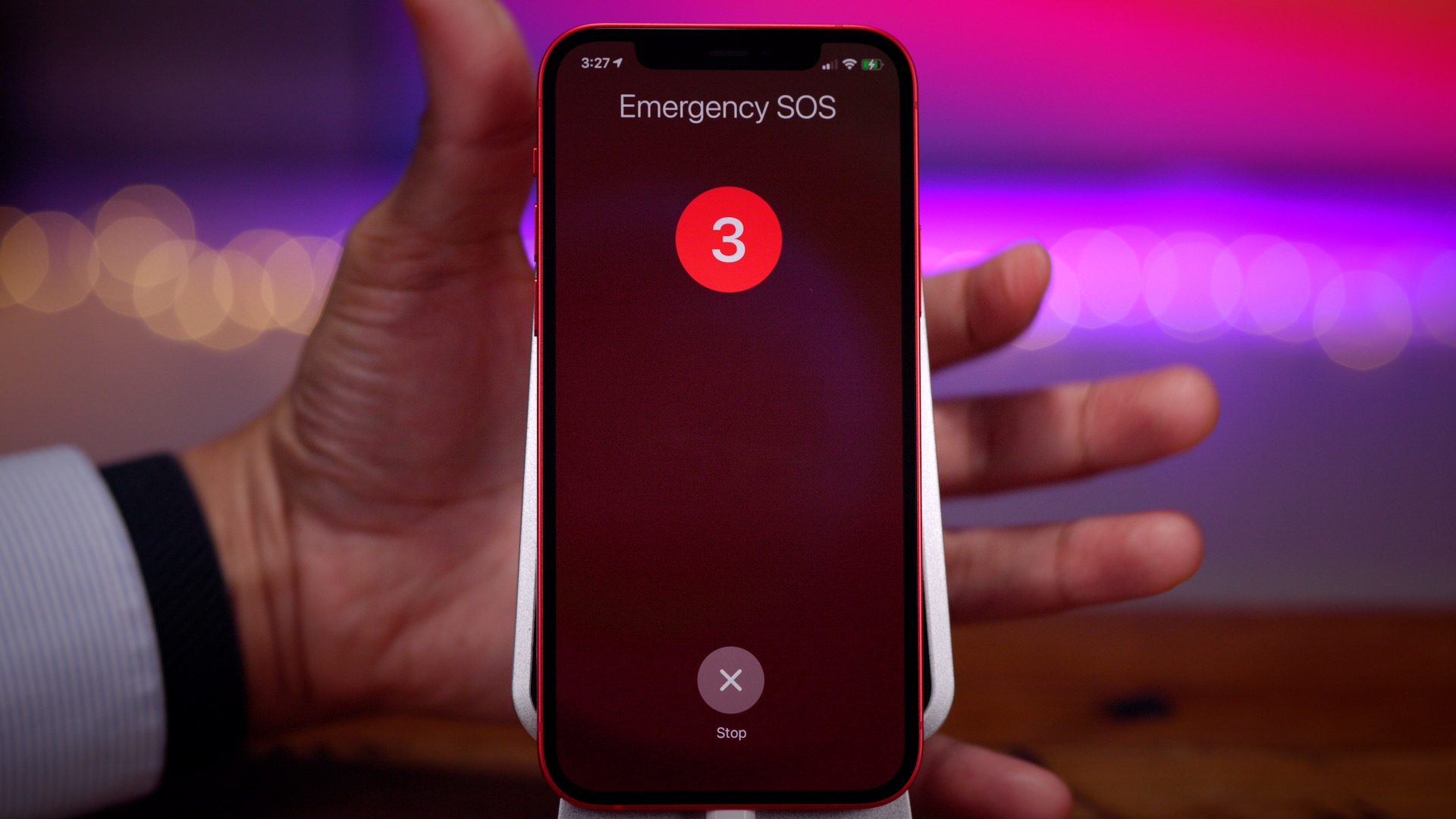
Press and hold one of the Volume buttons along with the Side button and keep holding each button to trigger Emergency SOS.
Press and hold one of the Volume buttons along with the Side button until the slide to power off slider appears. Use the Emergency SOS slider to activate Emergency SOS.
Go to Settings → Emergency SOS, and enable the Call with Side Button switch. This will allow you to invoke Emergency SOS by pressing the Side button 5 times in quick succession.
If you’re upgrading from an iPhone with a Home button, such as the iPhone 7 or iPhone 8, or even the second-generation iPhone SE, then the methods for performing all of the aforementioned functions is quite a bit different than what you may be used to.
Although you may not ever need to use recovery mode, and using DFU mode is even more unlikely, everyone should be familiar with how to force restart their iPhone. Force-restarting is handy for those occasional instances when your iPhone becomes extremely bogged down or outright unresponsive. If you only take one tip from this tutorial, it should definitely be how to force restart.
iPhone 12 Pro and iPhone 12 Pro Max give pro users everything they want out of their iPhone.
Best iPhone ever features the powerful A14 Bionic, all-new design with Ceramic Shield, pro camera system, LiDAR Scanner, and the biggest Super Retina XDR display ever on an iPhone
Apple announced iPhone 12 Pro and iPhone 12 Pro Max, introducing a powerful 5G experience and advanced technologies that push the boundaries of innovation for users who want the most out of iPhone. iPhone 12 Pro models feature a new design and edge-to-edge Super Retina XDR displays, the largest ever on iPhone, protected by the all-new Ceramic Shield front cover, which provides the biggest jump in durability ever on iPhone. The Apple-designed A14 Bionic chip, the fastest chip in a smartphone, powers impressive computational photography features including the all-new Apple ProRAW for more creative control in photos, and enables the first end-to-end Dolby Vision video experience, up to 60 fps. The reimagined pro camera systems include an expansive Ultra Wide camera, a Telephoto camera with an even longer focal length on iPhone 12 Pro Max, and new Wide cameras to capture beautiful professional-quality images and video in bright and low-light environments. iPhone 12 Pro models also introduce a new LiDAR Scanner for immersive augmented reality (AR) experiences and MagSafe, which offers high-powered wireless charging and an all-new ecosystem of accessories that easily attach to iPhone.
iPhone 12 Pro and iPhone 12 Pro Max will be available in four stainless steel finishes, including graphite, silver, gold, and pacific blue. Pre-orders for iPhone 12 Pro begin Friday, October 16, with availability beginning Friday, October 23. iPhone 12 Pro Max will be available for pre-order Friday, November 6, and in stores beginning Friday, November 13.
“This is a huge leap for iPhone, bringing the best 5G experience in the market and delivering our most advanced technologies to users who want the absolute most from their iPhone,” said Greg Joswiak, Apple’s senior vice president of Worldwide Marketing. “Each generation of iPhone has changed what we expect from a smartphone, and now with 5G, iPhone 12 Pro provides a new generation of performance. Our tight integration of hardware and software enables incredible computational photography features like the expansion of Night mode to more cameras, and introduces support for HDR video with Dolby Vision. A state-of-the-art LiDAR Scanner means users can experience AR like never before, and also offers benefits to the camera with faster autofocus in low light and the introduction of Night mode portraits. These experiences and so much more make this the best iPhone lineup ever.”
The 6.1-inch iPhone 12 Pro and 6.7-inch iPhone 12 Pro Max feature the largest Super Retina XDR displays ever on iPhone.
A Superior 5G Experience
iPhone 12 Pro and iPhone 12 Pro Max deliver an advanced 5G experience on a global scale, engineered with a seamless integration of world-class hardware and world-class software. 5G on iPhone boasts improved speeds for faster downloads and uploads, higher quality video streaming, more responsive gaming, real-time interactivity in apps, FaceTime in high definition, and much more. Customers will also be able to enjoy a secure, fast connection, reducing the need to connect to public Wi-Fi hotspots.
Featuring the most 5G bands on any smartphone, iPhone 12 Pro models offer the broadest 5G coverage worldwide. Models in the US support millimeter wave, the higher frequency version of 5G, allowing iPhone 12 Pro models to reach speeds up to 4Gbps, even in densely populated areas. iPhone 12 Pro models also feature Smart Data mode, which extends battery life by intelligently assessing 5G needs and balancing data usage, speed, and power in real time.
5G on iPhone 12 Pro models enables faster download speeds, more responsive gaming experiences, FaceTime in HD, and more.
A14 Bionic: Powerful and Efficient
Generations ahead of the competition, A14 Bionic is the first chip in the smartphone industry built on 5-nanometer process. Faster and more efficient than ever, A14 Bionic has the fastest CPU and GPU by up to 50 percent compared to the fastest competing smartphone chips, enabling console-quality gaming experiences, powerful computational photography, and more, while delivering great battery life. Pushing the limits of machine learning (ML), A14 Bionic features a 16-core Neural Engine — for an 80 percent increase in performance — that is capable of completing 11 trillion operations per second, enabling improved performance on even the most intense ML models.
Faster and more efficient than ever, A14 Bionic enables powerful computational photography and faster photo and video editing right on device.
New Design and Innovative Display Technologies
Designed with premium materials, iPhone 12 Pro models boast a new, sophisticated flat-edge design that features a gorgeous surgical-grade stainless steel band paired with a precision-milled matte glass back, and introduces the incredibly durable Ceramic Shield. The Ceramic Shield front cover, tougher than any smartphone glass, goes beyond glass and is infused with nano-ceramic crystals to dramatically improve toughness and increase drop performance by 4x.
With impressively larger, edge-to-edge displays with reduced borders in familiar sizes, the 6.1-inch iPhone 12 Pro and 6.7-inch iPhone 12 Pro Max feature a Super Retina XDR display with systemwide color management for industry-leading color accuracy. And iPhone 12 Pro Max offers the largest display ever on an iPhone and the highest resolution featuring nearly 3.5 million pixels for a remarkable, true-to-life viewing experience. These OLED displays bring HDR video content to life, reaching 1200 nits peak brightness.
iPhone 12 Pro models come with an industry-leading IP68 rating to withstand water submersion up to 6 meters for up to 30 minutes, and are protected against everyday spills, including coffee and soda.
iPhone 12 Pro and iPhone 12 Pro Max feature a new, elevated flat-edge stainless steel design and Ceramic Shield front cover for increased durability.
Versatile Pro Camera System
The world’s best pro camera is an even more versatile tool for all levels of photo and video enthusiasts with state-of-the-art camera hardware powered by A14 Bionic. Together with the new image signal processor (ISP), A14 Bionic drives increased image quality and enables powerful computational photography capabilities not possible with traditional cameras. iPhone 12 Pro models also feature the new Apple ProRAW, coming later this year,which combines Apple’s multiframe image processing and computational photography with the versatility of a RAW format. Users can experience full creative control over color, detail, and dynamic range natively on iPhone or with other professional photo editing apps.
The pro camera system on iPhone 12 Pro models includes new Wide cameras for even better low-light performance, an expansive Ultra Wide camera, and a Telephoto camera for capturing stunning images and video.
iPhone 12 Pro features the new seven-element lens Wide camera with an ƒ/1.6 aperture, the fastest ever on an iPhone, for 27 percent improved low-light performance in photo and video; the Ultra Wide camera with a 120-degree field of view, perfect for capturing more scene in tight spots or epic landscapes; and a 52 mm focal length Telephoto camera, great for framing portraits, bringing the optical zoom range to 4x.
iPhone 12 Pro Max takes the pro camera experience even further. The new ƒ/1.6 aperture Wide camera boasts a 47 percent larger sensor with 1.7μm pixels for a massive 87 percent improvement in low-light conditions. It also includes the expansive Ultra Wide camera and a 65 mm focal length Telephoto camera for increased flexibility with closer shots and tighter crops. Combined, this system offers 5x optical zoom range.
Deep Fusion comes to all cameras and uses advanced machine learning to do pixel-by-pixel processing of photos, optimizing for detail, texture, and color in every part of the photo.
iPhone 12 Pro models bring stunning improvements to Night mode, enabling even brighter pictures.
Powered by A14 Bionic and a new ISP, Night mode is now included on more cameras, including the Ultra Wide.
The Ultra Wide camera on iPhone 12 Pro models has a 120-degree field of view, allowing users to capture more scene and frame artistic shots.
Smart HDR 3 offers more true-to-life photos, using machine learning to recognize scenes and adjust sharpness, color, and tone where needed.
The new seven-element lens Wide camera captures even brighter photos and videos in low light.
The Telephoto cameras on iPhone 12 Pro and iPhone 12 Pro Max are perfect for classically framed portraits, closer shots, and tighter crops.
Improvements to Night mode, now expanded to the TrueDepth and Ultra Wide cameras, allow for an even brighter picture. And Night mode Time-Lapse delivers longer exposure times for sharper videos, better light trails, and smoother exposure in low-light scenarios when used with a tripod. Deep Fusion, now better and faster, comes to all cameras, and with the new Smart HDR 3, users can expect more true-to-life images, even in complex scenes.
iPhone 12 Pro models offer the highest quality video in a smartphone, and are the first cameras and only devices in the world to enable an end-to-end experience for HDR video with Dolby Vision, up to 60 fps, and even better video stabilization for cinema-grade productions. Dolby Vision grading is processed live and sustained during editing, whether in the Photos app or iMovie, and coming to Final Cut Pro X later this year. Dolby Vision takes advantage of the Super Retina XDR display for amazing contrast during capture and video playback, and users can share their videos with support for AirPlay up to 4K Dolby Vision to external devices.
iPhone 12 Pro models are the first cameras and only devices in the world to enable an end-to-end experience for HDR video with Dolby Vision. Film shot in HDR video with Dolby Vision on iPhone 12 Pro, by cinematographer Emmanuel “Chivo” Lubezki.
Realistic AR and Innovative Camera Experiences
An all-new LiDAR Scanner comes to the Pro line, offering the ability to measure light distance and use pixel depth information of a scene. This technology delivers faster, more realistic AR experiences and improves autofocus by 6x in low-light scenes for more accuracy and reduced capture time in photos and videos. This advanced hardware, combined with the power of the Neural Engine of A14 Bionic, also unlocks Night mode portraits, rendering a beautiful low-light bokeh effect.
An all-new LiDAR Scanner on iPhone 12 Pro and iPhone 12 Pro Max enables Night mode portraits and even more realistic AR experiences.
Innovative New Accessories with MagSafe
MagSafe improves wireless charging for a better, more efficient experience and introduces an ecosystem of easy-to-attach accessories that beautifully complement iPhone 12 Pro models.7 MagSafe delivers a unique experience to iPhone, featuring an array of magnets around the wireless charging coil, optimized for alignment and efficiency, that perfectly connects to iPhone every time. MagSafe chargers efficiently provide up to 15W of power while still accommodating existing Qi-enabled devices. Charging solutions include the MagSafe Charger and MagSafe Duo Charger for use with iPhone and Apple Watch, as well as new silicone, leather, and clear cases that easily snap onto the back of iPhone, and a leather wallet. Customers can also expect innovative MagSafe accessories from third-party manufacturers.
The innovative new MagSafe system enables seamless, high-powered wireless charging and easy-to-attach accessories.
Featuring iOS 14
iOS 14 delivers a reimagined iPhone experience with new ways to customize the Home Screen. Beautifully redesigned widgets present timely information at a glance and can be pinned in different sizes on any Home Screen page. The App Library is a new space that automatically organizes all of a user’s apps into one simple, easy-to-navigate view. iOS 14 also brings new ways to discover and use apps with App Clips, powerful updates for staying connected in Messages, greener ways to explore cities with Maps, and enhanced privacy features for even more transparency and control.
iOS 14 reimagines the user experience on iPhone with customizable widgets for the Home Screen, App Clips, coming later this year, and new updates to Maps and Messages.
Committed to the Environment
Today, Apple is carbon neutral for global corporate operations and, by 2030, plans to have net zero climate impact across the entire business, which includes manufacturing supply chains and all product life cycles. This means that every Apple device sold, from material collection, component manufacturing, assembly, transport, customer use, charging, all the way through recycling and material recovery, will be 100 percent carbon neutral. iPhone 12 Pro models were designed with the environment in mind. For the first time, iPhone 12 Pro models will utilize 100 percent recycled rare earth elements in all magnets, including the new camera, Taptic Engine, and MagSafe, as well as Apple’s MagSafe accessories. Apple is also removing the power adapter and EarPods from iPhone packaging, further reducing carbon emissions and avoiding the mining and use of precious materials, which enables smaller and lighter packaging, and allows for 70 percent more boxes to be shipped on a pallet. Taken altogether, these changes will cut over 2 million metric tons of carbon emissions annually, equivalent to removing nearly 450,000 cars from the road per year.
Pricing and Availability
iPhone 12 Pro and iPhone 12 Pro Max will be available in 128GB, 256GB, and 512GB models in graphite, silver, gold, and pacific blue starting at $999 and $1,099, respectively. Customers can also get iPhone 12 Pro for $29.12 a month or $699 with trade-in and iPhone 12 Pro Max for $30.37 a month or $729 with trade-in from apple.com, in the Apple Store app, and at Apple Store locations.9 iPhone 12 Pro and iPhone 12 Pro Max are also available through Apple Authorized Resellers and select carriers (prices may vary).
Customers in Australia, China, Germany, Japan, the UK, the US, and more than 30 other countries and regions will be able to pre-order iPhone 12 Pro beginning at 5 a.m. PDT on Friday, October 16, with availability beginning Friday, October 23, and pre-order for iPhone 12 Pro Max will begin at 5 a.m. PST on Friday, November 6, with availability beginning Friday, November 13.
iPhone 12 Pro will be available in India, South Korea, and more than a dozen other countries beginning Friday, October 30.
MagSafe Charger, Leather Wallet with MagSafe, and iPhone 12 Pro Silicone Case and Clear Case will be available beginning Friday, October 16. iPhone 12 Pro Leather Case will be available beginning Friday, November 6. MagSafe Duo Charger and Leather Sleeve will be available at a later date.
Through Apple’s iPhone Upgrade Program, customers in the US can get iPhone 12 Pro and iPhone 12 Pro Max with the protection of AppleCare+, choose their carrier (no multiyear service contract required), and have the opportunity to upgrade to a new iPhone every year. The iPhone Upgrade Program is available for iPhone 12 Pro and iPhone 12 Pro Max at apple.com and Apple Store locations in the US with monthly payments starting at $49.91.
Customers in the US choosing to pay with Apple Card Monthly Installments or joining or upgrading through the iPhone Upgrade Program can use the Apple Store app on their iPhone to get ready for iPhone 12 Pro pre-order until 9 p.m. PDT on Thursday, October 15. From Tuesday, November 3, customers can get ready for iPhone 12 Pro Max pre-order until 9 p.m. PST on Thursday, November 5.
For a limited time, eligible customers who purchase a new iPhone, iPad, iPod touch, Apple TV, or Mac can enjoy one year of Apple TV+ for free and three months of Apple Arcade for free.
Apple One is the easiest way to get many Apple subscription services at a great value, so customers can choose the one plan that is right for them or their whole family. Customers can sign up for Apple One starting this fall.
Customers are able to find the same great shopping and support services at apple.com and at Apple Store locations. Customers can get shopping help from Apple Specialists, choose monthly financing options, trade in eligible devices, and get Support services and no-contact delivery or Apple Store pickup options. Customers are encouraged to check apple.com/retail for more information on the health and safety measures in place, and the services available, at their local store.
Customers in the US get 3 percent Daily Cash back when they buy directly from Apple with Apple Card. And when they choose Apple Card Monthly Installments, they can pay over time, interest-free.11
Customers can extend their limited warranty with AppleCare+ and get accidental damage protection, or AppleCare+ with Theft and Loss, and get 24/7 priority access to technical support.
Every customer who buys iPhone from Apple can enjoy a free Online Personal Session with an Apple Specialist, to help them explore and discover all the amazing things they can do with their new iPhone.
Apple frequently lays down a gauntlet for Android vendors when it introduces new iPhones, and that’s truer than ever for the iPhone 12 series. While there are places where Apple falls short, the new iPhones also embarrass Android phone makers in a few key areas — and not just simple aspects like performance. Here’s how the iPhone 12, 12 Pro, and 12 Pro Max stack up vs. their Android counterparts.
High-quality designs across whole phone lines
If there’s an area where Android OEMs could most stand to learn from the iPhone 12, it’s in the consistently high quality of the design, even in more affordable devices.
Every iPhone 12 model, from the Mini to the Pro Max, has a string of features you don’t always see in Android equivalents. They all have high-resolution OLED screens; each one has extra-durable front glass thanks to a new Ceramic Shield; they’re all IP68-rated for water resistance; all of them have a new MagSafe wireless charging system (more on that later). That’s not including the consistency in performance-related features, like the A14 Bionic chip, 5G, and strong camera quality. While the lower-end iPhone 12 models have aluminum sides instead of stainless steel, that’s about the only obvious external compromise.
Many mid-range Android phones have stellar features, but there are usually gotchas. Samsung’s Galaxy S20 FE is fast and boasts a great display, but makes obvious compromises in design — unless you like “glasstic,” that is. Google’s Pixel 5 is better-built, but it’s not powered by top-tier silicon. Even the OnePlus 8T may struggle with camera quality. While Xiaomi’s Mi 10 series offers both a quality design and features at good price, it’s not readily available in North America and other parts of the world.
And those sacrifices are a problem. As a rule, iPhone 12 buyers can assume they’re getting first-class treatment no matter what model they buy. You can’t often guarantee that with Android. If someone is comparison shopping, they might pick the iPhone 12 simply because it looks and feels more like a premium device vs. its Android rivals.
Small phones with big features
iPhone 12 Mini is smaller than an iPhone SE, it packs features that put many Android phones to shame, let alone compact models. It has the same A14 chip, cameras, and MagSafe charging as its larger sibling. The OLED screen is only slightly lower-resolution than in the standard iPhone 12. And like we mentioned earlier, there are no major design sacrifices compared to larger versions.
Take a look at your Android options and… it’s not pretty. Many small Android phones are old, slower, or both. Even a Pixel 4a is relatively pokey, and it’s slightly larger than the iPhone 12 Mini (if also considerably more affordable). The Sony Xperia 5 II is an impressive phone all-around, but it’s much more expensive and some could argue that it’s not really a “small” phone.
Simply put, Apple’s offering is one of the better choices in a sea of lackluster small smartphones.
Easier wireless charging
Apple was undoubtedly slow to adopt wireless charging, having introduced it only with 2017’s iPhone X and iPhone 8. It’s catching up, though, and the iPhone 12 family includes a few features that Android vendors could stand to adopt in some form.
MagSafe, which uses magnets to align your iPhone for wireless charging, is the textbook example of a “why didn’t someone think of this earlier?” invention. You don’t have to worry that your phone might be off-center — you just drop it on the pad and walk away. Then there’s the accessories this enables, like snap-on cases and even a wallet.
There are certainly areas where Android phones fare better. MagSafe on the iPhone 12 line charging tops out at 15W where it’s not uncommon to see 30W or more from some Android phones. There’s no mention of reverse wireless charging to top up your other devices, either. But those features don’t address ease of use, and Apple might have an edge simply by eliminating one of the most common hassles of wire-free power.
More camera features aimed at enthusiasts and pros
Android phones are often chock-full of camera features, but they tend to be aimed at everyday users outside of the occasional manual mode. Samsung’s Single Take feature in the Galaxy S20 family is helpful in case you’re unsure of which shot you need, but it doesn’t offer much help if you’re an exacting mobile photographer. The notable exceptions are newer Sony phones like the Xperia 1 II, and they’re a handful of models in a much larger sea.
The iPhone 12 line bucks that trend. Although Apple’s official camera app won’t provide extensive control over shots, all the new phones can not only shoot Dolby Vision HDR videos (they’re the first phones to do this), while the Pro and Pro Max deliver RAW photo support through a new ProRAW format. In other words, you can create images that could be suitable for a TV show or photo spread, let alone your Instagram feed. A Night Mode that works across all cameras is helpful, too.
Yes, you’ve had RAW shooting on Android since Lollipop, but it’s inconsistently available. HDR video recording is also hit-or-miss. And that’s not counting more explicitly hardware-dependent features like sensor-shift image stabilization (again, new to phones) or LiDAR. Simply put, Apple is giving iPhone buyers a series of powerful camera features that are genuinely aimed at enthusiasts and working pros, and that could tip the balance for some buyers.
Custom processing power
As blisteringly fast as the current crop of Android phones can be, they tend to lag iPhones in performance to some degree. AnandTechnoted that even last year’s iPhone 11 models were sometimes outperforming Snapdragon 865 phones released several months later, let alone the iPhone 12. The Android phone market’s progress is largely dictated by one company, Qualcomm, and it hasn’t been moving at a breakneck pace.
Apple, meanwhile, doesn’t have that restriction. It designs the chips it uses in its devices, and the iPhone 12’s A14 Bionic illustrates the advantages of that approach. There’s no outside designer holding it back, and it’s targeting improvements for specific phones rather than trying to make a one-size-fits-all design. Whether or not Apple’s claims of up to a 50% speed advantage over rivals are true, its expected lead is evidence that custom processing power matters.
A few Android phone builders appreciate this as well, even if their execution isn’t flawless. Samsung has its (sometimes underpowered) Exynos chips, and Huawei had its high-end Kirin chips until the US blocked that option. Most others just follow the pack, though, and that lack of customization helps the iPhone 12 stand out that much more.
Where the iPhone 12 falls short
This doesn’t mean the iPhone 12 vs. Android battle is strictly one-sided. Apple falls short in a number of categories, at least if you’re used to what Android has offered. There’s no 120Hz screen. You still won’t find microSD expansion, a USB-C port, or very high-zoom cameras. You won’t even find a 1440p display on the iPhone 12 Pro Max.
There’s also the matter of software. As much progress as iOS 14 has made, additions like home screen widgets, changeable app defaults and iPhone picture-in-picture are catch-up features. You won’t be feeling a twinge of regret if Android’s flexibility is important to you, even if you may wish you had Apple’s timelier and longer-running OS updates.
Even so, the very fact that Android vendors could take multiple major cues from the new iPhones is important. It suggests that Apple is plugging some of the more glaring holes in its iPhone strategy. Android phone creators may have to step up if they plan to go head-to-head with Apple, particularly in that upper mid-range sweet spot occupied by the iPhone 12 and 12 Mini.
We’re just days away from the introduction of the iPhone 12. Apple officially announced its iPhone 12 event on Tuesday, teasing it with the tagline “Hi, Speed.” There’s a lot to expect at the event, and a lot we already know about what to expect.
Read on as we round up everything you need to know ahead of the “Hi, Speed” event this week.
When is Apple’s iPhone 12 event?
Apple’s iPhone 12 event will take place on October 13 at 10 a.m. PT/1 p.m. ET. It will be completely virtual due to the COVID-19 pandemic, much like Apple’s WWDC keynote and the Apple Watch event last month. We expect a pre-recorded video from Apple Park, featuring Tim Cook and a handful of other Apple executives.
You’ll be able to live stream the event through Apple’s website, on YouTube, and through the Apple TV application.
iPhone 12 models
Next week’s “Hi, Speed” event will focus primarily on Apple’s all-new iPhone 12 lineup. Apple will announce four new iPhone 12 models, ranging from 5.4 inches to 6.7 inches in screen size and from $699 to $1,099 in price.
In terms of design, the iPhone 12 lineup will feature a boxier body that is similar to the iPhone 4 and iPhone 5. This means we can expect a design that looks more like the newest iPad Pro with flat edges. Currently, the iPhone 11 Pro features a blended design between the glass of the display and the stainless steel edges. This differs from the iPhone 4 and iPad Pro, which are completely squared off around the sides.
All four of Apple’s new iPhone 12 models will feature OLED displays for the first time. Previously, only the highest-end iPhone models used OLED displays, with Apple using LCD in the lower-end models. Apple will market these new displays as “Super Retina XDR,” and there will also be a new glass technology on the front with increased durability.
All four iPhone 12 variants will also feature 5G connectivity for the first time. Rumors currently incite that iPhone 12 models in the United States will include support for mmWave 5G as well as sub-6Ghz 5G, while models sold in other countries will only include the latter. There will also be something called Smart Data Mode to allocate 4G/5G according to application bandwidth, such that 5G would only be used when necessary to improve battery life.
The differentiator other than screen size between the iPhone 12 lineup will be camera technology. Here are the details, according to a recent report.
iPhone 12 mini:
5.4-inch display
black, white, red, blue, and green
64GB, 128GB, and 256GB
Dolby Vision video recording
Dual camera, wide angle + ultra-wide angle, 1.6
Pre-orders November 6/7, available November 13/14
Starting at $699
6.1-inch iPhone 12:
6.1-inch display
black, white, red, blue, and green
64GB, 128GB, and 256GB
Dual camera, wide angle + ultra-wide angle, 1.6
Dolby Vision video recording
Pre-orders October 16/17, available October 23/24
Starting at $799
iPhone 12 Pro:
6.1-inch display
gold, silver, graphite, and blue
wide angle, ultra-wide angle, telephoto + LiDAR, wide angle of the new 7P lens, 1.6, 52mm focal length telephoto, 4x optical zoom
Dolby Vision video recording
Pre-orders October 16/17, available October 23/24
128GB, 256GB, and 512GB
Starting at $999
iPhone 12 Pro Max:
6.7-inch display
gold, silver, graphite, and blue
wide angle, ultra-wide angle, telephoto + LiDAR, wide angle of the new 7P lens, 1.6, 65mm focal length telephoto, 5x optical zoom, “Expanded” ultra-wide capabilities
Dolby Vision video recording
Pre-orders November 13/14, available November 20/21
128GB, 256GB, and 512GB
Starting at $1,099
You can read our full roundup of everything to except from the iPhone 12 right her ahead of Tuesday’s event.
New wireless chargers
Apple is also said to be developing two new wireless chargers that it could introduce alongside the iPhone 12 lineup. This comes after Apple canceled its AirPower wireless charger in 2019, before it was even released to the public over quality control and overheating concerns.
Whereas AirPower was designed to feature a “drop anywhere” design, Apple’s new wireless chargers are said to use a magnetic system of sorts. In fact, Apple will reportedly revive the popular “MagSafe” branding for two of these new chargers that will be released alongside the iPhone 12.
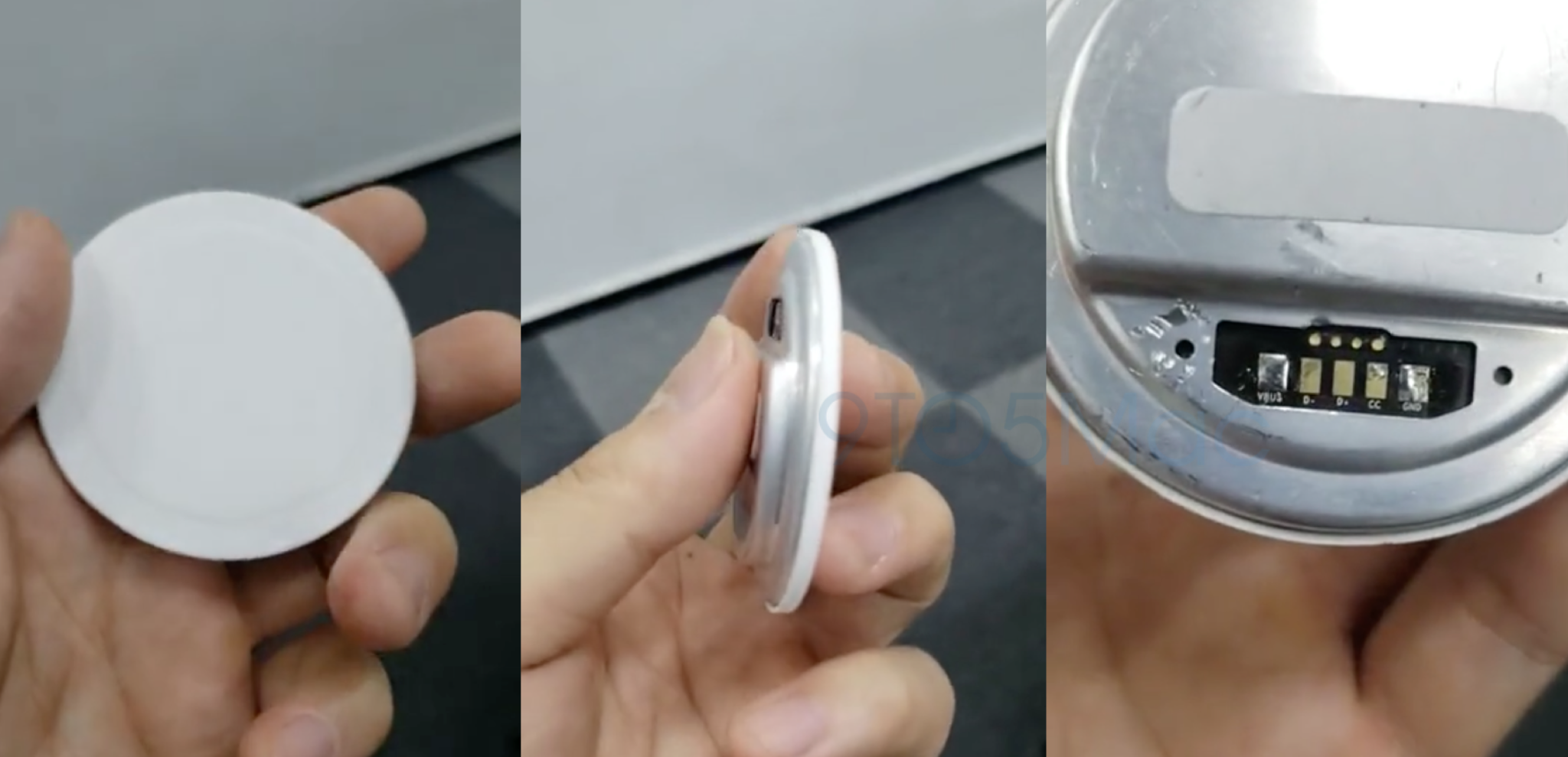
In September, reported on a video that claimed to show Apple’s magnetic wireless charger prototype. Rumors have also suggested that the iPhone 12 will include a new built-in ring of magnets in the back to allow for new accessories.
According to rumors, Apple will release two versions of the magnetic wireless chargers this year, branded as the MagSafe Charger and the MagSafe Duo Charger. This implies that we will see a smaller MagSafe charger that can only charge one device, and another that is slightly larger with support for charging two devices.
Other details about these MagSafe wireless chargers are unclear, but we should expect to learn more on October 13.
HomePod mini
Something else we should expect at Apple’s “Hi, Speed” event next week is the introduction of the HomePod mini, according to reports. Rumors currently indicate that the HomePod mini will be announced on October 13, made available for pre-order on November 6, and released on November 16.
HomePod mini will reportedly cost just $99 and measure in at 3.3 inches. It is said to be powered by Apple’s S5 processor, which is the same processor that powers the Apple Watch SE and Apple Watch Series 5. This is roughly half the size of the current HomePod, which measures in at 6.8 inches tall.
At $99, the HomePod mini seems like a clear competitor to Amazon’s Echo lineup, which is likely part of Apple’s strategy of expanding Siri to a wider user base. We do not currently expect any updates in 2020 to the full-size HomePod.
Other rumors
While it seems like a lock that the October 13 will include news on the iPhone 12, MagSafe wireless chargers, and HomePod mini, there are a few other possibilities worth mentioning.
AirPods Studio
For over a year now, reports have been circulating suggesting that Apple will soon launch its own pair of over-ear headphones. These are believed to exist separately from the Beats brand and offer features such as head and neck detection, custom equalizer settings, and more.
9to5Mac has also found evidence of so-called AirPods Studio in the leaked iOS 14 beta code, including assets showing at least two color options for the new accessory. As for the price, rumors suggest that it will cost $349 for a lower-end “Sport” variant and up to $599 for a “luxury” version made from leather and metal.
While it would absolutely make sense for Apple to unveil its AirPods Studio alongside the iPhone 12, Jon Prosser recently reported that Apple is not quite ready to announce the product just yet. It’s always possible that this will change, but for now, AirPods Studio seem more likely sometime in November or into 2021.
AirTags
For more than a year, rumors have indicated that Apple is developing its own Tile-like item trackers. In June 2019, reported on assets within iOS 13 that referenced a product type “Tag1,1.” Since then, 9 to 5 Mac discovered evidence of the “AirTags” name and references even appeared in a video published by Apple itself.
We initially expected AirTags to be released during the iPhone 11 event last year, then at WWDC 2020, then during Apple’s September event this year. Most recently, a rumor suggested that Apple had delayed AirTags until March 2021, signaling that we should not expect a release at the October 13 event
.
New Apple TV
Apple is also reportedly working on a new Apple TV and a new Siri remote. Evidence of a new Apple TV hardware refresh has been circling around in iOS code for a while, and a report recently indicated that one of the changes will be a faster chip for improved gaming performance.
As for the new Apple TV remote, Bloomberg has suggested that one of the upgrades will be support for the Find My application. This will make it easier for people to locate a remote when it goes missing in the house. Whether or not other improvements are also in store for the controversial Siri remote remains to be seen.
It’s possible that the new Apple TV is introduced during its October 13 event, but it could also be saved for later this year or early next year.
Apple Silicon
Finally, the Mac lineup is nearly set to begin its transition to Apple Silicon processors. Apple has said that it will release its first Apple Silicon Mac before the end of this year, but current indicators are that the Apple Silicon transition will not be addressed at the October event.
Most recently, Bloomberg reported that Apple will hold a separate event in November to unveil its Apple Silicon hardware. This means we should not expect details during next week’s event.
A conspiracy theory being spread on Facebook and other social media platforms this week claims that iOS 14 widgets are actually serving as key loggers, tracking everything you type on your iPhone. This is unequivocally not true, and there are technical limitations and protections in place that prevent widgets from accessing your data.
The viral post on Facebook has been screenshotted and shared to other social media platforms. On Twitter, a tweet with a screenshot of the original Facebook post has over 7,000 retweets and 8,000 likes. Screenshots have also gone viral on Instagram.
The Facebook post comes from an iPhone user who claims to have noticed that their “keyboard would lag and wouldn’t show the characters” as they were being typed, as well as other issues like app crashes and generally laggy performance.
The Facebook post also cites the security code autofill feature of iOS as evidence the app is tracking what they type.
iOS 12’s new security code auto-fill feature works
Another piece of misinformation gaining social media traction is that iOS 14 and/or home screen widgets are responsible for compromised passwords. The misconception here is that a lot of iOS 14 users are receiving a push notification upon updating informing them that their passwords may have been involved in a data breach.
The passwords were likely compromised in a data breach that occurred before you even installed iOS 14. Apple added data breach notifications to the built-in iOS password manager as a way to make users more informed about the security of their various online accounts.
iOS 14: iCloud Keychain now alerts users about leaked passwords
The Facebook user and other social posts all jump to the conclusion that these pieces of evidence are “all signs of a key logger.” This is not true, as it is technically impossible for widgets to access your keyboard data or virtually any other data about you.
How iOS 14 widgets work
iOS 14 home screen widgets have a variety of limitations and protections in place for things like privacy and battery life. These protections are also why you might notice widgets don’t continuously update but rather at predefined intervals.
Widgets in iOS 14 are not full-blown applications; in fact, Apple has went as far as to say they aren’t even “mini-apps.” Instead, the WidgetKit developer framework provides a limited set of tools that developers can tap into when designing and developing their home screen widgets.
Essentially, widgets run in the background very briefly to update the display content at a pre-defined interval. Once the content has been updated, the background process is killed entirely, ensuring that there is no way a widget can gather any data continuously.
Widgets are not mini-apps, so think through a glanceable experience for your user and use timelines, the concept of reloads, and intelligence to create the perfect experience on iOS, iPadOS, and macOS.
Widgets use SwiftUI views to display their content. WidgetKit renders the views on your behalf in a separate process. As a result, your widget extension is not continually active, even if the widget is onscreen.
If widgets were allowed to run continuously without restrictions, there would not only be privacy implications but also a dramatic impact on battery life and performance. All of these reasons are why Apple put these limitations in place with WidgetKit.
In fact, generally speaking, sandboxing protection within iOS also prevents any sort of key logger application, regardless of whether or not widgets are used.
The viral Facebook post particularly mentions Widgetsmith as the cause of these issues, but again, there are absolutely no facts behind these accusations.
Widgetsmith developer David Smith has addressed the claims head-on, saying that he can “categorically and absolutely” state such rumors are not true. The full Widgetsmith privacy policy can be found here, and it explains that Widgetsmith was designed “from the ground up to ensure that your data stays completely private.”
I’ve seen a number of references to an article being circulated on Facebook that apps like Widgetsmith must include key loggers because of keyboard issues experienced after installing iOS 14. For Widgetsmith I can state categorically and absolutely that this is not true.
Leaving for a moment that I don’t think that is technically possible for a widget to read the keyboard. Widgetsmith was built from the ground up with complete privacy in mind and collects essentially no data about its users.
If you are experiencing laggier performance after installing iOS 14, there are several possible explanations. One of the most common causes of slow iPhone performance is a low amount of available storage.
It’s also important to remember that iOS 14 is a brand new release, and there are likely to be bugs and performance issues. Apple released iOS 14.0.1 with bug fixes last week, so make sure that you’ve updated to that for the best possible experience.
Finally, laggy keyboard performance has been one of the most common iOS 14 complaints since beta testing started in June. The keyboard isn’t laggy because of so-called key logger apps; it’s glitchy because of system-level bugs.
Trust the privacy protections that Apple has put in place and customize your home screen to your heart’s content.
Widgets are beautifully redesigned in iOS 14, giving users timely information at a glance right on the Home Screen pages.
iOS 14 reimagines the iPhone experience, delivering a major update to the Home Screen with beautifully redesigned widgets and the App Library, new ways to use apps with App Clips, and powerful updates to Messages. iOS 14 is available today as a free software update.
“Together with iPhone, iOS is central to how we navigate our lives and stay connected, and we are making it even more powerful and easier to use in iOS 14, with the biggest update ever to the Home Screen,” said Craig Federighi, Apple’s senior vice president of Software Engineering. “We are thrilled to see the incredible ways developers are taking advantage of widgets and App Clips to create new experiences that we think customers are going to love.”
Redesigned Home Screen Pages
New widgets present timely information at a glance and can be added in different sizes on any Home Screen page. Users can choose a Smart Stack of widgets, which uses on-device intelligence to surface the right widget based on time, location, and activity. For example, users might see the News widget in the morning, Calendar events during the day, and their Fitness summary in the evening. Home Screen pages can be customized to show apps and widgets for work, entertainment, sports, and other areas of interest.
At the end of the Home Screen pages is the App Library, a new space that automatically organizes all of a user’s apps into one simple, easy-to-navigate view, and intelligently surfaces apps that are helpful in the moment. Users can also hide Home Screen pages for quicker access to the App Library.
The App Library makes it easier for users to get to all of their apps with a simple, easy-to-navigate view at the end of the Home Screen pages.
All-New Compact Design for Incoming Calls and Siri
Incoming FaceTime and phone calls and Siri interactions take on an all-new compact design that enables users to stay in the context of what they are doing. With Picture-in-Picture support, iPhone users can now watch a video or take a FaceTime call while using another app.
iOS 14 delivers an all-new compact design that lets users multitask while receiving calls, asking Siri a question, or watching videos.
With Picture-in-Picture, users can watch a video or take a FaceTime call while using another app.
The Siri experience is redesigned to let users stay in the context of what they are doing.
App Clips Bring New Ways to Discover and Use Apps
An App Clip is a small part of an app that is designed to be discovered the moment it is needed. App Clips are associated with a particular product or business, and load within seconds to complete a specific task, such as ordering takeout or filling up the car with gas. They can be easily discovered and accessed by scanning a new Apple-designed App Clip code,1 or through NFC tags and QR codes, or shared in Messages or from Safari, all with the security and privacy expected from apps.
App Clips are fast and easy to discover and allow users to access part of an app the moment they need it.
Powerful Updates to Messages
Messages is central to communicating with friends and family, and now it’s easier to stay connected and quickly access important messages. Users can pin conversations to the top of their messages list, easily keep up with lively group threads through mentions and inline replies, and further customize conversations by setting a group photo using an image or emoji. New Memoji options in Messages are even more inclusive and diverse with additional hairstyles, headwear, face coverings, and more.
Favorite conversations can be pinned to the top of a Messages list, with recent messages, Tapbacks, and typing indicators featured right above the pin.
iOS 14 delivers new customization options including additional hairstyles, headwear, face coverings, and more.
Greener Ways to Explore and New Guides in Maps
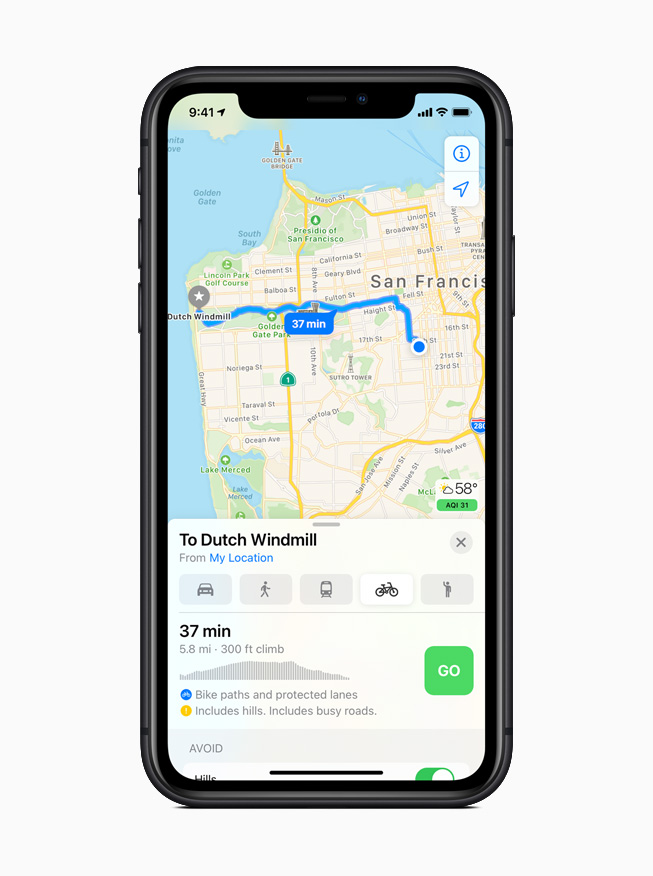
Maps makes it easier than ever to navigate and explore with new cycling directions, electric vehicle routing, and curated Guides. Cycling directions take into account elevation, how busy a street is, and whether there are stairs along the route. Electric vehicle routing adds charging stops along a planned route based on current vehicle charge and charger types.2 Guides provide a curated list of interesting places to visit in a city, created by a selection of trusted resources. Guides are a great way to find popular attractions, discover restaurants, and explore new recommendations from respected brands.
Maps offers cycling directions along bike lanes, bike paths, and bike-friendly roads.
Electric vehicle routing adds charging stops along a planned route based on current vehicle charge and charger types.
Guides make it easy to find things to do in a city, experience great new restaurants, or places to visit on vacation.
More Transparency and Control with Expanded Privacy Features
Now users can choose to share their approximate location with app developers rather than their precise location when granting an app location access, and get even more transparency into an app’s use of the microphone and camera. Developers can now offer users the option to upgrade their existing accounts to Sign in with Apple. Later this year, App Store product pages will feature summaries of developers’ self-reported privacy practices, displayed in a simple, easy-to-read format. Starting early next year, all apps will be required to obtain user permission before tracking.
App Store product pages feature a summary of the privacy practices of each app before downloading it.
Enhanced Listening Experience for AirPods
AirPods and AirPods Pro gain powerful capabilities with iOS 14. Spatial audio with dynamic head tracking brings a theater-like experience to AirPods Pro. By applying directional audio filters, and subtly adjusting the frequencies each ear receives, sounds can be placed virtually anywhere in a space to provide an immersive listening experience. Automatic device switching seamlessly switches AirPods and AirPods Pro audio between iPhone, iPad, and Mac. Headphone accommodations, a new accessibility feature, amplifies soft sounds and tunes audio to help music, movies, phone calls, and podcasts sound crisper and clearer.
Seamlessly switch AirPods or AirPods Pro audio between iPhone, iPad, and Mac with automatic device switching.
Additional iOS 14 Features
Translate is designed to be the best and easiest app for translating conversations, offering quick and natural translation of voice and text among 11 different languages.6 On-device mode allows users to experience the features of the app offline for private voice and text translation.
Siri expands its knowledge and answers complex questions with information sourced from across the internet. Keyboard dictation runs on device when dictating messages, notes, email, and more.7
The Home app makes smart home control even easier with new automation suggestions and expanded controls in Control Center for quicker access to accessories and scenes. Adaptive Lighting for compatible HomeKit-enabled lights automatically adjusts the color temperature throughout the day, and Face Recognition in compatible video doorbells and cameras uses on-device intelligence from Apple TV or HomePod to identify visitors. The Home app and HomeKit are built to be private and secure, so all information about a user’s home accessories is end-to-end encrypted.
Digital versions of car keys give users a secure way to use iPhone to unlock and start their car. Car keys can be easily shared using Messages, or disabled through iCloud if a device is lost, and are available today for compatible cars using NFC technology.8
Safari offers a Privacy Report so users can easily see which cross-site trackers have been blocked, secure password monitoring to help users detect saved passwords that may have been involved in a data breach, and built-in translation for entire webpages.9
Health has all-new experiences to manage sleep and better understand audio levels that may affect hearing health. A new Health Checklist that includes Emergency SOS, Medical ID, ECG, fall detection, and more offers users a centralized place to manage health and safety features.10 Health also adds support for new data types for mobility, Health Records, symptoms, and ECG.
The Weather app keeps users up to date on severe weather events, and a new next-hour precipitation chart shows minute-by-minute precipitation when rain is in the forecast.11
Apple One is the easiest way to get many Apple subscription services at a great value, so customers can choose the one planthat is right for them or their whole family. Customers can sign up for Apple One starting this fall.
Accessibility features include Back Tap, which offers a quick new way to trigger gestures, tasks, and accessibility shortcuts, sign language detection in Group FaceTime, and Sound Recognition, which uses on-device intelligence to notify users when the sound of a fire alarm or doorbell is detected. VoiceOver, the industry’s leading screen reader for the blind community, now automatically recognizes what is displayed visually onscreen so more apps and web experiences are accessible to more people.
Translate helps users quickly and easily translate voice or text between supported languages, and can work completely offline to keep conversations private.
The Home app has a new visual status that provides an at-a-glance view of a user’s smart home accessories.
Digital car keys give users a way to securely unlock and start their car using just their iPhone, and can be easily shared using Messages.
Pricing and Availability
iOS 14 is available as a free software update starting today for iPhone 6s and later. For more information, visit apple.com/ios/ios-14. Some features may not be available in all regions or all languages.
iOS 14 allows for third-party web browsers and email clients to become the default, so if you really don’t like Safari and Apple Mail, you now have other options.
With the latest update to Google Chrome, now available on the App Store, you can change your default browser from Safari to Google Chrome, on iPhone and iPad. Here’s how to do it …
With iOS 14, Apple has added system support for third-party web browsers and email apps. In the future, they may open even more categories.
The default web browser will be used when tapping on a link in any application. Until iOS 14, you could have an alternative browser like Google Chrome but link actions would always open in Safari. Here’s how to change that on iPhone and iPad in iOS 14.
How to set Google Chrome as your default browser on iPhone
Download the latest version of Google Chrome from the App Store.
Open the Settings app and open the settings page for Google Chrome.
Tap ‘Default Browser App’.
Tap ‘Chrome’.
With this set, any app that triggers a standard open URL activity will now direct the system to open Google Chrome, rather than Safari.
If you ever change your mind, you can go back into Settings and change the Default Browser App back to Safari. If you want to use a different third-party browser that isn’t Chrome, you will have to wait for the developer to update their application. The same goes for changing email apps: so far, we haven’t seen any compatible email app expose this feature.
Obviously, this all requires iOS 14 or iPadOS 14 to be installed. Right now, we are at iOS 14 developer beta 8. Apple is expected to release iOS 14 publicly for all users later in September, with a release date likely announced as part of next week’s Apple Event.