Apple has officially revealed this year’s September special event, inviting members of the press and the public to tune in remotely to watch on September 15 at 10 am PT. At the event, Apple is expected to unveil all-new hardware including a new iPad Air and new Apple Watch models.
Update: While initial reports suggested that the September event would focus on the iPhone 12 alongside new Apple Watch and iPad hardware, Bloomberg reports that the September event will only include iPad and Apple Watch details. The iPhone 12 will reportedly be saved for October.
Apple September Event details
Much like WWDC 2020, Apple’s September event will be completely virtual due to the COVID-19 pandemic. If the WWDC keynote was any indication, the iPhone 12 will likely be highly-produced and shot at Apple Park and in Steve Jobs Theater.
While the public invite for the September event does not include a tagline, the version sent to the press simply says “Time Flies.”
Apple’s WWDC keynote featured Tim Cook making opening comments from Steve Jobs Theater, then handing the reins to other Apple executives for details on iOS 14, watchOS 7, and more. We expect a similar format for the September event, but it’s always possible that Apple has some sort of surprises in store.
Apple’s September event will be live-streamed across Apple’s website, in the Apple TV app, and likely on YouTube. We’ll have more details on this process, including details on how to tune in for yourself, when event day rolls around.
iPad Air 4
Apple is reportedly developing a new iPad Air model that features an edge-to-edge display. This would serve as a middle-ground option between the $329 iPad and the iPad Pro. The new iPad Air could reportedly feature Touch ID authentication built into the power button for the first time.
The new iPad Air could also feature USB-C connectivity instead of Lightning connectivity, again closing the gap between it and the iPad Pro.
Assuming these reports pan out, it would represent a major upgrade for the iPad Air line, which certainly looks a tad dated compared to the iPad Pro. Giving it the more modern slim bezel look would also help to distance it further from the lowest-end iPad.
Apple Watch Series 6
Also at Apple’s September event this year, we expect the announcement of the Apple Watch Series 6. Rumors on the Apple Watch Series 6 are a bit lighter than the iPhone 12, but there are a couple of things that have surfaced so far.
For instance, one of the tentpole features of this year’s Apple Watch update is expected to be blood oxygen level detection. Code found within iOS 14 by 9to5Mac has indicated that Apple Watch will add it this year, further expanding the Apple Watch’s health monitoring capabilities.
Apple is also developing improved electrocardiograms for the Apple Watch Series 6. Apple Watch Series 4 and 5 currently result in inconclusive ECG readings with heart rates between 100 and 120 beats per minute. A future update, either in software or hardware, will remove that limitation with an upgraded version of the ECG app.
As for the Apple Watch Series 6 design, reports indicate that there aren’t any major changes in store for the Apple Watch Series 6’s industrial design and that it will follow the same general form factor as the Series 4 and Series 5.
iPhone 12
Apple is expected to unveil four new iPhone 12 models this year at an event in October: a 5.4-inch iPhone 12, a 6.1-inch iPhone 12 Max, a 6.1-inch iPhone 12 Pro, and a 6.7-inch iPhone 12 Pro Max. The differentiating factor between these iPhone 12 models will be the camera technology.
The 5.4-inch iPhone 12 and 6.1-inch iPhone 12 Max are expected to feature dual-lens camera set-ups on the back, while the iPhone 12 Pro and iPhone 12 Pro Max will feature triple-lens camera arrays on the back with an all-new LiDAR Scanner as well.
Other features of the iPhone 12 lineup include OLED displays across the board as well as 5G connectivity. The iPhone 12 lineup will reportedly support mmWave 5G as well as sub-6GHz 5G. In terms of design, the devices are expected to feature flat edges similar to the iPhone 4, iPhone 5, and the latest iPad Pro.
Wrap-up
In addition to the aforementioned hardware, there are other possibilities as well. For example, Apple is working on Apple Silicon updates for the Mac lineup. Apple is also reportedly planning Apple Studio over-ear headphones, AirTag item trackers, and more. Some of these announcements are possible at the September event, but others could be saved for a future October event.
Finally, Apple’s September event will also likely include details on the firm release dates for iOS 14, iPadOS 14, macOS 11 Big Sur, watchOS 7, and tvOS 14.
Apple may toss a wrench into expectations for their next big event. Where before this week it was expected that Apple would soon reveal the iPhone 12 and iPhone 12 Pro, rumors today suggest that we’ll see an iPad and an Apple Watch instead. Could this be a major upset for iPhone fans looking to upgrade to a new model this Fall, or is this just a sign that Apple’s switching up their game just a little bit?
It’s likely we’ll see some focus on the future of augmented reality at this event. It’ll be interesting how this will work, given that past augmented reality features on Apple devices were largely relegated to devices with 3D sensors on their fronts and/or backs.
It could be that Apple’s simply preparing audiences for the eventual October event in which they’ll reveal the iPhone 12 and iPhone 12 Pro, complete with the hardware needed to take their aspirations with augmented reality to the next level.
Apple is delaying its new rules around in-app tracking in iOS 14, postponing the controversial disclosure requirement that set it at odds with Facebook. Announced at WWDC 2020, the new feature was intended to make explicit that software could use data to deliver personalized adverts, and indeed track users across multiple apps and websites.
Users would be presented with the option to allow such tracking, or ask the app not to track them. At the time, Apple was praised by privacy advocates for taking the step, which could prevent iPhone and iPad users from unwittingly having their digital lives tracked and comprehensive profiles built on them for more specific advertising purposes.
However it was less popular with ad providers and networks. In August, Facebook called out the iOS 14 feature as having the potential to undermine its partner ad business. The change could leave its so-called Audience Network system “so ineffective on iOS 14 that it may not make sense to offer it on iOS 14,” Facebook said at the time.
Clearly someone at Apple has been listening to the feedback. Now, while iOS 14 will still support the new notification and the prompt to permit in-app tracking, developers won’t be penalized if their apps don’t show it. Instead it won’t be until sometime early in 2021 before Apple makes supporting the notification a requirement.
“We believe technology should protect users’ fundamental right to privacy, and that means giving users tools to understand which apps and websites may be sharing their data with other companies for advertising or advertising measurement purposes, as well as the tools to revoke permission for this tracking. When enabled, a system prompt will give users the ability to allow or reject that tracking on an app-by-app basis. We want to give developers the time they need to make the necessary changes, and as a result, the requirement to use this tracking permission will go into effect early next year”Apple
The technology relies on IDFA, or Identification for Advertisers, which sees each iOS device being given a unique code. That can be shared with advertisers, and used to personalize campaigns shown to a user across different software and websites. Audience Network, for example, is used in numerous apps and sites, and many people may not realize that they’re all keeping track of visits and sharing that data in aggregate in the background.
Making it more visible, Facebook and others have warned, could pull the rug out from under effective campaigns. Without a comprehensive user profile, targeted promotions will be trickier to finesse. “Like all ad networks on iOS 14, advertiser ability to accurately target and measure their campaigns on Audience Network will be impacted,” Facebook explained last week, “and as a result publishers should expect their ability to effectively monetize on Audience Network to decrease.”
Apple’s decision comes as it faces criticism from multiple quarters about its policies. In August, Epic Games led a revolt around in-app purchases and the so-called “Apple tax” applied to developer revenues made through the App Store. Apple responded by pulling Fortnite from its store, with Epic going on to sue the Cupertino firm – and Google – over the situation.
Apple says it will have more information on when, exactly, app publishers will need to start asking permission around tracking, later this year. “More information, including an update to the App Store Review Guidelines, will follow this fall,” the company told developers.
The iPhone XR was the first commercial success that came on the second attempt for making a more affordable iPhone. The iPhone 5c failed to impress in 2013, and we thought we’d never see the maker give this idea another try. Well, last year the iPhone XR was more than well received being the best selling iPhone of the trio, so this year we welcome its sequel – the iPhone 11.
The iPhone XR was indeed a cheaper, toned-down version of the XS generation, with an LCD screen, one camera short, and promised some excellent battery endurance. Well, when we say cheaper, we are not saying cheap, as those words mean something different in Apple’s universe.
But truth be told, this year the iPhone 11 is even cheaper than the XR on launch – now priced at $700 instead of $750. The good news is that nothing has been left out and there are a few welcome additions to the low-tier iPhone.
So, the iPhone 11 keeps absolutely the same form factor and screen as the XR’s. It employs the same 6.1″ IPS LCD screen with 326ppi and a notch on top that contains the Face ID tech. The screen specs are unchanged – same contrast, brightness, Haptic Touch, and whatnot.
The iPhone 11 boasts the new Apple A13 Bionic chip – the same SoC that powers the flagship iPhone 11 Pro duo. It also gets a second camera, and it’s the new 12MP ultra wide-angle snapper, also brought from the Pro models. Features like Crop Out of Frame are available as well, and also shooting 4K videos with all cameras at once.
The new 12MP selfie camera has made it to the iPhone 11, too. It’s another 12MP shooter with 23mm wide lens, and it can do regular 4K clips at 60fps, or 4K at 30fps videos with expanded dynamic range. Cinematic stabilization is available on the front cam on all modes.
Apple managed to squeeze a larger battery in the same body as last year – now the iPhone 11 gets a 3,110mAh battery compared to 2,942mAh unit within the XR.
The iPhone 11 supports 18W charging, but it is not bundled with a fast charger in the box as the Pro models.
So, a new camera and new chip, among some new cool software tricks, are what’s new in the iPhone 11 over the XR. Oh, and Apple is offering the 11 in some new colors like Green and Purple (the latter we have here for review).
Apple iPhone 11 specs
Body: Aluminum frame, Gorilla Glass front with oleophobic coating, Gorilla Glass back with glossy finish, IP68 certified for water and dust resistance. Black, Green, Yellow, Purple, White, and Red color options.
Screen: 6.1″ IPS LCD screen of 828 x 1792 px resolution, 326ppi, 625 nits, 120Hz touch sensing, wide color gamut. True Tone adjustment via a six-channel ambient light sensor.
OS: Apple iOS 13
Chipset: Apple A13 Bionic chip (7nm+) – Hexa-core (2×2.66 GHz Lightning + 4×1.8 GHz Thunder) Apple CPU, four-core Apple GPU, 8-core Apple NPU 3-gen
Memory: 4GB of RAM; 64/128/256GB of internal storage
Camera: Dual 12MP camera: 26mm main wide-angle, F/1.8, OIS, Dual Pixel AF; 13mm ultra wide-angle, F/2.4, 120-degree field of view; quad-LED flash with slow sync
Video recording: 2160p@60/30fps, 1080p@30/60/120/240fps video recording with wider dynamic range and spatial sound, OIS + EIS
Selfie: Dual camera – 23mm 12MP F/2.2 front-facing camera with HDR mode + 3D TOF camera; 2160p@60/30fps, 1080p@30/60/120fps video recording with wider dynamic range and spatial sound, EIS, depth detection for Portrait mode
Connectivity: Dual SIM, 4G LTE (1 Gbps); Wi-Fi a/b/g/n/ac/ax; Bluetooth 5.0; Lightning port; GPS with A-GPS, GLONASS, GALILEO, QZSS; NFC; Apple U1 chip ultrawideband
Battery: 3,110 mAh battery, 18W fast charging, Qi wireless charging
Misc: Face ID through dedicated TrueDepth camera, stereo speakers, Taptic Engine
The iPhone 11 also brings better water protection and may or may not have tougher glass on its back and front. We guess only time and drop accidents will confirm the latter.
Anyway, we are ready to unbox this iPhone 11, so let’s get this review started, shall we?
Unboxing the iPhone 11
The iPhone 11 box is white and just a little bit larger than the phone itself. Inside, you will find the iPhone 11 bundled with a regular Lightning cable, a pair of EarPods ending on a Lightning plug, and the ancient 5W charger.
Apple is no longer shipping the iPhones with a 3.5mm adapter.
While the iPhone 11 supports 18W fast charging through USB Power Delivery, it is not bundled with the new 18W Apple charger that comes with the Pro models. Then again, the iPhone 11 is $50 cheaper than the XR, and we guess with those savings you can buy the said 18W charger ($29), the required USB-C-to Lightning 1m cable ($19) and the 3.5mm adapter ($9).
Design
The iPhone 11 looks like any recent iPhone at the front – a large screen with two horns and nothing else. Over that the back Apple adopted the new square for the camera even though it’s a dual-setup on the iPhone 11 instead of a triple as on the Pro models.
Apple used the same screen from the XR on the iPhone 11 and it has no improvements in contrast or brightness. It’s a 6.1″ IPS LCD panel with a big notch for the Face ID, the selfie snapper, and top speaker. It is protected by the “toughest glass on the planet”, which is a custom Gorilla Glass made by Corning. The glass has minor 2.5D finish around the edge, but we can safely call it flat.
Apple has always used these minor curves around it glass panels to make the iPhones look thinner and prettier, but it has never gone to extremes such as curved or waterfall screens.
The iPhone XR was the first to retire the 3D Touch, but with the iPhone 11 generation – it is gone for good. Its functions were handed over to the Taptic Engine and this is how the Haptic Touch was born. It is just a long tap, but thanks to the taptic feedback – it feels a lot like 3D Touch. And this is what the iPhone 11 offers as 3D Touch replacement, just like the iPhone 11 Pro models.
The notch is not going away anytime soon and it is as big as on the other models. It contains the 3D TOF sensor, the earpiece that also doubles as a speaker, the new 12MP selfie cam, and a bunch of other sensor for True Tone, brightness, and proximity.
We are glad Apple finally upgraded the selfie camera and it’s now a 12MP shooter behind wide 23mm f/2.2 lens. It still lacks autofocus, but now it can do 4K at 60 and 30fps videos with always-on cinematic (fancy word for digital) stabilization. And thanks to the wider lens, the Face ID will supposedly work from wider angles.
The front glass has the usual oleophobic coating that makes fingerprints and smudges harder to stick and when they do, it is very easy to clean – you can do it with one swipe of your (clean) hand or short. We wish more makers use the same coating.
The iPhone 11 has noticeably bigger screen bezels than the Pro models and the same as on the iPhone XR. Its display is an LCD one instead of OLED and this type of panels have a few hardware restrictions that result in such bezels. But they are cheaper, ergo the cheaper iPhone price.
iPhone 11 between the iPhone 11 Pro and iPhone 11 Pro Max
The iPhone 11 has an aluminum frame with a brushed finish – the models before iPhone X had such and the XR offers one as well. All premium iPhones use stainless-steel with glossy finish instead.
Well, the aluminum is still better than plastic and we liked the brushed finish as you can’t see any smudges on it. It is also not as heavy as steel.
The iPhone 11 has the usual stuff on its sides – the silent switch and the volume keys are on the left, the Lightning port with the second speaker and the mouthpiece – at the bottom, and the power key and SIM slot – on the right.
The back of the iPhone 11 looks different than the XR, XS and X, as it is more in line with the new 11 Pro series. It is also protected by a custom version of Gorilla Glass, lost the iPhone inscription in favor of a bigger and centered Apple logo.
The purple color looks really nice on the iPhone 11 and is a cool addition to the series. The back is not textured as on the iPhone 11 Pro, but glossy as it was on any other phone to come before series 11. Smudges stick, but are still easy to wipe clean.
What is textured though is the new square glass at the top left corner that houses the two main snappers and the flash. It’s a bit hard to see that this piece is matte until you touch it, but it is still a nice accent.
The hump looked less than ideal on the press images, but in real life the protrusion is much thinner than we expected from those pictures. In fact, we like it better than the giant knobs the iPhone X and XR had on their backs.
Apple iPhone 11 Pro Max, 11 Pro, and 11
The iPhone XR had just one camera, but now the 11 has two – the regular 12MP main one with OIS, and the new 12MP ultrawide shooter. There is no zoom camera on the iPhone 11.
The iPhone 11 measures 150.9 x 75.7 x 8.3 mm – identical to the XR and it weighs 194g – also same as the XR.
One detail that eyes can’t see is the improved water resistance. The iPhone 11 is IP68-rated for dust and water resistance (up from XR’s IP67) and it can survive in 2m deep (not salty) water for 30 mins.
Handling the iPhone 11 is as iPhone experience as it can get. It is somewhat slippery but thanks to the brushed frame – the grip is not a disaster. And since its size is in between the compact iPhone 11 Pro and the large iPhone 11 Pro Max, it is good in most cases for operating with one hand, though not all of them. We like the glass design and the aluminum frame – it’s a very traditional formula, and we hope this custom Gorilla Glass is as tough as Apple claims it to be. And note that this means it is tough to break, not tough to scratch – a very important detail we’d say.
The iPhone 11 is cheaper, but not cheap. It costs as much as many of the current Android flagships. But in the Appleverse, it is the one you get if you are on the budget. And the maker made sure you will want to get it.
The first step was to ditch any signs, which may diminish its value. Like the letter R meaning it’s no longer a special edition – it’s just the regular iPhone 11 now, and it was the show opener at the launch event. That’s a statement the iPhone 11 is now a fully-fledged member of the flagship iPhone 11 series.
And a flagship it is. The iPhone 11 is the bearer of Apple’s latest and most powerful chip – the A13 Bionic. It also has a dual camera that shows signs of the somewhat forgotten software magic with that expanded viewfinder, crop out of frame options, and multiple camera video recording. Not only that, but the new chip also makes wonders when it comes to dynamic range and digital stabilization in videos. And the new Night Mode is great in both speed and quality.
Apple has also improved a few bits and pieces since the iPhone XR. The sequel has better ingress protection, tougher glass panels, a larger battery, improved audio, and a new selfie camera.
The screen has stayed the same, which is probably iPhone 11‘s only potential deal-breaker. The size is still 6.1″ as on the XR – very thoughtfully positioned between the smaller and bigger Pro, but it has the same 326ppi like the iPhone 8 and the older smaller iPhones. It’s not bad, the text is sharp, and videos look great, but it’s hardly something you’d call 2019.
And yet the iPhone XR sold a lot with that same screen, so we see no reason why the iPhone 11 can’t repeat the same success. It’s got insanely powerful hardware under the hood, it takes some amazing pictures and videos, it excels in the audio and battery departments, and it’s just one zoom camera short of matching the Pro models. Well, that and a fast charger.
The verdict
The iPhone 11 is a very thoughtful upgrade over the XR. It has everything new from Apple, but it costs less, and the tradeoffs seem to be just right.
We aren’t saying you should jump from XR on this one without thinking twice, but once again Apple has made just enough upgrades to make you want to do so. And we won’t judge you for that.
Pros
Tougher and water resistant design, glossy back.
The screen has excellent brightness and contrast.
Apple A13 Bionic is the fastest smartphone chip on the planet.
Excellent battery life, fast charging support.
Stereo speakers with great quality.
iOS provides smooth user experience.
The main camera produces very good photos, Night Mode works as advertised.
Amazing video quality and stabilization across the board.
Excellent selfie photo and video quality.
The calibration between the two snappers is excellent and allows for Crop Outside Frame, simultaneous video capturing, and smooth switching during recording.
Cons
The notch is still enormous, and so are the bezels.
A higher resolution screen would have made it more competitive.
Comes bundled with a meager 5W charger in the box.
No 3.5mm jack, and limited NFC implementation.
The file management and file transfer in iOS is unnecessarily complicated.
In our first hands-on iOS 14 video, we’ll step through over 250 changes and features, including all of the aforementioned QOL improvements such as Picture in Picture, Widgets, App Library, Compact call interface, and more.
Picture in Picture
new feature in iOS 14 is Picture in Picture video.
Picture in Picture is a huge convenience feature. It allows me to consume videos while chatting in iMessage or while browsing in Safari. I especially like that it allows me to watch YouTube how-to videos while jotting down notes in the Notes app.
Hands-on with 250 + iOS 14 beta features ( 1HR VIDEO )
Compact Call interface
In bringing a compact incoming call interface to iOS 14, Apple has addressed perhaps one of the most requested quality of life features for the iPhone.
In previous versions of iOS, receiving an incoming call would present a full-screen call interface and interrupt your current task. It was a jarring experience that never fully got used to and it made to dislike receiving incoming phone calls.
In iOS 14, incoming phone calls are relegated to a small banner at the top of the interface. This allows you to keep reading, or browsing without worrying about being ambushed by an incoming call.
Compact Siri
Like the compact call interface, compact Siri allows users to interface with the virtual assistant without interrupting whatever current task you’re engaged in. Siri is now displayed as an overlay at the bottom of the screen, with Siri results appearing as a significantly less conspicuous banner at the top of the screen.
App Library
Apple’s App Library is another big win for iPhone users who have long lamented over the state of app management on iOS. Instead of being forced into adopting page after page of apps and folders, users can now add and remove app pages at will.
Regardless of what’s displayed on the traditional Home screen pages, the App Library is where all of the apps installed on your iPhone reside. There’s even a handy alphabetical list of all of the apps currently installed on your iOS device.
Improved Search
Search in iOS 14 is a big improvement over its predecessors, bringing smarter search results and launcher-like functionality to native iOS. New features include as-you-type suggestions and the ability to press the “go” button to take action and launch websites, web searches, and apps.
For references, here’s a list of everything included in our iOS 14 beta features video walkthrough:
Initial setup
Downloading app data
Home screen
Slide through app pages
Enter edit mode from anywhere
New minus indicator for deleting apps
Edit Home screen pages
Six new iOS 14 wallpapers
App Library
Remove any app from Home screen
Automatic categorization
Suggestions
Widgets on Home screen
Edit a widget
Siri Suggestions widget
Differently sized widgets
Widget stacks
Edit a widget stack
Stack multiple weather widgets
Smart stack
Search
As-you-type search suggestions
Quick launcher
In-app search
Web search
Updated Siri Suggestions UI
Redesigned Siri Knowledge layout
Picture in Picture
Enable Picture in Picture
Customize and control Picture in Picture
Settings > General > Picture in Picture
Siri
Compact Siri UI
Send audio messages
Share ETA
Updated Siri Settings > Suggestions on Lock screen
Updated Siri Settings > Siri Feedback
Updated Siri Settings > Suggestions when Sharing
Updated Siri Settings > In Search settings
Updated Siri Settings > App Clips
Privacy
Manage app tracking
Approximate Location
Limited Photos library access
Recording/microphone indicator
Recently used indicator in Control Center
Notification when apps access clipboard
Privacy > Local Network
Use Private Address
Markup
New colors button
New eyedropper tool
Colors: Grid, Spectrum, Sliders
Opacity
Hexadecimal colors
Save colors as favorites
Shape recognition
Settings
Long press back button to go back levels
Settings > General > About > Carrier Lock
Settings > General > Customize Automatic Updates
Settings > TV > Cellular Streaming > Automatic Optimized based on data plan… Settings > iCloud > Media & Purchases
Rename Bluetooth devices
Search bar added to iPhone Storage
New Glyph when Bluetooth devices connected
AirPods now have their info in iOS Bluetooth Settings
All-new Field Test app
Family sharing
Family sharing shows avatars of all members
New Family Sharing Layout shows when joined, role, and access
“Shared with your Family” instead of shared features
Invite member now uses Share Sheet
Apple TV Channels are broken up individually
Ask To Buy
New Screen Time UI
Keyboard
Emoji search
Control Center
Updated Camera app glyphs
Home app CC toggle removed
Dynamic Home toggles added
Sound Recognition toggle
Hearing toggle shows decibel rating
Updated Control Center Settings
Accessibility
Headphone Accommodations
Accessibility Settings
VoiceOver
Magnifier
Spoken Content
Touch
Switch Control
Side Button
Audio/Visual
Siri
Accessibility Shortcut
Phone
Compact interface
Third-party VoIP calls compact interface
New audio picker
Updated tables and buttons in contacts
New contact photo options camera, photos, emoji, text
Update: As of right now, iOS 13.7 is only available to developers. We will update this post if that changes today. Initially, iOS 13.7 appeared to be rolling out to all users, but we’ve since confirmed that it is a beta release for now.
Apple is releasing iOS 13.7 to developers today with a key focus on expanding the COVID-19 Exposure Notification API. According to Apple, this update will allow users opt-in to COVID-19 Exposure Notifications without the need to download an app from your local public health authority.
Here’s what Apple says about iOS 13.7 for iPhone users:
iOS 13.7 lets you opt-in to the COVID-19 Exposure Notifications system without the need to download an app. System availability depends on support from your local public health authority. For more information see covid19.apple.com/contacttracing. This release also includes other bug fixes for your iPhone.
When Apple and Google announced their partnership on the COVID-19 Exposure Notification API, the companies detailed two phases of the technology. The first phase, which is what we ultimately saw released with iOS 13.5, required that users first download an app from their public health authority to opt-in to Exposure Notifications.
At the time, Google and Apple also teased “phase two” of the technology. This is what is being released as part of iOS 13.7, and it allows users to opt-in to COVID-19 Exposure Notifications without installing an app. In order to verify a positive case, however, you still will need an app from a public health authority to confirm a positive COVID-19 case.
Ideally, this change could expand the availability of the COVID-19 Exposure Notification API. Currently, just a few states in the US are taking advantage of the platform, as are several other countries around the world. Unfortunately, Apple says that the availability of COVID-19 Exposure Notifications will still depend on support from local public health authorities, even as the ability to opt-in is now built directly into iOS 13.7.
Apple has also released iPadOS 13.7 today, which includes bug fixes and performance improvements for iPad users.
Apple Music 1 and two new stations, Apple Music Hits and Apple Music Country, feature exclusive original shows from the world’s top music hosts and artists
Cupertino, California — Apple today announced two new live global radio offerings on Apple Music, now available to music fans in 165 countries. Beginning today, Beats 1, the flagship global radio station, will be renamed Apple Music 1, and two additional radio stations will launch: Apple Music Hits, celebrating everyone’s favorite songs from the ’80s, ’90s, and 2000s, and Apple Music Country, spotlighting country music.
Since Apple Music’s launch in 2015, Beats 1 has grown into one of the most-listened-to radio stations in the world, consistently delivering the best in-depth artist interviews, more global exclusives and premieres than anywhere else, and unique programming that produces culture-moving, news-making moments year after year. Throughout its evolution, Beats 1 has established an inherent camaraderie with the artist community and championed human curation and discovery — an approach that will continue across the three stations.
“For the past five years, if ever there was a meaningful moment in music culture, Beats 1 was there bringing human curation to the forefront and drawing in listeners with exclusive shows from some of the most innovative, respected, and beloved people in music,” said Oliver Schusser, vice president of Apple Music, Beats, and International Content. “Now, Apple Music radio provides an unparalleled global platform for artists across all genres to talk about, create, and share music with their fans, and this is just the beginning. We will continue to invest in live radio and create opportunities for listeners around the world to connect with the music they love.”
Beats 1 Now Renamed Apple Music 1
Apple Music’s flagship Beats 1 global radio station has now been renamed Apple Music 1.
With state-of-the-art studios in Los Angeles, New York, Nashville, and London, Apple Music 1 is the center for pop culture conversation and artist-led programming, and the global destination for artists from around the world to release new music, break news, and speak directly to their fans. Apple Music 1 is led by cornerstone presenters Zane Lowe, Ebro Darden, Brooke Reese, Dotty, Hanuman Welch, Matt Wilkinson, Nadeska, Rebecca Judd, and Travis Mills, and offers a lineup of shows from the biggest names in music, including Action Bronson, Billie Eilish, Elton John, Joe Kay, Lil Wayne, Frank Ocean, Vince Staples, and The Weeknd, as well as new shows from Aitch, Kerwin Frost, HAIM, Lady Gaga, Nile Rodgers, Travis Scott, Charlie Sloth, Young M.A, and many more.
Apple Music 1 also features several shows dedicated to celebrating the vibrancy of Latin music around the world, including a new show from J Balvin and listener favorites “¡Dale Play! with Sandra Peña” and “La Fórmula Radio with El Guru.” The station is also home to “Africa Now Radio with Cuppy,” showcasing the very best local African music and artists.
“Apple Music is home — it’s home to artists, it’s home to fans, and it’s home to incredible music,” said Zane Lowe, Apple Music’s global creative director and host. “I’m an obsessive music nerd. I love searching for the most exciting new artists and playing them right alongside the most essential, established artists of our time, because great music does not know the difference and Apple Music fans just want to hear great music. That’s what Apple Music radio is all about.”
Introducing Apple Music Hits
Apple Music Hits offers a full catalog of the biggest songs fans know and love from the ’80s, ’90s, and 2000s.
Apple Music Hits offers a full catalog of the biggest songs fans know and love from the ’80s, ’90s, and 2000s. The station features remarkable new shows from notable artists and hosts, connecting listeners with the stories behind the most popular songs in the world.
Apple Music Hits will be helmed by daily on-air hosts Jayde Donovan, Estelle, Lowkey, Jenn Marino, Sabi, Nicole Sky and Natalie Sky, George Stroumboulopoulos (“House of Strombo”), along with special shows from Ari Melber and others. Fans can also tune in to hear new exclusive shows from artists like Backstreet Boys, Ciara, Mark Hoppus, Huey Lewis, Alanis Morissette, Snoop Dogg, Meghan Trainor, Shania Twain, and more.
Introducing Apple Music Country
Apple Music Country showcases an increasingly diverse genre with a talent roster full of country’s most exciting voices.
Radio is part of the fabric of country music culture, and Apple Music Country amplifies that experience for the modern fan. As country music evolves and expands around the world, Apple Music Country aims to be the definitive place for every lane of an increasingly diverse genre. The station offers a mix of the best music of today while introducing fans to the stars of tomorrow and reminding them of the legendary artists and tracks that have shaped and defined country music along the way.
Apple Music Country’s talent roster boasts a wide range of country’s most exciting voices, including daily on-air hosts Kelleigh Bannen, Ty Bentli, Bree, Alecia Davis, Ward Guenther, Nada, and Tiera, plus weekly shows from Ashley Eicher and Kelly McCartney. Fans can also enjoy new exclusive shows from artists like Jimmie Allen, Kelsea Ballerini, Dierks Bentley, BRELAND, Luke Bryan, Luke Combs, Morgan Evans, Florida Georgia Line, Pat Green, Willie Jones, Chrissy Metz, Midland, Rissi Palmer, The Shires, Carrie Underwood, and Morgan Wallen, alongside exclusive shows from legendary producers and songwriters like Dave Cobb, Jesse Frasure, and Luke Laird, and journalist Hunter Kelly.
Fans can enjoy Apple Music radio wherever they listen to Apple Music, including iPhone, iPad, iPod, CarPlay, Apple Watch, Apple TV, Mac, HomePod, and on the web at music.apple.com.They can also ask Siri to play “Apple Music 1,” “Apple Music Hits,” or “Apple Music Country.”
About Apple Music
Apple loves music. With iPod and iTunes, Apple revolutionized the music experience by putting a thousand songs in your pocket. Today, Apple Music takes this to the ultimate with over 60 million songs, thousands of playlists, and daily selections from the world’s best music experts, including all of the artists and hosts broadcasting daily across its Apple Music 1, Apple Music Hits, and Apple Music Country global live streams. Since 2015, Apple Music has welcomed tens of millions of subscribers in 167 countries. Streaming seamlessly to iPhone, iPad, iPod, Apple Watch, Apple TV, Mac, HomePod, and CarPlay, Apple Music is the most complete music experience on the planet.
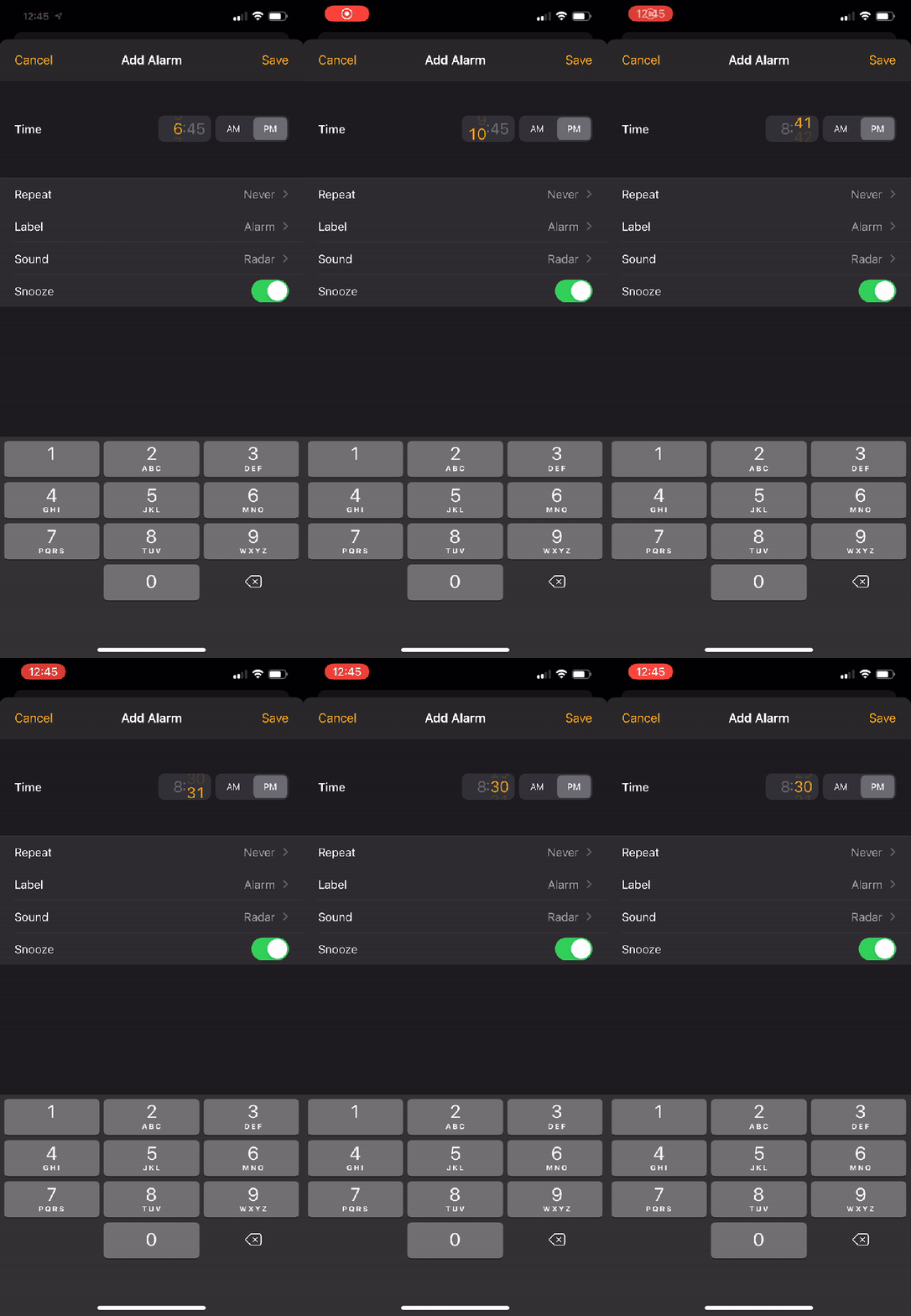
Apple has officially released iOS 14 beta 5 and iPadOS 14 beta 5 to developers. This week’s update brings a few small but notable changes to the iOS 14 experience, including the return of the scroll wheel for picking times and a new Apple News widget option.
iOS 14 beta 5 and iPadOS 14 beta 5 are fairly large updates in terms of download size, coming in at nearly 2GB and nearly 4GB respectively for most users. The updates feature the build number 18A5351d.
In addition to the fifth developer betas of iOS 14 and iPadOS 14, Apple also released watchOS 7 beta 5 to developers today. There is no new macOS 11 Big Sur developer beta quite yet, but it could come as soon as later this afternoon. Furthermore, we expect new public betas of iOS 14, iPadOS 14, macOS 11 Big Sur, and watchOS 7 later this week.
What’s new in iOS 14 beta 5?
One of the changes introduced in iOS 14 is the new time picker that ditches the iconic scrolling wheel. iOS 14 beta 5 brings the wheel back…kind of. Here’s how it looks in action:
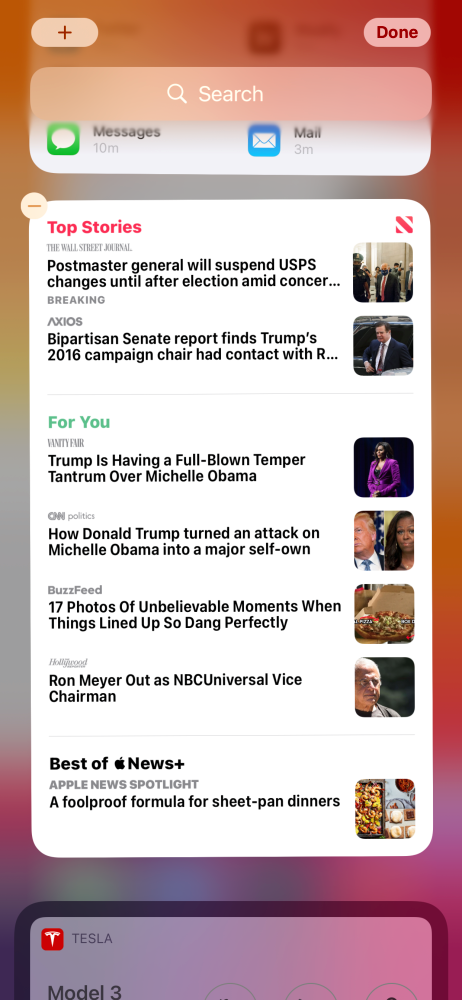
There is also a new “Tall” widget for Apple News in iOS 14 beta 5. This widget is exclusively for the “Today” screen on the far-left of iOS or iPadOS. It can’t be added to your home screen. This widget increases the number of Apple News widgets to seven and it headlines for Top Stories, For You, and Best of Apple News+.
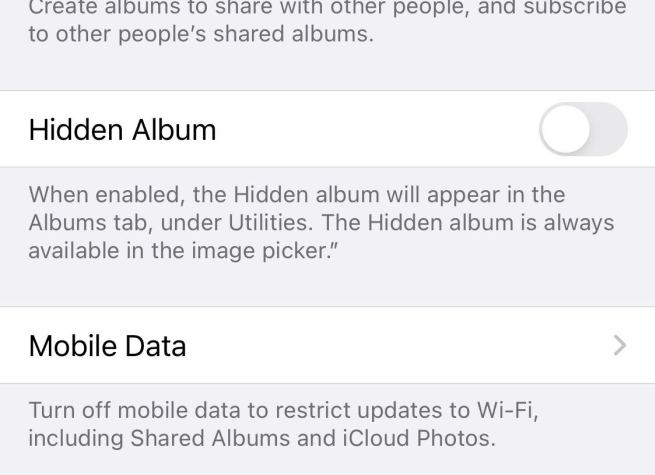
In the Settings app, you can now disable the Hidden Album in the Photos app. Open Settings, scroll down to Photos, and look for “Hidden Album.”
Apple says: “When enabled, the Hidden album will appear in the Albums tab, under Utilities. The Hidden album is always available in the image picker.”
New “Availability Alerts” for COVID-19 Exposure Notifications
Apple says: “Receive a notification if Exposure Notifications are available in your current region. Your region is determined by your iPhone and does not leave your device.”
New on-boarding process for COVID-19 Exposure Notifications in the Settings app:
New App Clip testing options for developers in Settings
New location access request for widgets:
Shortcuts app has a new “What’s new?” splash screen upon first launch:
Widgets are now blocked when a parent app is blocked with Screen Time
Last week saw contradictory claims about iPhone Mail vulnerabilities, with a security company claiming that they had been exploited in real-world attacks, and Apple stating that it can find no evidence of this.
Two leading security researchers have now weighed in on this, agreeing with Apple on one point, while stating it remains possible that the bugs have been exploited …
Everyone now appears to agree with one of Apple’s statements: that the iOS Mail app vulnerabilities discovered by ZecOps cannot be exploited on their own. Apple said:
The researcher identified three issues in Mail, but alone they are insufficient to bypass iPhone and iPad security protections.
ZecOps accepts this, and it has been backed by other security researchers. However, as we noted last week, that doesn’t mean that they couldn’t have been exploited alongside other vulnerabilities in order to carry out a successful attack.
The denial is not a complete refutation of the claim. It may be the case that the specific vulnerabilities alone cannot bypass security safeguards, but that they can be combined with existing exploits in order to do so.
Wired reports that our take has now been echoed by two high-profile security researchers.
iOS security researcher and Guardian Firewall creator Will Strafach points out that while Apple and ZecOps are correct about the limited utility of the Mail bugs alone, it’s still important to take these types of bugs seriously.
“A zero-click like this is especially interesting because it is not a full exploit chain, yet due to the nature of how it works, it could enable something like a smash-and-grab for mailbox data. Even the prospect of copying emails then self-deleting the crafted ‘attack email’ is quite scary.”
Former NSA hacker Patrick Wardle agrees, making the point that absence of evidence is not evidence of absence, and saying it wouldn’t be surprising that Apple would be unable to detect these attacks even if they have taken place.
“It is unlikely that if this vulnerability was used in highly targeted attacks that Apple would find evidence of such attack,” Wardle says. “Either way, it would be helpful for Apple to articulate how they came to this conclusion.”
Even the crudest zero-click attacks leave little trace, which makes tracking them an issue. Security analysts say that in many cases, the very features that make software more secure often make zero-click attacks harder to detect […]
“We don’t see a lot of these zero click vulnerabilities exploited in the wild and that is because they’re so difficult to detect—it’s not because they’re not out there.”
If the iPhone Mail vulnerabilities have been exploited, however, this is mostly likely against specific, high-profile targets.
Apple and Google announced their partnership two weeks ago to develop contract-tracing via Bluetooth in iOS and Android. Last week we shared details about how it will work and roll out, and today we’ve got answers to frequently asked questions about COVID-19 contact tracing for iOS and Android as well as updates on the Bluetooth and cryptography specifications.
We learned last week how contact tracing will work and roll out as well as how people will be able to participate. Those details should also help to further qualm security and privacy concerns from US Senators as well as the public.
Today we’ve got more details from Apple and Google representatives that cover some of the most frequently asked questions about contact-tracing in iOS and Android, now called Exposure Notification.
How can contact tracing help slow down COVID-19?
Smartphones can be an important part of slowing down the pandemic as they offer an automated solution that scales to understand when people are exposed to someone who has tested positive for the virus. This gives valuable anonymous data to public health authorities to make the best decisions to slow down COVID-19.
Contact tracing is being used by public health authorities and governments around the world.
How does the software ensure privacy and security?
Users have explicit choice whether or not to turn on and use COVID-19 contact-tracing
Users control all data and if they want to share it
No location data is tracked, the software works via Bluetooth-based rotating beacons
Contact-tracing from Apple and Google will only be available to be used by apps from public health authorities
Apple and Google can turn off COVID-19 exposure notification on a regional basis
Will the government have access to information through contact tracing?
Approved apps from public health authorities will have access to Bluetooth beacon data that retains user privacy and security.
Explicit user consent is required for their anonymous data to be shared
Where is contact tracing data stored and who can see it?
Contact tracing data is only stored on a user’s device
Contact tracing data is only processed on a user’s device
Public health authorities will be able to see anonymous Bluetooth beacon data for those who have tested positive for COVID-19 and those that receive exposure notifications
Data will also include the day the contact occurred and how strong the Bluetooth signal was
Will Apple and Google monetize contact tracing data?
There will not be any monetization for contact tracing data
Apple and Google reiterate that the software relies on a user’s device for processing and data storage
Where can you find contact tracing apps for iOS and Android?
As public health authorities develop and update apps to work with Apple and Google’s contact tracing software they will be made available in the App Store and Google Play Store.
Apple and Google are partnering with public health authorities to see about ways they might be able to contact users about available apps
Apple and Google will highlight contact tracing apps when they become available on their app stores.
How will the software know if I’ve been exposed to someone who has tested positive?
Each public health authority will decide how each determines if someone has been exposed.
Apple and Google’s software supports data that includes how long someone has been in contact with someone who has tested positive
Health authorities will determine a minimum threshold for the time in contact with someone who has tested positive and Apple and Google will have a 30-minute maximum set to retain user privacy.
Apple and Google representatives highlighted that contact tracing is just one part of the solution for the coronavirus pandemic.
More resources can be found on Apple’s website. There are also updates today on the Bluetooth specification, Cryptography specification, and framework API for the iOS software. These include the API keys being randomly generated, changing the encryption algorithm from HMAC to AES, associated metadata is now encrypted, and more.
Every so often, a bug in iOS emerges where a certain string of text will cause your iPhone or iPad to crash. This week, another such string of text is going viral, and a fix from Apple is not yet publicly available.
The string of text, which we aren’t going to share here, includes the Italian flag emoji and characters in the Sindhi language. When an iPhone, iPad, Mac, or Apple Watch receives a notification with this text string, things get wonky. Sometimes, your device will crash, while other times it completely stops responding to touch input, and much more.
Details of where this text string originated are somewhat unclear, but the original source seems to have been a Telegram group. It’s now going viral on Twitter and other social media platforms, though, so it’s worth being aware of. It can spread through theoretically any application, including Twitter, Messages, and more
These sort of bugs have surfaced at various times over the last few years. For instance, back in 2015 the “effective power” text string went viral. Essentially, when you sent the string to another iPhone user, it would cause their Messages app, and sometimes iOS as a whole, to crash.
What’s usually most important about these text string bugs, including today’s, is that it’s almost completely out of the end user’s control. What this means is that someone can send the text to you, and immediately crash your iPhone, iPad, Mac, or Apple Watch.
Other such stories include :
Receiving an Indian character crashes Messages and other apps in iOS 11
PSA: This link will crash Messages on iOS and macOS, cause resprings & more
iOS bug causes Messages to crash, iPhone to reboot when a certain text is received
Sending this text will crash almost any iPhone, but don’t expect it to become a major problem
The issue does appear to be fixed in the latest iOS 13.4.5 beta, but that update is not available to everyone just yet. Generally, Apple rolls out a fix for these problems quickly, so we should expect iOS 13.4.2 or even iOS 13.4.5 to be released to everyone sooner rather than later.
One temporary fix, until Apple releases software updates to resolve the problem, is to disable notifications on your devices. Thankfully, if you do receive a message with the text string in it, you can reboot your device and things should be back to normal.
Have you seen this bug in the wild? Let us know down in the comments! We’ll keep this post updated with the latest details as well.
A fix on Reddit claims to protect users with a jailbroken device from the bug :
A new string of characters is making the rounds similar to the Telugu text that would cause iOS to crash. CaptureTheFlag is similar in that it hooks CoreText to replace any occurrences of it with “REMOVED.”
Update: A new video from EverythingApplePro shows that you dont necessarily even need the Italian flags, just the Sindhi characters.