Want to transfer photos from a digital camera to iPhone? You can easily import photos and video from a digital camera or SD card to an iPhone with the help of an appropriate adapter and the super simple iOS Photos import procedure. This tutorial will walk through the steps to copy images and media from an SD card or camera to an iOS device.
To be able to successfully transfer and import photos from a digital camera or SD card to the iPhone, you will need the following:
The digital camera and/or SD card to copy the photos from
Assuming you have those prerequisites met, you’ll be able to copy images from the digital camera or SD card to the iPhone. And in case you were wondering, yes all of this is the same on iPhone as it is on iPod touch and iPad, so long as the iOS device has a Lightning port.
How to Import All Photos from Camera / SD Card to iPhone
Ready to import and copy photos from the SD card / camera to iPhone? Here’s what you’ll want to do:
Connect the Apple Lightning to SD Card Camera Reader adapter to the iPhone lightning port at the bottom of the phone
Insert the SD Card into the Apple Lightning to SD Card Camera Reader
Wait a moment and Photos app will launch automatically on the iPhone *
Tap on “Import All” in the corner of the Import screen of Photos app **
When the “Import Complete” screen appears, choose to “Keep” the photos on the SD card / camera, otherwise choose Delete if you want to permanently remove them from the attached SD card
All photos that were copied and imported from the SD card will now appear in the Photos app on the iPhone. You can find them in the general Camera Roll section or in the Photos section, though do note that the default Photos sorting view is by date and so if the images are from different dates they may not appear at the very bottom of the Photos app screen.
You can also choose to browse the imported photos by going to the Photos app “Albums” view and then selecting the “Imports” album.
Sometimes the Photos app does not automatically open when the SD card or digital camera is connected to the iPhone, if that happens manually open the Photos app and choose the “Import” tab.
** Optionally, you can manually select specific photos to import by tapping on them individually at the Import screen so that they a green checkmark appears overplayed on them, but for most users they’ll probably want to import all photos from the SD card to the iPhone.
If you have a digital camera that uses a different sort of memory card rather than an SD card, you’ll want to either use an adapter, or use the USB adapter for the iPhone instead. Fortunately most digital cameras have standardized around the SD card and so that will apply for most users who want to import pictures from a camera or SD card to their iPhone.
This walkthrough is obviously focused on the iPhone, but everything is basically the same on iPod touch and iPad, assuming they have a Lightning port anyway. If you’re a Mac computer use than you can also transfer images from iPhone, camera, or memory card to the Photos app on Mac too.
Announcing a special edition 30th anniversary product lineup, groundbreaking Prime Utopia concept motherboard, ZenBook Pro Duo and ZenScreen Touch
ASUS Chairman Jonney Shih today hosted a special press event at Computex 2019 in celebration of the company’s 30th anniversary, where he unveiled a series of limited-edition devices created to commemorate the milestone and introduced the groundbreaking Prime Utopia concept motherboard, ZenBook Pro Duo and ZenBook Duo laptops, and ZenScreen Touch portable monitor.
The ASUS 30th anniversary special-edition lineup features new versions of the ZenFone 6 Edition 30 smartphone, ZenBook Edition 30 laptop and Prime X299 Edition 30 motherboard, all featuring a special stylized “A” monogram signifying ASUS values and history created by ASUS Design Center to celebrate the anniversary as well as unique designs that embody the ASUS focus on refined aesthetics, outstanding performance and delivering exceptional user experiences. The foundation of the “A” monogram is a representation of the Chinese symbol for people and shows the humanitarian side of ASUS. The top part creates an arrow shape signifying the ASUS ability to overcome obstacles and ascend industry norms, and the overall shape when flipped resembles a heart, which speaks to the heartfelt affection and endearment for life.
“ASUS is honored to have been serving the hardcore tech community, enthusiast, gamers, creators, and tasteful consumers for the last 30 years,” said ASUS Chairman, Jonney Shih. “I am tremendously excited and proud that we have stayed true to our relentless engineering origin on this incredible journey — one that has made us wiser and stronger together. We aspire to continue to create the most ubiquitous, intelligent, heartfelt, and joyful smart life for everyone for decades to come.”
Joining Chairman Shih on stage to talk about the two companies’ long partnership was Chris Walker, Vice President of Client Computing at Intel: “Intel and ASUS share a strong passion for innovation. We congratulate ASUS on their 30-year anniversary. In that time, our collaborations have brought to market devices that enrich the experiences of people around the world. Today, ASUS is leveraging the desktop-caliber performance of 9th Gen Intel® Core™ mobile processors. The new, exciting ASUS ZenBook Pro Duo with the companion display, embodies the true meaning of pushing boundaries for PC function and design and is a great example of the innovation our collaboration enables.“
ASUS ZenBook Edition 30 features a luxurious design with a genuine leather lid cover and an 18-karat rose gold plated logo and exclusively equipped with a complete set of premium accessories. It is also the world’s smallest 13-inch laptop featuring a 95% screen-to-body ratio, 8th Gen Intel® Core™ i7 processor and NVIDIA®GeForce® MX250 discrete graphics. ZenFone 6 Edition 30 features the iconic Zen-inspired concentric-circle patterning in understated Matte Black with embossed Edition 30 logo. ZenFone 6 is the first notchless ZenFone with innovative Flip Camera. ZenFone 6 Edition 30 comes with 12GB RAM and 512GB of internal storage for a fast and smooth experience, offering owners the finest integration of art and technology. The Prime X299 Edition 30 motherboard features support for the latest high-core-count processors with an enhanced power solution and premium VRM heatsink design.
At its inception in 1989, ASUS revolutionized the motherboard industry with the creation of the company’s first motherboard, establishing a path to becoming the world’s best-selling and most award-winning motherboard maker. The next-gen Prime Utopia concept motherboard continues this legacy of innovation and is a complete re-thinking of motherboard design to meet the cooling and performance demands of future high-end processors, graphics cards and storage devices to offer system builders the most flexibility.
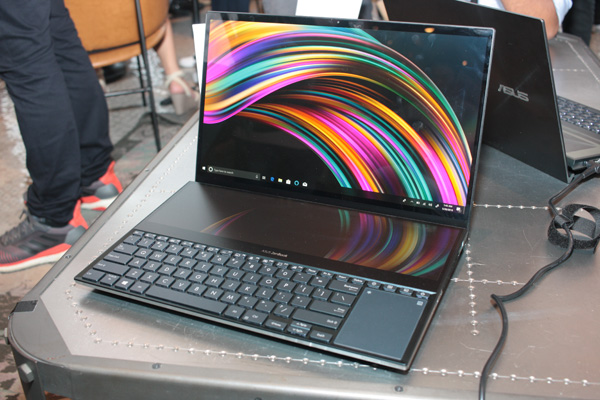
ASUS is also improving the experience for mobile creatives and professionals with the new ZenBook Pro Duo and ZenBook Duo ultraportable laptops featuring ScreenPad™ Plus, the next generation of the world’s first intelligent touchpad. ScreenPad Plus offers a larger and full-width display, a more intuitive design, seamless viewing experience and improved multi-screen workflow to empower the ultimate creativity. ZenBook Pro Duo features a 15.6-inch 4K UHD (3840 x 2160) OLED HDR display with a 14-inch 4K(3840 x 1100) ScreenPad Plus and is powered by a high-performance, eight core 9th Gen Intel Core i9 processor and NVIDIA GeForce RTX 2060 ray-tracing graphics. It also features the fastest port available on a PC with up to 40 Gbps Thunderbolt™ 3, plus NumberPad 2.0, Amazon Alexa voice control and a dedicated turbo-cooling button. ZenBook Duo features a 14-inch FHD display with a 12.6-inch FHD ScreenPad Plus, the performance of a 9th Gen Intel Core i7 processor, and NVIDIA GeForce MX250 discrete graphics. Both models feature Intel® Wi-Fi 6 (802.11ax) with Gig+ to deliver networking speeds of up to 2.4 Gbps for rapid internet connectivity.
In addition to ScreenPad Plus, ASUS also announced that it is bringing ScreenPad 2.0 — an update to the revolutionary input device — to ZenBook 13/14/15, ZenBook Edition 30, ZenBook Flip 15 and VivoBook S14 and S15 to offer the creativity it empowers to more consumers.
ASUS also revealed ZenScreen Touch, a slim and light portable monitor designed for mobile productivity, creativity and entertainment. It weighs just 0.9 kg and is only 9 mm slim and features a 10‑point touch screen that supports swipe, scroll, drag and pinch gestures, a built-in 7800mAh battery and rich connectivity with hybrid-signal USB-C and micro-HDMI ports.
ASUS booth at Computex 2019
A comprehensive lineup of ASUS products will be on display at the ASUS booth at the Taipei Nangang Exhibition Center on May 28 – June 1, from 9:30 a.m. to 5:30 p.m.[1] Visitors to Computex 2019 are invited to visit the showroom to experience the revolutionary functionality of these latest ASUS innovations for themselves.
Full listing of products shown onstage at the ASUS press event
Smartphone
ZenFone 6 Edition 30
ASUS ZenFone 6 Edition 30 is a luxurious limited-edition 30th Anniversary version of the extraordinary ZenFone 6, featuring an exclusive design and upgraded specifications. Echoing the ASUS spirit, the back of the phone features the iconic Zen-inspired concentric-circle patterning in understated Matte Black, covered with ergonomic 3D-curved glass. A distinctive embossed Edition 30 logo adorns the rear of the phone to identify this exclusive edition. As well as unique and exquisite styling, the hardware specifications of ZenFone 6 Edition 30 have been specially upgraded to 12GB RAM and 512GB of internal storage for a faster and smoother experience, offering owners the finest integration of art and technology.
The 6.4-inch ZenFone 6 Edition 30 features a notchless NanoEdge all-screen display covered with Corning®Gorilla® Glass 6, along with the groundbreaking Flip Camera with a 48MP Sony® IMX586 main camera and a 13MP 125° ultrawide secondary camera. The Flip Camera is identical to the one found in ZenFone 6, which achieved a total score of 98 in the DxOMark Selfie benchmark — the highest ever recorded[2]. ZenFone 6 Edition 30 is powered by the flagship Qualcomm® Snapdragon™ 855 Mobile Platform and incorporates a monster 5000mAh battery that provides up to two days of nonstop use.
Laptops
ZenBook Edition 30 (UX334FL)
The limited-edition ASUS ZenBook Edition 30 is a unique celebration of 30 years of ASUS innovation. It draws on the ASUS heritage but is designed with an eye on the future and features the finest leather craftsmanship as a mark of our confidence. ZenBook Edition 30 brings a futuristic twist to that classic look, with a lid encased in luxurious Pearl White genuine Italian leather for a pure, bold style statement. It is exclusively equipped with a complete set of premium accessories, including a Pearl White mouse, a leather-look box and mouse pad and a genuine-leather sleeve. It’s a very special collection for a very special laptop.
The combination of performance and mobility is a defining feature of the ZenBook series, and ZenBook Edition 30 features a full complement of high-performance components including up to 8th Generation Intel® Core™ i7 quad-core CPUs, NVIDIA® GeForce® MX250 graphics, 16GB RAM, ultrafast PCIe® SSDs and gigabit-class Wi-Fi.
A four-sided frameless NanoEdge display, with a 95% screen-to-body ratio gives it the world’s most compact footprint in its class. ZenBook Edition 30 also comes with the new ScreenPad 2.0, upgrading the traditional laptop experience with an interactive secondary screen that enhances productivity and multitasking.
ZenBook Pro Duo (UX581)
ASUS ZenBook Pro Duo (UX581) is a groundbreaking ultraportable laptop featuring the new ASUS ScreenPad™ Plus, a revolutionary full-width secondary touchscreen that expands and enhances the interactive capabilities offered by the original ScreenPad. ScreenPad Plus offers endless creative possibilities for content creators, allowing productivity-enhancing workflows and easy multitasking. It integrates seamlessly with the primary display, and the integrated ScreenXpert software includes a wide selection of useful apps, tools and utilities that allow users to easily enjoy the efficiency benefits of ScreenPad Plus.
ZenBook Pro Duo delivers extreme performance for effortless creativity with up to 9th Generation Intel® Core™ processors, up to 32GB RAM, an NVIDIA® GeForce RTX™ 2060, ultrafast storage with an up to 1TB PCIe® 3.0 x4 SSD, and seamless connectivity with Wi‑Fi 6 with Gig+ (802.11ax) and Thunderbolt 3.
ZenBook Pro Duo features a stunning 4K UHD (3840 x 2160) OLED HDR touchscreen for breathtaking visuals, a 4K (3840 x 1100) ScreenPad Plus and an ASUS NumberPad dual-function touchpad. The display is a frameless four-sided ASUS NanoEdge design, with ultraslim bezels for immersive visuals and an ultracompact form factor.
ZenBook Duo (UX481)
For creative professionals requiring a smaller second-screen form factor, the 14-inch ZenBook Duo is the perfect choice. It supports the same great ScreenPad Plus features as ZenBook Pro Duo, but in a lighter and smaller chassis. Powered by up to an Intel Core i7 processor and GeForce MX250 graphics, it has an FHD NanoEdge display and an FHD ScreenPad Plus.
Motherboards
Prime X299 Edition 30
The origin of ASUS Prime series motherboards date back to 1989 with the launch of ISA-386C, the first ASUS motherboard and a defining step along the path to becoming the world’s leading motherboard brand. The Prime X299 Edition 30 motherboard honors this legacy of innovation and performance with a wealth of features and accessible tuning options designed to make building a cutting-edge system within everyone’s reach.
Prime X299 Edition 30 supports the latest Intel® Core™ X-series high-end desktop processors, which feature high core counts to deliver tremendous performance for prosumers and content creators. The motherboard features a new flagship 16-stage power solution and enhanced cooling that enable the latest processors to achieve their full performance potential. Two M.2 slots with passive heat sinks enable ultrafast, unthrottled data transfers, and dual Thunderbolt 3 ports and accompanying DisplayPort inputs give content creators an easy way to connect chains of external storage and displays. Built-in 5G Aquantia Ethernet, Intel Gigabit LAN and Wi-Fi 6 ensure high-performance, lag-free wired and wireless networking.
Prime X299 Edition 30 also features a 2-inch LiveDash OLED that displays vital system stats, such as clock speeds, temperatures and voltages for easy performance monitoring. It can also display custom text and images for users who want to personalize their build. A second LiveDash display is included in the new Smart Control Console, an external module that connects via USB and comes with a stand that sits neatly on top of typical monitors. In addition to displaying system information, Smart Control Console offers convenient voice and hand-gesture control.
Prime Utopia
The Prime Utopia is an early prototype of the ASUS vision and aspirations for future high-end desktop motherboards. It’s engineered with a range of cooling enhancements to unleash the full potential of next-gen high-core-count processors and high-performance system components and has a host of innovations that take customization and control to the next level.
One of the most salient features is the convention-breaking placement of PCIe slots at the back of the board for improved thermal management. The layout frees up prime estate on the front of the board for more expansion cards and M.2 drives, and enables heat from next-gen CPU, graphics cards, and M.2 drives to be optimally managed for throttle-free performance.
In addition to optimizing thermal zones for high-performance components, Prime Utopia also features integrated water cooling that helps dispel the heat generated when fueling high core count processors. Keeping the CPU cool with custom water-cooling loops is made easier by the introduction of the proprietary, patent-pending Hydra Cortex fan header. The Hydra Cortex header can be connected and control up to four fans individually, simplifying cable routing to water cooling radiators. ASUS is currently working with partners to develop fans that are compatible with this new technology.
Recognizing that many high-end-desktop users have different needs, Prime Utopia features an innovative modular rear I/O and offers a selection of modules for users to choose their preferred compliment of ports and connectivity. It also comes with a 7-inch full-color OLED panel with touch-control. The panel can be connected via cable or Wi-Fi, enabling flexible placement directly on the desktop for users to modify BIOS settings, control fan speeds, turn the system on or off, or monitor real-time system stats.
Monitors
ZenScreen Touch (MB16AMT)
ASUS ZenScreen™ Touch is a Full HD portable monitor that weighs just 900 grams, is 9mm thin and features a large 7800 mAh battery that lasts up to four hours, taking mobile productivity to new heights. Its responsive 10-point touch screen supports swipe, scroll, drag and pinch gestures for effortless and intuitive interactivity to help users get tasks done more efficiently. The IPS display also supports the innovative ZenScreen Touch app, which enables the display and control of apps from Android phones[3] for a large-screen productivity boost. In addition to providing a more comfortable view of any content, this large scale is perfect for tackling complex tasks, such as editing documents, photos, and videos, making it faster and easier to get them done while away from home or the office. It also comes with an optional overlay of Android menu buttons (Back, Home, Recent and Rotation) as virtual keys for a better mobile user experience.
ZenScreen Touch also features hybrid-signal USB Type-C and Type-A connectivity, which enables both the video signal and power to be supplied over a single cable, simplifying connectivity and providing a more streamlined and clutter-free usage experience. Along with micro-HDMI support, ZenScreen Touch can display content from a wide range of portable devices, such as laptops, smartphones, cameras, and video game consoles, providing an expansive view for the best work and entertainment experiences on the go.
The data contained within Health app on iPhone can be saved and exported for other uses. Perhaps you want to export Health app data to use in another health or fitness app, importing it to elsewhere, or maybe you want to use the raw Health data for your own purposes.
Exporting Health data from iPhone results in a zip archive that contains the raw data as gathered by Health app in XML format. This exported Health data will include any data stored or gathered by the Health app and any associated devices, including any Medical ID data, the native iPhone step counter and distance tracker, any data from an Apple Watch, and any data gathered from any third party devices that are syncing to Health app, like a smart scale or blood pressure monitor. Read no to learn how to export Health data from iPhone.
How to Export Health Data from iPhone
Open the Health app on iPhone
Tap on your profile icon in the corner, it looks like a human head silhouette
Scroll down to the bottom of the Health profile and tap on “Export Health Data”
Tap on “Export” to confirm that you want to export Health data and start the exporting process, it may take a bit to complete
Choose the method of how you want to save or share the exported Health data: Messages, Mail, Notes, Files app, or any other *
Optionally, extract the exported Health data from the resulting “export.zip” file
As mentioned before, the exported Health app data arrives as a zip file containing XML files. Thus if you want to dig around in the Health data or just it for something else, you’ll probably want to extract and unzip the archive and access the raw XML files for your own purposes. Some third party health and fitness oriented apps and services can import the Health data directly from the zip archive, however.
* Perhaps the simplest way to gain access to the raw Health app data is either to message or email it to yourself, or to use “Save to Files” and then access the data from iCloud Drive on a Mac, iPhone, or iPad.
You can also delete Health data from iPhone if you don’t want any of the stored health and fitness information to be stored on the device.
Xiaomi recently launched the Redmi Note 7S in India. The handset comes less than two months after the Redmi Note 7 launch and its pricing has surprised many. If you plan on purchasing the Redmi Note 7S, check out our detailed FAQ surrounding it.
The FAQ will help clear all your doubts surrounding the Redmi Note 7S.
The Redmi Note 7 and Redmi Note 7S are mostly the same phones, with the latter only coming with a different rear camera setup. It is definitely surprising to see Xiaomi replace the Redmi Note 7 with the Redmi Note 7S so soon in India.
Redmi Note 7S FAQ
Q) What are the full specifications of the Redmi Note 7S?
Connectivity: LTE, (Hybrid) Dual-SIM, GPS, Wi-Fi b/g/n/ac, Bluetooth 5.0, USB-C
Battery: 4000mAh non-removable
Others: MIUI 10 based on Android 9.0 Pie
Q) How are the Redmi Note 7 and Redmi Note 7S different?
A) The Redmi Note 7 and Redmi Note 7S are essentially the same phones with their rear camera setup being the only difference. While the Redmi Note 7S features a 48MP GM1 Samsung sensor, the Redmi Note 7 features a 12MP Sony shooter. The GM1 sensor from Samsung is not a true 48MP sensor. In reality, it is a 12MP sensor , and that’s why the Redmi Note 7S clicks photos at 12MP by default.
Q) How is the 48MP camera on the Redmi Note 7 Pro different from the Redmi Note 7S?
A) The Sony IMX586 sensor on the Redmi Note 7 Pro is a superior sensor compared to the GM1 sensor found on the Redmi Note 7S. The former offers better dynamic range, colors, contrast, and the difference between the two is especially visible in low-light and challenging situations.
Q) Will Xiaomi continue to sell the Redmi Note 7 alongside the Redmi Note 7S?
A) No. Xiaomi is discontinuing the Redmi Note 7 in India.
Q) Is the Redmi Note 7S water-resistant?
A) No, but the handset is splash resistant. However, Xiaomi will not honor the standard warranty for any liquid damage.
Q) Is the battery of the handset removable?
A) No, since the Redmi Note 7S features a unibody glass build, the battery and back cover is not removable.
Q) What kind of SIM card slot does the Redmi Note 7 have? Can I use two SIM cards and a microSD card at the same time?
A) The Redmi Note 7S features a hybrid SIM card slot. This means that you can either 1 SIM card and microSD card or 2 SIM cards at any given time. The primary SIM slot accepts microSIM cards, while the secondary slot accepts nanoSIM cards.
Q) Is there an IR blaster on the Redmi Note 7S that can be used to control TVs and other devices?
A) Yes, the Redmi Note 7 features an IR blaster. Coupled with Mi Remote, one can use the IR blaster on the device to control TV, ACs, and other electronic items.
Q) Do you get face unlock on Redmi Note 7S?
A) Yes.
Q) Can one record calls on Redmi Note 7S?
A) Yes, one can record calls on the Redmi Note 7S.
Q) Does the Redmi Note 7 feature FM radio?
A) Yes, the Redmi Note 7S features FM radio.
Q) Is the display on the Redmi Note 7S protected by Gorilla Glass?
A) Yes, the 6.3-inch display on the Redmi Note 7S is protected by a 2.5D curved Corning Gorilla Glass 5.
Q) Can you lock apps using the fingerprint scanner on the Redmi Note 7S?
A) Yes, you can.
Q) Where is the fingerprint scanner on the Redmi Note 7S located? Is it touch-based?
A) The fingerprint scanner on the Redmi Note 7S is located at the rear, and yes, it is touch based.
Q) How many fingerprints can one register on the phone?
A) 5.
Q) Can you record slow-motion videos on the phone?
A) Yes. It can record slow-mo videos in 1080p@120fps. It can also record Full HD videos at 60fps and since it has EIS, the footage will not be shaky as well.
Q) Can one make native video calls on Redmi Note 7S without using a third-party app?
A) Yes, you can directly make video calls on the Redmi Note 7S without using an app like Google Duo or Skype.
Q) Which version of Android does the handset run?
A) Android 9.0 Pie.
Q) Which version of MIUI does the Redmi Note 7 run?
A) The Redmi Note 7 runs on MIUI 10 out of the box.
Q) Does the Redmi Note 7 support LTE and VoLTe networks? Will a Reliance Jio SIM work on the phone?
A) Yes, it does support LTE and VoLTE out of the box. The Note 7 also has dual-VoLTE support which means one can use two Jio or any two VoLTE networks on the device at the same time.
Q) What about VoLTE support on AirTel’s network?
A) Yes, the Redmi Note 7S support Airtel’s VoLTE network. Xiaomi will also add support for Vodafone’s VoLTE network on the handset with a future software update.
Q) Is fast or Quick charging supported on the Redmi Note 7 Pro?
A) Yes. The Redmi Note 7S has Quick Charge 4.0 support. However, Xiaomi continues to bundle a 10W charger with the device which means one will have to separately investment in a Quick Charge 3.0 or 4.0 charger.
Q) How much free storage space does one get on the Redmi Note 7S out of the box?
A) Almost 21GB of free space
Q) Can you uninstall or disable pre-installed apps on the handset?
A) Yes, you can uninstall or disable some pre-installed apps on the Redmi Note 7, but not all.
Q) What colors are the Redmi Note 7S going to be available in?
A) The handset will be available in Black, Blue, and Red.
Q) What contents do you get inside the retail box of the Redmi Note 7 Pro?
A) You get the phone, a 2A charger, a USB cable, SIM ejector tool, and some regulatory papers. Xiaomi is also bundling a free plastic case with the Redmi Note 7 just like its other recent devices.
Q) Does the handset support USB OTG?
A) Yes, the Redmi Note 7S supports USB On-The-Go. This allows you to connect pen drives, external hard disks directly and other similar devices using an adapter to the device.
Q) When will the Redmi Note 7 launch in India?
A) The Redmi Note 7S goes on sale in India from May 22. It is priced at Rs 10,999 for the 3GB/32GB variant, with the 4GB RAM/64GB variant coming at Rs 12,999.
quad cameras, punch hole displays, and the Kirin 980
A new challenger has entered the battle of the 2019 budget flagships: Honor. The smartphone brand unveiled its latest flagship smartphone duo, the Honor 20 and Honor 20 Pro, at an event in London today. It’s only been a few months since the Honor View20 launch, but the recent flood of impressive-looking budget flagship smartphones like the OnePlus 7, Xiaomi Mi 9, and ASUS ZenFone 6 has prompted Honor to launch new smartphones with significant camera upgrades over the last generation model to stay competitive.
The Honor 20 and Honor 20 Pro have all the hallmarks of a 2019 budget flagship: a speedy processor in the Kirin 980, a nearly bezel-less display, a beautiful design, and multiple cameras on the back. But the same is true for all the other budget flagships, so Honor’s latest devices are no longer in the position that the Honor View20 was when it came to market in January. Honor needs to do more than just check off the list of flagship-tier specifications if they want people to buy their latest smartphones. Let’s cover everything we know about the new Honor 20 series to see how it stands up to the competition.
Honor 20 Pro First Impressions
Check out our first impressions of the Honor 20 Pro from TK Bay on our YouTube channel.
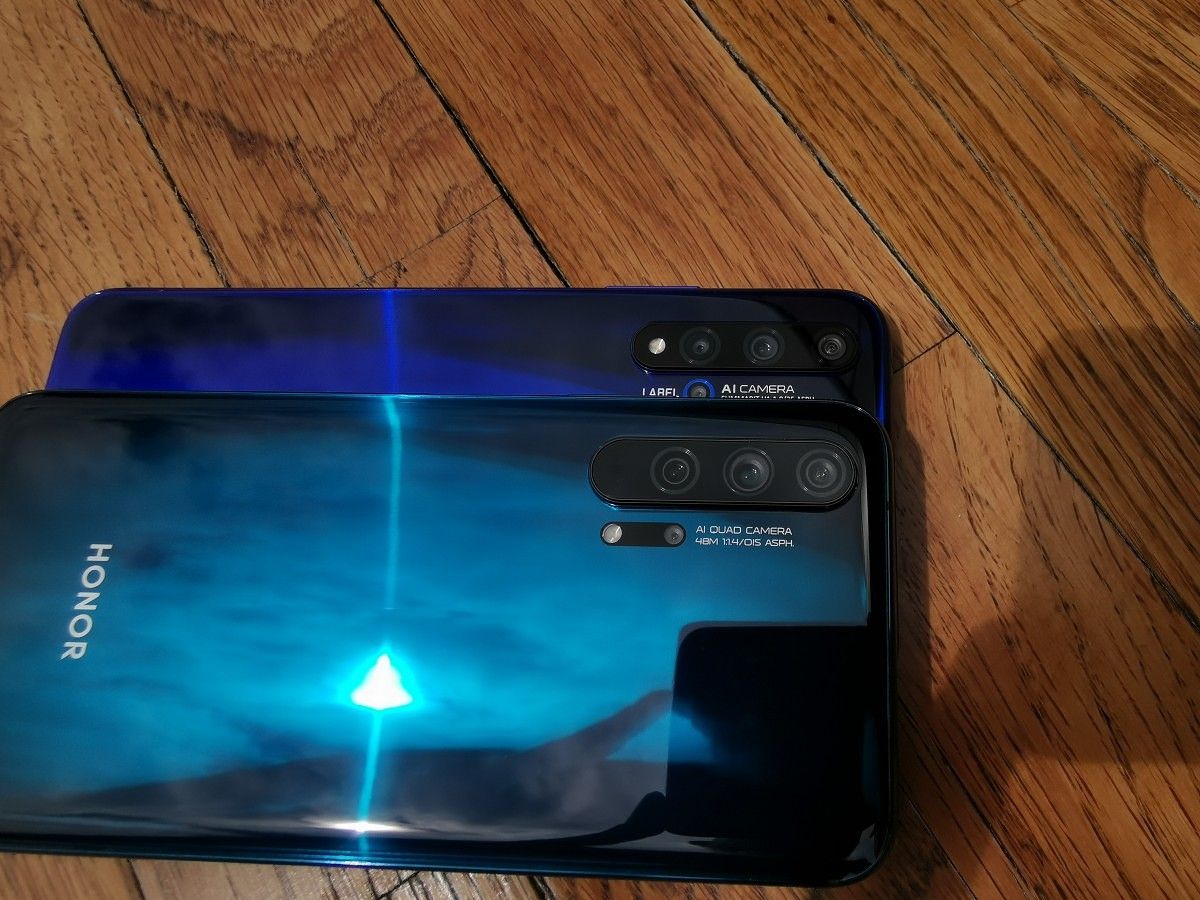
Above: Honor 20. Below: Honor 20 Pro.
Honor 20 Series Design
Display
The Honor 20 Pro with an “All-view” punch hole display.
You’d be hard pressed to tell the new Honor 20 and Honor 20 Pro apart from one another. Unlike “Pro” models from other smartphone brands, the Honor 20 Pro doesn’t have a better display than the Honor 20. Instead, both models have a 6.26-inch “All-view” IPS LCD with a 4.5mm hole punch in the top-left corner.
Honor boasts that their hole punch is still the smallest of its kind, resulting in the two devices having a 91.6% screen-to-body ratio. That means there’s more screen on the front of the phone than on the Xiaomi Mi 9, OnePlus 7, and Samsung Galaxy S10 series, but the ASUS ZenFone 6 and OnePlus 7 Pro have higher screen-to-body ratios at 92% and 93.22% respectively. The ASUS ZenFone 6 and OnePlus 7 Pro achieve such high screen-to-body ratios by moving the front camera to a mechanical flip-top and pop-up camera module respectively, which has their trade-offs in durability and facial recognition speed. On the other hand, the 32MP front camera sensor on the Honor 20 and Honor 20 Pro is located under the display where the hole punch is located.
Back Cover
The Honor 20 Pro in Phantom Blue.
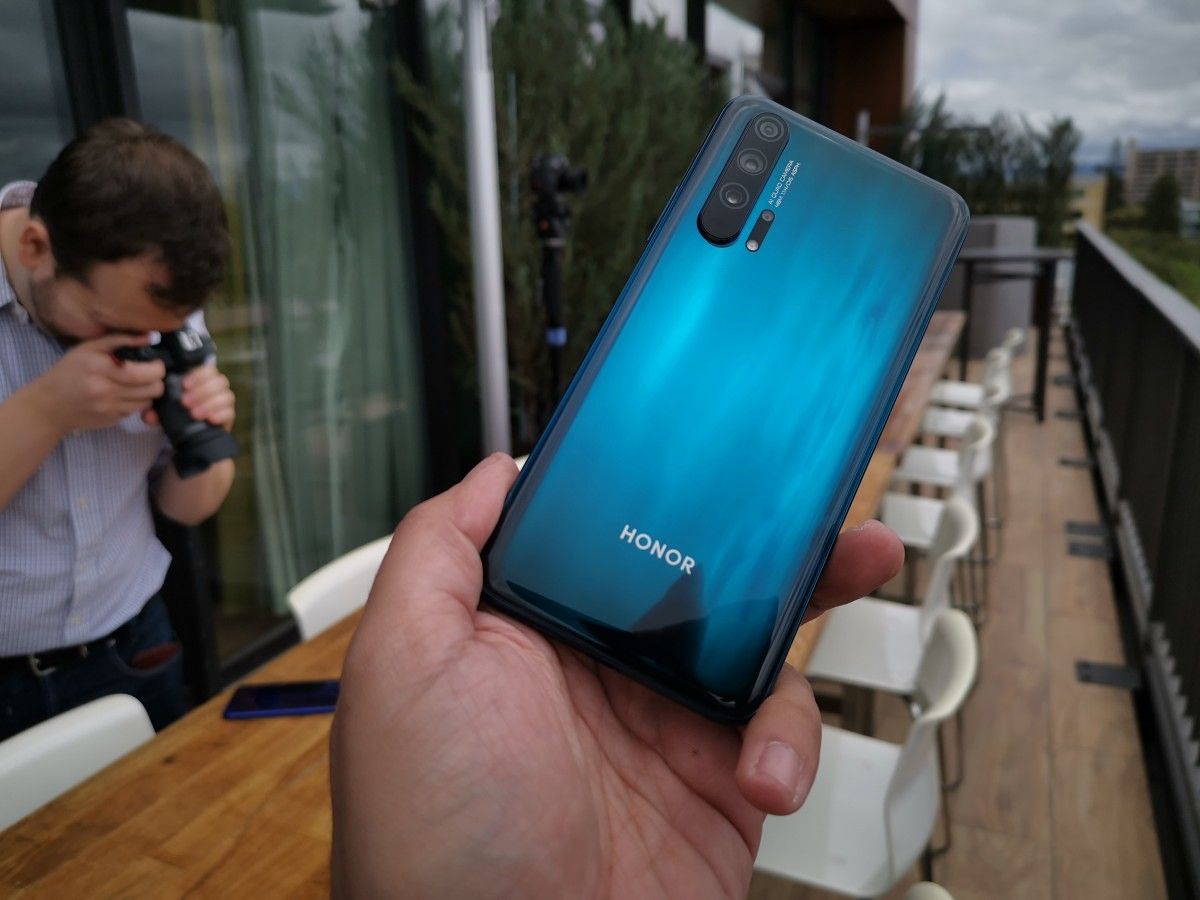
Honor created a great-looking phone in the Honor View20 with its reflective glass back creating a “V-shaped color gradient with a gleaming effect.” Honor is following up on the View20 with an equally impressive design on the Honor 20 series. The company is calling the design on the back their “Dynamic Holographic Design” which employs a two-stage process to create a 3D curved glass back with a “depth-inducing” optical effect.
The Honor 20 series comes in 4 different colors: Midnight Black and Safari Blue for the base model and Phantom Blue and Phantom Black for the higher-end model. Oddly, the Phantom Blue appears greenish in person while the Phantom Black looks purple.
Camera and Fingerprint Scanner Placement
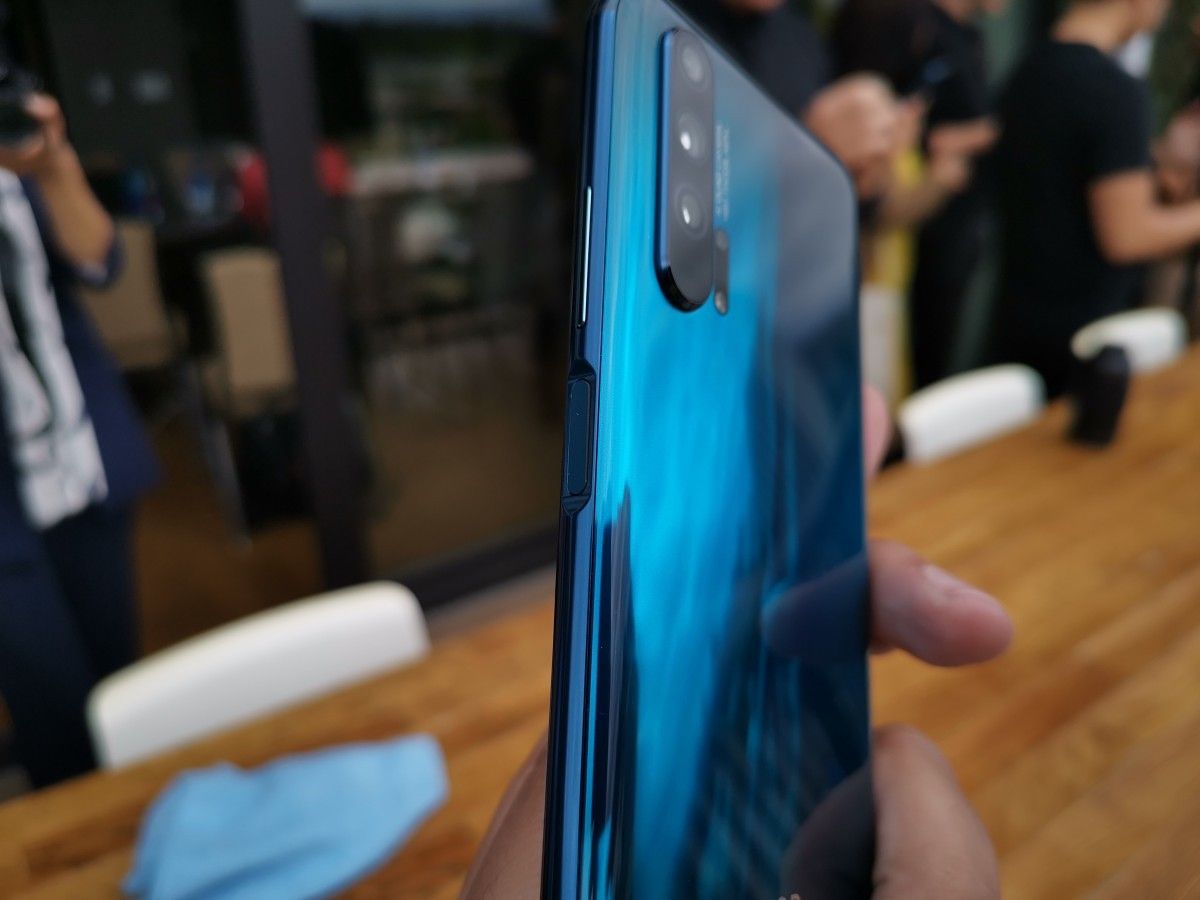
Both the Honor 20 and Honor 20 Pro have 4 cameras on the rear, though as expected the Pro model has slightly better camera hardware. The difference between the two models isn’t as substantial as the difference between the Huawei P30 and Huawei P30 Pro, though, so you’re not missing out significantly by opting for the regular model.
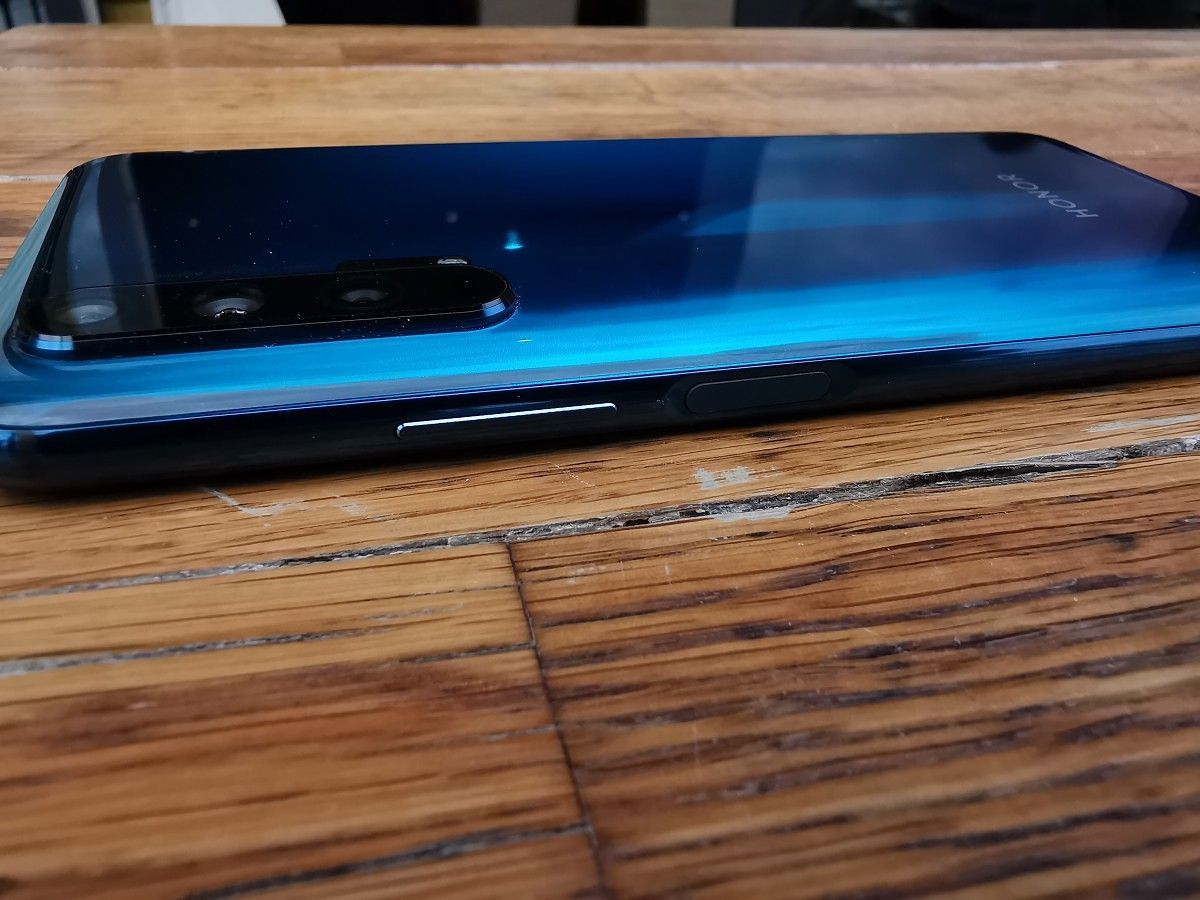
Like the Samsung Galaxy S10e, the Honor 20 series have side-mounted fingerprint scanners embedded in the power button. Honor couldn’t pack an optical fingerprint sensor underneath the display like the Xiaomi Mi 9 or OnePlus 7 because the Honor 20 series has an LCD; the company also likely didn’t go for an ultrasonic under-display fingerprint sensor to save cost. While having an under-display fingerprint scanner is cool, the side-mounted physical sensor is more practical since unlocking happens within 0.3 seconds of placing your finger on the power button. No need to wake the screen before using the fingerprint scanner – you turn on the screen with the power button and unlock the phone at the same time.
Cameras
Although both of Honor’s latest flagships have quad rear cameras, there are a few subtle differences between the two even among the shared image sensors. Here’s a rundown of the camera hardware on both models:
The main difference between the cameras on the Honor 20 and Honor 20 Pro is that the Honor 20’s 2MP Depth Assist sensor is substituted for an 8MP Telephoto sensor with OIS on the Honor 20 Pro. The 48MP main camera on the Honor 20 Pro also has OIS and a wider f/1.4 aperture for better low-light photography.
Honor is bringing back the 48MP AI Ultra Clarity mode from the View20. This mode allows both Honor 20 models to take sharper 48MP photos by combining multiple 48MP shots over a 5-second interval. If you’re not a fan of overly processed images, then you can use the Pro Mode to save in RAW.
Honor’s “AIS Super Night Mode” is also returning, making it possible to take handheld long-exposure shots that aren’t overexposed and still retain a good amount of detail. There are 4 steps in the process: handheld detection, light detection, image processing to compensate for shakes, and image compositing. The “AI” in “AIS” comes from the fact that the Kirin 980 analyzes sensor data from the gravity sensor and gyroscope to compensate for handheld shaking by “moving the lenses in the opposite direction of the motion in the picture.”
Unlike the Huawei P30 which uses auto-focus on its wide-angle lens for macro shots, both the Honor 20 and Honor 20 Pro have a 2MP 4cm fixed-focus Macro lens. Users will have to manually select the Macro mode in the camera app to take photos close to the subject, but Honor is considering adding a recommendation to Master AI to automatically switch to the mode when appropriate. The inclusion of a dedicated Macro lens is interesting since the Huawei Mate 20 and Huawei P30 series both pull off awesome Macro photography without a dedicated lens. Honor is still experimenting with what works, like when they had a TOF sensor on the Honor View20. The idea is to allow users to take photos at all distances. With a wide-angle, telephoto, and macro lens, nothing is too far or too close to take a photo of.
While the wide-angle lens on both smartphones isn’t stabilized, Honor has brought its Super Night Shot camera mode to the wide-angle lens. On the Honor 20 Pro, they’ve also added a 30X digital zoom option and a handheld “moon shot” which, like the Huawei P30 Pro, uses AI to optimize details in photos taken of the moon. The Huawei P30 Pro’s Moon Mode raised suspicions that the camera software was replacing the moon in the image, but Huawei shot down those rumors in a statement to AndroidAuthority.
“Moon Mode operates on the same principle as other master AI modes, in that it recognizes and optimizes details within an image to help individuals take better photos. It does not in any way replace the image – that would require an unrealistic amount of storage space since AI mode recognizes over 1,300 scenarios. Based on machine learning principles, the camera recognizes a scenario and helps to optimize focus and exposure to enhance the details such as shapes, colors, and highlights/lowlights. This feature can be turned on or off easily while taking a photo. While there is a Moon Mode, the shot can still be taken without AI mode because of the periscope lens.” – Huawei spokesperson in response to inquiries about the Huawei P30 Pro’s Moon Mode.
We’re hopeful that Honor is using the same algorithm, but we’ll have to test the Honor 20 Pro’s own moon shot mode to see how it stacks up against the Huawei P30 Pro’s version. We’ll also test the camera quality on the Honor 20 series, and in particular, on the Honor 20 Pro. Famed camera testing lab DxOMark has already rated the Honor 20 Pro with a score of 111 overall (117 for Photo and 97 for Video), tying the OnePlus 7 Pro but barely falling behind the Huawei P30 Pro and 5G Samsung Galaxy S10.
Performance
For high-end performance, Honor has equipped the Honor 20 and Honor 20 Pro with the latest 7nm HiSilicon Kirin 980 SoC. The CPU on the Kirin 980 consists of 2 ARM Cortex-A76 cores @ 2.60GHz, 2 ARM Cortex-A76 cores @ 1.92GHz, and 4 ARM Cortex-A55 cores @ 1.80GHz. The GPU is ARM’s Mali-G76MP10. In raw performance, the CPU is slightly bested by the Qualcomm Snapdragon 855 while falling significantly behind it in GPU performance benchmarks.
Benchmarks don’t tell the whole story, though. Our test of the Honor View20 against the most performance-intensive Android games from Google Play as well as emulators of retro game consoles proved that the Kirin 980 is more than capable of handling whatever you throw at it. Furthermore, the Honor 20 series launches with Magic UI 2.1, a re-branded EMUI 9.1, out of the box. The software, based on Android 9 Pie, comes with an upgraded GPU Turbo 3.0 for faster touch responses and lower energy consumption in supported games. One of those supported games, Fortnite, is getting some special attention by Honor. The company has worked with Epic Games to allow players to run Fortnite Mobile at 60FPS, and they’re also offering another exclusive Fortnite skin.
The available memory and storage capacities will be more than enough to handle your needs. With up to 8GB LPDDR4X RAM, the Honor 20 series can handle multi-tasking between games, documents, music playback, and most importantly, Google Chrome tabs. With up to 256GB, Honor’s new devices have enough storage to hold your photos, videos, documents, and other media files. Sadly, the storage is non-expandable. Honor has yet to support Huawei’s NM Card standard, which would allow the second nanoSIM slot to be used for expandable storage. The storage meets the UFS 2.1 standard which is still plenty fast, but slower than the new UFS 3.0 standard in storage benchmarks. How much of a day-to-day improvement a move to UFS 3.0 storage would make is something we can’t say, however.
Battery Life and Charging
Although both smartphones are the same thickness, the Honor 20 Pro has a slightly larger battery at 4000mAh versus 3750mAh on the standard model. At least charging speeds are equivalent between the two devices, with both supporting 22.5W SuperCharge 1.0. So far, the only Honor smartphone to support the faster 40W SuperCharge 2.0 is the China-only Honor Magic 2.
Audio
Honor has equipped both of its latest smartphones with “Virtual 9.1 Surround Sound.” This allows the user to hear where the sound is coming from, which can be useful if you’re playing a game with directional sound like PUBG Mobile. It requires the use of headphones, though. Honor says most headphones and earphones will work, fortunately. I don’t know if Honor developed this audio technology in-house or if they’re licensing it from a company, but I have heard similar technology in-person so I can say that it’s not a gimmick. Lastly, Honor is introducing what they’re calling “AI frequency compensation” to reduce earphone irritation and fatigue.
The Honor 20 series has a single speaker, but unlike the Honor View20, there’s no 3.5mm headphone jack. You’ll have to use the USB Type-C port or Bluetooth to take advantage of “Virtual 9.1 Surround Sound.”
Software
Honor is shipping both smartphones with its custom Android 9 Pie-based software called “Magic UI 2.1.” Magic UI 2.1 is EMUI 9.1 in all but name as it has the same design, features, and apps. EMUI 9.1 is a minor improvement over EMUI 9.0, which we’ve already reviewed extensively in a two-part review.
EMUI 9.1 offers a few improvements over EMUI 9.0 such as the upgraded GPU Turbo 3.0, a new Assistant power button shortcut, new icons, and other under-the-hood changes. All of EMUI’s best features are there including Easy Projection, full-screen navigation gestures, and Digital Balance.
Updates
Now, this is where things get a little tricky. Days before the Honor 20 launch, Reuters published an explosive report alleging that Google has revoked Huawei’s Android license. Statements made by Google and Huawei strongly suggest that this indeed has happened, though the U.S. Government has given Huawei a 3-month reprieve. We’ve covered all the details of what this means and the latest updates in this article, so be sure to read it thoroughly.
Honor operates as a separate brand under the Huawei Consumer Business Group, so it’s unclear if the restrictions on Huawei apply to Honor as well. If they do, then that puts Honor in a tough spot. Will the company be able to update the Honor 20 to Android Q? Will they be able to roll out timely security updates? As the U.S. trade war with China plays out, we’ll have to see how it affects Honor’s business. If we learn more information about Honor’s software update policy in light of the recent news, we’ll update this article.
Miscellaneous Odds & Ends
Honor is one of the few smartphone brands that still includes an IR blaster in their smartphones, and that’s still true for the Honor 20 series.
Pricing and Availability
The Honor 20 costs 499 Euros for the 6GB RAM + 128GB storage model. On the other hand, the Honor 20 Pro will cost 599 Euros for the 8GB RAM + 256GB storage model. In India, Honor has partnered with Flipkart for sales.
Want to toggle Do Not Disturb mode on the Mac with a keyboard shortcut? You can easily enable a custom keyboard shortcut to turn on or off Do Not Disturb mode in MacOS, and we’ll show you how to set it up.
Do Not Disturb mode on the Mac is one of the best features you can use if you want to focus on a task, and not be distracted by the myriad endless notifications and alerts that pop up on the Mac. Enabling and disabling the feature with a keyboard shortcut offers a quick way to toggle the feature off or on as quick as possible and at any time.
How to Set a Do Not Disturb Keyboard Shortcut on Mac
To be able to toggle Do Not Disturb off or on by keyboard shortcut on Mac, you’ll need to enable a keyboard shortcut for it first. Here’s how to do that:
Go to the Apple menu and select “System Preferences”
Go to “Keyboard” and then choose the “Shortcuts” tab
Select “Mission Control” from the Shortcuts options
Locate “Turn Do Not Disturb On/Off” and make sure that is checked to be enabled
Click directly to the right of “Turn Do Not Disturb On/Off” and then press a keyboard shortcut combination to set as the Do Not Disturb keyboard shortcut
In the example here, the keystroke combination SHIFT FN F10 was set as the keyboard shortcut for enabling and disabling Do Not Disturb mode.
You can set any keyboard shortcut you want for this purpose, just make sure it’s unique and does not overlap with another keystroke combination or feature. Applying modifier keys like Shift, Option, Control, FN can be an easy way to avoid conflict with other keyboard shortcuts on the Mac. Whether FN SHIFT F10 works for your particular situation is going to depend on your individual Mac setup.
How to Toggle Do Not Disturb ON or OFF by Keyboard Shortcut on Mac
Once the keyboard shortcut for toggling Do Not Disturb mode is enabled, you can use it at anytime by pressing the keystroke combination you set in the above steps. In the example here, that would be pressing SHIFT FN F10, so therefore toggling the feature would be as so:
Press SHIFT FN F10 to enable Do Not Disturb mode instantly
Press SHIFT FN F10 to disable Do Not Disturb mode immediately
When Do Not Disturb mode is on, all notifications and alerts will not show up on the Mac, but they will still be contained within the Notification Center.
When Do not Disturb mode is off, all alerts and notifications will come through to the Mac as usual, showing up as pop-up alerts in the upper right corner of the screen.
Do Not Disturb mode is one of the most useful features available on the Mac and on the iOS side of things too, where using Do Not Disturb mode on iPhone and iPad can offer some peace and quiet when you’re on the go as well.
If you find yourself toggling this feature on frequently, you might want to set a schedule for Do Not Disturb on Mac to be automatically on at times of your choosing. And if you don’t like the annoying notifications at all then you can precent all notifications on the Mac by setting Do Not Disturb mode in perpetuity to be always enabled using a scheduling trick, which will make it so your Mac is never harangued by the alerts and notifications from everything under the sun.
Update, May 19, 2019 (11:50 pm ET): Google has released a new statement regarding the Huawei situation, this time via the Android Twitter account. As seen below, the company states that current Huawei (and likely Honor) phones will continue having access to services like Google Play and security from Google Play Protect.
Google plans to comply with the U.S. government’s order to place Huawei on its Entity List. It’s still unclear what effect this decision will have on the future of Huawei.
Original post, May 19, 2019 (3:14 pm ET): Google has suspended business operations with Huawei effectively immediately, a forced move that will have a dramatic impact on Huawei devices across the globe.
According to Reuters, citing a source close to the matter, Google was forced into suspending business with Huawei that “requires the transfer of hardware and software products.”
“Huawei Technologies Co Ltd will immediately lose access to updates to the Android operating system, and the next version of its smartphones outside of China will also lose access to popular applications and services including the Google Play Store and Gmail app,” Reuters noted.
This effectively means no further Android security updates for devices new and old, including the recent P30 and P30 Pro, Mate 20 Pro, and many more.
Google’s actions come after the U.S. Commerce Department’s announcement on Wednesday, which placed Huawei and some 68 affiliates on a so-called Entity List, a trade blacklist, following an executive order signed by U.S. President Trump.
This is the same list that ZTE was added to and subsequently removed from, over the course of 2018, which caused it massive disruption. Huawei is now effectively forbidden from buying parts and components from U.S. companies without U.S. government approval – which includes Android.
This is, of course, a massive blow if the story is accurate. One of Huawei’s arms, its HiSilicon chip division, had stated it has “long been ready” for any ban, while Huawei has previously mentioned it has been preparing for six years or more for any ban of Android. Honor, a sub-brand of Huawei, had been set to launch the Honor 20 on Tuesday May 21, in London — it’s unclear what will now happen.
The Chinese giant said in a statement earlier this week that it was “against the decision made by the Bureau of Industry and Security of the U.S. Department of Commerce.”
President Trump issued an executive order last week banning “foreign adversaries” from doing telecommunication business in the US. The move was widely understood as a ban on Huawei products, and now we’re starting to see the fallout. According to a report from Reuters, Google has “suspended” business with Huawei, and the company will be locked out of Google’s Android ecosystem. It’s the ZTE ban all over again.
Reuters details the fallout from Trump’s order, saying “Huawei Technologies Co Ltd will immediately lose access to updates to the Android operating system, and the next version of its smartphones outside of China will also lose access to popular applications and services including the Google Play Store and Gmail app.”
Huawei’s loss of access “to updates” is most likely a reference to Android Q, which hardware manufacturers get early access to. Since Android is open source, Huawei could resume development once the source code comes out. The real killer is the loss of the Google Play Store and Google Play Services, which unlocks access to the billions of Android apps and popular Google apps like Gmail and Maps. Reuters claims this will only happen to “the next version” of Huawei’s smartphones, presumably meaning existing devices with the Play Store will continue to work.
Huawei doesn’t do much smartphone business in the US, so banning Huawei from selling phones to US consumers won’t change much. Huawei has made a few attempts to break into the US market, but pressure from Congress on Huawei’s individual business partners, like AT&T and Verizon, have caused them to walk away from deals with the company. Besides smartphones, Huawei is also one of the biggest suppliers of network and telecom equipment in the world, and this ban will keep the company’s routers, towers, and other equipment out of US networks. An earlier Reuters report detailed the problem the ban would cause in rural states like Wyoming and Oregon, which have adopted Huawei equipment.
The real change here is the banning of US companies from supplying Huawei with software and hardware. Outside of China, this move is a death sentence for Huawei smartphones in places like Europe and India. There isn’t a single viable alternative to Google’s Android ecosystem, so Google-less Huawei smartphones would have a tough time in the market. The only company that has sort of made Google-less Android work is Amazon, which sells forked Android tablets that are so cheap and disposable they come in a six-pack. Amazon is also a US company, though, so the Amazon App Store presumably wouldn’t be available to Huawei, either.
Huawei’s explosive growth will probably be coming to an end, if the ban sticks.
In Huawei’s home nation of China, not much will change. Google doesn’t do much business in China, so the Play Store and Google Play Services do not exist there. The app store landscape is pretty fragmented as a result, with most OEMs running their own app store or licensing a third-party app store from other Chinese companies like Tencent or 360 Mobile.
When ZTE faced a similar ban from doing business in the US last year, the company was forced to shut down worldwide operations. According to Reuters, 25 percent of ZTE’s smartphone components come from the US, and the one-two punch of being banned from Google’s Android app ecosystem and from buying Qualcomm’s smartphone chips were too much for the company. Huawei is a lot bigger than ZTE, though, and more independent. Qualcomm has a near-monopoly on high-end Android SoCs and cellular connectivity technology, but Huawei is one of two Android manufacturers (the other is Samsung) with its own chip design division. Huawei flagships all have SoCs from Huawei’s “HiSilicon” chip division, and the company even makes its own 5G modems.If the ban really does stick, a possible future path for Huawei is to ship forked, Google-less versions of Android with the Huawei App Store, extending its Chinese app ecosystem to the rest of the world. Huawei has also done some development work on an in-house operating system, but it’s unclear if this would be a better option than forking Android. Huawei is the number two smartphone vendor in the world, behind Samsung and ahead of Apple, and saw its device shipments grow by an explosive 50% year over year. Whatever decision it makes is a big deal for Google and the rest of the Android ecosystem.
It’s serious business now. Pokemon GO players are one of the most power hungry users around. With the rise of Pokemon GO gave rise to powerbank sales.
According to The NDP Group, battery pack sales doubled in the US during the estimated two weeks that followed the debut of Pokemon GO. That’s a lot of battery powerbanks needed to consistently play Pokemon GO! It reports seeing a year over year 101% growth. That’s 1.2 million powerbank units being sold between July 10 and 23 ever since July 6, the game’s official release.
Pokémon Go really seems to be the only explanation here. NPD notes that while battery pack sales have generally been increasing from 2015, sales were only up 4 percent in the weeks prior to the game’s release. So Pokémon Go very much seems to be what triggered it. The custom Pokéball batteries that popped up may have helped, too.
The question now is how battery packs — and Pokémon Go — will fair in the weeks ahead. It’s not outrageous to assume that the Pokémon Go phenomenon will fade with time, and battery pack sales are likely to go down along with it. How soon will that happen? Niantic still has most of the world to roll the game out to, but it’ll want to do that without annoying existing players too much.
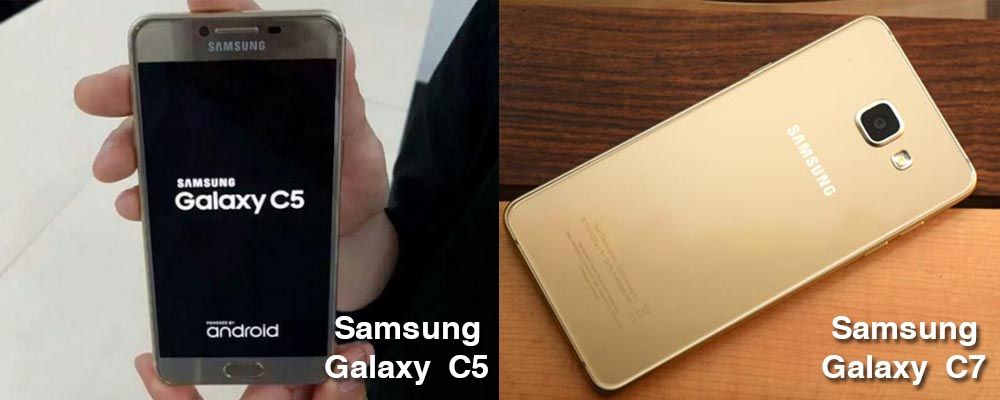
The new C-line of smartphone series from Samsung finally got announced and launched in China – the Samsung Galaxy C5 and the Samsung Galaxy C7. Are these mid-range smartphones any good?
The Galaxy C5 and C7 both run Android 6.0, both have a fingerprint scanner, and are available in the same color choices: gold, pink-gold, grey, and silver.
The Galaxy C7 is in the simplest terms, the big brother to the C5. Both smartphone sports the same camera setup, RAM, and storage. The only difference is the C7’s got a slightly faster processor and bigger screen.
5.7-inch SuperAMOLED full HD display
2.0GHz octa-core Snapdragon 625 SoC with Adreno 506 GPU
32GB and 64GB variations
3300mAh battery
The Galaxy C5 is the smaller of the two devices, and features an all-metal chassis and some pretty decent specs:
5.2-inch Super AMOLED full HD display
Snapdragon 617 SoC
4GB of RAM
32GB of storage, with 128GB capacity microSD slot
16MP rear camera, 8MP front-facing camera
Samsung clarified that for both of these devices to be made available outside of China, it would have to be certified by the FCC. This is a high possibility. However, if you want to pick one up right now, the Galaxy C5 will set you back $330 and the Galaxy C7, $396.
Broken screen? Phone acting up weird? Sydney CBD Repair Centre offers the best Samsung repair services for the lowest rates!