REPAIR SHOP SECRETS: Uncovering the Most Common Smartphone Issues

REPAIR SHOP SECRETS: Uncovering the Most Common Smartphone Issues + Proven Fixes + 10 Expert Tips
Introduction: Why Smartphone Issues Are More Common Than You Think
Smartphones have become our daily lifeline. From managing work to staying connected with loved ones, these devices are at the centre of everything we do. But with heavy usage comes inevitable wear and tear. Cracked screens, failing batteries, water damage, and charging problems are among the most common issues repair shops like Sydney CBD Repair Centre see every day.
And here’s the secret: most of these problems are avoidable or easily fixable when handled by professionals. In this guide, we’ll uncover the most frequent smartphone problems and how trusted repair centres fix them—helping you make smarter decisions about your device.
Cracked and Shattered Screens – The #1 Repair Shop Dilemma
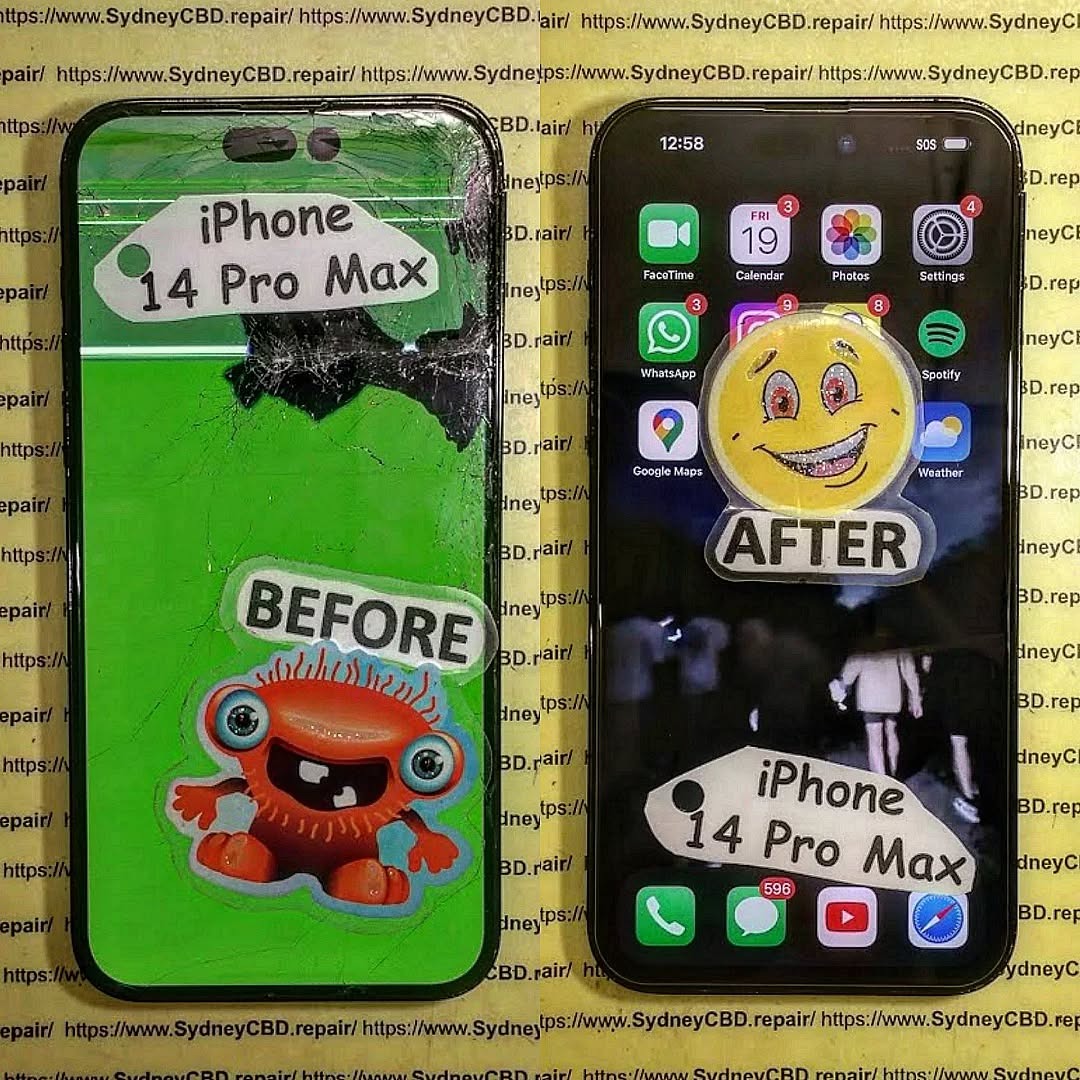
Screen damage is the single most common issue brought into phone repair shops. Whether it’s a small crack or a completely shattered display, broken screens compromise not just the look but also the usability of your phone.
Why Screens Break So Easily
Modern smartphones use edge-to-edge glass displays, making them highly vulnerable to drops. Even with screen protectors and cases, the impact angle can cause damage that feels unavoidable.
Repair vs Replacement: What’s Best?
- Repair (Glass-Only Fix): Works if the display is still functional but glass is cracked.
- Full Screen Replacement: Needed if the LCD or touch function is damaged.
At Sydney CBD Repair Centre, technicians use only genuine OEM screens to restore devices, ensuring color accuracy and durability.
Battery Problems – When Your Phone Won’t Hold Charge
A weak battery is the second most common complaint. Many users notice their phone draining unusually fast or shutting down at random.
Signs of a Failing Battery
- Battery drops from 50% to 10% suddenly
- Phone shuts down before reaching 0%
- Device feels hot during charging
Best Practices to Extend Battery Life
- Avoid overnight charging
- Keep battery between 20%–80%
- Use only original chargers
Battery replacements are quick, often completed within the hour at Sydney CBD Repair Centre, with a 90-day warranty.
Water Damage – The Silent Killer of Smartphones
Water damage is notorious because symptoms don’t always appear immediately.
What To Do Immediately After Water Damage
- Turn the phone off.
- Do not plug it in.
- Bring it to a repair centre immediately.
Professional Water Damage Repair vs DIY
DIY fixes like rice or blow dryers don’t solve internal corrosion. Professionals use ultrasonic cleaning machines to properly restore components.
Charging Port and Power Button Failures
Charging ports undergo thousands of plug-ins and unplug-ins, making them prone to wear. Power buttons can also fail due to dust, liquid exposure, or simple overuse.
- Charging Port Fix: Cleaning or replacing damaged connectors.
- Power Button Repair: Replacing worn switches or damaged flex cables.
Camera Malfunctions – Blurry, Cracked, or Dead Cameras
The rise of social media photography makes camera issues especially frustrating.
Common Causes of Camera Problems
- Scratched or cracked lens
- Dust or moisture trapped inside
- Faulty image sensor
Cost of Camera Repairs in Sydney
Depending on the phone, costs vary from $120 to $400, but expert repair shops provide original-quality parts.
Overheating Phones – A Growing Problem in 2025
As processors become faster, overheating has become a common issue.
Causes of Overheating
- Background apps running nonstop
- Faulty batteries
- Gaming or high-performance apps
How Technicians Fix Overheating Issues
Professionals may replace thermal paste, improve cooling, or repair damaged logic boards.
Software Issues – Freezing, Crashing, and Boot Loops
Sometimes, the problem isn’t hardware but software.
Quick Fixes Before Heading to the Repair Shop
- Restart device
- Clear cache
- Update apps
When a Factory Reset Isn’t Enough
In severe cases, professional repair shops reflash firmware or restore data safely.
Data Recovery – The Hidden Lifesaver of Repair Shops
Smartphones store precious memories—photos, videos, messages, and more.
How Experts Recover Lost Data
Using professional tools, technicians can extract data even from dead devices.
Best Prevention Tips
- Regular cloud backups
- External storage for photos/videos
The Importance of Using Genuine Parts
Many cheap repair shops use counterfeit parts, which can:
- Shorten device lifespan
- Reduce performance
- Void warranties
Sydney CBD Repair Centre only uses genuine parts, ensuring reliability and longevity.
FAQs – Most Asked Smartphone Repair Questions
Q1: How long do most phone repairs take?
Most common repairs, like screen or battery replacements, are done in under 1 hour.
Q2: Is it safe to use third-party parts?
No. They may be cheaper but can cause overheating, poor performance, or even hazards.
Q3: Can water-damaged phones always be fixed?
Not always, but expert technicians significantly increase recovery chances.
Q4: Will repairing my phone erase my data?
Most hardware repairs do not affect data, but it’s always best to back up.
Q5: Why does my phone keep overheating?
Likely due to battery issues or background apps. A technician can diagnose the root cause.
Q6: Should I repair or replace my phone?
If repair costs are less than 50% of a new phone’s price, repair is the smarter choice.
Conclusion: Why Professional Repairs Save You Time & Money

Smartphone problems are unavoidable, but with expert help, they don’t have to be permanent. From cracked screens to failing batteries, Sydney CBD Repair Centre has the expertise, tools, and genuine parts to bring your phone back to life—quickly and affordably.
📍 Visit us in the heart of Sydney CBD today and experience why 2000+ happy customers trust us with their devices.