New program reduces App Store commission to 15 percent for small businesses earning up to $1 million per year
Cupertino California — Apple announced an industry-leading new developer program to accelerate innovation and help small businesses and independent developers propel their businesses forward with the next generation of groundbreaking apps on the App Store. The new App Store Small Business Program will benefit the vast majority of developers who sell digital goods and services on the store, providing them with a reduced commission on paid apps and in-app purchases. Developers can qualify for the program and a reduced, 15 percent commission if they earned up to $1 million in proceeds during the previous calendar year.
The App Store Small Business Program, which will launch on January 1, 2021, comes at an important time as small and independent developers continue working to innovate and thrive during a period of unprecedented global economic challenge. Apps have taken on new importance as businesses adapt to a virtual world during the pandemic, and many small businesses have launched or dramatically grown their digital presence in order to continue to reach their customers and communities. The program’s reduced commission means small developers and aspiring entrepreneurs will have more resources to invest in and grow their businesses in the App Store ecosystem.
“Small businesses are the backbone of our global economy and the beating heart of innovation and opportunity in communities around the world. We’re launching this program to help small business owners write the next chapter of creativity and prosperity on the App Store, and to build the kind of quality apps our customers love,” said Tim Cook, Apple’s CEO. “The App Store has been an engine of economic growth like none other, creating millions of new jobs and a pathway to entrepreneurship accessible to anyone with a great idea. Our new program carries that progress forward — helping developers fund their small businesses, take risks on new ideas, expand their teams, and continue to make apps that enrich people’s lives.”
While the comprehensive details will be released in early December, the essentials of the program’s participation criteria are easy and streamlined:
Existing developers who made up to $1 million in 2020 for all of their apps, as well as developers new to the App Store, can qualify for the program and the reduced commission.
If a participating developer surpasses the $1 million threshold, the standard commission rate will apply for the remainder of the year.
If a developer’s business falls below the $1 million threshold in a future calendar year, they can requalify for the 15 percent commission the year after.
The App Store’s standard commission rate of 30 percent remains in place for apps selling digital goods and services and making more than $1 million in proceeds, defined as a developer’s post-commission earnings. Earlier this year, an independent study by the Analysis Group found that Apple’s commission structure is in the mainstream for app distribution and gaming platforms.
Small business owners will continue to benefit from Apple’s unparalleled suite of developer tools — including development applications, programming languages, a secure payment interface, and more than 250,000 essential software building blocks called APIs. Apple is committed to giving developers the tools to turn their brightest ideas into apps that change the world. Tools like HealthKit give engineers secure access to user health data, ARKit empowers developers to explore new frontiers of augmented reality, and Core ML harnesses the speed and intelligence of machine learning to help developers build powerful features with just a few lines of code.
Earning the trust of users and developers has been an important goal of the App Store from the beginning. It’s why every one of the 1.8 million apps on the App Store undergoes a review process that developers and their customers can rely on — one that helps make sure every app is reliable, performs as expected, is free of objectionable content, and upholds the highest standards to protect users’ privacy and security.
Developers of all sizes have built successful businesses while benefitting from the App Store’s global reach encompassing users of the more than 1.5 billion Apple devices around the world in 175 countries and over 40 languages, with more than 180 local payment methods and 45 accepted currencies. In 2019 alone, the App Store ecosystem facilitated $519 billion in commerce worldwide — with over 85 percent of that total accruing solely to third-party developers and businesses of all sizes. The new App Store Small Business Program will build on that progress to generate even more digital commerce and app innovations, support new jobs, and help small and independent developers continue to bring great software to Apple users.
The App Store, which launched in 2008, is the world’s safest and most vibrant app marketplace, currently offering 1.8 million apps and visited by half a billion people each week. It helps creators, dreamers, and learners of all ages and backgrounds connect with the tools and information they need to build a brighter future and a better world.

Through the new App Store Small Business Program, qualifying small businesses that earn up to $1 million in revenue are eligible for a 15 percent commission rate — half of the App Store’s standard commission.
Developers see a world of possibilities with new App Store Small Business Program
Every week, half a billion visitors to the App Store engage with 1.8 million apps, from indie games like “Song of Bloom,” to virtual fitness coaches like MySwimPro, to coding apps for kids like Hopscotch. Many of these apps are created by independent developers driven by a single idea. Oftentimes, these developers maintain full-time careers that ultimately fund their ideas until they are launched into the real world.
Since the launch of the App Store, small businesses have been its driving spirit. Now more than ever, these businesses are core to the communities they serve, helping people stay healthy, connected, and learning. Apple unveiled the App Store Small Business Program, a new commission structure to support small and individual developers and spur innovation for the next chapter of apps.
Philipp Stollenmayer, an indie game developer with 20 titles in the App Store, is excited for the new App Store Small Business Program to help a new wave of creators launch innovative games of their own.
“This is a big opportunity for the indie gaming spirit to become truly mobile,” says Philipp Stollenmayer, a solo developer in the App Store. Stollenmayer, whose latest game, “Song of Bloom,” won an Apple Design Award in June 2020, was drawn to the appeal of iPhone as a new platform for gaming, one in its infancy and in need of its own set of standards. When his first game, “What the Frog,” launched in the App Store in 2013 and won a German Multimedia Prize (mb21), he knew he was onto something.
“I saw a whole world of possibilities and how easy it was to get something out there,” Stollenmayer says. “I had the chance to shape how mobile games work and how they differ from consoles. With mobile games, you use the phone in a much more personal way. I put that inside my games and make that active as gameplay, which is much more valuable than trying to create worlds that might not work so well on a small screen.”
“Song of Bloom” is a 2020 Apple Design Award-winning puzzle game by indie developer Philipp Stollenmayer.
With the new App Store commission structure, small and individual developers who earn up to $1 million in revenue for the calendar year are eligible for a reduced 15 percent commission rate — half of the App Store’s standard commission. The savings mean small businesses and developers will have even more funds to invest in their businesses, expand their workforce, and develop new, innovative features for app users around the world. Stollenmayer is excited about the new wave of games that may come to the App Store from people who are new to game design. “I’m most interested in games from people that didn’t make games before because they’re super fascinating,” he says. “You can publish something on the iPhone much, much easier than on any console without any obstacles. This is a super awesome opportunity for the indie studios that don’t want to take any risks.”
Fares Ksebati (left) and Adam Oxner, co-founders of the MySwimPro personal swimming coach and Apple Watch companion app, are excited to reinvest additional revenue earned from the new App Store Small Business Program into making the app better for its community of swimmers.
Beyond the world of gaming, the team behind MySwimPro is also excited about the possibilities to grow their company and expand the app’s offerings with less risk, thanks to the additional revenue that will result from the new App Store program. Co-founders Fares Ksebati and Adam Oxner, both born and raised in Michigan and both swimmers through college competing at the 100-meter breaststroke (though not against each other), met over their shared interest to build a platform that could replicate the elements of coaching swimming whether for fitness or performance goals.
“Adam and I, as well as everyone on our team — we all swim in some capacity,” says Ksebati, who is also MySwimPro’s CEO. “We try and build a community around people who use the app, because swimming is one of those things that you can do at any age, anywhere in the world. And so we are users of our own product in a lot of ways.”
Launched in 2015, MySwimPro currently has 50,000 active users who are swimmers of varying levels.
“We chose to add dryland training to our coaching experience to continue delivering value to our members,” says Ksebati. “We continue to focus on delivering a holistic coaching experience to our community members whether they have access to a pool or not.”
After spending five years building an app that started as a side project, Ksebati and Oxner have grown MySwimPro into a successful business with 12 team members around the world, and they are excited for its next chapter. “The new App Store program will be a huge help to our revenue from purchases in the App Store, and we’re hoping to be able to leverage any more proceeds we get to help make the app better,” says Oxner. “We’re looking forward to further improving the integration of our dryland workouts into the app to help swimmers who might not be able to get to a pool right now.”
Samantha John, co-founder of Hopscotch, looks forward to releasing more features to kids for free with the additional revenue earned from the new App Store Small Business Program.
Samantha John, co-founder of Hopscotch, which was the first coding language designed for iPad, sees the new App Store program as an opportunity to allow kids to do more with Hopscotch for free. “It actually allows us to take some risk that we wanted to take but we were pretty afraid to,” John says. “Specifically around our subscription, … I think it is a good strategy in terms of making money, but it also limits the audience of the app. And we’ve been wanting to walk back that paywall and let people do more for free in the hopes that farther down the line we will have even more loyal subscribers to Hopscotch.”
Started as a way to introduce programming to kids who wouldn’t otherwise be exposed to it, Hopscotch is the brainchild of John and co-founder Jocelyn Leavitt, who attended Apple Entrepreneur Camp’s inaugural class of female entrepreneurs in 2019.
“A key driving principle of Hopscotch is that we really want to respect kids as makers and creators and artists,” John says. “That’s really how we see these kids, and also as coders, so it’s very key to how we think about Hopscotch: How can we make sure that kids are able to make work that is meaningful and important to them?”
Hopscotch was the first coding language designed for iPad when the app launched in 2013.
John was intrigued by the possibilities of making programming more kid-friendly after the launch of the second-generation iPad. “There’s something about an iPad and a touchscreen and something you can hold in your hands that feels so much more personal and just so much more interesting.”
Since its 2013 launch, Hopscotch now has 200,000 monthly active users. John considers Hopscotch’s loyal users as its best content creators after seeing how kids are creating and sharing their own games and creation tools in the app. Once the App Store Small Business Program goes into effect in January 2021, John looks forward to bringing more features into the app for free.
“Hopscotch is not just a game and it’s not just an app,” says John. “It’s a skill, a creative process, just in the way some kids play violin. And as kids get older, they get better at conceiving games, better at making things fun, so Hopscotch really is a long-term investment. Having this little bit of extra revenue really lets us invest in things that we believe are going to be really essential for the future of our company.”
Apple on Saturday launched a new iPhone 12 Studio website. This allows users to customize their favourite iPhone 12 device with MagSafe accessories. These customizations include Apple’s MagSafe cases and MagSafe Wallets for iPhone 12 series. This gives an opportunity for customers to preview their combination before heading to an Apple Store to pick them up.
MagSafe uses a series of magnets to attach stackable “modules” over each other. These include the MagSafe wireless charger, MagSafe Silicone Cases, MagSafe Clear case, and the MagSafe Wallet. Third parties like Belkin have already followed suit with their new MagSafe accessories.
This website comes live after the Twitter Hashflag “#iPhone12studio” went live a few hours prior. This website is, however, available for mobile and tablets devices only at the time of writing. Alongside this new website, Apple has also personalized combinations by adding user’s name with their desired combination. This can be saved as an image and shared with other users.
Click on design and choose from a range of colors, cases, and wallets for your desired iPhone.
Add your name or skip
Choose a view, download and share with the world!
These seemingly infinite combinations make it even more fun to try out. However, popular speculation suggests Apple will start shipping iPhone cases and wallets with iPhones. This is believed to be adopted from Apple Watch’s customizable approach.
Gone are the days when Apple limited its official options to just two or three colors. This year, in fact, almost has an overwhelming number of choices offered to iPhone buyers. There are four base models to choose from, not counting their different configurations, and a variety of MagSafe cases and wallets to spruce up the iPhone. In order to minimize the time you have to spend online or in stores trying to figure out what combination will fit your style, Apple has launched a new mobile site that will let you mix and match all of those and even show off your masterpiece to the world.
This isn’t the first time Apple created an online tool to help customers decide what color combination they want for their next purchase. The Apple Watch Studio last year let people virtually try out different combinations of straps, something a bit more fitting for a stylish wearable. Now the iPhone 12 Studio is offering the same chance so you won’t have to imagine what particular color combinations will look like.
The website starts off by asking you to choose between one of the four iPhone 12 models. You can then pick one of the different colors available for each model, a color for a MagSafe case, and a color for a MagSafe wallet. The latter two are optional, of course, but what would be the point of not picking one using this tool.
One interesting aspect of this tool is that it lets you download the finished combination in a format that is perfect for sharing on social media. In fact, the resulting image includes the #iPhone12Studio hashtag, encouraging people to share their creations with the world.
Unlike the Apple Watch Studio counterpart, however, the site doesn’t take you to an Apple Store page with that particular combination set, probably since the iPhone 12 is still marked as being on pre-order. If you do want to try out the iPhone 12 Studio, you’ll have to do it on a mobile browser, where on an iPhone, iPad, or any other mobile device, or set your desktop browser’s user agent to a mobile version.
MagSafe accessories make it easier than ever to personalize your iPhone 12 or iPhone 12 Pro with a unique style. A new interactive tool gives you the opportunity to mix and match colors, cases, wallets, and sleeves before you buy.
Thanks to the stackable, easy-to-attach design of MagSafe accessories, virtually limitless combinations of colors and styles can be created. Apple offers silicone and clear cases as well as leather cases, wallets, and sleeves with the technology built in.
At Apple Stores, Apple has created new interactive displays to help customers experience MagSafe technology and try an assortment of colors and styles. With some Apple Stores closed and others offering Express service or brief appointments only, there’s not always an opportunity to try before you buy. Inspired by Apple Watch Studio, I’ve created an interactive online tool to help you pick your favorite style.
Outside of the iPhone SE, every iPhone that Apple sells today features an “edge-to-edge” display devoid of a physical Home button. If you’re upgrading from a device with a Home button, this refresher course can help you learn how to force restart your iPhone 12, enter recovery mode, DFU mode, etc. Watch our hands-on video tutorial inside for the details.
Getting started
This tutorial will work for all new iPhone 12 releases, including the iPhone 12 Pro, and the forthcoming iPhone 12 mini and iPhone 12 Pro Max. Henceforth, when using the term iPhone 12, I’m referring to all iPhone 12 models.
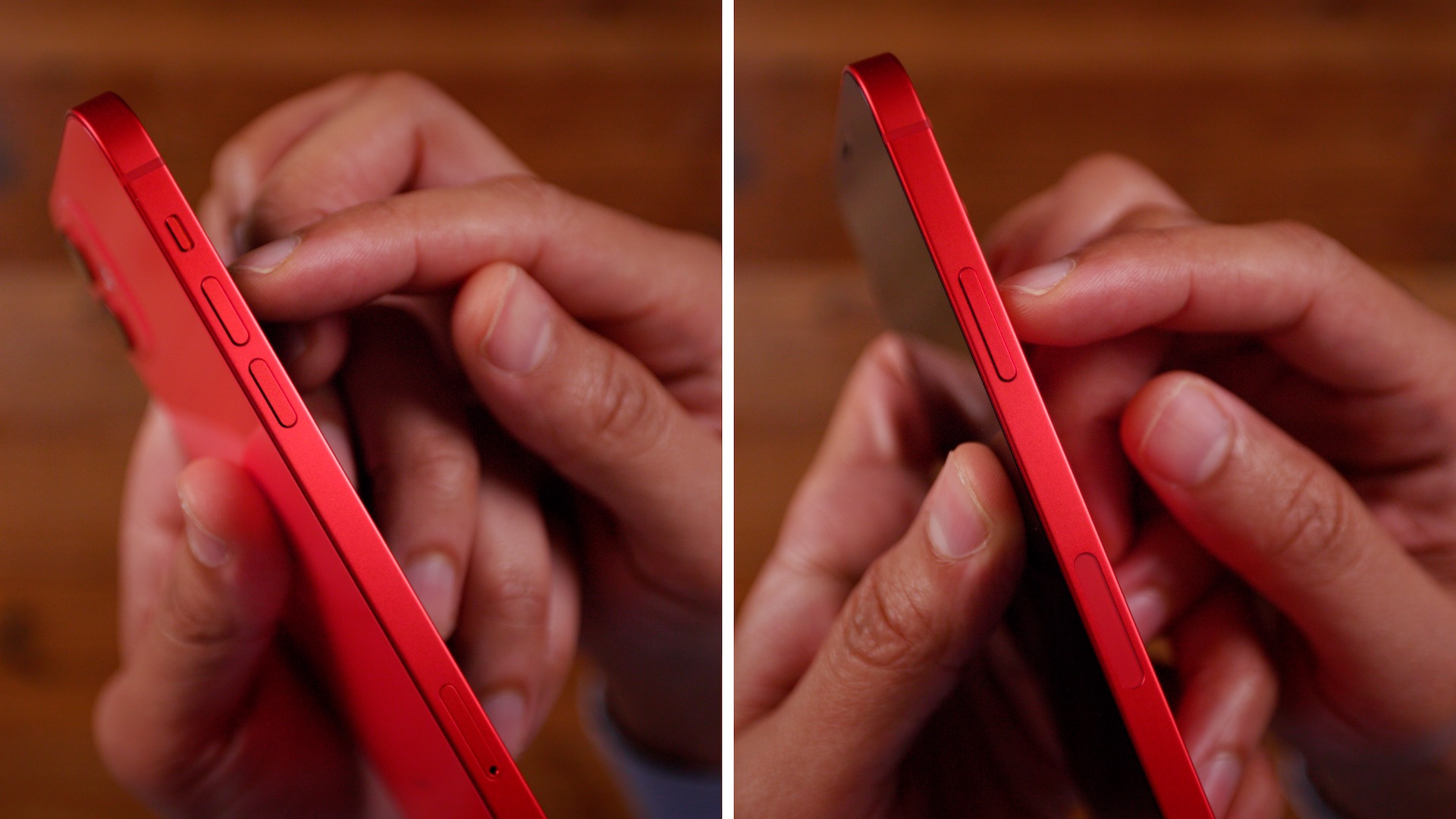
You’ll need to familiarize yourself with the buttons on your iPhone in order to perform any of the following functions. There are two Volume buttons on the left-hand side of the iPhone, along with a Side button on the opposite side.
Since modern iPhone hardware lacks the Home button, the Side button, along with the volume buttons, play instrumental roles when it comes to force resetting, entering recovery mode, DFU mode, etc.
iPhone 12 Volume buttons and Side button
How to turn off iPhone 12
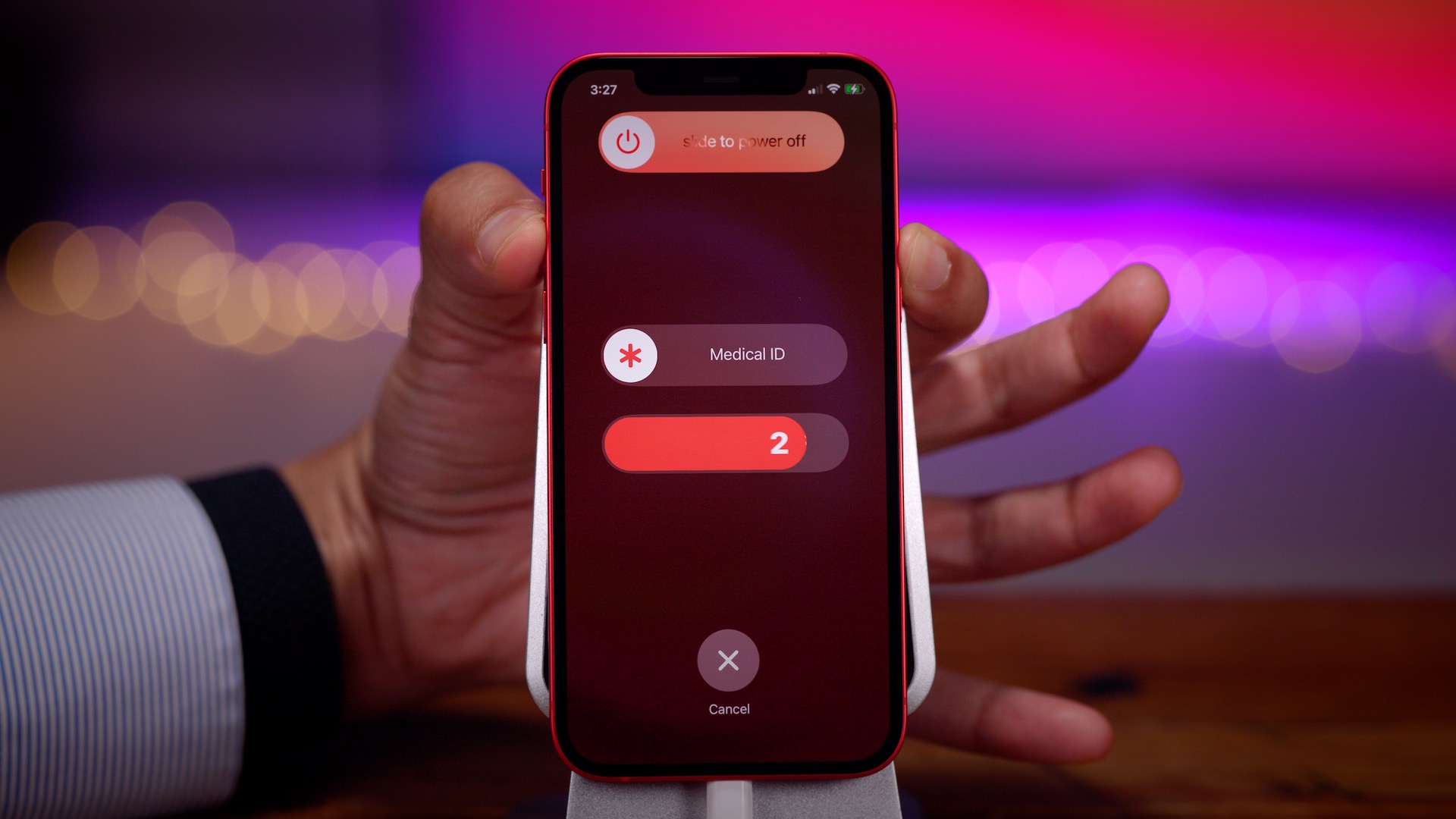
Powering down the iPhone 12 can be accomplished via a couple of methods. The easiest way to power down the iPhone 12 is to hold the Side button along with one of the volume buttons until the slide to power off slider appears at the top of the screen. From there, just slide to power off your iPhone.
You can also go to Settings → General, scroll down to the bottom of the page, and tap the Shut Down button. This will cause the slide to power off slider to appear at the top of the screen.
How to turn on iPhone 12
To power your iPhone 12 back up, press and hold the Side button until the Apple logo appears on screen. If this doesn’t work, your iPhone may need to be charged. If your iPhone has a black screen and the Side button doesn’t function, it could be because your iPhone 12 is in DFU mode. See the tutorial for exiting DFU mode below.
How to force restart iPhone 12
To force restart iPhone 12, perform the following in quick succession:
Step 1: Press Volume up and release.
Step 2: Press Volume down and release.
Step 3: Press and hold the Side button until you see a black screen.
Your iPhone 12 will restart and automatically boot back to the Lock screen.
How to put iPhone 12 into recovery mode
Step 1: Connect your iPhone to your computer with a Lightning to USB cable. If this is your first time connecting your iPhone to this computer, you’ll need to tap the Trust button that appears on the Trust This Computer dialogue that appears. You’ll then have to enter your passcode on your iPhone to confirm the pairing.
Next, perform the following steps in quick succession:
Step 2: Press Volume up and release.
Step 3: Press Volume down and release.
Step 4: Press and continue holding the Side button until you see the connect to computer dialogue on screen.
Step 6: Release the Side button and continue holding the Volume down button for an additional 10 seconds.
When you successfully enter DFU mode, your iPhone should remain on a black screen. If you see the Apple logo appear, then something went wrong and you’ll need to try again.
If you’re connected to a Mac, the Finder should acknowledge that you’ve entered recovery mode. Instead of having the option to Update iOS, you should only see the Restore option, which is another indication that you’ve successfully entered DFU mode.
How to exit DFU mode on iPhone 12
Exiting DFU mode is a little more involved than exiting regular recovery mode:
Step 1: Press Volume up and release.
Step 2: Press Volume down and release.
Step 3: Press and continue holding the Side button until you see the Apple logo appear. Your iPhone should boot back to the Lock screen.
How to disable Face ID temporarily on iPhone 12
To temporarily disable FaceID on iPhone 12, press and hold either of the Volume buttons along with the Side button until the slide to power off slider appears. Tap the ‘X’ button at the bottom of the screen to go back to the Lock screen, and you’ll see a message that says Your passcode is required to enable Face ID. Once your enter your device passcode, Face ID will be automatically reactivated.
How to use Emergency SOS on iPhone 12
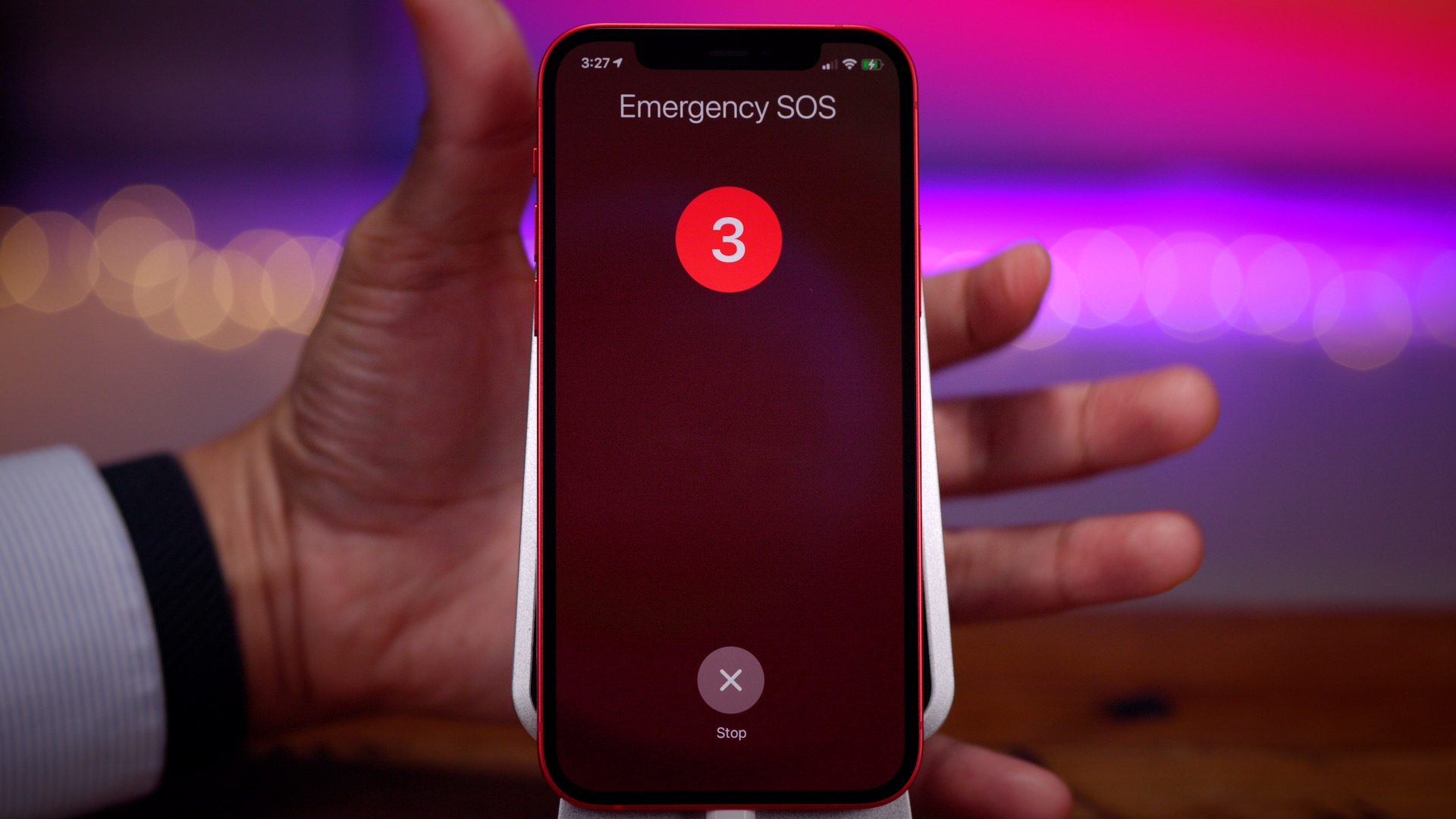
Warning: activating Emergency SOS will contact emergency authorities. Please only use this feature in case of a real emergency.
There are three ways to invoke Emergency SOS on iPhone 12:
Press and hold one of the Volume buttons along with the Side button and keep holding each button to trigger Emergency SOS.
Press and hold one of the Volume buttons along with the Side button until the slide to power off slider appears. Use the Emergency SOS slider to activate Emergency SOS.
Go to Settings → Emergency SOS, and enable the Call with Side Button switch. This will allow you to invoke Emergency SOS by pressing the Side button 5 times in quick succession.
If you’re upgrading from an iPhone with a Home button, such as the iPhone 7 or iPhone 8, or even the second-generation iPhone SE, then the methods for performing all of the aforementioned functions is quite a bit different than what you may be used to.
Although you may not ever need to use recovery mode, and using DFU mode is even more unlikely, everyone should be familiar with how to force restart their iPhone. Force-restarting is handy for those occasional instances when your iPhone becomes extremely bogged down or outright unresponsive. If you only take one tip from this tutorial, it should definitely be how to force restart.
Apple’s best-ever lineup of iPhone and iPad is available October 23.
Best-ever lineup of iPhone and iPad will be available October 23 through redesigned virtual and in-person experiences
When iPhone 12, iPhone 12 Pro, and iPad Air are available Friday, October 23, customers can get their all-new products directly from Apple through tailored purchase experiences offered online, by phone, or in store. From a chat session with a Specialist that starts online and finishes with contactless delivery, to visiting select Apple Store locations for a one-on-one session with an Apple Specialist, customers can find the best way to get the products they’re looking for. And unprecedented offers from AT&T, T-Mobile/Sprint, and Verizon give customers more choice and flexibility than ever, with offers starting as low as $0 per month for iPhone 12.
“There’s never been a better time to get a new iPhone, and there’s never been a better destination than Apple Retail,” said Deirdre O’Brien, Apple’s senior vice president of Retail + People.
“We’re offering new ways for our customers to get to know all of our products before they buy, so they can be sure to get the product that’s right for them. Whether our customers choose to connect with us in person, by phone, or online, our entire retail team is ready to deliver the world-class personalized service they’ve come to expect from Apple.”
New at Apple Retail this year:
Unprecedented carrier offers are now available from Apple, in store or online, with savings of up to $800.1
With Shopping Sessions, customers can now book a one-on-one session with a Specialist at an Apple Store for personalized help selecting a new product, carrier plan, or financing option. The same expert advice is available online, where customers can chat with a Specialist anytime.
Pickup options include in-store, curbside, same-day delivery, or Express storefront.2 Customers can check apple.com/retail for services available at their local store.
Contactless delivery is available for all products, including iPhone and iPad. Delivery drivers may ask for verbal confirmation from a safe distance, replacing the need for a physical signature.
And now with Apple Card, customers in the US get 3 percent Daily Cash back when they buy directly from Apple and have the option to choose Apple Card Monthly Installments so they can pay over time, interest-free.
Though this year’s iPhone launch looks different from years past, Apple Retail continues to offer the services customers love:
After a customer gets their new Apple product, an Online Personal Session allows them to schedule a free session with a Specialist to set up their new product, learn the basics, or get pro tips.
Apple Trade In lets iPhone or iPad owners get up to $500 credit toward the purchase of a new product.4
The vast majority of Apple Store locations around the world are open and operating in various service models to protect the health and well-being of customers and employees. Before visiting, customers should check apple.com/retail for details on their local Apple Store. For more information about services and support available from Apple Retail, visit apple.com/shop.
iPhone 12 Pro and iPhone 12 Pro Max give pro users everything they want out of their iPhone.
Best iPhone ever features the powerful A14 Bionic, all-new design with Ceramic Shield, pro camera system, LiDAR Scanner, and the biggest Super Retina XDR display ever on an iPhone
Apple announced iPhone 12 Pro and iPhone 12 Pro Max, introducing a powerful 5G experience and advanced technologies that push the boundaries of innovation for users who want the most out of iPhone. iPhone 12 Pro models feature a new design and edge-to-edge Super Retina XDR displays, the largest ever on iPhone, protected by the all-new Ceramic Shield front cover, which provides the biggest jump in durability ever on iPhone. The Apple-designed A14 Bionic chip, the fastest chip in a smartphone, powers impressive computational photography features including the all-new Apple ProRAW for more creative control in photos, and enables the first end-to-end Dolby Vision video experience, up to 60 fps. The reimagined pro camera systems include an expansive Ultra Wide camera, a Telephoto camera with an even longer focal length on iPhone 12 Pro Max, and new Wide cameras to capture beautiful professional-quality images and video in bright and low-light environments. iPhone 12 Pro models also introduce a new LiDAR Scanner for immersive augmented reality (AR) experiences and MagSafe, which offers high-powered wireless charging and an all-new ecosystem of accessories that easily attach to iPhone.
iPhone 12 Pro and iPhone 12 Pro Max will be available in four stainless steel finishes, including graphite, silver, gold, and pacific blue. Pre-orders for iPhone 12 Pro begin Friday, October 16, with availability beginning Friday, October 23. iPhone 12 Pro Max will be available for pre-order Friday, November 6, and in stores beginning Friday, November 13.
“This is a huge leap for iPhone, bringing the best 5G experience in the market and delivering our most advanced technologies to users who want the absolute most from their iPhone,” said Greg Joswiak, Apple’s senior vice president of Worldwide Marketing. “Each generation of iPhone has changed what we expect from a smartphone, and now with 5G, iPhone 12 Pro provides a new generation of performance. Our tight integration of hardware and software enables incredible computational photography features like the expansion of Night mode to more cameras, and introduces support for HDR video with Dolby Vision. A state-of-the-art LiDAR Scanner means users can experience AR like never before, and also offers benefits to the camera with faster autofocus in low light and the introduction of Night mode portraits. These experiences and so much more make this the best iPhone lineup ever.”
The 6.1-inch iPhone 12 Pro and 6.7-inch iPhone 12 Pro Max feature the largest Super Retina XDR displays ever on iPhone.
A Superior 5G Experience
iPhone 12 Pro and iPhone 12 Pro Max deliver an advanced 5G experience on a global scale, engineered with a seamless integration of world-class hardware and world-class software. 5G on iPhone boasts improved speeds for faster downloads and uploads, higher quality video streaming, more responsive gaming, real-time interactivity in apps, FaceTime in high definition, and much more. Customers will also be able to enjoy a secure, fast connection, reducing the need to connect to public Wi-Fi hotspots.
Featuring the most 5G bands on any smartphone, iPhone 12 Pro models offer the broadest 5G coverage worldwide. Models in the US support millimeter wave, the higher frequency version of 5G, allowing iPhone 12 Pro models to reach speeds up to 4Gbps, even in densely populated areas. iPhone 12 Pro models also feature Smart Data mode, which extends battery life by intelligently assessing 5G needs and balancing data usage, speed, and power in real time.
5G on iPhone 12 Pro models enables faster download speeds, more responsive gaming experiences, FaceTime in HD, and more.
A14 Bionic: Powerful and Efficient
Generations ahead of the competition, A14 Bionic is the first chip in the smartphone industry built on 5-nanometer process. Faster and more efficient than ever, A14 Bionic has the fastest CPU and GPU by up to 50 percent compared to the fastest competing smartphone chips, enabling console-quality gaming experiences, powerful computational photography, and more, while delivering great battery life. Pushing the limits of machine learning (ML), A14 Bionic features a 16-core Neural Engine — for an 80 percent increase in performance — that is capable of completing 11 trillion operations per second, enabling improved performance on even the most intense ML models.
Faster and more efficient than ever, A14 Bionic enables powerful computational photography and faster photo and video editing right on device.
New Design and Innovative Display Technologies
Designed with premium materials, iPhone 12 Pro models boast a new, sophisticated flat-edge design that features a gorgeous surgical-grade stainless steel band paired with a precision-milled matte glass back, and introduces the incredibly durable Ceramic Shield. The Ceramic Shield front cover, tougher than any smartphone glass, goes beyond glass and is infused with nano-ceramic crystals to dramatically improve toughness and increase drop performance by 4x.
With impressively larger, edge-to-edge displays with reduced borders in familiar sizes, the 6.1-inch iPhone 12 Pro and 6.7-inch iPhone 12 Pro Max feature a Super Retina XDR display with systemwide color management for industry-leading color accuracy. And iPhone 12 Pro Max offers the largest display ever on an iPhone and the highest resolution featuring nearly 3.5 million pixels for a remarkable, true-to-life viewing experience. These OLED displays bring HDR video content to life, reaching 1200 nits peak brightness.
iPhone 12 Pro models come with an industry-leading IP68 rating to withstand water submersion up to 6 meters for up to 30 minutes, and are protected against everyday spills, including coffee and soda.
iPhone 12 Pro and iPhone 12 Pro Max feature a new, elevated flat-edge stainless steel design and Ceramic Shield front cover for increased durability.
Versatile Pro Camera System
The world’s best pro camera is an even more versatile tool for all levels of photo and video enthusiasts with state-of-the-art camera hardware powered by A14 Bionic. Together with the new image signal processor (ISP), A14 Bionic drives increased image quality and enables powerful computational photography capabilities not possible with traditional cameras. iPhone 12 Pro models also feature the new Apple ProRAW, coming later this year,which combines Apple’s multiframe image processing and computational photography with the versatility of a RAW format. Users can experience full creative control over color, detail, and dynamic range natively on iPhone or with other professional photo editing apps.
The pro camera system on iPhone 12 Pro models includes new Wide cameras for even better low-light performance, an expansive Ultra Wide camera, and a Telephoto camera for capturing stunning images and video.
iPhone 12 Pro features the new seven-element lens Wide camera with an ƒ/1.6 aperture, the fastest ever on an iPhone, for 27 percent improved low-light performance in photo and video; the Ultra Wide camera with a 120-degree field of view, perfect for capturing more scene in tight spots or epic landscapes; and a 52 mm focal length Telephoto camera, great for framing portraits, bringing the optical zoom range to 4x.
iPhone 12 Pro Max takes the pro camera experience even further. The new ƒ/1.6 aperture Wide camera boasts a 47 percent larger sensor with 1.7μm pixels for a massive 87 percent improvement in low-light conditions. It also includes the expansive Ultra Wide camera and a 65 mm focal length Telephoto camera for increased flexibility with closer shots and tighter crops. Combined, this system offers 5x optical zoom range.
Deep Fusion comes to all cameras and uses advanced machine learning to do pixel-by-pixel processing of photos, optimizing for detail, texture, and color in every part of the photo.
iPhone 12 Pro models bring stunning improvements to Night mode, enabling even brighter pictures.
Powered by A14 Bionic and a new ISP, Night mode is now included on more cameras, including the Ultra Wide.
The Ultra Wide camera on iPhone 12 Pro models has a 120-degree field of view, allowing users to capture more scene and frame artistic shots.
Smart HDR 3 offers more true-to-life photos, using machine learning to recognize scenes and adjust sharpness, color, and tone where needed.
The new seven-element lens Wide camera captures even brighter photos and videos in low light.
The Telephoto cameras on iPhone 12 Pro and iPhone 12 Pro Max are perfect for classically framed portraits, closer shots, and tighter crops.
Improvements to Night mode, now expanded to the TrueDepth and Ultra Wide cameras, allow for an even brighter picture. And Night mode Time-Lapse delivers longer exposure times for sharper videos, better light trails, and smoother exposure in low-light scenarios when used with a tripod. Deep Fusion, now better and faster, comes to all cameras, and with the new Smart HDR 3, users can expect more true-to-life images, even in complex scenes.
iPhone 12 Pro models offer the highest quality video in a smartphone, and are the first cameras and only devices in the world to enable an end-to-end experience for HDR video with Dolby Vision, up to 60 fps, and even better video stabilization for cinema-grade productions. Dolby Vision grading is processed live and sustained during editing, whether in the Photos app or iMovie, and coming to Final Cut Pro X later this year. Dolby Vision takes advantage of the Super Retina XDR display for amazing contrast during capture and video playback, and users can share their videos with support for AirPlay up to 4K Dolby Vision to external devices.
iPhone 12 Pro models are the first cameras and only devices in the world to enable an end-to-end experience for HDR video with Dolby Vision. Film shot in HDR video with Dolby Vision on iPhone 12 Pro, by cinematographer Emmanuel “Chivo” Lubezki.
Realistic AR and Innovative Camera Experiences
An all-new LiDAR Scanner comes to the Pro line, offering the ability to measure light distance and use pixel depth information of a scene. This technology delivers faster, more realistic AR experiences and improves autofocus by 6x in low-light scenes for more accuracy and reduced capture time in photos and videos. This advanced hardware, combined with the power of the Neural Engine of A14 Bionic, also unlocks Night mode portraits, rendering a beautiful low-light bokeh effect.
An all-new LiDAR Scanner on iPhone 12 Pro and iPhone 12 Pro Max enables Night mode portraits and even more realistic AR experiences.
Innovative New Accessories with MagSafe
MagSafe improves wireless charging for a better, more efficient experience and introduces an ecosystem of easy-to-attach accessories that beautifully complement iPhone 12 Pro models.7 MagSafe delivers a unique experience to iPhone, featuring an array of magnets around the wireless charging coil, optimized for alignment and efficiency, that perfectly connects to iPhone every time. MagSafe chargers efficiently provide up to 15W of power while still accommodating existing Qi-enabled devices. Charging solutions include the MagSafe Charger and MagSafe Duo Charger for use with iPhone and Apple Watch, as well as new silicone, leather, and clear cases that easily snap onto the back of iPhone, and a leather wallet. Customers can also expect innovative MagSafe accessories from third-party manufacturers.
The innovative new MagSafe system enables seamless, high-powered wireless charging and easy-to-attach accessories.
Featuring iOS 14
iOS 14 delivers a reimagined iPhone experience with new ways to customize the Home Screen. Beautifully redesigned widgets present timely information at a glance and can be pinned in different sizes on any Home Screen page. The App Library is a new space that automatically organizes all of a user’s apps into one simple, easy-to-navigate view. iOS 14 also brings new ways to discover and use apps with App Clips, powerful updates for staying connected in Messages, greener ways to explore cities with Maps, and enhanced privacy features for even more transparency and control.
iOS 14 reimagines the user experience on iPhone with customizable widgets for the Home Screen, App Clips, coming later this year, and new updates to Maps and Messages.
Committed to the Environment
Today, Apple is carbon neutral for global corporate operations and, by 2030, plans to have net zero climate impact across the entire business, which includes manufacturing supply chains and all product life cycles. This means that every Apple device sold, from material collection, component manufacturing, assembly, transport, customer use, charging, all the way through recycling and material recovery, will be 100 percent carbon neutral. iPhone 12 Pro models were designed with the environment in mind. For the first time, iPhone 12 Pro models will utilize 100 percent recycled rare earth elements in all magnets, including the new camera, Taptic Engine, and MagSafe, as well as Apple’s MagSafe accessories. Apple is also removing the power adapter and EarPods from iPhone packaging, further reducing carbon emissions and avoiding the mining and use of precious materials, which enables smaller and lighter packaging, and allows for 70 percent more boxes to be shipped on a pallet. Taken altogether, these changes will cut over 2 million metric tons of carbon emissions annually, equivalent to removing nearly 450,000 cars from the road per year.
Pricing and Availability
iPhone 12 Pro and iPhone 12 Pro Max will be available in 128GB, 256GB, and 512GB models in graphite, silver, gold, and pacific blue starting at $999 and $1,099, respectively. Customers can also get iPhone 12 Pro for $29.12 a month or $699 with trade-in and iPhone 12 Pro Max for $30.37 a month or $729 with trade-in from apple.com, in the Apple Store app, and at Apple Store locations.9 iPhone 12 Pro and iPhone 12 Pro Max are also available through Apple Authorized Resellers and select carriers (prices may vary).
Customers in Australia, China, Germany, Japan, the UK, the US, and more than 30 other countries and regions will be able to pre-order iPhone 12 Pro beginning at 5 a.m. PDT on Friday, October 16, with availability beginning Friday, October 23, and pre-order for iPhone 12 Pro Max will begin at 5 a.m. PST on Friday, November 6, with availability beginning Friday, November 13.
iPhone 12 Pro will be available in India, South Korea, and more than a dozen other countries beginning Friday, October 30.
MagSafe Charger, Leather Wallet with MagSafe, and iPhone 12 Pro Silicone Case and Clear Case will be available beginning Friday, October 16. iPhone 12 Pro Leather Case will be available beginning Friday, November 6. MagSafe Duo Charger and Leather Sleeve will be available at a later date.
Through Apple’s iPhone Upgrade Program, customers in the US can get iPhone 12 Pro and iPhone 12 Pro Max with the protection of AppleCare+, choose their carrier (no multiyear service contract required), and have the opportunity to upgrade to a new iPhone every year. The iPhone Upgrade Program is available for iPhone 12 Pro and iPhone 12 Pro Max at apple.com and Apple Store locations in the US with monthly payments starting at $49.91.
Customers in the US choosing to pay with Apple Card Monthly Installments or joining or upgrading through the iPhone Upgrade Program can use the Apple Store app on their iPhone to get ready for iPhone 12 Pro pre-order until 9 p.m. PDT on Thursday, October 15. From Tuesday, November 3, customers can get ready for iPhone 12 Pro Max pre-order until 9 p.m. PST on Thursday, November 5.
For a limited time, eligible customers who purchase a new iPhone, iPad, iPod touch, Apple TV, or Mac can enjoy one year of Apple TV+ for free and three months of Apple Arcade for free.
Apple One is the easiest way to get many Apple subscription services at a great value, so customers can choose the one plan that is right for them or their whole family. Customers can sign up for Apple One starting this fall.
Customers are able to find the same great shopping and support services at apple.com and at Apple Store locations. Customers can get shopping help from Apple Specialists, choose monthly financing options, trade in eligible devices, and get Support services and no-contact delivery or Apple Store pickup options. Customers are encouraged to check apple.com/retail for more information on the health and safety measures in place, and the services available, at their local store.
Customers in the US get 3 percent Daily Cash back when they buy directly from Apple with Apple Card. And when they choose Apple Card Monthly Installments, they can pay over time, interest-free.11
Customers can extend their limited warranty with AppleCare+ and get accidental damage protection, or AppleCare+ with Theft and Loss, and get 24/7 priority access to technical support.
Every customer who buys iPhone from Apple can enjoy a free Online Personal Session with an Apple Specialist, to help them explore and discover all the amazing things they can do with their new iPhone.
Widgets are beautifully redesigned in iOS 14, giving users timely information at a glance right on the Home Screen pages.
iOS 14 reimagines the iPhone experience, delivering a major update to the Home Screen with beautifully redesigned widgets and the App Library, new ways to use apps with App Clips, and powerful updates to Messages. iOS 14 is available today as a free software update.
“Together with iPhone, iOS is central to how we navigate our lives and stay connected, and we are making it even more powerful and easier to use in iOS 14, with the biggest update ever to the Home Screen,” said Craig Federighi, Apple’s senior vice president of Software Engineering. “We are thrilled to see the incredible ways developers are taking advantage of widgets and App Clips to create new experiences that we think customers are going to love.”
Redesigned Home Screen Pages
New widgets present timely information at a glance and can be added in different sizes on any Home Screen page. Users can choose a Smart Stack of widgets, which uses on-device intelligence to surface the right widget based on time, location, and activity. For example, users might see the News widget in the morning, Calendar events during the day, and their Fitness summary in the evening. Home Screen pages can be customized to show apps and widgets for work, entertainment, sports, and other areas of interest.
At the end of the Home Screen pages is the App Library, a new space that automatically organizes all of a user’s apps into one simple, easy-to-navigate view, and intelligently surfaces apps that are helpful in the moment. Users can also hide Home Screen pages for quicker access to the App Library.
The App Library makes it easier for users to get to all of their apps with a simple, easy-to-navigate view at the end of the Home Screen pages.
All-New Compact Design for Incoming Calls and Siri
Incoming FaceTime and phone calls and Siri interactions take on an all-new compact design that enables users to stay in the context of what they are doing. With Picture-in-Picture support, iPhone users can now watch a video or take a FaceTime call while using another app.
iOS 14 delivers an all-new compact design that lets users multitask while receiving calls, asking Siri a question, or watching videos.
With Picture-in-Picture, users can watch a video or take a FaceTime call while using another app.
The Siri experience is redesigned to let users stay in the context of what they are doing.
App Clips Bring New Ways to Discover and Use Apps
An App Clip is a small part of an app that is designed to be discovered the moment it is needed. App Clips are associated with a particular product or business, and load within seconds to complete a specific task, such as ordering takeout or filling up the car with gas. They can be easily discovered and accessed by scanning a new Apple-designed App Clip code,1 or through NFC tags and QR codes, or shared in Messages or from Safari, all with the security and privacy expected from apps.
App Clips are fast and easy to discover and allow users to access part of an app the moment they need it.
Powerful Updates to Messages
Messages is central to communicating with friends and family, and now it’s easier to stay connected and quickly access important messages. Users can pin conversations to the top of their messages list, easily keep up with lively group threads through mentions and inline replies, and further customize conversations by setting a group photo using an image or emoji. New Memoji options in Messages are even more inclusive and diverse with additional hairstyles, headwear, face coverings, and more.
Favorite conversations can be pinned to the top of a Messages list, with recent messages, Tapbacks, and typing indicators featured right above the pin.
iOS 14 delivers new customization options including additional hairstyles, headwear, face coverings, and more.
Greener Ways to Explore and New Guides in Maps
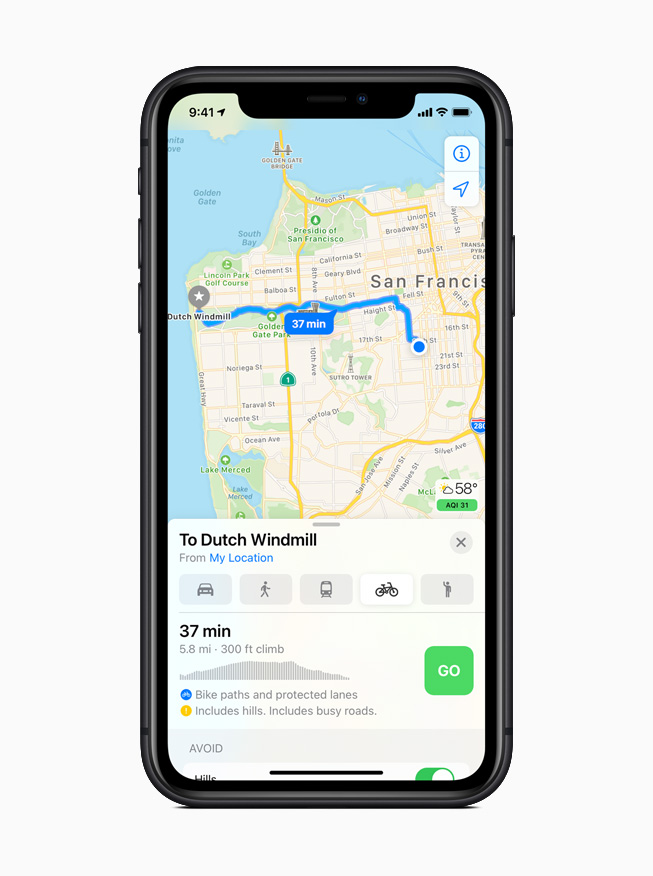
Maps makes it easier than ever to navigate and explore with new cycling directions, electric vehicle routing, and curated Guides. Cycling directions take into account elevation, how busy a street is, and whether there are stairs along the route. Electric vehicle routing adds charging stops along a planned route based on current vehicle charge and charger types.2 Guides provide a curated list of interesting places to visit in a city, created by a selection of trusted resources. Guides are a great way to find popular attractions, discover restaurants, and explore new recommendations from respected brands.
Maps offers cycling directions along bike lanes, bike paths, and bike-friendly roads.
Electric vehicle routing adds charging stops along a planned route based on current vehicle charge and charger types.
Guides make it easy to find things to do in a city, experience great new restaurants, or places to visit on vacation.
More Transparency and Control with Expanded Privacy Features
Now users can choose to share their approximate location with app developers rather than their precise location when granting an app location access, and get even more transparency into an app’s use of the microphone and camera. Developers can now offer users the option to upgrade their existing accounts to Sign in with Apple. Later this year, App Store product pages will feature summaries of developers’ self-reported privacy practices, displayed in a simple, easy-to-read format. Starting early next year, all apps will be required to obtain user permission before tracking.
App Store product pages feature a summary of the privacy practices of each app before downloading it.
Enhanced Listening Experience for AirPods
AirPods and AirPods Pro gain powerful capabilities with iOS 14. Spatial audio with dynamic head tracking brings a theater-like experience to AirPods Pro. By applying directional audio filters, and subtly adjusting the frequencies each ear receives, sounds can be placed virtually anywhere in a space to provide an immersive listening experience. Automatic device switching seamlessly switches AirPods and AirPods Pro audio between iPhone, iPad, and Mac. Headphone accommodations, a new accessibility feature, amplifies soft sounds and tunes audio to help music, movies, phone calls, and podcasts sound crisper and clearer.
Seamlessly switch AirPods or AirPods Pro audio between iPhone, iPad, and Mac with automatic device switching.
Additional iOS 14 Features
Translate is designed to be the best and easiest app for translating conversations, offering quick and natural translation of voice and text among 11 different languages.6 On-device mode allows users to experience the features of the app offline for private voice and text translation.
Siri expands its knowledge and answers complex questions with information sourced from across the internet. Keyboard dictation runs on device when dictating messages, notes, email, and more.7
The Home app makes smart home control even easier with new automation suggestions and expanded controls in Control Center for quicker access to accessories and scenes. Adaptive Lighting for compatible HomeKit-enabled lights automatically adjusts the color temperature throughout the day, and Face Recognition in compatible video doorbells and cameras uses on-device intelligence from Apple TV or HomePod to identify visitors. The Home app and HomeKit are built to be private and secure, so all information about a user’s home accessories is end-to-end encrypted.
Digital versions of car keys give users a secure way to use iPhone to unlock and start their car. Car keys can be easily shared using Messages, or disabled through iCloud if a device is lost, and are available today for compatible cars using NFC technology.8
Safari offers a Privacy Report so users can easily see which cross-site trackers have been blocked, secure password monitoring to help users detect saved passwords that may have been involved in a data breach, and built-in translation for entire webpages.9
Health has all-new experiences to manage sleep and better understand audio levels that may affect hearing health. A new Health Checklist that includes Emergency SOS, Medical ID, ECG, fall detection, and more offers users a centralized place to manage health and safety features.10 Health also adds support for new data types for mobility, Health Records, symptoms, and ECG.
The Weather app keeps users up to date on severe weather events, and a new next-hour precipitation chart shows minute-by-minute precipitation when rain is in the forecast.11
Apple One is the easiest way to get many Apple subscription services at a great value, so customers can choose the one planthat is right for them or their whole family. Customers can sign up for Apple One starting this fall.
Accessibility features include Back Tap, which offers a quick new way to trigger gestures, tasks, and accessibility shortcuts, sign language detection in Group FaceTime, and Sound Recognition, which uses on-device intelligence to notify users when the sound of a fire alarm or doorbell is detected. VoiceOver, the industry’s leading screen reader for the blind community, now automatically recognizes what is displayed visually onscreen so more apps and web experiences are accessible to more people.
Translate helps users quickly and easily translate voice or text between supported languages, and can work completely offline to keep conversations private.
The Home app has a new visual status that provides an at-a-glance view of a user’s smart home accessories.
Digital car keys give users a way to securely unlock and start their car using just their iPhone, and can be easily shared using Messages.
Pricing and Availability
iOS 14 is available as a free software update starting today for iPhone 6s and later. For more information, visit apple.com/ios/ios-14. Some features may not be available in all regions or all languages.
iOS 14 allows for third-party web browsers and email clients to become the default, so if you really don’t like Safari and Apple Mail, you now have other options.
With the latest update to Google Chrome, now available on the App Store, you can change your default browser from Safari to Google Chrome, on iPhone and iPad. Here’s how to do it …
With iOS 14, Apple has added system support for third-party web browsers and email apps. In the future, they may open even more categories.
The default web browser will be used when tapping on a link in any application. Until iOS 14, you could have an alternative browser like Google Chrome but link actions would always open in Safari. Here’s how to change that on iPhone and iPad in iOS 14.
How to set Google Chrome as your default browser on iPhone
Download the latest version of Google Chrome from the App Store.
Open the Settings app and open the settings page for Google Chrome.
Tap ‘Default Browser App’.
Tap ‘Chrome’.
With this set, any app that triggers a standard open URL activity will now direct the system to open Google Chrome, rather than Safari.
If you ever change your mind, you can go back into Settings and change the Default Browser App back to Safari. If you want to use a different third-party browser that isn’t Chrome, you will have to wait for the developer to update their application. The same goes for changing email apps: so far, we haven’t seen any compatible email app expose this feature.
Obviously, this all requires iOS 14 or iPadOS 14 to be installed. Right now, we are at iOS 14 developer beta 8. Apple is expected to release iOS 14 publicly for all users later in September, with a release date likely announced as part of next week’s Apple Event.
Apple has officially released iOS 14 beta 5 and iPadOS 14 beta 5 to developers. This week’s update brings a few small but notable changes to the iOS 14 experience, including the return of the scroll wheel for picking times and a new Apple News widget option.
iOS 14 beta 5 and iPadOS 14 beta 5 are fairly large updates in terms of download size, coming in at nearly 2GB and nearly 4GB respectively for most users. The updates feature the build number 18A5351d.
In addition to the fifth developer betas of iOS 14 and iPadOS 14, Apple also released watchOS 7 beta 5 to developers today. There is no new macOS 11 Big Sur developer beta quite yet, but it could come as soon as later this afternoon. Furthermore, we expect new public betas of iOS 14, iPadOS 14, macOS 11 Big Sur, and watchOS 7 later this week.
What’s new in iOS 14 beta 5?
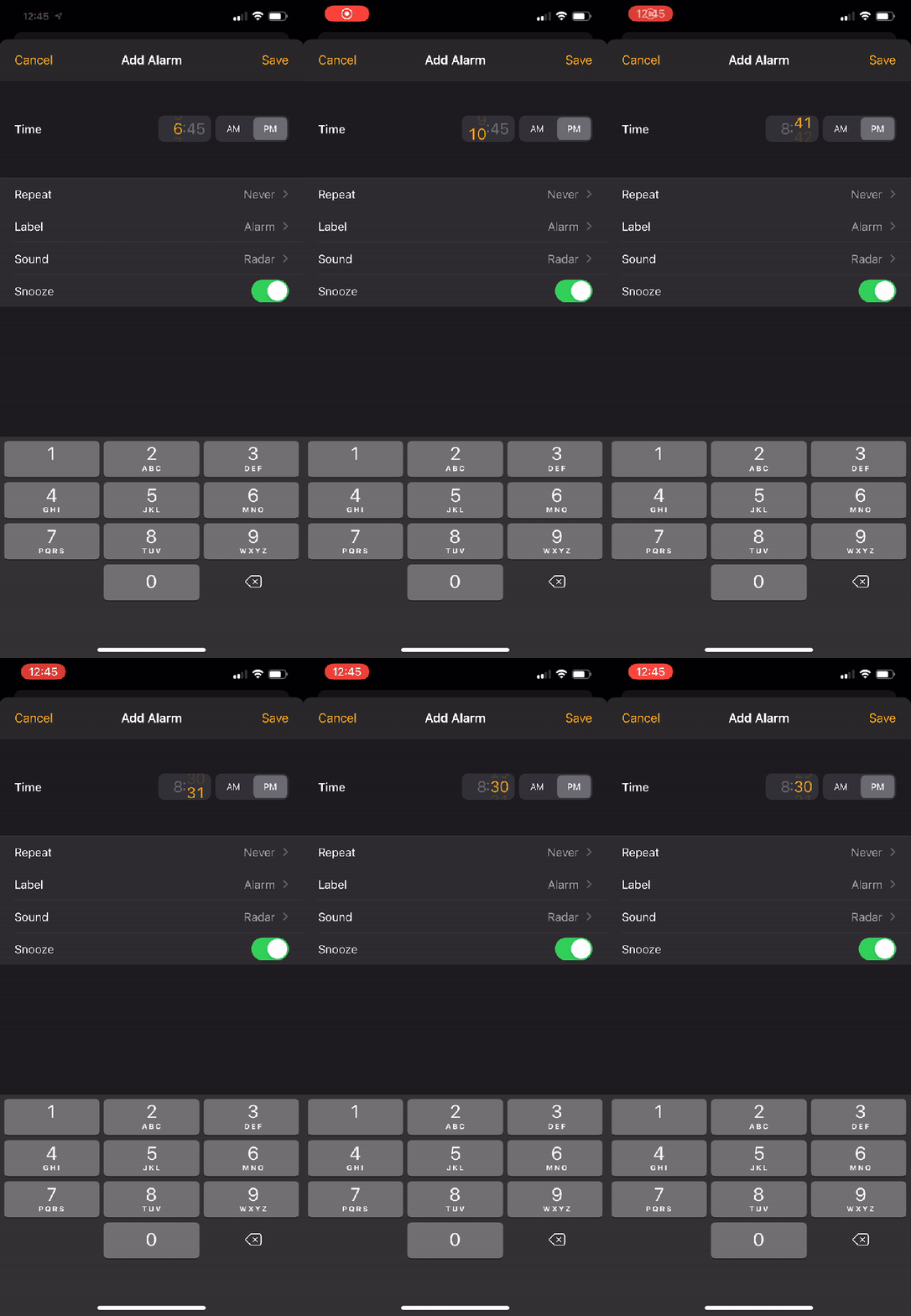
One of the changes introduced in iOS 14 is the new time picker that ditches the iconic scrolling wheel. iOS 14 beta 5 brings the wheel back…kind of. Here’s how it looks in action:
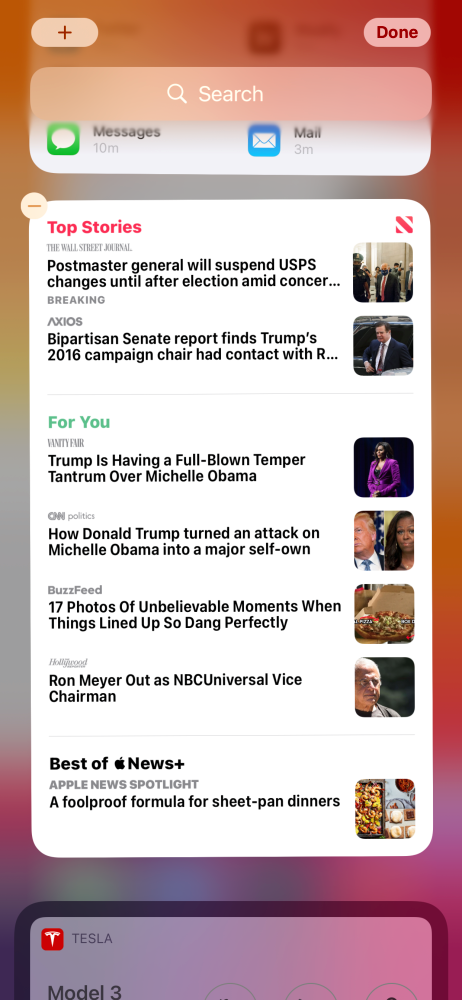
There is also a new “Tall” widget for Apple News in iOS 14 beta 5. This widget is exclusively for the “Today” screen on the far-left of iOS or iPadOS. It can’t be added to your home screen. This widget increases the number of Apple News widgets to seven and it headlines for Top Stories, For You, and Best of Apple News+.
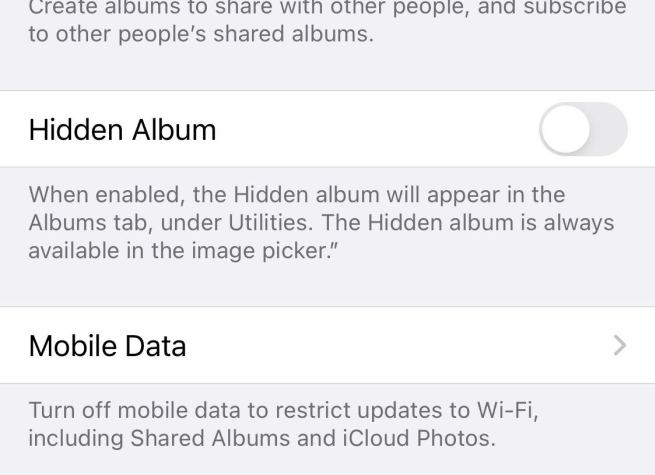
In the Settings app, you can now disable the Hidden Album in the Photos app. Open Settings, scroll down to Photos, and look for “Hidden Album.”
Apple says: “When enabled, the Hidden album will appear in the Albums tab, under Utilities. The Hidden album is always available in the image picker.”
New “Availability Alerts” for COVID-19 Exposure Notifications
Apple says: “Receive a notification if Exposure Notifications are available in your current region. Your region is determined by your iPhone and does not leave your device.”
New on-boarding process for COVID-19 Exposure Notifications in the Settings app:
New App Clip testing options for developers in Settings
New location access request for widgets:
Shortcuts app has a new “What’s new?” splash screen upon first launch:
Widgets are now blocked when a parent app is blocked with Screen Time
Among the more modest tweaks to the iPhone’s UI with iOS 14 is a redesigned Clock app. While it is nice to see the rotating dial replaced with a more efficient number pad, there are some confusing aspects to the new interface. Read along for how to use the new iPhone alarms in iOS 14 and where the Bedtime tab has moved.
The Clock app on iPhone with iOS 14 is simpler in some ways but also a bit counterintuitive in others. Below we’ll look at how to best use iPhone alarms as well where the Bedtime tab now lives and more.
Note: iOS 14 and iPadOS 14 are available as free public betas as well as developer betas for iPhone and iPad.
How to use new iPhone alarms in iOS 14
Open the Clock app
Tap the Alarm tab at the bottom
Tap the orange “+” icon in the top right corner or hit Edit in the top left corner and tap an existing one to modify it
Use the number keypad at the bottom of the screen to enter your full alarm time (don’t tap the small orange time near the top, if you do, you’ll just be editing the hour)
You can leave out the 0 for hours between 1-9 (e.g. type 730 instead of 0730)
Don’t forget to check the AM/PM toggle (light gray box signals what is selected)
One way to opt-out of the interface is to use Siri to set your alarms
Here’s how the new UI looks and works with some more details and tips:
After you tap to add a new alarm or edit an existing one, make sure to start with the on-screen number keypad at the bottom.
Don’t forget to check the AM/PM toggle. Unfortunately, it defaults to whatever the current time is. So if you’re adding or editing alarms 12 PM or later, make sure to switch it to AM for morning alarms.
What happens when you tap the orange time
The new UI becomes confusing if you start by tapping the orange alarm time at the top of the edit/new alarm screen as it selects just the hour to be editable or just the minutes as shown below. That leads to a counterintuitive and clunky experience.
However, with the default that displays the entire time in orange (showing the current time) you can use the number pad at the bottom of your screen to quickly enter the hour and minutes for your alarm. So make sure to head straight for the number pad at the bottom.
Where’s the Bedtime tab?
You probably also noticed that the Bedtime tab that used to be in the clock app is gone. You’ll still see the Sleep | Wake Up alarm that is scheduled in the Alarm tab of the clock app but you’ll find that what used to be the Bedtime settings now live in the Health app.
Here’s what it looks like to edit your sleep schedule in iOS 14:
A big change that arrived with iOS 14 is an all-new home screen experience. This marks arguably the biggest UI update for iOS since it was first introduced. However, iPad isn’t getting all the same new features and changes as iPhone, but there are new widgets to take advantage of. Follow along for how to use the new iPad widgets in iPadOS 14.
iOS 14 on iPhone includes the ability to use the new widgets anywhere on the home screen as well as other app pages. There’s also the new App Library feature.
iPad sees a different experience in iPadOS 14 with the new widgets arriving for use only in the Today View portion of the home screen (can’t be mixed in with apps) and the new App Library feature is absent. In any case, the new widgets still offer some useful new functionality.
Note: iOS 14 and iPadOS 14 are available as free public betas as well as developer betas for iPhone and iPad.
How to use new iPad widgets in iOS 14
If it’s not turned on permanently, swipe from left to right on your iPad home screen to see the Today View
Long press on a black space of your home screen to enter Edit mode (jiggle mode)
You can tap the Keep on Home Screentoggle at the top to keep widgets available all the time
Tap, hold, and drag the existing widgets around to organize them
You can stack widgets of the same size on top of each other for swipeable widgets
Swipe to the bottom of the widgets and tap Customize to add new ones
Tap the green “+” icon to add available widgets, tap Done when finished
When not in Edit mode, you can long press a widget from your home screen to get the edit or remove option (e.g. removing stacked widgets, modify smart suggestions, etc.)
Here’s how all this looks:
Now you’ll be able to edit your widgets.
Tap the “—” icon to remove widgets or tap-hold-drag them to reorganize the layout. Swipe to the bottom to add more widgets, tap Customize.
You can add new widgets by tapping the green “+” icons and then order them by dragging the three-line icons as shown below.
Don’t forget you can stack widgets of the same size on top of each other to maximize your use of space.
And from the home screen you can long press on a widget to get edit and customization options:
What do you think of the new widgets in iPadOS 14? Are you hoping to see the same implementation as iOS 14 in the future? Share your thoughts in the comments below!