




FLIP IT RIGHT! Samsung Galaxy Z Flip 7 Inner Screen Professional Restoration Process

FLIP IT RIGHT! Samsung Galaxy Z Flip 7 Inner Screen Professional Restoration Process – Ultimate 12-Step Expert Guide
Introduction
Foldable smartphones have transformed the mobile industry, and the Samsung Galaxy Z Flip 7 continues this evolution with a slimmer design, stronger hinge, brighter display, and improved durability. Despite these advancements, the inner foldable screen remains one of the most sophisticated—and delicate—components inside any smartphone.
The Samsung Galaxy Z Flip 7 Inner Screen Professional Restoration Process is far more complex than replacing the display on a conventional smartphone. Every layer of the folding display is engineered to flex thousands of times while maintaining brilliant image quality and responsive touch performance. Even a tiny mistake during repair can permanently damage the OLED panel, hinge mechanism, flexible display cable, or protective layers.
That’s why professional restoration matters.
Experienced repair technicians follow carefully controlled procedures using specialized tools, genuine replacement parts, precision adhesives, and extensive diagnostic testing. Every stage is designed to restore the device as closely as possible to its original factory condition while minimizing risks.
In this guide, you’ll learn exactly how professionals restore the Galaxy Z Flip 7 inner display, why each repair step is important, and how expert workmanship helps maximize the lifespan of your foldable smartphone.
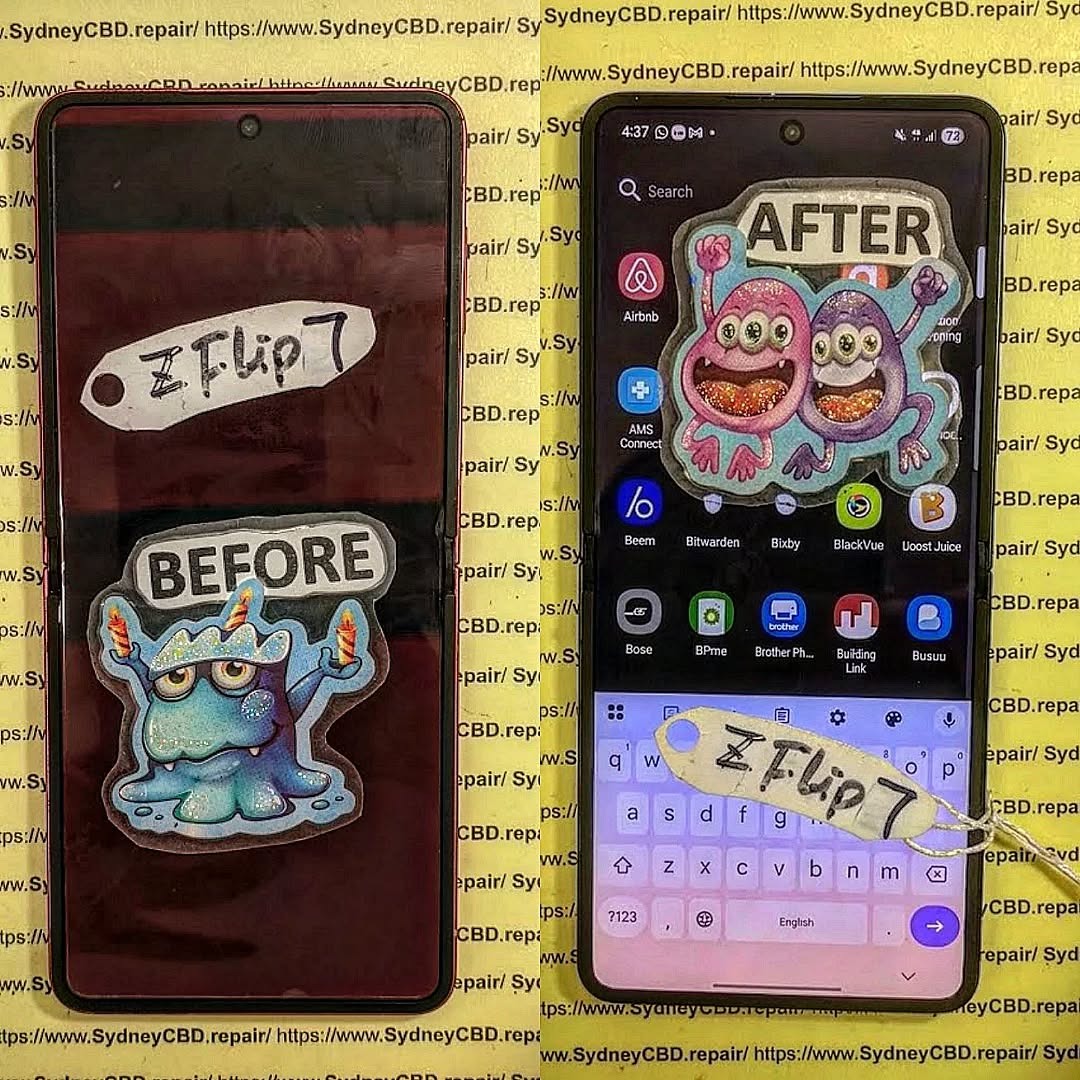
Understanding the Samsung Galaxy Z Flip 7 Inner Display
The Galaxy Z Flip 7 features one of Samsung’s most advanced flexible OLED displays. Unlike traditional smartphones, its screen bends repeatedly along a precisely engineered hinge while maintaining exceptional image quality.
Several advanced technologies work together to make this possible:
- Dynamic AMOLED display technology
- Ultra Thin Glass (UTG)
- Flexible OLED panel
- Protective polymer layers
- Precision hinge assembly
- Fold-resistant display adhesive
- Integrated touch digitizer
- Under-display components
Unlike a flat smartphone display, every layer inside the Z Flip 7 must move together perfectly every time the phone opens or closes.
The Role of Ultra Thin Glass
Ultra Thin Glass provides a balance between flexibility and durability. Although it is called “glass,” it behaves differently from the glass used on conventional smartphones.
Its benefits include:
- Improved scratch resistance
- Better display clarity
- Enhanced touch sensitivity
- More natural folding characteristics
- Reduced crease visibility
However, UTG remains vulnerable to:
- Sharp impacts
- Excessive pressure
- Twisting forces
- Improper repair techniques
This is one reason the Samsung Galaxy Z Flip 7 Inner Screen Professional Restoration Process should always be handled by trained technicians.
Flexible OLED Technology
Samsung’s flexible OLED panels deliver:
| Feature | Benefit |
|---|---|
| Deep blacks | Higher contrast |
| Bright colors | Better viewing experience |
| High refresh rate | Smooth scrolling |
| Low power consumption | Longer battery life |
| Thin construction | Enables folding design |
The OLED layer is exceptionally fragile. During professional repair, technicians avoid direct pressure on the display because even slight deformation can permanently damage the pixels.
Why the Hinge Matters
Many people assume the display alone causes problems. In reality, the hinge and display function as one integrated system.
The hinge controls:
- Folding angle
- Opening resistance
- Display cable movement
- Internal cable protection
- Stress distribution
If the hinge becomes bent or contaminated with debris, it can place uneven stress on the flexible display, eventually leading to cracks or display failure.
Professional technicians always inspect the hinge before installing a replacement screen.
Integrated Flexible Cables
Unlike standard smartphones, the Galaxy Z Flip 7 uses flexible ribbon cables that constantly move as the phone opens and closes.
These cables connect:
- Main OLED panel
- Touch digitizer
- Display controller
- Internal sensors
Repeated bending makes these cables one of the most sensitive parts of the device.
During restoration, technicians carefully route replacement cables through the hinge area while ensuring they maintain the correct bending radius. Improper positioning can dramatically shorten the lifespan of the repair.
Why Foldable Displays Require Specialized Repairs

Repairing a foldable phone is very different from replacing a standard smartphone screen.
Professional repair shops use specialized equipment, including:
- Temperature-controlled heating plates
- Precision opening tools
- Anti-static workstations
- Display alignment fixtures
- High-strength flexible adhesives
- Microscope inspection systems
- OLED testing equipment
These tools help prevent accidental damage while ensuring every replacement component is installed accurately.
Common Causes of Inner Screen Failure
Although Samsung has significantly improved durability, several issues can still affect foldable displays:
Accidental Drops
Even a minor drop can:
- Crack the OLED panel
- Damage Ultra Thin Glass
- Shift hinge alignment
- Loosen internal display layers
Pressure Damage
Placing heavy objects on the folded phone can create excessive stress at the crease, leading to:
- Dead pixels
- Touch failure
- Internal display fractures
Dust and Debris
Tiny particles entering the hinge may:
- Increase friction
- Affect smooth folding
- Place uneven pressure on the display
- Accelerate internal wear
Liquid Exposure
Although water resistance has improved, moisture can still affect:
- Display connectors
- OLED circuitry
- Touch controller
- Internal adhesive strength
Natural Wear
Every fold creates microscopic stress within the flexible display. Over years of use, this repetitive movement can contribute to:
- Crease deepening
- Reduced touch responsiveness
- Pixel degradation
- Ribbon cable fatigue
Understanding these failure mechanisms helps explain why the Samsung Galaxy Z Flip 7 Inner Screen Professional Restoration Process requires much more than simply swapping one display for another.
Professional Diagnostic Process Before Restoration
Before any technician removes a single screw, a complete diagnostic inspection is performed. This ensures that the problem truly lies with the inner display and not another component, such as the motherboard, battery, display cable, or hinge assembly.
Professional diagnostics reduce unnecessary repairs and help identify hidden damage caused by drops, impacts, or liquid exposure.
Typical inspections include:
- Visual inspection of the OLED panel
- Checking the folding hinge for smooth movement
- Testing touch responsiveness across the entire screen
- Inspecting for dead pixels or color distortion
- Examining the crease for abnormal wear
- Verifying brightness consistency
- Testing cameras and sensors
- Checking wireless charging and NFC
- Battery health evaluation
- Internal moisture indicator inspection
Identifying Hidden Damage
Not every damaged screen shows obvious cracks.
Technicians often encounter problems such as:
| Hidden Issue | Possible Cause |
|---|---|
| Green or pink display lines | OLED layer damage |
| Black spots | Internal pixel failure |
| Flickering display | Ribbon cable damage |
| Partial touch response | Digitizer malfunction |
| Random shutdowns | Internal impact damage |
| Screen flashing | Display controller fault |
Professional diagnostic equipment helps determine whether only the display requires replacement or if additional components need servicing.
Essential Tools Used During the Samsung Galaxy Z Flip 7 Inner Screen Professional Restoration Process
Foldable smartphones demand precision. Unlike older devices, technicians cannot simply heat the screen and pull it away.
Instead, specialized tools are used throughout the Samsung Galaxy Z Flip 7 Inner Screen Professional Restoration Process.
Professional Equipment
- Precision screwdriver set
- Plastic opening picks
- Flexible OLED separation tools
- Anti-static tweezers
- Controlled heating plate
- Suction tools
- Display alignment jig
- Precision adhesive applicators
- Microscope
- Anti-static wrist strap
- Flexible display clamps
- Lint-free cleaning materials
Each tool is selected to reduce the risk of damaging delicate internal components.
Why Anti-Static Protection Matters
Modern smartphones contain highly sensitive integrated circuits.
Electrostatic discharge (ESD) can instantly damage:
- Display controller chips
- Memory components
- Charging ICs
- Camera modules
- Touch controller
Professional repair benches are equipped with grounded mats and anti-static wrist straps to minimize this risk.
Step-by-Step Samsung Galaxy Z Flip 7 Inner Screen Professional Restoration Process
Replacing a foldable display involves careful sequencing. Every stage builds on the previous one, and skipping steps can compromise the repair.
Step 1 – Device Preparation
The technician first:
- Powers off the device
- Records the device condition
- Verifies functionality
- Removes the SIM tray
- Cleans the exterior
- Protects the outer display
This documentation is valuable for quality assurance and customer transparency.
Step 2 – Controlled Heating
Specialized heating equipment softens factory adhesive without overheating sensitive components.
Temperature must remain carefully controlled because excessive heat can damage:
- OLED layers
- Battery
- Wireless charging coil
- Plastic frame
- Waterproof seals
Professional heating systems provide even temperature distribution to avoid localized stress.
Step 3 – Opening the Rear Housing
Using precision opening tools, technicians carefully separate the rear panel.
Important precautions include:
- Avoiding scratches
- Preventing glass cracks
- Protecting wireless charging components
- Preserving reusable frame sections where possible
Patience is critical. Rushing this stage can increase repair costs.
Step 4 – Disconnecting the Battery
Safety comes first.
Before disconnecting any display cables, the battery is isolated from the motherboard.
This helps prevent:
- Electrical shorts
- Component damage
- Accidental display activation
- Connector arcing
Battery disconnection is a standard practice in professional smartphone repairs.
Step 5 – Removing Internal Shields
Protective covers are removed to expose:
- Motherboard connectors
- Display flex cables
- Hinge routing channels
- Battery connectors
Each screw is carefully organized because different lengths are used throughout the phone.
Incorrect screw placement during reassembly can damage internal components.
Step 6 – Disconnecting the Inner Display
The flexible OLED cable is one of the most delicate components inside the device.
Technicians disconnect it using plastic tools to avoid damaging:
- Gold contacts
- Connector housings
- Flexible ribbon cables
Even slight bending beyond design limits may permanently damage a replacement display.
Step 7 – Removing the Damaged Display
The damaged inner screen is separated from the frame with specialized equipment.
Professionals work slowly to avoid:
- Frame deformation
- Cable tearing
- Hinge damage
- Adhesive contamination
Old adhesive residue is then completely removed to create a clean bonding surface.
Step 8 – Preparing the Frame
Frame preparation directly influences repair quality.
Technicians thoroughly inspect:
- Display seating surface
- Frame alignment
- Hinge integrity
- Connector positioning
- Adhesive channels
Any debris left behind may create pressure points that affect the new OLED panel.
Step 9 – Installing the Replacement Inner Screen
The new flexible display is aligned using precision fixtures.
Proper alignment ensures:
- Uniform bezels
- Smooth folding
- Correct hinge clearance
- Accurate cable routing
- Reliable adhesive bonding
This stage requires exceptional attention to detail because even a slight misalignment can impact long-term durability.
Step 10 – Applying Professional Adhesive
Foldable displays rely on flexible, high-strength adhesives designed to withstand repeated opening and closing.
Professional adhesives provide:
- Strong bonding
- Controlled flexibility
- Temperature resistance
- Long-term durability
- Improved structural integrity
Improper adhesive application can lead to lifting edges, display movement, or premature repair failure.
Step 11 – Reconnecting Components
After the new display is secured, technicians reconnect:
- Display ribbon cables
- Battery connector
- Wireless charging assembly
- Cameras
- Antennas
- Internal sensors
Every connection is inspected under magnification to ensure it is fully seated.
Step 12 – Reassembly
The smartphone is carefully reassembled in the reverse order.
Key tasks include:
- Reinstalling internal shields
- Tightening screws to appropriate torque
- Replacing waterproof adhesive seals
- Reattaching the rear housing
- Cleaning fingerprints and residue
A meticulous reassembly helps restore both functionality and structural integrity.
Quality Control and Functional Testing
A professional restoration is not complete once the phone is reassembled. Extensive testing confirms that every major feature works correctly before the device is returned to the customer.
Technicians typically verify:
| Test | Purpose |
|---|---|
| Inner display brightness | Uniform illumination |
| Touch responsiveness | Accurate multi-touch input |
| Fold and unfold operation | Smooth hinge movement |
| Fingerprint sensor | Reliable biometric recognition |
| Cameras | Proper image capture |
| Speakers and microphones | Clear audio performance |
| Charging | Stable wired and wireless charging |
| Connectivity | Wi-Fi, Bluetooth, and cellular performance |
| Proximity and ambient light sensors | Correct automatic behavior |
These quality control procedures help ensure the Samsung Galaxy Z Flip 7 Inner Screen Professional Restoration Process delivers a dependable repair that performs as expected in everyday use.
Display Calibration After the Samsung Galaxy Z Flip 7 Inner Screen Professional Restoration Process
Installing a new display is only part of a successful repair. The final stage is calibration and functional optimization to ensure the replacement screen performs as intended.
Professional technicians carry out several checks to verify that the phone delivers a premium user experience.
Touch Sensitivity Testing
The Galaxy Z Flip 7 relies on a highly responsive touch digitizer. After installation, technicians test the entire surface of the display, paying particular attention to the folding crease.
Testing includes:
- Multi-touch response
- Swipe accuracy
- Gesture recognition
- Edge sensitivity
- Keyboard responsiveness
- Pressure consistency
Any irregularities are investigated before the repair is considered complete.
Display Quality Inspection
The OLED display is examined under different brightness levels to confirm:
- Uniform brightness
- Accurate color reproduction
- No dead pixels
- No flickering
- Proper refresh rate
- Smooth animations
Professionals also inspect the display from multiple viewing angles to ensure image consistency.
Fingerprint Sensor Verification
If the Galaxy Z Flip 7 uses an integrated biometric system associated with the display assembly, technicians verify that fingerprint recognition remains fast and reliable after the repair.
Checks include:
- Fingerprint enrollment
- Unlock speed
- Authentication accuracy
- Multiple-user support
Waterproofing and Adhesive Replacement
Although professional repairs aim to restore the phone’s sealing, it’s important to understand that once a device has been opened, its original factory waterproof certification cannot always be guaranteed.
Professional technicians replace all removed adhesive seals with high-quality equivalents and carefully reseal the device.
The sealing process includes:
- Removing old adhesive
- Cleaning all contact surfaces
- Applying precision-cut replacement adhesive
- Even pressure during bonding
- Appropriate curing time
Proper sealing helps improve resistance to dust and accidental moisture exposure.
Genuine vs. Aftermarket Inner Displays
One of the most important decisions during the Samsung Galaxy Z Flip 7 Inner Screen Professional Restoration Process is selecting the replacement display.
Comparison Table
| Feature | Genuine Display | Quality Aftermarket Display |
|---|---|---|
| Color Accuracy | Excellent | Good to Very Good |
| Brightness | Factory Specification | May vary |
| Refresh Rate | Full specification | Depends on supplier |
| Fold Durability | Designed for repeated folding | Varies by manufacturer |
| Touch Response | Excellent | Usually good |
| Compatibility | Full | May require adjustments |
| Longevity | Typically longer | Depends on quality |
| Manufacturer Support | Yes | Limited |
Professional repair centers often recommend genuine parts whenever available because they provide the closest match to the original performance and durability.
Common DIY Mistakes to Avoid
Foldable smartphones are significantly more difficult to repair than conventional devices. Attempting a DIY repair without the proper tools or experience can lead to additional damage.
Common mistakes include:
Using Excessive Heat
Too much heat can damage:
- Flexible OLED layers
- Plastic display components
- Battery
- Internal adhesives
Pulling the Screen Too Quickly
Removing the screen without controlled separation may tear:
- Ribbon cables
- Touch digitizer layers
- Flexible OLED panel
Damaging the Hinge
Applying force in the wrong direction can affect hinge alignment, causing uneven folding or additional stress on the new display.
Incorrect Adhesive Application
Poor adhesive installation may result in:
- Lifting edges
- Dust entering the device
- Uneven screen pressure
- Reduced durability
Forgetting Battery Isolation
Working on an energized phone increases the risk of electrical shorts and accidental component damage.
Benefits of Choosing Professional Restoration
Professional repairs provide advantages that extend beyond simply replacing a damaged screen.
These include:
- Experienced technicians
- Specialized equipment
- Proper diagnostic testing
- High-quality replacement parts
- Safe handling of delicate components
- Thorough post-repair quality control
- Repair warranty
- Reduced risk of repeat failures
An experienced technician also identifies hidden issues that may not be visible during a basic inspection, helping prevent future problems.
Tips to Protect Your Galaxy Z Flip 7 Inner Screen
Preventive care can significantly extend the life of your foldable device.
Keep the Hinge Clean
Dust and debris can accumulate around the hinge. Wipe the exterior regularly with a soft microfiber cloth and avoid exposing the phone to sandy or dusty environments whenever possible.
Avoid Excessive Pressure
Do not place heavy objects on the folded phone or keep it in a tightly packed pocket where it may be compressed.
Open and Close the Phone Gently
The hinge is engineered for repeated use, but smooth, controlled opening and closing reduces unnecessary stress on the flexible display.
Use a Protective Case
A case designed specifically for the Galaxy Z Flip 7 can help absorb impacts and protect the frame from accidental drops.
Avoid Extreme Temperatures
Very high or very low temperatures can affect battery performance, adhesives, and display materials. Store and use the phone within the manufacturer’s recommended temperature range.
Address Minor Issues Early
If you notice flickering, touch delays, unusual noises from the hinge, or visible lines on the display, have the device inspected promptly. Early intervention may prevent more extensive damage.
Frequently Asked Questions
1. How long does a Galaxy Z Flip 7 inner screen replacement usually take?
Most professional repair centers can complete the repair on the same day if replacement parts are in stock. More complex cases involving hinge or motherboard damage may require additional time.
2. Can the inner screen be repaired without replacing the entire display?
In most cases, damage to the flexible OLED panel requires replacement of the complete display assembly because the layers are permanently bonded together.
3. Will the phone fold normally after a professional repair?
Yes. When the repair is performed correctly with proper alignment and quality components, the phone should open and close smoothly.
4. Is it safe to keep using a phone with a cracked inner screen?
No. Continued use may allow cracks to spread, reduce touch responsiveness, and expose internal components to dust or moisture.
5. Does replacing the inner screen improve touch performance?
If the original display suffered from touch issues caused by physical damage, a professionally installed replacement should restore normal responsiveness.
6. How can I make my foldable display last longer?
Use a protective case, avoid excessive pressure, keep the hinge clean, and have any developing issues inspected by qualified technicians before they worsen.
Conclusion

The Samsung Galaxy Z Flip 7 Inner Screen Professional Restoration Process is a precise procedure that combines advanced diagnostic techniques, specialized tools, skilled workmanship, and rigorous quality control. Unlike traditional smartphone repairs, restoring a foldable display requires careful attention to the flexible OLED panel, Ultra Thin Glass, hinge mechanism, ribbon cables, and adhesive system.
Choosing a professional repair service helps ensure the new display is installed accurately, calibrated correctly, and thoroughly tested before the device is returned. With high-quality replacement parts and experienced technicians, your Galaxy Z Flip 7 can regain its smooth folding action, vibrant display quality, and dependable touch performance.
By following good maintenance practices and addressing problems early, you can maximize the lifespan of your foldable smartphone and continue enjoying its innovative design for years to come.
Learn More
For additional information about caring for Samsung Galaxy devices and foldable technology, visit the official Samsung Support website:
https://www.samsung.com/support/
David from Sydney CBD Repair Centre – The Best place to fix mobile phones as 7 Years In A Row! Top Mobile Phone Repair In Sydney. More than 2000 Positive Reviews on Google and Same Day Repairs.
We take pride in delivering exceptional repair services for all major phone brands including Apple, Samsung, Google, and more. Our expert technicians use only genuine parts and offer 90 days warranty on repairs. Located in the heart of Sydney CBD, we’re your one-stop solution for all mobile device repairs.
Our commitment to excellence has earned us the trust of thousands of satisfied customers. Whether it’s a cracked screen, battery replacement, or water damage repair, we handle it all with professional care and expertise. Walk in today and experience why we’re Sydney’s #1 choice for mobile phone repairs.
Visit us for:
- ✓ Same Day Express Repairs
- ✓ Genuine Parts Guarantee
- ✓ Professional Technicians
- ✓ Competitive Pricing
- ✓ 2000+ 5-Star Google Reviews
- ✓ 7-Time Award Winner for Best Phone Repairs
Sydney CBD Repair Centre – Where Quality Meets Reliability.
Call: +61 2 8011 4119
Website: https://SydneyCBD.repair/locate-us

