YouTube has announced that another slew of Twitch-like features are set to help tempt streamers to the video platform including Gifted Memberships and Live Redirect.
Gaming content is part of the very foundation of YouTube, and the video-streaming platform confirmed that over 800 billion views, 90 million hours of live-streamed content, and over 250 million uploads are all dedicated to gaming.
Twitch at least currently remains the go-to destination for dedicated gaming content, but with the addition of new features, YouTube will hope to scoop up those disillusioned with the restrictive practices of Amazon-owned livestreaming service.
Many Twitch creators already use YouTube as a repository of highlights and clips. The new changes are obvious attempts to tempt creators to stick with YouTube and provide an end-to-end experience for gaming fans.
Although not yet available, the company confirmed that “Gifted Memberships” and “Live Redirect for Gaming” will come to YouTube creators very soon:
We’re currently working on upcoming products and features to meet these demands and others–including Gifted Memberships, as well as Live Redirect for Gaming, which will let you seamlessly send your viewers directly to another livestream once yours ends.
“Gifted Memberships” appear to work in much the same way that the current Memberships system works on YouTube. This paid-for tier allows fans to support content creators with paid-for tiers that provide access to things like added live chat emoticons and special badges when commenting on a specific channel.
Live Redirect for Gaming allows you to seamlessly send your viewers directly to another livestream once yours ends. This sounds very similar to the “host” ability that Twitch streamers have had for several years now. This could help create an even greater sense of community on the platform for gamers, but it’s not quite clear how you’ll be able to select channels or streams to host at this stage.
Alongside Gifted Memberships and Live Redirect, YouTube also confirmed that there will be further exploration into “other perks for YouTube Gamers through [their] subscription services.” This could include things such as the recent free access to YouTube Premium for Discord Nitro users.
Neither feature is yet available, but YouTube also teased “more updates” are coming to the platform, too.
During its Connect 2021 conference keynote today, Facebook spent a lot of time diving into the “metaverse” – its in the works mixed-reality platform. And along with that, as expected, it announced a major rebrand to “Meta” with the goal of the new name to “encompass everything” it does.
CEO Mark Zuckerberg and a variety of other executives led the Connect 2021 keynote. Much of the time was spent diving further into the details of what Facebook Reality Labs is envisioning with its mixed reality metaverse.
That includes how the platform could offer new ways to experience work, play, exercise, entertainment, and much more. The metaverse isn’t something that will be launching all at once or right away, but will be developed over the next decade. Notably, Zuckerberg said the company aims to have 1 billion metaverse users in ten years.
The other big part of the keynote today was the major rebrand from Facebook to Meta. Zuckerberg said the name best represents what it’s working towards, being a metaverse company.
As part of this, it’s time for us to adopt a new company brand to encompass everything that we do. To reflect who we are and what we hope to build. I’m proud to announce our company is now Meta.
The existing apps, Facebook, Instagram, WhatsApp, etc. all remain with Meta being the umbrella they all live under instead of Facebook.
Check out all the details in the full keynote below and Meta’s press release here.
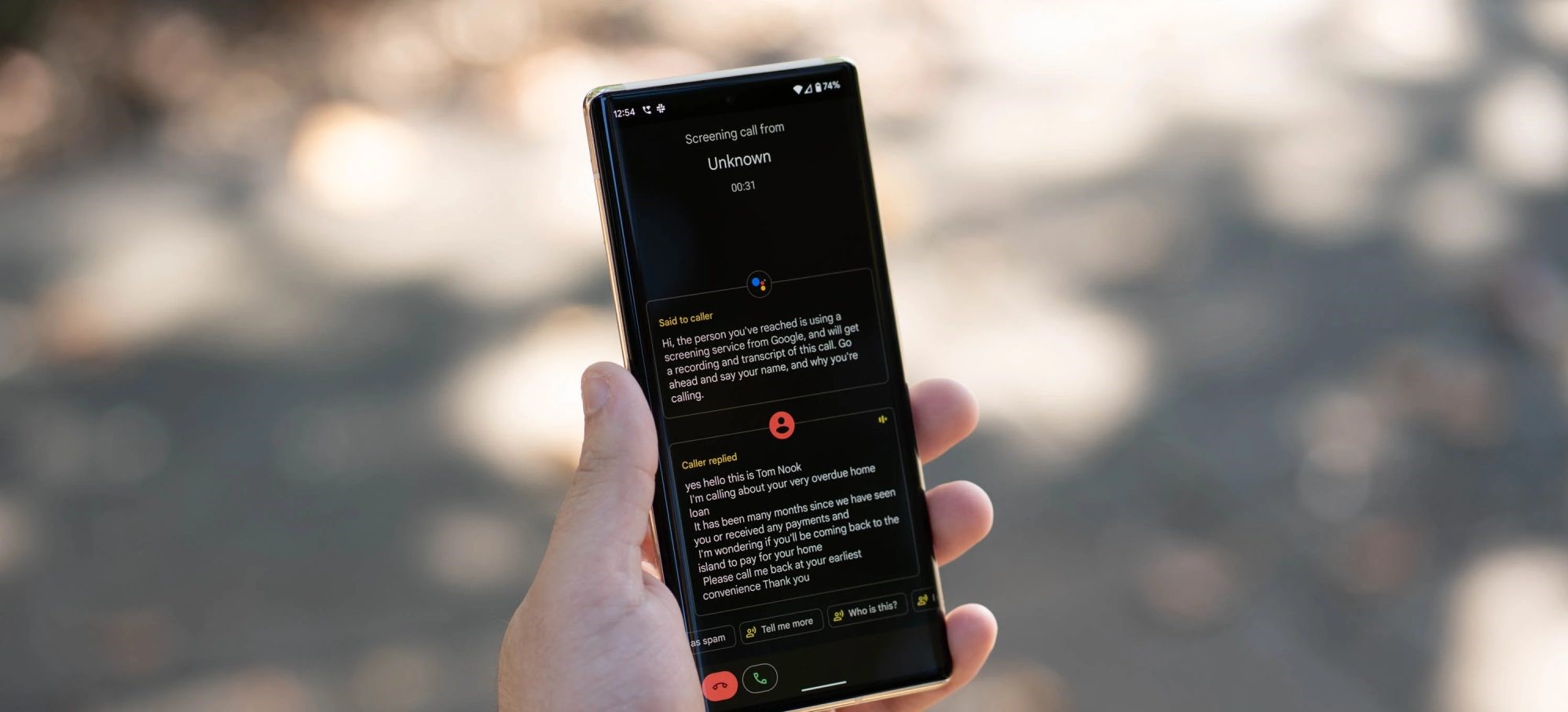
One of the best features of Google Pixel phones is Call Screen, an easy way to handle spam calls without actually picking up the phone. This week, the feature is officially expanding past the US, Canada, and Japan to seven new regions.
Flying under the radar on Pixel 6 launch day last week, Google quietly revealed that Call Screen would expand to seven more countries. These countries specifically include:
UK
France
Germany
Australia
Ireland
Italy
Spain
We’ve since found that the feature was rolling out in the UK early this week and reports have since come in from France, Australia, and Germany.
It’s worth noting that the feature is limited in these additional countries compared to how it works in the US, Canada, and Japan. Call Screen on Pixel phones in these countries will be limited to its manual form, rather than supporting the automatic screening feature that allows the phone to detect spam calls on its own and screen those on your behalf. That option was first rolled out to Pixel owners in the US at the end of 2019.
Call Screen helps users in the U.S., Canada and Japan screen 37 million calls each month, and today we’re expanding manual Call Screen to Pixel users in the U.K., France, Germany, Australia, Ireland, Italy and Spain. Our latest on-device speech models make the transcriptions more accurate than ever on Pixel 6 and Pixel 6 Pro thanks to Pixel’s new Google Tensor.
After waiting what felt like ages, Android 12 has arrived with a literal mountain of changes, tweaks, and tuning to sink your teeth into. We’ve whittled or distilled our deep dive down to a selection of 20 of the best features added in Android 12 — features we think you’ll really love right away.
We’re going beyond Material You here though. The wallpaper-based theming approach sure is different to what we’ve seen on Pixel hardware in years prior, but there are some things to love and even a few things to hate — a lack of independent customization being one sore point for just about everyone.
Even so, selecting 20 of the top features in Android 12 is no easy task. With over 100 new user-facing additions, functions, and tweaks, there is so much here to try out for yourself. We have done the hard work, so you don’t have to.
One-handed mode
The fact that it has taken until Android 12 to even get a dedicated one-handed mode in AOSP is quite shocking. Then when you consider the way it has been implemented owes a lot to iOS and the “Reachability” mode, and you’ll scratch your head wondering why we have waited to get the option.
However long the wait, it’s just nice to have the option to use larger smartphones without requiring hand gymnastics or huge hands. Unfortunately, you cannot access the one-handed mode unless you are happy to use gesture navigation.
Quick tap
Yet another feature that has been so long in the making that we were beginning to wonder if it would ever arrive. You might not even remember Quick tap as it was originally codenamed “Columbus.” Basically, this new gesture lets you double-tap the back of your Pixel to do things like activating the flashlight, activating the Google Assistant, taking screenshots, or launching an app.
It took Google so long to implement that iOS has had the option for over a year at this point. You need to enable the feature, and it’s a great way to access common parts of Android without needing to unlock your device.
Microphone/camera access dots
People are rightly taking privacy on their smartphones and connected devices more seriously. The number of permissions that many apps request upon first launch and accepted without much thought can be remedied. If an app is concurrently or has very recently accessed any of your on-device cameras or the microphones, you’ll see a small green dot or icon at the upper-right of your smartphone display.
This is just a quick indicator that an app or service has accessed either hardware. Expanding the notification shade and tapping the icon informs you just which app has done so. An extended feature as part of the wider Privacy controls lest you quickly disable or enable Microphone and Camera access from the Quick Toggles section on a whim.
Game dashboard
If you’re a big mobile gamer then the dedicated Game dashboard will be a very important new addition. Built directly into Do Not Disturb mode, Game dashboard brings a floating pop-up menu with a few extra tweaks and controls to enhance your mobile gaming.
This allows you to screen record, get frame rate indicators and ensures that any incoming calls and texts are silencing when you’re deep into your favorite mobile games.
Picture-in-picture mode tweaks/tuning
Android 12 brings some enhancements to the picture-in-picture mode, which makes a big difference to the experience. To better fit with the rest of the “rounded” aesthetic, the playback windows do away with sharp corners with what could be considered a more “pill-shaped” player.
There is a new ability to “stash” a playing video so that UI portions are not obstructed. This means that background playback doesn’t affect anything you’re currently doing. When you dismiss or close a playing window, the animation envelops the player and it snaps or “pops” out of view.
Verified links
The process of opening an app from a URL should be much easier with “Verified link” in Android 12. Effectively, these are URLs that specifically state that it should open an app and are able to bypass the old “open with” dialog that would show on previous versions of Android.
You likely won’t even notice the feature in action as it just acts automatically and streamlines your day-to-day UI experience. Heading into the Settings app, you can change the behavior of verified links on an app-by-app basis.
Link/image sharing from Recents menu
To save some time, you can quickly grab web page links and images on web pages or in apps courtesy of a quick-select option within the Recent apps screen. When viewing the Recents section, web pages will include a “link” icon or an “image” icon.
Tapping the “link” icon brings up a color-coordinated site link that can be copied or shared directly. Alternatively, you can drag the link icon to a recent contact or into a “more” option, which will launch the wider Share Sheet.
When tapping the “image” icon a similar menu will launch but this will include “Lens” and “Save” options. Similarly, dragging downwards opens up three recent contacts or apps with the ability to drag into a “more” option which also launches a wider Share Sheet.
Scrolling screenshots
Yet another long-overdue addition but an important one nonetheless. Scrolling screenshots are finally here in Android 12 and represents one of the top or most requested features over the past few years. The implementation is not dissimilar to how it has been added in various third-party Android skins from the likes of OnePlus and Xiaomi.
Just take a screenshot and if the app or screen can be expanded, you will get a “Capture more” toggle appearing in the bottom-left preview pop-up. At the moment, this doesn’t work everywhere. A case in point is that of Chrome, which isn’t yet working with the Scrolling screenshot feature.
Ongoing call chip
Although this feature is not completely reliant on Android 12, when using Google Phone as your default dialer a status bar “chip” will give you at-a-glance information on call progress/timings. This does appear to adapt or change based upon Dynamic Color theming on devices where color-tuning and accenting is currently supported.
This works as a semi-replacement for the pop-up “bubbles” that offers call controls and gives quick access to return to a call in-progress. Unlike bubbles, a status bar call chip fully minimizes phone calls without affecting any other apps you have open or are using at a particular point in time. Tapping reopens your call and minimizing or opening another app will return the call to the status bar chip.
Universal device search
Provided you use the Pixel Launcher as your default home screen, when accessing the app drawer there is an expanded Universal device search option within Android 12. This expanded search lets you find contacts, messages, email, and apps so long as you use the default launcher on Pixel phones.
It’s worth noting that you can access the feature automatically by enabling the keyboard each time you swipe up into the Pixel Launcher app drawer. Alternately, you can just access via the search bar at the top of the app drawer as and when you see fit.
Face control auto-rotate
To help ensure that your phone is in the right orientation all the time auto-rotate has been given a big boost with the ability to activate face controlled rotation. The feature uses the selfie camera to orientate in conjunction with the accelerometer for even more accurate auto-rotate than using the accelerometer alone.
If you often watch YouTube or other video content in landscape mode then this is a great added feature. You can still use the standard auto-rotate mode or the quick toggles to snap to landscape orientation if you prefer that method.
Gboard redesign
While the Gboard redesign is not technically part of the Android 12 update, the changes are only available on devices with the most recent OS. Top of the new features in this Android 12-specific Gboard overall is full compatibility with Material You theming and Dynamic Color tweaks.
If you like rounded or soft corners, the new Gboard will really appeal. All of the tweaks are most prominent when using your on-device light theme.
Extra dim
If you are using your phone in a dark or low-light environment and want to quickly adjust the screen brightness, “Extra dim” allows you to do so with just a single tap. You can customize the luminance level or brightness of your display to a preset level of your choosing with a single button press.
Emergency SOS
Security and personal safety features have been elevated in priority within Android 12. While this might not seem like a big deal, the Emergency SOS feature is one of the top new additions for personal safety and peace of mind.
You can press the power button quickly five times or more to have your device emit a loud sound and countdown alarm before calling emergency services or a predetermined number of your choice. This will call for help, but your device will need to be unlocked if you choose a number that is not directly to emergency services.
Approximate or precise location controls
Privacy is one of the core tenets of the Android 12 update, and this means a number of new features are coming to your smartphone including the ability to give apps and services access to “approximate” or “precise” location data.
This includes a new pop-up with a new animation to indicate the inherent differences when apps request your location. For apps that only require a locale or region data, this is a great way to conceal or protect your location without losing access to in-app features or functions.
New pop-up Power menu
Every year the Power menu on Android seems to receive a facelift and the latest looks the best so far despite a few substantial changes. Cards & Passes and smart home controls are now accessible in separate lockscreen toggles leaving the Power menu to be just that – a place to access device power controls.
This simplification and separation mean that it is abundantly clear just what the pop-up offers. While the previous version in Android 11 felt like a “hub” for some incompatible UI and system controls. Now there is no confusion and it’s all the better for it.
Editor available from Share Sheet
When sharing an image, be that a direct screenshot or even just an image from your gallery, an editor has been added to allow you to do things like add emoji, text, and draw without needing to first edit your image or screenshot.
For those wondering why this is one of the top features in Android 12, it means you can just add or tweak things right before you send them on. Not only does this save time, it makes things a lot easier across the board.
Adaptive charging tweaks
While you likely won’t see the benefits initially, Adaptive Charging has now been tuned to ensure that your smartphone battery lifespan is considered when the feature is activated in Android 12.
Adaptive charging slows the charging speed between the 80 and 100% thresholds and, in turn, helps reduce the wear and tear on your Pixel internal battery. This charging process should more closely match when your on-device alarm when your phone is placed on charge overnight.
Face controls in Android Accessibility Suite
Expanding on the growing suite of accessibility features Android 12, a new “Camera Switch” allows you to control your phone with facial expressions via the selfie camera. The facial expressions that can be performed include opening your mouth, smiling, raising your eyebrows, and looking left, right, or up.
The feature will, by default, ask for the user to set expressions for next, select, and “pause,” which stops the phone from recognizing other gestures temporarily. Other actions include previous, touch & hold, scroll forward/backward, home, back, notifications, quick settings, and overview/multitasking.
On/off labels in Quick Settings
Simple. Effective. The new pill-shaped Quick Settings toggles now have an “on” or “off” indicator underneath to make it even more obvious if something is activated or not. You might not understand why this is a nice addition, but for accessibility and those with vision-related issues it makes it explicit rather than a highlighted button accent.
Starting next month, YouTube Music is getting free background listening in a major revamp of the streaming service’s ad-supported tier. As part of that, the YouTube Music app is going audio-only and will no longer play videos if you don’t pay for Premium.
With background play, the application will keep streaming music when it’s no longer open or your screen is off. This previously required a paid YouTube Premium (or Music Premium) subscription. Today, those that don’t pay can watch videos found in the Home and Explore feeds, as well as search. They cannot, however, use the seamless “Song/Video” switcher at the top of the Now Playing screen.
To balance the upcoming change, free YouTube Music users will no longer be able to watch music videos in the app. This is becoming a YouTube Premium perk as Google shifts YouTube Music for free users to be an audio-only experience. Users are advised to use the main YouTube client for their regular video-watching.
This change starts on November 3, when free background play rolls out. It’s first coming to Canada with “global expansion plans” not yet detailed. Google confirmed to us this change to videos in YouTube Music, while a help post lays out the new tiering system.
That that don’t pay for YouTube Music (and see an “Upgrade” tab” in the bottom bar) can:
listen to music in the background
shuffle play personalized mixes (that are made just for you!)
find the perfect mood mixes for activities like workout, commute and more
explore millions of songs & thousands of playlists, free of cost
Meanwhile, YouTube Premium lets users:
listen to songs on-demand
watch videos on YouTube Music
skip tracks an unlimited number of times
enjoy YouTube Music without ads
It comes as Apple Music on Monday introduced a cheaper “Voice Plan.” As per usual, Google and YouTube are just combating that with a free “radio-like” tier that is supported with advertising.
With Android 12 hitting AOSP at the start of the month, Google also released the latest Compatibility Definition Document (CDD). There are a handful of hardware and software changes that device makers have to abide by, but nothing too major.
With Android 12, Google introduced a “Performance class” standard that “defines a set of device capabilities that goes beyond Android’s baseline requirements.” This includes media, camera, and “generic” (memory, screen resolution/density).
It lets app developers determine which software features a phone or tablet is capable of running. For example, Performance class 12 (for the “highest performing devices”) could get the “most premium experience,” while class 11 would go down to “high quality experience” and everything else gets the base experience. Meanwhile, Performance classes are forward-compatible:
A device can upgrade to a newer platform version without updating its performance class. For example, a device that initially supports performance class 12 can upgrade to Android 13 and continue to report it supports class 12 if it does not meet the class 13 requirements.
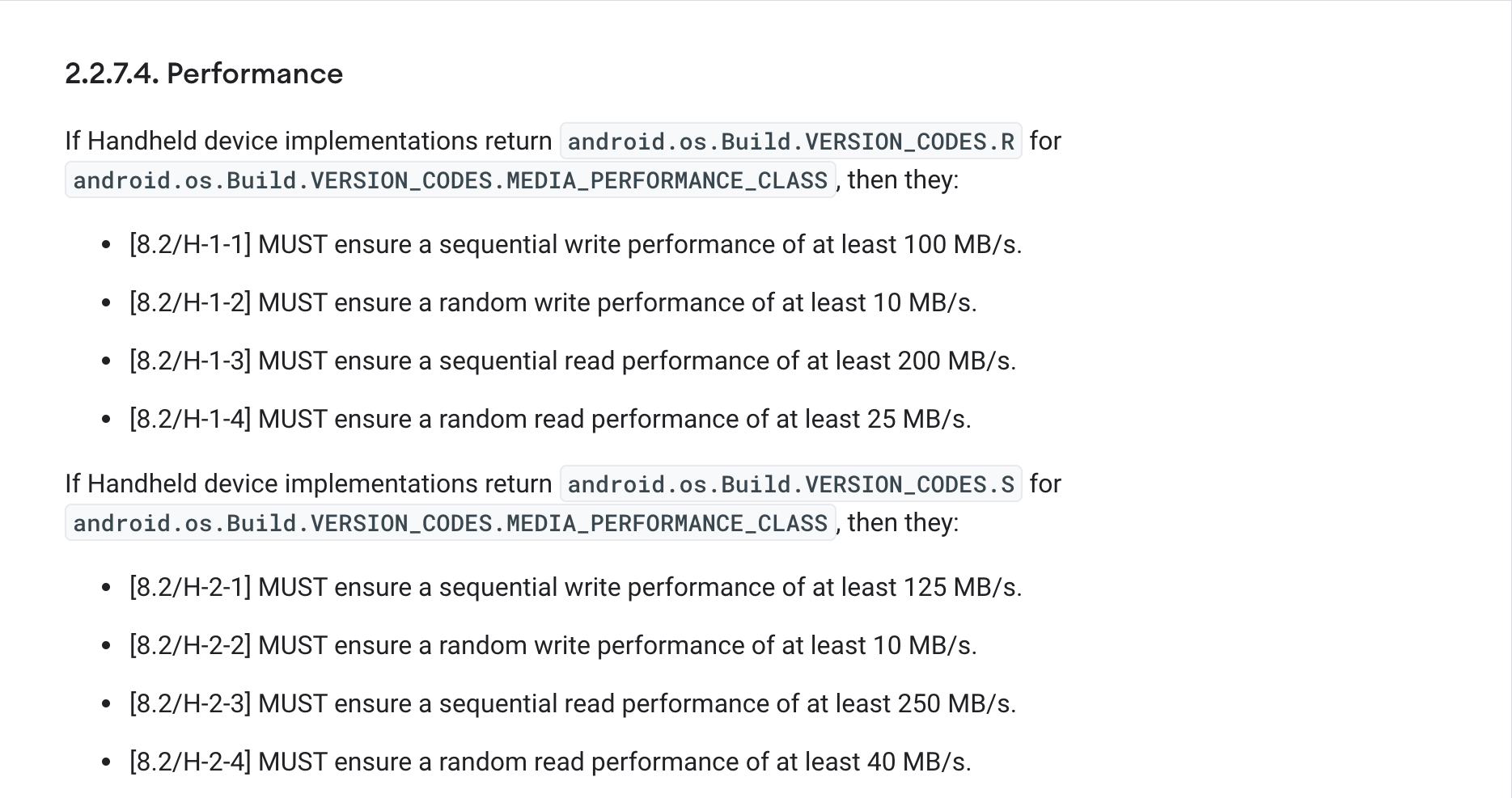
The Android 12 CDD says that Performance class 11 (R) and 12 (S) “must” at least have a 12MP rear camera that supports 4K at 30FPS video capture. The latter also requires a 5MP or higher front-facer (1080p at 30FPS), while the former needs at least 4MP. Both classes require a screen resolution of 1080p (with 400DPI) or greater and a minimum RAM requirement of 6GB. Sequential and random read/write are also specified:
Meanwhile, OEMs must display the microphone and camera indicators when those two components are being used by apps, including system ones. Under “Unicode and Font,” Google added that device makers:
MUST NOT remove or modify NotoColorEmoji.tff in the system image. (It is acceptable to add a new emoji font to override emoji in NotoColorEmoji.tff)
A “strong” recommendation has been added about making sure the touchable area of an under-display fingerprint sensor (UDFPS) does not interfere with 3-button navigation, which Google reminds that “some users might require for accessibility.”
The fact that we haven’t seen a stable Android 12 release means that at least Samsung has the opportunity to catch up to Google with their One UI 4.0 Beta 2 update.
Although it’s quite unlikely, we could have a situation where the first stable Android 12 update comes to a non-Pixel device. That would be a real shock, but given that Samsung is only pushing the second One UI 4.0 beta based upon Android 12, we’d be very surprised, to say the least.
Here’s everything notable in the latest Android 12-based update for Samsung Galaxy devices:
Color theme
A huge component of Android 12 on Pixel phones is now available as part of One UI 4.0 Beta 2 but with a few Samsung-ish tweaks in tow. “Color theme,” as Samsung has renamed it, is the Korean firm’s take on Dynamic Color and the “Monet” theming system seen on Pixel hardware.
From your homescreen, long-press in an empty space or pinch to zoom outwards and head to Wallpapers > Color theme. From this new panel you’ll be able to choose a three-color theme based upon your on-device wallpaper. You can leave it as the preset blue, white, and black setup or select one of up to four patterns determined by your device.
You’ll see a nice preview pane above showing just what colors will be adopted across your device too. The effect isn’t nearly as obvious as it is on Pixels, but it does work across almost all core One UI 4.0 system areas — including notification toggles and the lockscreen.
It’s worth noting that the change is very noticeable but not quite as extensive as you might expect. Instead, it’s more of an accent addition that tweaks some UI elements but doesn’t appear to work with any of Google’s recently updated and tuned first-party applications including Messages, Gmail and many more.
You’ll still see the Material You tweaks on those apps, but for now at least, most will just adhere to the stock or standard colors applied. Some apps are fully themed but will depend heavily upon which version you have installed or have updated. A fine example is the Google Podcasts app, which will adjust based upon your wallpaper-based “Color theme” accenting.
Because of the inherent changes to apps as a result of your system accent color, “Color theme” changes just how you’ll experience Android 12 on your Samsung Galaxy device. Google is pushing it hard for Pixel, and it was initially expected to be limited to Made by Google devices but the arrival here in One UI 4.0 Beta 2 is far earlier than expected.
RAM Plus
To explain, “RAM Plus” is a feature that uses a portion of your on-device storage to create “virtual RAM” that ups the limit on your Galaxy smartphone. For higher-end Samsung Galaxy smartphones in excess of 8-12GB of RAM, this probably isn’t even an issue, but for the low-end devices with hardware limits, this could be a real way to expand or improve general performance levels.
In One UI 4.0 Beta 2 you can’t actually disable “RAM Plus” as it’s simply enabled by default. You can see just how much space is being used by heading to Settings > Device care > Memory. Here you’ll be able to clear or free up RAM as well as see just how much “virtual memory” is being adopted where the system deems necessary.
We’re not sure if this will decrease or automatically disable if you lack the available space, but it appears to be capped at 4GB. It’s also worth noting that this isn’t the same as physically adding 4GB of RAM to your device, but it might help if heavy apps are taking up system resources or you want to play more demanding games and are happy to sacrifice other app performance levels. It’s worth noting that this has already been released to some mid-rangers from Samsung, including the Galaxy A52 and even the brand-new Z Fold 3, but joining the main One UI 4.0 build could expand it to all devices.
Enhanced video calling options and effects
When initiating a video call, you have more options at your fingertips as part of the “Video call effects” floating panel after updating to One UI 4.0 Beta 2. These include the ability to adjust background blur effects or add a color/image. Effectively, this simply mimics the kind of things you can already do in the various calling apps like Zoom, Google Meet, and others, but this works on any app that your Galaxy device detects as a video calling app.
Enhancing those controls is a new “Mic mode” option that lets you choose just what audio is picked up when making video calls. There’s a “Standard” mode that works just as you expect, a “Voice focus” option that attempts to cut out any annoying background noise but a neat option for group or family calls is an option labeled “All sound.” When making large group calls — something fairly normal since the start of the pandemic — this might help as it boosts the audio picked up in the vicinity of your phone.
Gallery metadata editing
It’s almost as if Samsung lifted the ability to edit and adjust the time and date metadata from images in the Gallery app right from Google Photos — although it’s simply a highly requested feature. Tapping the overflow menu and then selecting details opens up the metadata menu for any image within the Samsung Gallery app.
From here you’re able to edit everything from the photo name, the location it was taken, and even the time and date — complete with Dynamic Color supporting time and date picker. Not having to upload to Google Photos or use another third-party app is likely a massive added feature for many that use the default gallery app on their Galaxy devices.
Android 12 easter egg with Dynamic Color
Not necessarily a massive update but provided you are using “Color theme” on your device, the Android 12 easter egg will adhere to your preset theme — just like it does on Pixel smartphones running the Android 12 Beta. Is this is an important change? No, but it’s nice all the same.
Should I install One UI 4.0 Beta 2 on my Galaxy S21?
If you want to try this modest set of additional features alongside the previous — and more extensive add-ons — then you’ll need to sign up the One UI 4.0 Beta via the Samsung Members app. At this stage it has only rolled out in the US and UK, but more regions will get access to this Android 12 preview over the coming days.
However, at this stage, we’d suggest holding on a little longer. Although this update includes a number of bug fixes, performance can be quite unstable at times with texture pop-in and lag in certain apps when scrolling. Beta 3 will hopefully add a bit more stability.
It’s been a while since we’ve last seen a Mi Note phone. The Mi Note 3 came more than two years ago and received a lukewarm reception, so the Mi Note series was put on pause. Well, we can now consider that a reboot as the Mi Note 10 is official and it starts on a high note with a penta-camera setup that’s the host of the world’s first 108MP snapper!
The 108MP camera is the obvious highlight, but it’s not the only one. The Note 10 has two zoom snappers – one for 2x and another for 5x optical magnification. There is also a 20MP ultrawide camera with autofocus and a 2MP macro shooter. All kinds of hybrid zoom levels are available, as well as many video capturing modes.
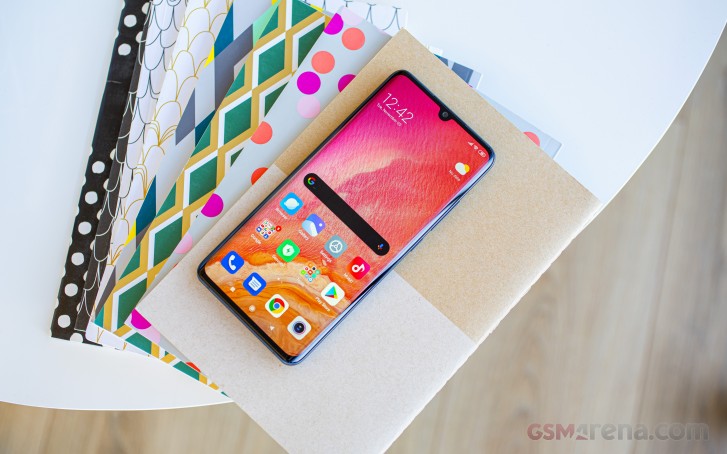
There is more to the Xiaomi Mi Note 10 than just the camera. The maker has refined its flagship design since the Mi 9, and now the Note 10 introduces a new 3D curved screen – a 6.47″ panel of extended 1080p resolution. The front curves mirror the rear ones, and the Mi Note 10 has one of the most symmetrical designs we’ve seen in a while.
The gaming-friendly Snapdragon 730G is in charge of everything that happens on the Mi Note 10. It’s not the fastest chip there is today, but it is one of the most current and its power is more than enough for the 1080p display.
The Mi Note 10 also impresses with a massive 5,260 mAh battery that’s capable of 30W fast charging. We expect nothing, but record-setting scores in our battery life test and here is hoping the Note 10 delivers.
Finally, Android 9-based MIUI 11 boots right off the bat on the Mi Note 10 – making it the first Xiaomi smartphone to have the new launcher installed by default.
Xiaomi Mi Note 10 specs
Body: Aluminum frame, Gorilla Glass 5 front and back;
Display: 6.47″ curved AMOLED, droplet notch, 2340 x 1080px resolution, 19.5:9 aspect ratio, 398ppi; HDR 10 and DCI-P3 compliant.
Penta rear camera: Main camera – 108MP, 1/1.33″ Quad-Bayer sensor with 0.8µm pixel size, 25mm f/1.7 lens (8P lens for the Mi Note 10 Pro), OIS, Laser AF; 2x zoom camera – 12MP, f/2.0, 1.4µm pixel size, dual-pixel AF; 5x zoom camera – 5M, f/2.0, saves 8MP; Ultra wide-angle cam – 20MP, 13mm f/2.2, 1.12µm pixel size; AF w/ closeup focusing Macro camera – 2MP, 1/5″, 1.75µm pixel size, f/2.4; AF, 1.5-10cm focusing distance.
Front camera: 32MP, 0.8µm pixel size, f/2.0; 1080p/30fps video recording;
Battery: 5,260mAh Li-Po; 30W fast charging, 0-100% in 65min.
Connectivity: Dual-SIM; LTE-A, 4-Band carrier aggregation, Cat.15/13 (800Mbps/150Mbps); USB-C; Wi-Fi a/b/g/n/ac; dual-band GPS; Bluetooth 5.0; FM radio, IR blaster.
Misc: Under-display fingerprint reader; single down-firing speaker; 3.5mm jack
It’s no secret that the Xiaomi Mi Note 10 is identical to the Xiaomi Mi CC9, which was unveiled yesterday for the Chinese market. The specs are the same except that the Note 10 doesn’t get the 8GB/256GB tier that the Mi CC9 has.
Both phones have their 3.5mm audio jacks, IR blasters, and even an FM radio.
Sure there are some holes in their specs sheets – they lack any increased water resistance or a MicroSD slot, or wireless charging, or even stereo speakers. But some of us can live without those if it means you can get the impressive set of cameras on the back for a bargain price.
We are eager to test the 108MP camera, but before we go all-in with photo and video samples, we should probably unbox this Note.
Unboxing the Xiaomi Mi Note 10
The Mi Note 10 bundle is pretty straightforward – the contents are the same as you’d get with any Xiaomi. Inside the black box, you’ll find a charger, a USB-C cable, and a black silicone case.
Xiaomi is shipping the Mi Note 10 with a proper 30W charger so that you can enjoy the fast charging right out of the box. And you are going to need it as that 5,260 mAh battery will take forever to recharge with an inferior adapter.
Wrap-up
The Xiaomi Mi Note 10 is a unique smartphone. First – its penta-camera is something you don’t see every day – a 108MP sensor is a first, and it seems to be taking great high-res 27MP photos, both day and night. The other four snappers are quite good, too, making for one of the most skilled and versatile camera kits on a smartphone ever.
Then the Note 10 shines with excellent symmetry in design and its build is nothing less than flagship-worthy. The curves don’t get in the way at all, it has very good palm rejection, while the sandblasted frame helps for a secure grip.
Finally, the Snapdragon 730G chip may not be the best chipset around, but it is among the better ones and it does great in combination with the 1080p AMOLED screen.
We only have two issues with the Mi Note 10 – the trickery it uses to get to 5x magnification and the lower than expected battery life. We can understand why Xiaomi made 5x zoom the way it made it, but we can’t find logic in upscaling the 5MP image to 8MP, especially when the maker is advertising the 5x zoom camera as 5MP. At least we are hopeful for the battery life as MIUI 11 would get better with updates and so will the battery performance.
The competition
The Xiaomi Mi Note 10 costs about €550 at launch, which makes it a great offer already. But the so-called flagship killer segment is quite crowded, and there are other phones worthy of serious consideration.
The Xiaomi Mi Note 10 Pro costs €100 more and it offers an upgrade in RAM and storage. You get 8GB/256GB and the main camera has a 8P lens design compared to the 7P on the vanilla Note 10. P stands for the pieces the lens is made of but honestly, we don’t think the difference in photo quality will be palpable. So in end, we can’t really recommend the Note 10 Pro over the Note 10 unless you really want to splurge on absolutely top tier of the device.
Xiaomi already has the Mi 9T Pro, which is at least €150 cheaper than the Note 10. It has a notch-free flat AMOLED screen, a faster Snapdragon 855, but lacks the 5x zoom and macro snappers. Sure, it doesn’t have a 108MP camera either, but its photos are excellent nevertheless.
The OnePlus 7T Pro is about €200 more expensive, but if uninterrupted AMOLED experience at 90Hz is what you are after – you get it with the 7T. It may lack a macro camera, but its tele offers 3x zoom, which should be more than enough.
Realme’s X2 Pro, where available, is much cheaper than the Mi Note 10, but it has a lot to offer. There is a large 6.5″ AMOLED screen with 90Hz refresh rate, the most current Snapdragon 855+ chip is inside, while its battery supports 50W charging. The X2 Pro has a 64MP primary snapper, a 13MP 2x telephoto, an 8MP ultrawide and a 2 MP depth sensor – not exactly a match for the Mi Note 10 setup, but still an excellent configuration.
Finally, the price of the Samsung Galaxy S10 keeps dropping, and it is now about €50 more expensive than the Mi Note 10. The holiday season is almost here, and we expect to see the S10 trio on sweet discounts, and we’d suggest the S10 as a more compact offer, with a better display, faster performance, and high-quality triple camera on the back.
If you are after the camera experience, there is probably no better-equipped smartphone than the Mi Note 10 – it has a camera for every situation. Sure, the camera experience could use a bit more work via future updates, but even in this stage – it’s certainly the phone’s highlight feature.
The Mi Note 10 is not the best smartphone on the market, but with a stunning design, powerful hardware, and an unmatched set of cameras – it is certainly a great package worth recommending.
Pros
Bright and large AMOLED screen, DCI-P3 accurate
Large battery and very fast charging
The Snapdragon 730G is gaming-friendly and runs cool
All camera produce excellent daylight photos
Comes with the latest MIUI 11 out of the box
3.5mm jack, FM radio, IR blaster
Cons
No rated water resistance
Snapdragon 855 would have been better
Low-light photos by the zoom cameras and the ultra-wide one are nothing special
Video recording quality is not impressive with any of the cameras
Another year, another ROG Phone. Asus has relentlessly been keeping up its efforts to deliver “The ultimate smartphone gaming experience” for four years now. With great success, we might we add.
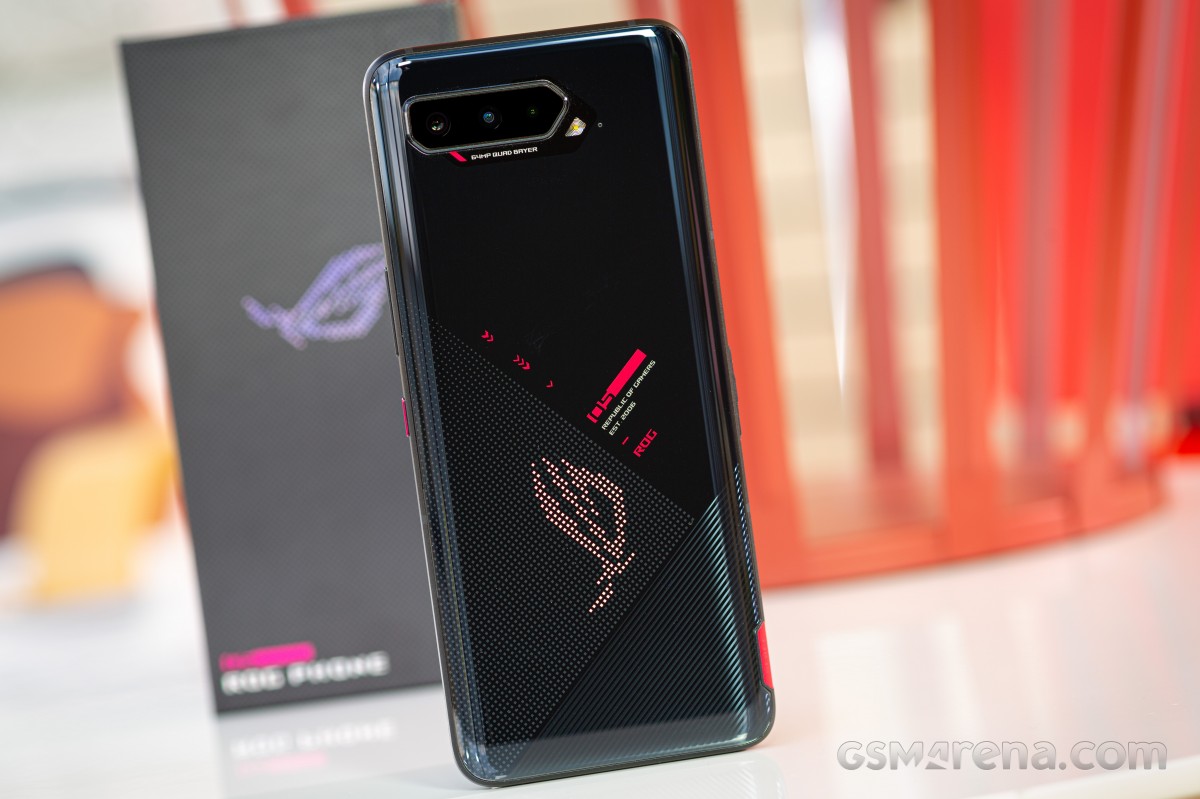
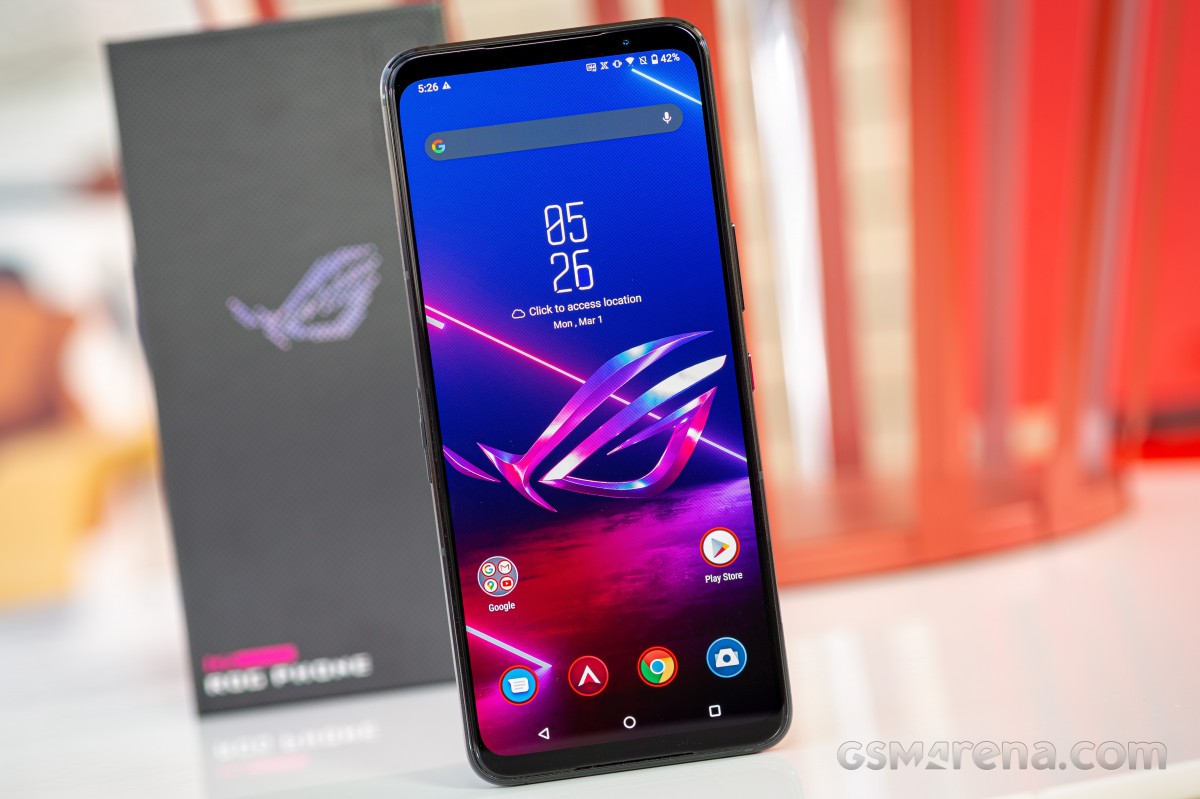
This time around, we have the shiny new ROG Phone 5 to get acquainted with. A Republic of Gamers product through and through, but one that does things a bit differently than its predecessors in some regards, while staying true to form in many others. There’s plenty to discuss, so without further ado, we’ll just jump straight into it.
First things first. Yes, it’s the ROG Phone 5 instead of 4. Don’t worry about it; you haven’t accidentally skipped an iteration along the way. The explanation is actually simple and one that we have encountered before with Chinese and Taiwanese naming conventions. The number ‘four’ in Chinese just happens to sound similar to their word for death, so naming products after this number is considered unlucky and is avoided.
That’s ironically, probably the least intriguing bit about the ROG Phone 5, though. Let’s start with the fact that the ROG Phone 5 is more of a family of devices than a single model.
Asus ROG Phone 5 specs at a glance:
Body: 172.8×77.3×10.3mm, 238g; metal body; RGB light panel (on the back), Pressure sensitive zones (Gaming triggers).
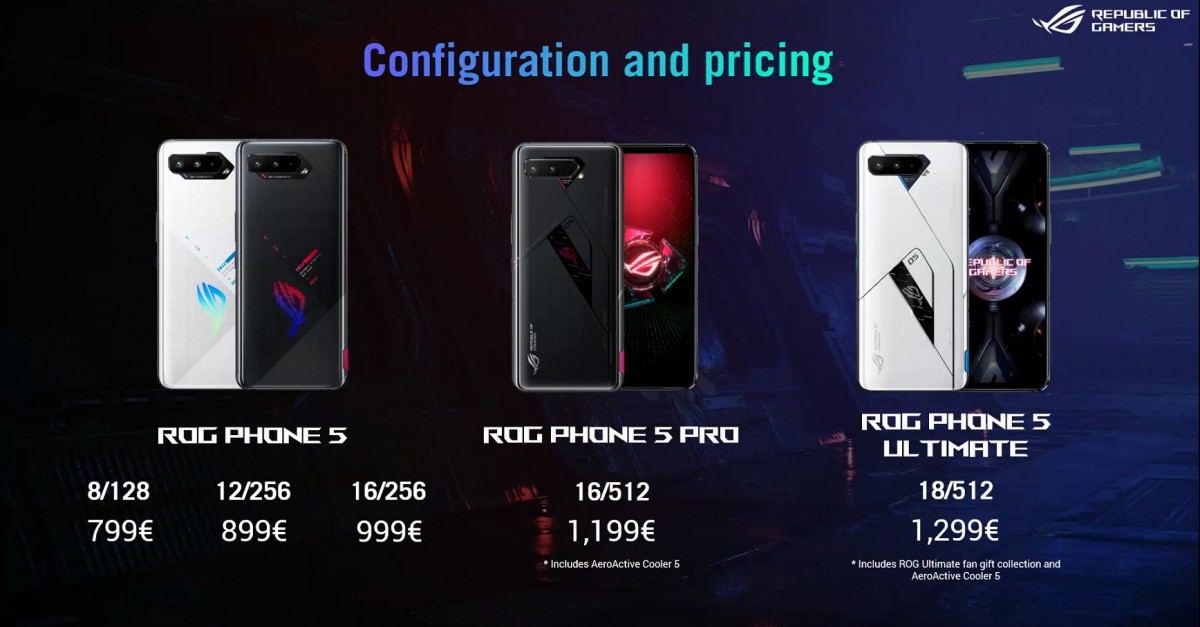
There are anywhere between two to five distinct versions available, depending on how you count them. The vanilla ROG Phone 5 has an A, B and C variant, denoting their differences in available bands and network connectivity, as well as memory variants. Starting from variant “C”, the base configuration is an 8GB/128GB one with a 12GB/256GB tier also available. Variant “B” adds a third option to the list – 16GB/256GB. Variant “A” is not available in the base 8GB/128GB tier, but can be had in both 12GB/256GB and 16GB/256GB configs.
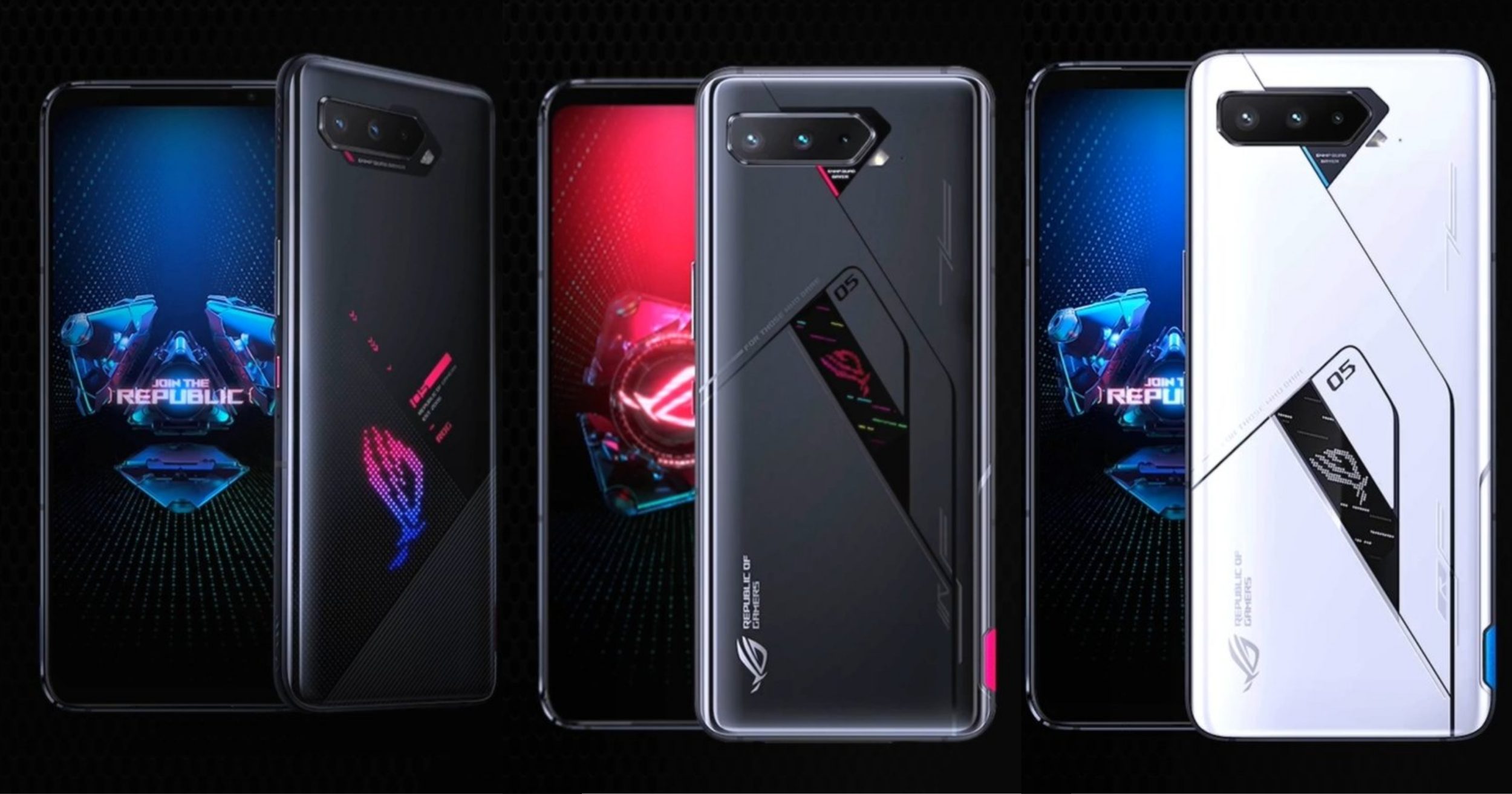
Granted, clearly, some of these variants are meant for different markets. Still, that’s already plenty confusing in our mind, but things extend past the vanilla ROG Phone 5 this year. And we’re not talking about a “Strix” variant, like in previous generations, which might still be a thing. Instead, this year Asus has an ROG Phone 5 Pro, as well as and ROG Phone 5 Ultimate.
The Pro variant has 16GB of RAM and 512GB of storage, while Ultimate ups the RAM to a whopping 18GB of capacity. The Ultimate edition is expected to be an extremely limited offering.
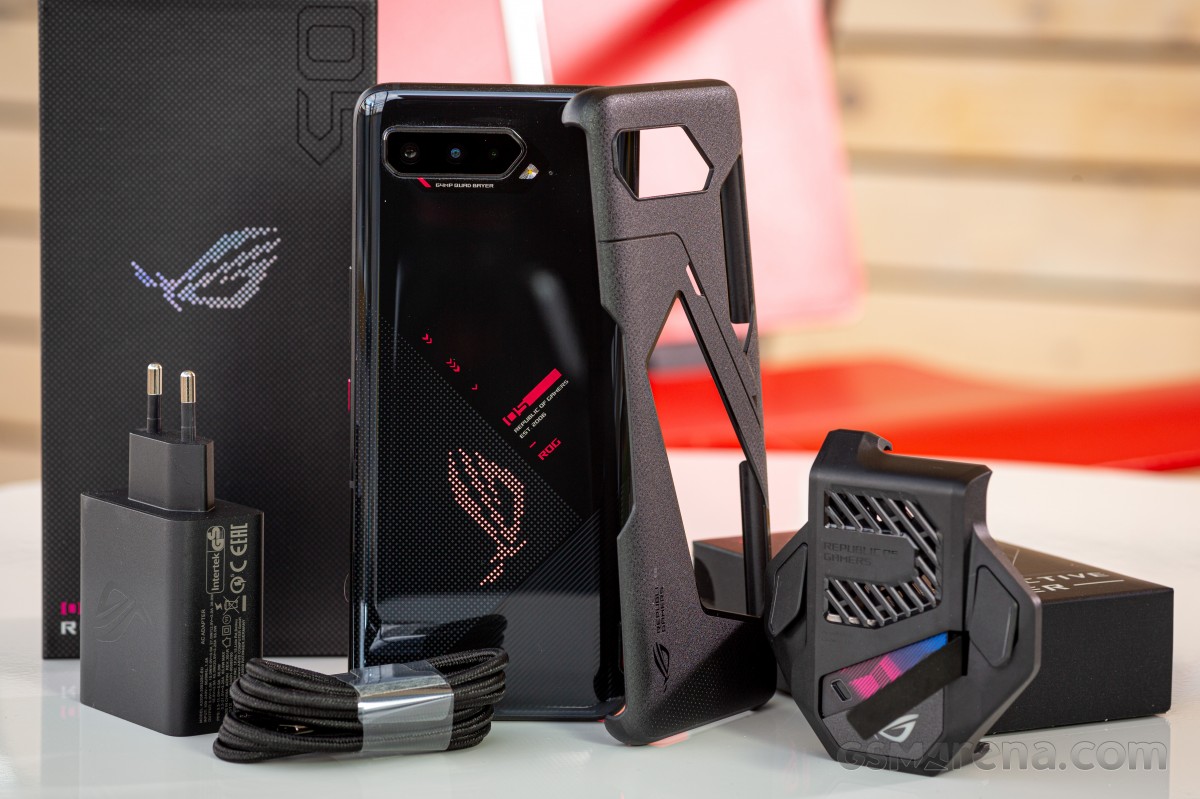
There are some physical differences compared to the Pro/Ultimate. Both of these have PMOLED ROG Vision displays on the back, instead of the ROG RGB logo, as well as a pair of extra touch inputs. There are some exclusive colors and finishes – Glossy Black on the Pro and Matte While, with a satin matte finish on the Ultimate. You also need to buy either the Pro or the Ultimate to get the Asus Aeroactive Cooler 5 snap-on active cooling accessory in the box. And if you go Ultimate, you will also get an exclusive gift bag of ROG “swag” beyond that.
This particular review and all of the testing and benchmarking was done on a regular ROG Phone 5 unit with 16GB of RAM and 256GB of storage.
This variant situation is undoubtedly a bit confusing. Still, there are different ways of looking at it from a more positive angle, namely that of extra choice for the end-user and Asus trying to cast a wider net this time around in hopes of appealing to as many prospective buyers as possible.
On the flip side of this argument, there are definitely some questionable decisions with the ROG Phone 5 as well, that could be passed-off as simplification or diversification measures, but are actually kind of downgrades or “side-grades” at best. Notable examples include the rather odd fact that after two consecutive years of deliberately preserving the same footprint with ROG Phones and compatibility with the growing ROG accessory ecosystem, the chain is officially broken with the ROG Phone 5. It is slightly taller than its predecessors and leaves behind support for such killer gadgets as the Desktop Dock and the TwinView Dock.
Also, the Aeroactive Cooler is not bundled with every unit for the first time ever. And in a more general sense, while still clearly on top of its game, the ROG Phone 5 is arguably a bit “lighter” in the innovation department compared to its predecessors.
We’ll definitely dig more into these “interesting choices” surrounding the ROG Phone 5 in the following pages.
Unboxing
A great place to start seems to be the retail box itself and its contents. Getting a new ROG Phone package has always been a bit of an experience in itself. Doubly so for us, since Asus used to send actual briefcases chuck-full of accessories our way. With last year’s ROG Phone 3, the packaging started getting a bit tamer, sort of synergistically so with the design of the phone itself, which was justifiable and rather sensible.
The ROG Phone 5 takes things to the next level in more ways than one. The box we got was just a regular rectangle. A fancy one, for sure, complete with some art, but it only took us a split second to open the magnetic flap and get to the unit. No alien tetrahedranes, pyramids sliding into each other, hidden compartments, and magic augmented reality symbols. Joking aside, we appreciate the extra sensibility in an otherwise costly package that will ultimately end up in a closet somewhere.
We are a lot less appreciative of the omission of the ROG Aeroactive Cooler 5, though. Every other ROG Phone in the past used to have its corresponding Aeroactive cooler bundled. You can definitely choose whether to see this as a convenient way to save less-demanding users some money or an otherwise manufacturer-beneficial cost-saving measure. It’s up to you. Plus, you do still get one if you go for the Pro or Ultimate variant of the ROG Phone 5. Probably the former, since the latter will be extremely limited in availability.
We didn’t get any spare plastic plugs for the ROG Side connector this time around, which is not a major deal, but is still worth mentioning. On the plus side, Asus still throws in its highly-specific Aero case in black or white, to match your unit’s color. It has a particular shape mostly mandated by the need to be compatible with the Aeroactive Cooler 5, to allow for the ROG logo to be visible, while still providing at least some protection. At least the corners are covered.
For charging you still get a very versatile HyperCharger unit from Asus. It is a 65W brick that uses Asus HyperCharge technology, based on Power Delivery 3.0 + PPS at 3.3V to 21V and 3A of current. This means that you only need a decent USB 2.0 or 3.0 Type-C to Type-C cable rated at the base 3A to take full advantage of the charger. Asus provides a nice braided one in the box.
The ROG Phone 5 actually has two separate 3,000 mAh cells, with MMT tech and double-wired split design, which works in conjunction with the HyperCharge tech to allow the 65W charging speed – a clear upgrade over the ROG Phone 3, while also generating less heat. More on that later.
One interesting side note is that the 65W charger also supports Quick Charge 5.0, making it surprisingly versatile to just have on hand for all sorts of charging needs. Plus, it’s compact, especially for a non-GaN unit.
Alternatives
Even if you don’t appreciate certain aspects of devices Asus brings into the smartphone realm, there is no denying that the Taiwanese giant basically spearheaded the modern gaming smartphone niche with the ROG Phone line. It was a major gamble, a bold move and the space is still marked by plenty of uncertainty and soul-searching. That’s the beauty of big bold steps, though, that they spark innovation, and, today, four years later, Asus is not alone in the gaming smartphone space.
Sure, releases are still sporadic and experimental, more than anything else, but there is competition to point out. ZTE-owned Nubia instantly comes to mind, especially with the very recent announcement of the nubia Red Magic 6 and 6 Pro. Just like the ROG Phone 5, these are based on the flagship Snapdragon 888 chipset and even feature active fan cooling. Only theirs is an actual part of the internal design of the phones, as opposed to a snap-on accessory. Another spotlight feature of the Red Magic 6 pair, in particular, is the 165Hz refresh rate and 400Hz touch sampling rate on their 6.8-inch AMOLED displays. Both industry-leading figures, though we are not exactly sure how actual input chain latency sizes-up against Asus‘ bold claims of delivering the lowest input times in the industry with the ROG Phone 5.
Xiaomi has its Black Shark line, which unfortunately hasn’t been updated since the Black Shark 3S, back in August last year. With a regular Snapdragon 865 (non-plus) under the hood, it’s no longer going to be a benchmark chart-topper. Still, a potent device styled in proper gaming attire. You might want to wait a bit for the upcoming Black Shark 4 family, though.
No gaming smartphone list would be complete without Lenovo’s relatively recent entry into the scene with the Legion line. The last refresh there is the Legion Duel – a solid hardware proposition all-around, with its 144Hz AMOLED display and Snapdragon 865+ chipset. Not unlike Xiaomi, though, a new Legion, allegedly called the Legion 2 Pro is right around the corner and if rumors are to be believed, will have some sort of dual turbo cooling system to boot.
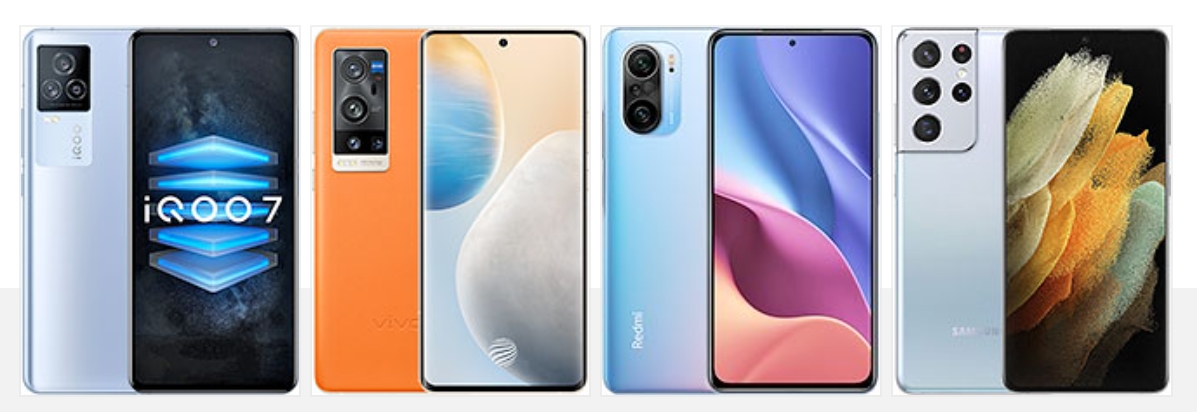
If you are not particularly partial to the gamer aesthetic or don’t really think your gaming performance would benefit all that much from any specific game optimizations, features and tweaks on a hardware or software level, there are plenty of excellent “ordinary” flagship devices to consider and still get excellent flagship performance. Vivo, for one, has you covered with the iQOO 7, which still holds the AnTuTu score record. And just a few points behind – the vivo X60 Pro+. Both are based on the Snapdragon 888 and with fast 120Hz OLED displays. The latter shining a bit brighter in the camera department.
Coincidentally, or rather not so much, we also find the excellent and very popular Xiaomi Redmi K40 Pro also on the same AnTuTu list. To be clear, we are not advising anyone to choose a device simply based on one peak performance score number. However, it is a convenient data point to consider when looking for the best performance around. Plus, with its 120Hz AMOLED panel, the K40 Pro is more than just raw muscle and has the requirements to deliver an excellent gaming experience, as well.
Speaking of an excellent gaming experience, as part of an equally-good overall phone one, why not consider one of Samsung’s Galaxy S21 phones? Ideally, one with the Snapdragon 888, instead of the Exynos 2100, in the particular context of sustained performance and thermal-throttling, which you can read more about in our in-depth comparative exploration of the two chips. Beyond that, it is worth noting that Samsung has a surprisingly competent and in-depth Game Launcher, complete with graphics and resolution tweaks, among other things.
The verdict
Nobody does smartphone gaming quite like Asus. Four iterations into the ROG Phone line, that remains a fact. The ROG Phone 5 is a true powerhouse in every sense of the word – a phone that is specifically crafted to deliver the best possible gaming experience, with any other concern or consideration taking a back seat. It just so happens that when you make an excellent gaming flagship, you usually end up with an excellent all-around device in general that has plenty of appeal outside gaming.
That has generally been our conclusion for every ROG Phone in the past, and we stand by it for the ROG Phone 5, as well. However, the ROG Phone 5 is probably the least impressive new generation we’ve seen in the ROG family.
On a hardware level, it constitutes a small upgrade over the ROG Phone 3. There are no new major spotlight features, no pushing the envelope in terms of display tech or additional controls and inputs. It’s more a case of Asus refining most aspects of the ROG Phone 3 further, but also, unfortunately, changing some odd things around. We can’t say we particularly like the new design for the side connector. It is hard to operate and fragile. Plus, it breaks compatibility with the excellent Mobile Desktop Dock. The simpler design for the AeroActive Cooler 5 also has its issues, and for the first time ever, it is not included with every unit.
Then there is the slightly taller body, likely related to the return of the 3.5mm audio jack and the newly-symmetrical exquisite speaker system, which we very-much appreciate, as well as the new split battery design, which is more of a polarizing topic, looking at the battery numbers. We don’t really mind the growth spurt, as such, but wish that it didn’t come at the expense of even more lost compatibility with the excellent ROG Phone accessory ecosystem, like the TwinView Dock.
Perhaps Asus is amidst some business “reorientation” here. Shifting focus away from end users and extravagant accessories to capture headlines and laser-focusing on delivering pro tools for the e-sports contestants and organizers exclusively. It seems to be too early to tell. Overall, we feel like the ROG Phone 5 is a truly excellent phone, still on a level of its own when it comes to mobile gaming profess, but one unfortunately experiencing some “changes” this year that managed to rub us the wrong way.
Pros
Even more toned-down, but still ROG-inspired gamer’s design with great build quality.
AirTigger 5 ultrasonic touch sensors are very precise and versatile. Motion controls are extended and greatly improved from last gen
Industry-leading stereo speaker performance, complete with gaming-specific sound tweaks
Superb AMOLED screen, 144Hz refresh rate.
Great battery life, even at full 144Hz. Rich battery health prolonging options. Very fast charging (65W charger bundled).
Fastest-available Snapdragon 888 chipset with an amazing thermal management.
Great Android implementation, an unparalleled number of game tweaks, control-mapping and performance options
Solid daylight photos, as well as low-light images. Impressive selfie quality
Very good video quality, impressive EIS
Cons
No longer backwards compatible with most ROG Phone II or 3 accessories. Available accessory ecosystem is significantly smaller than on previous models
AeroActive Cooler 5 not included with the vanilla model. The new design for both the cooler and its connector are hard to align and prone to damage
No water or dust resistance
No microSD
Rather basic camera setup, compared to typical 2021 flagships
Security updates are designed to keep Android devices as secure as possible, but you’re only as safe as your latest update. OnePlus does promise regular updates for its smartphones for at least two years, so let’s see how they’re handling the September 2021 security update.
OnePlus September 2021 security update — What’s new?
Google released the September security patch way back on September 7, but as is often the case nowadays, market leader Samsung started to see the update almost a week before it “officially” arrived on Android with the Pixel rollout. As a part of this month’s patch, Google issued a few key fixes, mostly of moderate severity — as is often the case.
Rightly criticized for update consistency, OnePlus started rolling out the September patch 11 days after Google, but a whopping 18 days after Samsung started updating almost all of its core device lineup. It’s worth noting that this is a bit of an improvement over the August patch update schedule, but it still feels as though OnePlus is letting things slip after a rally earlier in the year. While it’s very close to October, we’re still seeing a rollout to select devices.
Those devices that have already started to see the latest update have also been on the receiving end of a few new features. As is often the case, there’s no discernable pattern to the company’s additions. We’ve said for some time that the overreliance on the Open Beta path is something that OnePlus has to move away from. It’s worth noting that the OxygenOS Open Beta has ended for a few devices over the past few weeks ahead of Android 12 coming soon.
On OnePlus 9 and OnePlus 9 Pro, the September patch not only includes a number of common bug fixes including stability and device performance, but it also adds a brand-new XPan camera mode that was made famous by Hasselblad cameras. It’s unclear if this feature will ever come to other non-Hasselblad-certified devices from the firm, but it’s a neat new option for those with 2021’s flagship devices.
OnePlus devices with the September 2021 update
OnePlus 9 Series
OnePlus confirmed that we are unlikely to see a 9T model this year. This means that until the OnePlus 10 arrives, the 9 series will be more prominent — and hopefully gain greater software support. As the flagship series, the OnePlus 9 and 9 Pro were the first from the Chinese OEM to gain access to the September 2021 security patch.
This has arrived in a couple of flavors. Firstly, it is available as part of the OxygenOS 11.2.9.9 update. As we have mentioned, this includes a number of substantial camera tweaks and the new XPan camera mode. For those happy to run what amounts to pre-release software, the recent Android 12 Developer Preview 2 for the OnePlus 9 and 9 Pro also comes with the latest September 2021 security patch. However, it isn’t mentioned in the changelog, but we can confirm that it is included as part of this update.
Although an India exclusive device, the OnePlus 9R is also able to grab the latest security patch with OxygenOS 11.2.5.5. This patch includes a number of tweaks and fixes for some problems many owners saw with app crashes, and even problems with Warp Charge not activated correctly.
OnePlus 6 Series
Now approaching four years old, the oldest OnePlus devices in the entire lineup still receiving support now have access to the September 2021 security patch. It’s hard to be massively critical of OnePlus for this particularly update, especially as many other devices from a similar time period — save some Samsung flagships — have ceased being supported.
The OxygenOS 11.1.1.1 patch does not bring any new features, but does add some important software fixes and tuning to ensure your device runs smoothly. Plus on top of that, you have the September patch to protect your OnePlus 6 series handset.
Devices still awaiting the September patch
While we’re seeing a relatively small pool of devices get the latest patch, a larger selection of the OnePlus hardware lineup is now running the outdated August 2021 security patch. We’re not entirely sure if or when we could see the devices updated, but we are hoping that they are patched soon.
OnePlus 8 series
OnePlus 8
OnePlus 8 Pro
OnePlus 8T
OnePlus 7 series
OnePlus 7
OnePlus 7 Pro
OnePlus 7T
OnePlus 7T Pro
OnePlus Nord series
OnePlus Nord
OnePlus Nord CE
OnePlus Nord N100
OnePlus Nord N10 5G
OnePlus Nord 2
How can I get the September 2021 security patch on my OnePlus device?
OnePlus has a habit of rolling out updates for devices in a staged manner. That means that the initial release and subsequent confirmation on the OnePlus Forums doesn’t always indicate when you’ll be able to grab an OTA file and get your device updated/patched.
Our advice is to use a third-party application to get updates in a timely manner. The community-run Oxygen Updater allows you to sideload official update .zip files as soon as they are available publicly. While this will ensure you get updates right away, if you encounter problems, you may need to revert to an older build. This may require a device reset if problems are major.