Apple on Wednesday began rolling out the second betas of iOS 17.3, macOS Sonoma 14.3 and other software updates to developers. The first betas of these versions were released on December 14, before the holiday break. The company is now resuming the beta program – and we’re about to find out what’s new in today’s updates.
iOS 17.3 beta brings Secure Device Protection and more
iOS 17.3 is a major update. The first beta introduced Secure Device Protection, which is an “additional layer of security” that protects users’ data in case someone steals their phone and gets their password. When Secure Device Protection is enabled, you can only access saved passwords using Face ID or Touch ID, for example.
This feature also makes it harder for crooks to change the Apple ID password of the owner of that device. There’s also a delay in removing Find My from an iPhone with Secure Device Protection enabled. In addition to this feature, iOS 17.3 also re-enables collaborative Apple Music playlists, now with emoji reactions.
Today’s build number is 21D5036c, compared to the number 21D5026f of the first build. Developers can update their devices by going to Settings > General > Software Update.
It’s worth noting that although iPadOS 17.3 is also available for iPads, Secure Device Protection is an exclusive feature for iPhones at this point.
macOS 14.3 and more
In addition to iOS 17.3 beta 2, the second betas of macOS 14.3, watchOS 10.3, and tvOS 17.3 are now available to developers. The first beta of these updates had no significant changes apart from potential bug fixes.
Apple is continuing its annual tradition of donating a portion of all Apple Pay sales during the holiday shopping season to The Global Fund. This is an extension of Apple’s ongoing partnership with (RED), which has raised more than a quarter of a billion dollars so far.
Apple always donates a portion of proceeds from every (PRODUCT)RED purchase to the Global Fund. This includes purchases from (PRODUCT)RED iPhones, cases, Apple Watch bands, and more.
This limited-time promotion expands the donation eligibility to include every purchase made with Apple Pay on Apple’s website, in the Apple Store app, and at Apple Stores.
“From November 28 through December 8, Apple is donating $1 to the Global Fund for every purchase made with Apple Pay on apple.com, in the Apple Store app, or at an Apple Store,” Apple says on its website.
“Donations are limited to a maximum of one million dollars ($1,000,000). The donation goes to the Global Fund to fight AIDS and help fund critical health programs that save lives,” it continues.
You can learn more about Apple’s partnership with (RED) on the company’s website.
Apple’s support for World AIDS Day 2023 includes in-app purchases
Apple’s annual support for World AIDS Day this year includes donating all proceeds from in-app purchases in three popular games.
Apple is also suggesting the (PRODUCT)RED Apple Watch Series 9 and Sport Band combo as a holiday gift …
Apple has supported the (RED) Global Fund since 2006, with Apple’s contribution helping to fund HIV/AIDS programs in sub-Saharan Africa.
Over the last 17 years, Apple customers have helped raise more than a quarter of a billion dollars, giving millions of people access to lifesaving antiretroviral treatment and HIV testing, and helping HIV-positive mothers prevent passing the virus on to their babies.
Apple is supporting the fund in three ways. First by promoting (PRODUCT)RED versions of a range of products.
Apple Watch Series 9, iPhone 14, iPhone 14 Plus, iPhone 13, and iPhone SE, and accessories, including the Silicone Case with MagSafe for the entire iPhone 14 and iPhone 13 lineups.
A portion of the sale price on all these goes to the Global Fund. Apple is highlighting the special edition Apple Watch S9 as a potential gift choice.
The world’s most popular watch is available in a (PRODUCT)RED aluminum case with a (PRODUCT)RED Sport Band. Powered by the new S9 SiP, Apple Watch Series 9 is packed with the most advanced health, fitness, and safety capabilities in Apple Watch to date, plus a magical new double tap gesture and Precision Finding for iPhone.
New Palette and Solar Analog watch faces will also be available in red, joining Metropolitan, World Time, Numerals Mono, Gradient, Stripes, and Typograph in a collection of specially customized watch faces celebrating World AIDS Day.
Second, with a one dollar donation on any purchase made this week.
Now through December 8, Apple will donate $1 for every purchase made using Apple Pay on apple.com, through the Apple Store app, or at an Apple Store location. Customers can buy any Apple product or accessory and help save lives.
Third, special in-app purchases for three popular games.
Beginning today through December 4, the App Store will donate all proceeds from select, exclusive in-app purchases for three amazing games — MONOPOLY GO!, Gardenscapes, and EA Sports FC Mobile — to the Global Fund, including playful avatars, cool shields, and star soccer players.
As usual, the company will also be highlighting World AIDS Day in Apple Stores, likely including turning the logo red.
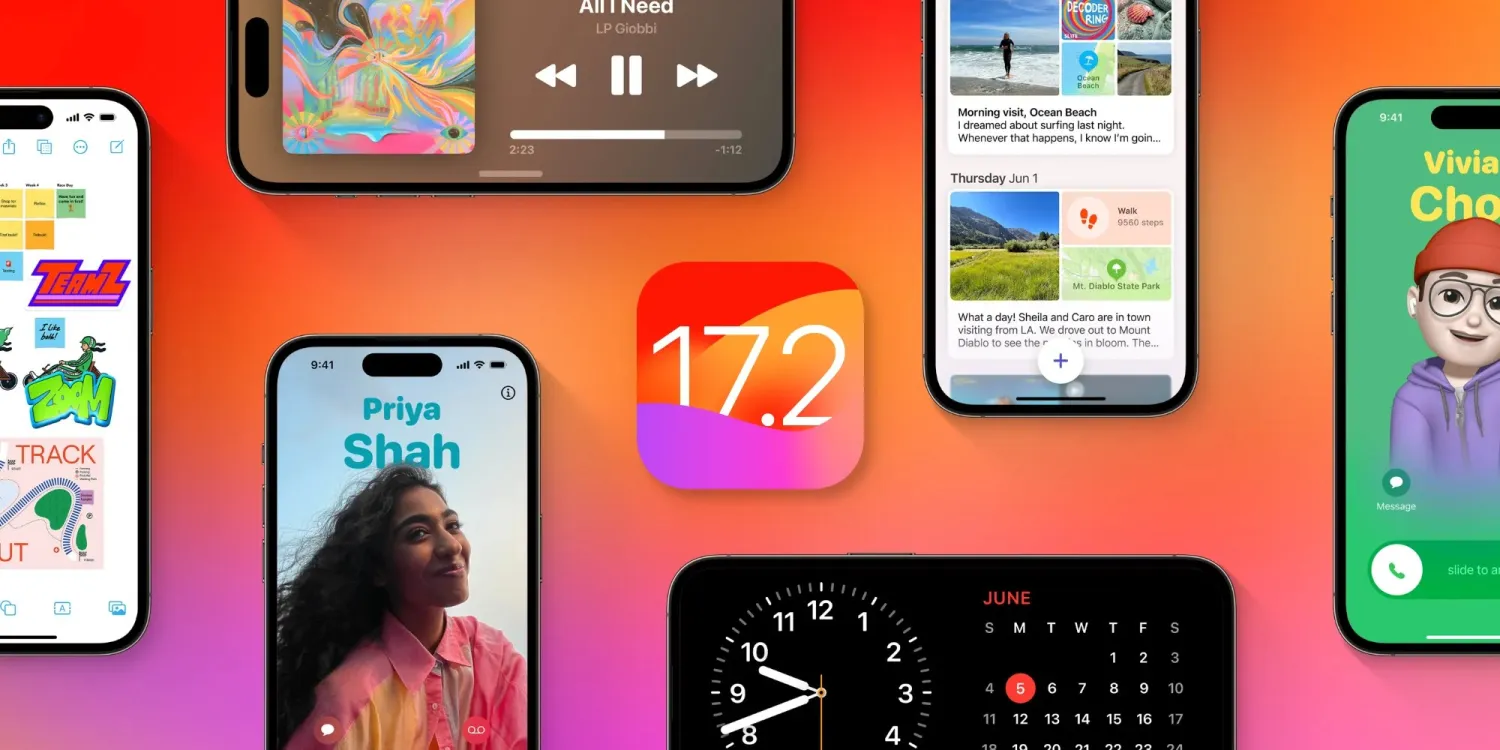
After the release of iOS 17.1 in October, Apple is hard at work on iOS 17.2 with a collection of new features and changes. iOS 17.2 is currently in beta testing with developers and public beta users. Here’s everything new so far.
When will iOS 17.2 be released?
Thus far, Apple has released four betas of iOS 17.2. This leads us to believe that the update will be released to the public sometime within the next several weeks. The update will almost certainly be released before the end of 2023.
Last year, iOS 16.2 was released on December 13 with major new features like Apple Music Sing and the all-new Freeform app.
What’s new in iOS 17.2?
Journal app
The headlining change in iOS 17.2 is the addition of the new Journal app, which Apple first unveiled at WWDC in June. Apple describes the new Journal app as an “all-new way to appreciate life’s moments and preserve your memories.”
At launch, the Journal app is only available on iPhones. There’s no word on when or if Apple plans to expand it to the iPad and Mac.
Collaborative playlists in Apple Music (maybe?)
The first three betas of iOS 17.2 included the ability to create collaborative playlists in Apple Music. This feature was announced by Apple at WWDC in June and teased as coming sometime later this year.
iOS 17.2 beta 4, however, removes the ability to create collaborative Apple Music playlists. Whether or not Apple adds the feature back before iOS 17.2 is released to everyone remains to be seen.
More changes to Apple Music
Also in iOS 17.2, there is a new default playlist called “Favorite Songs” that is automatically generated based on songs you’ve “favorited.” This builds upon the “Favorites” feature that was first introduced in iOS 17.1.
iOS 17.2 can now automatically add songs to your music library when you favorite them. You can find this option by going to the Settings app and then choosing “Music.”
Finally, iOS 17.2 adds the ability to disable Apple Music Listening History when a Focus Mode is on. “Choose if music played will influence recommendations and mixes, appear in Recently Played, or be shown to others on Apple Music,” Apple explains.
This means that when you have a particular Focus mode enabled, you can toggle on the Apple Music Focus Filter to prevent any songs played from affecting your listening data.
Spatial Video recording
With iOS 17.2, iPhone 15 Pro and iPhone 15 Pro Max users can record spatial video for Vision Pro. You can enable the new spatial video toggle by going to the Settings app, choosing the Camera menu, then choosing Formats and toggling the “Spatial Video for Apple Vision Pro” option.
Spatial video is recorded in 1080p resolution at 30 frames per second. Apple estimates that one minute of spatial video takes up around 130MB of storage space.
iOS 17.2 beta 2 enables Vision Pro spatial video capture on iPhone 15 Pro
Apple has allowed some press to view their own spatial videos in Vision Pro, Final Cut gaining editing ability next year
Default notification sounds
At long last, iOS 17.2 adds the ability to change the default notification sound. This comes after iOS 17 changed the default notification sound from “Tri-tone” to “Rebound,” which has proven to be a controversial decision.
In iOS 17.2, you can go to the Settings app and choose “Sounds & Haptics” to find a new “Default Alerts” option. Here, you can change the default sound and haptic feedback for alerts.
Reactions in Messages
Another feature coming with iOS 17.2 is the ability to react to messages using any sticker or emoji in the Messages app. This is done by long-pressing on a message and choosing the new “Add Sticker” option.
Action Button adds “Translate” option
With iOS 17.2, iPhone 15 Pro users can assign their Action button to a new “Translate” option. With this enabled, pressing the Action button initiates an automatic voice-to-text translation between two languages.
Although this capability was first introduced during the announcement of the iPhone 15 Pro in September, it wasn’t added until iOS 17.2.
New widgets
Apple has added three new widgets for the Weather app:
Details: See the chance of precipitation, UV index, wind, and more.
Daily forecast: See the current weather conditions and daily forecast for a location.
Sunrise and sunset: See the upcoming sunrise and sunset information for your location.
For the Clock app, there’s a new “Clock Digital” widget that displays the current time in a digital format rather than analog. This is the first digital clock widget Apple has offered.
‘Local Awareness’ for Emergency Alerts
iOS 17.2 includes a new “Local Awareness” option for Emergency Alerts. “Apple can use your approximate location to improve the timeliness, accuracy, and reliability of emergency,” Apple says.
To enable this option, go to the Settings app, head to Notifications, then choose Emergency Alerts and look for the new “Local Awareness” toggle.
Contact Key Verification
A year ago, Apple unveiled a feature called Contact Key Verification to enhance the security of iMessage. This feature has now been added with iOS 17.2.
Contact Key Verification enables users of iMessage to ensure that their messages are reaching only the intended recipients.
iOS 17.2 adds a new “AirPlay Receiver” option for Vision Pro. “Stream or share content from Apple Vision Pro to your iPhone,” Apple explains.
Vision Pro is currently expected to be released sometime in “early 2024.” The new toggle is in the Settings app under the AirPlay menu.
iTunes Store changes
Bloomberg has reported that Apple plans to phase the dedicated iTunes movie and TV show apps in favor of the TV app. iOS 17.2 lays the groundwork for these changes, including new messaging that redirects users to the TV app.
Software update feature
iOS 17.2 also lays the groundwork for a new feature that will allow iPhones to be updated even if they are still sealed in the box.
For instance, Apple retail employees will be able to update iPhones without taking them out of the box. Currently, iPhones are shipped from the factory with whatever build of iOS was available at that time. This means millions of iPhones out there ship with software that is multiple updates old by the time that phone arrives to the customer.
More changes in iOS 17.2
The new “Sensitive Content Warning” feature in iOS 17 is expanding to stickers in the Messages app and Contact Posters in the Contacts app.
Siri can now tell you your ETA when using Apple Maps and tell you your current altitude.
iOS 17.2 lets users disable inline text predictions without turning off predictive text.
Apple says that iOS 17.2 fixes Wi-Fi slowdowns and connectivity issues.
In the App Store’s “Apps” and “Games” sections, there are new sub-categories that appear along the top for additional filtering options.
There’s a new rainbow text option when designing a Contact Poster in iOS 17.2.
The Apple Books app has added a new “Fast Fade” option for page turning.
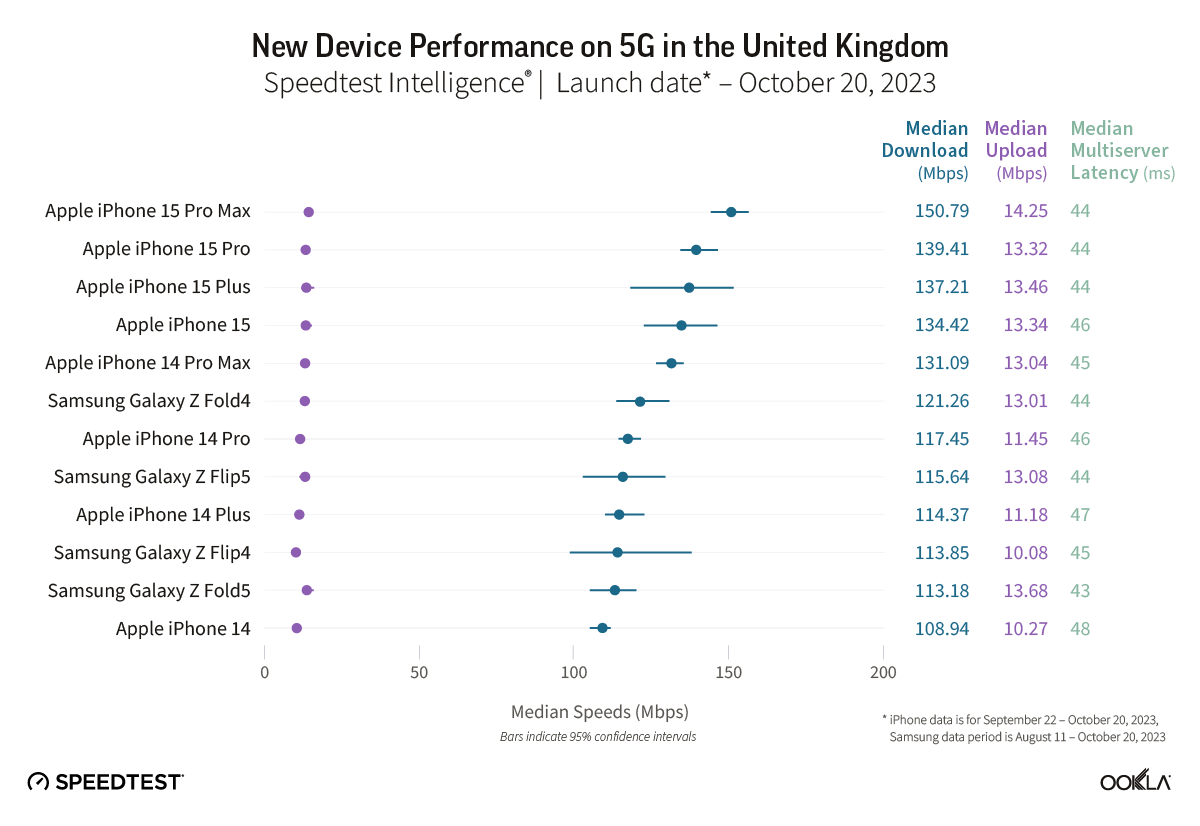
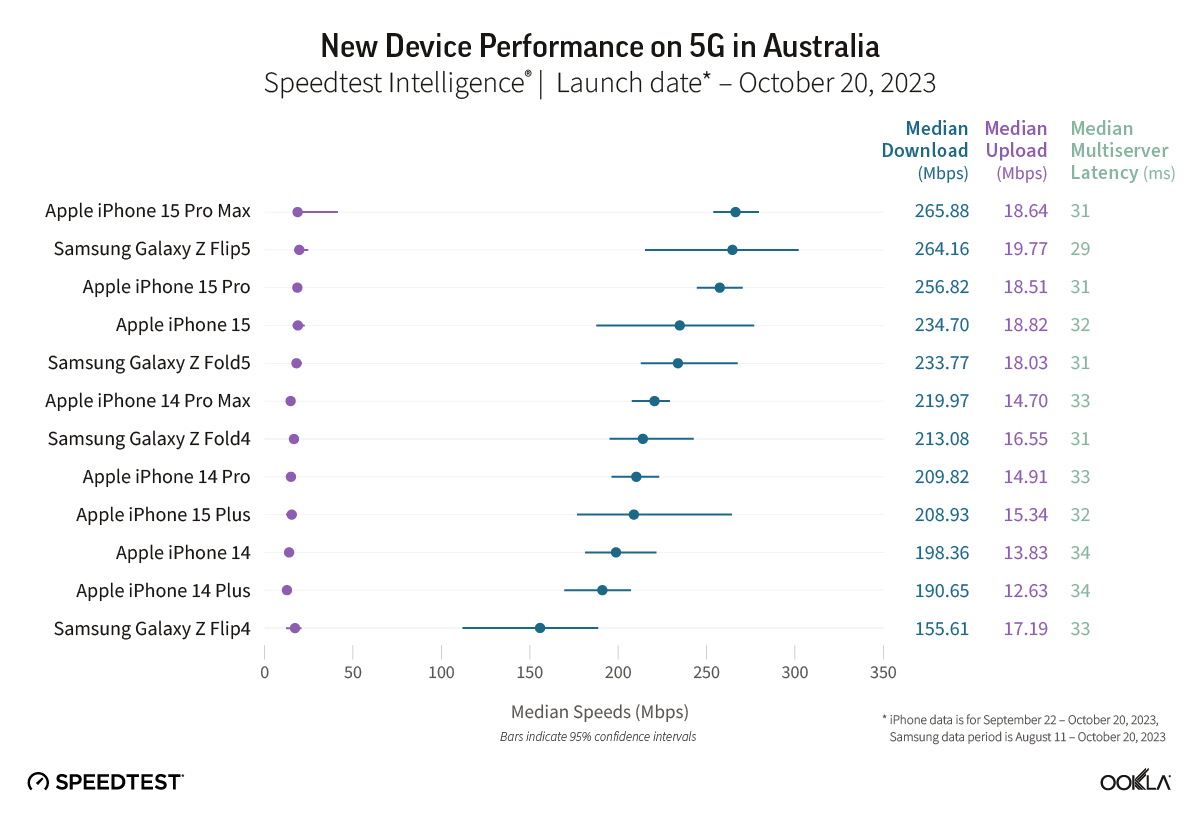
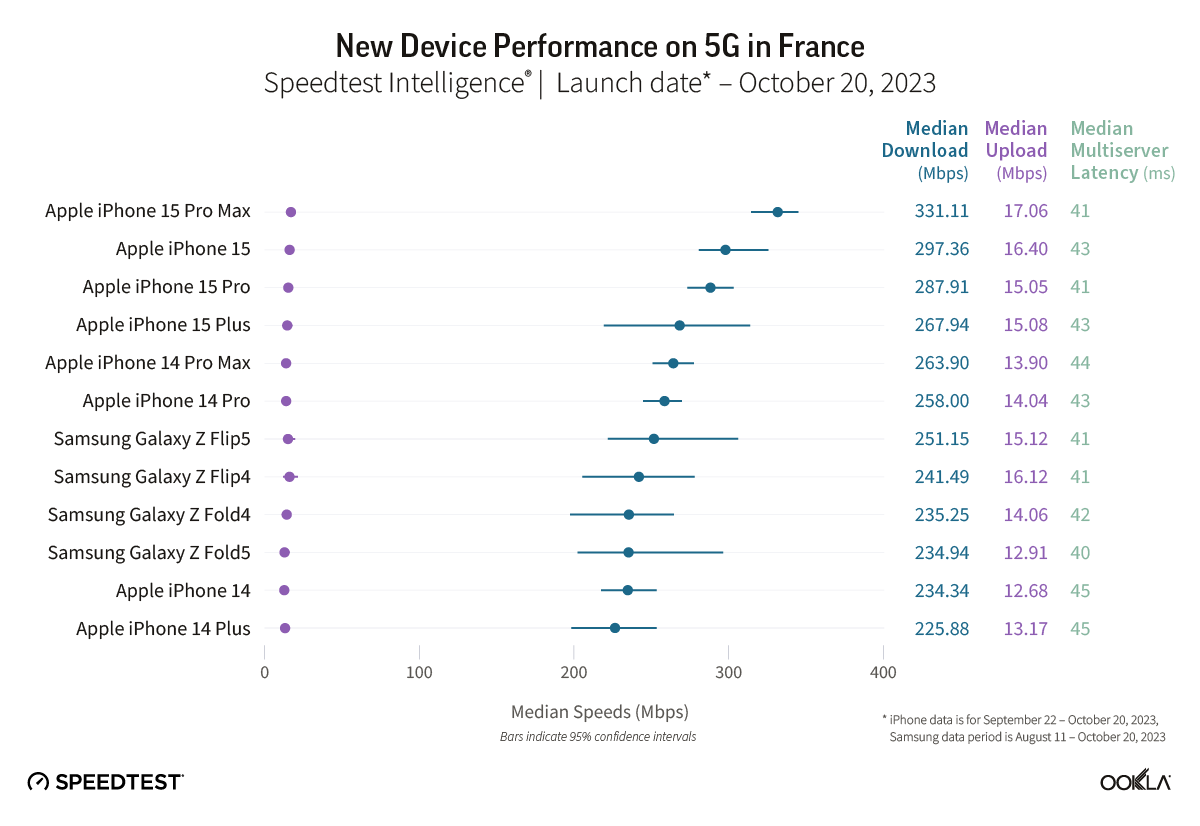
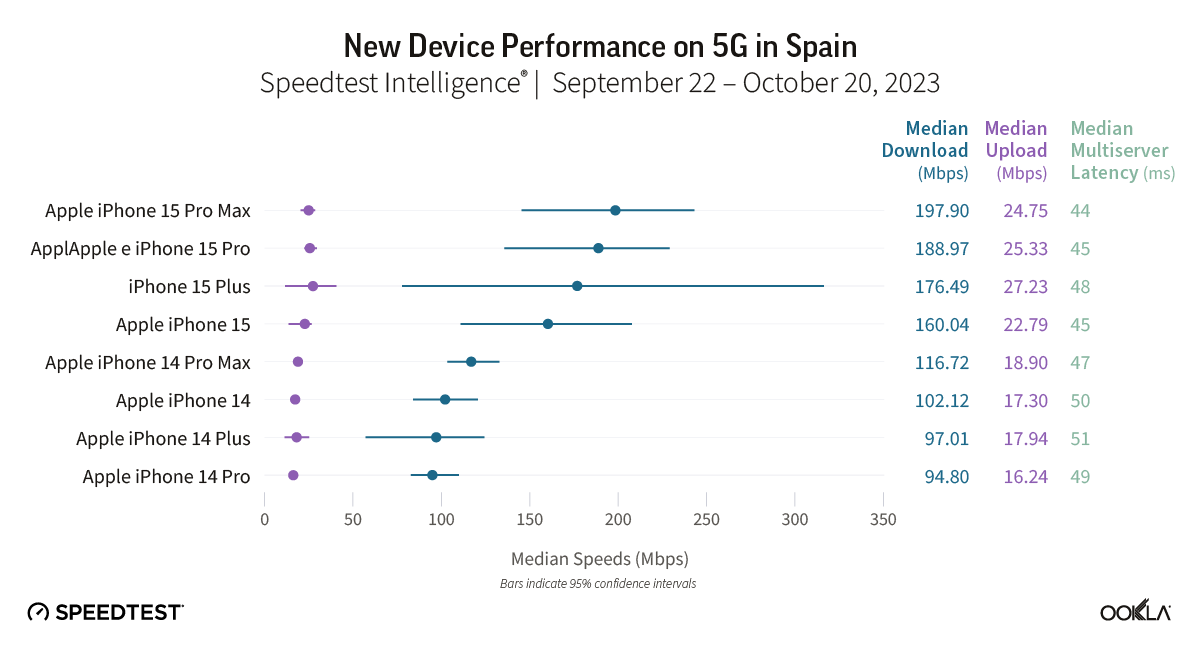
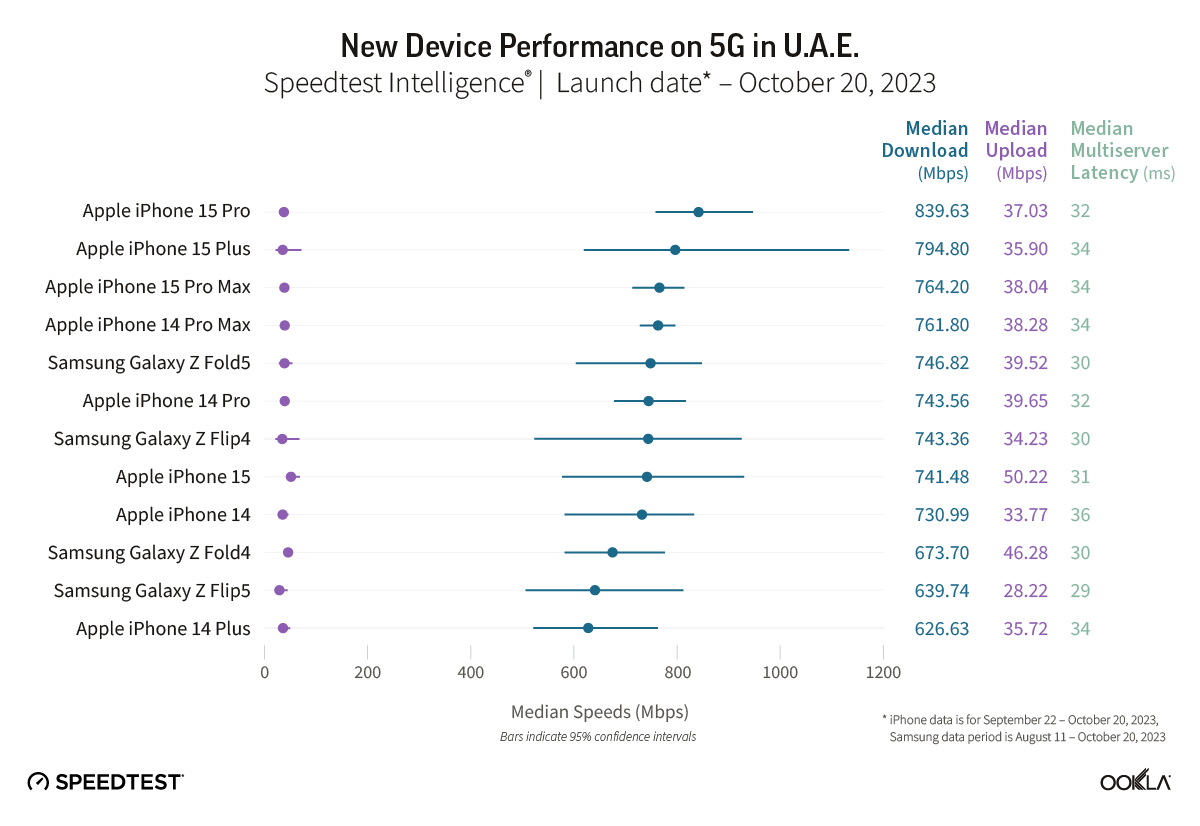
We got an early look at the iPhone 15 Pro Max cellular performance from Ookla in October with its Q3 report showing almost 100% faster 4G/5G speeds compared to iPhone 14 Pro Max. Now Ookla has shared a new 5G performance study and iPhone 15 lineup has dominated as the fastest 5G devices around the world.
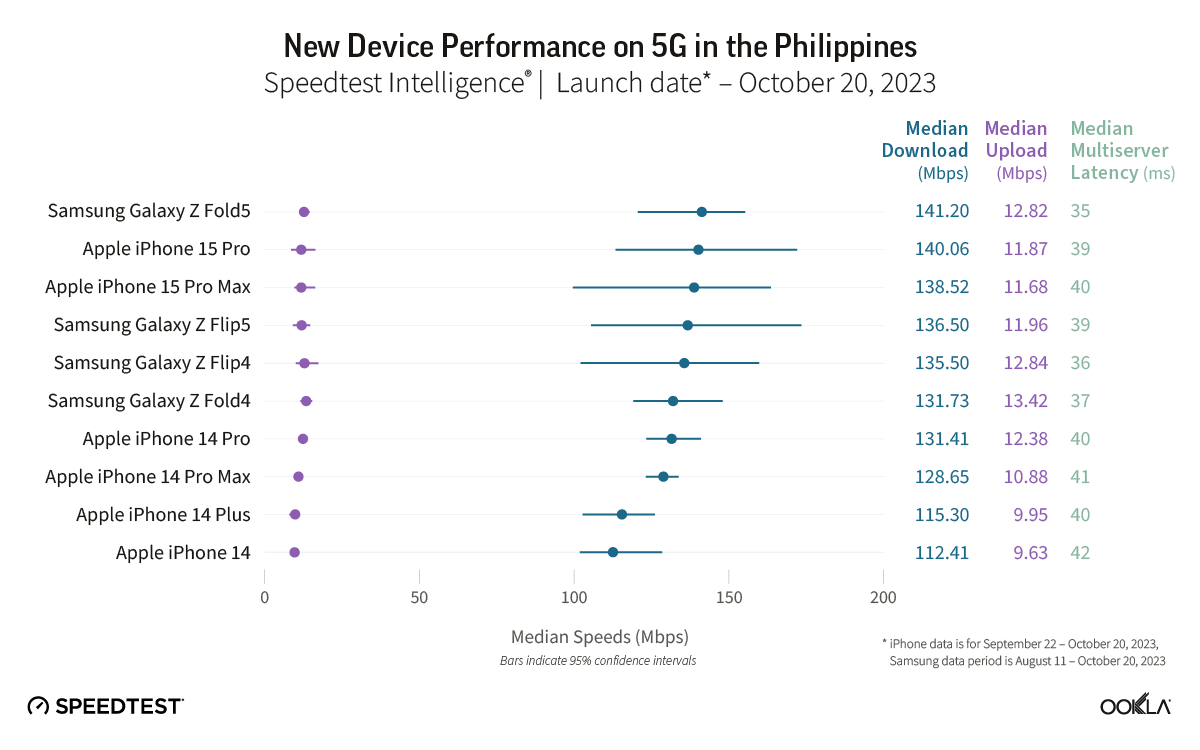
Ookla shared the new report on its blog. Collecting data from 13 countries between September and October for iPhone (August to October for Samsung devices), the results show the iPhone 15 Pro Max or in some cases the iPhone 15 or 15 Plus are the fastest 5G smartphones by a good margin. And an iPhone was the fastest 5G device in all but just one of the 13 countries.
Ookla notes that there are a number of variables when it comes to 5G performance like “5G investments by governments and mobile operators, different 5G spectrum allocations, and mobile 5G plans.”
In the US, the iPhone 15 Pro Max was on top with 285.02 Mbps as the median 5G download speed. The rest of the iPhone 15 family took 2nd, 3rd, and 4th place, with the next closest device being the Samsung Galaxy Z Fold5 with 231.56 Mbps.
5G performance in Canada was lower overall with the iPhone 15 Pro Max at 217.35 Mbps. The 15 Plus and 15 Pro took 2nd and 3rd and the Galaxy Z Fold5 snuck into 4th place with 175.63 Mbps.
In the UK, the new iPhones dominated with the Galaxy Z Fold4 coming in 6th place roughly 20-30 Mbps slower than the modern iPhones’ median 5G download speed.
One interesting result was in Brazil – the iPhone 15 took the top spot over the 15 Pro and Pro Max with 533.32 Mbps. However, the 15 Pro and Pro Max were close being with 523 Mbps.
The only country on the list where an iPhone didn’t have the fastest 5G median download speed was the Philippines. The Galaxy Z Fold5 beat out the iPhone 15 Pro by just 1 Mbps.
In Australia, two out of four iPhone 15 models showed median 5G download speeds that were significantly faster than their iPhone 14 equivalents during the September 22-October 20, 2023 period. Speedtest Intelligence reveals the iPhone 15 Pro and the iPhone 15 Pro Max both had a 14% better download speed than their prior year counterparts. There was no statistical winner for the iPhone standard model or the iPhone Plus in Australia during this period.
The Galaxy Z Flip5 had a 30% better download speed than the Galaxy Z Flip4 during the August 11-October 20, 2023 period in Australia, while there was no statistical winner for the Galaxy Z Fold.
Recommendation: Depending on your model of choice, only half the devices surveyed merit an upgrade based on performance alone in Australia.
Other Countries are:
Check out the full Ookla report on iPhone 15 5G performance against other devices for more details.
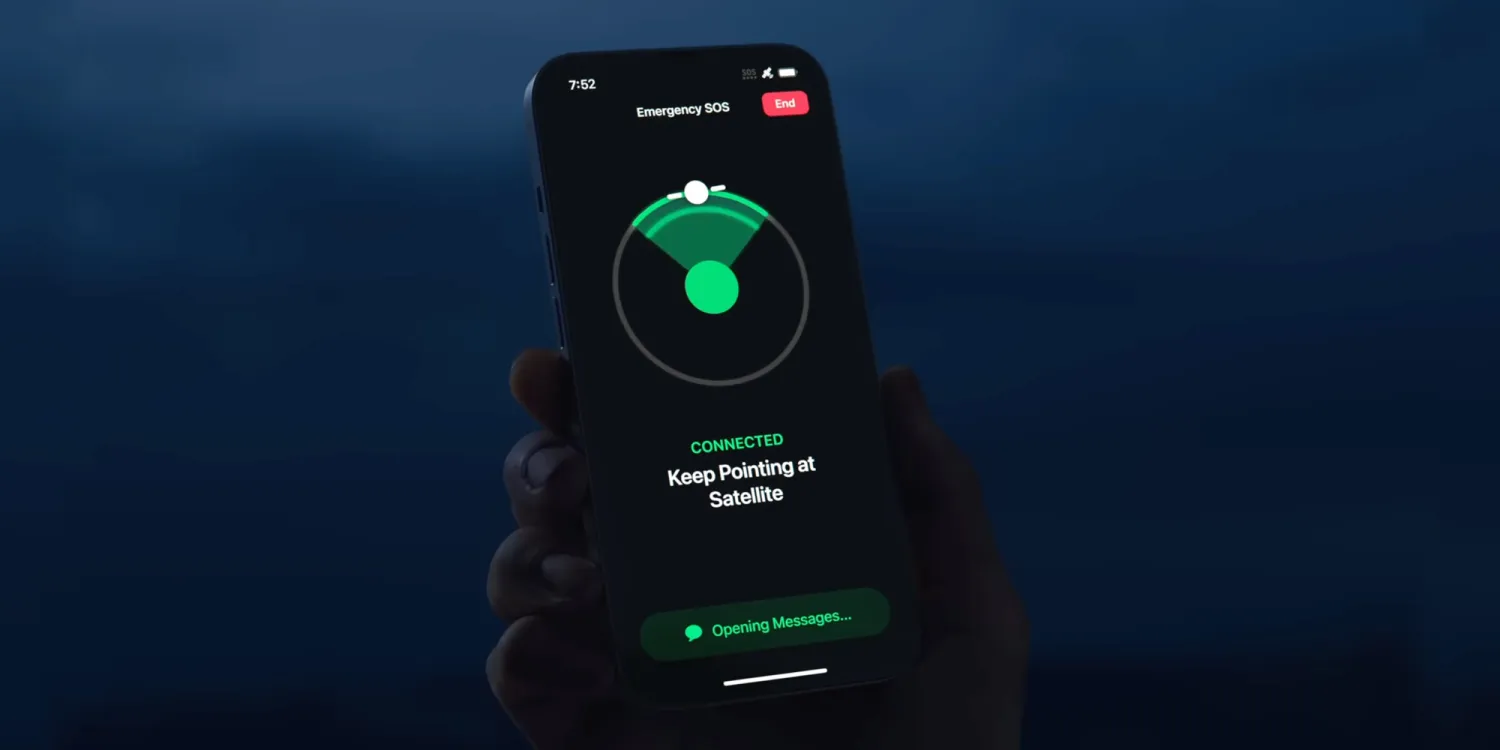
Apple today announced it is extending the free usage period for Emergency SOS satellite features for iPhone 14 users. Previously, Apple gave iPhone 14 customers two free years after device activation, which would have began expiring this time next year.
But now, all current iPhone 14 users will be able to use the service for free for another two years. Apple has not revealed how much it will charge for Emergency SOS via satellite when the free period is up, and today’s announcement means the company can defer any decision making on that further into the future.
The free period for iPhone 15 customers has not been extended. That means iPhone 15 users still currently are working on a two free years model, which will begin to elapse in September 2024.
This means iPhone 14 and iPhone 15 customers will see their free periods expire at roughly the same time, beginning September 2025. It gives Apple more time to decide on pricing plans for these features.
Emergency SOS via satellite allows compatible iPhone users to send short text messages to nearby emergency services even when outside of Wi-Fi or cellular signal range. It allows people to get help if they get into trouble in places where usually they would have no way to contact anyone else.
Users can also update their location in the Find My app using the satellite signal. With iPhone 15, Apple also extended the Emergency SOS feature to include contacting roadside assistance when your car breaks down.
Apple has been under pressure in the European Union as the Digital Markets Act antitrust legislation requires the company to allow users to sideload apps outside the App Store to increase competition. The iOS 17.2 beta code that the company is indeed moving towards enabling sideloading on iOS devices.
Update: Apple has published new documentation for the ManagedAppDistribution API on its website confirming that it is primarily intended as an MDM solution. As we suggested in our report, it could still be used for other purposes. You can read the original article below.
What is sideloading
For those unfamiliar, the sideloading process consists of installing apps obtained from third-party sources instead of an official source. When it comes to iOS, the official source (and the only one available to iPhone and iPad users) is the App Store. Apple has never allowed sideloading on iOS, as this would allow apps to bypass the App Store guidelines.
However, the European Union last year passed the Digital Markets Act, or DMA, a new piece of antitrust legislation aimed at big tech companies so that they don’t use their advantages to undermine competition. One of the requirements of the DMA is that users can install any apps they want from third-party sources.
Previous reports revealed that Apple had been doing under-the-hood work on iOS 17 to prepare the system for sideloading in Europe. With the iOS 17.2 beta, internal code suggests this is true.
iOS 17.2 seems ready to allow alternative app stores
iOS 17.2 has a new public framework called “Managed App Distribution.” While our first thought was that this API would be related to MDM solutions for installing enterprise apps (which is already possible on iOS), it seems that Apple has been working on something more significant than that.
By analyzing the new API, we’ve learned that it has an extension endpoint declared in the system, which means that other apps can create extensions of this type. Digging even further, we found a new, unused entitlement that will give third-party apps permission to install other apps. In other words, this would allow developers to create their own app stores.
The API has basic controls for downloading, installing, and even updating apps from external sources. It can also check whether an app is compatible with a specific device or iOS version, which the App Store already does. Again, this could easily be used to modernize MDM solutions, but here’s another thing.
We also found references to a region lock in this API, which suggests that Apple could restrict it to specific countries. This wouldn’t make sense for MDM solutions, but it does make sense for enabling sideloading in particular countries only when required by authorities – such as in the European Union.
When will this happen?
In theory, Apple is required to comply with DMA legislation by March 2024. The company has even admitted in a Form 10-K filing that it expects to make changes that will impact the App Store’s business model.
At the same time, Apple will also appeal to the European Union about including the App Store in the Digital Markets Act, which is no surprise. Apple will likely try everything to preserve the iOS App Store. But ultimately, iOS 17 will be ready for sideloading.
One of the more useful changes to recent Apple Watch models is support for fast charging. This allows you to quickly top off your Apple Watch battery at much faster speeds than before. There are a few things to remember, and you don’t get everything you need in the box…
Which Apple Watch models support fast charging?
The following Apple Watch variants allow for fast charging:
Apple Watch Series 7
Apple Watch Series 8
Apple Watch Series 9
Apple Watch Ultra
Apple Watch Ultra 2
Apple says that with fast charge, your Apple Watch battery level can go from 0-80% in about 45 minutes. Apple has a support document detailing the specifics of fast charging with the Apple Watch Series 7, Apple Watch Series 8, and Apple Watch Ultra.
What do you need to fast charge your Apple Watch?
Included with the Apple Watch is an Apple USB-C Magnetic Fast Charging Cable. As we’ve previously reported, the difference with this cable is that it has aluminum instead of plastic around the magnetic charger.
While Apple is including one of these cables in the box with Apple Watch Series 7, Series 8, and Ultra, you can also buy them separately so you can outfit all of your charging spots with fast charge support. The cable measures 1m in length and is available for $29. The model number for the cable is A2515, so make sure you’re buying that specific model if you purchase from a third party other than Apple or Amazon.
The second part of the equation is the power adapter that you plug into the wall. As part of its continued focus on reducing its environmental footprint, Apple no longer includes this power brick in the box. This means you’ll have to use one that you already have or buy a new one.
Apple says that any USB-C power adapter that supports USB Power Delivery of 5W or better is capable of Apple Watch fast charging. You can find these on Amazon from reputable brands such as UGreen for as little as $10.
Here are the specifications from Apple:
Apple 18W, 20W, 29W, 30W, 61W, 87W, or 96W USB-C Power Adapter
A comparable third-party USB-C power adapter that supports USB Power Delivery (USB-PD) of 5W or greater
Interesting. So if I read this article correctly, you only need 5 watts with the new usb-c cable to get 45 minutes at 80% on AW 7 or 8?
I thought you needed a larger charger.
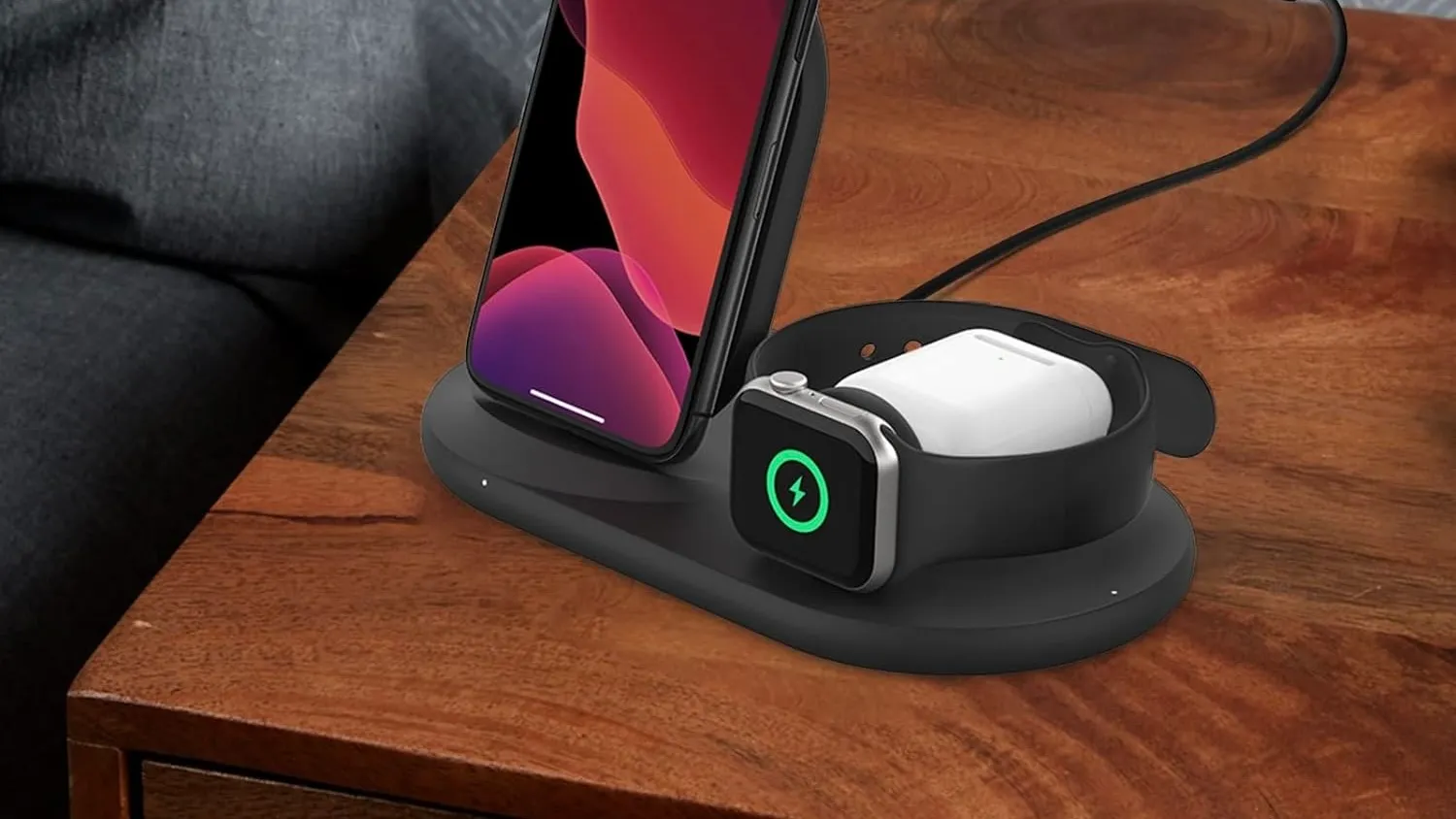
Finally, if you use Apple’s MagSafe Duo or its Apple Watch Magnetic Charging Dock, you can’t tap into fast-charging capabilities, regardless of which cable or power adapter you use. You could, however, place the fast charger puck in a third-party dock of any sort.
More options
Belkin Apple Watch Fast Charger Dock
Belkin 3-in-1 Wireless Charger – Fast Charging Stand
Apple has released iOS 17.1.1 for iPhone. The software update includes fixes for wireless charging and the recently discovered snow glitch. The update follows the iOS 17.1 update from October 25 which introduced new AirDrop and Apple Music features. Apple is also working on iOS 17.2 and the new Journal app for iPhone.
Release notes
This update provides bug fixes for your iPhone including:
In rare circumstances, Apple Pay and other NFC features may become unavailable on iPhone 15 models after wireless charging in certain cars
Weather Lock Screen widget may not correctly display snow
It’s not just you: Apple Weather widget is showing a file icon instead of snow
Apple released a watchOS update that fixed an annoying bug affecting the Weather app complication, which had been broken for months since the watchOS 10 beta. But it seems that Apple still has other bugs to fix in its Weather app, as some users have been seeing a random file icon in the Lock Screen widget instead of a representation of snow.
Apple Weather widget can’t handle snow
As noticed by many users on the web and also by the 9to5Mac staff, the Apple Weather Lock Screen widget has been showing a generic file icon. Interestingly, this only happens when the weather forecast for the set location is snow and doesn’t seem to affect any other weather conditions shown by the widget.
On X (formerly Twitter), iPhone users have been making jokes about the fact that the Apple Weather widget isn’t ready for snow. The “iPhone weather widget apparently can no longer handle snow (neither can I, but that’s a different story),” a user posted on the social network. “The snow image isn’t even loading on my weather widget. It’s too soon for this,” said another user.
The snow image isn’t even loading on my weather widget. It’s too soon for this. pic.twitter.com/BMWP7A2ls3
It is unclear whether the bug is caused by something that can be fixed remotely on the Apple Weather servers or if it’s a more serious glitch that will require an iOS update. Either way, Apple hasn’t had much luck when it comes to its Weather app.
Back in 2020, the company acquired the weather app Dark Sky and has since implemented some of its features right into the Apple Weather app. However, it’s been a while since users began complaining about its lack of accuracy when it comes to weather alerts and forecasts.
Since the rise of generative AI tools like ChatGPT, many people have wondered when Apple will introduce its own generative AI. Rumors suggest that this could happen next year. Until then, Apple CEO Tim Cook has been talking a lot about AI in recent months and has now reinforced that Apple is investing in generative AI.
Tim Cook says Apple will have its own generative AI
During a call with investors on Thursday to reveal Q4 2023 fiscal results, Cook was asked how Apple has been experimenting with generative AI, given that many other tech companies have already launched AI-based tools.
Unsurprisingly, Apple’s CEO highlighted many features in Apple devices that are based on artificial intelligence and machine learning, such as Personal Voice, Crash Detection, and ECG in the Apple Watch. But when it came specifically to generative AI tools like ChatGPT, Cook responded that “obviously, we have work going on.”
He didn’t give any details about what exactly Apple is doing but said that the company wants to have its own generative AI responsibly and that customers will see these technologies become the “heart” of future products.
In terms of generative AI, obviously, we have work going on. I’m not going to get into details about what it is, because as you know, we really don’t do that. But you can bet that we’re investing. We’re investing quite a bit. We’re going to do it responsibly, and it will… you will see product advancements over time where those technologies are at the heart of them.
This is not the first time Tim Cook has talked about AI. In an interview a few months ago, he said that Apple has been “doing research across a wide range of AI technologies, including generative AI, for years.” In May, the executive praised the potential of AI, although he claimed that there are “issues that need to be sorted.”
According to Bloomberg’s Mark Gurman, Apple has been ramping up the development of AI-based tools, targeting a release with iOS 18 next year. This technology would be implemented in apps such as Apple Music, Xcode, and of course, Siri.
Report: AI features in development for iOS 18, Siri, Apple Music, Xcode and more
In his Power On newsletter, Bloomberg’s Mark Gurman says that Apple was caught by surprise at the sudden swell of generative AI tools this year. But they are working hard to catch up with Apple SVPs Craig Federighi, John Giannandrea, and Eddy Cue all in charge of integrating AI-powered functionality into Apple’s products and services.
That will include various new AI features in iOS 18, such as smarter reply suggestions in Messages. Cue is pushing to include features like AI-generated playlists in Apple Music, and exploring how generative AI can be utilized in Apple’s productivity apps like Pages and Keynote. Giannandrea’s team is working on a new, smarter, version of Siri that should be ready to debut next year.
Gurman says embracing AI in end-user features is one of the primary objectives for Apple right now, as it looks to catch up to rivals like OpenAI, Google and Microsoft. Apple is consequently set to spend about $1 billion a year on AI research and product development.
In addition to new features in iOS 18 and Siri, Apple is also looking at ways to enhance the developer experience with AI-enhanced features in Xcode. This would likely include advanced code completion similar to what Github Copilot offers. The company is also looking at ways to streamline its internal AppleCare tools with artificial intelligence.
There is apparently some internal tension about whether to base these features off of AI neural network models running on device, or passed through Apple’s cloud services. Running on-device maximizes privacy, but large language models running on a server farm enable much more sophisticated capabilities. Gurman says Apple will likely decide on a case-by-case approach, with some features running wholly on-device and others relying on a cloud backend.
Apple’s proud boast that the entire Scary Fast event was shot on the iPhone 15 Pro Max has lead to a lot of discussion and debate about what that really means, and whether or not it’s a big deal.
There are those suggesting it really does mean the camera is something special, while other are suggesting that it’s at best meaningless, and at worst a cheat …
The Verge’s Jess Weatherbed was one of the naysayers.
Still images and a video reveal that (unsurprisingly) a great deal of fancy equipment — from drones, gimbals, dollies, industrial set lighting, and other recording accessories — is still required to make iPhone footage look this good […]
It’s a neat way to promote the recording quality of iPhone cameras, but it’s not like everyday folks can recreate these kinds of results at home unless they happen to own a shedload of ludicrously expensive equipment. The gear shown in the “Scary Fast” behind-the-scenes footage is fairly standard for big studio productions, but Apple’s implication with these so-called “shot on iPhone” promotions is that anyone can do it if only they buy the newest iPhone.
I saw a few folks mocking Apple for this on Mastodon and Threads, too. This is ridiculous. Do these people think that previous Apple keynote films were shot with just a single camera person wielding something like a $40K RED cinema camera and no crew, no lighting, no cranes? That the iPhone “needs help” that traditional cinema cameras do not? I mean, guess what, they used professional microphones too.
The whole point is that an iPhone 15 Pro camera is so good that it can fit right in on a high-budget commercial film shoot, and produce world-class results. There’s no implication that a casual user can get results like this by just hitting the shutter button in the iPhone Camera app.
Personally, I fall somewhere between the two views.
There’s one cheat Apple didn’t use
First, there is one cheat that is often used on ‘Shot on iPhone’ video footage, and that’s the use of high-end lenses.
You can buy adapters that allow you to use either DSLR or even full-on cinema lenses with iPhones. While those still have to go through the built-in lenses, of course, they do allow you to achieve things that simply cannot be achieved with the built-in lenses, like anamorphic perspectives and really shallow depth of field (DoF).
Since Apple showed us behind-the-scenes footage, and we saw no sign of external lenses, we can be reasonably confident that the company didn’t use that particular cheat.
But set control is a very good workaround
Very often, you want shallow DoF because there are distractions in the background. When you or I are filming on the street, or in a public area, there are other people around, trash cans, litter, all kinds of distracting elements.
A big-budget production, in contrast, has complete control of the set. You can either build the background you need, or simply take complete control of it.
Clear out all the people, ensure there’s nothing untidy to clutter up the scene, add a bit of dry ice, and voila: a setting in which everything being in focus is just fine.
Lighting is everything
When I introduced a friend to studio photography, he was amazed that camera settings were set-and-forget. Manual mode, ISO 100, f/11, 1/125th, done.
All the control is achieved with the lights. High-key, low-key, upbeat, moody, colorful, monochromatic, background visible, background invisible – lighting is the route to achieving the exact look you want.
The same is true with video. But more than this, studio or cinema lighting enables you to overcome weaknesses in a sensor. Almost any modern camera phone does just fine in bright light; it’s in low-light conditions that we see the difference between a high-end sensor and a mediocre one. Throw in the kind of lighting rigs we see in the BTS video and it’s no surprise that the iPhone sensor can cope.
Now, you might argue that this was a Halloween theme, and a lot of it was pretty dimly lit – and that’s true. But the presenters are very well-lit indeed, and it’s them we’re looking at. If we turn our attention to the low-lit background, that has nothing like the same clarity or sharpness. Those areas are as muddy and noisy as we’d expect from low-light filmed with a smartphone sensor (and bear in mind this is the result after professional editors have done their very best to clean it up):
Camera angles, movement, and transitions do a lot
The other factor to bear in mind is that a lot of heavy lifting was done by all the rest of the kit we got to see in the BTS videos. Dollies, jibs, gimbals, drones, you name it.
Plus some absolutely superb editing, with Apple’s trademark transitions.
The result was a lot of camera movement, a lot of angles, a lot of fast-paced transitions to capture our attention. So we don’t have much time to take in the wider framing and notice the noise and muddiness in the background areas.
Is Apple pulling a fast one?
The debate essentially comes down to whether Apple is trying to give the impression that the iPhone 15 Pro Max camera is so good that anyone can get these types of results.
There are those who say: No, of course not. The very fact that Apple chose to share the BTS video acknowledges that you need all the extra kit to get these results. You’d use exactly the same additional kit if you were shooting with Arri movie cameras.
That much is true. But … you could take your Alexa Mini into an ordinary room, partly lit by window light alone, without all those fancy lighting rigs, and still get very good results. The results from the iPhone wouldn’t even come close. And it’s that latter situation where most of us would find ourselves shooting.
So while Apple does acknowledge that it used movie-grade kit, at the same time the implied message is ‘See? The iPhone can get similar results to movie cameras’ – when that is, in most circumstances, very much not the case.
You decide
Ultimately, this comes down to opinion. What Apple did was real, and used exactly the same kit it has used with cinema cameras in the past. At the the same time, those are the least-challenging conditions for any camera – and there are a lot of weaknesses in the images that simply flashed past unnoticed.