After “hardware limitations” were cited as the reason that the Pixel 8 isn’t getting Gemini Nano earlier this month, Google announced today that the on-device LLM is coming after all.
The Pixel 8 will get Gemini Nano, in developer preview, to power Summarize in Recorder and Gboard Smart Reply. The latter allows for “higher-quality smart replies” that have “conversational awareness” and should be generated faster. On the Pixel 8 Pro, it works with WhatsApp, Line, and KakaoTalk. Meanwhile, Summarize can take a recording and generate bullet points.
RAM — 8 GB versus 12 GB — is the main hardware difference between the two Tensor G3 phones. Google today says “running large language models on phones with different memory specs can deliver different user experiences, so we have been testing and validating this on Pixel 8.”
It looks like Google found a way to run the LLM on less RAM without impacting the rest of the user experience, with the smaller Galaxy S24 doing the same. As a reminder, Google only ever said Gemini Nano was coming to the Pixel 8 Pro in December. Meanwhile, the comment earlier this month came from an engineer outside the Pixel team.
Gemini Nano is coming to the Pixel 8 with the next Pixel Feature Drop, which should be Android 14 QPR3 in June (if previous timelines remain in place). Besides end users getting those two Google app features, developers with the Pixel 8 will be able to use AICore for their own applications.
The work to make Gemini a better phone assistant continues, with Google recently updating it to automatically start Maps navigation “when you ask for directions.”
“Navigate to [place]” or “take me to [x]” commands first show a brief summary with the route, how long it will take, and how many miles, as well as a map and link to “directions.” This is one capability that Gemini can handle natively with the Google Maps Extension instead of having to punt to the legacy Assistant.
After a few seconds, Gemini now opens Google Maps with the route underway to save you a step and improve the hands-free experience. This is according to the latest Play Store release notes for the Gemini app/icon, which also include:
“You can now use your voice to set reminders and calendar entries with the Gemini app if your Workspace extension is turned on in your Gemini app settings. Workspace extension availability varies by country. See more details here: https://support.google.com/gemini/answer/14579631#workspace_extension“
“We updated voice commands to include auto submit. No need to hit the ‘send’ button anymore.”
Meanwhile, we’re still waiting for the ability to issue “play music” commands. Google implies that this is coming: “Media service providers: Podcasts, news and radio stations, and third-party music providers aren’t currently supported in Gemini.”
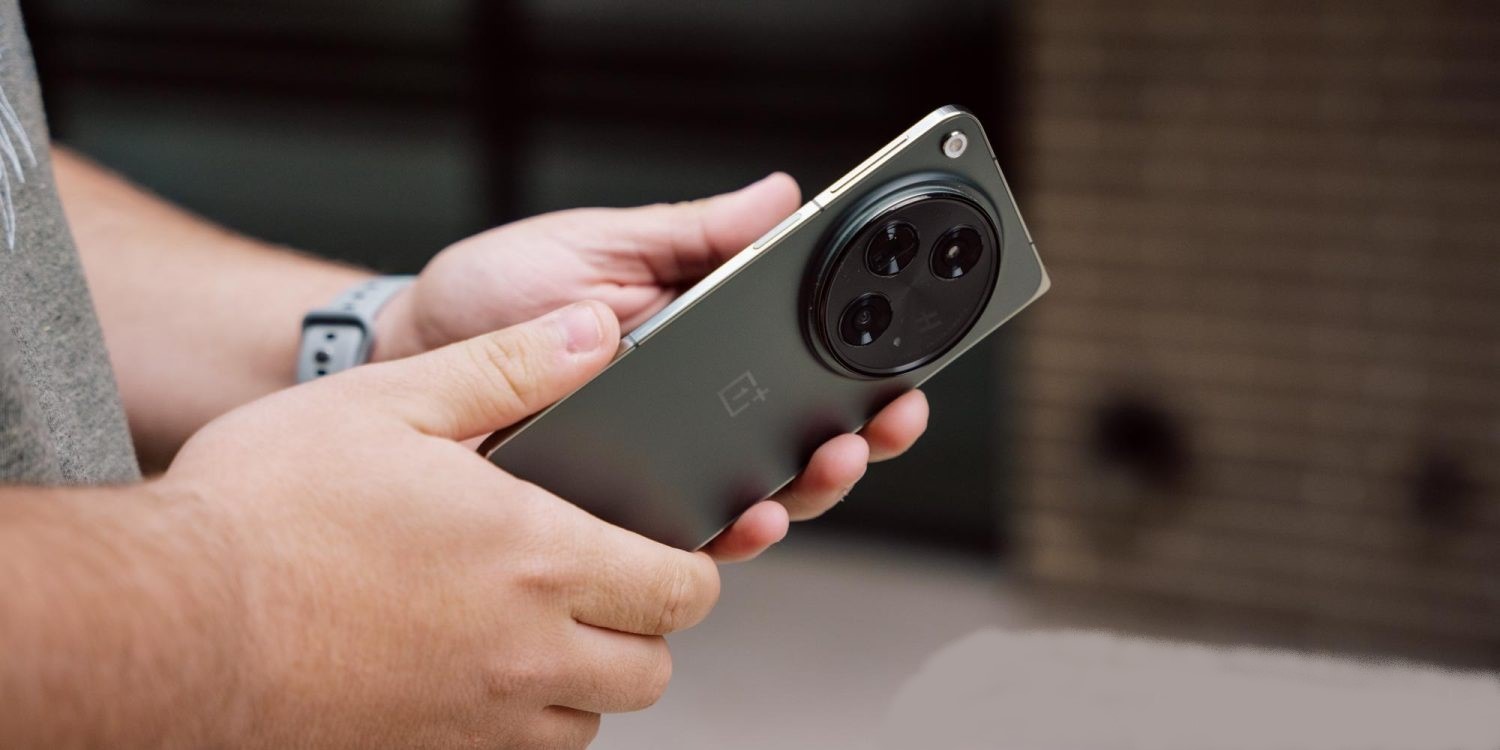
The OnePlus Photos app is getting a useful new trick, with support now available to integrate Google Photos with the app for backup and showing your library.
Available as a part of OxygenOS 14 (OnePlus’ Android 14 update), the brand’s built-in Photos app now supports integration with Google Photos. This is found through the app’s settings, with a “Backup with Google Photos” option appearing at the top of the screen. Tapping that activates a menu in Google Photos where you’re asked to grant access.
Once connected, you can not only back up photos, but also access your entire Google Photos library from OnePlus’ app.
We were able to get this up and running on a OnePlus Open running OxygenOS 14, though actually activating backup required force closing the OnePlus Photos app after first granting permission through Google Photos.
On a support page, Google explains that this functionality is currently supported on Xiaomi, OnePlus, Oppo, and Realme devices running Android 11 or newer. Android Police points out that Xiaomi’s integration goes a bit deeper, allowing full two-way sync including albums, which don’t sync in OnePlus’ implementation. Xiaomi previously shut down its own cloud backup solution in favor of Google Photos back at the end of 2022, but this newer functionality has become available only recently.
With either device, integration can be disabled through the app, or through Google Photos itself. Going to Google Photos > Photo settings > Apps & devices > Google Photos access allows you to remove access.
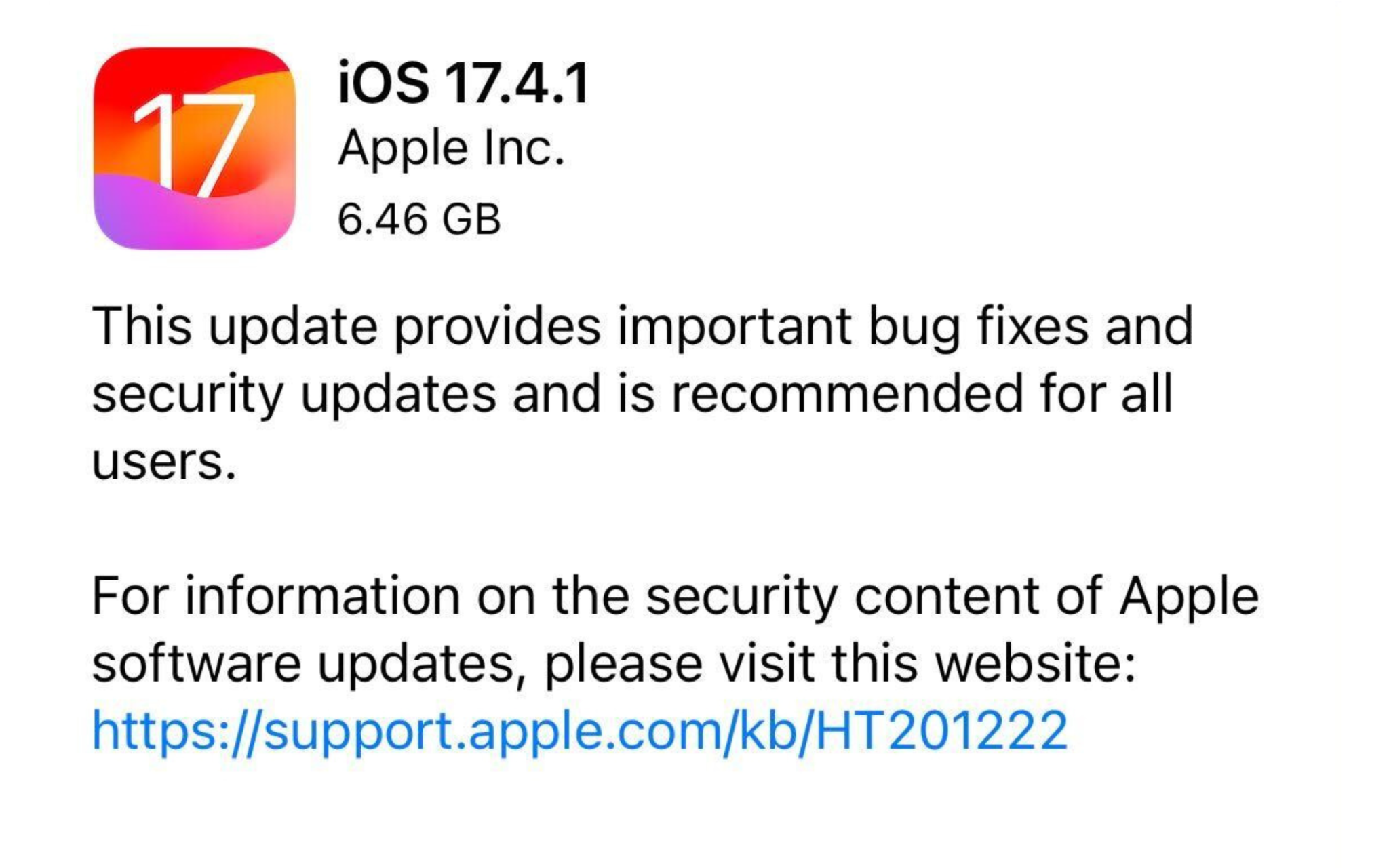
Last week, Apple released iOS 17.4.1 with rather vague release notes claiming to include important bug fixes and security patches. Now, two days later, the company has not yet added any specifics. This is unusual for Apple, which typically lists important security patches hours after a release, and suggests that the ones in iOS 17.4.1 could be significant or something else entirely.
The update comes two weeks after the release of iOS 17.4, which brought major changes to the iPhone in the European Union, mostly around the App Store, with support for alternative app marketplaces.
The release notes for iOS 17.4.1 simply say, “This update provides important bug fixes and security updates and is recommended for all users,” with a message to visit an Apple support page for additional information. The page, however, notes that details on the update are still “coming soon.”
This is not a coincidence. And could mean several things.
It’s possible Apple doesn’t want to disclose details about the iOS 17.4.1 security patches before the company has concluded its own investigation, which could point to something more significant. The update we received may have been a fix to prevent further exploitation.
It’s taken way too long, but after the better part of eight years now, Samsung has finally adopted Android’s Seamless Updates on its latest Galaxy devices.
Seamless Updates were first introduced in Android Nougat way back in 2016, almost eight years ago now. The feature allows devices to install an update in the background and apply the update on a reboot. While it’s typically slower and can eat up more storage, the A/B partition allows for a safer install as a messed-up installation can be reverted to the prior software build. It also leaves the device fully usable during the lengthy install process. Google has also made improvements to Seamless Updates over the years, with the feature now being much faster and also requiring less storage using a “virtual A/B mechanism.”
Yet, for all this time, Samsung has repeatedly skipped out on this feature that virtually every other Android OEM currently uses.
That’s finally changed now, though, as the Samsung Galaxy A55 is the company’s first smartphone with Seamless Updates support for Android updates.
The change was spotted on the new mid-range device by early buyers (via Mishaal Rahman) as well as SamMobile and The Mobile Indian. On downloading an update on the device, a new “downloading and installing” message appears with “Restart Now” appearing when the device has the update installed. Existing Samsung smartphones have an “Install Now” prompt when the update
Samsung may have finally implemented seamless updates on their Android devices! When updating the new Galaxy A55 5G, users have noticed that the software update screen now shows a "downloading and installing" as well as "verification" steps.
a feature configured before the device is in the customer’s hands. Back in 2016, Google had confirmed that existing devices wouldn’t support it.
However, future Samsung Galaxy devices are very likely to support Seamless Updates going forward. It was revealed earlier this year that Android is moving to only support this form of update, and while Samsung could technically work out a way to stick with its existing model, it seems the company has decided to just give in to how Android is supposed to work in 2024.
Besides using Gemini to power features in its apps and services, Google offers its LLM to third-party developers. Apple is reportedly in talks with Google to license Gemini for the iPhone.
According to Bloomberg, there are “active negotiations to let Apple license Gemini, Google’s set of generative AI models, to power some new features coming to the iPhone software this year.” Apple has also talked with OpenAI, which powers Microsoft’s AI capabilities.
Apple is specifically looking to partner on cloud-based generative AI, with today’s report citing text and image generation as examples of what Gemini could be used for. At the same time, Apple is working on offering its own on-device AI models and capabilities with the upcoming iOS 18 release.
The discussions are still underway, and it’s unclear how the AI agreement will be branded. This would be a significant expansion of the existing relationship — default search engine — between the two companies.
Looking at the rest of the industry, Google announced a partnership with Samsung in February to have Gemini power summarization features in the Galaxy S24’s notes and voice recording apps, as well as keyboard. Samsung is also using Imagen 2 text-to-image diffusion for a generative editing feature in the photo gallery app. Those features all require server-side processing, but Samsung is also using an on-device version of Gemini.
Google offers Gemini in three sizes, with Pro being used by most first and third-party apps. Gemini 1.0 Pro powers the free version of gemini.google.com, while 1.0 Ultra is used in the paid Gemini Advanced tier.
Gemini 1.0 is available in stable, but Google in mid-February previewed Gemini 1.5 with a greatly expanded context window that allows for more information to be absorbed. This can make the “output more consistent, relevant and useful.”
Gemini Ultra: Largest and most capable model for highly complex tasks
Gemini Pro: Best model for scaling across a wide range of tasks
Gemini Nano: Most efficient model for on-device tasks
Bloomberg does not expect a deal to be announced until WWDC in June, with Apple opting for OpenAI or even multiple providers offered as possibilities in today’s report.
Back in September 2023, Google introduced an updated wordmark and 3D robot design for Android. That new wordmark is appearing on Pixel devices with the Android 14 QPR3 Beta.
On Pixel devices, the boot sequence starts with the “Google” logo appearing in full color and then a Material You Dynamic Color “G” that animates in. “Powered by Android” then appears at the bottom of the screen.
Starting with Android 14 QPR3 Beta 1 on some devices, “Powered by” is centered (instead of left-aligned) with the updated wordmark that prominently features a capitalized “A” and other tweaked letters. This is followed by the Android head.
As of QPR3 Beta 2, not all devices, like the Pixel Tablet, have been refreshed with the new Android wordmark.
On newer Android devices, like the Honor Magic 6 Pro and Xiaomi 14 Ultra, a 3D version of the head, which appears at the bottom edge of the screen, is used. The Galaxy S24 features the new wordmark.
Meanwhile, QPR3 Beta 2 increases the size of the boot animation as evidenced by the size of the “Google” logo getting bigger when the animation starts.
It’s a shame that this change wasn’t timed with the initial Android 14 release in October, or the Pixel 8 and 8 Pro launch.
AirPods today offer a handful of different features related to hearing health and Accessibility. A new report today, however, says Apple has big plans for iOS 18: a new “hearing aid mode” for AirPods Pro.
AirPods Pro with iOS 18
In the latest edition of his Power On newsletter, Bloomberg’s Mark Gurman writes that AirPods Pro aren’t set to see any hardware changes in 2024. Instead, he says that the “big news will be a major new hearing aid mode, coming alongside iOS 18.”
AirPods already offer a feature called Live Listen, which launched as part of iOS 12 in 2018. This feature essentially turns an iPhone into a directional microphone, transmitting the audio captured by that iPhone to AirPods in real time. A handful of testimonials over the years have shown how useful this feature can be.
Apple also introduced a Conversation Boost capability to AirPods Pro in 2021, which boosts mic pickup from directly in front of you, to better hear someone talking to you. A study in 2022 showed that some of these existing AirPods Pro features already compare well to much more expensive dedicated devices.
Also notable: in 2022, the FDA established new guidelines to allow for a category of hearing aids that can be purchased over-the-counter. Hearing aids within this category can be sold directly to consumers in stores or online without a medical exam or a fitting by an audiologist.
More details on this new iOS 18 feature for AirPods Pro users are unclear. This isn’t the first time Gurman has written about Apple’s plans to bring new hearing health features to AirPods, though. Last year, he reported that Apple is also working on a hearing test feature for future AirPods as well.
Satellite connectivity for smartphones has proven valuable on Apple’s iPhone, but it’s a feature that’s struggling to get out the door on Android devices. This week, though, a new “Satellite SOS” feature has started appearing on Google Pixel phones, and we’ve got a sneak preview of what it will be able to do.
If you dive into Settings > Safety & emergency on a Pixel phone today, you’ll very likely see “Satellite SOS” appear between Emergency SOS and Car Crash Detection. Google, seemingly in an error, has rolled out the setting widely to virtually all Pixel device through a recent update to Adaptive Connectivity Services.
But, right now, the feature doesn’t do anything. Tapping “Satellite SOS” on a Google Pixel device doesn’t open any menus, but it will soon.
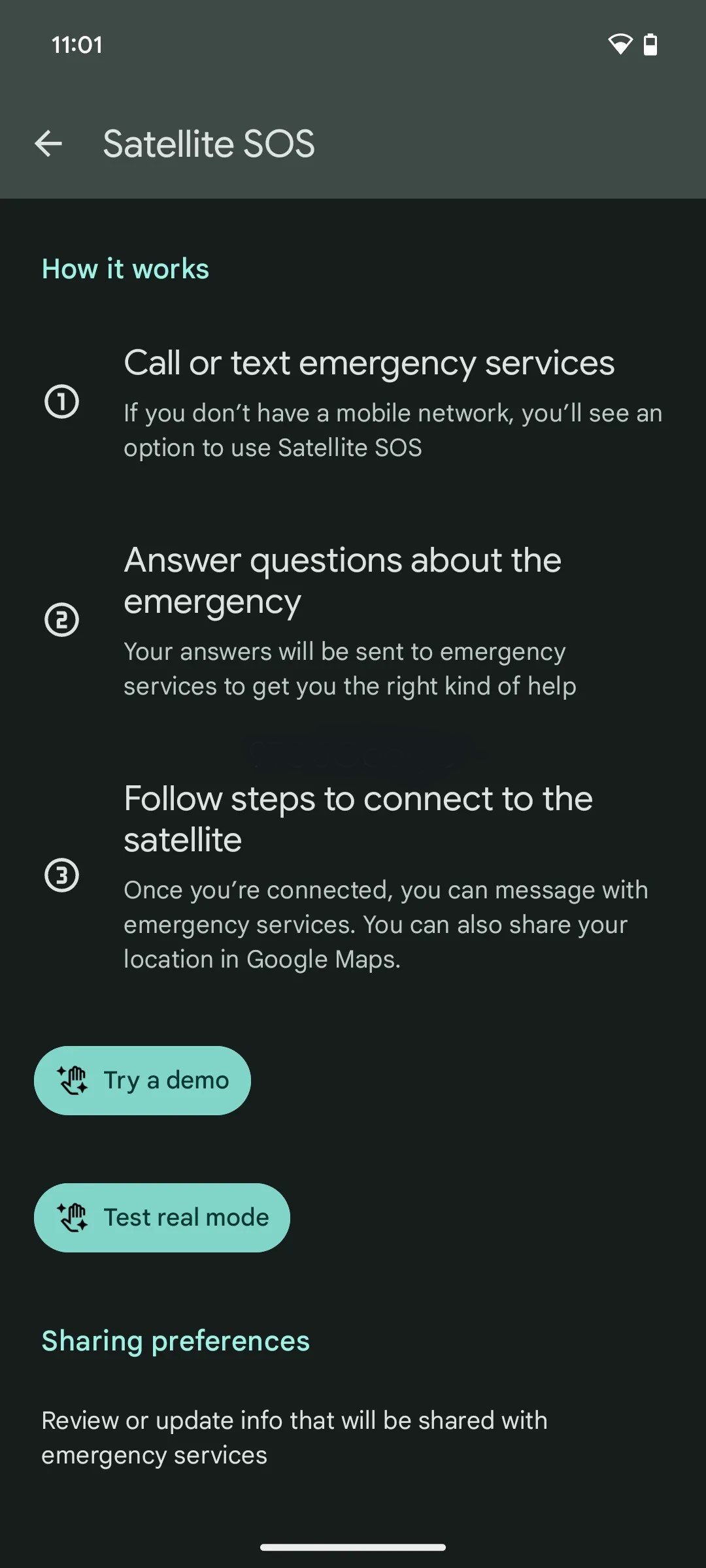
Through a rooted Pixel, we were able to access the menu Google is preparing for this feature. The Satellite SOS page explains:
With your Pixel, you can message with emergency services and share your location when you can’t connect to a mobile or Wi-Fi network.
The page explains that you can call or text emergency services, share your location using Google Maps, and answer questions about your emergency. There’s no word if you’ll be able contact anyone outside of emergency services, but Google also details that it will share your name and phone number from your Google account, as well as contact details for up to three emergency contacts.
Google reiterates what details are shared at the bottom of the page:
When you connect with emergency services by satellite, your name, email, phone number, location, device information (IMEI, language, model, battery level), and emergency information are share with emergency services and satellite service providers.
The page links out to a Google support page about what countries are supported by Satellite SOS, but the page unfortunately is not yet live. There’s also a link to a Garmin Search and Rescue Insurance plan. Notably, Google Messages previously showed signs of using Garmin services for satellite connectivity.
There are demos for satellite connectivity, but neither “Try a demo” or “Test real mode” are currently working.
It’s unclear when Google intends to push this functionality live, but the fact that the shortcut is appearing widely on Pixel phones today combined with how fleshed out this behind-the-scenes settings menu is suggests that it’s not too far off.
iOS 17.4 is a massive new iOS update for iPhone users, and includes new features to support European Union regulations, which makes it possible for to use alternative app marketplaces. However, the recent changes aren’t just limited to those who fall under EU jurisdiction. iOS 17.4 has tons of new changes and features, like new emoji, new Apple Music and Apple Podcasts updates, an updated “Hello” screen, and much, much more.
Notable iOS 17.4 updates
Podcast transcription
My favorite iOS 17.4 change relates to the Podcast app. I appreciate it even more since I recently launched a brand new podcast called 9to5Mac Overtime with my colleague Fernando Silva. The Podcast app now has text transcriptions that work similarly to the lyrics view in Apple Music. As the hosts talk, you’ll see each word from the transcription highlighted, and the highlights will adjust in real-time based on playback speed.
Another nice thing about text transcription in Apple Podcasts is the ability to search for a term quickly and jump directly to a specific part of the show with just a tap. I’m impressed with the accuracy of podcast transcription, and I was surprised at how well it accommodated my Kentucky twang.
iOS 17.4 RC changes and features
Apple Cash virtual card numbers and Safari autofill
Apple Cash gets more valuable thanks to the new virtual card numbers that can be regenerated on the fly in iOS 17.4. These numbers let you use your Apple Cash balance at merchants that don’t use Apple Pay. It also includes the ability to autofill card numbers in Safari and will even reflect your Apple Cash balance on the autofill button so that you know if you’ll be able to cover the balance in advance.
Music recognition
Updated integrated Shazam music recognition can now add a song directly to your Apple Music library or a specific playlist. Music recognition will also let you add classical music songs to Apple Music Classical.
Stolen Device Protection update
Stolen Device Protection gains additional security in iOS 17.4 thanks to a new option that lets you enforce the 1-hour delay at all locations before you can access critical areas of your iPhone. In previous versions of iOS, the security delay was only enforced when not in a familiar location.
Battery Health
Apple updated battery health by decoupling Battery information from Charging Optimization. It also instituted a new, more straightforward Battery Health status, similar to what Mac users have. In addition, pertinent battery information like cycle count, manufacture date, and first usage date now reside directly within Settings → Battery → Battery Health.
Full list of what’s new in iOS 17.4
Updated “Hello” Screen
New emoji
18 new right-facing body emoji
City Digital Clock Widget
Apple Podcasts full episode text
Apple Podcasts transcripts
Podcast app Home tab replaces Listen Now
Music recognition update
Music app “Home” tab replaces “Listen Now”
Apple Music Classical Music Recognition
Updated Lock Screen song title animation
Siri announces messages in any supported language
Stolen Device Protection update
Battery Health decoupled from charging
Battery Health Status
Additional Battery data
Passkeys Access for Web Browsers
Apple Cash virtual card numbers
Apple Cash autofill in Safari
Updated dialer background for unknown calls
Quantum Computer Protection for iMessage
Support for game streaming apps
Updated TV app channel links
Updated “How to Watch” in TV app
Updated iCloud glyph in Files app
Updated App Store user settings
Other iOS 17.4 bug fixes
CarPlay Updates
Beats Solo 4 Headphones
iOS 17.4 isn’t all about EU regulatory changes, but there are noteworthy updates that all users, regardless of location, will benefit from. Highlighted a few in this post, but as you can see from the bullet point list above, there are tons of new changes and features in iOS 17.4, not to mention the various bug fixes and security updates.
iOS 17.4 RC was stable in my brief hands-on time with the release. This is likely the version that Apple will launch next week. We’ll know if next week’s release sports the same 21E217 build number.