📱 Introduction: When a Google Pixel 7 Meets Trouble
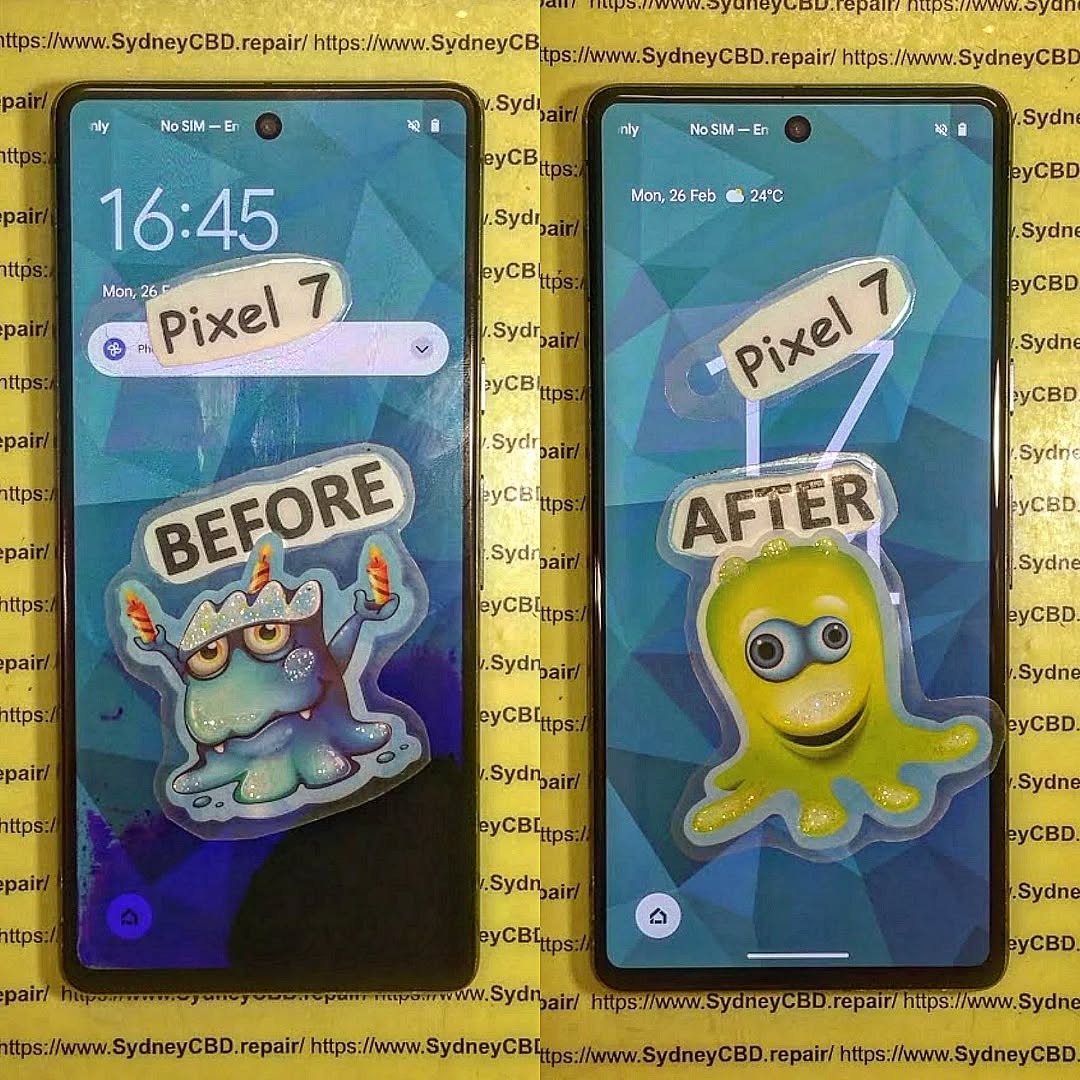
The Google Pixel 7 is known for its sleek design, powerful camera, and smooth Android experience. But like all smartphones, it’s not invincible. One unlucky Pixel 7 owner found themselves with a badly damaged screen after a sudden drop — and feared they’d be without their phone for days or even weeks.
This is the story of how Sydney CBD Repair Centre swooped in to save the day.
Our customer’s Pixel 7 had a completely cracked AMOLED display, with visible black spots and a flickering backlight. The touchscreen was intermittently unresponsive, making it impossible to use for work or personal communication.
Common issues with such damage include:
Loss of touch sensitivity
Screen flicker or blackout
Compromised water resistance
Increased risk of further internal damage
🔍 Our Diagnosis Process
At Sydney CBD Repair Centre, we start with a thorough inspection:
Visual Check – Confirm visible cracks and damage.
Function Test – Check touch response, fingerprint sensor function, and display brightness.
Internal Damage Assessment – Ensure there’s no motherboard or battery damage.
The verdict? The screen needed a full OEM replacement to restore both display quality and touch functionality.
Using precision tools, our technicians carefully opened the Pixel 7 without damaging its water-resistant seals more than necessary.
2. Removal of the Broken Screen
We detached the damaged AMOLED panel and cleaned the adhesive from the frame.
3. Installation of a Genuine Google OEM Screen
We used a 100% original Pixel 7 display, ensuring perfect color accuracy, brightness, and compatibility with the in-screen fingerprint sensor.
4. Resealing & Calibration
We resealed the phone using professional-grade adhesive to restore as much water resistance as possible, then recalibrated the touch and fingerprint systems.
⏱️ The Result: Same-Day Success
From drop-off to pick-up, the entire repair took just 2 hours. The Pixel 7 looked and functioned like new — and the customer walked away relieved and happy.
🏆 Why Choose Sydney CBD Repair Centre for Google Pixel Repairs
Genuine Parts Guarantee – No cheap knock-offs that compromise performance.
90-Day Warranty – Peace of mind for every repair.
Same-Day Repairs – Most Pixel repairs completed in hours, not days.
Expert Technicians – Over a decade of combined repair experience.
2000+ 5-Star Google Reviews – Proof of our commitment to quality.
💡 Pixel 7 Screen Care Tips
Use a tempered glass screen protector to absorb impact.
Keep your phone in a shockproof case.
Avoid extreme heat or cold.
Address small cracks quickly before they spread.
❓ FAQs
1. How much does a Pixel 7 screen repair cost at Sydney CBD Repair Centre?
Typically between $350–$450 depending on part availability and whether you choose genuine or high-grade aftermarket.
2. Will the fingerprint sensor still work after repair?
Yes — when we use OEM parts and calibrate correctly, the fingerprint sensor works flawlessly.
3. How long does a Pixel 7 repair take?
Most are completed the same day, often within 1–3 hours.
4. Can you fix water-damaged Pixel 7 devices?
Yes, but water damage requires immediate attention to prevent corrosion.
5. Do you repair other Google Pixel models?
Absolutely — from the Pixel 3 to the latest Pixel 8 Pro.
✅ Conclusion: Your Pixel 7 is in Good Hands
If your Google Pixel 7 suffers a screen crack, display glitch, or other hardware failure, don’t risk DIY mishaps or wait weeks for a manufacturer repair. Sydney CBD Repair Centre offers fast, reliable, and professional Pixel repairs with genuine parts and expert workmanship — all backed by a 90-day warranty.
How to Find the Right Replacement Screen for Your Phone – The Ultimate 17-Step Guide to Saving Money & Stress
🧭 Introduction
If you’ve cracked your phone screen—or worse, shattered it—you know how frustrating and inconvenient it can be. But not all screen replacements are created equal. Whether you want to DIY or visit a professional like Sydney CBD Repair Centre, this guide will help you choose the right replacement screen while saving money, time, and headaches.
Your screen is the face of your phone. A poor-quality replacement can lead to:
Touchscreen lag
Colour distortion
Decreased brightness
Poor durability
That’s why choosing the correct screen is crucial for long-term performance and usability. You want to get as close to the original quality as possible—without paying a premium unnecessarily.
Understanding the types of screens available will help you make the best decision for your device and usage.
LCD Screens
Liquid Crystal Display (LCD) is common in budget and mid-range phones. It provides decent brightness and color but is less vibrant compared to newer tech.
Pros:
Affordable
Readable in sunlight
Cons:
Lower contrast
Less battery efficient
OLED Screens
Organic Light-Emitting Diode (OLED) screens are self-lighting and offer vibrant colors with deep blacks. Common in flagship phones like iPhones and Samsung Galaxy models.
Pros:
Better contrast and brightness
More energy-efficient
Cons:
Expensive
More delicate
AMOLED Screens
A more advanced OLED version found in high-end Samsung and OnePlus phones.
Pros:
True blacks
Thin and flexible
Faster response time
Cons:
Costlier
Risk of burn-in
⚠️ Signs Your Screen Needs Replacing
If you notice any of the following, it might be time for a screen replacement:
Cracks or chips
Touchscreen unresponsiveness
Ghost touches
Discoloration
Flickering or lines
🏷 OEM vs Aftermarket Screens
OEM (Original Equipment Manufacturer) screens are made by the same company that made your phone’s original screen.
Aftermarket screens are third-party alternatives.
Feature
OEM Screen
Aftermarket Screen
Quality
High
Varies
Price
High
Low to Medium
Compatibility
Guaranteed
Might have fit issues
Availability
Limited
Widely Available
If you’re not on a tight budget, go for OEM. Otherwise, research reputable aftermarket brands or trust a professional repair service like Sydney CBD Repair Centre.
🛍 Where to Buy Replacement Screens
Authorized Retailers
These vendors offer genuine parts and often provide warranties. Great for peace of mind, but expect higher prices.
Online Marketplaces
Amazon, eBay, AliExpress—you’ll find everything, but beware of fakes. Check reviews and ratings before purchase.
Local Repair Shops
Shops like Sydney CBD Repair Centre offer walk-in service, verified genuine parts, and same-day repairs.
🔎 How to Identify Your Phone’s Model and Screen Type
Check your phone’s settings or backplate. Common ways:
Settings > About Phone
IMEI Lookup tools
Manufacturer’s website
Physically inspecting model number
This step ensures you get a compatible screen.
❌ Common Mistakes to Avoid
Buying the wrong screen type
Ignoring touch sensitivity ratings
Choosing lowest-price option blindly
Skipping compatibility checks
Using poor-quality tools
🧰 Tools You’ll Need for Screen Replacement
If you go DIY, make sure you have:
Screwdriver kit
Pry tools
Suction cup
Heat gun or hairdryer
ESD-safe gloves
Quality tools reduce the risk of damage during installation.
🧑🔧 DIY vs Professional Screen Replacement
Choosing between doing it yourself and hiring a professional depends on your skills, budget, and tolerance for risk.
DIY Screen Replacement
DIY might seem appealing, especially for the tech-savvy. You can find numerous tutorials online, and kits are available for most phone models.
Pros:
Cheaper (initially)
Good learning experience
Can be done at your convenience
Cons:
Risk of damaging internal components
Voids manufacturer warranty
Time-consuming
No quality guarantee
DIY is ideal only if you have prior experience or if the phone is old and not worth the cost of professional repair.
Professional Screen Replacement
Professional repair centers like Sydney CBD Repair Centre offer expertise, speed, and reliability.
Pros:
Done by trained technicians
Use of high-quality or OEM parts
Repairs done within the same day
Covered under a warranty (e.g., 90 days at Sydney CBD Repair Centre)
Zero risk of causing more damage
Cons:
More expensive than DIY
You might need to leave your phone for a few hours
If you value peace of mind and time efficiency, going pro is the way to go.
💰 Cost Comparison: DIY vs Professional Services
Cost Factor
DIY
Professional
Screen
$30 – $150
$100 – $400
Tools
$15 – $50 (if not already owned)
Included
Time
2–4 hours
30 mins – 1 hour
Risk
High (if inexperienced)
Low
Warranty
None
Yes (e.g., 90 days at Sydney CBD Repair Centre)
Bottom Line: DIY might save you money upfront, but professional repairs give you long-term value and confidence in your device’s performance.
🧑⚖️ What to Look for in a Repair Service Provider
Not all phone repair shops are equal. When selecting a provider, keep these key factors in mind:
Experience: Look for providers with a proven track record. Sydney CBD Repair Centre has been voted top repairer 6 years in a row.
Parts: Only use shops that install genuine or high-grade OEM screens.
Warranty: A 90-day warranty is ideal—it shows the shop stands by their work.
Reviews: Thousands of positive reviews (like Sydney CBD’s 2000+ 5-star reviews) are a strong trust signal.
Speed: Same-day repairs are a massive plus, especially for working professionals.
✅ Warranty and Quality Assurance
Always ask about:
Part warranties (minimum 30–90 days)
Service warranties
Return or re-repair policies
Shops like Sydney CBD Repair Centre provide peace of mind with a 90-day warranty and same-day repair, so you don’t have to worry.
🌱 Environmental Impact of Screen Replacements
Replacing your phone screen instead of buying a new device is eco-friendly. It reduces e-waste and the need for new raw materials.
To be extra responsible:
Ask your repair shop if they recycle old screens
Choose local repair options to reduce shipping emissions
Support businesses using sustainable practices
🔒 How to Extend the Life of Your New Screen
Here are some practical tips to protect your investment:
Install a tempered glass protector
Use a shockproof phone case
Avoid putting your phone in the same pocket as keys or coins
Clean your screen with microfiber cloths only
Don’t overheat your phone
Preventative care means fewer future repairs—and more savings.
❓ Frequently Asked Questions (FAQs)
1. Can I replace my phone screen myself?
Yes, but it requires the right tools, patience, and confidence. It’s best for older models or if you have prior experience.
2. Is it worth repairing a cracked screen?
Absolutely—especially if the device is still under contract or has good performance. Replacing the screen is far cheaper than buying a new phone.
3. How long does professional screen replacement take?
Most services take 30 minutes to 1 hour, especially if you choose Sydney CBD Repair Centre, which offers same-day express repairs.
4. What’s the difference between OEM and aftermarket screens?
OEM screens are original, while aftermarket ones vary in quality. Reputable shops often use high-grade aftermarket parts if OEMs aren’t available.
5. Do repaired screens affect touch sensitivity or display quality?
If done correctly with high-quality parts, there should be no difference in touch or display performance.
6. Where’s the best place to get my screen replaced in Sydney?
Sydney CBD Repair Centre – with over 2000 5-star Google reviews, genuine parts, and express same-day service.
🏁 Conclusion: Make the Smart Screen Choice
Your phone screen is more than glass—it’s your gateway to communication, productivity, and entertainment. Choosing the right replacement involves understanding screen types, knowing where to buy, and recognizing the value of expert repair services.
If you’re in Sydney, don’t risk DIY mistakes or dodgy shops. Visit Sydney CBD Repair Centre, where quality meets reliability.
📞 Call to Action – Trust Sydney CBD Repair Centre
Sydney CBD Repair Centre
🔧 Over 2000+ 5-Star Google Reviews
🏆 6-Time Award Winner for Best Phone Repairs
📍 Located in the heart of Sydney
🛠 Same Day Repairs | Genuine Parts | 90-Day Warranty
How to Fix Your Smartphone’s Cracked Back Glass – Expert Guide for Safe & Effective Repair
# Introduction
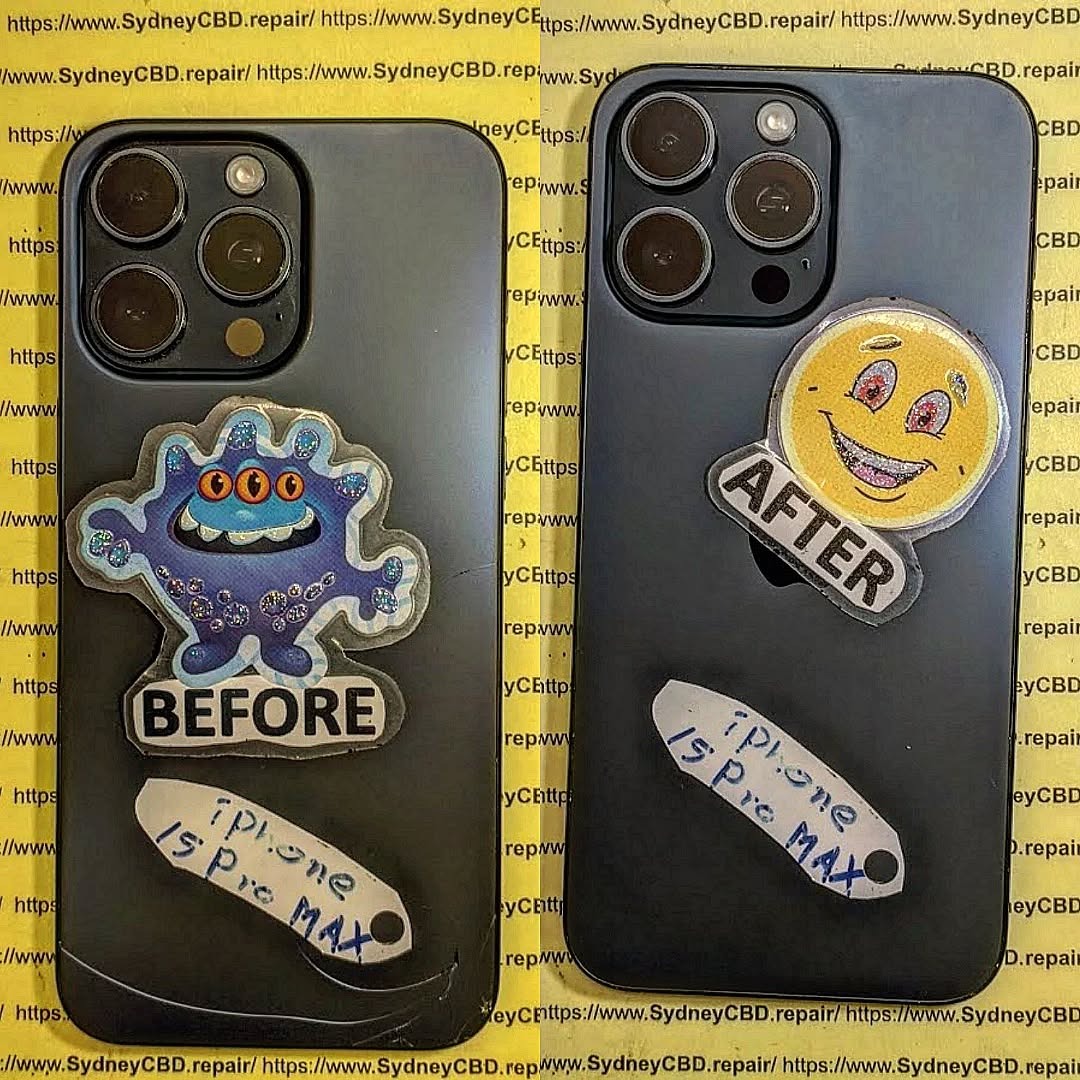
Your phone’s back glass is not just about looks—it also protects internal components and supports features like wireless charging. But when it cracks, it’s more than a cosmetic issue. A cracked back can expose your device to moisture, affect structural integrity, and even cut your hands.
In this article, we’ll walk you through how to fix your smartphone’s cracked back glass, what to expect from a professional repair shop, and why it’s worth investing in expert help—especially for iPhones, Samsungs, and Google Pixels.
Even a tiny crack can spread quickly due to pressure and heat.
# Can You Still Use Your Phone with a Cracked Back?
Technically, yes—but it’s risky:
❌ Moisture and dust can enter the device
❌ Risk of cuts from sharp glass edges
❌ Reduced resale value
❌ Wireless charging may stop working
❌ Compromised water resistance
📌 Fixing it early prevents further damage and keeps your phone safe to use.
# Repair Options: DIY vs Professional Repair
🔧 DIY Repair
Requires a heat gun, suction tools, adhesive, precision blades
Can be very risky, especially for glass with strong adhesive
Often leads to accidental damage to internal parts
No warranty
🛠 Professional Repair
Technicians use laser separation machines and industrial tools
Work completed in sterile, static-free environments
Comes with a warranty (90 days at Sydney CBD Repair Centre)
Maintains phone integrity
Verdict: DIY is risky unless you’re trained. Leave it to pros.
# The Right Tools for Back Glass Replacement
A quality repair requires:
Laser separation machine (to remove adhesive without overheating)
Isopropyl alcohol (for residue cleanup)
ESD-safe workstations
Factory-grade adhesives and sealants
Microscope (for alignment and inspection)
Sydney CBD Repair Centre uses industry-standard equipment to ensure safe and precise repairs.
# Why Back Glass Repairs Are More Complicated Than They Seem
Back glass isn’t held by screws—it’s fused with strong adhesive, especially on iPhones and Galaxy S models. Removing it without the right tools risks:
Burning internal components
Damaging the camera module
Breaking the wireless charging coil
Ruining water resistance seals
💡 Many shops refuse back glass repairs because of these challenges.
# Step-by-Step: How Professionals Replace Back Glass
Device is powered down and inspected
Back panel heated or laser-separated
Cracked glass is carefully removed with suction tools and blades
Adhesive residue cleaned thoroughly
New glass aligned and installed with OEM adhesive
Phone reassembled and tested (Face ID, charging, camera)
At Sydney CBD Repair Centre, this process takes around 1–2 hours.
# Does Wireless Charging Still Work After Replacement?
✅ Yes—if the repair is done properly and the charging coil remains intact.
At Sydney CBD Repair Centre, we:
Retain or replace the coil if needed
Test all wireless charging functions before handing back your phone
Guarantee performance with our 90-day warranty
# How Much Does Back Glass Repair Cost?
Pricing varies by model and glass type:
Model
Average Price (AUD)
iPhone 11
$120 – $180
iPhone 13 Pro Max
$200 – $300
Samsung Galaxy S21
$180 – $250
Pixel 7 Pro
$170 – $240
Galaxy Z Fold (Back)
$250 – $400
✔️ OEM or factory-grade parts may cost more but offer better longevity and performance.
# How Long Does It Take?
Most cracked back glass repairs can be done within the same day, often in 1–2 hours depending on the model and severity.
# What to Ask Your Repair Technician
Do you use OEM back glass or high-quality aftermarket?
Will wireless charging still work after repair?
Is there a warranty on the repair?
How do you ensure dust and moisture protection after the fix?
Can you repair foldable or rare phone models?
👉 At Sydney CBD Repair Centre, the answer to all the above is yes.
# Why Choose Sydney CBD Repair Centre
📍 Located in the heart of Sydney CBD, we offer:
✅ Same-Day Repairs
✅ Genuine Parts & OEM Adhesives
✅ Laser Equipment for Safe Glass Removal
✅ Certified Technicians
✅ 90-Day Warranty
✅ Over 2000 Google 5-Star Reviews
✅ Trusted by Locals & Visitors for 6 Years Running
Absolutely. It restores safety, aesthetics, and phone functionality.
2. Can you fix the back glass without replacing the whole frame?
Yes. We replace just the glass while keeping the original frame intact.
3. Will my phone still be waterproof after the repair?
We reseal devices carefully, but factory-level water resistance may not be fully restored. Use caution around water.
4. Do you repair foldable phones’ back glass?
Yes, including Galaxy Z Fold and Flip models.
5. Can you repair back glass for phones not sold in Australia?
Yes. We can source parts for imported or rare models.
6. Is there a discount for multiple repairs?
We offer bundle discounts—just ask in-store or when you book online.
# Conclusion
Cracked back glass isn’t just cosmetic—it can impact your phone’s safety, performance, and value. Whether you’re using the latest iPhone or a foldable Samsung, it’s crucial to repair it the right way, with expert care and the right tools.
🛠 At Sydney CBD Repair Centre, we’re ready to help you restore your phone to like-new condition—fast, safely, and professionally.
David from Sydney CBD Repair Centre – The Best place to fix mobile phones as 6 Years In A Row!
Top Mobile Phone Repair In Sydney. More than 2000 Positive Reviews on Google and Same Day Repairs.
Visit us for:
✓ Same Day Express Repairs
✓ Genuine Parts Guarantee
✓ Professional Technicians
✓ Competitive Pricing
✓ 90-Day Warranty
✓ 6-Time Award Winner for Best Phone Repairs
How to Remove and Replace a Fingerprint Display on a New Screen – Expert Guide + 15 Easy Steps
Introduction to Fingerprint Display Technology
Fingerprint sensors have evolved from physical buttons to under-display technologies. Most modern smartphones integrate fingerprint readers within OLED screens, especially on flagship Android devices. This innovation enhances both security and design but makes repairs a bit more technical.
Whether your phone is a Samsung Galaxy, Google Pixel, or another flagship model, under-display fingerprint scanners are delicate and require a precise approach for removal and replacement. Knowing how to manage this repair can save you time, money, and future frustration.
Genuine OEM screens with integrated fingerprint sensors
Professional calibration for reliable fingerprint recognition
Same-day service for most models
90-day warranty on all repairs
Our technicians are trained to handle delicate components with precision, ensuring you get the best results without any risk.
Cost of Replacing a Fingerprint Display in Sydney
Prices vary depending on phone model and screen type. As of 2025:
Phone Model
Estimated Cost (AUD)
Samsung Galaxy S22 Ultra
$380 – $450
Google Pixel 7 Pro
$340 – $420
OnePlus 11
$300 – $390
Note: Prices include genuine screen + fingerprint sensor and labor. Contact Sydney CBD Repair Centre for the latest quotes.
FAQs
1. Can I replace the fingerprint sensor without replacing the screen?
In most modern phones, the fingerprint sensor is embedded under the screen. Replacing the sensor alone usually isn’t possible.
2. Will a new screen affect fingerprint performance?
Only if it’s not OEM or installed incorrectly. Genuine parts retain full functionality.
3. How long does it take to replace a fingerprint display?
DIY might take 2–3 hours. At Sydney CBD Repair Centre, it’s usually done same day.
4. Is it safe to use a third-party screen?
Third-party screens may not support fingerprint sensors or may degrade over time. Always choose OEM if fingerprint recognition is important.
5. Can water damage affect the fingerprint scanner?
Yes. Moisture can short the sensor or damage flex cables. Immediate repair is recommended.
6. Will I lose data during screen replacement?
No, but always back up your phone before a repair just in case.
Conclusion
Replacing a fingerprint display isn’t a task to take lightly. It requires careful disassembly, high-quality parts, and precise installation. Whether you’re confident doing it yourself or prefer expert help, it’s essential to use genuine components and follow safety protocols.
For Sydney residents, Sydney CBD Repair Centre is your trusted choice for expert fingerprint display repairs. With thousands of satisfied customers and genuine parts guaranteed, you’re in good hands.
So, is it worth fixing a broken Pixel 8a screen? The short answer: yes — in most cases, repair is far more economical and environmentally friendly than replacing the device entirely. In this guide, we’ll help you understand repair options, cost comparisons, and how you can get your Pixel 8a screen fixed professionally in Sydney without overpaying.
📱 Common Pixel 8a Screen Issues
Cracked Glass vs Full Screen Damage
Not all screen damage is created equal. A simple crack in the top glass may look bad, but it might not affect the display or touch functionality. In contrast, internal LCD or OLED damage may require a full screen replacement. Understanding the type of damage can impact the repair method and cost.
Touchscreen Unresponsiveness
Sometimes, the Pixel 8a screen may appear intact but stop responding to touch. This issue often stems from impact damage or internal disconnection. It requires professional diagnostics to determine the underlying cause.
Display Discoloration or Dead Pixels
Color distortions, flickering, or dead spots on the screen are telltale signs of internal panel damage. This type of defect cannot be fixed by replacing only the top glass — you’ll need a full display assembly replacement.
Using genuine Pixel parts ensures color accuracy, touch responsiveness, and durability. However, they come at a premium. Aftermarket parts are cheaper but may have quality compromises. At Sydney CBD Repair Centre, we only use genuine parts to maintain your phone’s original performance.
Technician Experience and Location
Prices vary based on technician skill and geographic location. Highly rated repair shops in central areas like the Sydney CBD may charge slightly more — but often deliver far superior service and faster turnaround.
Warranty and Service Guarantees
Shops that offer repair warranties (like our 90-day coverage) may charge a bit more, but the peace of mind is worth it. If something goes wrong after the repair, you’re covered.
A new Pixel 8a can cost anywhere from $799 AUD to over $900 AUD with taxes. Compared to a $250 screen repair, replacement is 3x more expensive. Unless your phone is severely damaged or outdated, screen repair is clearly the cost-effective choice.
🧰 Professional Repairs vs DIY: Pros and Cons
Factor
Professional Repair
DIY Kit
Price
Higher upfront
Cheaper
Risk
Minimal
High (device damage)
Warranty
Included
None
Skill Required
None
Advanced
Tools Needed
Provided by technician
Must be bought separately
DIY repairs might seem tempting, but one mistake could damage internal components beyond repair. That’s why most experts — including us — recommend leaving it to professionals.
🏆 Benefits of Repairing Your Pixel 8a at Sydney CBD Repair Centre
Why Choose Us for Pixel 8a Screen Repair?
With over 2000 5-star reviews and six years of award-winning service, Sydney CBD Repair Centre is the #1 trusted name for Pixel screen repairs in Sydney.
Transparent Pricing and Genuine Parts
We never cut corners. You get clear pricing upfront, and we use only genuine Google parts — ensuring quality repairs that last.
Fast Turnaround Times with Same-Day Repairs
Drop in during your lunch break, and get your Pixel 8a screen replaced within hours. Same-day express service means minimal disruption to your life.
💬 Customer Testimonials & Google Reviews
“Absolutely the best repair experience I’ve ever had. Fast, affordable, and super friendly staff!” — Mark T., Sydney
“My Pixel 8a looks brand new! I wouldn’t trust anyone else with my phone.” — Lucy H., Bondi
“They used genuine parts, explained everything, and had my phone back in 2 hours. 10/10!” — Daniel G., Surry Hills
🛡️ How to Prevent Future Screen Damage
Use a Tempered Glass Protector
This affordable add-on can absorb impacts and prevent glass cracks in minor drops.
Invest in a Quality Case
Choose shockproof, drop-tested cases with raised edges to protect both the screen and body.
Insurance and Care Plans
Consider coverage from your mobile carrier or third-party protection services for peace of mind.
❓ Frequently Asked Questions (FAQs)
1. How long does a Pixel 8a screen repair take?
At Sydney CBD Repair Centre, we complete most repairs on the same day, often within 1–2 hours.
2. Will the replacement screen be as good as the original?
Yes, we use genuine parts to ensure your phone feels and performs like new.
3. Is screen repair covered under Google warranty?
Accidental damage usually isn’t covered under standard warranties. Repairing it privately is often faster and more cost-effective.
4. Can I repair my Pixel 8a screen at home?
While possible, it’s risky. DIY repair requires advanced tools and skills, and it voids any remaining warranty.
5. Do you offer a warranty on your screen repairs?
Absolutely! We provide a 90-day warranty on all screen repairs.
6. How do I book a repair appointment?
You can call us at +61280114119 or visit our location here to walk in anytime.
✅ Conclusion: Is It Worth Fixing Your Pixel 8a Screen?
Yes — repairing your Pixel 8a screen is absolutely worth it. You save money, reduce electronic waste, and get back a fully functional device. Especially with trusted repair partners like Sydney CBD Repair Centre, you’re guaranteed expert care, genuine parts, and lightning-fast service.
📍 About Sydney CBD Repair Centre
SydneyCBDrepairCentreTeam-854-553.jpg
David from Sydney CBD Repair Centre — The Best place to fix mobile phones 6 Years In A Row! We’re Sydney’s Top Mobile Phone Repair Shop, trusted by over 2000 happy customers. Our technicians repair screens, batteries, ports, and more for all major brands. Located in the heart of Sydney CBD, we’re your local experts for fast, reliable, and professional phone repairs.
Visit us for:
✓ Same Day Express Repairs
✓ Genuine Parts Guarantee
✓ Professional Technicians
✓ Competitive Pricing
✓ 2000+ 5-Star Google Reviews
✓ 6-Time Award Winner for Best Phone Repairs