Have you spotted this comet that’s been making headlines this month? If you’re in the northern hemisphere and want to catch the photogenic comet in the night sky before it disappears, read on as we explain the best way to hunt down NEOWISE with your iPhone.
NASA describes the comet as a “fuzzy star with a bit of a tail” so you have an idea of what to chase.
For those hoping to catch a glimpse of Comet NEOWISE before it’s gone, there are several observing opportunities over the coming days when it will become increasingly visible shortly after sunset in the northwest sky. If you’re looking at the sky without the help of observation tools, Comet NEOWISE will likely look like a fuzzy star with a bit of a tail, so using binoculars or a small telescope is recommended to get the best views of this object.
Have an iPhone 11 or iPhone 11 Pro? You may also try your luck at capturing the comet using Night Mode on iPhone 11. Just hold your phone firmly or use a tripod for best results, and don’t expect professional results like those produced by multiple images stacked from astronomical photographers. An iPhone shot still makes for a neat souvenir, of course!
What’s NEOWISE?
Comets are icy bodies from deep in the Solar System that create a trail called a coma when they near the Sun. This is caused when the comet warms and gasses are released in what’s called an outgassing phase.
Comet C/2020 F3 was discovered on March 27 through infrared images from the Near-Earth Object Wide-field Infrared Survey Explorer telescope, thus its common name NEOWISE.
The NEOWISE project was founded by NASA’s Planetary Science Division to measure and catalog asteroids and comets. Over 980,000 infrared measurements of 37,009 solar system objects have been made so far — and now the C/2020 F3 comet is one of them.
Observers in the Northern Hemisphere have been able to see the NEOWISE comet with the naked eye this month, and you still have a chance to see it if you can find a clear night sky.
With the help of neowise.whatsupin.space, an online resource developed by Tony Rice, you can enter your city or ZIP code to find the right range of hours when the the NEOWISE comet will be visible in the sky. The tool shows upcoming days and the estimated local times when the C/2020 F3 comet can best be seen.
Comet NEOWISE is seen, upper left, before sunrise over Washington, Sunday, July 12, 2020. Source: NASA
iPhone apps
There are also fantastic iPhone apps that can guide you to find the comet using location and augmented reality to show you where to look. These apps have topped the free and paid App Store charts because of NEOWISE.
Other high-ranking apps climbing the charts because of the the C/2020 F3 comet include Stellarium PLUS (#13) for viewing a realistic night sky and NightCap Camera (#14) for night photography on the iPhone.
Weather apps including Dark Sky (recently acquired by Apple) are also useful for determining weather conditions before heading out to a viewing site with a clear view of the sky.
Source: NASA
Viewing tips
NASA has also shared recommendations for those who want to see the Comet NEOWISE before disappears for 6,800 years. This includes finding a location away from lights and looking to the northwest sky:
Find a spot away from city lights with an unobstructed view of the sky
Just after sunset, look below the Big Dipper in the northwest sky
If you have them, bring binoculars or a small telescope to get the best views of this dazzling display
Apple News+ audio stories, a new daily audio briefing, and curated local news collections are all available now in Apple News.
Apple is introducing several new features for Apple News and Apple News+, including audio stories of some of the best feature stories from Apple News+, a daily audio news briefing hosted by Apple News editors, and curated local news collections beginning in five cities and regions and expanding to more areas in the future. Apple News is also adding more top local and regional news outlets for readers and subscribers, including The Charlotte Observer, the Miami Herald, and The News & Observer (Raleigh, North Carolina).
“Apple News showcases so much great journalism, and we’re excited to help bring it to life in new ways with Apple News+ audio stories and a new daily news show, Apple News Today,” said Lauren Kern, editor-in-chief of Apple News. “We also greatly value our many local news partners — our new local news feature highlights their work for readers who live, and are interested, in those communities.”
Apple News+ Audio Stories
Beginning today, Apple News will produce about 20 audio stories a week across a wide range of interests. Narrated by professional voice actors, these are audio versions of some of the best feature reporting and long-form pieces published by Esquire, Essence, Fast Company, GQ, New York magazine, Sports Illustrated, TIME, Vanity Fair, Vogue, Wired, and more, and newspapers including the Los Angeles Times and The Wall Street Journal. Audio stories are now available to Apple News+ subscribers in the US.
Apple News+ audio stories are audio versions of some of the best feature reporting from a variety of publications.
Apple News Today
With Apple News Today, a daily audio news briefing, Apple News editors and co-hosts Shumita Basu and Duarte Geraldino guide listeners through some of the most fascinating stories in the news — and how the world’s best journalists are covering them. Apple News Today is free to all listeners and available mornings Monday through Friday directly in the News app in the US and on Apple Podcasts.
Audio stories and Apple News Today can both be found in the newly added Audio tab, located at the bottom of the News app, where users can manage their queue and get personalized recommendations. Both new audio features are available on iPhone, iPod touch, and CarPlay.
Apple News Today is hosted by Apple News editors Shumita Basu and Duarte Geraldino.
Apple also introduced support for the News app in CarPlay, so users can listen to audio stories and Apple News Today while driving. Users will be able to sync listening progress across devices: Start listening to an audio story with CarPlay from your iPhone and pick up listening to or reading it later at home.
CarPlay now supports the News app, so users can listen to audio stories and Apple News Today while driving.
Curated Local News
Apple News introduced a new curated local news experience currently available in the Bay Area, Houston, Los Angeles, New York, and San Francisco, featuring a variety of content from a diverse collection of local publishers, including a major newspaper in each city and region. Local news collections in Apple News include coverage of topics most important to local communities, such as sports, dining and restaurants, weather, news and politics, and more, with curation by local Apple News editors as well as personalization for each user.
The new curated local news experience in Apple News is currently available in the Bay Area, Houston, Los Angeles, New York, and San Francisco.
Even More Local News
Apple News recently added even more top local and regional newspapers to the Apple News+ catalog: A subscription to Apple News+ in the US now includes access to The Charlotte Observer, the Idaho Statesman, The Kansas City Star, the Miami Herald, The News & Observer, and The State (Columbia, South Carolina). In Canada, leading French-language newspaper Le Devoir is now available to Apple News+ subscribers, and The Globe and Mail, one of the country’s most prestigious national newspapers, will be available to subscribers later this summer.
Apple News draws over 125 million monthly active users in the US, the UK, Australia, and Canada, and has revolutionized how people access news from all their favorite sources. Apple News+ is a single subscription that provides access to written and audio content from hundreds of the world’s top magazines and major newspapers, including the Los Angeles Times and The Wall Street Journal, as well as many local and regional newspapers including the Houston Chronicle and the San Francisco Chronicle.
Pricing and Availability
Apple News is available for free in the US, the UK, Australia, and Canada on iPhone, iPad, and Mac devices. To access the new audio features, users must update to iOS 13.6. To access the new local news features, users must update to iOS 13.6, iPadOS 13.6, and macOS 10.15.6.
Apple News+ is available in the US for $9.99 a month, Canada for $12.99 CAD a month, the UK for £9.99 a month, and Australia for $14.99 AUD a month. Customers can sign up for a free one-month trial, and the plan automatically renews after the trial ends. To subscribe to Apple News+, customers must update to iOS 12.2 or later and macOS 10.14.4 or later. Through Family Sharing, up to six family members can share one Apple News+ subscription.
Whether you want to take advantage of the 0% interest offers for iPhone, iPad, Mac, and more or have been wanting to get Apple’s credit card for while for another reason, follow along for how to apply for Apple Card on iPhone and iPad.
Apple Card offers a variety of compelling features like its Daily Cash program, strong focus on security and privacy, no fees, a clean, optional Titanium physical card, and a great software experience to track spending and more on iPhone.
While Apple has offered free iPhone financing to Apple Card users for some time, a new addition is the ability to get 0% interest financing for iPad, Mac, AirPods, and more. The interest-free period ranges from 6-12 months depending on the product you’re buying. There’s also a $50 sign up bonus promotion through 7/31/2020.
Here are some of the requirements for Apple Card eligibility:
Be 18 years or older, depending on where you live
Be a U.S. citizen or a lawful U.S. resident with a valid, physical U.S. address that is not a P.O. Box. You can also use a military address
Have a compatible iPhone with the latest iOS version (iPhone 6 or later)
Using two-factor authentication with your Apple ID and be signed in to iCloud with your Apple ID
Apple works with Goldman Sachs to provide the financial end of Apple Card.
How to apply for Apple Card on iPhone and iPad
On iPhone open the Wallet app (on iPad head to Settings > Wallet & Apple Pay > Add Card)
You might see an offer at the top to apply for Apple Card (if not tap the + icon in the top right corner)
Choose Apply for Apple Card
Read the terms and conditions, tap Continue
Confirm your Apple ID, name, date of birth, and phone number, tap Next
Enter your address (no P.O. boxes)
Enter the last four digits of your social security number
Enter your total annual income (required by Goldman Sachs)
Agree to the terms and conditions
It will just take a few moments and you’ll see if you’re immediately approved or not
In some cases, Apple/Goldman Sachs may ask for you to share a photo of your driver’s license or State ID.
Here’s how the process looks:
Once your application is submitted, you should see a screen that lets you know if you’re approved or not. Check out our previous hands-on coverage of using Apple Card, tracking spending, and more with iPhone, iPad, and Apple Watch.
Apple is rolling out the second developer betas of iOS 13.6 and iPadOS 13.6 today. Included in the updates are additional controls to manage software updates going forward, including having updates automatically download and install.
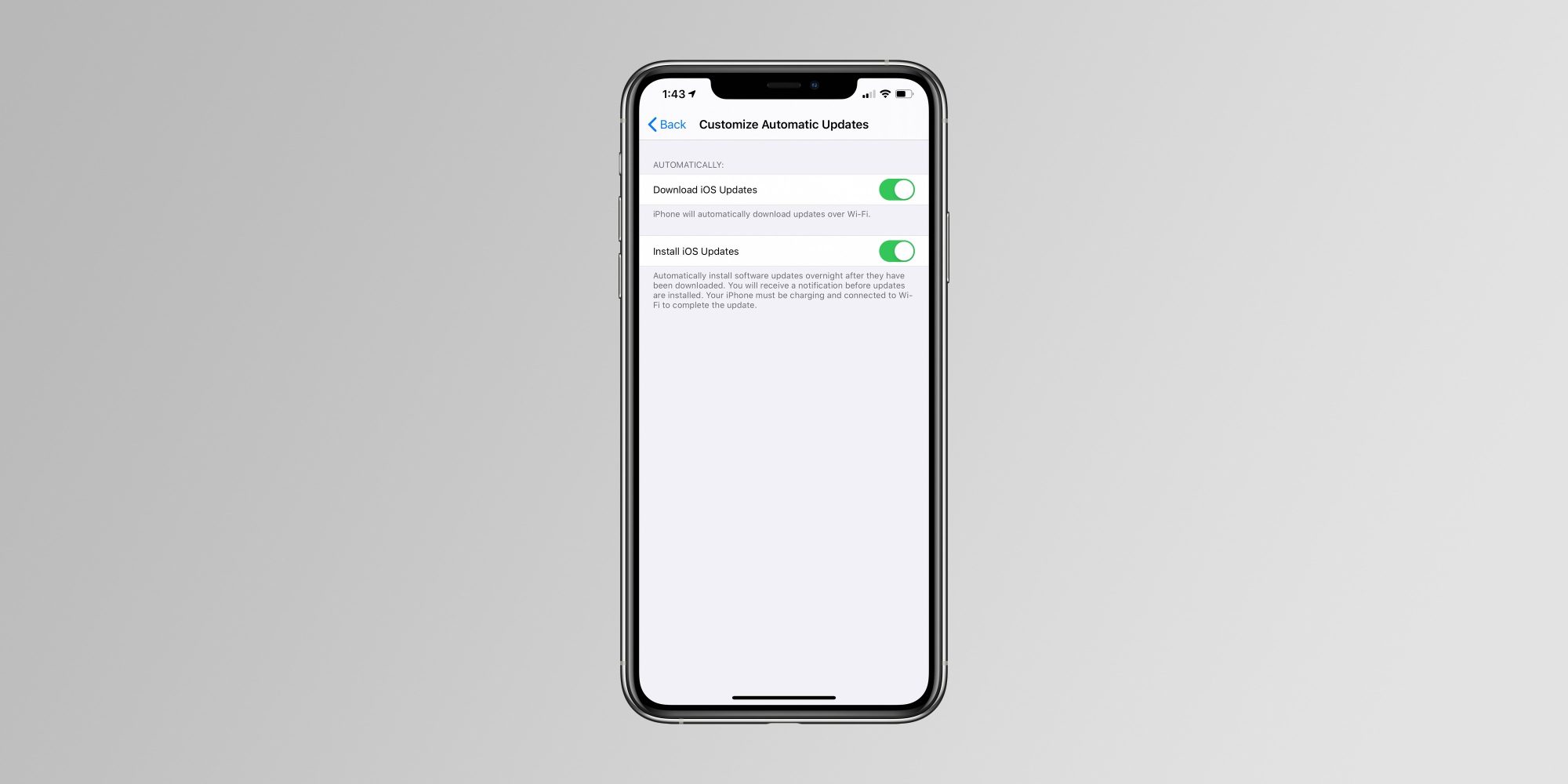
The new Automatic Updates setting allows your iPhone, iPad, or iPod touch to automatically download software updates when you’re connected to Wi-Fi. “iPhone will automatically download updates over Wi-Fi,” is how Apple describes the new toggle.
iOS and iPadOS have long allowed you to automatically install software updates overnight, and today’s new toggle simply builds on that feature. There’s no need to manually download an update, but iOS will still send you a push notification before an update is installed overnight:
Automatically install software updates overnight after they have been downloaded. You will receive a notification before updates are installed. Your iPhone must be charging and connected to Wi-Fi to complete the update.
We’re still digging through iOS 13.6 beta 2 to see if there are any other notable changes.
Apple is also expected to introduce iOS 14 in less than two weeks at WWDC 2020. Whether or not iOS 13.6 is released to the public before iOS 14 beta testing begins remains to be seen.
Also new in iOS 13.6:
Health app adds new “Symptoms” section for tracking symptoms of different illnesses
New data types are available in HealthKit to track symptoms including headaches, chills, sore throat, and more
May 20: iOS 13.5 was released with the new Apple and Google Exposure Notification API
June 1: iOS 13.5.1 released to everyone with a security patch for the unc0ver jailbreak vulnerability.
June 1: iOS 13.5.5 beta 1 released to developers and public beta users with “bug fixes and improvements”
June 9: iOS 13.5.5 renamed to iOS 13.6, beta 2 released to developers
Apple has today released iOS & iPadOS 13.6 Beta 2 to developers along with Xcode 11.6 beta (11N700h). The build number for this update is 17G5045c. There are two new interesting features added to this beta which are:
1. New Toggle for Automatic Updates: With this version of iOS & iPadOS, Apple has added a new toggle which will allow users to enable or disable the option to download updates automatically on your iPhone or iPad when they are connected to WiFi. The option is called “Download iOS updates” and under it, Apple mentions, “iPhone will automatically download updates over Wi-Fi”. To enable or disable this option, go to Settings>General>Software update>Customize Automatic Updates.
2. A new Symptoms Section in the Health App: Apple has added a new Symptoms Section to the the Browse Tab on the Health App. This section will enable users to add their symptoms like pain, coughing, headache, dizziness, etc. This will help users to be aware of their symptoms over time, and will help to discover illnesses developed by the users over time. Apple has described each symptom they have listed under teh new Symptoms category, and has options to add important details like Present/Not Present, Mild, Moderate and Severe.
These are the two interesting changes are present on iOS 13.6 Beta 2. This update is expected to be released after 2-3 betas.
In total, Apple has released four new colors for the Apple Watch Sport Band: linen blue, seafoam, vitamin C, and coastal gray. All four of the new colors are available to order from Apple’s Online Store today in 40mm and 44mm sizes for $49:
It’s common for Apple to introduce new Apple Watch band colors near the start of a new season. As of right now, the Sport Band is the only option to be updated for summer 2020. There have been rumors of a new Leather Loop for Apple Watch, but that was not included with today’s updates.
But in addition to the new Apple Watch accessories, Apple has also released new silicone cases for the iPhone 11, iPhone 11 Pro, and iPhone 11 Pro Max. The new cases are available in three new colors: seafoam, vitamin C, and linen blue.
You can buy the new iPhone 11 silicone cases for $39 from Apple’s Online Store at the links below:
We also expect the new iPhone cases to be available on Apple’s official Amazon storefront soon, alongside the new Apple Watch bands. They will likely also be available in physical Apple Stores that are open sometime this week.
What do you think of Apple’s new iPhone 11 cases and Apple Watch Sport Bands? Are you planning to order anything new? Let us know down in the comments!
Starting today, we’re rolling out a change that enables native support for the W3C WebAuthn implementation for Google Accounts on Apple devices running iOS 13.3 and above. This capability, available for both personal and work Google Accounts, simplifies your security key experience on compatible iOS devices and allows you to use more types of security keys for your Google Account and the Advanced Protection Program.
As long as your iPhone is running iOS 13.3 or later, you’ll find that your security key options are now a lot broader. You’ll be able to use USB-A and Bluetooth Titan Security Keys with your iPhone because those keys have built-in NFC support, meaning all you need to do is tap one of them to the back of your phone for authentication.
You also have the option of using a Lightning security key in place of the Titan – Google calls out the YubiKey 5Ci
Making the Advanced Protection Program and Titan Security Keys easier to use on Apple iOS devices, rolling out a change that enables native support for the W3C WebAuthn implementation for Google Accounts on Apple devices running iOS 13.3 and above. This capability, available for both personal and work Google Accounts, simplifies your security key experience on compatible iOS devices and allows you to use more types of security keys for your Google Account and the Advanced Protection Program.
More security key choices for users
Both the USB-A and Bluetooth Titan Security Keys have NFC functionality built-in. This allows you to tap your key to the back of your iPhone when prompted at sign-in.
You can plug a USB-C security key in directly to an iOS device that has a USB-C port (such as an iPad Pro).
We suggest installing the Smart Lock app in order to use Bluetooth security keys and your phone’s built-in security key, which allows you to use your iPhone as an additional security key for your Google Account.
In order to add your Google Account to your iOS device, navigate to “Settings > Passwords & Accounts” on your iOS device or install the Google app and sign in.
Account security best practices
We highly recommend users at a higher risk of targeted attacks to get security keys (such as Titan Security Key or your Android or iOS phone) and enroll into the Advanced Protection Program. If you’re working for political committees in the United States, you may be eligible to request free Titan Security Keys through the Defending Digital Campaigns to get help enrolling into Advanced Protection.
a USB security key if you’ve got an Apple Lighting to USB Camera Adapter. iOS devices with a USB-C port (hello iPad Pro) can use USB-C keys to secure Google accounts, and finally, Google recommends that users install its Smart Lock app, which will enable functionality with Bluetooth keys and let iPhone adherents use their phone itself as a security key for their Google accounts.
Google first introduced its Titan Security Key back in 2018 after requiring that all of its employees switch to hardware-based two factor authentication. Two-factor authentication, regardless of the form, is better than merely securing your accounts with a password, but hardware-based 2FA using security keys is one of the safer authentication methods.
Google also reminded users of its Advanced Protection Program, which can help keep safe the Google accounts belonging to people at risk of targeted attacks. Those who are working for political committees in the United States can request a free security key from Google, so if you are you might want to check out the Advanced Protection Program website.
After releasing the golden master to developers earlier this week, Apple is releasing iOS 13.5 to the general public today. The update brings quite a few changes and new features prompted by COVID-19, including the Exposure Notification API, Face ID enhancements, and much more.
Apple and Google have been developing the Exposure Notification API with close guidance from public health officials. When a user enables the feature and has an app from a public health authority installed, the device will regularly send out a beacon via Bluetooth that includes a random Bluetooth identifier. From there, the Exposure Notification API will download a list of the keys for the beacons that have been verified as belonging to people confirmed as positive for COVID-19 and check against that list. If there is a match, the user may be notified and advised on next steps.
Apple and Google say that as of today, a handful of U.S. states and 22 countries across five continents have requested and received access to the Exposure Notification API. The two companies say they have consulted with and briefed a number of different public health teams, including the Centers for Disease Control and Prevention, the CDC Foundation, the Association of Public Health Laboratories, the Association of State and Territorial Health Officials, the Council of State and Territorial Epidemiologists, and the Public Health Informatics Institute of the Taskforce for Global Health.
The release of iOS 13.5 today means that public health agencies around the world can begin deploying their applications that take advantage of Apple and Google Exposure Notification API.
Key changes made to the Exposure Notification API based on feedback from public health agencies include:
Public health agencies can define what constitutes an exposure event
Public health agencies can determine the number of exposure events a person has had
Transmission risk of positive cases can be factored into the definition of an exposure event
Public health agencies can contact exposed users based on a combination fo the API and data that users voluntarily choose to input into the app
Apple and Google also say that they have made further privacy enhancements to the Exposure Notification API:
Temporary Exposure Keys are now generated randomly instead of being derived from a tracing key
All metadata associated with Bluetooth is now encrypted to make it more difficult to identify a person
Apple and Google elaborated on the need for this Exposure Notification API in helping slow the spread of COVID-19. The goal, the companies say, is to offer rapid notifications to exposed users. Again, Apple and Google both emphasize that what they’ve built is not an app, but rather an API that public health agencies can incorporate into their own apps.
One of the most effective techniques that public health officials have used during outbreaks is called contact tracing. Through this approach, public health officials contact, test, treat and advise people who may have been exposed to an affected person. One new element of contact tracing is Exposure Notifications: using privacy-preserving digital technology to tell someone they may have been exposed to the virus. Exposure Notification has the specific goal of rapid notification, which is especially important to slowing the spread of the disease with a virus that can be spread asymptomatically.
To help, Apple and Google cooperated to build Exposure Notifications technology that will enable apps created by public health agencies to work more accurately, reliably and effectively across both Android phones and iPhones. Over the last several weeks, our two companies have worked together, reaching out to public health officials scientists, privacy groups and government leaders all over the world to get their input and guidance.
Starting today, our Exposure Notifications technology is available to public health agencies on both iOS and Android. What we’ve built is not an app — rather public health agencies will incorporate the API into their own apps that people install. Our technology is designed to make these apps work better. Each user gets to decide whether or not to opt-in to Exposure Notifications; the system does not collect or use location from the device; and if a person is diagnosed with COVID-19, it is up to them whether or not to report that in the public health app. User adoption is key to success and we believe that these strong privacy protections are also the best way to encourage use of these apps.
Today, this technology is in the hands of public health agencies across the world who will take the lead and we will continue to support their efforts.
Among the first states to commit to adopting the Apple and Google Exposure Notification API are North Dakota, South Carolina, and Alabama. Leslie A. Lenert MD, Assistant Provost for Data Science and Informatics and Chief Research Information Officer, Medical University of South Carolina, said:
“The Department of Health and Environment Concerns (DHEC) and the Medical University of South Carolina (MUSC) are building the SC-Safer-Together COVID-19 risk management app, which is designed to let people know anonymously that they may have been exposed to the virus and giving them the option to connect with public health officials. Built to tough medical privacy protection standards by health care providers, the SC Safer Together app, using the Apple-Google system, protects users’ privacy and will help South Carolina safely get back to work. MUSC is also proud to be working with Clemson University and the University of California San Diego on smart and private extensions that will further enhance the app’s capabilities.”
Dr. Scott Harris, Alabama State Health Officer, said the state is working to accelerate the development of an exposure notification system:
“The State of Alabama’s priority as we fight the COVID-19 pandemic together is the health and safety of its citizens as well as their privacy. In partnership with Apple and Google, the Alabama Department of Public Health, University of Alabama System, and the University of Alabama at Birmingham, we are harnessing technology to accelerate exposure notification to slow the spread of COVID-19 so that we can all be safe together.”
The CDC:
This technology may help identify people that could have been exposed to SARS-CoV-2. Public health partners are exploring how this may be used to support COVID-19 pandemic response efforts.
And finally, North Dakota Governor Doug Burgum:
“North Dakota is excited to be among the first states in the nation to utilize the exposure notification technology built by Apple and Google to help keep our citizens safe. The CARE19 Exposure app will help us improve contact tracing and continue our ND Smart Restart by notifying people who may have been exposed to COVID-19, reaching the greatest number of people in a way that protects their privacy. As we respond to this unprecedented public health emergency, we invite other states to join us in leveraging smartphone technologies to strengthen existing contact tracing efforts, which are critical to getting communities and economies back up and running.”
Apple and Google are continuing to publish resources for privacy-preserving contact tracing. You can find the details, with revision history, here. The sample code is available on Apple’s developer website.
In addition to the first version of the Exposure Notification API, iOS 13.5 also includes a few other changes. With the update, your iPhone or iPad will now skip Face ID authentication and skip directly to the passcode screen if it detects you are wearing a mask. You can also now disable the automatic face zooming feature in a Group FaceTime call.
iOS 13.5 beta makes it easier to skip Face ID if you’re wearing a mask
Apple releases iOS 13.5 beta with first version of its COVID-19 exposure notification API
Busy Group FaceTime call? iOS 13.5 lets you turn off automatic face zooming
In the release notes, Apple says the update also makes bug fixes for streaming video, the Mail app on iPad, and the share sheet. Here are the full release notes for the update:
iOS 13.5 release notes:
iOS 13.5 speeds up access to the passcode field on devices with Face ID when you are wearing a face mask and introduces the Exposure Notification API to support COVID-19 contact tracing apps from public health authorities. This update also introduces an option to control automatic prominence of video tiles on Group FaceTime calls and includes bug fixes and other improvements.
Face ID and Passcode
Simplified unlock process for devices with Face ID when you are wearing a face mask
Passcode field automatically presented after swiping up from the bottom of the Lock screen when you are wearing a face mask
Also works when authenticating with the App Store, Apple Books, Apple Pay, iTunes, and other apps that support signing in with Face ID
Exposure Notification
Exposure Notification API to support COVID-19 contact tracing apps from public health authorities
FaceTime
Option to control automatic prominence on Group FaceTime calls so video tiles do not change size when a participant speaks
Emergency Services
Option to automatically share health and other essential information from your Medical ID with emergency services when you place an emergency call (US only)
This update also includes bug fixes and other improvements.
Fixes an issue where users may see a black screen when trying to play streaming video from some websites
Addresses an issue in the share sheet where suggestions and actions may not load
You can update to iOS 13.5 and iPadOS 13.5 on your iPhone or iPad by heading to the Settings app, then choose General, then Software Update. The update should start rolling out very soon if you don’t yet see it on your device.
Apple is moving quickly to release new software features that improve lives during the COVID-19 health pandemic. One new feature that’s aimed to help first responders will be useful for iPhone and Apple Watch users even after we reach the other side of the coronavirus outbreak. The change is coming in iOS 13.5 and watchOS 6.2.5 later this month.
Medical ID
Apple Watch and iPhone have supported a feature called Medical ID that lets you collect critical health data in one place. Medical ID can include your contact information, date of birth, medical conditions, blood type, and more.
Medical ID can be accessed from the Lock Screen on the iPhone without a passcode, or by holding the Side Button on an Apple Watch even if it’s locked. The idea is that anyone can see important health information about you in a time of need even if you’re not responsive.
Emergency SOS
iPhone and Apple Watch offer a separate feature called Emergency SOS. When you hold down the Side Button on an iPhone and Apple Watch for several seconds, the device can call local emergency services for you.
Emergency SOS also alerts your emergency contact when activated. This feature has been critical in saving lives by notifying first responders when an iPhone or Apple Watch user has an accident.
Medical ID in Emergency Calls
What’s new in iOS 13.5 and watchOS 6.2.5 is a new capability that connects Medical ID and Emergency SOS together. Starting later this month, customers can opt into a new Emergency SOS feature that automatically shares Medical ID information with emergency services.
This helps first responders by reducing the need to ask about allergies, medications, and medical conditions. First responders will automatically receive this vital information from Medical ID when Emergency SOS is activated.
Medical ID data is encrypted to ensure the data is stored privately on-device. This privacy is maintained with the new capability by relying on Enhanced Emergency Data to securely share the data with first responders.
Apple WatchSeries 4 and later also feature Fall Detection which automatically calls emergency services when a fall is detected and a user is unresponsive. The new Medical ID sharing feature will be used for Fall Detection as well.
The new feature is currently available in the beta versions of iOS and watchOS. Update to iOS 13.5 and watchOS 6.2.5 when the software updates are available later this month.
Submissions for the Swift Student Challenge Are Now Open Through May 17
Apple has announced that its first-ever virtual WWDC will start on June 22 this year and that it will be free for all developers through its Developer app and Developer website. There’s also a new event this year, a Swift Student Challenge for young developers 13 and older.
We learned back in March that Apple would still hold WWDC this June but as a virtual event. However, it didn’t share an actual date.
Today Apple unveiled the June 22 start date for the online WWDC in a Newsroom post and gave a few more details on this year’s developer conference that’s being impacted by the coronavirus pandemic.
Going virtual this year means it’s the first time that the event is free for all developers. Traditionally, it’s a paid event for most attendees after submitting for tickets through a lottery system.
Showcase your love of coding by creating an incredible Swift playground on the topic of your choice. Winners will receive an exclusive WWDC20 jacket and pin set. This challenge is open to students around the world.
SVP of Software Engineering Craig Federighi highlighted the importance of students at WWDC:
“Students are an integral part of the Apple developer community, and last year WWDC saw attendance from more than 350 student developers spanning 37 different countries,” said Craig Federighi, Apple’s senior vice president of Software Engineering. “As we look forward to WWDC20, although our gathering will be virtual this year, we want to recognize and celebrate the creative contributions of our young developers from around the world. We can’t wait to see this next generation of innovative thinkers turn their ideas into a reality through the Swift Student Challenge.”
Apple’s SVP Phil Schiller shared positivity around the opportunity to take WWDC online:
“WWDC20 will be our biggest yet, bringing together our global developer community of more than 23 million in an unprecedented way for a week in June to learn about the future of Apple platforms,” said Phil Schiller, Apple’s senior vice president of Worldwide Marketing. “We can’t wait to meet online in June with the global developer community and share with them all of the new tools we’ve been working on to help them create even more incredible apps and services. We look forward to sharing more details about WWDC20 with everyone as we get closer to this exciting event.”
Apple didn’t share specifics about how exactly the virtual WWDC will work beyond accessing it through its Developer app and website. Fortunately, the company still has a month and a half to figure out the logistics of converting everything to a digital format while preserving key elements of the WWDC experience.
Cupertino, California — Apple today announced it will host its annual Worldwide Developers Conference virtually, beginning June 22, in the Apple Developer app and on the Apple Developer website for free for all developers. The company also announced the Swift Student Challenge, an opportunity for student developers to showcase their love of coding by creating their own Swift playground. Now in its 31st year, WWDC20 will be an opportunity for millions of creative and innovative developers around the world to get early access to the future of iOS, iPadOS, macOS, tvOS, and watchOS, and to learn from Apple engineers as they work to build app experiences that enrich the lives of Apple customers around the globe.
“WWDC20 will be our biggest yet, bringing together our global developer community of more than 23 million in an unprecedented way for a week in June to learn about the future of Apple platforms,” said Phil Schiller, Apple’s senior vice president of Worldwide Marketing. “We can’t wait to meet online in June with the global developer community and share with them all of the new tools we’ve been working on to help them create even more incredible apps and services. We look forward to sharing more details about WWDC20 with everyone as we get closer to this exciting event.”
“Students are an integral part of the Apple developer community, and last year WWDC saw attendance from more than 350 student developers spanning 37 different countries,” said Craig Federighi, Apple’s senior vice president of Software Engineering. “As we look forward to WWDC20, although our gathering will be virtual this year, we want to recognize and celebrate the creative contributions of our young developers from around the world. We can’t wait to see this next generation of innovative thinkers turn their ideas into a reality through the Swift Student Challenge.”
Swift Playgrounds is a revolutionary app for iPad and Mac that makes learning the Swift programming language interactive and fun. Now through 11:59 p.m. PDT on May 17, student developers from all over the world can submit to the Swift Student Challenge by creating an interactive scene in a Swift playground that can be experienced within three minutes. Winners will receive an exclusive WWDC20 jacket and pin set. For more information, visit developer.apple.com/wwdc20/swift-student-challenge.
Developers are encouraged to download the Apple Developer app where additional WWDC20 program information — including keynote and Platforms State of the Union details, session and lab schedules, and more — will be shared in June. Information will also be made available on the Apple Developer website and by email.
The App Store, now in 175 countries and regions, is the world’s safest and most vibrant app marketplace, with more than half a billion people visiting each week. It is the best place for users to discover new apps and allows developers of all sizes to distribute their apps to customers around the world. The App Store features many ways for developers to build their businesses, and since its launch in 2008, developers have been creating innovative apps that influence culture and change lives.
Apple revolutionized personal technology with the introduction of the Macintosh in 1984. Today, Apple leads the world in innovation with iPhone, iPad, Mac, Apple Watch, and Apple TV. Apple’s five software platforms — iOS, iPadOS, macOS, watchOS, and tvOS — provide seamless experiences across all Apple devices and empower people with breakthrough services including the App Store, Apple Music, Apple Pay, and iCloud. Apple’s more than 100,000 employees are dedicated to making the best products on earth, and to leaving the world better than we found it.
Apple has launched its COVID-19 screening app and website that were designed in partnership with the CDC, FEMA, and the White House. The software makes it easy for anyone to get free information and guidance on whether you or a loved one should seek professional medical advice, self-isolate, try to take a test, and more. Read on for how to check coronavirus symptoms on iPhone and more with Apple’s screening app and website.
In typical Apple fashion, the app and website to check coronavirus symptoms were designed for a really user-friendly experience for anyone to quickly and easily get help with questions and advice about coronavirus/COVID-19 as well as concrete next steps via the app or web screening for those who may be ill.
Like it does with its products and services, Apple’s free app and website also respect user privacy by not collecting answers from the screening, and they don’t identify users.
On the landing page you’ll see sections for more info on COVID-19, “What You Can Do”, and “COVID-19 testing”
If you need to figure out next steps for yourself or someone else who is ill, choose the blue Start Screening button
Pick if you are taking the screening for yourself or someone else
Follow the prompts and answer all the questions to the best of your ability
At the end of the screening, you’ll get a recommendation on the next steps to take
Here’s how the process looks on iPhone:’
You can start by reading more about COVID-19, what you can do, or testing or if needed jump right into the screening process.
Apple made the app and website look almost identical, choose Start Screeningon the landing page of to begin the process for yourself or someone else (you can use the screening as many times as you want).
When you complete the screening, you’ll see one of a few different results including “You Should Practice Social Distancing,” “You Should Self-Isolate,” and “Contact Your Healthcare Provider.”
Look for the Next Stepssection below the result.
Once you’ve used the screening, you can view past results at any time by heading back to the app’s main screen. You can also start a new screening.
Apple releases new COVID-19 app and website based on CDC guidance Tools Offer Up-to-Date Guidance and Information for People Across the US
Apple today released a new screening tool and set of resources to help people stay informed and take the proper steps to protect their health during the spread of COVID-19, based on the latest CDC guidance. The new COVID-19 app,available on the App Store, and website were created in partnership with the CDC1, the Coronavirus Task Force and FEMA to make it easy for people across the country US to get trusted information and guidance at a time when the UShealthcare system is feeling the heavy burden of COVID-19.
The COVID-19 app and website allow users to answer a series of questions around risk factors, recent exposure and symptoms for themselves or a loved one. In turn, they will receive CDC recommendations on next steps, including guidanceon social distancing and self-isolating, how to closely monitor symptoms, whether or not a test is recommended at this time, and when to contact a medical provider. This new screening tool is designed to be a resource for individuals anddoes not replace instructions from healthcare providers or guidance from state and local health authorities.
The app and website also offer access to resources to help people stay informed and get the support they need. Users will receive answers to frequently asked questions about COVID-19, including who is most at risk and how to recognizesymptoms. In addition, they will learn the most up-to-date information from the CDC like best practices for washing hands, disinfecting surfaces and monitoring symptoms.
Along with the new COVID-19 app and website, customers across the US may also ask Siri, “How do I know if I have coronavirus?” to access guidance and resources from the CDC and a curated collection of telehealth apps available on theApp Store. This week, travelers landing at select international airports throughout the US started receiving notifications on their iPhone to remind them of current CDC guidance tostay home and monitor their health.
Consistent with Apple’s strong dedication to user privacy, the COVID-19 app and website were built to keep all user data private and secure. The tools do not require a sign-in or association with a user’s Apple ID, and users’ individualresponses will not be sent to Apple or any government organization.
Anyone in the US who is 18 years or older can access the screening tool and resources today by downloading the COVID-19 app on the App Store or visiting apple.com/covid19.