It sounds less drastic than the visual changes seen in the iOS 6 to iOS 7 transition, though. He writes “the company is indeed working to update the design of iOS as early as this year, but I don’t believe it will be a total overhaul that mirrors visionOS”. While Gurman says we can expect to see changes in iOS 18 this summer, the work on macOS has only just started and won’t be ready until 2025 or 2026.
Since Apple Vision Pro operating system was first unveiled, many people have wondered whether Apple will update the design of its other operating systems to match the visionOS aesthetic of 3D buttons and and glassy background textures. This doesn’t necessarily hold, as the visionOS design is specific to a platform that revolves around passthrough video. Being able to see the context of the world around you ‘through’ the open app windows is a concept that doesn’t really apply to iOS.
However, it has been a while since we’ve seen major design changes come to the iPhone and iPad. A visual refresh of any kind would make for an exciting release, that is also set to include significant AI-powered features.
Indeed, Mark Gurman previously said that Apple sees iOS 18 as its “ambitious and compelling” with major new features and designs. The company will officially unveil its next-generation operating systems at the annual WWDC conference in June. iOS 18 will be in beta over the summer and release for everyone in September, assuming Apple follows its usual traditions.
Apple on Wednesday began rolling out the second betas of iOS 17.3, macOS Sonoma 14.3 and other software updates to developers. The first betas of these versions were released on December 14, before the holiday break. The company is now resuming the beta program – and we’re about to find out what’s new in today’s updates.
iOS 17.3 beta brings Secure Device Protection and more
iOS 17.3 is a major update. The first beta introduced Secure Device Protection, which is an “additional layer of security” that protects users’ data in case someone steals their phone and gets their password. When Secure Device Protection is enabled, you can only access saved passwords using Face ID or Touch ID, for example.
This feature also makes it harder for crooks to change the Apple ID password of the owner of that device. There’s also a delay in removing Find My from an iPhone with Secure Device Protection enabled. In addition to this feature, iOS 17.3 also re-enables collaborative Apple Music playlists, now with emoji reactions.
Today’s build number is 21D5036c, compared to the number 21D5026f of the first build. Developers can update their devices by going to Settings > General > Software Update.
It’s worth noting that although iPadOS 17.3 is also available for iPads, Secure Device Protection is an exclusive feature for iPhones at this point.
macOS 14.3 and more
In addition to iOS 17.3 beta 2, the second betas of macOS 14.3, watchOS 10.3, and tvOS 17.3 are now available to developers. The first beta of these updates had no significant changes apart from potential bug fixes.
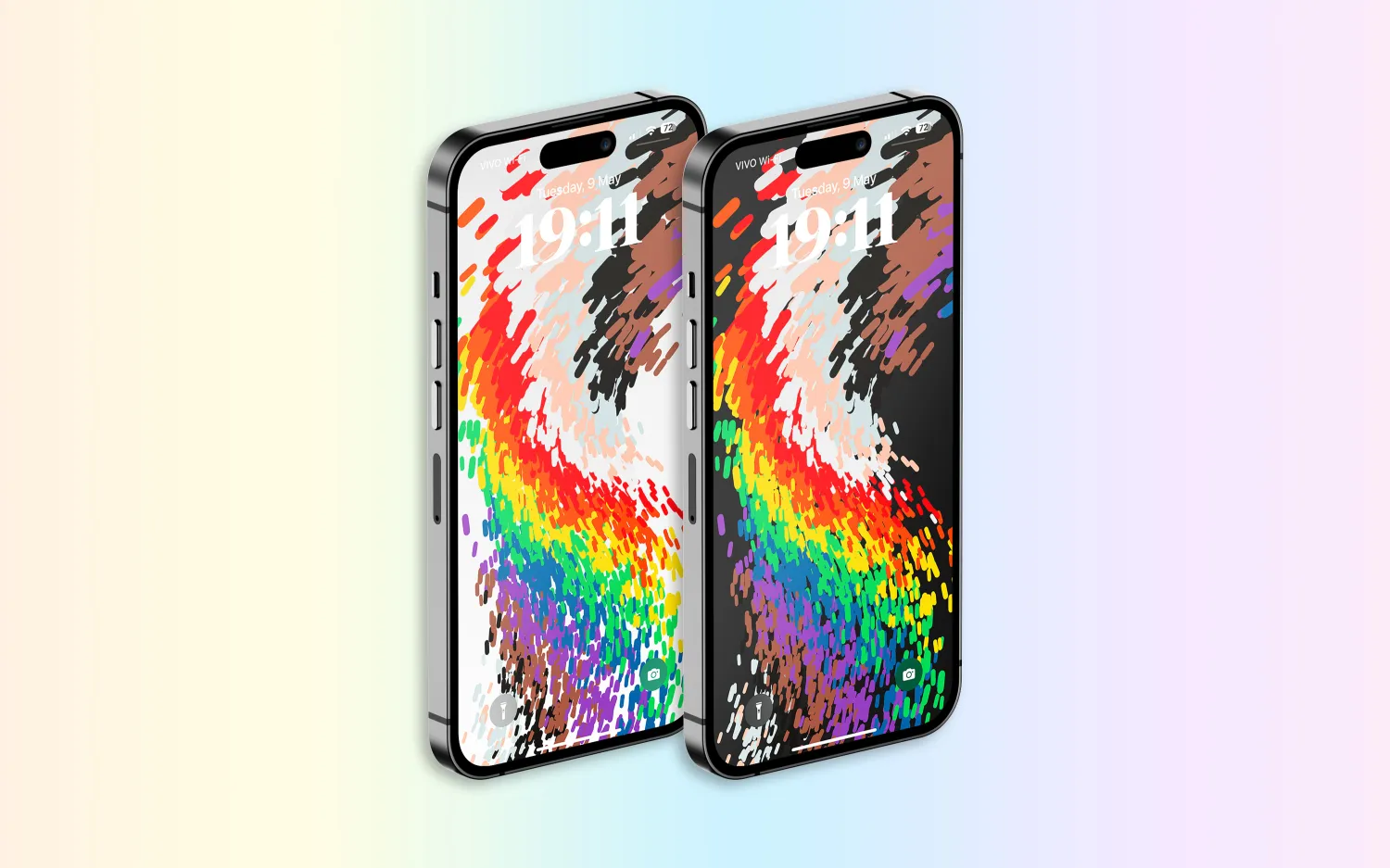
Following over a month of beta testing, iOS 16.5 is now available to the general public. This update includes changes to Apple News, the addition of a new “Pride Celebration” wallpaper, and more. Head below for the full release notes with details on bug fixes, new features, and more.
What’s new in iOS 16.5?
Here are Apple’s official release notes on iOS 16.5 new features and bug fixes. The build number for today’s update is 20F66.
A new Pride Celebration wallpaper for the Lock Screen to honor the LGBTQ+ community and culture
Sports tab in Apple News gives easy access to stories, scores, standings, and more, for the teams and leagues you follow
My Sports score and schedule cards in Apple News take you directly to game pages where you can find additional details about specific games
Fixes an issue where Spotlight may become unresponsive
Addresses an issue where Podcasts in CarPlay may not load content
Fixes an issue where Screen Time settings may reset or not sync across all devices
Earlier iOS 16.5 betas included the addition of a new Siri command for starting and stopping a screen recording. Apple removed this feature in subsequent iOS 16.5 betas, and it’s not included in the final version of the update.
iOS 16.5 will be the final major point-release update to iOS 16 before WWDC in June. This is where Apple will debut iOS 17 and release the first developer betas.
Apple is, however, expected to continue releasing updates to iOS 16 through the summer and likely even alongside iOS 17. iOS 16.6 is expected to enter beta testing soon.
You can update your iPhone by going to the Settings app, choosing General, then choosing Software Update.
watchOS 9.5 debuts with new Pride Celebration watch face
Alongside iOS 16.5, Apple has also released watchOS 9.5 for Apple Watch users today. The headlining change in this update is an all-new Pride Celebration watch face to honor the LGBTQ+ community and culture.
What’s new in watchOS 9.5?
watchOS 9.5 is rolling out now to all users. You can update your Apple Watch by going to Settings, choosing General, then choosing Software Update. You can also install the update via the Apple Watch companion app on your iPhone.
Here are Apple’s release notes for watchOS 9.5:
watchOS 9.5 includes new features, improvements and bug fixes, including a new Pride Celebration watch face to honor the LGBTQ+ community and culture.
And some more details on the new Pride Celebration watch face:
Inspired by multiple pride flags, this new watch face combines colors to represent the strength and mutual support of the LGBTQ+ movement. Mirroring the woven loops of the Sport Loop, each strand of vibrant thread contributes to the overall composition of the watch face. The colorful threads move as the Digital Crown on Apple Watch is rotated, the display is tapped, or the user’s wrist is raised.
The new Pride Celebration face included in watchOS 9.5 pairs with the similarly-designed wallpaper for iPhone users. The new wallpaper is included with iOS 16.5, which is also available starting today.
macOS Ventura 13.4 with new sports-related features
After months of beta testing, Apple has finally released macOS Ventura 13.4 to the public. The update, which is now available for macOS users, comes with new sports-related features, as well as a new system for installing beta software. Read on as we detail what’s new with macOS Ventura 13.4.
One big change coming with macOS Ventura 13.4 is the new system for installing betas that was introduced with iOS 16.4. The operating systems now asks for the Apple ID to show and download beta software updates.
macOS checks whether the account is associated with a developer or user registered in the public beta program. It then shows the beta update available for that program. With this change, regular users will no longer be able to install developer betas, for example.
macOS 13.4 full release notes
Sports feed in the sidebar of Apple News gives easy access to stories, scores, standings, and more, for the teams and leagues you follow
My Sports score and schedule cards in Apple News take you directly to game pages where you can find additional details about specific games
Resolves an issue where Auto Unlock with Apple Watch does not log you into your Mac
Fixes a Bluetooth issue where keyboards connect slowly to Mac after restarting
Addresses a VoiceOver issue with navigating to landmarks on webpages
Fixes an issue where Screen Time settings may reset or not sync across all devices
You can install macOS Ventura 13.4 by going to the Software Update menu in the System Settings app. It may take a while before the update shows up on your computer; make sure that your Mac is compatible with macOS Ventura.
The update build number is XXXXX.
OpenAI launches free ChatGPT for iPhone app with Whisper support and more
OpenAI has announced that it is releasing a dedicated iPhone app for its ChatGPT service. The app, which is available via the App Store, gives users the ability to use ChatGPT through a native app on their iPhone. The app is free to download and includes no ads. It’s currently only available in the United States, but OpenAI says availability will expand “in the coming weeks.”
ChatGPT for iPhone now available
As announced by OpenAI in a blog post, ChatGPT for iPhone will offer the same set of features as the web version of the service. This will include ChatGPT Plus support, which lets users subscribe to pay for more advanced versions of the service.
The app will also sync your ChatGPT history across all your devices, including the web. It also includes support for Whisper, OpenAI’s open-source speech-recognition system. This integration with Whisper enables voice input for the ChatGPT app on iPhone. The ChatGPT app is also completely ad-free.
As ChatGPT has gained popularity over the last six months, a number of copycat and scam apps have surfaced on the App Store. Apple has cracked down on these apps, in part by blocking apps that use “GPT” in their name. By releasing its own version of ChatGPT for iPhone, OpenAI hopes to directly control the experience of using the service on an iPhone.
Additionally, Microsoft’s Bing app for iPhone has seen a major boost in popularity since it added ChatGPT integration.
ChatGPT for iPhone is rolling out starting today to users in the United States. OpenAI availability will “expand to additional countries in the coming weeks.”
As part of a flurry of new accessibility improvements announced by Apple, the company says that Made for iPhone hearing aids can pair directly with Macs for the first time. Previously, pairing was only available with an iPhone, iPad, or iPod Touch.
Compatible products already support pairing with more than one Apple device, so this move should make it much easier for people who use both Macs and iOS devices …
Made for iPhone hearing aids
Made for iPhone (MFi) hearing devices effectively combine the functionality of hearing aids and AirPods. They allow people with hearing impairment to switch seamlessly from listening to their environment, to listening to their devices. Phone calls, FaceTime, Music, Siri, and other content is all supported.
In some cases, MFi hearing aids will switch automatically from ambient listening to your Apple device, such as when you receive an incoming call on your iPhone, or starting to play a movie on an iPad.
Settings allow you to configure your MFi hearing devices on your iPhone, and now on your Mac. This includes choosing an audio preset, adjusting volume levels, and turning on Live Listen.
MFi pairing with Macs
Apple doesn’t provide much detail on this, including just a single bullet point in its accessibility news release:
Deaf or hard-of-hearing users can pair Made for iPhone hearing devices directly to Mac and customize them for their hearing comfort
However, the reference to the “customizing” feature does suggest that connecting to a Mac will allow greater control over the audio experience. While an iPhone allows you to choose between different audio presets, this wording indicates the ability to fine-tune the audio output to your own needs and preferences.
We’ll need to wait for further details on M1 Mac support.
Hearing device compatibility
Around 200 devices are supported, from 40 different brands.
Those marked with an asterisk additionally support bidirectional streaming, which allows users to talk hands-free through their hearing aid microphones. This feature requires iOS 15.2 and later on iPhones and iPads; Macs will require some version of Ventura.
Advance
RIC, RIC LI
SlimRIC
AGXO
FX00*
GX00 S
GX00 SC
Amplifon
Ampli-connect B
Ampli-connect PO*
Ampli-connect R 13
Ampli-connect R 312
Ampli-easy B
Ampli-energy B*
Ampli-energy B R
Ampli-energy I*
Ampli-energy I R WL
Ampli-energy PO*
Ampli-energy R*
Ampli-energy R R
Ampli-energy R R-D
Ampli-mini 312 AS
Ampli-mini PO*
Ampli-mini R 312
Aquitis
AEBB3D
AF2 B
AF2 E
AMBB3D
AMRB2D
AMRR2D
Audibel
A3i
A4i
A4i iQ
Arc AI*
Via*
Via AI*
Via Edge AI*
Audibene
HORIZON ITC-R
HORIZON RIC
HORIZON RIC-R
HORIZON RIC-S
Audifon
Lewi
Risa
Audigy
AGXsevo AI*
AGXsevo AIAGXsp
AGXsliv*
AGXsliv AI*
AGXsliv Edge AI*
AGXsp 2
AGXsp iQ
AGXwE-F2
Audigy AGXwM
B-F2
Audika / Audika France
First
FX00*
GX00
GX00 S
GX00 SC
Legend
PG X0
AudiLab
Aligo*
Altena
Capto
Coral
Audio Service
DUO LI G5
DUO LI G6
Duo G5
ENERGY 4PLUS BLUE
FDH RIC
HP LI G6
Ida BT G5
ITC LI 7
ITE LI 7
Mood G5
Mood G5 Li-Ion
MOOD G6
MOOD LI G6
OZ BTE
OZ RIC
P G5
P LI G6
R LI 7
R S 7
SR LI 7
STILINE BT
Sun G5
AudioSync
A3i
A4i
A4i iQ
Arc AI*
Via*
Via AI*
Via Edge AI*
Audix
Lewi
Risa
Auris
Øre
Beltone
Beltone Amaze
Beltone Boost
Beltone Boost Max
Beltone Boost Plus
Beltone Boost Ultra
Beltone First
Beltone Imagine*
Beltone Legend
Beltone Silk
Beltone Rely
Beltone Trust
Bernafon
Aligo*
Alpha*
Altena
Capto
Coral
Leox
Viron
Viron A
Zerena
Cochlear
Baha 5
Baha 5 Power
Baha 5 SuperPower
Kanso 2 Sound Processor
Nucleus 7 Sound Processor
Cochlear Limited
Kanso 2 Sound Processor
Nucleus 7 Sound Processor
Concept
Complete
Coselgi
Effect EBB3D
Effect F2
Mojo MBR3D
Mojo MRB2D
Mojo MRBB3D
Mojo MRR2D
Danalogic
Ambio Smart
Danavox
Alya
Anthe
Barani
Danavox Aio
Danavox Gala
Danavox Logar
Klar
EarLens
EarLens Processor
EarQ
EarQ
FX0*
GX0
GX0 S
eMeritus
eMeritus
GPL
Aligo*
Altena
Capto
Coral
Grand Audition
GF2 B
GF2 E
HCS
HCS BTE, BTE LI
HCS Custom ITC/HS, ITE
HCS RIC, RIC LI
HCS SR LI
Hearbuy
Vogue E
Hear.com
HORIZON ITC-R
HORIZON RIC
HORIZON RIC-R
HORIZON RIC-S
HearFocus
HearFocus
HHM
FX00*
GX00
GX00 S
GX00 SC
PG X0
PG X0 C
Hoerluchs
ICP BTE
ICP RIC
Hörex
Aligo*
Capto
Coral
Serie 2*
Serie 2+*
Serie 2PLUS X*
Hormann
Natural
Spatial
iBelieve
MOOD LI-ION
Incognito
IC RIC 312
IC RIC LI
Intela-Hear
Atom
Interton
Interton Centro
Interton Ready
Move
Jabra
Enhance Pro
Enhance Pro PM
Kind
KINDakira XD10
KINDakira KD20*
KINDduro KD20*
KINDduro XD10
KINDduro XD20
KINDevo*
KINDnido
KINDvitalo*
KINDvitalo 10*
KINDvitalo 20*
KINDwings
Kirkland Signature
KS 6.0
KS 8.0
KOJ
FX00*
Lisound
Aligo*
Altena
Capto
Coral
Lively
Lively
Lucid
Lucid U series
Maico
Aligo*
Altena
Capto
Coral
Med-EL
AudioStream
MediTrend
Aligo
FX00*
GX00
GX00 S
SoniTon AO*
SoniTon CO
SoniTon CZ
MicroAudio
Aligo*
Altena
Capto
Coral
Microaudio
MicroTech
Kinnect
Kinnect 2
Kinnect iQ
Esentia AI*
Esentia*
Envy AI*
Esentia Edge AI*
Mimitakara
goHearing R1
goHearing R2
goHearing R3
Miracle-Ear
IRHYTHM ME
ME Custom
ME DS BTE
ME DS RIC 13
MECONNECT R 312
MEENERGY B
MEENERGY I
MEENERGY iR
MEENERGY R
MEENERGY RF
MEMINI R 312
MK
MK2 CHARGE NX-M
MK2 CHARGE NX-P
Mosaic
Mosaic M 8C
Mosaic P 8C
MultiOpticas
FX00*
GX00
GX00 S
NationsHearing
Peak Pro 9
Peak 7
NuEar
iSDS
iNOW
iNOW iQ
Circa AI*
Circa*
Circa Edge AI*
Savant AI*
Optima
Deuce
Optimus
INSYNC
INSYNC R
Oticon
FX00*
Opn
Opn S
Opn Play
More*
Play PX*
Ruby
Zircon*
Optim
Siya
Xceed
Xceed Play
Oticon Medical BAHS
Ponto 4
Ponto 5
Sentio 1
Oton
FX00*
GX00
GX00 S
Ouiezen
OZ RIC 312
OZ RIC LI
OZ SLIM
OZ TINI
Persona Medical
Sombra
Philips
HearLink
HearLink 000
HearLink 010
HearLink 020
HearLink 030*
Politec
Aligo
Pro Akustik
Aligo
iPro.5*
iPro.5 AI*
ipro.6 AI*
ipro.7 AI*
pro+2 CO
pro+3 CZ
pro+4 AO*
ReSound
ReSound Cala
ReSound ENZO
ReSound ENZO2
ReSound ENZO 3D
ReSound ENZO Q
ReSound Forte
Resound Key
ReSound Lancio
ReSound LiNX
ReSound LiNX Quattro
ReSound LiNX TS
ReSound LiNX2
ReSound LiNX 3D
ReSound One*
ReSound Preza
ReSound Sola
ReSound SOUSA Fine
ReSound Up Smart
ReSound Vida
Rexton
ADORE
BICORE CUSTOM LI
BICORE R-LI
BICORE R312
BICORE SR
EMERALD M
EMERALD S
M-CORE B-LI
M-CORE R-LI
M-CORE R312
M-CORE SR
MOSAIC M
MOSAIC P
STELLAR M
STELLAR RIC
STERLING ITC
STERLING ITE
SES
FX00*
GX00
GX00 S
GX00 SC
Signia
Active
Active Pro
Insio C&G ITC
Insio C&G ITE
Insio ITC (BT)
Insio ITE (BT)
Motion 13
Motion 13P
Motion C&G
Motion C&G P
Motion C&G SP
Motion CHARGE&GO
Pure Charge&Go Nx
Pure Charge&Go X
Pure 13
Pure 312
Pure C&G
Pure C&G T
Pure Charge&Go
Stretta HP
Stretta M
Stretta M-R
Stretta RIC
Stretta UP-R
Styletto
Styletto Connect
Sonic
Captivate
Enchant
Radiant*
Trek
Soniton
COMF 10
ECO 8
HDO 13 LI
INSIDE
RIC 312 SPIRIT
RIC LI SPIRIT
SLIM LI STIL
Specsavers
Advance
Starkey
Evolv AI*
Halo
Halo 2
Halo iQ
Livio AI*
Livio*
Livio Edge AI*
Sympatico
SYMPATICO DUO
SYMPATICO MOOD
TruHearing
Flyte
Flyte 770
Flyte 990
TH BTE, BTE LI
TH Canal/ITE, ITC/HS/ITE LI
TH RIC, RIC LI
TH SR LI
Udisens
Udisens
Udio Finissimo
Udito Finissimo
VIO
VIO E
VIO E LI
VIO E STYLE
Widex
Beyond Fusion 2
EarQ Beyond Fusion 2
EarQ EBB2D
EarQ EBB3D
EarQ ERB2D
EarQ Fusion 2
EarQ MRB2D
EarQ MRR2D
Effect EBB3D
Enjoy E-F2
Enjoy EBB3D
Enjoy EBB2D
Evoke EBB2D
Evoke EBB3D
Evoke ERB2D
Evoke Fusion 2
Magnify MBR3D
Magnify MRB2D
Magnify MRB3D
Magnify MRR2D
Moment MBB3D
Moment MBR3D
Moment MRB2D
Moment MRR2D
Apple previews iOS 17 accessibility features: Assistive Access, Personal Voice and Live Speech, more
Ahead of WWDC in June, Apple today has announced a range of new accessibility features coming to iPhone and iPad this year. The new features include a new “Assistive Access” interface option, Live Speech, Personal Voice Advance Speech, and more.
The first new feature announced by Apple today is called Assistive Access, and the company says this feature is meant to support users with cognitive disabilities.
Assistive Access uses innovations in design to distill apps and experiences to their essential features in order to lighten cognitive load. The feature reflects feedback from people with cognitive disabilities and their trusted supporters — focusing on the activities they enjoy — and that are foundational to iPhone and iPad: connecting with loved ones, capturing and enjoying photos, and listening to music.
Assistive Access includes a customized experience for Phone and FaceTime, which have been combined into a single Calls app, as well as Messages, Camera, Photos, and Music. The feature offers a distinct interface with high contrast buttons and large text labels, as well as tools to help trusted supporters tailor the experience for the individual they support. For example, for users who prefer communicating visually, Messages includes an emoji-only keyboard and the option to record a video message to share with loved ones. Users and trusted supporters can also choose between a more visual, grid-based layout for their Home Screen and apps, or a row-based layout for users who prefer text.
Next up, Apple has announced a new feature called Live Speech. This allows iPhone, iPad, and Mac users to type what they want to say to have it be spoken out loud during phone and FaceTime calls as well as in-person conversations. Users can also save commonly used phrases to chime in quickly during lively conversation.
There’s also a new component to this feature called Personal Voice for users who are at risk of losing their ability to speak. Apple says that this feature is a “simple and secure way to create a voice that sounds like them.”
For users at risk of losing their ability to speak — such as those with a recent diagnosis of ALS (amyotrophic lateral sclerosis) or other conditions that can progressively impact speaking ability — Personal Voice is a simple and secure way to create a voice that sounds like them.
Users can create a Personal Voice by reading along with a randomized set of text prompts to record 15 minutes of audio on iPhone or iPad. This speech accessibility feature uses on-device machine learning to keep users’ information private and secure and integrates seamlessly with Live Speech so users can speak with their Personal Voice when connecting with loved ones
Apple is also expanding the Detection features in the Magnifier app:
Point and Speak in Magnifier makes it easier for users with vision disabilities to interact with physical objects that have several text labels. For example, while using a household appliance — such as a microwave — Point and Speak combines input from the Camera app, the LiDAR Scanner, and on-device machine learning to announce the text on each button as users move their finger across the keypad.
Point and Speak is built into the Magnifier app on iPhone and iPad, works great with VoiceOver, and can be used with other Magnifier features such as People Detection, Door Detection, and Image Descriptions to help users navigate their physical environment.
Other new Accessibility announcements today from Apple:
Deaf or hard-of-hearing users can pair Made for iPhone hearing devices directly to Mac and customize them for their hearing comfort.
Voice Control adds phonetic suggestions for text editing so users who type with their voice can choose the right word out of several that might sound alike, like “do,” “due,” and “dew.”Additionally, with Voice Control Guide, users can learn tips and tricks about using voice commands as an alternative to touch and typing across iPhone, iPad, and Mac.
Users with physical and motor disabilities who use Switch Control can turn any switch into a virtual game controller to play their favorite games on iPhone and iPad.
For users with low vision, Text Size is now easier to adjust across Mac apps such as Finder, Messages, Mail, Calendar, and Notes.
Users who are sensitive to rapid animations can automatically pause images with moving elements, such as GIFs, in Messages and Safari.
For VoiceOver users, Siri voices sound natural and expressive even at high rates of speech feedback; users can also customize the rate at which Siri speaks to them, with options ranging from 0.8x to 2x.
Apple says that all of these new software features are coming later this year.
How to improve hearing by turning iPhone and AirPods into remote microphones
AirPods are great fully wireless earphones, and they can also be used as a sort of hearing aid device with iPhone as a remote microphone. Follow along for how to improve hearing by turning iPhone and AirPods into remote microphones with the iOS Live Listen feature.
Live Listen support for AirPods came with iOS 12 and even users on the beta software noted how useful the feature is.
Nick Dawson, founder of the Sibley Innovation Hub at Johns Hopkins University, documented his mother’s use of Live Listen on Twitter.
First, she used AirPods while watching a movie. Dawson says the film was at normal volume and he placed an iPhone near the TV speakers while his mother wore AirPods so she could watch and listen with them.
Other valuable use cases can be at the dinner table, or environments with higher levels of ambient noise.
How to improve hearing by turning iPhone and AirPods into remote microphones
Open Settings on your iPhone or iPad
Swipe down and tap Control Center, then Customize Control Center
Now swipe down and tap the + next to Hearing, tap Back and exit Settings
Open Control Center (swipe down from top right corner on iPhone X and later, swipe up from the bottom of your screen on iPhone 8/8 Plus and earlier
Tap the ear icon
Tap Live Listen to turn it on
Here’s how the process looks:
Now open Control Center and tap Live Listen to to turn it on. Place your iPhone closer to the audio source you’d like to hear better.
If you have trouble, turning on the feature like this:
Double check that AirPods are connected in Settings → Bluetooth. It may also help to play audio on AirPods first, then try to turn on Live Listen.
Apple is continuing to push into health care, this time striking a deal with Epic Systems for a Mac-friendly version of its health records app. As reported by Axios,the deal will see Epic Systems create a version of its health records tool that “is easier to run on Apple devices.”
Apple had reportedly pushed for Epic to create a “native version of the service” for Apple devices, but the two companies settled on this compromise of a version that is “easier to run on Apple devices” instead. Apple hasn’t acknowledged this deal, but Axios says it was confirmed by a “source inside Epic.”
The deal comes despite previous disagreements between Epic and Apple over health records and data sharing, Axios explains. Apple has pushed for easing health record sharing requirements, something that Epic is firmly opposed to. Epic argued that rule changes focused on “interoperability” will be “overly burdensome on our health system and will endanger patient privacy.”
Epic Systems is the largest electronic health records vendor in the United States, with “roughly half the population’s medical records” being stored in a system powered by Epic software and technology. The lack of well-developed Mac, iPad, and iPhone software from Epic has put inhibited Apple’s ability to tap further into the health records industry.
Given the pace at which things in the healthcare industry move — especially around medical records technology — it’ll likely be awhile before we see any results of this new deal. None the less, it could end up being good for the industry and consumers, particularly if it improves data integration with other Apple platforms and services.
Thank you for using
Themify Popup
This is a sample pop up. Themify Builder or Builder Lite (free) plugin is recommended to design the pop up layouts.