App Clips were announced in 2020 as a feature of iOS 14, but this year Apple is expanding that feature with some enhancements. With iOS 15, developers will be able to integrate App Clips into websites as a full-screen card that will appear in Safari.
For those unfamiliar, an App Clip is a small part of an app that can be accessed without having to download the full version of that app. With this API, developers can provide a demonstration of what an app offers and even let users explore some options without having to install the app from the App Store.
Apple introduced App Clips with iOS 14 and iPadOS 14 last year, and now they are getting even better with iOS 15 and iPadOS 15. As demonstrated at one of the WWDC 2021 sessions, App Clips can now be fully integrated into websites.
Previously, developers could add a banner to show the user that the website has an App Clip available, but it was small and required more touches. Now the App Clip banner can be displayed full screen when you are browsing a website that offers this feature. This, of course, will require developers to update their websites with new code.
Apple is also making it easier for developers to test their App Clips locally and introducing new ways to discover App Clips through ARKit within apps. More details about what’s new in App Clips with iOS 15 can be found on the Apple Developer website.
Both iOS 15 and iPadOS 15 will be available as a free update this fall. Users can install the beta versions by joining the Apple Beta Software Program.
If you’ve downloaded one of the following, you might want to check your account
Google has a lot of moving parts behind the scenes, trying to keep malware off of the Play Store. But with seven figures of apps posting and updating constantly, even it doesn’t have a perfect record. Such is the claim from a security researcher last week, which said they found ten apps with variations on a trojan horse program. The apps are fairly innocuous based on their title and description, but each is designed to scrape a user’s phone for Facebook login credentials.
Dr. Web Anti-Virus said that variations of the Trojan were detected in the following publicly available apps:
PIP Photo by developer Lillians — 5,000,000+ downloads
Processing Photo by developer chikumburahamilton — 500,000+ downloads
Rubbish Cleaner by developer SNT.rbcl — 100,000+ downloads
Horoscope Daily by developer HscopeDaily momo — 100,000+ downloads
Inwell Fitness by developer Reuben Germaine — 100,000+ downloads
App Lock Keep by developer Sheralaw Rence — 50,000+ downloads
Lockit Master by developer Enali mchicolo — 5000+ downloads=
Horoscope Pi by developer Talleyr Shauna — 1000+ downloads
App Lock Manager by developer Implummet col — 10+ downloads
The researchers alerted Google to their findings, and as of Monday morning, it looks like all the apps and developers have been removed from the Play Store. Even so, the Play Store’s basic metrics report that the apps were installed on approximately six million Android devices, on the low end. A similar app, “EditorPhotoPip,” had already been removed from the Play Store but was available on alternative download sites.
Dr. Web reports that all of the apps it found were fully functional for their advertised purpose, making them particularly effective as spyware. This serves as yet another lesson to keep your guard up, even when downloading “vetted” apps directly from Google.
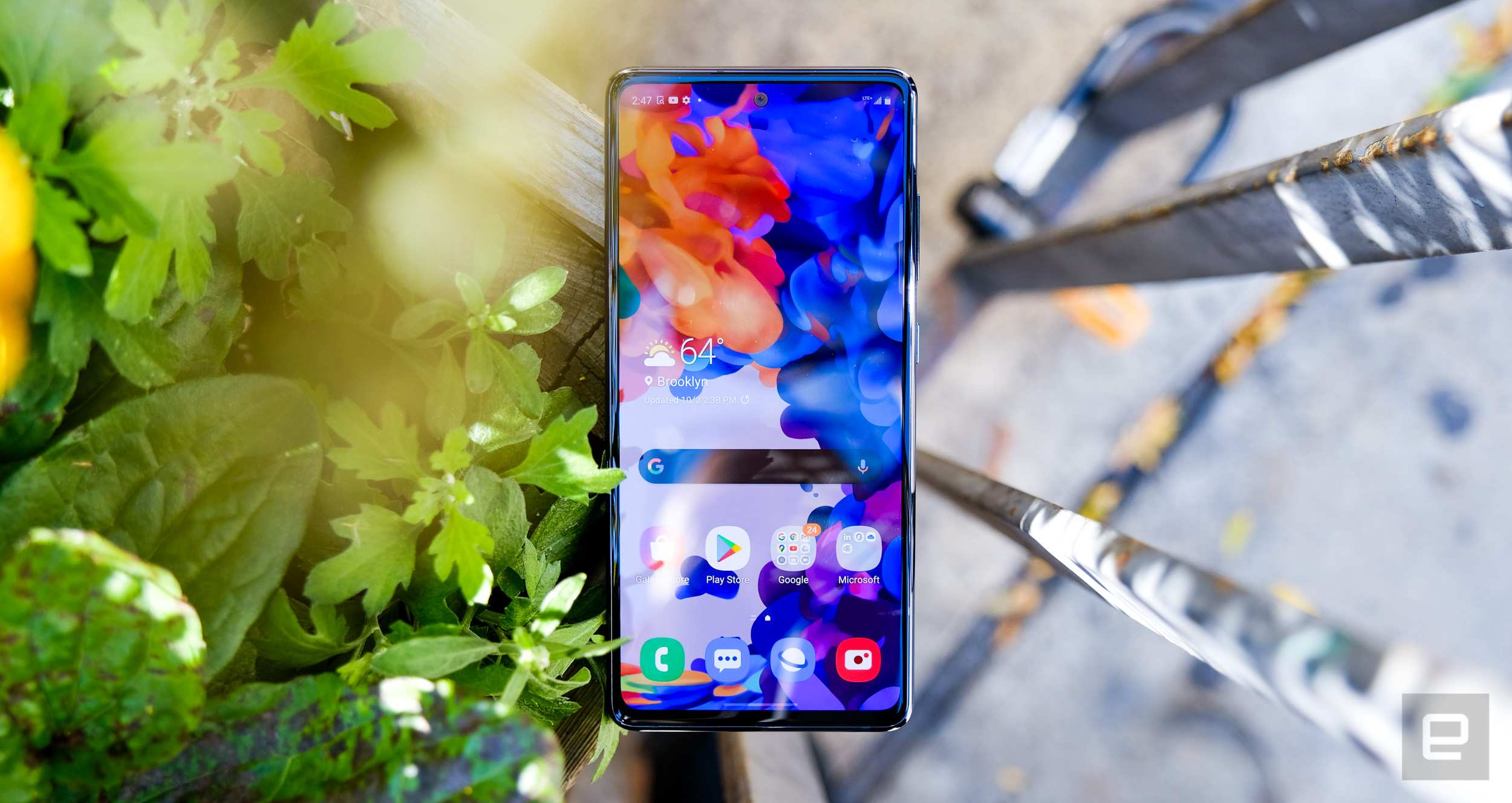
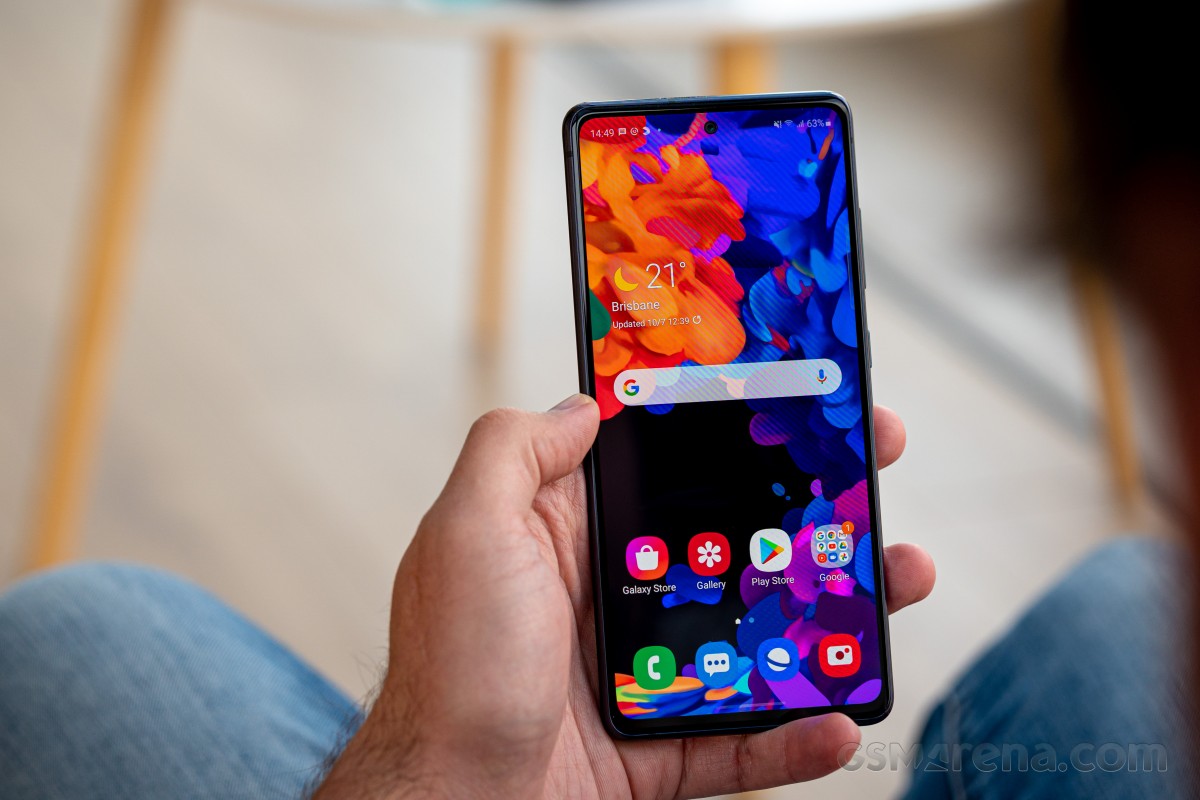
This one’s for the fans! Or for the chemistry students with a penchant for iron alloys? It’s not ‘lite,’ that’s for sure. This is the Galaxy S20 FE 5G (or Fan Edition). The latest member of the S20 family comes with some spec changes to meet a lower price point, while still maintaining important bits to qualify for the S-series badge.
One of those is the high-end chipset, and that’s a good point to clarify that not all FEs are the same – there is a 5G-capable version and an LTE-capped one. The 4G-only model follows the usual regional differentiation with some parts of the world getting the Exynos 990 while others have their FEs equipped with the Snapdragon 865.
On the other hand, the 5G model is Snapdragon-only this time, regardless of locale. It’s this version that we’re reviewing, though we may be dropping the ‘5G’ when referring to the phone for the remainder of this review.
Placed in between the S20 and S20+ in terms of screen size, the Fan Edition packs a 6.5-inch Super AMOLED display. This one’s not HDR10+ compliant and has a FullHD resolution next to its QHD brethren, but Samsung did keep the 120Hz refresh rate.
As part of the tri-set of cameras on the FE, it gets to keep the S20s main big-sensor 12MP shooter. The ultra wide-angle cam takes 12MP shots too, but from a smaller imager than on the non-fan editions. And the telephoto is different too – fans will be shooting with an 8MP almost-3x zoom unit, as opposed to the slightly odd 64MP non-tele tele setup on the S20 and S20+. Meanwhile, the selfie camera on the FE is a 32MP Tetracell unit, which may sound like an upgrade compared to the 10MP modules of the S20 and S20+, but there’s more to that as you go deeper. We’ll be doing all sorts of camera comparisons later on, of course.
Tere are some other less apparent downgrades here and there. Like the as-yet unspecified type of glass on the front instead of Gorilla Glass 6 and the plastic back where the non-fan S20s have more Gorilla Glass 6. The Fan Edition also tops out at 8GB of RAM (6GB in the base version), while the regular S20s start at 8GB and can be had even with 12GB.
Whether it’s an upgrade, a downgrade, or simply a side-step, the Fan Edition gets an optical fingerprint reader, not the controversial ultra-sonic reader of the other phones in the Galaxy S and Note roster.
Filed strictly under downgrades, however, is the retail bundle.
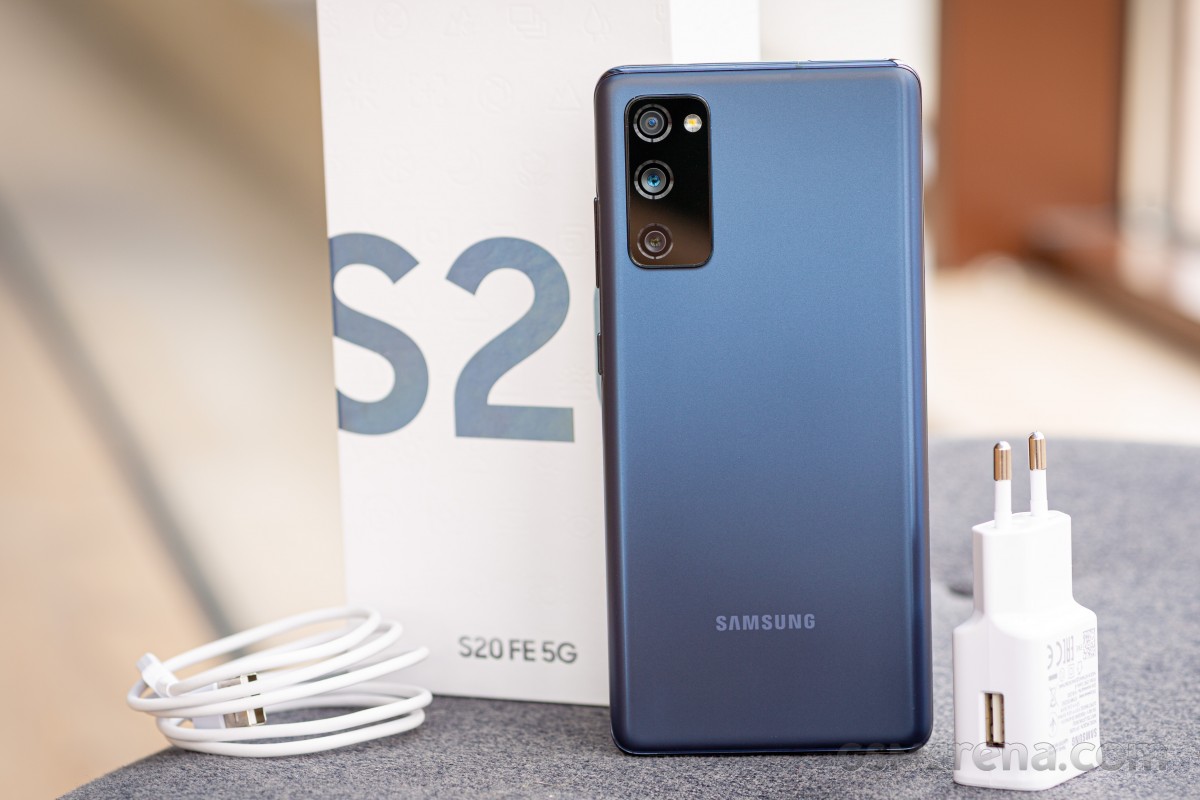
Samsung Galaxy S20 FE 5G unboxing
The S20 FE‘s box is Fan Edition too – it’s not the black packaging of the true flagships. It’s still the same thick cardboard, only white, and the S20 name is printed on the front, just like on the non-FEs. There are many emoji-looking imprints, something you don’t get on the regular S20 or Note20 boxes.
There’s special treatment on the inside too, but not the good kind. The accessories package is rather sparse, and besides the phone, you’re only getting an adapter and a cable to go with it. Even worse, it’s the plain old Adaptive Fast Charging unit that’s Qualcomm QuickCharge 2.0 compliant – 15W max, USB-A out – lame. Non-fans are treated to a 25W adapter and earphones, but the budget cuts for this one didn’t allow for such frivolous expenses.
Competition
With the Galaxy S20 FE context is really important, more important than with most other phones. It’s got a flagship chipset inside and a 120Hz Super AMOLED display with battery life that’s spectacular for the combo, plus a hugely capable camera system, all in an IP68-rated body. Okay, that’s no big deal, there are a lot of phones that can squeeze into the above description. But the key bit is that they’re either a lot more expensive, or have regional appeal. The S20 FE? You can have that everywhere, for well under the price of a true flagship.
For example, in the US, the S20 FE is only available in 5G trim, and while its MSRP is $700, it’s been going for $600 since launch, unlocked. An S20 5G, meanwhile, is $1000 (by the way, so is the S20+ 5G, because US).
In Europe, a 4G-only Fan Edition starts at around €630, with a €100 premium if you want the 5G variant. For the S20+ those numbers are €700+ and €900+ – from reputable retailers, that is. And if you have your eyes set on getting a Snapdragon in a Galaxy S20 on this continent, for one reason or another, it’s really just the Fan Edition 5G.
In India, you can’t officially get the 5G version, but the LTE flavor has a list price of INR50K. Compare that to INR78K for an S20+ and INR70K for an S20.
Yes, we meant pricing when we said context.
The closest you can get to the S20 FE’s price (and get it globally) is the OnePlus 8 – that one goes for $600/€650/INR45K. The Galaxy’s display goes up to 120Hz (90Hz on the OP) and it has a telephoto camera plus a microSD slot. The 8 has longer battery life and faster charging capability, but it’s not like the Galaxy is lacking in this respect.
If you’re in Europe and exploring the possibility for an S20 FE 5G, that puts the Asus Zenfone 7 on the table and it’ll get you wider 5G band coverage. More importantly, it’ll come with a flip up mechanism that brings unmatched main camera versatility to selfies.
A case could be made for the brand new Mi 10T Pro 5G. With a 144Hz display, 108MP main camera and a 5,000mAh battery it’s looking really promising on paper, and early impressions from the ongoing review process indicate it can deliver. This one, with 5G capability, is more affordable than the Galaxy S20 FE with no 5G.
A very smart buy if you’re in India is the iqoo 3. Starting at INR35K for a 4G variant (since there’s no 5G Fan Edition in India anyway), the iqoo 3 matches the S20 FE’s 8GB/128GB and has spectacular battery life, a headphone jack and a decent camera. The Galaxy does counter with other niceties like a microSD slot, IP68 rating, 120Hz display, and… well, overall superior camera. Hm, but you could grab the iqoo 3 5G and have next-gen connectivity, 12 gigs of RAM and 256GB of storage for 10% less than a 4G Fan Edition.
OnePlus 8 • Asus Zenfone 7 ZS670KS • Xiaomi Mi 10T Pro 5G • vivo iQOO 3 5G
Galaxy S20 FE money also buys you a Google Pixel 5, a flagship by name but a midranger at heart with an inferior chipset and a limiting camera system among other deficiencies. It does have wide 5G support, Google’s software and all that. We really wouldn’t, though. And we usually would or at least consider it.
Verdict
This one is for the fans, isn’t it? But if you aren’t one already, the Galaxy S20 FE may very well convert you – a Samsung flagship at the core at a friendlier price.
A few concessions had to be made for the lighter price tag and it’s almost as if the least expensive one bugs us the most – the charger dates back to the Galaxy Note4 times. The plastic back isn’t as classy as the glass one on higher-end Galaxies, though this could be a con or pro, depending on where you stand. For whatever reason, we’re not finding the FE’s 4K recording up to the S20 standard. And lastly, the selfie camera isn’t the best Samsung can offer.
But that’s about it. The Fan Edition may not be a truly top-tier device by the book, but it’s got the key markings of one with just the right corners cut to meet a more appealing price point. It then represents amazing value – for a Galaxy in particular, but also against competing offerings. It’s got our recommendation.
Pros
IP68 rating for dust and water protection, variety of color options.
Smooth 120Hz Super AMOLED display.
Top-class battery life.
Getting the 5G version bags you a Snapdragon-powered Galaxy in Europe.
The ultra wide and tele cameras aren’t the downgrades they appear to be compared to the other S20s, the triple camera as a whole is mostly great.
Cons
Bundled with a slow 15W charger.
Plastic back looks fine but is the opposite of ‘premium’.
No AF for selfies, unreliable portrait mode on the front cam.
Similar-sounding privacy details, but more and better information when it comes to your security
Last year, Apple rolled out a new set of what it called Privacy Labels for the App Store. These disclaimers were sort of like privacy-oriented nutrition information attached to each app listing, with developers supplying the details regarding exactly what data their apps collect and precisely how it’s used — assuming you trust them to be honest. The moment that news landed last year, expectations swung our collective attention at Google: When would Android and the Play Store get something similar?
The answer is “next year,” assuming the tentative schedule Google for the new “safety section” announced today holds up. And based on the details provided, it might beat Apple when it comes to caring about your security instead of just your privacy.
We don’t know what the new safety section will look like in action, and Google is still ironing out some of the particulars with developer feedback, but the overall strategy has been outlined in broad strokes.
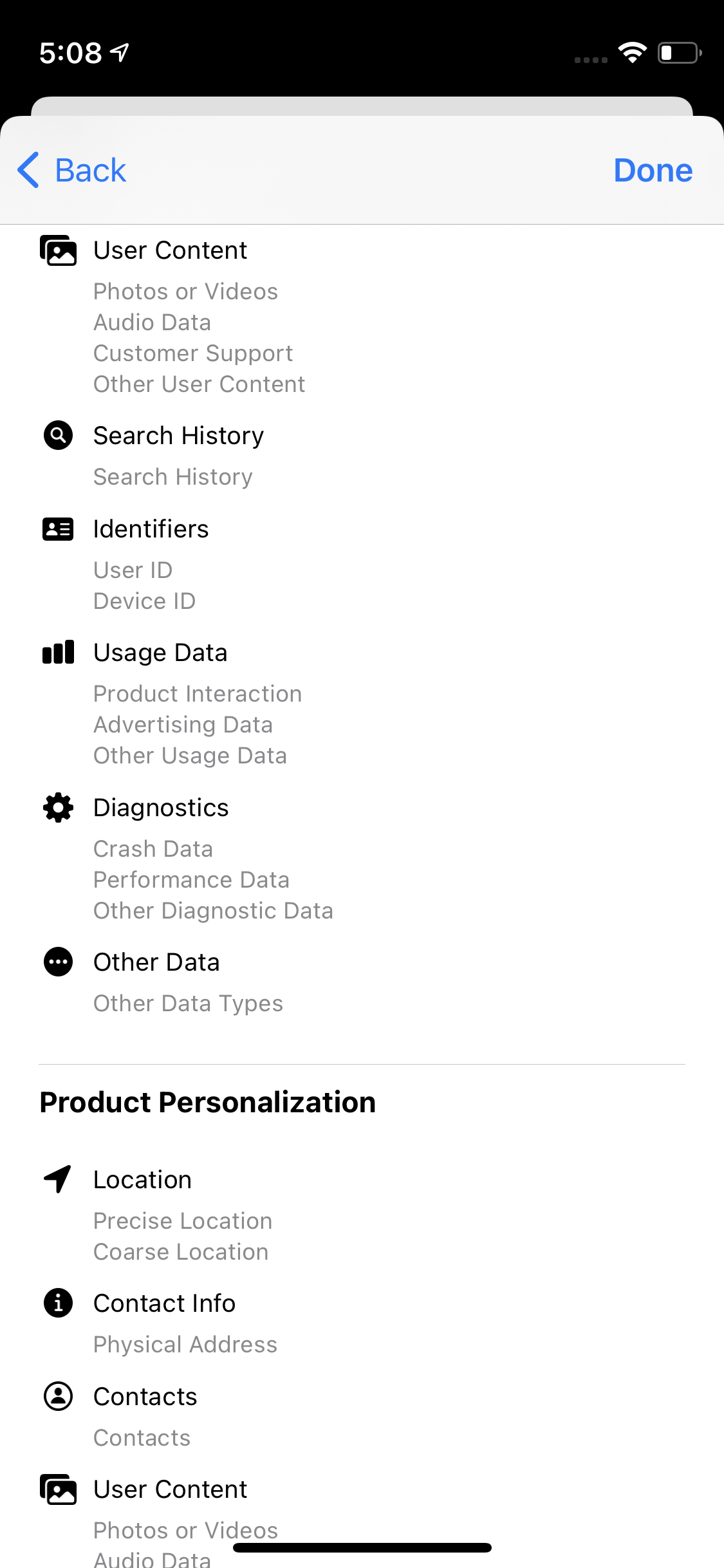
A (chunky) example of a Privacy Label on the App Store.
The new safety section will offer similar data to Apple’s Privacy Labels (example visible above), with developers stating on their app listings exactly what type of data an app collects or stores and how that data is used. While we don’t know how Google will organize that information or if it will offer the same super-granular approach Apple does, it does sound like Google could intentionally going for something a little simpler — skeptics might claim that’s because Android cares less about your privacy, but to be honest, the way Apple shows that data does start to feel a little overwhelming and overcomplicated for big, monolithic apps with deep cross-service integrations, which are all the rage these days.
As in the case of Apple, Google will require that developers be honest and responsible for declaring what their apps use, and if they try to scoff the rules, they’ll have to either fix it or be subject to further “policy enforcement.” Though precise terms of enforcement haven’t been described, we have to assume it’s similar to violating other Play Store policies, which could mean things as simple as holding back updates, or potentially as extreme as app delisting for extreme violations. And Google is making itself and all its own apps subject to this same policy, so there isn’t a double standard, matching Apple.
However, in a few very significant ways, Google is also one-upping Apple, like security. This new safety section will also explain if an app follows specific security practices, like data encryption. Furthermore, these sorts of labels are only accurate so long as developers are honest about what they’re doing. To that end, Google will let apps declare if their privacy and security claims have been verified by an independent third party.
Apps on the Play Store will also explain if the permissions are required or optional, rather than just listing all possible permissions they could declare. For example: If you’re cool with a third-party photo app accessing your camera but not your microphone and it can take photos either way. Or, if a workout-tracking app can access your physical activity history but not your location directly and still follow your calories burned, etc.
Apps will also declare if they meet Google’s Families Policy, presumably making it easier to pick out family-friendly apps for the kiddos — though hopefully doing a better job of it than the kid-friendly section of YouTube. This would build upon the “teacher approved” badges that rolled out last year for the Play Store and policy changes in 2019 regarding apps that target specific age groups and which child accounts can be limited to with Family Link.
Very importantly, Google’s policy will also let apps highlight if customers can delete their data should they stop using an app. So if any of your data for an app is stored off your device (which plenty of apps do), you’ll know if that’s going to be someone else’s property for time immemorial or if you can tell them to toss it out when you decide you’re done playing Clash of Crush or whatever.
I honestly assumed that if Google rolled out its own version of Privacy Labels, they’d just be a straight clone of Apple’s system. But this policy is set to beat Apple when it comes to security and accountability, not just privacy.
There is one kind of major snag, though, and that’s Google’s timeline for this new Play Store safety section — outside the kind of “eh” name.
While it’s subject to change, this new section isn’t set to show up until next year, sometime in Q1 2022. That’s coming up on two years after Apple announced its privacy disclosures back in June 2020, which rolled out to phones last December. The formal policy details also won’t be standardized until Q3 of this year, and developers can start putting that info in their app listings around the end of the year.
The ultimate deadline by which all new and existing apps must declare details for the safety section is Q2 2022, and it isn’t immediately clear what might happen to the (probably millions of) apps on the Play Store that have been basically abandoned and will never be updated to honor this new policy — if, for example, they might still be available with a prominent warning and blocked from delivering updates until they do, or if they’ll be outright unlisted.
Developers hoping to participate in the conversation for the new safety section going forward are invited to review their apps and see what data is collected, saved, and where and how it’s sent anywhere. At the same time, they should review best privacy practices and best security practices, raising a stink as required should they run into any issues or questions Google might want to be aware of before the new rules are set in stone.
Apple Podcasts Subscriptions and channels are available for listeners starting today.
Thousands of Apple Podcasts Subscriptions and channels from the world’s best audio creators, including the Los Angeles Times, Luminary, NPR, Pushkin Industries, and QCODE, are available today, with more launching every week
Apple announced last Jue 15,2021 Apple Podcasts Subscriptions, the global marketplace for premium podcast subscriptions, is now available. Starting today, listeners in more than 170 countries and regions1 can purchase subscriptions for individual shows and groups of shows through channels, making it easy to support their favorite creators, enjoy new content, and unlock additional benefits such as ad-free listening and early access, directly on Apple Podcasts.
Listeners can discover thousands of subscriptions and channels featuring brand new shows that span many genres and formats, including news, comedy, sports, and true crime, offering listeners premium experiences that help them stay informed, entertained, connected, and inspired. These include subscriptions to shows from essential independent voices like “Birthful” with Adriana Lozada, “Pantsuit Politics” with Beth Silvers and Sarah Stewart Holland, “Snap Judgment” with Glynn Washington, and “You Had Me At Black” with Martina Abrams Ilunga; premier studios such as Lemonada Media, Luminary, Realm, and Wondery; and leading media and entertainment brands, including CNN, NPR, The Washington Post, and Sony Music Entertainment.
With Apple Podcasts Subscriptions, listeners can experience never-before-heard stories on Luminary’s “The Midnight Miracle” with Talib Kweli, Yasiin Bey, and Dave Chappelle, and Pushkin Industries’ “Revisionist History” with Malcolm Gladwell; the next chapters of QCODE’s apocalyptic thriller “Blackout,” starring Rami Malek and Aja Naomi King, and Realm’s “Orphan Black,” featuring Tatiana Maslany; the unrivaled chemistry and insightful commentary driving CNN’s “The Handoff,” and Politico’s “Playbook: Deep Dive”; and many more.
“Listeners can’t get enough of their favorite podcasts and want a simple way to support the extraordinary creators who make them possible,” said Oliver Schusser, Apple’s vice president of Apple Music and Beats. “Now, listeners can enjoy new content and additional benefits for thousands of new and popular podcasts, alongside millions of free shows, with more arriving every week. Apple Podcasts Subscriptions will help creators grow their businesses and continue to make podcasting an important source of information, entertainment, connection, and inspiration for hundreds of millions of listeners around the world.”
Discover Subscriptions and Channels
When listeners purchase a subscription to a show, they automatically follow the show and the page is updated with a Subscriber Edition label so they know they have access to the premium experience. Listeners can discover channels for their favorite podcasts from each show page and through Search, explore recommendations from the Listen Now and Browse tabs, and share channels using Messages, Mail, and other apps. As listeners subscribe to channels, the Listen Now tab expands with new rows that provide easy access to all of the content included in the channel and with their subscription. Listeners who subscribe to two or more channels will see a My Channels row in the Listen Now tab, where they can browse and follow all of the shows offered.
Subscribers automatically receive new episodes with the benefits included in their subscription.
Channels make it easy to discover shows and subscriptions.
Discover recommendations for channels in Listen Now and Browse.
Listeners can access channels with active subscriptions under My Channels in Listen Now.
New Shows and Seasons, Available with Apple Podcasts Subscriptions
Listeners can hear new and original shows, and get early access to new seasons of critically acclaimed and fan-favorite series, all ad-free, including:
“Chameleon: High Rollers” with Trevor Aaronson, from Campside Media:
Last year, Josh Dean and Vanessa Grigoriadis told listeners the remarkable true story of the Hollywood Con Queen scam. This summer, the critically acclaimed series returns with a new story about a doomed FBI sting operation in Las Vegas. Trevor Aaronson investigates what happened and how it all went off the rails. Subscribers enjoy new episodes first starting today, plus exclusive bonus episodes throughout the season.
“The Handoff” with Don Lemon and Chris Cuomo from CNN:
The love viewers witness between Don Lemon and Chris Cuomo in the handoff between their evening broadcasts is real. Now, Lemon and Cuomo are stepping out from behind the anchor desk for a weekly conversation where nothing is off limits. “The Handoff” is available today exclusively to subscribers on Apple Podcasts.
“The Midnight Miracle” with Talib Kweli, Yasiin Bey, and Dave Chappelle, from Luminary:
A groundbreaking original series that uniquely blends the salon and variety shows formats, recorded during Chappelle’s legendary 2020 Summer Camp in Ohio. “The Midnight Miracle” is available exclusively to Luminary subscribers today.
“Revisionist History” with Malcolm Gladwell, part of PushNik from Pushkin Industries:
Bestselling author Malcolm Gladwell’s journey through the overlooked and the misunderstood moments in history continues. In this new season, Gladwell races autonomous vehicles, rewrites one of America’s most beloved fairy tales, falls in love with a small college in New Orleans, and dives into dirty laundry.
“To Live and Die in LA” with Neil Strauss, from Tenderfoot TV:
After revealing the truth about the tragic death of an aspiring Hollywood actress, the award-winning series returns to uncover the baffling, tragic, and mysterious disappearance of Elaine Park. Neil Strauss investigates — along with his wife, neighbors, Incubus guitarist Mike Einziger, and concert violinist Ann Marie Simpson — to advance the investigation and provide closure for her loved ones. TenderfootPlus+ subscribers will gain early and exclusive access to upcoming bonus episodes.
New Subscriptions and Channels from Premier Studios
Lemonada Media: Sort through the messiness of life and get inspired by high-quality shows with all-star hosts focused on important causes. Subscribers to Lemonada Premium join an incredible community, support meaningful, world-shaping content from a women-run network, gain early access to new series, and unlock bonus episodes from leading shows.
Radiotopia from PRX: Home to podcasts from extraordinary, independent creators, including “Ear Hustle,” with Earlonne Woods, Nigel Poor, and Rahsaan Thomas, “Criminal” with Phoebe Judge, “Song Exploder” with Hrishikesh Hirway, “The Stoop” with Hana Baba and Leila Day, “Passenger List” starring Kelly Marie Tran, and more. Subscribers to Radiotopia Uninterrupted support the work they do and gain access to ad-free listening across the award-winning network.
Pushkin Industries: Listen to revelatory shows from world-class writers and thinkers, including “A Slight Change of Plans” with Dr. Maya Shankar, “The Last Archive” with historian Jill Lepore, “The Happiness Lab” with Dr. Laurie Santos, “Against The Rules” with author Michael Lewis, “Broken Record” with legendary producer Rick Rubin, and more. PushNik subscribers can hear these shows and more with no interruptions, and access exclusive bonus content.
Tenderfoot TV:Dive into gripping true-crime narratives, documentaries, and anthology series from the award-winning, independent, Atlanta-based production studio behind “Up and Vanished” and “Atlanta Monster” with filmmaker Payne Lindsey, “Whistleblower” with sports journalist Tim Livingston, “Radio Rental,” and more. Subscribers to TenderfootPlus+ enjoy ad-free listening and gain early and exclusive access to upcoming bonus episodes.
Beginning June 15,2021, listeners can find additional subscriptions from other premier studios and entertainment brands, including Audio Up, Betches Media, Blue Wire, Imperative Entertainment, Lantigua Williams & Co., Magnificent Noise, The Moth, Neon Hum Media, Sony Music Entertainment, Three Uncanny Four, and Wondery, plus channels from Audacy’s Cadence13 and Ramble, Barstool Sports, Jake Brennan’s Double Elvis, Headgum, iHeartMedia’s The Black Effect, Big Money Players, Grim & Mild, Seneca Women, Shondaland, and Relay FM.
New and Emerging Formats Powered by Subscriptions
Scripted Fiction: Subscribers get early and exclusive access to immersive original narratives with uninterrupted listening experiences from award-winning storytellers, produced by Meet Cute, QCODE, Realm, and more.
Mindfulness and Sleep: New shows featuring calming meditations, soothing music, and relaxing stories from WaitWhat’s “Meditative Story” with Rohan Gunatillake, Frequency’s “Drift” with Erin Davis, and “Sleep by Headspace” help listeners practice mindfulness and support a good night’s rest.
Kids and Family: Introduce kids to their new co-detectives, downtime companions, and study buddies with premium subscriptions featuring curated collections of age-appropriate, ad-free original stories spanning mysteries, comedies, musicals, and more from GBH, Gen-Z Media, Pinna, Wonkybot Studios, TRAX from PRX, and others.
News Providers Offering Subscriptions and Channels
The Athletic: Join the conversation on every sports story that matters. With breaking news, expert commentary, insightful analysis, and unrivaled narratives, The Athletic is powered by hundreds of full-time local writers to deliver exclusive sports coverage built around fandom.
FOX News: Hear from Dana Perino, Bret Baier, Shannon Bream, Trey Gowdy, Martha MacCallum, and other signature voices — all without commercials. Subscribers receive early access to seasonal series from FOX News Investigates, bonus episodes from FOX News Radio’s talk shows, audio versions of popular FOX News Channel programs, and a variety of long-form interviews.
Los Angeles Times: Enjoy the engaging, informative, and diverse journalism and storytelling the L.A. Times is known for with access to ad-free versions of “The Times,” a new daily news podcast hosted by columnist Gustavo Arellano; the new season of “Asian Enough” with reporters Jen Yamato, Johana Bhuiyan, Tracy Brown, and Suhauna Hussain; “Chasing Cosby” with Nicki Weisensee Egan and other narrative series; plus subscriber-exclusive bonus episodes for the all-new “The Trials of Frank Carson” from Christopher Goffard, host of “Dirty John” and “Detective Trapp.”
NPR: Enjoy sponsor-free versions of leading NPR shows across news, business, culture, and more, including “Fresh Air” with Terry Gross, “How I Built This with Guy Raz,” “It’s Been a Minute with Sam Sanders,” “Planet Money” with Jacob Goldstein, Karen Duffin, and Sarah Gonzalez, “Short Wave” with Madeline Sofia, and the Apple Podcasts 2020 Show of the Year, “Code Switch,” with Shereen Marisol Meraji and Gene Demby.
The Washington Post: Listen to ad-free editions of The Post’s award-winning podcasts spanning daily news, documentaries, investigations, and deep discussions around specific topics and moments in history, including “Post Reports” with Martine Powers, “Moonrise” with Lillian Cunningham, “Canary” with Amy Brittain, and “Cape Up with Jonathan Capehart.”
This month, listeners can also find subscriptions from Bloomberg Media, Los Angeles Times, Politico, and Vox Media, plus channels from other leading newspapers, magazines, broadcasters, radio stations, and digital publishers, including ABC News, Axios, Billboard, Bravo, CNBC, CNN, Crooked Media, Dateline, Entertainment Weekly, Futuro Media, The Hollywood Reporter, LAist Studios, National Geographic, MSNBC, NBC News, NBC Sports, New York Magazine, The New York Times, SiriusXM, SB Nation, Southern Living, The Verge, TODAY, VICE, Vogue, Vox, and WBUR.
Even More Subscriptions with Channels
Notable international subscriptions and channels available beginning today include ABC, LiSTNR, and SBS from Australia; Abrace Podcasts from Brazil; CANADALAND and Frequency Podcast Network from Canada; GoLittle from Denmark; Europe 1, Louie Media, and Radio France from France; Der Spiegel, Podimo, and ZEIT ONLINE from Germany; Il Sole 24 Ore and Storielibere.fm from Italy; J-WAVE from Japan; Brainrich from Korea; libo/libo from Russia; Finyal Media from the UAE; and Broccoli Productions, The Bugle, Content Is Queen, the Guardian, Immediate Media, and Somethin’ Else from the UK.
Creators interested in offering subscriptions and channels are encouraged to visit Apple Podcasts for Creators.
Galaxy S21 Ultra just won a global award for being the best smartphone
The Galaxy S21 Ultra is a great device. It has the top position in our list of best Samsung phones. It’s certainly the Android flagship to beat for all OEMs this year. The handset has now picked up a new award that further highlights its exceptional nature.
Samsung certainly knows a thing or two about making award-winning phones. Many of the company’s flagship handsets have been similarly praised in the past as well.
The Galaxy S21 Ultra 5G has won the Best Smartphone category at the Global Mobile Awards during the Mobile World Congress 2021. The annual GLOMO awards highlight the hardware, software and services that enable innovation in the global mobile industry.
Having been named the Best Smartphone of the past year, the Galaxy S21 Ultra 5G was regarded by the category judges as the “best Android smartphone Samsung has ever made.” The device delivers exceptional performance backed by innovation across the board. It features a professional grade camera system, a brilliant display and a gorgeous contour cut design. The Galaxy S21 Ultra 5G is also the first Galaxy S series smartphone to support the S Pen.
While the Galaxy S21 Ultra 5G won the coveted award, another Samsung device was also shortlisted for this category. The Galaxy S20 FE was shortlisted because of its incredible value for money. The handset offers flagship-level functionality in a more affordable package.
Samsung fans are now looking forward to the Galaxy S22 which is expected to kick things up a notch. Before it arrives, the Galaxy S21 FE is also on the horizon. Samsung is likely going to unveil the Galaxy S21 FE towards the end of this year.
You don’t have to spend $49 on a band to get the face.
Apple introduced new International Collection bands for Apple Watch on Tuesday, priced at $49 each. There are 22 available and each comes with an accompanying Stripes face you can download from Apple’s website.
But you don’t need to buy a band to get your hands on the new faces. We’ll show you how to download them right now to show support for your country at this year’s Summer Olympics.
Here’s the full list of countries supported: Australia, Belgium, Brazil, Canada, China, Denmark, France, Germany, Great Britain, Greece, Italy, Jamaica, Japan, Mexico, the Netherlands, New Zealand, Russia, South Africa, South Korea, Spain, Sweden and the United States
The faces are based on the existing Stripes design already available on your Apple Watch, so you could replicate them yourself if you wanted to. But there’s really no need; you can download them all, premade, from Apple’s website for free.
Get new international Stripes faces for Apple Watch
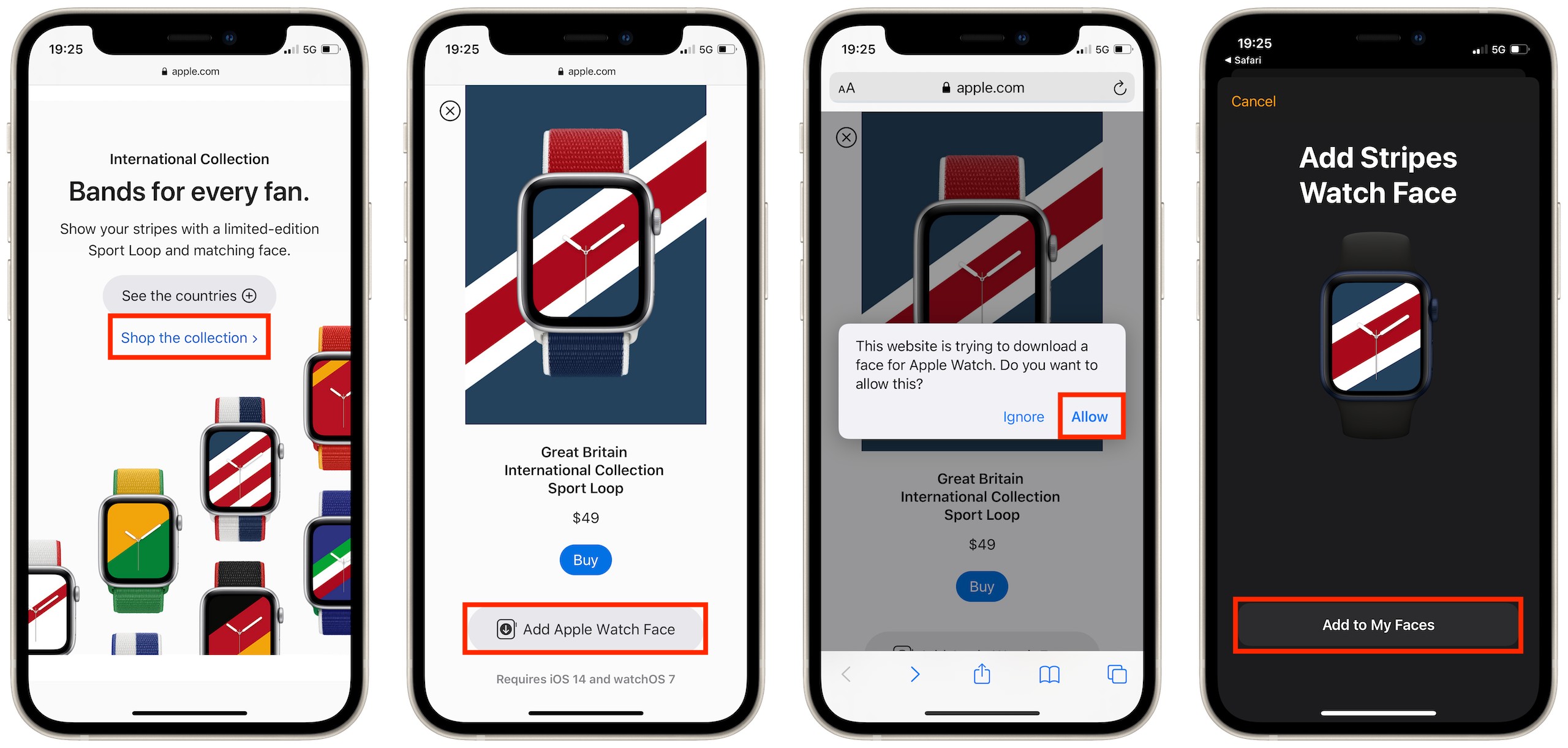
Scroll down until you see the International Collection, then tap See the countries.
Select the country you want, then scroll down and tap the Add Apple Watch Face button.
When prompted, tap the Allow button to confirm the download.
You’ll be redirected to the Watch app. Tap the Add to My Faces button.
Your new face will now appear under My Faces. You can select it to customize it, and tap the Set as current Watch Face to activate it right away.
After adding your new face, you can set it inside the Watch app.
Get your matching International Collection band
You can order a matching International Collection band to go with your new face exclusively from Apple. They’re available in 40mm and 44mm size options, priced at $49 each, and based on the brilliant Sport Loop.
The Oppo Find X2 Pro flaunts a chunky camera assembly on its back, compromises and gets a punch hole in the display, and limits its moving bits to just the vibration motor. So it must have lost all the charm that the Find X from mid-2018 had – its elevating camera assembly was plenty cool on its own, but it also kept the back flush and the display cutout-free, only whirring up swiftly when needed. Ah, but it’s a different kind of charmer the Find X2 Pro.
For this generation, Oppo has shuffled up the priorities, and we don’t mind the new ones. For starters, an all-around impressive camera setup with big sensors and capable lenses, entirely unique to the Find X2 Pro, beats the Find X’s limited (if good for what it was) stow-away outfit. You get a 48MP 1/1.43″ f/1.7 primary cam and another 48MP 1/2.0″ f/2.2 ultra-wide, each outspeccing competitors’ offerings in one way or another. And the cherry on top of all that is the 13MP telephoto cam with a 5x periscope lens that beats the Galaxy S20 Ultra in zoom power, if not in resolution and sensor size.
Keeping the cameras static has meant a hole in the display, which isn’t ideal, particularly when the previous generation had no such blemishes. But what a display it is, indeed – high resolution, high refresh rate, high brightness, high dynamic range, high color fidelity – high everything. We’d take all that and live with the punch hole.
And that is one of very compromises on the Find X2 Pro. It doesn’t have wireless charging, but that’s not really a make or break feature, the lack of a headphone jack is hardly news at this point, and who is really going to lament the missing microSD card slot with half a terabyte of built-in UFS 3.0 storage?
The Find X2 Pro also has an IP68 rating, the ‘8’ being a first for Oppo with water and dust protection quite rare in the company’s lineup to begin with. Stereo speakers get a check mark in the specsheet too and the 65 watts in the charging section are among the most watts you can get on a phone these days.
Oppo Find X2 Pro unboxing
You get the fast charger needed to make use of all the 65W inside the box too, not at an extra cost. The adapter is quite the chunky unit, but power goes together with size. Mind you, it’s not 65 watts of PowerDelivery-compliant output, so you won’t be using that to power your laptop, nor can you expect your 65W PD charger to pump 65 watts to the Find X2 Pro. It’s a proprietary SuperVOOC 2.0 solution and you need both the adaptor and the supplied cable to achieve the full power. With another phone, it’ll do 10W max, while the Find X2 Pro itself can draw 18W from QuickCharge/PowerDelivery bricks.
The bundle includes a set of earbuds ending in a USB-C connector. Another welcome sight is the silicone case, though you may not be so keen to opt for that cheap-ish feel as opposed to the handset’s own finish, be it Vegan leather or Ceramic.
Competition
The Oppo Find X2 Pro goes for €1200 in Europe, and that’s not a modest amount of money. The all-out Galaxy S20 Ultra runs for €1350, and that relative price difference is mostly the same in other markets where the two are available. Despite the premium for the Ultra, we still feel it’s the Find X2 Pro’s main competitor.
The number above is for 128GB storage version Ultra (as others don’t seem to be in stores just yet) versus a 512GB Find, which makes it look like an even worse deal though the Galaxy does come with the option to expand that storage with a microSD card. Battery life is hardly a differentiator, with neither managing to impress, though the Find’s 36 minutes to a full charge could be key to the right buyer. Oppo‘s display is no worse than Samsung’s, which is saying something, and it even outdoes it by offering 120Hz at 1440p (the Galaxy is capped at 1080p at the HRR). The software could decide it for you as both custom jobs have their own quirks, but Samsung’s is arguably more polished.
Ultimately though, it’s the camera that sets the Ultra apart and warrants the extra money. The two are closely matched in this respect upon first glance, but the Galaxy tends to outperform the Find in most areas, with a particular advantage in low light. The Find’s ultra wide-angle cam isn’t quite the beast we hoped it to be, but even so, it, in particular, could sway you into the Oppo direction if you’re adamant about autofocus.
Other alternatives are available as well. The iPhone 11 Pro Max comes to mind, and even though it’s already more expensive in its base 64GB trim, there’s something that will justify its price to brand loyalists. The iPhone doesn’t have a periscope telephoto, but you can hardly call it a bad cameraphone. It’s missing a high refresh rate on its screen and has a notch the size of a continent, but those two aside, it’s one of the best panels you can buy. The Pro Max will outlast the Find in an endurance race, and that’s probably the one objective victory it can snatch here.
A few upcoming phones may be worth waiting for before you jump up for Find X2 Pro. The OnePlus 8 Pro should be quite intriguing if rumored specs are anything to go by, plus we can’t imagine it’ll be quite as expensive as the Find. Huawei’s P40 Pro family is the pipeline too, with a Pro (or a Pro Premium?) posed to be a fine Find alternative if you can learn to live without Google services. And an already real Xiaomi Mi 10 Pro is offering competitive specs at a little over the Find X2 Pro‘s price – this one can’t arrive at the office soon enough.
A lot of people may have bought the original Find X from 2018 simply for its one-of-a-kind elevating camera even though it wasn’t spectacular as an actual camera for its time. The Find X2 Pro from 2020 takes a whole different approach and makes for a winning combination of top-level hardware in a conventional body.
While it can’t quite compete with the Galaxy S20 Ultra in absolute image quality at the long end of its triple-cam setup, in most other cases, it delivers images and video that are hard to beat. And if we take that same Galaxy as a reference, the Find X2 Pro can teach the Ultra a thing or two.
If you’re looking for a high-end device today, we reckon you can’t go wrong with an Oppo Find X2 Pro.
Pros
Standout design, particularly if you opt for the Vegan leather version. IP68 rating is a welcome addition.
Possibly the best display on the market.
Class leading charge times, battery life you can live with.
Apple introduced iOS 15 beta 2 and iPadOS 15 beta 2 to developers, which are the first updates since the initial release at WWDC 2021 earlier this month. Now that we have the new betas in our hands, here’s a look at what’s new in today’s updates.
Not available for some devices
According to the iPadOS 15 beta 2 release notes on the Apple Developer website, today’s release cannot be installed on the Wi-Fi + Cellular version of the 9.7-inch iPad Pro. The reason is unknown, but probably Apple found some serious issue and chose to skip this release for the affected iPad models.
Bug fixes for iCloud Private Relay
iCloud Private Relay makes web browsing more secure for iCloud subscribers, but this feature was causing some problems for users in beta 1. According to Apple in today’s release notes, iOS 15 beta “resolved an issue that caused iCloud Private Relay to function unexpectedly.”
New Maps icon
Apple revealed a new icon for its Maps app at WWDC 2021, but it was not included in iOS 15 beta 1. Now with beta 2, the new Maps icon is there. It also shows animated driving directions within the app.
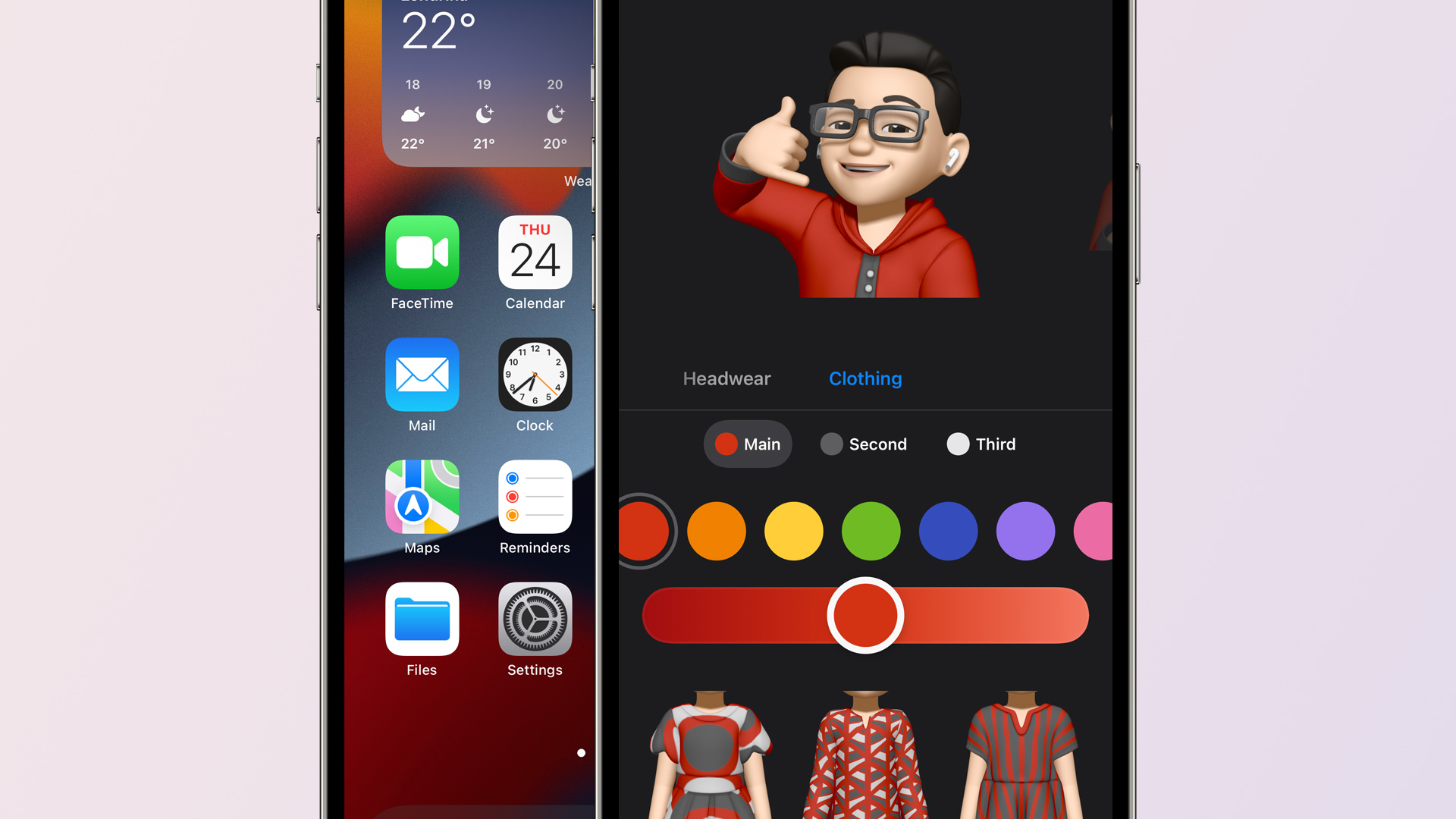
Apple also mentioned earlier this month that Memojis would be updated with new looks, including the option to set a custom outfit. These options are now available with iOS 15 beta 2.
Welcome screen in the Weather app
When you open the Weather app in iOS 15 beta 2 for the first time, you will now see a welcome screen highlighting its new features and refreshed design.
Quick Note on iPad
Quick Note was already available in iPadOS 15 beta 1, but now with beta 2 users can swipe from the bottom right corner to trigger Quick Note.
Apple’s iPadOS 15 features page claims that you’ll be able to swipe a finger to access Quick Note, but this doesn’t seem to work in Dev 1. Hopefully it makes into a future update because I don’t always carry my Pencil. (Or it’s often out of charge. 😂) pic.twitter.com/PinUT70VZF
SharePlay is a new feature to let users share a song, video, or even the screen of their devices during a FaceTime call. This feature is now working with iOS 15 beta 2.
Lossless on HomePod removed
Apple has removed the option to enable Lossless audio on HomePod with iOS 15 beta 2. Previously there was an option to stream Lossless songs on HomePod within the Home app. Most likely this option has been temporarily removed due to some issue and will return in a future release.
Safari
Apple has brought back the Refresh button for the Safari address bar, but it only shows up when using a mouse or trackpad.
The Shortcuts app can now see what is displayed on the screen for receiving input from an app without the share sheet.
Also new in iOS/iPadOS 15 beta 2: Shortcuts, like Siri, can see what's displayed on screen.
There's a new 'Receive What's On Screen' option for Shortcuts. Enable this, and a shortcut will receive input from an app without the share sheet. Right now, it works in Safari. pic.twitter.com/wxrzDlavbY
Two weeks after unveiling iOS 15 and iPadOS 15 to the public at WWDC 2021, Apple is rolling out the second developer betas. iOS 15 beta 2 and iPadOS 15 beta 2 are now available to registered developers ahead of a public beta release in July and a release to everyone in the fall.
iOS 15 beta 2 details
iOS 15 beta 2 and iPadOS 15 beta 2 are available to developers via an over-the-air update in the Settings app. As usual, if the update does not immediately appear for download, keep checking, as it sometimes takes a few minutes to roll out to all registered developers. The build number for today’s iOS 15 beta 2 release is 19A5281h .
Apple’s new software version won’t be complete until the fall, at which point it will be released to the general public. Testers should still expect performance and stability issues when running the iOS 15 beta on primary devices for the time being.
In addition to the second developer betas of iOS 15 and iPadOS 15, Apple is also releasing tvOS 15 beta 2 for Apple TV and HomePod and watchOS 8 beta 2 for Apple Watch. The second beta of macOS Monterey is not yet available.
Several users have taken to social media to report that the Google app on their Android phone is constantly crashing. While there’s no clear reason why this is happening, a new update seems to be causing the problem.
The issue doesn’t seem to be limited to just one version of the app. I faced the problem with version 12.23.16.23 on my Redmi K20 Pro whereas one of our tipsters experienced it with the beta version 12.24.7.29. Lens, Podcasts, and the Assistant are also affected by the crashes as they’re bundled into the Google app.
Google‘s Twitter account has suggested a soft reboot to fix the issue, and it seems to be working for some users. However, the fix isn’t universal and you might need to resort to other steps to stop the crashes. For me, uninstalling the update via the Google Play Store did the trick, but you could also try clearing cache and data.
A similar problem with tons of crashing apps plagued Android phones back in March, though that time around, the Android System WebView was the culprit.
If you’re experiencing a bunch of apps suddenly crashing on your recent Samsung phone, you’re not alone. This afternoon US time, reports from dozens, then hundreds of users on the Samsung subreddit started coming in, complaining of apps crashing on their phones, constantly and seemingly at random. It’s causing some major headaches. You can quickly fix the problem by disabling the Android System WebView app, or updating it via the Play Store or APK Mirror.
Users of recent Samsung phones—Galaxy S20 and S21, Note 20, A50 and A70 series, among others—seem to be the most heavily affected. There are scattered reports of the same problem happening to Pixel, Motorola, and OnePlus phones, though those may be coincidental issues unrelated to the primary problem. Owners of some older Samsung devices, including one J7, are reporting similar issues. The app crashes aren’t limited to any specific subset: applications with more or less any function, from any developer, are crashing repeatedly and without warning.
A few users have reported success with a relatively simple method: uninstalling the latest version of Android System WebView, a small tool that allows apps to render a web page using Chrome without leaving the application. It’s used in a lot of different ways, including secure logins and viewing support documentation. Reddit user /u/WatfordHert detailed their method, which is fairly straightforward.
How to Fix the Recent App Crashes
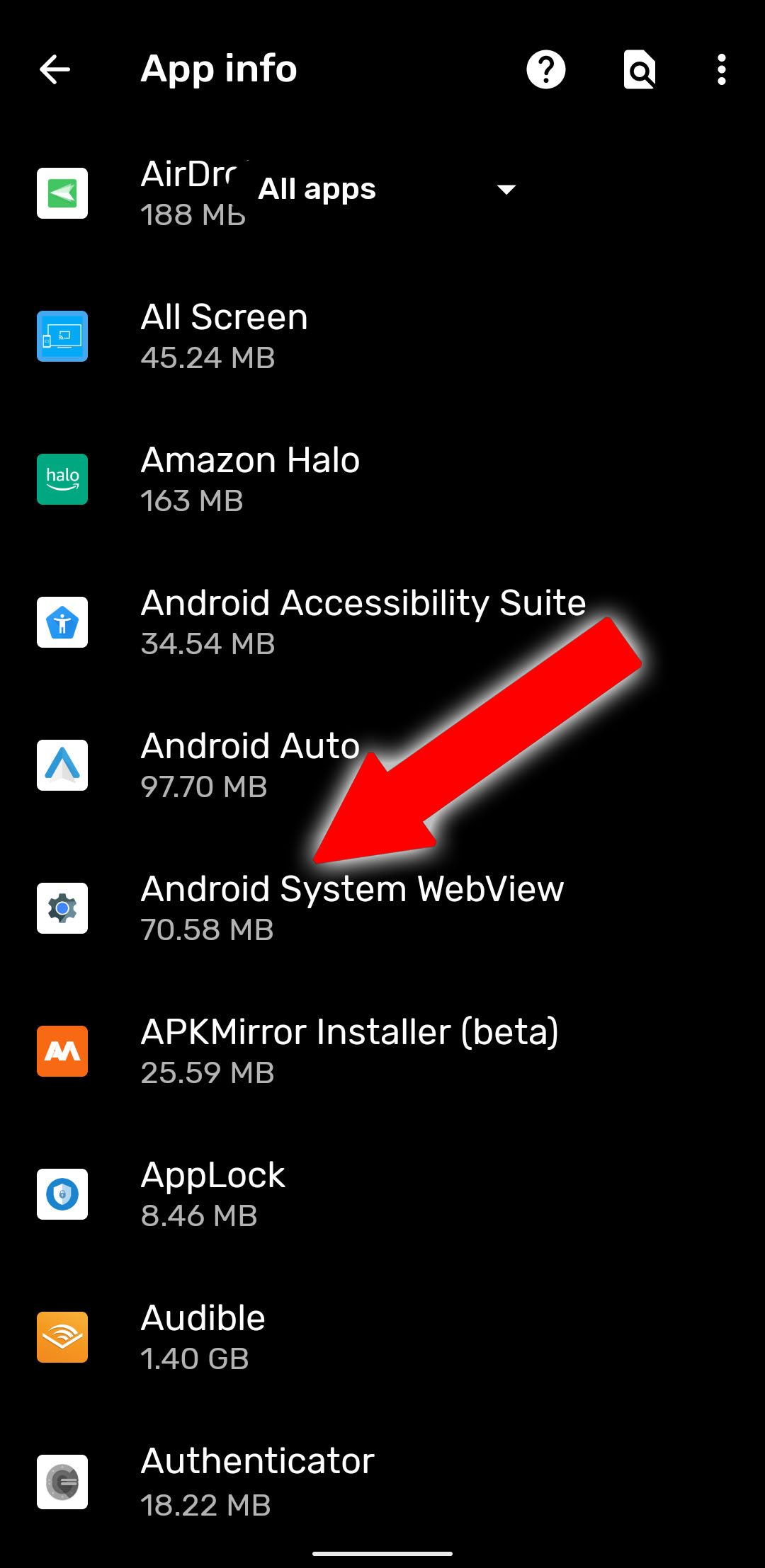
To use WatfordHert’s method, go to the main Android Settings menu, then tap “Apps & Notifications” (just “Applications” on some phones). Find Android System WebView in the list and tap it. (If you can’t see the app, check the three-dot menu and tap “show system apps.”) Do not disable the app.
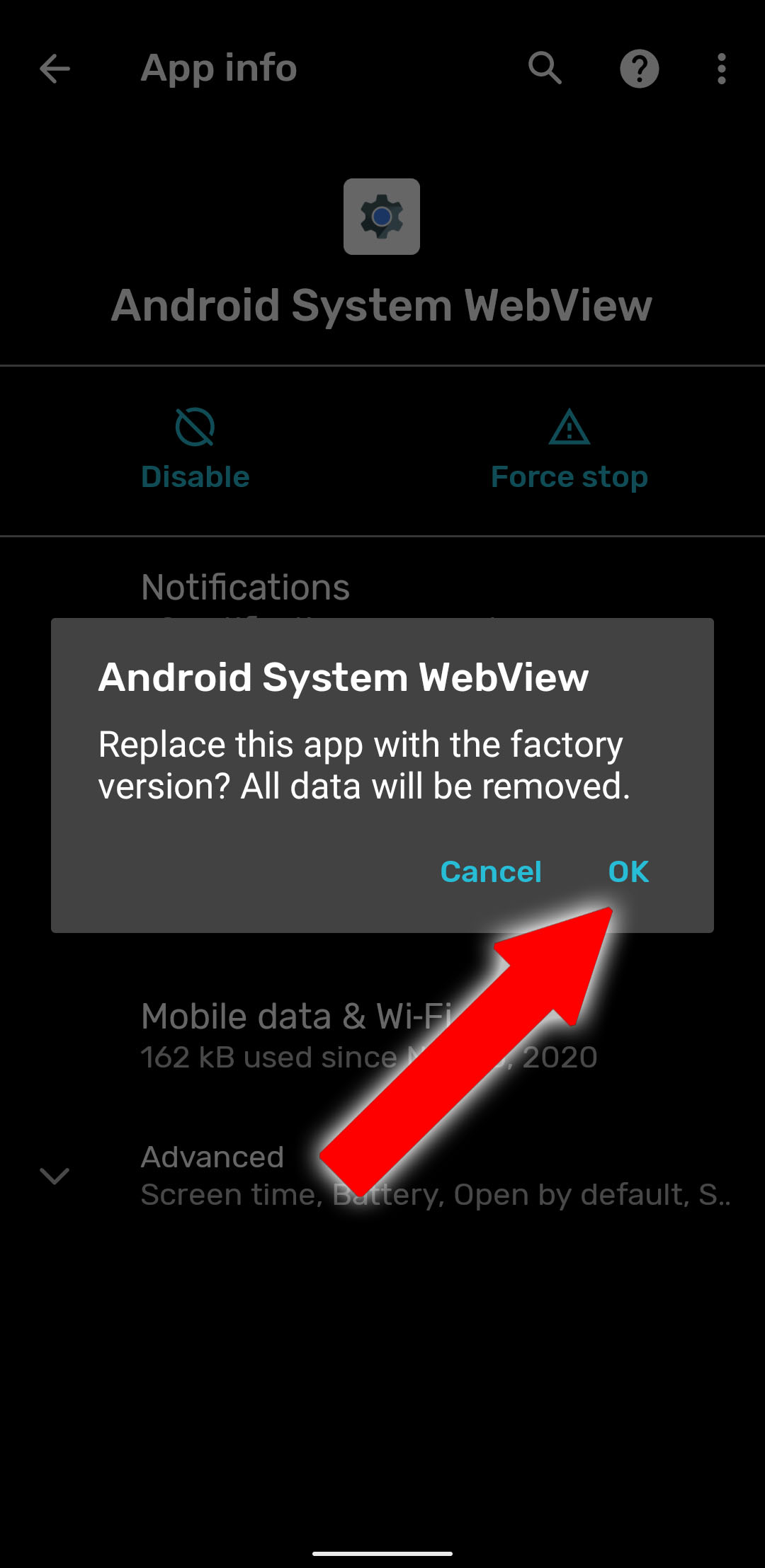
Tap the three-dot menu at the top right of this screen, then select “Uninstall updates.” This won’t uninstall Android System WebView completely—it’s an essential component, and many apps will cease to function without it. Instead, it will remove the updates installed from the Play Store and restore it to the version that came with your phone. This isn’t ideal, but it’s better than having a phone that can’t go thirty seconds without an app crash.
Tap “OK” on the warning that pops up, and you should be done. If you’re still seeing constant app crashes, try a reboot of your phone.
We can’t personally test this method on all the phones being affected, but multiple Reddit users are reporting that it’s working for them. If you see the app crashing problem return, try repeating the steps above—the Play Store may have automatically updated the app without alerting you. According commenters like Jorell, this method may not work on devices running older versions of Android—try uninstalling the updates from the Chrome browser itself instead.
Update Android System WebView
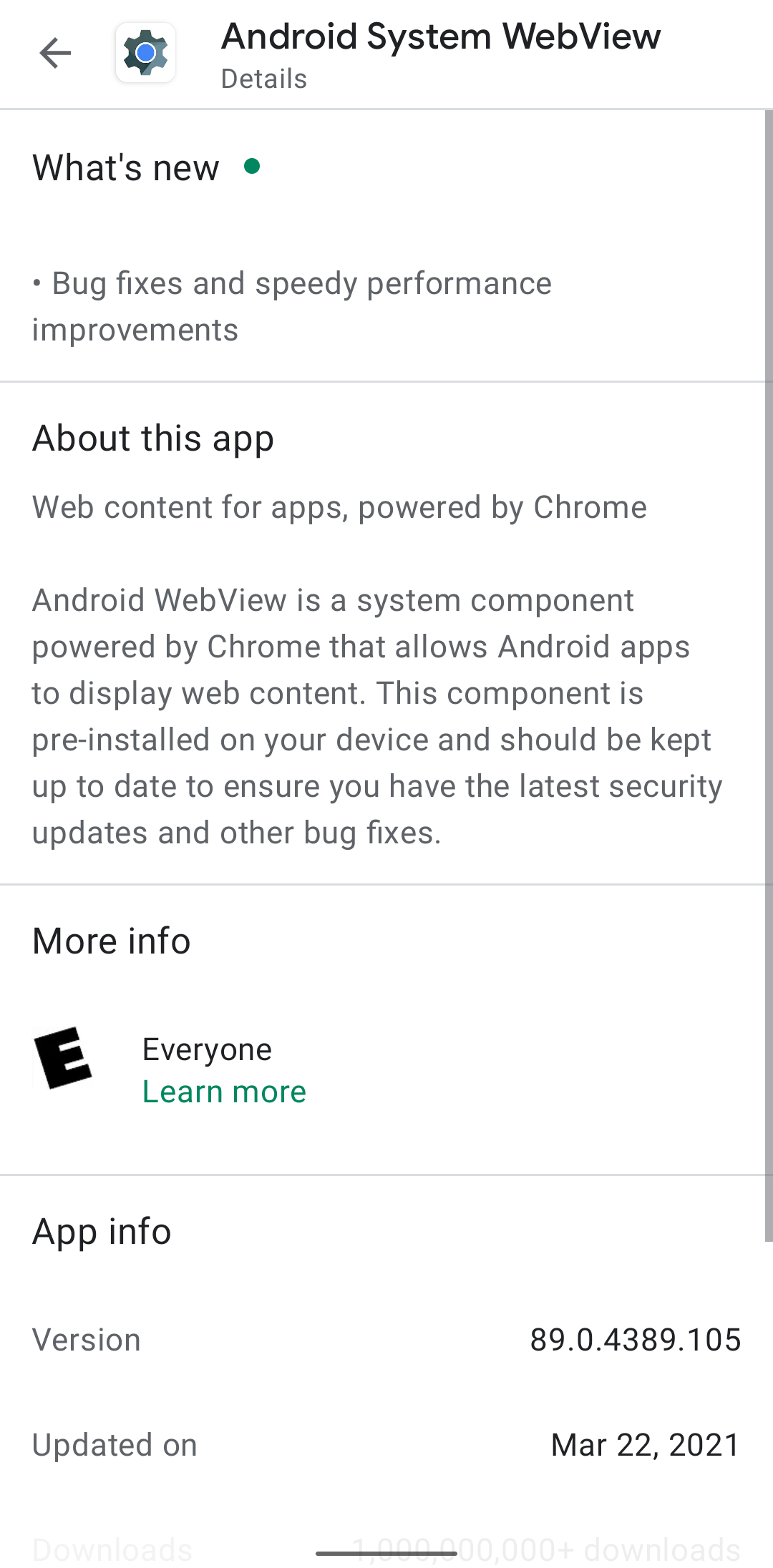
If you want a more permanent solution, Google quickly issued an update to the Android System WebView application in the early hours of March 23rd. It should be rolling out on the Play Store right now, but if you don’t want to wait, it’s available on APK Mirror as a direct download. The version number you’re looking for is 89.0.4389.105.
According to a service update posted to the Google Workspace Status Dashboard, this version of the app should fix the problems with other reliant apps crashing. Note that users who are already on the developer previews for Android 12 shouldn’t need this—they’re already running early versions of Chrome 90, and WebView gets updated along with its.