One UI 6 is finally available for some users in full, bringing a list of changes to the OS. One change is the addition of a new security tool called “Auto Blocker” which acts as additional security for Samsung Galaxy phones.
According to Samsung, Auto Blocker is intended to be somewhat of an expansion of additional and optional security tools at your disposal. Heading into the settings with bring you to a new page with a suite of options that are entirely a matter of preference, similar to how some would use malware protection on a computer.
One security option on this page is the familiar “Block app installation from unauthorized sources” feature. Normally, that option would be on a different page, but has since moved with One UI 6/ The option is now also off by default, which is a big change from previous versions of One UI where the first time users tried to sideload an app, it was blocked.
Now, users can sideload as much as they want with the knowledge that it’s not always entirely safe. The option will act as a prevention tool whenever apps are not being sideloaded intentionally.
Auto Blocker also brings app security checks to keep third-party programs in check, as well as a blocker for USB commands. Turning Samsung’s Auto Blocker on with the toggle at the top of that page looks to enable all three of these features at the same time. Below is an “Advanced” section with more tools that can be turned on and off individually, like Message Guard, to protect users from Zero Click attacks and malicious code in direct messages.
Auto Blocker is available for every Samsung Galaxy device running One UI 6, which is rolling out globally now.
Samsung confirms a list of over 20 Galaxy smartphones that will get Android 14
Earlier today Samsung officially announced that its Android 14 update is now rolling out to the Galaxy S23 series, and the company has also confirmed the first few Galaxy smartphones that will be eligible for Android 14 in the coming months.
Android 14 for Samsung devices comes in the form of One UI 6.0, an update that delivers platform improvements from Google as well as updates to Samsung’s skin. Those updates include a bunch of new camera features, updated emoji, and more. But, to start, it’s all exclusive to the Galaxy S23 series which is getting the update now.
What comes next?
According to a small list that Samsung has provided, other Galaxy smartphones getting Android 14 will begin with the past few years of flagships, foldables, and a couple of A-Series devices.
In talking about the new features coming to “Enhance-X,” Samsung also confirmed over 20 devices that will be updated to One UI 6.0, many of which come as no surprise. That initial list includes devices released in 2020 and newer, starting with Galaxy S series devices.
Galaxy S23 series
Galaxy S22 series
Galaxy S21 series
Galaxy S20 series
Beyond that, almost every Samsung foldable is going to get One UI 6.0 except for the original Galaxy Fold.
Galaxy Z Fold 5
Galaxy Z Fold 4
Galaxy Z Fold 3
Galaxy Z Fold 2
Galaxy Z Flip 5
Galaxy Z Flip 4
Galaxy Z Flip 3
Galaxy Z Flip 5G
Galaxy Z Flip
And, finally, Samsung has also confirmed that Galaxy Note 20, Galaxy A54, and Galaxy A53 will all be eligible, as well as some M-series devices.
Galaxy Note 20 series
Galaxy A54
Galaxy A53
Galaxy A34
Galaxy A33
Galaxy M54
Galaxy M53
Galaxy M34
Galaxy M33
Update: To address the elephant in the room, the Galaxy S20 series, Note 20 series, Flip/5G, and Fold 2 were not expected to get One UI 6.0, but Samsung’s wording here is pretty clear. The quote below is a footnote on Samsung’s blog post and refers to a new camera feature which requires One UI 6.0 or higher, meaning that the devices listed would need to be getting the update.
Available on Galaxy S23 series, S22 series, S21 series, S20 series, Note20 series, Z Fold5, Z Flip5, Z Fold4, Z Flip4, Z Fold3, Z Flip3, Z Fold2, Z Flip 5G and Z Flip LTE, A54, A53, A34, A33, M54, M53, M34, M33 devices operating on One UI 6.0 or above.
We have reached out to Samsung for comment on the status of 2020 device updates.
These devices will all get One UI 6.0 in time, and likely pretty quickly if last year’s Android 13 rollout serves as any indication. For now, though, we’re still waiting on Samsung to release Android 14 to the Galaxy S23 series in the US, which is coming “soon.”
This initial list, notably, is by no means complete. Samsung’s current policy for software updates means that many more smartphones and tablets will be updated to Android 14, but the company has not officially confirmed anything outside of this initial list.
Exit iPhone mini, enter iPhone Plus! Indeed, the rumors came true, and this year Apple launched a bigger non-Pro model instead of a mini one. We can only guess what Apple‘s plans are about the mini model, but today’s review is about Apple’s newest addition to the iPhone series – the iPhone 14 Plus.
We thought the iPhone 13 would go down in history as the most insignificant iPhone update ever, but the iPhone 14 snatched that title. See, the iPhone 14 and iPhone 14 Plus are based on the same Apple A15 Bionic chipset as the iPhone 13 models, and even the screen specs have stayed the same – OLEDs with about 460ppi, 800nits brightness and 60Hz refresh.
In fact, there are only four notable upgrades on the iPhone 14 when compared to the iPhone 13 – the new primary rear camera (lifted from iPhone 13 Pro), the updated selfie camera with the new lens and AF, 2GB more RAM, and the Emergency SOS via satellite feature.
The new iPhone 14 Plus adds a couple of extra ones – the larger screen and the larger battery. The Plus model brings a Max-sized screen to the regular series – even if it’s only 60Hz.
The selfie camera, while retaining its 12MP sensor, has a new brighter aperture lens with optical stabilization, and autofocus. We always wondered why Apple didn’t introduce AF capabilities sooner, as the Face ID tech is there to provide a massive assist to that, but alas, it is finally here.
The iPhone 14 Plus is as waterproofed as the rest of the recent iPhones – it can last for 30minbs in up to 6m deep clean water. And it should be a desirable smartphone for its large screen and yet thin and lightweight design. It is also touted as the iPhone with the best battery life, and we will surely test this out.
Disclaimer. We can not guarantee that the information on this page is 100% correct.
Just like the iPhone 13 and iPhone 14, the iPhone 14 Plus has one glaring omission – high refresh rate support. And the size of the notch is an eyesore you need to put up for a few more years, apparently. At least, it looks subjectively smaller on this large screen.
We are glad the non-Pro iPhones are getting the new software features like Action Mode for the video camera, the improved Cinematic Mode, and the satellite connection, too.
Unboxing the iPhone 14 Plus
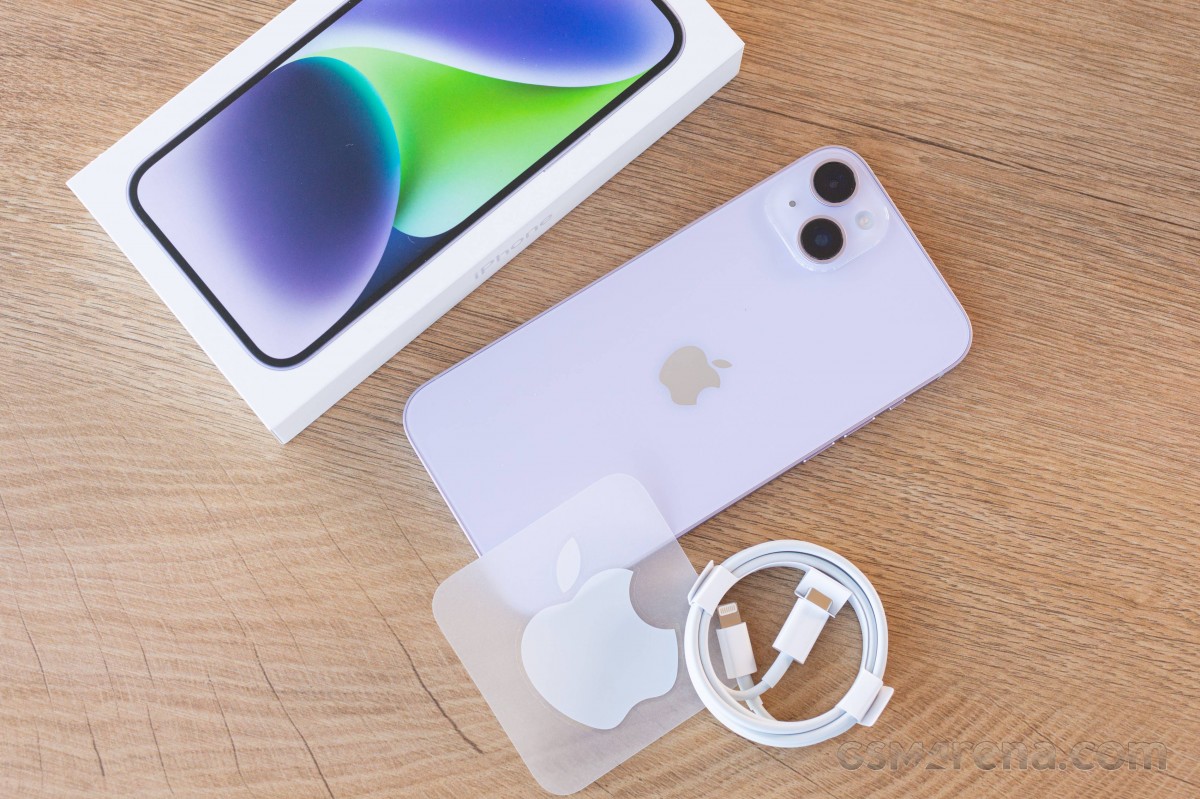
The eco-friendly iPhone box contains a USB-C-to-Lightning cable and the iPhone 14 Plus. There is also a SIM ejection pin, some paperwork, and an Apple sticker.
Apple was among the first manufacturers to ditch the headphones and the charger from its boxes.
If you have a 20W+ USB-PD power adapter with a USB-C port, you should be good.
Alternatives
The iPhone 14 Plus makes total sense in the grand Apple design – the maker has turned the SE model into a special mini edition iPhone, and that’s why the mini had to go from the flagship series. In fact, the vanilla iPhone 14 is so compact and lightweight that we can argue it has been the mini one all along.
Meanwhile, the absence of a larger iPhone for the masses has been quite obvious for the last couple of years, and it was only time for Apple to answer that call. And it did, in its own way.
The iPhone 14 Plus is essentially a supersized iPhone 14 and not much else. What you get is a Max-size display of non-Pro quality and better battery life thanks to the larger battery.
Now, all those Apple users who wanted a large iPhone that’s not overweight and ‘oh so premium’ can have the iPhone 14 Plus.
But, if you are still on the fence about this new Plus model, probably because of its €1,150 price tag, we can understand why you would want to explore more options.
For example, you can get the iPhone 13 Pro Max, which is pretty much the same phone but with an additional zoom camera, a better ultrawide shooter with AF, and a 120Hz ProMotion display. It can be purchased for €1,200 – which is quite an offer to consider. Yes, it is heavy because of the stainless-steel frame and the extra parts like LiDAR and the telephoto, but it’s a tradeoff many would take.
The iPhone 14, as we established, is the most compact current iPhone in circulation, and it’s quite the treat despite the 60Hz screen. It has the same specs as the Plus; it’s just smaller in size and incredibly pocketable. Oh, and it’s €150 cheaper.
Finally, Apple is also selling the older iPhone 12, which is basically an iPhone 13, and so on, starting at €800 for the 64GB model at Apple Store, or about €650 from third-party retailers. So, if you want the cheapest premium iPhone officially available, that’s the one.
Apple iPhone 13 Pro Max • Apple iPhone 14 • Apple iPhone 12
Of course, there are plenty of cheaper offers you can consider for their large screens outside Apple’s lineup. The €780 Xiaomi 12T Pro impressed us with its screen, charging speed, all-around performance and camera quality. The same goes for the Motorola Edge 30 Ultra – a phone with a 144Hz OLED screen, one of the first 200MP imagers, a 60MP selfie camera, and 125W fast charging. Finally, the Samsung Galaxy S22+ 5G has a large 120Hz OLED, one of the fastest Android chips, and an excellent trio of cameras on the back, including a zoom one.
The iPhone 14 Plus is one of the best iPhones Apple has ever made, as usual. It does exactly what it is supposed to do – offering the non-Pro experience on a larger display. A big bonus from the new size is the larger battery capacity and hence – the better battery life.
The iPhone 14 Plus is one of the lightest 6.7-inch smartphones around with a flagship-grade design, screen, speakers, battery life, performance and video quality. Meanwhile, its new cameras, including the AF-capable selfie one, are as controversial as usual – it’s like their quality hasn’t changed for generations because of the heavy processing and over-sharpening.
Still, this iPhone 14 Plus finds its way to the hearts and pockets of people despite the lack of a high refresh rate screen or zoom camera. A lot of users won’t mind this.
Its price tag may be too close to the 13 Pro Max for its own good, but last year’s flagship model has been officially discontinued, so you’d have to source it from an independent retailer but it’s definitely the better one between the two.
That doesn’t make the iPhone 14 Plus a bad smartphone and it’s well worth considering if you don’t need the extra features that the Pro models bring.
Pros
Sturdy design and sleek looks.
Excellent OLED, Dolby Vision, HDR10, high brightness.
Very good battery life.
Top-notch stereo speakers.
Flagship-grade performance even if not the latest chipset.c
Dependable photo quality from the main and selfie cameras.
Outstanding video quality and stabilization across the board, great action clips.
Every iPhone gets at least five years of iOS updates.
Cons
Wide feature gap with the 14 Pro family: no 120Hz refresh rate, A16 Bionic, zoom camera or AF on the ultrawide.
Priced too close to last year’s iPhone 13 Pro Max, which has most of the above.
No charger in the box, somewhat slow charging.
Apple’s iOS restrictions can be off-putting to newcomers to the ecosystem.
Depending on the device, this issue can result in the primary user being unable to access media storage. Alternatively, the issue can reboot the device with a “Factory data reset” message. If this message is accepted, data that is not backed up can be lost, and if it is declined, the device repeatedly reboots with the “Pixel is starting” message.
Google starts by saying that this storage issue impacts the “Pixel 6 and later models” that “have both received the Android 14 update and have multiple users (other than the primary user) set up.” This includes “users, guests, restricted profiles, and child users,” but not simply having more than one Google Account signed in “within the primary user or work profiles.”
The company has already rolled out a Google Play system update to “help prevent this issue from being triggered on additional devices.” To install, open Settings > Security & privacy > System & update > Google Play system update. The latest version we’re seeing today is October 1, 2023.
For those currently “unable to access media storage,” Google is working on a system update that “will repair the issue and restore access to media files without requiring a factory reset.”
Google is also “investigating methods that may be able to recover some data” for devices in a “Pixel is starting” boot loop. However, this seems more tentative: “We’ll provide more information as soon as it is available.”
For all other users, including those that factory reset their device, Google says to avoid “creating or logging into a secondary user on the device until the OTA update is available.”
Google ends with an apology:
We’re sorry for the inconvenience this has caused, and we appreciate your patience.
Android 14 breaks storage on Pixel 6 phones with multiple user profiles
Android 14 is a solid update to Google’s smartphone OS, but the update does seem to be causing some significant issues regarding user profiles on Pixel 6 series devices.
Following the update to Android 14 that rolled out earlier this month, some Google Pixel 6, Pixel 6 Pro, and Pixel 6a owners are seeing some considerable issues with their devices, specifically around storage becoming unusable. A growing number of users across Google’sforums, Reddit, and elsewhere reporting that their Pixel 6 and Pixel 6 Pro devices are drastically hindered, to the point of breaking most tasks users would perform on their devices.
The storage problem takes effect if the user, before installing Android 14, had multiple profiles on the device.
Following the installation of Android 14, the main profile on a Pixel 6 series device seems to lose access to storage, which prevents users from taking photos or videos, downloading files, and both installing or uninstalling applications. However, on the second profile, things seem to work as expected.
Other limitations include that apps report the device as having no available storage, Google Photos can’t refresh a user’s library (only showing low-quality previews), and files can’t be accessed via USB from a connected PC, as one of our readers explained in an email.
Given that Android’s user profiles are more of a niche feature on smartphones (primarily used for personal and work profiles), this issue doesn’t appear excessively widespread, but the symptoms of the problem are affecting users pretty consistently.
Google has, so far, not offered any solution for this issue or public statement.
Earlier this month, Bloomberg’s Mark Gurman reported that Apple has been developing a new system that will allow its employees to install software updates on sealed iPhones without taking them out of the box.
Apple can now wirelessly update sealed iPhones
According to Gurman, the new system is being developed so that Apple can wirelessly update sealed iPhones to deliver them to customers with the latest software available. The company reportedly decided to invest in this system after being forced to release a day-one update for iPhone 15 models to fix a major bug during setup.
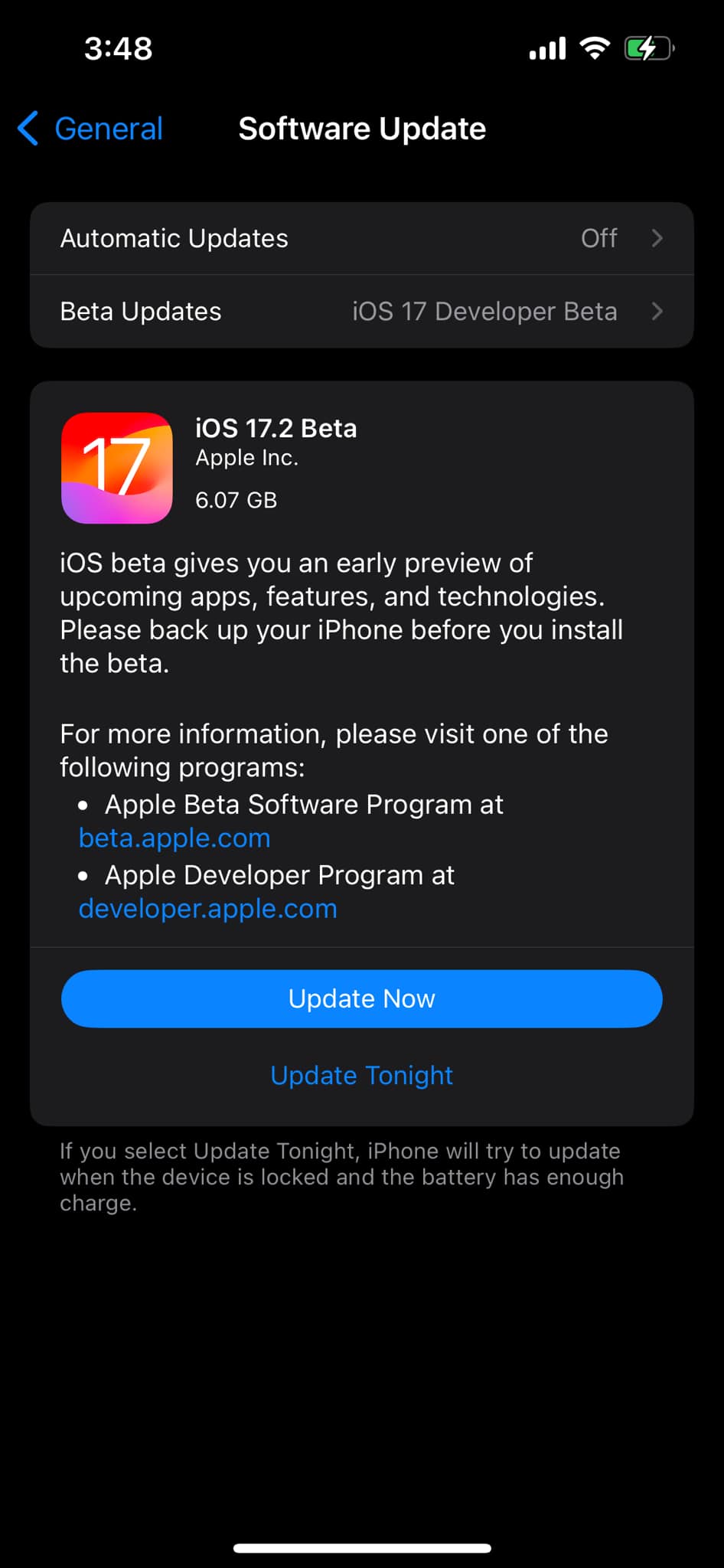
Interestingly, the iOS 17.2 beta SDK that comes with the latest Xcode 15.1 beta pretty much corroborates this report. There are three new internal frameworks named FactoryOTALogger, FactoryOTANetworkUtils, and FactoryOTAWifiUtils that enable wireless OTA firmware updates by using a special external device.
This is in line with what Gurman reported, as the journalist described the system as a “proprietary pad-like device that the store can place boxes of iPhones on top of.” The feature is not intended for end users and is clearly marked as internal in the codes seen by 9to5Mac. In the future, this will allow Apple to avoid major day-one bugs by installing iOS updates on sealed iPhones.
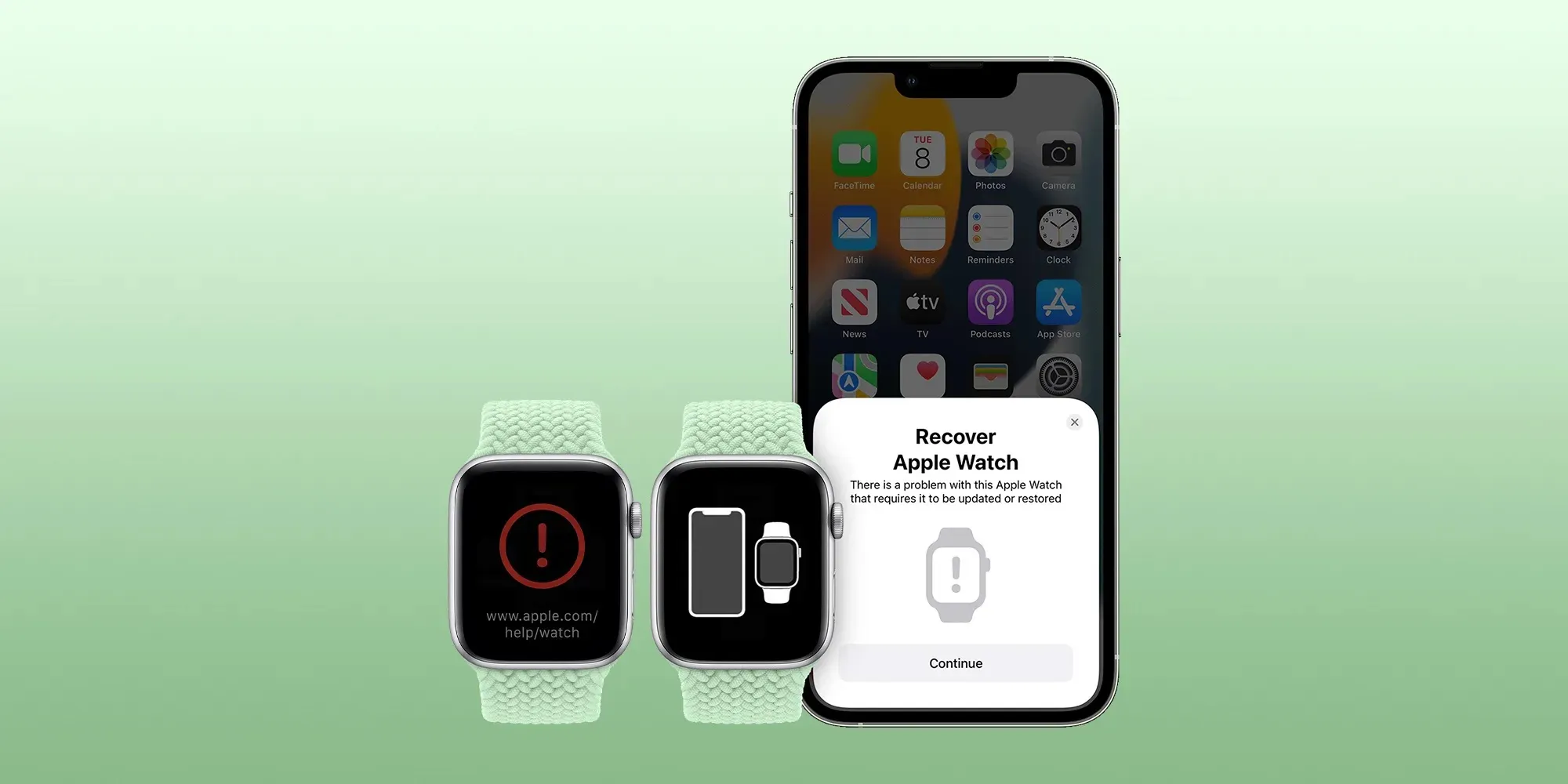
This system could also be useful in helping Apple to restore the firmware of iOS devices without the need for a cable. In recent years, Apple has been working on new technologies to help users restore devices such as the Apple Watch and Apple TV when they get stuck since these devices can’t be connected to a computer.
More about iOS 17.2
iOS 17.2 brings some new features for Apple Music subscribers, such as collaborative playlists and a new “Favorites” playlist that is automatically generated based on the songs you’ve marked as favorites. In addition, the update comes with the Journal app, a new Translate option for the Action Button, and some new Home Screen widgets.
The update is now available as a beta to developers and is expected to be released to the public by the end of the year.
iOS 17.2 adds one more function to the Action button on iPhone 15 Pro
When Apple unveiled the iPhone 15 Pro, it shared 10 customization options for the new Action button. One of those options, however, was described as coming later. With iOS 17.2, it has arrived.
Starting with iOS 17.2, iPhone 15 Pro and iPhone 15 Pro Max lets you assign Translate as the Action button task. The new option slots in between Voice Memo and Magnifier in the Action button section of the Settings app.
When assigned to Translate, pressing the Action button invokes a translation session from the Dynamic Island. No need to launch the Translate app.
Apple introduced its built-in Translate app as part of iOS 14 in 2020. Translation on iOS relies on the iPhone’s Neutral Engine to keep everything on-device. That means translations can work offline and do not need to rely on a network connection or server.
iOS 17.2 now includes these 10 options for the Action button on iPhone 15 Pro and later:
Silent mode: Turn Silent mode on or off.
Focus: Turn a specific Focus on or off.
Camera: Open the Camera app to quickly take a photo, selfie, video, portrait, or portrait selfie.
Flashlight: Turn the flashlight on or off.
Voice Memo: Start or stop recording a voice memo.
Translate: Translate phrases or have a conversation with someone in another language.
Magnifier: Open the Magnifier app.
Shortcut: Open an app or run your favorite shortcut.
Accessibility: Quickly access your favorite accessibility feature.
No action: Do nothing.
Apple debuts iMessage Contact Key Verification with iOS 17.2 beta
Apple has enabled the testing of a new security feature with the first iOS 17.2 beta. For use with iMessage, Contact Key Verification gives users more certainty they’re messaging with the people they’re intending.
Apple detailed the new iMessage Contact Key Verification feature in the release notes for iOS 17.2 beta 1. As it happens, there are three levels for how to verify contacts. Here’s the first:
With iMessage Contact Key Verification, users can choose to further verify that they are messaging only with the people they intend. Contact Key Verification uses Key Transparency to enable automatic verification that the iMessage key distribution service returns device keys that have been logged to a verifiable and auditable map. When a user enables Contact Key Verification, they will be notified about any validation errors directly in the Messages conversation transcript and Apple ID Settings.
However, for those in situations where stricter security is needed, iMessage Contact Key Verification can be used “in person, on FaceTime, or a through another secure call.”
Apple highlights users can also “choose to create or edit a contact and save a public key to turn on CKV with that person.”
To test out iMessage Contact Key Verification, you’ll need to have all devices connected to your iCloud account updated to the iOS 17.2 Beta, macOS 17.2 Beta, or watchOS 17.2 Beta or “sign out of iMessage on these devices in order to enable contact key verification.”
Then you can head to iPhone Settings > your name > Contact Key Verification (very bottom) > toggle it on.
While Apple has never seen an attack like this, Contact Key Verification is another security feature that will give peace of mind to those who may be highly targeted individuals.
Even though a very small percentage of iPhone users may need security of this level, the neat part is turning it on doesn’t reduce the functionality of your iPhone or iMessage – so it could end up being more widely used than something like Lockdown Mode.
Apple has launched its first major update for all users since debuting iOS 17 in September. iOS 17.1 comes with a range of security patches and none of them were identified as exploited in the wild ahead of the fixes.
Per usual, Apple shared the details of the latest vulnerability fixes on its security page.
Patches range from fixing security bugs in Contacts, Find My, Kernel, Passkeys, Photos, Siri, Weather, WebKit, and more.
Fortunately, there were no known reports of any of the security flaws being actively exploited ahead of Apple releasing the fixes.
Here are the full security fix notes for iOS 17.1:
Contacts
Available for: iPhone XS and later, iPad Pro 12.9-inch 2nd generation and later, iPad Pro 10.5-inch, iPad Pro 11-inch 1st generation and later, iPad Air 3rd generation and later, iPad 6th generation and later, and iPad mini 5th generation and later
Impact: An app may be able to access sensitive user data
Description: A privacy issue was addressed with improved private data redaction for log entries.
CVE-2023-41072: Wojciech Regula of SecuRing (wojciechregula.blog) and Csaba Fitzl (@theevilbit) of Offensive Security
CVE-2023-42857: Noah Roskin-Frazee and Prof. J. (ZeroClicks.ai Lab)
CoreAnimation
Available for: iPhone XS and later, iPad Pro 12.9-inch 2nd generation and later, iPad Pro 10.5-inch, iPad Pro 11-inch 1st generation and later, iPad Air 3rd generation and later, iPad 6th generation and later, and iPad mini 5th generation and later
Impact: An app may be able to cause a denial-of-service
Description: The issue was addressed with improved memory handling.
CVE-2023-40449: Tomi Tokics (@tomitokics) of iTomsn0w
Find My
Available for: iPhone XS and later, iPad Pro 12.9-inch 2nd generation and later, iPad Pro 10.5-inch, iPad Pro 11-inch 1st generation and later, iPad Air 3rd generation and later, iPad 6th generation and later, and iPad mini 5th generation and later
Impact: An app may be able to read sensitive location information
Description: The issue was addressed with improved handling of caches.
CVE-2023-40413: Adam M.
ImageIO
Available for: iPhone XS and later, iPad Pro 12.9-inch 2nd generation and later, iPad Pro 10.5-inch, iPad Pro 11-inch 1st generation and later, iPad Air 3rd generation and later, iPad 6th generation and later, and iPad mini 5th generation and later
Impact: Processing an image may result in disclosure of process memory
Description: The issue was addressed with improved memory handling.
CVE-2023-40416: JZ
IOTextEncryptionFamily
Available for: iPhone XS and later, iPad Pro 12.9-inch 2nd generation and later, iPad Pro 10.5-inch, iPad Pro 11-inch 1st generation and later, iPad Air 3rd generation and later, iPad 6th generation and later, and iPad mini 5th generation and later
Impact: An app may be able to execute arbitrary code with kernel privileges
Description: The issue was addressed with improved memory handling.
CVE-2023-40423: an anonymous researcher
Kernel
Available for: iPhone XS and later, iPad Pro 12.9-inch 2nd generation and later, iPad Pro 10.5-inch, iPad Pro 11-inch 1st generation and later, iPad Air 3rd generation and later, iPad 6th generation and later, and iPad mini 5th generation and later
Impact: An attacker that has already achieved kernel code execution may be able to bypass kernel memory mitigations
Description: The issue was addressed with improved memory handling.
CVE-2023-42849: Linus Henze of Pinauten GmbH (pinauten.de)
Mail Drafts
Available for: iPhone XS and later, iPad Pro 12.9-inch 2nd generation and later, iPad Pro 10.5-inch, iPad Pro 11-inch 1st generation and later, iPad Air 3rd generation and later, iPad 6th generation and later, and iPad mini 5th generation and later
Impact: Hide My Email may be deactivated unexpectedly
Description: An inconsistent user interface issue was addressed with improved state management.
CVE-2023-40408: Grzegorz Riegel
mDNSResponder
Available for: iPhone XS and later, iPad Pro 12.9-inch 2nd generation and later, iPad Pro 10.5-inch, iPad Pro 11-inch 1st generation and later, iPad Air 3rd generation and later, iPad 6th generation and later, and iPad mini 5th generation and later
Impact: A device may be passively tracked by its Wi-Fi MAC address
Description: This issue was addressed by removing the vulnerable code.
CVE-2023-42846: Talal Haj Bakry and Tommy Mysk of Mysk Inc. @mysk_co
Passkeys
Available for: iPhone XS and later, iPad Pro 12.9-inch 2nd generation and later, iPad Pro 10.5-inch, iPad Pro 11-inch 1st generation and later, iPad Air 3rd generation and later, iPad 6th generation and later, and iPad mini 5th generation and later
Impact: An attacker may be able to access passkeys without authentication
Description: A logic issue was addressed with improved checks.
CVE-2023-42847: an anonymous researcher
Photos
Available for: iPhone XS and later, iPad Pro 12.9-inch 2nd generation and later, iPad Pro 10.5-inch, iPad Pro 11-inch 1st generation and later, iPad Air 3rd generation and later, iPad 6th generation and later, and iPad mini 5th generation and later
Impact: Photos in the Hidden Photos Album may be viewed without authentication
Description: An authentication issue was addressed with improved state management.
CVE-2023-42845: Bistrit Dahla
Pro Res
Available for: iPhone XS and later, iPad Pro 12.9-inch 2nd generation and later, iPad Pro 10.5-inch, iPad Pro 11-inch 1st generation and later, iPad Air 3rd generation and later, iPad 6th generation and later, and iPad mini 5th generation and later
Impact: An app may be able to execute arbitrary code with kernel privileges
Description: The issue was addressed with improved memory handling.
CVE-2023-42841: Mingxuan Yang (@PPPF00L), happybabywu and Guang Gong of 360 Vulnerability Research Institute
Siri
Available for: iPhone XS and later, iPad Pro 12.9-inch 2nd generation and later, iPad Pro 10.5-inch, iPad Pro 11-inch 1st generation and later, iPad Air 3rd generation and later, iPad 6th generation and later, and iPad mini 5th generation and later
Impact: An attacker with physical access may be able to use Siri to access sensitive user data
Description: This issue was addressed by restricting options offered on a locked device.
CVE-2023-41982: Bistrit Dahla
CVE-2023-41997: Bistrit Dahla
CVE-2023-41988: Bistrit Dahla
Status Bar
Available for: iPhone XS and later, iPad Pro 12.9-inch 2nd generation and later, iPad Pro 10.5-inch, iPad Pro 11-inch 1st generation and later, iPad Air 3rd generation and later, iPad 6th generation and later, and iPad mini 5th generation and later
Impact: A device may persistently fail to lock
Description: The issue was addressed with improved UI handling.
CVE-2023-40445: Ting Ding, James Mancz, Omar Shibli, an anonymous researcher, Lorenzo Cavallaro, and Harry Lewandowski
Weather
Available for: iPhone XS and later, iPad Pro 12.9-inch 2nd generation and later, iPad Pro 10.5-inch, iPad Pro 11-inch 1st generation and later, iPad Air 3rd generation and later, iPad 6th generation and later, and iPad mini 5th generation and later
Impact: An app may be able to access sensitive user data
Description: A privacy issue was addressed with improved private data redaction for log entries.
CVE-2023-41254: Cristian Dinca of “Tudor Vianu” National High School of Computer Science, Romania
WebKit
Available for: iPhone XS and later, iPad Pro 12.9-inch 2nd generation and later, iPad Pro 10.5-inch, iPad Pro 11-inch 1st generation and later, iPad Air 3rd generation and later, iPad 6th generation and later, and iPad mini 5th generation and later
Impact: Processing web content may lead to arbitrary code execution
Description: The issue was addressed with improved memory handling.
WebKit Bugzilla: 259836
CVE-2023-40447: 이준성(Junsung Lee) of Cross Republic
WebKit
Available for: iPhone XS and later, iPad Pro 12.9-inch 2nd generation and later, iPad Pro 10.5-inch, iPad Pro 11-inch 1st generation and later, iPad Air 3rd generation and later, iPad 6th generation and later, and iPad mini 5th generation and later
Impact: Processing web content may lead to arbitrary code execution
Description: A use-after-free issue was addressed with improved memory management.
Available for: iPhone XS and later, iPad Pro 12.9-inch 2nd generation and later, iPad Pro 10.5-inch, iPad Pro 11-inch 1st generation and later, iPad Air 3rd generation and later, iPad 6th generation and later, and iPad mini 5th generation and later
Impact: Processing web content may lead to arbitrary code execution
Description: A logic issue was addressed with improved checks.
WebKit Bugzilla: 260173
CVE-2023-42852: an anonymous researcher
WebKit Process Model
Available for: iPhone XS and later, iPad Pro 12.9-inch 2nd generation and later, iPad Pro 10.5-inch, iPad Pro 11-inch 1st generation and later, iPad Air 3rd generation and later, iPad 6th generation and later, and iPad mini 5th generation and later
Impact: Processing web content may lead to a denial-of-service
Description: The issue was addressed with improved memory handling.
We would like to acknowledge Bahaa Naamneh for their assistance.
libxml2
We would like to acknowledge OSS-Fuzz, Ned Williamson of Google Project Zero for their assistance.
Power Manager
We would like to acknowledge Xia0o0o0o (@Nyaaaaa_ovo) of University of California, San Diego for their assistance.
VoiceOver
We would like to acknowledge Abhay Kailasia (@abhay_kailasia) of Lakshmi Narain College Of Technology Bhopal India for their assistance.
WebKit
We would like to acknowledge an anonymous researcher for their assistance.
Information about products not manufactured by Apple, or independent websites not controlled or tested by Apple, is provided without recommendation or endorsement. Apple assumes no responsibility with regard to the selection, performance, or use of third-party websites or products. Apple makes no representations regarding third-party website accuracy or reliability. Contact the vendor for additional information.
Apple has announced a special virtual event for later this month. The event, believed to focus on the introduction of new Macs, will take place on Monday, October 30. It will be a virtual event, streamed via Apple’s website, at the spooky Halloween Eve time of 5 p.m. PT/ 8 p.m. ET.
Apple October event: ‘Scary fast’
Unlike the past several Apple events, the “Scary fast” event will be held completely virtually. There is no in-person component for members of the press. Anyone will be able to tune in live via Apple’s website, YouTube, and the Apple TV app.
This also marks Apple’s first nighttime event, taking place at 5 p.m. PT / 8 p.m. ET. In the past, Apple events have generally been held at the much-more-reasonable time of 10 a.m. PT / 1 p.m. ET.
Apple’s October event is expected to focus on the introduction of new Macs. The company is rumored to have a new iMac in the works and possible updates to the MacBook Pro.
On Apple’s Events website, there is an animated version of the invite artwork where the Apple logo transforms into a Finder-style spooky face. A clear hint at new Macs, as if there was any doubt.
One lingering question is whether or not Apple is ready to unveil its next-generation M3 chip. It’s possible that the new iMac will be powered by the M2 chip that was first unveiled at WWDC 2022. The “Scary fast” tagline, however, seems to imply that more dramatic upgrades are on the way.
I am prepared to be underwhelmed, and hope for the best.
iMac refreshed with M2 and M2 Pro, and Keyboard, TrackPad, and Mouse with USB-C.
13-inch MacBook Pro, redesigned without Touch Bar but with MagSafe. Available with M2 and M2 Pro.
But I would love to be surprised with M3.
Apple unveiled the current M1 iMac way back in April 2021 with the M1 chip. It featured an all new ultra-thin design, available in a range of unique colors. The 24-inch iMac, however, hasn’t been updated since then.
In January, Apple held a virtual event of sorts to announce the updated 14-inch and 16-inch MacBook Pro with M2 chips. This “event” wasn’t pre-announced and instead came in the form of press releases on Apple’s website and a video published – not live-streamed – on YouTube.
Easter egg on Apple’s website confirms that the ‘Scary fast’ event is all about the Mac
Apple has just announced a special event for the press on October 30. Named “Scary fast,” the event seems rather atypical for the company, as it will be held on a Monday at 5 p.m. PT. There was a lot of speculation about Apple announcing new Macs next week, and a subtle easter egg on the company’s website confirms that the event is all about the Mac.
Apple confirms its upcoming event is about the Mac
On the official Apple Events webpage, there’s an animated version of the Apple logo that turns into a spooky Finder face – the file explorer in macOS. In the past, Apple has held other events in October and November dedicated to announcing new Macs, so the timeline fits perfectly.
In recent years, Apple’s event artwork hasn’t been very clear about what the company will discuss at the presentation. In most cases, the company chooses to promote the events with a stylized Apple logo based on new wallpapers that come with the devices, with only a few exceptions.
For example, the image promoting the September 2022 event had stars to represent the iPhone 14’s satellite connectivity. Having the Finder logo on the event webpage pretty much confirms that we’ll be seeing new Macs next week.
As for the name of the event and Finder’s spooky face, that’s presumably a joke about the fact that Halloween takes place the next day. And while we don’t know exactly which Macs Apple will announce next week, there are rumors about both the iMac and MacBook Pro getting an upgrade – perhaps with a new M3 chip.
In January, Apple held a virtual event of sorts to announce the updated 14-inch and 16-inch MacBook Pro with M2 chips. This “event” wasn’t pre-announced and instead came in the form of press releases on Apple’s website and a video published – not live-streamed – on YouTube.
Watch it online
Interestingly, this event will be broadcast online without an in-person gathering, which means that the press won’t be there to see the new products in person after the presentation. It will be streamed on Apple’s website, Apple TV app, and YouTube.
As was first announced at the Made by Google event at the beginning of the month, you can now use the Google Assistant to ask if an incoming call from a contact is urgent.
For years now, Pixel phones have offered an option to “Screen call,” allowing the Google Assistant to speak to an incoming caller on your behalf to find out who they are and what they want. This method is surprisingly effective for filtering out unwanted calls from unknown numbers, as many spam callers will hang up automatically, but it’s much less useful when you know who’s calling.
If someone in your contact list calls, you have the same option to screen their call and have the Assistant ask for more information. You can ask anyone who’s ever accidentally used the Assistant to screen a call from a family member why this is a terrible idea.
To address that, the Google Assistant call screening has gained a new option that only appears for people who are on your contact list. Appearing in the incoming call screen as “Ask if urgent,” tapping the option gives your friend or family member a somewhat friendlier greeting from the Google Assistant.
Hi I’m a Google virtual assistant on a recorded line. The person you are trying to reach wanted me to check is it urgent?
As before, Assistant transcribes and displays what the caller says in response, while the Phone app offers tappable options to ask for more information.
The feature was first demonstrated at the Pixel 8 unveiling event, with the company confirming the feature would be rolling out soon. As noted by Mishaal Rahman on X, the rollout has begun and includes older Pixel phones, not just the newly released Pixel 8 and Pixel 8 Pro. We’ve confirmed the new “Ask if urgent” option appeared on a Pixel 7 Pro over the weekend, but let us know in the comments if it appears on your older Pixel phone too.
I guess when Google said "soon" they meant "immediately" then. At least it's good to know this isn't exclusive to the Pixel 8, since my tipster saw this on their Pixel Fold.
Google brings Action Blocks customization to all Assistant Routines
Google is rolling out a number of new accessibility features, including the ability to use Action Blocks as Assistant Routine shortcuts on your Android homescreen.
Today, going to Assistant Settings > Routines lets you select one and add it to your homescreen as an app icon-sized shortcut that can start the macro.
Google will soon let you have Routines appear as “Custom rounded” or “Custom rectangle” widgets on your homescreen, with the old icon shortcut still supported. Besides being resizable, these Google Assistant Routine widgets support custom images and text without having to download the dedicated Action Blocks app.
Research has shown that this personalization can be particularly helpful for people with cognitive differences and disabilities and hope it will bring the helpfulness of Assistant Routines to even more people.
Google Maps Live View last year added the ability to search for nearby places, like restaurants, shops, transit stations, and ATMs, within the AR interface. Available in select cities, this feature is adding screen reader support starting today on iOS, with Android following “later this year.”
If your screen reader is enabled, you’ll receive auditory feedback of the places around you with helpful information like the name and category of a place and how far away it is.
Google Maps and Search business listings are gaining support for a “new identity attribute for the disability community.”
Google Maps is rolling out wheelchair-accessible walking routes. These stair-free routes can also be helpful for “people traveling with things like luggage or strollers.” This will be available “globally on iOS and Android wherever we have data available.”
Similarly, wheelchair accessibility information will be surfaced in the Android Auto and Automotive apps to find step-free entrances, as well as locations that have accessible parking, seating, and restrooms. Look for a wheelchair icon next to the search results.
Chrome on desktop can already “detect URL typos and suggest websites based on the corrections.” This is now coming to the Android and iOS browsers. It’s especially meant for people with “dyslexia, language learners, or anyone who may have typos.”
Finally, there’s the new Magnifier app for Pixel phones that Google designed in collaboration with the Royal National Institute of Blind People and the National Federation of the Blind.
Oppo and OnePlus have been sharing more and more in common over the past few years, and there’s nowhere that’s no apparent than the OnePlus Open and Oppo Find N3 foldables, which quite literally are the same device.
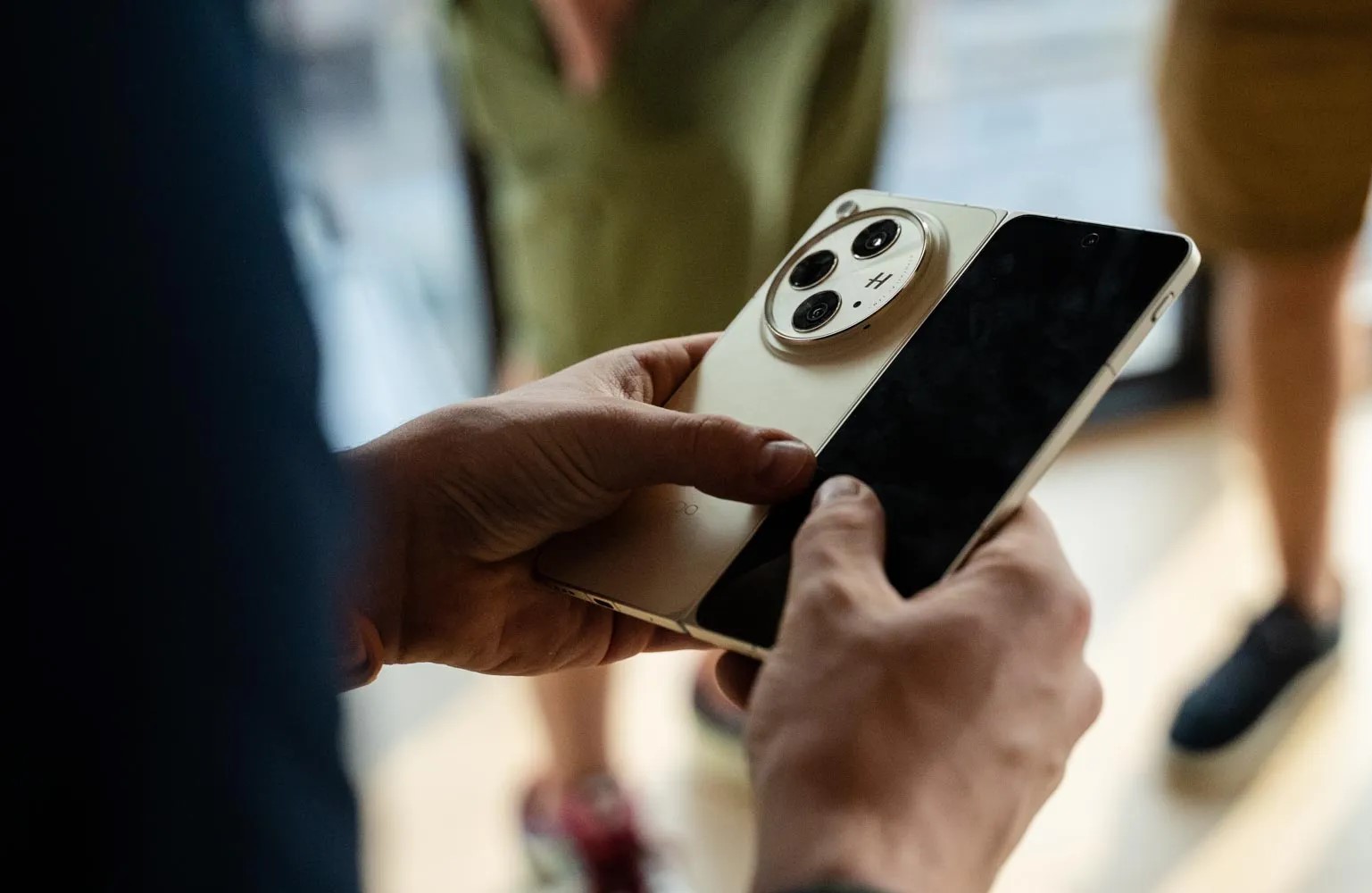
The Oppo Find N3 and OnePlus Open share basically everything. The same specs, the same cameras, the same hinge, the same displays. It’s all the same, and you can tell in person. Over the summer, 9to5Google got a brief early chance to spend a few minutes with the Find N3, and it is indeed the same device we ended up getting in the OnePlus Open.
At the time, Oppo even said that the OnePlus Open is essentially the “global version” of the Find N3.
That’s certainly good news, as Oppo’s book-style foldables have never launched outside of China. The Find N and Find N2 both never made it to global markets, and from the looks of it, the Find N3 technically won’t either unless it’s called the OnePlus Open.
The only real differences come down to the software and the fit and finish. The Find N3 is sold in gold, red, and some other colors, while the Open is only available in black and green. The Find N3 has ColorOS, and the Open has OxygenOS (not that those are different).
The only real difference is the logo on the back.
So, yeah. These are the same phones, just for different markets. Will that continue into future releases? We’ll see! If it’s for flip phones, I hope that we see more crossover, but I would prefer if OnePlus’ main flagships retain at least some personal identity.
iPhone 15 and 15 Plus are Apple’s latest non-pro smartphones that come with a number of new features. But are they worth the upgrade if you have an iPhone 13? Follow along for an in-depth look at the iPhone 13 vs 15 for everything that’s changed.
Screen sizes and design
The screen sizes between the iPhone 13 and iPhone 15 remain the same at 6.1 inches. However, the 15 Plus offers a 6.7-inch option that wasn’t available with the iPhone 13 lineup without stepping up to the 13 Pro Max.
New with the iPhone 15 displays is the Dynamic Island and an outdoor brightness of up to 2000 nits.
Here’s the full look at the display specs for iPhone 13 vs iPhone 15:
The bezels on the iPhone 15 are also slimmer than the 13, which is what allows the very slight increase in pixels.
Size, weight, design
Overall, the physical design of the iPhone 15 remains very similar to the 13, but Apple has given the 15 more rounded edges for a more comfortable feel.
And as mentioned above, you’ve now got the larger iPhone 15 Plus option.
For size, weight, and materials, here’s iPhone 13 vs 15:
Of course, the new iPhones also come in new colors.
Performance – A16 vs A15 Bionic
Here’s a breakdown of the iPhone 13 vs iPhone 15 chip specs:
Both the A15 and A16 Bionic are powerful enough for almost everyone. But GeekBench offers a look at the performance difference between the A15 and A16 Bionic.
16% faster single-core score
21% faster multi-core score
29% faster GPU
Battery life
When it comes to battery life, the iPhone 15 has one hour longer battery for video playback than the 13 and 5 hours longer for audio playback.
The iPhone 15 Plus offers 7 hours longer video use and 25 hours more audio than iPhone 13.
iPhone 13 vs 15 cameras
Rear cameras
iPhone 15 and 15 Plus come with a 48MP main rear camera, next-gen portrait with Focus and Depth Control, Smart HDR 5, and more.
The iPhone 15/Plus main camera also has more powerful sensors and supports shooting both 24 and 48MP “super-high-resolution photos.”
Video recording
The main new feature for video recording with the iPhone 15/Plus compared to iPhone 13 is Action mode.
The other new video features this year are reserved for the iPhone 15 Pro and Pro Max.
Selfie camera
Apple’s TrueDepth front camera on the iPhone 15 gets a mix of upgrades found on the main rear camera.
iPhone 13 vs 15 I/O
The major change for iPhone 15 I/O is the switch from Lightning to USB-C.
Unfortunately, it’s only the 15 Pro and Pro Max that offer much faster transfer speeds with USB 3 support at up to 10Gbps. The 15 and 15 Plus have USB 2 speeds up to 480Mbps.
Two more differences between the iPhone 15 vs 13 include Bluetooth and UWB upgrades.
Whether the new iPhone 15 devices will support Qi2, Apple is saying yes but it’s a bit confusing.
So it’s also unclear if iPhone 13 will support Qi2.
Safety
iPhone 15 has two more advanced safety features than iPhone 13 Pro:
iPhone 15 colors
iPhone 15 and 15 Plus come in these five colors:
Black
Blue
Green
Yellow
Pink
Storage and pricing
iPhone 15/Plus comes in these storage options:
128GB – $799 / $899
256GB – $899 / $999
512GB – $1,099 / $1,199
What’s in the box?
iPhone 15/Plus comes with the iPhone and a USB-C cable in the box.
If you need a power adapter, go with at least a 20W so you get fast charging for your iPhone.
iPhone 13 vs 15: Is it worth upgrading?
The iPhone 15 and 15 Plus are fantastic smartphones, but whether upgrading from the 13 is worth it for you will depend on how you want to use your iPhone and what features you find important.
Reasons to consider upgrading to iPhone 15 or 15 Plus:
More powerful and capable cameras
Dynamic Island
USB-C
Faster chip and more powerful GPU for mobile gaming
Crash Detection and Roadside assistance via satellite
Exactly two weeks after the previous release, Android 14 QPR1 Beta 2.1 is rolling out today with a handful of bug fixes, but the Pixel 8 and 8 Pro aren’t getting updated right away.
There are just three fixes for Pixel devices, which are getting U1B2.230922.010 today with the October 2023 security patch:
Fixed issues with biometric authentication, such as an issue that sometimes prevented the under-display fingerprint sensor from activating while always-on display features were enabled.
Fixed an issue where, in some cases after swapping SIM cards on a device, the device couldn’t connect to cellular service.
Fixed various issues that were impacting system stability and performance.
Google says the “Pixel 8 and 8 Pro will receive this update at a later time.” The initial Beta 2 update rolled out a week ago.
The OTA and factory images are now available, while the on-device OTA is also rolling out immediately (66MB on the Pixel Fold and 7 Pro).
Google wants every Android version to be ‘higher quality than the previous release’
Dave Burke, VP of Engineering for Android, was interviewed during The Android Show today and shared a lot of interesting tidbits, especially around quality and performance.
In the context of Android releases, Burke considers quality the “number one feature” given how much we use our phones:
If you think about how much we depend on our devices and how much we use them [in] a day, it’s just really important that the device runs really, really well. Really, really reliably. The highest performance, highest fidelity.
The Android team has a “pledge” internally to “ensure that every release was higher quality than the previous release by a set of expanding metrics that we measure in the lab and in the field.”
We’ve been holding ourselves to that. It’s difficult, I can tell you, because you’re only as good as the weakest metric. So you’ve got to chase everything down, but it’s really causing us to force the bar higher and higher.
Burke described one way the team is doing that:
Even internally, we’re looking at actually changing some of our developer practices in 2024 where rather than sort of go[ing] off for a year and work[ing] on a release for a very long time, we break that up into chunks internally so that we sort of keep the branch green as we go.
From the description we have today, this just seems to be an internal change rather than anything that would impact the yearly cycle.
On Android 14, Burke highlighted expression (gen AI wallpapers, lockscreen clocks, and shortcuts) and performance as the big tentpoles. Burke said the team “may not have talked enough” about performance. (Frankly, Google should have discussed it on-stage at I/O in May.)
We’ve done a ton of work to reduce CPU activity of background apps, and the result is that there’s 30% less cold starts now on Android 14. Cold starts are when you have to literally read the code pages off the flash and read them into memory before you execute them. A 30% reduction is pretty dramatic, and you feel that as a user.
This involved increasing the number of cached processes, but doing so risks increased CPU usage and, therefore, battery drain. Android 14 does a better job of properly freezing the processes.
Burke also mentioned how large-screen-related work, like the transient taskbar, was originally part of Android 14 but moved up into Android 13 (QPR2) as Google worked to be more competitive in the space and to support foldables.