With the latest version of macOS, dubbed Monterey, one of the apps that saw a handful of upgrades was Reminders. A once rather basic task and to-do application, Reminders is now a powerhouse application with new features include Smart List, tags, and more. Head below for a deeper look at these new features.
The new features in Reminders
First off, the Reminders app in macOS Monterey is the first version to support tags. As the name implies, tags allow you to organize and categorize your reminders and tasks. This means you can tag tasks with bits of information to help you keep track of categories, groups, and more.
Tags are a fast and flexible way to organize your reminders. Add one or more tags, like #errands, to your reminders to make them easy to search and filter for across your Reminders lists.
In macOS Monterey, you can add tags to your tasks when you create them. Simply look for the “Add Tags” field when creating a new reminder.
But while tags themselves are a notable addition to the Reminders application, they are really powerful when combined with Smart Lists.
Without a doubt, the biggest new addition to the Reminders app in macOS Monterey is a new feature that Apple is calling Smart Lists. Essentially, Smart Lists are a way to create custom lists that include reminders that meet certain criteria.
Here’s how Apple explains the feature:
Create your own Smart Lists to automatically include reminders that matter most to you by selecting for tags, dates, times, locations, flags, and priority. Choose more than one tag (such as #gardening and #errands) and combine them with other setting filters for more specific lists.
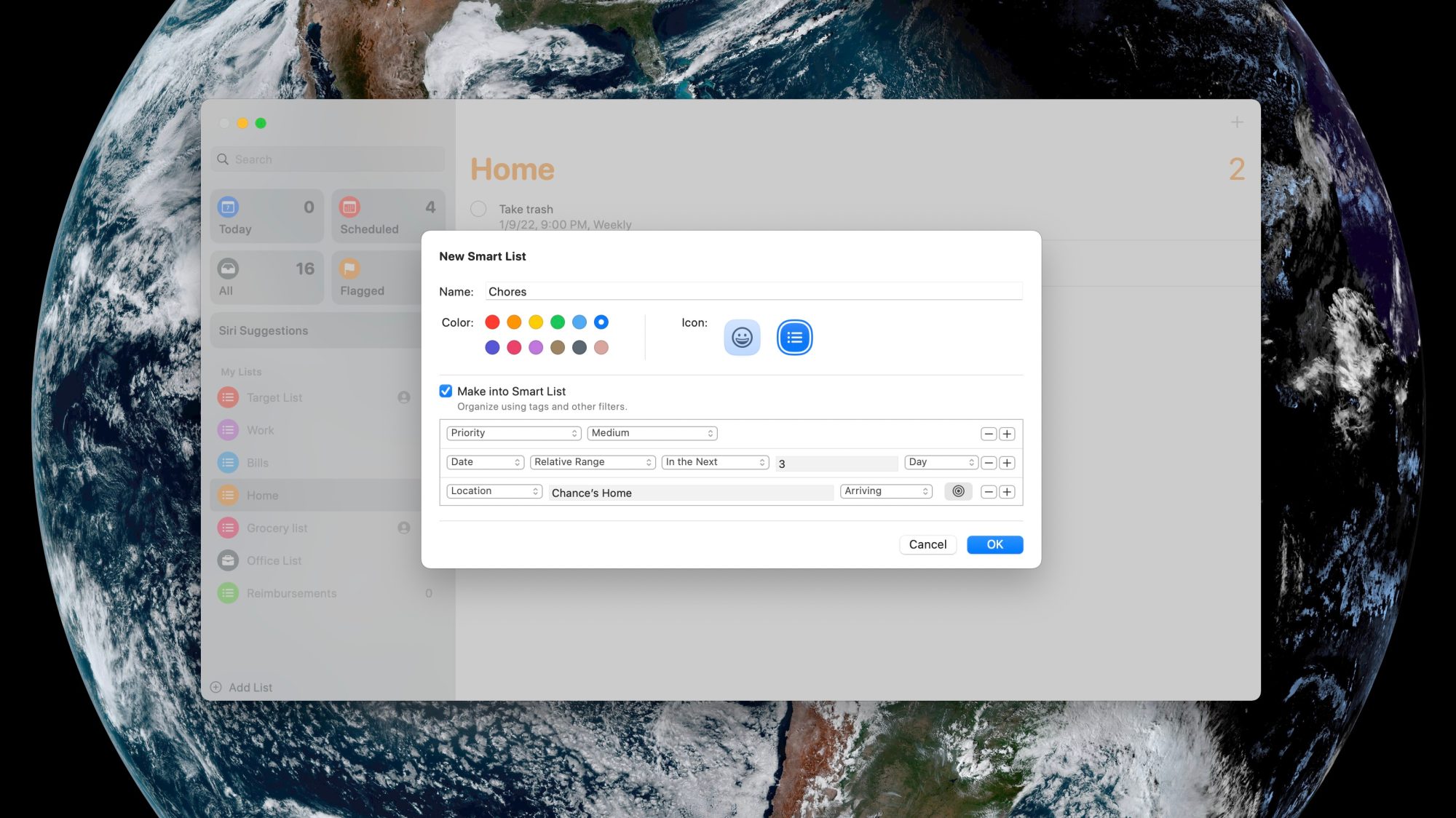
So how does this work in practice? It’s actually not as complex as it might sound. In the Reminders app on your Mac, you can start by clicking the “Add List” button, just like you would for creating any sort of to-do list. While you’re creating your list, look for the “Make into Smart List” checkbox.
Once you select this checkbox, you can select criteria for your Smart List. The criteria can be different tags, the due date for the task, the time, the priority, the location, and whether or not the task is flagged. Once you’ve done this, the Reminders will automatically create a Smart List of the tasks that meet your defined criteria.
Once you’ve created a custom Smart List in the Reminders app, it will sync to your other Apple devices and be added to the app’s sidebar. In the sidebar, it will be denoted with a small gear icon in the bottom-right corner, indicating that it is a Smart List.
And while Smart Lists and tags are the top new features of the Reminders app in macOS Monterey, there’s more to try out:
A Tag Browser in the sidebar lets you click any tag or combination of tags to quickly view tagged reminders.
Access quick options to easily delete your completed reminders.
Choose tags, flags, priority, and people you message with from the Quick Toolbar when creating a reminder.
Type more advanced phrases to create reminder settings. Try something like “Jog every other morning” for a specific, recurring reminder.
As usual, HomeKit announcements are expected to be one of the biggest trends at CES this year. Today, home security company Schlage has announced an all-new Encode Plus Smart WiFi Deadbolt, and the company is going all in on Apple’s ecosystem with support for both HomeKit and home keys in the Apple Wallet application.
Apple’s home key feature was first announced at WWDC in June. When you add a home key to your Apple Wallet application, you can simply tap to unlock your door using your iPhone or Apple Watch, just like how Apple Pay currently works. Here’s how Apple explains the feature:
Add home keys to Wallet on iPhone and Apple Watch, then simply tap to unlock a compatible HomeKit door lock for seamless access to your home. Home keys live in the Wallet app with other important items like your car keys and credit cards.
The home key functionality works in addition to HomeKit, allowing you to control the Encode Plus via the Home application, with Siri, through automations, and by tapping on the lock itself using your iPhone and Apple Watch. The lock also features a keypad where you can manually lock or unlock it using a passcode.
The process of setting up a home key is also very simple. Once you add the lock itself to HomeKit, you can directly add a home key to the Wallet app on your iPhone and Apple Watch as well. You can also easily share Apple home keys with others for granting permanent or temporary access to the lock to friends and family members.
The new Schlage Encode Plus has been touted as the “first smart lock solution” in North America with support for both HomeKit and home keys. Note that Apple’s home key features require an iPhone XS or newer running iOS 15 or above, while Apple Watch support is limited to the Apple Watch Series 4 or newer running watchOS 8 or above.
Schlage says the new Encode Plus Smart WiFi Deadbolt will be available sometime in the spring for $299.99 MSRP. We’ll be sure to keep you in the loop when additional information is released.
Like Apple Wallet evolved with iOS 15 to include the ability to store keys for homes and hotels, with upgraded U1 support for the car key standard too. Now it looks like one of the first HomeKit smart locks to feature the NFC Apple home key support could be on the way.
Spotted by HomeKit Authority, the yet-to-be-released Schlage Encode Plus popped up momentarily on Home Depot’s website (now pulled) with some interesting details.
Along with HomeKit support like some of Schlage’s existing smart locks include, the Encode Plus appears to come with instructions on how to use it with the new Apple home key feature.
After setting up your Schlage Encode Plus lock in the Apple Home app, you can add a home key to the Wallet app for easy and secure access to your home using your iPhone or Apple Watch.
No word yet on when the Schlage Encode Plus is officially available, but it may not be long as Home Depot accidentally posted the product listing early before pulling it. Based on the FCC filing, it looks like there will be two styles available (modern and traditional).
The handy part about Apple home key is you have an NFC key to quickly unlock your door with Apple Watch or iPhone. While standard HomeKit locks have Siri support, sometimes Siri is unresponsive or slow to respond to open locks or garage doors.
Another benefit is you can share Apple home keys with others through the Home app.
Earlier, on Hyatt become the first hotel to adopt Apple Wallet keys.
Apple had a remarkably busy 2021, announcing its latest round of new Macs amid the Apple Silicon transitioning, the new iPhone 13, long-awaited AirTag item tracker, and much more. Looking ahead to 2022, there are even more new devices on the way across all of Apple’s major product categories.
MacBook Air
One of the most hotly-anticipated new products on the way from Apple is a completely revamped MacBook Air. The new MacBook Air is rumored to feature a flat-edged design, ditching the iconic tapering design that is slimmer at the front and gets thicker towards the back.
Reliable Apple analyst Ming-Chi Kuo has also reported that the 2022 MacBook Air will come in additional colors, similar to the colors of the 24-inch iMac. Also similar to the iMac, the new MacBook Air will reportedly feature white bezels and a white keyboard. There are also rumors that the MacBook Air could feature a notch similar to the new MacBook Pro, but it’s unclear if this will actually come to fruition.
Finally in terms of processor power, the new MacBook Air will reportedly be the first Mac powered by the next-generation M2 chip. Bloomberg has reported that the M2 processor will have the same number of computing cores as the M1 but run faster.
The new MacBook Air (or potentially just “MacBook”) is reportedly slated for a release sometime in mid-2022. It will reportedly be “slightly” more expensive than the current MacBook Air, which starts at $999.
Mac mini and Mac Pro
Unsurprisingly, the Apple Silicon transition will also continue into 2022 — and could be the year that the transition is completed. According to Bloomberg, Apple is planning a new Mac Pro powered by Apple Silicon. This machine could be around half the size of the current Mac Pro in terms of design.
The new Mac Pro is rumored to come in 20 or 40 computing core configurations, made up of 16 high-performance or 32 high-performance cores and four or eight high-efficiency cores. GPU options would reportedly include 64-core and 128-core options.
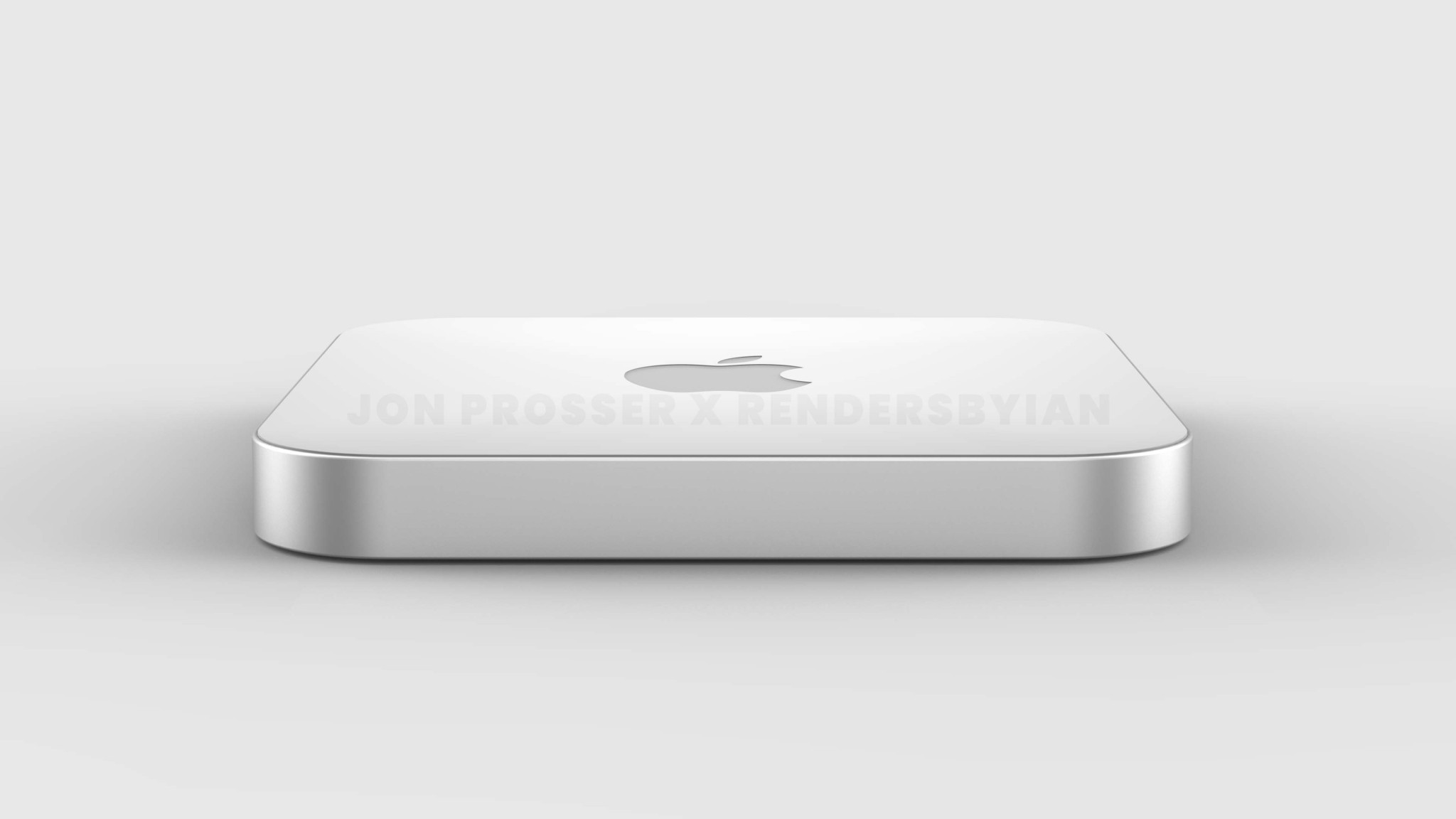
Meanwhile, Apple is also reportedly planning a new so-called “Mac mini Pro” with a new-generation of industrial design. Jon Prosser has reported that the new Mac mini will feature a new external chassis with a “plexiglass-like” reflective surface on the top, in an otherwise aluminum enclosure.
New iMac
While Apple introduced the all-new 24-inch iMac in April of 2021, fans of the larger 27-inch iMac are still waiting. In fact, the 27-inch iMac is one of the few Intel-powered machines still available in Apple’s Mac lineup today.
As such, Apple is widely expected to debut a new 27-inch iMac powered by Apple Silicon in 2022. The new iMac is likely to feature a high-end Apple Silicon chip on the inside, while rumors also indicate miniLED display and ProMotion technology will come to the iMac for the first time.
Rumors have indicated that the iMac will feature a base model configuration of 16GB of RAM and 512GB of SSD storage, just like the new MacBook Pro. Ports on the new iMac will reportedly include an HDMI port, an SD card slot, and multiple USB-C/Thunderbolt connections.
iPad Pro
The iPad Pro got a notable update in 2021 with a transition to the M1 chip for power as well as a mini-LED display in the 12.9-inch. Not long after the 2021 iPad Pro was announced, rumors started circulating about what to expect from the next-generation model.
Bloomberg has reported that Apple is developing a redesigned iPad Pro with a glass back. This change would allow for the iPad Pro to support wireless charging for the first time, as well as reverse wireless charging. Reverse wireless charging would allow you to place a wireless charging-compatible device, such as an iPhone or AirPods, on the back of the iPad Pro to recharge that device. The power would be shared from the iPad Pro to the other device.
Another change reportedly coming with the 2022 iPad Pro is an expansion of mini-LED display technology to the 11-inch iPad Pro for the first time. This is the display technology that first came to the 12.9-inch iPad Pro in 2021.
As for a release date, Apple has gotten into a cadence of releasing new iPad Pro models during the first half of the year, usually in the spring.
iPhone SE 3
Moving on to the iPhone, the first new iPhone we expect from Apple in 2022 is a new third-generation iPhone SE. This iPhone SE 3 is expected to be similar to the current iPhone SE, but with the addition of an A15 chip on the side and 5G connectivity.
In fact, one analyst even believes that the iPhone SE 3 with 5G could turn a billion Android users into switchers.
While rumors have suggested that Apple is also working on some sort of iPhone SE Plus with a larger display, it’s unclear whether this will be released in 2022. The iPhone SE 3, however, is expected to come sometime during the first half of the year.
iPhone 14
And, of course, we can’t forget the iPhone 14. The iPhone 14 is rumored to be a major overhaul to the iPhone lineup, with analyst Ming-Chi Kuo predicting that the lineup will consist of two 6.1-inch models and two 6.7-inch models.
The 2022 iPhone lineup could look something like this in terms of marketing names: iPhone 14, iPhone 14 Max, iPhone 14 Pro, and iPhone 14 Pro Max. Kuo says that the iPhone 14 Max will represent the lowest price ever for a large 6.7-inch iPhone, potentially at around $900.
Leaker Jon Prosser has also corroborated these changes, and indicated that the iPhone 14 will feature a design similar to the iPhone 4.
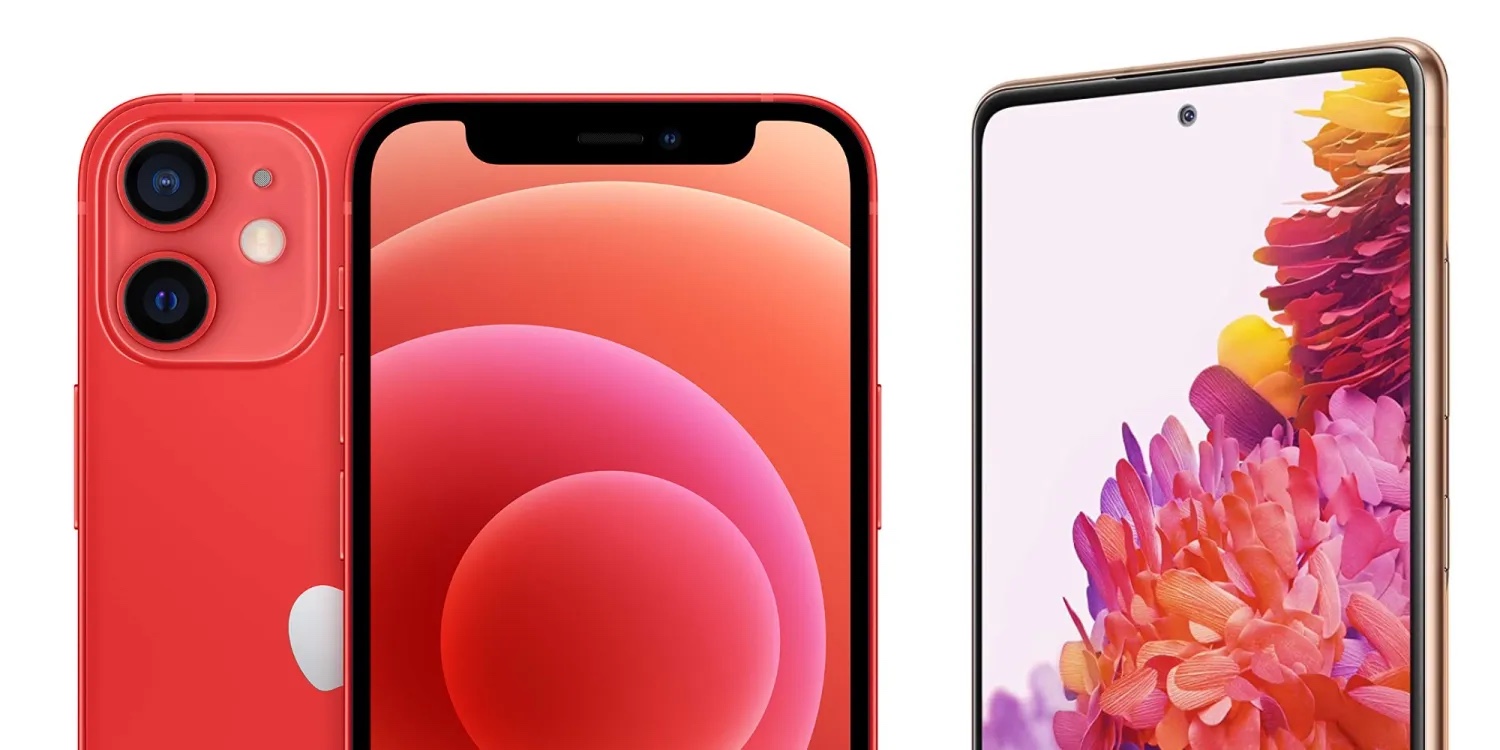
Meanwhile, the iPhone 14 Pro and iPhone 14 Pro Max are expected to feature a new hole-punch design. If the punch-hole design sounds familiar, that’s because it’s currently used on many high-end Android flagships. It makes sense for Apple to adopt this design with the iPhone 14, with the “punch-hole” housing the camera that’s currently located in the notch.
The iPhone 14 will also include dramatic improvements to the front-facing camera, according to Kuo. In terms of the rear camera, Kuo says the iPhone 14 Pro and iPhone 14 Pro Max will be upgraded to 48-megapixels, an increase from the 12-megapixel sensor in iPhone 12.
The iPhone 14 lineup is expected to be announced and released sometime in September of 2022.
Apple Watch Series 8
The Apple Watch lineup is also expected to be overhauled in 2022. Kuo has reported that Apple will release three new Apple Watch models in the fall of 2022, including a new high-end Apple Watch Series 8, a new Apple Watch SE, and the previously-rumored rugged sports version.
In terms of health technologies, the Apple Watch Series 8 is expected to add a body temperature sensor, enabling additional health and fitness tracking.
Unfortunately, we’re still waiting on more details about what to expect from the Apple Watch Series 8 and other models coming in 2022.
AirPods Pro 2
Last but not least, Apple is also reportedly planning new second-generation AirPods Pro for release in 2022. These AirPods Pro 2 are expected to feature a new focus on health tracking and fitness technologies, as well as an all-new design. Apple VP Kevin Lynch even mentioned the possibility of using AirPods to “father different data” for health monitoring in an interview in June.
Bloomberg has reported that the second-gen AirPods Pro will feature a “more compact” design that removes the stem that current sticks out from the bottom of the AirPods Pro. This could be similar to the Amazon Echo buds, which feature a stem-less design that is completely round and rests inside the user’s ear.
These changes, however, are not guaranteed. Apple is said to have faced challenges removing the AirPods Pro stem while also still including features like transparency mode, the H1 chip, and noise cancellations. As such, Apple might settle on a less ambitious redesign of the AirPods Pro.
Other possibilities
These are just the major new products we expect from Apple in 2022. There are many other possibilities on the table, including iterative updates to the latest 14-inch and 16-inch MacBook Pros, new accessories, and much more.
With the holiday season officially here, there’s nothing better than learning some tips for your brand new iPhone. Even if you already own a shiny iPhone 11, 12, or 13, there’s always more you can learn about them.
In a video shared by the Apple Support channel on YouTube, the company gives “helpful tips for getting the most out of your iPhone.” Even though has tons of how-tos, thanks to our colleague Michael Potuck, it’s interesting when Apple also shares some tips as well.
Here are some of the tips Apple is sharing for iPhone users in the five-minute video:
Swipe to erase a digit in Calculator
One of the classic “pro” tips is the ability to erase a digit in the Calculator app. Just swipe left or right on the top of the screen to erase or re-add a number. It’s that simple, and many people still don’t know that.
Pin shared content in Messages
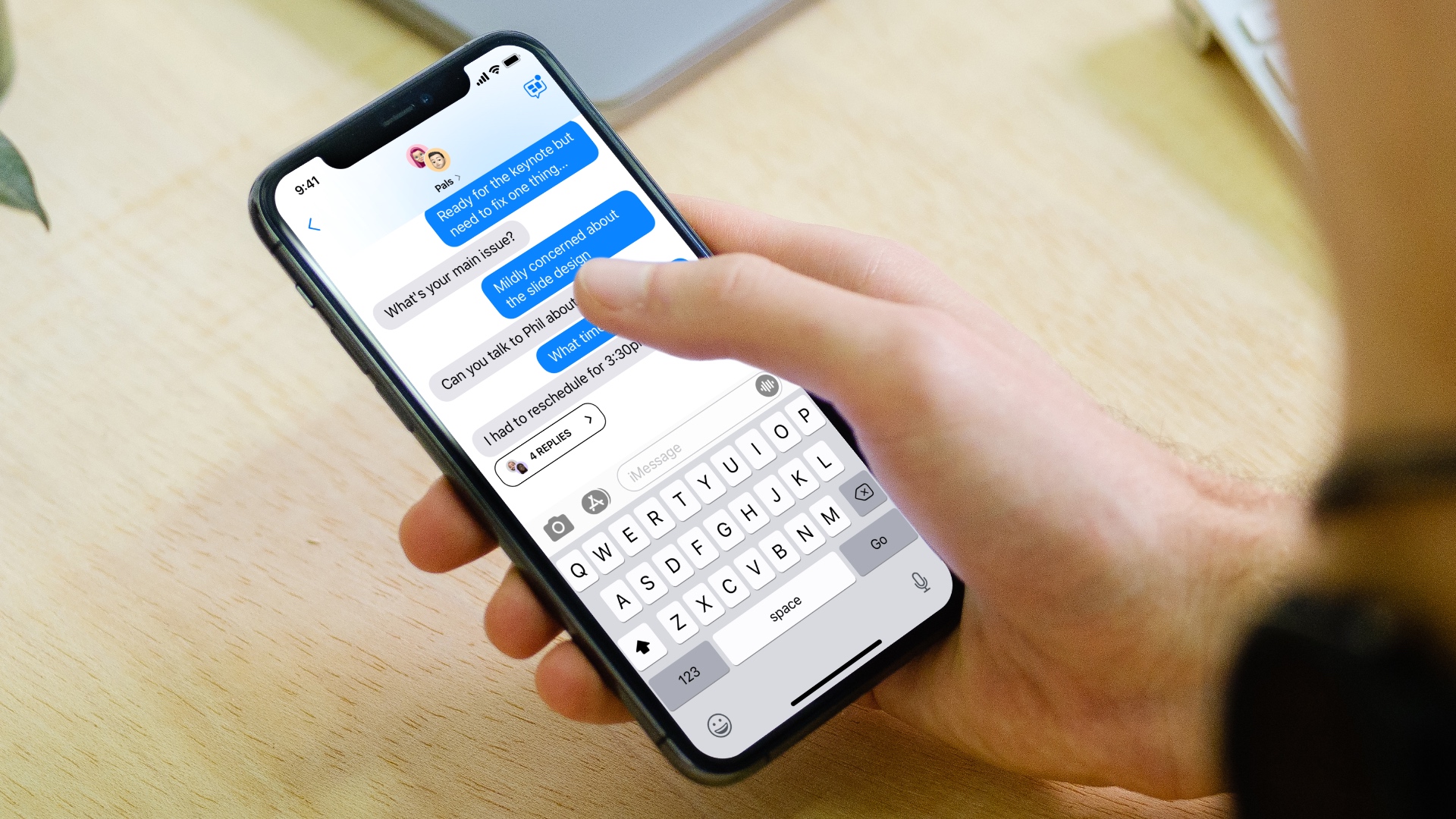
Starting with iOS 15, you can pin shared content in Messages so it’s easier to find when you need it. In a messages thread, touch and hold the info you want to pin, and then tap “Pin.” It can’t be any easier than that!
Stack widgets on your Home Screen
Ever since Apple introduced widgets on the Home Screen with iOS 14, the company has been improving it with the latest software updates. Now, you can easily create a stack with up to 10 widgets. As you arrange apps on the library, do the same with widgets putting one above the other. Apple will smartly show you the right widget depending on your iPhone usage or time of the day.
Select multiple photos to add to other apps
Drag and drop has been available for a few years now, but it’s still a mystery why many people still don’t take advantage of it. For example, you can drag a photo, then with another finger select multiple others, and finally swipe to another app, like Photos, to add them there.
Open Camera from the Lock Screen
You don’t have time to open your iPhone and then your Camera? Just swipe left on the Lock Screen to quickly open your Camera app. The best part is that all your photos are protected, so you don’t have to worry about anyone accessing them.
You can take a look at all of the iPhone tips in the video below. Did you know all of them? Share your thoughts in the comment section below.
iPhone 13 Pro and Pro Max cameras come with a new Macro mode that’s quite impressive. However, it originally shipped with a design that automatically kicked in, with no option to manually control it. Now with iOS 15.2, there’s an easy way to control the feature. Read on for how to enable the Macro toggle on iPhone 13 Pro and also make your preference the default.
After first seeing a disable Auto Macro option with iOS 15.1 in Settings, now Apple has included a toggle option inside the actual Camera app with iOS 15.2. This means it’s much more convenient to manage Macro mode without having to leave the Camera app.
Below we’ll also cover how to customize your Macro mode with the preserve camera option on iPhone 13 Pro/Pro Max
How to enable Macro toggle on iPhone 13 Pro camera
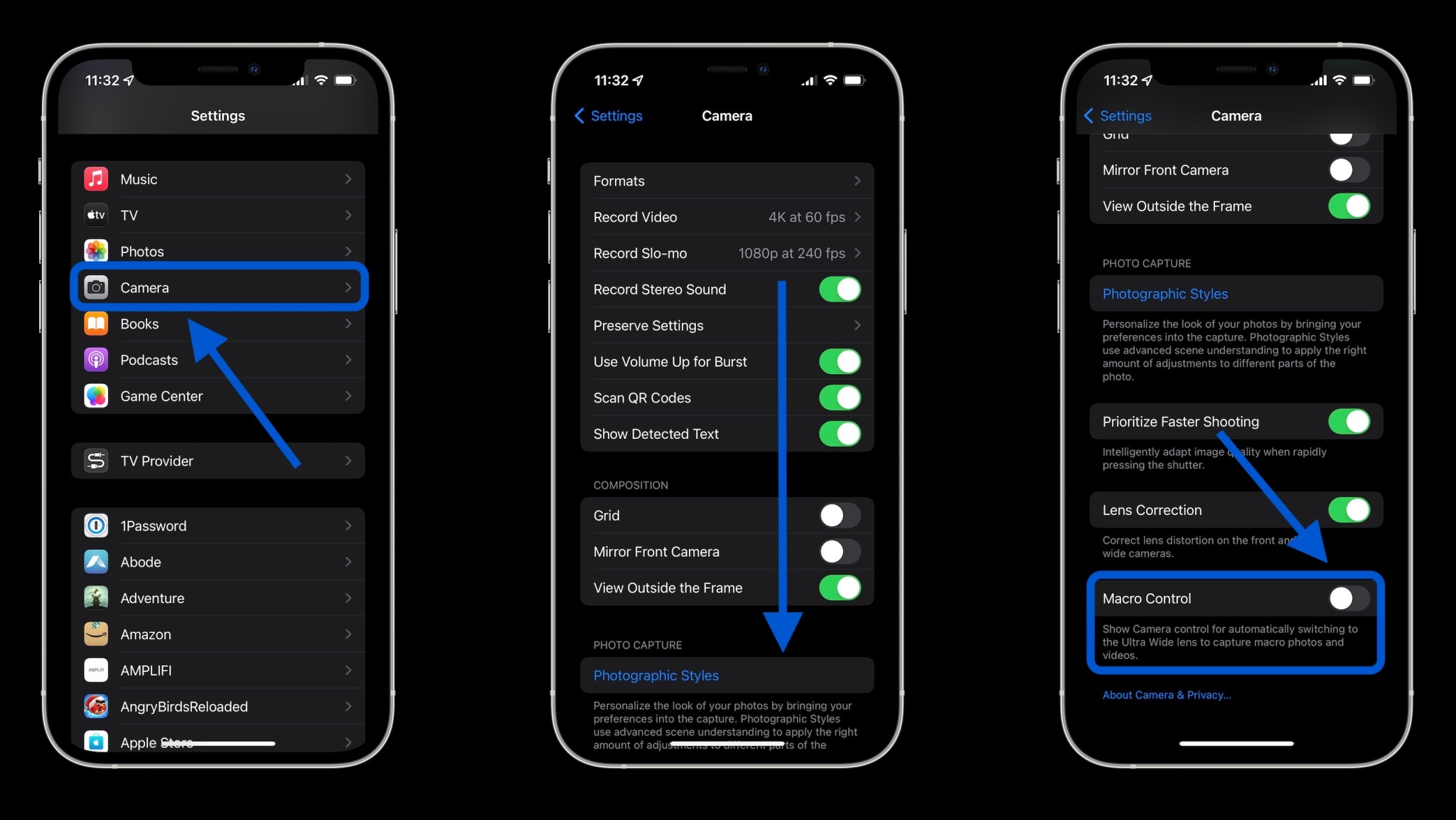
Running iOS 15.2 on iPhone 13 Pro/Pro Max, open the Settings app
Swipe down and choose Camera
Swipe to the bottom, tap the toggle next to Macro Control
Now you’ll see a flower icon (right in the Camera app) you can quickly toggle off/on after Macro mode kicks in (bring the camera close to something to get it to show up)
In Settings > Camera you can also now tap Preserve Settings
Tap the toggle next to Macro Control
With this on, your Macro on or off preference will be preserved as the default when opening the Camera app
Note: With Macro Control fully toggled off, iPhone 13 Pro will auto switch to Macro mode when you get close to subjects and will not show the manual toggle in the Camera app.
Here’s how the process looks:
Now when using the iPhone 13 Pro/Pro Max camera and you get close to a subject, you’ll see this icon after the lens auto enables Macro mode:
And if you’d like to preserve whatever Macro toggle setting you chose (auto on or off), head to Settings > Camera > Preserve Settings > Macro Control:
An Apple optical data transfer patent granted yesterday could facilitate super-fast communications between devices. The patent says that the technology could offer transfer speeds of “terabits per second” …
Background
Optical data transfer is of course nothing new. It can be used at both the network level, using fiber optic cable, and in the home, though optical fiber connections in hi-fi systems known as TOSLINK. The advantage of optical connections over copper cables in this context is that the latter don’t suffer from RF interference or ground loops.
Cable-free optical comms is also well established. Indeed, my first fully mobile email system back in 1999 used infra-red communication between a Psion 5mx and a Nokia 7110.
However, cable-free optical data transfer is very sensitive to alignment, and this is the problem Apple’s patent seeks to solve.
An electronic device can include a free-space optical communication system to wirelessly transmit, receive, or exchange data with another electronic device. In some cases, the optical communication system may be configured to be directional (e.g., line-of-sight) in order to increase data transfer rates, to increase data transfer privacy, or for any other suitable purpose.
However, a conventional directional free-space optical communication system is exceptionally dependent on precise alignment of communicating devices. As such, conventional free-space optical communication systems cannot be incorporated into portable electronic devices that may be moved or repositioned from time to time.
In other words, anything with less than optimal alignment can dramatically reduce transfer speeds.
What Apple has invented is a moveable lens at each end, so that each device can change the alignment of the optical signal, using feedback from the other to achieve the highest possible transfer speeds.
A method of operating a free-space optical communication system with a source device and an endpoint device, the method including the operations of: changing a position of a movable lens positioned over a laser diode in the source device according to a pattern; monitoring power output from a photosensitive area of a photodiode in the endpoint device for a maximum and, in response, sending a signal to the source device to stop changing a position of the source device lens; changing a position of a second movable lens positioned over the photodiode in the endpoint device; and monitoring power output from a photosensitive area of the photodiode for another maximum and, in response, stopping movement of the second movable lens.
Or, translated from patent-speak, one device would move its lens around until the second device says, “Stop, this position gives the highest speeds.” Then the second device would do the same thing, so that both lenses are perfectly aligned.
Apple also says this approach could not only be faster than radio communications, but also more secure, because of the proximity and careful alignment required.
A directional free-space optical communication system can facilitate increased data transfer rates (e.g., tens of gigabits per second to terabits per second), increased data transfer privacy, and increased data transfer security relative to conventional device-to-device data communication protocols, such as Wi-Fi, Near-Field Communications, or Bluetooth.
We of course include our usual patent disclaimer, that Apple patents a great many things that never make it into products.
A year after Apple Music first became available on GoogleNest and Home devices, the streaming service is now supported in five more countries.
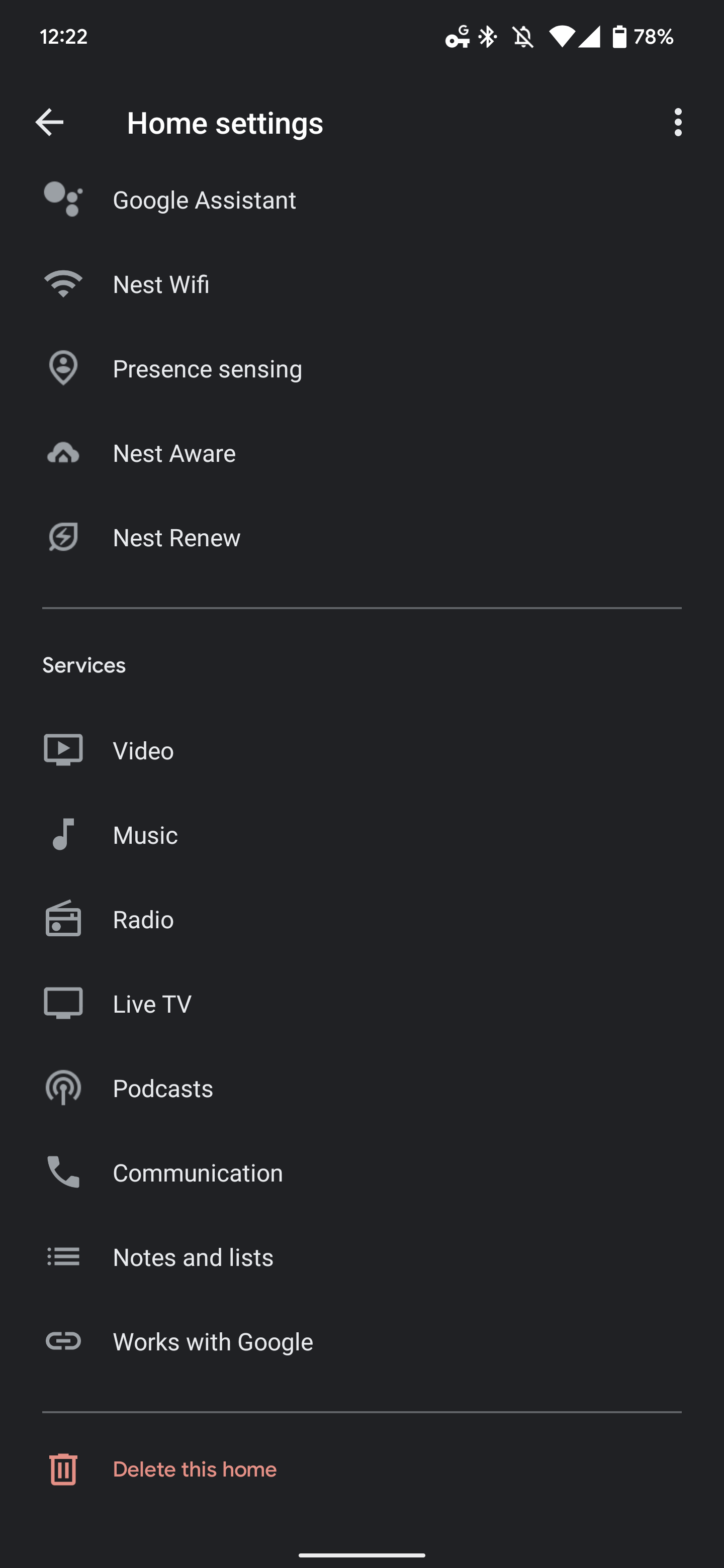
Australia, Canada, India, Mexico, and South Korea join the US, UK, France, Germany, and Japan. To enable Apple Music, open the Google Home app (Android or iOS) > the Settings gear > (under Services at the bottom) “Music.” You can also open Google Assistant settings and scroll down to “Music.”
Tap the blue link/chain icon next to “Apple Music” and agree to “Link Account.” You’ll be sent to an Apple website where you can enter Apple ID credentials. Once complete, requests to Google Assistant for songs and albums will automatically play in Apple Music.
After it is set up, you can easily queue up your favorite playlist, artist, or any of the award-winning Apple Music Radio stations live streaming today’s hits, classics, and country to play over your connected device.
Stateside, supported streaming services include YouTube Music, Spotify, Apple Music, Pandora, Deezer, and iHeartRadio. Apple’s Android app also supports Casting, while there’s still no TV+ app to watch original content despite the presence of an Android TV client.
After over a month of beta testing, Apple has made the iOS 15.2 Release Candidate available to developers. Head below for the full release notes on everything new in this update, which will be released to the public as soon as next week.
Update: Now available to public beta testers as well.
Today’s new release of iOS 15.2 RC is available to developers via an over-the-air update in the Settings app. As usual, if the update does not immediately appear for download, keep checking, as it sometimes takes a few minutes to roll out to all registered developers. The build number of iOS 15.2 RC is 19C56.
As a refresher, iOS 15.2 brings a few notable changes for iPhone and iPad users. Most notably, it adds the full “App Privacy Report” feature to the Settings application. With this, users can now see the data accessed by applications, including third-party apps and Apple apps.
Below are the full release notes, directly from Apple.
iOS 15.2 adds Apple Music Voice Plan, a new subscription tier that provides access to music using Siri. This update also includes the App Privacy Report, new safety features for children and parents in Messages, and other features and bug fixes for your iPhone.
Apple Music Voice Plan
Apple Music Voice Plan is a new subscription tier that gives you access to all songs, playlists, and stations in Apple Music using Siri
Just Ask Siri suggests music based on your listening history and likes or dislikes
Play it Again lets you access a list of your recently played music
Privacy
App Privacy Report in Settings lets you see how often apps have accessed your location, photos, camera, microphone, contacts and more during the last seven days, as well as their network activity
Messages
Communication safety setting gives parents the ability to enable warnings for children when they receive or send photos that contain nudity
Safety warnings contain helpful resources for children when they receive photos that contain nudity
Siri and Search
Expanded guidance in Siri, Spotlight, and Safari Search to help children and parents stay safe online and get help with unsafe situations
Apple ID
Digital Legacy allows you to designate people as Legacy Contacts so they can access your iCloud account and personal information in the event of your death
Camera
Macro photo control for switching to the Ultra Wide lens to capture macro photos and videos can be enabled in Settings on iPhone 13 Pro and iPhone 13 Pro Max
TV app
Store tab lets you browse, buy, and rent movies and TV Shows all in one place
CarPlay
Enhanced city map in Apple Maps with road details like turn lanes, medians, bike lanes, and pedestrian crosswalks for supported cities
This release also includes the following enhancements for your iPhone:
Hide My Email is available in the Mail app for iCloud+ subscribers to create unique, random email addresses
Find My can locate iPhone for up to five hours when in Power Reserve
Stocks allows you to view the currency for a ticker and see year-to-date performance when viewing charts
Reminders and Notes now allow you to delete or rename tags
This release also includes bug fixes for your iPhone:
Siri may not respond while VoiceOver is running and iPhone is locked
ProRAW photos may appear overexposed when viewing in third-party photo editing apps
HomeKit scenes that include a garage door may not run from CarPlay when your iPhone is locked
CarPlay may not update Now Playing information for certain apps
Video streaming apps may not load content on iPhone 13 models
Calendar events may appear on the wrong day for Microsoft Exchange users
The App Store Awards honor the best apps and games at the end of each year.
Apple today revealed the 2021 App Store Award winners, recognizing the 15 best apps and games that helped users tap into personal passions, discover creative outlets, connect with new people and experiences, and simply have fun. This year’s winners include developers from around the world whose apps and games were selected by Apple’s global App Store editorial team for delivering exceptional quality, innovative technology, creative design, and positive cultural impact.
“The developers who won App Store Awards in 2021 harnessed their own drive and vision to deliver the best apps and games of the year — sparking the creativity and passion of millions of users around the world,” said Tim Cook, Apple’s CEO. “From self-taught indie coders to inspiring leaders building global businesses, these standout developers innovated with Apple technology, with many helping to foster the profound sense of togetherness we needed this year.”
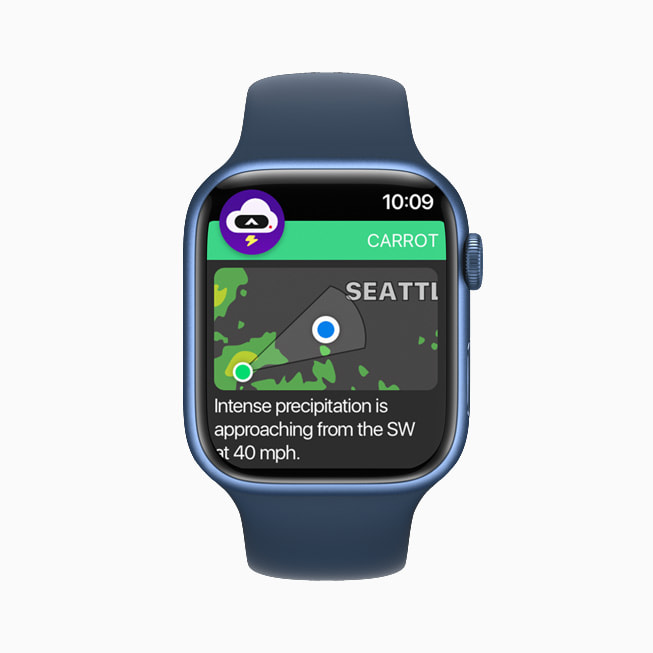
This year’s best apps and games offered extraordinary experiences across Apple devices. Ten years after its App Store debut, Toca Life World is masterfully iterating on the art of play and self-expression for kids. The developers behind DAZN guided local sport culture into the global spotlight for everyone to enjoy, while Carrot Weather brought its best-in-class meteorological forecasts — and the witty character behind it — to users’ wrists. LumaFusion made video editing faster, less intimidating, and more portable for creators at every level, and Craft creatively enabled efficiency and artistry through a notebook with seemingly limitless capabilities. The incredible graphics and rich storylines woven into “League of Legends: Wild Rift,” “MARVEL Future Revolution,” “Myst,” “Space Marshals 3,” and Apple Arcade’s “Fantasian” transported players of all ages into immersive gaming experiences.
2021 App Store Award Winners
Apps
iPhone App of the Year:Toca Life World, from Toca Boca.
iPad App of the Year:LumaFusion, from LumaTouch.
Mac App of the Year:Craft, from Luki Labs Limited.
Apple TV App of the Year: DAZN, from DAZN Group.
Apple Watch App of the Year: Carrot Weather, from Grailr.
Games
iPhone Game of the Year: “League of Legends: Wild Rift,” from Riot Games.
iPad Game of the Year: “MARVEL Future Revolution,” from Netmarble Corporation.
Mac Game of the Year: “Myst,” from Cyan.
Apple TV Game of the Year: “Space Marshals 3,” from Pixelbite.
Apple Arcade Game of the Year: “Fantasian,” from Mistwalker.
Trend of the Year: Connection
In addition to recognizing the best apps and games on Apple devices, Apple’s global App Store editors name a Trend of the Year. The goal is to identify a movement that had lasting impact on people’s lives, and to recognize the standout apps and games that met that moment. The top trend of 2021 is “Connection.” This year’s trend winners brought people together in meaningful ways — while meeting social, personal, and professional needs for users around the world.
“Among Us!” From Innersloth
With a mix of cooperation and competition, “Among Us!”cultivated community through bite-size matches that urged users to talk — and listen — to each other via banter, bluffing, and teamwork.
Bumble, from Bumble Inc.
Bumble met the moment by adding and enhancing features designed to bridge the gap for users hoping to date, forge platonic friendships, and broaden their professional networks — all while fostering women-powered conversations.
Canva, from Canva
Offering elegantly simple design tools and gorgeous templates, Canva helps users tap into their entrepreneurial spirit by making design simple for professionals, students, job seekers, community leaders, and teams of every kind.
EatOkra, from Anthony Edwards Jr. and Janique Edwards
EatOkrabuilta robust, user-driven guide to more than 11,000 Black-owned eateries that helps people find tasty ways to invest in their community.
Peanut, from Peanut App Limited
By launching social audio Pods led by experts on everything from pregnancy and menopause to relationships and self-care, Peanut is creating space for honest conversations on every aspect of womanhood at every stage of life.
For more than a decade, Apple has honored the best apps and games at the end of each year. To acknowledge the impact of the winning developer teams, last year, Apple designers began a tradition of celebration through meticulous craftsmanship with physical App Store awards for each winner. Inspired by the signature blue App Store icon, each award reveals the App Store logo set into the 100 percent recycled aluminum used to make Apple products, with the name of the winner engraved on the other side.
To learn more about the apps and games highlighted in this year’s App Store Awards, visit the App Store. In addition to the App Store editorial picks, charts for the top apps and games of the year are now available, as well as top Apple Arcade charts.
Apple has been fined €10M ($11.3M) in Italy for what competition authorities say is the misuse of customer data. Google has been fined the same amount for the same thing.
It follows a $225M fine in the same country earlier this week for price fixing between Apple and Amazon …
The fine was announced by the Italian competition regulator AGCM. It says that when a consumer creates an Apple ID, the iPhone maker doesn’t reveal that their personal data will be used by Apple to market its own services, as well as promote apps, music, and books.
The Authority ascertained two violations of the Consumer Code, one due to lack of information and another due to aggressive practices regarding the acquisition and use of consumer data
The Italian Antitrust Authority closed two investigations against Google Ireland Ltd. and Apple Distribution International Ltd., sanctioning both of 10 million euros, that is, for the maximum permitted according to current legislation. The Antitrust has ascertained for each company two violations of the Consumer Code, one due to lack of information and another due to aggressive practices related to the acquisition and use of consumer data for commercial purposes […]
Apple collects, profiles and uses user data for commercial purposes through the use of its devices and services. Therefore, even without proceeding to any transfer of data to third parties, Apple directly exploits the economic value through a promotional activity to increase the sale of its products and / or those of third parties through its commercial platforms App Store, iTunes Store and Apple Books […]
Apple , both in the phase of creating the Apple ID and on the occasion of accessing the Apple Stores (App Store, iTunes Store and Apple Books), does not immediately and explicitly provide the user with any indication on the collection and use of your data for commercial purposes, emphasizing only that data collection is necessary to improve the consumer experience and use of services.
This part of the ruling seems odd, since Apple’s privacy policy explicitly says that data will be used for marketing purposes (our emphasis):
Apple uses personal data to power our services, to process your transactions, to communicate with you, for security and fraud prevention, and to comply with law […]
Communicate with You. To respond to communications, reach out to you about your transactions or account, market our products and services, provide other relevant information, or request information or feedback.
Additionally, the AGCM says the Cupertino company doesn’t allow consumers to choose how their data will be used – for example, declining permission for marketing messages.
The promotional activity is based on a method of acquiring consent to the use of user data for commercial purposes without providing the consumer with the possibility of a prior and express choice on sharing their data. This acquisition architecture, prepared by Apple, does not make it possible to exercise one’s will on the use of one’s data for commercial purposes. Therefore, the consumer is conditioned in the choice of consumption and undergoes the transfer of personal information, which Apple can dispose of for its own promotional purposes carried out in different ways.
The fine is pocket change to Apple, but is the maximum sum permitted under the law.
Apple told us that it complies with all data protection laws, and said it will appeal the ruling.
We believe the Authority’s view is wrong and will be appealing the decision. Apple has a long-standing commitment to the privacy of our users and we work incredibly hard to design products and features that protect customer data. We provide industry-leading transparency and control to all users so they can choose what information to share or not, and how it is used.